Choose a pricing plan for chatbots
SendPulse has three chatbot pricing plans: the free Basic plan, Standard, and Pro. Standard is the paid plan previously called Pro. The new Pro plan adds AI credits, unlimited AI agents, a CRM plan, and recurring payments.
For example, an online school on Standard needs a fourth AI agent to answer schedule questions. The school switches to a Pro plan of the same size and gets unlimited AI agents and a CRM plan for its team.
Let's talk about how to choose a plan, what Pro includes, what changes for current paid plans, and how to switch between plans.
Select a plan tier
Choose a plan tier based on the features you need.
The chatbot builder has the following plan tiers:
| Basic |
A free plan with a core set of features, including:
|
| Standard |
A paid plan with an expanded set of features that includes:
|
| Pro |
A paid plan with all Standard features, plus:
|
Each higher tier includes more features and higher limits. For the full list of features and limits, see Chatbot builder pricing.
Select a plan size
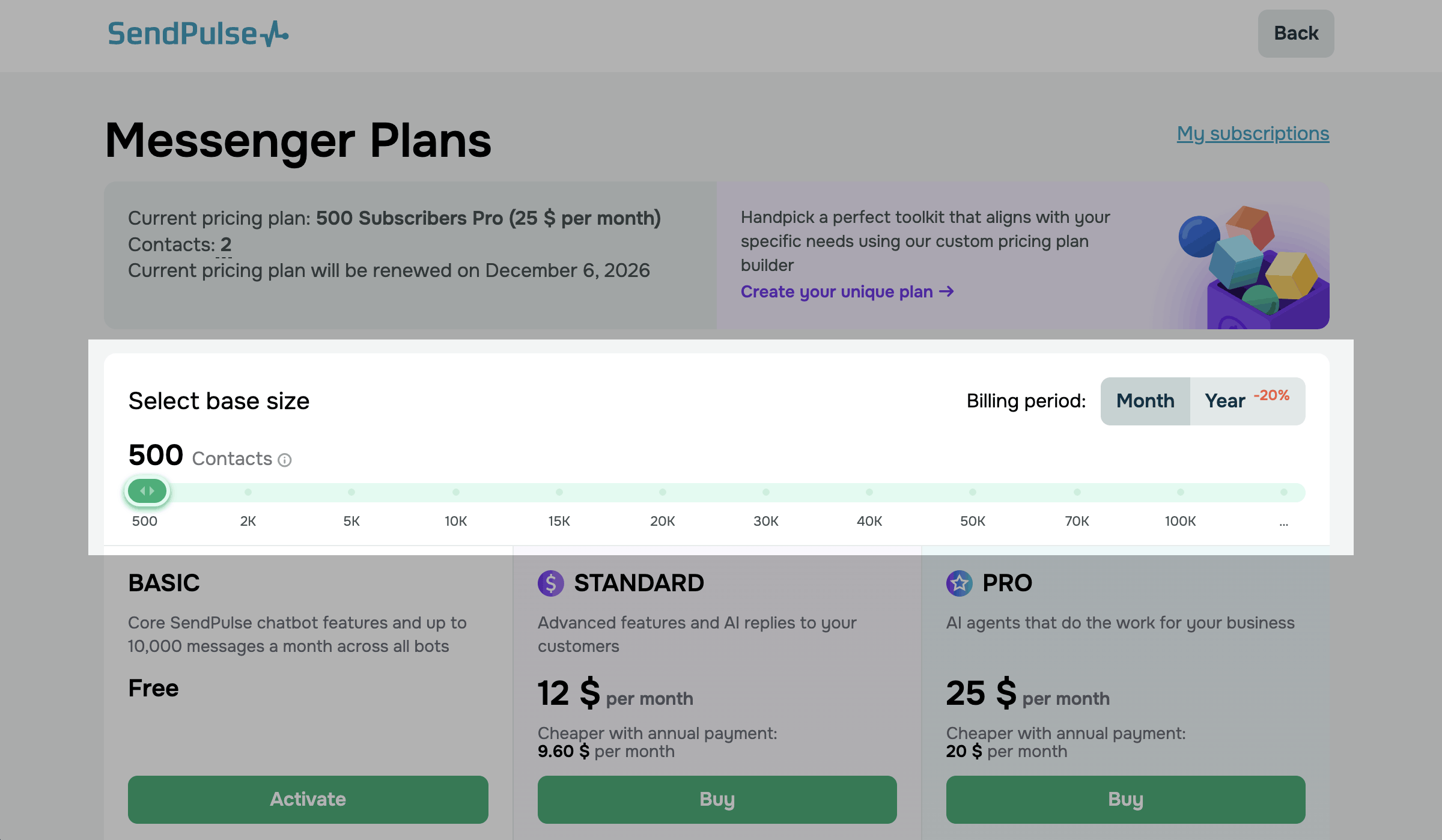
If you've chosen a Standard or Pro pricing plan, choose a plan size, which is the number of subscribers your chatbots can have. Standard and Pro come in the same sizes, from 500 to 1,000,000 subscribers.
The price depends on the plan tier, size, and billing period.
To see the prices, go to Chatbots > Pricing plans and move the slider to the number of subscribers you need.
If you need more than 100,000 subscribers, move the slider to the end and find the size in the table for your plan.
What the Pro plan includes
Pro includes everything in Standard and adds the following features:
| Billing by active users in Instagram and TikTok |
SendPulse counts only monthly active users (MAU). These are contacts who messaged you or received a message from you in the last 30 days. Other contacts in your Instagram and TikTok audiences don't count toward your plan limit. Read more: Calculate the number of your chatbot subscribers. |
| AI credits |
Every month, your plan adds AI credits, so your AI agents work without your own API key. The number of credits depends on the plan size, from 1M on the 500-subscriber plan to 260M on the 1,000,000-subscriber plan. Read more: Buy and use AI credits. |
| Unlimited AI agents |
You can create as many saved AI agents as your tasks need, for example, a dedicated agent for each product or language. Read more: The AI Agent element in chatbots. |
| CRM plan |
You get a CRM plan for your team at no extra cost. The CRM plan you get depends on your Pro plan size. |
| Recurring payments |
You can sell subscriptions in your chatbot flows. Customers subscribe once and then pay automatically on the selected billing schedule. Read more: Accept recurring payments. |
| More file storage |
You get from 2 to 10 GB of file storage, depending on the plan size. If another active SendPulse pricing plan gives you more storage, the larger limit applies. Read more: Check and expand your file storage. |
Live chat contacts count as monthly active users on every plan, so nothing changes for live chat on Pro.
CRM plan included with Pro
Here's which CRM plan you get with each Pro plan size:
| From 500 to 15,000 subscribers | CRM Lite plan with 5 user seats. |
| From 20,000 to 70,000 subscribers | CRM Basic plan with 10 user seats. |
| 100,000 subscribers or more | CRM Standard plan with 20 user seats. |
The account owner takes one of these seats. If your team needs more, you can buy additional user seats separately.
Read more: Manage your team's CRM system access.
You get the CRM plan as soon as your Pro plan becomes active, even if you haven't opened CRM before.
The CRM plan stays active as long as your Pro plan does and renews with it. If you switch to a Pro plan of another size, SendPulse switches your CRM plan to the matching one.
For example, if you switch from a Pro plan for 20,000 subscribers to one for 100,000, your CRM Basic plan becomes CRM Standard.
When you switch to a smaller Pro plan, your included CRM plan can have fewer user seats than your team uses. In that case, SendPulse blocks the extra users until you turn them off.
SendPulse doesn't charge your balance or card for this CRM plan, even when it renews.
Your current CRM plan and trial
If your paid CRM plan is lower-tier than the included one, SendPulse replaces it. The unused amount goes back to your balance.
If your paid CRM plan is the same or higher, or you have an active CRM trial, your CRM plan doesn't change.
After your trial expires, your CRM plan switches to the free plan. SendPulse adds the CRM plan included with Pro the next time your Pro plan renews or changes.
While you have the CRM plan included with Pro, you can't start a CRM free trial.
You can buy a paid CRM plan at any time. It stays active after your Pro plan ends.
Included CRM plan in My subscriptions
In My orders > My subscriptions, the CRM plan included with Pro has its own entry in the list of subscriptions. The entry shows the plan name, status, next renewal date, and activation date.
You don't pay for this plan, so you can't cancel it, renew it manually, or change its payment method.
To switch to a paid CRM plan, click Select another subscription in this entry.
Read more: View your subscriptions.
What changes for current paid plans
If you had a paid chatbot plan before the new Pro plan appeared, your plan is now called Standard. The price stays the same, and your chatbots keep working as before.
The following conditions apply to Standard:
-
your file storage is 1 GB;
-
you can create up to 3 AI agents;
-
your subscription products, recurring payment triggers, and flows with them keep working.
To add new subscription products to flows or to add or edit recurring payment triggers, switch to Pro.
Switch between plans
You can switch from Standard to Pro and back, or choose a different plan size. When the change takes effect depends on whether you upgrade or downgrade.
To tell an upgrade from a downgrade, SendPulse compares the two plans' monthly prices, regardless of the billing period.
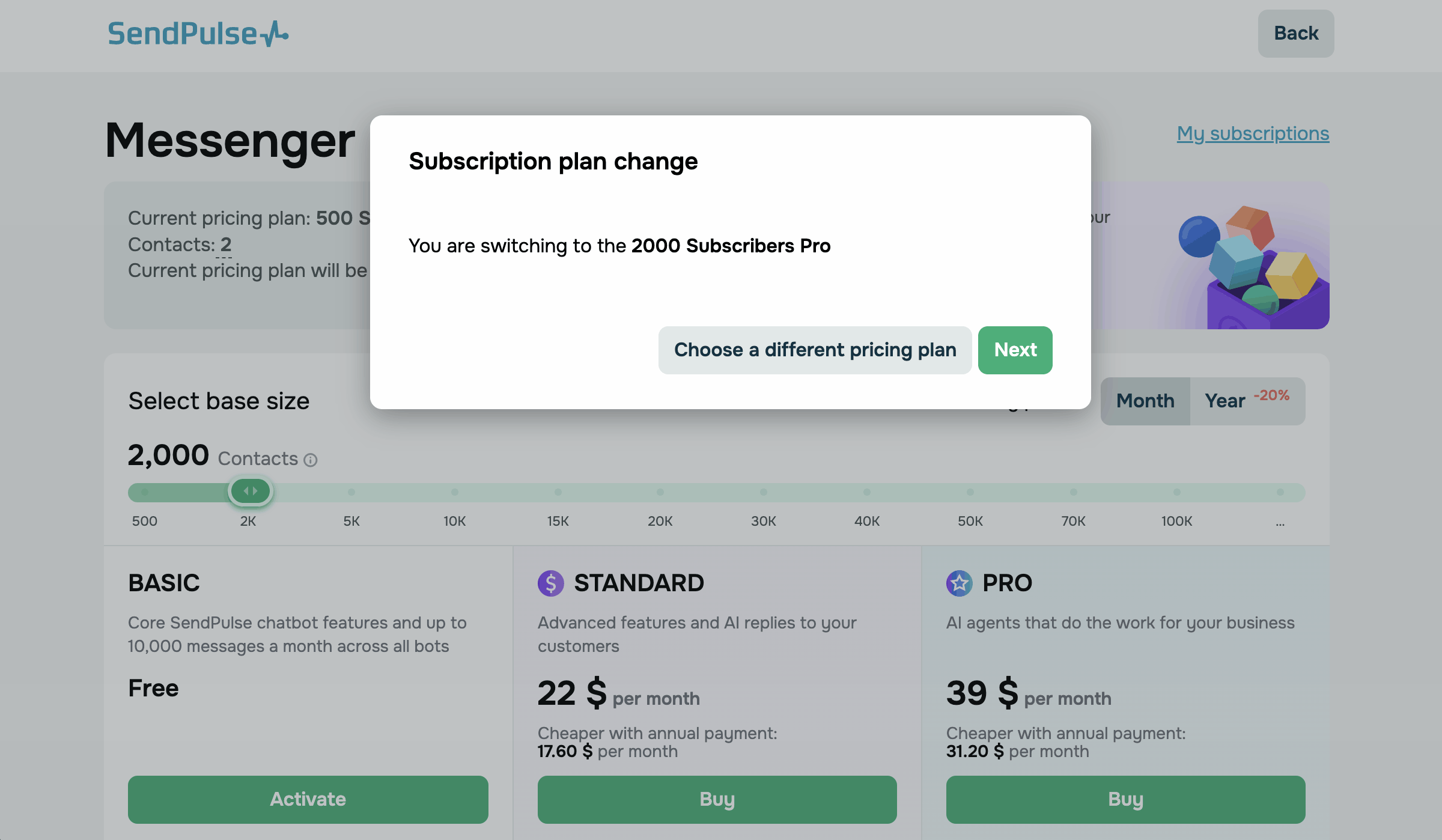
To switch your plan, go to Chatbots > Pricing plans and use the slider to set the number of subscribers. For more than 100,000 subscribers, move the slider to the end and select the size in the table of the plan you need.
To switch to a paid plan, click Buy in its column.
To switch to Basic, click Activate in its column.
In the Subscription plan change dialog box, check the plan name and click Next.
When you switch to a more expensive plan, the new plan starts right away. For example, this happens when you switch from Standard to Pro of the same or a larger size. The unused amount of your current plan goes toward the new one, so you pay less.
When you switch to a cheaper plan, your current plan stays active until the billing period ends. For example, this happens when you switch from Pro to Standard of the same size, to a smaller Pro plan, or to Basic.
If SendPulse can't charge you automatically, you pay for the cheaper paid plan at checkout, and the plan starts right away. SendPulse returns the unused amount of your current plan to your balance.
If you turn on the automated plan upgrade, SendPulse moves you to the next plan size of the same type. It upgrades Standard to a larger Standard plan, and Pro to a larger Pro plan.
Read more: Downgrade your pricing plan, Upgrade your pricing plan automatically.
What happens when you leave Pro
You leave Pro when your switch to Standard or Basic takes effect or when your Pro plan expires.
At that point, SendPulse removes the CRM plan included with Pro, and your CRM switches to the free plan. A CRM plan you paid for yourself stays active.
If more people use CRM than the free plan allows, SendPulse blocks the extra users until you turn them off.
AI credits from Pro stay available until the end of the paid month.
If your files exceed the storage limit of your new plan, you can't upload new files until you delete enough files to fit the limit.
Read more: How an expired pricing plan affects your chatbots.
To pay for your plan without leaving the chatbot builder, use quick plan purchase.
To learn how SendPulse counts subscribers for your plan, see Calculate the number of your chatbot subscribers.
To compare pricing plans of other SendPulse tools, see Pricing plan basics.
 Last Updated: 19.11.2026


or