Paris or Vilnius? Brevo started in 2012 in Paris as Sendinblue and was renamed in 2023, while MailerLite was founded in Vilnius in 2010. On paper, they look like twins: both are European, both offer free plans, and both are built for small businesses that don’t want to pay a Mailchimp-sized bill.
MailerLite doesn’t hide the rivalry either, openly pitching itself as the free alternative to Brevo. But look closer, and they play different games. Brevo is a multi-channel toolbox, with email, SMS, WhatsApp, transactional email, and a basic CRM under one roof. MailerLite is a simplicity-first platform built around newsletters, landing pages, and creator tools.
Which one is right for you depends on how big your list is compared with how often you send, which channels you need, and how much hand-holding you want. We tested both, section by section, so you’ll know exactly where each one wins.
How we scored this comparison: This review was created by the SendPulse team. As an email marketing platform ourselves, we work in the same space as the tools we test, which also means we understand the field deeply.
Each platform was evaluated across the key categories using our independent methodology. Pricing (25%), ease of use (20%), and email and automation features (15% each) carry the most weight because they affect daily workflows the most. All scores reflect hands-on testing and analysis as of October 2026.
TL;DR Brevo vs MailerLite at a glance
Brevo wins our comparison by a narrow margin, but MailerLite may be the better choice for many smaller businesses. Brevo offers a more complete marketing and sales toolkit, while MailerLite makes email marketing, website creation, and selling digital products easier to manage.
Here’s a quick recap. If one category matters most to you, click it to jump to the detailed comparison.
| Category |
Brevo |
MailerLite |
Winner |
| Best for |
Multi-channel marketing, advanced automation, and data-driven campaigns |
Small businesses, creators, and email-focused marketing teams |
Depends on the use case |
| Pricing |
8.5/10
Email-volume tiers that also set how many contacts you can store |
8.5/10
Subscriber-based tiers; sending is capped on Free and Comfort, unlimited on Power |
Tie |
| Ease of use |
8.5/10
Beginner-friendly, with more advanced tools to master |
9/10
Simple, intuitive, and quick to learn |
MailerLite |
| Email design |
8.4/10
Flexible editor with strong customization and mobile controls |
8.6/10
More templates, ready-made elements, and interactive content |
MailerLite |
| Automation |
8.8/10
Multi-channel workflows, diverse triggers, and AI-assisted creation |
7.5/10
Straightforward email sequences with visual branching |
Brevo |
| Contact management |
9/10
Advanced segmentation using behavioral, eCommerce, and CRM data |
8/10
Simple contact organization with groups and dynamic segments |
Brevo |
| Forms and pages |
8/10
Strong data collection, consent management, and basic landing pages |
8.5/10
Creative pop-ups, flexible targeting, landing pages, and a website builder |
MailerLite |
| AI features |
9/10
Campaign generation, workflow creation, predictive analytics, and segmentation |
8/10
AI writing, email design, images, and send-time optimization |
Brevo |
| Integrations |
8.8/10
Built-in CRM, broad API, and strong Shopify integration |
8.8/10
Broad eCommerce and third-party CRM integrations |
Tie |
| Deliverability |
10/10
Strong authentication, monitoring, and dedicated IP options |
9.8/10
Strong deliverability with practical list hygiene tools |
Brevo |
| Reporting |
9/10
Advanced analytics, custom dashboards, and multi-channel insights |
7.8/10
Clear campaign reports with essential engagement and sales metrics |
Brevo |
| Customer support |
7.6/10
Email tickets on all plans; phone support on Professional and Enterprise; no live chat |
7.8/10
24/7 email on paid plans; 24/7 live chat on Power; higher customer satisfaction |
MailerLite |
| G2/Capterra rating |
4.5/4.6 |
4.6/4.7 |
MailerLite |
| Final score |
8.5/10 |
8.4/10 |
Brevo |
Key facts about Brevo vs MailerLite as of October 2026:
- Free plans. Brevo Free lets you store up to 100,000 contacts and send 300 emails per day. MailerLite Free supports 250 subscribers and 2,500 emails per month.
- Entry price. Brevo Starter costs from $9/month for 5,000 emails and up to 500 contacts. MailerLite Comfort starts at $12/month for 500 subscribers and 5,000 emails.
- Pricing model. Brevo prices plans mainly by monthly email volume, and each tier also sets your contact allowance. MailerLite charges by subscriber count. Comfort includes sends equal to 10 times your subscriber tier, while Power includes unlimited sending.
- MailerLite’s June 2026 changes. Growing Business became Comfort and Advanced became Power on June 16, 2026. Prices increased by roughly 10–38%, and the Free plan dropped from 500 to 250 subscribers and from 12,000 to 2,500 monthly emails.
- Transactional email. Brevo includes it on every plan through API and SMTP. MailerLite uses MailerSend as a separate product with its own plans.
- Beyond email. Brevo provides a free sales CRM, live chat, meetings, pay-as-you-go SMS, and WhatsApp. MailerLite includes websites, digital products, paid newsletters, and bookings.
Choose Brevo if you want an all-in-one platform that combines email marketing, CRM, SMS, WhatsApp, live chat, and transactional emails, with strong automation to connect everything.
Choose MailerLite if you’re a creator, freelancer, or small business looking for simple email marketing alongside websites, landing pages, and selling digital products, paid newsletters, or bookings.

Create and send high-performing emails
Use an AI assistant, pre-made templates, advanced segmentation, and feature-rich automation to run campaigns without coding. Send up to 15,000 monthly emails at no cost.
Get started for free
Brevo vs MailerLite pricing and feature differences
This comparison is not just a collection of everything the platforms say about themselves in promo materials and on their websites. What interested us much more was our own experience of testing and using them – creating emails, flows, and pop-ups – and the feedback from real users on websites like Capterra and G2. This makes our comparison more of a practical one – something you can use if you don’t want to test the platforms yourself.
Pricing plans
⭐ Brevo: 8.5/10 | ⭐ MailerLite: 8.5/10
Disclaimer: Pricing changes frequently. All prices in this comparison were verified against MailerLite’s official pricing and Brevo’s official pricing as of October 23, 2026. Always confirm current costs on the official pages.
Brevo and MailerLite use different pricing models, which makes a direct price comparison a little tricky. Brevo bases its plans on monthly email volume, while MailerLite charges by subscriber count. The sections below show how those models work, what the free plans include, and where the price differences start to matter.
How Brevo pricing works in 2026
Brevo has five plans: Free, Starter, Standard, Professional, and Enterprise. The Free plan allows you to send 300 emails per day and store up to 100,000 contacts.
On paid plans, you choose a monthly email volume, and that tier also determines how many contacts you can store. The three smallest Starter and Standard tiers allow 500, 1,500, and 2,500 contacts. Once you reach the 20,000-email tier, the contact limit jumps to 500,000. So if you have more than 2,500 contacts, the 20,000-email tier is your starting point.
| Monthly emails |
Contacts you can store* |
Brevo, Starter |
Brevo, Standard |
Brevo, Professional |
| 5,000 |
500 |
$9/mo |
$18/mo |
– |
| 10,000 |
1,500 |
$17/mo |
$35/mo |
– |
| 15,000 |
2,500 |
$25/mo |
$49/mo |
– |
| 20,000 |
500,000 |
$32/mo |
$69/mo |
– |
| 100,000 |
500,000 |
$82/mo |
$139/mo |
– |
| 150,000 |
500,000 |
– |
$179/mo |
$499/mo |
| *Starter and Standard. Professional stores up to 2 million contacts at every tier. |
Starter keeps the price low, but it is fairly limited. You get one user, Brevo branding unless you pay $9/month to remove it, no A/B testing or landing pages, and automation for up to 2,000 contacts. Standard unlocks those missing features. Professional starts at $499/month and brings in tools such as pop-ups, WhatsApp, predictive analytics, and phone support. Enterprise is custom-priced.
How MailerLite pricing works in 2026
MailerLite charges by the number of subscribers on your list. It has three self-serve plans: Free, Comfort, and Power, plus Enterprise for lists above 200,000 subscribers. On Comfort, your monthly sending allowance is 10 times the subscriber tier. Power removes that cap and adds unlimited users and automations, as well as multiple automation triggers.
| Subscribers |
MailerLite, Comfort |
MailerLite, Power
(unlimited emails) |
| 500 |
$12/mo for 5,000 emails |
$25/mo |
| 1,000 |
$19/mo for 10,000 emails |
$39/mo |
| 2,500 |
$33/mo for 25,000 emails |
$49/mo |
| 5,000 |
$49/mo for 50,000 emails |
$69/mo |
| 10,000 |
$89/mo for 100,000 emails |
$129/mo |
| 50,000 |
$319/mo for 500,000 emails |
$389/mo |
MailerLite also changed its pricing quite significantly in 2026. On June 16, the Growing Business plan became Comfort and the Advanced one became Power, with prices increasing by around 10–38% depending on the tier. Comfort also moved from unlimited sending to a monthly cap but gained the preference center, Smart sending, and the AI writing assistant.
The Free plan changed too. It now supports 250 subscribers and 2,500 emails per month, down from 500 subscribers and 12,000 emails.
New accounts got the new pricing on June 16, 2026. Existing paid accounts switch at their next renewal, so annual subscribers may keep their old rate until as late as June 2027.
Brevo vs MailerLite free plans compared
The Free plans are quite different as well. Brevo gives you much more room for contacts, while MailerLite includes more tools for building your online presence.
| Free plan limit |
Brevo Free |
MailerLite Free |
| Contacts |
Up to 100,000 |
250 subscribers |
| Emails |
300 per day (about 9,000 per month) |
2,500 per month |
| User seats |
1 |
2 |
| Marketing automation |
For up to 2,000 active contacts |
3 automations, 5 steps each |
| Signup forms and pop-ups |
Signup forms; no pop-ups |
3 forms or pop-ups |
| Landing pages and websites |
No |
1 landing page and 1 website (up to 5 pages) |
| A/B testing |
No |
Yes |
| Transactional email |
Yes, via API and SMTP |
No; requires MailerSend |
| SMS and WhatsApp |
Pay-as-you-go SMS; no WhatsApp |
No |
| CRM and live chat |
1 pipeline, 50 open deals, and live chat |
No |
| Selling online |
No |
1 digital product or booking |
Brevo is a more generous option if you already have a large list, but the 300-email daily cap changes how useful that allowance is. For instance, sending to 1,000 contacts would take four days. MailerLite gives you far fewer subscribers, but its free plan includes a website, landing page, and product page, which may be more useful for someone starting a business from scratch.
We kept this category a tie. Brevo starts cheaper at $9/month versus $12 for MailerLite and still has the more generous free plan, especially after MailerLite’s June 2026 cuts. On comparable paid plans, though, MailerLite can work out better for smaller lists. At 2,500 contacts, Comfort costs $33/month, while Brevo Standard, its closest equivalent, costs $49. It’s also far cheaper for frequent senders – emailing 5,000 contacts every day costs $69/month on MailerLite Power and $179 on Brevo Standard.
In practice, Brevo is more attractive if you want a low entry price or a large free contact allowance. MailerLite makes more sense once sending frequency becomes a bigger part of the cost.
Ease of use and interface
Brevo: 8.5/10 | ⭐ MailerLite: 9/10
MailerLite wins on ease of use, but Brevo isn’t far behind. MailerLite keeps the experience focused on everyday email marketing tasks, making it easier to get things done. Brevo offers a broader set of capabilities, and that inevitably adds some complexity, even with a well-designed interface. For teams focused primarily on email marketing, MailerLite’s simplicity is an advantage. But if you need Brevo’s additional tools, the extra effort may be a worthwhile trade-off.
| Aspect |
Brevo |
MailerLite |
Winner |
| First-time experience |
Quick setup, simple and beginner-friendly interface |
Quick setup, minimal complexity, widely praised for simplicity |
Tie |
| Daily navigation |
Clean interface, easy-to-find features, straightforward menus |
Simple interface, but some navigation might be confusing |
Brevo |
| Learning curve |
Core email and SMS tools are easy to learn; advanced automation takes longer |
Short learning curve, including for users with little experience |
MailerLite |
| Mobile access |
No unified marketing app; separate chat and calling apps |
iOS app for campaigns, subscribers, statistics, and A/B testing; no Android app; limited campaign design |
MailerLite |
| Workflow efficiency once mastered |
Efficient campaign setup, automation management, and multi-channel marketing with minimal repeated work |
Fast email production, campaign scheduling, and routine subscriber management with minimal effort |
Brevo |
| Total score |
8.5/10 |
9/10 |
MailerLite |
Based on our experience testing both platforms, here’s how long we estimate it might take your team to get familiar with each one.
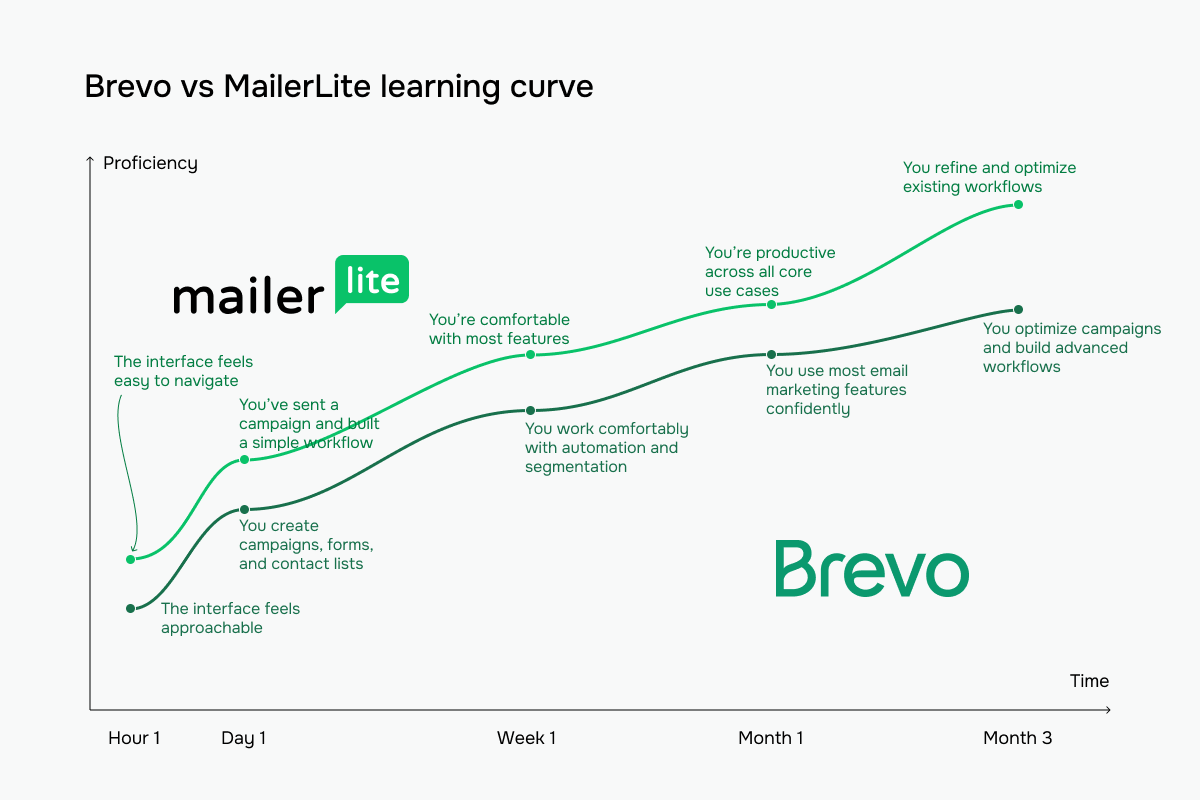 Brevo vs MailerLite learning curve based on our testing experience
Email builder and templates
Brevo: 8.4/10 | ⭐ MailerLite: 8.6/10
MailerLite wins email design, although the gap is small. It’s the better choice for teams that produce campaigns regularly and want consistently attractive results without involving a designer. Brevo is a capable alternative, particularly for businesses that value precise control over their layouts and mobile experience. But for most teams, MailerLite offers a more complete creative toolkit and makes it easier to put that toolkit to good use.
| Aspect |
Brevo |
MailerLite |
Winner |
| Templates |
50+ templates* |
100+ templates* on Comfort and Power; limited selection on Free |
MailerLite |
| Drag-and-drop editor |
Visual editor with a desktop/mobile preview toggle, undo/redo, version history, and an optional Developer Mode for direct HTML/CSS access |
Drag-and-drop, simple, and custom HTML editors |
Tie |
| Notable content blocks |
Live product feeds for Shopify, Shopware, PrestaShop; dynamic content |
Surveys, quizzes, countdowns, accordions, and subscriber-specific dynamic content |
MailerLite |
| Mobile responsiveness |
Automatic resizing, mobile-specific styling, and device-based content visibility |
Automatic resizing, mobile preview, and test emails |
Tie |
| Sending time optimization |
Personalized sending times based on engagement (Standard and higher) |
AI-powered Smart sending and time-zone-based delivery (Comfort and higher) |
MailerLite |
| Total score |
8.4/10 |
8.6/10 |
MailerLite |
| * Template counts reflect what we saw in our test accounts in October 2026. |
Brevo puts almost everything you need to add to an email in front of you. There are 13 blocks, from Text, Image, and Button to Product, Navigation, HTML, and Dynamic content, and you can drag any of them straight onto the canvas.
Blocks, complete Sections, and your own Saved elements are also grouped together, so reusing something you’ve already created doesn’t require digging through menus. We also liked seeing Dynamic content among the regular blocks instead of hidden somewhere in advanced settings. You get the pieces and decide how to combine them, which leaves plenty of room for custom layouts without making the editor crowded.
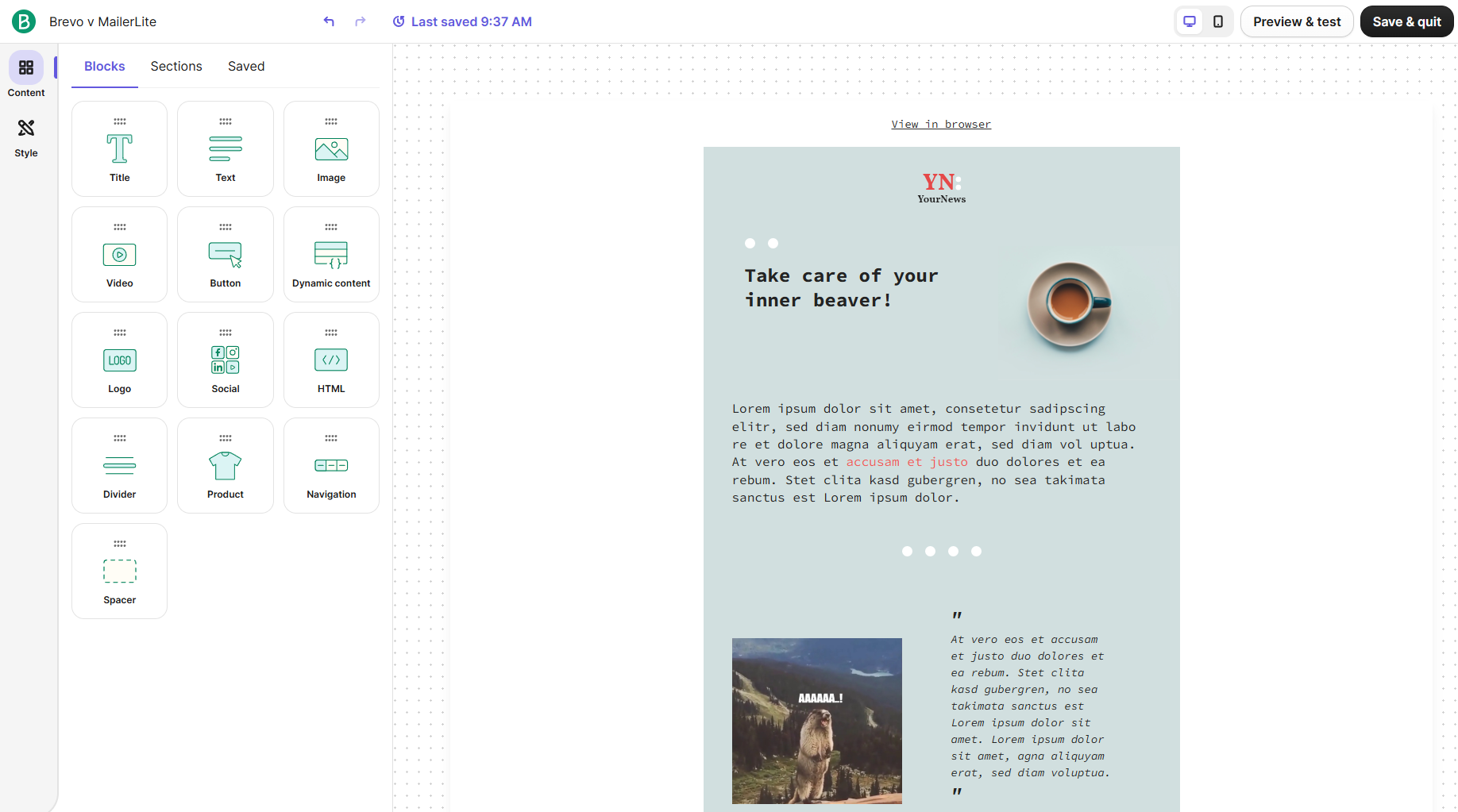 Assembling our newsletter from Brevo’s 13 content blocks
MailerLite gives you much more ready-made material to work with. Its sidebar is divided into categories with search on top if you don’t want to browse through them. Many elements are already assembled for you.
For example, when we selected a Standard hero, we could change its padding, background image, image position, colors, button style, headings, and individual content elements from one panel. Revision history is also right at the top, and individual component changes can be saved or canceled. There are more controls to go through, but you also have fewer design decisions to make from scratch.
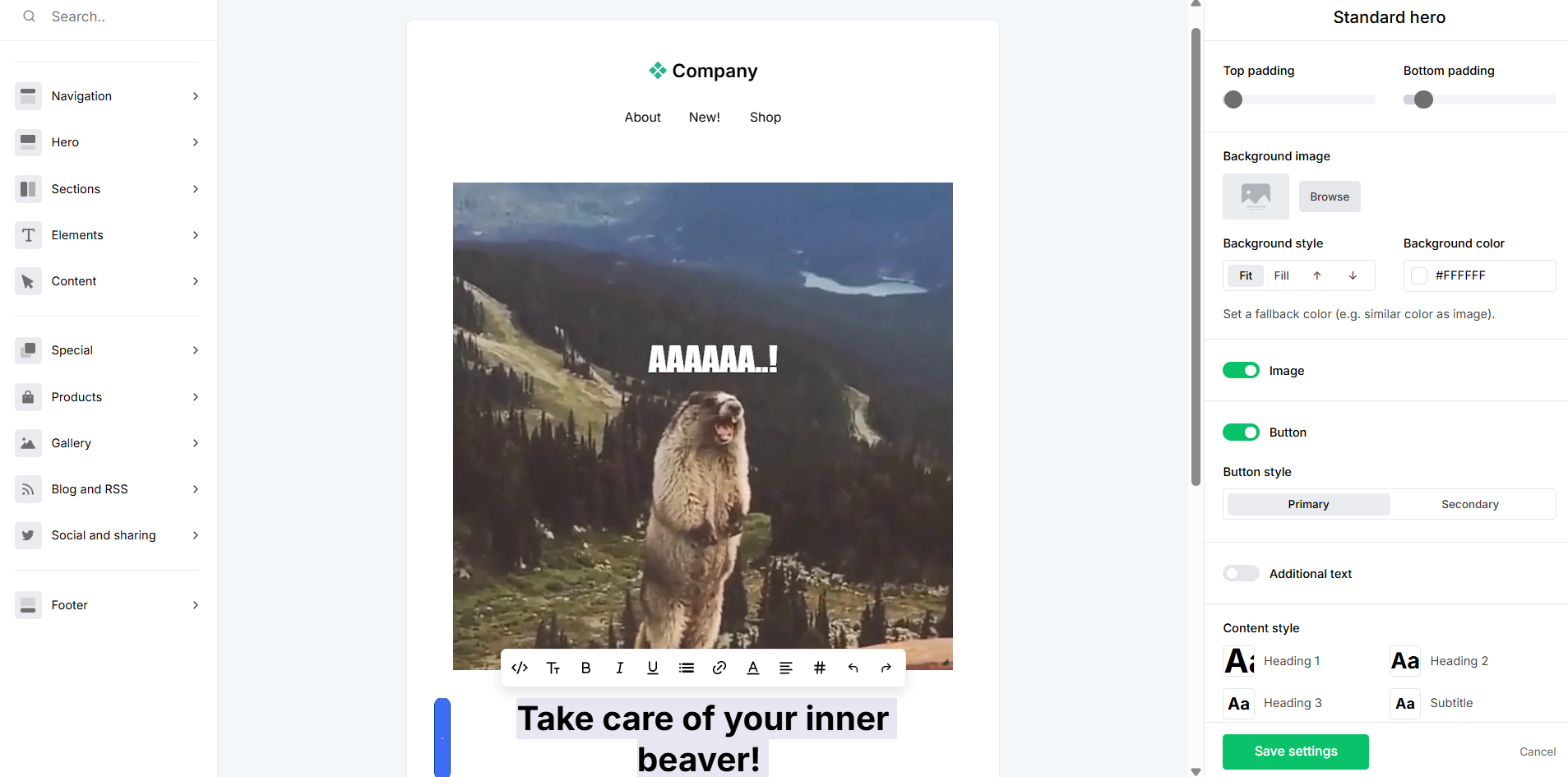 Restyling a ready-made hero section in MailerLite
After using both, MailerLite is the one we’d pick if the goal is to create a good-looking email fast. You start with more finished components and then adjust them, so you don’t need much design experience to get a polished result. Brevo gives you fewer ready-made decisions and more individual pieces, which is useful when you already know how you want the email structured. MailerLite does more of the assembling for you; Brevo gives you more freedom to do the assembling yourself.
Transactional email
Winner: ⭐ Brevo (not scored separately)
Transactional emails are easy to overlook until one fails to reach the inbox. Order confirmations, password resets, receipts, and shipping updates need to reach customers reliably, and this is one of the areas where the Brevo vs MailerLite comparison shows a clear difference.
| Aspect |
Brevo |
MailerLite |
Winner |
| Availability |
Included on every plan |
Not available in MailerLite; offered through MailerSend |
Brevo |
| How you send |
REST API, SMTP relay, and webhooks for delivery events |
MailerSend API and SMTP relay |
Tie |
| Cost |
Uses your plan’s email volume |
Separate MailerSend plans (from Free with 500 emails/mo to Professional with 50,000 emails/mo for $110/month) |
Brevo |
| Account and billing |
One account and one bill for marketing and transactional email |
One login (MailerSend is in the MailerLite account menu under “Switch app”), but MailerSend has its own plans and billing |
Brevo |
| Dedicated IP |
$251/year add-on on Professional (from $499/month); included on Enterprise |
$50/month add-on on MailerSend Professional (from $110/month); for senders of 100K+ emails/week |
Tie |
With Brevo, you can manage marketing and transactional email from the same account. Templates use the same editor, and you can connect your website through SMTP or the API. Delivery, open, and bounce data are available in the dashboard, and a single API request can send up to 1,000 emails.
Those sends do count toward your email allowance, so this is worth factoring into your plan if you run a busy store or app.
MailerSend keeps transactional email separate. It has its own templates, analytics, and inbound routing, so the functionality is there, but you’re managing another product with its own limits and pricing.
For low volumes, that may not be a problem. The free MailerSend plan covers 500 emails per month. If you need more than that, the extra cost sits on top of your MailerLite subscription.
Marketing automation
⭐ Brevo: 8.8/10 | MailerLite: 7.5/10
Brevo is a much stronger automation platform, and the difference is substantial. Its biggest advantage is that businesses can automate more of their customer communication in one place, without relying on separate tools to handle different parts of the journey.
MailerLite is still a good choice for businesses whose automation needs are limited to email, and its simplicity is a genuine advantage for smaller teams. But Brevo offers far more opportunities to put marketing on autopilot, making it the clear winner for businesses that want to get serious about automation.
| Aspect |
Brevo |
MailerLite |
Winner |
| Availability by plan |
Free and Starter are limited to 2,000 contacts in active automations; unlimited from Standard |
Free tier supports 3 active flows with up to 5 steps; 50 flows with up to 100 steps each and A/B testing from Comfort; unlimited flows and multiple triggers from Power |
Brevo |
| Automation builder |
Visual trigger/rule/action editor; classic and new versions; AI workflow generation |
Visual editor with delays, conditions, A/B tests, email, contact updates, webhooks, notifications, and step jumps |
Brevo |
| Triggers available |
List changes, opens, clicks, custom/website events, push clicks, and WhatsApp replies/keywords (Professional and higher) |
Contact, form, API, field update, and date-based triggers; eCommerce events with store connection |
Brevo |
| Pre-built automations |
14 email and 4 SMS templates |
18 templates |
Brevo |
| Channels supported |
Email, SMS, web push, and chat auto-replies on all paid plans; WhatsApp on Professional and Enterprise |
Email |
Brevo |
| Automation complexity |
Relatively simple Trigger > Rule > Action structure |
Moderate-complexity flows with branching logic, A/B testing, multiple triggers, and webhook actions |
Tie |
| Total score |
8.8/10 |
7.5/10 |
Brevo |
Brevo gives you Triggers, Actions, and Rules as three separate groups, and that structure makes sense once workflows start getting complicated. There’s plenty to work with: automations can react to contact and segment changes, email activity, forms, website behavior, and even WhatsApp replies, while actions can go beyond email to SMS, WhatsApp, and web push.
The editor is also prepared for larger workflows, with step search, zoom controls, testing, autosave, undo and redo, and an Activity section where you can check what happened after an automation started running. We also liked how hard it is to overlook an unfinished step – Brevo puts a visible warning directly inside anything that still needs configuration. And if you don’t want to build the initial structure yourself, its AI, Aura, can generate one from a written description.
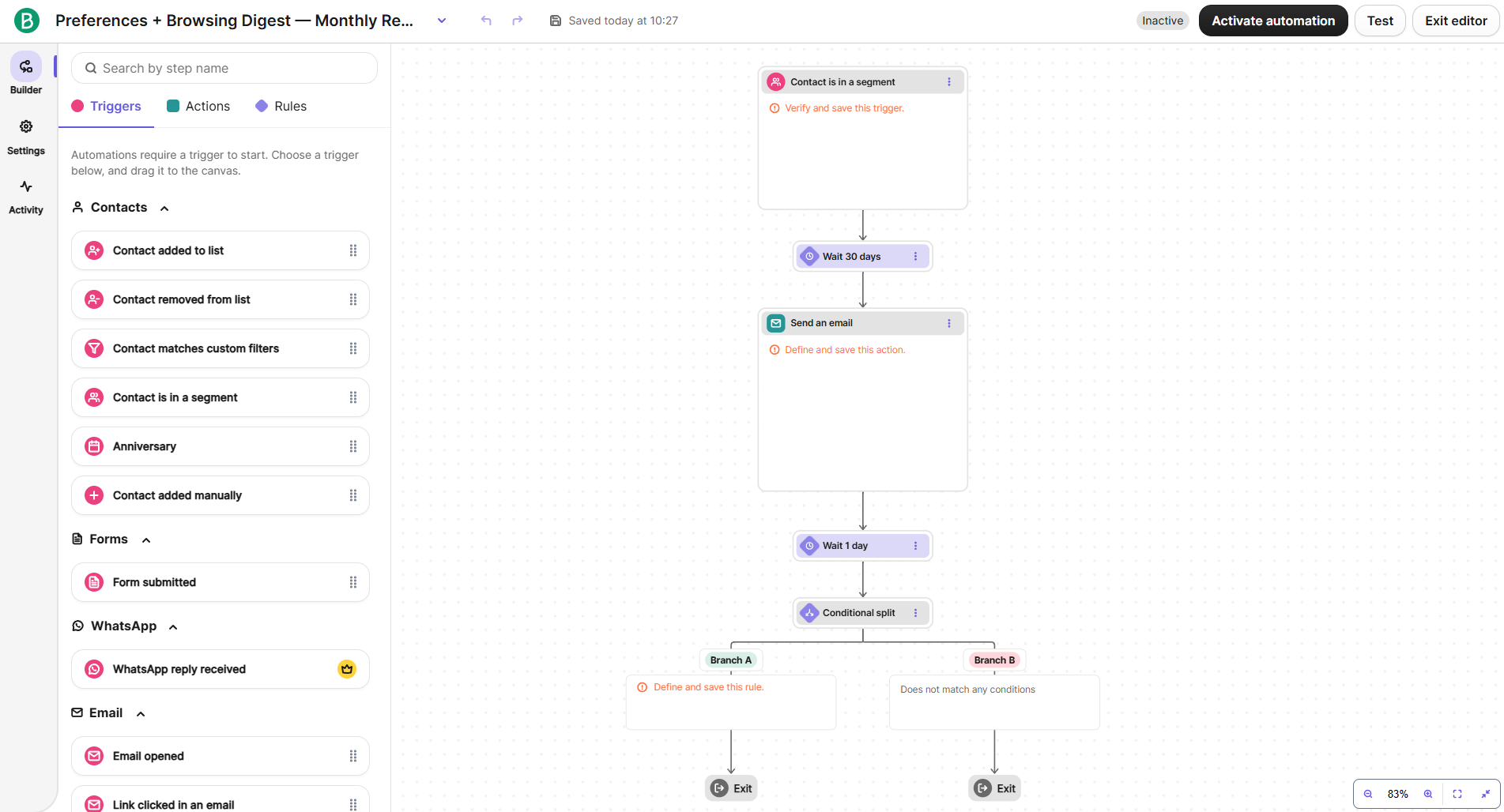 Building our segment-triggered workflow in Brevo
MailerLite fits a lot of information onto one canvas without making the workflow difficult to follow. Steps name themselves and show what they do underneath, branches are simply labeled Yes and No, and small status indicators tell you whether everything has been configured.
Its toolkit covers Delay, Condition, A/B test, email, webhooks, internal notifications, custom field updates, and group management. Move to step is particularly useful: instead of recreating the same sequence after different branches, you can send subscribers back to another point in the workflow.
The limitation becomes obvious when you look beyond email, though. Most of what you can do revolves around sending emails, controlling the sequence, and updating subscriber data, so there’s much less room to expand a workflow into other marketing channels.
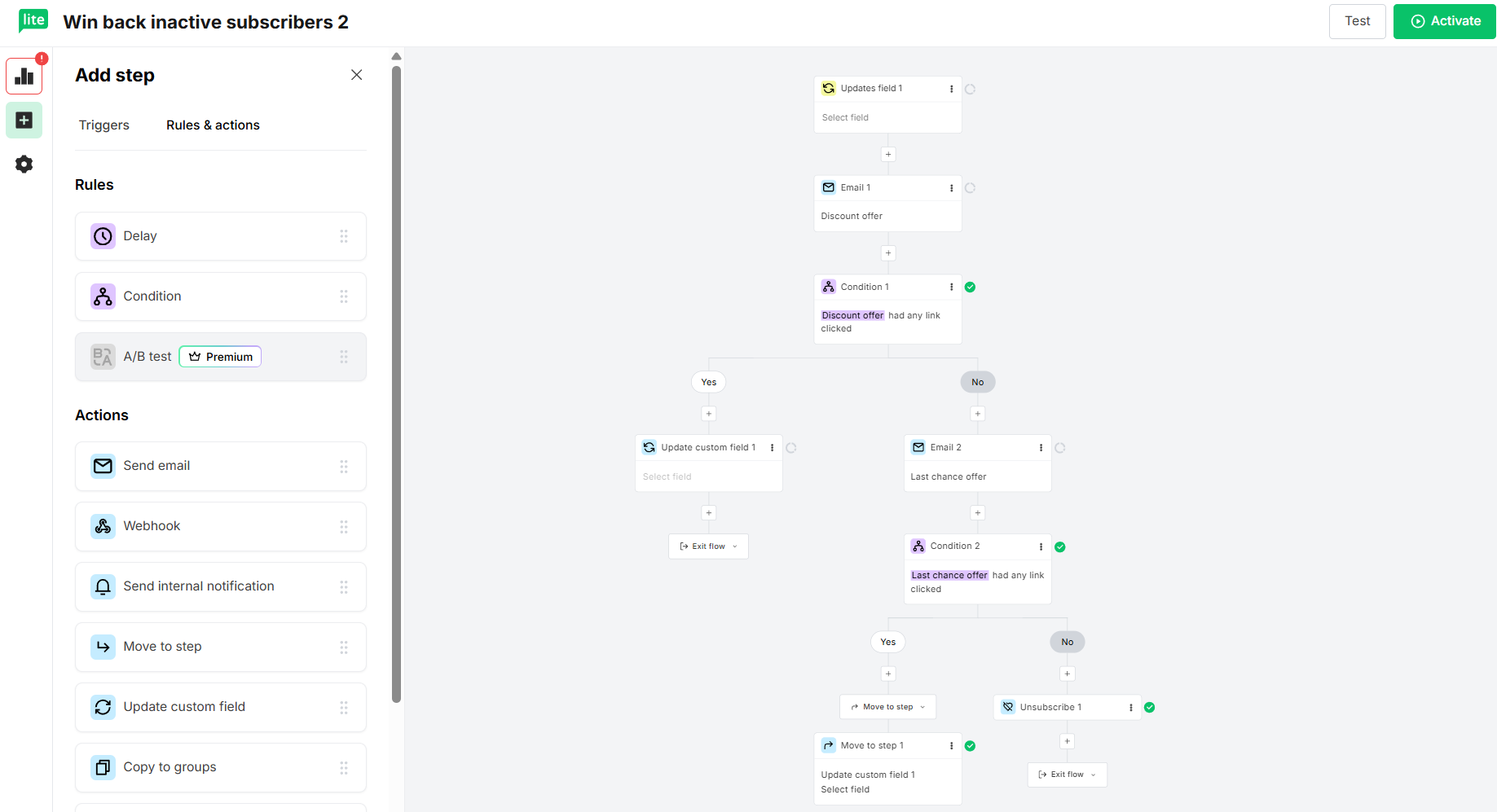 Mapping out a win-back sequence with Yes/No branches in MailerLite
MailerLite may actually be nicer for a simple email sequence – its compact canvas is easier to read, and you can understand a finished workflow without spending much time studying it. But its simplicity also defines where the limits appear. Once you want SMS, WhatsApp, web push, more varied triggers, or a workflow that several people will need to build, test, and troubleshoot, Brevo has much more to offer. MailerLite is excellent for getting straightforward email automations running without much fuss; Brevo gives you room to turn those automations into much larger customer journeys.
Contact management
⭐ Brevo: 9/10 | MailerLite: 8/10
Sending the same emails to everyone on your list is rarely a good idea. Subscribers have different interests, needs, and levels of engagement, and treating them all alike can lead to fewer opens, more unsubscribes, and spam complaints. Over time, that can also damage your sender reputation and hurt deliverability. Good contact management and audience segmentation help you send relevant messages to the right people, identify inactive subscribers, and keep your list healthy. That’s why we consider these capabilities essential when comparing email marketing platforms.
| Aspect |
Brevo |
MailerLite |
Winner |
| Segmentation capabilities |
Dynamic, real-time segments; up to 100 AND/OR conditions; templates |
Dynamic, rule-based segments with AND/OR logic; pre-built filters; segments work in campaigns and automations |
Brevo |
| Segmentation criteria |
Contact data, email engagement, eCommerce activity, website behavior, custom objects, and CRM events |
Groups, custom fields, segments, signup date, time zone, campaign activity, automation activity, and email actions |
Brevo |
| Segment update speed |
Automatic, real-time updates |
Automatic updates when subscribers meet or stop meeting conditions |
Tie |
| Tagging and manual organization |
No contact-level tags; uses contact attributes; tags organize campaigns and emails |
Groups function as tags; contacts can belong to multiple groups and still count once; groups work across forms, pages, and campaigns |
MailerLite |
| Total score |
9/10 |
8/10 |
Brevo |
Brevo wins contact management because it gives you a much deeper understanding of your audience. Its strength isn’t just organizing contacts, but using customer data to identify opportunities and make campaigns more relevant.
MailerLite makes everyday contact organization easier and more intuitive, which many smaller businesses will appreciate. But for businesses that want to do more with their customer data, Brevo offers considerably greater potential.
Signup forms, landing pages, and websites
Brevo: 8/10 | ⭐ MailerLite: 8.5/10
MailerLite wins this category because it gives businesses more opportunities to turn website visitors into subscribers. Its tools encourage experimentation with different offers, designs, and signup experiences. Brevo is a solid choice when collecting accurate subscriber information and consent is the main priority, but it offers less flexibility for creative lead generation. MailerLite also makes its more engaging features accessible to smaller businesses, so you don’t need a large marketing budget to start experimenting with what attracts subscribers.
| Aspect |
Brevo |
MailerLite |
Winner |
| Types of forms available |
Embedded, full-page, profile update, and unsubscribe forms; pop-ups on Professional and Enterprise only |
Embedded, promotional, teaser, spin-to-win, and click-triggered pop-ups (3 forms on Free, 10 on Comfort, unlimited on Power) |
MailerLite |
| Form builder |
Drag-and-drop; CAPTCHA, 3 embed options, double opt-in, and submission notifications |
Drag-and-drop; HTML/CSS customization for embedded forms |
Tie |
| Pop-up targeting conditions |
Time delay, exit intent, page targeting, and frequency controls |
Time delay, scroll depth, exit intent, click triggers, page targeting, scheduling, and frequency controls |
MailerLite |
| Landing page builder |
Dedicated builder with custom domains, CAPTCHA, SEO settings, and tracking scripts; 1 page on Standard, 10 on Professional, none on Free or Starter |
Dedicated builder with 70+ sections, AI generation, A/B testing, pop-ups, and automation triggers; 1 page on Free, 10 on Comfort (shared with websites), unlimited on Power |
MailerLite |
| Total score |
8/10 |
8.5/10 |
MailerLite |
Brevo’s signup form builder is mostly concerned with what data you collect and whether you collect it properly. Its draggable elements include standard content blocks alongside contact attributes, single- and multiple-choice fields, checkboxes, and multi-list subscription, which can let subscribers choose the lists they want to join.
GDPR also gets its own section with two dedicated blocks, while CAPTCHA is required, so privacy and bot protection are hard to overlook even if you’re building your first form. Design is handled in a separate tab and is fairly straightforward. It’s not an editor for creating elaborate signup experiences, but it gives you a practical way to collect structured contact data and consent.
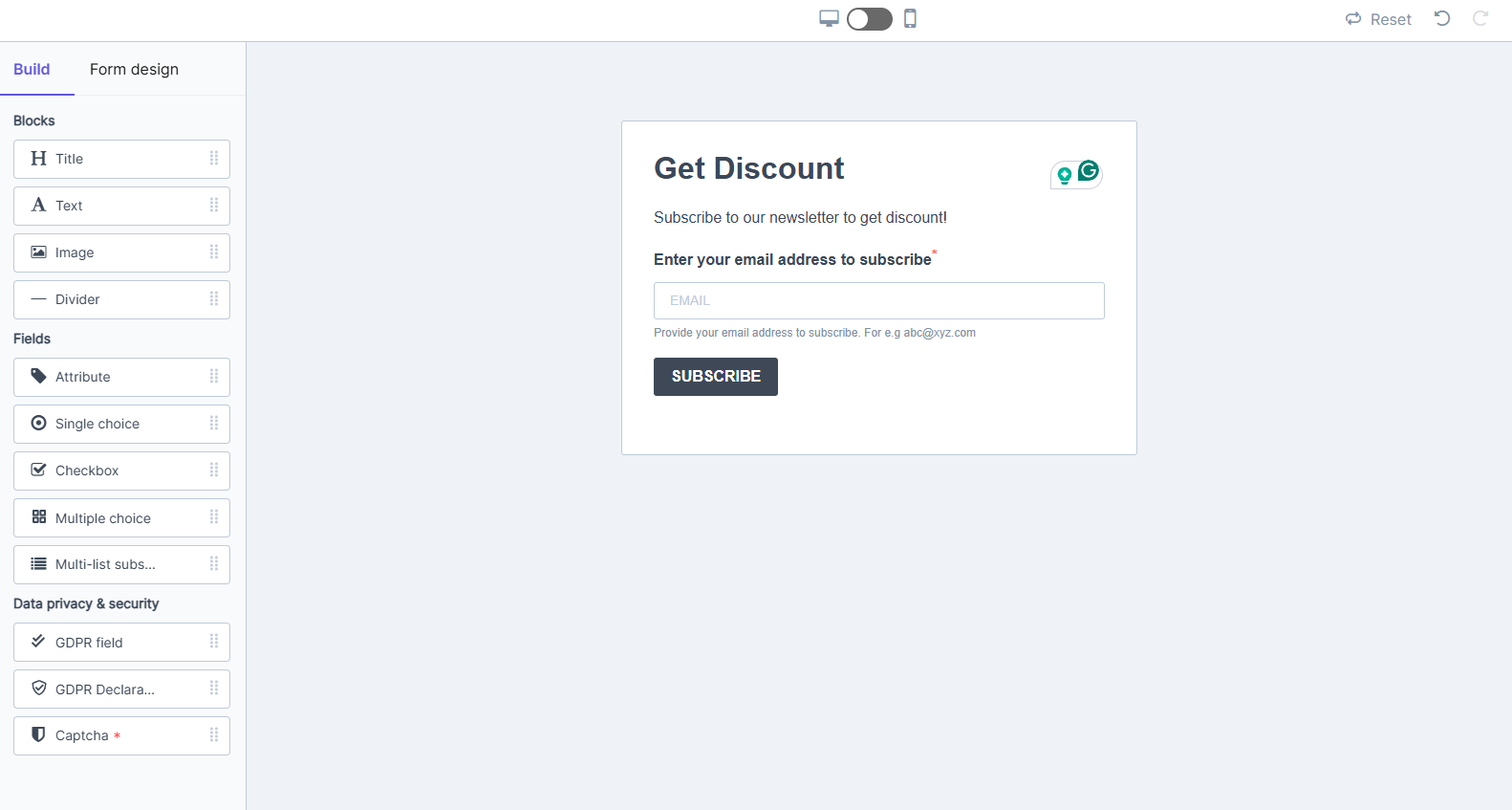 Creating a discount signup form in Brevo
MailerLite can turn a signup form into much more of a promotion. The pop-up editor we tested included detailed controls for size, layout, backgrounds, opacity, corners, and shadows, and content elements like video and countdown timers.
More interesting is what you can build with them: spin-to-win forms have separate Pop-up, Success, and Losing states, so visitors can enter their email and immediately interact with the offer. And these pop-ups aren’t reserved for expensive plans – even Free users can create them, although they carry MailerLite branding.
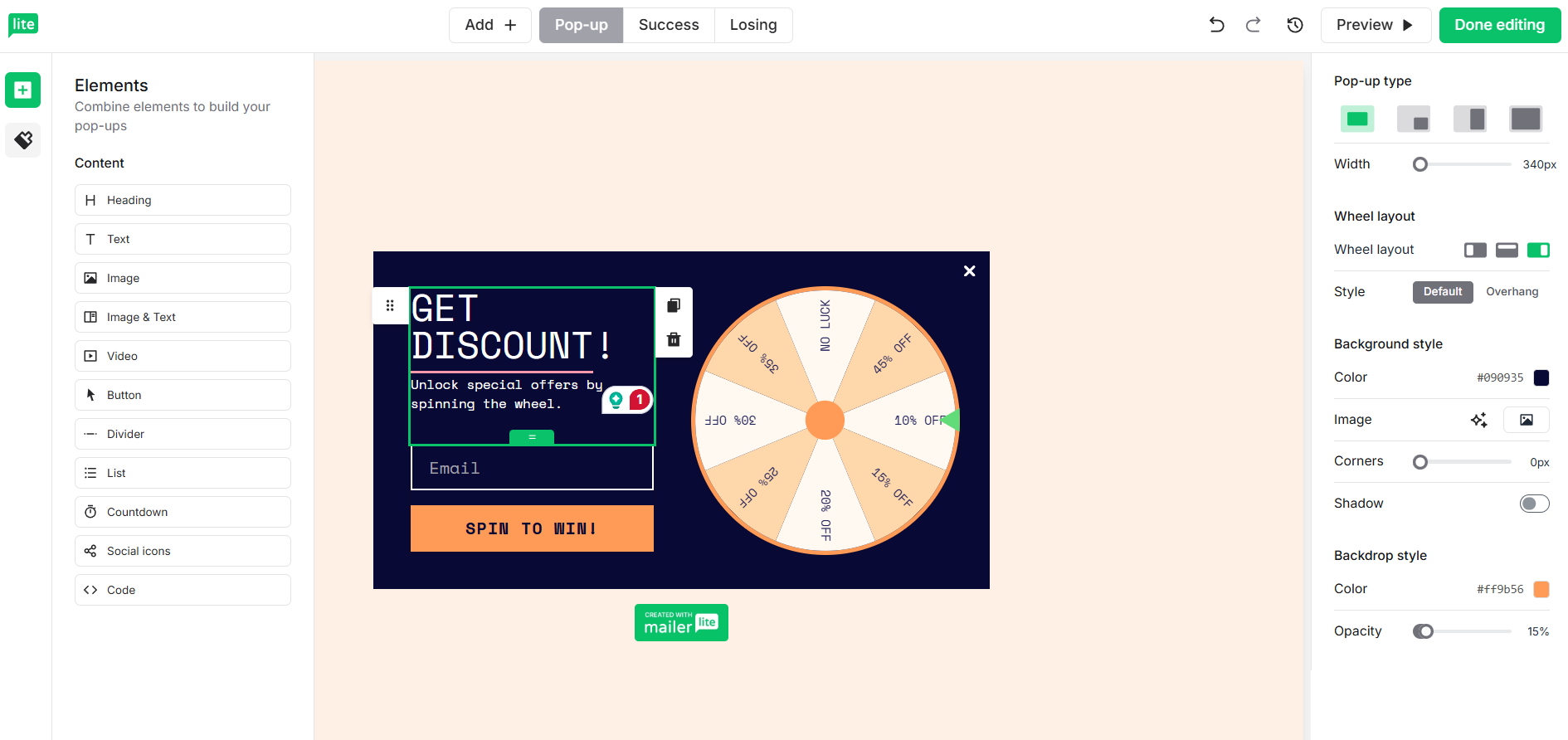 Setting up a spin-to-win form in MailerLite
The screenshots aren’t a perfect like-for-like comparison because we tested a regular embedded form in Brevo and a spin-to-win pop-up in MailerLite. Still, that difference reflects how each platform approaches lead capture: Brevo focuses on clean data and consent, while MailerLite focuses on making the signup itself engaging.
MailerLite’s advantage grows once a visitor has signed up. Beyond forms and landing pages, it lets you build a website and sell from it, while Brevo stops at landing pages.
| Aspect |
Brevo |
MailerLite |
Winner |
| Website builder |
No; landing pages only |
Multi-page websites with a blog, custom domains on paid plans, SSL, and unlimited traffic and storage (1 website up to 5 pages on Free; 10 websites and landing pages combined on Comfort; unlimited on Power) |
MailerLite |
| Digital products |
No built-in checkout; connect Stripe or your online store |
Sell digital downloads through Stripe with 0% MailerLite commission (1 product or booking on Free; 5 on Comfort; unlimited on Power) |
MailerLite |
| Paid newsletters |
Not available |
Recurring paid subscriptions through Stripe on Comfort and Power, with 0% MailerLite fee |
MailerLite |
| Bookings |
Brevo Meetings with free scheduling pages and paid appointment options |
Free or paid sessions with Google Calendar or Outlook sync; counts toward the digital product limit |
Tie |
What makes MailerLite’s setup useful is that everything feeds the same subscriber database. Someone who buys an eBook, books a coaching session, or joins a paid newsletter can be segmented and added to an automation based on that action. The main limit is that MailerLite only sells digital goods, so you’ll still need a separate store for physical products.
Overall, MailerLite is the stronger option if you want lead capture, landing pages, and simple selling tools in one place. Brevo makes more sense if your priority is collecting accurate subscriber data, managing consent, and connecting those leads to a broader marketing and CRM setup.
CRM, SMS, WhatsApp, and chat
Winner: ⭐ Brevo (not scored separately)
MailerLite is mainly an email platform with some extras for creators, so CRM, SMS, WhatsApp, and live chat all require separate tools. Brevo covers those channels in the same contact database, though some features are included on lower plans while others require a paid sales package or a higher marketing tier.
| Tool |
What Brevo offers |
| Sales CRM |
Free on all plans with 1 sales pipeline, 50 open deals, and meeting scheduling. Sales Essentials adds unlimited deals and pipelines plus sales automation from $31/month per user. Sales Advanced starts at $65/month per user and adds outreach sequences, phone calling, and one-to-one SMS and WhatsApp. |
| SMS |
Available on every plan through pay-as-you-go credits. US pricing starts at about $0.011 per credit, and credits do not expire. |
| WhatsApp |
Campaigns are available on Professional and Enterprise, with Meta’s per-message fees charged separately. |
| Live chat (Conversations) |
Website live chat is available on all plans. Chatbots and the social inbox come with Sales packages. |
Brevo wins easily if you want more than email. A small team can handle deals, SMS, and live chat without stitching together several separate tools. If email is all you need, though, this difference matters much less.
Integrations
⭐ Brevo: 8.8/10 | ⭐ MailerLite: 8.8/10
Even though the scores are tied, MailerLite has some advantages for businesses using several external tools, particularly CRMs. However, Brevo has its own built-in CRM, so many businesses won’t need an external integration in the first place. It also offers broader API capabilities and more Zapier triggers and actions.
| Aspect |
Brevo |
MailerLite |
Winner |
| Integration catalog |
150+ integrations |
130+ integrations |
Brevo |
| eCommerce platforms |
Shopify, WooCommerce, PrestaShop, Magento 2, Shopware, BigCommerce, OpenCart, and more; Wix and Squarespace only through Zapier or Make |
Shopify, WooCommerce, BigCommerce, PrestaShop, Wix, Squarespace, Shoper, and an eCommerce API for custom stores |
Tie |
| CRM systems |
Built-in sales CRM; Salesforce app (Professional and Enterprise) with bi-directional lead, contact, and opportunity sync |
Pipedrive, HubSpot, Salesforce, Zoho CRM (via Zoho Flow), Copper, Kommo, Salesflare, and Microsoft Dynamics 365 |
MailerLite |
| API capabilities |
One unified REST API covering email, SMS, WhatsApp, contacts, custom events, eCommerce data, and custom objects |
One REST API with a global limit of 120 requests per minute and a separate 5 per minute on subscriber imports |
Brevo |
| Zapier support |
17 triggers and 16 actions |
13 triggers and 10 actions |
Brevo |
| Total score |
8.8/10 |
8.8/10 |
Tie |
For eCommerce businesses, integrations can be especially important, and the two platforms have different strengths here. Brevo has deeper Shopify integration, with abandoned cart recovery, browse abandonment, and back-in-stock automations across multiple communication channels, and it offers native plugins for self-hosted stores built on WooCommerce, PrestaShop, Magento, or Shopware. MailerLite connects natively to hosted website builders like Wix and Squarespace and offers an eCommerce API for custom stores. So, Brevo has the edge for Shopify and self-hosted shops, while MailerLite is the easier choice if your store runs on Wix or Squarespace.
AI features
⭐ Brevo: 9/10 | MailerLite: 8/10
You might think you don’t need AI in your email marketing platform. After all, you can write emails, build automations, and segment contacts yourself. But what if some of that work could take minutes instead of hours? Or you could discover patterns in your customer data that you’d never think to look for? That’s where AI starts getting interesting, and some platforms are already doing much more with it than others. Let’s see what Brevo and MailerLite have to offer.
| Aspect |
Brevo |
MailerLite |
Winner |
| Email generation |
AI-generated emails, subject lines, preview text, images, and translations; brand extraction from URLs; full email generation in beta (Aura is available on all plans) |
AI writing and rewriting with tone options and spam checks (Comfort and higher); subject lines, images, and HTML email generation (beta) |
Tie |
| Automation generation |
AI-generated workflows with triggers, rules, and actions |
No in-app workflow generation; you can draft automations in Claude or ChatGPT through MailerLite’s MCP server |
Brevo |
| Predictive customer analytics |
Predictive CLV, churn risk, and purchase count/rate (Professional and higher; requires eCommerce data) |
No customer predictions |
Brevo |
| Smart segmentation suggestions |
AI-generated segments and audience suggestions (Professional and higher) |
Manual segmentation; AI re-engagement and deliverability suggestions (beta), but no segment generation |
Brevo |
| Total score |
9/10 |
8/10 |
Brevo |
Brevo wins this category because its AI can take on more of the work that would otherwise require your time and expertise. This is particularly useful for teams on Brevo’s higher plans that want to make better use of customer data without spending hours setting everything up manually. MailerLite’s AI tools are helpful, but they won’t change how much work goes into managing your marketing. Brevo’s tools have more potential to do just that.
Deliverability
⭐ Brevo: 10/10 | MailerLite: 9.8/10
Brevo has a slight edge in deliverability tools, but that doesn’t mean your emails are more likely to reach the inbox with Brevo. Both platforms have strong technical foundations, and in our testing, both delivered reliably once domains were authenticated.
Customer feedback tells a similar story: users praise deliverability on both platforms, while most complaints concern account suspensions caused by strict automated enforcement. We’d keep Brevo as the narrow winner for the extra control and visibility it provides, but both are equally strong choices when it comes to actual email deliverability.
| Aspect |
Brevo |
MailerLite |
Winner |
| Authentication |
One-click DKIM, DMARC, and domain verification for supported DNS providers; 1024-bit DKIM by default, with 2048-bit available through CNAME setup; BIMI support |
Guided or manual DKIM, SPF, and domain verification; separate DMARC setup |
Brevo |
| Deliverability monitoring |
Real-time deliverability score, issue alerts, and domain-level reporting |
Campaign-level delivery, bounce, and complaint reports |
Brevo |
| List hygiene |
Automatic suppression of hard bounces, complaints, and unsubscribes; 36-hour soft-bounce retries, suppression after 5 consecutive soft bounces; import verification |
Automatic hard-bounce suppression; suppression after 3 consecutive soft bounces; inactive-contact cleanup; email verification via MailerCheck or NeverBounce |
MailerLite |
| Dedicated IP |
$251/year add-on on Professional, included on Enterprise |
Custom pricing on request; requires 50,000+ emails per week and an authenticated domain; managed warm-up |
Brevo |
| Total score |
10/10 |
9.8/10 |
Brevo |
The bad news is that your deliverability depends much more on how you send emails than on which platform you use. Most modern email marketing services already have the technical side well covered. The rest is largely up to you. Here are a few email marketing best practices that can help you:
- Never buy mailing lists and send only to people who have agreed to hear from you.
- Clean your lists regularly and remove invalid addresses; stop emailing subscribers who haven’t engaged in a long time.
- Keep a consistent schedule and increase sending volume gradually.
- Send emails people actually want – use segmentation to make your campaigns relevant.
- Make it easy to unsubscribe.
- Take a closer look at rising bounce rates, spam complaints, and falling engagement.
Reporting and analytics
⭐ Brevo: 9/10 | MailerLite: 7.8/10
How much can you learn from your campaign reports? Opens and clicks are nice, but they are only a part of the story. You might also want to know which campaigns bring in the most revenue or how different audiences respond. We decided to give reporting its own section because the amount of data a platform collects matters much less if you can’t easily find, analyze, and use it.
| Aspect |
Brevo |
MailerLite |
Winner |
| Report coverage |
Dashboards for email, SMS, transactional messages, revenue, and customer data |
Dashboards for subscribers, campaigns, automations, forms, eCommerce, and sites; campaign engagement, deliverability, click maps, email clients, location, and revenue |
Tie |
| Custom reports |
AI queries, Excel-style formulas, custom dashboards, and Google Looker integration (Analytics Studio, Professional and higher) |
Custom campaign reports with filters, grouping by campaign, audience, or time period, and engagement/eCommerce charts |
Brevo |
| Reporting speed |
Real-time transactional data; campaign reports generated on demand |
No real-time reporting or refresh interval; default dashboard period of 30 days |
Brevo |
| Export capabilities |
CSV and PDF |
CSV and PDF |
Tie |
| Total score |
9/10 |
7.8/10 |
Brevo |
MailerLite provides enough information to track campaign performance and understand what’s working, but Brevo gives you more freedom to explore your data and answer specific business questions. This is even more valuable if you need to understand how different channels and customer activities contribute to your results.
Customer support
Brevo: 7.6/10 | ⭐ MailerLite: 7.8/10
Customer support is one of those things you might barely think about when choosing an email marketing platform, but that’s just until something goes wrong. When a campaign won’t send or your account gets suspended right before an important launch, access to someone who can solve your problem becomes crucial. We compared Brevo and MailerLite not just by the support options they advertise, but also by how satisfied real customers are with the help they receive.
| Aspect |
Brevo |
MailerLite |
Winner |
| Channel availability |
Email tickets on all plans (priority email from Standard); phone on Professional and Enterprise (Mon–Fri); no live chat |
Email and chat during the first 14 days on Free, then self-service; 24/7 email on Comfort; 24/7 email and live chat on Power (and on Comfort from 50,000 subscribers); no phone |
Tie |
| Knowledge base |
Help Center with clear plan details; free Academy, community forum, and YouTube tutorials |
Extensive guides, videos, courses, and self-service resources; some outdated documentation |
Tie |
| Onboarding assistance |
Self-service courses; hands-on assistance through paid agency partners |
Migration guides, Mailchimp importer, trial support; onboarding consultations and training on custom-volume plans |
MailerLite |
| Support quality sub-rating on Capterra |
4.5/5 |
4.8/5 |
MailerLite |
| Total score |
7.6/10 |
7.8/10 |
MailerLite |
MailerLite wins customer support, and the Capterra ratings make its advantage more convincing. A 0.3-point difference on a five-point scale is worth paying attention to, especially when both platforms have established user bases. Some of that satisfaction may come from MailerLite’s emphasis on simplicity: users who find a platform easy to navigate have fewer frustrating support experiences in the first place. But that alone doesn’t explain the gap, and MailerLite also makes it easier to reach a support agent on its paid plans. We can’t separate the influence of product simplicity from support quality based on ratings alone, but MailerLite users clearly report greater satisfaction with the help they receive.
Interestingly, Capterra gives both platforms the same 4.6/5 for ease of use, which weakens the idea that simplicity alone explains the support gap. Reviews also specifically praise MailerLite’s responsive support team, suggesting that the quality of assistance itself contributes to its higher rating.
Real users’ reviews on Brevo and MailerLite
Our experience is valuable, but we also wanted to check whether our impressions were too subjective. To do that, we turned to software review platforms to see what real users had to say. Here’s what we found.
Ease of use is where MailerLite gets the most consistent praise:
Brevo reviewers find everyday campaigns easy too, but many say the more advanced tools take time to learn:
On pricing, Brevo users focus on how much they get for the money:
MailerLite’s subscriber-based pricing is less forgiving if you rarely send, which is exactly where Brevo’s volume-based model fits better:
Both platforms share one complaint about getting started: strict checks on new accounts can hold up your first campaign. Some Brevo users were suspended right after signing up:
MailerLite users describe a similar delay:
Overall, reviewers see MailerLite as the easier tool to pick up and Brevo as the more capable platform for the money. The main trade-offs are a steeper learning curve on Brevo, pricing that doesn’t suit infrequent senders on MailerLite, and strict account checks on both.

Join businesses growing with SendPulse
From solo creators to global brands, thousands of customers trust SendPulse to run email campaigns, chatbots, automations, and more — all in one place.
Get started for free
Your decision checklist
Now let’s put it all together. Read each row and note which column describes your business better. If most rows point to one platform, it’s probably the better fit for your company.
| Decision area |
Brevo
is a better fit if… |
MailerLite
is a better fit if… |
| Business type |
You run an online store, a service business, or a B2B company that connects with customers across several communication channels. |
You’re a creator, coach, newsletter publisher, or solopreneur building an audience online. |
| Budget expectations |
You have a large list and email it once a week or less, or you want a generous free plan for a list you already have. |
You email a small or mid-sized list often and prefer predictable pricing based on subscriber count. |
| Automation needs |
You want workflows that go beyond email and combine SMS, WhatsApp, web push, and CRM steps. |
You want simple email workflows that are quick to build and easy to follow. |
| Analytics focus |
You want real-time transactional stats, a visible deliverability score, and predictive customer scores. |
You want detailed per-campaign reports: click maps, opens by location, and revenue per email. |
| Team setup |
Your team splits its time between marketing and light sales and wants a basic CRM in the same tool. |
You’re a solo marketer or a small team focused on email and your online presence. |
But what if neither feels quite right? Don’t settle for less! There are plenty of other platforms to choose from, and it’s worth exploring your options before committing. Onboarding takes time and money, and migrating to another platform later can be just as costly. So it’s better to find the right fit from the start than to compromise now and regret it later.
- What if you need a more eCommerce-focused platform? In that case, take a closer look at Klaviyo, one of the strongest options in this niche.
- What if you want to automate almost everything and keep manual work to a minimum? Consider ActiveCampaign.
- What if you need more than email marketing, with chatbots and CRM in one platform, but without enterprise-level costs? Then SendPulse is worth exploring.
Final verdict
⚖️ Final scores: Brevo – 8.5/10 | MailerLite – 8.4/10
Would we recommend Brevo? Absolutely. It’s a great, multifunctional platform with plenty of communication channels and affordable pricing. Its billing model takes a minute to understand, but that might actually work in your favor if you email a large list once a week or less.
Would we recommend MailerLite? Of course. Even after its June 2026 price increase, it remains one of the more affordable options on the market. It lets you sell digital products, paid newsletters, and bookings without extra tools. It’s also simple and straightforward, making it a great choice for creators, small teams, and solopreneurs.