Few email platforms differ as much in mindset as MailerLite and Klaviyo.
MailerLite focuses on speed, clarity, and affordability. Klaviyo is built around data, automation depth, and revenue attribution. Small teams, solopreneurs, creators, and service providers often choose MailerLite because it is efficient and easy to use. Klaviyo, by contrast, is typically adopted by eCommerce brands that need precise customer data and sophisticated lifecycle automation. Pick wrong, and you’ll either outgrow the platform too fast or end up locking yourself into workflows that don’t match how your business actually operates.
In this post, we’ll compare MailerLite and Klaviyo side by side. We’ll break down real use cases, pricing, strengths, and trade-offs to help you decide which direction makes sense for your business in the long run.
How we scored this comparison: This review was created by the SendPulse team. As an email marketing platform ourselves, we work in the same space as the tools we test, which also means we understand the field deeply.
Each platform was evaluated across nine categories using our independent methodology. Pricing (25%), ease of use (20%), and email and automation features (15% each) carry the most weight because they affect daily workflows the most. All scores reflect real testing and analysis as of June 2026.
TL;DR MailerLite vs Klaviyo at a glance
Use this table to quickly identify which platform aligns with your priorities. Detailed analysis follows below – click on each category to jump to its overview.
| Category |
MailerLite |
Klaviyo |
Winner |
| Platform focus |
An email platform focused on simplicity and affordability for small businesses, creators, and budget-conscious online stores |
A customer-data-first platform built for eCommerce brands, especially Shopify/ WooCommerce stores, that need behavioral tracking and lifecycle marketing |
Depends on your use case |
| Pricing |
8.8/10
Free plan available; well-priced for the features included |
7/10
Free plan for small lists, with advanced features available early, but costs rising quickly at scale |
MailerLite |
| Ease of use |
10/10
Intuitive, beginner-friendly interface with clear navigation and tooltips |
6.5/10
Data-heavy interface that is harder to learn and takes more time to set up |
MailerLite |
| Email design |
8.6/10
Visual email builder with 108 general-purpose templates |
9.4/10
Drag-and-drop email editor with 160 conversion-focused templates |
Klaviyo |
| Automation |
7.5/10
Multi-step workflows with up to 100 steps, multi-trigger entry, and 15 basic templates |
9.6/10
Advanced cross-channel flows with AI suggestions, 60+ templates, and 40+ triggers |
Klaviyo |
| Deliverability |
9.8/10
Permission-based sending; built-in email verification; automated bounce and complaint management; dedicated IP available for high-volume senders with guided warm-up |
10/10
Built-in deliverability hub with sender health score, bounce details, and improvement suggestions; dedicated IP available for high-volume accounts |
Klaviyo |
| Integrations |
6.4/10
185+ integrations across eCommerce, CRM, analytics, and other categories |
7.2/10
350+ integrations, mainly deeply eCommerce-focused |
Klaviyo |
| AI features |
5/10
Limited to generating email copy and subject lines; includes a native MCP server |
8.7/10
Integrated into analytics, automation, segmentation, and lifecycle optimization; has an MCP server |
Klaviyo |
| Reporting and analytics |
7.8/10
Clear dashboards with regular data updates for campaigns and automations |
10/10
Advanced real-time analytics for customer behavior, lifecycle tracking, and revenue attribution |
Klaviyo |
| Customer support |
7.3/10
24/7 email and live chat for paid accounts; comprehensive, beginner-friendly help center |
6.4/10
24/7 email and 24/5 chat for paid users; extensive eCommerce-focused documentation |
MailerLite |
| Final score |
8.4/10 |
8.7/10 |
Klaviyo |
The table above gives a quick snapshot. Next, we’ll examine each platform inside out, focusing on how it handles pricing at scale, how easy it is to use, what helpful features it comes with, and more. By the end, you will have a clear sense of which platform best fits your use case.

Create and send high-performing emails
Use an AI assistant, pre-made templates, advanced segmentation, and feature-rich automation to run campaigns without coding. Start for free with up to 15,000 monthly emails.
Get started for free
Side-by-side MailerLite vs Klaviyo comparison
Time to move past first impressions. We’ll break down MailerLite and Klaviyo across the core pillars of a modern email marketing platform – from pricing and usability to integrations and AI capabilities – to show where each one performs best and where trade-offs start to appear.
Pricing plans
⭐ MailerLite: 8.8/10 | Klaviyo: 7/10
Disclaimer: Pricing changes frequently. These figures are accurate as of June 22, 2026. Always verify final costs on official pricing pages.
For many businesses, pricing is often where excitement meets reality. Features can look impressive, but if the cost doesn’t line up with how you use the platform, that enthusiasm fades quickly. This is exactly where the MailerLite vs Klaviyo comparison becomes revealing.
MailerLite keeps pricing simple and predictable, with gradual cost increases. Klaviyo unlocks powerful features early, but gets expensive fast as your audience grows. On paper, both models are reasonable. In practice, only one will feel right once you factor in your list size.
| Contacts |
MailerLite |
Klaviyo |
Savings with MailerLite |
| Free plan |
250 contacts and 2,500 emails/mo |
250 contacts, 500 emails/mo, and 150 SMS |
– |
| 2,500 |
$33/mo |
$60/mo |
$27/mo |
| 10,000 |
$89/mo |
$150/mo |
$61/mo |
| 50,000 |
$319/mo |
$720/mo |
$401/mo |
| Total score |
8.8/10 |
7/10 |
– |
MailerLite clearly wins on affordability for any list size. At 50,000 contacts, the annual difference exceeds $4,800 – enough to fund additional tools or ad spend.
However, even the cheapest Klaviyo paid plan comes with a bunch of advanced eCommerce-focused features, including real-time segments, personalized product recommendations, and predictive analytics, so if you need them anyway, its pricing could be worth it.
Ease of use and interface
⭐ MailerLite: 10/10 | Klaviyo: 6.5/10
Comparing MailerLite and Klaviyo on usability is a bit like putting Arithmetic 101 next to high-school Algebra. Both deal with the same subject, but the effort required to become comfortable using each platform differs a lot.
MailerLite keeps the interface well-structured and consistent. It guides users step by step and keeps navigation simple, almost obvious. In contrast, Klaviyo centers its user experience around data and performance metrics. It rewards expertise yet expects you to bring it with you.
Here’s how those differences show up across the core usability factors:
| Aspect |
MailerLite |
Klaviyo |
Winner |
| First-time experience |
Smooth onboarding with contextual tips; most users can launch their first campaign in an hour or less |
Data-focused dashboard that requires high marketing familiarity; beginners may need around 10 hours to send their first campaign |
MailerLite |
| Daily navigation |
Clean interface with navigation built around key workflow stages; user-triggered tooltips |
Metrics-first dashboard centered on segments and flow performance; dense at first |
MailerLite |
| Learning curve |
Core features can be learned within 6-12 hours using step-by-step guides, video lessons, and free Academy resources |
Building complex segments and flows can take up to 3-4 weeks of consistent use and careful documentation review; free courses and lessons on email marketing and the platform use |
MailerLite |
| Mobile access |
Native iOS app supports campaign creation, preview, scheduling, subscriber management, and reporting |
No native iOS or Android app; mobile web access only |
MailerLite |
| Workflow efficiency once mastered |
Fast for routine campaigns; limited customization keeps workflows simple |
Highly efficient for complex behavioral flows once you understand the data model |
Tie |
| Total score |
10/10 |
6.5/10 |
MailerLite |
MailerLite scores highly here because usability affects daily productivity more than almost any other factor. A platform that is easy to navigate lowers friction and shortens execution time. Klaviyo requires more time upfront, but that investment unlocks deeper control and advanced capabilities once the platform becomes familiar.
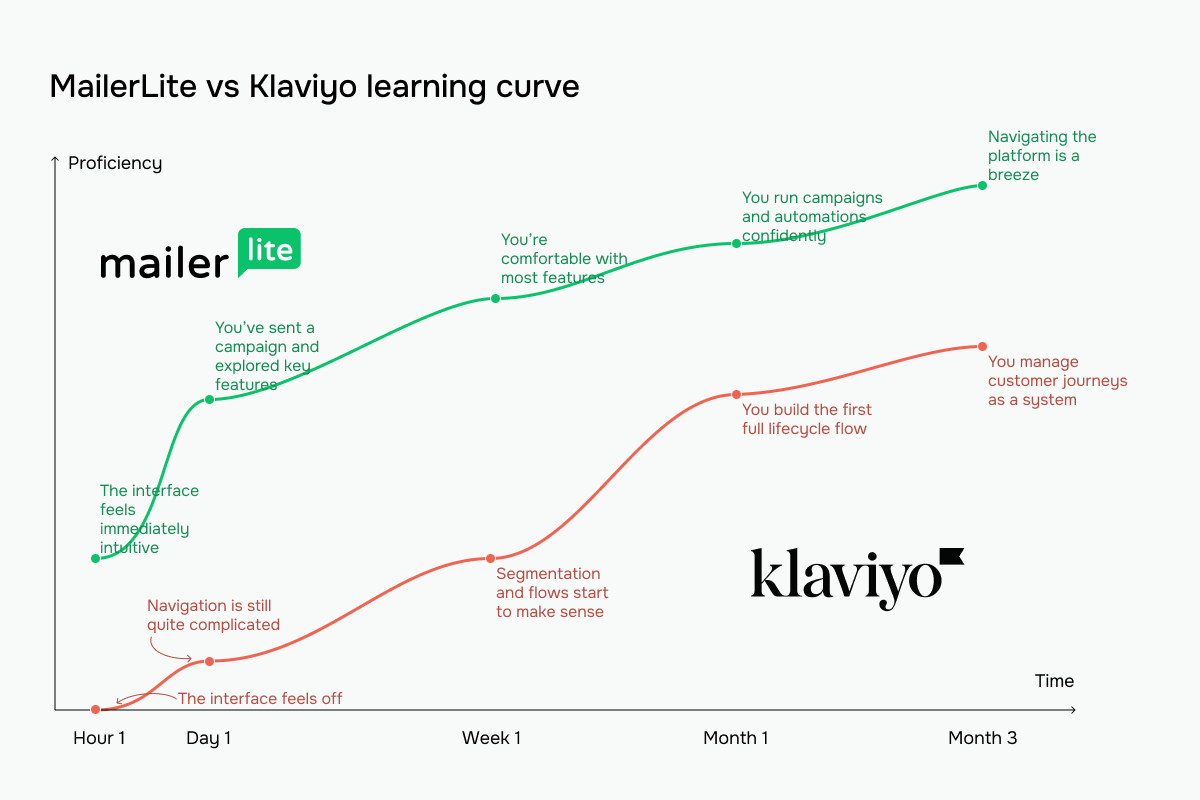 The green line represents MailerLite vs Klaviyo’s red line
If your team can’t dedicate weeks to learning a new platform, MailerLite’s 10/10 score represents a significant practical advantage. If you have time to invest in mastering a sophisticated system, Klaviyo’s eventual efficiency can justify the longer ramp-up period.
Email builder and templates
MailerLite: 8.6/10 | ⭐ Klaviyo: 9.4/10
The email builder is where a good chunk of daily work happens. It determines how much control you have over your template design and how easily you can maintain your brand consistency across emails.
MailerLite and Klaviyo both offer intuitive drag-and-drop editors with precise design options that let you build polished emails. There are quite a few differences, though, like the template gallery, layouts, and content block focus.
| Aspect |
MailerLite |
Klaviyo |
Winner |
| Templates |
108+ responsive, customizable templates for newsletters, promotions, and events |
160+ responsive, fully customizable templates optimized to showcase products and drive conversions |
Klaviyo |
| Drag-and-drop editor |
Visual editor with ready-to-use content blocks, global brand controls, block-level settings, and built-in AI writing assistance |
Modern, AI-powered drag-and-drop editor with reusable sections and dynamic content |
Tie |
| Notable content blocks |
Surveys and quizzes, applications, feature highlights, and signatures |
Product feeds and recommendations, tables, and review quotes |
Tie |
| Customization |
Control over fonts, colors, spacing, and layout structure; dynamic content and HTML coding available |
Detailed control over global template, section, and block styles, including fonts, colors, borders, padding, and alignment; custom HTML supported |
Klaviyo |
| Mobile responsiveness |
Mobile-responsive templates by default, with a mobile preview option |
Mobile-friendly templates with device and recipient preview modes |
Tie |
| Total score |
8.6/10 |
9.4/10 |
Klaviyo |
Here’s what the interfaces look like when you first sign up and start customizing your email template.
Klaviyo gives you plenty of room to play designer. Its drag-and-drop editor comes packed with basic, pre-built, and reusable “universal” blocks that you can move, edit, delete, or save for future emails. You can also connect product data directly into your emails to add dynamic or static product feeds and recommendations.
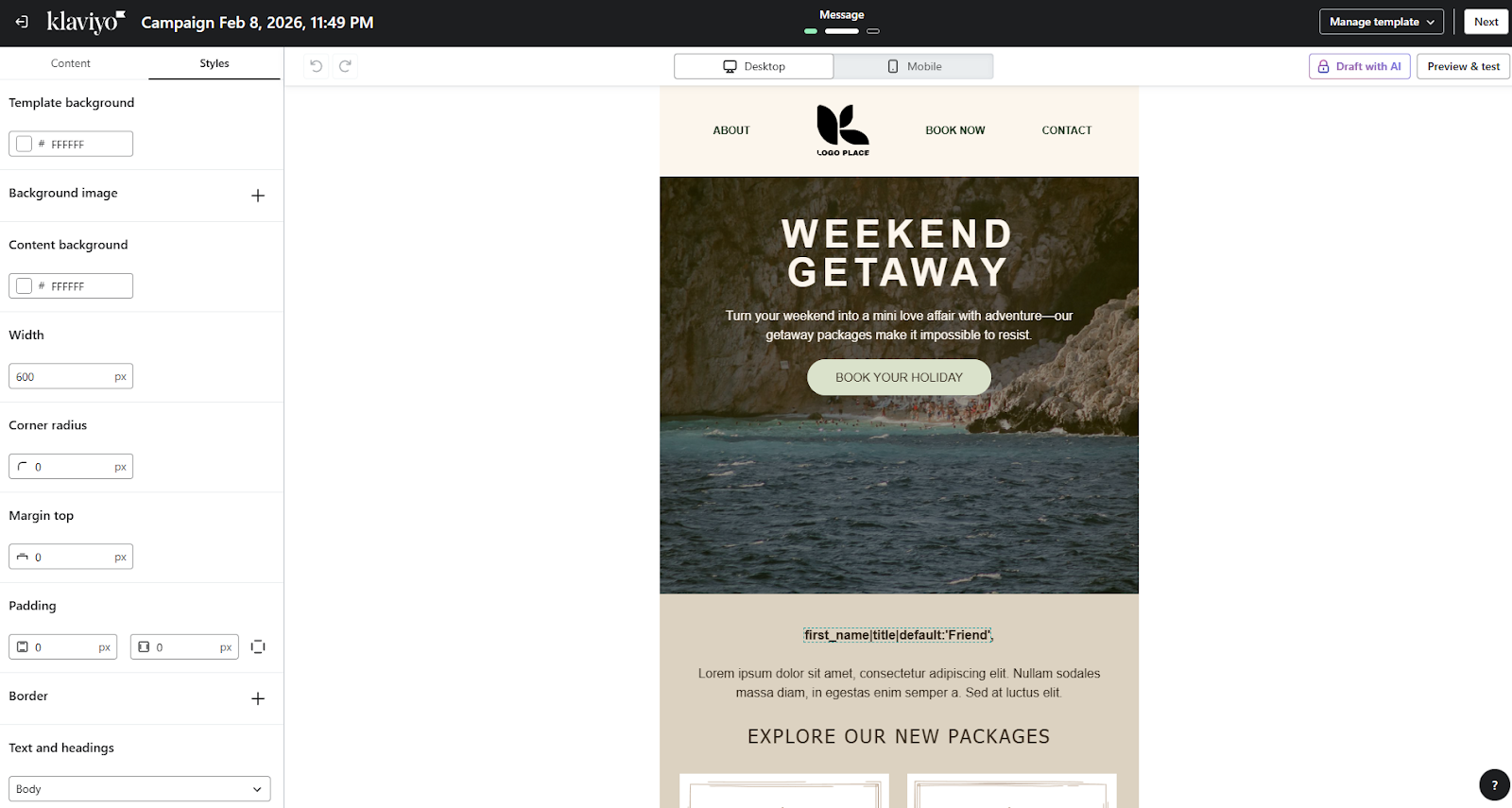 Inside the Klaviyo email builder
Layouts are fully adjustable with sections and columns, while the “Styles” tab lets you fine-tune everything from background images and colors to padding, margins, fonts, and mobile display options. In short, if you like having control over every pixel, Klaviyo is more than happy to hand it over.
Just like Klaviyo, MailerLite keeps the editing experience straightforward, offering a bunch of creative control over your templates at the same time. All essential and advanced blocks, like text, images, buttons, countdown timers, and surveys, are easily accessible from the sidebar.
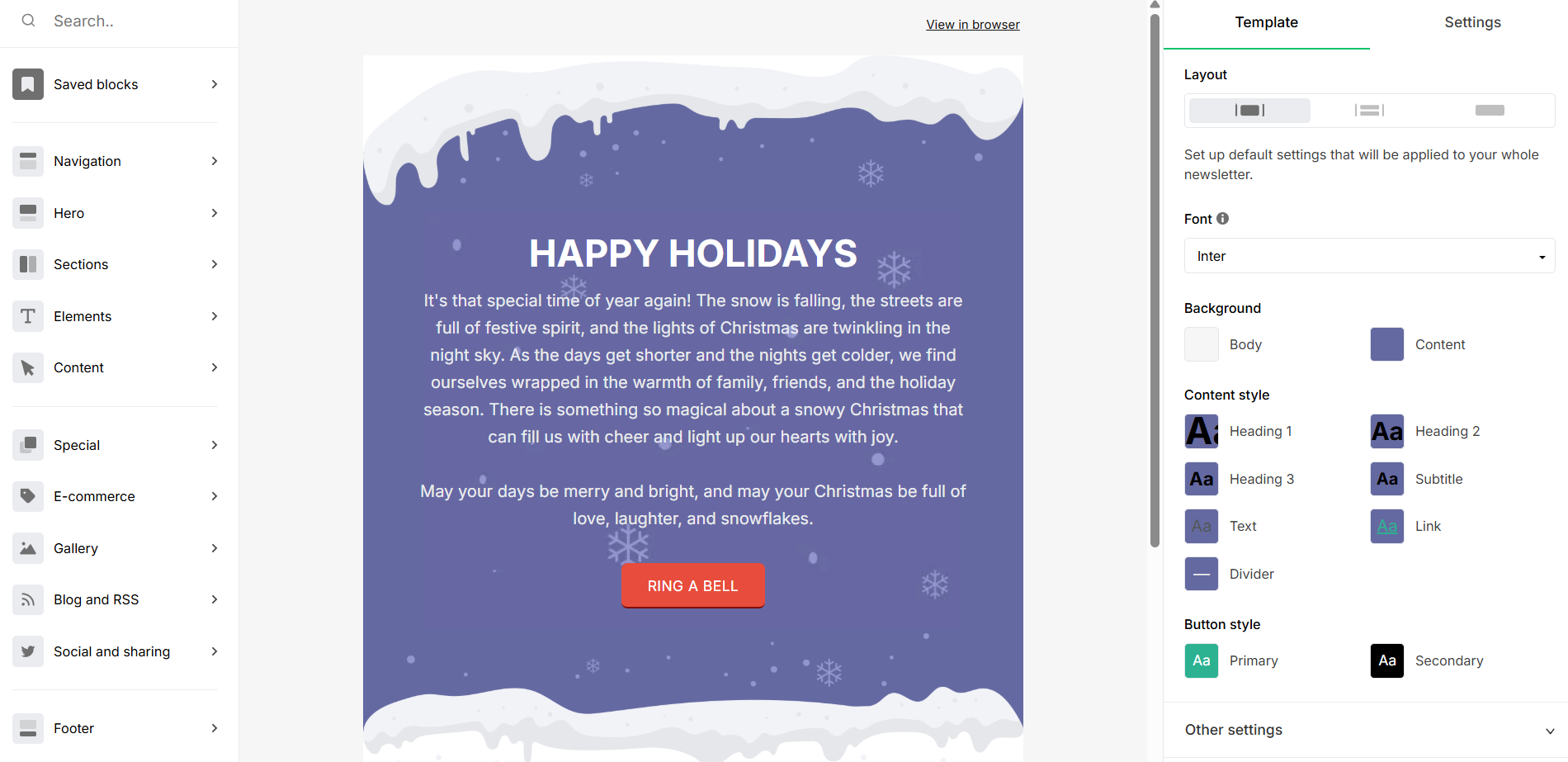 Inside the MailerLite email editor
You can duplicate and reuse blocks, adjust global brand settings, and preview emails on desktop and mobile with literally minimal navigation. As a result, MailerLite’s editor is flexible for first-time users, while still meeting the expectations of visual-oriented marketers.
Marketing automation
MailerLite: 7.5/10 | ⭐ Klaviyo: 9.6/10
Automation is where email platforms either stay simple or become strategic tools. It determines how much of your marketing runs on autopilot, how complex your customer journeys can be, and how easily those workflows scale over time.
MailerLite covers the essentials and makes automation accessible early. Klaviyo, in turn, shows its eCommerce DNA here, being designed for complex, stage-specific customer lifecycle flows in data-driven environments.
Here’s how they compare across the main automation factors:
| Aspect |
MailerLite |
Klaviyo |
Winner |
| Availability by plan |
AAutomation available across all plans, with higher tiers supporting more active workflows and longer automation sequences |
Full automation capabilities available across all plans |
Klaviyo |
| Automation builder |
Visual workflow builder with rules and actions; split A/B testing and some advanced features require a paid plan |
Powerful automation builder with branching logic, time delays, and built-in A/B testing on all plans; AI assistant available for paid accounts |
Klaviyo |
| Triggers available |
11 automation triggers, including 4 designed specifically for connected eCommerce stores |
40+ pre-built triggers across behavioral, transactional, and product events; unlimited custom events via API and webhooks |
Klaviyo |
| Pre-built automations |
15 editable automation templates covering welcome, lead nurturing, promotional, and basic eCommerce flows |
60+ pre-built templates covering browse abandonment, cart recovery, post-purchase, cross-sell, replenishment, win-back, price drop, and back-in-stock flows |
Klaviyo |
| Channels supported |
Email |
Email, SMS, mobile push notifications |
Klaviyo |
| Automation complexity |
Supports multi-step workflows with conditional paths; some advanced features are limited by plan |
Built for structured, multi-channel customer journeys with advanced segmentation, conditions, and filters |
Klaviyo |
| Total score |
7.5/10 |
9.6/10 |
Klaviyo |
A 2.1-point difference may not be obvious at first glance, but it becomes clear as workflows grow more complex.
MailerLite approaches automation with structure and clarity. You select a trigger and build the workflow in a visual editor using rules and actions step by step. Pre-built templates help teams launch common workflows quickly without designing from scratch.
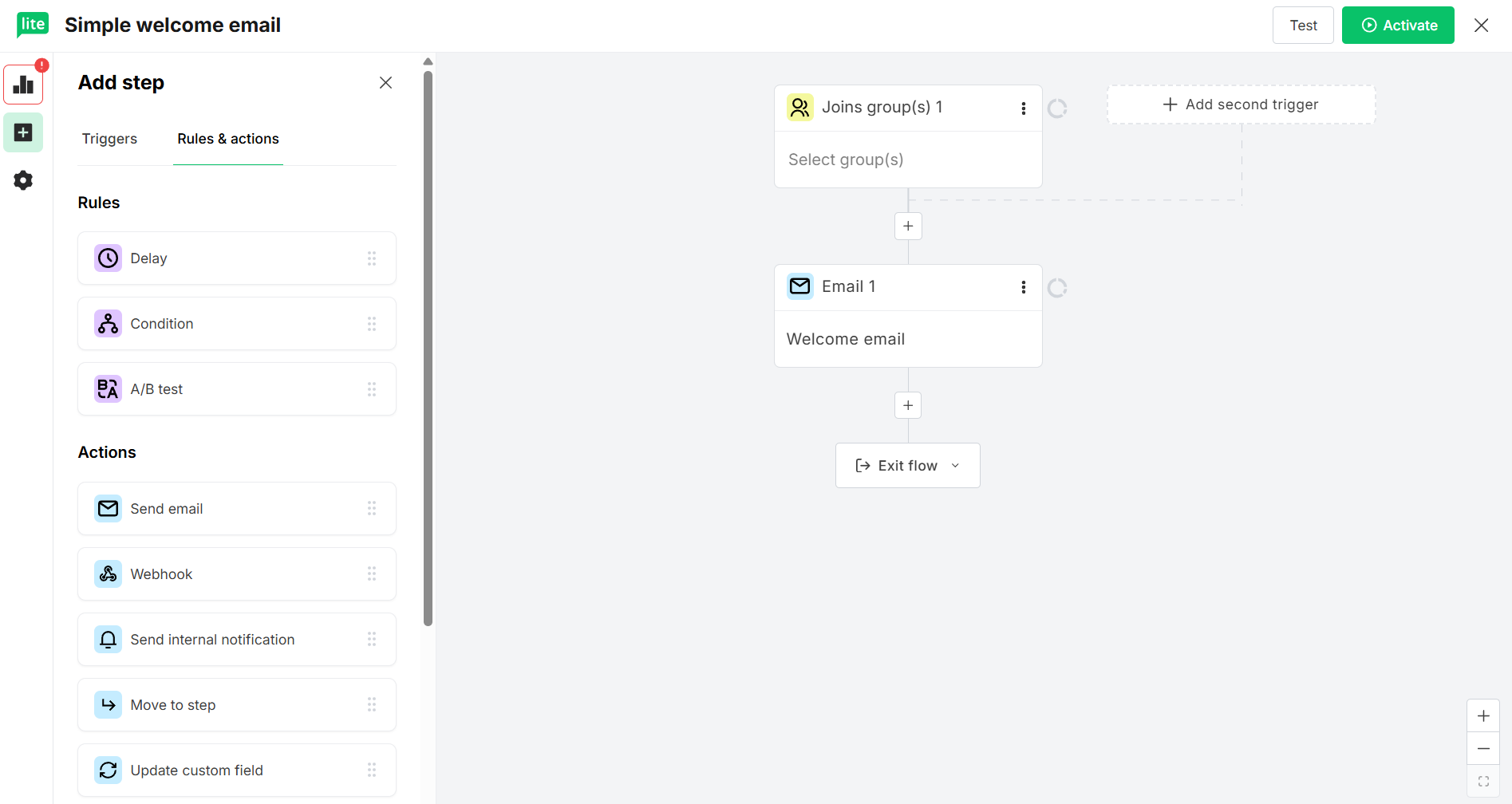 Welcome email automation flow at MailerLite
Meanwhile, Klaviyo stands out thanks to how deeply its automations tie into eCommerce data. Triggers connect directly to behavioral and product data, which allows flows to adapt based on customer actions in real time. After selecting a trigger, such as a list subscription, product view, or cart abandonment, you can assemble layered, multi-step workflows that incorporate email, SMS, delays, actions, and conditional paths.
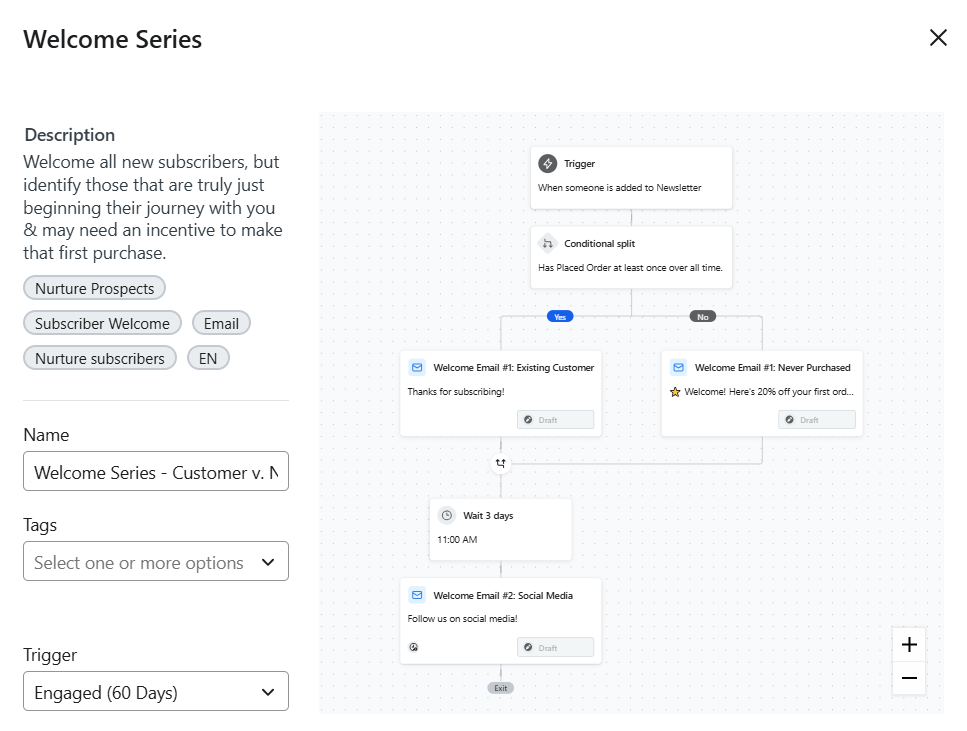 Customizable welcome flow template in Klaviyo
The platform offers pre-built templates that cover sophisticated scenarios out of the box, saving weeks of workflow logic design. Plus, it’s equipped with an AI-powered assistant to generate flows with triggers, filters, and structure from natural language inputs.

Power up your business with smart tools
Emails, automation, chatbots, websites, CRM, and more — everything you need to connect with your audience. Try SendPulse for free today.
Get started for free
Contact management
MailerLite: 8/10 | ⭐ Klaviyo: 9.2/10
Segmentation is what turns email marketing from scheduled sending into targeted communication. The way a platform structures and updates contact data shapes the accuracy and context that actually drive automations.
MailerLite organizes contacts through clear rules and groups. Klaviyo builds segmentation around purchase history, live browsing behavior, and predictive metrics. Here’s how the two approaches compare:
| Aspect |
MailerLite |
Klaviyo |
Winner |
| Segmentation capabilities |
Condition-based segmentation using fields, tags, and campaign activity, with basic AND/OR logic and 7 pre-built segments |
Event-driven segmentation with nested AND/OR logic across behavior, purchases, predictive insights, and lifecycle data; AI-generated segments |
Klaviyo |
| Segment update speed |
Segments refresh automatically once the criteria are met |
Segments update in real time based on customer behavior and transactions |
Klaviyo |
| Available segmentation criteria |
Location, profile data, time zone, signup source and date, email interactions, automation activity, and tags |
Browsing behavior, cart activity, purchase history and frequency, product affinity, engagement metrics, predicted next purchase date, and CLV bands |
Klaviyo |
| Tagging and manual organization |
Group-based tagging within a single shared list |
Tags are supported, but the primary organization relies on behavioral and attribute-based segments |
MailerLite |
| Contact structure |
One shared database; contacts can belong to multiple groups without duplication |
One centralized profile per email address with all behavioral and purchase history attached |
Tie |
| Total score |
8/10 |
9.2/10 |
Klaviyo |
MailerLite organizes contacts through manual tags and condition-based segments. You define criteria, apply groups, and build segments using straightforward rules. For many businesses, that structure is predictable and easy to manage.
Klaviyo builds detailed customer dossiers that update in real time based on behavior, purchases, and interactions. Segments can incorporate predictive signals, allowing targeting to adjust automatically as customer behavior evolves.
With a 1.2-point lead, Klaviyo is a better fit for eCommerce brands optimizing customer journeys based on what people do, not just who they are. MailerLite delivers solid segmentation for standard marketing needs with a simpler, more straightforward approach.
Signup forms and landing pages
MailerLite: 7/10 | ⭐ Klaviyo: 7.4/10
Signup forms and landing pages sit at the front line of audience growth, shaping how users perceive your brand early on and how seamlessly they convert.
Both platforms offer solid form-building tools. However, MailerLite offers a complete lead-capture toolkit on a single platform, whereas Klaviyo focuses exclusively on forms but offers more sophisticated targeting and tighter automation integration.
Here’s how the platforms compare in their approach to subscriber acquisition:
| Aspect |
MailerLite |
Klaviyo |
Winner |
| Form builder |
Visual form builder with 33 templates for embedded and pop-up forms; supports visibility controls, GDPR fields, and A/B testing |
Advanced form builder with 115 templates for pop-ups, fly-outs, embedded forms, and teasers, all designed to feed into automation; supports multiple steps, A/B tests, and bot prevention measures |
Klaviyo |
| Pop-up targeting conditions |
Flexible display settings, including time delay, scroll percentage, exit intent, frequency caps, scheduling, device targeting, and page-specific rules |
Timing, frequency, and behavior rules like exit intent, scroll depth, time on page, and page views, along with device type, visitor status, segments, URL and UTM parameters, location, and cart contents |
Klaviyo |
| Landing page builder |
Native builder with 30 templates, block-based editing, SEO settings, publishing controls, custom domains, and essential analytics |
No native landing page builder; requires third-party tools |
MailerLite |
| Total score |
7/10 |
7.4/10 |
Klaviyo |
Let’s see how their pop-up builder interfaces compare side by side.
Once you pick a pop-up template in MailerLite, the drag-and-drop editor opens with your design ready for tweaking. A panel of “Elements” sits on the left, letting you quickly drop in new components and shape the form to your liking. The “Style” tab handles the visual side – fonts, colors, and borders, while the “Settings” tab lets you adjust layout, size, visibility, consent fields, and other behavioral details.
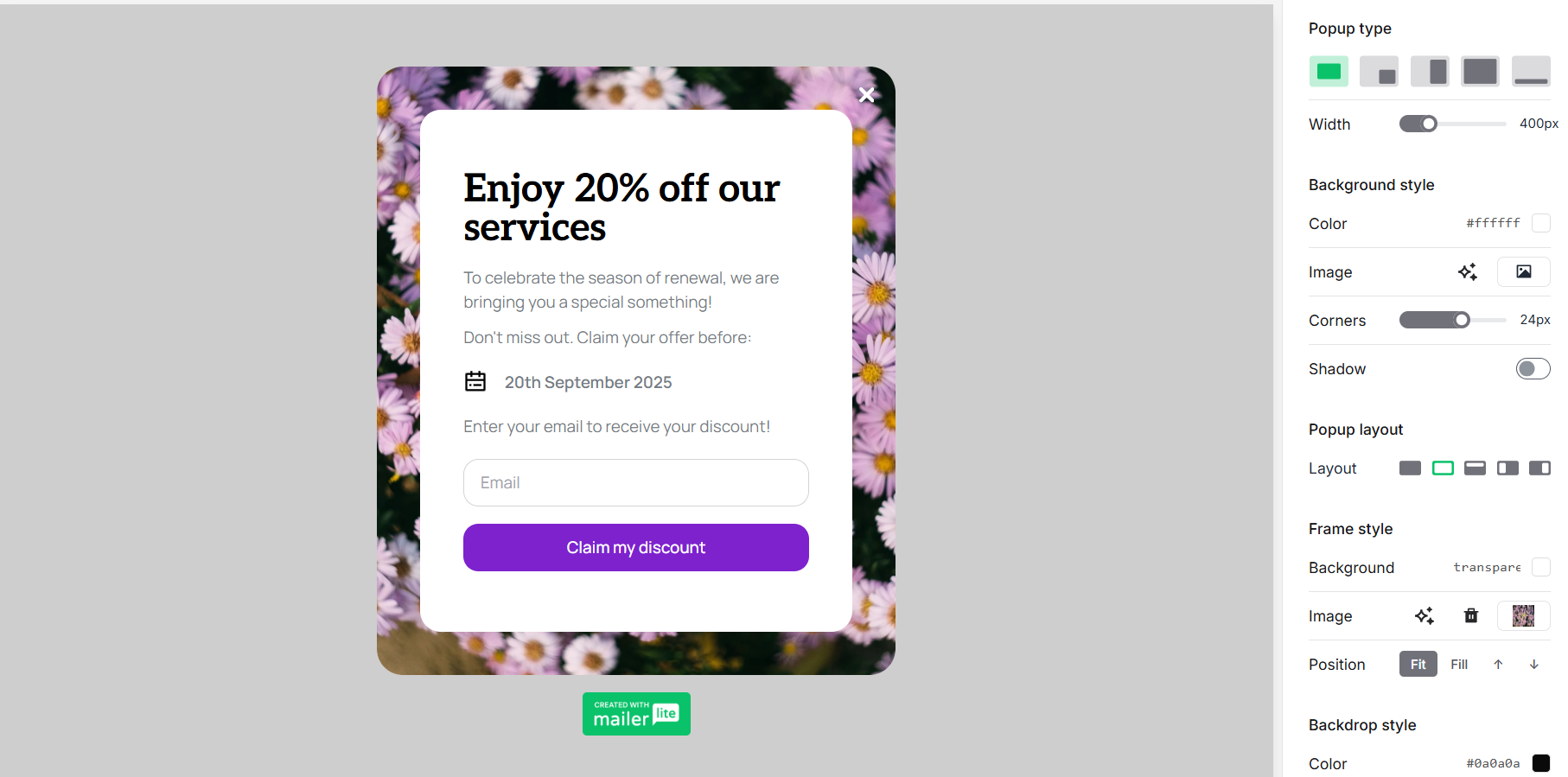 Editing a pop-up form in MailerLite
Everything is clearly organized, so you spend more time designing than searching for options. Overall, the experience leans toward simplicity rather than sophistication – practical, approachable, and easy to navigate from the start.
Klaviyo’s multi-tab editor is designed for marketers who like precise control. Styles shape the look, blocks build the content, and display conditions let you define when and to whom the pop-up appears. Preview tools round out the process before you publish.
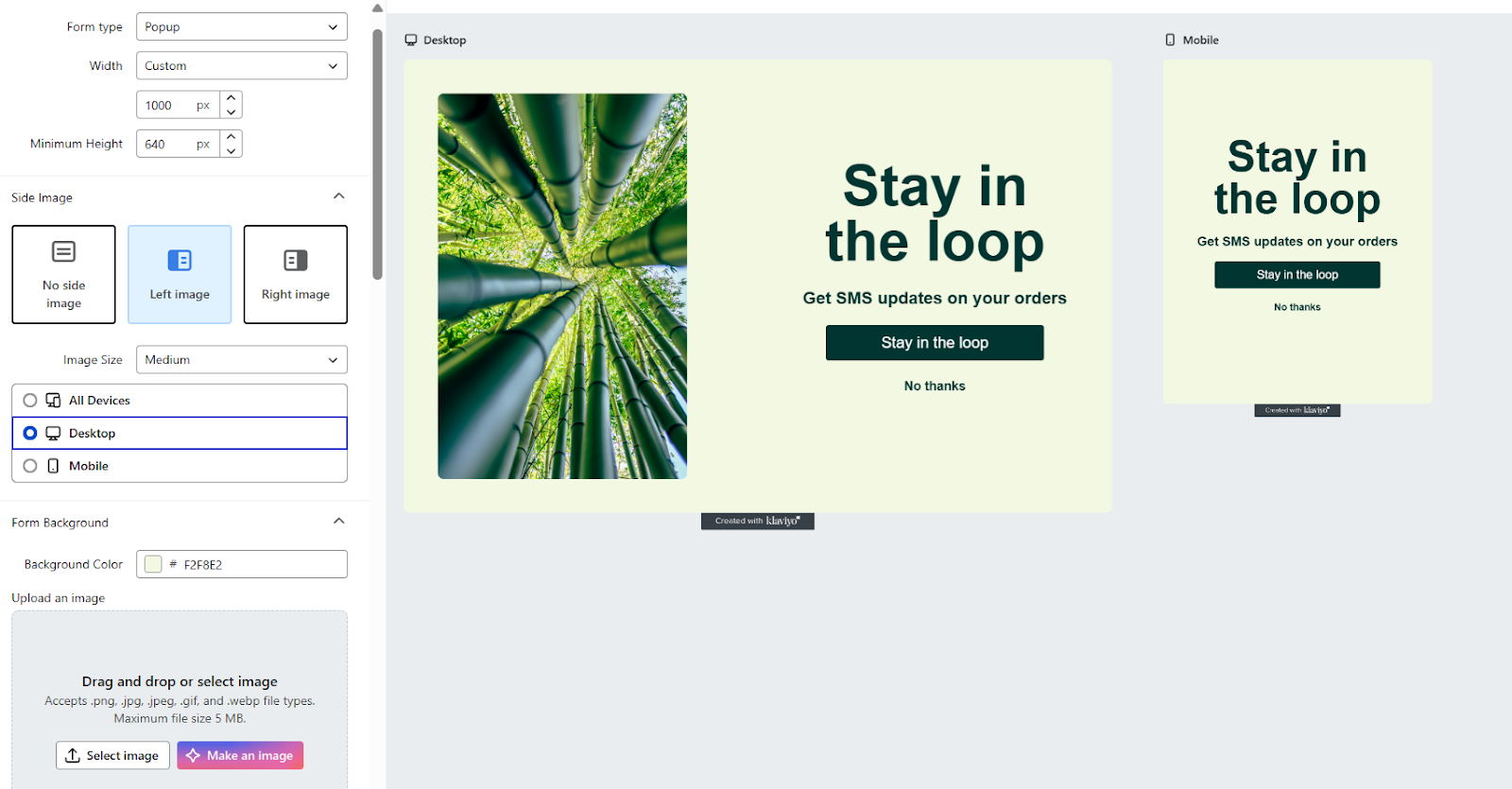 Editing a pop-up form in Klaviyo
It’s a powerful builder with total, pixel-perfect control over design and targeting options, but it surely requires more initial setup time.
If you need both targeted pop-ups and standalone landing pages,
SendPulse has you covered. The platform provides interactive pop-ups with advanced display logic and a fully-featured website builder, including custom domains, store functionality, and reusable components for consistent branding. Oh, and both tools are backed by AI to support content and design along the way.
Deliverability
MailerLite: 9.8/10 | ⭐ Klaviyo: 10/10
Deliverability is easy to ignore, right until your emails stop reaching the inbox. Behind the scenes, it’s shaped by proper authentication, clean contact lists, a strong sender reputation, and a reliable sending infrastructure.
MailerLite and Klaviyo both check the essential boxes, but one offers a bit more reporting depth for those who want closer monitoring. Here’s how they compare:
| Aspect |
MailerLite |
Klaviyo |
Winner |
| Authentication |
Step-by-step setup for SPF, DKIM, and DMARC, with automatic domain authentication for most hosting providers |
Automatically configured SPF and DKIM when setting up a branded sending domain; DMARC handled separately at the DNS level |
Tie |
| Deliverability monitoring tools |
Domain reputation tracking, blocklist and spam filter checks, and inbox placement estimates |
Detailed campaign- and flow-level deliverability reporting with reputation repair AI and sender health scores |
Klaviyo |
| List hygiene features |
Automated bounce handling with soft-to-hard conversion after 3 soft bounces; complaint suppression; email verification tool |
Automated suppression of hard bounces and 7+ consecutive soft bounces, spam complaints, and role-based email addresses; never-engaged segments |
Tie |
| Dedicated IP |
Available on request for high-volume senders, with evaluation and supervised warm-up by the deliverability team |
Available for qualifying high-volume senders with tailored assistance from the customer success team for the IP warming process |
Tie |
| Total score |
9.8/10 |
10/10 |
Klaviyo |
This isn’t a dramatic showdown. Both platforms guide you through domain authentication setup with clear instructions. Both automatically suppress hard bounces, manage spam complaints, and handle soft bounces intelligently. Both use shared IP pools for most users, with dedicated IPs available for high-volume senders.
Klaviyo’s forte is definitely its Deliverability hub. It’s a centralized dashboard showing campaign-level and flow-level inbox placement, bounce details, open rates by provider, and sender reputation health score. This visibility helps you pinpoint and resolve deliverability issues faster. On the other hand, MailerLite stands out with a native email verification tool and supervised IP warm-up.
If you send responsibly and maintain your list quality, either platform will support you well.
Integrations
MailerLite: 6.4/10 | ⭐ Klaviyo: 7.2/10
Most businesses don’t need hundreds of integrations. They need the right ones to work reliably and sync the data that actually drives marketing decisions.
Both platforms cover essential categories – eCommerce, CRM, advertising, design, and analytics. Yet, Klaviyo provides behavioral tracking that MailerLite can’t match.
| Aspect |
MailerLite |
Klaviyo |
Winner |
| Integration catalog |
185 integrations |
350+ integrations |
Klaviyo |
| eCommerce platforms |
19 integrations, for example, Shopify, WooCommerce, BigCommerce, and Adobe Commerce |
21 integrations with Shopify, WooCommerce, BigCommerce, etc.; deep behavioral sync, including product views, cart events, and browsing activity |
Klaviyo |
| CRM systems |
17 integrations, including Zoho CRM, Pipedrive, Salesforce, Kommo, and HubSpot |
14 integrations, including Salesforce, Zoho, Microsoft Dynamics, and Monday; accurate customer profile synchronization every hour |
Klaviyo |
| Analytics and data tools |
17 integrations, including Google Sheets |
12 integrations with enterprise warehouses like BigQuery, Snowflake, Amazon Redshift, Amazon S3, and Azure |
Klaviyo |
| Zapier support |
13 triggers and 6 actions |
3 triggers and 21 actions |
Klaviyo |
| MCP server |
Native MCP server for connecting ChatGPT, Claude, and Cursor |
Official MCP server for connecting Claude, Cursor, Windsurf, and ChatGPT |
Tie |
| Total score |
6.4/10 |
7.2/10 |
Klaviyo |
The higher score in this category isn’t based solely on the number of integrations. It reflects the quality and richness of the data pulled in.
MailerLite supports the core stack most small and mid-sized businesses rely on. Its integrations typically sync contact data, campaign activity, and purchase history, and are mostly easy to set up.
Klaviyo places a heavier emphasis on real-time data syncing. Its native eCommerce integrations with popular platforms like Shopify go beyond exchanging information. They capture placed orders, catalog data, browsing behavior, and other events. That deeper data stream allows you to create targeted segments and flows around how customers behave.
AI features
MailerLite: 5/10 | ⭐ Klaviyo: 8.7/10
In email marketing, AI capabilities range from basic content generation to sophisticated predictive analytics. MailerLite focuses on the former – AI-assisted copywriting for emails and subject lines. Klaviyo embeds AI across email creation, automation, analytics, and segmentation to guide targeting and lifecycle decisions.
Here’s how the platforms compare:
| Aspect |
MailerLite |
Klaviyo |
Winner |
| Email generation |
OpenAI-based writing assistant creates email copy and subject lines with adjustable tone and style |
Email AI generates text, images, layouts, buttons, and product blocks, adjusts tone and length, and provides 3 subject line variants aligned with brand goals |
Klaviyo |
| Automation generation |
AI-driven actions initiated via MCP commands |
Flows AI converts natural language into an automation draft with recommended triggers, filters, actions, and structure that you can refine in the builder |
Klaviyo |
| Sending time optimization |
Sends based on each subscriber’s past engagement and time zone; available on higher-tier plans |
AI defines the optimal send time per recipient using their engagement history |
Tie |
| Predictive customer analytics |
Not included |
Customer lifetime value, churn risk, purchase frequency, average time between orders, and gender derived from behavioral and transaction data |
Klaviyo |
| Smart segmentation |
Not included |
AI suggests and generates high-value segments using behavioral, engagement, and predictive data |
Klaviyo |
| Deliverability assistance |
Not included |
Reputation repair AI identifies and removes unengaged contacts from your list |
Klaviyo |
| Total score |
5/10 |
8.7/10 |
Klaviyo |
This category matters significantly for data-rich eCommerce businesses. For everyone else, the gap looks impressive on paper but won’t affect daily operations that much, no matter what platform you choose.
Reporting and analytics
MailerLite: 7.8/10 | ⭐ Klaviyo: 10/10
At some point, every team wonders, “Is my marketing working?” Reporting helps answer that question. MailerLite and Klaviyo both give you the core metrics you need. The key difference is how far you can drill down.
| Aspect |
MailerLite |
Klaviyo |
Winner |
| Advanced reports |
Detailed reports covering campaigns, audiences, comparisons, and eCommerce performance |
Business and audience performance reports with RFM and funnel analysis, plus product-level insights |
Klaviyo |
| Custom reports |
Pre-set templates; no custom dashboards |
Pre-built and custom reports across single or multiple metrics for campaigns, flows, and products |
Klaviyo |
| Reporting speed |
Metrics refresh with a delay |
Data update in real time |
Klaviyo |
| Export options |
CSV exports for campaign results, contact data, and reports |
CSV exports for customer profiles, events, segments, and revenue data |
Klaviyo |
| Total score |
7.8/10 |
10/10 |
Klaviyo |
MailerLite keeps reports simple and readable. They are easy to navigate and cover the essentials without overwhelming you with layers of filters. You can also connect your email data with external AI tools through MailerLite’s secure MCP server for personalized data analysis and actionable suggestions.
On the other hand, Klaviyo offers more analytical depth with pre-built dashboards and customizable reports. You can track performance across flows, campaigns, products, and segments in real time, which can be especially useful for eCommerce teams that need detailed customer and purchase insights. On top of that, Klaviyo’s AI-driven benchmarks let you compare your performance against businesses of similar size, type, and market position.
Customer support
⭐ MailerLite: 7.3/10 | Klaviyo: 6.4/10
When a platform is easy to use, customer support often stays in the background. But the steeper the learning curve, the more valuable fast and helpful support becomes.
Neither MailerLite nor Klaviyo offers phone support, so both rely on email, chat, and documentation for help. Here’s how they compare:
| Aspect |
MailerLite |
Klaviyo |
Winner |
| Channel availability |
24/7 email support in multiple languages with up to 14-day access for free users; 24/7 live chat access for paid users |
24/7 email support with 60-day access for free users; live chat support during business hours on paid plans |
MailerLite |
| Email response time |
Typically within 24 hours; often faster during business hours |
Priority-based responses on premium plans: 1–2 hours for urgent issues and up to 24 hours for standard requests |
Klaviyo |
| Knowledge base |
Searchable help center with regularly updated guides, tutorials, videos, and troubleshooting resources |
Extensive documentation with detailed guides on automation, eCommerce workflows, deliverability, and analytics |
Tie |
| Onboarding assistance |
In-app user-triggered tips and brief instructional videos, free training courses, and personalized onboarding assistance on premium plans |
eCommerce-focused setup guides and integration checklists; one-on-one onboarding sessions available on higher-tier plans |
MailerLite |
| Support quality rating on Capterra |
4.8/5 |
4.3/5 |
MailerLite |
| Total score |
7.3/10 |
6.4/10 |
MailerLite |
Interestingly, the simpler platform scores higher on support, while the more complex one scores lower. This raises a question: is Klaviyo’s support less helpful, or does the platform complexity make even exemplary support feel insufficient?
User reviews suggest it’s both. Klaviyo’s support is rated lower than MailerLite’s (4.3 vs 4.8), and the platform’s steeper learning curve means users need more help from human agents more often. Given the limited chat availability, it can be frustrating or inconvenient to wait for a reply from the rep when you need help with a business-critical issue.
MailerLite wins on support accessibility and user satisfaction. If you’re a small team without dedicated technical resources, this means a lot.
If consistent access to support matters to you,
SendPulse provides 24/7 live chat handled by real agents in multiple languages. Customer support is available across plans, so you don’t need to upgrade just to get assistance.
Your decision checklist
Now that you’ve toured the compatibility landscape of MailerLite and Klaviyo, you may have noticed something: this isn’t a “pick the highest score and go home” situation. The right choice depends on your business model, team capabilities, and expectations. To help you find a better fit, here are a few aspects to consider.
| Decision area |
MailerLite
is a better fit if… |
Klaviyo
is a better fit if… |
| Business model |
? You run a small-to-mid-sized business, a creator brand, or a service-based company with straightforward marketing flows. |
? You run an eCommerce or DTC brand where customer behavior and purchase history drive revenue. |
| Automation needs |
? You need practical, easy-to-build workflows that cover core scenarios without excessive complexity. |
? You need advanced, multi-step lifecycle automation triggered by behavior, purchase, and predictive data. |
| Analytics focus |
? You want clear, actionable reports that help you track performance and make routine decisions. |
? You want real-time metrics, funnel visibility, and product-level performance to identify and resolve customer-journey bottlenecks. |
| Budget expectations |
? You need predictable pricing that stays affordable as your list grows. |
? You’re willing to pay more for advanced features that drive measurable revenue. |
| Team and resources |
? Your team is small and needs a platform that’s quick to learn and manage. |
? You have time and resources to fully use advanced segmentation and automation features. |
If most of the criteria above point clearly to one platform, congratulations – you’ve found your perfect match. But if the scorecard looks more like a friendly tie, that simply means both tools could work for you.
In this case, it can be helpful to consider alternative options. Say, you can explore cost-efficient solutions like MailerLite or automation-focused tools like Klaviyo.
Final verdict and recommendations
⚖️ Final scores: MailerLite – 8.4/10 | Klaviyo – 8.7/10
This is one of those comparisons where the numbers don’t tell the full story. At this point, the difference is really about finding the right fit for your needs.
If you’re looking for simplicity, affordability, and a quick return on investment, go with MailerLite. On the other hand, if your focus is on advanced segmentation, in-depth data analysis, and revenue-driven automation, Klaviyo is your best bet.
When both platforms can work equally well, consider taking these steps:
- Start with free plans or trials. Use your actual data to test out the email, segmentation, and automation features of both platforms.
- Map your critical workflows. Can they run properly in MailerLite, or do they require Klaviyo’s depth?
- Project 12-month costs. Factor in list growth, required tier, and specific features you’ll need.
- Think about your growth trajectory. If you’ll outgrow MailerLite in 6-12 months, starting with Klaviyo might save you a migration later on.
If neither platform feels like a complete fit, but you find yourself leaning towards MailerLite, Mailchimp lives nearby with its own twist. Our Mailchimp vs MailerLite comparison will highlight how they stack up.
If you prefer Klaviyo’s depth but not quite the level of investment, consider ActiveCampaign. It often appeals to teams looking for strong capabilities with a slightly lower entry point. You can find more details in our ActiveCampaign vs Klaviyo review.
Lastly, if you’re aiming for a middle ground where advanced features meet usability without breaking the bank, SendPulse should definitely be on your shortlist.