Running an online business means juggling initial costs and ongoing expenses. Since most companies rely on a stack of different tools, those costs add up fast, which is a big deal for startups and growing businesses.
In 2026, there are plenty of email marketing platforms that look affordable at first glance, but “cheap” can mean very different things. Some offer free-forever plans, others a free trial, pay-as-you-go options, or low-cost plans with subscriber or feature caps. In this guide, we break down the cheapest email marketing platforms, their key features, real pricing, and what users say about each.
Disclosure: This comparison is published by SendPulse. Although we cover our own product alongside competitors, we aim to present each tool fairly. No vendor paid to be included or ranked.
The cheapest email marketing platforms in 2026 with a genuinely useful free plan include SendPulse, Brevo, Sender, and EmailOctopus, plus Kit for its unusually large 10,000-subscriber free tier.
Here’s a quick rundown of each tool’s free plan limits, entry-level pricing, cost at 10,000 subscribers, and whether it offers pay-as-you-go pricing. All the prices reflect annual billing unless otherwise noted.
| Tool |
Free plan |
Cheapest paid plan |
Price at 10,000 subs |
Pay-as-you-go |
| SendPulse |
✅
500 subs; 15k emails/mo |
$9.60/mo
(Standard) |
$62.40/mo
(Standard) |
✅
Prepaid credits |
Brevo
(ex Sendinblue) |
✅
Up to 100k subs; 300 emails/day |
$8.08/mo
(Starter) |
$28.75/mo
(Starter, 20k-email tier) |
✅
Prepaid credits |
| MailerLite |
✅
250 subs; 2.5k emails/mo |
$10.80/mo
(Comfort) |
$80.10/mo
(Comfort) |
❌
Subscription only |
| Sender |
✅
2.5k subs; 15k emails/mo |
$9/mo
(Standard, monthly billing) |
$69/mo
(Standard, monthly billing) |
✅
Prepaid credits |
| EmailOctopus |
✅
2.5k subs; 10k emails/mo |
$9/mo
(Pro) |
$40/mo
(Pro) |
❌
Subscription only |
| Moosend |
❌
30-day free trial |
$7/mo
(Pro) |
$70/mo
(Pro) |
✅
Prepaid credits |
| Kit (ex ConvertKit) |
✅
10k subs; unlimited emails/mo |
$33/mo
(Creator) |
$116/mo
(Creator) |
❌
Subscription only |
| Zoho Campaigns |
✅
2k subs; 6k emails/mo |
$3/mo
(Standard) |
$36.75/mo
(Standard) |
✅
Prepaid credits |
| Mailjet |
✅
1k subs; 6k emails/mo |
$8.10/mo
(Starter) |
$17.10/mo
(Essential, unlimited contacts) |
❌
Subscription only |
| beehiiv |
✅
2.5k subs; unlimited emails/mo |
$49/mo
(Lite) |
$119/mo
(Lite) |
❌
Subscription only |
| Mailchimp |
✅
250 subs; 500 emails/mo |
$13/mo
(Essentials, monthly billing) |
$110/mo
(Essentials, monthly billing) |
✅
Prepaid credits |
Please note that pricing and plan details in this post are accurate as of October 2026. Always check each provider’s official pricing page before you commit, as plans change frequently.
When comparing cheap email marketing platforms in 2026, “free” doesn’t always mean you can use the service indefinitely without paying. Some platforms have genuinely free plans, while others offer only a time-limited trial, charge based on the emails you send, or keep the price low by putting strict limits on contacts, sends, or features. Here are the four pricing models to watch for.
Free plans you can keep using
A free-forever plan lets you keep using the platform without paying, as long as you stay within its limits. Those limits can apply to your subscriber count, monthly or daily email volume, user seats, or available features.
To give you an idea, Sender has a free-forever plan for up to 2,500 subscribers and 15,000 emails per month, with no daily sending limit. Brevo works differently: it allows you to store a large contact list — up to 100,000 contacts — but caps sending at 300 emails per day. Unused daily sends don’t roll over, so the practical limit depends on how frequently you send.
Free trials that expire
A free trial gives you temporary access to a paid platform rather than a plan you can keep using indefinitely. Once the trial ends, you generally need to subscribe to continue sending campaigns.
Case in point: ActiveCampaign does not have a free-forever plan. It offers a 14-day free trial instead, after which you need a paid account. Constant Contact is also a trial-based tool rather than a free email marketing platform. It provides a 30-day free trial as well, after which you should switch to a paid plan. That distinction matters when comparing “cheap” tools: a $0 trial shouldn’t be treated as a $0 long-term option.
Pay-as-you-go pricing
With pay-as-you-go email marketing, you pay for what you send instead of committing to a recurring subscription. This can be useful if you send campaigns occasionally or have an uneven sending schedule. The key thing to check is whether the provider charges per email, per block of credits, or through another usage-based model.
Brevo and SendPulse, for example, both offer prepaid email credits alongside their subscription plans.
Low-cost plans with strict limits
Some platforms are genuinely inexpensive but become less cheap once your list or sending volume grows. The headline price may apply only to a small subscriber tier or a limited number of monthly sends, with higher tiers required as your audience grows.
MailerLite is a good example of why you need to look beyond the starting price: its free plan has a tight subscriber and sending limit, and its paid plans step up in price as your subscriber tier grows.
Now that we’ve established what “free” really means, let’s focus on how to choose the right email marketing platform. Below are the key factors to consider when evaluating cost-efficient solutions so you get the best value for your investment.
Value over price
When comparing low-cost email marketing platforms, focus on what you get in each plan. Review whether you’re charged per subscriber, per email sent, or based on features used. Look for transparent pricing: make sure there are no hidden fees like extra costs for automation, templates, or deliverability monitoring tools.
Essential features
Even on a tight budget, certain features are non-negotiable for running effective campaigns. Here’s what you cannot sacrifice:
Skipping these essentials may save you a few dollars initially, but can limit your ability to launch professional, results-driven campaigns.
Expected trade-offs
Budget-friendly email marketing tools come with compromises, so it’s best to set realistic expectations. You may find fewer design templates, limited customization options, or slower customer support. Advanced integrations or analytics may also be restricted.
Understanding these limitations upfront will help you choose a tool that fits your marketing strategy. When you focus on what matters most, even a low-cost email solution can deliver excellent results for your business.
We created test accounts and built email templates and basic flows with almost every email platform on this list, so the features and screenshots reflect what you’ll actually find. Each platform has a free plan or a generous free trial, and each review includes current, official pricing and what real users say on G2 and Capterra. Note that the tools are not ranked.
Why do we use Mailchimp as a price benchmark? Throughout this guide, we compare prices to Mailchimp because it’s the most widely recognized email marketing platform — a reference point most users already know. It’s also well known for pricing that climbs steeply as your list grows: at 10,000 contacts, Mailchimp’s cheapest paid plan (Essentials) costs $110/month. So when we call a tool “cheaper than Mailchimp,” we mean cheaper than that $110/month at the same 10,000-subscriber list size.
SendPulse
G2: 4.6 ⭐ | Capterra: 4.6 ⭐
Best for: marketing-led teams that want cheap multi-channel outreach.
SendPulse is an AI-driven marketing platform that helps scaling businesses automate email and chatbot conversations. This low-cost email marketing service features an intuitive drag-and-drop email builder and a bunch of professionally designed templates. You can easily personalize your emails with text, images, buttons, videos, and social media links, and use AI-powered tools to generate, translate, and improve your email copy.
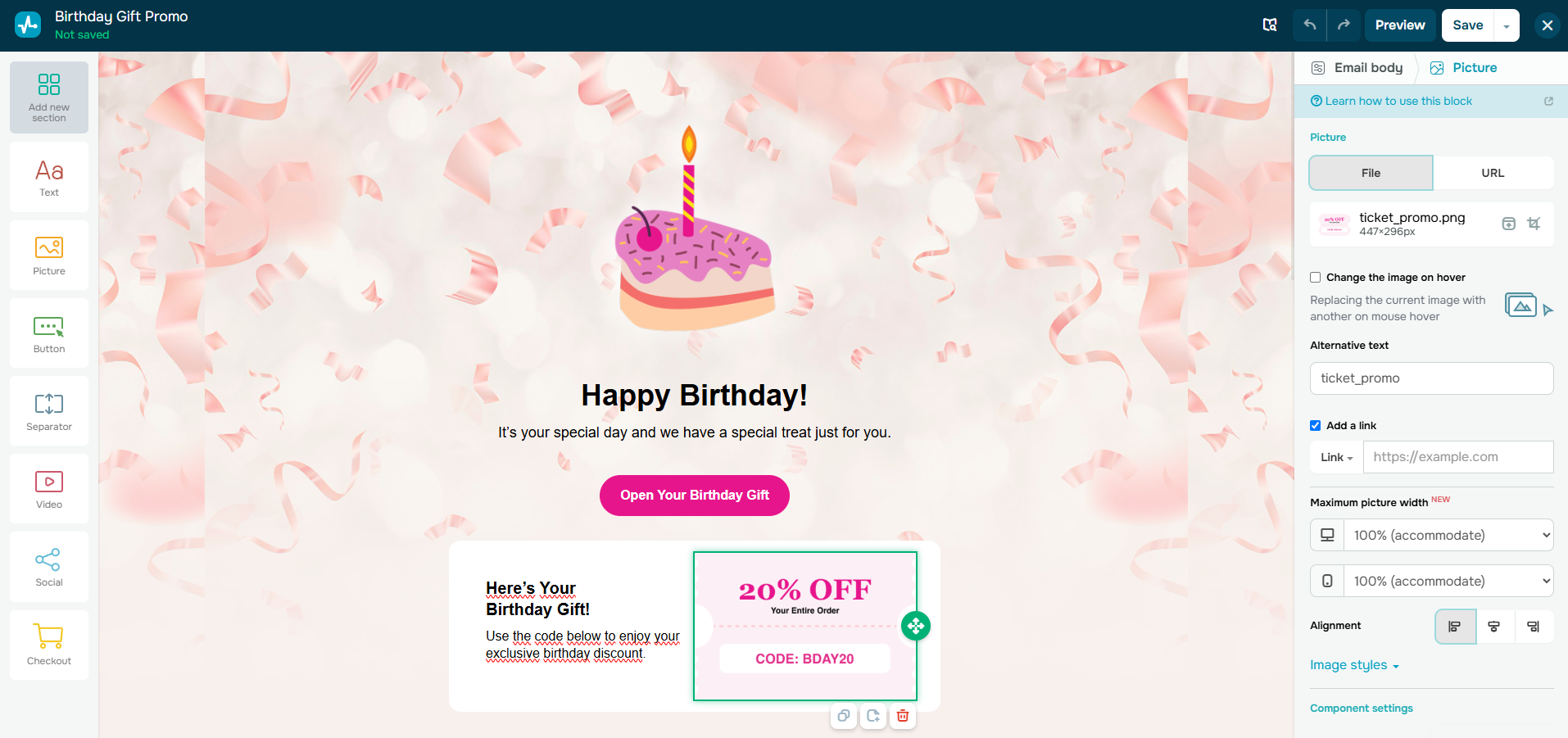 Putting together a birthday promo email in SendPulse’s editor
The automation builder lets you create sophisticated flows across multiple communication channels, triggered by subscriber activity, data changes, purchases, or custom events. You can segment audiences based on real-time behavior and data, and use advanced analytics and A/B testing to help you optimize campaigns.
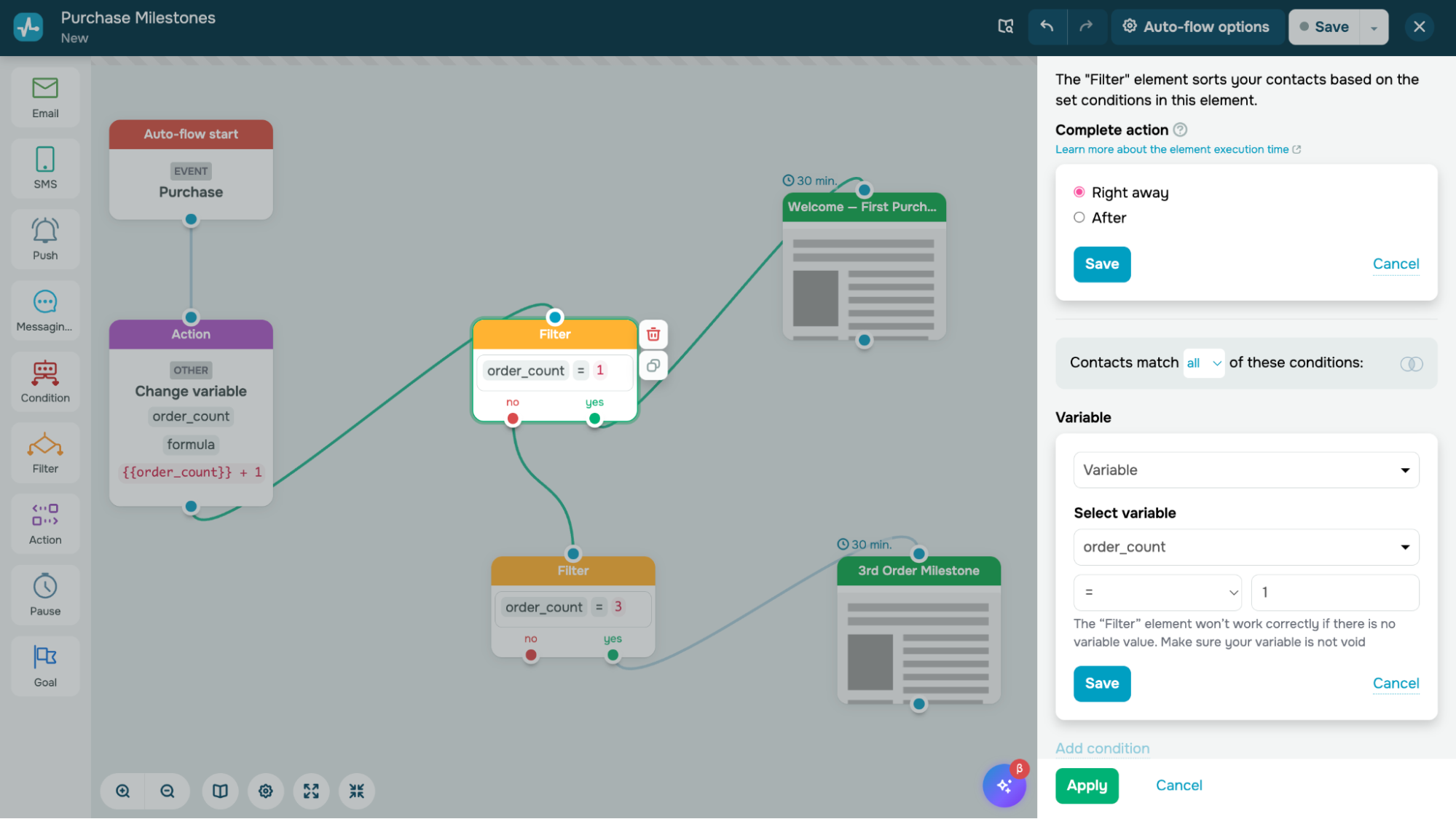 Creating a purchase milestone flow in SendPulse’s automation builder
In addition to email marketing and automation, SendPulse enables you to launch chatbots, online courses, and online stores. It also offers a built-in CRM system as well as eCommerce, CMS, and other integrations.
Key features include:
- drag-and-drop and HTML email builders;
- responsive email templates;
- multi-channel automation flows;
- static and dynamic subscriber segmentation;
- built-in spam checker and email verifier;
- multilingual emails;
- AI content generation tools;
- A/B testing for subject lines, content, and sender names;
- payment processing in emails;
- API and webhooks;
- integrations with CRM, CMS, eCommerce tools;
- campaign performance insights (opens, CTRs, unsubscribes).
Hands-on take. Automation is where SendPulse stands out. Its AI assistant can quickly create a full flow structure, which helps if you don’t want to start from a blank canvas. You still have to set up each step yourself, so it mainly saves time on the overall framework rather than the final details.
Free plan details. SendPulse’s free plan supports up to 500 subscribers and 15,000 emails per month. It includes email templates, a drag-and-drop email builder, 5 automated flows, 50 elements per flow, 250 MB storage space, and 3 sender email addresses.
Free plan limits. Beyond the caps, the free plan keeps automation basic and leaves out A/B testing, dynamic segmentation, and in-email payments. Your emails also carry a SendPulse footer until you upgrade.
Pricing. SendPulse’s paid plans start at $9.60/month (billed annually) for 500 subscribers and unlimited emails. It unlocks advanced features like saved segments and A/B testing. The cheapest option for 10,000 subscribers costs $62.40/month (billed annually). SendPulse also offers pay-as-you-go email plans starting at $48 for 10,000 emails. Check SendPulse’s official pricing page for current rates.
Cost takeaway. Against Mailchimp — the typical benchmark — SendPulse has a lower entry price at both list sizes: $9.60/month vs $13/month at 500 subscribers, and $62.40/month vs $110/month at 10,000 subscribers. Because every SendPulse paid plan includes unlimited emails, your cost stays predictable as you send more.
What users say. On G2 and Capterra, reviewers consistently praise SendPulse’s ease of use, responsive support, and value for the feature set; the most common requests are for more template variety and smoother team-permission controls.

Power up your business with smart tools
Emails, chatbots, automation, CRM, and more — everything you need to connect with your audience.
Get started for free
Brevo
G2: 4.5 ⭐ | Capterra: 4.6 ⭐
Best for: teams that send irregularly or have large lists but low or irregular sending volume.
Brevo, formerly known as Sendinblue, is an email and multi-channel marketing platform that offers a drag-and-drop email editor, responsive templates, and AI tools for generating copy and subject lines.
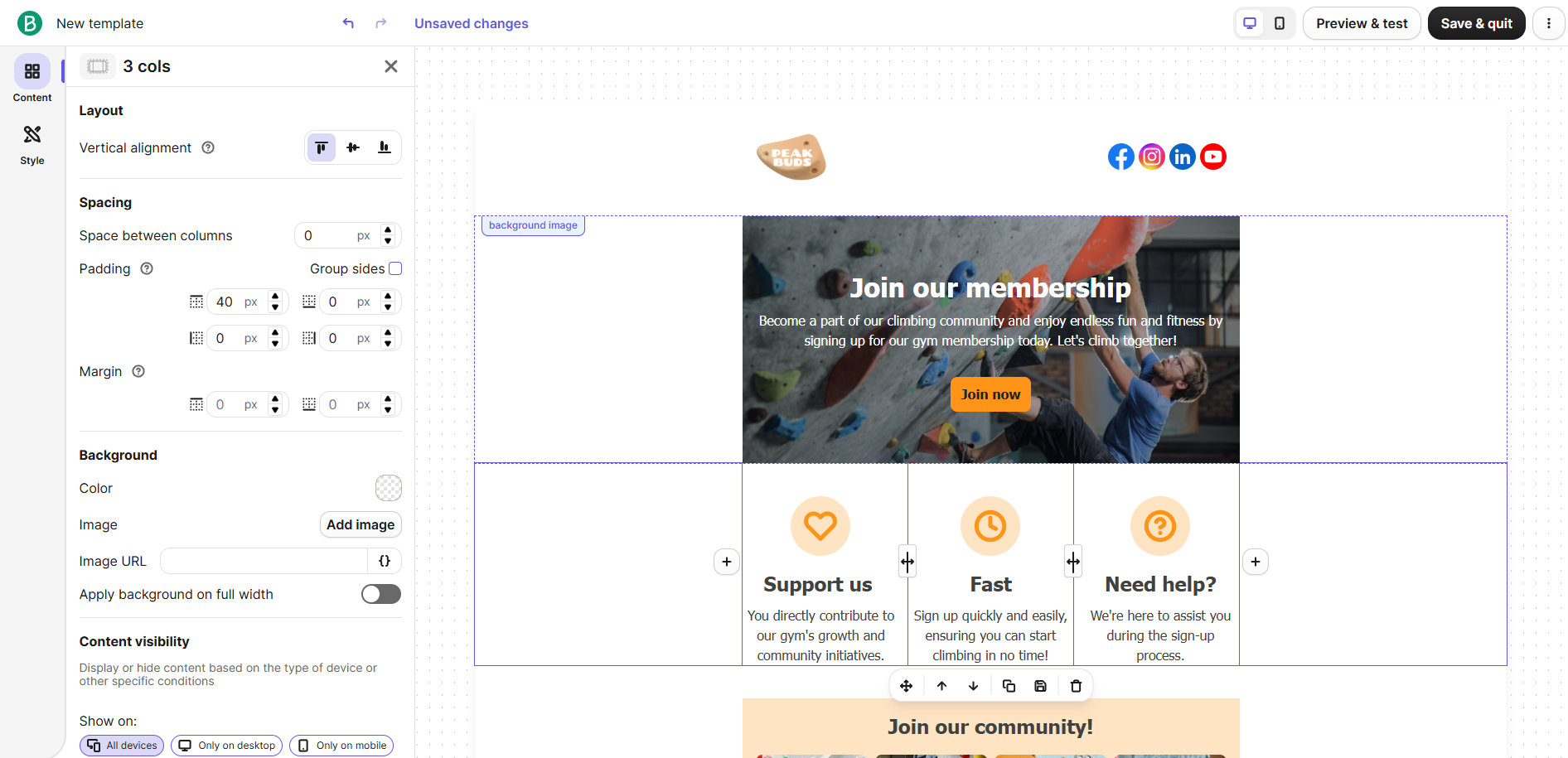 Building a membership email in Brevo’s drag-and-drop editor
Brevo also supports advanced segmentation, so you can create dynamic lists based on subscriber attributes, demographics, purchase history, and activity. For automation, you can combine these segments with triggers and workflow steps, while sending time optimization helps choose when individual contacts are most likely to engage.
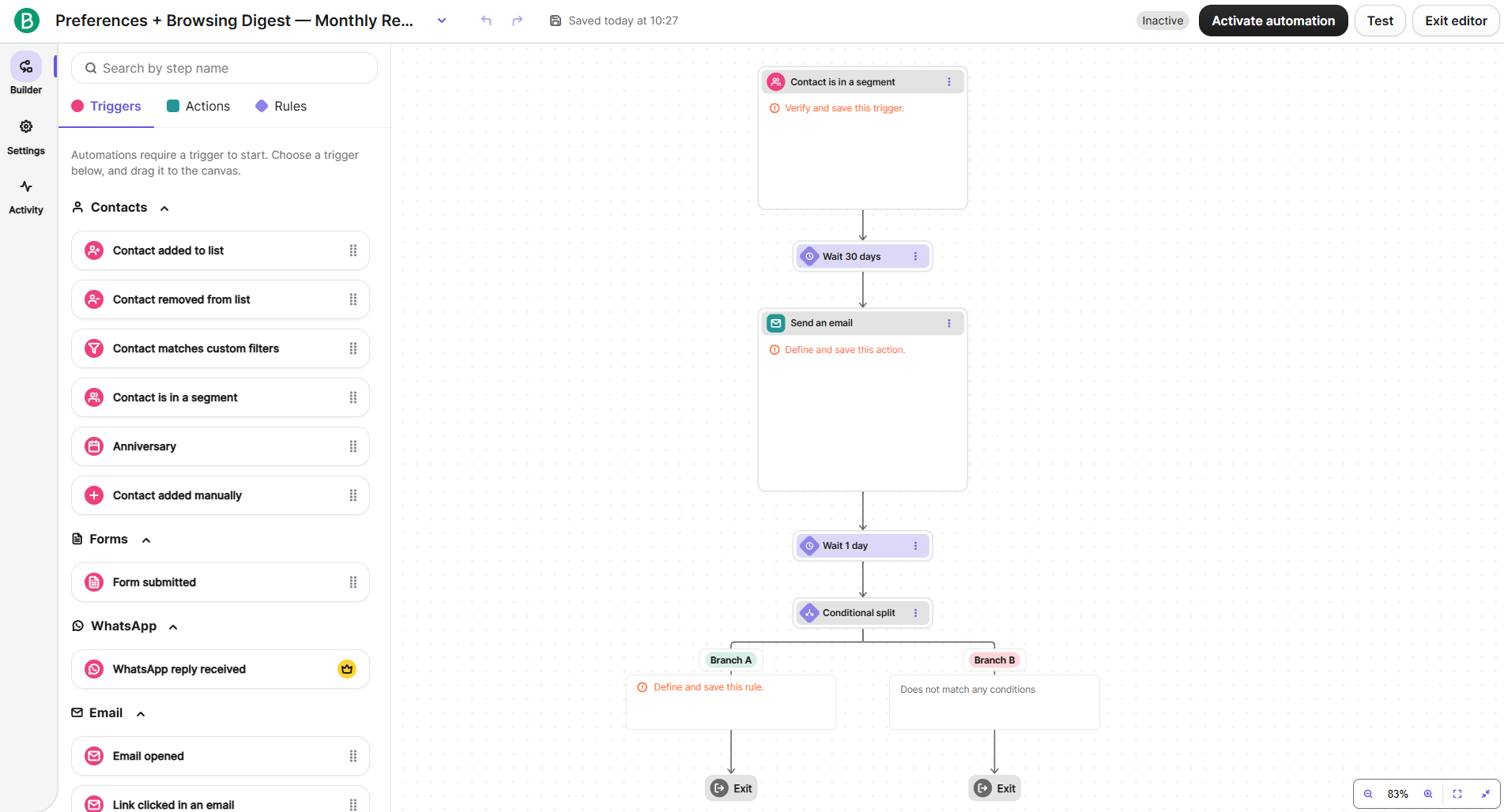 Mapping a monthly-digest automation in Brevo’s flow builder
Beyond email, Brevo also supports SMS, WhatsApp campaigns, web push notifications, landing pages, and pop-ups. Reporting covers opens, clicks, heatmaps, geography, and device data, so you can track how campaigns perform across communication channels.
Key features include:
- drag-and-drop email editor;
- responsive templates;
- email and SMS campaigns;
- AI-generated email copy and subject lines;
- AI-driven sending time optimization;
- advanced and dynamic audience segmentation;
- multi-channel marketing automation;
- real-time triggers and branching;
- A/B testing;
- click heatmaps and geography/device reporting;
- WhatsApp, web push, and mobile push campaigns;
- marketplace with native and third-party integrations;
- Analytics Studio with customizable dashboards.
Hands-on take. Brevo packs many features into its builder without making it overwhelming. We especially liked how flexible the display rules are: you can show or hide any block based on conditions and even set different visibility for desktop and mobile. The automation builder is also easy to use and offers a good range of triggers, though the specific options depend on your plan.
Free plan details. Brevo’s free plan includes up to 100,000 contacts with a daily sending limit of 300 emails/day. It offers the drag-and-drop email editor with pre-made templates, basic automation, segmentation, and reporting.
Free plan limits. The binding constraint is the daily sending cap — unused daily sends don’t roll over, so your real monthly volume depends on how evenly you send. Free accounts are also limited to a single user, add Brevo branding to emails, and come with limited customer support.
Pricing. Brevo’s paid plans are priced by monthly email volume, but each tier also caps how many contacts you can store, so your list size matters too. On Starter, the contact allowance increases with the email tier: 500 contacts with 5,000 emails at $8.08/month, 1,500 contacts with 10,000 emails at $15.25/month, and up to 500,000 contacts from the 20,000-email tier at $28.75/month, all billed annually. So if you have 10,000 contacts, you’ll need at least the 20,000-email tier even if you don’t send that often. Brevo also has a pay-as-you-go option, with 10,000 email credits for $59. Check Brevo’s official pricing page for current rates.
Cost takeaway. Brevo can be a very cheap email tool if you have a large list but send infrequently, especially on the free plan with its 300-email daily cap. Once you upgrade to paid plans, though, list size can push you into a higher tier before your sending volume does. Besides, marketing automation beyond 2,000 contacts needs a higher plan. In practice, it’s worth checking both your contact count and your monthly sends before deciding which plan is actually cheapest.
What users say. Brevo reviewers often mention its affordability, automation, and the fact that it covers a lot in one platform. The main frustrations are a sometimes fiddly email editor and slower support on free and lower-tier plans.
MailerLite
G2: 4.6 ⭐ | Capterra: 4.7 ⭐
Best for: small businesses and creators who want a polished tool at a low paid price.
MailerLite is a user-friendly email marketing platform aimed at small businesses and individual creators. Its drag-and-drop editor comes with customizable templates, a wide range of content blocks, and a free image library, so you can build emails, surveys, quizzes, and other campaign content without much setup.
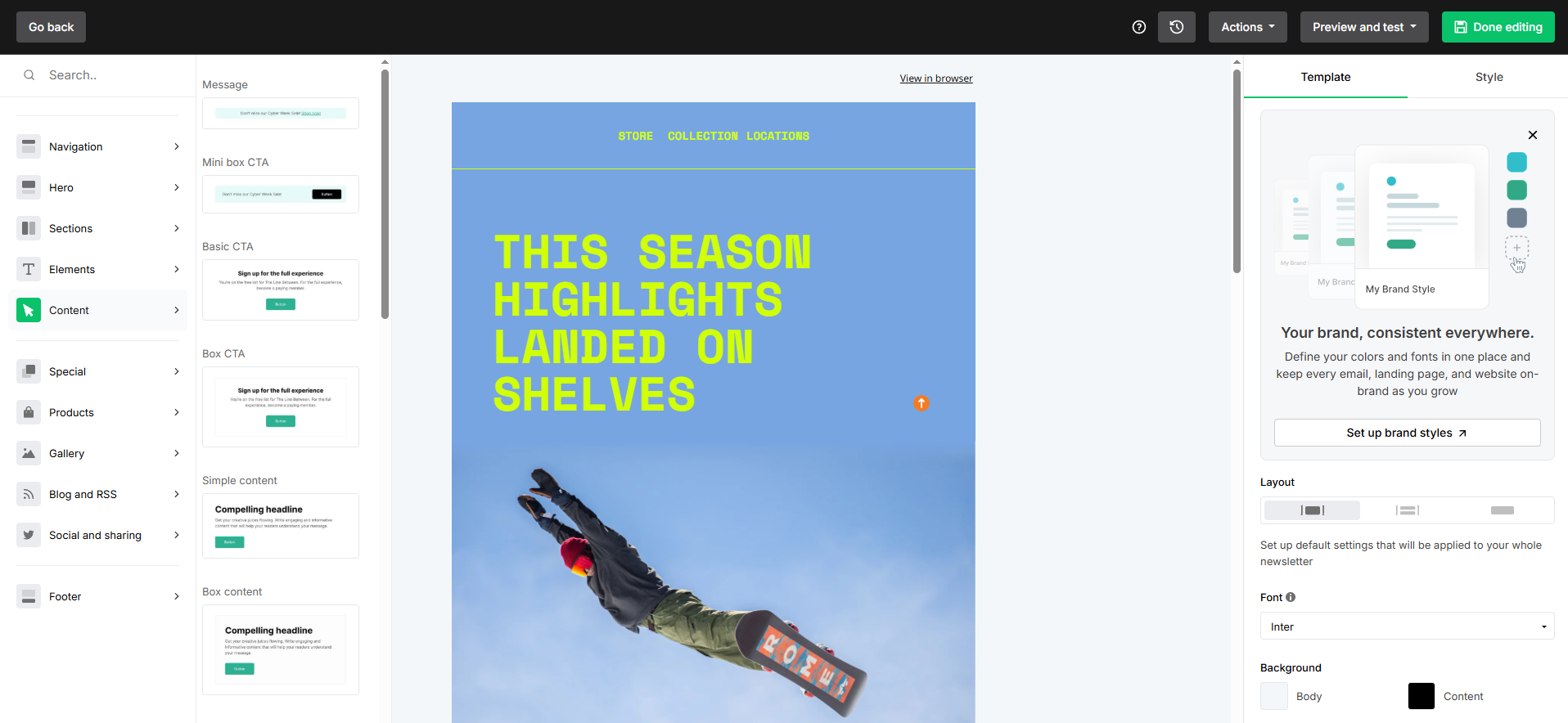 Building a campaign from MailerLite’s pre-styled content blocks
You can personalize messages and run A/B tests on subject lines, sender names, and sending times. MailerLite’s AI-powered Smart Sending feature also predicts the best time to send emails for each subscriber.
Automation is another area where MailerLite keeps things simple. You can build welcome series, lead nurturing flows, re-engagement campaigns, and other common sequences, schedule steps for specific days and times, use the “Move to step” action to loop contacts back or route them elsewhere, and remove or unsubscribe contacts directly from a workflow.
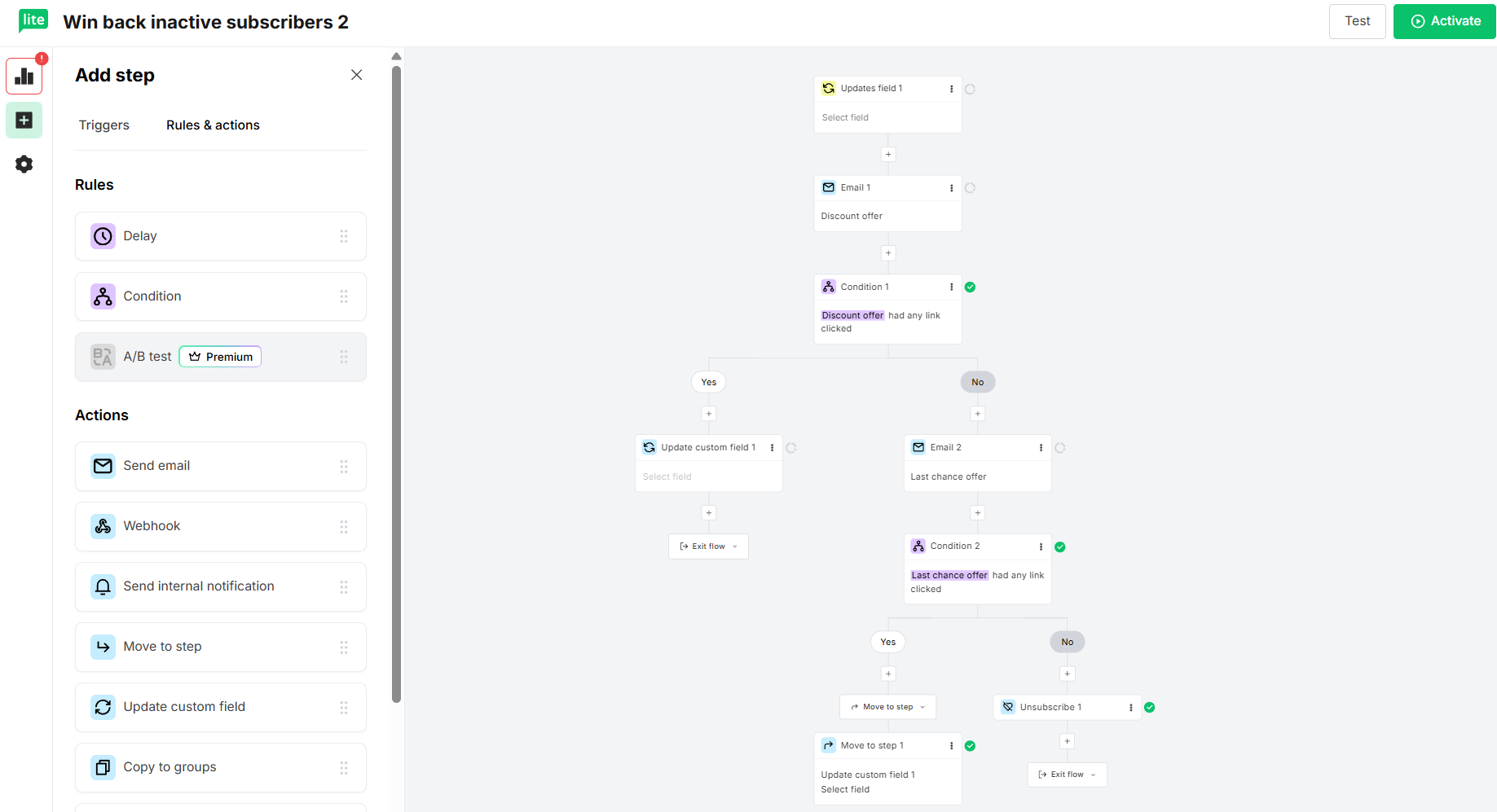 Building a win-back automation in MailerLite’s workflow editor
MailerLite also supports advanced segmentation and dynamic content, while reporting covers link clicks, geolocation, signup sources, and eCommerce revenue.
Key features include:
- drag-and-drop, rich text, and HTML editors;
- customizable email templates and content blocks;
- visual automation builder with pre-built workflows;
- dynamic content and subscriber segmentation;
- AI writing assistant and subject line generator;
- Smart Sending for optimized sending times;
- eCommerce integrations;
- campaign auto-resend option;
- click maps and detailed campaign reporting;
- A/B and multivariate testing.
Hands-on take. MailerLite takes care of much of the small setup work. You can start with polished, pre-styled layouts instead of building from scratch, and global typography settings keep fonts and sizes consistent throughout your email. The workflow canvas also remained easy to follow as we added more steps.
Free plan details. MailerLite’s free plan supports up to 250 subscribers and allows 2,500 emails per month. It includes the drag-and-drop editor, email templates, automation, A/B testing, forms, landing pages, and basic reporting.
Free plan limits. The main thing to note is not a hidden catch, but that the free tier has been reduced a lot. It used to offer much more, so lists that once fit the free plan may now require a paid one. After the first 30 days, free users only get support by email and do not have access to some templates and features that are only available with paid plans.
Pricing. Paid plans start at $10.80/month (billed annually) for up to 500 subscribers. The cheapest option for 10,000 subscribers costs $80.10/month (billed annually) and includes 100,000 emails. MailerLite does not offer a pay-as-you-go option. Check MailerLite’s official pricing page for current rates.
Cost takeaway. MailerLite keeps a low entry price and a polished experience, and at 10,000 subscribers its $80.10/month plan is cheaper than Mailchimp’s equivalent. The free plan is now fairly modest, though, and unlimited sending is reserved for the higher Power tier.
What users say. MailerLite is popular for its clean interface and beginner-friendly setup, and customer support gets good feedback too. The usual complaints are limited design flexibility and anti-spam account reviews that some users find overly strict.
Sender
G2: 4.7 ⭐ | Capterra: 4.7 ⭐
Best for: small businesses or eCommerce brands on a tight budget.
Sender is an email and SMS marketing platform for small businesses looking to grow their audience and run campaigns without upgrading immediately. With this cheap email marketing software, you get an easy-to-navigate interface, a drag-and-drop email builder, and professional templates to choose from. You can customize your templates with custom HTML, video, GIFs, interactive blocks, review forms, and countdown timers. Its shoppable blocks let you pull product details directly into your emails. You can also use segmentation and personalization to tailor campaigns to your audience.
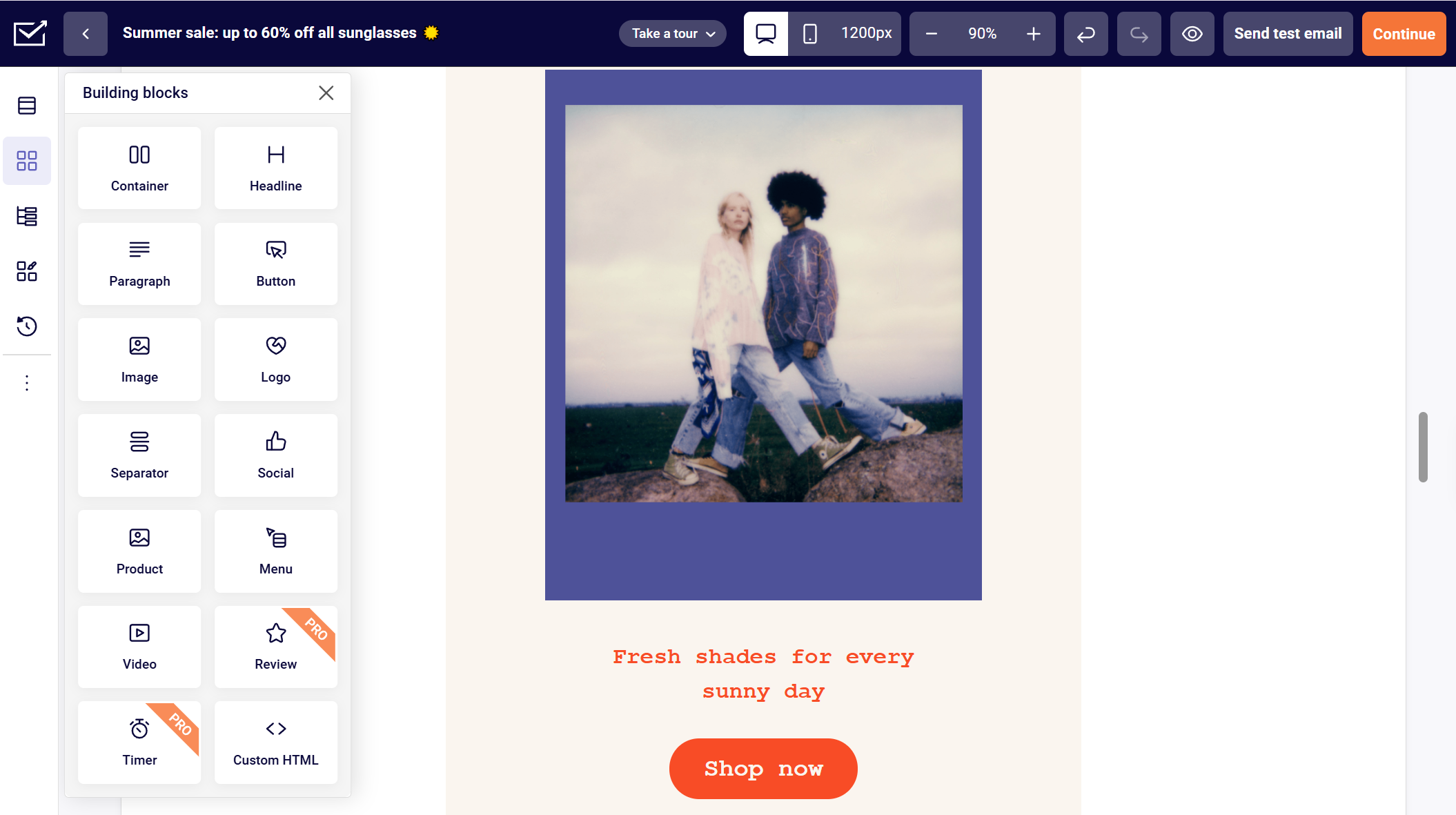 Building a summer sale email in Sender’s drag-and-drop editor
Sender also offers visual marketing automation to build smooth customer journeys. Your flow can combine emails and SMS messages, be initiated by different triggers such as abandoned cart or eCommerce workflows, and be branched depending on various conditions.
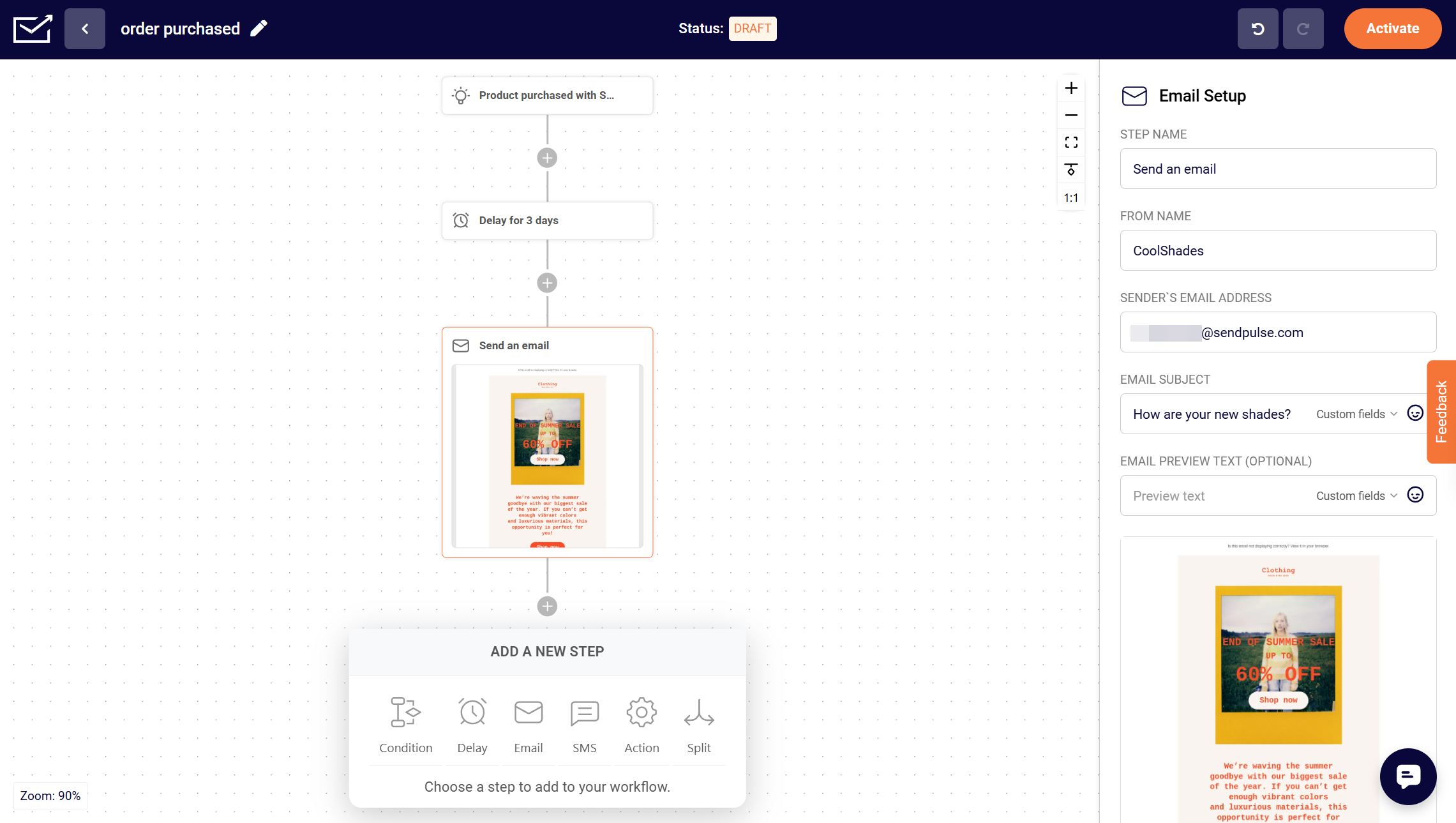 Building a post-purchase email flow in Sender’s automation editor
Apart from email marketing, Sender lets you launch pop-ups, build landing pages, and integrate with popular CMS, CRM, and other eCommerce tools.
Key features include:
- drag-and-drop, plain text, and HTML editors;
- pre-made email templates;
- custom HTML, video, and eCommerce blocks;
- email and SMS campaigns;
- pre-built and custom automation workflows;
- triggers, steps, splits, and custom trigger automations;
- dynamic content for abandoned carts, billing information, order summaries, and more;
- pre-made basic and eCommerce segments;
- contact profiles and behavioral targeting;
- A/B testing;
- real-time campaign reports, heatmaps, and eCommerce analytics.
Hands-on take. Sender was one of the simplest builders we tested. With very little hidden in menus, it’s quick to get started. While its automation is more limited than SendPulse or Brevo, it still covers the main triggers and steps that most small businesses need.
Free plan details. Sender’s free plan supports up to 2,500 subscribers and 15,000 emails per month, with no daily sending limit. It includes email campaigns, the drag-and-drop editor, templates, email automation, segmentation, landing pages, signup and pop-up forms, and transactional emails.
Free plan limits. Two catches to note: the free plan adds Sender branding to your emails, and SMS campaigns and email A/B testing are reserved for paid plans. If you exceed the free subscriber limit, sending pauses until you reduce your list or upgrade.
Pricing. The cheapest paid plan is $9/month (billed monthly) for up to 500 subscribers and 6,000 monthly emails. The most affordable option for 10,000 subscribers is $69/month (billed monthly); it includes 120,000 emails. Sender also offers pay-as-you-go pricing in 5,000-email increments, with 10,000 email credits for $57. Check Sender’s official pricing page for current rates.
Cost takeaway. Sender undercuts Mailchimp across list sizes and pairs its low prices with unusually high sending allowances, giving it one of the best price-to-value ratios in this comparison.
What users say. Sender stands out for a very generous free plan and an easy setup process. The main trade-offs reviewers mention are Sender branding on the free tier and a smaller integration library than major email marketing platforms.
EmailOctopus
G2: 4.2 ⭐ | Capterra: 4.8 ⭐
Best for: cost-focused senders who don’t need heavy automation.
EmailOctopus is one of the cheapest email marketing services, perfect for creators, freelancers, and small or new businesses that want to send good-looking newsletters to a small list of subscribers without a lot of complexity. You can build emails using a drag-and-drop editor or customize one of 100+ responsive templates. There’s an option to set up your branding, add custom HTML, and use personalization and merge tags.
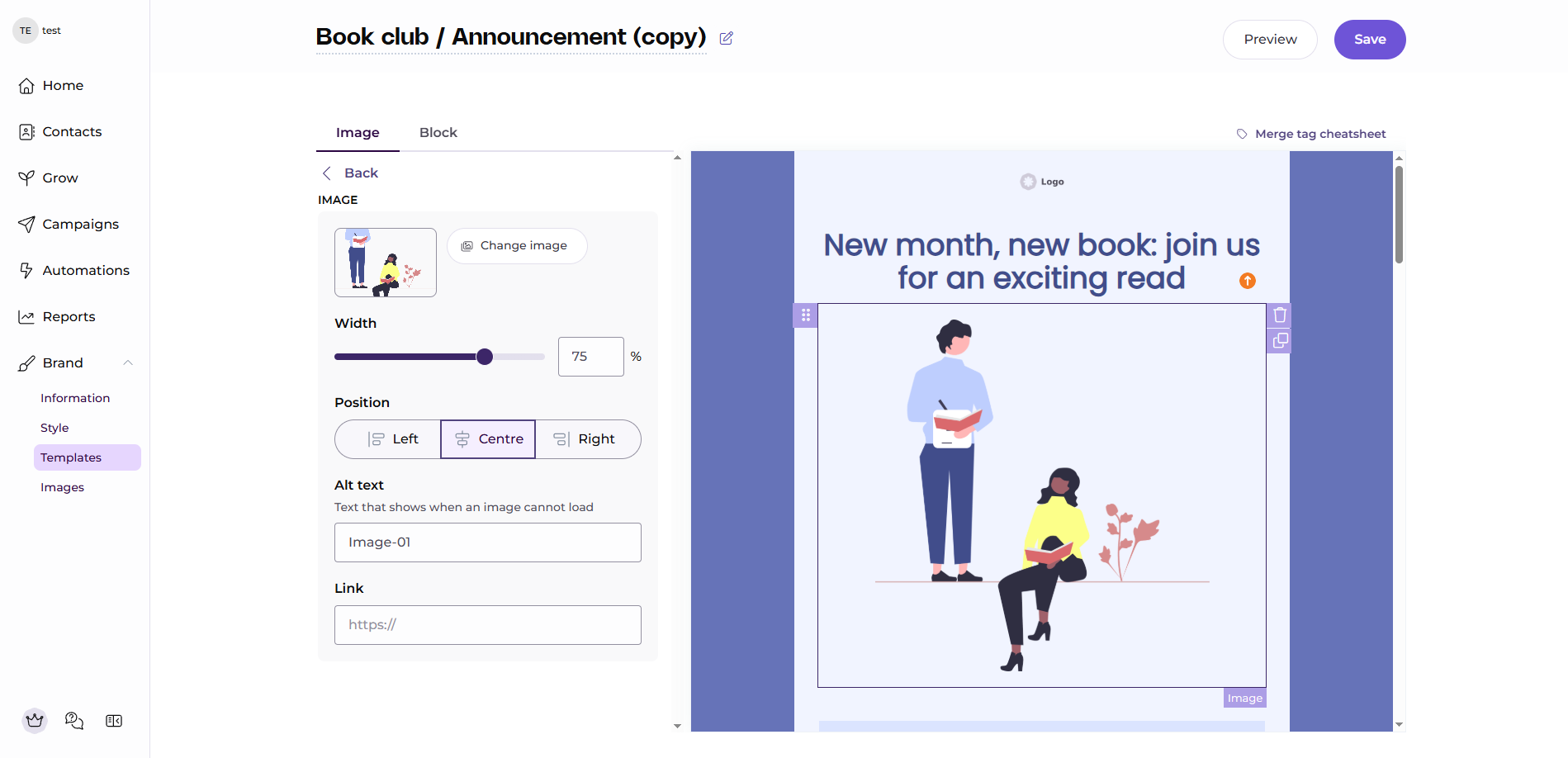 Designing a book club newsletter in EmailOctopus’s email builder
You can also create custom fields to store extra subscriber information and use that data for segmentation. The visual automation builder supports sequences triggered by new signups, form submissions, tag changes, API activity, and other events, with multiple steps and conditions.
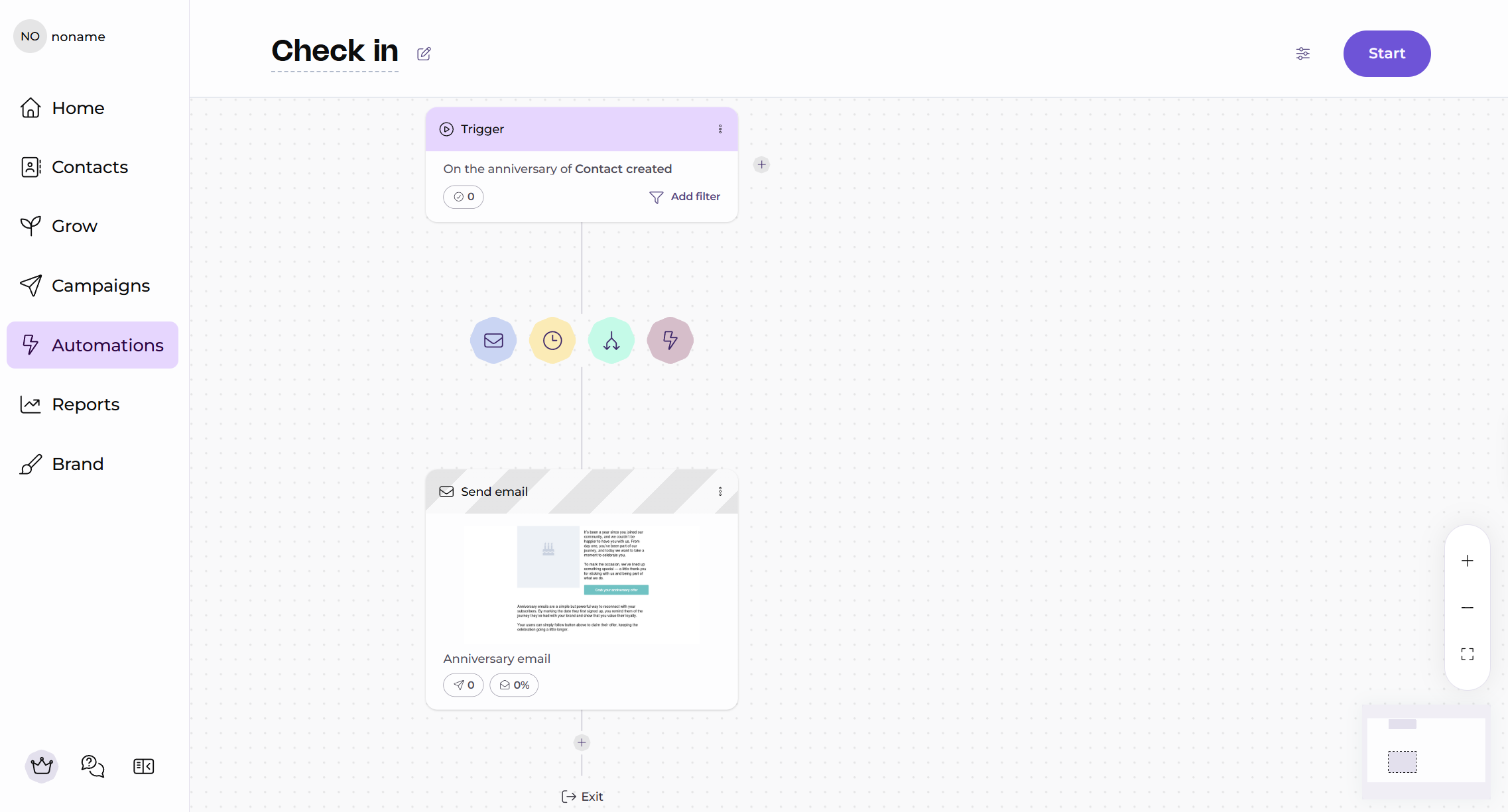 Building an anniversary automation in EmailOctopus’s flow builder
Key features include:
- drag-and-drop email editor;
- HTML coding support;
- mobile-friendly templates;
- personalization, custom fields, tags, and segmentation;
- visual automation builder with multi-step sequences;
- API access and 1,000+ integrations, including Google Analytics;
- landing pages, pop-up and inline signup forms;
- real-time campaign and automation reports.
Hands-on take. EmailOctopus’s automation builder works a little differently from most tools we tested. Clicking a step opens its settings in a centered pop-up window instead of a usual side panel, which takes a moment to get used to. The available actions are simple but practical, such as updating a field, adding or removing a tag, unsubscribing a contact, or triggering another automation.
Free plan details. EmailOctopus’s free plan supports up to 2,500 subscribers and 10,000 emails per month, with no separate daily sending limit. It includes the drag-and-drop editor, templates, personalization, automation, segmentation, and reports.
Free plan limits. The free plan adds EmailOctopus branding, limits reports to 30 days, allows only 1 landing page and form, and restricts automations to 3 sequences of up to 5 steps each.
Pricing. EmailOctopus’s plan starts at $9/month (billed annually) for 500 subscribers and 10,000 emails. At 10,000 subscribers, it costs $40/month (billed annually) and includes 100,000 emails. EmailOctopus does not offer a pay-as-you-go option. Check EmailOctopus’s official pricing page for current rates.
Cost takeaway. EmailOctopus is one of the lower-cost options in this comparison and stays well below the Mailchimp benchmark. The trade-off is a simpler feature set, especially around automation and design flexibility.
What users say. EmailOctopus users tend to like the simple setup and low cost, especially for smaller lists. The main downside is that its automation and template options feel more limited than those of bigger-name platforms.
Moosend
G2: 4.6 ⭐ | Capterra: 4.6 ⭐
Best for: budget-conscious teams that want capable automation.
Moosend is another cheap email marketing and automation platform that empowers businesses to deliver targeted and effective campaigns. Its drag-and-drop editor lets you either start from scratch or choose from responsive templates for eCommerce, SaaS, real estate, and other industries. With a wide range of features, including custom fields, conditional content, and A/B testing, plus a clear, simple interface, it’s perfect for newbie marketers but powerful enough for pros.
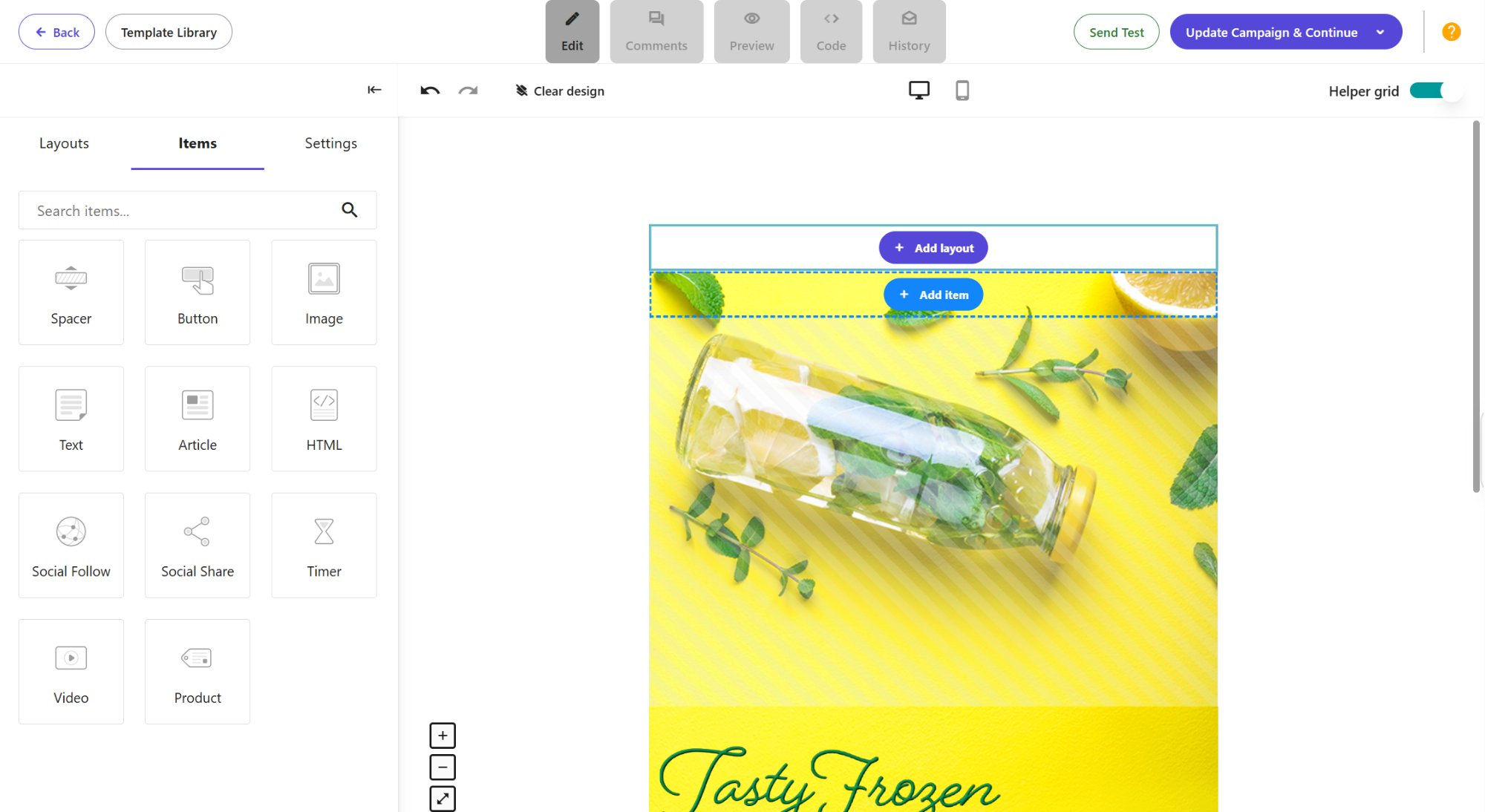 Building an email template in Moosend’s layout-first editor
Beyond email tools, the platform supports behavior-based automation and offers pre-set automation recipes for cart abandonment, user onboarding, upsell and cross-sell, and other scenarios. You can customize them with triggers, conditions, and actions, for example, when a system records a custom event or someone views a specific product.
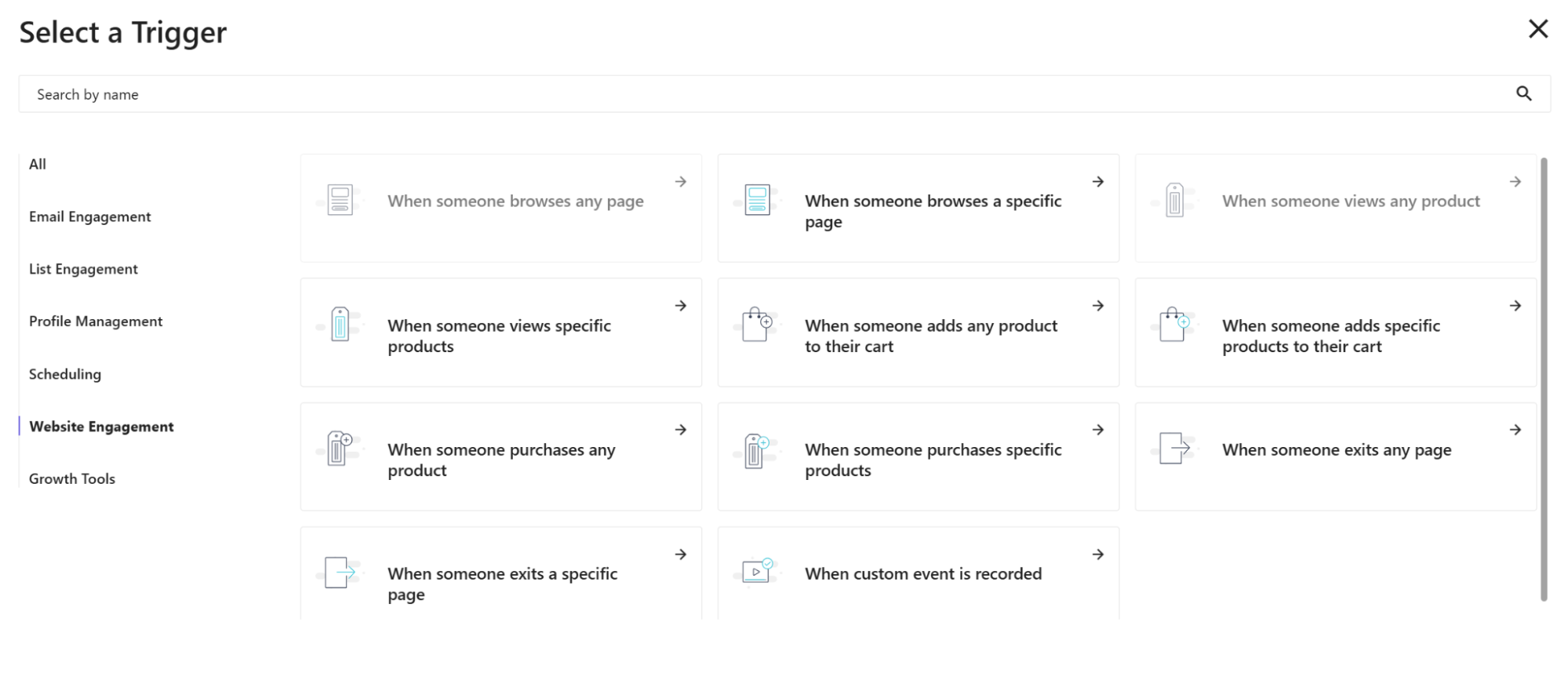 Selecting a trigger to build a flow in Moosend
Moosend also includes real-time tracking, custom reports, product recommendations, and AI tools for email copy and subject lines.
Key features include:
- drag-and-drop email editor;
- basic and custom-coded email templates;
- image cropping and resizing tools;
- automation workflow builder with pre-built templates;
- multi-step marketing automation with behavioral triggers;
- AI email assistant and AI product recommendations;
- personalization and segmentation;
- conditional visibility content;
- A/B testing;
- 80+ native integrations and API access;
- real-time reporting and analytics.
Hands-on take. Moosend does a few things differently from most platforms we tested. The dashboard uses a top navigation bar instead of the usual left sidebar, the email editor works layout-first, and automation triggers and actions open in pop-up windows. It feels slightly unfamiliar at first, but the interface is still easy to get around.
Free plan details. Moosend offers a 30-day free trial for up to 1,000 contacts with unlimited email campaigns and sends. It includes core tools such as the newsletter builder, automations, and custom-coded templates, with no separate daily sending limit listed.
Free plan limits. The main limitation is simply that the trial ends after 30 days. After that, you need a paid plan or email credits to keep sending, and Moosend notes that trial data may be lost if you don’t subscribe.
Pricing. Paid plans start at $7/month (billed annually) for 500 contacts and unlimited emails. At 10,000 contacts, the cheapest option is $70/month (billed annually). Moosend also sells prepaid email credits for occasional sending, starting at 350,000 emails for $350. Check Moosend’s official pricing page for current rates.
Cost takeaway. At $70/month for 10,000 contacts, Moosend is one of the cheapest email platforms if automation is a priority. Just keep in mind that there’s no free-forever plan.
What users say. Moosend gets good reviews for being affordable, beginner-friendly, and strong on automation. One common complaint is that the old free-forever plan is gone and has been replaced by a time-limited trial.
Kit
G2: 4.4 ⭐ | Capterra: 4.6 ⭐
Best for: creators, newsletters, and course sellers who need email marketing.
Kit, formerly ConvertKit, is an email marketing platform built around creators who want to grow an audience and sell through email. Its editor includes templates, personalization, subject line and content A/B testing, and rich content elements such as polls and countdown timers. You can also segment subscribers and track opens, clicks, and revenue.
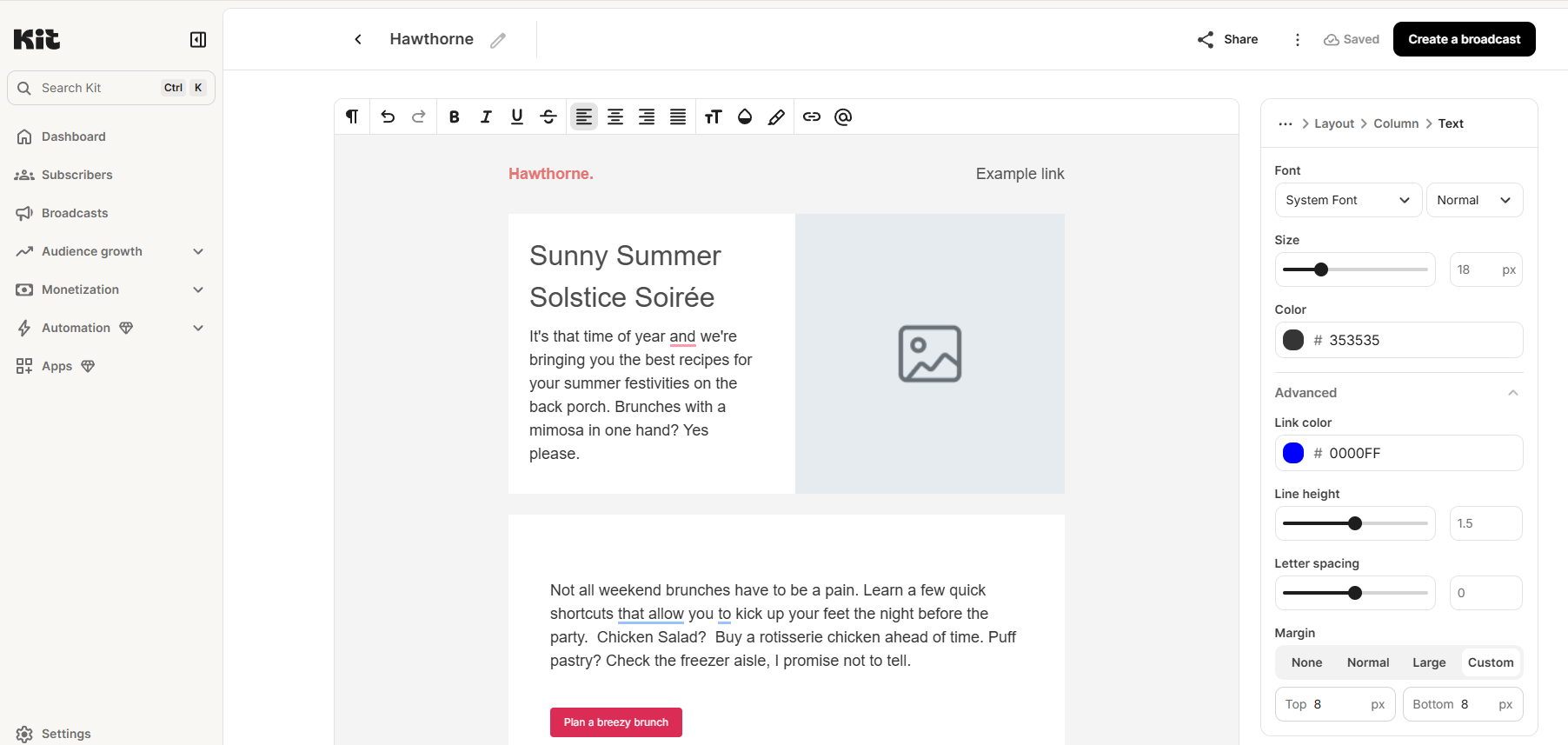 Writing a broadcast in Kit’s document-style editor
Kit also has a visual automation builder for welcome sequences, sales funnels, and other multi-step journeys. You can sell digital products directly through the platform too, without connecting a separate eCommerce tool.
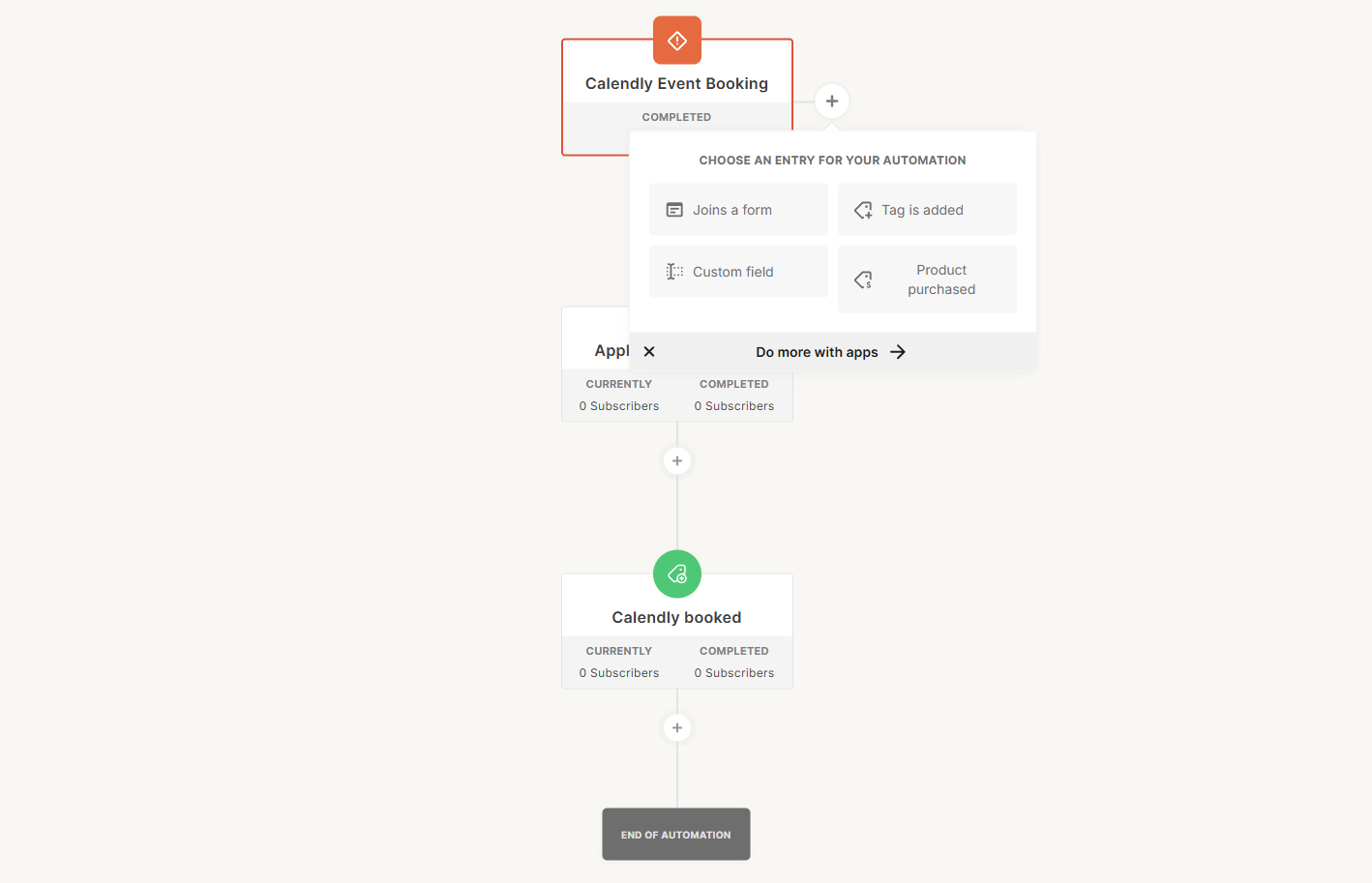 Choosing an entry trigger in Kit’s visual automation builder
Its App Store connects directly to a bunch of tools like Linktree, Shopify, Stripe, WooCommerce, Canva, and Typeform. Kit also includes Recommendations for growing your list through cross-promotion.
Key features include:
- creator-focused email editor and broadcasts;
- email template library and custom templates;
- conditional email content and reusable snippets;
- subscriber tagging and segmentation;
- visual automation builder and pre-built templates;
- automated email sequences and RSS campaigns;
- personalized subscriber journeys;
- A/B testing;
- API access;
- landing pages, opt-in forms, and newsletter websites;
- digital product sales, paid newsletters, and subscriptions.
Hands-on take. Kit was one of the quickest platforms to get a campaign started. The editor feels more like writing in a document than assembling an email from blocks, which works especially well for newsletters and simpler creator emails. It’s less flexible for heavily branded designs, and the tag-based setup can take some getting used to if you normally work with lists.
Free plan details. Kit’s free plan supports up to 10,000 subscribers with unlimited email sends and no separate daily sending limit. It includes digital products, landing pages, unlimited opt-in forms, and subscriber tagging and segmentation.
Free plan limits. The free tier includes Kit branding and leaves out advanced features such as automated sequences, the visual automation builder, and direct app integrations.
Pricing. Kit’s cheapest paid plan, Creator, starts at $33/month (billed annually) for 1,000 subscribers. At 10,000 subscribers, it costs $116/month. Kit does not offer pay-as-you-go pricing. Check Kit’s official pricing page for current rates.
Cost takeaway. Kit’s biggest advantage is the size of its free plan: you can manage up to 10,000 subscribers without paying. Once you need the Creator plan at that list size, though, the price rises to $116/month, slightly above the $110/month Mailchimp benchmark.
What users say. Creators like Kit for its free plan and tools built around newsletters and audiences. Complaints are more mixed, with some users pointing to inconsistent support experiences and an interface that can feel too basic for more advanced workflows.
Zoho Campaigns
G2: 4.3 ⭐ | Capterra: 4.3 ⭐
Best for: existing Zoho users who want to make use of email marketing tools in the same ecosystem.
Zoho Campaigns is a multi-channel platform for small businesses that supports email, SMS, and WhatsApp campaigns. You have the flexibility to create a template from scratch, use an HTML code editor, or choose from ready-made templates. The platform also supports conditional content, personalization, and audience segmentation to help you tailor messages to individual subscribers.
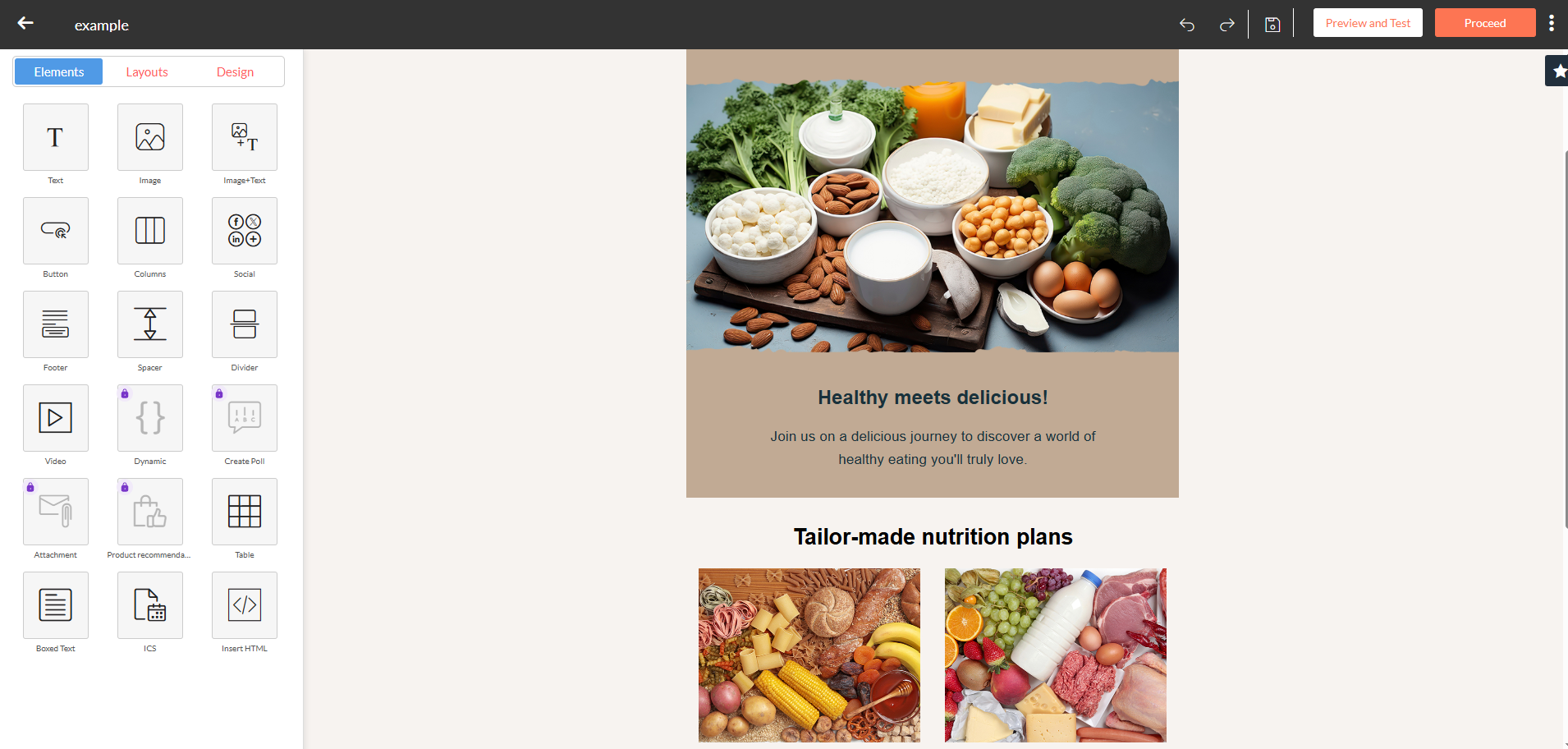 Exploring the Zoho Campaigns email editor and its element library
As to automation tools, Zoho Campaigns can help you set up both simple workflows triggered by actions like form submissions or signing up for a mailing list, as well as more complex, multi-layered flows that utilize data from integrations, advanced conditions, or specific contact activities. You can also use customer-based segmentation depending on geography (country, state, city), demography (age, gender), behavior, buying patterns, and more.
Key features include:
- drag-and-drop, plain text, and HTML editors;
- ready-made templates;
- AI-powered content and subject line recommendations;
- personalization, merge tags, and dynamic content;
- contact segmentation, scoring, and tags;
- polls, surveys, GIFs, and reply tracking;
- sending time optimization and time-zone sending;
- multi-step automation workflows;
- triggers, conditions, splits, and actions;
- A/B testing;
- reports and analytics.
Hands-on take. Even with an existing Zoho account, Campaigns still needed its own setup. We had to name the organization, choose an industry, and add a phone number before we could get started. That separate onboarding says a lot about how the product fits into Zoho: it connects well with the wider ecosystem, but it still feels like its own app rather than an extension of Zoho CRM.
Free plan details. Zoho Campaigns’ free plan supports up to 2,000 contacts and 6,000 emails per month, with no daily sending limit. It includes email templates, the drag-and-drop editor, AI content and subject line recommendations, and up to 5 users.
Free plan limits. Automation, eCommerce features, segmentation, and dynamic content all require a paid plan. The entry paid tier, Standard, is also fairly limited.
Pricing. Paid plans start at $3/month (billed annually) for 500 contacts and unlimited emails. At 10,000 contacts, the price is $36.75/month (billed annually). Zoho Campaigns also offers pay-as-you-go credits, with 10,000 email credits costing $173. Check Zoho Campaigns’ official pricing page for current rates.
Cost takeaway. At around $37/month for 10,000 contacts, Zoho Campaigns is one of the cheapest email tools in this comparison. The trade-off is that the Standard plan restricts many useful features. It makes the most sense if your needs are fairly straightforward or you already use other Zoho products.
What users say. Reviewers like Zoho Campaigns for its low price and close integration with Zoho CRM. The more common complaints are around deliverability and an automation builder that can feel limited or awkward.
Mailjet
G2: 3.9 ⭐ | Capterra: 4.2 ⭐
Best for: developers and teams wanting an API combined with cheap sending.
Mailjet is an affordable email marketing platform that covers all the essentials, including templates, personalization, A/B testing, audience segmentation, automation, and analytics. With its drag-and-drop editor, you can build branded emails in no time and use the brand kit with pre-saved colors, fonts, and logos to ensure your campaigns look polished and consistent.
Another standout feature is real-time collaboration on email templates — multiple team members can edit, leave comments or suggestions, and preview changes directly within the editor.
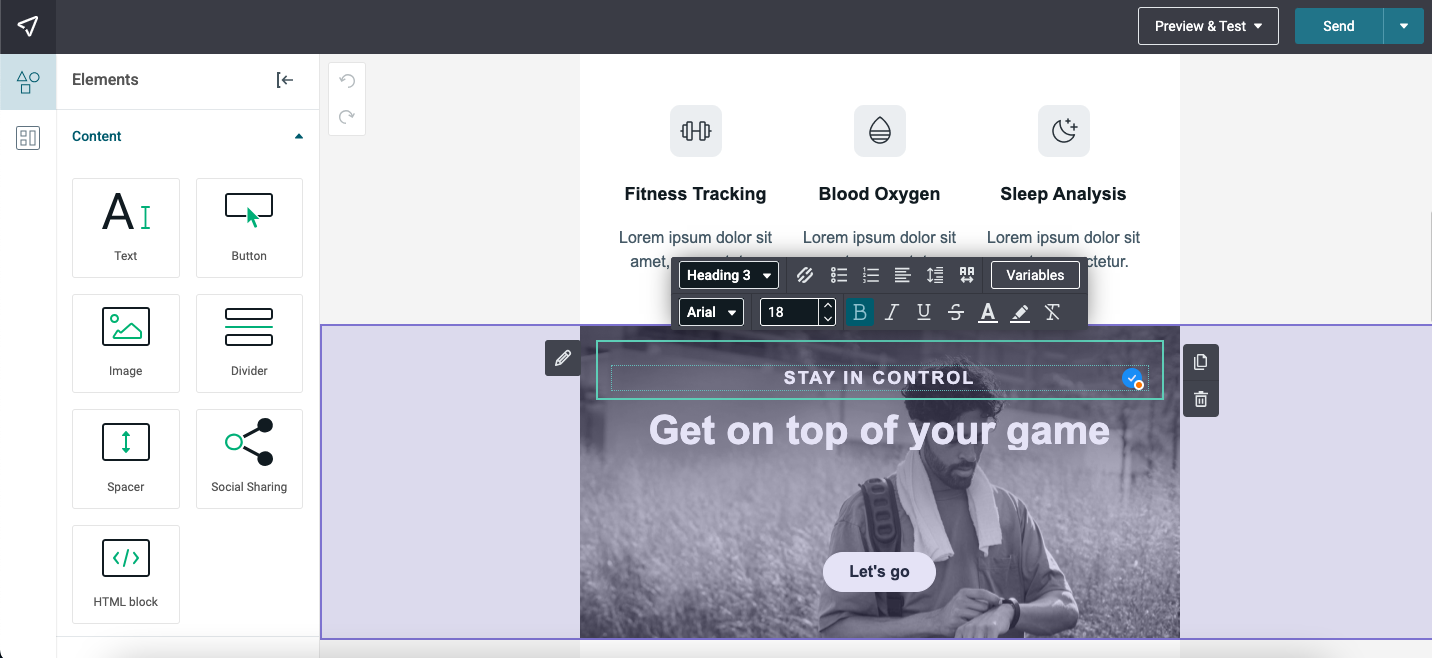 Working in Mailjet’s email builder
Thanks to integrated AI-powered tools, you can also generate a template by specifying the type of email you need and providing some context like layout details, color schemes, or desired visuals. Besides, there is an AI writing assistant that gives you real-time text suggestions; it can help you fix grammar and spelling errors, rephrase or translate your copy, and adjust the tone of your message.
Automation is more basic. You can build flows triggered when someone joins a mailing list or when their contact data changes. Mailjet also connects with 70+ third-party tools and includes forms and landing pages.
Key features include:
- drag-and-drop, HTML, and MJML editors;
- pre-designed templates;
- AI-assisted content creation;
- saved, locked, and linked email sections;
- brand kit;
- personalization, segmentation, and dynamic content;
- A/B testing;
- GDPR compliant forms;
- multi-user collaboration, advanced permissions, and activity logs;
- statistics and monthly deliverability reports.
Hands-on take. Mailjet structures campaign setup like a checklist. From one Campaign details screen, you fill in the name, contact list, sender, and subject before moving on to designing your email. Inside the editor, the usual content blocks are easy to find, and the inline text toolbar includes variable controls for personalization.
Free plan details. Mailjet’s free plan supports up to 1,000 contacts and 6,000 emails per month, with a 200-email daily limit. It includes the advanced drag-and-drop email editor, email templates, basic statistics, MJML, and SMTP relay.
Free plan limits. Automation, segmentation, A/B testing, AI-assisted content creation, and dynamic content all require a paid plan. Ticket support is included only for the first 30 days, after which free users rely on self-serve resources.
Pricing. Mailjet’s pricing is primarily based on the number of emails you send. The cheapest paid plan, Starter, costs $8.10/month (billed annually) for 2,000 contacts and 8,000 monthly emails without a daily sending limit. Unlimited contacts kick in on the Essential plan at $17.10/month (billed annually), while automations require the Premium plan at $26.10/month (billed annually). Check Mailjet’s official pricing page for current rates.
Cost takeaway. Mailjet can be inexpensive if you mainly care about sending high email volume, especially compared with the $110/month Mailchimp benchmark. It’s particularly appealing for developer-led teams that can make use of SMTP relay, MJML, and API access.
What users say. Mailjet is often described as a cost-effective option, with reliable transactional sending and a straightforward dashboard. The main complaints are tighter limits on the free and entry-level tiers and occasional Gmail inbox-placement issues.
beehiiv
G2: 4.5 ⭐ | Capterra: 4.4 ⭐
Best for: creators, publishers, and newsletter operators focused on growth and monetization.
beehiiv is a newsletter platform built for creators and brands that want to grow and monetize their audience. You get a fast editor, customizable templates, audience segmentation, automations, recommendations, and SEO tools. You can also publish a website alongside your newsletter, with growth and engagement features built into the same platform.
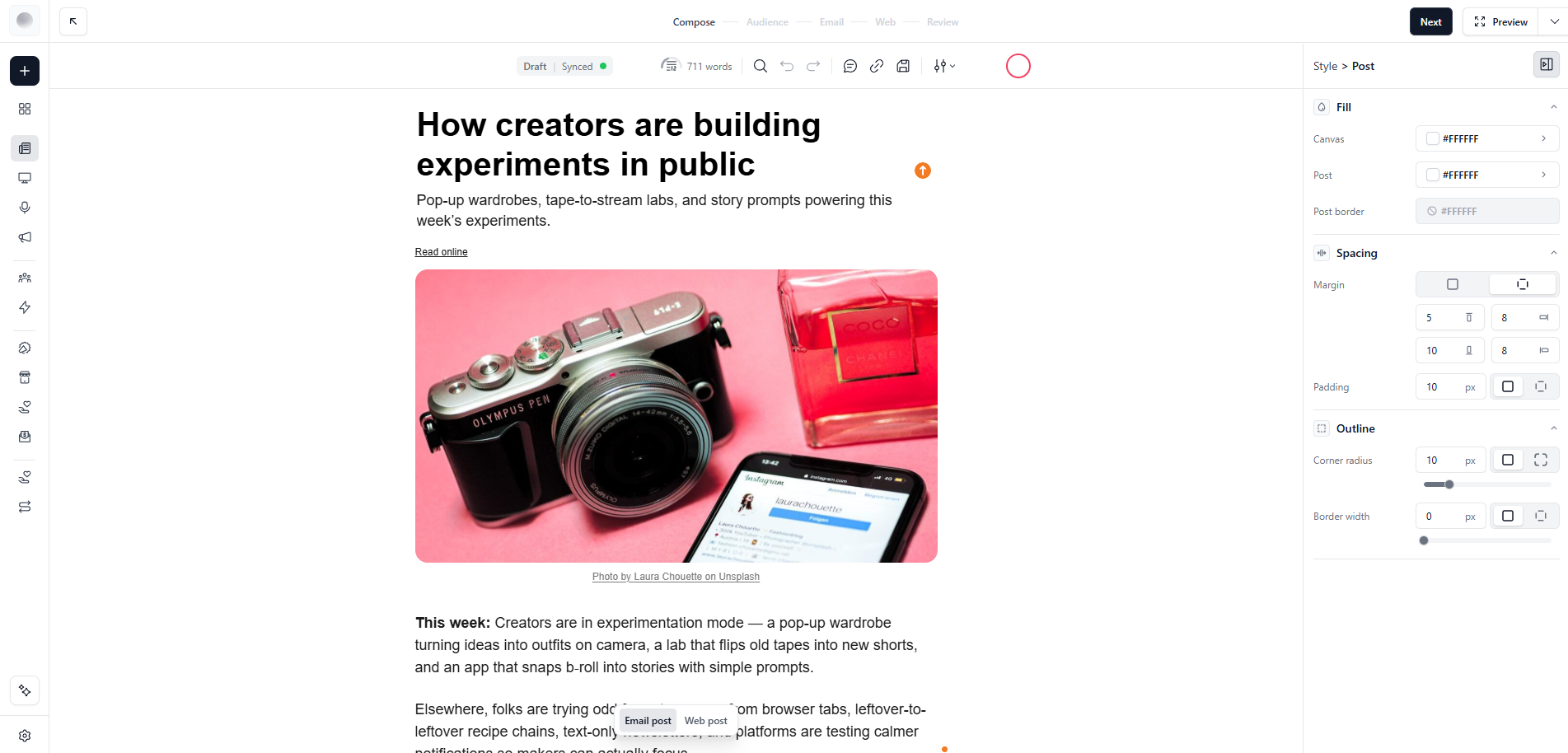 Writing a newsletter post in beehiiv’s editor
The platform emphasizes publishing and monetization more than a typical email marketing tool. You can earn through paid subscriptions, the Ad Network, sponsorships, recommendations, digital products, and communities, while analytics help you track subscriber and content performance. The platform also includes AI tools, API access, podcast features, and community tools.
Key features include:
- custom newsletter builder and responsive templates;
- subscriber segmentation and custom fields;
- AI-powered newsletter tools and AI Assistant;
- email automations and click-triggered automations;
- A/B testing and audience polls;
- website and podcast hosting;
- built-in recommendation network and referral programs;
- paid subscriptions, digital products, and advertising monetization;
- community features, including discussions, DMs, and group chats;
- campaign, subscriber, and website analytics.
Hands-on take. The biggest limitation we noticed was design flexibility. When we tested beehiiv, it offered only about a dozen email templates, and the editor gave us less room to customize layouts than some of the other platforms in this comparison.
Free plan details. beehiiv’s free plan includes up to 2,500 subscribers and unlimited email sends, along with newsletter publishing, segmentation, custom fields, and limited AI tools.
Free plan limits. The main gaps are automation, monetization, A/B testing, custom HTML, and dynamic content, which all require a paid plan. The free tier also includes beehiiv branding and is limited to 1 team member.
Pricing. Paid plans start at $49/month (billed annually) for 1,000 subscribers and unlimited emails. At 10,000 subscribers, the cheapest paid option is $119/month (billed annually). beehiiv doesn’t offer a traditional pay-as-you-go option because its plans include unlimited sends. Check beehiiv’s official pricing page for current rates.
Cost takeaway. beehiiv is one of the pricier options in this comparison. At 10,000 subscribers, it comes in slightly above the Mailchimp benchmark, so the extra cost makes more sense if you’ll actually use its publishing, audience growth, and monetization tools.
What users say. beehiiv gets strong feedback from newsletter creators for its growth and monetization tools, plus the speed at which new features are released. The main drawbacks are pricing that can feel high for smaller newsletters and an interface that takes a little time to get used to.
Mailchimp
G2: 4.3 ⭐ | Capterra: not enough reviews yet
Best for: eCommerce brands and teams that want an all-in-one platform.
Note: included in our list as the industry price benchmark.
Mailchimp is a well-established email marketing platform with a polished drag-and-drop builder, responsive templates, AI-assisted content tools, segmentation, and behavior-based automation. It also offers product recommendations and predictive features for eCommerce teams that want to personalize campaigns around customer activity.
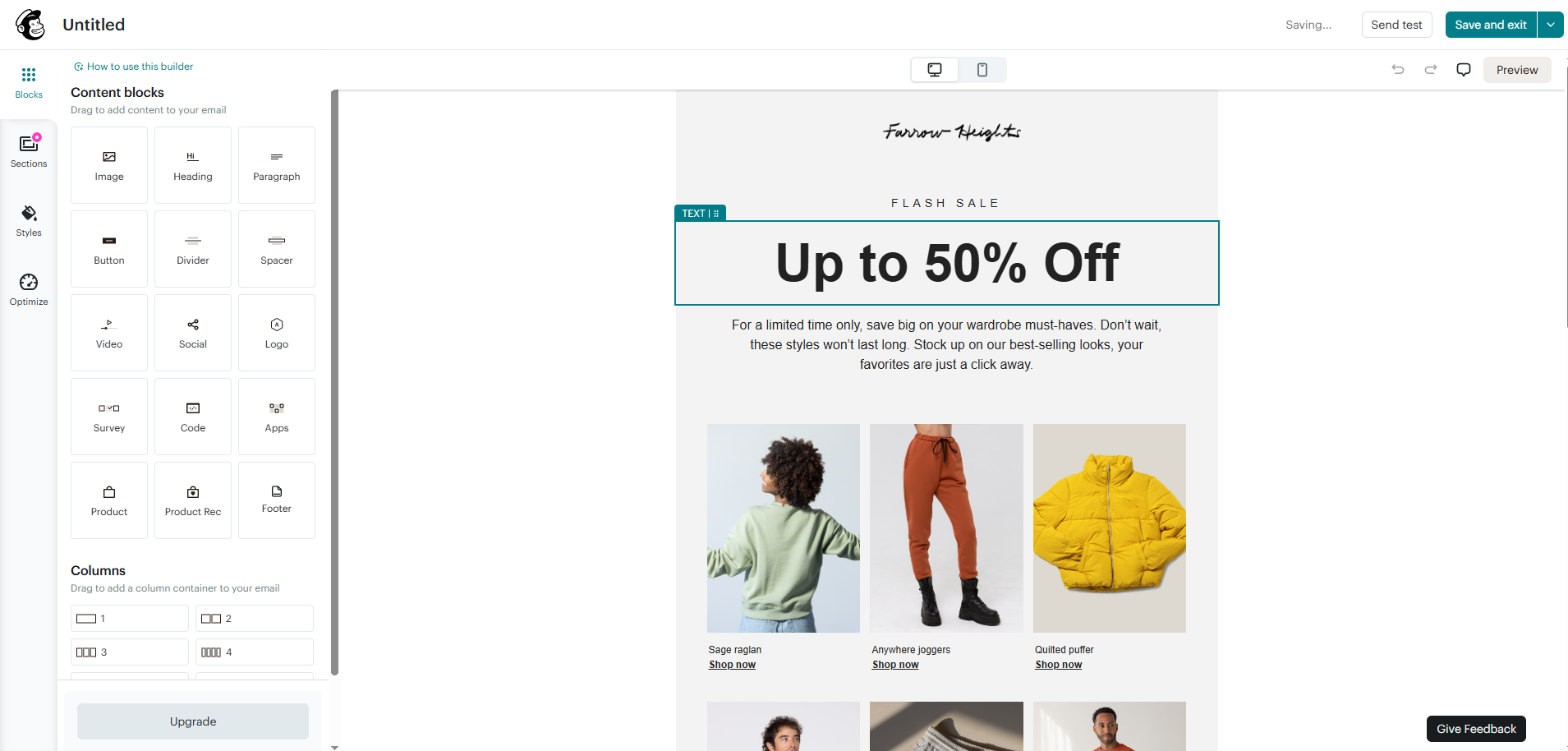 Building a flash sale email in Mailchimp’s drag-and-drop editor
Its automation tools allow you to build customer journeys with branching, multiple starting points, behavioral triggers, and other logic for more complex campaigns.
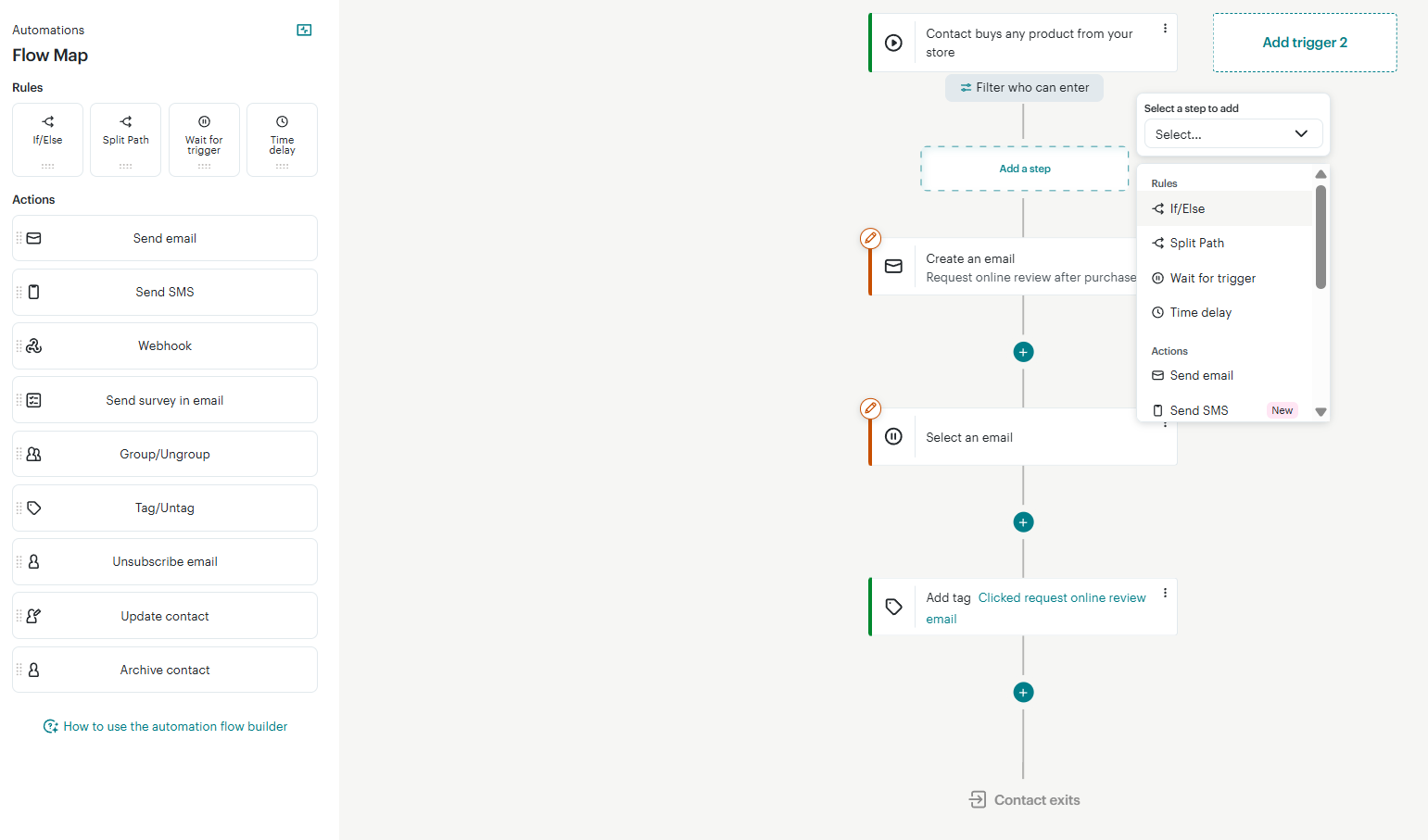 Mapping a post-purchase journey in Mailchimp’s customer journey builder
Mailchimp also offers SMS marketing and a broader omnichannel dashboard. Its free plan is fairly limited, though, so it works better as an entry point than a long-term option for growing lists.
Key features include:
- drag-and-drop email builder with pre-built templates;
- AI-powered content creation and product recommendations;
- personalization and dynamic content;
- basic and advanced audience segmentation;
- behavioral targeting and predictive segmentation;
- marketing automation flows with branching and multiple starting points;
- A/B and multivariate testing;
- sending time optimization and delivery by time zone;
- SMS and MMS add-ons;
- landing pages, pop-up forms, and social posting;
- integrations and detailed reporting.
Hands-on take. Mailchimp offers some of the most detailed editing controls we tested, including anchor links, letter spacing, rounded corners, and separate spacing for desktop and mobile. The trade-off is a busier interface with more menus to work through. Its customer journey builder, by contrast, is clean and easy to follow: a straightforward top-to-bottom flow with branching handled by clear If/Else and Split Path steps.
Free plan details. Mailchimp’s free plan supports up to 250 contacts and 500 emails per month, with a 250-email daily limit. It includes 1 audience and 1 user, basic email templates, and reporting.
Free plan limits. The free plan is deliberately minimal: you get a single audience and user, basic templates, Mailchimp branding, limited support, and no access to the full automation builder. Another issue is how quickly paid pricing increases with list size.
Pricing. Paid plans start at $13/month for 500 contacts and 5,000 emails. At 10,000 contacts, the cheapest paid plan costs $110/month. Mailchimp also offers pay-as-you-go pricing, with 10,000 email credits at $260. Check Mailchimp’s official pricing page for current rates.
Cost takeaway. At 10,000 contacts, Mailchimp is one of the more expensive options in this comparison, which makes it a useful benchmark for judging how much cheaper other email marketing platforms really are.
What users say. Mailchimp gets plenty of credit for its polished interface and broad feature set. The complaint that comes up most often, though, is pricing, especially once your contact list starts to grow.
Other cheap email tools worth a look
A few other email marketing tools are worth a look if you want a free plan, a low starting price, or a more specific set of features.
- HubSpot’s free marketing tools include up to 2,000 email sends per month, plus forms, CRM features, basic reporting, and limited automation. It’s not really a cheap email platform on its own; the bigger appeal is having email connected to HubSpot’s CRM from day one.
- Omnisend focuses on eCommerce and combines email, SMS, automation, segmentation, and forms. Its free plan supports up to 250 contacts and 500 emails per month, so it makes most sense for smaller stores that want several communication channels in one place.
- Klaviyo has a free plan for up to 250 profiles and 500 emails per month, with campaigns, automation, and analytics included. It’s built more for advanced eCommerce and customer-data-driven marketing, so the free tier works better as a way to get started than as a long-term low-cost option.
- Systeme.io combines email marketing with funnels, websites, and courses. Its free plan supports up to 2,000 contacts and unlimited email sends, but puts limits on things like funnels, courses, and automation rules.
- Benchmark Email offers a free plan for up to 500 contacts and 2,500 emails per month. It includes a drag-and-drop editor, segmentation, reporting, and basic automation, making it a simple option if you want to start small without paying right away.
It’s also worth separating free plans from free trials. Some platforms let you test the product for a short period but don’t offer an ongoing free tier.
- ActiveCampaign offers a 14-day free trial with unlimited contacts and 100 email sends. After that, you’ll need a paid plan, starting at $15/month (billed annually).
- Constant Contact also uses a trial model. Its 30-day trial includes up to 100 total email sends, and paid plans start at $10.20/month (billed annually).
- Flodesk free plan includes only list-building tools without actual email sending. Its paid plans start at $19/month (billed annually) with unlimited emails and 1,000 subscribers.
If you’re trying to keep costs at zero for as long as possible, focus on platforms with a real ongoing free plan and limits that fit your list size and sending volume. If it’s only a trial, the price after those first few weeks matters just as much as the free period.

Free email marketing that scales
Use an AI assistant, pre-made templates, robust automation, and more to run impactful email campaigns without coding.
Get started for free
If you send at very high volumes or have a technical team, the lowest email costs often come from email infrastructure rather than a traditional marketing platform. You can get the price per email down quite a bit, but you usually give up some convenience and take on more setup.
Amazon SES
G2: 4.3 ⭐ | Capterra: 4.7 ⭐
Best for: technical teams and businesses that send high volumes of emails.
Amazon SES is a cloud email delivery service built for developers. You can connect it to your application through an API or SMTP and use it for transactional messages, promotional campaigns, and newsletters.
It also gives you more control over the sending side of things. You can use shared, dedicated, or customer-owned IPs, monitor sender reputation, and check deliverability through tools such as Virtual Deliverability Manager and the Reputation Dashboard.
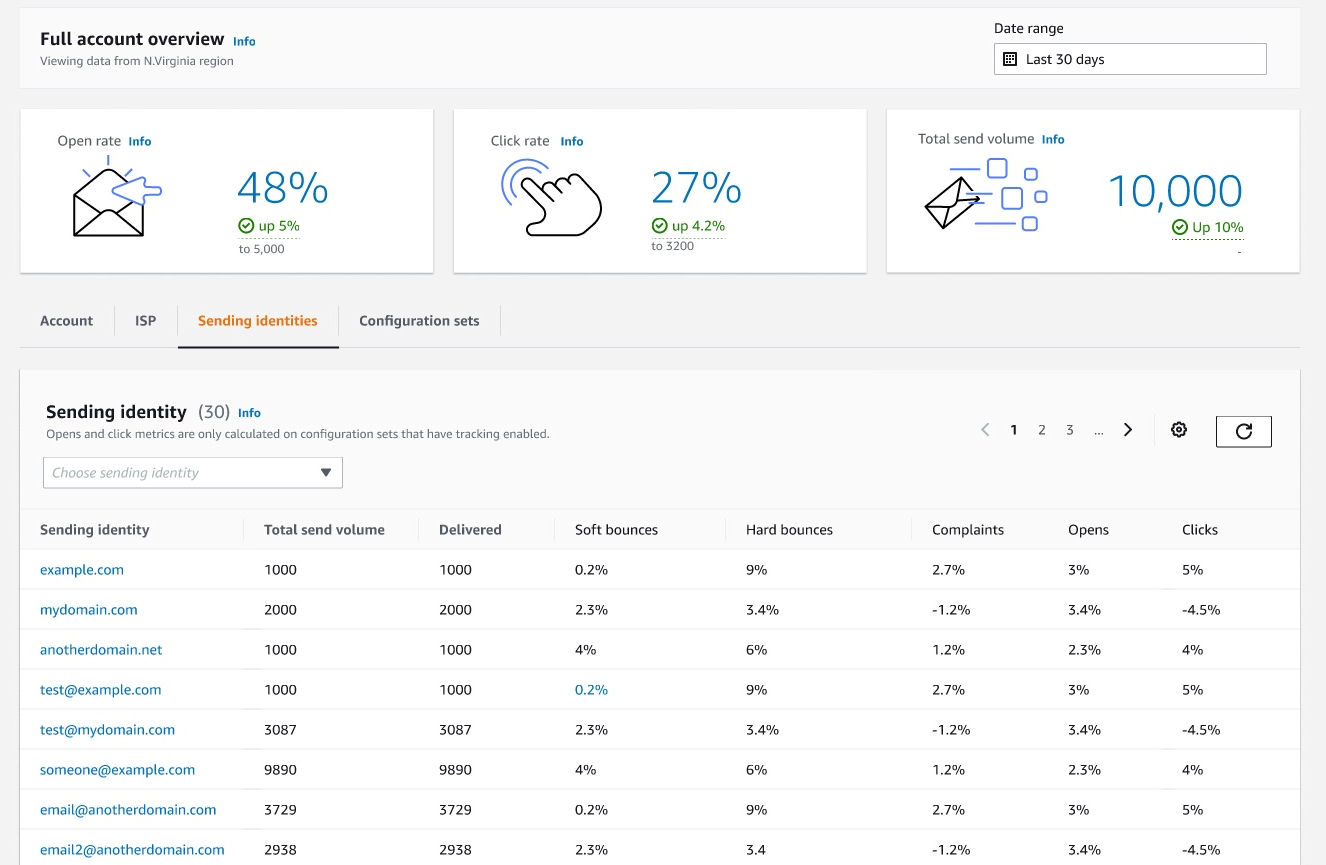 Amazon SES account dashboard with sending identities; source: Amazon SES
What you don’t get is the usual marketing platform experience. There’s no built-in drag-and-drop builder or full list management, so you’ll either need to build around SES yourself or connect it to another tool.
Alternatives like Twilio SendGrid, Mailgun, Postmark, and Resend take a similar API- and SMTP-first approach, with different pricing and features for transactional and high-volume sending.
Key features include:
- high-volume email delivery;
- API or SMTP integrations;
- flexible IP options;
- Virtual Deliverability Manager and Reputation Dashboard;
- email authentication and security;
- email analytics and reporting;
- global endpoints;
- Mailbox Simulator to test email delivery scenarios;
- Mail Manager.
Pricing. Amazon SES uses pay-as-you-go pricing, where à-la-carte outbound email starts at $0.10 per 1,000 emails. For example, sending 1 email per month to 10,000 subscribers would cost approximately $1/month, while 4 campaigns per month would cost around $4/month, excluding any additional AWS services or add-ons. Check Amazon SES’ official pricing page for current rates.
What users say. Developers tend to like Amazon SES for its very low sending costs and reliable delivery at scale. The trade-off is that you need to handle more of the technical setup yourself, and there’s no ready-made campaign interface.
Sendy
G2: 4.3 ⭐ | Capterra: 4.7 ⭐
Best for: teams that want Amazon SES pricing with a ready-made campaign interface.
Sendy sits between raw email infrastructure and a traditional marketing platform. It’s a self-hosted newsletter tool that uses Amazon SES for delivery, while giving you a campaign interface, list management, segmentation, auto-responders, and reporting.
You can build emails with drag-and-drop, WYSIWYG, or HTML editing, create separate brands or client accounts, and set permissions and sending limits for each one. Its AI Assistant (add-on) can help with subject lines, newsletter content, and campaign insights.
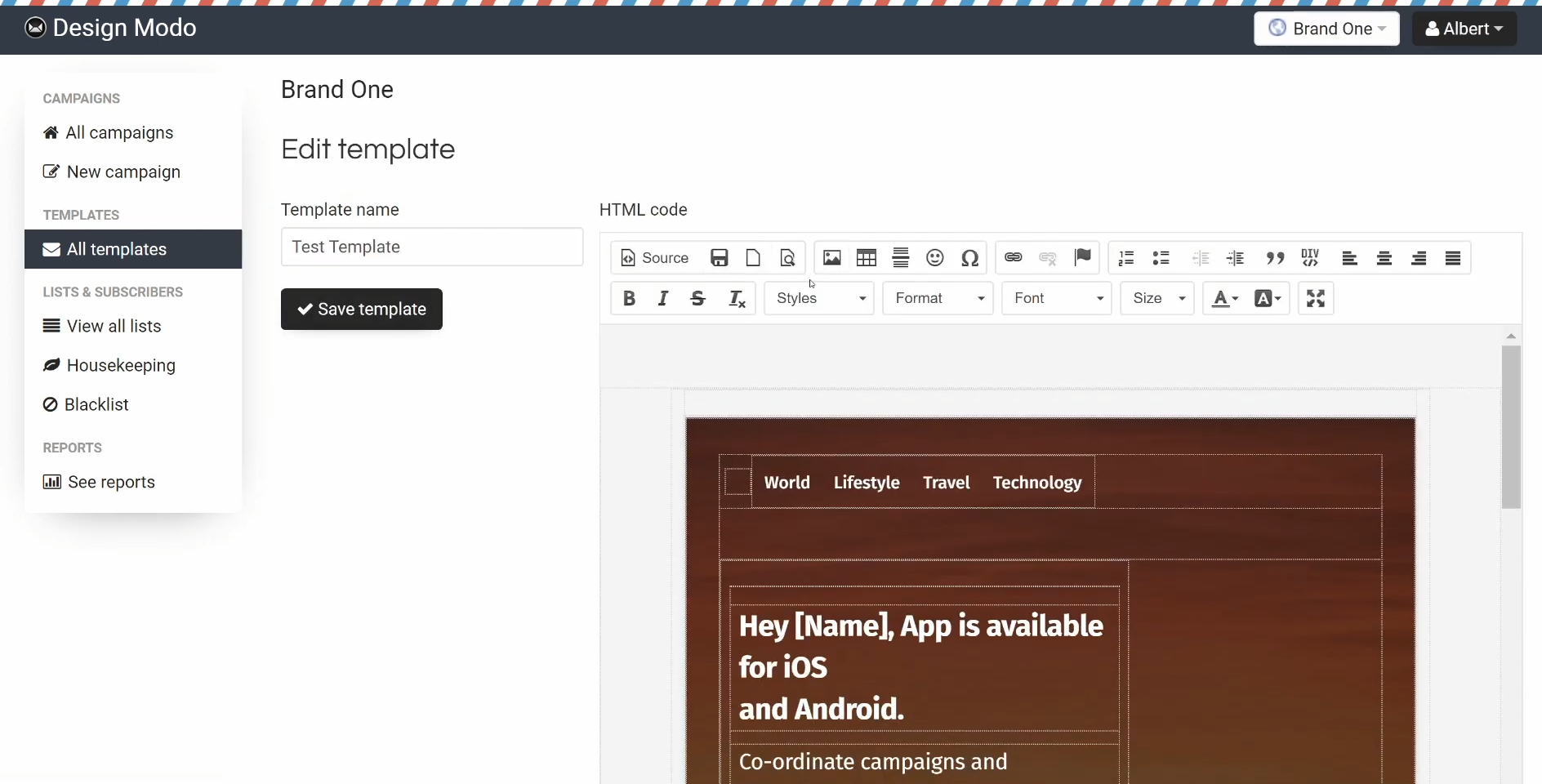 The Sendy dashboard, editing an email template in HTML; source: YouTube
The main thing to keep in mind is hosting. Sendy runs on your own server and requires PHP plus MySQL or MariaDB, so there’s more setup and maintenance involved than with a hosted email platform.
Key features include:
- Amazon SES email delivery;
- drag-and-drop, WYSIWYG, and HTML editors;
- campaign reports;
- AI Assistant (add-on) for subject lines, content, and insights;
- white-labeled client accounts;
- auto-responders and drip campaigns;
- list segmentation with custom conditions;
- subscriber management;
- bounce and complaint handling;
- custom domains;
- rules and webhooks.
Pricing. Sendy costs $69 as a one-time payment for the self-hosted platform; email sending is billed separately through Amazon SES (around $1 per 10,000 emails). Check Sendy’s official pricing page for current rates.
What users say. Users like the one-time software cost and low SES sending fees. The main downside is the extra work involved in self-hosting and getting everything set up.
Overall, Amazon SES and Sendy make the most sense when sending cost matters more than convenience. If you have technical resources, both can be much cheaper platforms at scale. If you’d rather not manage infrastructure or hosting, a hosted email marketing platform will be easier to live with.
Pricing pages can make these tools harder to compare than they need to be. One platform charges by subscribers, another by email volume, and a third may keep the headline price low while limiting key features.
The comparisons below put them on equal footing: what you’ll pay as your list grows from 1,000 to 10,000 subscribers, how the four most compared options stack up head-to-head at 10,000 contacts, and what each free plan actually includes.
What you’ll pay as your list grows
The table below uses monthly billing so the prices are easier to compare side by side. Annual plans are usually around 10–30% cheaper, although the discount varies by provider.
If a platform doesn’t offer the exact subscriber count shown, we use the nearest plan that can accommodate it.
| Tool – cheapest paid plan |
1,000 subs |
5,000 subs |
10,000 subs |
Emails/mo included |
| SendPulse |
$18/mo |
$52/mo |
$78/mo |
Unlimited |
| Brevo (ex Sendinblue) |
$17/mo
(1.5k subs) |
$32/mo*
(500k subs) |
$32/mo*
(500k subs) |
Capped by email tier |
| MailerLite |
$19/mo |
$49/mo |
$89/mo |
10× subscribers |
| Sender |
Free or $15/mo |
$39/mo |
$69/mo |
Capped by email tier |
| EmailOctopus |
Free or $13.50/mo |
$31.50/mo |
$44.50/mo |
10× subscribers |
| Moosend |
$16/mo |
$48/mo |
$88/mo |
Unlimited |
| Kit (ex ConvertKit) |
Free or $39/mo |
Free or $89/mo |
Free or $139/mo |
Unlimited |
| Zoho Campaigns |
Free or $7/mo |
$31/mo |
$49/mo |
Unlimited |
| Mailjet |
Free or $9/mo |
$19/mo**
(unlimited subs) |
$19/mo**
(unlimited subs) |
Capped by email tier |
| beehiiv |
Free or $59/mo |
$109/mo |
$139/mo |
Unlimited |
| Mailchimp |
$26.50/mo
(1.5k subs) |
$75/mo |
$110/mo |
10× subscribers |
*Brevo’s contact tiers jump from 2,500 to 500,000, so 5,000 and 10,000 sit on the same $32 tier.
**Mailjet’s entry paid plan caps contacts at 2,000; larger lists need Essential (unlimited contacts), priced by email volume, so 5,000 and 10,000 subscribers sit on the same $19 tier.
Which is the cheapest email tool at 10,000 subscribers?
SendPulse vs Brevo vs MailerLite vs Moosend is a useful comparison because all four are affordable enough to appeal to small and mid-size businesses, but they price their plans very differently. At the same list size, the cheapest option depends a lot on how often you send and what else you need from the platform of your choice.
- Brevo has the lowest price of the four at 10,000 contacts. The catch is that contact limits still apply, so a 10,000-contact list needs at least the 20,000-email tier at $28.75/month (billed annually), even if you don’t send very often. If your monthly volume goes up, the price does too. Automation on the free and entry-level plans is also limited to 2,000 contacts.
- SendPulse is easier to justify if you send frequently or in higher volumes. At $62.40/month (billed annually) for 10,000 subscribers, you get unlimited emails, so the cost doesn’t increase with every extra campaign. You also get chatbots, SMS, and CRM in the same platform.
- Moosend costs $70/month (billed annually) for 10,000 contacts, with unlimited sending and a strong focus on automation. It’s cheaper than MailerLite but pricier than Brevo and SendPulse.
- MailerLite costs $80.10/month (billed annually) for 10,000 subscribers and 100,000 emails. It’s the most expensive of these tools at that list size, but the editor and overall ease of use may still be worth the difference for some teams.
So in the SendPulse vs Brevo vs MailerLite vs Moosend comparison, Brevo is the obvious starting point on price, SendPulse wins once you send often or want extra communication channels, Moosend is the value pick when automation is the priority, and MailerLite earns its higher price for a cleaner editing experience and simpler day-to-day use.
Which free plan is the best?
Email free plans are generous in different ways. Some give you more room for contacts, others let you send more emails, and a few offer higher limits but keep important features behind a paid plan. The table below makes those differences easier to compare.
| Tool |
Free subscribers |
Free monthly emails |
Free daily cap |
Key free plan restrictions |
| SendPulse |
500 |
15,000 |
None stated |
5 automations with up to 50 steps; static segmentation |
| Brevo (ex Sendinblue) |
100,000 |
∼ 9,000 (based on the daily cap) |
300 |
1 user; limited automation (2,000 contacts); basic reporting |
| MailerLite |
250 |
2,500 |
None stated |
2 users; 3 automations with up to 5 steps; limited AI features |
| Sender |
2,500 |
15,000 |
None stated |
1 user; basic email blocks; limited reports |
| EmailOctopus |
2,500 |
10,000 |
None stated |
1 user; 3 automations with up to 5 steps; reports retained for 30 days |
| Kit (ex ConvertKit) |
10,000 |
Unlimited |
None stated |
1 user; no automation |
| Zoho Campaigns |
2,000 |
6,000 |
None stated |
5 users; no automation; no segmentation; basic reporting |
| Mailjet |
1,000 |
6,000 |
200 |
No automation; no segmentation; basic statistics |
| beehiiv |
2,500 |
Unlimited |
None stated |
1 user; no automation; limited AI features |
| Mailchimp |
250 |
500 |
250 |
1 user; 1 audience; no automation; limited templates; limited reports |
So the best free plan really comes down to what you’re trying to maximize. Brevo gives you plenty of room for contacts, but the daily sending limit makes it better for storing a large list than emailing it frequently. If you want to send more emails, Kit and beehiiv are better options since they don’t have a monthly email cap. Sender and SendPulse offer a more balanced setup, with useful features like automation and segmentation still available with the free plan.
If you just want the lowest price, the at-a-glance table near the top of this post gives you that answer. This section is more about fit: which platform gives you the best value for the way you actually send, the audience you have, and the communication channels you use.
Small businesses just starting out
Winner: Sender. Its free plan gives you enough room to get started without paying, and the paid tiers stay fairly affordable as your list grows. That makes it a good fit for a young business that doesn’t want to upgrade too early.
Runner-up: EmailOctopus. It also has a generous free plan and keeps the upgrade path simple and relatively inexpensive.
Also worth a look: SendPulse. Its free plan supports fewer subscribers, but it provides email, automation, CRM, and chatbots, so you don’t need to switch tools as your business grows.
Online stores and eCommerce
Winner: Moosend. It offers a deeper eCommerce toolkit than the low-cost platforms we reviewed, with product recommendations and ready-made cart abandonment, upsell, and cross-sell automations starting at $7/month.
Runner-up: Sender. It’s the cheaper option if you still want store-focused features, with shoppable product blocks and abandoned cart flows included on the free plan.
Creators and newsletters
Winner: Kit. It’s built around creator workflows, with landing pages, paid newsletters, audience tagging, and enough free capacity to grow a decent-sized list before you need to pay.
Runner-up: beehiiv. It’s another strong option for newsletter businesses, especially if growth and built-in monetization tools matter to you.
Also worth a look: MailerLite. It’s a favorite with bloggers and course creators for its clean editor, digital product sales, and paid newsletters. It’s also cheaper than Kit as your list grows.
Infrequent or seasonal senders
Winner: SendPulse. Its prepaid email credits start at $48 for 10,000 emails, with no monthly fee, so it works well if you send in bursts rather than on a fixed schedule.
Runner-up: Brevo. It also offers prepaid credits, which makes it a practical option for occasional campaigns.
Email plus other communication channels
Winner: SendPulse. It combines email with chatbots, SMS, pop-ups, and a built-in CRM, so you can cover more of your marketing from one platform instead of paying for several separate tools.
Runner-up: Brevo. It also covers email, SMS, and marketing automation, making it another good option if you want more than email alone.
Summing up
Email marketing is a core part of most online businesses, but how much you spend on it depends on your list size, sending habits, and the features you actually need. When comparing platforms, it helps to look past the advertised starting price and check what the plan will really cost at your current volume.
If you want to keep email, automation, chatbots, SMS, pop-ups, and other marketing tools in one place, SendPulse is worth considering. It also has a free plan, so you can get started without paying and upgrade only when you need more capacity or features.
Create your free SendPulse account and see whether it fits the way you work.
FAQ
What is the cheapest email marketing platform in 2026?
Zoho Campaigns has the lowest starting price at about $3/month (billed annually), though its entry plan is very limited on features. Moosend, Brevo, and Sender follow at roughly $7–9/month. The exact cost still depends on your list size and the features you need.
What is the cheapest email marketing platform for a small business that is just starting?
For a small business just starting out, the cheapest route is a strong free plan. Sender and EmailOctopus are two of the best if you mainly need email. SendPulse is worth a look if you’d rather not outgrow your tool quickly, since its free plan bundles email, automation, a built-in CRM, and chatbots. Kit and beehiiv give you more room for subscribers or unlimited sending, but they lean toward creators and newsletter businesses.
Is Mailchimp’s free plan still worth it in 2026, and what are its limits?
Mailchimp’s free plan can still work for a very small list, but it is quite limited compared with many alternatives. You get up to 250 contacts, 500 email sends per month, and a restricted feature set (a single audience with no advanced segmentation, basic templates only, no send scheduling, and automations you can build but not actually activate without upgrading).