This comparison began with a bold number: 19,450.
That’s how many ActiveCampaign users MailerLite claims have switched to its platform. Whether that number is exact or not, it points to a fair question: what would make someone move from one platform to the other?
To answer that, we compared ActiveCampaign and MailerLite across pricing, usability, and key features that matter for effective email marketing. Not to crown a winner, but to help you figure out which one fits the way your business runs.
If you manage straightforward campaigns for a small business or blog, your decision may look very different from a SaaS or eCommerce team running multi-channel automation. Let’s break it down.
How we scored this comparison: This review was created by the SendPulse team. As an email marketing platform ourselves, we work in the same space as the tools we test, which also means we understand the field deeply.
Each platform was evaluated across nine categories using our independent methodology. Pricing (25%), ease of use (20%), and email and automation features (15% each) carry the most weight because they affect daily workflows the most. All scores reflect real testing and analysis as of June 2026.
TL;DR MailerLite vs ActiveCampaign at a glance
Before we get into the details, here’s the big picture. Use it as a quick reference, or click any category to jump straight to the full breakdown.
| Category |
MailerLite |
ActiveCampaign |
Winner |
| Best for |
Small businesses, bloggers, and solo marketers who need a simple email platform with fast setup and predictable costs |
B2B companies, SaaS teams, and eCommerce brands that run behavior-driven automation and engage with customers across various channels |
Depends on use case |
| Pricing |
8.8/10
Free plan available; affordable pricing, although recent price increases reduced its advantage |
7.4/10
14-day trial and no free plan; pricing increases based on the number of contacts, the volume of monthly emails sent, and access to premium features |
MailerLite |
| Ease of use |
10/10
Beginner-friendly interface with guided setup and clear navigation |
8.8/10
Clean but complex interface with a steeper learning curve; step-by-step wizards and one-on-one onboarding for beginners |
MailerLite |
| Email design |
8.6/10
Visual builder with 108 templates categorized by industry and campaign type |
8.8/10
Drag-and-drop email editor with 125+ templates based on business goals and layouts |
ActiveCampaign |
| Automation |
7.5/10
Multi-step automation with 15 ready-made workflows |
9.6/10
Advanced multi-channel automation with over 900 templates and AI assistance |
ActiveCampaign |
| Deliverability |
9.8/10
Permission-based sending policy; automatic handling of bounces and complaints; dedicated IP available on request for high-volume senders |
10/10
Automatic suppression of bounces and complaints; built-in spam check tool; dedicated IP available for qualified senders |
ActiveCampaign |
| Integrations |
6.4/10
Over 185 integrations across eCommerce, CRM, finance, analytics, and other categories |
9/10
Over 1,000 integrations covering eCommerce, CRM, analytics, and automation solutions |
ActiveCampaign |
| AI features |
5/10
AI support is limited to generating email copy and subject lines |
8.9/10
AI solutions embedded across email, automation, segmentation, and predictive sending |
ActiveCampaign |
| Reporting |
6.4/10
Visual dashboards for core campaign and automation metrics |
8.4/10
Advanced reporting with filtering, customization, and export flexibility |
ActiveCampaign |
| Customer support |
7.3/10
24/7 email and live chat support for paid plans; structured help center |
6.8/10
Email and live chat support with extended hours; extensive documentation and training workshops |
MailerLite |
| Final score |
8.4/10 |
9.2/10 |
ActiveCampaign |
The score says ActiveCampaign beats MailerLite. The real question is where it wins and whether those wins actually matter to you – that is what this comparison is here to help you figure out.

Create and send high-performing emails
Use an AI assistant, pre-made templates, advanced segmentation, and feature-rich automation to run campaigns without coding. Start for free with up to 15,000 monthly emails.
Get started for free
MailerLite vs ActiveCampaign across pricing and key features
Before diving into each category, it’s worth stepping back for a moment and looking at what sets these two platforms apart at their core.
MailerLite prioritizes making email marketing simple and affordable. ActiveCampaign is built around managing customer journeys, with email as one part of a broader strategy that includes CRM and automation.
That contrast shapes nearly every score in this comparison. Let’s see how it plays out in pricing, automation, segmentation, and reporting – starting with cost.
Pricing plans
⭐ MailerLite: 8.8/10 | ActiveCampaign: 7.4/10
Disclaimer: Pricing changes frequently. These figures are accurate as of June 22, 2026. Always verify final costs on official pricing pages.
Pricing is where the gap between these platforms becomes most visible. Here’s what you can expect to pay as your contact list grows:
| Contacts |
MailerLite |
ActiveCampaign |
Winner |
| Free plan |
500 contacts and 2,500 emails/mo; 14-day free trial of advanced features |
No free plan, only a 14-day free trial |
MailerLite |
| 2,500 |
$33 |
$39 |
MailerLite
Cost difference: $6 |
| 10,000 |
$89 |
$149 |
MailerLite
Cost difference: $60 |
| 50,000 |
$319 |
$609 |
MailerLite
Cost difference: $290 |
| Total score |
8.8/10 |
7.4/10 |
MailerLite |
MailerLite is less expensive at every tier shown above, and the difference becomes more noticeable as your audience expands.
There’s also an important difference that doesn’t always show up in headline pricing: email limits. MailerLite’s paid plans include unlimited email sends. Once you choose a tier based on your contact count, you can run as many campaigns and automations as you need.
ActiveCampaign, on the other hand, ties email volume to both your plan and the number of contacts. If you send frequently, you may need to move to a higher tier to avoid hitting limits.
For high-volume senders, this is something to take into account, too.
Ease of use and interface
⭐ MailerLite: 10/10 | ActiveCampaign: 8.8/10
Comparing MailerLite and ActiveCampaign on usability isn’t a battle between easy and complicated. Both platforms are intuitive enough that a non-tech-savvy user can find their way around without much hand-holding.
The real difference is that MailerLite is optimized entirely around simplicity, while ActiveCampaign balances usability with deeper automation and CRM functionality.
As a result, the gap shows up less in whether you can figure things out, and more in how long it takes before everything feels second nature.
| Aspect |
MailerLite |
ActiveCampaign |
Winner |
| First-time experience |
Smooth onboarding with helpful in-app tips; most users can send their first campaign within minutes |
Clear setup for basic tasks; advanced features require additional learning |
MailerLite |
| Daily navigation |
Clean interface with navigation organized around core workflow sections and built-in support resources |
Feature-rich UI with contextual tooltips; some routine actions involve multiple clicks |
MailerLite |
| Learning curve |
Core features are easy to learn within 2-4 hours, supported by tutorials and Academy content |
Automation logic, tagging, and CRM workflows require about a month to master |
MailerLite |
| Mobile access |
iOS app allows users to create, preview, and schedule campaigns, manage subscribers, and track key metrics |
iOS and Android apps support managing deals and contacts, reviewing email and automation details, and tracking performance |
Tie |
| Workflow efficiency once mastered |
Routine tasks are quick and consistent; advanced customization is limited, but workflows stay simple and predictable |
Highly efficient for running complex, multi-step automations once properly set up |
Tie |
| Total score |
10/10 |
8.8/10 |
MailerLite |
MailerLite scores higher across most usability factors, which makes sense given that ease of use is its primary design goal. It is faster to learn and quicker for day-to-day tasks. ActiveCampaign starts slower, with the first month spent understanding how all its functionality pieces fit together. By month three, experienced users tend to feel just as comfortable, but with significantly more capability available to them.
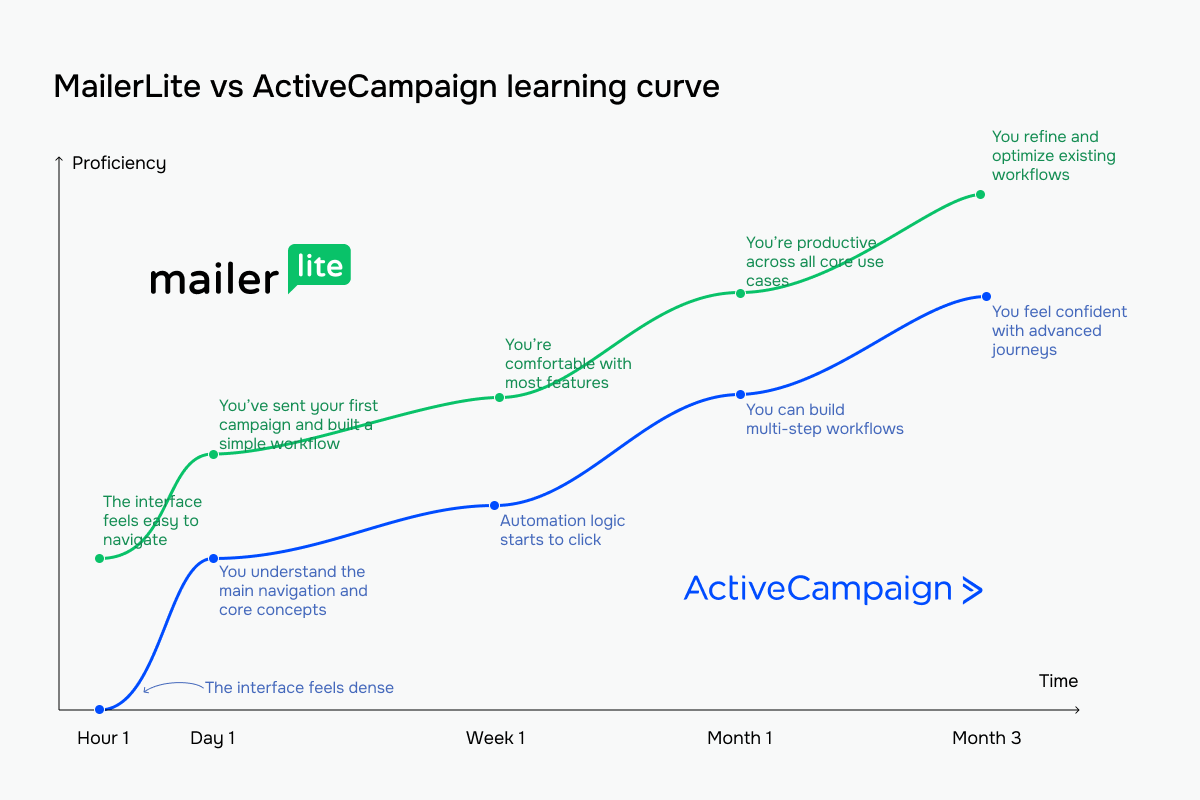 The green line represents MailerLite vs ActiveCampaign’s blue line
Email builder and templates
MailerLite: 8.6/10 | ⭐ ActiveCampaign: 8.8/10
The email builder is a key part of any email marketing platform, since it’s where most daily campaign work happens. Both MailerLite and ActiveCampaign offer intuitive drag-and-drop editors with flexible layouts, content blocks of various kinds, and solid template libraries, so their scores here are very close.
The difference comes down to how much design control you want versus how quickly you want to move from draft to sent email. Here’s how those differences show up in practice:
| Aspect |
MailerLite |
ActiveCampaign |
Winner |
| Templates |
108 templates organized by industry and campaign type |
125+ templates organized by campaign goal; unlimited AI-generated brand-aligned layouts |
ActiveCampaign |
| Drag-and-drop editor |
Visual editor with ready-made and saved content blocks, with global and per-block style settings |
Drag-and-drop builder with ready-to-use blocks, flexible layouts, and global style settings |
Tie |
| Notable content blocks |
Survey, quiz, feature highlights, signature, and eCommerce |
Shopify / WooCommerce product, predictive content, and timer |
MailerLite |
| Customization |
Extensive control over fonts, colors, spacing, and layouts; dynamic content and HTML editing available |
Deep customization with global styles and block-level controls; full HTML support and per-recipient dynamic content |
Tie |
| Mobile responsiveness |
Responsive templates with built-in mobile preview |
Responsive templates with device-specific layout adjustments |
ActiveCampaign |
| Total score |
8.6/10 |
8.8/10 |
ActiveCampaign |
MailerLite’s editor is clean and easy to move through. You start from a template, drag blocks from the left sidebar, and adjust content, colors, spacing, links, and other style settings in the right panel. There are also advanced content blocks in the “Special” tab, such as product listings, countdown timers, RSS feeds, surveys, and video embeds.
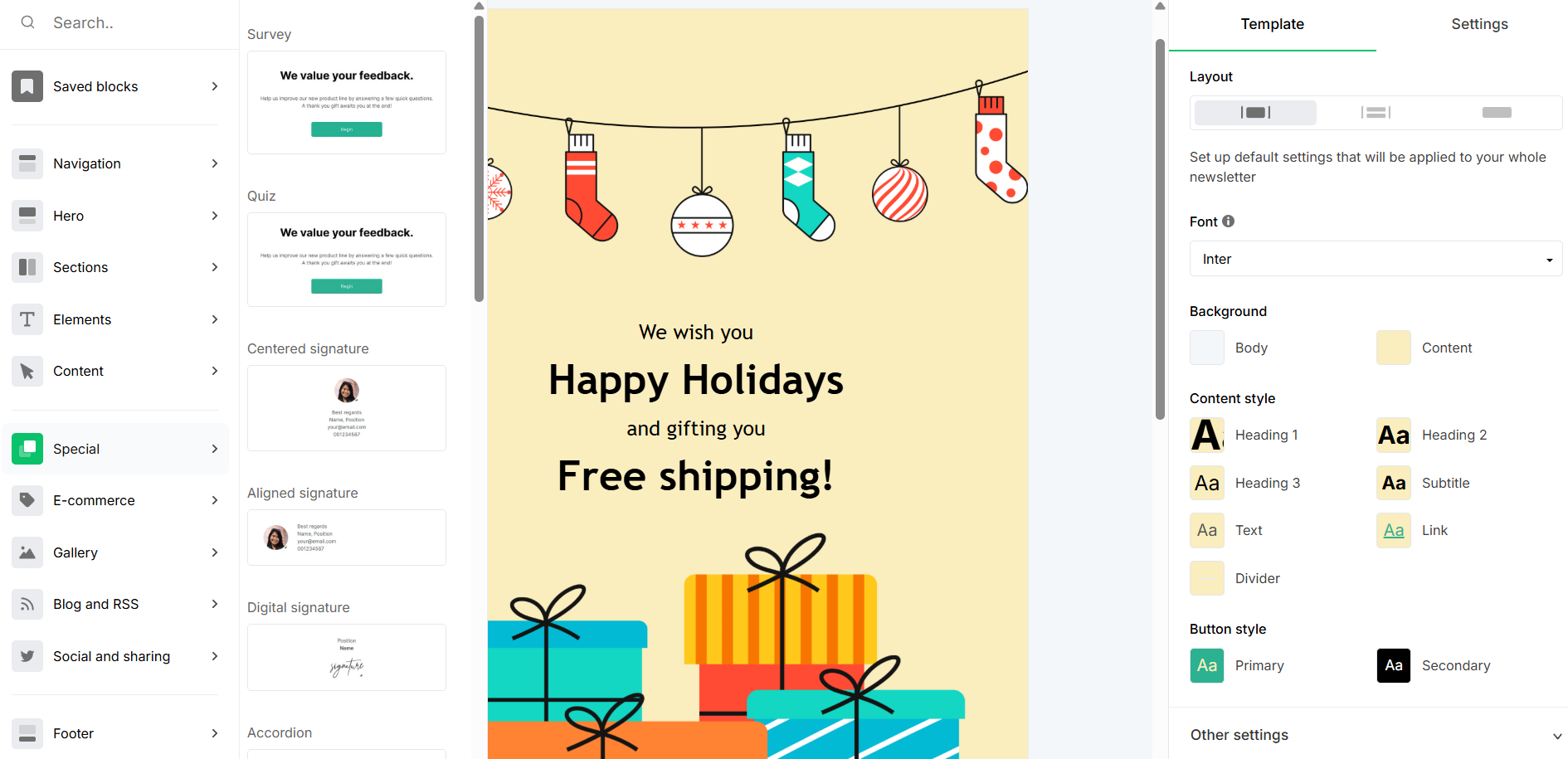 Inside the MailerLite email editor
ActiveCampaign’s email builder lets you start from a ready template and customize it using drag-and-drop blocks. You can adjust layout containers, replace content like text or images, and fine-tune styles from the side panel.
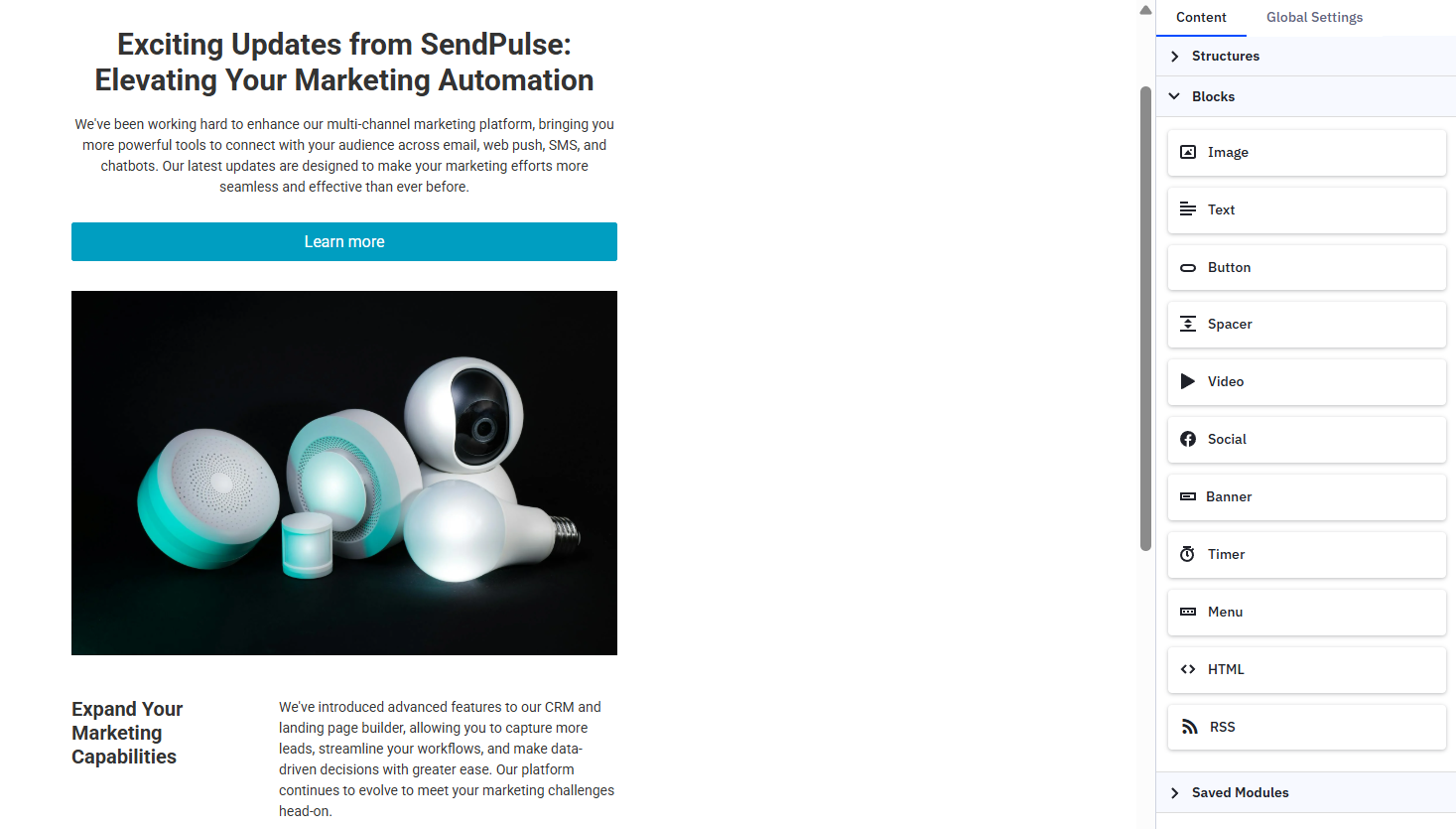 Inside the ActiveCampaign email editor
You can also save custom blocks to reuse them across emails and make a block, section, container, or structure conditional by setting rules that determine the content that should appear in an email to contacts on your list.
Marketing automation
MailerLite: 7.5/10 | ⭐ ActiveCampaign: 9.6/10
Automation is where an email tool becomes a comprehensive marketing system. It determines how much of your communication runs on its own, how detailed your customer journeys can be, and how easily those workflows scale as your business grows.
MailerLite keeps automation practical and easy to set up, covering the core triggers and flows most teams need. ActiveCampaign’s automation, by contrast, is the product itself. Everything else in the platform is built around it, allowing for deeply branched, event-driven workflows.
Here’s how they compare across the main automation factors:
| Aspect |
MailerLite |
ActiveCampaign |
Winner |
| Availability by plan |
Free users can run up to 3 automations with 5 steps each; paid plans increase limits to 50–100 active automations and up to 100 workflow steps |
5 actions per automation on the cheapest plan; higher tiers remove action limits and unlock cross-channel capabilities |
ActiveCampaign |
| Automation builder |
Workflow editor with multiple entry paths, rules, and actions |
AI-powered builder with multiple triggers, IF/ELSE conditions, contact-related and CRM-based actions, and predictive next steps |
ActiveCampaign |
| Triggers available |
11 triggers, 4 of which require a connected eCommerce store |
~ 40 triggers covering CRM and eCommerce events, integrations and webhooks, contact behavior and engagement data, and website or in-app activity |
ActiveCampaign |
| Pre-built automations |
15 automation templates to onboard leads, promote offers, recover carts, re-engage inactive subscribers, and trigger date-based emails |
900+ recipes for qualifying new leads, re-engaging lapsed customers, and triggering follow-ups based on specific page visits |
ActiveCampaign |
| Channels supported |
Email |
Email, SMS, and WhatsApp |
ActiveCampaign |
| Automation complexity |
Suitable for standard email-focused flows |
Designed for complex, multi-channel, CRM-driven workflows |
ActiveCampaign |
| Total score |
7.5/10 |
9.6/10 |
ActiveCampaign |
To make the difference between MailerLite and ActiveCampaign automation clearer, let’s look at how their automation templates compare.
MailerLite offers ready-made automation templates for common stages of the customer journey, including welcome emails, abandoned cart reminders, and re-engagement campaigns. Selecting a template loads a pre-built sequence of triggers and steps that you can edit and customize before activating the automation.
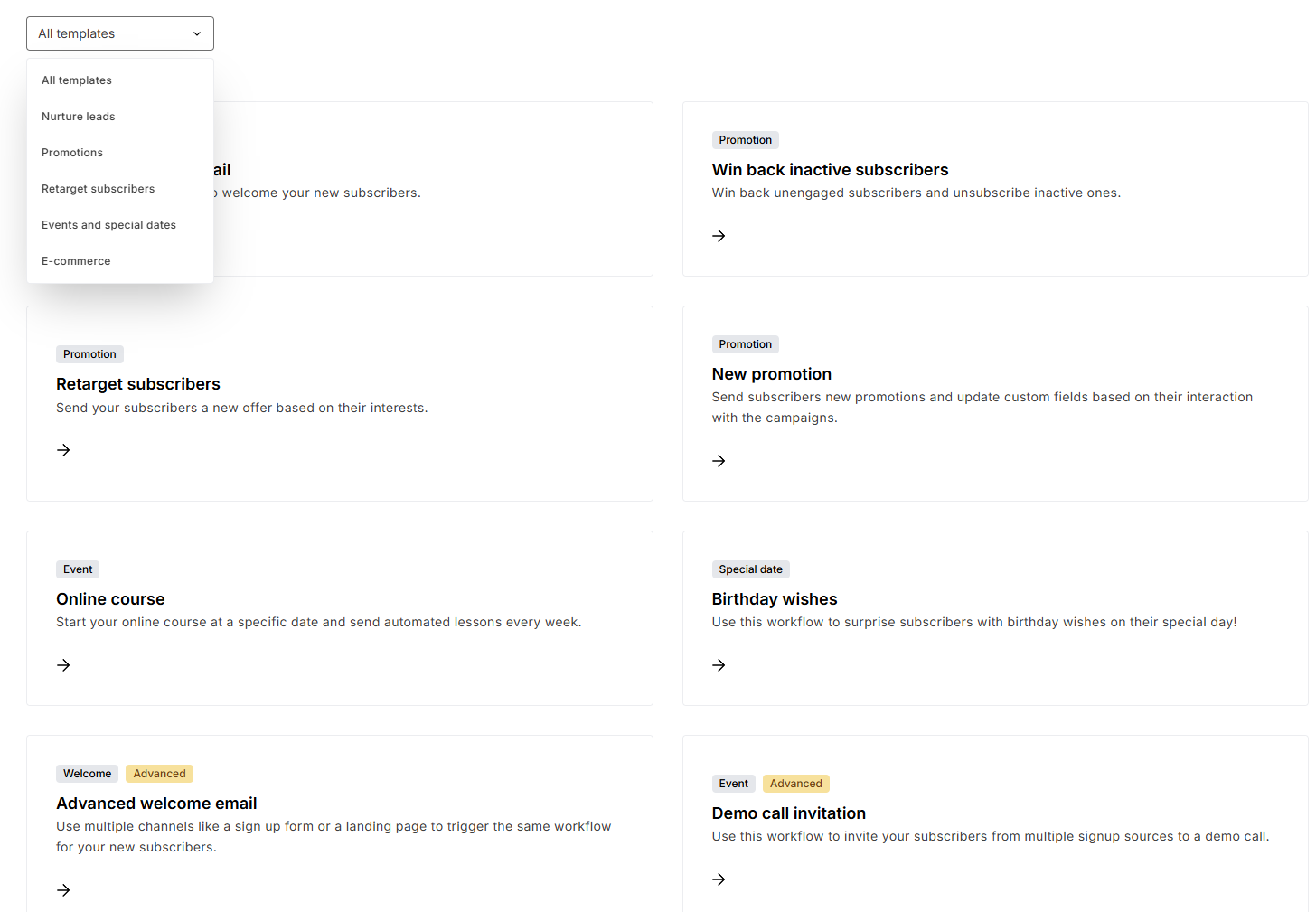 Automation templates at MailerLite
If your needs stop at straightforward sequences, MailerLite will get the job done without much effort.
ActiveCampaign’s automation library goes further. Its templates load multi-step workflows with branching paths, CRM actions, lead-stage triggers, and engagement-based conditions. A single automation can branch, pause, send an SMS, update a deal, and move a contact into an entirely different sequence based on what they do next.
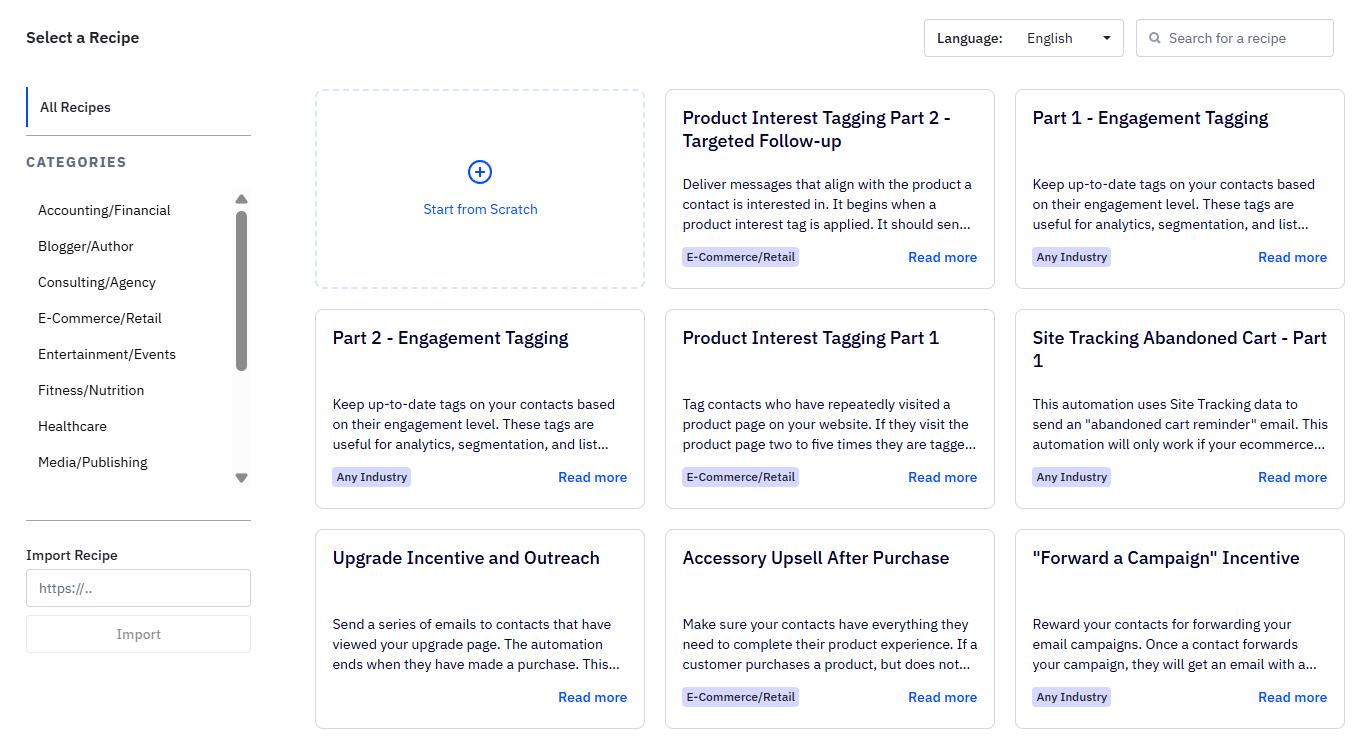 Automation recipes at ActiveCampaign
Because automation in ActiveCampaign connects email, SMS, web messaging, and CRM activity within the same workflow, it helps teams coordinate multiple touchpoints within a single customer journey.
One thing worth noting before you assume ActiveCampaign is the better choice by default: more automation complexity also means more setup time and more expertise required to maintain it.

Power up your business with smart tools
Emails, automation, chatbots, websites, CRM, and more — everything you need to connect with your audience. Try SendPulse for free today.
Get started for free
Contact management
MailerLite: 8/10 | ⭐ ActiveCampaign: 9.5/10
Contact management determines how precisely your automation and targeting can respond to customer behavior. Both MailerLite and ActiveCampaign handle basic list organization well. The gap opens up when segments need to react dynamically to what contacts actually do.
MailerLite uses a shared list model with groups (tags) and rule-based segments to keep subscriber data organized. ActiveCampaign centers contact management around a unified profile that connects email activity, automation logic, and CRM data in one place. As contacts interact with campaigns, websites, or their data changes in related deals, their records update automatically – and segmentation adjusts in real time.
Here’s how that difference plays out across key areas:
| Aspect |
MailerLite |
ActiveCampaign |
Winner |
| Segmentation capabilities |
Rule-based segmentation based on fields, groups, and campaign activity; basic AND/OR logic; limited segment library |
Event-driven segmentation with layered AND/OR logic based on contact tags, behavioral data, and campaign activity; saved and AI-generated segments |
ActiveCampaign |
| Segment update speed |
Segments update automatically as contacts meet defined conditions |
Segments refresh in real time as contact actions occur and data changes |
Tie |
| Available segmentation criteria |
Location and profile fields, time zone, signup source and date, email engagement, automation activity, and groups |
Behavioral events, automation status, CRM records, deal stages, goal completions, engagement data, and custom fields |
ActiveCampaign |
| Tagging and manual organization |
Groups (tags) are used to label and filter contacts inside a shared list |
Manual and automatic tagging through forms, link clicks, workflows, integrations, and the API |
ActiveCampaign |
| Total score |
8/10 |
9.5/10 |
ActiveCampaign |
Compared to ActiveCampaign, MailerLite has some limitations in certain aspects. For example, it doesn’t provide a comprehensive tagging system or AI assistance and lacks the insane number of detailed segmentation conditions that ActiveCampaign offers.
Signup forms and landing pages
⭐ MailerLite: 8.6/10 | ⭐ ActiveCampaign: 8.6/10
Signup forms and landing pages are where your business growth begins. They shape the first impression about your brand and determine how smoothly new leads move into your marketing or sales pipeline.
Both MailerLite and ActiveCampaign include built-in tools for capturing leads – no third-party builders required. The difference lies in how those tools connect to the rest of your workflow. MailerLite keeps form and page building simple and quick, while ActiveCampaign ties signups more tightly to automations and CRM workflows.
Here’s how the two platforms compare in their lead-capture toolkits:
| Aspect |
MailerLite |
ActiveCampaign |
Winner |
| Form builder |
Drag-and-drop form builder with 33 templates for embedded and pop-up forms; includes visibility rules, GDPR consent fields, and A/B testing |
AI-powered visual builder for inline, floating, and pop-up forms; supports contact, custom, and account fields; form submissions can trigger tags, deals, team notifications, and automations |
ActiveCampaign |
| Pop-up targeting conditions |
Time delay, scroll percentage, exit intent, frequency limits, scheduling, device targeting, and page-level targeting |
Time, frequency, and scroll-based triggers |
MailerLite |
| Landing page builder |
Native builder with 30 templates, block styles, SEO settings, custom domains, and core analytics |
Visual builder with 60+ pre-made templates, unique URL, metadata, and site tracking |
Tie |
| Total score |
8.6/10 |
8.6/10 |
Tie |
MailerLite’s landing page builder feels like a mini website studio made for marketers who want results fast. You start from a polished template, drag ready-made sections onto the page, and can use AI to draft the copy or layout if inspiration runs low.
 Landing page editor at MailerLite
It includes SEO settings, A/B testing, and analytics, so you can measure page performance without additional tools. For many small teams, that’s enough to run effective lead generation campaigns without technical overhead.
Compared to MailerLite, ActiveCampaign takes a more structured approach. Pages and forms are tightly connected to tags, automations, and CRM records. When someone signs up on your page, they can immediately enter a nurturing flow, be assigned a deal stage, or trigger a follow-up task.
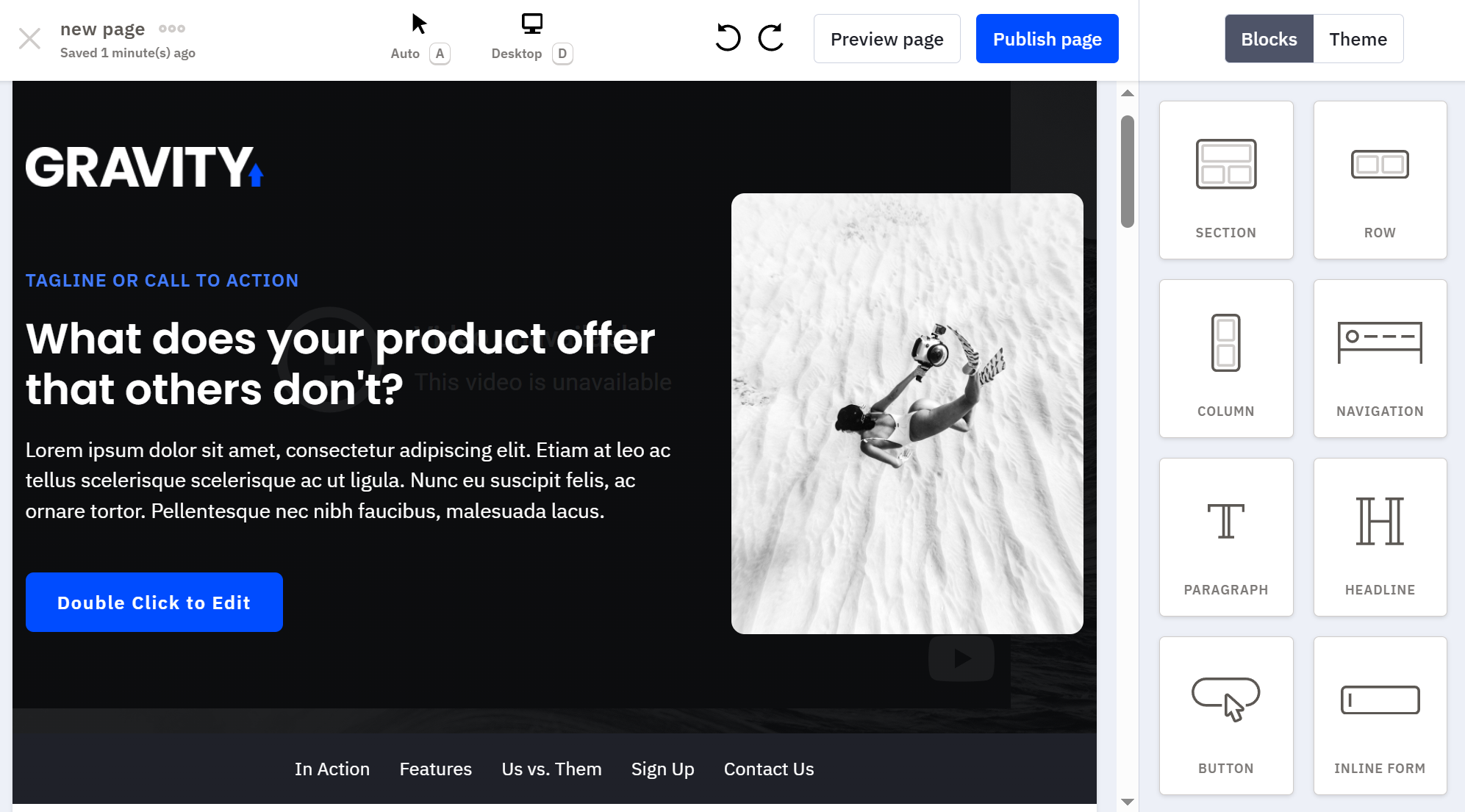 Landing page editor at ActiveCampaign
The page you create with ActiveCampaign isn’t just collecting leads; it becomes the starting point of a consolidated customer journey.
For teams that want targeted pop-ups, professional landing pages, and even online store functionality in one place,
SendPulse offers all of that – powered by AI. Lead data can automatically move into automation, CRM, chatbots, or other communication channels, allowing for dynamic customer journeys from the first interaction.
Deliverability
MailerLite: 9.8/10 | ⭐ ActiveCampaign: 10/10
Deliverability determines whether your emails land in the inbox or disappear into spam. Most of it comes down to how you manage your mailing list, how often you send emails, how relevant your content is, and whether you’ve set up proper authentication. The email platform should provide a stable infrastructure, enforce good sending standards, and give you tools to catch related issues early.
MailerLite and ActiveCampaign both handle deliverability fundamentals well, which is why the scores here are close and both are high.
| Aspect |
MailerLite |
ActiveCampaign |
Winner |
| Authentication |
Guided setup for SPF, DKIM, and DMARC; automatic domain authentication available for hosting providers |
Requires SPF, DKIM, and DMARC configuration before campaigns can be sent |
Tie |
| Deliverability monitoring |
Domain reputation tracking, blocklist and spam filter checks, inbox placement estimation |
Built-in spam-check tool and support for IP warm-up |
Tie |
| List hygiene |
Automatic bounce handling with soft bounces converted to hard after email address bounces 3 times; complaint suppression; native email verification tool |
Automatic management of bounces and unsubscribed contacts; tools to remove unengaged or inactive subscribers |
Tie |
| Dedicated IP |
Available on request for senders exceeding 50,000 emails a week; includes supervised warm-up; no official pricing available |
Available on request for senders exceeding 100,000 emails daily; pre-warmed and cold IP options; dedicated IP costs $750 |
ActiveCampaign |
| Total score |
9.8/10 |
10/10 |
ActiveCampaign |
For most senders, both platforms will deliver strong inbox rates if you’re following good sender reputation practices.
Integrations
MailerLite: 6.4/10 | ActiveCampaign: ⭐ 9/10
When platforms start counting integrations in the hundreds, the numbers can sound impressive. In reality, most teams stick to a small core stack: their website or eCommerce platform, CRM system, accounting software, analytics tools, and a few automation connectors.
Both MailerLite and ActiveCampaign cover those essentials well. What really matters is how well the platform slots into your setup when it grows more complex. If you’re looking for in-depth CRM coordination, advanced automation triggers, or specialized data syncing, that’s where things get interesting.
| Aspect |
MailerLite |
ActiveCampaign |
Winner |
| Integration catalog |
185 integrations |
1,010 integrations |
ActiveCampaign |
| eCommerce platforms |
Connects to Shopify, WooCommerce, BigCommerce, etc. |
Connects to Shopify, WooCommerce, BigCommerce, Adobe Commerce, Square, etc. |
ActiveCampaign |
| CRM systems |
Integrates with third-party CRMs like Pipedrive, Zoho, Salesforce, Kommo, and HubSpot |
Includes a built-in CRM system with contacts, deals, pipelines, and tasks; integrates with external CRM tools |
ActiveCampaign |
| Analytics and data tools |
Integrates with Google Analytics, Google Sheets, SurveyMonkey, and common reporting tools |
Integrates with Google Analytics, Kissmetrics, Zoho Analytics, and advanced data platforms |
ActiveCampaign |
| Zapier support |
13 triggers and 6 actions |
19 triggers and 22 actions |
ActiveCampaign |
| Total score |
6.4/10 |
9/10 |
ActiveCampaign |
If your stack includes a store, a CRM system, and basic reporting, either platform will connect the dots. You’re unlikely to hit limitations quickly.
But when your workflows span departments, ActiveCampaign’s built-in CRM and larger integration catalog make it way easier to sync up marketing and sales without integrating as many external tools. That flexibility matters even more as teams and operations expand.
AI features
MailerLite: 5/10 | ⭐ ActiveCampaign: 8.9/10
AI in email marketing can mean very different things. On some platforms, it helps you write faster. On others, it shapes how you build campaigns, who receives them, and when they are sent.
MailerLite applies AI mainly to content creation, helping you draft subject lines and email copy inside the editor. ActiveCampaign embeds AI into emails, automation, contact management and segmentation, deals, reporting, and websites.
Here’s how their AI capabilities compare in practice:
| Aspect |
MailerLite |
ActiveCampaign |
Winner |
| Email generation |
AI-generated email copy, subject lines, and some content blocks |
AI-generated campaign with a subject line, preheader, layout, text, images, and call to action; AI-powered templates based on the incorporated brand kit |
ActiveCampaign |
| Automation generation |
Automations created manually; AI-assisted actions possible via external tools (MCP) |
AI generates multi-step automation workflows with branching logic, triggers, and conditions |
ActiveCampaign |
| Sending time optimization |
Smart sending for emails based on each subscriber’s past engagement and time zone |
Predictive sending based on engagement data for automations and emails |
ActiveCampaign |
| Predictive customer analytics |
Not available |
Contact and deal scoring and deal win probability forecasting |
ActiveCampaign |
| Smart segmentation suggestions |
Not available |
AI recommends 3 segments based on contact activity, behavior, and market trends |
ActiveCampaign |
| Total score |
5/10 |
8.9/10 |
ActiveCampaign |
The score gap reflects how deeply AI is integrated into each platform.
MailerLite’s AI features help teams draft campaigns more efficiently, while ActiveCampaign applies AI more broadly. You can use its Active Intelligence to make decisions you might not have had the data or time to make manually, like which leads to reach, which contacts are close to converting, or which segments are worth targeting.
Reporting and analytics
MailerLite: 6.4/10 | ⭐ ActiveCampaign: 8.4/10
Reporting rarely sells a platform on its own, yet it plays a crucial role in how confidently you make decisions. Clear analytics help you understand what’s effective, where performance drops, and how automation impacts revenue over time.
Here’s how MailerLite and ActiveCampaign analytics capabilities compare:
| Aspect |
MailerLite |
ActiveCampaign |
Winner |
| Report coverage |
Campaign and automation performance reports, visual click maps, survey and eCommerce insights for corresponding email blocks, and subscriber activity reports |
Campaign, automation, сonversion attribution, and CRM performance reports with multi-metric dashboards and revenue tracking |
ActiveCampaign |
| Custom reports |
Pre-built performance overview dashboard with custom date ranges and comparative reporting |
Customizable reports and templates with flexible filters and combinable data fields |
ActiveCampaign |
| Reporting speed |
Dashboards refresh at regular intervals |
Reports update once every 24 hours |
Tie |
| Export capabilities |
CSV exports for campaign data, reports, and contact lists |
CSV, Excel, JSON, and TXT exports for reports, contacts, and deals |
ActiveCampaign |
| Total score |
6.4/10 |
8.4/10 |
ActiveCampaign |
MailerLite provides clean, accessible performance tracking. You can quickly see open rates, click behavior, location-based information, automation performance, and basic eCommerce results if your store is connected.
ActiveCampaign goes the extra mile, offering deeper insights into your campaign and automation performance, contact behavior, and CRM and eCommerce activity. It also filters out bot-generated email opens and clicks from your reports, so you get an accurate picture of your user engagement rates. On top of that, the platform provides tailored suggestions on actions you can take to grow your business, like segmenting contacts in a specific way to increase customer loyalty or purchase conversion.
Customer support
⭐ MailerLite: 7.3/10 | ActiveCampaign: 6.8/10
Customer support tends to stay unnoticed while everything runs smoothly, and suddenly becomes important the moment something doesn’t. When settings or configurations are confusing, what matters most is response time, support channel and agent availability, and clear documentation.
Let’s compare the support options available at MailerLite versus ActiveCampaign:
| Aspect |
MailerLite |
ActiveCampaign |
Winner |
| Channel availability |
24/7 multilingual email and live chat support |
24/7 email support, live chat during business hours |
MailerLite |
| Knowledge base |
Well-structured knowledge base with regularly updated articles, tutorials, and videos |
Clear help center with articles, videos, and step-by-step guides |
Tie |
| Onboarding assistance |
Tips and short video tutorials, free online courses, and dedicated onboarding support on higher-tier plans |
Guided onboarding with setup wizard, personalized onboarding sessions, and regular training workshops |
ActiveCampaign |
| Support quality rating on Capterra |
4.8/5 |
4.4/5 |
MailerLite |
| Total score |
7.3/10 |
6.8/10 |
MailerLite |
The score gap comes down to two factors: MailerLite offers multilingual support that ActiveCampaign simply does not, and it also holds a significantly higher rating based on verified user reviews (4.8/5 vs 4.4/5).
We noted a similar pattern in the MailerLite vs Klaviyo comparison: the more complex and feature-rich the software becomes, the more demanding its support needs tend to be. A platform that lets you build multi-channel, CRM-driven automations will naturally generate harder support questions, which may influence user ratings.

Join 3M+ businesses growing with SendPulse
From solo creators to global brands, millions trust SendPulse to run email campaigns, automations, chatbots, and more — all in one place. Get started for free now!
Get started for free
Your decision checklist
You’ve walked through the full MailerLite vs ActiveCampaign comparison. Now it’s time to translate all those features into a real-world choice. Use the checklist below to see which side you land on.
| Decision area |
MailerLite
is a better fit if… |
ActiveCampaign
is a better fit if… |
| Business type |
🟩 You run a small business, online store, or content brand and mainly need simple campaigns and email sequences. |
🟦 You run a B2B, SaaS, eCommerce, or sales-driven business and leverage lifecycle marketing to drive long-term growth. |
| Budget expectations |
🟩 You want solid marketing functionality without a large monthly investment. |
🟦 You’re comfortable starting on a paid plan to access advanced automation, CRM features, and deeper lifecycle marketing tools. |
| Automation needs |
🟩 You need simple workflows for welcome emails, lead magnets, or basic nurturing flows. |
🟦 You need complex, multi-step automations with branching logic, event triggers, and coordinated messaging across channels. |
| Analytics focus |
🟩 You mainly track campaign performance and basic engagement results. |
🟦 You need reporting tied to deals, customer journeys, automation performance, and revenue outcomes. |
| Team setup |
🟩 Your team is small and needs a platform that’s quick to learn and manage with minimal setup. |
🟦 Your team can invest time in setup and training to use advanced features. |
If one column clearly fits the way you run your marketing, that’s probably the right choice. You don’t need every row to match – just pay attention to what matters most for your business.
Final verdict and recommendations
⚖️ Final scores: MailerLite – 8.4/10 | ActiveCampaign – 9.2/10
So, back to those 19,450 switchers according to MailerLite statements. Whether or not that number is real, our comparison shows why it’s believable – in either direction.
There are solid reasons a team might move from ActiveCampaign to MailerLite: a cleaner interface, simpler workflows, lower costs, and faster setup. And there are equally valid reasons to move the other way: deeper automation and segmentation, a built-in CRM system, and AI-powered decision-making tools.
Basically, these platforms aren’t competing for the same users and aim at solving different problems for different stages of growth.
The safest way to decide is to test both platforms with a real workflow – build an automation, send a campaign, segment your audience, and see which one fits your process more naturally.
And remember, these aren’t your only options. If neither feels like a perfect fit, there are alternative solutions worth exploring, from budget-friendly tools like MailerLite to automation-heavy platforms like ActiveCampaign.