Creating fresh, engaging email content week after week is quite a challenge. Tight deadlines, busy calendars, and creative fatigue make it hard to stay consistent. That’s where ChatGPT can make a difference. It can generate outlines, write drafts, and refine your tone so you can move from idea to finished email faster.
The key is in how well you guide it. The more specific and detailed your ChatGPT email prompts are, the better your emails will sound and perform. Marketers around the world are already seeing the benefits — nearly 97% of business owners say they expect tools like ChatGPT to improve their operations. Many already use it to write customer responses, summarize content, and create marketing emails that convert.
In this guide, you’ll find practical tips for using ChatGPT to write emails, save time, and make your marketing workflow more efficient.
What ChatGPT can do for email campaigns
AI is shaping the future of many industries and using ChatGPT to write emails is a smart way to enhance your email marketing. Here’s how it can save you time and improve your results.
Content creation and drafting
ChatGPT can help you quickly turn a blank page into a working draft. It writes follow-ups, thank-you notes, or internal updates in minutes and adapts tone and style to your brand’s voice, be it friendly, persuasive, or professional.
You can use these drafts as inspiration, or just share a basic idea and let ChatGPT create several versions for you to edit. If you already have a long blog post or report, ChatGPT can turn it into short, easy-to-read snippets for your newsletter or rework it into a summary-style email.

Free email marketing that scales
Use an AI assistant, pre-made templates, robust automation, and more to run impactful email campaigns without coding.
Get started for free
Personalization and audience targeting
You can ask ChatGPT to insert dynamic fields like names, companies, or product names right into the draft. If you need the same email to feel like it’s coming from different perspectives, ChatGPT can adjust the tone accordingly. It can write from a CEO’s point of view, a sales rep’s perspective, or any other role, adapting the message to fit.
For different audience segments, ChatGPT can adjust the message to suit their needs. For instance, new subscribers may need a warm introduction, loyal customers expect appreciation and exclusive offers, while inactive users might respond better to reactivation offers or urgency-driven messages. ChatGPT can quickly adapt tone, focus, and value proposition for each group, helping you maintain relevance without rewriting your email entirely.
Optimization and testing
AI is great at generating variations for A/B testing, helping you experiment with subject lines, CTAs, or tone to see what resonates best with your audience. By feeding it campaign data, ChatGPT can even suggest adjustments to boost engagement.
For example, if you’re testing email subject lines, ChatGPT can offer options based on different tones:
- Friendly – “Hey, you left your sneakers behind — come back and grab them!”
- Persuasive – “Your sneakers are waiting! Complete your order before they sell out.”
- Playful – “Oops! Looks like your sneakers are feeling lonely in the cart…”
Plus, ChatGPT can proofread, simplify complex sentences, and make your emails easier to read across devices.
Localization and cultural adaptation
When targeting global audiences, learning how to use ChatGPT to write emails can help you translate and adapt messages to fit local languages, idioms, and events. For instance, it can help tailor a Christmas promotion in the U.S. or a Lunar New Year offer in Asia. This ensures your campaigns remain relevant across different markets.
You can also use it as an expert on customs and holidays in different countries and regions. While big events are easy to spot, local holidays in specific countries can be trickier to identify. ChatGPT can suggest these dates, but always double-check that the holiday actually exists. If your AI assistant can’t find reliable information, it might invent one, which we’ll cover later.
Workflow and campaign support
Beyond single emails, ChatGPT can outline entire automation flows and brainstorm seasonal campaigns or newsletter themes.
For example, it can outline a three-step welcome sequence: a warm introduction to the brand, a follow-up with top resources or products, and a final incentive to trigger the first conversion. The same applies to abandoned cart flows. ChatGPT can create a series of emails, from a gentle reminder to a sense of urgency (“Items are almost gone”) and a final message with a discount or bonus.
For inactive subscribers, ChatGPT can structure a re-engagement series starting with a “we miss you” note, followed by a value reminder, and then a last-chance incentive for those who still haven’t returned. When planning seasonal campaigns, you can brief ChatGPT with a theme, for instance, “create a spring campaign for eco-friendly shoppers.” It will offer campaign angles, hooks, and example email topics.
To keep all these touchpoints coherent, you can input your past emails or brand guidelines, so the drafts ChatGPT generates match your tone, rhythm, and message architecture across the entire automation.

Power up your business with smart tools
Emails, chatbots, websites, automation, CRM, and more — everything you need to connect with your audience.
Get started for free
Limitations of using ChatGPT for email marketing
While using ChatGPT to write emails can certainly accelerate your workflow, there are still areas where human oversight is essential: accuracy, compliance, deliverability, brand nuance, and strategic judgment.
Accuracy and compliance risks
ChatGPT doesn’t verify facts, legal requirements, or regulations. It can generate confident statements that might be wrong or leave out necessary compliance elements, like unsubscribe links or legal disclaimers (GDPR/CCPA notes, etc.).
For example, it might write a fundraising email without the required legal disclaimer or mention outdated statistics. Always double-check any claims, dates, or regulations manually. Legal emails should definitely go through compliance review before being scheduled.
Deliverability and technical limitations
AI doesn’t know how inboxes work. ChatGPT will not pick up on spammy wording, test how your email looks in different inboxes (like Gmail vs. Outlook), protect your sender reputation or resolve authentication issues. Even a perfectly written email can end up in the spam folder without a proper technical review.
To avoid this, run deliverability checks within your email service provider, use dedicated tools (Inbox placement tests), and proofread for spam triggers and formatting.
Branding and human touch
While ChatGPT can replicate your brand’s tone if you provide it with past emails or a style guide, it might miss the subtleties that only a human can catch. For example, it may not pick up on cultural cues, sarcasm, or know when to adjust the tone based on your audience or their stage in the customer journey.
For instance, ChatGPT might write a perfectly “on-brand” renewal email in a friendly tone, but your brand may actually require a more formal and urgent tone to convey the value of the renewal. Without human review, these important nuances can be lost.
That’s why it’s key to involve a human in this creative process. You can have a brand expert review your AI-generated drafts or give them a final polish yourself. It also helps to use one of the best AI detectors to catch any robotic-sounding patterns before they reach your subscribers. Over time, build a collection of “gold standard” emails to calibrate ChatGPT for future drafts.
Advanced marketing judgment and strategy
Knowing how to use ChatGPT to write emails means understanding what it can and can’t do within your marketing ecosystem. ChatGPT will not replace the data and insights from your marketing stack. It can’t read your analytics, so it will not automatically optimize emails based on open rates, clicks, or conversions. It also can’t push drafts into your email service provider on its own — you’ll need to manually copy and paste or use connectors. And, when it comes to making big strategic decisions (like pricing, market context, or compliance for regulated industries), ChatGPT isn’t your go-to solution.
For example, ChatGPT might suggest a “15% off” subject line for a reactivation campaign, but it doesn’t know if that offer is financially viable or if it violates marketing rules in your industry. To ensure your campaigns are successful, always pair AI-generated drafts with a human review, informed by platform analytics and compliance constraints.
Risk of over-reliance
When used on autopilot, ChatGPT tends to generate safe, generic copy, especially if the prompts are too broad. This can lead to “template fatigue,” where your emails sound polished but lack personality. Without proper guidance, AI might miss cultural nuances or humor, and even use references that aren’t appropriate for the audience.
For instance, AI-generated flash sale campaigns might repeatedly use the same urgency language like “last chance” and “don’t miss out,” making it lose their effectiveness over time. Or it could reference a culturally specific holiday (like Thanksgiving) when it’s not relevant to your audience.
To avoid this, mix in human-written “anchor” emails, add live context or personal touches, and always double-check sensitive or cross-cultural emails before sending.
To sum up what ChatGPT can and can’t do for email marketing, here’s a quick overview of its strengths and limitations:
| What ChatGPT can do |
What ChatGPT can’t do |
| Write follow-ups, thank-you emails, and newsletters quickly. |
Ensure factual accuracy or compliance with regulations like the CAN-SPAM Act and GDPR. |
| Generate catchy subject lines, compelling CTAs, and tone variations tailored to your audience. |
Optimize email deliverability or manage sender reputation to avoid the spam folder. |
| Personalize content using names, segments, and customer data. |
Fully capture your brand’s unique voice, emotional tone, and subtleties. |
| Repurpose content like blogs, webinars, or reports into email-friendly copy. |
Provide analytics or measure performance like opens, clicks, or conversions. |
| Translate and adapt emails for different languages and markets. |
Detect cultural sensitivities or subtle context without human input. |
| Plan automated flows for any stage of your customer journey. |
Securely process or store sensitive customer data without privacy risks. |
| Suggest A/B test ideas for subject lines, copy, or CTAs. |
Run or analyze A/B tests directly within your email platform. |
| Brainstorm creative campaigns and content hooks based on trends. |
Predict campaign success with complete certainty. |
| Support team workflows by generating templates or content outlines for faster collaboration. |
Replace strategic thinking, experimentation, or marketer intuition. |

Power up your business with smart tools
From solo creators to global brands, thousands of customers trust SendPulse to run email campaigns, chatbots, automations, and more — all in one place.
Get started for free
Prompting tips for ChatGPT email writing
When you ask ChatGPT to “write an email,” it gives you a default, one-size-fits-all draft. But when you define what you need, who it’s for, and why it matters, the results become sharper, more relevant, and closer to publish-ready. Each prompt you use should include your real context, for example, product names, offer dates, and customer segments.
Now, let’s look at a few ChatGPT email writing tips that help marketers craft high-performing, ready-to-send emails.
Use the Purpose–Tone–Length–Audience–Context formula
One of the most effective ways to structure ChatGPT email prompts is by combining purpose, tone, length, audience, and context. Here’s how to use it effectively.
Purpose. Define what type of email you’re creating. Is it a thank-you message, a follow-up, a newsletter, or a promotional campaign? Clear intent gives ChatGPT the right direction from the start.
Example: “Write a follow-up email after a demo call.”
Tone. Tell the AI how you want it to sound. Should it be formal, friendly, or persuasive? The right tone ensures your copy feels human and fits your brand personality.
Example: “Keep the tone confident but approachable, like a helpful consultant.”
Length. Specify how long your email should be. For instance, a teaser campaign may work best under 100 words, while an educational email might need more space to explain value.
Example: “Make it concise — around 120 words, easy to scan on mobile.”
Audience. Clarify who will receive it. A prospect, a loyal customer, a VIP, or a partner? The more specific you are, the more relevant the draft will feel.
Example: “Target new subscribers who just joined the mailing list this week.”
Context. Give background details that shape the message: campaign goals, past interactions, or special offers. This transforms generic text into an authentic message.
Example: “Mention that the subscriber downloaded our productivity guide and offer them a 15% discount on our new course.”
Here’s an example that brings all five points together into one strong, structured prompt:
“Write a friendly 120-word follow-up email for prospects who signed up for a free trial of our project management tool but haven’t activated their account yet.
Keep the tone encouraging and helpful, highlight how the tool helps teams save time, and include a clear CTA to finish onboarding today. Make it short enough to read easily on mobile.”
Take a look at the result you can get with a ChatGPT email prompt like this:
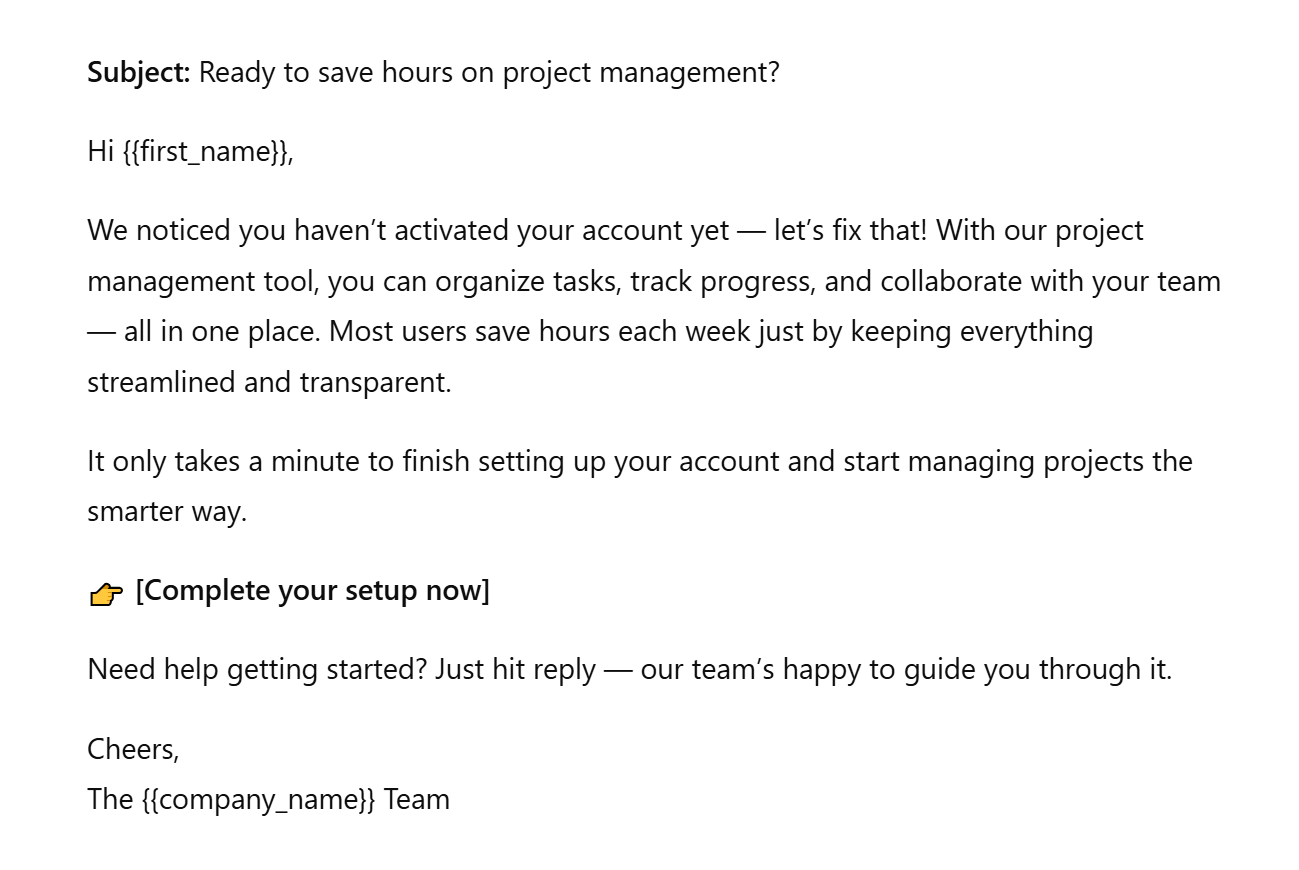 Example of an email text generated by AI
Ask for variations and length versions
Instead of taking the first draft ChatGPT gives you, ask for multiple variations. When you use ChatGPT for email writing, this approach lets you test different tones, structures, and emotional angles, so you can choose the version that best fits your audience and campaign goal without rewriting from scratch.
For instance, you can prompt:
“Write three variations of this email: one playful, one urgency-driven, and one professional.”
You’ll get different options ready for A/B testing. Sometimes the best-performing subject line or intro will come from version two or three, not the first draft.
Here’s an example of one of the email versions that AI generated from this prompt:
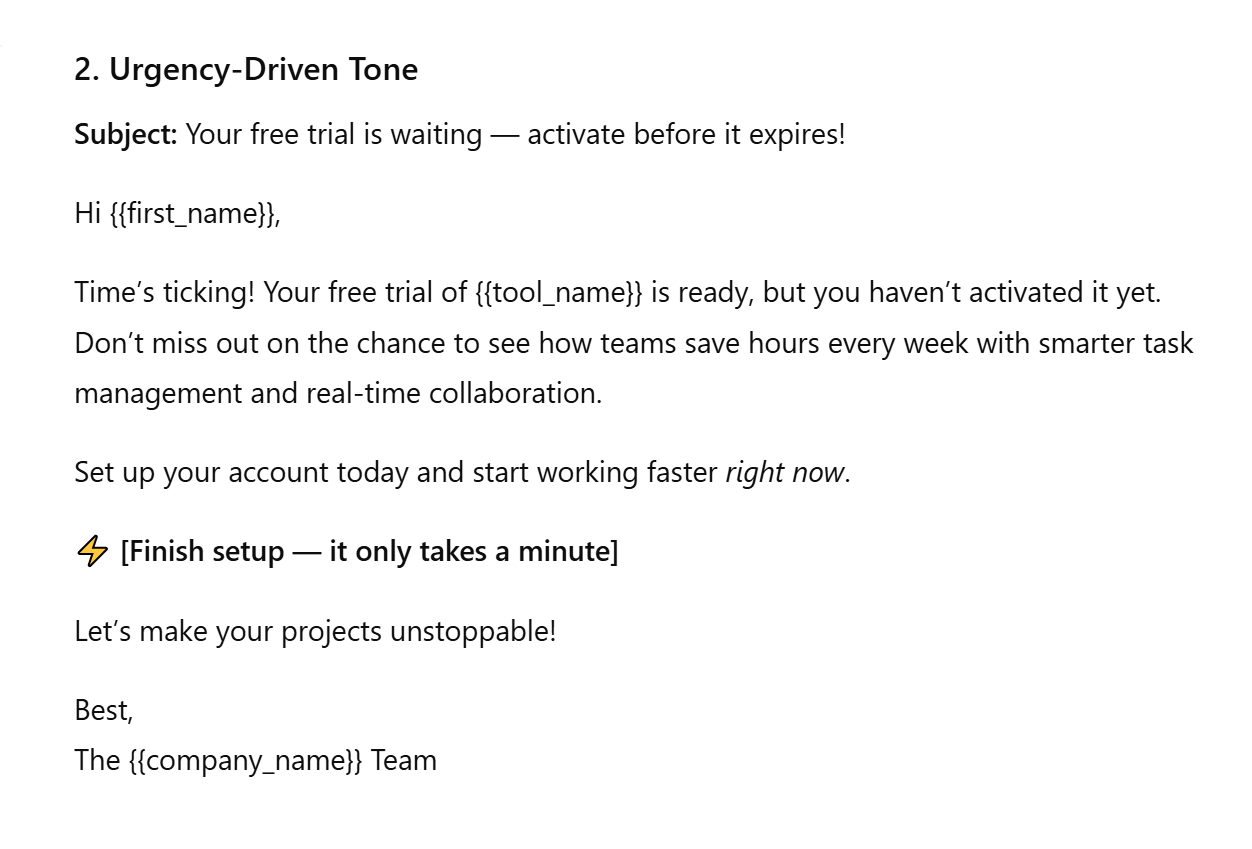 Example of an email text generated by AI
You can also request adjustments in length and complexity, depending on where and how you plan to use the email. For example:
“Rewrite this email in under 100 words for busy executives.”
This technique helps you produce concise versions for mobile readers or teaser emails while keeping longer, more detailed options for newsletters or onboarding flows. By systematically testing tone and length, you’ll discover what resonates best and start using AI not just for drafting, but for data-informed creative experimentation.
Specify role and perspective
ChatGPT writes better when it knows its role. By assigning a role and point of view, you anchor the tone, vocabulary, and intent of the message. This helps to make the copy sound like it was written by a real professional.
For example, prompting “Write as a SaaS marketing manager announcing a new feature to customers” gives the model context for both audience and communication style. This helps you get a copy that speaks the right language for the right audience.
This approach works across industries:
- a coach or educator will sound motivational and supportive;
- a sales representative will emphasize urgency and next steps;
- a consultant or agency will use credibility, empathy, and insight.
By specifying role and perspective, you help ChatGPT mirror your professional context. This ensures every email feels authentic to both your brand voice and your audience.
Create and maintain a prompt library
If you write emails regularly, stop reinventing prompts every time. Build a prompt library — a database of instructions that generate high-quality drafts for your recurring campaigns.
Start by cataloguing ChatGPT email prompts for common email flows — welcome series, re-engagement, follow-ups, post-webinar thank-yous, abandoned carts, and seasonal promotions. Each time you refine a prompt that delivers great results, save it. Over time, you’ll have a ready-made toolkit for any campaign type.
To make your library easy to navigate, you can tag each prompt by:
- audience – new leads, loyal customers, inactive users;
- funnel stage – awareness, nurture, conversion, retention;
- tone – friendly, urgent, professional, conversational.
For example, you might tag a prompt as “B2B | nurture | educational | friendly.” This makes it simple to find and reuse the right starting point without scrolling through old chats.
Include conversion goals and funnel stage
If you want ChatGPT to write emails that convert, you need to tell it what success looks like. Every prompt should include the goal you’re trying to achieve, be it maximizing sign-ups, booking demos, or re-engaging inactive users. Without this direction, the AI can only guess your intent, and that’s how you end up with copy that sounds fine but doesn’t drive action.
When crafting your prompt, define both the conversion goal and the funnel stage. For example, top-of-funnel emails should educate and inspire; mid-funnel should nurture your leads and overcome objections; bottom-funnel should convert with urgency or proof.
Try a prompt like this:
“Write a persuasive 100-word re-engagement email for users who haven’t opened messages in 60 days. The goal is to bring them back to the platform with a limited-time 20% discount. Suggest three CTA button options and one KPI to track (e.g., reactivation rate).”
This way, ChatGPT aligns tone, content, and structure with your marketing objective and even gives you measurable next steps for testing and optimization.
Here’s a re-engagement email text AI can create if you give it a prompt like this:
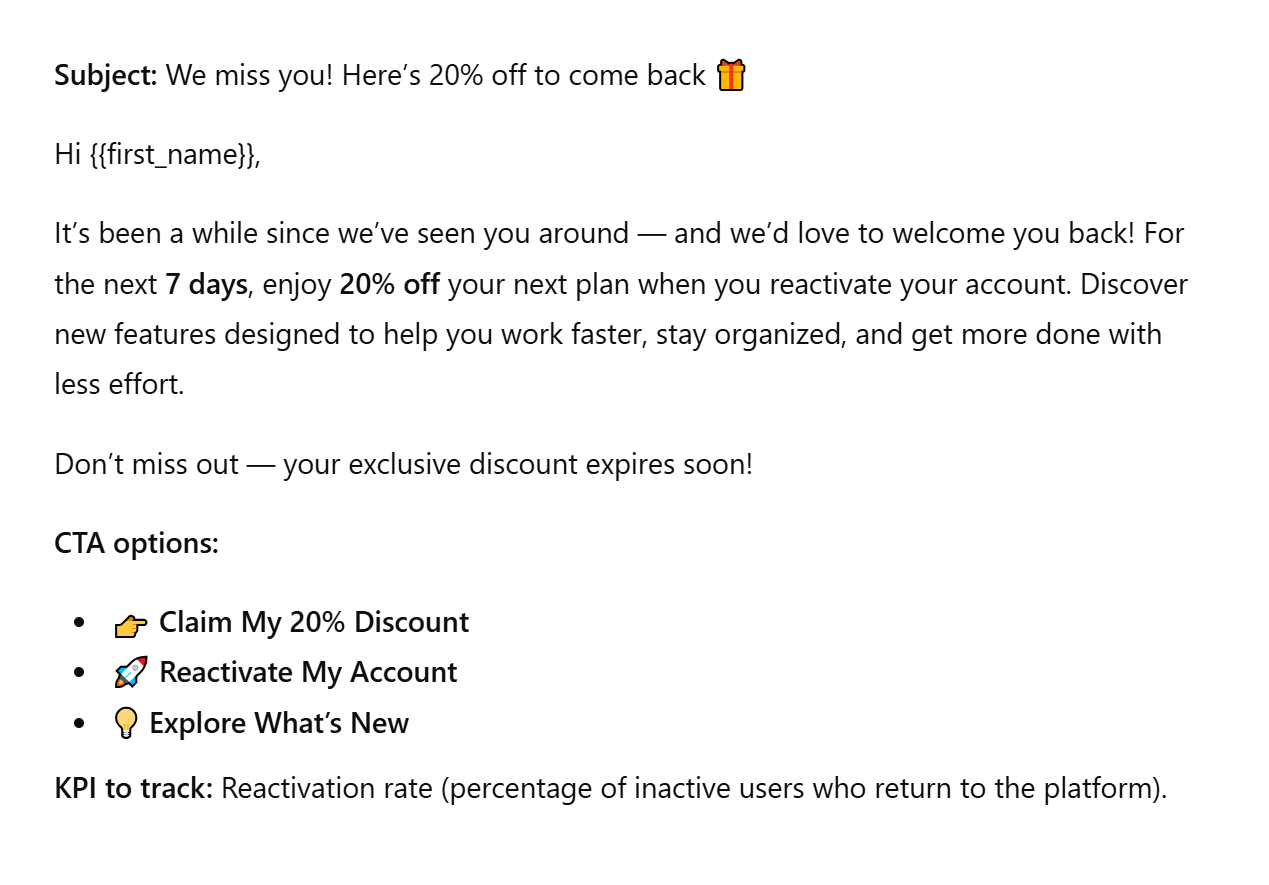 Example of an email text generated by AI
Ask for formatting and deliverability safeguards
Even the best copy can fail if the structure is messy or the email gets flagged as spam. That’s why, when using ChatGPT for email writing, it’s smart to tell the AI not just what to say, but how the email should look and perform in the inbox.
Ask for a clear, reader-friendly structure: short paragraphs, bullet points for key benefits, a bold CTA button, and a simple P.S. at the end for secondary offers or reminders. This makes the email easier to scan and improves mobile readability, where most of your audience actually reads.
For example: “Write a promotional email with three concise bullet points for benefits, one bold CTA, and a P.S. about free delivery.”
We used this prompt, and here’s what we got:
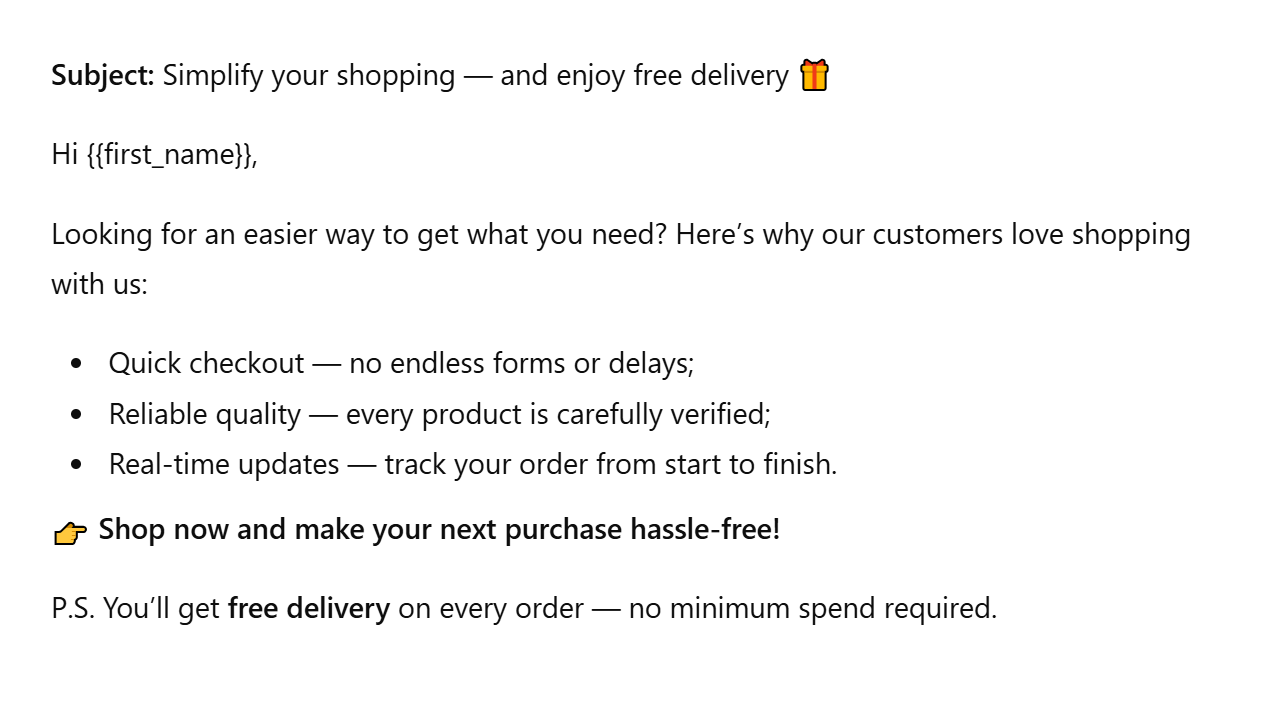 Example of an email text generated by AI
Beyond design, include deliverability safeguards directly in your prompt. Ask the AI to avoid spam-trigger words like free, guaranteed, or $$$, and to keep sentences short and natural:
“Draft this email using simple language and avoid spammy phrases that could harm deliverability.”
Include brand voice instructions
AI can imitate your writing style, but it can’t feel your brand voice unless you teach it. The more clearly you describe your brand personality, the closer the output will sound to something you’d actually send. That’s why every prompt should include tone and voice instructions — short, vivid cues that reflect how your brand communicates.
For example: “Rewrite this promo email in the style of a friendly but authoritative wellness coach. Avoid jargon and keep the tone motivational.”
Here’s what we got using this ChatGPT email prompt:
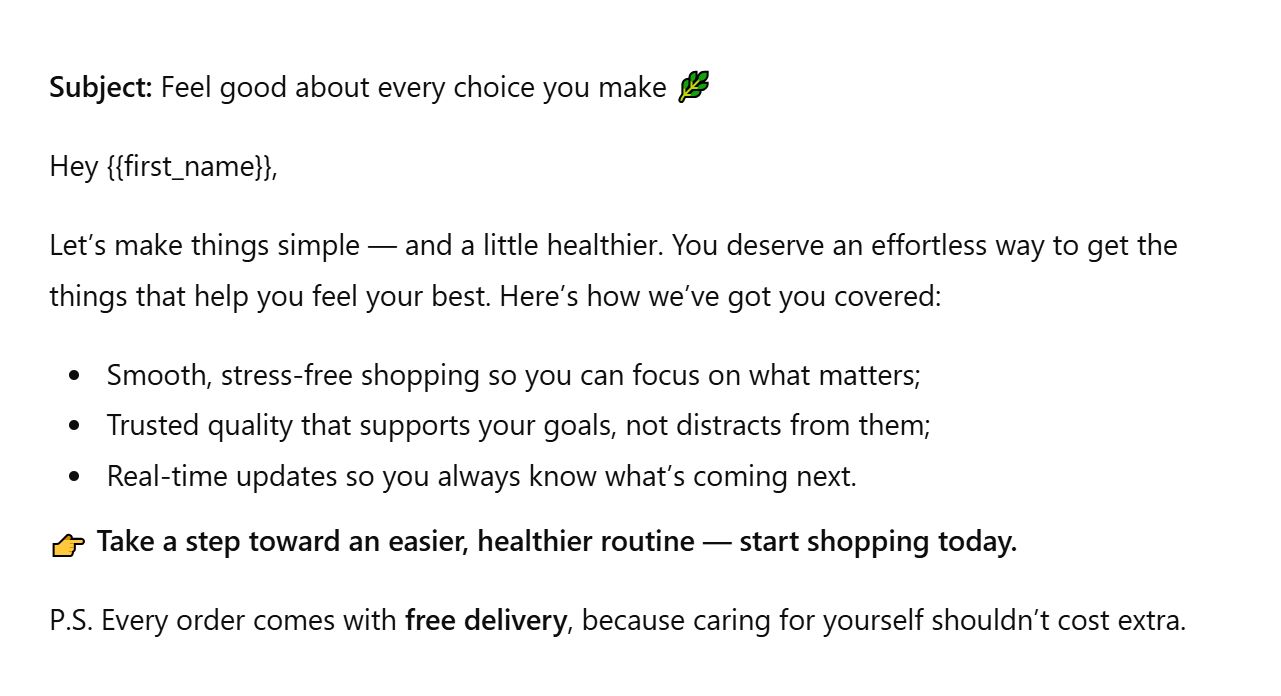 Example of an email text generated by AI
This kind of instruction tells ChatGPT what energy the message should carry. A SaaS brand might go for “confident and expert,” a boutique agency for “refined and conversational,” while an eCommerce store might choose “upbeat and playful.”
Giving clear voice guidance ensures brand consistency across campaigns, even when multiple people or tools create content.
Turn conversations into conversions
Design targeted flows across email, messaging apps, and SMS — powered by CRM data and real user behavior, all in one automation hub.
Get started for free
Ready-to-use ChatGPT prompts for email marketing
Once you’ve mastered how to build effective prompts, it’s time to put that skill to work. Below, we’ve provided prompt templates designed for various email types, from promotional campaigns to abandoned cart reminders, event invites, re-engagement messages, and newsletters.
Promotional campaigns
Each template is tailored for a different business type, such as eco-friendly products, SaaS launches, and local promotions. These ChatGPT prompts for email marketing but rather a starting point to help you go from concept to publish-ready copy in minutes. They provide a structure that you can easily personalize with your product details, offers, and other relevant information.
To illustrate the flexibility, here are three example prompts for common promotional scenarios:
| Eco-friendly product campaign |
Write a 110-word promotional email announcing a 20% discount on our new eco-friendly skincare line. Target women aged 25-40 who value sustainability. Start with a relatable pain point (harsh chemicals in traditional skincare), highlight two benefits — organic ingredients and recyclable packaging — and keep the tone warm and inspiring. End with a playful CTA and two subject line ideas. |
| SaaS product launch |
Create a 100-word announcement email for the launch of a new time-tracking tool designed for freelancers. Highlight three features — automatic time logs, smart project summaries, and one-click invoicing. Include a short testimonial-style quote and a clear CTA to start a free trial. Keep the tone professional yet approachable. |
| Local seasonal offer |
Write a cozy 100-word email promoting a limited-edition pumpkin spice latte for autumn. Target local professionals who want a quick seasonal treat. Use warm, sensory language and a touch of exclusivity (‘available until November 15’). Add one playful and one urgency-driven subject line. |
Here’s an example of how that last prompt could look in action — a seasonal promotion for a local coffee shop:
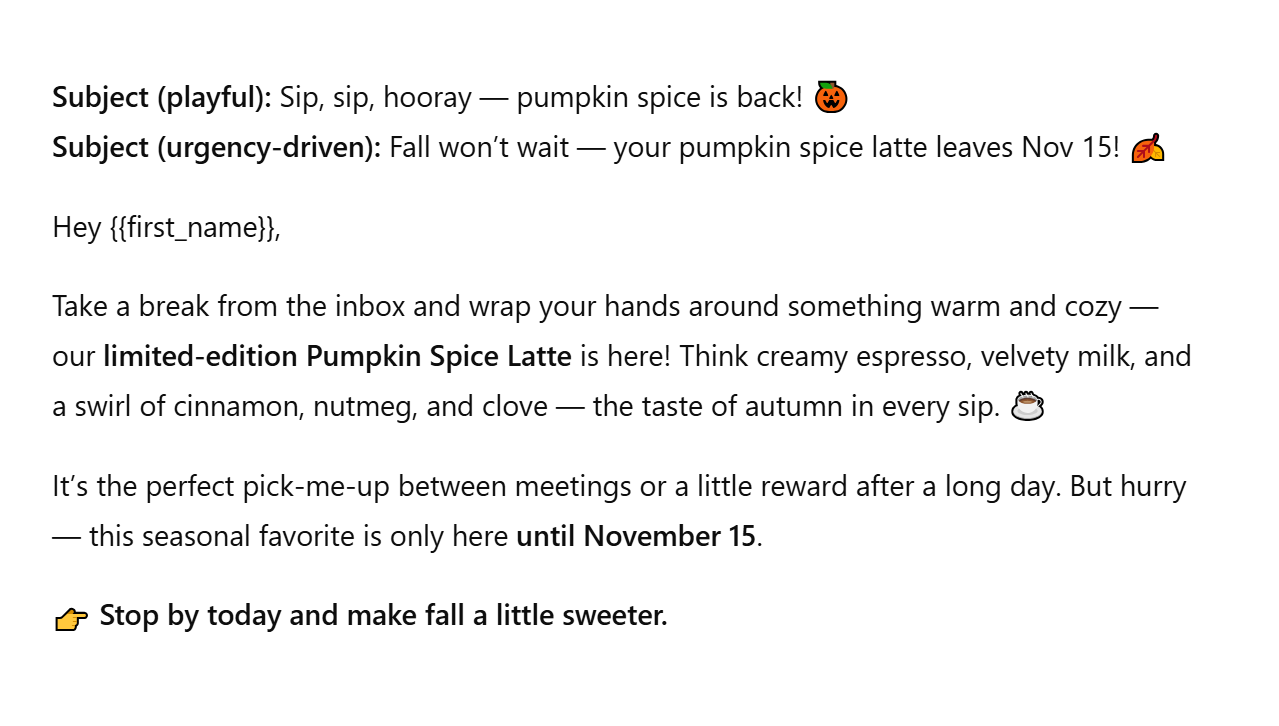 Example of an email text generated by AI
Abandoned cart
Cart recovery emails don’t have to sound robotic or pushy. The right tone, whether humorous, urgent, or supportive, can effectively turn hesitation into conversion. Below are three structured ChatGPT prompts for email marketing that show how to brief AI for different emotional angles. Each prompt helps you tailor your message to your audience’s mindset and test which tone resonates best.
| Humorous reminder |
Write a fun, 100-word abandoned cart email for an online fashion store. Use playful humor to remind customers what they left behind. Make it witty, friendly, and lighthearted — not salesy. End with a clever CTA and one pun-inspired subject line. |
| Urgency-driven reminder |
Create a concise, 90-word abandoned cart email emphasizing urgency and limited stock. Mention the product by name, use action-focused language, and include a 24-hour deadline. Add two urgency-based subject lines and one strong CTA. |
| Supportive, reassuring reminder |
Write a warm, 100-word abandoned cart email for a home decor store. Use an empathetic tone, reassure the customer that their items are saved, and offer support (like easy returns or help choosing). Include one calm subject line and one reassuring CTA. |
Here’s an example of how the humorous prompt might look in action:
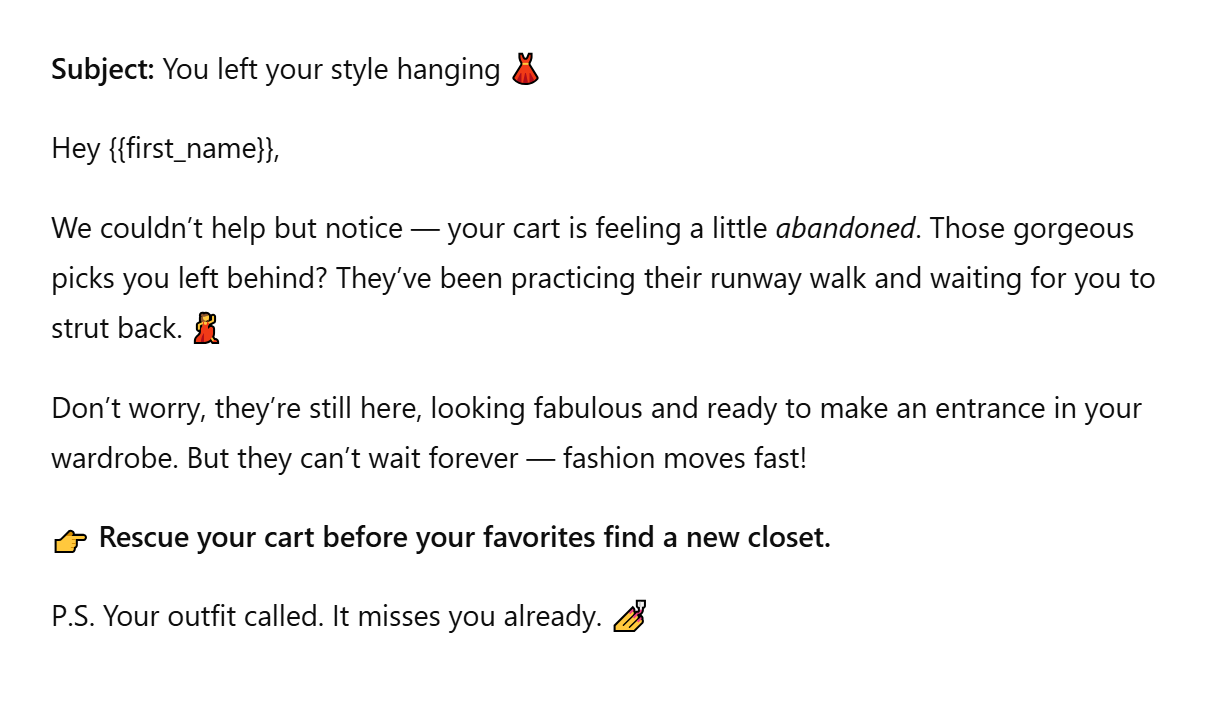 Example of an email text generated by AI
Seasonal campaigns
Seasonal campaigns are where great planning meets perfect timing, and ChatGPT can help you map out a full three-email series in minutes. Whether it’s Black Friday or New Year’s, the formula is similar: start with anticipation, move to conversion, and finish with urgency.
Below you’ll find structured ChatGPT prompts for email marketing for teaser, launch, and last-chance emails. They are easy to adapt to any industry, from eCommerce and SaaS to education or services.
Here are the prompts for a Black Friday email flow:
| Teaser email prompt |
Write a 90-word teaser email for an upcoming Black Friday sale. Build excitement without revealing the discount. Use a mysterious tone, short sentences, and phrases like ‘something big is coming.’ Add two subject lines: one curiosity-based, one urgency-driven. |
| Launch email prompt |
Write a 120-word Black Friday launch email announcing our biggest sale of the year. Include the discount amount (up to 40%), highlight top product categories, and use clear, energetic language. Add one bold CTA and two subject line options. |
| Last-chance email prompt |
Write an 80-word final reminder email for the last day of the Black Friday sale. Make it urgent but not pushy. Include phrases like ‘final hours,’ ‘ends tonight,’ or ‘your last chance.’ Suggest two subject lines and a single, high-impact CTA. |
Here are the prompts for a New Year campaign:
| Teaser email prompt |
Write a short 80-word teaser email for a New Year campaign focused on renewal and fresh starts. Keep the tone optimistic and forward-looking. Don’t mention the offer yet — just inspire readers to ‘get ready for something new.’ |
| Launch email prompt |
Write a 120-word New Year campaign email announcing a limited-time offer (e.g., 25% off all plans or courses). Use motivational language centered on growth and positive change. Include one clear CTA and two subject line options with a hopeful tone. |
| Last-chance email prompt |
Write an 80-word last-call email for a New Year sale ending tonight. Use friendly urgency — phrases like ‘start your year strong’ and ‘don’t miss your reset moment.’ Include one CTA and one concise, time-sensitive subject line. |
Here’s a quick example of how the Black Friday teaser prompt might look in action:
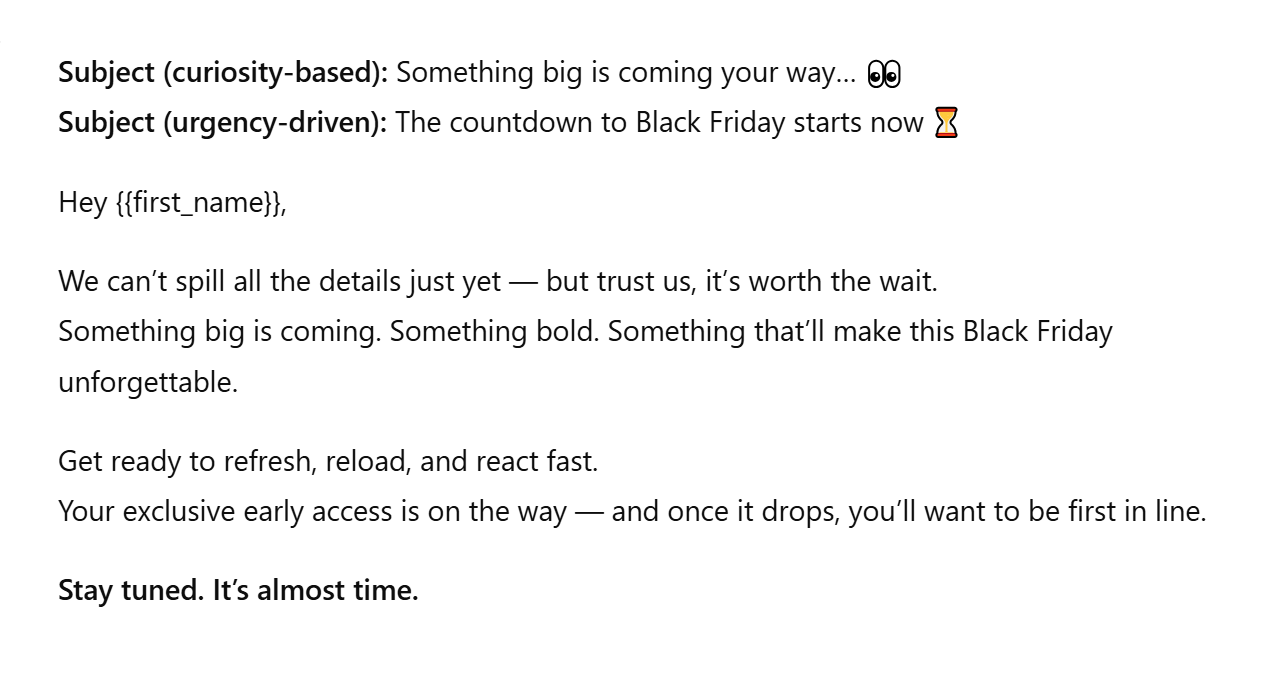 Example of an email text generated by AI
Re-engagement
Every audience drifts, but the key is knowing how to win them back. A well-crafted re-engagement email can turn quiet subscribers into active customers again, especially when it feels personal. ChatGPT can help you build that bridge fast by combining tone, timing, and incentive in a single clear prompt.
Here’s a template for lapsed subscribers who haven’t opened an email or made a purchase in the last 90 days. It’s written to remind and re-spark interest, with a comeback incentive that feels like appreciation:
“Write a friendly, 100-word re-engagement email for subscribers who haven’t opened emails in 90 days. Use a warm, conversational tone and acknowledge the break subtly (‘It’s been a while since we’ve seen you’). Offer a comeback incentive such as 20% off or free shipping. End with an inviting CTA and two subject line options: one nostalgic, one benefit-focused.”
Here’s how that ChatGPT email prompt might look in action:
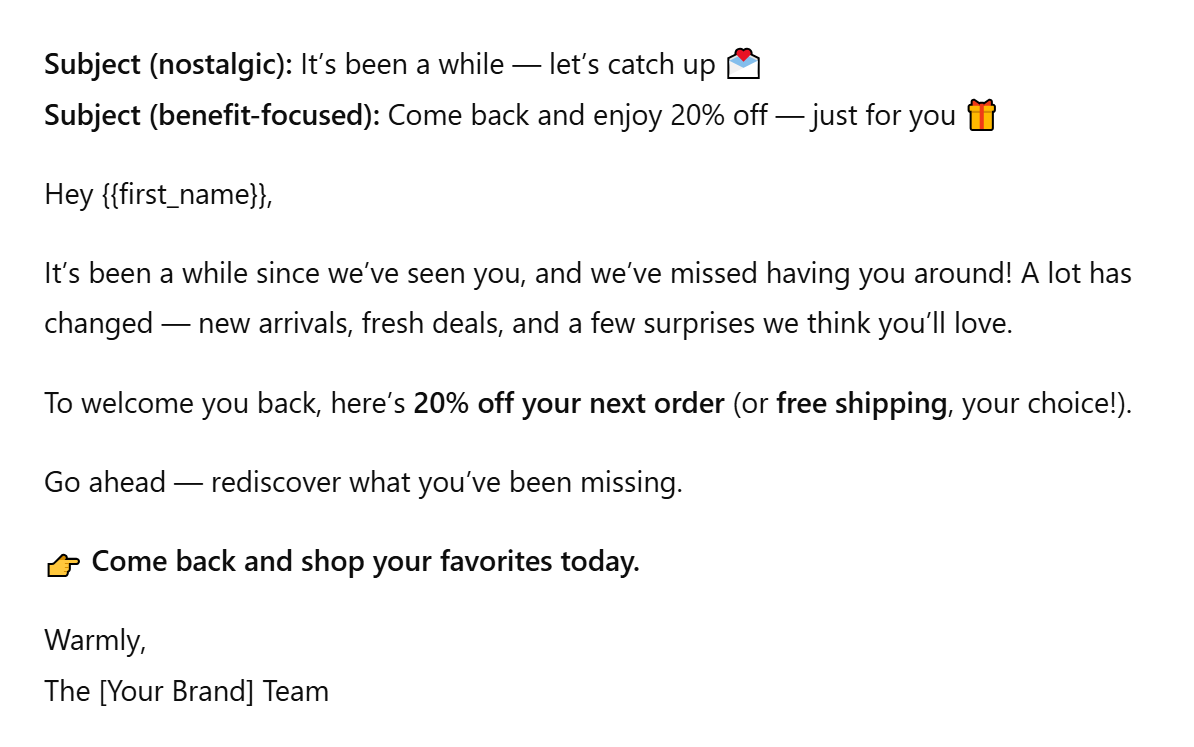 Example of an email text generated by AI
Event and webinar emails
ChatGPT can help you design the entire attendee journey: from first invite to post-event follow-up. Below are three ChatGPT prompts for invite, reminder, and follow-up emails that work for both online and in-person formats. Each one is structured to guide tone, pacing, and next-step clarity.
| Event invite |
Write a 120-word invitation email for an upcoming webinar titled ‘The Future of Marketing Automation’. Audience: digital marketers and business owners. Include event date and time, three key takeaways, and a strong CTA to register. Keep the tone energetic and professional. Add two subject lines: one curiosity-driven, one benefit-focused. |
| Event reminder |
Write a 90-word reminder email for registered attendees one day before the webinar. Keep it short and friendly. Include the event link, start time, and a brief note on what they’ll learn. Add one upbeat subject line and one CTA to join live. |
| Post-event follow-up |
Write a 100-word follow-up email thanking attendees for joining the webinar. Recap one or two highlights, include a replay link, and invite feedback or next steps (e.g., download slides or book a demo). Keep the tone appreciative and professional. Add one subject line and one CTA. |
Here’s an example of how the invite prompt might look in action:
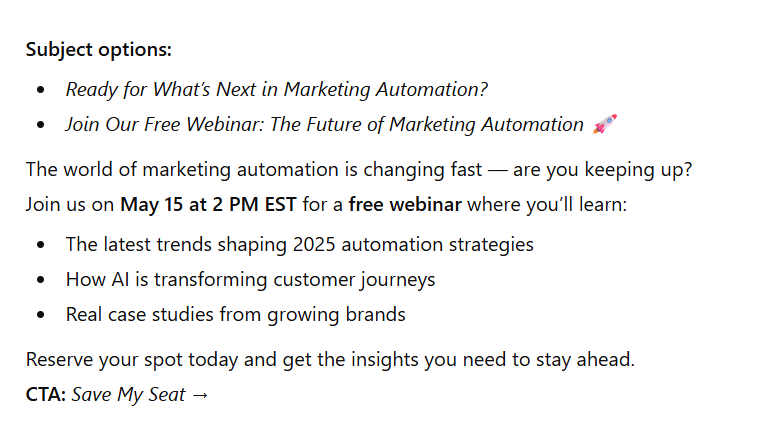 Example of an email text generated by AI
Newsletters and content promotion
Newsletters are your best tool for turning existing content into ongoing engagement. ChatGPT can help you repurpose blogs, case studies, or reports into concise, scroll-stopping snippets.
Instead of copy-pasting your entire article, you can brief the AI to extract key insights, reshape them into a short narrative, and end with a clear action: read more.
Here’s how to brief ChatGPT for this kind of content repurposing:
“Summarize this blog post into a short newsletter snippet (about 100 words). Highlight the main idea in one line, then list three key takeaways as concise bullet points. Keep the tone friendly and informative, and end with a strong CTA button that says ‘Read More on the Blog.’ Suggest two subject lines: one curiosity-driven, one benefit-based.”
Here’s how that might look in action — short and engaging:
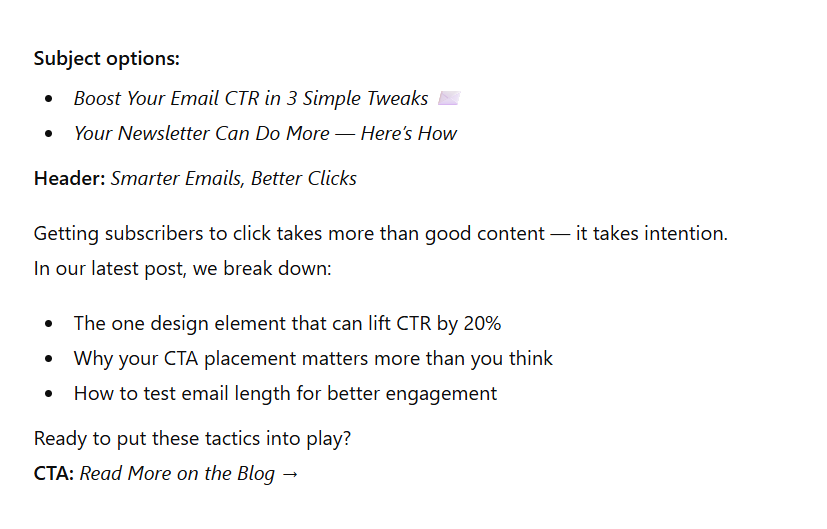 Example of an email text generated by AI
How to use ChatGPT inside the SendPulse workflow
Creating emails with SendPulse is easy thanks to its intuitive email builder and ready-made templates. The built-in AI Assistant, powered by ChatGPT, makes the process even smoother and faster.
As you work on your campaign, SendPulse’s AI Assistant helps you generate, refine, or localize your email copy directly within the editor. There’s no need to switch between different tools; everything you need is right there.
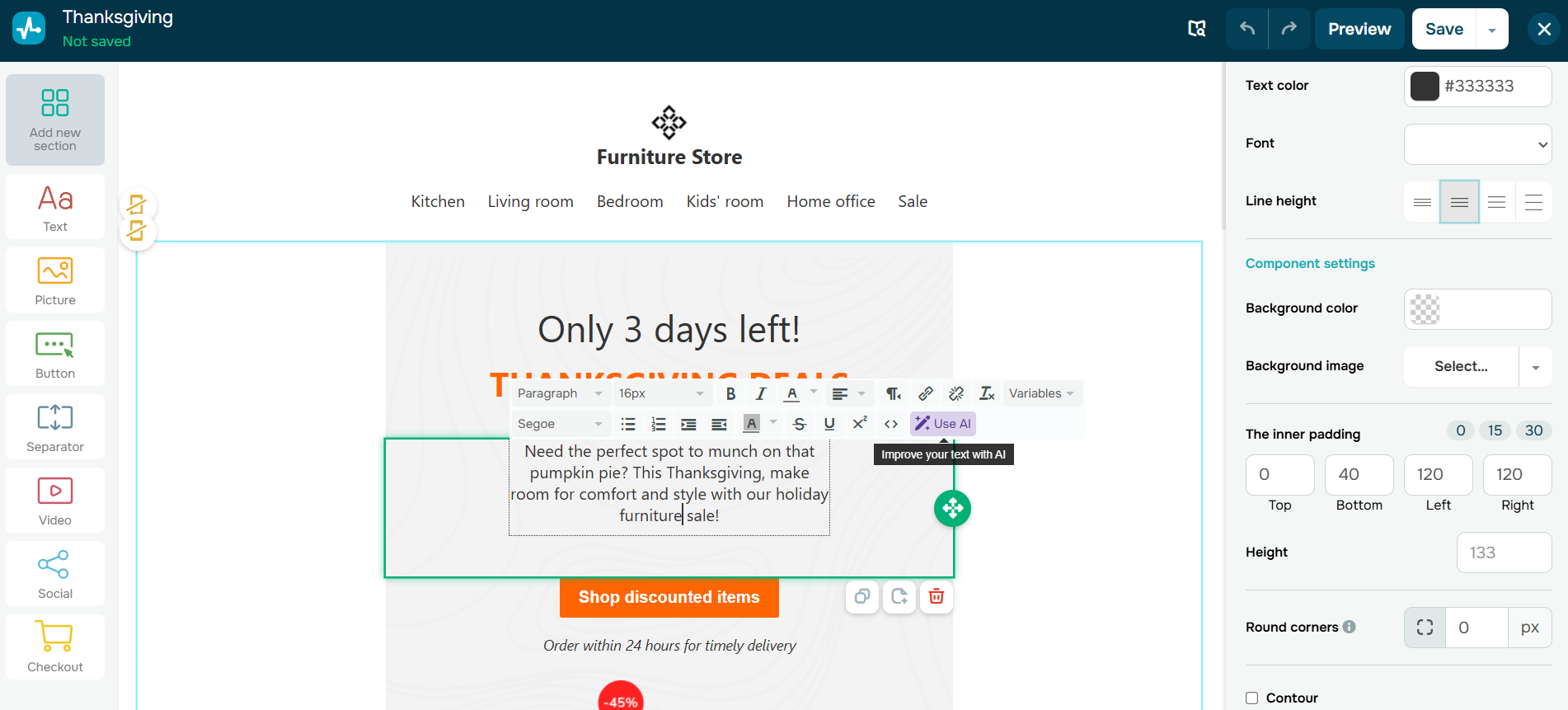 Using AI within the SendPulse email builder
The AI Assistant is fully integrated into the SendPulse email builder, so you can access it exactly when you need it.
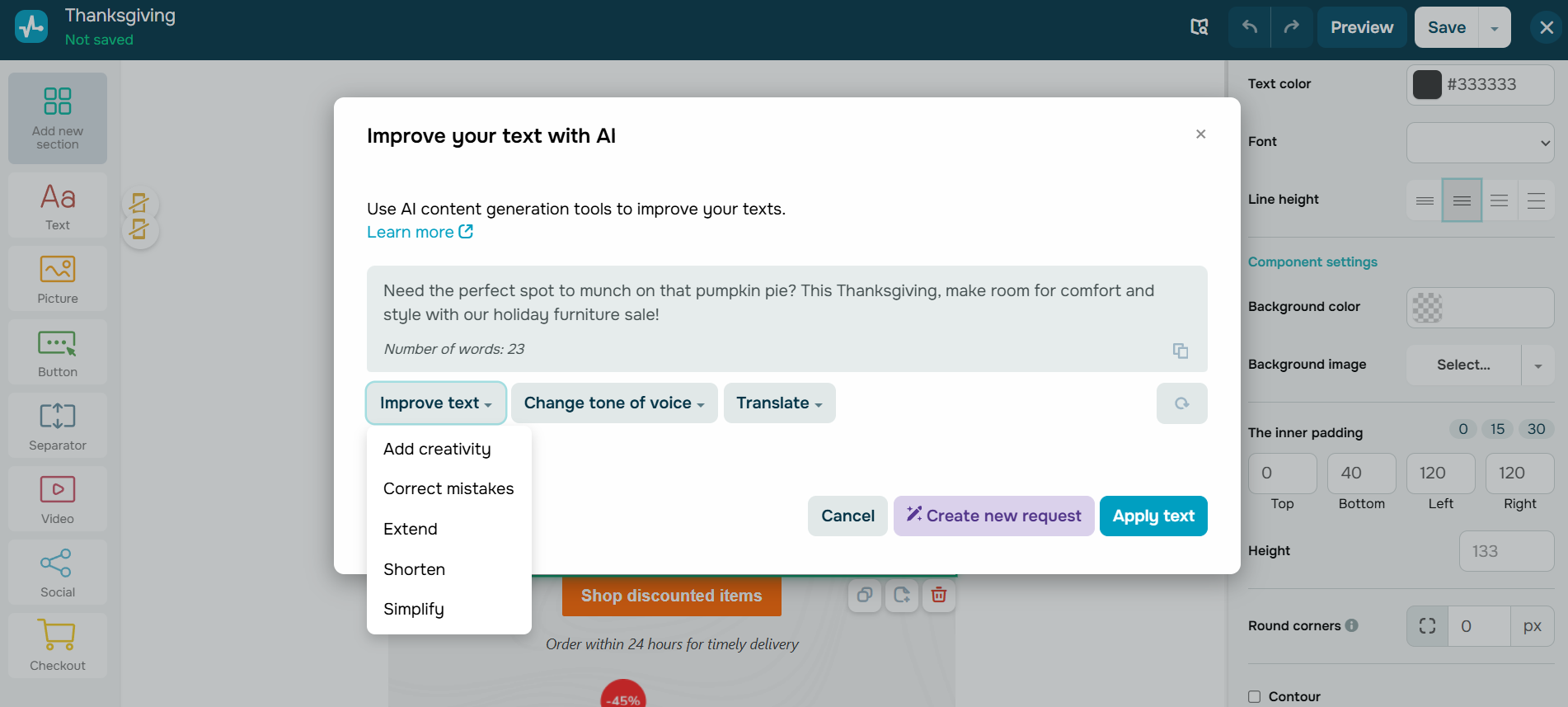 AI Assistant in the SendPulse email builder
With just one click, you can:
- Create or refine your copy. Generate fresh ideas for subject lines, openings, or CTAs, or polish what you already have so it sounds sharper and more engaging.
- Translate instantly. Turn one email into multilingual campaigns that feel natural for every local audience.
- Adapt tone and clarity. Make your email sound more persuasive, more professional, or more conversational, depending on your goal and audience.
Turn AI ideas into send-ready campaigns
ChatGPT gives marketers what they’ve always wanted — speed without sacrificing creativity. Our ChatGPT email writing tips show how to turn AI-generated drafts into polished, high-performing campaigns. The tool helps you draft faster, test more ideas, and scale personalization across audiences. But real success still depends on the human touch: reviewing tone, ensuring compliance, and optimizing deliverability before you hit send.
Inside SendPulse, this balance is easy to achieve. You can refine AI-generated copy right in the email builder, assemble it into a polished campaign using ready-made templates, and run A/B tests or automation flows in one place.
Bring your next campaign to life faster. Try SendPulse and explore the built-in AI Assistant in your email editor to see how effortlessly strategy meets execution.