Even though the way businesses connect with their audiences keeps changing, email is still one of the most reliable channels for marketers. Trends change, tools evolve, but email keeps proving its value with consistent results and incredible reach.
To really get the most out of it, you need to lean into email marketing automation. Automated email marketing flows can generate up to 30 times more revenue per recipient compared to regular campaigns because they send the right message, at the right moment, to the right person
In this blog post, we’ll explore how to automate your email marketing effectively, share practical ideas to boost your campaigns, and walk through real-life examples of email automation done right.
TL;DR
Email automation boosts engagement, revenue, and customer retention by sending the right message at the right moment.
This guide covers 14 automated email flows, from welcome series and abandoned cart reminders to post-purchase, loyalty, and re-engagement campaigns. You’ll also learn how to build each flow in SendPulse with practical examples, templates, and optimization tips.
Create seamless customer experiences
Set up scenarios to automate your contact management and customer interactions across various communication channels under one roof. Get started for free without any risks.
Get started for free
What is email marketing automation, and why does it matter?
Email marketing automation is the practice of sending emails automatically based on how your subscribers interact with your brand. Instead of manually tracking every subscriber’s action or inaction, you set up email marketing flows that automatically run on triggers you define.
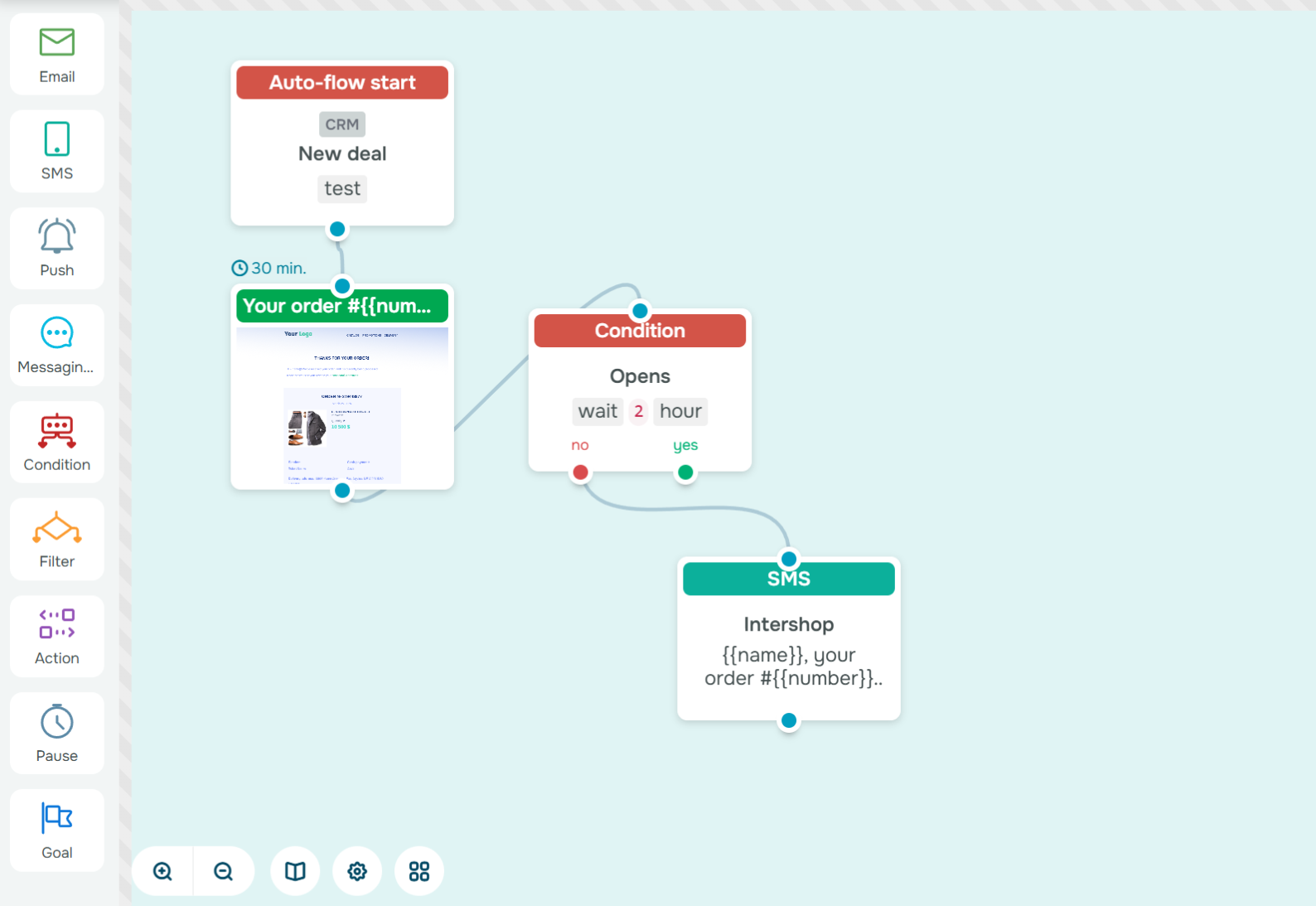 Email automation flow example in the SendPulse builder
For instance, when someone signs up for your newsletter, they get a welcome email right away. If a customer makes a purchase and then doesn’t buy anything for two months, an automated reminder with a bonus offer can help bring them back.
These automated email journeys operate in the background and handle tasks you’d never be able to manage manually at scale. Once they’re active, they keep your communication consistent and relevant without adding extra work to your day.
Here’s why automated campaigns outperform manual sends:
- They’re timely. Manual campaigns are sent out when you schedule them. Automated campaigns go out when your audience is most receptive: right after subscribing, purchasing, or leaving their cart behind.
- They’re always working. Once you’ve set them up, your flows run 24/7. They greet new leads, nurture relationships, and convert buyers while your team focuses on strategy instead of repetitive workflows.
- They scale personalization. Each subscriber can get a tailored journey based on actions, tags, or data from your CRM system. That’s impossible to replicate manually at scale.
- They deliver long-term ROI. Unlike one-off blasts, automated flows continue generating conversions months after setup, creating a steady revenue stream from every new contact.
Within a larger email marketing automation strategy, each flow plays a specific role in guiding subscribers from their first interaction to long-term loyalty.
It starts with lead nurturing, where automated welcome or educational sequences introduce new contacts to your brand, share valuable insights, and build trust before any sales pitch appears.
Once subscribers are engaged, automated engagement flows keep the relationship active, reminding inactive users about your brand, reintroducing products they once viewed, or celebrating key milestones like holidays or birthdays.
Finally, conversion and retention flows strengthen loyalty and increase lifetime value by rewarding repeat buyers, suggesting complementary products, and encouraging reviews or referrals.

Create your free SendPulse account
Start using powerful tools to attract, engage, and retain customers — all on one platform. Sign up for free and explore what you can build.
Get started for free
14 email automation ideas for each stage of the user journey
Let’s look at email automation ideas that brands from different industries can use.
Welcome flow
A welcome email flow is the backbone of any strong email marketing automation strategy. It’s the first touchpoint in your automated email journeys, triggered the moment someone joins your mailing list. This is your chance to set expectations and make a memorable first impression.
A good welcome email helps turn new subscribers into loyal customers. It reaches people when they’re most curious about your brand and gives you space to introduce who you are, what you offer, and what they’ll receive moving forward.
A simple two-step welcome email flow might look like this:
- The warm hello. Thank new subscribers for joining and briefly highlight what makes your brand special. This could be your mission, bestsellers, or customer success stories.
- The gentle next step. Encourage subscribers to take action. Invite them to browse your store, follow you on social media, or redeem a special offer.
In SendPulse, you can easily create any email automation flow with the drag-and-drop builder. Open the “Automation” tab in your account and click “Create flow” → “New flow.”
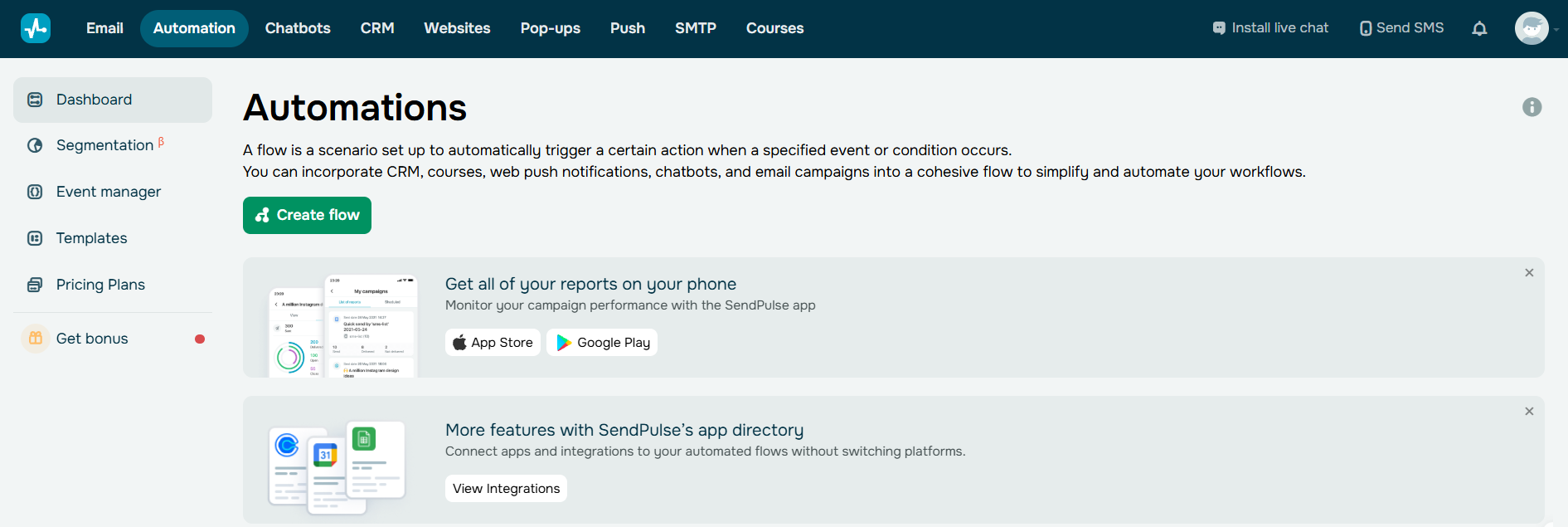 The “Automations” section in SendPulse
In the automation builder, you can mix and match different elements to design your flow. For instance, set the starting point as “New subscriber,” choose the email you want to send first, add a “Pause” element to set the delay before the next message, and then create your second email to complete the flow.
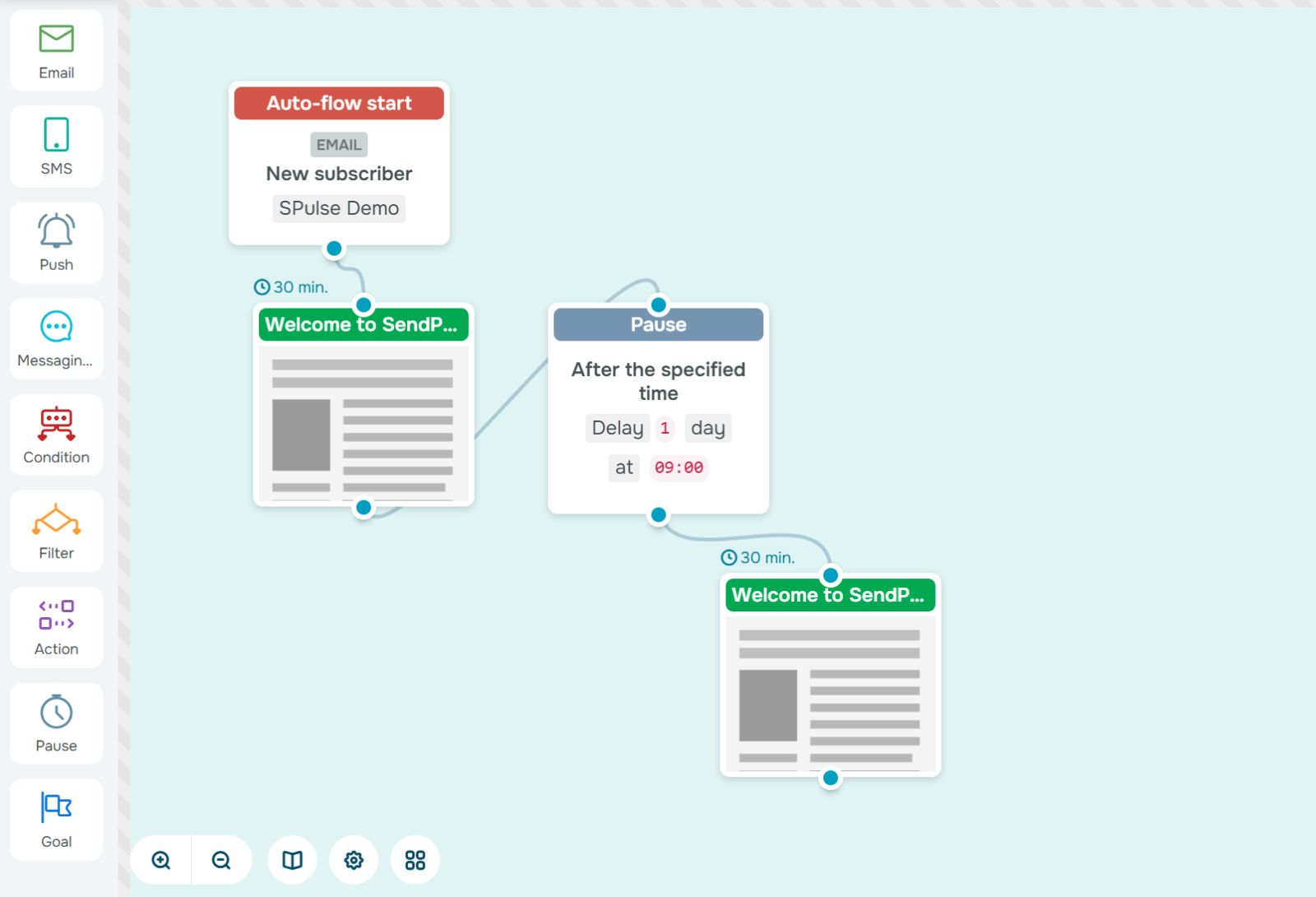 Email marketing automation template created in SendPulse
SendPulse also offers ready-made templates if you want to skip the setup process. You can use them as is or customize them to match your goals.
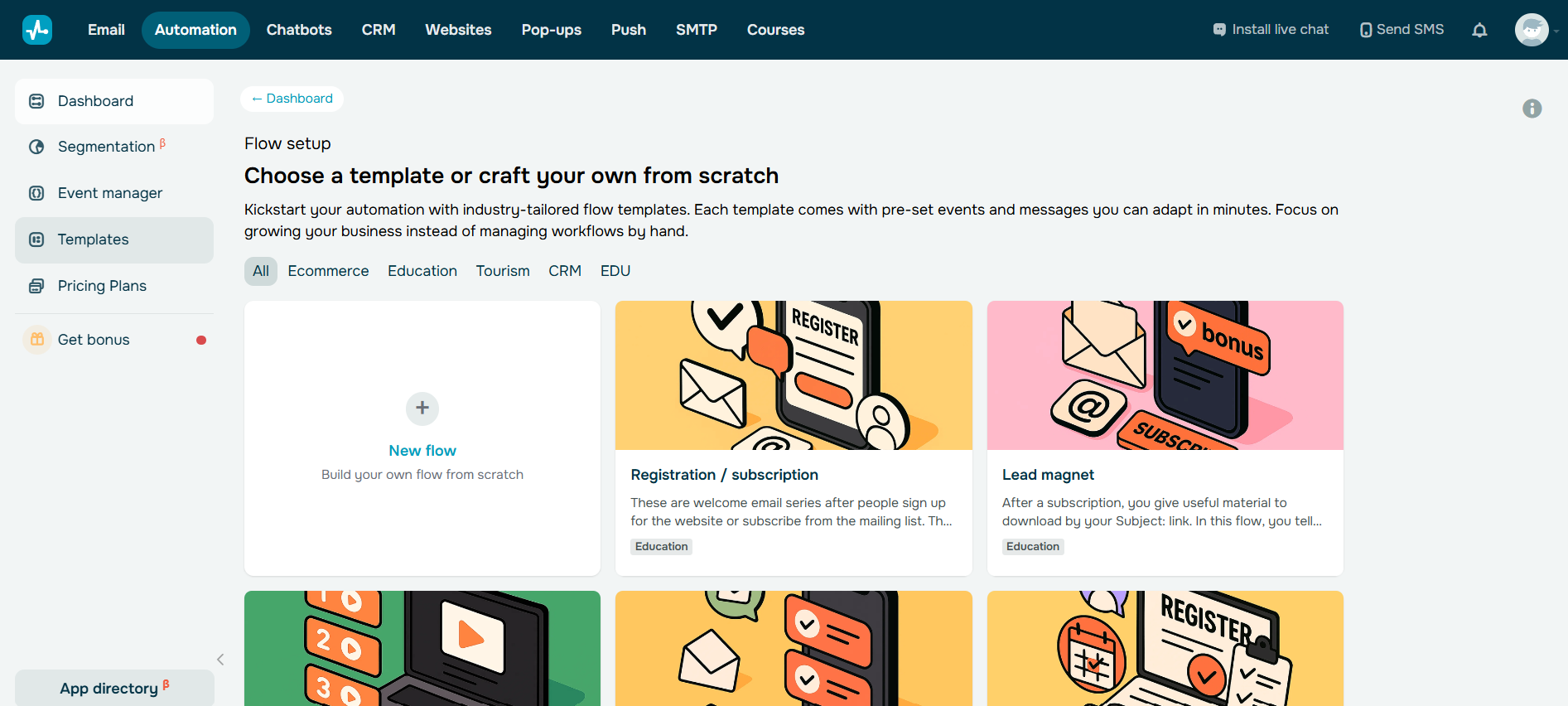 Automation flow templates in SendPulse
Extra tip: A/B test the small things. Try different subject lines – “Welcome to {Brand}” vs. “Your {Bonus} is here,” – check whether an immediate send or a short delay performs better, and personalize your intro using dynamic fields. These tiny tweaks often lead to big engagement gains.
Let’s take a look at a welcome email automation example from VBOUT. The flow consists of two emails. The first arrives right after someone subscribes and includes an account activation link. Beyond that, it briefly introduces the brand and explains how users can benefit from the platform.
It also mentions that another email will arrive in a few days with more helpful tips. It’s a subtle yet clever way to boost anticipation and open rates.
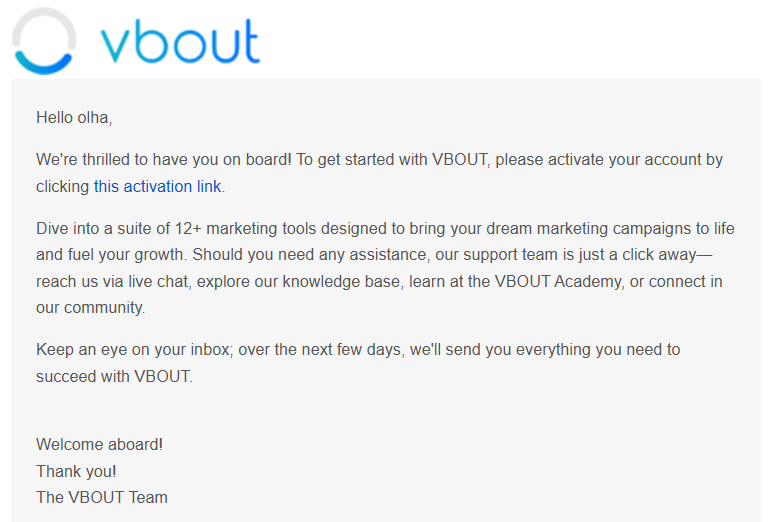 VBOUT’s automated email to welcome new subscribers
The second email arrives two days later. It clearly outlines the steps users should take to get started and shares useful resources to make the process smoother. Both messages use clean, minimalistic designs that match VBOUT’s website and keep the focus on the essentials.
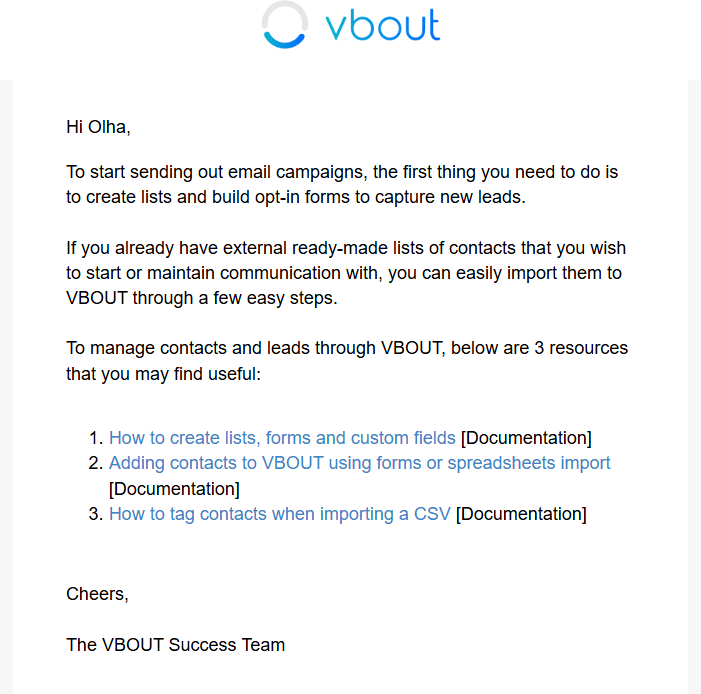 VBOUT’s automated email from the welcome series
Lead magnet delivery flow
A lead magnet delivery flow is often the first interaction between your brand and a potential customer, so it should feel smooth and helpful from the start. This email automation flow triggers as soon as someone submits a form or downloads a resource, for instance, an eBook, a checklist, or a guide. Its main job is to make sure the promised content reaches the subscriber’s inbox instantly.
Speed plays a big role here. When someone shares their email address in exchange for something valuable, they expect to receive it right away. Delivering it within seconds shows that your brand follows through. It also sets a positive tone for your future communication. From there, follow-up emails help you stay top of mind while interest is still high.
Automated delivery flows perform better than manual sends because they reach people at the exact moment they’re most engaged. Instead of waiting hours or days, subscribers quickly get what they came for, along with a natural next step.
A simple lead magnet automation journey often includes three steps that guide subscribers forward:
- Instant delivery. Send the promised content right after someone fills out your form. Include a friendly note like, “Here’s your guide, we hope it helps you get started.”
- Related insights. After a short pause, follow up with helpful blog posts, case studies, or tools that expand on the topic. This positions your brand as a reliable source of expertise and keeps it top of mind.
- Gentle invitation. Close the sequence by inviting subscribers to something that aligns with their interests and intent, such as a free webinar, demo, or consultation.
To build this email automation flow in SendPulse, create the “Form submitted” event or use the “New subscriber” trigger to launch your flow the moment a user requests your content. Then, add an “Email” element for instant delivery with a download link or button. Then set delays between follow-up messages so the flow feels natural and not overwhelming.
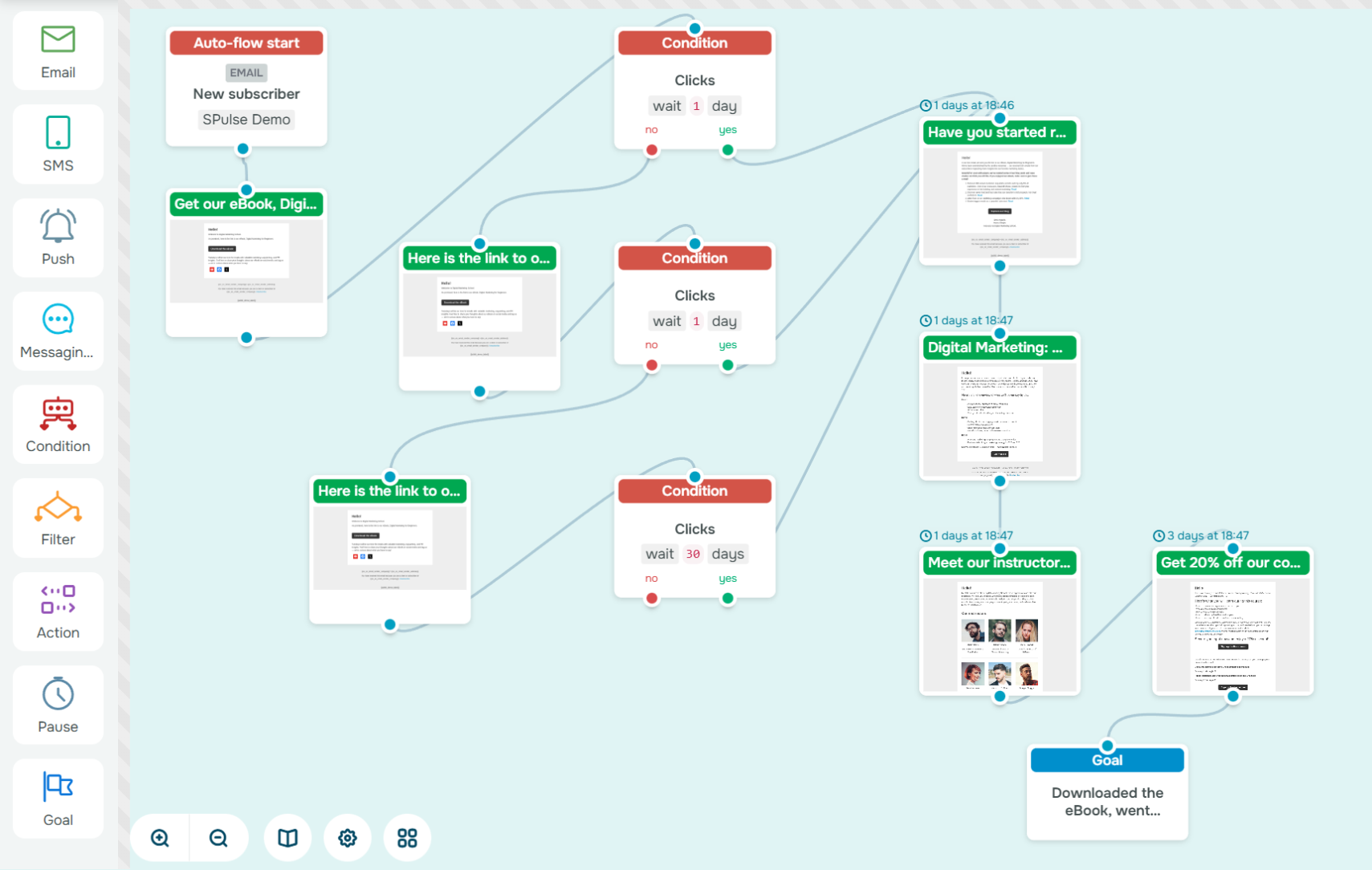 Email automation example in the SendPulse builder
Extra tip: Tag leads by interest or content topic to segment them for future campaigns. This ensures someone who requests your “Email Design Guide” gets different follow-ups than someone who chooses your “Automation Checklist.” Over time, these micro-segments will help you deliver more targeted, conversion-driven automated email journeys without the extra manual effort.
Let’s look at the email automation example from HubSpot. The company offers its State of Marketing 2025 report through a short lead capture form. Right after submitting it, users receive a clean, straightforward email with a link to access the report. The message is simple and distraction-free, which is perfectly aligned with HubSpot’s communication style.
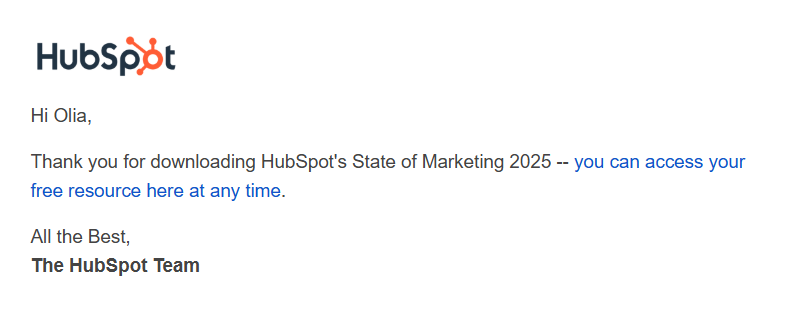 Automated email example from HubSpot
Four days later, subscribers receive a second email offering free courses and certifications. Instead of jumping straight into a sales pitch, HubSpot continues to deliver value. In the second half of the email, the brand subtly invites readers to try the platform for free or reach out with questions. It’s a thoughtful, balanced way to nurture leads through an automated email flow.
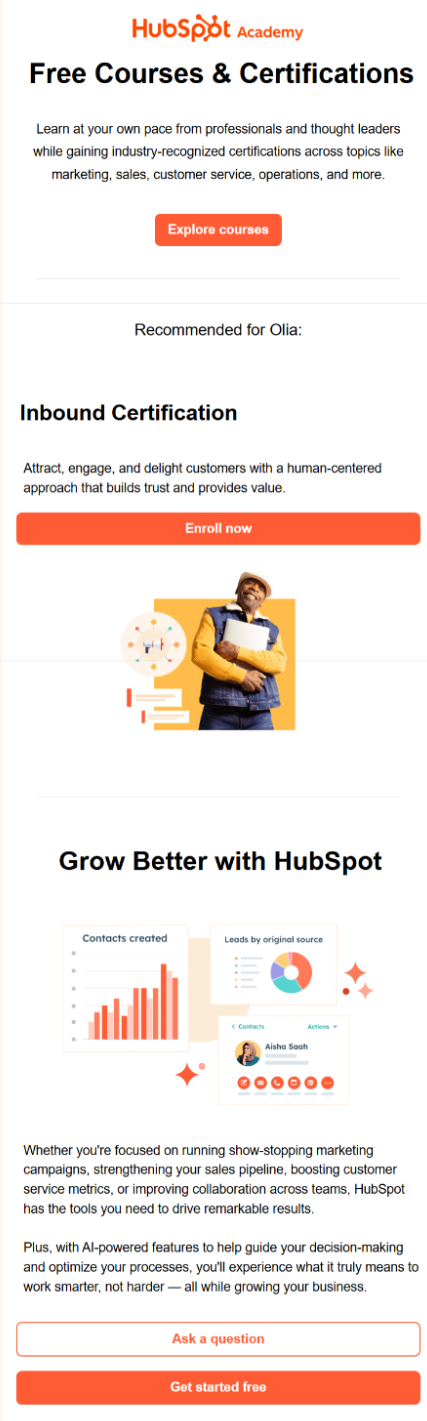 Email automation strategy from HubSpot
Educational or nurture flow
An educational or nurture flow is the core of a long-term email automation strategy. It’s designed for leads who are interested but not quite ready to buy. These subscribers usually need more value, guidance, and reassurance before making a decision. Instead of pushing for a sale, this automated email journey focuses on earning trust through genuinely helpful content.
When new leads receive content that answers their questions or solves a problem, they begin to view your brand as a reliable expert, not just another business trying to sell to them. That’s why email automation flows like this are so powerful. They share the right type of content at a comfortable pace, helping prospects move naturally from initial interest to consideration and eventually to purchase.
A simple three-step nurture flow might look like this:
- Value-driven content. Start by sending helpful, educational emails that address your audience’s pain points. Share how-to guides, actionable tips, or short tutorials that offer immediate value and highlight your expertise.
- Social proof and credibility. Once subscribers are engaged, show them why others trust you. Use testimonials, case studies, or customer stories to reinforce your credibility and show real results.
- Soft offer. End the sequence with a gentle invitation to take the next step, such as booking a free consultation, signing up for a trial, or claiming a limited-time deal. Keep it helpful and low-pressure to encourage natural conversions.
To create this sequence using SendPulse’s drag-and-drop builder, choose the “New subscriber” or “Tag added” trigger to launch the flow, set up conditions and delay blocks to pace your messages naturally, and define a conversion goal, for example, a completed purchase or demo booking. You can also add an “Action” element to move your subscriber through the pipeline automatically or assign them a new tag.
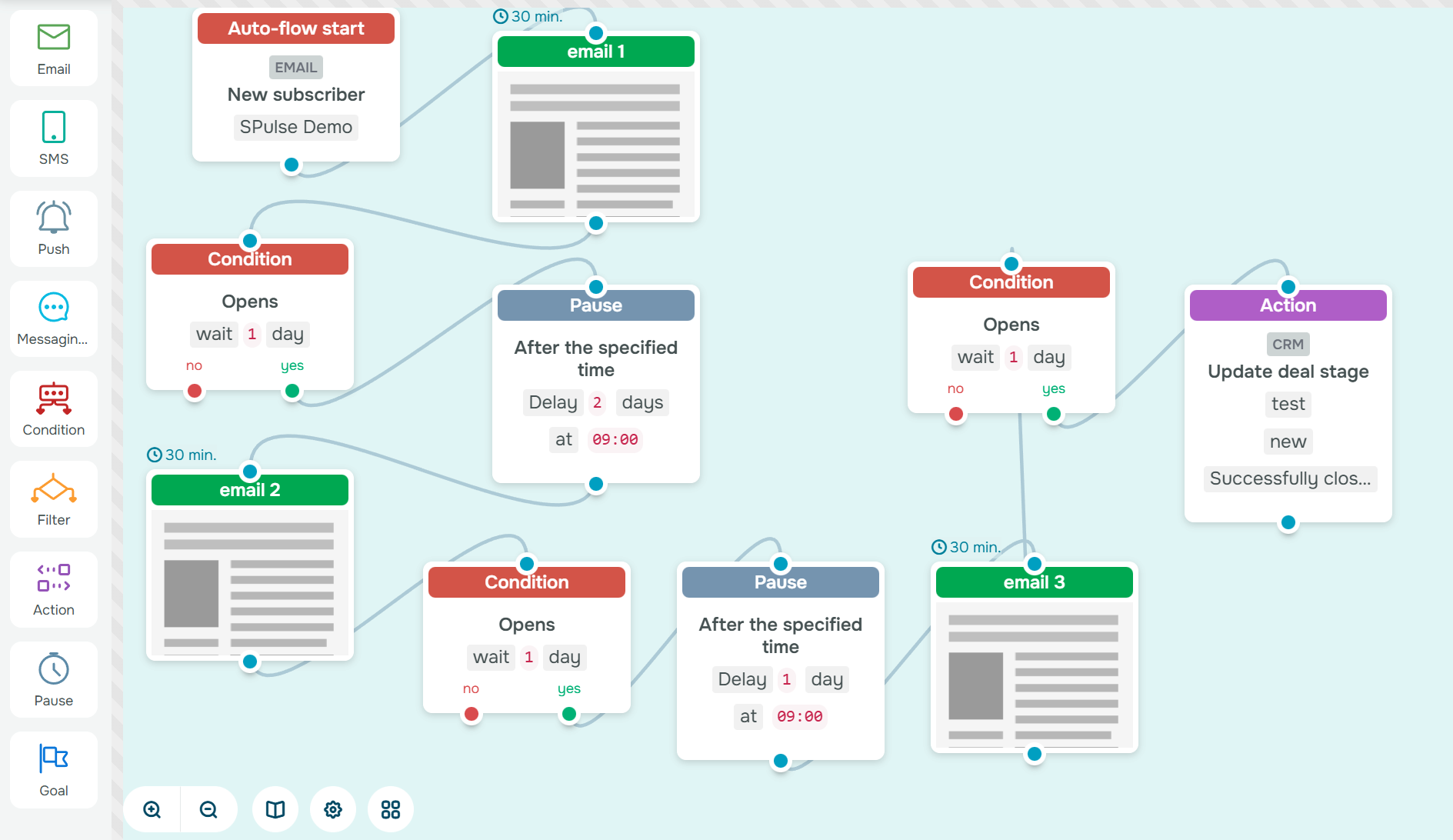 Email marketing flow created in the SendPulse builder
Extra tip: Keep your messages dynamic. Mix content formats like videos, case studies, and customer success stories to keep your audience engaged. Each new perspective deepens trust and moves your subscribers one step closer to conversion.
Sundays for Dogs, a premium dog food brand, creates a wide variety of emails that focus on building relationships rather than pushing for immediate sales. Their goal is to make each newsletter engaging and genuinely helpful for their audience.
For example, one email features helpful blog articles where subscribers can discover practical ideas and insights about pet care.
Another message demonstrates the power of social proof. It showcases real posts and testimonials from customers’ social media accounts. The email even encourages subscribers to follow the brand so their pets might be featured too, creating a sense of connection and community.
The third email is an excellent example of how to combine education with subtle promotion. Timed around Pet Pain Awareness Month, it offers valuable advice on pet health while gently including a limited-time discount. It’s a smart way to drive sales without sounding pushy.
Free trial or demo onboarding flow
A free trial or demo onboarding flow starts the moment a new user signs up for a trial or requests a demo. This automated email journey helps them explore your product’s value before their motivation fades. New users are eager but often unsure where to start. Marketers should remove friction, guide them toward small wins, and show how the product fits naturally into their workflow.
A well-structured onboarding flow keeps users engaged, helps them experience real value early on, and encourages them to upgrade or become paying customers. A three-step onboarding flow might look like this:
- The “getting started” email. Welcome new users, set expectations, and help them take their first action inside the product, like connecting an account, creating their first project, or exploring a key feature.
- Feature tips and value highlights. Send a follow-up email that demonstrates how your product solves their problems. Use screenshots, short tutorials, or mini case studies to showcase quick wins and reinforce product value.
- The “upgrade now” CTA. As the trial nears its end, send a reminder email that summarizes achieved benefits and encourages the next step, whether it’s upgrading to a paid plan or booking a deeper product demo.
To make a similar flow in SendPulse’s builder, create the “Registration” event and add it as a trigger to start the flow. Then, add required conditions and timed delay blocks between messages. You can also connect the CRM system for real-time automated deal or contact updates.
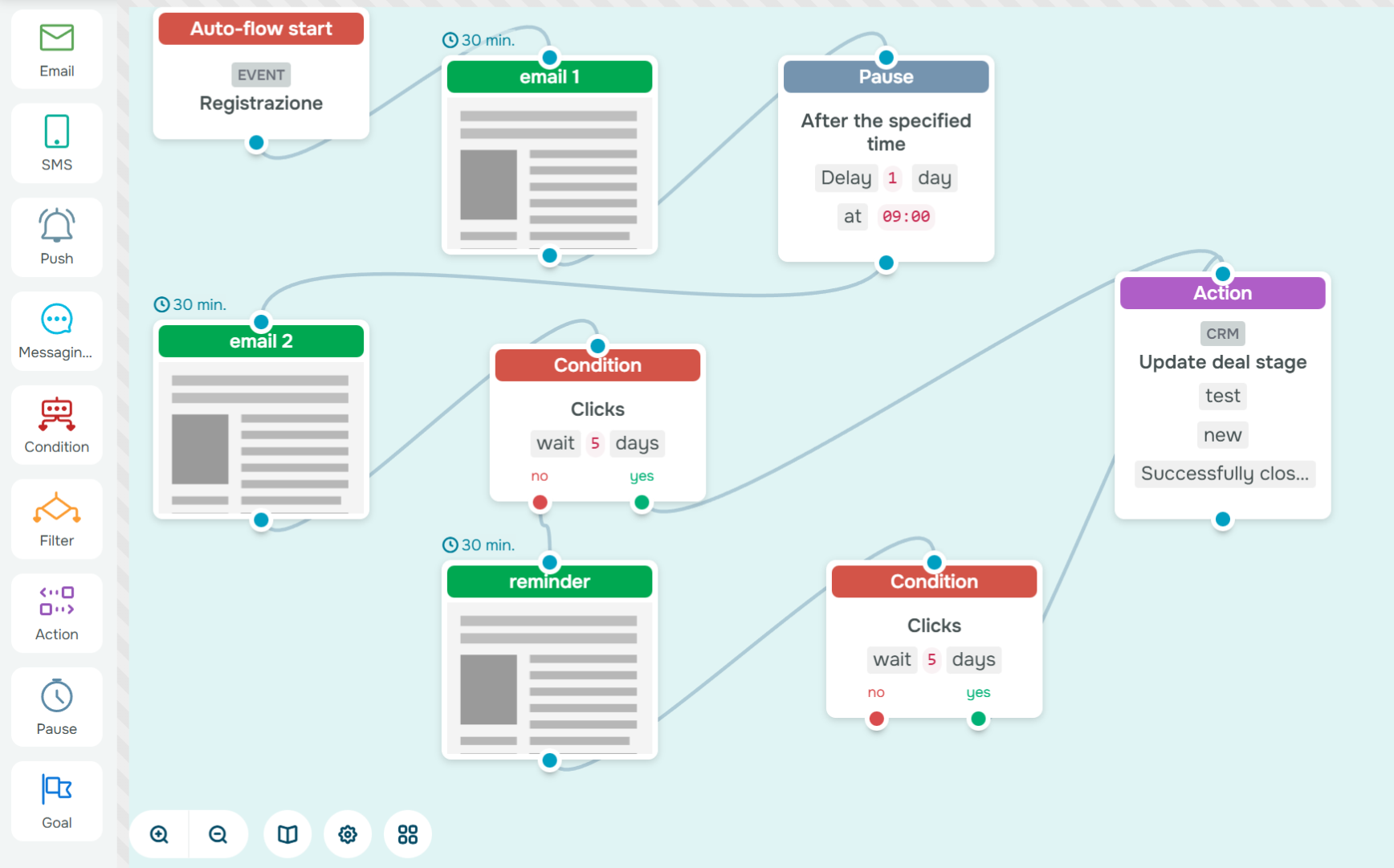 Automated email flow built in SendPulse
Extra tip: Use analytics to personalize onboarding in real time. For example, if a user hasn’t activated a feature within three days, send a friendly “Need help getting started?” email.
Let’s look at an email automation example from Zapier. When a user registers, they receive a welcome email with a brief explanation of the platform’s capabilities and a step-by-step guide on what to do next. The message also mentions that more emails will follow soon to encourage the subscriber to keep checking their inbox.
The following email is sent once the user creates their first integration. It’s educational in nature, offering additional information about the platform’s functionality and showing how to get more out of the platform.
Another follow-up email continues this approach by highlighting specific features and providing practical tips on how to use them effectively.
Finally, when the trial period ends, Zapier sends a short, clear email notifying the user and inviting them to upgrade to a paid plan to continue accessing premium features.
Abandoned cart flow
An abandoned cart flow is triggered when a user adds products to their cart but leaves without purchasing. This automated email journey reminds shoppers what they left behind and motivates them to complete checkout.
Cart abandonment happens more often than you think. Nearly 70% of shoppers never finish their order. That’s why this flow matters: it directly impacts ROI. Instead of losing potential revenue, you can bring users back with a timely reminder that reignites intent.
A two-step abandoned cart flow might look like this:
- Friendly reminder. Send a personalized email a few hours after the cart is left behind. Include the product image, price, and a clear CTA to return to checkout.
- Follow-up email with an incentive or urgency. If the user still hasn’t purchased, send a second message 24–48 hours later. Offer a small discount, free shipping, or use social proof (“These items are almost sold out!”) to re-engage attention and drive action.
In SendPulse, you can set up this automation using the “Abandoned cart” template or create your own flow using the drag-and-drop builder. Start with the “Abandoned cart” event, then add your emails, conditions, and waiting time.
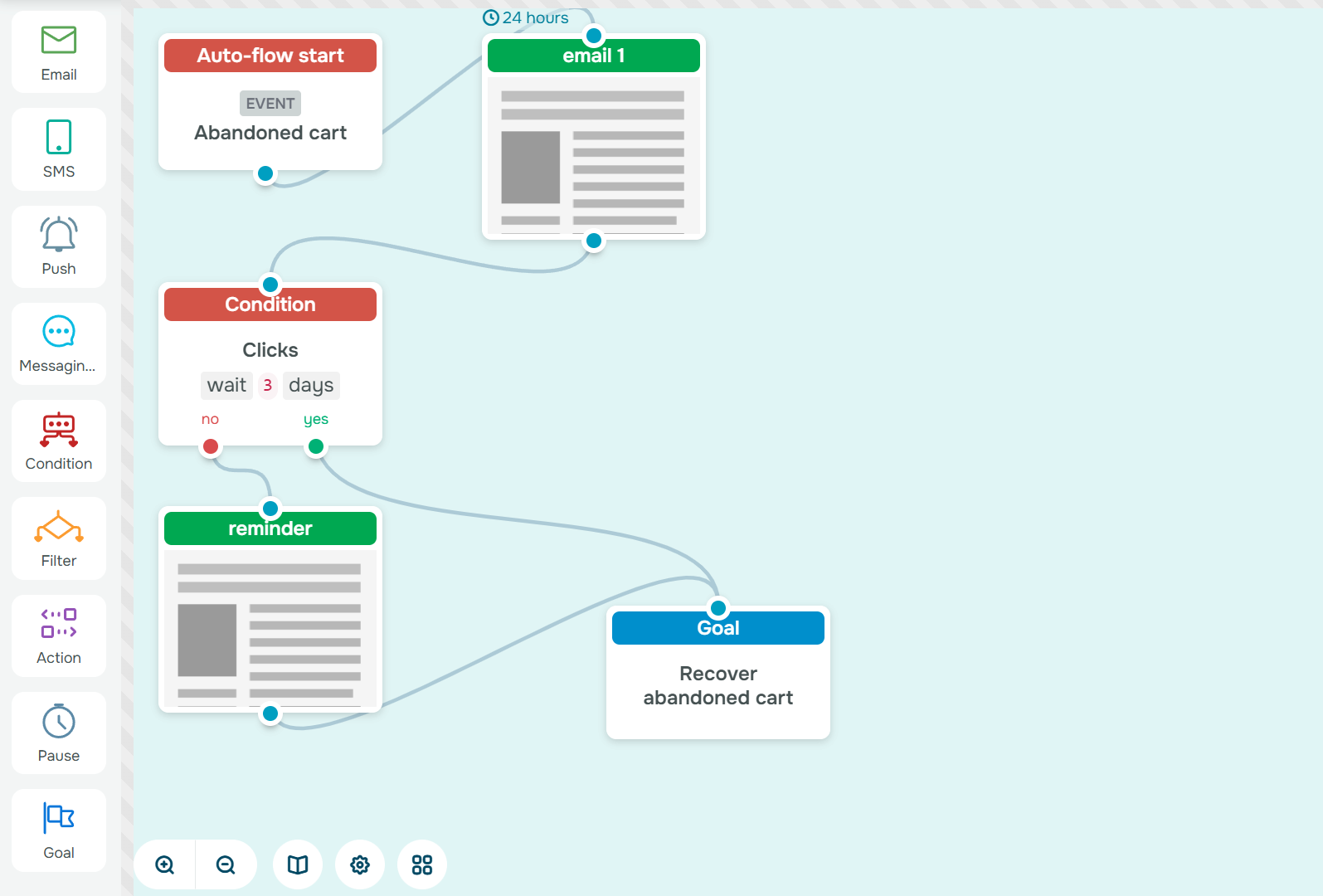 Email marketing automation template created in SendPulse
Extra tip: Personalization is what turns reminders into conversions. Use customer names, cart contents, and behavioral data to make every message feel direct and relevant. This is one of the simplest yet effective email marketing automation best practices to increase your store’s revenue without extra ad spend.
Wuffes makes it clear right from the subject line that the email is about an abandoned product: “We noticed you had your eye on this…” The message itself is quite detailed. The first part focuses on the product the customer viewed but didn’t purchase, featuring a clear CTA “Shop Now.”
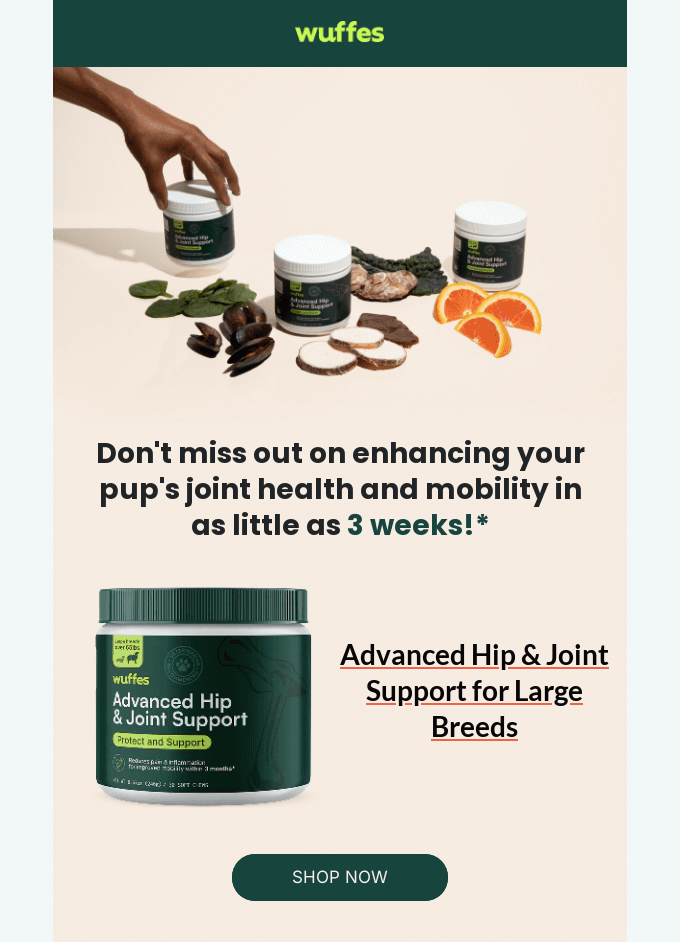 Excerpt from Wuffes’ email automation flow to recover abandoned carts
However, a simple reminder isn’t always enough. That’s why the next section includes vet reviews to reinforce trust and motivate the shopper to complete their order.
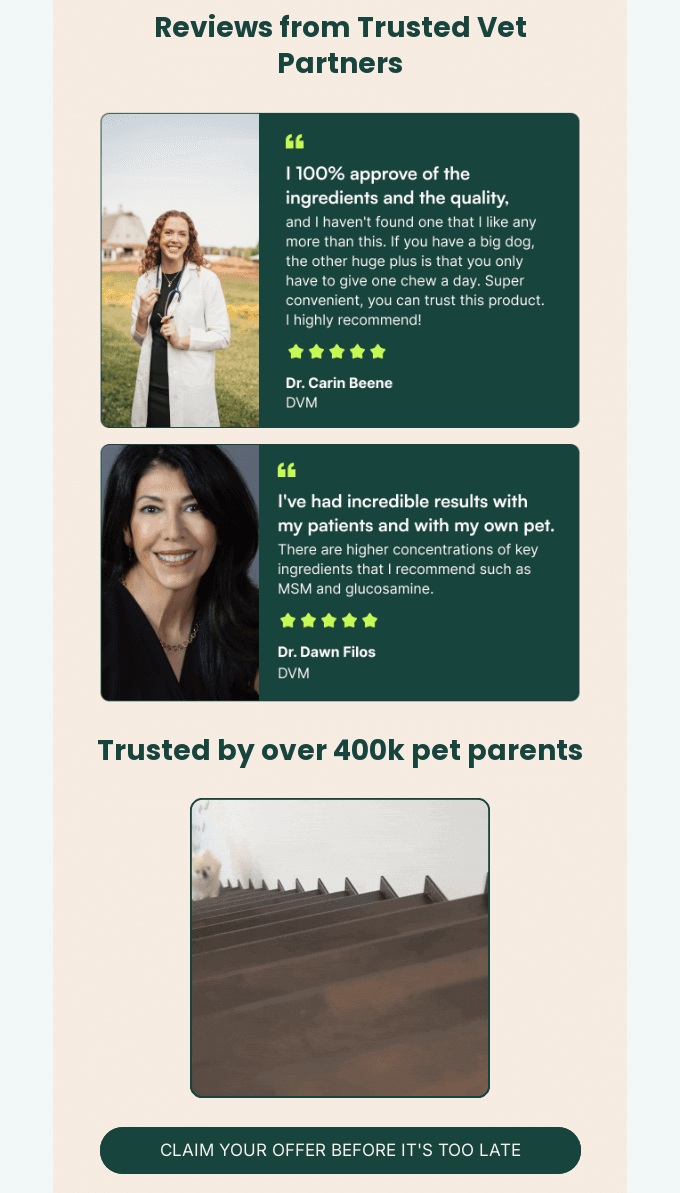 Excerpt from Wuffes’ email automation flow to recover abandoned carts
Below that, there’s a block with additional product recommendations that might also interest the recipient. And to seal the deal, the email ends with a FOMO note that only 20 items of the viewed product are left in stock.
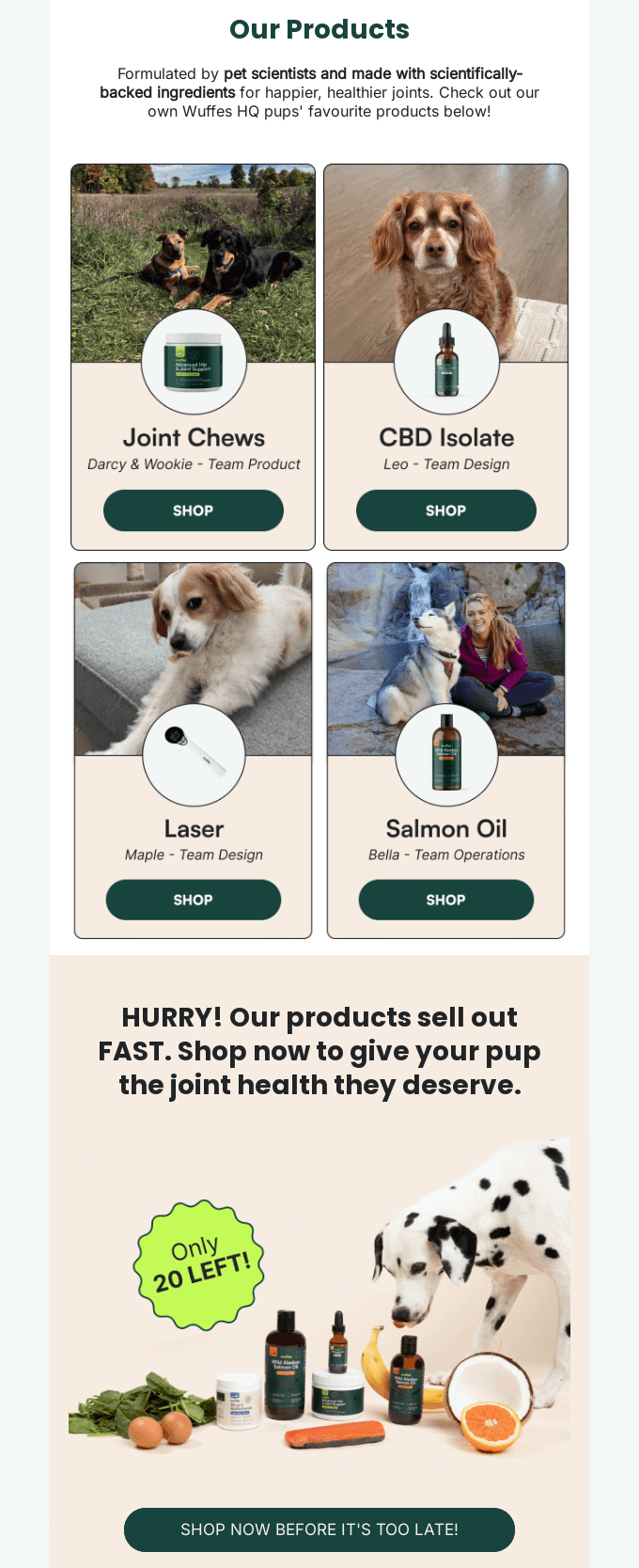 Excerpt from Wuffes’ email automation flow to recover abandoned carts
While this email uses multiple strong persuasion tactics, it might have been more effective to split them into two separate messages to avoid overwhelming the reader.
The second email in the flow continues the reminder. Still, it takes a softer tone, focusing primarily on social proof — customer and expert reviews — to rebuild trust and encourage the shopper to return.
Purchase confirmation flow
A purchase confirmation flow shapes how customers feel right after they buy. A successful order triggers this automated email journey; it reassures the buyer, delivers essential details, and strengthens post-purchase confidence.
Transactional emails often get the highest open rates, yet many brands overlook their potential. By turning a routine confirmation into a thoughtful, brand-aligned experience, you can inform but also delight and turn one-time buyers into repeat customers.
A simple purchase confirmation flow might look like this:
- Order confirmation. Send instantly after checkout. Thank the customer for their purchase, confirm payment and order details, and highlight next steps.
- Shipping details. Follow up once the order is dispatched. Include tracking links, estimated delivery dates, and any relevant updates. This shows transparency and helps customers feel in control.
- What’s next. After delivery, send a friendly email inviting feedback, sharing usage tips, or recommending complementary products. It’s a subtle way to re-engage without pushing another sale too soon.
In SendPulse, you can easily automate this flow using the “Placed order” flow template or by building one from scratch. Choose the trigger to start the flow, for example, a CRM event such as “New deal,” then add the necessary email campaigns and the pauses that should occur between them.
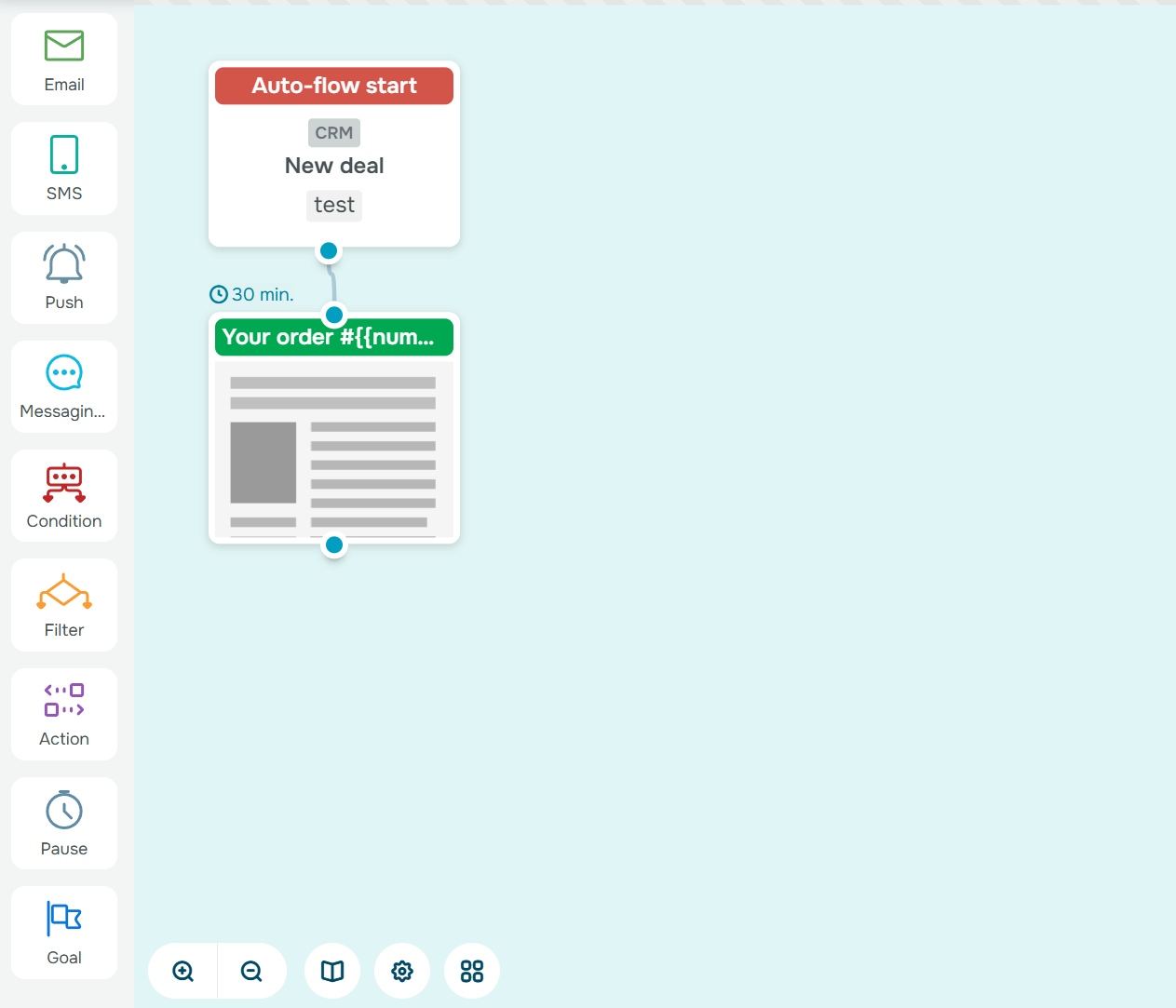 Automated email flow example in the SendPulse builder
Extra tip: Enhance your confirmation emails with smart cross-sell suggestions. For instance, if a customer buys running shoes, include a carousel with related products like socks or accessories.
In its order confirmation email, Everlywell goes beyond simply confirming a purchase. Along with the order details, the company includes plenty of valuable content: a step-by-step guide on how to use the platform effectively, recommendations for related product categories, an invitation to join their social media community, and links to helpful resources from the company’s blog.
The second email informs the customer that their order has been delivered. It reflects genuine care for the buyer, offering them the opportunity to get answers or assistance if they have any questions about the purchased product.
Post-purchase flow
Once a purchase is made, email automation allows you to keep the conversation going. You can reinforce trust, provide value, and encourage repeat sales. This automated email journey transforms a one-time buyer into a loyal advocate by showing that your brand’s care doesn’t end at checkout.
Retention-focused flows like this are among the most effective in email marketing automation because they tap into existing trust. A well-timed sequence reassures the buyer that they made the right choice, helps them get the most out of their purchase, and keeps your products or services top of mind for future needs.
Here’s how a post-purchase email flow can turn satisfaction into loyalty:
- Thank-you email. Send a warm thank-you message right after the purchase to express appreciation. Reinforce brand values and set expectations for what comes next — shipping details, support contacts, or community links.
- Usage tips and helpful content. A few days later, share practical guidance on how to use, maintain, or enhance the purchased item. Educational content strengthens satisfaction.
- Product recommendations. Once the customer is comfortable with their purchase, send personalized suggestions for complementary products or services.
To set up this flow using SendPulse, add a start trigger, for example, “New deal” or “Deal stage update” depending on your workflow. Then add delay blocks to give customers time to get their purchase delivered and follow-up emails.
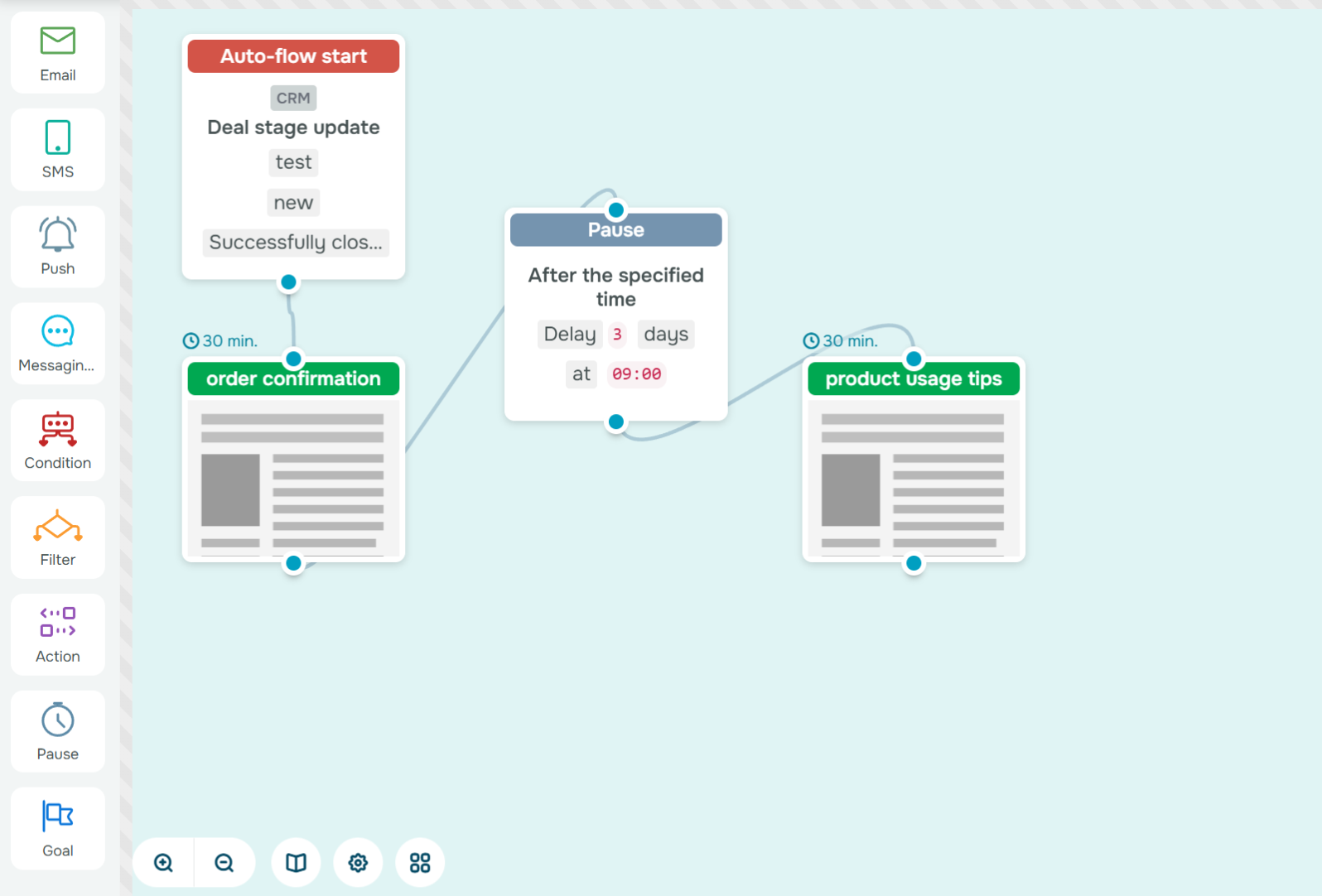 Automated email flow example created in the SendPulse builder
Extra tip: Segment your most loyal buyers and reward them with exclusive offers or early access to new products. These small gestures of appreciation strengthen emotional loyalty and turn satisfied customers into long-term brand promoters.
Let’s look at two emails from Taylor Stitch. The first one is a fairly standard order confirmation message with a thank-you note. It also invites customers to reach out if they have any questions or to check additional information about delivery.
The second email, however, is an excellent example of how to re-engage existing customers. If you have customer data, you can segment your audience based on how long it’s been since their last purchase and target the right group.
Taylor Stitch created a program inviting customers to send back their old purchases in exchange for reward points. It’s a smart and creative way to encourage repeat business while promoting sustainability and customer loyalty.
Review request flow
After a product is delivered or a service is completed, a review request flow helps you capture authentic customer feedback and turn it into social proof. Reviews and testimonials are the lifeblood of trust-driven marketing, and automation ensures you never miss the right moment to ask for them.
When sent at the right time, a review request shows you care about your customer’s experience and are confident in the value you provide. Plus, every new review strengthens credibility and gives you valuable insights for future improvements.
Here’s how a simple review request flow might work:
- “How did we do?” email. A few days after delivery, send a short, friendly message asking for feedback. Keep the tone conversational and make it easy to respond. Just one clear CTA leading to your review page works best.
- Thank you and reward. Once a customer leaves a review, follow up with appreciation. Offer a thank-you coupon, loyalty points, or early access to a new product.
In SendPulse, you can use the “Post-purchase feedback” flow template or create one in a builder. Add a delay block to ensure the customer has time to experience the product, then send your feedback request and reminder email.
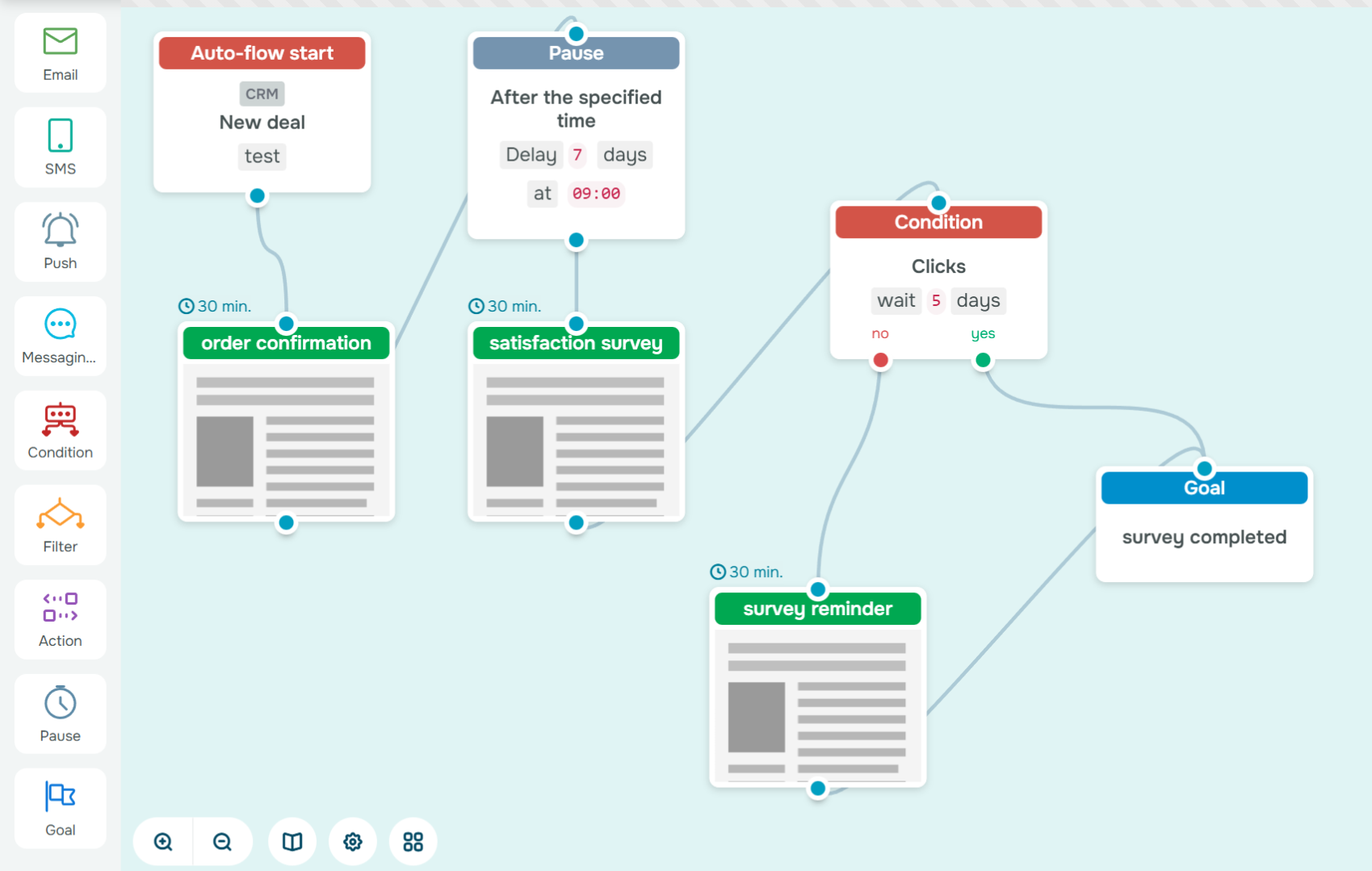 Automated email flow template in the SendPulse builder
You can also create a conditional path. If the review is positive, automatically send a follow-up email inviting them to share their experience publicly or refer a friend.
Extra tip: Keep your review emails short, visual, and mobile-friendly. The easier it is to leave feedback, the higher your response rate and the faster your brand grows its reputation on autopilot.
The U.S.-based olive oil brand Graza decided to collect customer feedback and used a single, well-crafted email instead of splitting it into two separate messages. In the email, they invited buyers to take a short survey accessible via a clear CTA button.
The second part of the message expressed gratitude and offered a small reward as a token of appreciation. Customers are far more likely to complete a survey or leave a rating when you explain why their feedback matters and offer a pleasant incentive or gift in return.
Turn conversations into conversions
Build targeted auto-flows with emails, chatbots, SMS, and more — powered by CRM data and real user behavior.
Get started for free
VIP or loyalty flow
A VIP or loyalty flow celebrates your most valuable customers who buy often, engage deeply, and advocate for your brand. This automated email journey focuses on recognition and exclusivity. By rewarding consistent engagement, you make customers feel seen and appreciated.
A well-crafted email automation flow helps you deliver a quality experience automatically: personalized rewards, early access to new products, and sneak peeks of upcoming campaigns.
Here’s how a simple VIP flow might look:
- VIP welcome. As soon as a customer crosses your loyalty threshold, send a warm welcome celebrating their new status. Use personalization to make it feel exclusive.
- Exclusive rewards and early access. Follow up with special offers, invitations to private sales, or early access to new launches. This drives repeat purchases and reinforces the feeling of being part of an inner circle.
In SendPulse, set up the automation flow to send tailored campaigns to your most engaged customers and use segmentation filters in the CRM system to refine who qualifies for each reward.
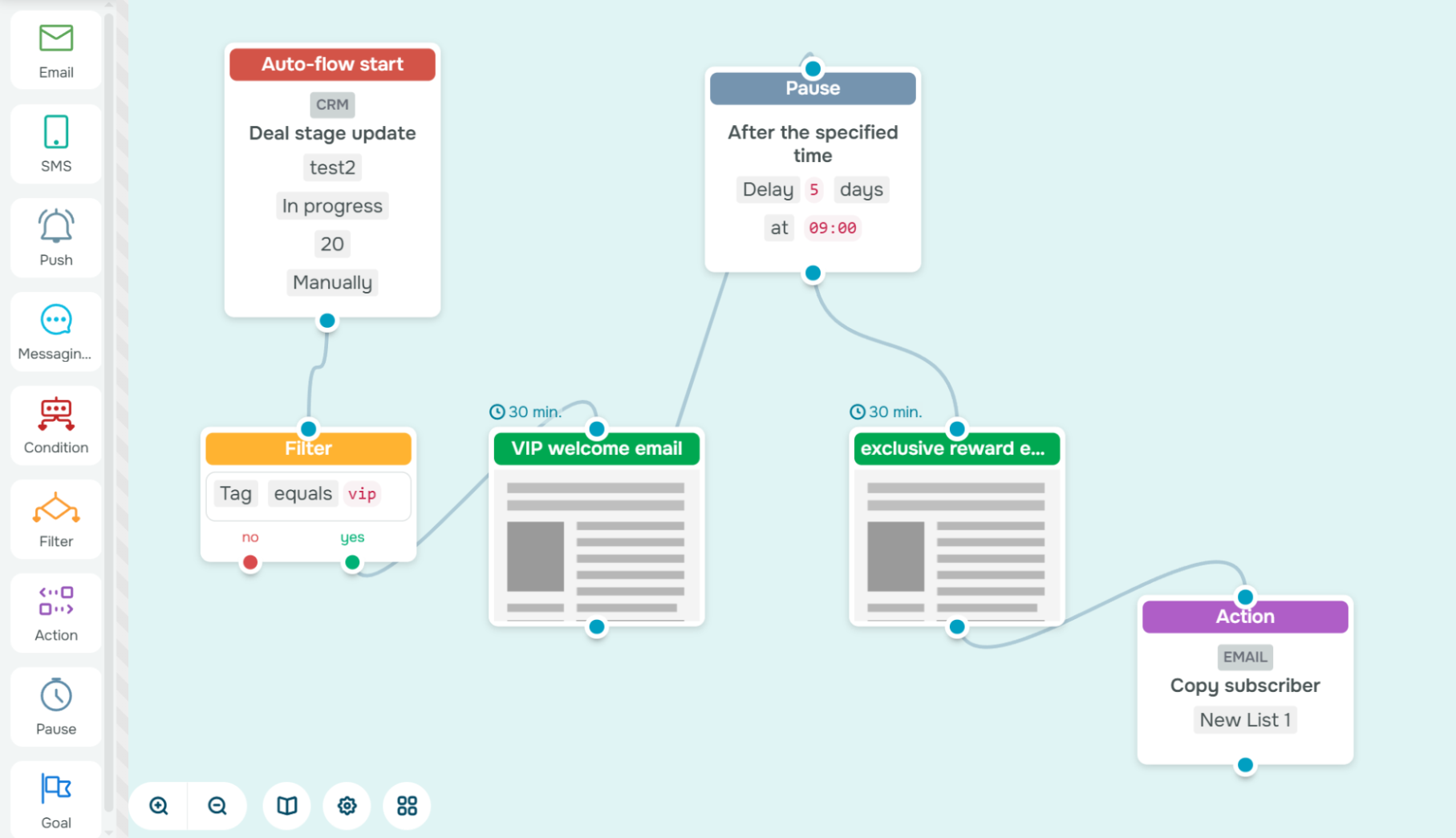 Email marketing automation template created in SendPulse
Extra tip: Go beyond transactional perks. Combine exclusive content like brand stories, behind-the-scenes looks, or member-only insights with special deals. Loyalty grows stronger when customers feel connected to your brand, not just your prices.
The fashion brand BaubleBar created an email campaign specifically for its VIP customers. In the message, they offered an appealing 35% discount, available only for 12 hours. The email’s design is bright and stylish, echoing the look and feel of their website.
The copy is minimal, focusing only on what truly matters: the size of the discount, the time limit, and a clear, compelling CTA that drives immediate action.
Anniversary or birthday flow
An anniversary or birthday flow is a simple way to humanize your brand through email marketing automation. Triggered by a key date such as a subscriber’s birthday or the anniversary of their first purchase, this automated email journey helps you celebrate your customers and strengthen emotional connection.
Unlike promotional campaigns, these messages aren’t about selling first. They aim to recognize your customers as individuals. A well-timed, personalized greeting shows genuine appreciation and builds long-term loyalty.
Here’s how an anniversary or birthday flow might look: send a heartfelt message that celebrates your customer. Keep it warm, personal, and visually delightful. Think confetti animations or a simple “We’re glad you’re with us!” Include a special discount, freebie, or early-access link as a gift.
In SendPulse, you can set up this automation using the “Birthday campaign” flow template linked to the “Birthday” or “Sign-up date” contact variable. Let it run annually and add a reminder step a few days later on a specified condition to close the loop. You can also combine this email flow with an SMS or chatbot message to make your greeting even more interactive and memorable.
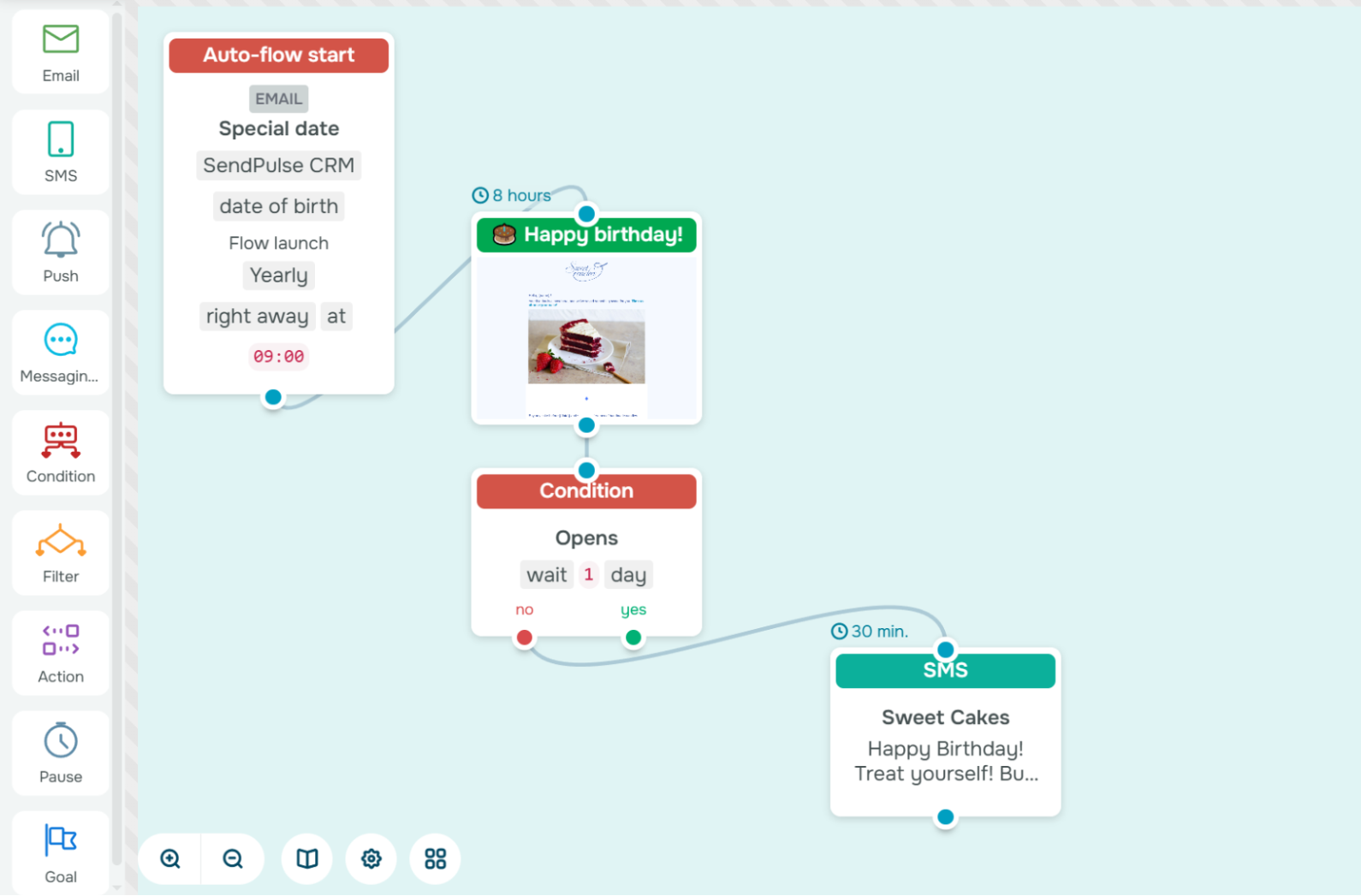 Email marketing automation template created in SendPulse
Extra tip: Go beyond generic “Happy Birthday” messages. Mention how long the customer has been with your brand, reference their favorite products, or add a short thank-you note from your team.
Magic Spoon Cereal used their own birthday as a reason to reach out to subscribers, not the customers’ birthdays. This is a great example of how a company can turn its own milestone into an opportunity to strengthen customer relationships and encourage purchases.
In the email, Magic Spoon Cereal offered subscribers a special gift available with their next order. To spark action and create urgency, the offer was time-limited, motivating customers to celebrate the occasion together with the brand.
Upsell or cross-sell flow
An upsell or cross-sell flow is triggered by a recent purchase or a specific product interest. This automated email journey recommends complementary items that enhance the customer’s experience and increase average order value.
This type of email marketing automation flow works because it feels helpful and delivers timely, relevant suggestions based on what the customer already likes. Instead of blasting generic “You may also like” messages, automation allows you to tailor recommendations to actual behavior and intent.
Here’s how a well-timed upsell or cross-sell flow might look:
- Personalized recommendation. A few days after a purchase, send an email featuring related or upgraded products. Use dynamic product blocks to automatically pull matching items — accessories for gadgets, refills for skincare, or add-ons for software.
- Limited-time offer. Follow up with a subtle incentive, such as a time-limited discount or bundle deal, to encourage faster decisions while maintaining authenticity.
In SendPulse, you can customize the “Cross-sell” email automation flow template or build your own. Schedule the sequence to launch 3–7 days after the last order so it feels relevant but not intrusive.
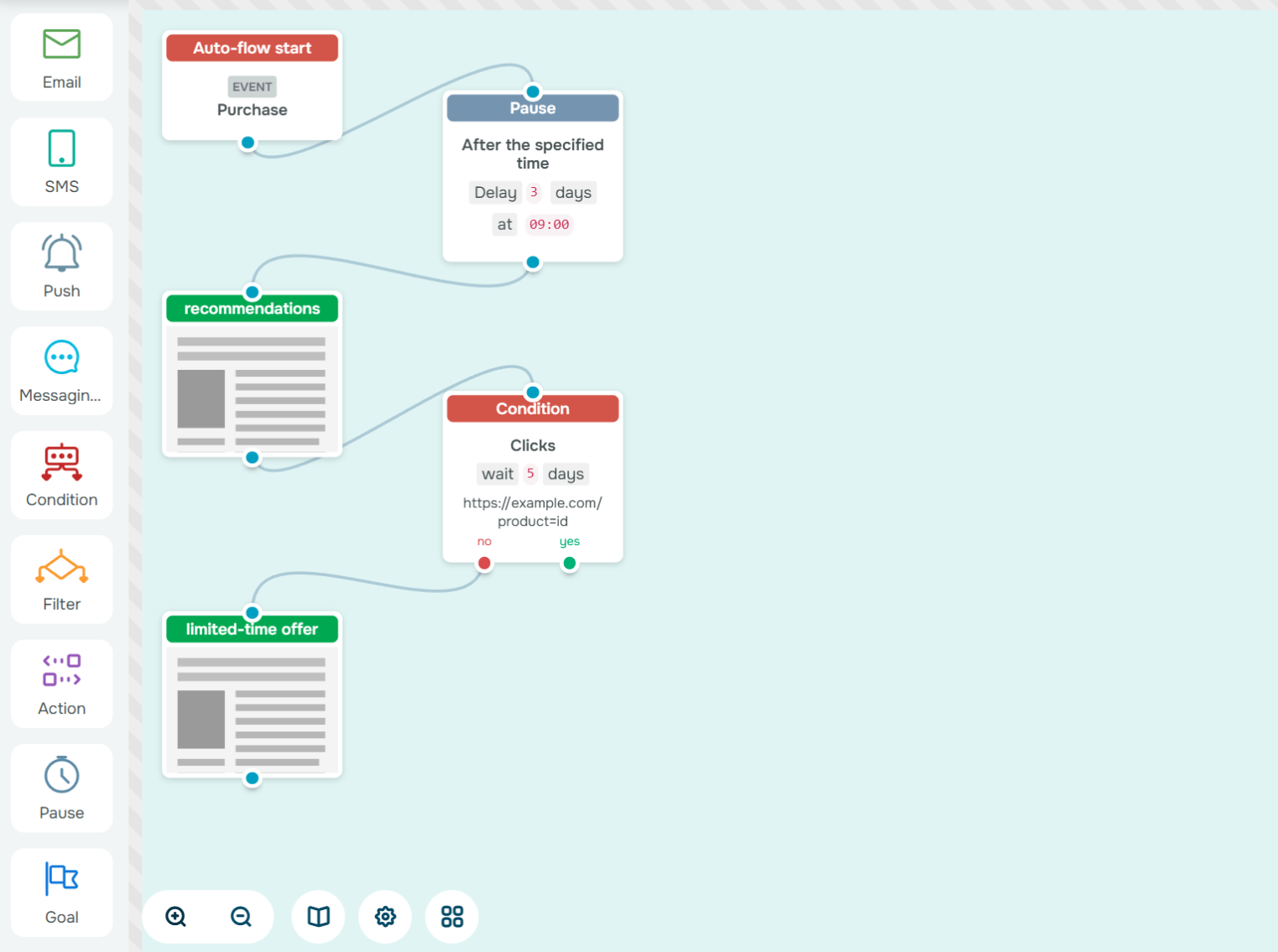 Automated email flow in the SendPulse builder
Extra tip: Combine purchase data with engagement metrics from your CRM system to refine timing and product selection. The more accurately you align with the customer’s needs, the more your upsell flow feels like a personalized shopping assistant.
Subscribers of the Yelp brand received an email featuring recommendations for the most popular places of the week. The message included enticing photos that instantly drew attention, making recipients want to either place an order or at least click through to explore the venues.
Each card contained concise but useful details: location, rating, and type of cuisine. The email kept information to a minimum, focusing only on what truly matters and enough to spark curiosity and gently guide the reader toward making a choice.
Webinar or event reminder flow
A webinar or event reminder flow helps you turn sign-ups into actual attendees and attendees into engaged leads. This email journey is triggered when someone registers for your webinar or event and keeps your audience informed and ready to show up. Beyond reminders, it also supports post-event nurturing, ensuring that every registration contributes to your marketing goals.
Attendance rates often drop simply because people forget. That’s why this email marketing automation flow matters. It eliminates missed opportunities by sending well-timed reminders that maintain anticipation and build momentum.
Here’s how an effective event reminder flow might look:
- Confirmation and reminder sequence. Right after sign-up, send a confirmation email with the date, time, and access link. Follow up with one or two reminders, for example, a day before and an hour before the event, to keep it top of mind.
- Post-event follow-up. After the event, automatically send a thank-you email with a replay link or key takeaways. Include a soft CTA, such as scheduling a demo or downloading additional resources, to move attendees further down the funnel.
In SendPulse, you can use the “Event reminder” automation flow template. Add a series of timed reminders via email and SMS. You can also end the flow with a post-event follow-up email.
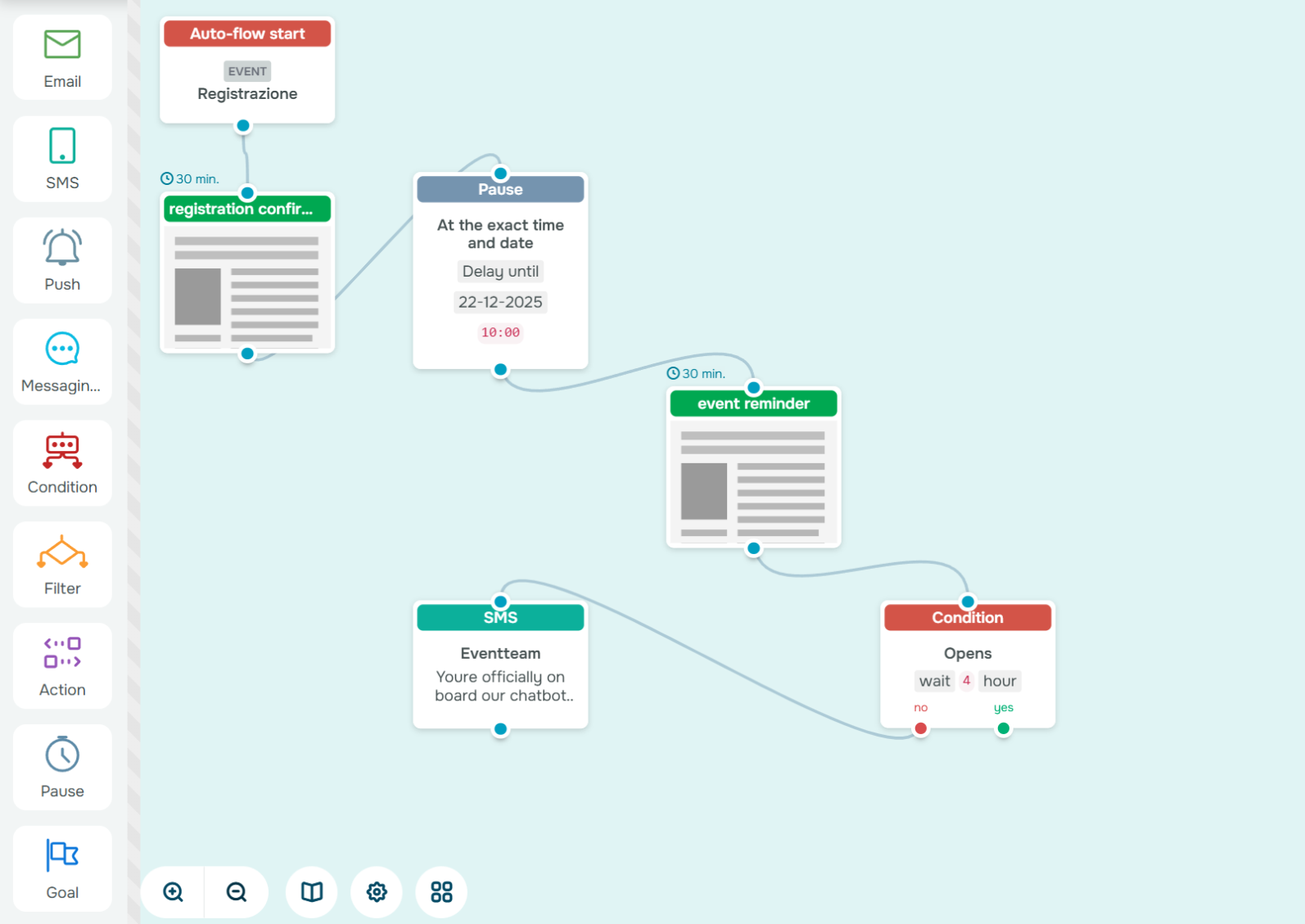 Automated email flow example in the SendPulse builder
Extra tip: Don’t stop at reminders. Automate a final “What’s next?” email after the event to keep the conversation going, whether that’s an invitation to your next session, a trial offer, or exclusive content for attendees.
Zapier sent an email to its subscribers inviting them to an online event. The message was quite detailed, as it was designed to spark interest by outlining the event’s agenda and introducing the speakers. To make registration easy, the email included multiple CTA buttons, allowing readers to sign up or learn more without scrolling too far.
The second email served as a reminder and highlighted the last chance to register. Instead of repeating the speaker list, it focused on the value and benefits attendees would gain from joining the event. This approach kept the message concise, relevant, and action-oriented.
It’s a great example of how to automate event promotion while keeping communication engaging.
Re-engagement flow
A re-engagement flow is triggered when a subscriber hasn’t opened or clicked an email in 60 days or more. This automated email journey helps you reconnect with silent contacts or gracefully remove them if interest is gone.
Inactive subscribers hurt performance metrics and can even affect inbox placement. Re-engagement keeps your list healthy, boosts sender reputation, and ensures your messages reach people who genuinely want to hear from you. The goal is to reactivate users and focus your energy on a responsive, high-value audience.
Here’s how a simple re-engagement email flow might look:
- “We miss you” message. Start with a friendly email reminding subscribers what they’re missing: fresh content, exclusive perks, or product updates.
- Special offer or final call. Follow up with a small incentive, like a limited-time discount or personalized recommendation. If they still don’t respond, send a short “Do you still want to hear from us?” message before removing them from your list.
To build a similar flow in SendPulse, start by setting the conditions for the segment that should receive the re-engagement flow using the “Filter” element, say subscribers who’ve been inactive for a specified time. Then add the necessary message blocks and engagement conditions with delays between them.
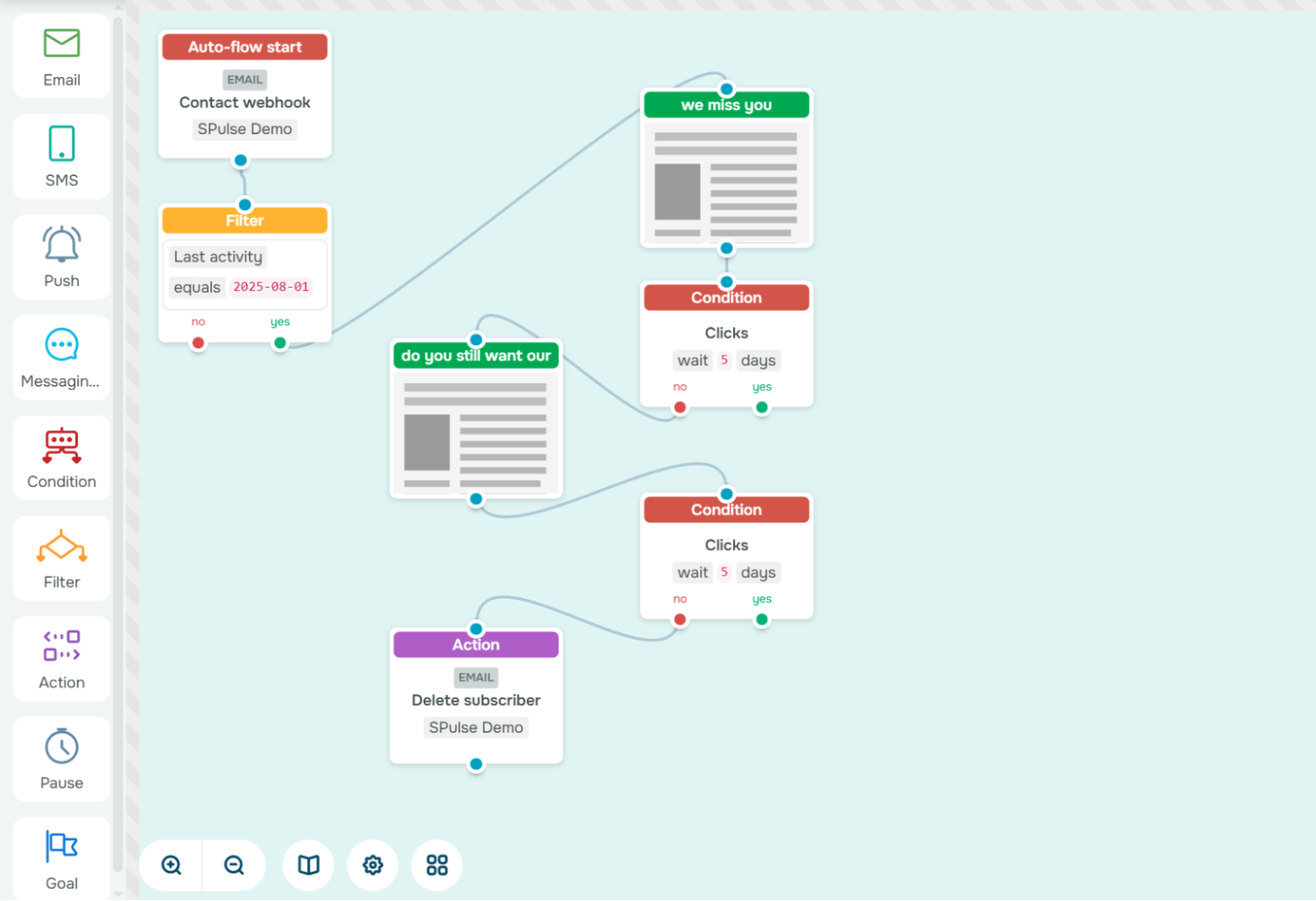 Email marketing automation template created in SendPulse
Extra tip: Don’t see inactivity as failure; see it as feedback. Use insights from your re-engagement campaigns to refine subject lines, sending frequency, and content strategy for your future automated email journeys.
Too Good To Go tried to win back inactive users with a heartfelt re-engagement email. The message opened with a direct and friendly line — “We’ve missed you!” — creating a sense of familiarity. To reignite interest, the company briefly highlighted new and improved features of its app that make it even easier to use.
The email could have been even more persuasive if it had included a small incentive or special offer. A little extra motivation could encourage users to return and give the app another try.
Seasonal or event-based flow
A seasonal or event-based flow helps your brand stay relevant and visible during key moments of the year. It may be a major holiday or a sales event like Black Friday. Email automation flow ensures that your campaigns go out exactly when they matter most without last-minute stress.
When customers receive personalized messages tied to meaningful dates, they’re more likely to open and click. With email marketing automation, you can plan once and let the system handle the execution year after year. This saves time and keeps your brand consistently present during high-impact seasons.
Here’s how a seasonal or event-based flow might look:
- The main campaign email. Send a themed message aligned with the occasion. For example, a “Happy New Year” greeting paired with a special discount or gift.
- Follow-up or reminder. A few days later, send a gentle reminder before the offer expires or the event ends. This reinforces urgency and helps capture those who missed the first message.
In SendPulse, you can automate such a flow using the “Date” trigger, then add message blocks and timers.
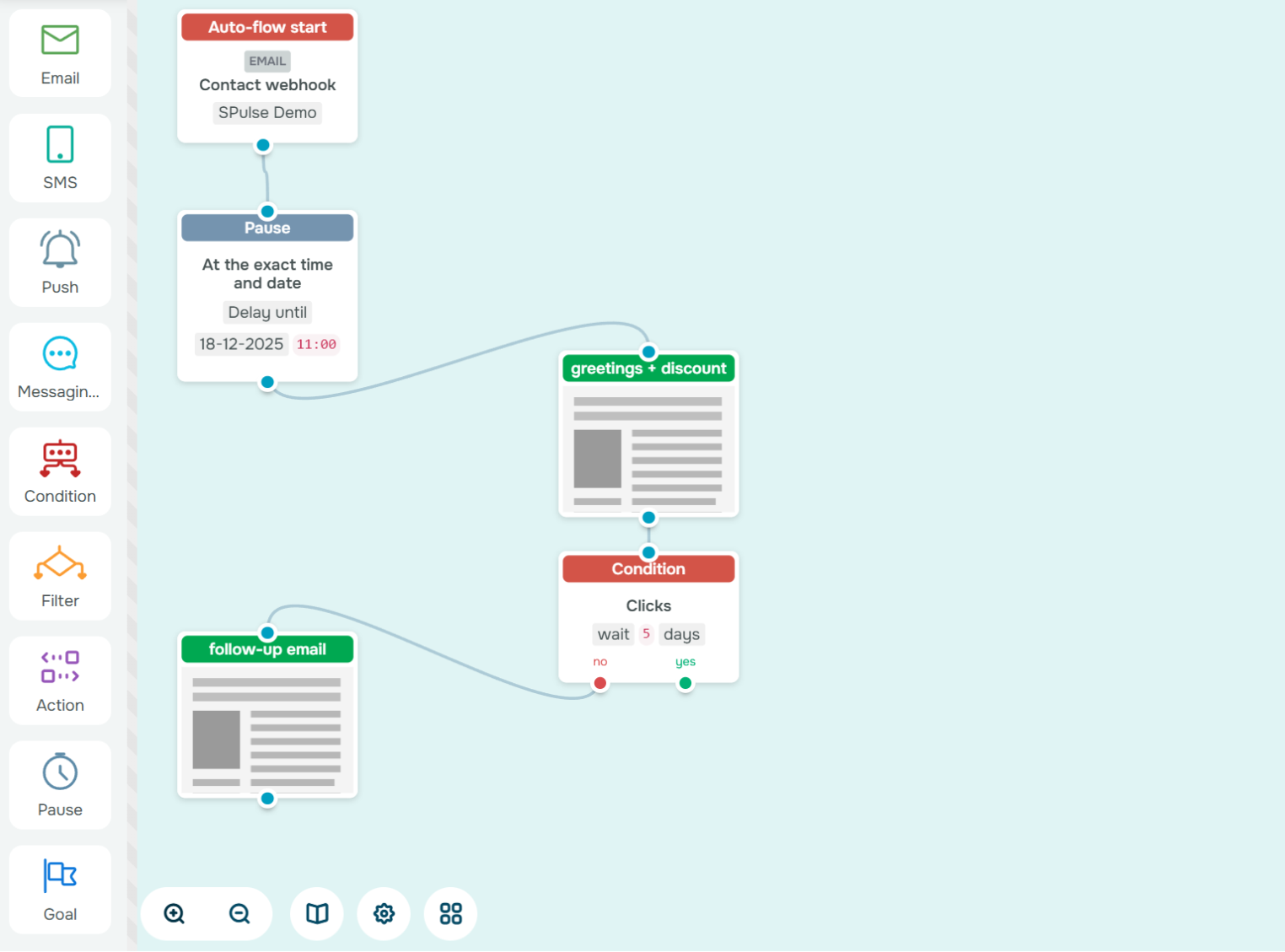 Automated email flow example in the SendPulse builder
Extra tip: Don’t limit yourself to email. Pair your campaign with a chatbot reminder to create a seamless multi-channel experience that keeps your audience engaged across platforms.
Smalls created an engaging New Year email for their subscribers that perfectly combined several effective elements. The message included a 50% discount as a holiday bonus, a personalized quiz to help users find the best product for their pets, and social proof through customer testimonials.
The result was a festive and personal campaign — a thoughtful New Year’s gift wrapped in relevance and genuine value for the subscriber.
Email marketing automation best practices
To make email marketing automation effective, try to find a balance between creativity and precision. The right structure, timing, and personalization can turn a simple flow into a conversion engine. Here’s how to automate emails that deliver value and feel human:
- Keep flows short and purposeful. Each automation should have one clear goal, whether it’s welcoming new subscribers, reactivating dormant users, or driving a repeat purchase. Long, unfocused sequences dilute impact and fatigue your audience.
- Test timing and frequency. Even the best message can fail if it lands at the wrong moment. Experiment with delays between emails, sending hours, and number of touches to find the spot that keeps engagement high without overwhelming subscribers.
- Personalize beyond the first name. Use behavior-based data such as purchase history, browsing patterns, or interaction level to craft messages that resonate. A recommendation based on real behavior will always outperform a generic “Hello {{Name}}.”
- Always include clear opt-out options. Giving subscribers control over their preferences keeps you compliant, strengthens credibility, and reduces spam complaints.
- Review reports and optimize continuously. Regularly analyze open rates, click-throughs, and conversions to identify weak points and refine your next email automation flow. Each insight helps you make future campaigns more efficient and engaging.
Every triggered message should add value and move your audience naturally along their journey.
Bring your automated email journeys to life
When built thoughtfully, email automation flows save you hours of manual work, deliver personalized experiences, and keep your marketing running even while you sleep. From welcome flows to loyalty campaigns, each automation strengthens relationships, drives conversions, and turns data into meaningful human communication.
With SendPulse, you can easily bring any email automation ideas to life. The drag-and-drop builder and ready-made templates let you design powerful flows without coding. You can focus on creativity and strategy. Start building your first email marketing flow in SendPulse and watch your campaigns work for you, delivering value and growth on autopilot.
Email marketing automation FAQs
What is email automation?
Email automation is the process of sending pre-scheduled or trigger-based emails based on user actions, behavior, or data from your CRM.