Chances are, you’ve had a teacher who could turn a room full of half-asleep students into sharp-eyed competitors just by announcing a pop quiz or dangling a gold star. Nobody wanted to be caught not paying attention. Everyone sat up a little straighter, because suddenly there was something worth competing for.
Milestone emails work on the same principle. They tap dormant users on the shoulder at precisely the right moment and deliver two messages at once: “Look how far you’ve come. Don’t you dare stop now!”
On one side, there’s the sentimental pull — the reminder that the time and effort invested already add up to something real, and that abandoning it would feel like a betrayal. On the other hand, there’s a competition with your own record. Duolingo has practically built an empire on this tension: miss a single day and the streak resets to zero, which feels genuinely catastrophic.
Let’s explore how to leverage the push-and-pull effect that milestone emails create, from writing motivating subject lines to structuring rewarding copy and choosing CTAs that guide users forward without pressure. We’ll look at real examples of milestone emails to customers worth learning from and show you how to replicate that magic with SendPulse’s AI automation builder.
TL;DR Milestone email types and when to use them
Below is a quick overview of common milestone email types, their goals, and use cases.
| Milestone email type |
Purpose |
When to use |
Benefits |
| Time-based milestones |
Celebrate time spent with the brand |
Triggered by birthdays, signup anniversaries, or renewals |
Retention, re-engagement, loyalty |
| Behavior-based milestones |
Appreciate user’s progress |
Sent after completing projects, hitting usage goals, or reaching activity streaks |
Activation, product adoption, upsells |
| Purchase and loyalty milestones |
Express gratitude for brand loyalty |
Used when customers reach spending, order, or loyalty thresholds |
Repeat purchases, higher LTV |
| Community milestones |
Increase the sense of belonging |
Triggered by referrals, forum contributions, and reviews |
Advocacy, referrals, community growth |
| Sensitive milestones |
Acknowledge emotional moments and life changes |
Intended for condolences, health journeys, or support check-ins |
Trust, brand empathy, bonding |
Now, let’s dive into the details.
What is a milestone email?
A milestone email is a triggered message that you send to recognize a meaningful moment in a customer’s journey with your product or brand — a streak reached, an anniversary marked, or a goal completed. While most emails push something toward the user, milestone emails reflect progress, invested time, or a crossed threshold.
Their job is to make the user’s journey feel seen and to give them a reason to keep going. At their core, that makes them re-engagement emails — but ones that lead with recognition rather than a sales pitch.

Create and send high-performing emails
Use an AI assistant, pre-made templates, advanced segmentation, and feature-rich automation to run campaigns without coding. Start for free with up to 15,000 monthly emails.
Get started for free
Milestone email vs transactional email
A transactional email, be it an order confirmation, a shipping update, or a password reset, exists to deliver information. It’s functional, expected, and largely emotionless. The user triggered it with a one-off action, and the email confirms that the action was received.
A milestone email, by contrast, is about a continuous journey. It comes unprompted and therefore carries an element of surprise, and is intended to deepen a relationship.
Milestone email vs lifecycle onboarding email
Onboarding emails guide new users through a product — they’re educational, sequential, and designed to reduce friction when the user is most vulnerable. But they follow the brand’s timeline, not the user’s.
Milestone emails follow the user’s timeline entirely. They aren’t teaching anything or nudging someone toward a next step out of necessity — they’re applauding the steps the user has already taken on their own.
Milestone email vs promotional campaign
Promotional emails are outward-facing by nature: “Here’s an offer, here’s a deal, here’s a reason to buy.” Even when personalized, they’re fundamentally about what your brand wants the user to do next.
Milestone emails move in the opposite direction. They put your customer at the center, with all their progress, consistency, and achievements. Any call to action that follows doesn’t feel like a sales push anymore because it’s been justified by the acknowledgment. That distinction is what makes milestone emails one of the few email types that users genuinely enjoy receiving.
How can milestone emails drive business outcomes?
Milestone emails are one of the few email types that deliver measurable impact without asking the user for anything upfront. Here’s why marketers deem them worth the effort:
- Retention. 47% of consumers say they are more likely to stick with the brand if it remembers their past interactions. Milestone emails excel at that, interrupting the natural drift that happens when users go quiet. By surfacing a user’s progress at a meaningful moment, they reintroduce the product’s value exactly when someone might otherwise stop noticing it.
- Loyalty. 44% of consumers say their favorite brands understand and appreciate them and their needs. Feeling recognized via milestone celebrations builds trust faster than almost any generic promotional message can — it signals that the bond is being tracked and valued.
- Re-activation. According to HubSpot, increasingly more users value human-led content and tune out faceless promotions. For users who have gone dormant, a milestone email can reignite engagement without the awkwardness of a generic “we miss you” campaign. The milestone gives the email a legitimate reason to land in the inbox, making it feel timely rather than desperate.
- Long-term commitment. 66% of lost customers don’t come back. Milestone emails work against that clock by building the kind of accumulated goodwill. They make progress visible, and visible progress is harder to abandon. When a user can see that they’re 60 days into a habit, they are more likely to continue to protect what they’ve already invested.
- Referrals. Peak satisfaction moments are the most natural points at which users are willing to share their experience with others. Younger consumers in particular say they enjoy being a visible part of their favorite brand’s community. And, two-thirds of shoppers will recommend brands they love to their circle.
Milestone emails often break typical marketing rules and get a pass where other email campaigns tank. For instance, a “Your year with us at a glance” can be longer than any best practice guide would recommend, image-heavy, and still see above-average engagement. Stats back this up: 28% of users don’t mind reading longer emails if they feel personalized.
Milestone email types and tips on how to use them
Not all milestone emails are equal — some mark the passage of time while others recognize effort, spending, or contribution. Let’s break down the subtle differences between them.
Time-based milestones
Time-based milestones are triggered by the calendar rather than by user behavior — they fire when a set amount of time has passed since a specific event, for example, their sign-up. The most common triggers include account anniversaries, subscription renewals, and the date a user first made a purchase or joined a program.
These emails are among the easiest to build and automate, which adds a certain risk. For instance, a one-year anniversary email that lands in the inbox of a user who hasn’t logged in for ten months may come across as an unpleasant reminder of something they abandoned.
How to implement time-based milestone emails to customers:
- Pair time-based triggers with an activity check. If the user has been inactive for 60+ days, route them into a re-engagement flow instead. It’s irrelevant how long they’ve been registered if they get no value from your platform.
- Make the milestone feel exciting, not administrative. “You’ve been with us for a year” has no spark and offers little incentive to read further. “A year ago, you started X — here’s how far you’ve come” holds significant weight.
- Use anniversary emails to surface personalized stats: sessions completed, money saved, goals hit. Numbers make the milestone concrete.
Behavior-based milestones
Behavior-based milestones are triggered by something the user actually did — completing a task, reaching a usage threshold, hitting a streak, or unlocking a feature for the first time.
Because these emails are tied to demonstrated engagement, they tend to perform above average — the user was already active when the trigger fired, which means the timing is almost always right.
How to implement behavior-based milestone emails to customers:
- Define your milestones before you build them. Map out the key moments in your customer journey where effort deserves recognition, be it the first meaningful action, the first repeated behavior, or the first sign of habit formation, and build triggers around those moments.
- Don’t over-celebrate trivial actions. If every click generates a milestone email, the format loses its meaning. Reserve behavior-based milestones for real progress.
- Use these emails to introduce the next natural step. A user who just completed their fifth session is ready to hear about an advanced feature. The milestone creates the opening for a CTA to walk through.
Purchase and loyalty milestones
Purchase and loyalty milestones are triggered by commercial behavior — a user’s first order, fifth purchase, crossed spending threshold, or entry into a new loyalty tier. These milestone emails overlap with loyalty program communication.
How to implement purchase and loyalty milestone emails to customers:
- Separate the milestone email from the transactional email. An order receipt is functional, while a “Congrats with your 5th purchase. Your next accessory is on us” email is emotional. Send the two separately, even if they go out minutes apart.
- Be specific about what the next tier or reward actually means. “You’re almost at Gold status” is vague. “You’re $15 away from free shipping on every order for a year” sounds like a clear to-do item.
- The “one step away” email is one of the highest-converting formats in this category. Don’t miss that chance — use it to actively nudge an already loyal customer toward another order.
Community milestones
Community milestones recognize a user’s contribution to something bigger — their role within a group, forum, referral network, or user base. These are less common than the other types, which is precisely what makes them effective. They signal that your brand is paying attention not just to what the user buys or does, but to what they give.
Think referring a set number of friends, writing a first review, reaching a contribution threshold in a community forum, or simply being among the first users in a new market.
How to implement community milestone emails to customers:
- Community milestones work best when they make the user feel like an insider. Acknowledge the specific contribution — “your review helped 47 people decide” is more powerful than bland “thanks for being part of our community.”
- Collective milestones (“we just hit 1 million users”) can build brand affinity, but only if the user feels personally connected to that number. Give them a reason to feel ownership: “You were one of the first 10,000!”
- Referral milestones are a natural moment to incentivize further sharing. A user who has already referred two friends has shown willingness — encourage them to keep the word of mouth going.
Sensitive milestones you don’t want to blindly automate
A poorly timed or poorly worded email can do real damage, both to open rates and to the relationship itself. Sensitive personal milestones include anything tied to health, grief, family status, or life events that users may have shared with your platform unintentionally.
This could be a due date entered into a pregnancy app, a diagnosis logged in a health tracker, or a memorial date stored in a calendar tool. Bringing them up can feel like a jarring intrusion, and there is no automation logic sophisticated enough to recognize the appropriate context.
How to implement sensitive milestone emails to customers:
- Only trigger milestone emails based on data the user explicitly provided for that purpose. Inferred data, like purchase patterns, browsing behavior, or third-party signals, should never drive sensitive milestone communications.
- Build in a human review step for any milestone category that touches health, loss, relationships, or major life transitions.
- Always give users control. Sensitive milestone categories should carry clear opt-out options, ideally surfaced at the point where the user first shares the relevant data.
Before building a milestone automation flow that relies on behavioral tracking or third-party data enrichment, confirm that your data collection, consent records, and retention policies can support it. A milestone email that prompts a user to ask, “How did you know that?” is a compliance and PR risk not worth taking.

Turn conversations into conversions
Build targeted automation flows with emails, chatbots, SMS, and more — powered by CRM data and real user behavior.
Get started for free
Milestone email best practices
Integrating a new email type takes a bit of planning, but milestone emails are among the more forgiving formats to start with. The triggers are logical, the content writes itself when you know the user’s journey, and the returns tend to justify the setup quickly. That being said, there are a few good-to-know practices:
- Start with three flows before building anything else. The minimum viable milestone program covers signup anniversary, first purchase celebration, and loyalty tier advancement — typically, the three most critical moments in the user journey.
- Include a smart next step. Every milestone email to customers should point forward as well as back. The next step should follow logically from the milestone itself, for instance, a user who just hit a streak gets nudged to extend it.
- Avoid discount dependency. Defaulting to one every time trains users to expect a price reduction at every emotional high point, which hurts both your margins and perceived value over time.
- Use low-cost perks for early-stage milestones. Templates, guides, exclusive content, or unlocked tools make your product feel useful rather than just cheap.
- Never let milestone emails and promotional emails overlap. When both are queued, the milestone should be prioritized — it is harder to recreate and more valuable to the long-term relationship.
- Set frequency caps across all email types, not just milestone sends. A user who receives a promotional email on Monday, a newsletter on Wednesday, and a milestone email on Friday has been contacted three times in five days — this is guaranteed to lead to fatigue and lower open rates.
- Watch for milestone stacking. If a user hits several triggers in a short window, batch or sequence them rather than sending all at once. The more frequently a user is celebrated, the less each celebration means.
- Audit your active flows quarterly. Automation makes it easy to build milestone triggers in isolation and lose track of how they interact across the full user journey. Regularly review them against a realistic user timeline to highlight conflicts before they reach the inbox.
Now, we can move on to the execution part.
Milestone email subject line ideas
For milestone emails specifically, subject lines should get up close and personal. Not just first-name personal, but achievement personal, in order to make the customer think “this one is actually about me.”
Generic subject lines like “Your monthly update is here” or “A message from the team” often fail to convey that significance. Here’s what to try instead.
Achievement-led milestone email subject lines — for highlighting specific accomplishments with no preamble:
- Yay, welcome to the new chapter! ⚡️
- New level unlocked. Congrats!
- Oh wow. Look at you go.
- [X] sessions. You showed up every single time 💪🏻
- [User Name], congrats on your new habit!
- You’re in rare company now 🤫
- Milestone reached. You earned every bit of it.
- We’ve been waiting to send you this one.
- Not everyone makes it this far. You did.
- [X] months ago you started. Look at you now! 🎊
Curiosity-driven milestone email subject lines — for personalized data recaps or surprise rewards:
- Hard work pays off. Especially yours.
- There’s something inside with your name on it 💌
- Did you think we weren’t paying attention? We were.
- We’ve been keeping score. You’ll want to see this.
- You might want to sit down for this one 🎁
- Someone’s been making progress. (It’s you.)
- You couldn’t possibly think we would just ignore your effort.
- Wow, you’ve been quietly crushing it.
- Hey [User Name]. You’ve earned this.
- You keep surprising us!
Progress-framing milestone email subject lines — for fostering commitment and continuity:
- You’ve done [X] sessions so far. What’s one more?
- The hardest part is over. Keep going ⛹️♀️
- You’re halfway through.
- Cheers to your [X] years with us. We appreciate it.
- [X] down, [Y] more to go. You can’t stop now 🧗♀️
- [X] workouts logged. Your strongest month yet.
- You’ve referred [X] friends. [Y] more and you unlock [reward].
- Your portfolio is up [X]%. Keep the momentum going.
- You’ve been at this for [X] weeks. The results are starting to show.
- [X] hours of learning logged. You’re building something real.
Reminiscent milestone email subject lines — for celebrating epic sentimental moments together:
- [X] years together. Today feels special 🍾
- You were one of our first. We haven’t forgotten that.
- A lot has changed since you joined. You haven’t quit, though.
- This was your first [Purchase/workout/lesson]. Look at where you are now.
- Can’t wait to make more memories with you 🎢
- This time last year, you were just getting started.
- You picked us in [Year]. We’re glad you did.
- It started with a free trial. Look where it went.
- A lot of customers come and go. You stayed ❤️🩹
- You’ve stuck with us through thick and thin. That’s rare.
FOMO-inducing milestone email subject line ideas — for when the user needs a light push:
- Don’t leave your points behind! ⏰
- You’ve gone so far — don’t stop now.
- We’d hate for you to lose your progress.
- Everything you’ve built is still here — come back.
- Your [tier/status] is waiting to be claimed 🧘♀️
- Oh oh. Miss today and the streak disappears.
- You’re [X] points away — don’t let them go to waste 🗑
- This is too close to give up on.
- We know you’ve worked hard for this reward. Don’t let it expire.
- Pssst. Your [points/credits/badge] have an expiration date.
An impactful, relatable subject line will lay the necessary groundwork both for your core message and call to action before the user even opens the email.
Recommended milestone email CTAs
The fastest way to undermine a milestone is to treat it like a promotional campaign in disguise. Here’s how to keep your milestone email CTAs genuine and logical:
| Milestone type |
Goal |
Best CTA strategy |
Example CTAs |
| Time-based milestones |
Reignite interest and give the user a reason to return or go deeper. |
Keep the CTA forward-looking. Give the user something specific and rewarding. |
Explore what’s new since you joined
Start your next chapter |
| Behavior-based milestones |
Channel the user’s dedication into the next step. |
Help the user naturally continue what they just did, without sharp pivots. |
Log today’s progress
Keep the momentum going |
| Purchase and loyalty milestones |
Reward the user’s loyalty and show a clear path to the next purchase or tier. |
Lead with the reward. Let the user know this is something they’ve proudly earned. |
Claim your reward
Unlock new level |
| Community milestones |
Deepen the user’s sense of belonging. |
Avoid commercial tone. Show the user how to contribute to the group. |
Share your story
Join the conversation |
| Sensitive milestones |
Acknowledge an emotional moment with care. |
Offer support and help find a quiet way back into the product. |
Explore resources at your own pace
We’re here when you’re ready |
Once you’re clear on the goals and purpose of your milestone communication, it’s time to look at how design and framing work together to deliver it.
7 strong milestone examples from brands
The following anniversary email and milestone email examples demonstrate how even a plain recap or monthly snapshot can be turned into a profound, captivating message.
Lummi
This milestone email in a year-in-review format turns data into something that feels like a shared experience. The user is being invited to see themselves as part of what the year added up to. The stats are unambiguous, and the personal impact is made obvious and tangible.
The email is finished off with a relevant call to action inviting the recipient to explore the free Pro tools they may not have known about, as well as to peek at what’s coming soon. By the time the reader reaches the CTA, they have already been celebrated and made to feel like an insider, so this feels like a natural next step.
Huggies
The popular diaper brand has perfected the art of gentle and personal email communication, and this milestone email is living proof of that. The campaign is sent out in alignment with the sensitive data gathered by the brand — in this case, the baby’s date of birth. But that data is used to show up at the right moment with something genuinely useful rather than to sell.
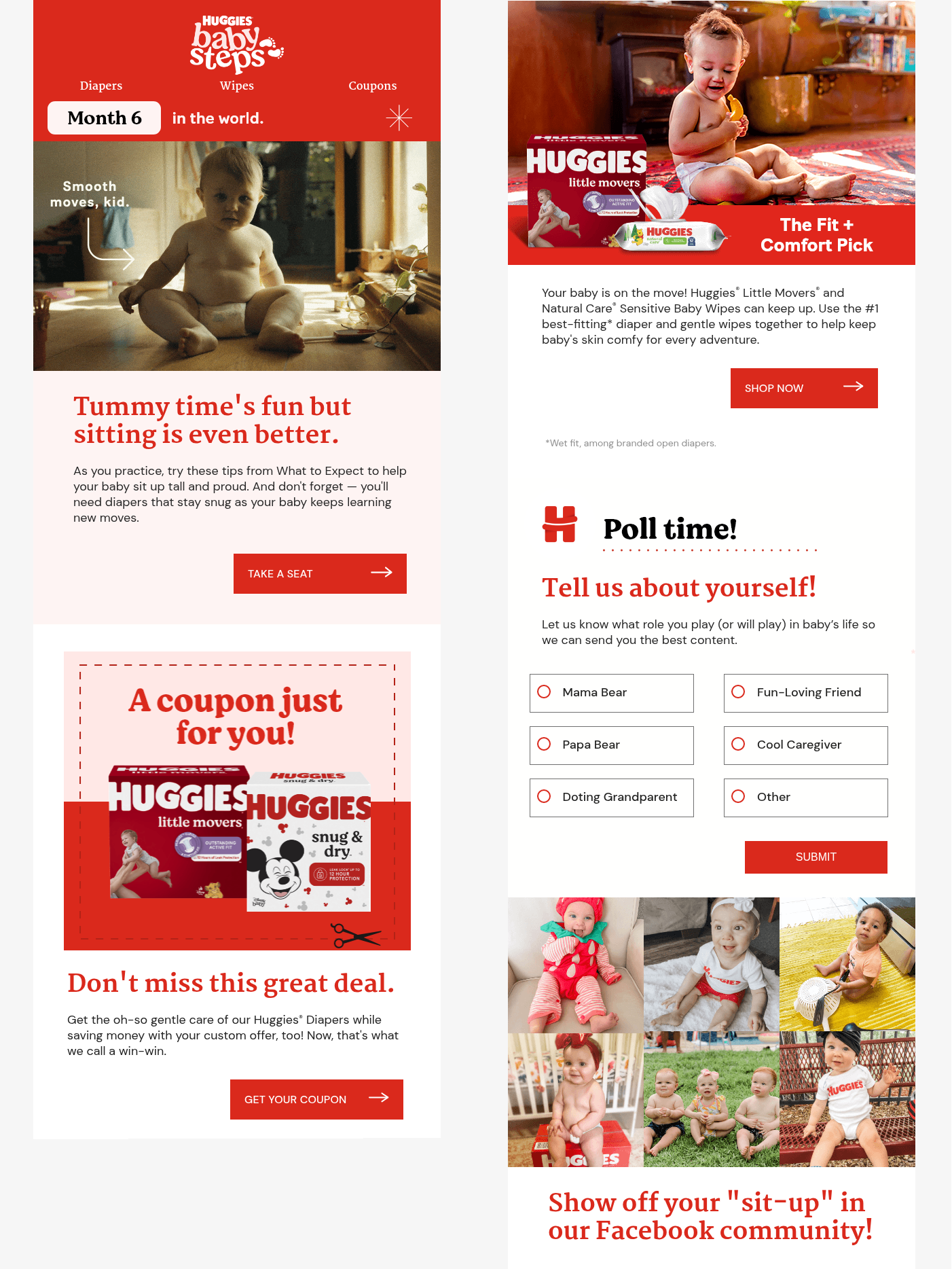 A sensitive milestone email example from Huggies; source: Email Love
The coupon, the relevant links, the fun parenting style poll, and the invitation to join the Facebook community make the email feel like a complete experience well worth the busy parents’ time.
Prima
This anniversary email to customers reads like a personal letter — the effect achieved by a handwritten signature, an individual narrative voice, and a deeply emotional tone. The lack of images and other distractions only helps draw attention to the core message.
The promo code, when it appears, is so naturally woven into the narrative that it reads less like an offer and more like a gift slipped into the envelope of a handwritten note. There is no bold banner, no countdown, and no aggressive deadlines, which elevates the entire experience.
Waymo
Waymo’s annual customer milestone email takes a format that could easily become a dry data dump and turns it into something shareable and fun. The rider’s personal stats from the year are presented in a clean, minimal layout and anchored to something the user cares about — their time, choices, or environmental impact.
Each compliment reframes the rider’s ordinary behavior as a small, meaningful choice. The CTA gives the reader two natural exits: dive deeper into the stats in the app, or share the summary on social media in one tap.
Monday
The end of a free trial is one of the first milestones a new user encounters. Most trial expiry emails work on urgency and mild panic, but Monday takes the opposite approach. This milestone email arrives with a surprise — another week, no strings attached, as an acknowledgment that the user hasn’t had enough time to see what Monday can actually do.
The brand is being brutally honest and transparent, practically saying: “We know that the trial is up and that you are on the fence.” Instead of pressuring the user, Monday gives them another chance and points at the specific tools worth exploring.
Touchland
Some milestone emails rather focus on what happens in the brand’s world. However, finding a way to make the reader feel like they were part of it can be challenging, especially if they were nowhere near the venue.
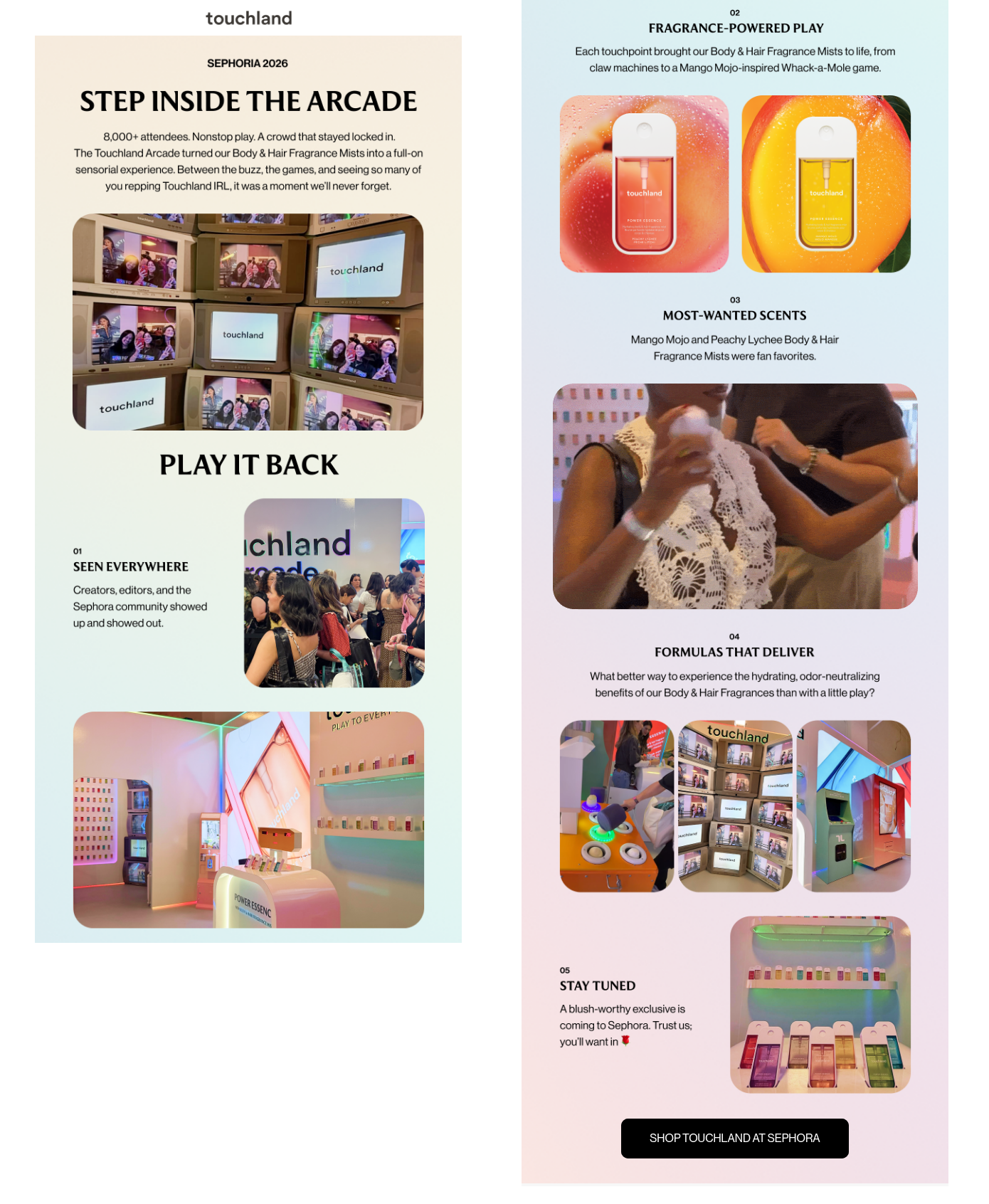 A community milestone email to customers from Touchland; source: Email Love
This email captures Touchland’s presence at one of the beauty industry’s most anticipated events with a vibrant, sensory energy conveyed via GIFs and colorful snippets. It highlights themed activations that are guaranteed to spark FOMO in the reader and makes that cultural moment shared, even if through a screen.
TurboTax
Few things create more productive anxiety than being told you are almost done. TurboTax’s milestone email understands this perfectly, visualizing the user’s progress toward submitting their declaration.
“Keep going” operates as a primary CTA, giving a nudge in the right direction. It’s followed by relevant deduction updates, and the deadline is a convenient calendar invite that the user can claim in one tap.
Finally, the loyalty recognition via the exclusive 20% discount rewards the user for past submissions and gives them yet another incentive to finish up their paperwork.
How to set up milestone automation flows in SendPulse
From finding the right milestone email template to designing a multi-step automation flow, SendPulse covers your needs at every step of celebrating your audience’s wins and sharing your own.
Before you jump into building your milestone automation flow with SendPulse, make sure the following pieces are in place:
- Create a free SendPulse account or choose one of our paid plans – it unlocks advanced or expert-level automation features.
- Set up segments or tags in advance to send different milestone emails to different audiences (e.g., free vs. paid members). Use the “Filter” element inside any flow to branch contacts by variable values, tags, or segments.
- Design your milestone email templates before building the flow. Go to “Email” → “Templates” → “Create template” and use the drag-and-drop builder. Save each template so you can select it inside the “Email” element when building your automation flow. For dynamic personalized content, insert variables using
{{variable_name}} syntax.
- Create or check the necessary variables in your mailing list settings (“Mailing lists” → select your list → “Variables”) before building the flow.
Every automation flow in SendPulse identifies contacts by their email or phone variable. Depending on the milestone automation flow you’re gonna build, you’ll also need:
- a “Date” variable (e.g.,
signup_date or first_order_date) to track when a milestone clock started;
- a “Number” variable (e.g.,
order_count or actions_count) that works as a counter;
- relevant event variables (like
product_name, order_total, or feature_name) that your backend sends with each event for personalization based on user activity.
You can learn more about creating and managing custom variables in our help center.
Signup anniversary emails
Let’s say you want to send a milestone email when a contact reaches 30 days and 90 days since signing up. Your finished flow will look similar to this.
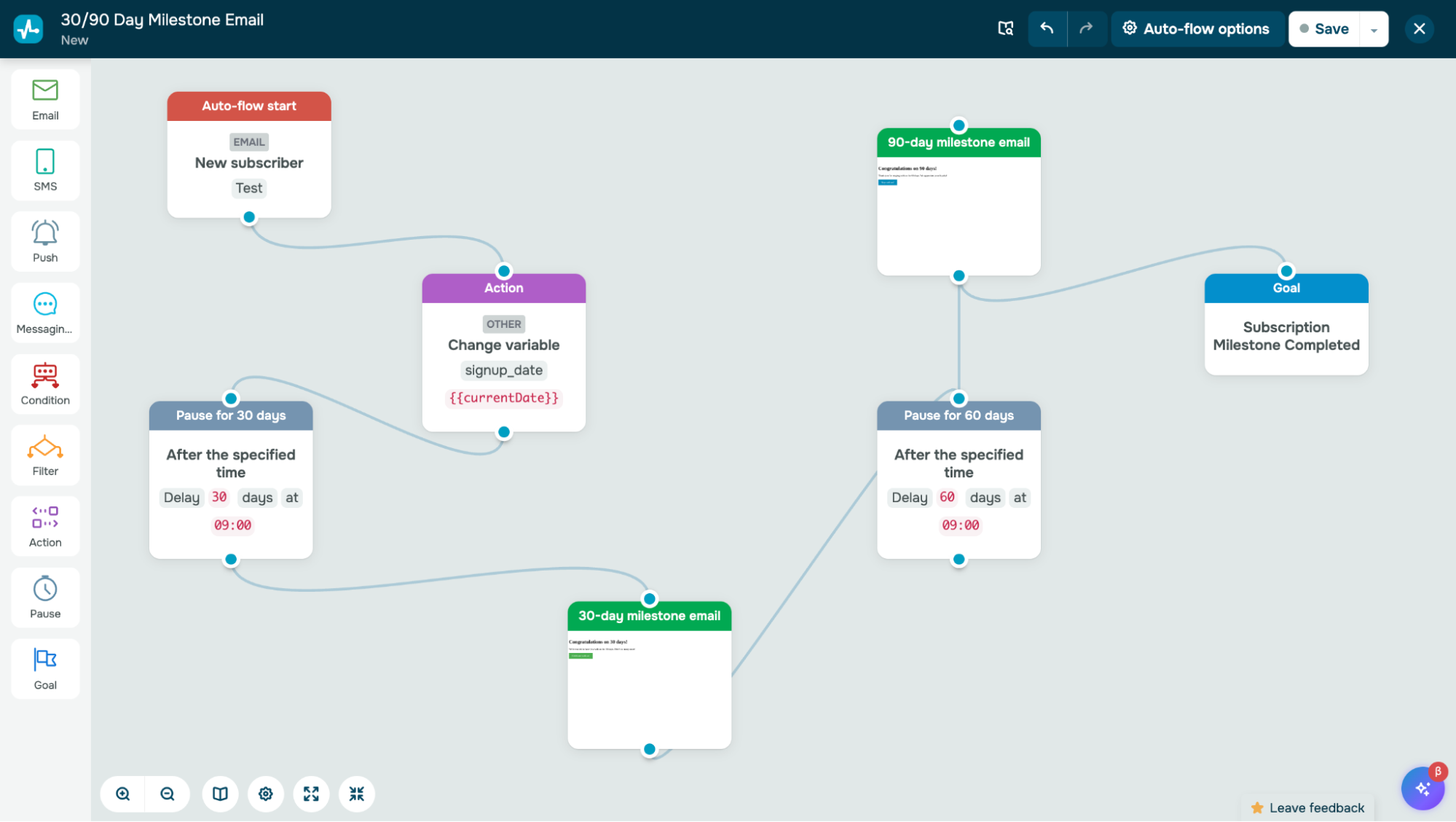 Setting up a signup anniversary automation flow in SendPulse
You can either give directions to our AI Automation Assistant or create a flow from scratch in our drag-and-drop builder:
- Create a new flow. Go to “Automations” → “Create new automation.”
- Choose the trigger. In the flow builder, click the start element. Select the “Email” trigger category, then choose “New subscriber.” Pick the mailing list where new signups land.
- Record the signup date. Drag an “Action” element onto the canvas and connect it to the trigger. Select “Other” → “Change variable.” Choose your
signup_date variable and set its value to {{CurrentDate}}.
- Add a 30-day pause. Connect a “Pause” element to the “Action.” Set the delay to 30 days. This holds the contact in the flow for exactly 30 days before they advance to the next element.
- Add the 30-day milestone email. Drag an “Email” element after the “Pause.” Select your pre-built “30-Day Milestone” template. Personalize the subject line and customize the sender name and address.
- Add a 60-day pause (to reach 90 days total). Drag another “Pause” element after the 30-day email. Set this one to 60 days.
- Add the 90-day milestone email. Drag another “Email” element after the second Pause. Select your “90-Day Anniversary” template, personalize it, and save.
- (Optional) Add a Goal element. If you want to track conversions — for example, how many 90-day contacts convert to paid — drag a “Goal” element at the end of the flow and set the conversion condition (e.g., a tag change or a variable update).
- Activate the flow. Review all elements, then click “Save and launch.”
Purchase milestone emails
Now, let’s say you want to send a “Thank you for your first purchase” email immediately after a customer’s first order, plus a special reward email after their third order. In our visual automation builder, you can filter contacts based on one or multiple conditions.
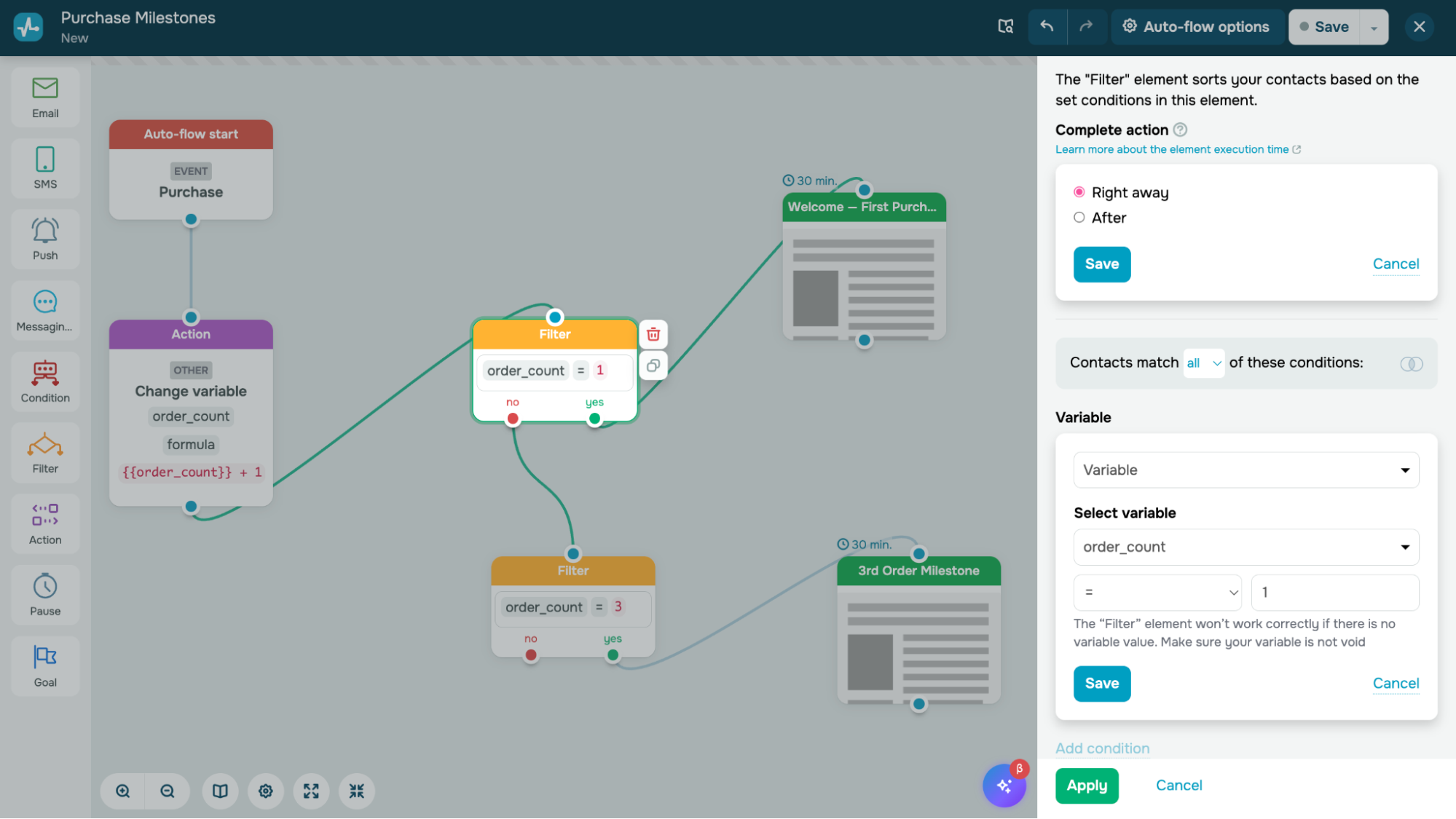 Setting up a “Filter” element for a purchase milestone flow in SendPulse’s automation builder
This flow will require a custom event trigger and a counter variable.
- Create the “Purchase” event. Go to “Automations” → “Event manager” → “Add event.” Add the following variables: email (required), product_name (string), and order_total (number). Save the event and copy the webhook URL — you’ll need this for your backend integration.
- Add a counter variable to your mailing list. Go to “Mailing lists” → select your list → “Variables” → “Add variable.” Create a “Number” type variable called
order_count with a default value of 0.
- Create a new flow. Go to “Automations” → “Create new automation.” Name it “Purchase Milestones.”
- Set the trigger to your Purchase event. Click the start element. Select the “Custom event” trigger category, then choose your
Purchase event from the list.
- Increment the order counter. Drag an “Action“ element onto the canvas and connect it to the trigger. Select “Other” → “Change variable.” Choose
order_count, select the “Insert formula” checkbox, and enter the formula: {{order_count}} + 1. Every time a purchase event fires, this element adds 1 to the contact’s running order count.
- Filter by order count = 1. Drag a “Filter” element after the “Action.” Set the condition:
order_count → equals → 1. This splits the flow into two branches — “Yes” (it’s their first order) and “No” (it’s a repeat order).
- Add the first-order email. Connect an “Email” element to the “Yes” branch of the filter. Select your “Welcome — First Purchase” template. Use event variables like
{{product_name}} and {{order_total}} to personalize the message.
- Filter by order count = 3 on the “No” branch. Drag another “Filter” element and connect it to the “No” branch from Step 6. Set the condition:
order_count → equals → 3.
- Add the 3rd-order reward email. Connect an “Email” element to the “Yes” branch of this second filter. Select your “3rd Order Milestone” template.
- Connect your backend. Set up your server, eCommerce platform, or integration tool to send a POST request to the webhook URL from Step 1 every time a customer completes a purchase. The JSON payload should include
email, product_name, and order_total.
- Activate the flow. Review everything and click “Save and launch.” Each purchase event will now trigger the flow, increment the counter, and send the appropriate milestone email.
Ready for more?
With SendPulse, you can run multistep email campaigns, build omnichannel automation flows, create chatbots for messaging apps, track sales in the built-in CRM system, assemble websites, and more. We offer 24/7 support, flexible pricing, personalized onboarding, and tailored setup on demand — create your account today and watch your brand take off!