To meet rising customer expectations, marketers strive to make every interaction feel more personal. That requires collecting data, both automatically and directly, from subscribers. For years, one of the simplest tools for this was the email tracking pixel.
But email providers have a different priority: protecting user privacy. They continue to reduce the amount of the data companies can access, which is reshaping how tracking pixels in emails actually work. In this post, we’ll look at what’s changed, how tracking pixels work today, and what you can do to keep your campaigns effective in a privacy-first world.
What is an email tracking pixel, and how does it work?
An email tracking pixel is a tiny, invisible image, usually just 1×1 pixels in size, embedded into a message. When a subscriber opens the email, their email client attempts to load this image from the sender’s server.
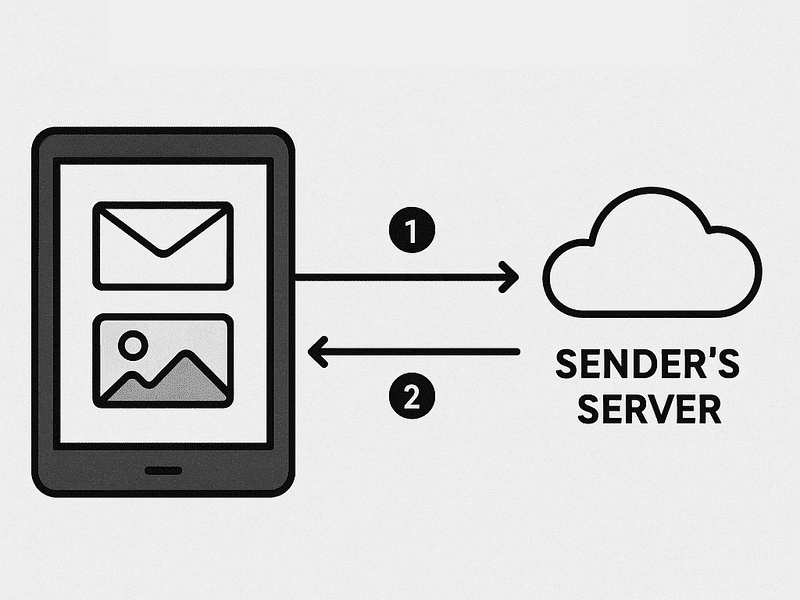 How tracking pixels work
Such a simple request leaves behind a trail of useful technical data: the IP address, device type, operating system, email client, and the exact time the email was opened.
For years, this made tracking pixels in emails the go-to tool for measuring engagement. They helped marketers estimate open rates, identify whether subscribers were reading on desktop or mobile, and even approximate their location. In short, a single pixel powered much of email analytics.

Free email marketing that scales
Use an AI assistant, pre-made templates, robust automation, and more to run impactful email campaigns without coding. Create your account and send up to 15,000 monthly emails at no cost.
Get started for free
How tracking pixels differ from cookies
At first glance, email tracking pixels and cookies seem to do the same job. They both capture user behavior data, but operate in different environments. A tracking pixel lives inside an email and fires the moment an image loads, telling you whether a message was opened, when, and on what device. Cookies, on the other hand, sit in the browser and follow a user’s activity across websites, logging visits, interactions, and preferences.
This distinction is why cookies became the first target of privacy regulations like GDPR and CCPA. They were visible, widespread, and tied directly to online advertising. Tracking pixels in emails flew under the radar for longer, but with Apple’s Mail Privacy Protection and similar measures, they too are now heavily restricted.
For marketers, the lesson is simple: you need to understand both. Cookies continue to influence retargeting and web analytics, while tracking pixels impact your evaluation of email engagement.
Why email services are blocking tracking data
Email providers are no longer letting tracking pixels in emails pass data freely. What used to provide marketers with open rates, IP location data, and device information now produces incomplete or distorted signals. An email tracking pixel can still show that an email was opened, but the “who, where, and how” behind that open is often blurred or hidden.
Major players like Apple, Google, Yahoo, and Microsoft see privacy as part of the product experience. Let’s look at how different changes shape this new reality.
Apple’s Mail Privacy Protection
Apple Mail Privacy Protection was a turning point. Since 2021, Apple has been preloading all email images, including tracking pixels, through its own proxy servers. This happens in the background, often before a subscriber even looks at the message.
For senders, that means the following:
- Open rates appear inflated because every message looks “opened.”
- IP addresses are replaced by Apple’s proxy locations, not the user’s real network.
- Device data is masked, so you can’t distinguish an iPhone from a Mac.
In short, Apple made real-time open tracking impossible. For marketers, the open rate metric is now more of a vanity number than a reliable engagement signal.
Gmail and Yahoo updates
Gmail has been caching images through Google’s own servers for years, but recent updates go further. As of 2024-2025, Google and Yahoo introduced stricter bulk-sender requirements: stronger authentication (SPF, DKIM, DMARC), unsubscribe standards, and anti-spam protections.
These changes indirectly affect tracking pixels in emails, too:
- Opens often register from Google’s servers in California, not the subscriber’s real location.
- User Agent strings are replaced by generic identifiers like GoogleImageProxy.
- All Gmail users look alike in reporting, with no segmentation by device or client.
Yahoo applies similar image proxying, with all activity appearing from its Sunnyvale servers. As a result, marketers lose visibility into geography and device usage, making campaign optimization harder.
Global privacy regulations
Inbox providers aren’t acting in a vacuum; they’re responding to tightening laws.
The GDPR in Europe set the tone by classifying even IP addresses as personal data, putting strict limits on how businesses can collect and process them. In the U.S., the CCPA in California gives consumers the right to opt out of having their data shared or tracked through technologies like cookies and pixels. By 2025, more countries, including Canada, Brazil, and several regions across Asia, will have rolled out GDPR-inspired frameworks that demand explicit consent for digital tracking.
Initially, regulators targeted cookies as the primary vehicle for hidden surveillance. Now, however, email tracking pixels are firmly in the spotlight, recognized as another covert way of monitoring users without their awareness. To stay ahead of enforcement, inbox providers have started to proactively mask IP addresses, device fingerprints, and geolocation data, making it harder for senders to track recipients without consent.

Create your free SendPulse account
Start using powerful tools to attract, engage, and retain customers — all on one platform. Sign up for free and explore what you can build.
Get started for free
How different email clients handle tracking pixels
Tracking pixels once promised clear visibility into email engagement, but today the picture is far more fragmented. The amount of data you see now depends heavily on the inbox provider. Some clients strip tracking down to the bare minimum, while others still expose signals of genuine user interaction.
Apple Mail
Apple disrupted tracking with Mail Privacy Protection. Instead of waiting for a user to open an email, Apple preloads images through its servers, often in bulk, at random times. For marketers, this means open rates can look inflated, timestamps lose meaning, and location and device data is stripped away.
Gmail
Gmail has long hidden user details by routing all image loads through Google Image Proxy. Every email open looks like it came from Google’s servers in California. The only reliable signal left is that the email was displayed, but not when, where, or on what device.
Yahoo Mail
Yahoo takes a similar approach, caching images on YahooMailProxy servers. All opens blend into one anonymous stream, with geolocation showing as Sunnyvale, California. User Agent data is replaced by Yahoo’s own identifiers, removing device-level insights.
Outlook.com (web)
Microsoft’s webmail defaults to proxying images, masking IPs, and devices just like Gmail and Yahoo. Users can turn this off in settings, but few do, meaning most Outlook.com opens are anonymized.
Microsoft Outlook (desktop)
The desktop version works differently. By default, it blocks external images until the user clicks “download.” If they do, the request goes directly to the sender’s server, revealing IP and system details. This makes Outlook one of the last clients where genuine tracking still works, but only if the user opts in.
Proxies strip email tracking pixels of their sharpest insights, but they don’t make them entirely blind. A few signals still slip through, useful for directional trends, though no longer precise at the user level.
What you still see:
- Proxy-based opens — a confirmation that the email was loaded, even if it’s Apple’s server or Google’s cache doing the “opening.”
- Email client fingerprints — User Agent strings like GoogleImageProxy or YahooMailProxy reveal which service was used, letting you segment engagement by provider.
- Clicks remain intact — unlike opens, link tracking is still tied to real user actions, since redirects happen outside the proxy layer.
What’s lost in translation:
- User-level accuracy — the proxy masks individual identities, merging millions of users into one generic data source.
- Real location — IPs resolve to data centers, not subscriber cities. At best, Apple MPP may hint at a country or region.
- Reliable open metrics — caching and prefetching inflate numbers, while repeat opens often don’t trigger fresh requests.
In the end, proxies are a black box. They grab images on the user’s behalf and hand them over, revealing almost nothing in return. No IP, no provider, no device details — just a hint of which email client or service is in play. And that’s by design. Proxies exist to break the direct line of sight between sender and recipient, keeping user privacy intact while giving senders only a limited view of engagement.

Turn conversations into conversions
Design targeted flows across email, messaging apps, and SMS — powered by CRM data and real user behavior, all in one automation hub.
Get started for free
Email tracking pixel dos and don’ts
Instead of clinging to outdated signals, marketers need to rebuild their measurement playbook around actions that still tell the truth. Here’s a quick checklist to keep your strategy both effective and future-proof:
- Track clicks, conversions, and UTM tags. Unlike opens, these actions can’t be faked by an auto-load. Every click or tagged visit requires intent, which makes them cleaner engagement signals you can actually tie to ROI.
- Segment on post-click behavior. Don’t just group subscribers by whether they “opened.” Look at what they did after landing on your site — did they browse, add to cart, or bounce? This behavioral segmentation gives you a much sharper sense of who’s warm, cold, or ready to buy.
- A/B test subject lines and CTAs. Opens may be fuzzy, but you can still experiment with creative levers that push real engagement. Test subject lines for click-through uplift or CTAs for conversion lift, so your learnings tie back to business outcomes rather than vanity metrics.
- Acknowledge proxy-driven opens. Apple Mail Privacy Protection and similar tools inflate open counts. Platforms like SendPulse already filter much of this noise, but you should still assume open data is directional at best and avoid over-optimizing around it.
- Use declared data. Preferences, interests, and online survey responses shared directly by subscribers are gold. They’re not subject to tracking limitations, and they give you explicit signals to personalize campaigns without relying on shadow metrics.
- Build an engagement scorecard. Instead of obsessing over one metric, assign weighted points for clicks, replies, purchases, or website actions. This composite score creates a durable view of your mailing list health and makes it easy to spot declining engagement early.
- Read proxy headers smartly. Even with Apple masking IPs, patterns like repeated downloads from known proxy ranges (e.g., iCloud servers) can flag inflated opens. Identifying these keeps your audience segmentation cleaner and helps you avoid promoting the wrong audience.
Here’s what to avoid instead:
- Don’t rely on open rates alone. While they once served as a quick benchmark, today they’re inflated by auto-downloads, blocked by privacy settings, and inconsistent across inboxes. Treating them as your north star means you’re making strategic decisions on numbers that often don’t reflect real user behavior.
- Don’t ignore compliance obligations. Regulators increasingly view tracking pixels as a form of surveillance. With GDPR, ePrivacy, and similar frameworks tightening, non-compliance can result not only in fines but also reputational damage if customers feel you’re overstepping boundaries.
- Don’t base targeting on IP from opens. Apple Mail Privacy Protection and other proxy services disguise real user locations. That makes geo-personalization from opens a dead end, often leading to irrelevant content and wasted resources.
- Don’t assume uniform behavior across inboxes. Gmail, Outlook, Apple, and Yahoo all interpret tracking pixels differently. What’s recorded as an “open” in one provider may never appear in another, leading to fragmented data and misleading campaign reports.
- Don’t overload emails with multiple pixels. Trying to squeeze out extra tracking signals only clutters your template code, risks slowing load times, damages deliverability, and makes your emails look suspicious to both filters and subscribers.
How SendPulse helps you run effective email campaigns without relying on pixels
Relying solely on tracking pixels is unreliable as different inboxes block them and privacy regulations limit their effectiveness. SendPulse offers tools that let marketers optimize campaigns without depending on pixel-based metrics.
Automation goes beyond simple open tracking. It monitors subscriber behavior across your website, app, or email interactions, enabling triggered campaigns based on actions like purchases, form submissions, or page visits, etc. For instance, a visitor who downloads a whitepaper can automatically receive a follow-up nurturing flow.
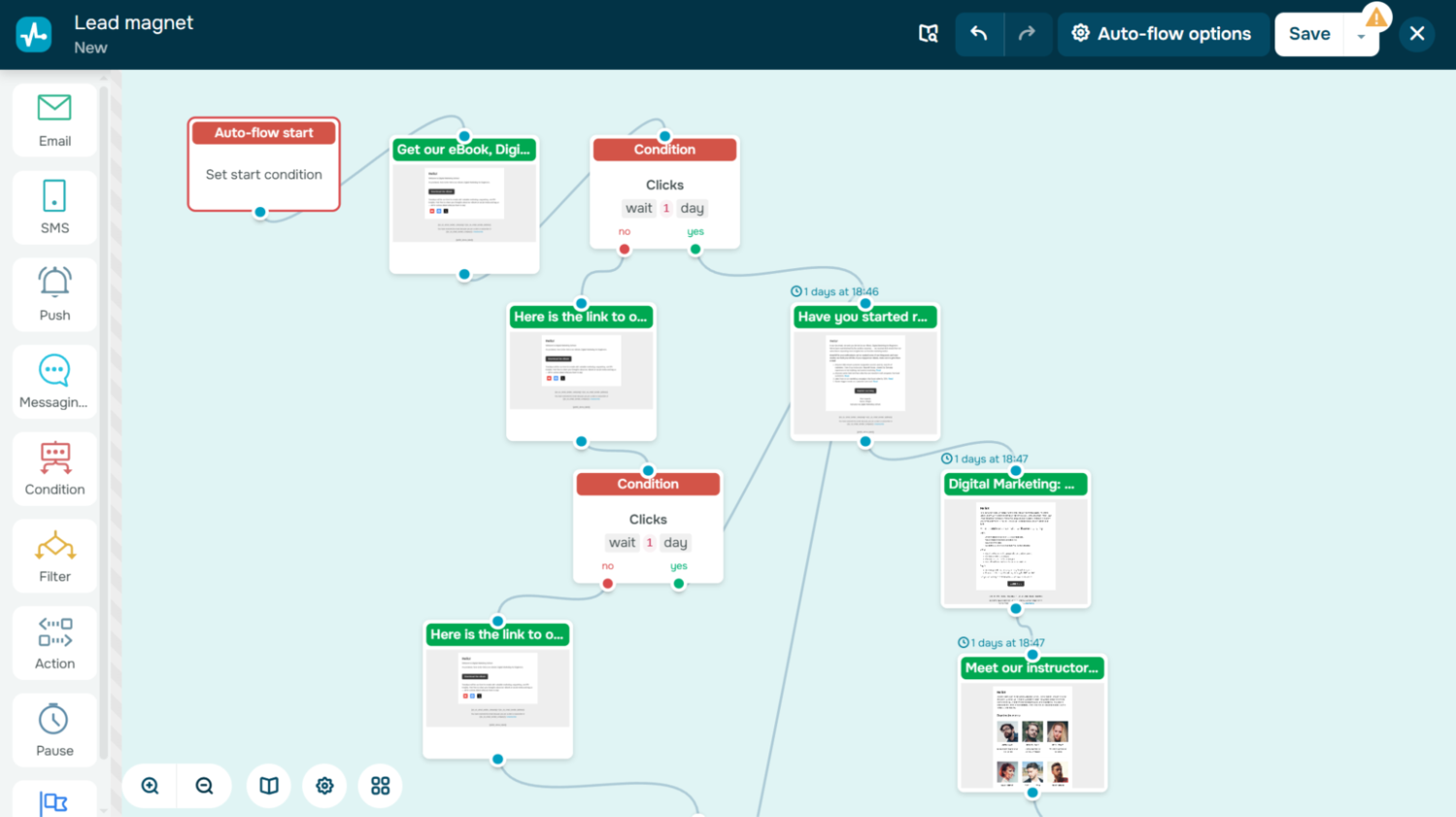 Automated lead magnet campaign in SendPulse
Dynamic segmentation helps you target your audience based on meaningful engagement signals instead of whether an email was opened. Subscribers who click links or interact with previous campaigns can be grouped for tailored messaging, boosting relevance and conversion.
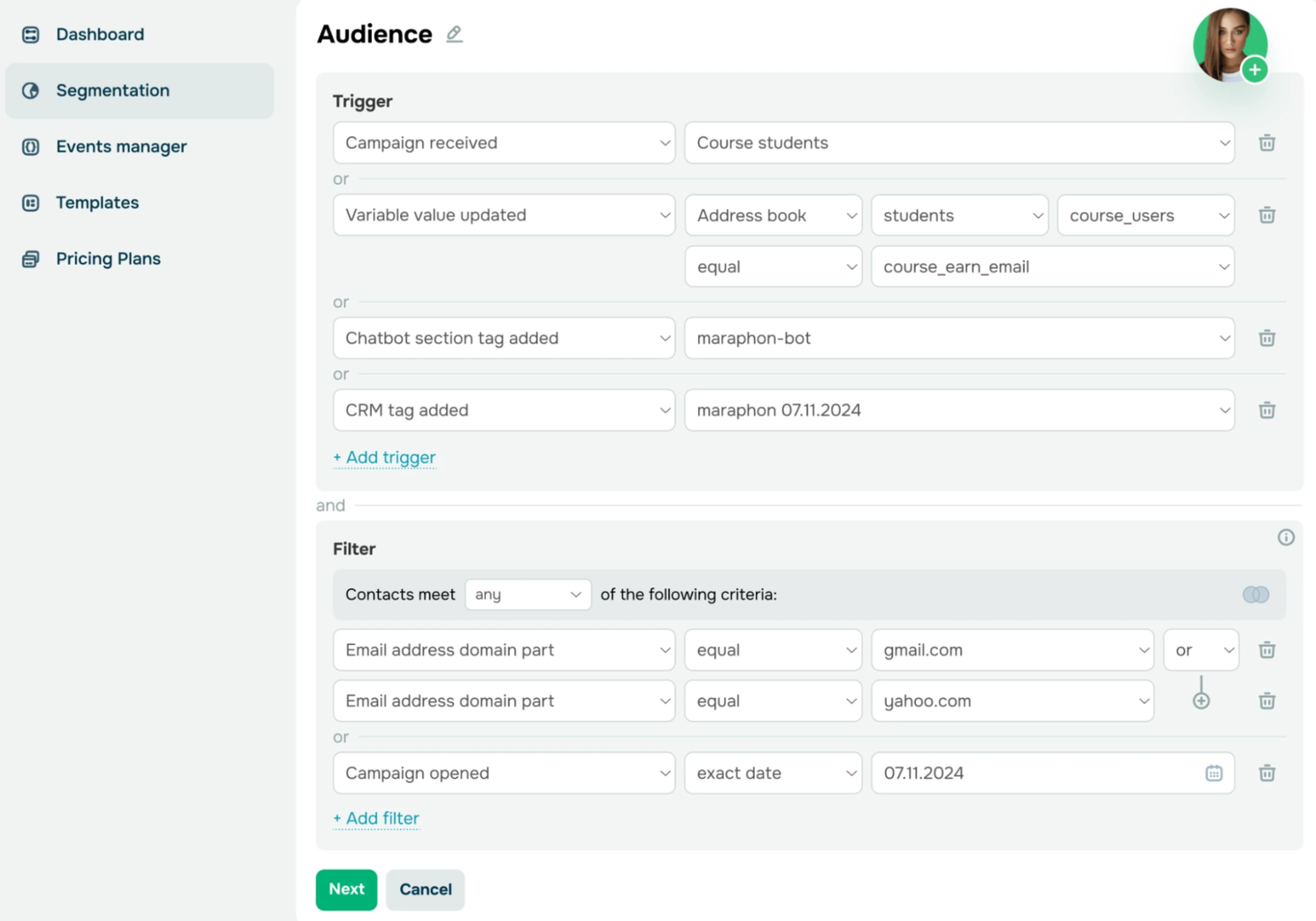 Building dynamic segments in SendPulse
A/B testing allows you to experiment with subject lines, layouts, and optimize your calls-to-action, refining campaigns based on actual engagement rather than pixel-dependent opens.
Email verification keeps your list clean, protecting deliverability and sender reputation. A verified email list means fewer bounces and more reliable campaign results, independent of pixel tracking.
AI writing assistant generates optimized, context-aware email copy in seconds. Marketers can focus on strategy while ensuring messages resonate with their audience and drive measurable outcomes.
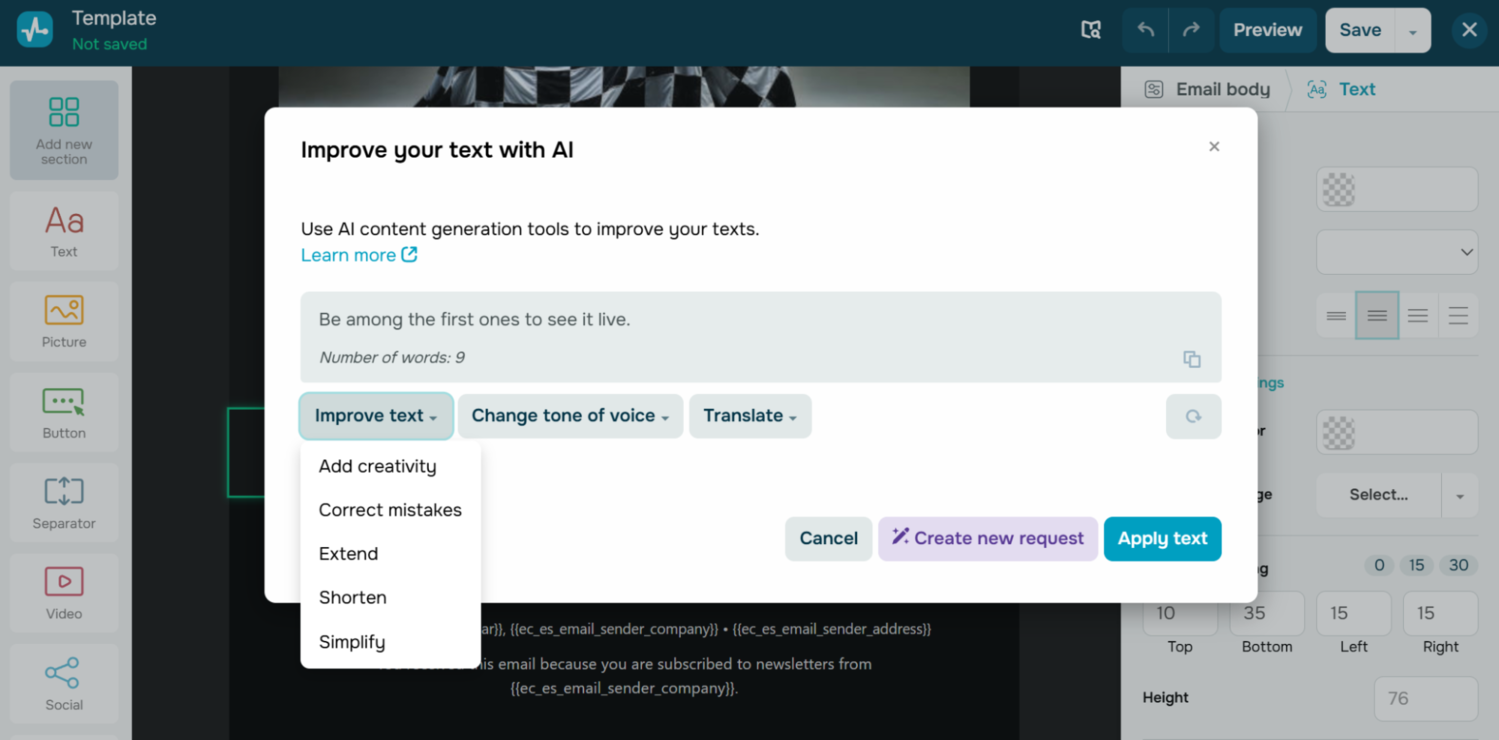 Built-in AI writing assistant in SendPulse’s email service
Advanced analytics provides actionable insights beyond opens. Clicks, conversions, and revenue metrics are tracked directly, giving you a true picture of campaign performance. For example, you can see which links drove sales, allowing precise ROI calculation without ever relying on a pixel.
By combining these features, SendPulse helps marketers run highly effective campaigns that are privacy-friendly, reliable, and driven by meaningful engagement.
Conclusion
Privacy updates have blurred the once-clear signals, making email tracking pixels less useful and, in some cases, misleading. But it’s a chance to build smarter, stronger strategies.
Marketers should focus on what truly matters: clicks, conversions, engagement, and relationships. These are the metrics that reveal intent, not just activity.
With SendPulse, you can turn this privacy-driven change into an advantage. Our tools help you track meaningful actions, segment effectively, and stay compliant so your campaigns keep performing even as pixels fade into the background.