Many small business owners and creators treat email compliance the same way they treat their terms of service — skim once, check a mental box, and move on. A consent checkbox here and an unsubscribe link there may make you feel covered. But you’re not.
Vaguely understanding email laws can have very real consequences. Verkada, an American security technology company, had to pay $2.95 million to the Federal Trade Commission in 2024 for violating the CAN-SPAM Act — the company sent 30 million marketing emails with no way to unsubscribe and no physical address in the footer.
The consequences don’t end there. Major ESPs like SendPulse or Mailchimp require you to stick to strict compliance rules. One violation can get your account shut down overnight. Moreover, Gmail, Microsoft, and Yahoo now evaluate sending behavior holistically, and a damaged sender reputation can take months to rebuild, if at all.
This guide will help you develop a deeper understanding of how regional email laws work and what they actually require. We’ll also show you the exact steps that keep you in the clear, whether you’re emailing customers in Austin, São Paulo, or Johannesburg.
Disclaimer: This article is published by SendPulse, an email service provider, and mentions SendPulse features as examples of how compliance works in practice. It’s for informational purposes only and is not legal advice — if you have specific compliance questions, speak to a qualified lawyer.
TL;DR Quick overview of email marketing rules and regulations around the globe for 2026
Email marketing laws are the regulations that govern how businesses collect consent, identify themselves, handle subscriber data, and process unsubscribe requests when sending commercial email.
They vary by country, so here’s a quick overview of the key rules around the world before we dig into each one.
| Region |
Main law(s) |
Consent |
Unsubscribe deadline |
Max penalty |
| USA |
CAN-SPAM, state laws (CCPA/CPRA), TCPA |
Opt-out (email); opt-in (SMS) |
10 business days |
$53,088/email (CAN-SPAM); $2,663–$7,988/violation (CCPA); $500–$1,500/text (TCPA) |
| Canada |
CASL |
Opt-in (implied expires in 2 yrs) |
10 business days |
CAD $10M (business); $1M (individual) |
| EU |
GDPR + ePrivacy Directive |
Opt-in |
As fast as technically feasible |
€20M or 4% global turnover |
| UK |
UK GDPR + PECR |
Opt-in (soft opt-in for existing customers) |
As fast as technically feasible |
£17.5M or 4% global turnover |
| Australia |
Spam Act 2003 |
Opt-in (express or inferred) |
5 business days |
AUD $626K/day (first offense) |
| Brazil |
LGPD |
Opt-in |
15-day response (no fixed deadline) |
2% Brazil revenue, capped at R$50M |
| Singapore |
PDPA + Spam Control Act |
Opt-in |
10 business days |
SGD $1M or 10% turnover |
| South Africa |
POPIA |
Opt-in |
Immediately on request |
ZAR 10M and/or up to 10 yrs imprisonment |
The biggest difference between these laws is opt-in vs opt-out: under CAN-SPAM (US), you can email until someone opts out, while GDPR (EU), CASL (Canada), and most other laws require opt-in consent before your first message.
Now, let’s break down these frameworks and find out what businesses often get wrong.
What email compliance laws are designed to protect
Email marketing compliance laws exist because the inbox, at its core, is an intimate space. It’s where people receive bank statements, tax documents, medical records, and government notifications. For millions, a single email address is the master key to their financial accounts and state services, so unauthorized or deceptive access to that channel is not just annoying, but genuinely dangerous.
At their core, these laws are built around one premise: a person’s contact details are not public property. To reach them commercially, you must have either explicit permission or a clear, legitimate reason to do so. And rightfully so — up to 45% of global traffic in 2025 was spam, ranging from unsolicited promotions to phishing and malware.
The good news is that compliant campaigns and lists also mean better deliverability and more revenue per subscriber. For example, Europe, with its strict opt-in/consent laws, shows the highest inbox placement rates of 89%.
The four pillars of compliant email marketing
Consent is the foundation. Before you send a single email, the person on the other end needs to have actually agreed to hear from you. The opt-in should neither be buried in a terms-of-service checkbox nor implied from a business card you handed someone at a conference. Most laws worldwide treat a real, informed “yes” as non-negotiable, and inbox providers are increasingly enforcing it on their own terms — with every unwanted email, they, too, lose user trust.
Identity is about being honest about who you are. Every email you send needs to clearly show who it’s from — a real sender name, a real reply address, and a physical address somewhere in the footer. This is a key thing that separates a legitimate business from a phishing attempt. If you obscure your identity, expect immediate suspicion by email providers.
Data responsibility covers what you do with someone’s information after they give it to you. You collected it for a specific purpose, say, emailing about your product, and that’s what it should be used for. By selling it, sharing it without disclosure, or holding onto it indefinitely without a retention policy, you would violate virtually every modern privacy law on earth.
The right to leave means that getting out of your list has to be easy, fast, and permanent. One click, no login required, and honored within days. Multi-step forms and “we’ll process this in 30 business days” are absolute no-gos, as they turn unsubscribing into an obstacle course. This kind of practice is likely to cross a legal line in most jurisdictions — and earn you a bunch of spam complaints.
Why email law is no longer just a legal issue
Email compliance consists of two separate enforcement systems. The first is legal, with regulators like the Federal Trade Commission or the EU’s data protection authorities. These entities can investigate, fine, and prosecute.
The second is infrastructural. Inbox providers like Gmail, Yahoo, and Outlook enforce their own rules, on their own timeline, with no hearing and no appeal process. Your campaign can be entirely legal, with proper consent and honest subject lines, and still get blocked before it reaches a single inbox if the technical side isn’t in order.
In particular, since 2024, both Gmail and Yahoo require mass senders to:
- authenticate their emails with protocols like SPF, DKIM, and DMARC;
- implement one-click unsubscribe;
- stay below a set spam rate threshold.
These are parallel systems, and failing either one can annihilate your entire marketing efforts. For instance, it only takes three spam complaints per 1,000 sent emails to hit the 0.3% spam rate threshold and potentially get blocklisted by Gmail. Among senders familiar with new Yahoo and Google requirements, over 60% saw them positively — 30.5% called them good for email’s future, and 33.2% necessary (if a hassle).

Create and send high-performing emails
Use an AI assistant, pre-made templates, advanced segmentation, and feature-rich automation to run campaigns without coding. Start for free with up to 15,000 monthly emails.
Get started for free
Email marketing laws by country/region
Email law is territorial. The country or region where your recipient lives determines what you’re allowed to do — how you collect their address, what counts as valid consent, how quickly you must honor an unsubscribe request, and how long you can legally hold their data. Here are the key email marketing regulations for each market, focused on emails sent to individual consumers.
USA — CAN-SPAM Act, state privacy laws, and TCPA
The US is the one market with no single email law. A federal statute governs the message, a fast-growing patchwork of state laws governs the data behind your list, and a separate law governs text messages. If you send to US contacts, all three can apply at once.
CAN-SPAM Act
Overview. CAN-SPAM is the federal law that governs all commercial email in the US, and it works differently from most email laws around the world. It doesn’t require you to get permission before you send — it requires you to make it easy for people to tell you to stop, and to actually stop when they do. That opt-out model rather than the opt-in model makes it one of the more permissive frameworks globally, but not toothless.
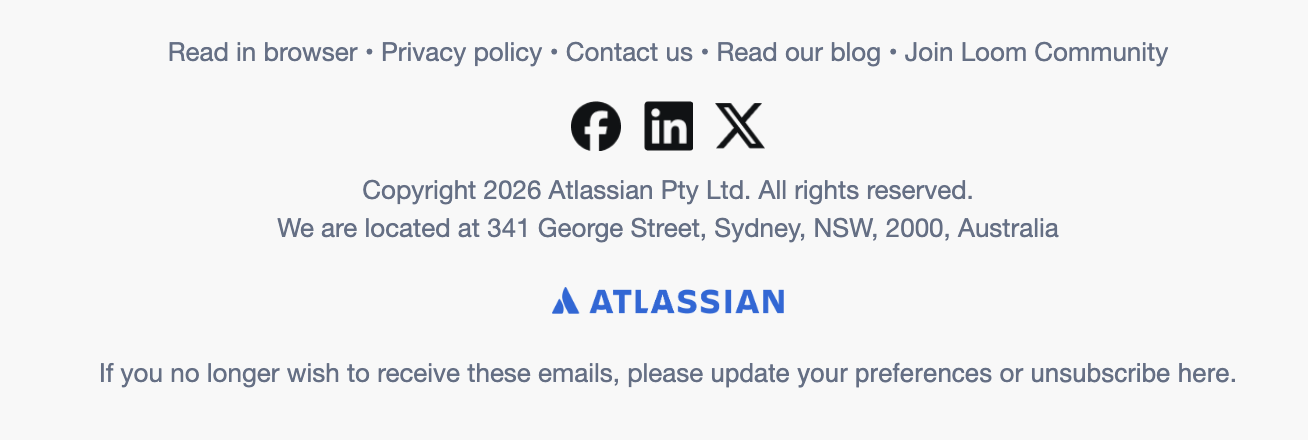 An example of a CAN-SPAM-compliant email footer
Key requirements. The CAN-SPAM Act requires you to:
- have honest sender information (your “From,” “Reply-To,” and routing details);
- use truthful subject lines, accurately reflecting the contents;
- disclose advertisements;
- include a valid postal address (a registered PO is enough);
- build in a clear opt-out mechanism anyone can understand and follow;
- process opt-out requests within ten business days;
- hold anyone sending emails on your behalf to the same standards.
Penalties. The current maximum civil penalty is $53,088 per non-compliant email, set by the FTC’s most recent inflation adjustment effective January 2025. Beyond civil fines, senders may also face imprisonment for aggravated violations like address harvesting, sending through compromised computers, or registering fake accounts to send spam.
Safest practice. Treat the law as the minimum and build upward from there, especially if any portion of your audience is outside the US. If you work with any external partners, affiliates, or agencies on email, get written confirmation that their practices adhere to the CAN-SPAM Act.
The only emails you’re allowed to send without an unsubscribe link are transactional or relationship emails — think order confirmations, employee status updates, or security alerts. Everything else needs an opt-out, regardless of whether the recipient is already a paying subscriber or active member. If your message combines commercial and transactional or relationship content, its main purpose is what matters.
State privacy laws
Overview. CAN-SPAM is a federal law that regulates email content, but it is no longer the only relevant regulation in the US. Since the introduction of California’s CCPA (expanded by the CPRA), many states, including Virginia, Colorado, Connecticut, Texas, and Oregon, have enacted their own privacy laws, with more being added regularly. These laws supplement CAN-SPAM and focus on how you handle personal data, rather than just the content of your messages.
Key requirements. While CAN-SPAM requires honoring unsubscribe requests, state laws grant residents the right to opt out of the “sale” or “sharing” of their personal data. Transferring a mailing list for targeted advertising may qualify as sharing under these laws. In practice, this means:
- a “Do Not Sell or Share My Personal Information” path for residents of states that require it;
- honoring browser opt-out signals like the Global Privacy Control, where the law recognizes them;
- a privacy notice that discloses what you collect and why.
Penalties. In California, penalties can reach $2,663 per violation, or $7,988 per intentional violation or one involving a consumer under 16. These are the CCPA’s inflation-adjusted maximums effective January 2025, as set under Civil Code § 1798.155. Fines are assessed per consumer, so violations can accumulate quickly. Other states impose their own fines, enforced by their attorneys general.
Safest practice. If your processes already comply with GDPR or CASL standards, you are largely meeting state requirements. Documented consent, a clear privacy notice, and an easy opt-out satisfy most of what state laws ask. However, if you share or monetize subscriber data in any way, provide US contacts with a clear opt-out of that sharing, and ensure you honor browser-level opt-out signals.
SMS and the TCPA
Overview. CAN-SPAM regulates email. Once you send marketing texts or make automated marketing calls, a separate and stricter federal law applies: the Telephone Consumer Protection Act.
Key requirements. The TCPA requires prior express written consent before you send a promotional SMS, which is stricter than email’s opt-out model. A pre-checked box or a clause hidden in your terms is not sufficient; consent must be specific to texts. Collect SMS consent separately during signup and maintain timestamped records as you do for email.
Penalties. Statutory damages range from $500 to $1,500 per message, with the higher amount for willful or knowing violations under 47 U.S.C. § 227(b)(3). Because this applies to each text, TCPA cases can quickly reach millions of dollars.
Safest practice. If you send both email and SMS, never use an email opt-in as justification for sending texts. Obtain separate, written SMS consent and apply the same documentation and easy opt-out process used for email.
Canada — CASL
Overview. Canada’s Anti-Spam Legislation is considered the toughest anti-spam law in the world due to its consent model. Unlike CAN-SPAM, CASL requires opt-in consent before you send a single commercial message. This catches a lot of US-based senders off guard when they tap into the Canadian market, especially with outbound or cold emails.
Key requirements. Every commercial electronic message sent to a Canadian recipient must satisfy the following:
- express or implied (a recent purchase or existing business relationship) consent;
- two-year consent validity window;
- paper trail capturing the obtained consent;
- your full legal identity in every message;
- your contact information (must be valid for at least 60 days);
- clear unsubscribe mechanism with opt-outs honored within ten business days.
Penalties. The maximum penalty for a CASL violation is $1 million CAD for an individual and $10 million CAD for a business. If your affiliate or partner sends emails promoting your business and breaks CASL rules, you can both be held liable, even if you didn’t write or approve the messages.
Safest practice. With CASL, assumed consent is not enough — you need to document it. The solution is to build opt-in confirmation into every Canadian-facing signup flow, timestamp your consent records, and set calendar reminders for the two-year consent expiry window. Any third-party services you work with must meet the same standards.
EU — GDPR and ePrivacy Directive
Overview. The General Data Protection Regulation is the most far-reaching data protection law in the world. It regulates what you do with user data at every stage, from collection and storage to sharing and deletion. GDPR treats email addresses as personal data requiring explicit protection. The ePrivacy Directive, also known as the “Cookie Law,” regulates the act of sending commercial email in itself. This is where the opt-in requirement comes from.
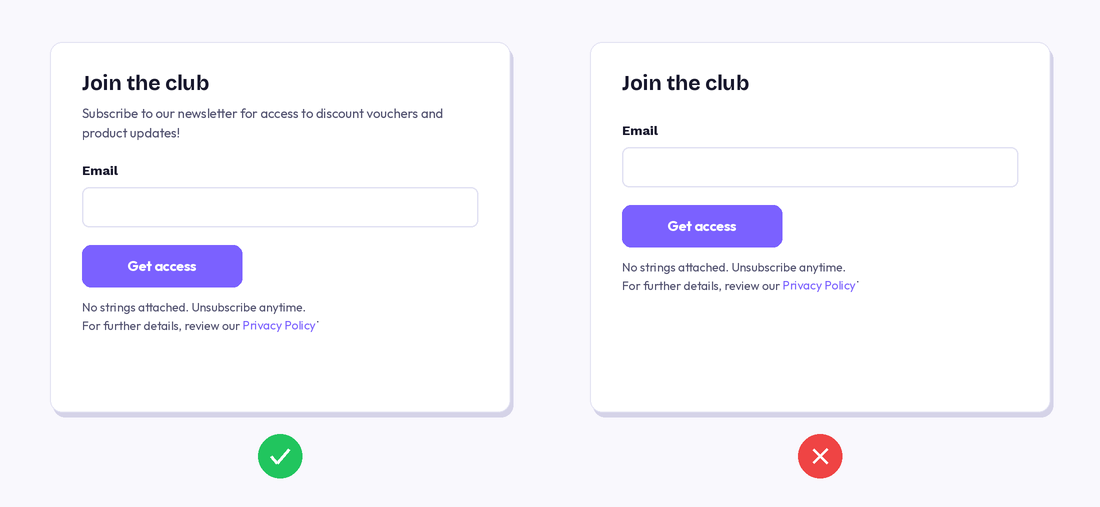 An example of a GDPR-compliant, purpose-specific lead capture form
Key requirements. To stay compliant with GDPR and the ePrivacy Directive, your email practices must tick the following boxes:
- documented, freely given, and unbundled consent (not hidden in your ToS);
- clear privacy policy at the point of subscription;
- clearly stated purpose for processing of personal data;
- data minimization and purpose limitation;
- sender identity disclosure and a valid physical or registered address;
- user’s right to withdraw consent at any time;
- user’s right to access, correct, and delete personal data;
- strict data retention limits;
- honest subject lines and content;
- functioning opt-out mechanism in every message;
- technical and organizational safeguards for ensuring user data safety;
- 72-hour window to notify the authorities and users in case of a data breach;
- signed data processing agreements with all your third-party services.
Penalties. GDPR penalties have two tiers. Less serious violations, like missing processor agreements, result in fines of up to €10 million or 2% of global annual turnover. Serious violations, like consent failures, carry fines of up to €20 million or 4% of global annual turnover, whichever is higher.
Safest practice. If you email or track EU residents, GDPR applies to you regardless of where you operate from. There is no minimum subscriber count threshold. User data must be stored for the shortest time possible, unless it’s archived for research purposes or public interest — and even then, strict conditions apply. Opt-outs must be processed as promptly as technically feasible.
GDPR doesn’t allow you to capture personal data without clearly stating why you need it and for how long. The data minimization principle means that you shouldn’t capture more data than absolutely necessary for fulfilling the stated goal. If you have collected data for one purpose, you can use it for another purpose only if the new purpose is compatible with the original one.
There are free customizable templates and generators that can help you write a GDPR-compliant privacy notice tailored to your company. Many ESPs and online form builders like SendPulse offer GDPR-compliant email templates and double opt-in forms that keep you on the safe side when emailing a global audience.
UK — PECR and UK GDPR
Overview. Post-Brexit, the UK runs its own version of GDPR alongside the Privacy and Electronic Communications Regulations 2003. PECR determines when consent is required, while UK GDPR sets the standard that consent must meet.
The UK GDPR has a “soft opt-in” exception for existing customers that the EU doesn’t offer. There’s also the Data Use and Access Act 2025, which updates some of the earlier email privacy laws, reducing compliance friction and supporting innovation.
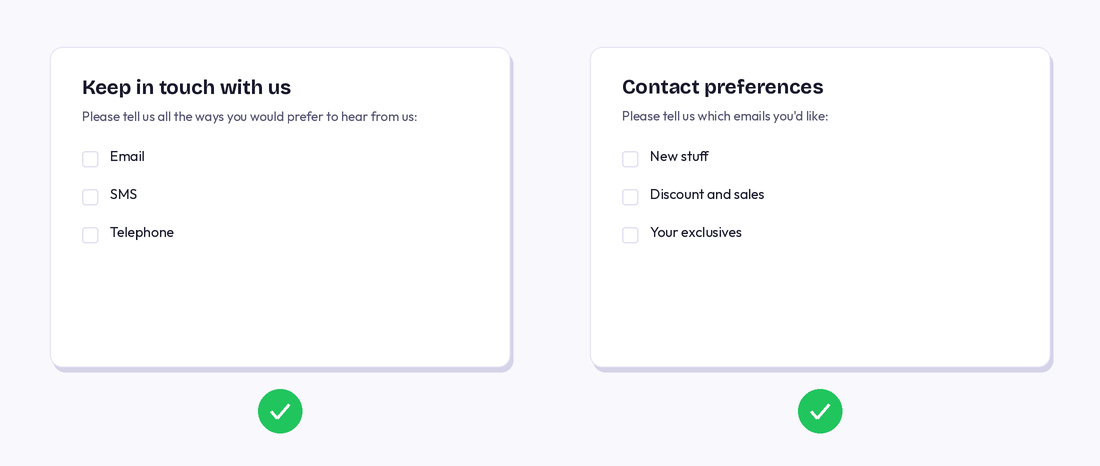 UK-GDPR-compliant consent forms
Key requirements. Here are the must-haves for all commercial emails intended for UK users:
- unambiguous, specific, and freely given consent;
- reproducible consent records;
- purpose- and time-limited data use;
- clear sender identity and contact details;
- working opt-out in every message;
- no misleading subject lines or sender names;
- customer’s right to withdraw consent and access and manage their data;
- appropriate data protection measures;
- data-rights requests (access, correction, erasure, withdrawal of consent) answered within one calendar month of receipt;
- written contracts with third-party data processors to ensure compliance.
Penalties. The maximum fine for PECR breaches has recently risen from £500,000 to £17.5 million or 4% of global annual turnover, whichever is greater. For milder offenses, the UK’s Information Commissioner’s Office can also just issue a warning or impose a ban on data processing.
Safest practice. If you’re already EU GDPR compliant, you’re most of the way there. The soft opt-in exception means that if someone bought from you recently and you gave them a clear chance to opt out, you can email them about similar products without fresh consent. It only covers your own similar products and is valid while the customer relationship is active, but every email must still offer an easy opt-out.
Australia — Spam Act 2003
Overview. Australia’s Spam Act sits somewhere between the permissive opt-out model of CAN-SPAM and the strict opt-in requirements of GDPR. The Spam Act requires consent before sending, but it recognizes both explicit and “reasonably inferred” consent. There’s only one exemption — so-called designated commercial emails. This email marketing law applies to any commercial electronic message sent from or received in Australia.
Designated Commercial Electronic Messages are a narrow category of messages that are exempt from the Spam Act’s consent and unsubscribe requirements. It covers purely factual messages with no commercial intent, and messages from government bodies, registered political parties, religious organizations, charities about their own products or services, and educational institutions emailing their students. If you’re a regular business sending marketing campaigns, this doesn’t apply to you, and you still must adhere to the Spam Act’s consent requirements.
Key requirements. According to the Spam Act, all commercial email campaigns must adhere to the following rules:
- direct opt-in or inferred consent (based on an existing business relationship);
- clear sender identification with valid contact details and no misleading sender information;
- sender details and the unsubscribe option must remain valid for at least 30 days after the message is sent;
- working unsubscribe link in every message;
- unsubscribe requests honored within five business days.
Penalties. The Australian Communications and Media Authority’s priority is to monitor and penalize businesses that disguise their marketing campaigns as designated emails to avoid consent requirements. Courts can fine non-compliant companies up to $626,000 AUD per day for a first offense, rising to $3,130,000 AUD per day for repeat offenders.
Safest practice. If a business email address is publicly listed, say, on a company website, LinkedIn, or a professional directory, and there’s no statement asking not to be contacted, the Spam Act allows you to infer consent and send cold emails to that email address. But, only if your email is directly relevant to that person’s professional role or business function.
Brazil — LGPD
Overview. Brazil’s LGPD is the country’s comprehensive data protection law, modeled closely on GDPR. Like GDPR, it goes well beyond email, governing the entire lifecycle of personal data, from collection and storage to processing, sharing, and deletion. According to this email marketing regulation, direct consent is paramount for any list-building efforts.
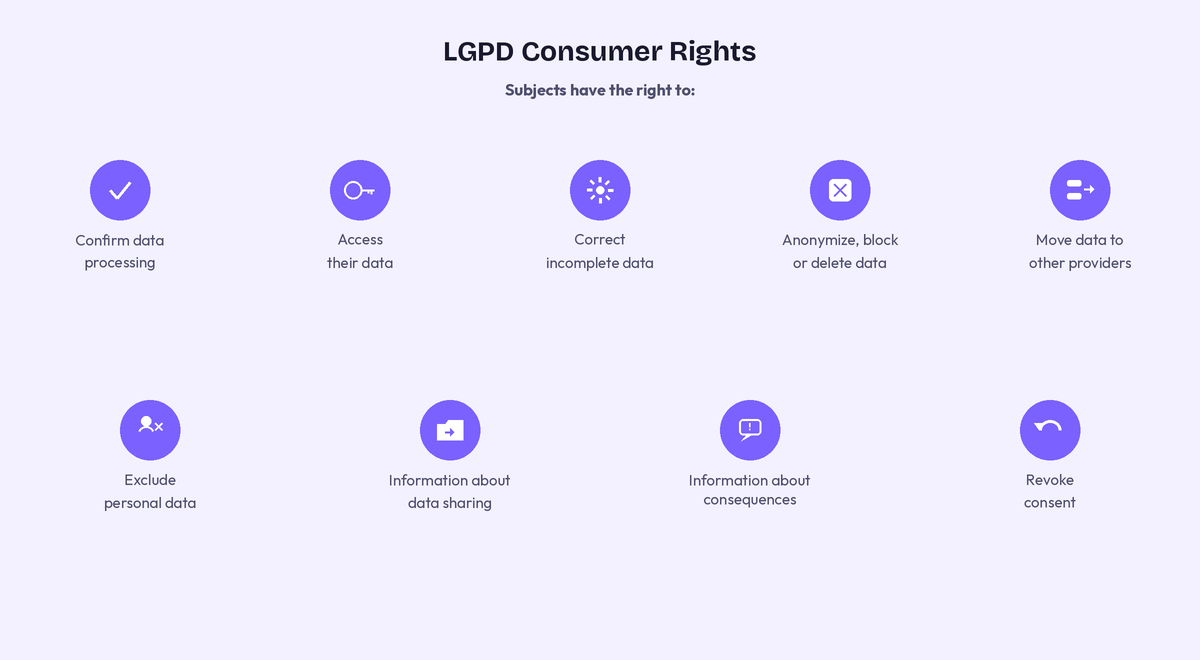 An overview of consumer rights under LGPD
Key requirements. The law outlines several legal requirements for anyone who processes personal data of people located in Brazil:
- documented lawful basis for every send;
- clear, purpose-specific, and unbundled consent;
- transparent sender identity disclosure;
- clear opt-out mechanism;
- data subject rights fulfilled within 15 days;
- data breach notifications within a reasonable timeframe;
- no purchased lists without verified consent;
- vendor contracts demonstrating LGPD compliance;
- safeguards for data transfers outside Brazil.
Penalties. LGPD fines reach up to 2% of a company’s Brazilian revenue per violation, capped at R$50 million per offense. Moreover, the enforcing authority, ANPD, has shown its willingness to preventively suspend operations without waiting for formal sanctions to kick in.
Safest practice. When building your Brazilian audience from scratch, you need explicit opt-ins — there is no legitimate shortcut. Make sure your consent forms are specific, keep timestamped opt-in records, and get signed data processing contracts in place with every vendor that handles your subscriber data.
Singapore — PDPA and Spam Control Act
Overview. Singapore’s email marketing compliance framework is a two-law system. The PDPA governs whether you have the right to collect and use someone’s email address for marketing, while the Spam Control Act governs the message itself. Both apply simultaneously, and a single email must satisfy both to be fully compliant.
Key requirements. As always, all commercial emails accessed in Singapore must comply with the requirements below, even if the sender is based overseas:
- informed and specific consent — not bundled with order confirmations;
- implied consent (applies only in limited circumstances);
- accurate subject lines;
- clear sender identification in every email;
- functioning unsubscribe mechanism;
- opt-outs honored within ten business days;
- data breach notifications to the PDPC within three calendar days of assessing a notifiable breach.
For channels covered by the Do Not Call Registry (phone, SMS, fax), check the registry before contacting those channels.
Penalties. Under the PDPA, the Personal Data Protection Commission can impose financial penalties of up to SGD $1 million, or 10% of annual turnover in Singapore where that turnover exceeds SGD $10 million — whichever is higher. The Commission can also require a business to stop sending messages or destroy unlawfully collected data. Under the Spam Control Act, recipients of spam can take private civil action directly against senders — penalties go up to SGD $25 per non-compliant message, capped at SGD $1 million in total.
Safest practice. Just like in Europe, according to PDPA, data collected for one purpose cannot be repurposed for another without fresh consent. To stay away from legal trouble, build a clean wall between your transactional and marketing lists, make the distinction unambiguous to subscribers at the point of collection, and run re-permission campaigns later if needed. Also, document every consent event and make sure your unsubscribe flow is tested end-to-end.
Singapore’s email laws do recognize deemed consent in exceptional situations where someone’s actions reasonably imply they’re okay with being contacted, for example, if they handed you a business card at a networking event.
South Africa — POPIA
Overview. POPIA is South Africa’s comprehensive data protection law, fully enforceable since July 2021. The regulation draws a hard line between opt-in and everything else, explicitly prohibiting any unsolicited electronic communications unless the recipient has consented to them or qualifies as an existing customer under specific conditions.
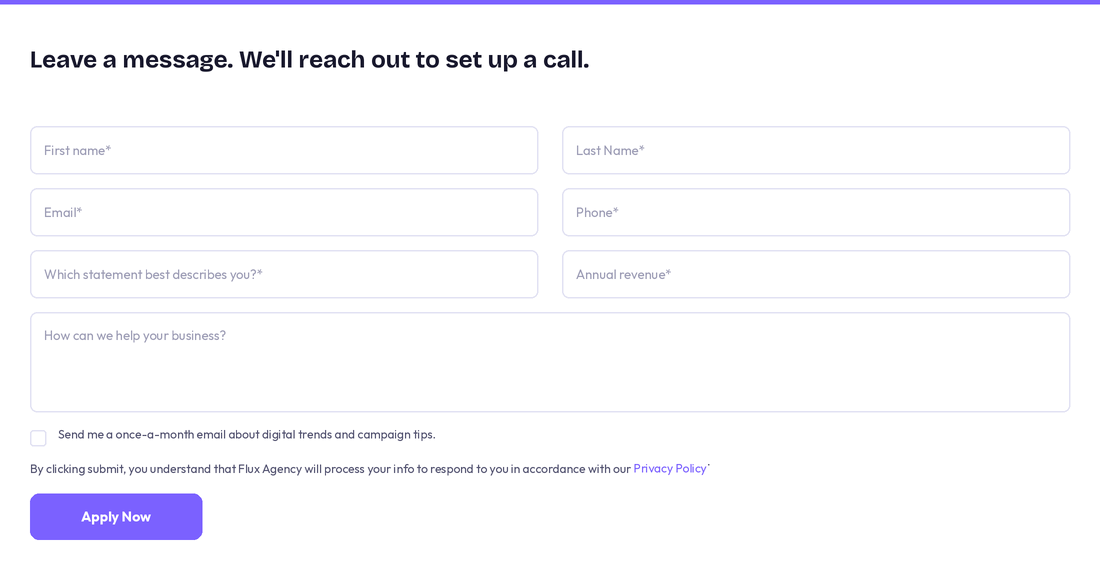 A POPIA-compliant email address capture form
There’s one notable quirk worth knowing — POPIA allows you to send one unsolicited email to a prospect, provided their contact details were obtained lawfully and the email contains a clear opt-out and sender identification. But if the recipient doesn’t respond positively or opts out, no further emails can be sent.
Key requirements. Here are the key aspects anyone commercially emailing a Southern African audience should pay attention to:
- explicit and documented consent (limited to the original purpose);
- the one-approach-to-seek-consent exception under section 69;
- clear sender introduction with contact details;
- accessible opt-out in every message;
- opt-out requests honored promptly;
- secure data storage;
- data breach notification within the shortest time feasible.
Penalties. POPIA provides for a maximum administrative fine of ZAR 10 million (approximately USD 550,000), and for serious offenses, penalties can include a fine or imprisonment for up to 10 years, or both.
Safest practice. To safely build your South African audience, prioritize documented opt-in, keep consent records that can survive regulatory scrutiny, and review your do-not-contact lists regularly to make sure opt-outs are being honored across channels. It’s also worth checking the National Opt-Out Registry. While this is a Consumer Protection Act mechanism rather than a POPIA requirement, it supports best practices for cross-channel compliance.
How to build a legal email marketing workflow step by step
This step-by-step guide outlines how to build a legal, globally compliant email marketing workflow, from mapping your audience to monitoring deliverability. If your business operates locally, aligning GDPR and CAN-SPAM compliance may not be a concern. However, things get increasingly complicated the moment your selling radius expands.
Building a compliant email strategy from the ground up involves eight key steps:
- Map where your subscribers are located.
- Build signup forms to the strictest standard (GDPR/CASL).
- Record and store every consent event.
- Set up SPF, DKIM, and DMARC authentication.
- Create a universally compliant email template and footer.
- Segment your list by region before sending.
- Sign data processing agreements with every vendor.
- Monitor your spam-complaint rate continuously.
Below are the details for each step.
Step 1. Know where your audience actually is
Before you write a single subject line or configure a signup form, find out which countries your subscribers are in — or are likely to be in. Many small businesses skip it and end up building their entire list infrastructure around CAN-SPAM because they’re based in the US, while quietly accumulating subscribers in Germany, Canada, and Australia who are covered by much stricter laws.
Pull your existing customer data and look at the geographic spread. If you’re starting fresh, think about:
- which countries your ads target;
- which languages your site is available in;
- where your product ships.
The countries your audience comes from determine which laws apply to you. If there’s any overlap with the EU, Canada, or Australia, design your consent process to meet those standards, not just the US minimum.
Step 2. Build your signup forms to the strictest standard
How you collect consent is the deciding factor. To stay on the safe side, build every signup form to meet the strictest standard, which in most cases means GDPR or CASL.
In practice, that means:
- One unchecked checkbox per consent purpose. An unambiguous checkbox that says something like “I’d like to receive marketing emails from [Your Business]. I can unsubscribe at any time.” No pre-ticking, no bundling with terms of service.
- Double opt-in. This is a second confirmation step after someone fills in your email capture form. Double opt-in both verifies the address and creates a documented submission event.
- Separate checkboxes for separate purposes. If you want to send both a newsletter about your courses and product offers, those are two different consent requests under GDPR.
- Link to your privacy policy at the point of signup. People need to know what they’re agreeing to before they agree to it. A short line like “We’ll handle your data in line with our [Privacy Policy]” with a working link is sufficient.
Also, marketing consent should always stay optional. Under GDPR and CASL, you cannot force someone to agree to promotional emails in order to complete a transaction.
Step 3. Record and store every consent event
A consent record is your proof that a subscriber agreed to hear from you — when they opted in, what form or page they used, and exactly what they were told at the time. GDPR, CASL, LGPD, and POPIA all place the burden of proof on the sender, so you need to be able to produce this for every contact on your list.
If your ESP provides double opt-in forms, the way SendPulse does, they handle consent timestamps automatically, giving you the necessary “paper trail.” If you’re importing contacts manually — from a spreadsheet, a past event, a partner’s list — document the source and consent basis for each batch before you import.
If CASL applies to you, sooner or later, you’ll face the issue of consent expiry. Set a calendar reminder and run a re-permission campaign before the two-year window closes. Contacts who haven’t engaged in 12 to 18 months are a consent risk under GDPR. A clean re-permission email before removing them will help both compliance and deliverability.
Step 4. Set up your technical authentication before your first send
This layer caters to the new requirements Gmail, Yahoo, and Outlook impose on bulk senders, determining whether your emails actually reach anyone’s inbox.
Every domain you send from needs three things configured in its DNS settings:
- SPF (Sender Policy Framework) — tells receiving mail servers which servers are authorized to send email on your behalf.
- DKIM (DomainKeys Identified Mail) — adds a cryptographic signature to your emails that proves they haven’t been tampered with in transit.
- DMARC (Domain-based Message Authentication, Reporting & Conformance) — ties SPF and DKIM together and tells receiving servers what to do if an email fails authentication.
In the following section, we’ll show you how to configure each of these authenticators in SendPulse step by step.
Step 5. Build a universal compliant email template
Rather than worrying about compliance with each campaign, revise your email template collection and make necessary adjustments to have a reliable layout ready to go at any moment.
For an email footer to be globally compliant, it needs to contain:
- your business name, clearly displayed;
- valid physical address (a PO box is only sufficient under CAN-SPAM);
- prominent unsubscribe link in the footer + a List-Unsubscribe header;
- link to your privacy policy;
- your reply-to address.
Set this footer as a locked element in your templates so it can’t be accidentally deleted on a campaign-by-campaign basis. In SendPulse’s email campaign builder, you can save custom layout blocks like this for easy reuse.
Before you send a single campaign, go through your own unsubscribe process as if you were a subscriber. This means clicking the link, ensuring it works, and checking whether the deletion happens not just from one campaign segment, but from your master marketing list.
Step 6. Segment your list by region before you send
Once your list is built and your template is ready, segment your contacts by country or region before launching any campaign.
The key regional considerations to build into your segmentation logic:
- EU/UK contacts — confirm active consent is on record;
- Canadian contacts — verify whether consent is express or implied and check expiry dates;
- Australian contacts — check that unsubscribe requests are being honored within five business days;
- Brazilian contacts — confirm data processing agreements are in place with every third-party tool;
- South African contacts — confirm you have documented consent or qualify for the existing-customer exception, and honor any objections; checking with the national opt-out registry is good supplementary practice.
This will also allow you to target your campaigns more precisely and account for national holidays, time zones, and cultural sensitivities.
Step 7. Sign data processing agreements with every vendor
A Data Processing Agreement (DPA) is a contract that sets out how a third party may process personal data on your behalf — what they can do with it, how they protect it, and what happens if something goes wrong. Under GDPR (Article 28), and equally under the UK GDPR, Brazil’s LGPD, and South Africa’s POPIA, this contract is mandatory whenever a vendor touches your subscriber data.
So every third-party tool in your email stack that processes subscriber data, including your CRM system, analytics platform, and form builder, needs a signed DPA if you have any EU, UK, Brazilian, or South African subscribers. Most reputable vendors offer this as a standard document, usually signable in two clicks inside your account settings, under “Privacy,” “Legal,” or “GDPR.”
Step 8. Monitor your spam complaint rate continuously
As mentioned before, Gmail’s recommended spam complaint rate ceiling is 0.1%, with hard enforcement beginning above 0.3%. If you’re emailing Gmail email addresses, which you almost certainly are, your complaint rate is the single number that most directly determines whether your campaigns reach inboxes or get blocked.
By setting up Google Postmaster Tools for every sending domain, you can monitor your spam rate in near real-time — it’s recommended to check it weekly. If the rate is going up, consider working on your list quality and targeting precision. Increasing your sending volume may exacerbate the problem because at its other end is a potentially cold and disinterested audience.
A subscriber who controls what they receive almost never marks it as spam, so let your contacts choose their own email frequency and content type. Another common practice is regular list cleaning: run last-chance re-engagement campaigns and remove recipients who haven’t opened or clicked anything in 90 to 180 days.

Turn conversations into conversions
Build targeted automation flows with emails, chatbots, SMS, and more — powered by CRM data and real user behavior.
Get started for free
How to ensure email marketing compliance with SendPulse
Let’s see how to configure SendPulse for GDPR, CAN-SPAM, and bulk-sender compliance, including consent capture, one-click unsubscribe, email authentication, and list hygiene. Below is what following email marketing laws looks like in practice.
Setting up compliant double opt-in subscription forms
While double opt-in is not strictly required by GDPR, it gives you auditable proof of consent and naturally filters out mistyped email addresses and bot submissions.
- In SendPulse, open “Email” → “Subscription forms” and click “Create new form,” then choose a template.
- Add a separate, unchecked consent checkbox, and turn on the “This form is GDPR compliant” toggle to add data-processing-consent variables (pre-ticked boxes are not valid consent).
- Link to your Privacy Policy from the form and state what subscribers will receive and how often.
- In the form builder, go to “Form options” → “Opt-in settings” and enable “Double opt-in.”
- Customize the confirmation email under “Email” → “Service settings” → “Subscription tools” (or directly in the form’s opt-in settings). Use your branding, remind the subscriber what they signed up for, and include the confirmation link.
- Create a thank-you page that confirms subscription and re-states your sender identity.
SendPulse records the subscription timestamp and source form automatically; the subscriber’s IP address and consent date are captured when you use the GDPR-compliant double opt-in form. For offline-collected contacts (events, paper forms), import via “Email” → “Mailing lists” and attach a tag like consent_offline_2026-07 so you can prove origin later, and verify the batch before your first send.
Configuring unsubscribe and preference handling
The ultimate goal is to make opt-out one click away and honor data-rights requests quickly.
- Make sure every template contains the
{{unsubscribe_url}} variable. If you forget, SendPulse inserts an unsubscribe link automatically at the bottom of the email.
- For transactional/SMTP sends, add the same
{{unsubscribe_url}} variable, documented in the SMTP section of our help center.
- Go to “Email” → “Service settings” → “Subscription tools” and click “Add unsubscribe page.” Add a short reason-for-leaving question (optional).
- Use email categories so recipients can leave your emails on one topic without leaving everything. SendPulse renders a per-category unsubscribe link automatically.
Here’s what the unsubscribe page setting up looks like:
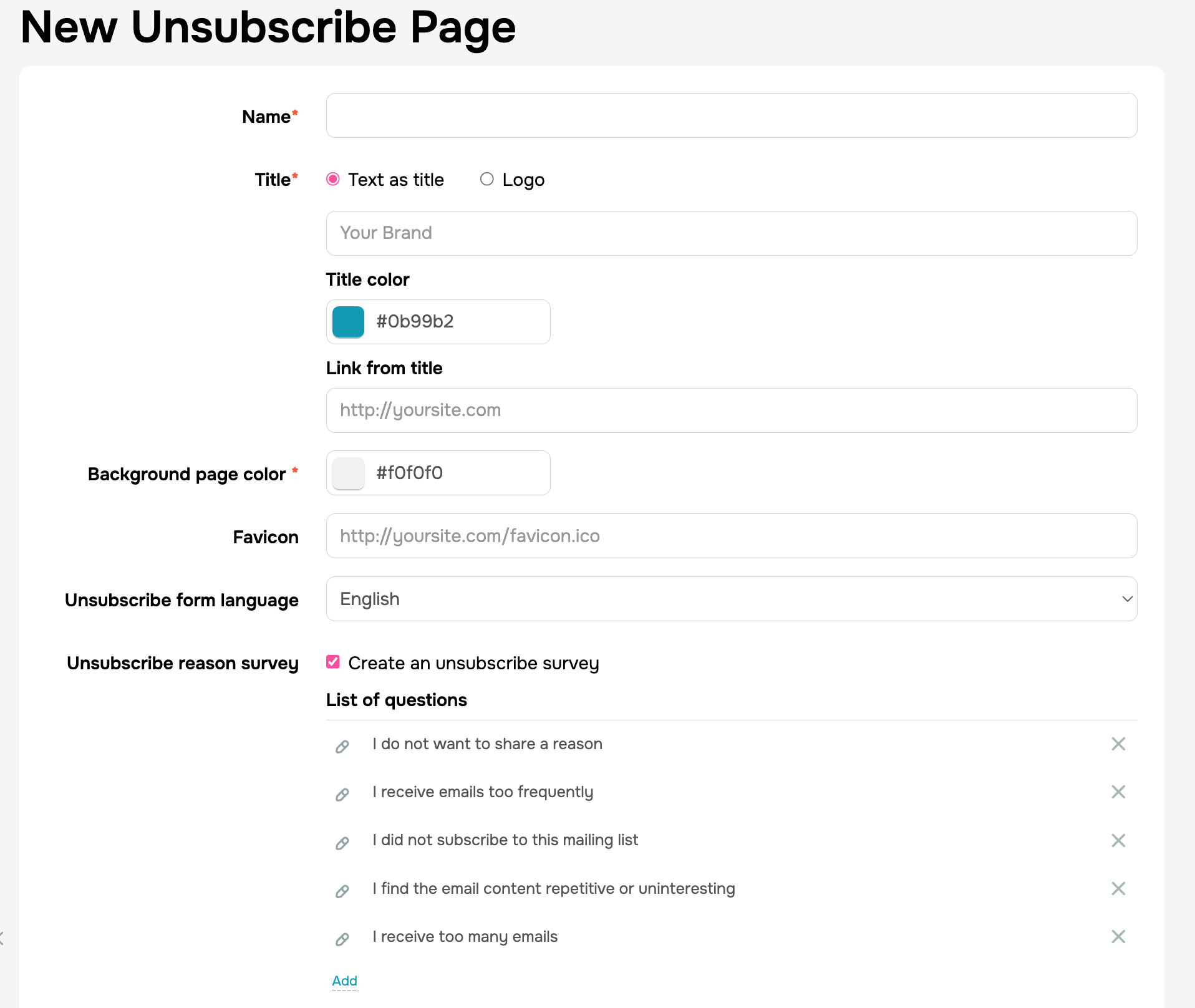 Creating an unsubscribe page in SendPulse
You can insert the {{MANAGE_SUBSCRIPTION}} variable to let users edit or delete their personal data — this covers GDPR/LGPD access and erasure rights. The {{RECONFIRM_SUBSCRIPTION}} variable is used in re-engagement campaigns to refresh consent for long-dormant contacts.
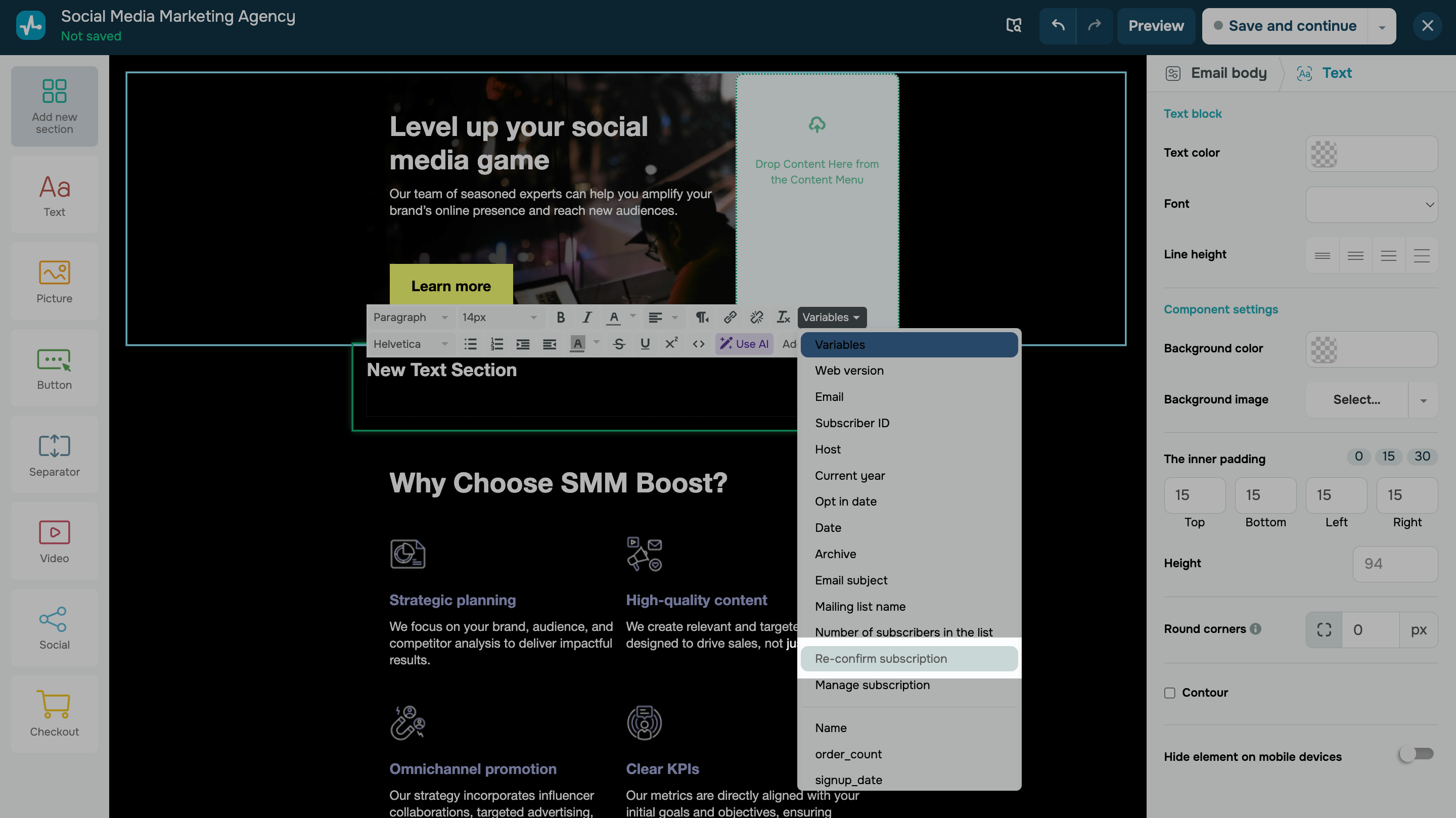 Adding a variable to an email template for consent refreshment
Some email marketing laws require you to process opt-outs within ten business days. SendPulse automatically adds anyone who unsubscribes to a persistent unsubscribed list and excludes them from future campaigns, so opt-outs are honored without manual work.
Configuring email authentication settings
These authenticators prove the email really came from you and are now required by Gmail, Yahoo, and other inbox providers. Configure them in your “Domain settings” (under your email/SMTP service settings) by copying each record into your DNS.
| Record |
What it does |
Where in SendPulse |
| SPF |
Lists servers allowed to send on your domain’s behalf |
“Email” → “Settings” → “Domain settings.” Copy the TXT record to your DNS. |
| DKIM |
Signs each message cryptographically to prove it wasn’t altered in transit. |
Same screen — copy the DKIM TXT record to your DNS. |
| DMARC |
Tells inbox providers what to do if SPF/DKIM fails, and enables reporting. |
Publish a TXT record at _dmarc.yourdomain.com. Start with p=none, review reports, then move to quarantine or reject. |
Also required by most email laws are your real sender name, a valid reply-to address, and a physical postal address in the footer. Add the postal address directly in your template’s footer block; your company name comes from “Account settings” → “Company information” (inserted via the {{ec_es_email_sender_company}} variable).
Segmenting and cleaning your mailing list
This enables you to only send to people who still want to hear from you — and prove it.
- In “Email” → “Mailing lists,” open your list and click “Segments” → “Add segment.”
- Create a segment Region = EU (or equivalent) so you can apply GDPR-specific defaults — for example, no behavioral tracking without consent.
- Create a
consent_source variable and segment by it so you can spot unsourced contacts quickly.
- Go to “Email” → “Mailing lists” → “Inactive contacts.” SendPulse flags unsubscribed, invalid, and six-month non-opener email addresses.
- Run a re-confirmation campaign using
{{RECONFIRM_SUBSCRIPTION}}. Users who reconfirm stay, and the rest are suppressed.
- Repeat quarterly. This protects deliverability and shrinks the data you hold, which is itself a GDPR/LGPD principle (data minimization).
Done consistently, these steps turn compliance into a routine your account runs for you. The checklist below pulls it all together, showing the key SendPulse settings to confirm before every send.
Email marketing compliance checklist
Here’s a final overview of the key SendPulse settings that keep you compliant across email campaigns and beyond.
| Requirement |
SendPulse settings |
| Explicit, freely given consent |
Unchecked consent checkbox on the subscription form, plus double opt-in enabled |
| Proof of consent (IP, timestamp, source via GDPR form) |
Recorded automatically in the contact record |
| Identifiable sender |
Verified sender name, reply-to, and company postal address in the footer |
| Easy opt-out in every email |
{{unsubscribe_url}} variable and a branded unsubscribe page |
| Data access and deletion (GDPR, LGPD) |
{{MANAGE_SUBSCRIPTION}} link in the footer |
| Domain authentication |
SPF, DKIM, and DMARC TXT records added to DNS |
| Clean, valid recipient list |
Email verifier run on email addresses or lists before sending |
| List hygiene |
Inactive contacts cleaned quarterly, with re-confirmation for dormant users |
| Region-aware sending |
Segments by region, consent source, or category |
You can find intuitive step-by-step instructions on these and other topics in our help center — or ask our 24/7 support team.
Let’s get started
Email compliance isn’t a one-time setup. It’s an ongoing practice that tracks where your subscribers live, how they consented, and how easily they can leave. The specific rules differ across CAN-SPAM, GDPR, CASL, and other laws, but they all imply the same tactics: be honest about who you are, send only to people who agreed to hear from you, and make unsubscribing effortless. Get that right, and compliance stops being a legal headache. It becomes the foundation of better deliverability, stronger sender reputation, and more trust with every send. The good news is that the right platform takes most of this off your plate.
SendPulse bakes these essentials into the workflow: GDPR-ready double opt-in forms, automatic unsubscribe handling, consent records, dynamic segmentation, built-in email verification, full authentication setup, and more. Being compliant is the default, not extra work.
And it is more than an email service provider — it offers an advanced automation builder, subscription forms, SMS campaigns, CRM system, chatbots, an omnichannel inbox, and much more. You can experience our entire tool stack with a free plan before committing to a paid subscription. Create your account today and give it a go!