Mailchimp and ActiveCampaign both want your email marketing budget, but they’re playing completely different games. One bets you want simplicity and fast setup without multi-step flow building. The other assumes you’re willing to climb a learning curve for sophisticated automations and CRM-driven campaigns.
At SendPulse, we spent days testing Mailchimp vs ActiveCampaign to pinpoint which approach actually delivers and for whom. Read on to find out how each platform stacks up across key areas.
How we scored this comparison: Each platform was evaluated across nine categories using our
independent methodology. Pricing (25%), ease of use (20%), and email and automation features (15% each) carry the most weight because they affect daily workflows the most. All scores reflect real testing and analysis as of January 2026.
TL;DR Mailchimp vs ActiveCampaign at a glance
If you want a quick overview, this table summarizes the key strengths, limitations, and best-fit scenarios for Mailchimp and ActiveCampaign.
| Category |
Mailchimp |
ActiveCampaign |
Winner |
| Best for |
Small businesses and early-stage startups, local brands, agencies, and service-based companies running newsletters, promotions, announcements, and follow-up campaigns |
Growing SMBs and mid-market companies, B2B, SaaS, and eCommerce businesses running complex funnels, aligning marketing and sales around shared contact data and automation-driven growth |
Depends on your needs |
| Pricing |
9/10
Free plan for up to 500 contacts; lower pricing across all tiers during the first year; advanced tools gated behind higher plans |
8.8/10
14-day free trial; higher entry pricing; costs scale quickly with contact count; advanced automation and CRM features unlocked on higher tiers |
Mailchimp |
| Ease of use |
9.5/10
Designed for newbies, with guided onboarding, a clean interface, and a large library of educational videos |
8.8/10
1:1 personalized onboarding; a structured interface that helps with basic setup, but power-user features take longer to learn |
Mailchimp |
| Email design |
9.4/10
User-friendly editor with more than 135 ready-made templates |
9.3/10
Drag-and-drop email builder with over 125 pre-built templates |
Mailchimp |
| Automation |
7.8/10
Basic and multi-step automations depending on the paid plan tier; over 35 customizable flow templates |
10/10
Highly detailed, multi-channel workflows with AI assistance; over 900 pre-built automation templates |
ActiveCampaign |
| Deliverability |
10/10
Automated bounce and spam complaint suppression; strict policy against purchased and scraped mailing lists; dedicated IP available as an add-on for $29.95/mo with a warmup schedule |
10/10
Enforces proper authentication; auto-suppression of bounced, unsubscribed, and spam-reported contacts; built-in spam check tool; dedicated IP for qualified senders for $750 |
Tie |
| Integrations |
7.7/10
300+ integrations spanning marketing, CRM, and analytics, making it easy to connect to a wide range of tools |
9/10
1,000+ integrations and supported apps across eCommerce, CRM, analytics, and automation, with native deep-data connections |
ActiveCampaign |
| AI features |
7.2/10
AI is primarily used for writing assistance and campaign optimization, including subject lines, preview text, sending time suggestions, and spam checks |
8.9/10
AI is embedded into automation and lifecycle logic, supporting email and workflow generation, predictive sending time, lead and deal scoring, and AI-suggested segments |
ActiveCampaign |
| Reporting and analytics |
7.8/10
Straightforward, campaign-level reporting with standard metrics and limited depth beyond core performance insights |
8.4/10
Advanced, customizable reporting across automations, CRM, and eCommerce, with flexible export capabilities |
ActiveCampaign |
| Customer support |
7/10
Email and chat support on mid-tier plans; phone support on premium tiers; a clear and approachable help center |
7.3/10
Email and chat support with extended hours; an in-depth help center; customer enablement sessions |
ActiveCampaign |
| Final score |
8.7/10 |
9.2/10 |
ActiveCampaign |
Keep reading for details about our experience and the most significant differences between Mailchimp and ActiveCampaign.

Create and send high-performing emails
Use an AI assistant, pre-made templates, advanced segmentation, and feature-rich automation to run campaigns without coding. Start for free with up to 15,000 monthly emails.
Get started for free
Head-to-head Mailchimp vs ActiveCampaign comparison
In the following sections, we’ll compare Mailchimp vs ActiveCampaign across automation, contact management, email design, integrations, AI features, customer support, and other areas. Each section will show you who wins, by how much, and when those differences matter.
First up: pricing, and why Mailchimp’s advertised cost tells only half the story.
Pricing plans
⭐ Mailchimp: 9/10 | ActiveCampaign: 8.8/10
Disclaimer: Pricing reflects publicly available information as of January 2026. Always check current pricing pages before making your final decision.
At first glance, Mailchimp appears significantly cheaper than ActiveCampaign. But there’s a critical detail that most comparisons overlook: Mailchimp’s advertised pricing only applies to your first year. After 12 months, costs effectively double across all tiers.
Here’s what that looks like in practice:
| Contacts |
Mailchimp, year 1 |
Mailchimp, year 2 |
ActiveCampaign |
Better value |
| Free plan |
500 contacts and 1,000 emails/mo |
– |
No; only a 14-day trial period |
Mailchimp |
| 2,500 |
$37/mo |
$75/mo |
$39/mo |
Mailchimp |
| 10,000 |
$90/mo |
$180/mo |
$149/mo |
Mailchimp |
| 50,000 |
$315/mo |
$630/mo |
$609/mo |
Mailchimp |
| Total score |
9/10 |
– |
8.8/10 |
Mailchimp |
| Note: prices may vary based on your location and applicable local tax regulations. |
The pattern is clear: Mailchimp wins on price during your first year, but once that promotional period ends, the math shifts. The graph below shows the real pricing trajectory across it and ActiveCampaign. We also included SendPulse as one more reference point for how a clear pricing model compares.
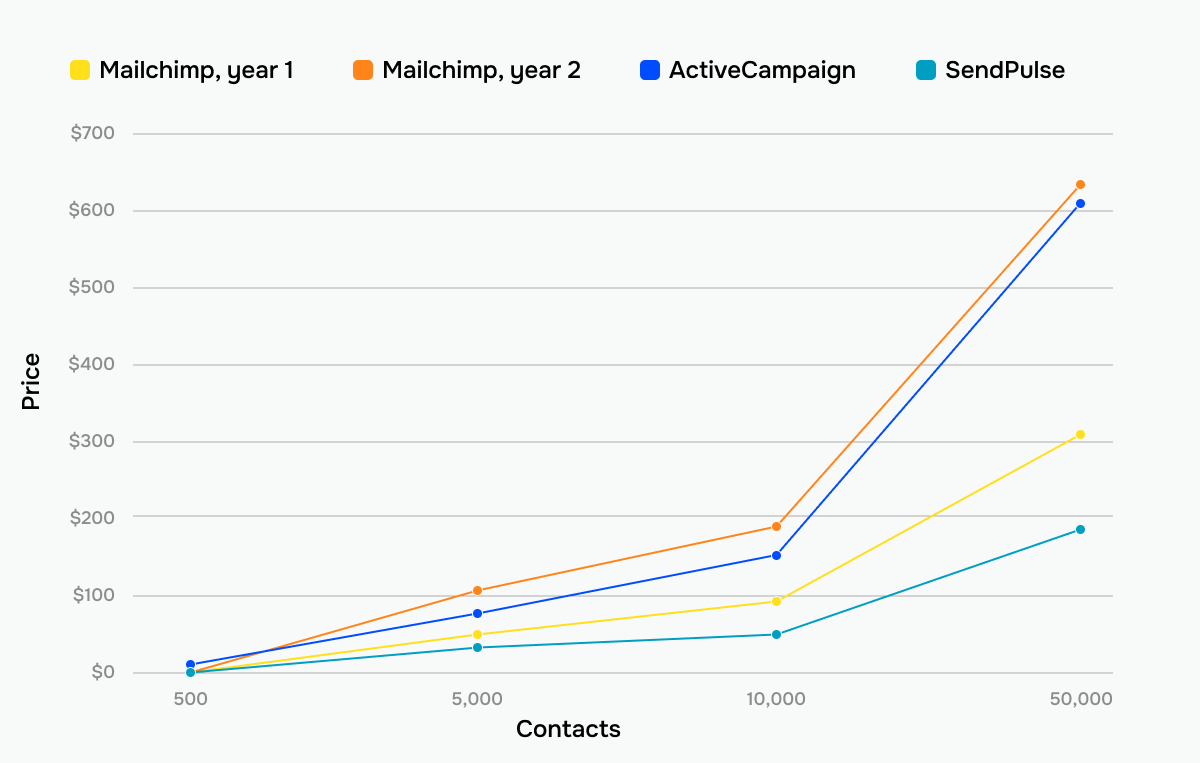 How prices grow across three different email platforms
If pricing transparency matters more than brand recognition, or if you’re scaling quickly and want to avoid steep jumps in monthly costs, consider exploring less popular but more affordable solutions.
Take
SendPulse as an example: for 1,000 contacts, the platform will cost you 9% less than Mailchimp, even with its first-year pricing, and 20% less than ActiveCampaign. If your mailing list is larger, say, you have 10,000 contacts, it will be 42% cheaper than Mailchimp and 65% cheaper than ActiveCampaign.
Another difference between Mailchimp and ActiveCampaign lies in how pricing scales with feature access. ActiveCampaign’s costs rise as more complex automation and CRM capabilities are unlocked on higher tiers. Mailchimp offers clearer, more accessible entry-level pricing, but many advanced automation, analytics, and segmentation features remain gated behind higher plans.
Ease of use and interface
⭐ Mailchimp: 9.5/10 | ActiveCampaign: 8.8/10
Ease of use makes up 20% of our total score because it directly affects how quickly your team becomes productive and whether they actually use the features you’re paying for. An email marketing platform might have powerful tools, but if routine actions feel difficult or slow, those features tend to sit unused.
We evaluated Mailchimp and ActiveCampaign across five critical usability factors, and here’s what we found:
| Aspect |
Mailchimp |
ActiveCampaign |
Winner |
| First-time experience |
Guided onboarding with clear prompts and predefined paths; most users can launch their first campaign within hours |
Intuitive for basic tasks like importing contacts and building email templates, but the CRM layer and automation depth can be overwhelming for a complete beginner |
Mailchimp |
| Daily navigation |
Straightforward interface with features organized into clear sections; easy to find what you need without hunting through menus |
Feature-dense but clean interface with great navigation and pop-up guides; requires more clicks to reach routine tasks |
Mailchimp |
| Learning curve |
Most users feel confident with core features within a week |
Requires 2-3 weeks to understand automation logic, tagging systems, and CRM workflows |
Mailchimp |
| Mobile access |
iOS and Android apps allow you to create simple emails, manage contacts, schedule campaigns, and monitor their performance |
iOS and Android apps let you manage your CRM and contact data, view email and automation details, and track email performance |
ActiveCampaign |
| Workflow efficiency once mastered |
Fast execution for routine tasks, but complex workflows may feel limiting and require extra navigation steps |
Rather complex to get started, but seasoned users can build powerful multi-step journeys |
ActiveCampaign |
| Total score |
9.5/10 |
8.8/10 |
Mailchimp |
The difference between these platforms is most evident when you track how quickly users move from initial setup to competence. Here’s what the typical progression looks like for each:
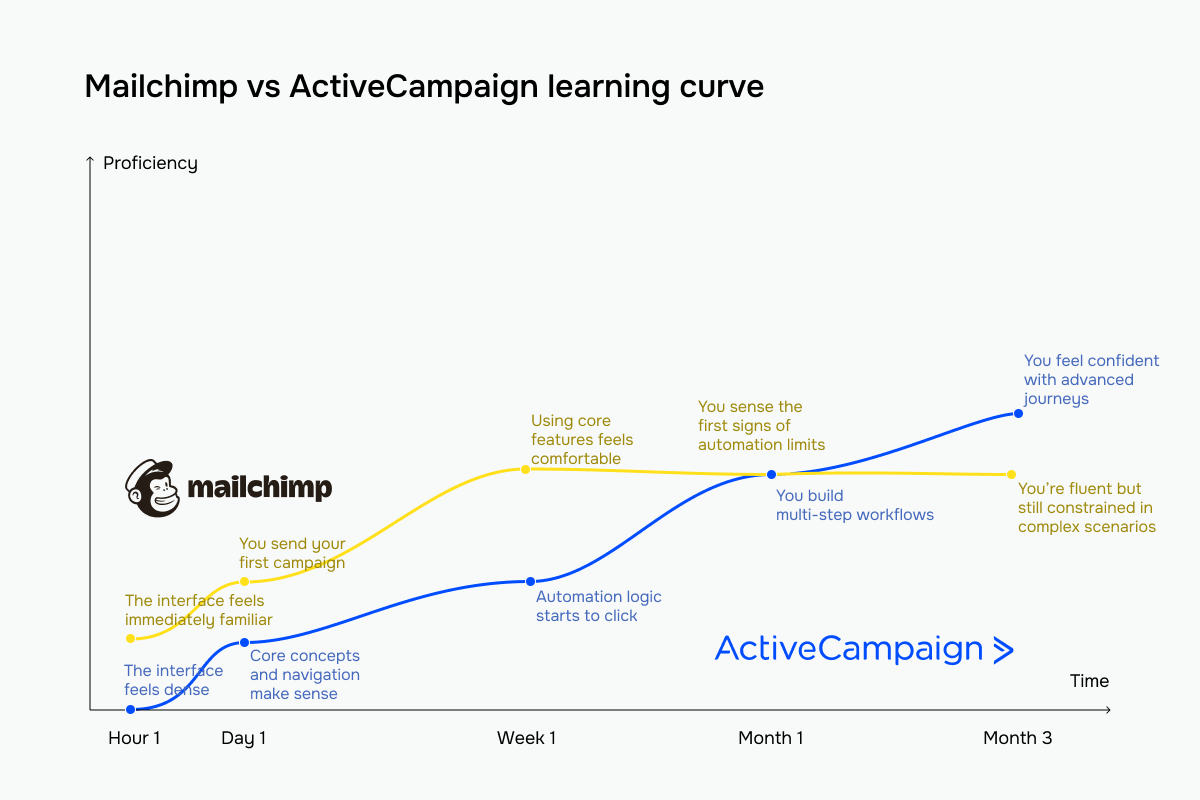 The yellow line represents Mailchimp vs ActiveCampaign’s blue line
Mailchimp offers guided setup, simplified interface, and linear workflows so that most teams can launch campaigns quickly. ActiveCampaign, in turn, requires navigating through more interface layers, but you gain access to capabilities like multi-touch automations and CRM-integrated email series.
The ease-of-use decision between Mailchimp and ActiveCampaign comes down to three key questions:
- How quickly do you need results?
- How much technical expertise does your team have?
- What level of complexity do you actually need in your workflows?
| Choose Mailchimp if… |
Choose ActiveCampaign if… |
| Your priority is getting campaigns live quickly, your team prefers easy-to-navigate interfaces, and you want a minimal learning curve before getting results. |
You’re willing to invest a fair bit of practice to get access to sophisticated automation capabilities, and your team has CRM experience or technical skills. |
Email builder and templates
⭐ Mailchimp: 9.4/10 | ActiveCampaign: 9.3/10
Your email builder is where strategy meets execution. A clunky interface slows down every campaign. A flexible one lets you move fast without sacrificing brand consistency or design quality. We tested both platforms’ email-building tools across key areas; here’s how Mailchimp and ActiveCampaign compare:
| Aspect |
Mailchimp |
ActiveCampaign |
Winner |
| Templates |
135+ professionally designed templates on paid plans; smaller curated selection on free tier |
125+ templates organized by business goal and campaign type; unlimited AI Brand kit templates |
ActiveCampaign |
| Drag-and-drop editor |
Clean drag-and-drop editor with structured content blocks, Creative Assistant for design suggestions, and built-in Content Studio for asset management |
Structured drag-and-drop editor with flexible layout blocks, global styling controls, dynamic content options, and full HTML and plain text editing options |
Mailchimp |
| Customization |
Flexible control over layout, fonts, and colors; custom HTML support; advanced options limited to higher-tier plans |
Extensive customization via global settings and blocks; HTML access; support for dynamic content personalized per recipient |
ActiveCampaign |
| Mobile responsiveness |
Mobile-responsive templates by default, with preview tools for testing across devices before sending |
Mobile-friendly templates by default, with built-in controls for adjusting mobile-specific formatting (headings, buttons, margins) |
Tie |
| Total score |
9.4/10 |
9.3/10 |
Mailchimp |
Mailchimp’s templates are designed as near-final products. You select one that matches your campaign goal, swap in your brand colors and logo, add your content, and you’re ready to send. This works exceptionally well when you’re a non-designer needing to move fast or when your campaigns use similar layouts.
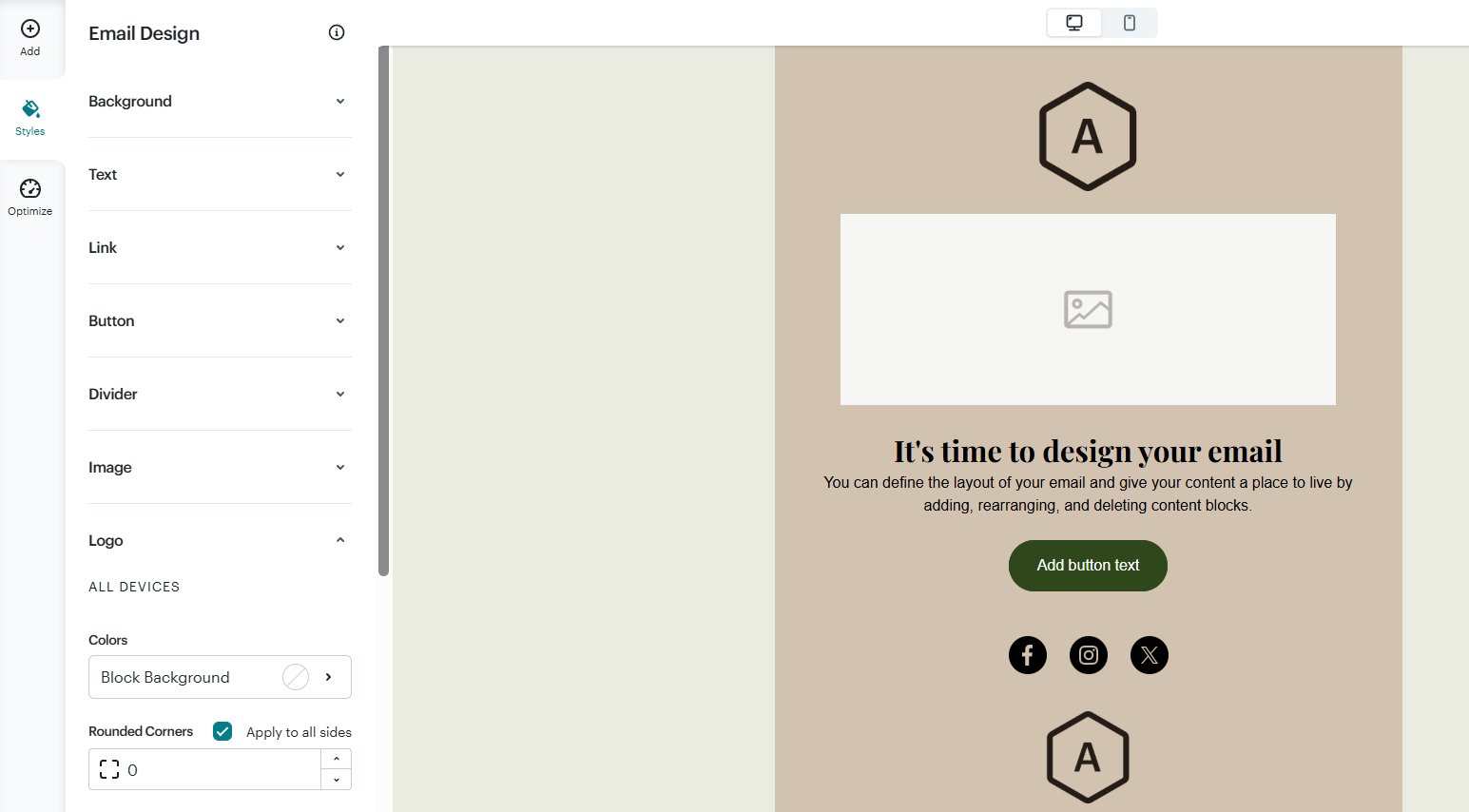 Mailchimp’s email template in their builder
ActiveCampaign’s templates act more like frameworks rather than finished designs. They’re intentionally more flexible so that you can easily customize them with on-brand assets and conditional content visible to relevant segments based on tags, merge fields, or recipient data.
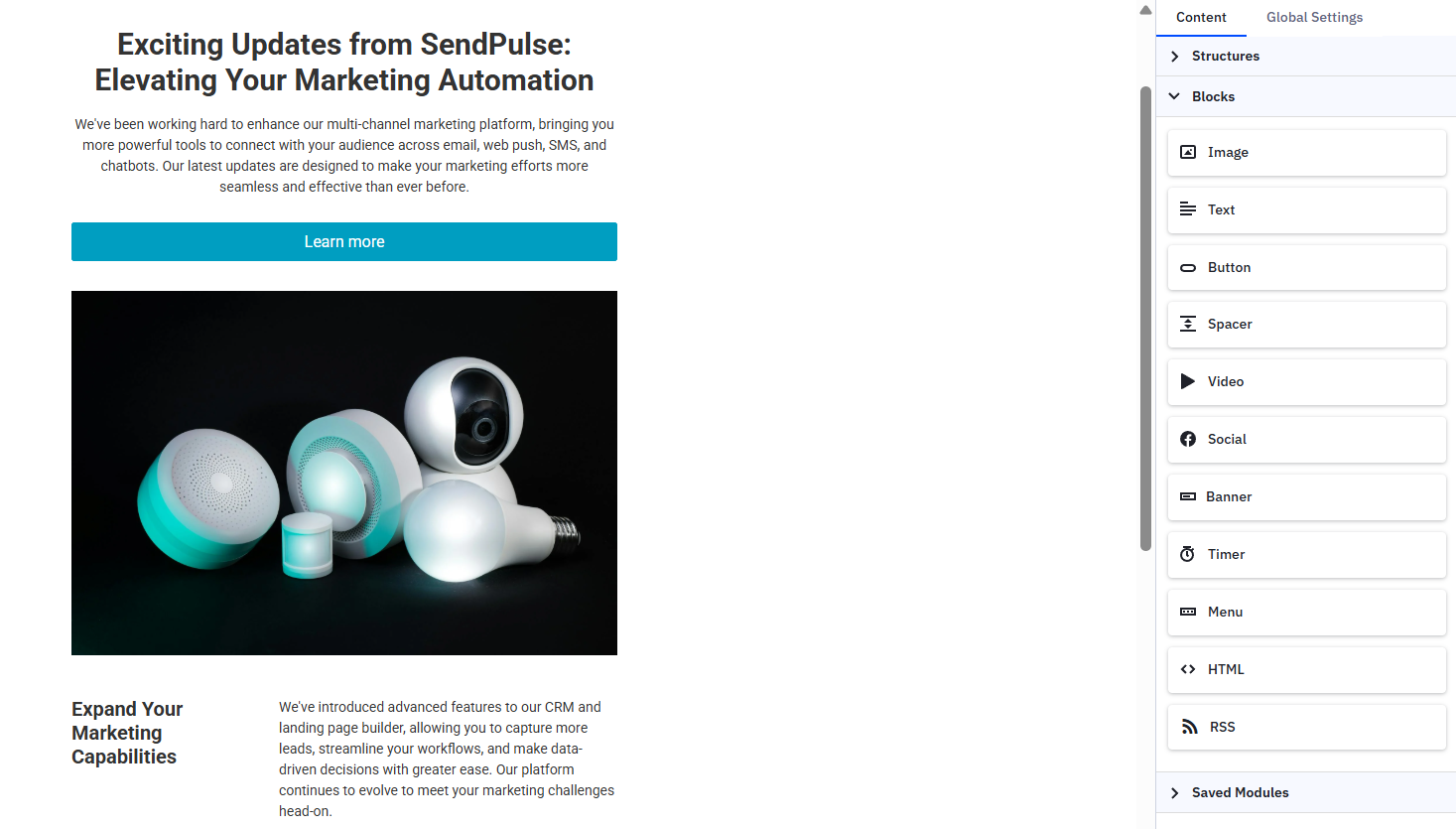 ActiveCampaign’s email template in their email builder
On top of that, ActiveCampaign positions AI-assisted template creation as the core of modern email design, enabling marketers to generate, adapt, and scale emails automatically rather than rely on fixed layouts.
Contact management
Mailchimp: 7.5/10 | ⭐ ActiveCampaign: 9.5/10
Contact management defines how precisely you can target people and how intelligently your automations respond to real behavior. Poor contact management limits what you can build. Flexible one enables elaborate workflows that adapt in real time.
The 2-point gap between Mailchimp and ActiveCampaign reflects fundamental architectural differences that have a bearing on your automation capabilities, the amount of manual work you’ll do to keep data synchronized, and even your billing costs.
| Aspect |
Mailchimp |
ActiveCampaign |
Winner |
| Segmentation capabilities |
Condition-based segmentation using AND/OR logic with standard behavioral rules; available on paid plans |
Event-driven segmentation with nested AND/OR logic across contact data and behavior, automations, and custom events |
ActiveCampaign |
| Segment update speed |
Recalculates every 2 hours; manual refresh required for immediate updates |
Updates in real time as contact behavior or data changes; no manual refresh needed |
ActiveCampaign |
| Available segmentation criteria |
Standard conditions such as demographics, location, signup details, email engagement, basic purchase history, custom fields, and tags |
Basic and advanced conditions like tracked site behavior, automation status, CRM data, goal completions, and custom fields |
ActiveCampaign |
| Tagging and manual organization |
Manual tagging with simple search and filtering that helps you stay organized |
Manual or automated tagging via forms, link clicks, automations, integrations, and API |
ActiveCampaign |
| Contact structure |
Isolated audiences; same email address in multiple audiences counts as multiple contacts, which may result in duplicate billing |
Single, unified contact database; one email address counts as one contact, regardless of lists or tags |
ActiveCampaign |
| Total score |
7.5/10 |
9.5/10 |
ActiveCampaign |
Attention to Mailchimp’s duplicate contact problem: the platform’s architecture creates a hidden cost issue that affects most growing businesses.
Contacts live in separate audiences (mailing lists) that don’t share data. If someone subscribes to your newsletter, then later downloads a lead magnet, then registers for a webinar, they exist as three separate contact records if those campaigns use different audiences. As a result, you’re essentially billed for the same person multiple times.
ActiveCampaign uses a unified database where one email address equals one contact profile, period. You’re billed once per unique email address, regardless of how many lists or campaigns they’re in.

Join businesses growing with SendPulse
From solo creators to global brands, thousands of customers trust SendPulse to run email campaigns, chatbots, automations, and more — all in one place.
Get started for free
Marketing automation
Mailchimp: 7.8/10 | ⭐ ActiveCampaign: 10/10
The gap between Mailchimp and ActiveCampaign is wide in the automation capabilities, and this is not an abstract claim. Here’s what happens when teams actually switch from one platform to the other – this G2 review captures the experience better than any feature list could:
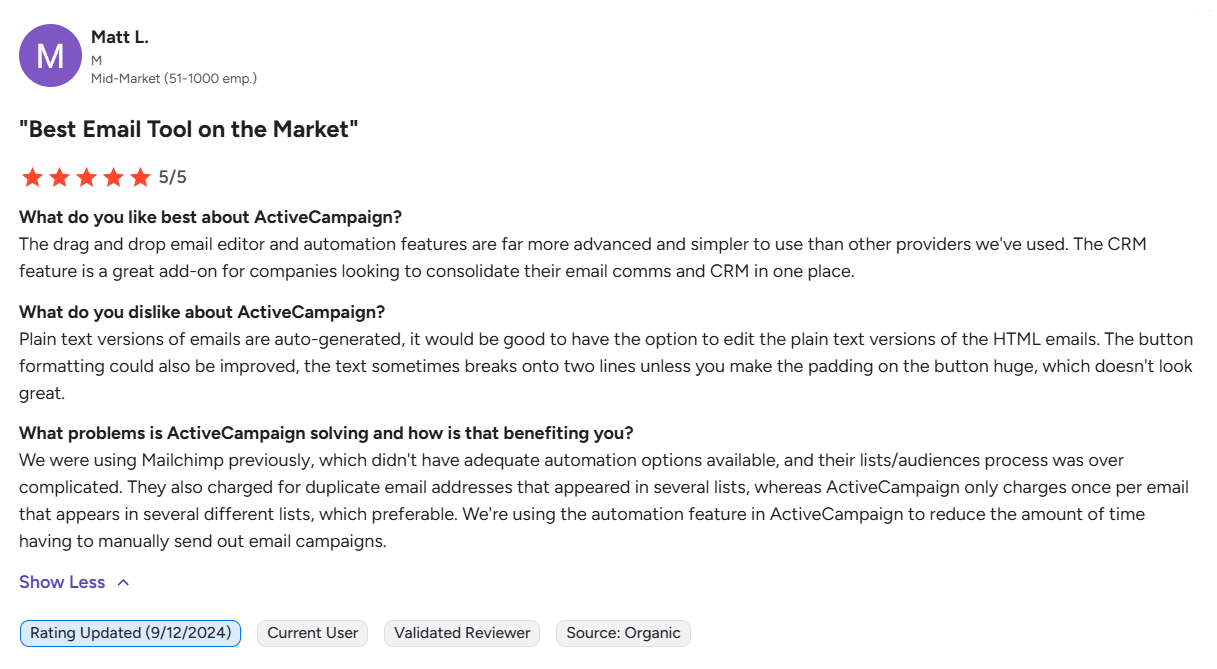 A user’s experience switching from Mailchimp to ActiveCampaign
The reviewer points out three specific pain points they solved by migrating from Mailchimp to ActiveCampaign: automation depth, contact data organization, and time efficiency. These aren’t marketing talking points but tangible issues that show up in daily work. Our testing revealed the same patterns.
Here’s how these differences translate to actual features:
| Aspect |
Mailchimp |
ActiveCampaign |
Winner |
| Automation builder |
Visual automation builder with branching and conditional logic that requires paid plans |
Powerful workflow builder with multiple trigger types, conditional splits, wait conditions, and CRM-driven actions |
ActiveCampaign |
| Triggers available |
38 built-in automation triggers covering contact changes, dates, eCommerce and integration events, engagement actions, and API calls |
≈ 40 start triggers, including CRM-, eCommerce-, and integration-related events, contact behavior, site or in-app user activity, engagement levels, with multiple entry points possible per automation |
ActiveCampaign |
| Pre-built automations |
35 ready-made automation templates for core use cases like welcome flows, abandoned cart recovery, re-engagement, and basic nurturing |
900+ pre-built automation recipes qualifying and scheduling new project leads, reminding unengaged customers about their purchases one year later, and following up on specific or multiple page visits |
ActiveCampaign |
| Automation complexity |
Well-suited for linear automations; more complex lifecycle workflows require higher-tier plans |
Built for advanced, multi-branch automations that combine any number of triggers, actions, and conditions |
ActiveCampaign |
| Total score |
7.8/10 |
10/10 |
ActiveCampaign |
The automation template libraries tell you exactly what each platform expects you to build.
Mailchimp bets you need common, straightforward scenarios to welcome new subscribers, recover abandoned carts, re-engage inactive contacts, or confirm purchases. These are step-by-step workflows where step A leads to step B, which leads to step C. You can launch them quickly with minimal setup.
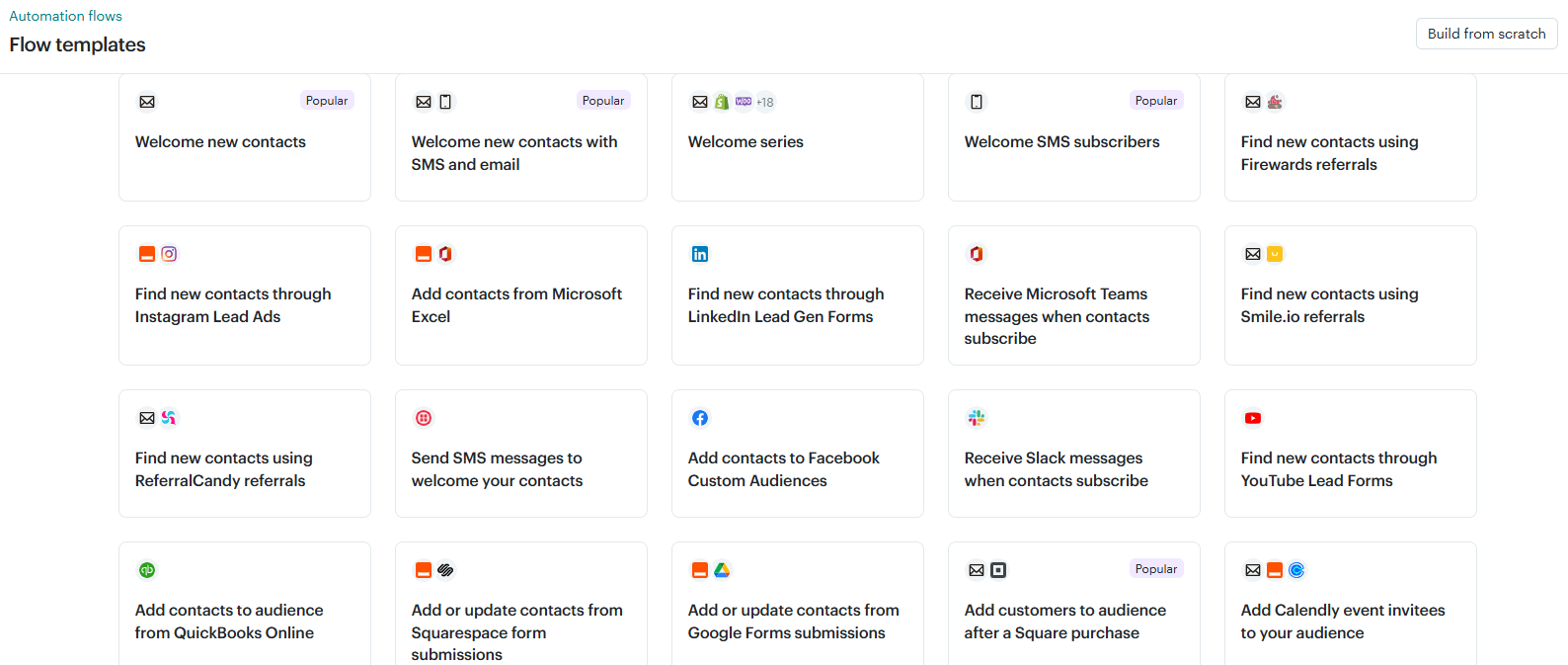 Automation templates at Mailchimp cover most essential use cases
Compared to Mailchimp, ActiveCampaign wants you to build something more sophisticated. It can be a multi-touch nurturing flow that branches dynamically based on email interactions or website activity, a sales pipeline that triggers notifications to your reps when a deal moves into a specific stage, or an onboarding flow that adapts to how users engage with your product.
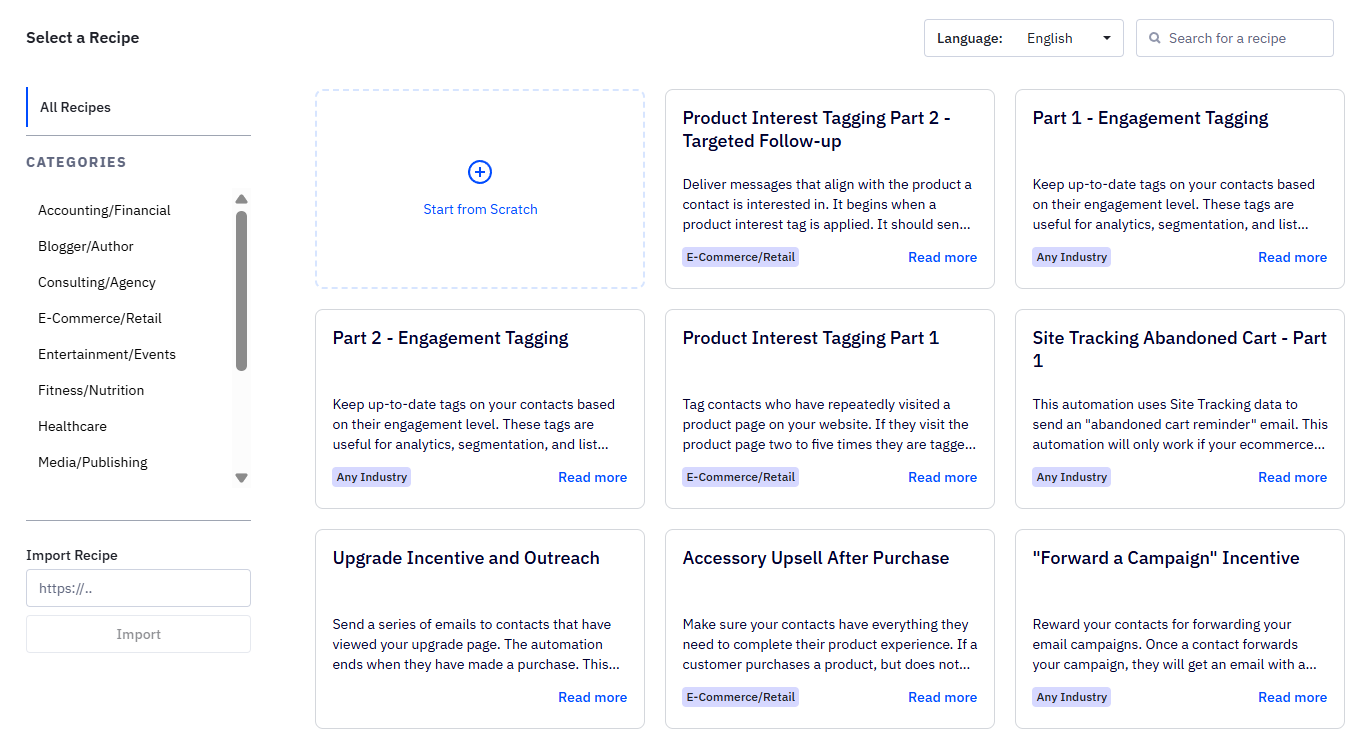 Automation recipes at ActiveCampaign cover complex, behavior-driven scenarios
ActiveCampaign wins this category, but that doesn’t mean everyone needs its complexity. Mailchimp’s automation is more than enough for teams running typical 2-5 step flows and those that don’t have time to build and maintain enterprise-grade automations.
Deliverability
⭐ Mailchimp: 10/10 | ⭐ ActiveCampaign: 10/10
Here’s the short version: both Mailchimp and ActiveCampaign deliver emails reliably when you follow deliverability best practices. This is why deliverability accounts for only 10% of our overall score – it’s critical, but modern email marketing platforms rarely differ dramatically when they meet current infrastructure standards.
| What you control (80% of the outcome) |
What your ESP controls (20% of the outcome) |
- List quality and user consent
- Engagement rates
- Sending frequency and consistency
- Content relevance
- Proper SPF, DKIM, DMARC setup
- Opt-out process
|
- IP reputation management
- IP warm-up processes
- Abuse prevention systems
- Automated bounce suppression
- Feedback loop handling
|
Yet, that 20% your ESP controls matters more than it sounds. Even when you follow best practices, poor platform infrastructure can still hurt your deliverability.
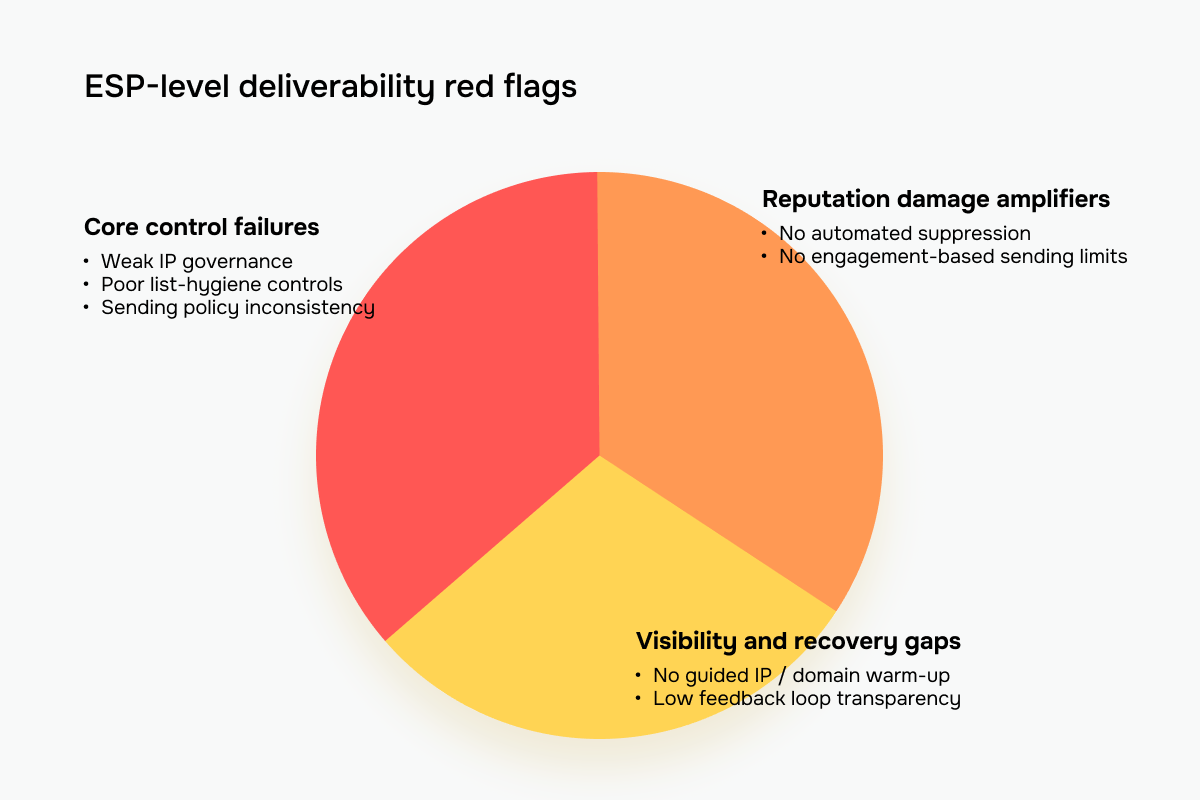 Warning signs that an ESP has a poor deliverability infrastructure
These seven issues indicate ESP-level problems rather than sender mistakes:
- Poor IP reputation management. Allowing low-quality senders on shared IPs without strict vetting damages the reputation for all users within that infrastructure. Mailbox providers evaluate abuse patterns at the ESP level, not just individual accounts.
- Weak list-quality enforcement. Tolerating purchased mailing lists, scraped data, or cold emailing increases complaint rates across the network. This affects all senders sharing the same infrastructure.
- Inadequate automated suppression. Failure to automatically suppress hard bounces, repeated soft bounces, or spam complaints creates ongoing negative signals that hurt platform-wide reputation.
- No engagement-aware sending controls. Platforms that allow unrestricted sending to long-unengaged contacts, without warnings or guardrails, enable behavior that mailbox providers penalize.
- No structured IP or domain warm-up mechanisms. Leaving IP warming entirely to users without tooling or guidance increases the likelihood of new senders triggering spam filters.
- Limited transparency. Not surfacing spam complaints, reputation indicators, or feedback loop data prevents users from identifying problems early.
- Inconsistent sending policy enforcement. Allowing high-volume offenders to continue sending emails signals poor governance to mailbox providers.
Neither Mailchimp nor ActiveCampaign showed these red flags during our testing. Both support domain authentication, automatically suppress bounces and complaints, and enforce clear sender policies and anti-spam requirements to protect their services.
The difference lies in how strictly they enforce infrastructure controls as your sending volume grows:
| Mailchimp |
ActiveCampaign |
| The platform prioritizes accessibility with a paid dedicated IP add-on at $29.95/month, available to any user regardless of volume or engagement levels. |
The platform applies strict controls for high-volume sending and isolates sender reputation more carefully, limiting how one sender’s poor practices affect others. Dedicated IPs are available only to regular senders with at least 100,000 active, opted-in, engaged contacts and require a one-time setup fee of $750. |
Integrations
Mailchimp: 7.7/10 | ⭐ ActiveCampaign: 9/10
For eCommerce businesses, your email marketing platform is only as good as its Shopify integration. For SaaS teams, it’s the Salesforce connection. Integrations determine whether your tools work together seamlessly or result in hours of manual data entry each week.
Both Mailchimp and ActiveCampaign offer extensive integration libraries, but the real differences show up when data starts flowing between tools and automations trigger based on that data.
| Aspect |
Mailchimp |
ActiveCampaign |
Winner |
| Integration catalog |
300+ supported apps |
1,000+ available integrations and supported apps |
ActiveCampaign |
| eCommerce platforms |
Integrates with Shopify, WooCommerce, BigCommerce, and Adobe Commerce, syncing core customer and order data, such as contact details and purchase history, with limited native support for fine-grained behavioral triggers |
Connects to Shopify, WooCommerce, BigCommerce, Adobe Commerce, and Square, pulling in purchase data and allowing automations based on customer actions, such as buying or abandoning a cart |
ActiveCampaign |
| CRM systems |
Basic built-in contact management; integrates with Salesforce, Zoho CRM, and Pipedrive |
Full-featured built-in CRM with deals, pipelines, and tasks; integrates with Salesforce, Zoho CRM, and OnePage CRM |
ActiveCampaign |
| Analytics and BI tools |
Google Analytics tracking; CSV exports for external BI tools |
Google Analytics, Zoho Analytics, and Whatagraph for visualization and deeper campaign analysis |
ActiveCampaign |
| API capabilities |
REST API for contact sync, campaign management, and report access |
REST API for contacts, deals, automation data, and activity tracking |
ActiveCampaign |
| Zapier support |
10 available triggers and 22 supported actions |
19 triggers and 22 actions for cross-app workflows |
ActiveCampaign |
| Total score |
7.7/10 |
9/10 |
ActiveCampaign |
ActiveCampaign’s most significant integration advantage isn’t actually an integration. It’s what you don’t need to connect.
The platform includes a built-in CRM with deals, tasks, lead scoring, automated sales workflows, and engagement tracking. Marketing and sales data live in the same system by default, so you can follow a contact’s journey from the first email open through multiple touchpoints to a closed deal without relying on platforms like Pipedrive, HubSpot, or Salesforce.
Mailchimp, by contrast, offers basic audience management – contact records, tags, and custom fields – but no native deal tracking, pipelines, or sales automation. To manage sales workflows, you’ll need external CRM integrations.
Why this matters: Integration complexity is a hidden cost. Every third-party connection introduces potential sync delays, data mapping errors, and additional monthly fees. Platforms that consolidate CRM and multi-channel messaging, like
SendPulse, reduce these friction points, especially for teams without dedicated technical and budget resources.
AI features
Mailchimp: 7.2/10 | ⭐ ActiveCampaign: 8.9/10
AI won’t revolutionize your email marketing or replace marketing judgment, but it can become a meaningful productivity booster, reducing time spent on writing copy, building flows, and optimizing campaigns. Here’s where Mailchimp and ActiveCampaign’s AI actually help in day-to-day work:
| Aspect |
Mailchimp |
ActiveCampaign |
Winner |
| Email generation |
AI creates and edits subject lines, preview text, and email body copy aligned with brand voice |
AI generates ready-to-go email templates, including layout, subject line, preheader, images, content blocks, and CTA buttons, maintaining your brand identity |
ActiveCampaign |
| Automation generation |
AI-assisted workflow creation from natural-language prompts is available in beta, with user refinement required |
Multi-step workflow creation from natural language, with automatic branching, AI-based lead scoring, sentiment analysis, personalization, and next-best-step predictions |
ActiveCampaign |
| Sending time optimization |
Recommends delivery windows based on aggregate engagement patterns rather than individual subscriber behavior |
Uses predictive sending based on sender account data and industry-wide benchmarks, with support for both emails and automation flows |
ActiveCampaign |
| Predictive customer analytics |
Provides purchase likelihood and estimated customer lifetime value for connected eCommerce businesses |
Provides a deal win probability score and engagement-based lead scoring |
Tie |
| Smart segmentation suggestions |
AI insights can support your segmentation decisions, but AI doesn’t auto-generate segment suggestions |
AI suggests three pre-built segments tailored to your contacts’ activity, behavior, and industry trends |
ActiveCampaign |
| Total score |
7.2/10 |
8.9/10 |
ActiveCampaign |
The 1.7-point scoring gap reflects ActiveCampaign’s deeper AI integration into each workflow. It’s a true AI powerhouse with goal-aware agents that learn from your specific industry, use cases, and customer journey as they go.
However, for most businesses, AI features are a useful bonus, not a primary decision factor. Choose the platform that matches your email and automation needs first, then take advantage of whatever AI capabilities come with it.
Reporting and analytics
Mailchimp: 7.8/10 | ⭐ ActiveCampaign: 8.4/10
Reporting and analytics aren’t the main factor in our overall score – and that’s by design. Today, solid reporting is a given: it should be accurate, easy to access, and help you understand what’s working. While analytics alone rarely determine which email platform is a better choice, the way each tool approaches data can tell you a lot. Here’s how Mailchimp and ActiveCampaign compare in this area:
| Aspect |
Mailchimp |
ActiveCampaign |
Winner |
| Advanced reports |
Reporting across campaigns, audiences, comparisons, custom views, and connected eCommerce data |
Conversion attribution reports, CRM-specific reports, detailed automation analytics, and dashboards for visualizing multiple metrics |
ActiveCampaign |
| Live reporting |
No, metrics update with a delay |
No, built-in reports refresh once every 24 hours |
Tie |
| Custom reports creation |
Limited customization; pre-built views mostly |
Custom reports with flexible filters and data combinations on the highest-tier plan or as an add-on |
ActiveCampaign |
| Export capabilities |
CSV exports for contacts, campaigns, and reports |
CSV, TXT, Excel, JSON, HTML, and Markdown files for key reports; CSV exports for deals, lists, and contacts |
ActiveCampaign |
| Total score |
7.8/10 |
8.4/10 |
ActiveCampaign |
Both platforms offer rich and detailed insights. ActiveCampaign exports in six formats (CSV, TXT, Excel, JSON, HTML, Markdown) vs Mailchimp’s CSV-only exports. Overall, if you need export flexibility and deal reporting too, then ActiveCampaign is the go-to.
Customer support
Mailchimp: 7/10 | ⭐ ActiveCampaign: 7.3/10
Customer support accounts for only 2% of our total score because it is rarely a deciding factor on its own. Still, when platforms score close overall, support quality can tip the balance. Both Mailchimp and ActiveCampaign offer adequate customer support, with minor differences outlined below.
| Aspect |
Mailchimp |
ActiveCampaign |
Winner |
| Channel availability |
Email and chat 24/7 on paid plans; phone support on the highest-tier plan only |
Email 24/7, chat 6 days/week with extended hours; no phone support |
Mailchimp |
| Knowledge base quality |
Extensive self-service Help Center featuring well-structured articles, clear step-by-step instructions, and video walkthroughs |
Extensive, well-organized Help Center with searchable how-to guides, walkthroughs, and multi-language documentation |
Tie |
| Onboarding assistance |
Structured onboarding with guided setup, optional onboarding specialist sessions on paid plans, and contextual in-app tips and resources |
Free live 1:1 onboarding and coaching for all customers, with complimentary migration support; highest-tier plans receive a dedicated account team |
ActiveCampaign |
| Total score |
7/10 |
7.3/10 |
ActiveCampaign |
The gap in this category isn’t dramatic, but it could matter when you’re racing against the clock. Take SendPulse as a Gold Standard: we provide 24/7 support via live chat and email in five different languages, no matter what pricing plan you choose.
Your decision checklist
Phew – quite a journey, right? By now, you probably know which email marketing platform fits your business best. But just in case, here’s a super-quick checklist. Use it to match platforms with your actual needs, not which one sounds more impressive on paper.
Mailchimp
is a better fit if… |
ActiveCampaign
is a better fit if… |
| 🟨 you need campaigns live within days, not weeks |
🟦 you’re building behavior-driven lifecycle campaigns |
| 🟨 your automations follow predictable, linear paths (2-5 steps max) |
🟦 your workflows are branch-based on contact actions and conditional logic |
| 🟨 you manage one primary audience without multiple subscription types |
🟦 you manage contacts across multiple campaigns and want unified billing |
| 🟨 you want a clear, high-level view of campaign performance |
🟦 you need to understand how email impacts deals, revenue, or retention |
| 🟨 you want the lowest first-year cost |
🟦 you want predictable costs that won’t double after 12 months |
| 🟨 you work solo or with a small team that values intuitive tools |
🟦 your team can invest 2-3 weeks learning in exchange for advanced capabilities |
| 🟨 you don’t need CRM features like deal tracking or sales pipelines |
🟦 you want marketing and sales data in the same system without external tools |
Final verdict and recommendations
⚖️ Final scores: Mailchimp – 8.7/10 | ActiveCampaign – 9.2/10
Totaling up the points, Mailchimp has scored 8.7/10, and ActiveCampaign has 9.2/10 — but that half-point difference doesn’t mean one platform is objectively better. The key question is whether your business actually needs what the more complex platform offers.
Mailchimp is a user-friendly solution that gets you productive in days and keeps your email marketing simple. It works brilliantly when email supports your marketing rather than driving revenue directly. The cost: automation ceilings you’ll hit as you scale and year-two pricing that doubles your monthly billing.
ActiveCampaign takes weeks to master, but then unlocks behavior-driven automation, unified contact data, and CRM integration that eliminates external tools. The trade-off is the extra complexity you might not need for years.
Ultimately, the right platform is whichever one solves your pain points and addresses your current business needs.
If neither platform feels like the perfect fit, consider exploring Mailchimp alternatives or ActiveCampaign alternatives to see how other platforms stack up on pricing, features, and ease of use.