Constant Contact is one of the oldest email marketing platforms still operating today – it’s even older than Google. But longevity alone doesn’t guarantee competitiveness. So we asked ourselves – is Constant Contact still relevant? Does it keep pace with modern email marketing platforms?
To explore this, let’s compare Constant Contact with Mailchimp, one of the most widely used platforms on the market.
How we scored this comparison: Each platform was evaluated across nine categories using our independent methodology. Pricing (25%), ease of use (20%), and email and automation features (15% each) carry the most weight because they affect daily workflows the most. All scores reflect real testing and analysis as of March 2026.
Before we go deeper into all the aspects of Constant Contact vs Mailchimp, let’s briefly compare the core features of these email marketing platforms:
| Category |
Constant Contact |
Mailchimp |
Winner |
| Platform focus |
Simple email marketing for small businesses, nonprofits, and beginners |
Scalable email marketing with deeper automation and eCommerce tools |
– |
| Pricing |
7/10
Higher cost with no free plan and limited entry plan features |
9/10
Free plan available, lower pricing, and a higher feature-to-price ratio |
Mailchimp |
| Ease of use |
7.5/10
Simple but sometimes inconsistent interface |
9.5/10
Structured, modern, and intuitive interface |
Mailchimp |
| Email design |
7.3/10
Basic editor with limited layout flexibility |
9.4/10
Advanced editor with strong layout and styling control |
Mailchimp |
| Automation |
5/10
Basic automation and simple conditional logic |
7.8/10
Multi-step workflows with flexible branching and more triggers |
Mailchimp |
| Contact management |
7.5/10
Unified database, yet limited segmentation depth |
7.5/10
Advanced segmentation, yet a non-unified database |
Tie |
| Forms and pages |
7.4/10
Functional but visually limited forms and pages |
8.2/10
Modern builder with vast customization options |
Mailchimp |
| Deliverability |
7/10
Overall good, but sometimes glitchy deliverability |
9.6/10
Consistently efficient deliverability |
Mailchimp |
| Integrations |
6.2/10
60 integrations |
7.7/10
339 integrations |
Mailchimp |
| AI features |
4/10
AI embedded into email content and template generation |
8.7/10
AI embedded into email content, automation, and analytics |
Mailchimp |
| Reporting and analytics |
6.5/10
Standard reports with minimal customization |
7.8/10
Deeper reports with customization options |
Mailchimp |
| Customer support |
7/10
Responsive support, yet disorganized and sometimes not user-friendly documentation |
7/10
24/7 customer support with a well-structured help center |
Tie |
| Final score |
6.1/10 |
8.7/10 |
Mailchimp |
The overall score gives a useful snapshot, but let’s zoom into the details – they can highlight why Constant Contact remains a solid choice for certain businesses.

Create and send high-performing emails
Use an AI assistant, pre-made templates, advanced segmentation, and feature-rich automation to run campaigns without coding. Start for free with up to 15,000 monthly emails.
Get started for free
In the following sections, we will evaluate Mailchimp and Constant Contact across multiple areas, including automation capabilities, AI features, and contact management tools. For now, let’s start with pricing.
Pricing and value
Constant Contact: 7/10 | ⭐ Mailchimp: 9/10
Disclaimer: Pricing changes frequently. These figures are accurate as of March 2026. Always verify final costs on official pricing pages.
Pricing often becomes the deciding factor, especially when comparing tools with overlapping functionality. Email marketing platforms are no exception. At first glance, Constant Contact costs roughly twice as much as Mailchimp, but the price difference alone doesn’t explain the 2-point gap in this category.
To understand where that gap comes from, let’s look at the numbers first.
| Contacts |
Constant Contact |
Mailchimp |
Winner |
| Free plan |
No free plan; the website promotes a 14-day trial, though the actual trial period lasts 30 days |
250 contacts, 500 emails; no automation or AI features |
Mailchimp |
| 2,500 |
$50 |
$22.50 |
Mailchimp
Cost difference: $27.50 |
| 10,000 |
$120 |
$55 |
Mailchimp
Cost difference: $65 |
| 50,000 |
$430 |
$192.50 |
Mailchimp
Cost difference: $237.50 |
| Total score |
7/10 |
9/10 |
Mailchimp |
Mailchimp is cheaper than Constant Contact across every contact tier shown. More importantly, its lowest-tier paid plan gives you access to more pro features.
Constant Contact’s entry-level paid plan is kind of restrictive. To give you an idea: at $30 per month for 1,000 contacts, you cannot even schedule emails or run subject line A/B tests, both of which are available on Mailchimp’s cheapest paid plan. In other words, with Constant Contact, you don’t get access to some features that are pretty standard at similar price points.
Mailchimp does have one catch we need to talk about, though. Its most attractive pricing applies only during the first year. After those 12 months, the monthly cost doubles.
To make the comparison fair, the graph below reflects Mailchimp’s year-one and year-two pricing – and includes SendPulse to give you a wider view of how prices compare across the broader ESP market.
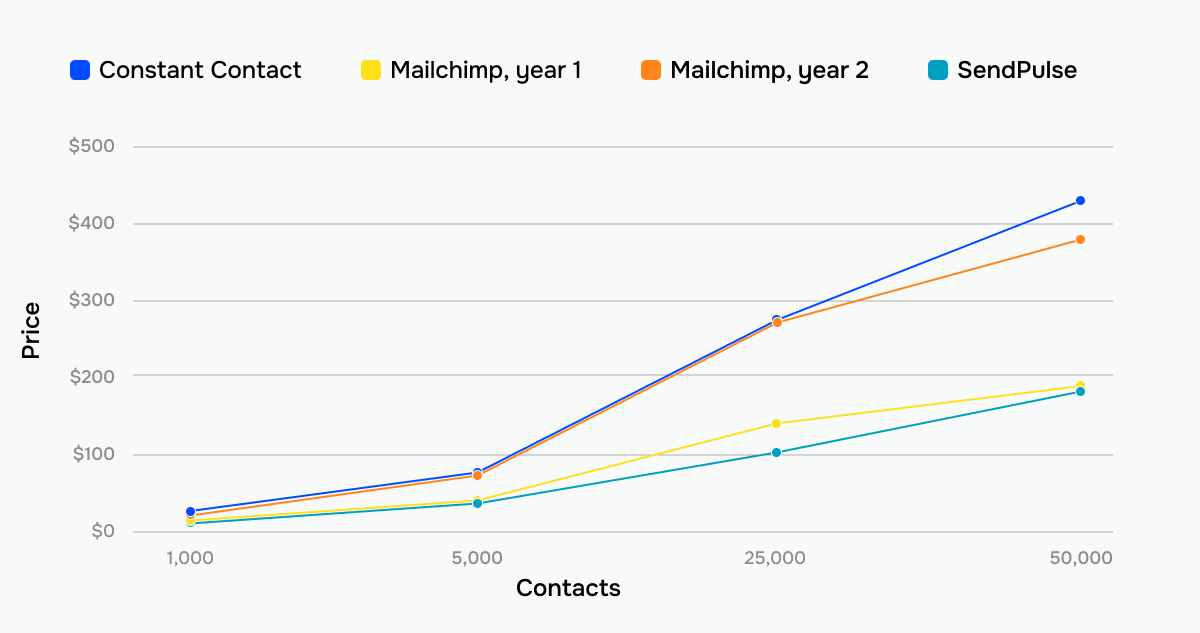 How prices grow across three different email platforms
If pricing alone determines your choice, you may already have your answer. But features, usability, and long-term fit can change the picture – so let’s keep going.
Ease of use and interface
Constant Contact: 7.5/10 | ⭐ Mailchimp: 9.5/10
Mailchimp and Constant Contact both position themselves as simple, easy-to-use platforms, but there is an important nuance. Mailchimp is designed for users who want to use advanced features, such as automation or segmentation, in a simplified way. Constant Contact targets users who prefer to avoid complexity altogether and choose a platform that offers fewer advanced options in the first place.
One thing we did notice during testing: Constant Contact’s interface can feel slightly outdated. Information is often spread across different sections, and it is not always clear which source on their very own website is authoritative. This lack of cohesive information was one of the biggest usability drawbacks we found during analysis. As a result, Constant Contact scores 7.5/10 despite being generally workable for everyday use.
Here are more details about the ease of use and interface of Constant Contact and Mailchimp:
| Aspect |
Constant Contact |
Mailchimp |
Winner |
| First-time experience |
Quite clear, a bit old-fashioned interface |
Clear and modern interface |
Mailchimp |
| Daily navigation |
Navigation across core sections is simple overall, though the placement of certain categories and tabs is not unintuitive; new features include short video introductions |
Fast and easy navigation across the email editor, automation builder, contact management, and other sections; video lessons and user-triggered tips available |
Mailchimp |
| Learning curve |
You can learn all the basic features in up to 6 hours |
You can learn all the basic features in up to 18 hours |
Mailchimp |
| Mobile access |
iOS and Android apps; some reviews report glitchy functionality |
iOS and Android apps; functionality is limited compared to the desktop version; apps have good reviews |
Mailchimp |
| Workflow efficiency once mastered |
Efficient workflow built around core functionality |
Highly efficient workflow with advanced capabilities |
Mailchimp |
| Total score |
7.5/10 |
9.5/10 |
Mailchimp |
But what does this mean in practice? The graph below compares how quickly you or your team will be able to start working with a new email platform, be it Mailchimp or Constant Contact.
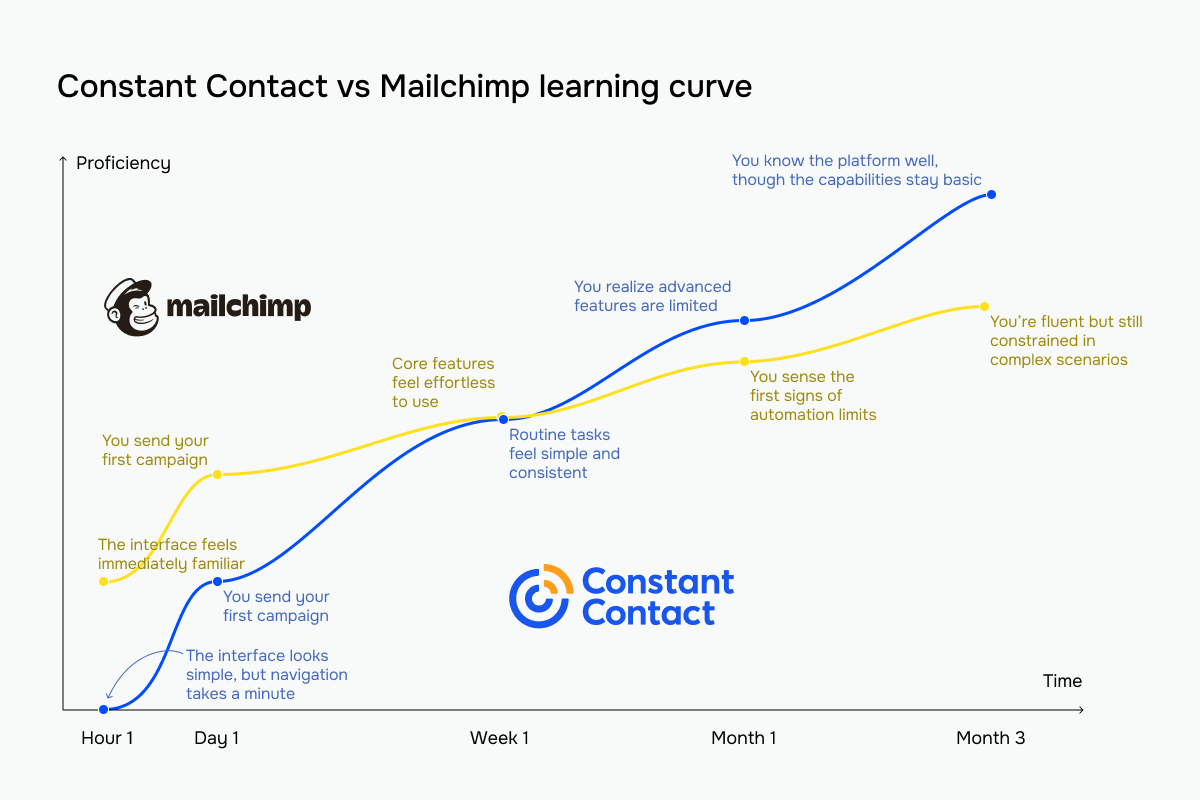 The blue line represents Constant Contact vs Mailchimp’s yellow line
Email builder and templates
Constant Contact: 7.3/10 | ⭐ Mailchimp: 9.4/10
The core and the heart of any email marketing platform is its template builder, and in this category, we have a clear winner. See below how and why Mailchimp wins this round with a 2.1-point lead:
| Aspect |
Constant Contact |
Mailchimp |
Winner |
| Templates |
497 templates for special occasions, newsletters, and eCommerce campaigns |
367 templates for newsletters, invites, announcements, eCommerce-specific emails, etc. |
Constant Contact |
| Drag-and-drop editor |
Clear visual builder with limited design flexibility |
Clear visual builder with multiple options to customize your email |
Mailchimp |
| Notable content blocks |
Data table, event, RSVP, feedback |
Survey and eCommerce-specific blocks like product recommendation, discount, and payment |
Mailchimp |
| Customization |
Section-level layout and styling controls; BrandKit for managing logo and brand colors |
Flexible control over layout, typography, and colors; custom HTML support |
Mailchimp |
| Mobile responsiveness |
Mobile preview available before sending; no mobile-specific editing controls |
Dedicated mobile editing mode for adjusting layout and elements |
Mailchimp |
| Total score |
7.3/10 |
9.4/10 |
Mailchimp |
If you’ve worked with modern email marketing platforms before, Constant Contact’s email builder may feel somewhat unintuitive at first. However, once you get used to it, you’ll see that it includes all the standard blocks other platforms offer – and even a few extras, such as data tables and feedback elements.
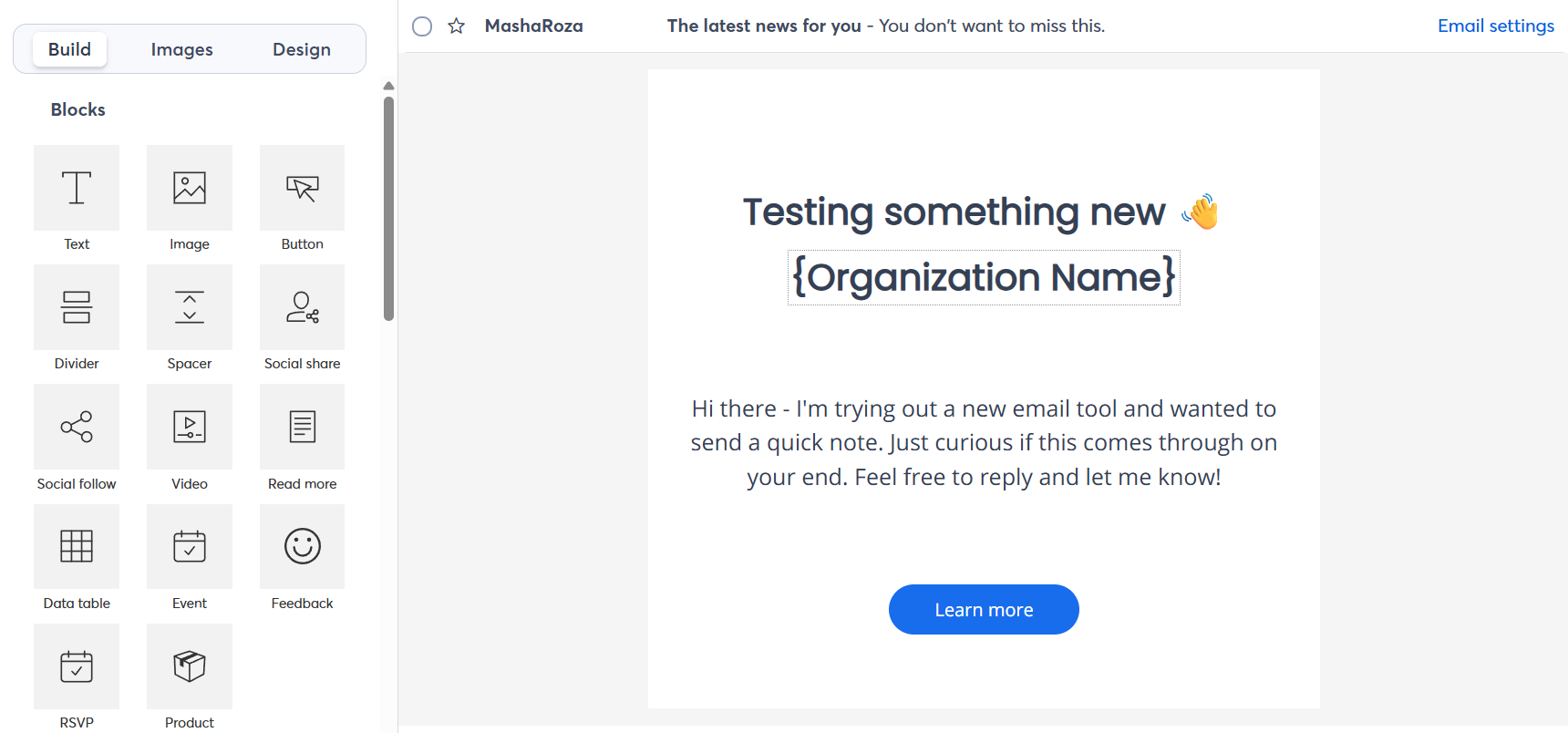 Inside the Constant Contact email editor
Capterra reviews, though, often describe Constant Contact’s email formatting options as “limited and glitchy,” and our testing supports that assessment. Text editing can become unstable when you build a template, which is frustrating given how much time you typically spend working in the editor.
Mailchimp’s builder, by contrast, offers a smoother, stress-free editing experience. Content blocks are significantly more versatile, and you can unlink your desktop and mobile styles to make specific changes to the version you need without impacting the other. Besides, it comes with more content blocks and dynamic content settings.
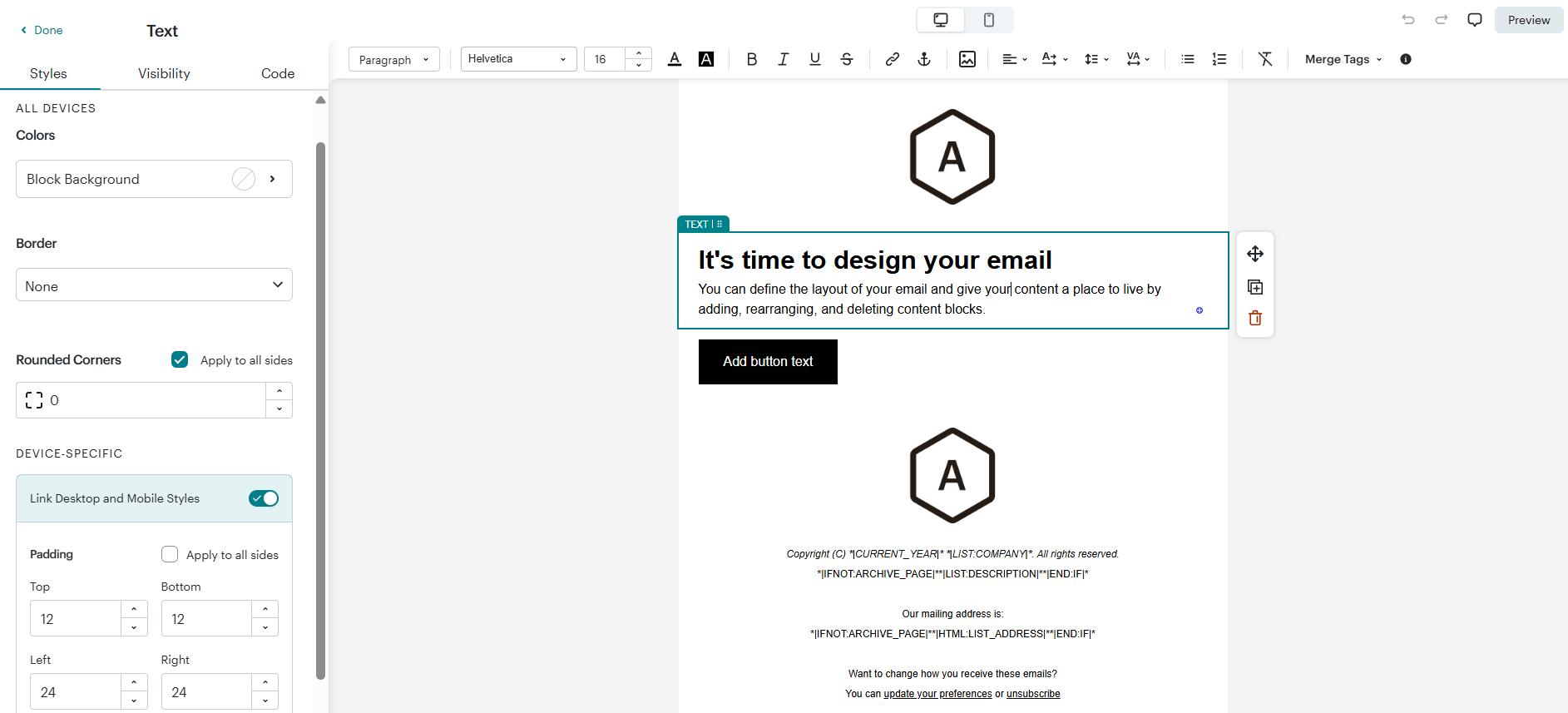 Inside the Mailchimp email editor
Marketing automation
Constant Contact: 5/10 | ⭐ Mailchimp: 7.8/10
Although both platforms let you automate emails, your expectations might not match the reality. Mailchimp’s automation builder supports complete workflows with branching logic and multiple paths, while Constant Contact allows you to build mostly simple-triggered message sequences. Compared to Mailchimp’s more advanced automation tool, Constant Contact is more of a basic solution that can satisfy users with minimal automation needs.
Here is a more detailed review:
| Aspect |
Constant Contact |
Mailchimp |
Winner |
| Availability by plan |
The cheapest paid plan offers only 1 template; custom automation building is not supported |
The cheapest paid plan is limited to only 4 automation flows |
Mailchimp |
| Automation builder |
Drag-and-drop automation path editor focused on linear message sequences |
Visual workflow editor supports rule-based branching and conditional paths |
Mailchimp |
| Triggers available |
14 triggers that cover calendar dates, contact, invoice, and shopping activity |
38 automation triggers for contact behavior, date-based events, engagement signals, eCommerce activity, API requests, and connected integrations |
Mailchimp |
| Pre-built automations |
14 basic templates, 9 being eCommerce-specific ones |
35 pre-configured automation flows for common use cases |
Mailchimp |
| Channels supported |
Email and SMS (only in the US) |
Email and SMS |
Mailchimp |
| Automation complexity |
Very basic, up to 50 steps |
Solid, up to 200 steps |
Mailchimp |
| Total score |
5/10 |
7.8/10 |
Mailchimp |
If the reference standard in your mind is advanced lifecycle automation, like multi-branch journeys, complex behavior logic, and coordinated eCommerce campaigns, Constant Contact’s automation will likely feel limited. Their building blocks center on triggers + delays + yes/no splits + message steps + the most basic contact actions.
That doesn’t make it unusable, though. If your goal is simple, reliable sequences, like welcome series, date-based reminders, basic eCommerce follow-ups, or SMS invitations, Constant Contact automation might be enough.
See how the Constant Contact automation builder looks:
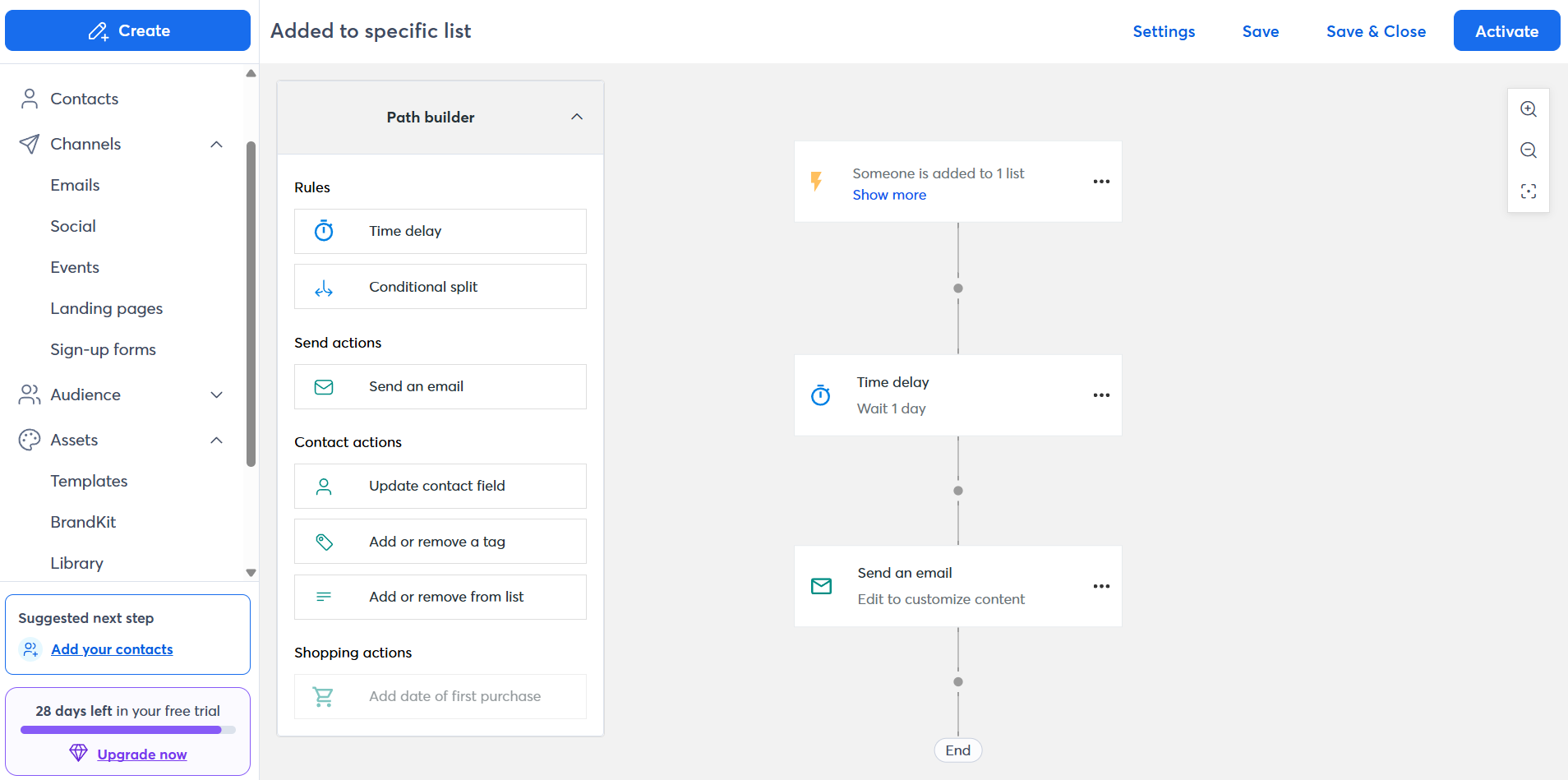 Welcome email automation flow at Constant Contact
On the other hand, Mailchimp offers a visual automation builder designed for start-to-finish customer journeys rather than sequences. Workflows can be triggered by multiple events and shaped using rule-based branching, while actions include sending emails, tagging contacts, updating audience data, and moving users between segments.
Because workflows can combine multiple rules and actions within the same path, Mailchimp supports much more elaborate automation scenarios than Constant Contact. Here’s what its builder looks like:
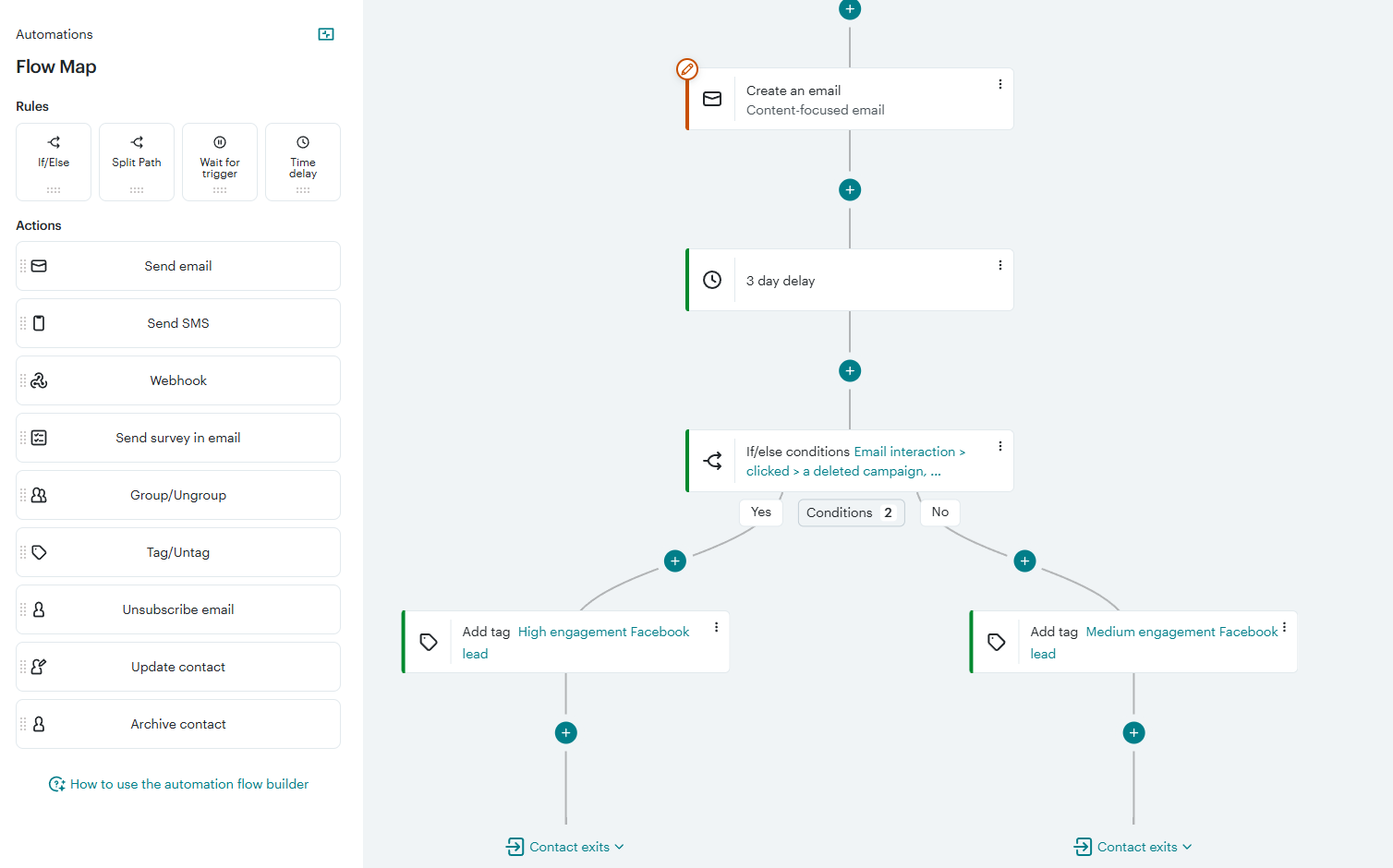 Find new contacts with Facebook Lead Ads flow in Mailchimp
For serious marketing automation, Mailchimp is clearly more flexible and capable than Constant Contact. Still, its automation score of 7.8/10 suggests it is not the most advanced option on the market.
If you need AI-powered, multi-channel automation with CRM-based triggers and actions, SendPulse is worth a look. It brings email, SMS, web push, and messaging app stogether inside one streamlined funnel.
Flows can start not only from subscriber actions like signups or purchases but also from CRM events such as deal creation or stage updates. In practice, that means your marketing reacts to what’s actually happening in your pipeline.
Contact management
⭐ Constant Contact: 7.5/10 | ⭐ Mailchimp: 7.5/10
Segmentation and tagging determine how precisely you can target your audience and how efficiently your campaigns perform. When comparing Constant Contact vs Mailchimp, we found that both have meaningful limitations, which explains their low scores in this category.
Here’s what you need to know before deciding between them:
| Aspect |
Constant Contact |
Mailchimp |
Winner |
| Segmentation capabilities |
Limited segmentation on lower tiers (1 segment on entry plan, 10 on standard); unlimited and eCommerce segmentation available only on the highest tier |
Condition-based segmentation using AND/OR logic with standard behavioral filters; higher tiers include predictive segmentation and unlimited condition combinations |
Mailchimp |
| Segment update speed |
Contacts are added to a segment automatically when they meet the rules |
Segments update automatically when used in campaigns or workflows |
Tie |
| Available segmentation criteria |
Email activity, lists, contact details, and integration data |
Demographics, location, signup source, campaign engagement, purchase activity, custom fields, and tags |
Mailchimp |
| Tagging and manual organization |
Contacts can be tagged manually only |
Contacts can be tagged manually or automatically |
Mailchimp |
| Contact structure |
Contacts are stored in a unified account database organized into lists; the same contact can belong to multiple lists and is automatically deduplicated when campaigns are sent |
Contacts are stored in separate audiences; the same email address stored in multiple audiences counts as multiple contacts, which may increase billing |
Constant Contact |
| Total score |
7.5/10 |
7.5/10 |
Tie |
Constant Contact simplifies audience structure by keeping everything inside one unified database that prevents billing surprises. The downside is limited segmentation, especially on lower tiers.
Mailchimp pushes much further into behavioral segmentation and predictive targeting. You can build more nuanced segments and automate tagging. However, the platform has a major drawback: its separate audiences don’t share data at all, so you can end up with duplicate contacts, leading to increased costs and messy lists.

Power up your business with smart tools
Emails, automation, chatbots, websites, CRM, and more — everything you need to connect with your audience. Try SendPulse for free today.
Get started for free
Signup forms and landing pages
Constant Contact: 7.4/10 | ⭐ Mailchimp: 8.2/10
Before your automation efforts or segmentation strategy starts to pay off, someone has to fill out a form on your page or website.
When we tested Constant Contact versus Mailchimp, it became clear that one keeps things simple, including your design options, while the other lets you customize forms and landing pages far beyond the basics.
Here’s how the two platforms compare in their form and landing page creation tools:
| Aspect |
Constant Contact |
Mailchimp |
Winner |
| Form types |
Pop-up, flyout, banner, inline forms; signup landing page, Facebook lead ads |
Pop-ups, embedded forms; signup landing pages |
Constant Contact |
| Form builder |
No pre-designed templates; forms are built from scratch with very limited style settings |
120 templates; visual builder with extensive design customization |
Mailchimp |
| Pop-up targeting conditions |
Time on page and exit intent |
Time on page, inactivity, quick scroll, or exit intent |
Mailchimp |
| Landing page builder |
11 old-fashioned templates; builder with basic layout and styling options |
9 templates; flexible customization options for layout blocks and global styles |
Mailchimp |
| Total score |
7.4/10 |
8.2/10 |
Mailchimp |
Constant Contact’s signup form editor offers only basic customization – you can change the text, pick colors for the button and background, and select which fields to display – but there’s no visual layout editor or advanced styling settings. Here’s how the Constant Contact pop-up builder looks:
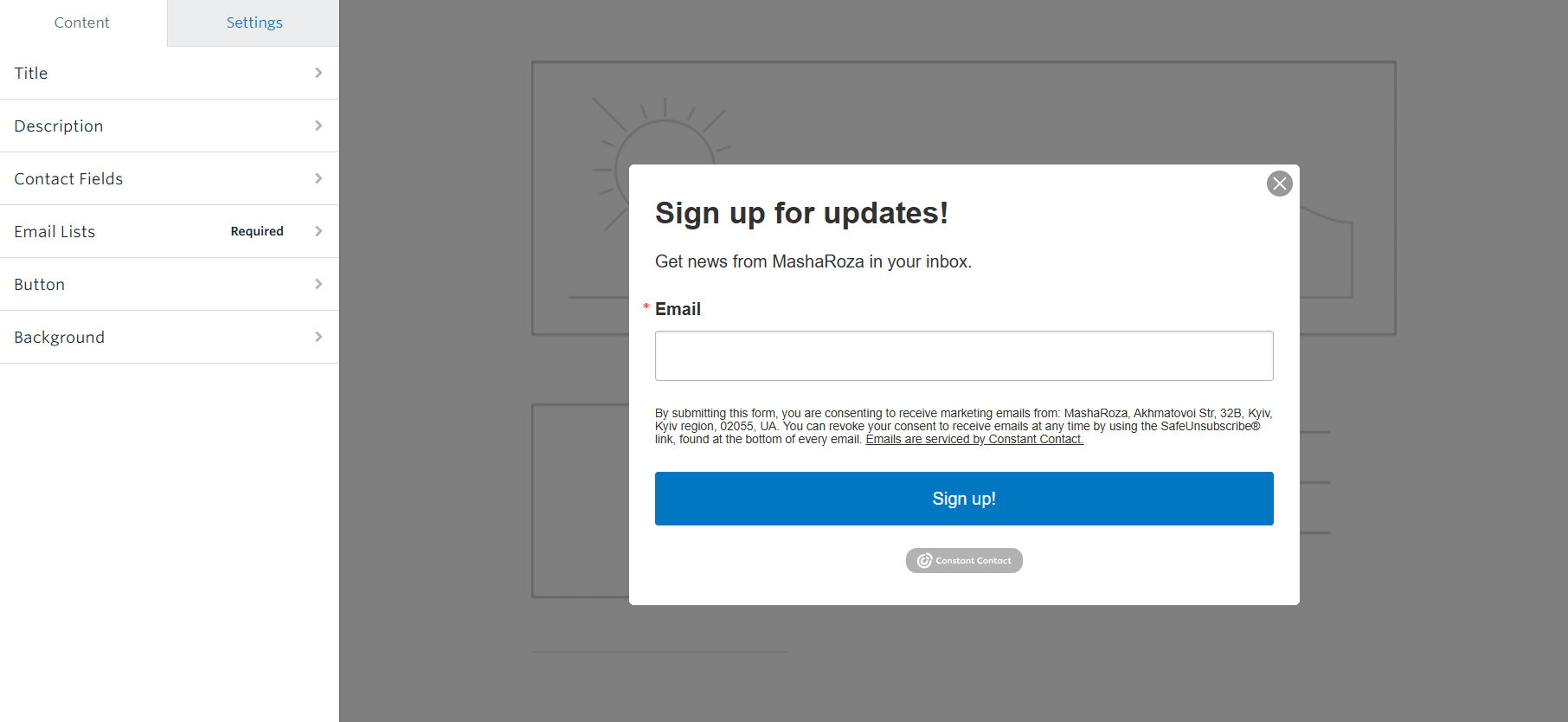 Editing a pop-up form in Constant Contact
Mailchimp offers one of the most flexible pop-up builders we’ve seen in our email platform comparisons, with extensive visual customization options. The editor is structured into three clear stages – email capture, follow-up, and confirmation, and you can adjust the content and design of each step individually.
Within each stage, you can modify layout, text, images, colors, and styling through a visual interface. This step-by-step approach keeps the process intuitive while still giving you full control over how each component of your pop-up looks and behaves.
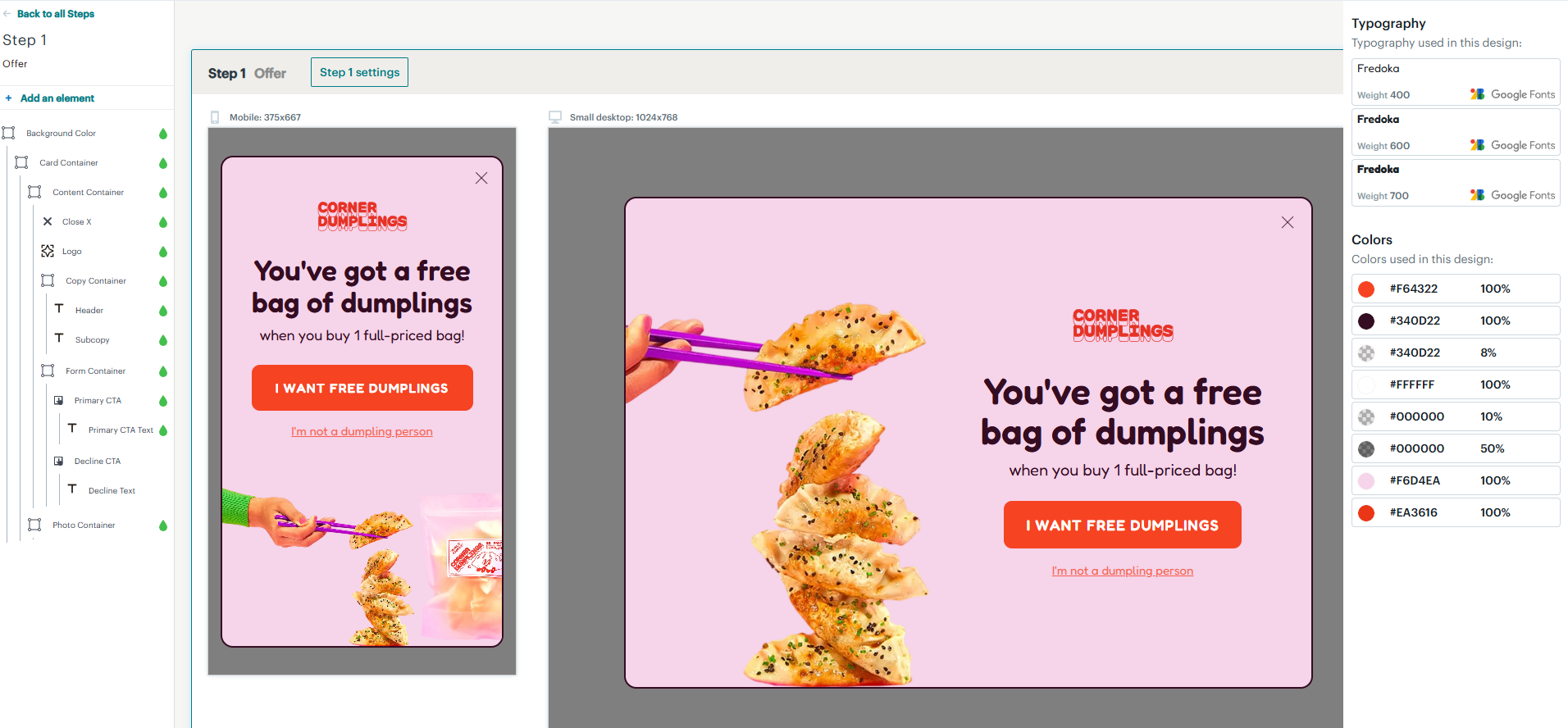 Editing a pop-up form in Mailchimp
If you find that Constant Contact’s limited customization or Mailchimp’s lack of template variety is holding you back, consider exploring platforms with better lead-capturing tools.
Take SendPulse as an example. It’s an AI-powered platform that offers a wide range of form types with advanced styling options and targeting rules. It also provides ready-made website templates and pre-made components, as well as eCommerce functionality, at a lower starting price.
Deliverability
Constant Contact: 7/10 | ⭐ Mailchimp: 9.6/10
Deliverability is what determines whether your emails reach subscribers’ inboxes or end up elsewhere. While up to 80% of deliverability depends primarily on your list quality and sending practices, the infrastructure and tools your platform provides can either support or complicate that process.
Here’s how Constant Contact and Mailchimp compare in this category:
| Aspect |
Constant Contact |
Mailchimp |
Winner |
| Authentication |
Supports SPF, DKIM, and DMARC authentication |
SupportsSPF, DKIM, and DMARC authentication, with clear instructions and visible verification status |
Tie |
| Deliverability monitoring |
Not available |
Content checks for formatting issues before sending |
Tie |
| List hygiene |
Automatic suppression of bounced email addresses; list of email addresses recommended for removal |
Automatic processing of bounces, spam complaints, and unsubscribes; tools to filter and manage inactive subscribers based on engagement |
Mailchimp |
| Dedicated IP |
Not available |
Available as a paid add-on for high-volume senders ($29.95/mo), including assistance with IP warm-up |
Mailchimp |
| Total score |
7/10 |
9.6/10 |
Mailchimp |
We noted that independent review platforms often show lower deliverability ratings for Constant Contact. Many users report emails being blocked, flagged as spam, or landing in spam folders. The company has also acknowledged delivery delays at certain times, including while we were testing the platform.
 Email delivery delay notice in the Constant Contact account
Integrations
Constant Contact: 6.2/10 | ⭐ Mailchimp: 7.7/10
When your tools don’t sync properly, marketing becomes manual, time-consuming work. So, before committing to Constant Contact or Mailchimp, it’s worth checking how well they fit into your existing tech stack.
To give you an idea, here are some integrations across different categories that these platforms offer:
| Aspect |
Constant Contact |
Mailchimp |
Winner |
| Integration catalog |
60 integrations |
339 integrations |
Mailchimp |
| eCommerce platforms |
10 integrations, including Shopify, WooCommerce, BigСommerce, eBay, and Magento |
72 integrations, including Shopify, ShopifyPlus, WooCommerce, and BigCommerce |
Mailchimp |
| CRM systems |
11 integrations, including Salesforce, Zoho, HubSpot, and OnePageCRM |
82 integrations, including Pipedrive, Zoho, Monday, and Salesforce |
Mailchimp |
| Analytics and data tools |
1 integration – Glances |
37 integrations, including Google Analytics and Supermetrics |
Mailchimp |
| Zapier support |
8,659 apps available through Zapier |
8,000+ apps available via Zapier |
Tie |
| MCP server |
Not available |
Not available |
– |
| Total score |
6.2/10 |
7.7/10 |
Mailchimp |
A thing worth noting: Constant Contact and Mailchimp integrate with external CRM systems, but neither includes a native one. For teams that already use Salesforce, HubSpot, or similar solutions, that may be totally fine.
If you’d rather avoid stitching your tools together, SendPulse includes a full-featured CRM system with pipelines, deal tracking, contact history, and task assignments built in. It also provides an official MCP server, which allows AI tools like ChatGPT or Claude to access and interact with your account data.
AI features
Constant Contact: 4/10 | ⭐ Mailchimp: 8.7/10
While Mailchimp is powered by Intuit Assist – a generative AI system integrated across the entire Intuit ecosystem, including Mailchimp itself – Constant Contact offers only a beta AI assistant for basic tasks and some limited email generation tools.
Once you start comparing the tools side by side, the contrast becomes fairly obvious: most of the features we evaluate simply aren’t available in Constant Contact. See for yourself:
| Aspect |
Constant Contact |
Mailchimp |
Winner |
| Email generation |
Content generation for emails with different tones; email templates can be generated from a user prompt |
Brand-aligned email content generation, including subject lines and preview text, based on past campaign results and audience engagement patterns |
Mailchimp |
| Automation generation |
Not available |
Beta feature that builds automations from natural-language prompts; requires human review and adjustments before activation |
Mailchimp |
| Sending time optimization |
Not available |
Suggested sending times determined by general engagement data trends |
Mailchimp |
| Predictive customer analytics |
Not available |
Predictive metrics for connected eCommerce stores, including purchase likelihood and estimated customer lifetime value |
Mailchimp |
| Smart segmentation |
Not available |
Predictive data can be used when building segments manually, but the platform does not automatically create or suggest segments |
Mailchimp |
| Deliverability assistance |
Not available |
Built-in spam analysis and content improvement suggestions available directly within the email editor before sending |
Mailchimp |
| Total score |
4/10 |
8.7/10 |
Mailchimp |
So, if Constant Contact offers only one of the six AI features on our list, where does its 4/10 score come from? Actually, the platform provides a useful option: generating email templates based on your prompt. For example, you can request an Easter 2026 template, and AI will present several versions tailored to eCommerce, nonprofit, or other fields, with customizable styles, text, and image quantity:
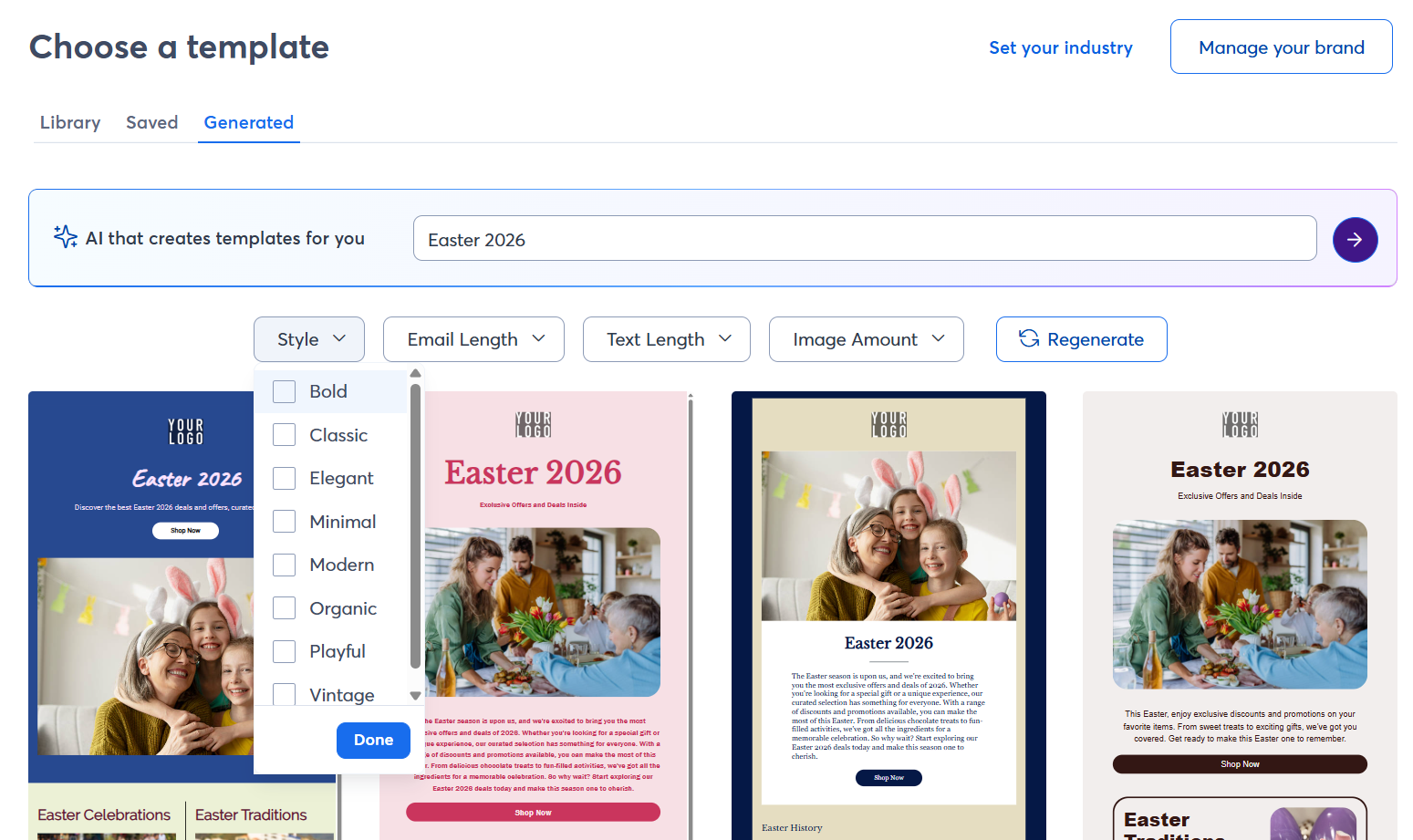 Email templates generated by AI in Constant Contact
Does this feature make Constant Contact the winner in AI capabilities? Hardly so. But for teams that mainly use an email platform to draft and send campaigns, it can be genuinely useful.
Reporting and analytics
Constant Contact: 6.5/10 | ⭐ Mailchimp: 7.8/10
Both platforms deliver the core metrics for you and your marketing team to track overall email performance. Here’s how Constant Contact and Mailchimp compare across key reporting aspects:
| Aspect |
Constant Contact |
Mailchimp |
Winner |
| Report coverage |
Basic campaign-focused reports (opens, clicks, bounces, unsubscribes, etc.) |
Comprehensive reports across campaigns, audiences, and connected eCommerce data |
Mailchimp |
| Custom reports |
Not available |
Custom reports with engagement, delivery, and eCommerce metrics you choose, with filtering and grouping |
Mailchimp |
| Reporting speed |
Data become available after sending and may require some time to refresh |
Metrics update with a delay |
Tie |
| Export options |
CSV or Excel files for campaign metrics and contact activity data |
CSV files for campaign results, contact data, and reporting metrics |
Tie |
| Total score |
6.5/10 |
7.8/10 |
Mailchimp |
At the end of the day, both platforms do the job for everyday email reporting. Mailchimp just gives you more room to explore the numbers, especially if you want to compare campaigns, analyze your automations, or connect reporting with eCommerce activity. It’s not a dramatic difference, but it’s enough to give it the slight edge here.
Customer support
⭐ Constant Contact: 7/10 | ⭐ Mailchimp: 7/10
When everything runs smoothly, customer support rarely crosses your mind. However, when you’re learning a new platform or troubleshooting an issue, the quality of help and clarity of documentation can make a big difference.
While testing Mailchimp versus Constant Contact, we occasionally had to rely on available help resources to figure things out. Here’s what we found:
| Aspect |
Constant Contact |
Mailchimp |
Winner |
| Channel availability |
Live phone and chat support during business hours; dedicated priority support team on higher-tier plans |
24/7 email and chat support; phone and priority assistance available on higher-tier plans |
Constant Contact |
| Knowledge base |
Extensive yet inconsistent and sometimes misleading help center |
Extensive and well-structured knowledge base |
Mailchimp |
| Onboarding assistance |
One-on-one onboarding sessions with experts |
Available only on higher-tier plans |
Constant Contact |
| Support quality rating on Capterra |
4.2/5 |
4.2/5 |
Tie |
| Total score |
7/10 |
7/10 |
Tie |
When you run into issues, reaching out to a support agent usually solves things faster than searching through the help center. Luckily, Constant Contact’s agents are known for being responsive and genuinely helpful. Still, the knowledge base itself feels inconsistent. For instance, product-related information may appear in different places with slight variations, mixed with general marketing advice, which makes self-service troubleshooting much harder.
Mailchimp also provides support for product-related questions; moreover, not just during business hours but 24/7. What’s good is that their help center is structured more clearly and is generally easier to navigate.

Join 3M+ businesses growing with SendPulse
From solo creators to global brands, millions trust SendPulse to run email campaigns, automations, chatbots, and more — all in one place. Get started for free now!
Get started for free
Your decision checklist
Now that you have all the information in front of you, it’s time to decide. Review the key areas below and see which platform aligns better with your needs. The one that checks more of your boxes is likely the better choice to try first.
| Decision area |
Constant Contact
is a better fit if… |
Mailchimp
is a better fit if… |
| Business model |
🟦 You run a small local business, nonprofit, or event-driven organization and need simple email campaigns without complex setup. |
🟨 You run an online business, SaaS product, or eCommerce brand that relies on segmentation and scalable marketing workflows. |
| Automation needs |
🟦 You need basic autoresponders or triggered email sequences. |
🟨 You require multi-step automations with branching logic and behavioral triggers to engage prospects and customers at specific stages of their journey. |
| Analytics focus |
🟦 Basic campaign metrics like opens, clicks, and bounces are enough for tracking results. |
🟨 You want deeper insights, including comparative reports, audience analytics, and predictive performance metrics. |
| Budget expectations |
🟦 You’re willing to pay more for hands-on support and simplicity, even if the feature set is limited. |
🟨 You’re looking for a better feature-to-price ratio, particularly with the discounted first-year pricing. |
| Team and resources |
🟦 Your team prefers accessible human support and minimal time spent learning complex tools. |
🟨 Your team is comfortable exploring structured documentation and learning new, advanced tools independently. |
If neither platform truly fits your needs, there are plenty of other email marketing tools with different strengths:
Final verdict and recommendations
⚖️ Final scores: Constant Contact – 6.1/10 | Mailchimp – 8.7/10
When two platforms score within a point of each other, the final decision usually comes down to personal preference and business workflow. However, that’s not the case with Constant Contact.
While we can’t speak for every user, it appears that much of Constant Contact’s audience consists of long-standing customers who have been with the platform for years and prefer not to switch. For most other businesses, it’s difficult to justify choosing Constant Contact over Mailchimp. It costs more while offering less depth and functionality in every aspect of email marketing we evaluated.
Our conclusion: we would not recommend starting with Constant Contact in 2026.