HubSpot is one of the most recognized names in CRM and email marketing, and for good reason. It offers a broad set of tools for sales and marketing teams, including highly customizable automation and advanced segmentation. But despite its positioning as a solution for businesses of any size, HubSpot isn’t always the right fit. Costs can add up quickly, and some teams find it more complex than they actually need. That’s where HubSpot competitors come in, and there are plenty worth considering.
Disclosure: This article is published by SendPulse. Although we cover our own product alongside competitors, we aim to present each tool fairly.
TL;DR Best HubSpot alternatives compared
Here’s a side-by-side comparison of the best HubSpot alternatives for email marketing, so you can quickly evaluate pricing models and key features before diving into the details.
| Tool |
Best for |
Pricing model |
Starting price
(as of June 2026) |
Built-in CRM features |
| SendPulse |
SMBs looking for all-in-one multi-channel marketing in a single platform |
Plan + contacts |
$9.60/mo for
500 contacts, ∞ emails, 10 flows |
Contact management, sales pipelines, task tracking, segmentation, automation flows, and integrations |
| ActiveCampaign |
Growing businesses looking for advanced automation, email marketing, and a sales CRM |
Plan + contacts |
$15/mo for
1k contacts, 10k emails |
Contact management, deal pipelines, lead scoring, sales automation, task management, email tracking, and deep CRM-tied automation |
| Brevo |
Teams looking for affordable multi-channel marketing |
Plan + email volume |
$8.08/mo for
500 contacts, 5k emails |
Contact management, deal pipelines, basic sales CRM, task tracking, and integrations |
| Zoho |
Businesses already using the Zoho ecosystem |
Plan + contacts (Zoho Campaigns) or plan + per user (Zoho CRM) |
$3.50/mo for
500 contacts, ∞ emails |
Lead and contact management, pipelines, forecasting, multi-channel tracking, and workflow automation |
| EngageBay |
Startups and small businesses looking for a budget-friendly all-in-one platform |
Plan + per user |
$13.79/mo for
500 contacts, 3k emails |
Contact and deal management, sales pipelines, helpdesk with ticket management, live chat, macros, and automation |
| Pipedrive |
Sales teams needing a visual pipeline CRM |
Plan + per user |
$14/mo for
1 seat, 2,5k leads and deals |
Visual sales pipelines, contact and deal management, activity tracking, email integration, reporting dashboards, workflow automation, forecasting |
| Keap |
Businesses needing a powerful all-in-one CRM with strong automation, sales, and payments |
Per user + contacts |
$299/mo for
2 users, 1,5k contacts |
Contact and lead management, sales pipelines, workflows, appointment scheduling, and payments |
| Klaviyo |
eCommerce brands wanting advanced email and SMS marketing with deep customer data and segmentation |
Plan + contacts |
$20/mo for
500 contacts, 5k emails |
Marketing CDP with customer profiles, real-time segmentation, behavioral tracking, purchase data, revenue attribution, and integrations |
These CRM and email marketing tools each serve different needs. Ultimately, the right choice comes down to your stage of growth and how complex your marketing and sales processes actually are.
Quick HubSpot feature overview
G2: 4.4 ⭐ | Capterra: 4.5 ⭐
HubSpot has become one of the most recognized platforms in sales and marketing, with its tools organized into dedicated hubs: Sales Hub, Marketing Hub, Service Hub, CMS Hub, and Operations Hub. Each hub is built around a specific function, which makes it easy to find the right set of tools for your team’s goals.
Here’s what the HubSpot Marketing Hub’s free plan includes:
- Forms – standalone, embedded, and pop-up form types with automated follow-up actions.
- Emails – up to 2,000 emails per month with HubSpot branding.
- Email automation – automated email campaigns, workflows, and routine marketing tasks.
- AI-powered tools – AI-generated and personalized email content, automated marketing tasks, and AI agent support for customer interactions.
- Landing page builder – AI-assisted page creation with cross-device preview before publishing; free plan includes HubSpot branding and limited customization.
- Audience segmentation – contact segmentation and targeting based on behavior and characteristics; lookalike feature for identifying prospects similar to existing contacts.
- Reporting – email performance metrics including deliverability, open rates, and click-through rates.
- Integrations – native connections with Google Calendar, Google Sheets, Shopify, WordPress, Hotjar, and Databox.
Sales teams may find the HubSpot Sales Hub a better fit for their day-to-day needs. Here’s what its free plan offers:
- Email templates – reusable templates with dynamic personalization using contact properties and personalization tokens.
- AI-powered email assistance – AI-generated and personalized sales email content based on CRM data.
- Email reply tracking – visibility into which contacts have responded to each email.
- AI-supported prospecting – Breeze AI agents for lead prioritization and outreach suggestions; functionality is limited on the free plan.
- Integrations – Gmail, Outlook, and Microsoft Exchange connections for sending emails directly from HubSpot.
Beyond the free plan, HubSpot offers deeper CRM customization and more advanced automation across its higher-tier plans.
Why HubSpot gets expensive fast
HubSpot is a widely popular all-in-one marketing platform. While it offers a free plan, costs can increase quickly as your business grows due to its pricing structure.
- Contact-based pricing. Pricing scales with the number of marketing contacts. Exceeding the included limit automatically moves you to a higher pricing tier, which can significantly increase monthly costs.
- Steep tier jumps. Moving from the cheapest to the next paid plan involves a steep price increase from $9 per seat to around $800/month, even if you only need a few additional features.
- Mandatory onboarding fees. Some paid plans require one-time onboarding fees of around $3,000–$7,000, depending on the chosen plan. This adds a substantial upfront cost.
- Seat-based pricing. Paid plans include a limited number of users, and each additional seat adds a recurring monthly cost.
- Add-ons and usage-based costs. Features like marketing SMS, advanced reporting, API usage, or AI Breeze credits can increase costs depending on usage.
- Scaling across hubs. Using multiple HubSpot products, for example, Marketing and Sales Hub, increases the total cost, even though they are part of the same ecosystem.
The truth is, HubSpot can be an option for larger teams seeking an all-in-one marketing solution. However, its combination of contact-based pricing, tier upgrades, and add-ons means costs can grow quickly as your marketing and sales activities scale.
The best HubSpot alternatives reviewed
All features, pricing, and positioning below are accurate as of June 8, 2026. Our team created accounts and tested the platforms’ email builder, automation setup, and CRM features firsthand. Most screenshots are taken during our testing.
Startups and small businesses often assume HubSpot is their only option, and that assumption can lead to being locked into expensive year-long contracts. The good news is that several HubSpot competitors offer comparable features at a significantly lower cost.
SendPulse
G2: 4.6 ⭐ | Capterra: 4.6 ⭐
Best for: Teams looking for a budget-friendly all-in-one email marketing platform.
SendPulse is a user-friendly alternative to HubSpot that covers marketing automation, subscriber segmentation, and analytics in one place. The drag-and-drop editor made building a campaign from scratch during our test noticeably fast — and with 140+ ready-made templates, pulling together text, images, buttons, videos, and social media links was easy even without a design background. AI tools are also built directly into the email creation workflow, so users can generate, refine, and adapt content without switching between platforms.
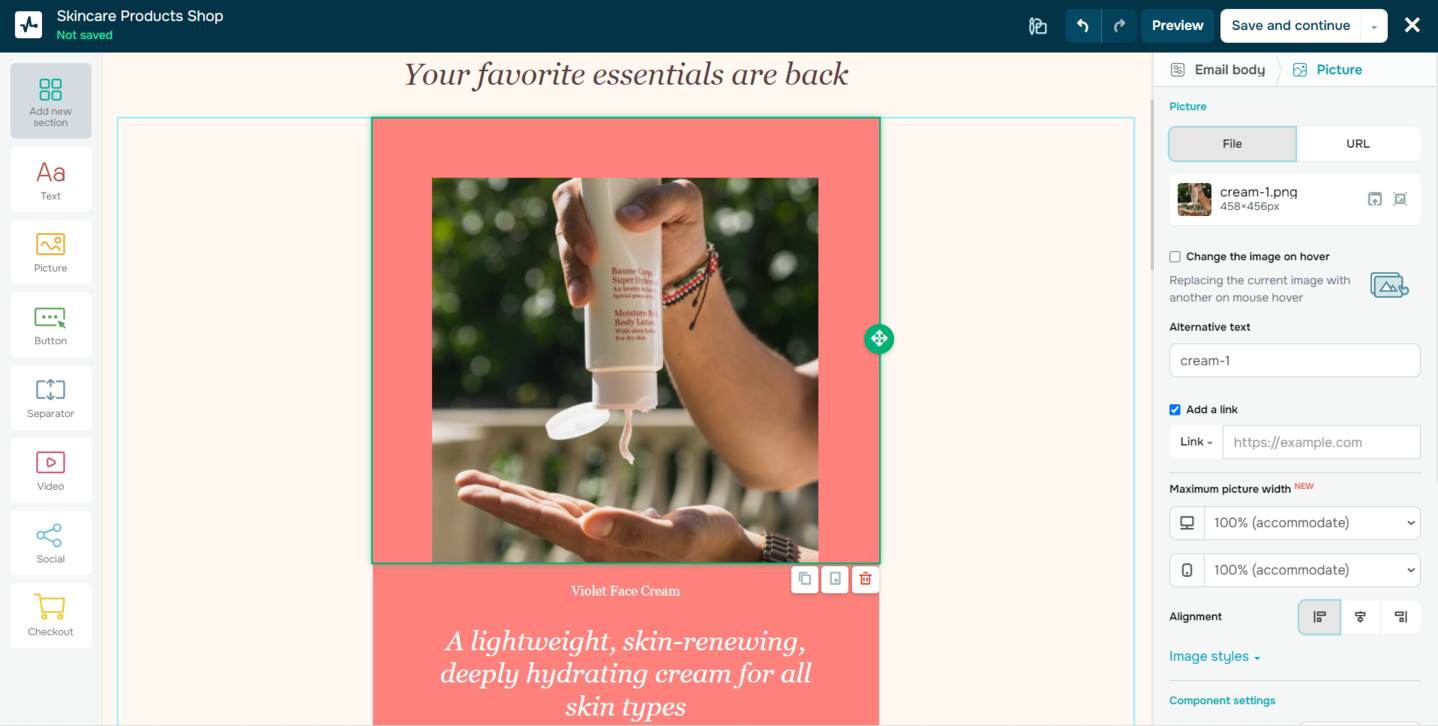 Creating an email campaign with SendPulse while testing the builder
The platform also includes a built-in spam checker to help protect your sender reputation and keep bulk emails out of the blacklist. Beyond that, it combines CRM functionality with dynamic segmentation to support more targeted messaging. User data, including behavior, preferences, and deal status, is stored within a centralized system and can be used to trigger automated campaigns.
SendPulse key features include:
- drag-and-drop email editor;
- 140+ pre-designed email templates;
- AI-powered content generation and editing;
- AI-assisted flow builder for marketing automation;
- static and dynamic segmentation based on user behavior and data;
- built-in CRM system for contact and deal management;
- personalized email content, based on name, location, and preferences;
- email scheduling and trigger-based campaigns;
- A/B testing for email subject lines and content;
- payment processing in emails;
- email address verifier;
- multi-channel integrations, including chatbots and push notifications, and more.
Limitations. The free plan allows just 500 subscribers and restricts access to some advanced features like dynamic segmentation and payment processing. Analytics capabilities may not provide the depth needed for granular insights and complex data breakdowns.
Not the right fit if your business has complex enterprise-level needs or requires a highly specialized, deeply customizable email marketing solution. In that case, a more robust HubSpot alternative may be a better match.
Pricing. SendPulse offers both a subscription plan and a pay-as-you-go model. The free tier covers up to 500 subscribers and 15,000 emails per month. The entry-level paid plan starts at $9.60/month (billed annually) for 500 subscribers, unlimited emails, 10 automated flows, and advanced features.

Power up your business with smart tools
From solo creators to global brands, thousands of customers trust SendPulse to run email campaigns, chatbots, automations, and more — all in one place.
Get started for free
ActiveCampaign
G2: 4.5 ⭐ | Capterra: 4.6 ⭐
Best for: Companies that need automation-heavy lifecycle marketing and predictive sending.
ActiveCampaign is another alternative to HubSpot that combines email marketing with advanced AI capabilities. Its AI-powered tools can generate complete email campaigns from a single prompt, including layouts, copy, subject lines, and images. Apart from that, the platform’s Active Intelligence analyzes large volumes of customer data to provide real-time recommendations, such as optimal sending times and content adjustments.
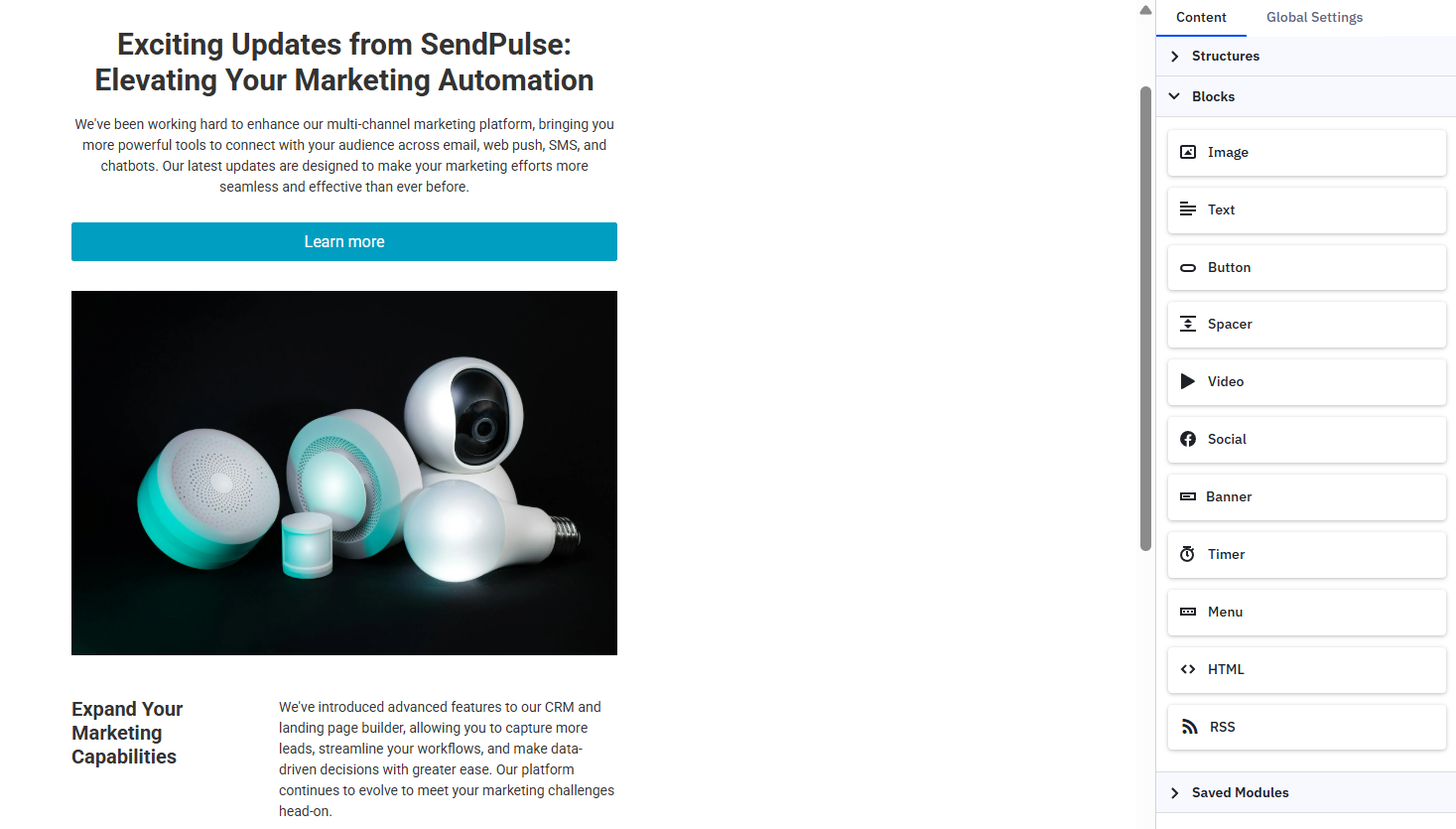 Setting up a new email in ActiveCampaign’s builder during our review
In addition to AI, ActiveCampaign uses behavioral data and automation to tailor messages to individual subscribers, which reduces the need for manual segmentation. Its infrastructure includes dedicated IP management, authentication protocols, and real-time monitoring to support inbox placement and sender reputation.
One thing that stood out while working with the ActiveCampaign automation builder was the contextual suggestions. As you add steps, the platform recommends what to include next, such as wait times, follow-ups, or condition checks.
ActiveCampaign key features include:
- drag-and-drop email designer for plain text and HTML;
- 250+ pre-built templates;
- AI campaign builder and follow-up automation;
- AI content generation;
- conditional content;
- AI-powered predictive sending;
- segmentation based on user preferences and actions;
- scheduled, RSS-triggered, and date-based campaigns;
- CRM features like contact profiles, custom fields, tags, lists;
- eCommerce features like product catalog and blocks, coupons, etc.;
- automation reporting, sales reporting, and more.
Limitations. ActiveCampaign’s advanced features and automation capabilities can come with a steeper learning curve, especially for beginners. Additionally, pricing can increase quickly as your contact list grows or if you need access to more advanced features.
Not the right fit if you need a simple email marketing tool with minimal setup. Small businesses or beginners with basic needs may find a more straightforward, lower-cost HubSpot alternative a better choice.
Pricing. ActiveCampaign doesn’t offer a free plan, but new users get a 14-day free trial. The entry-level plan starts at $15/month (billed annually) and includes 1,000 contacts, 10,000 emails, limited AI functionality, and basic segmentation.
Brevo
G2: 4.5 ⭐ | Capterra: 4.6 ⭐
Best for: Growing teams that need optimal send-volume pricing with built-in CRM and AI features.
Brevo is an all-in-one sales and marketing automation platform that balances advanced functionality with ease of use. It covers email and SMS campaigns, automated follow-up sequences, real-time analytics, chat, sales CRM, WhatsApp messaging, and transactional emails in one place.
This HubSpot alternative lets users quickly create responsive emails using a drag-and-drop editor or templates, with optional AI tools for content generation. Brevo’s segmentation system supports targeting based on demographics, behavior, and purchase history, including dynamic lists that update automatically as subscriber activity changes.
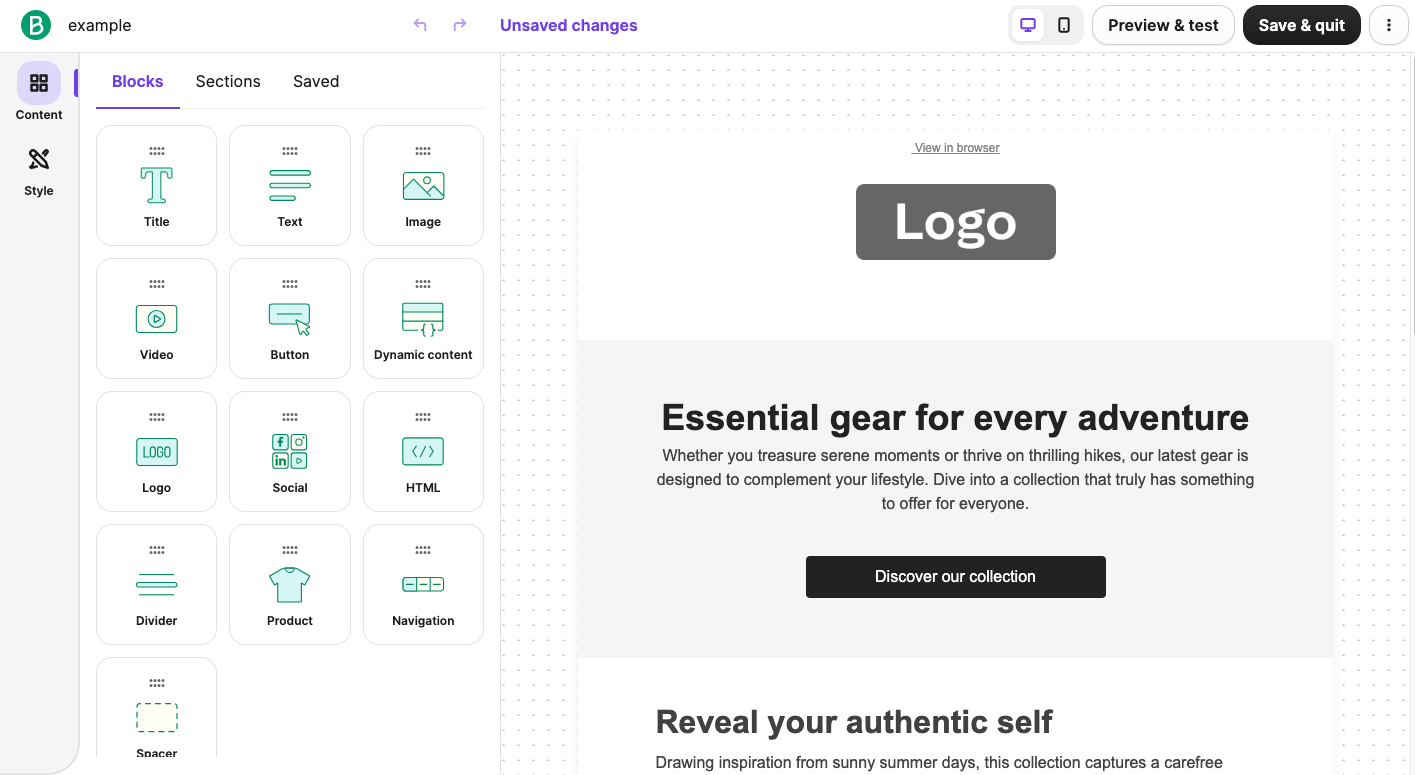 Exploring Brevo’s content blocks while building a test email
The platform’s pre-built automation flows cover common use cases like welcome sequences, birthday messages, and abandoned cart reminders. We also gave Brevo’s AI automation builder a try — we described a multi-step welcome flow in plain language, and it generated the full structure in minutes: a form trigger, two emails with a three-day delay, a conditional split based on link clicks, and a sales notification. The steps still needed content and settings configured manually, but the logic and sequence were spot on.
Brevo key features include:
- drag-and-drop editor;
- ready-made email templates;
- AI-generated subject lines and email content;
- AI-powered predictive sending;
- advanced segmentation based on filters and attributes;
- dynamic lists that update automatically based on subscriber activity;
- ready-made workflows and autoresponders;
- transactional emails;
- audience and campaign analytics and reporting.
Limitations. Brevo’s free plan is limited by a daily sending cap, and some advanced features are only available on more expensive plans. If you want to remove Brevo branding, you need to buy an add-on or upgrade to a higher-tier plan.
Not the right fit if your business requires highly complex automation, extensive integrations, or a fully customizable email infrastructure.
Pricing. Brevo offers a free plan that allows up to 300 emails per day. The entry-level paid plan starts at $8.08/month (billed annually) and includes 5,000 emails and 500 contacts. A pay-as-you-go option with email credits is also available.
Zoho
G2: 4.3 ⭐ | Capterra: 4.3 ⭐
Best for: Businesses that want a scalable all-in-one system or are already using the Zoho ecosystem.
Zoho offers an integrated suite of business tools that brings together marketing and sales capabilities. Zoho Campaigns focuses on email and SMS marketing, and allows users to create professional campaigns using pre-designed templates or custom layouts. This HubSpot competitor includes automation features for workflows like lead nurturing or follow-ups, along with optimization tools such as A/B testing, send-time optimization, and detailed performance analytics.
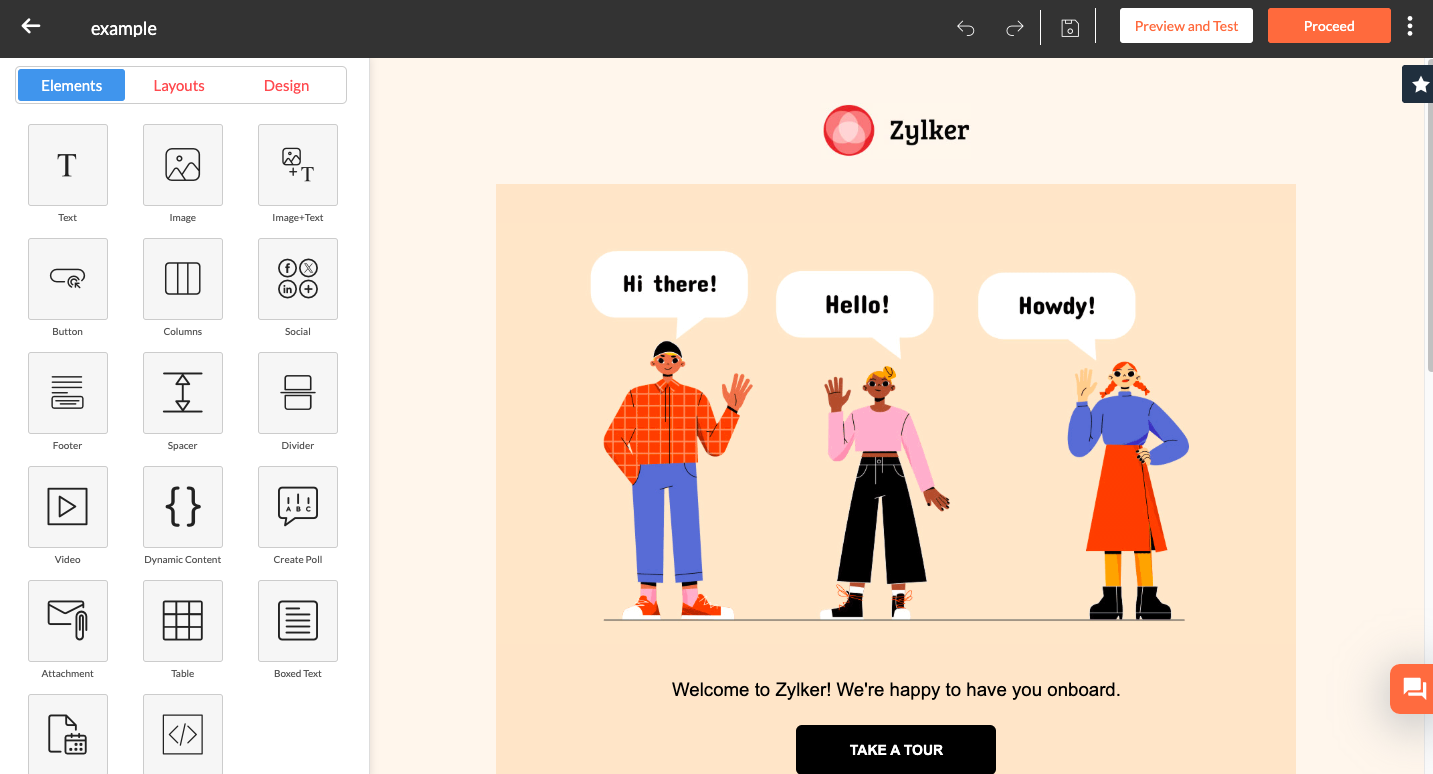 Customizing an email template in Zoho Campaigns during our hands-on test
Zoho CRM complements this by acting as a central hub for customer data and sales processes. Teams can manage pipelines, track interactions, and collaborate across departments. Built-in AI features surface insights and help identify opportunities or anomalies across the sales cycle.
The template editor in Zoho Campaigns was easy to pick up when we tested it, and the data sync between Campaigns and Zoho CRM kept contacts and engagement history aligned without manual imports.
Zoho key features include:
- drag-and-drop template editor;
- pre-designed, responsive newsletter templates;
- segmentation based on name, interactions, eCommerce activities, etc.;
- bulk segments by country, state, and other attributes;
- dynamic content based on specific criteria;
- AI-based product recommendations;
- eCommerce email marketing;
- cart abandonment and purchase follow-up workflows;
- email scheduling with timezone-based sending;
- automated workflows with 25+ components;
- Zia AI Agents in Zoho CRM;
- A/B testing for content, subject line, or sender address.
Limitations. The combined system can feel complex to set up and manage, especially for beginners or smaller teams without CRM experience. Some advanced features, integrations, and AI capabilities are only available on higher-tier plans.
Not the right fit if you need a simple email marketing tool without a full CRM system, or prefer a more specialized solution focused purely on email.
Pricing. Zoho’s tools are available separately or in combination. Zoho Campaigns offers a free plan with up to 2,000 contacts and 6,000 emails per month. The entry-level paid plan starts at around $3.50/month (billed annually) for 500 contacts with unlimited emails.
EngageBay
G2: 4.6 ⭐ | Capterra: 4.7 ⭐
Best for: Companies looking for a budget-friendly all-in-one CRM suite with built-in AI for email creation, personalization, and basic automation.
EngageBay is an all-in-one CRM and marketing platform that allows businesses to manage customer relationships, marketing campaigns, and sales activities within one platform. Users can build emails using templates or custom designs, generate multiple variations for testing, and refine subject lines and content with AI assistance. This HubSpot alternative for small businesses also supports personalization by tailoring messages based on customer behavior and interaction history.
While testing the email editor, we found the template customization controls, including padding, spacing, and block-level styling, granular enough for precise layouts without requiring HTML edits.
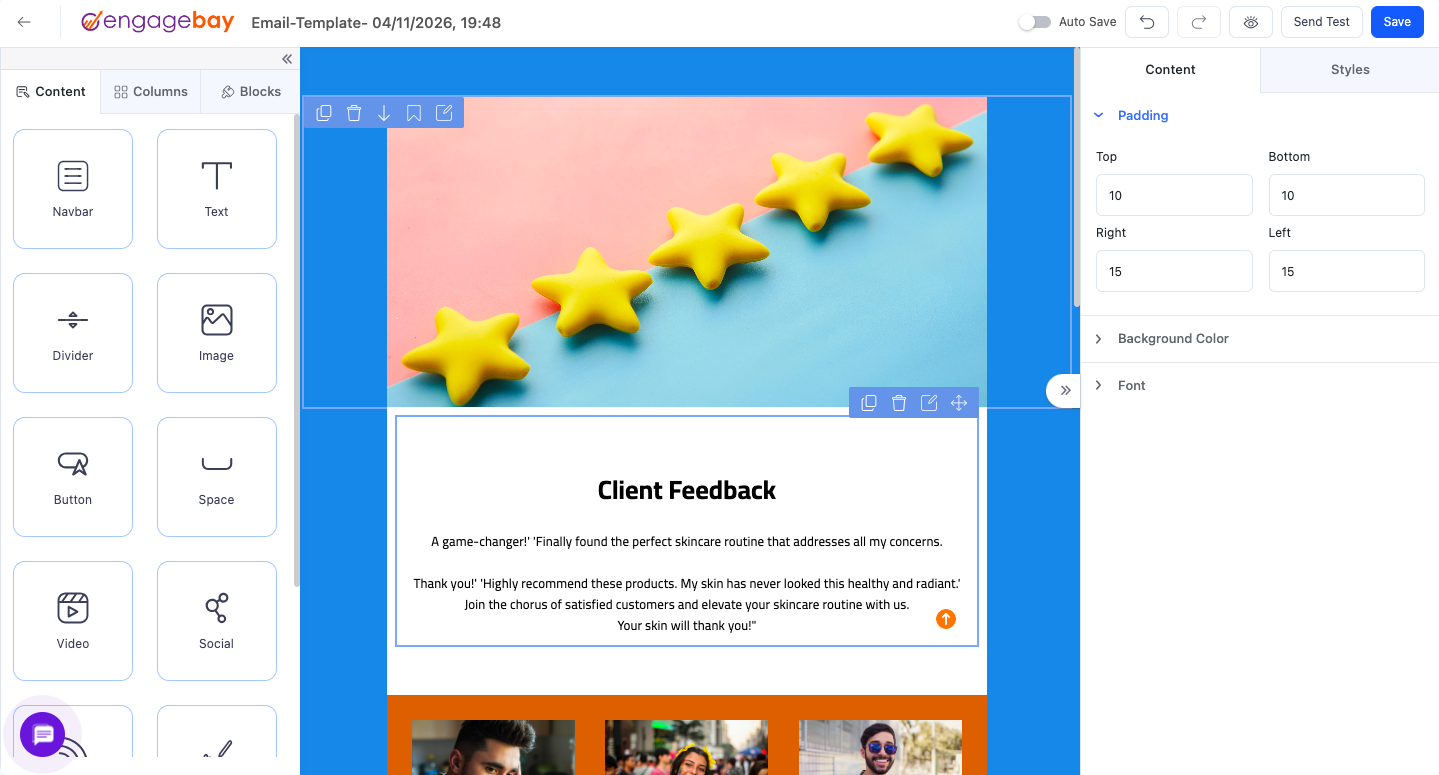 Adjusting padding in our test email template in EngageBay’s editor
Beyond email, EngageBay covers contact and deal management, marketing automation workflows, and multi-channel communication. It provides analytics and reporting features to track performance metrics like open rates and engagement. Additionally, the platform’s AI-driven analytics help marketers identify patterns in open rates, clicks, and conversions, letting them refine campaigns and focus on what works best.
EngageBay key features include:
- email template builder;
- pre-made email templates;
- email broadcast;
- AI email draft generation;
- AI subject line and content personalization;
- email automation;
- dynamic content based on user behavior and preferences;
- AI-driven insights on open rates, clicks, and engagement;
- additional features like landing pages, inline forms, live chat, and others.
Limitations. EngageBay can feel overwhelming at first due to the number of features and modules. Also, reporting and analytics are relatively basic, and the integration ecosystem is limited compared to HubSpot.
Not the right fit if your business has complex workflows, advanced reporting needs, or relies heavily on custom integrations.
Pricing. EngageBay offers separate hubs for marketing, CRM, and other tools, as well as an all-in-one option. The free plan includes 250 contacts and 1,000 emails. The entry-level paid plan starts at $12.74/month (billed biannually) and includes 500 contacts and 3,000 emails per month.
Pipedrive
G2: 4.3 ⭐ | Capterra: 4.5 ⭐
Best for: Companies looking for CRMs with email campaigns that let them run targeted outreach from one platform.
Pipedrive is a cloud-based sales CRM and a solid HubSpot competitor for businesses that want to manage deals and email marketing in one place. The platform’s pipeline management is highly visual and customizable, allowing you to add deals, move them between stages, and add custom elements. For teams that need more advanced campaign capabilities, Pipedrive integrates with external email marketing tools like SendPulse.
We didn’t test Pipedrive hands-on, but Capterra reviews consistently mention its easy-to-use visual pipeline — deals are easy to drag between stages, and the interface stays readable even with a large number of active deals.
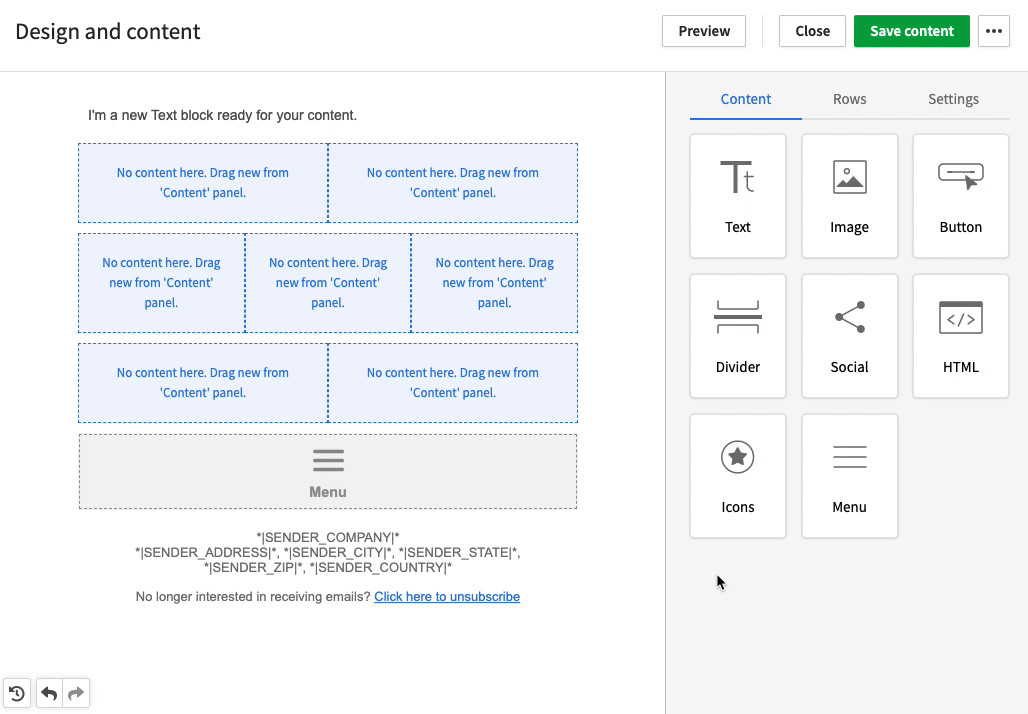 Content blocks for emails in the Pipedrive drag-and-drop editor; source: Pipedrive
The built-in email marketing feature connects directly to CRM data, giving teams visibility into how each contact interacts with emails. Users can build campaigns using templates or a drag-and-drop editor, segment audiences based on various criteria, and track performance through open rates and clicks without moving data between separate tools.
Pipedrive key features include:
- email builder with templates and drag-and-drop editor;
- AI-powered email writing and summarization;
- email segmentation and group emailing;
- scheduling and automated follow-ups;
- lead, calendar, and pipeline management;
- visual sales pipeline with customizable stages;
- workflow automation, including if/else logic and auto-assignment;
- AI-generated reports from prompts;
- smart recommendations for next actions and apps;
- AI insights on deal success probability;
- reporting dashboards and sales forecasting.
Limitations. Pipedrive can feel limited for companies that need advanced marketing automation, deep customization, or a full, all-in-one platform beyond sales and email campaigns. Some features, like email campaigns or lead generation tools, are only available as paid add-ons.
Not the right fit if your business needs complex marketing automation or a fully featured all-in-one marketing platform.
Pricing. Pipedrive doesn’t offer a free plan, but new users get a 14-day free trial. The entry-level plan starts at $14/month per seat (billed annually) and includes lead and pipeline management and AI capabilities. Email campaigns, lead capture, and project management are available as paid add-ons.
Keap
G2: 3.9 ⭐ | Capterra: 4.1 ⭐
Best for: Small businesses and service-based entrepreneurs who want an all-in-one CRM with strong automation.
Keap (formerly Infusionsoft and now part of Thryv) is an all-in-one platform that combines CRM, email marketing, and automation to help teams manage customer relationships more efficiently. This HubSpot alternative for small businesses includes tools for building email campaigns, automating sales processes, and tracking performance through built-in reporting. Users can create emails with ready-made templates, with A/B testing available to optimize results.
Automation is central to how Keap works. The platform triggers emails and actions based on customer behavior, automatically organizes and segments contacts, and sends personalized messages at the right time, helping businesses drive repeat sales and long-term engagement.
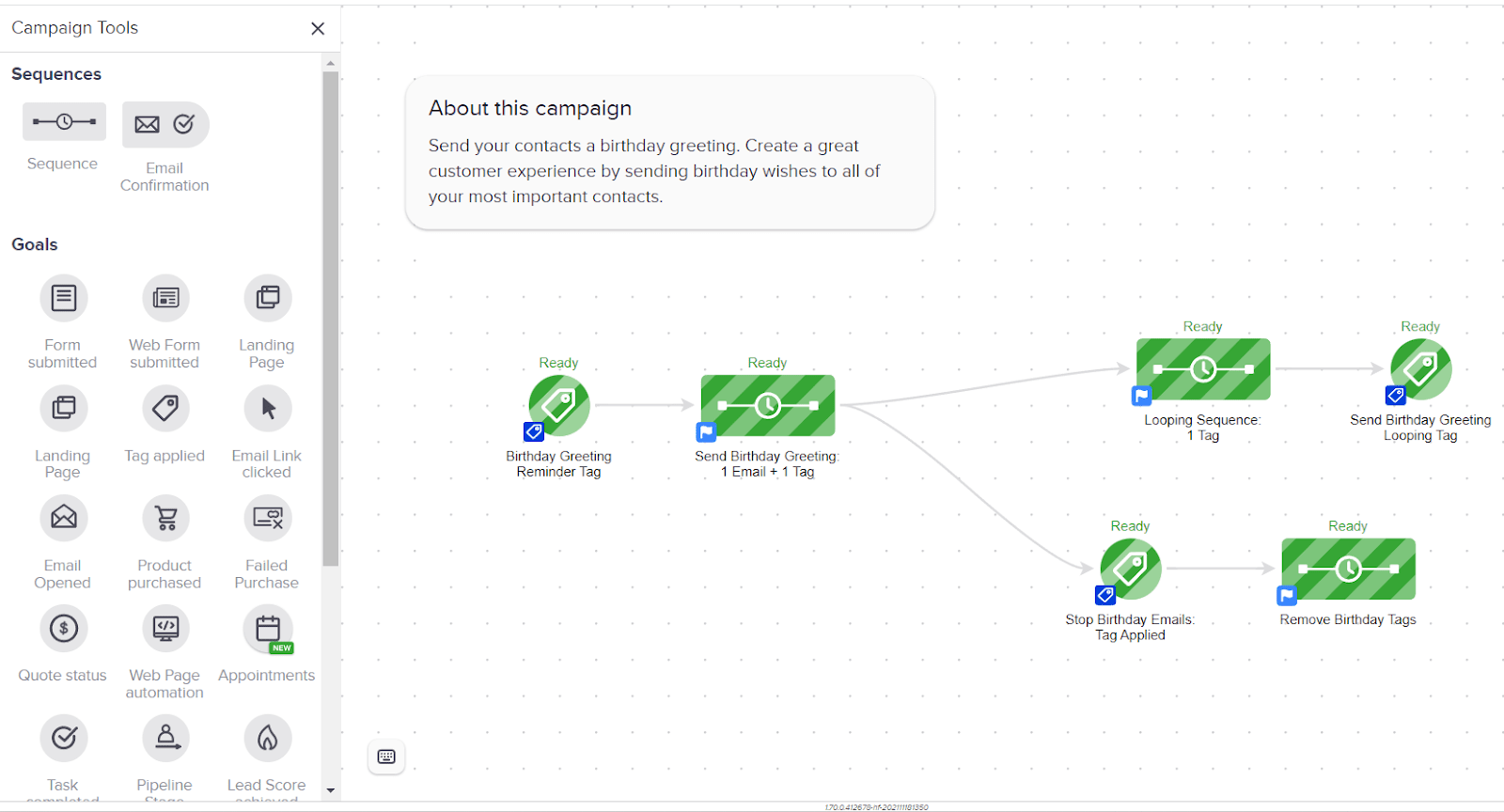 Building a test birthday automation flow in Keap during our review
Setting up an automation — the test birthday flow you see above — was surprisingly quick, thanks to the extensive library of ready-made templates that only needed minor adjustments.
Keap key features include:
- email marketing features, including broadcasts, newsletters, and 1:1 emails;
- templates for campaigns and newsletters;
- AI Content Assistant for writing emails and marketing copy;
- automated email sequences based on customer behavior;
- AI Automation Assistant to build campaigns faster;
- email segmentation via tags, lists, and filters;
- 52+ ready-made automations;
- billing and payment follow-up automation;
- trigger-based emails, texts, and tasks;
- contact segmentation using tags, lists, and saved searches;
- smart campaign suggestions based on templates and best practices;
- appointment scheduling and calendar sync;
- reporting dashboards and performance insights.
Limitations. This alternative to HubSpot can feel complex for very small businesses or beginners who only need basic email marketing or a simple CRM solution. Its wide range of features may also require time to set up properly to get full value. Also, if you’re on an annual contract, canceling before the end of a one-year term will result in a $299 early termination fee.
Not the right fit if your business doesn’t need automation or a full CRM – Keap’s variety of features may be more than you require.
Pricing. Keap offers a 14-day free trial that allows you to send up to 25 emails. The starting price is $299/month for 2 users and 1,500 contacts. Base plan details aren’t listed publicly and need to be confirmed directly through account settings or the sales team. An additional email usage charge of $0.0005 per email applies once you exceed 10 emails per recipient in a billing cycle.
Klaviyo
G2: 4.6 ⭐ | Capterra: 4.6 ⭐
Best for: eCommerce businesses using platforms like Shopify or WooCommerce that need deep customer segmentation and automated flows.
Klaviyo is an excellent alternative to HubSpot for online store owners who seek cost-effective email marketing tools. As Shopify’s recommended email marketing partner, it fits naturally into an eCommerce stack. The platform’s email tools include a drag-and-drop editor, customizable templates, campaigns, and automated lifecycle flows like abandoned cart and post-purchase follow-ups. The platform also supports transactional emails, such as order notifications, invoices, and status updates, via SMTP.
Klaviyo also helps marketers optimize campaigns through send-time suggestions, deliverability improvements, and content variation testing to identify the highest-performing content. AI and automation connect directly to CRM data, so emails are continuously adjusted based on customer behavior and predicted intent.
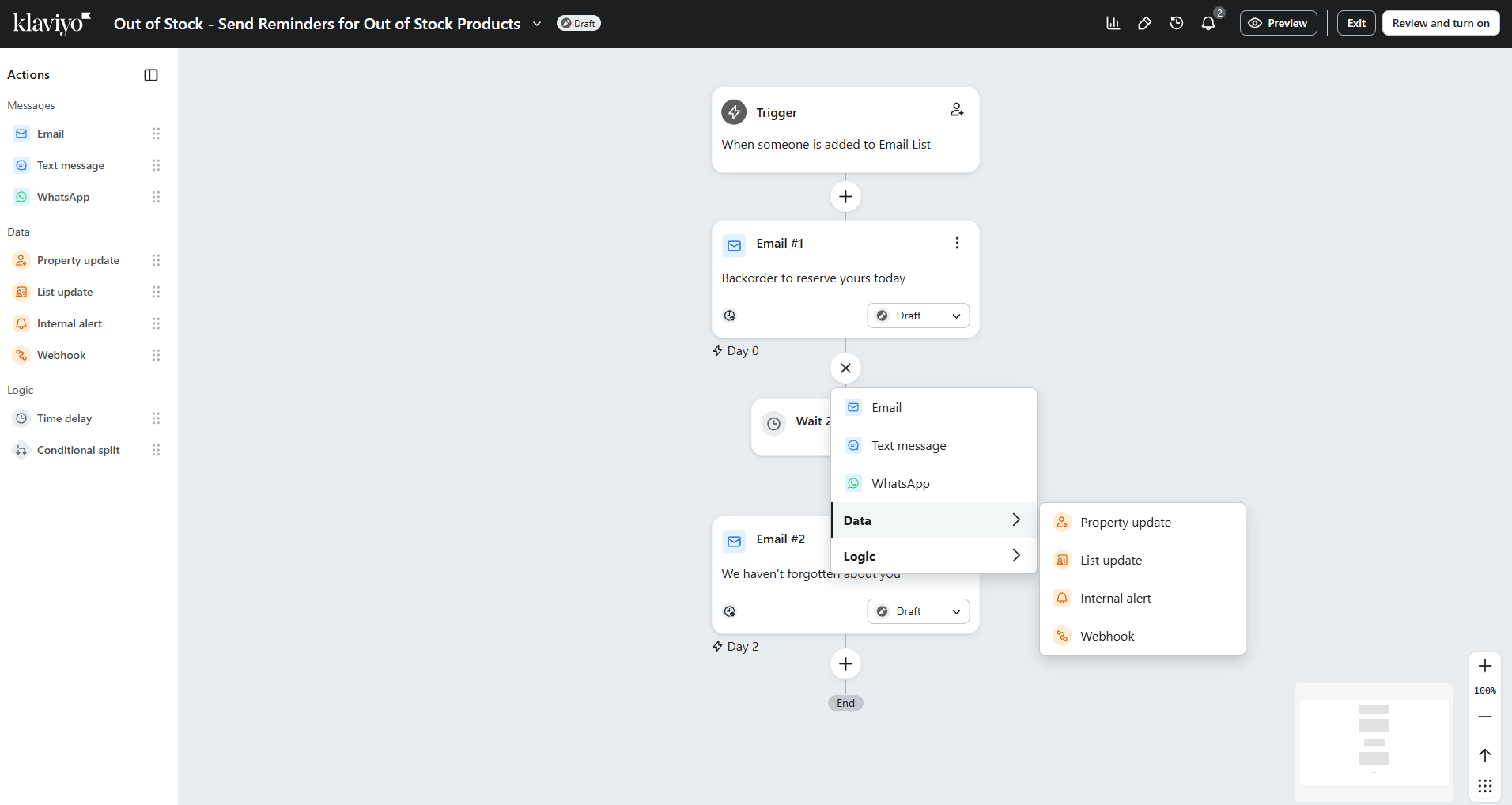 Creating an out-of-stock flow in Klaviyo to test the automation builder
In our testing, Klaviyo’s flow builder stood out for its clarity. The strictly vertical layout makes even complex workflows easy to follow. We also noticed that deliverability safeguards like quiet hours and frequency caps appear directly in the builder, which helps guide safer sending behavior from the start.
Klaviyo key features include:
- drag-and-drop email editor;
- 160 customizable templates;
- AI email and subject line generation;
- automated email campaigns and lifecycle flows;
- personalized product recommendations in emails;
- email segmentation based on customer data and behavior;
- A/B testing for subject lines and content;
- advanced segmentation using all collected customer data;
- campaign scheduling and performance tracking;
- purchase, browsing, and engagement history tracking;
- AI-driven sending time optimization;
- AI campaign testing to automatically select the best-performing variations;
- predictive insights based on customer behavior.
Limitations. This HubSpot competitor can feel complex and data-heavy, especially for beginners or small businesses that don’t have the time to manage advanced segmentation and automation. Costs can also increase quickly as your active profiles grow, and your plan auto-upgrades if you exceed the limit.
Not the right fit if you only need simple email newsletters or a lightweight CRM system without advanced automation or customer data tracking.
Pricing. Klaviyo’s free plan includes up to 250 profiles and 500 email sends per month. The entry-level paid plan starts at $20/month and includes 500 profiles and 5,000 monthly email sends.
Conclusion
HubSpot is a powerful platform, but it’s best suited for larger businesses with complex needs and the budget to match. If you’re looking for something more specific, simpler, or cost-effective, the alternatives above show there’s no shortage of solid options.
Before you decide, be sure you understand what you really need. Think about your main goals, which features matter most, and how much complexity you want to manage. If automation is important to you, look at ActiveCampaign and Keap. For online stores, Klaviyo is a great pick. If you want a wide range of tools like email, CRM, and chatbots without switching between different platforms, SendPulse is free to start.
In the end, the best HubSpot alternative is the one that fits your workflow, helps you reach your goals, and doesn’t make you pay for features you won’t use.