If you’re weighing GetResponse vs ActiveCampaign, you’re looking at two comprehensive platforms for marketers who need advanced automation. At the same time, each has its own strengths and differences. We created accounts on both platforms and spent a few weeks building email campaigns, setting up automations, and stress-testing form builders to see how they compare and which one fits your business model best.
How we scored this comparison: This review was created by the SendPulse team. As an email marketing platform ourselves, we work in the same space as the tools we test, which also means we understand the field deeply.
Each platform was evaluated across nine categories using our independent methodology. Pricing (25%), ease of use (20%), and email and automation features (15% each) carry the most weight because they affect daily workflows the most. All scores reflect hands-on testing and analysis as of May 2026.
TL;DR Quick ActiveCampaign vs GetResponse comparison
Before we get into the details, here’s a quick overview of what we found. If any of the aspects below matter most to you, click on it to jump straight to the section where we break it down further.
| Category |
ActiveCampaign |
GetResponse |
Winner |
| Best for |
Teams that need powerful automation combined with a built-in CRM system |
Growing businesses that need email, webinars, funnels, and landing pages in one platform |
Depends on the use case |
| Pricing |
8/10
No free plan; higher pricing on paid tiers, justified by deeper automation capabilities |
8.4/10
Free plan up to 500 contacts; affordable pricing across paid tiers |
GetResponse |
| Ease of use |
8.2/10
Steeper initial learning curve; clear navigation and layout once oriented |
8/10
Easy to start; gets more complex as you use more features |
ActiveCampaign |
| Email design |
9.2/10
Flexible editor with global styles; slightly fewer specialized blocks; AI template generation |
9/10
Section-based editor; eCommerce and course blocks; includes AI content generation |
ActiveCampaign |
| Automation |
9.6/10
Highly advanced automation with AI-assisted setup; CRM-driven logic; cross-automation mapping |
9/10
Visual canvas with a wide range of triggers, multi-path branching, and scoring; supports website visitor interactions |
ActiveCampaign |
| Contact management |
9/10
Dynamic segments with AI suggestions, CRM fields, and deal-based data |
8/10
List-based with broad segmentation criteria, including eCommerce, webinar, and consent data |
ActiveCampaign |
| Forms and pages |
7.2/10
Functional builder with custom CSS; fewer targeting rules and no A/B testing for landing pages |
8.5/10
Drag-and-drop builder with advanced targeting, including eCommerce conditions; A/B testing for landing pages |
GetResponse |
| Deliverability |
9.1/10
Full authentication; engagement management tools; dedicated pre-warmed IP (requires ~100,000 active, opted-in contacts) |
9.2/10
Full authentication support; solid list hygiene; dedicated IP available from 50,000 emails a week |
GetResponse |
| Reporting |
8.4/10
Advanced reporting; custom reports with cross-joined data; limited by daily refresh and no PDF export |
8/10
Custom report builder with scheduling, cross-channel coverage, and PDF export |
ActiveCampaign |
| Customer support |
7.2/10
Email and live chat support (live chat available in English only); workshops and free migration assistance; extensive help documentation |
7.1/10
Multilingual email support; 24/7 self-serve chatbot; detailed help center; academy content |
ActiveCampaign |
| G2/Capterra rating |
4.4/4.6 |
4.3/4.2 |
ActiveCampaign |
| Final score |
8.8/10 |
8.2/10 |
ActiveCampaign |
The difference is noticeable – a 0.6-point gap is a lot. So, is ActiveCampaign really better? In many ways, yes. However, that doesn’t mean it is the best fit for your specific case. Keep reading to find out why.

Create and send high-performing emails
Use an AI assistant, pre-made templates, advanced segmentation, and feature-rich automation to run campaigns without coding. Start for free with up to 15,000 monthly emails.
Get started for free
Differences between ActiveCampaign and GetResponse in pricing and key features
We tested and compared ActiveCampaign and GetResponse across pricing, usability, automation, email building, and smaller workflow details that often only become noticeable during real use. Below, you’ll find everything we discovered organized into a structured side-by-side comparison.
Pricing plans
ActiveCampaign: 8/10 | ⭐ GetResponse: 8.4/10
Disclaimer: Pricing changes frequently. These figures are accurate as of May 14, 2026. Always verify final costs on official pricing pages.
Neither GetResponse nor ActiveCampaign is cheap, but both offer solid value for the price. The table below shows the lowest and highest pricing tiers. The reason is simple: some advanced features, especially within automation, AI, and segmentation, are only available on higher plans. Since we’re evaluating each platform at its full potential, we’re referring to those top-tier features.
| Contacts |
ActiveCampaign,
Starter |
ActiveCampaign,
Pro |
GetResponse,
Starter |
GetResponse,
Creator |
Winner |
| 1,000 |
$15/mo;
10,000 emails |
$79/mo;
12,000 emails |
$19/mo;
unlimited emails |
$73/mo;
unlimited emails |
GetResponse |
| 2,500 |
$39/mo;
25,000 emails |
$149/mo;
30,000 emails |
$32/mo;
unlimited emails |
$93/mo;
unlimited emails |
GetResponse |
| 10,000 |
$149/mo;
100,000 emails |
$375/mo;
120,000 emails |
$81/mo;
unlimited emails |
$134/mo;
unlimited emails |
GetResponse |
| 25,000 |
$391/mo;
250,000 emails |
$629/mo;
300,000 emails |
$175/mo;
unlimited emails |
$257/mo;
unlimited emails |
GetResponse |
| 50,000 |
$457/mo;
500,000 emails (higher tier applies) |
$969/mo;
600,000 emails |
$305/mo;
unlimited emails |
$434/mo;
unlimited emails |
GetResponse |
| Total score |
8/10 |
8.4/10 |
GetResponse |
ActiveCampaign is clearly more expensive – there’s no free plan, and the top tier isn’t exactly affordable. Despite the huge price differences compared to GetResponse, ActiveCampaign’s pricing earns a solid 8/10. That score comes from the sheer depth of features ActiveCampaign includes for the price.
Ease of use and interface
⭐ ActiveCampaign: 8.2/10 | GetResponse: 8/10
You won’t find yourself lost on the dashboard with either ActiveCampaign or GetResponse. Both are designed for marketers who know what they want, so the interfaces are simple, intuitive, and let you get started right away.
| Aspect |
ActiveCampaign |
GetResponse |
Winner |
| First-time experience |
Manual setup with no automation by default; relies on guides and manual setup before first send |
Guided setup with auto-generated initial assets; requires sender’s verification before sending |
GetResponse |
| Daily navigation |
Well-structured navigation system with distinct sections |
Feature-rich interface with many sections and tools to navigate |
ActiveCampaign |
| Learning curve |
Steeper from the start due to automation depth and CRM capabilities |
Starts simple but becomes more complex with advanced features |
GetResponse |
| Mobile access |
App supports monitoring and contact/deal management |
App supports monitoring and basic management |
ActiveCampaign |
| Workflow efficiency once mastered |
Highly efficient for complex automation and CRM workflows |
Efficient across multiple tasks and channels |
ActiveCampaign |
| Total score |
8.2/10 |
8/10 |
ActiveCampaign |
ActiveCampaign comes out ahead in usability, but not by much. The real difference between the platforms, and how your marketing team will experience them, is best seen in the learning curve comparison below.
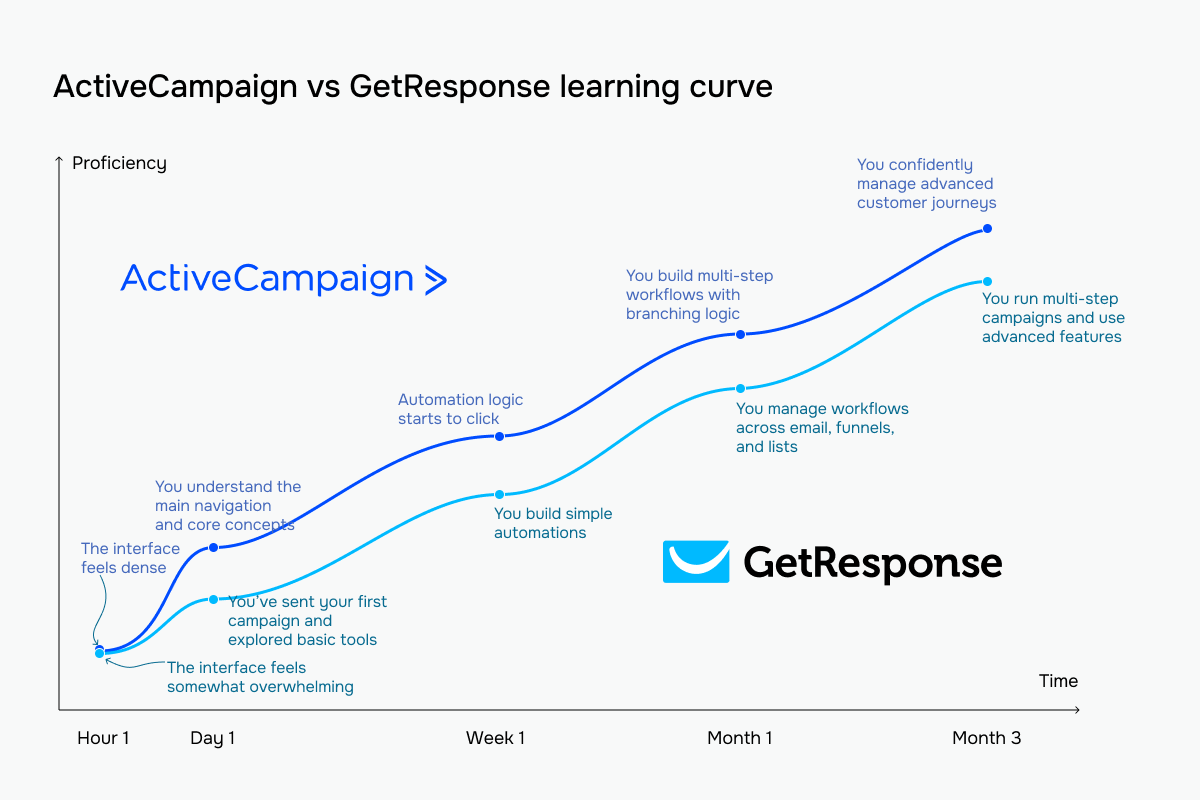 The bright blue line represents ActiveCampaign vs GetResponse’s pale blue
Email builder and templates
⭐ ActiveCampaign: 9.2/10 | GetResponse: 9/10
When we first tried ActiveCampaign, we immediately noticed how much AI is built into the email builder. With just one prompt, it made a complete email with a subject line, preheader, layout, images, body text, and call to action. You can also bring in your brand assets straight from your website, and it automatically creates templates and visuals that match your brand. That’s a high bar, but GetResponse comes close.
| Aspect |
ActiveCampaign |
GetResponse |
Winner |
| Templates |
230+ templates organized by goals; AI-assisted template generation |
260+ professionally designed templates organized by use case |
ActiveCampaign |
| Drag-and-drop editor |
Structure-and-block editor with global style settings; supports switching between drag-and-drop editing and HTML within the same campaign |
Section-based editor with full layout control and a persistent content block library |
ActiveCampaign |
| Notable content blocks |
Content-focused blocks, including countdown timers, menus, banners, and predictive content |
eCommerce-focused blocks, including product boxes, recommended products, promo codes, and countdown timers, and course elements |
GetResponse |
| Mobile responsiveness |
Mobile-responsive drag-and-drop templates with element-level visibility controls |
Automatic mobile optimization with element-level visibility controls |
Tie |
| AI features |
AI support for content generation, subject lines, and full campaign creation |
AI support for body content, subject lines, and full campaign generation |
Tie |
| Sending time optimization |
Uses individual open behavior to determine the best sending times across campaigns and automation workflows |
Uses engagement history to optimize sending times; supports delivery in each subscriber’s local time |
ActiveCampaign |
| Total score |
9.2/10 |
9/10 |
ActiveCampaign |
Here’s how this works in practice when you use the builder. GetResponse’s editor lets you control each block individually. The right panel shows detailed settings for every element, such as spacing, padding, background color, custom CSS, and visibility rules. You can change how each block works without leaving the main editing area.
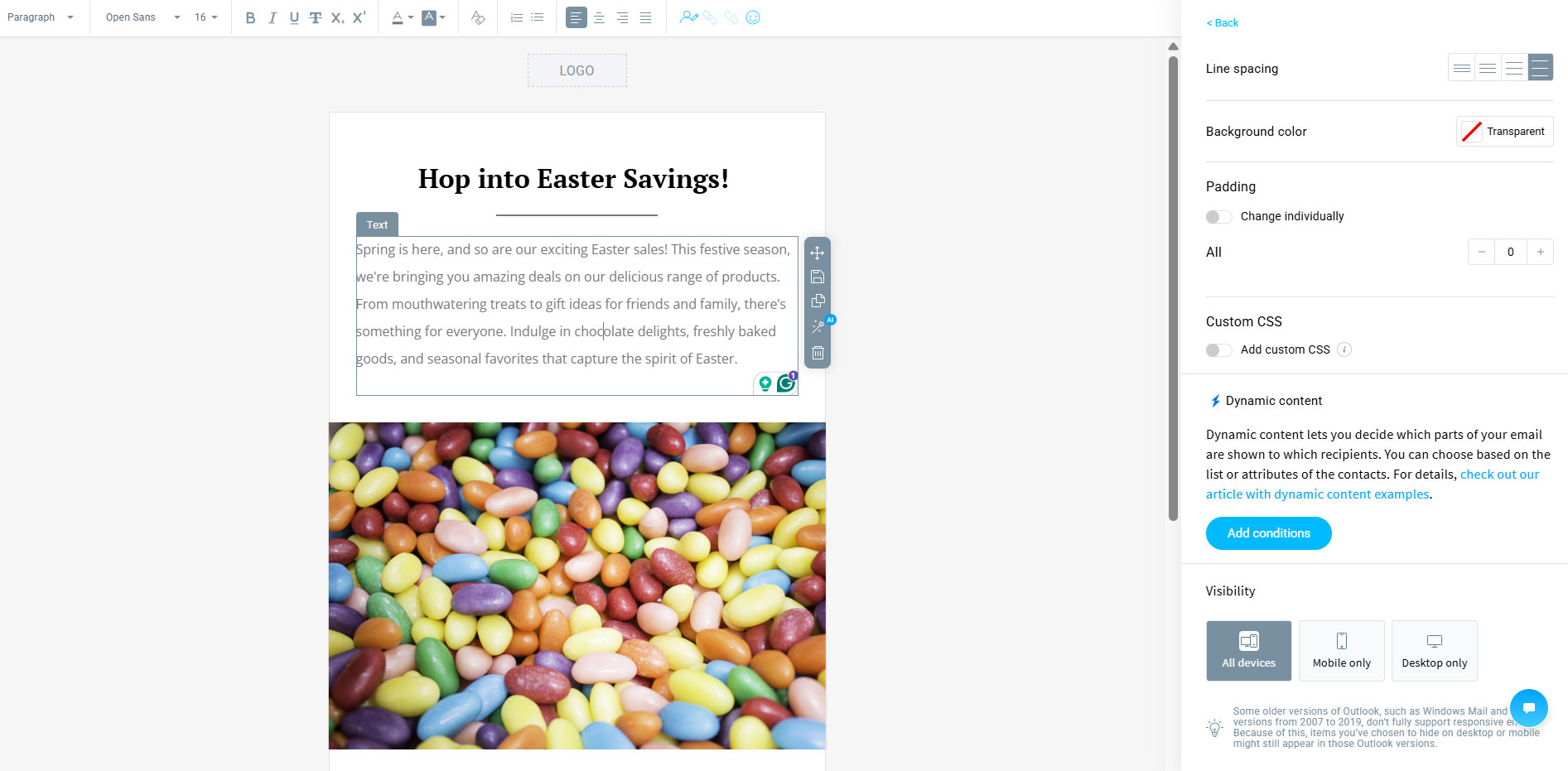 A template GetResponse generated when we tested the prompt “Easter”
One of the best features is dynamic content inside blocks. You can show or hide parts of your email based on contact data or list membership, right from the settings panel. Along with device-specific visibility for desktop and mobile, this lets you control exactly what each recipient sees.
ActiveCampaign’s editor focuses on flexible layouts and reusable components. Its block library is small but includes special elements like banners, menus, timers, RSS feeds, and reusable modules.
The “Banner” block, in particular, lets you layer text and images, so you can create richer, more design-heavy emails. With reusable modules, you can save sections and use them in other campaigns, which speeds up production for recurring content.
AI is also integrated directly into the workflow, helping generate campaigns without switching tools. The interface shows less per-block detail than GetResponse, but it focuses more on building layouts and reusing content efficiently.
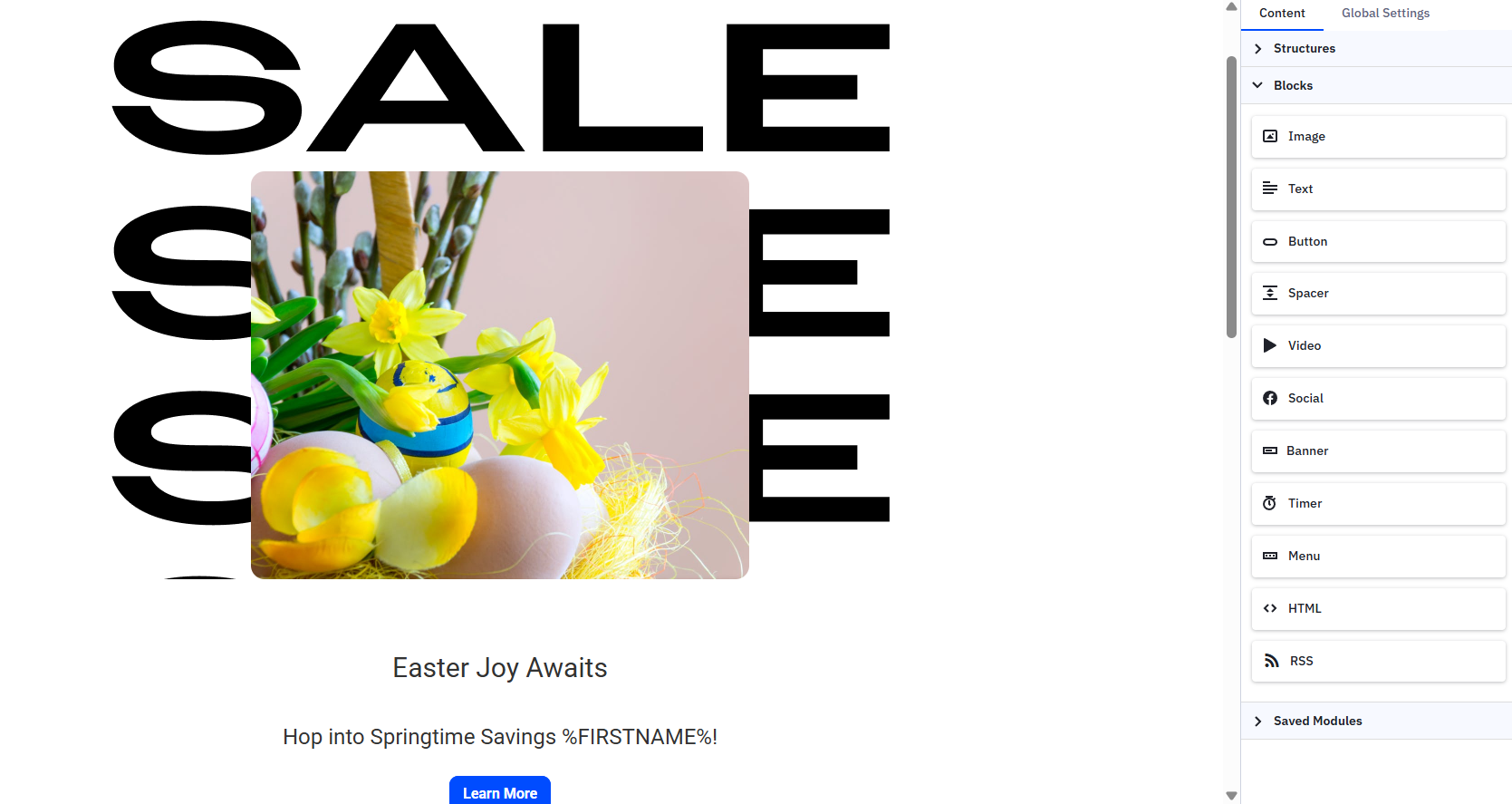 Testing AI template generation in ActiveCampaign with the prompt “Easter”
Functionally, you’re getting a similar toolkit from both, even though their interfaces look quite different. GetResponse gives you more control over individual elements like spacing, visibility, and especially personalization. If your emails need to show different blocks to different segments, GetResponse makes that easier to manage without leaving the editor.
ActiveCampaign offers more flexibility in layout and design. Layered banners, structured sections, reusable components – it’s built for teams that send often and want to assemble campaigns from pre-built parts rather than styling everything from scratch.
Marketing automation
⭐ ActiveCampaign: 9.6/10 | GetResponse: 9/10
ActiveCampaign has one of the most advanced automation builders we’ve tried. It handles complex flows with ease and is powered by AI. During testing, we gave it a single prompt – a post-purchase upsell sequence with conditional branching – and it generated a complete multi-step workflow, ready to polish. That’s something few platforms can do. GetResponse’s automation is solid, but it doesn’t go as far.
| Aspect |
ActiveCampaign |
GetResponse |
Winner |
| Availability by plan |
Entry plan limits automations to 5 actions each; higher plans unlock unlimited automations with full trigger and action access |
Free plan does not allow publishing workflows; lower-tier plans support 1 workflow with basic logic and up to 6 elements; higher plans unlock unlimited workflows with full functionality |
ActiveCampaign |
| Automation builder |
Visual builder with if/else logic, multiple triggers per workflow, and an automation map showing workflow connections |
Visual drag-and-drop canvas with yes/no branching, parallel paths, and cross-workflow triggers |
ActiveCampaign |
| Triggers available |
Email engagement, site visits, form submissions, eCommerce activity, tag changes, CRM deal updates, SMS replies, recurring payments, and third-party app events |
Subscriber actions, engagement, eCommerce behavior, course and webinar activity, website visits, consent updates |
ActiveCampaign |
| Pre-built automations |
200+ templates for lifecycle, eCommerce, and customer engagement scenarios |
46 templates for eCommerce, subscriber management, course/event promotion scenarios |
ActiveCampaign |
| Channels supported |
Email on all plans; SMS, site messages, and WhatsApp on higher tiers |
Email on all plans; SMS and web push notifications on higher tiers |
ActiveCampaign |
| AI features |
AI-generated automation sequences built from prompts |
No AI support for building automation logic |
ActiveCampaign |
| Automation complexity |
Very high; supports multiple triggers, if/else branching, scoring, CRM deal logic, cross-automation connections, and AI-assisted workflow building |
High; supports loops, scoring, dynamic segment filters, and multi-path branching |
ActiveCampaign |
| Total score |
9.6/10 |
9/10 |
ActiveCampaign |
When you get to GetResponse’s automation builder, it becomes clear that it was designed for simple, linear workflows. A trigger kicks off a sequence of steps: send an email, add a tag, wait, repeat. Everything flows in one direction, which makes it quick to set up and easy to scan.
During testing, we liked that performance data, like sends, opens, and clicks, is displayed right on each step. You can see how your flow is performing without leaving the canvas. At the same time, the interface stays clean and readable, even for someone new to automation.
It’s a comfortable tool for building welcome series, product recommendations, and event reminders, especially if you don’t need complicated logic or several different paths.
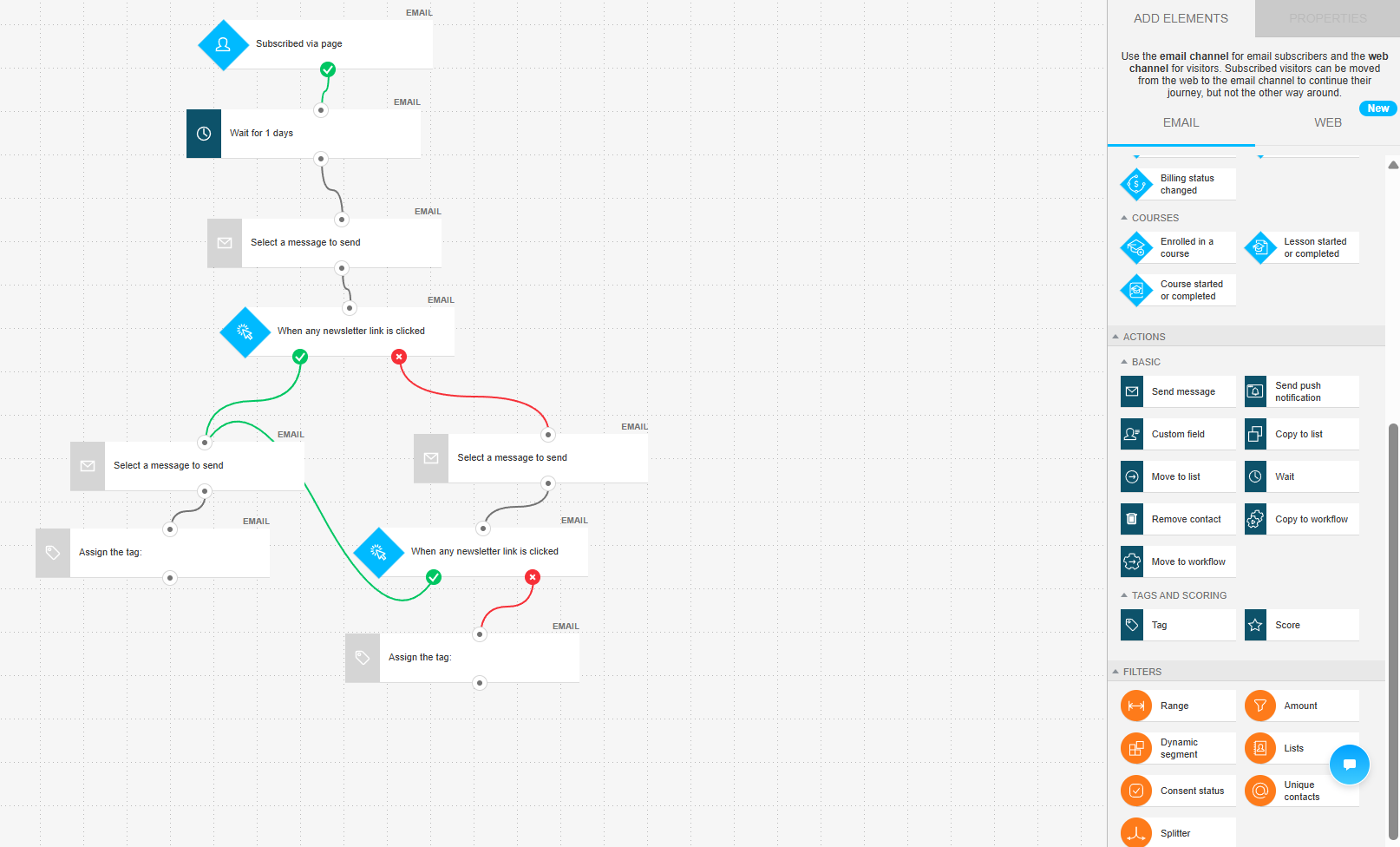 A multi-step engagement workflow we built in GetResponse – paths split based on link clicks
ActiveCampaign’s builder is where the complexity ceiling disappears. Instead of a single path, you can run multiple sequences in parallel, split contacts at any point based on behavior, and layer conditions on top of each other.
Another practical feature is contextual suggestions. As you build a workflow, you get suggestions on what to add next: wait times, follow-ups, or checks, which help structure more complex automations. Even with many branches and steps, the canvas stays easy to read.
It’s built for behavior-driven automation: eCommerce flows, multi-step customer journeys, and anything where different users need to follow different paths based on what they actually did.
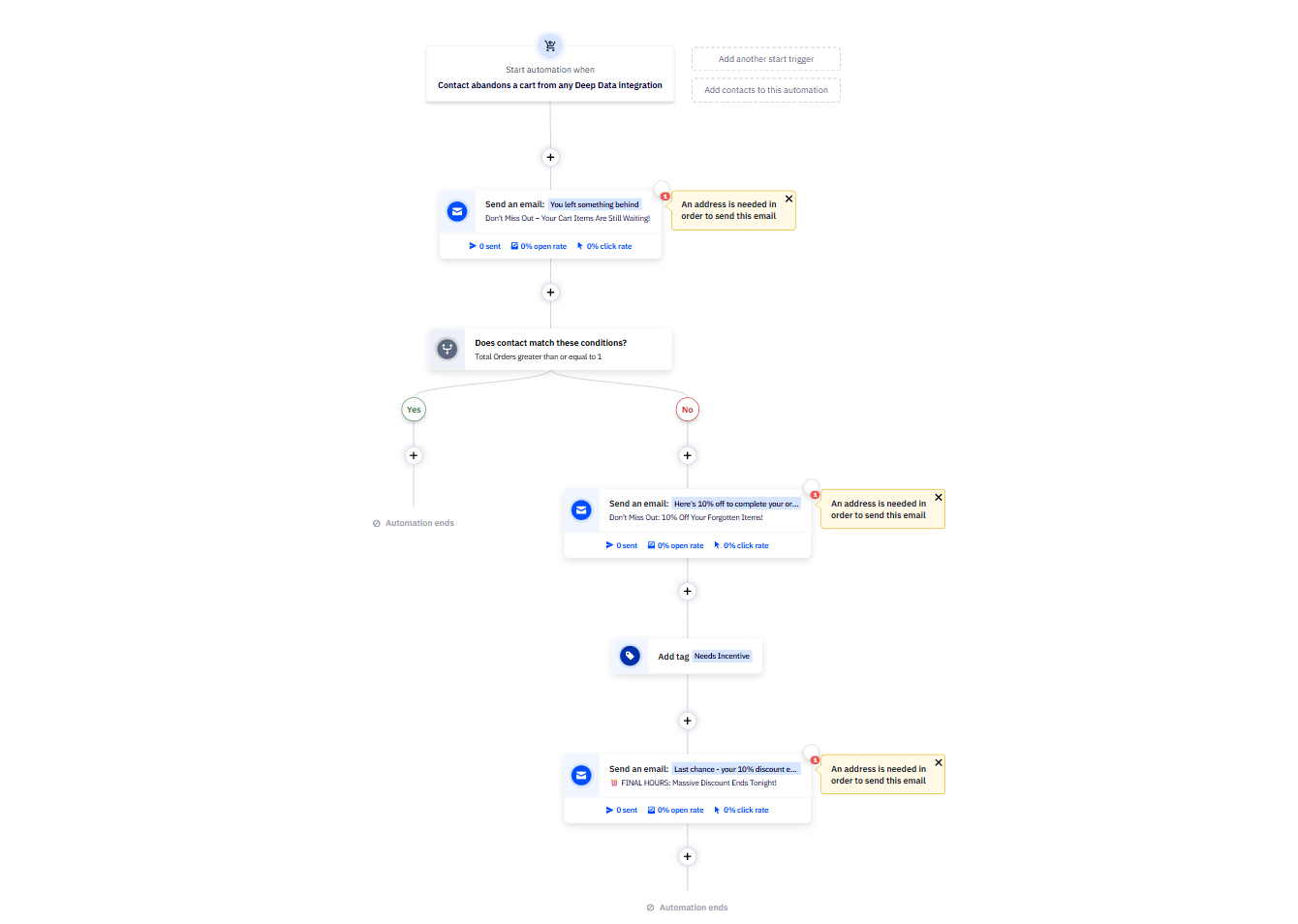 A cart abandonment flow we built in ActiveCampaign – first-time visitors and existing customers get different paths
The gap between the two tools becomes clear once your workflows need more than a straight line. GetResponse handles structured sequences well – it’s fast, readable, and low-friction for simple campaigns. ActiveCampaign picks up where that ends: real branching logic, behavior-based conditions, and automations where no two contacts necessarily follow the same path.
Contact management
⭐ ActiveCampaign: 9/10 | GetResponse: 8/10
ActiveCampaign’s segmentation advantage follows naturally from its automation depth – more data in, more ways to slice it. With AI-suggested segments and real-time updates, it leads across all aspects.
| Aspect |
ActiveCampaign |
GetResponse |
Winner |
| Segmentation capabilities |
Dynamic rule-based segments with AND/OR logic and condition groups; reusable saved segments stored in a segment library |
Dynamic rule-based segments within a list-based structure; contacts can belong to multiple lists; supports AND/OR logic |
Tie |
| Segmentation criteria |
Contact details, tags, list status, custom fields, email engagement, site visits, eCommerce data, deal status, automation activity, geolocation |
Contact data, subscription details, engagement, scoring, tags, consent, eCommerce activity, webinar participation |
ActiveCampaign |
| Segment update speed |
Real-time updates; contacts move in and out of segments immediately as conditions change |
Automatic updates; contacts move in and out of segments as conditions change |
Tie |
| AI features for segmentation |
AI suggests segments based on behavior, account activity, and trends |
No AI-based segmentation |
ActiveCampaign |
| Tagging and manual organization |
Tags applied manually, through imports, automations, or bulk actions; supports combined use of lists and tags with more flexible segment filtering |
Tags applied manually, through imports, automations, or bulk actions; used for segmentation and automation triggers |
ActiveCampaign |
| Total score |
9/10 |
8/10 |
ActiveCampaign |
The difference in scores is small. While GetResponse is a step behind ActiveCampaign, its contact management is still strong and fully deserves an 8/10.
But what if your business needs more, like fully-fledged cross-channel audience targeting? In this case, check out SendPulse, which offers dynamic segmentation:
SendPulse dynamic segmentation functions across multiple tools at once – contacts can enter a segment based on actions from email, chatbots, CRM, or courses, with real-time updates as their data changes. It also unifies fields from different sources into a single variable, so data stays consistent regardless of how it was originally collected. In practice, segments act as live, multi-channel entry points that can immediately trigger automation flows when a contact qualifies.

Tetiana Moroz
Automation Product Manager at SendPulse
Signup forms and landing pages
ActiveCampaign: 7.2/10 | ⭐ GetResponse: 8.5/10
GetResponse clearly leads in form creation. It supports a wider range of use cases and offers more flexible layout control and styling options. On top of that, it adds A/B testing and AI generation to the landing page builder, built-in analytics, and more advanced targeting conditions.
| Aspect |
ActiveCampaign |
GetResponse |
Winner |
| Types of forms available |
Inline forms, modal pop-ups, floating boxes, and floating bars |
Embedded forms, pop-ups, slideboxes, floating bars, half-screen and full-screen overlays, teaser forms |
GetResponse |
| Form builder |
Style-based editor with layout options depending on form type; custom fields supported only for inline forms |
Drag-and-drop editor with flexible layout controls and automated styling; supports consent fields and double opt-in |
GetResponse |
| Pop-up targeting conditions |
Time delay, scroll depth, exit intent; includes device and display frequency controls |
Time delay, scroll depth, exit intent, inactivity, on-click; includes page-level targeting, scheduling, device controls, and eCommerce conditions for Shopify and PrestaShop |
GetResponse |
| Landing page builder |
Drag-and-drop builder with 60+ pre-designed templates; Google Analytics and site tracking supported via custom code |
Drag-and-drop builder with 100+ templates, A/B testing, AI landing page wizard, built-in analytics, and integrations with Google Analytics, Tag Manager, and Meta Pixel |
GetResponse |
| Total score |
7.2/10 |
8.5/10 |
GetResponse |
The score gap makes sense once you try out the builders. GetResponse’s builder is designed for fully styled, promotional pop-ups. The canvas shows exactly what the final result will look like, with background images, overlaid content blocks, and branded layouts.
The level of control goes deep: custom fonts, block-level settings, and per-element visibility rules. What stood out to us was the promo code block – a dedicated element with its own styling, built specifically for campaign use. Small thing, but it tells you a lot about who this builder is for.
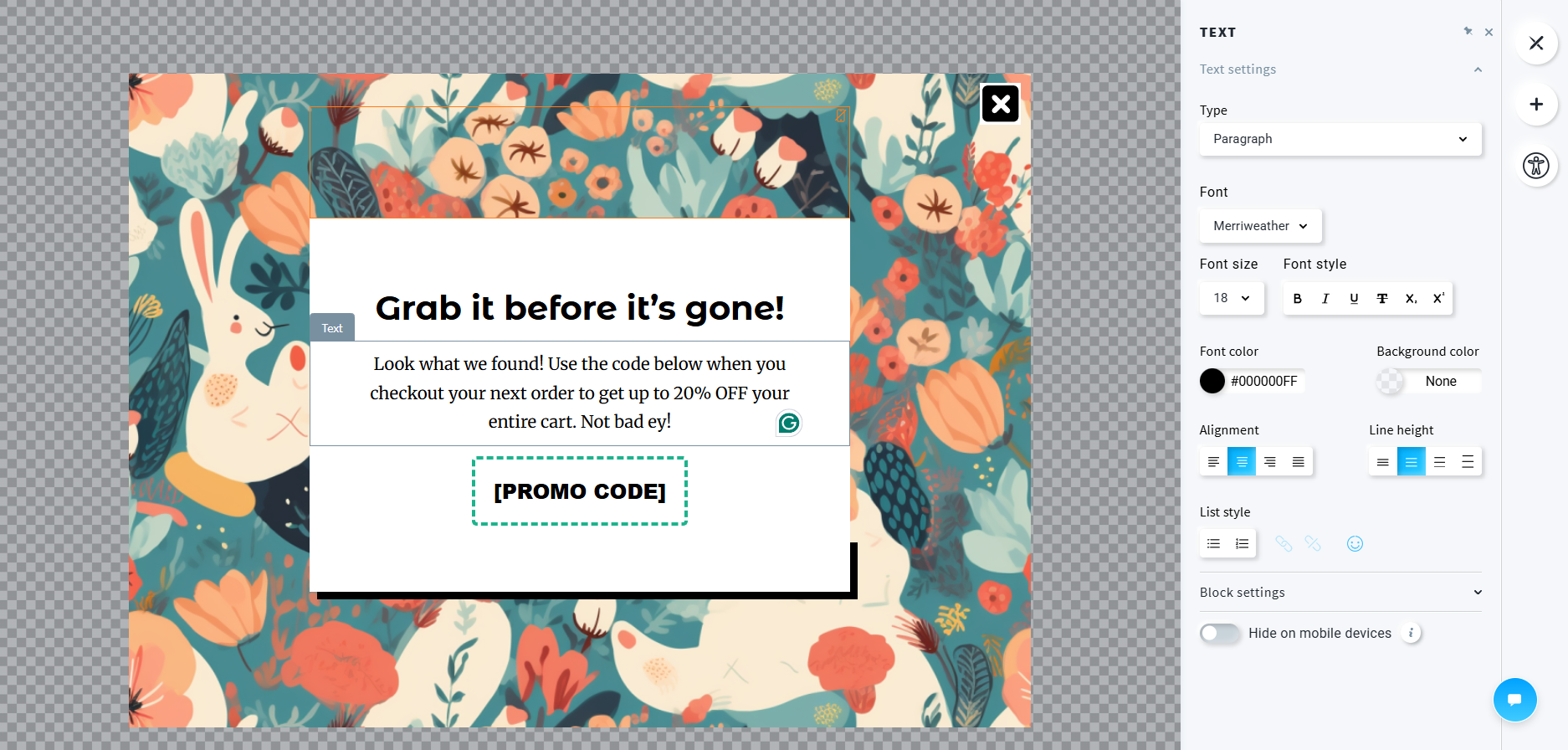 A promotional pop-up we designed in GetResponse – custom background, promo code block, and per-element styling controls
ActiveCampaign’s builder is focused on simple, functional forms – basic fields, a submit button, and clean styling options for headers, paragraphs, and buttons. We were able to set up a simple inline form within a few minutes.
But that’s also where it stops. There are no layered layouts, no background images, and no decorative elements. The editor lets you match your brand colors and fonts, but it isn’t meant to be a design tool.
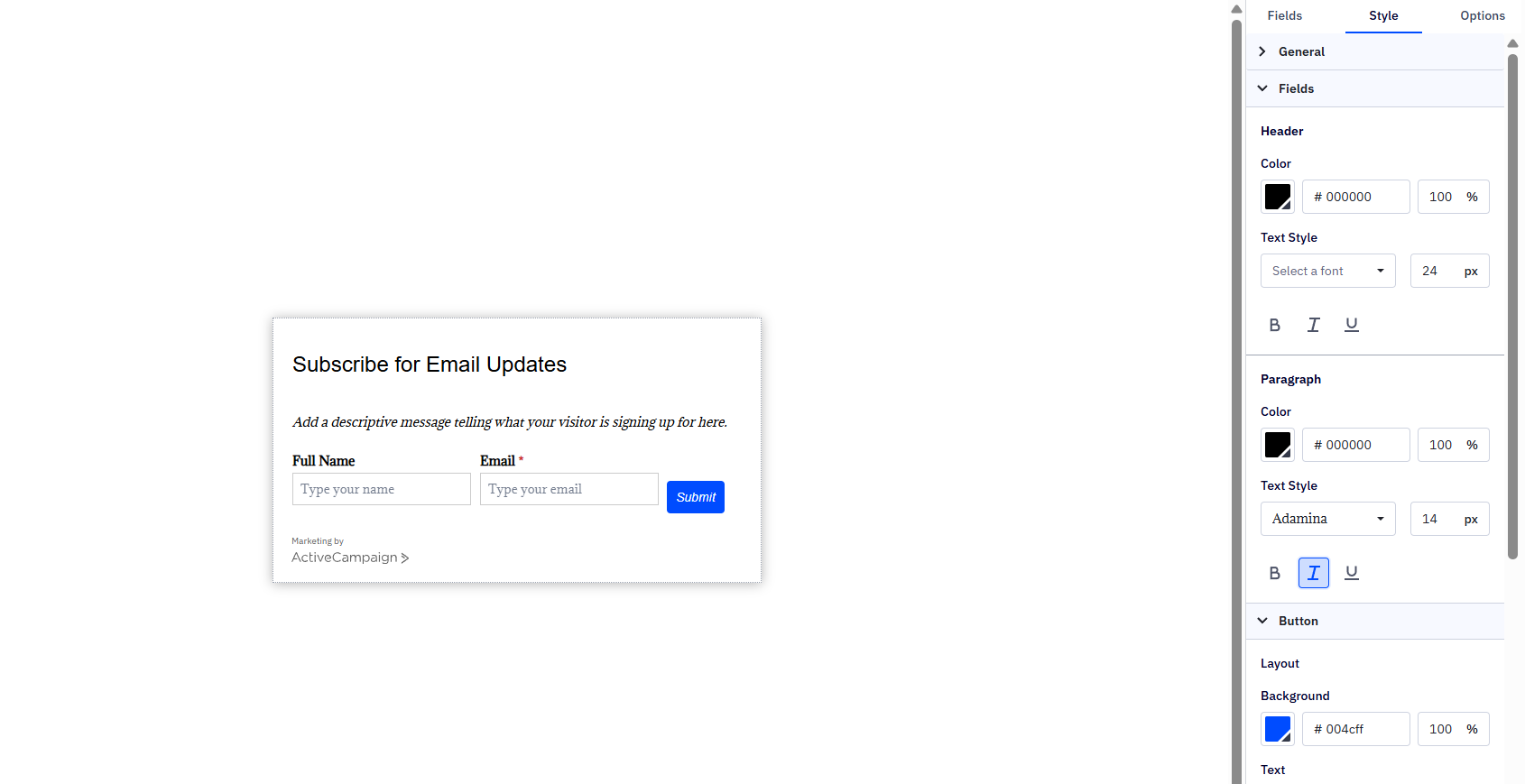 A signup form we set up in ActiveCampaign – clean but limited to basic field and style customization
In practice, the difference lies in what you’re trying to create. GetResponse is better suited for promotional pop-ups, like discounts, seasonal campaigns, lead magnets, or short-term offers, where the form is part of your marketing message itself. You can build polished, brand-consistent pop-ups directly in the editor without relying on extra tools or custom styling.
ActiveCampaign works well for basic lead capture forms and quick opt-in flows, but it’s not really built for highly customized or visually refined pop-ups.
Deliverability
ActiveCampaign: 9.1/10 | ⭐ GetResponse: 9.2/10
Deliverability is essential for any bulk email service. GetResponse offers a slight advantage with easier infrastructure access and more effective automated list cleaning. ActiveCampaign excels in support and deliverability guidance.
| Aspect |
ActiveCampaign |
GetResponse |
Winner |
| Authentication |
SPF, DKIM, and DMARC supported; automatic and manual setup; domain verification required before first send |
SPF, DKIM, and DMARC supported; automatic and manual setup |
Tie |
| Deliverability monitoring |
Built-in spam and DNS checks; Google Postmaster integration; shared IP monitoring; one-on-one deliverability consultations |
Shared infrastructure monitored internally; campaign-level bounce and spam complaint rates |
ActiveCampaign |
| List hygiene |
Hard bounces suppressed automatically; soft bounces removed after 3 failure attempts; spam complaints suppressed automatically; recommends removing inactive contacts (12+ months) |
Hard bounces removed immediately; soft bounces removed after 4 failed attempts within 32 days; spam complaints suppressed automatically; internal suppression list applied during import |
GetResponse |
| Dedicated IP |
Available for accounts with 100,000+ active contacts; pre-warmed IP; ongoing warmup managed by the sender |
Available starting at 50,000+ emails/week; setup and warmup handled by the GetResponse team |
GetResponse |
| Total score |
9.1/10 |
9.2/10 |
GetResponse |
Both platforms manage deliverability well, which is table stakes for modern email platforms. These days, whether your emails reach the inbox depends more on your sending habits than on the platform you use. Here are some key deliverability best practices, based on SendPulse recommendations:
- Warm up new domains or IPs gradually.
- Use double opt-in to keep your list clean.
- Remove inactive subscribers regularly.
- Authenticate your domain (SPF, DKIM, DMARC).
- Avoid spam-trigger words and overly aggressive formatting.
- Keep a consistent sending schedule.
Get these right, and both GetResponse and ActiveCampaign will deliver strong inbox placement.
Reporting and analytics
⭐ ActiveCampaign: 8.4/10 | GetResponse: 8/10
How do you know if your email marketing strategy works? You collect data to measure performance and pinpoint areas for improvement. Reporting and analytics play a key role in this process, and both ActiveCampaign and GetResponse offer strong capabilities in this area.
| Aspect |
ActiveCampaign |
GetResponse |
Winner |
| Report coverage |
Campaigns, automations, contacts, deals, eСommerce, SMS campaigns, and marketing revenue; includes broader CRM and sales reporting |
Campaigns, automations, contacts, forms, landing pages, webinars, and eCommerce performance |
ActiveCampaign |
| Custom reports |
Custom report builder; supports cross-data analysis across campaigns, automations, contacts, and eCommerce; data refreshes daily |
Custom report builder; flexible metrics and filters for reports |
ActiveCampaign |
| Reporting speed |
Campaign reports load with the last 14 days selected by default; custom report data refreshes once daily |
Data updates progressively after sending; custom reports generated on demand or on schedule |
GetResponse |
| Export capabilities |
Campaign data can be exported in CSV, TXT, XLS, JSON, HTML, and Markdown; contacts and automation data can be exported as CSV |
Contacts, campaign reports, webinar data, and custom reports can be exported as CSV, XLSX, or PDF |
Tie |
| Total score |
8.4/10 |
8/10 |
ActiveCampaign |
ActiveCampaign leads in this category thanks to its comprehensive and flexible reporting. It covers more areas, including CRM and revenue data, and lets you consolidate information from campaigns, automations, contacts, and eCommerce into unified reports. This is especially helpful for teams tracking results across channels and connecting marketing efforts to business outcomes.
In contrast, GetResponse stands out for its fast reporting. Data updates more quickly, and you can access reports whenever you need them. However, if you want deeper analysis and more flexibility, ActiveCampaign is the better choice.
Customer support
⭐ ActiveCampaign: 7.2/10 | GetResponse: 7.1/10
Even experienced marketers sometimes need help – whether it’s figuring things out on their own or getting in touch with the platform’s support team. This section reviews both the ease of self-service troubleshooting and the effectiveness of human support.
| Aspect |
ActiveCampaign |
GetResponse |
Winner |
| Channel availability |
Email and live chat support; live chat available in English only |
Multilingual email support, live chat, and a 24/7 chatbot |
GetResponse |
| Knowledge base |
Large help center with step-by-step guides, multilingual articles, community forums, training webinars, and live workshops |
Extensive help center with guides, tutorials, videos, and free courses through GetResponse Academy |
ActiveCampaign |
| Onboarding assistance |
Free migration service, onboarding webinars, live workshops, and self-serve migration documentation and FAQs |
AI-assisted onboarding checklist generates initial campaign assets during signup; includes self-serve guides and dedicated onboarding on the enterprise tier |
ActiveCampaign |
| Support quality rating on Capterra |
4.4/5 |
4/5 |
ActiveCampaign |
| Total score |
7.2/10 |
7.1/10 |
ActiveCampaign |
GetResponse leads in channel availability – multilingual support and a 24/7 customer service chatbot are hard to beat for global teams. However, ActiveCampaign pulls ahead in onboarding and long-term support, providing free migration, live workshops, and a community forum beyond standard documentation. Capterra support quality ratings back this up (4.4/5 for ActiveCampaign vs 4/5 for GetResponse), giving ActiveCampaign the advantage in this category.

Join businesses growing with SendPulse
From solo creators to global brands, thousands of customers trust SendPulse to run email campaigns, chatbots, automations, and more — all in one place.
Get started for free
Your decision checklist
So, have you made your choice yet? If anything still isn’t completely clear, here’s a quick checklist – see which platform you pick more often below, and that’s likely your best fit.
| Decision area |
ActiveCampaign
is a better fit if… |
GetResponse
is a better fit if… |
| Business type |
You run a sales-driven operation where automation, pipeline tracking, and lead scoring need to live inside a built-in CRM system. |
You run a broad marketing operation – email, landing pages, webinars, and conversion funnels – and want it all in one platform. |
| Budget expectations |
You’re willing to pay more for best-in-class automation and can justify higher per-contact pricing. |
You want a broad feature set at a mid-range price without paying for a separate CRM tool. |
| Automation needs |
You need the most powerful automation on the market – complex branching, CRM logic, scoring, and AI-assisted workflow building. |
You need multi-channel automation with a wide range of triggers and a visual builder without extreme complexity. |
| Analytics focus |
You need deep custom reporting with cross-joined data across contacts, campaigns, automations, and deals. |
You want solid cross-channel reporting with a custom report builder and scheduled delivery out of the box. |
| Team setup |
You work in a combined sales and marketing team that needs shared CRM data, deal tracking, and pipeline-based automation. |
You work in a small to mid-sized marketing team, managing campaigns across multiple channels. |
Neither platform a fit? Here are a few alternatives worth considering:
- SendPulse – a more affordable option with solid email marketing features;
- Kit – best for creators and solopreneurs who want a generous free plan;
- Klaviyo – ideal if the budget is flexible and you need advanced eCommerce-grade automation.
Final verdict and recommendations
⚖️ Final scores: ActiveCampaign – 8.8/10 | GetResponse – 8.2/10
In this GetResponse vs ActiveCampaign comparison, ActiveCampaign comes out on top, but not because it is better in every way. It stands out because it offers more complexity. You get more logic, more connections between data points, and more ways to respond to user behavior. This advantage shows up in automation, segmentation, and reporting, which is why ActiveCampaign gets the higher score.
However, that strength can also be a drawback.
What this comparison really shows is not a “better vs worse” situation, but a threshold question: how much system complexity do you actually need?
GetResponse covers a very wide surface area – email, funnels, webinars, and landing pages – and does it in a way that stays manageable. It gives you a complete marketing stack without forcing you to think in terms of pipelines, deal stages, or deeply nested logic. For many teams, that’s exactly the right level.
ActiveCampaign makes more sense when your marketing is no longer straightforward. If users need to follow different paths based on their actions, purchases, or place in your sales process, simpler tools may not be enough.
So, here is the key ActiveCampaign vs GetResponse takeaway:
- If your workflows are mostly structured and campaign-driven, GetResponse will feel faster and more complete.
- If your workflows are behavior-driven and tightly connected to revenue and sales processes, ActiveCampaign will feel like the natural next step.