This isn’t a typical comparison – choosing between Kit (formerly ConvertKit) and GetResponse is more like choosing between a niche specialist and a generalist. Kit is a creator-first platform with simple, email-first workflows. GetResponse takes a broader approach, covering more marketing tasks in one place.
Because of that, people don’t usually compare them at random. It tends to happen at a specific moment – when something changes. Say, a creator starts to scale and wonders if they need more powerful tools, or a small business using GetResponse starts feeling that the platform does more than they actually need.
If that’s where you are, this comparison will help sort it out. Let’s look at Kit and GetResponse side by side and see which one fits your situation better.
How we scored this comparison: This review was created by the SendPulse team. As an email marketing platform ourselves, we work in the same space as the tools we test, which also means we understand the field deeply.
Each platform was evaluated across nine categories using our independent methodology. Pricing (25%), ease of use (20%), and email and automation features (15% each) carry the most weight because they affect daily workflows the most. All scores reflect hands-on testing and analysis as of May 2026.
TL;DR Quick Kit vs GetResponse comparison
Before we get into the full breakdown, here’s a quick summary of how Kit (formerly ConvertKit) and GetResponse compare across pricing, email and automation features, customer support, and other key areas.
If you already know what matters most to you, you can jump straight to that section.
| Category |
Kit |
GetResponse |
Winner |
| Best for |
Creators and small businesses focused on email-first growth and monetization |
Growing businesses and teams that need a multi-functional marketing platform |
Depends on the use case |
| Pricing |
10/10
Permanent free plan for up to 10,000 contacts; paid plans stay competitive across all tiers |
8.4/10
14-day premium trial; free plan limited to 500 contacts; paid plans get noticeably pricier at smaller list sizes |
Kit |
| Ease of use |
8.2/10
Clean, focused interface; quick to start, but requires adapting to tag-based logic |
7.8/10
Feature-rich interface; easy for basics, but more complex as you scale across tools |
Kit |
| Email design |
7/10
Simple, content-first emails with limited design flexibility |
9.2/10
Flexible visual builder with stronger layout control and richer templates |
GetResponse |
| Automation |
6/10
Linear workflows with basic branching; suited for simple sequences |
9/10
Sophisticated workflows with multiple paths, triggers, and more versatile use cases |
GetResponse |
| Contact management |
7.5/10
Tag-based system within a single database; effective but less intuitive |
8/10
List-based system with robust segmentation and scoring |
GetResponse |
| Forms and pages |
6.4/10
Functional builders with basic targeting and customization |
8.5/10
More flexible builders with precise targeting and A/B testing |
GetResponse |
| Deliverability |
8.7/10
Strong baseline with authentication and list hygiene tools; limited built-in monitoring |
9/10
Strong infrastructure with granular hygiene controls and lower sending volume for dedicated IPs |
GetResponse |
| Reporting |
7.2/10
Standard reporting with fixed dashboards and limited customization |
8/10
Detailed statistics with custom reports and deeper cross-channel visibility |
GetResponse |
| Customer support |
7.5/10
24/7 email and live chat on all plans; strong help documentation; migration assistance on paid plans |
7.1/10
Email and live chat on paid plans; 24/7 self-serve chatbot; detailed knowledge base |
Kit |
| Final score |
8.4/10 |
8.2/10 |
Kit |
The score gap is almost nonexistent – so how do you decide which one is right for you?
That’s exactly what we’ll help you figure out. We tested both platforms hands-on and compared them across every major category, so by the end of this comparison, you’ll have a clear sense of whether Kit or GetResponse is the better fit.
Differences between Kit and GetResponse in pricing and key email features
We’re starting with what matters most: pricing for business owners, and core features like the email builder and automation for marketers. The comparison then moves on to areas like reporting and analytics that, while less central, can still shape your workflow.
Pricing plans
⭐ Kit: 10/10 | GetResponse: 8.4/10
Disclaimer: Pricing changes frequently. These figures are accurate as of May 1, 2026. Always verify final costs on official pricing pages.
Pricing in email marketing can be tricky. Kit’s free plan is remarkably generous – up to 10,000 contacts, unlimited emails, no time limit – but it doesn’t include advanced automation, full segmentation, or deeper analytics. GetResponse also has a free plan, but it’s much more limited.
To get the full picture of what each platform actually costs once you need all the features, you have to look beyond the free tier. That’s why this comparison covers both ends of the pricing spectrum: the free or entry-level plan that gets you started, and the top-tier plan where the full feature set becomes available.
| Contacts |
Kit,
Newsletter/ Creator |
Kit,
Pro |
GetResponse,
Starter |
GetResponse,
Creator |
| Free plan |
Up to 10,000 contacts and unlimited emails |
Up to 500 contacts and 2,500 emails |
| 1,000 |
$0/mo |
$66/mo |
$19/mo |
$73/mo |
| 10,000 |
$0/mo |
$158/mo |
$81/mo |
$134/mo |
| 25,000 |
$166/mo |
$233/mo |
$175/mo |
$257/mo |
| 50,000 |
$316/mo |
$433/mo |
$305/mo |
$434/mo |
| Note: All indicated paid plans include unlimited email sends unless otherwise specified. |
| Total score |
10/10 |
8.4/10 |
Kit‘s permanent free plan is exceptional by any standard. For creators, solo operators, and small newsletter businesses, Kit’s core audience, it completely removes the financial risk of getting started.
GetResponse‘s free plan exists but comes with clear limitations: a smaller contact cap, a monthly email limit, and no direct access to support once the 14-day premium trial ends. Its paid plans are competitively priced at the entry level but climb noticeably on the higher tier, particularly at smaller list sizes where most users actually begin. Pricing does become more competitive as your list grows, but the starting point disadvantage is hard to ignore.
That’s what drives the 1.6-point difference in pricing scores, with Kit earning a full 10/10.
Ease of use and interface
⭐ Kit: 8.2/10 | GetResponse: 7.8/10
When we first tried Kit, everything felt instant. We signed up and, before we really had to think about it, the campaign was already taking shape. The interface is clean, the UI text makes sense, and nothing gets in the way of sending right away. Things get a bit less intuitive once you start organizing contacts – there are no lists, only tags, and if you’re used to a more traditional setup, that takes a moment to adjust to.
GetResponse felt different from the start. It actually helped us create our first assets automatically, which is useful, but then you’re immediately dropped into a much denser interface. There’s more going on on screen, and you need to verify your account before you can send. At the same time, the structure is familiar – lists, campaigns, workflows – so if you’ve used other email marketing platforms before, you don’t have to rethink how things work.
To make this clearer, here’s a side-by-side breakdown of how both platforms compare on usability and interface:
| Aspect |
Kit |
GetResponse |
Winner |
| First-time experience |
Guided start with clear steps; you can send emails immediately with no setup barriers |
Guided start with automated setup; key assets are generated for you; requires basic verification before sending |
Kit |
| Daily navigation |
Task-based navigation (Send, Grow, Automate, Earn); clean, focused interface with low feature density |
Feature-based navigation (Email, Automation, Funnels, Websites, Webinars, etc.); broader structure with more sections to navigate |
Kit |
| Learning curve |
Low for core workflows; requires adapting to tag-based logic |
Low for basic campaigns; becomes steeper as feature usage expands; AI tools simplify initial setup |
Kit |
| Mobile access |
No dedicated mobile app; accessible via web browser only |
Dedicated mobile app; supports core management and monitoring tasks |
GetResponse |
| Workflow efficiency once mastered |
Fast and streamlined for focused email workflows; minimal friction in execution |
Efficient across a wider range of use cases; handles more complex workflows and higher-volume operations |
GetResponse |
| Total score |
8.2/10 |
7.8/10 |
Kit |
The pattern is easy to spot: Kit feels quick and simple at first, but you need to learn how its tagging system works. GetResponse, on the other hand, has more going on upfront, but once you get familiar with it, navigation becomes much easier.
This difference is even more noticeable when you look at how the learning curve evolves over time:
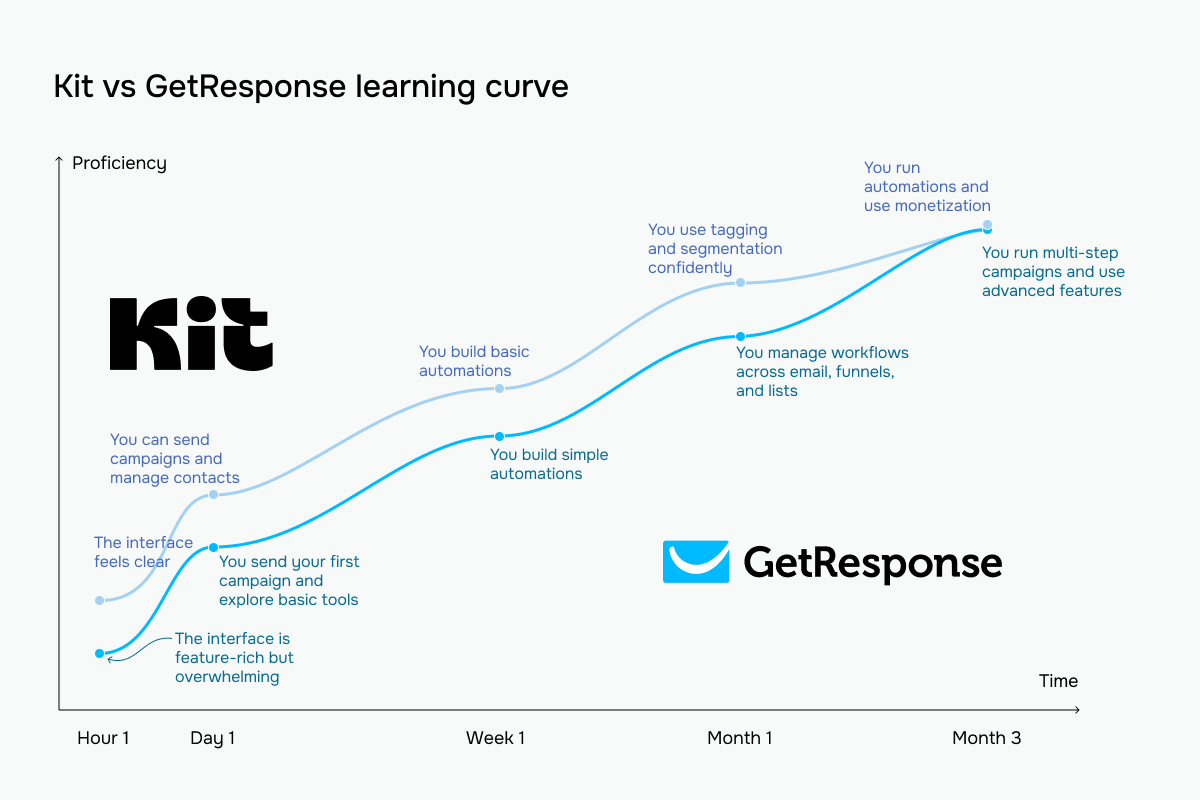 The bright blue line represents GetResponse vs Kit’s pale blue
Email builder and templates
Kit: 7/10 | ⭐ GetResponse: 9.2/10
GetResponse clearly leads when it comes to the email builder. It offers a larger template library, more flexible layout control, and a wider range of content blocks, which gives you more freedom when designing templates. It also handles mobile optimization automatically, so you don’t have to think about how your emails will look across devices.
Kit still works well for simple, text-focused newsletters – it’s fast and easy to use. But as soon as you need more design control, want to run promotions, or build fancier layouts, its limitations become noticeable. GetResponse is simply better suited for emails that go beyond basic communication and need to support real marketing goals.
| Aspect |
Kit |
GetResponse |
Winner |
| Templates |
Smaller library with 40+ simple templates |
Large library with 260+ professionally designed templates categorized by use case |
GetResponse |
| Drag-and-drop editor |
Inline, content-first editing; blocks added directly on canvas; limited design control; no persistent block panel |
Section-based visual builder; full layout control; persistent block library; supports reusable elements |
GetResponse |
| Notable content blocks |
Video, polls, social icons, reusable snippets |
Courses and eCommerce blocks (Product box, Recommended products, Promo code) |
GetResponse |
| Mobile responsiveness |
Mobile preview available; no control over how elements appear on mobile devices |
Automatically responsive layouts; element visibility can be adjusted per device |
GetResponse |
| AI features |
AI-assisted subject line generation |
AI-powered content generation, rewriting, and full campaign creation |
GetResponse |
| Sending time optimization |
Not available |
Automated send-time optimization based on engagement data; supports per-subscriber timezone delivery |
GetResponse |
| Total score |
7/10 |
9.2/10 |
GetResponse |
When we tried Kit’s editor, it felt more like writing in a document than building a campaign. You pick a template and just start typing. When you click on any element, the settings appear – nothing extra, nothing distracting. It’s easy to stay focused and move quickly.
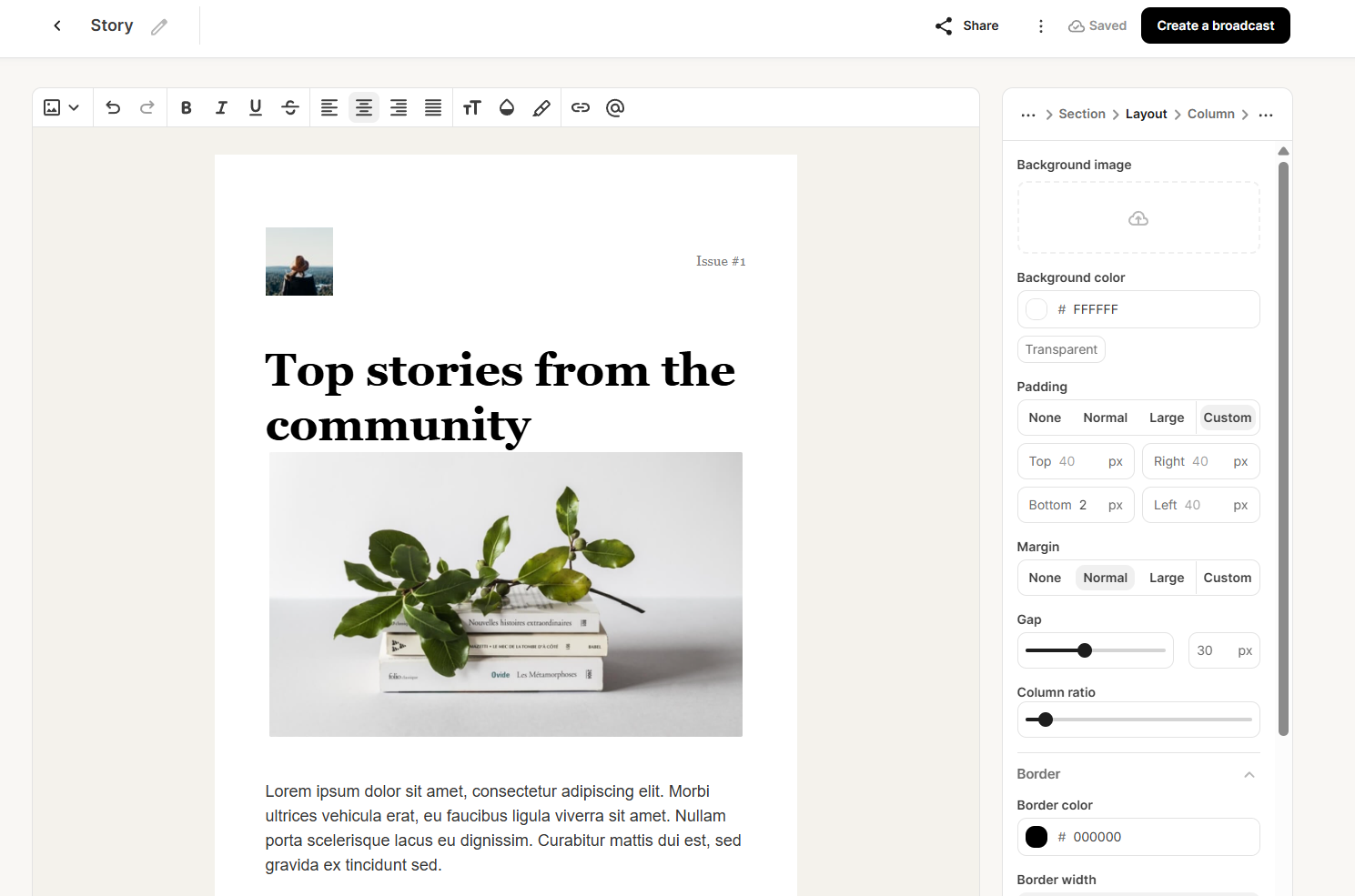 Designing a template with Kit’s email builder
That works really well for simple newsletters. But when we tried to build more complex, brand-aligned emails, it took more effort. You can adjust elements one by one, but there’s no easy way to apply styles across the whole email, so keeping everything consistent becomes a manual task.
With GetResponse, the process started differently – before writing anything, we had to choose a layout. You build the structure first, then fill it with content. The sidebar gives you a full set of blocks to drag in, like images, buttons, videos, products, promo codes, and countdown timers.
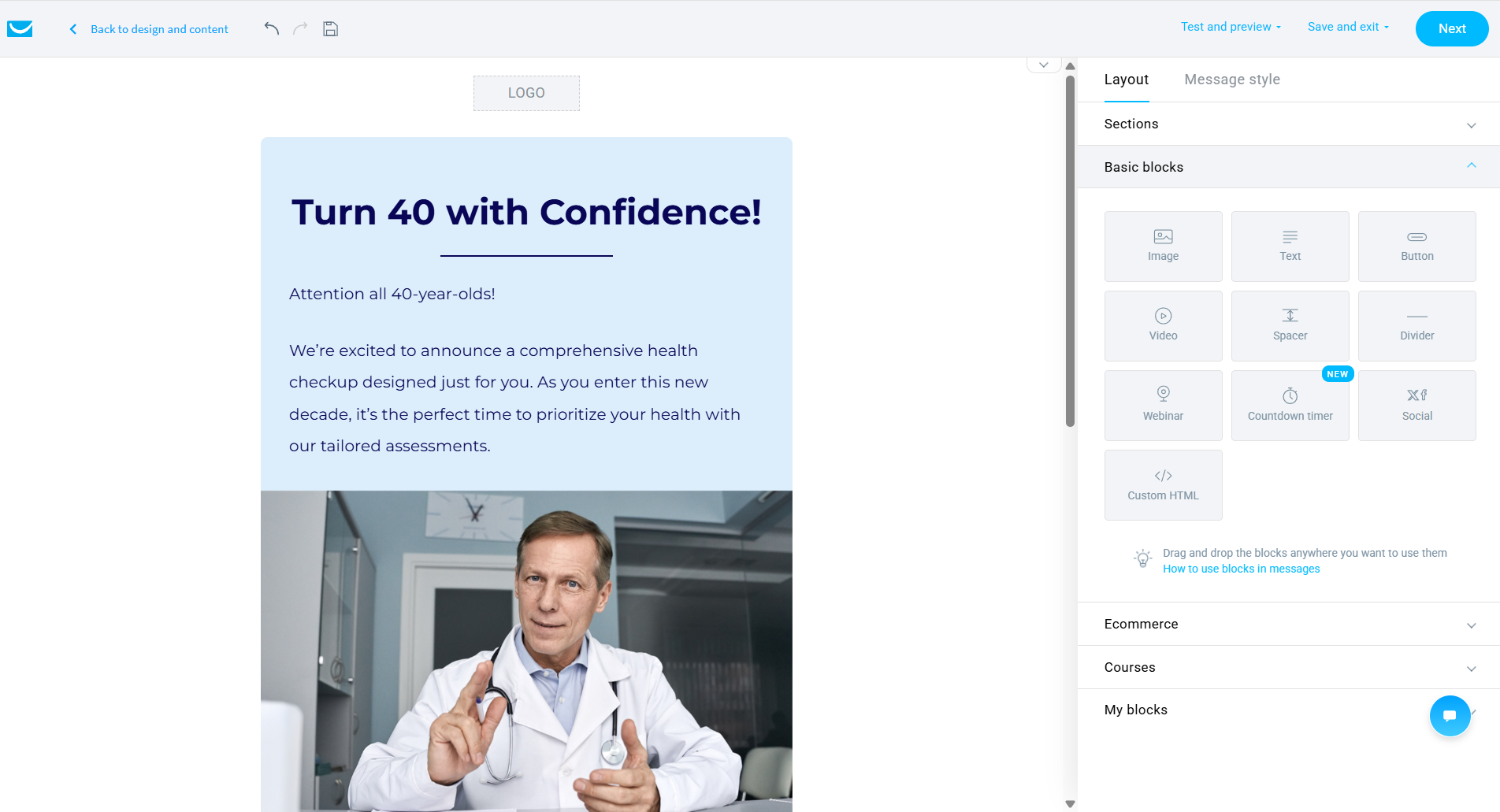 Creating a template with the GetResponse email builder
What stood out was how easy it is to keep everything consistent. You can control the overall style of the email in one place – width, colors, background – instead of adjusting each element manually. Once we got used to where things are, building more complex emails, like multi-column promos with product sections, felt quite natural.
These editors are designed for different types of work, and that becomes clear pretty quickly. Kit works best when your goal is to write and send emails regularly without overthinking the layout. It stays out of your way and lets you focus on the content. GetResponse makes more sense when emails are part of a larger campaign, especially if you’re promoting products, running offers, or building more sophisticated layouts.
Marketing automation
Kit: 6/10 | ⭐ GetResponse: 9/10
The 3-point score gap is huge! Where does it come from? The thing is, GetResponse stands out here – the visual canvas stays readable even with complex flows, you get a wide range of triggers, and features like branching, loops, scoring, and dynamic filtering let you create advanced journeys.
Once you move beyond simple sequences, the difference between Kit and GetResponse automation is very noticeable:
| Aspect |
Kit |
GetResponse |
Winner |
| Availability by plan |
Free plan includes 1 basic workflow (actions only, no conditions) and 1 sequence; paid plans unlock unlimited workflows with conditions, branching, and rule-based logic |
Free plan does not allow publishing workflows; entry-level paid plan includes 1 workflow with up to 6 elements and basic logic; higher tiers unlock unlimited workflows with full functionality |
Kit |
| Automation builder |
Clean, linear canvas; steps added inline; designed for forward-moving flows |
Flexible visual canvas; supports more complex structures, multiple paths, and reusable workflows |
GetResponse |
| Triggers available |
Basic triggers like form signups, tag changes, purchases, custom field updates; limited behavioral triggers |
Advanced triggers like subscriber actions, engagement (opens, clicks), scoring, browsing behavior, purchases, and course activity |
GetResponse |
| Pre-built automations |
41 templates for core scenarios (welcome series, launches, newsletters, monetization) |
46 templates covering sales, retention, eCommerce, and event-based workflows |
GetResponse |
| Channels supported |
Email only |
Email on all plans; messaging and web-based interactions on higher tiers |
GetResponse |
| Automation complexity |
Moderate; linear workflows with basic branching; no loops or lead scoring; limited entry points |
High; multi-path workflows with loops, scoring, dynamic filtering, and complex multi-condition logic |
GetResponse |
| Total score |
6/10 |
9/10 |
GetResponse |
Kit’s automation builder uses a vertical, linear canvas where workflows are built step by step from top to bottom. Each step is added through a simple pop-up with clearly labeled triggers, actions, and conditions, making the process intuitive even for non-technical users.
The builder supports forward-moving journeys, where subscribers progress through sequences based on tags, custom fields, or basic engagement signals. The interface is uncluttered and displays live subscriber counts at each step, which helps monitor performance without leaving the builder.
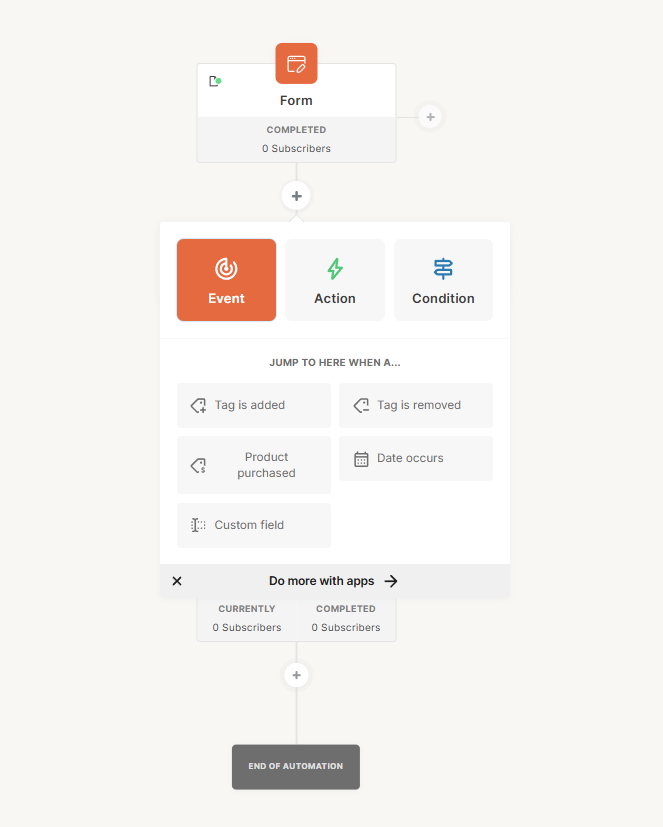 Testing the marketing automation capabilities of Kit
Testing GetResponse’s automation builder was a whole lot different experience – it is a flexible visual canvas designed for complex workflows. It supports multi-path branching with clear yes/no logic, allowing you to map out detailed customer journeys with multiple decision points and parallel paths. The trigger library is extensive too, covering subscriber behavior, engagement signals, eCommerce activity, and website interactions.
One standout feature is that automation can be triggered by both subscribers and anonymous website visitors, meaning workflows can kick in before someone even joins your mailing list. The builder also supports filtering, scoring, and advanced segmentation within workflows, making it a good fit for large-scale, multi-layered campaigns.
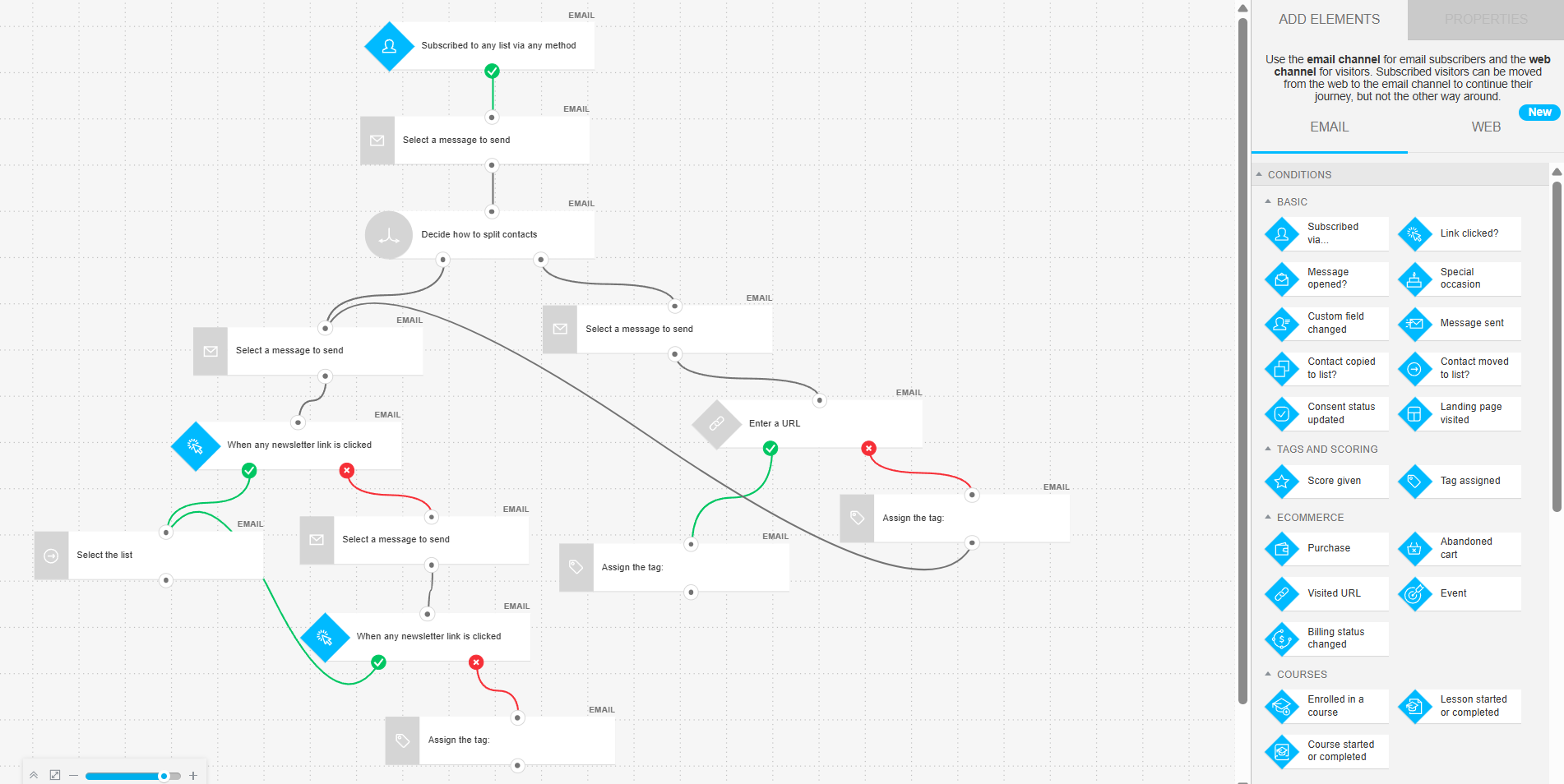 Setting up a multi-step workflow in GetResponse
In practice, Kit is built for fast execution of straightforward email workflows, like welcome sequences, product launches, and tag-based nurturing, where a clear, linear structure does the job. GetResponse, on the other hand, is designed for complex marketing operations, where campaigns depend on multiple triggers, behavioral data, and branching logic working together.
This matters most in eCommerce and multi-channel marketing, where workflows react to actions like product views, purchases, or on-site behavior in real time.
In short, Kit helps you move faster with simpler workflows, while GetResponse gives you the tools to build more advanced, data-driven customer journeys when your marketing needs go beyond email alone.
Contact management
Kit: 7.5/10 | ⭐ GetResponse: 8/10
GetResponse pulls ahead in contact management, mostly because it supports a wider range of segmentation criteria, including eCommerce behavior, webinar activity, consent data, and scoring. Its list-based structure also makes it easier to manage multiple audiences or campaigns at the same time. Kit, on the other hand, keeps things simple with a single database and flexible tagging, which works well for simpler setups.
To make this clearer, here’s a side-by-side comparison of how both platforms handle contact management:
| Aspect |
Kit |
GetResponse |
Winner |
| Segmentation capabilities |
Dynamic rule-based segments within a single database; uses tags and conditions with AND/OR/NONE logic across multiple filter groups |
Dynamic rule-based segments within a list-based structure; contacts can belong to multiple lists |
Kit |
| Segmentation criteria |
Based on forms, tags, custom fields, subscriber status, location, engagement score, and purchase data |
Broader range, including contact data, subscription details, engagement (opens, clicks), scoring, tags, consent, eCommerce behavior, and webinar activity |
GetResponse |
| Segment update speed |
Automatic updates; subscribers enter or leave segments as conditions change; minor delay possible in displayed counts |
Continuous updates; contacts enter or leave segments as conditions change |
GetResponse |
| AI features for segmentation |
No AI-based segmentation; engagement scoring available on higher plans, but not AI-driven |
No AI-based segmentation; engagement scoring calculated automatically based on activity, but not AI-driven |
Tie |
| Tagging and manual organization |
Tag-based organization with no limits; tags applied manually, via import, forms, automations, or links; tags and segments can be grouped |
Tag-based organization with an additional scoring system; tags applied manually, via import, automations, or bulk actions; used for segmentation and automation |
Kit |
| Total score |
7.5/10 |
8/10 |
GetResponse |
The difference shows up in how much you’re tracking about your audience. If it’s one list of subscribers – readers, listeners, or course followers – Kit’s tagging keeps everything simple and quick to manage. But once you’re dealing with customers across different products, tracking what they bought, what they clicked, or whether they joined a webinar, Kit starts to feel limited. That’s where GetResponse makes more sense – it gives you more ways to sort and act on that data.
Signup forms and landing pages
Kit: 6.4/10 | ⭐ GetResponse: 8.5/10
GetResponse wins every category here. It offers more form types, a more flexible builder, stronger targeting options, including eCommerce-based triggers, and a landing page builder with A/B testing and AI assistance. All of that adds up to a much more capable toolkit for lead capture and conversion-focused campaigns.
Kit, while more basic, is noticeably faster to use for simple signup forms and newsletter opt-ins. See how these differences play out in this side-by-side comparison:
| Aspect |
Kit |
GetResponse |
Winner |
| Types of forms available |
Inline, pop-up, slide-in, and sticky bar forms |
Inline, bar, full-screen, slide-in, and pop-up forms |
GetResponse |
| Form builder |
Template-based editor; template fixed after selection; basic visual editing with custom styling; fields mapped to tags or custom data |
Drag-and-drop editor with flexible layout control; broader field types including consent options; supports visual customization and automated styling |
GetResponse |
| Pop-up targeting conditions |
Time delay, scroll depth, exit intent, and click-based activation; device targeting and frequency limits |
Time delay, scroll depth, exit intent, inactivity, and click-based activation; includes page-level targeting, scheduling, device control, and eCommerce-based conditions |
GetResponse |
| Landing page builder |
Template-based editor with fixed structure; supports core content elements and custom styling; basic analytics and tracking via scripts; custom domains supported; no A/B testing |
Drag-and-drop builder with a large template library; supports advanced customization, integrations, and built-in analytics; includes A/B testing and broader tracking options |
GetResponse |
| Total score |
6.4/10 |
8.5/10 |
GetResponse |
When we tested it, Kit’s pop-up builder turned out to be a simple, template-driven editor built for speed and clarity. You pick a layout, and it stays fixed, and customization happens through style panels, where you adjust colors, typography, and field appearance without changing the overall structure.
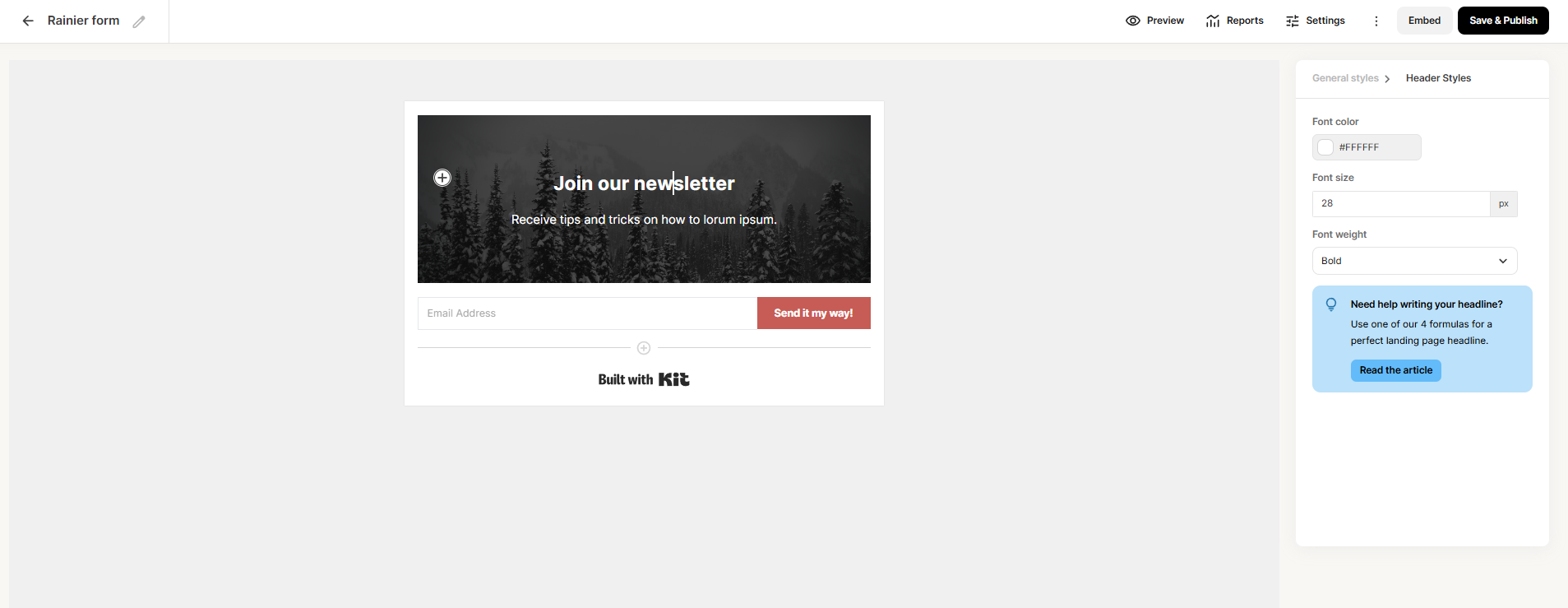 Trying out a signup form builder at Kit
Behavioral settings, such as timing, scroll triggers, exit intent, device targeting, and frequency caps, are grouped in one panel, making them easy to configure. Kit’s builder also includes subtle guidance elements, like headline suggestions, which help non-technical users create effective forms quickly.
GetResponse’s pop-up builder is a fully visual, drag-and-drop editor with a canvas-based working area. Every element, like text, buttons, and layout blocks, can be customized in detail: colors, spacing, typography, and shape variations.
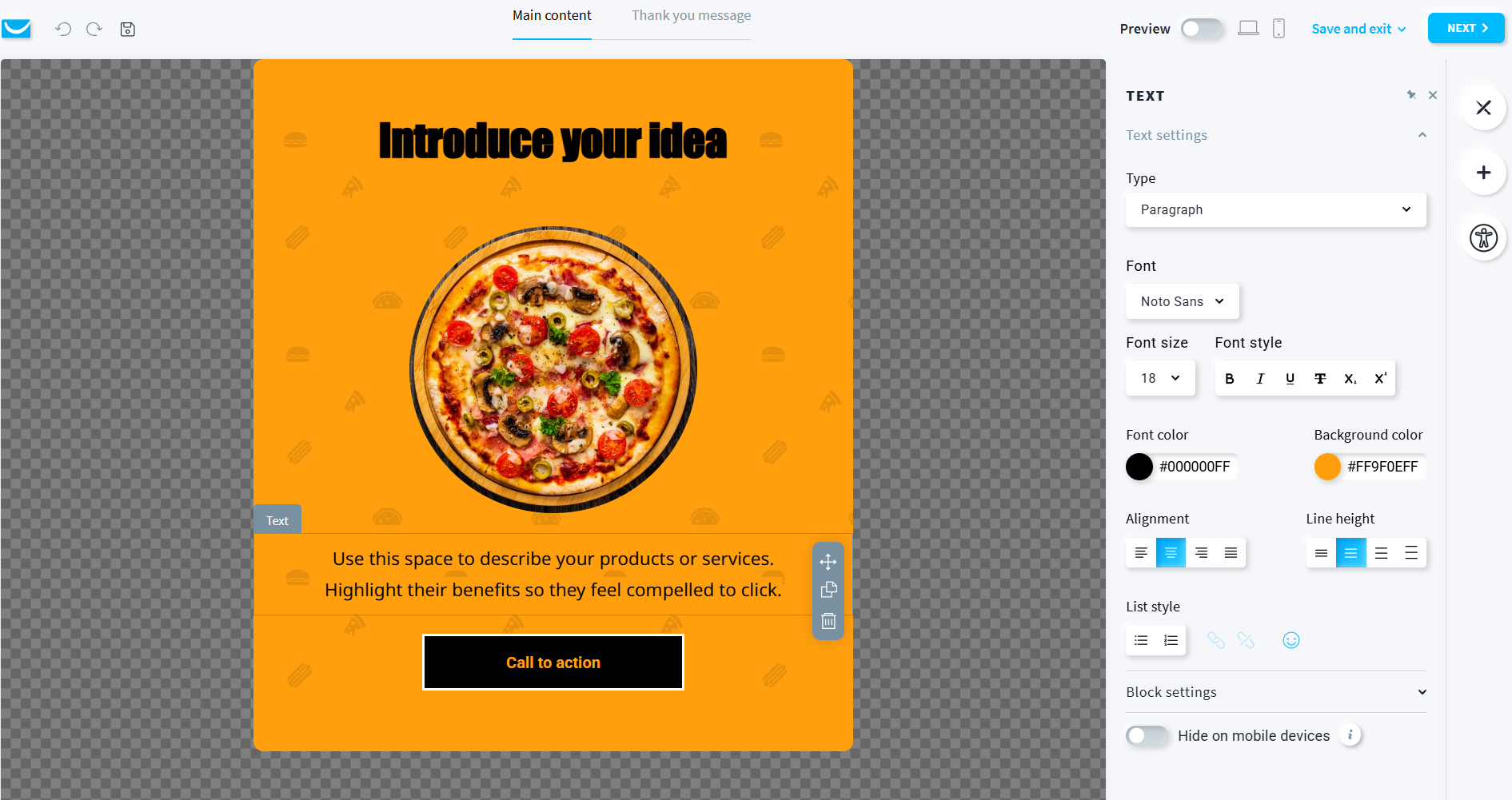 Setting up a pop-up form with GetResponse
With GetResponse, you also get to design a separate post-submission screen, which is a nice touch for confirmation messaging or upsells. Targeting options cover all the standard triggers and some extras like scheduling and page-level rules.
What we saw in practice is that Kit is faster to work with, as you can launch a clean, functional pop-up with minimal effort, which is ideal for newsletter signups and simple lead capture. GetResponse requires more setup time but lets you design pop-ups that look and feel like polished campaign pieces, matching your brand and tailored to your goals.
This becomes especially important in promotional scenarios – new product announcements, limited-time promotions, and eCommerce campaigns – where design quality and consistency directly affect performance.
Deliverability
Kit: 8.7/10 | ⭐ GetResponse: 9/10
Deliverability is crucial when you choose a bulk email sending service. However, it depends less on the platform itself and more on the marketer’s practices. Both Kit and GetResponse provide strong deliverability foundations – reliable infrastructure, proper authentication, and automatic handling of bounces and complaints.
| Aspect |
Kit |
GetResponse |
Winner |
| Authentication |
Supports SPF, DKIM, and DMARC via verified sending domain; automatic and manual setup available |
Supports SPF, DKIM, and DMARC; encourages full domain authentication; automatic and manual setup available |
Tie |
| Deliverability monitoring |
No built-in deliverability dashboard; shared infrastructure monitored internally; relies on external tools for domain and inbox placement tracking |
No built-in inbox placement tools; shared infrastructure monitored internally; campaign-level reporting includes bounce and complaint metrics; dedicated support available on higher tiers |
Tie |
| List hygiene |
Automatically handles unsubscribes, bounces, and complaints; removes hard bounces immediately; flags inactive contacts after a set period; supports manual cleanup via tagging and re-engagement workflows |
Automatically handles unsubscribes, bounces, and complaints; removes hard bounces immediately and soft bounces after repeated failures; applies internal suppression lists; recommends regular removal of inactive contacts |
GetResponse |
| Dedicated IP |
Available on request for high-volume senders (150,000+ emails/week); shared infrastructure managed internally by default |
Available on request from lower thresholds (50,000+ emails/week); setup, warmup, and scaling supported by the internal team |
GetResponse |
| Total score |
8.7/10 |
9/10 |
GetResponse |
GetResponse comes out ahead in most areas, and one thing that stands out is access to a dedicated IP at lower sending volumes. That alone can make a difference for senders who are starting to scale beyond basic limits. It also offers more detailed handling of bounces and complaints, along with internal suppression systems, giving you more control over list quality and sender reputation.
It also supports IP warm-up, which is essential when moving to a dedicated IP and helps maintain deliverability as your sending volume grows. As a general rule:
If you use dedicated IP addresses, you need to warm them up first. Each IP has a daily sending limit, so start with a small volume and gradually increase it over several weeks – or sometimes months.
SourceHalyna Panasiuk
CRM Manager at Voyagu
At the same time, both platforms share the same limitation: neither GetResponse nor Kit offers a built-in tool for tracking inbox placement or domain reputation on standard plans.
Reporting and analytics
Kit: 7.2/10 | ⭐ GetResponse: 8/10
Reporting and analytics help you figure out what’s working, what’s not, and where to focus next. In this category, Kit and GetResponse are not particularly close. Here are the details:
| Aspect |
Kit |
GetResponse |
Winner |
| Report coverage |
Covers campaigns, sequences, forms, landing pages, and subscriber growth; higher plans add deliverability insights, engagement scoring, and multi-layer dashboards for acquisition, engagement, and revenue tracking |
Covers campaigns, automations, contacts, forms, landing pages, webinars, and eCommerce performance; includes detailed engagement metrics across different marketing channels |
GetResponse |
| Custom reports |
No custom report builder; higher plans offer predefined dashboards with filtering, but fixed structure |
Custom report builder available on mid and higher tiers; multiple report types with flexible metrics and filters; supports scheduled and on-demand report generation |
GetResponse |
| Reporting speed |
Data appears after sending and updates progressively; advanced dashboards may take extra time to load |
Data appears after sending and updates progressively; custom reports can be generated on demand or on a set schedule |
Tie |
| Export capabilities |
Exports available for subscribers, campaign activity, and performance metrics; CSV format only |
Export available for contacts, campaign performance, automation activity, and analytics data; supports CSV and XLS formats |
GetResponse |
| Total score |
7.2/10 |
8/10 |
GetResponse |
What really sets GetResponse apart here is its custom report builder – scheduled reports, multiple report types, and shareable links make a real difference for teams tracking performance across campaigns on a regular basis. Coverage is also broader, with eCommerce, webinars, and API-based exports extending reporting beyond standard email metrics.
That said, neither platform offers built-in inbox placement or real-time deliverability dashboards, and the custom report builder is limited to mid- and higher-tier plans rather than available across all plans. Still, GetResponse clearly offers stronger, more flexible reporting, especially for teams running multi-channel campaigns.
Customer support
⭐ Kit: 7.5/10 | GetResponse: 7.1/10
Customer support is not something you think about every day, until something goes wrong. Most of the time, you’ll rely on documentation and figure things out yourself. But when you do need help, response speed and support quality quickly become important. Both Kit and GetResponse offer the basics, but there are some differences in availability, guidance, and overall experience. Here’s how they compare:
| Aspect |
Kit |
GetResponse |
Winner |
| Channel availability |
Email and live chat available on all plans; no phone support |
Email and live chat available on paid plans; 24/7 self-serve chatbot; phone support for enterprise accounts |
GetResponse |
| Average response times |
From 15 minutes to 72 hours (plan-dependent) |
Within 24 hours |
Tie |
| Knowledge base |
Large library of articles with step-by-step guides, troubleshooting content, and migration-focused documentation |
Extensive help center with articles, tutorials, and broader educational content, including courses and webinars |
GetResponse |
| Onboarding assistance |
Self-serve onboarding with structured guides; migration support with assisted data transfer on paid plans |
Guided onboarding with automated setup of initial assets; dedicated onboarding and support on the enterprise tier |
Tie |
| Support quality rating on Capterra |
4.4/5 |
4/5 |
Kit |
| Total score |
7.5/10 |
7.1/10 |
Kit |
Overall, the difference between the two platforms is not dramatic. GetResponse actually offers more resources, a chatbot for product-related responses around the clock, and multilingual support, but Kit ends up with a slightly higher score. The main reason is user feedback – Kit has a better support rating on Capterra, where real customers share their experience. That small gap tells more about how support feels in practice than what’s listed on paper.

Join 3M+ businesses growing with SendPulse
From solo creators to global brands, millions trust SendPulse to run email campaigns, automations, chatbots, and more — all in one place. Get started for free now!
Get started for free
Your decision checklist
Now that you’ve seen the full comparison, it’s time to make a decision. Let’s be honest – the situation where a marketer or business owner is genuinely choosing between Kit (formerly ConvertKit) and GetResponse isn’t that common.
You’re either a creator, solo operator, or small newsletter business looking for a focused, affordable tool built around audience growth and content monetization, or you’re a growing business or marketing team that needs a broader platform with advanced automation, eCommerce features, and multi-channel campaigns. Most people already fall into one of these groups before finishing the comparison.
But if you’re in that middle ground – a small business doing some content marketing, a creator starting to run promotions, or a team that’s outgrowing a simple tool but not sure how much complexity they actually need – then the choice is worth thinking through. To make it easier, look at the decision areas below and see which platform you choose more often. That usually points you in the right direction.
| Decision area |
Kit
is a better fit if… |
GetResponse
is a better fit if… |
| Business type |
You run a newsletter, sell courses or digital products, or grow an audience through content (email, blog, YouTube) and monetize it directly. |
You run an online store, SaaS, or service business and need to manage campaigns across email, website, funnels, and sales workflows. |
| Budget expectations |
You want to grow a list up to 10,000 subscribers for free, then move to a paid plan when you need full automation and eCommerce features. |
You’re ready to start on a paid plan from the beginning to get access to advanced automation workflows, segmentation, and eCommerce integrations. |
| Automation needs |
You need linear flows like welcome sequences, lead magnets, and product drop emails with segment-based targeting. |
You need behavior-driven flows triggered by purchases, page visits, or cart abandonment, with branching paths, lead scoring, and multi-step cross-channel campaigns. |
| Analytics focus |
You need to track subscriber growth, form conversion rates, sequence performance, and engagement scoring to identify your most engaged readers and optimize content. |
You need to track revenue attribution, abandoned cart recovery, order history, and average order value to measure and optimize eCommerce performance. |
| Team setup |
You work solo or with a small team and prefer a clean, low-friction interface. |
You work with a marketing team and need structure, roles, and support for complex workflows. |
Not finding the right fit? That happens – Kit and GetResponse cover a lot, but not every use case. Here are a few alternatives to consider:
- SendPulse combines ease of use and multi-channel reach in one platform, with email, SMS, chatbots, CRM, and a course builder, without enterprise-level pricing.
- ActiveCampaign is hard to beat for complex automation, with advanced workflow logic, branching, scoring, and AI-assisted templates.
- Klaviyo is purpose-built for eCommerce, with tight Shopify integration, real-time customer data, and revenue-focused reporting.
- MailerLite keeps things simple and affordable – one of the easiest tools to pick up, especially for small businesses.
- Mailchimp is a widely recognized platform with an extensive feature set and a bunch of popular integrations.
Final verdict and recommendations
⚖️ Final scores: Kit – 8.4/10 | GetResponse – 8.2/10
GetResponse wins more categories, and not by small margins. Its email builder, automation, contact management, reporting, and lead capture tools are all stronger. If you look at features alone, it’s the more powerful platform.
So why does Kit still come out ahead? Price and ease of use – two things you feel right away. Kit removes the cost barrier completely at the start. You can build a list, send emails, and monetize content without paying a thing, and that is hard to ignore. GetResponse expects you to commit sooner, but gives you more tools once you do.
If your setup is simple, Kit is likely the better option. If your setup is already more complex or heading that way, GetResponse is the platform you’ll grow into.