Kit and Klaviyo are not platforms you’d normally consider interchangeable. Kit (formerly ConvertKit) is built for creators – bloggers, indie makers, and entrepreneurs selling digital products. Klaviyo, on the other hand, is built for commerce – physical products, customer journeys, and revenue-driven marketing.
So why compare them at all? Because understanding where they differ makes it much easier to see which one actually fits your business, and where choosing the wrong one can slow you down.
How we scored this comparison: This review was created by the SendPulse team. As an email marketing platform ourselves, we work in the same space as the tools we test, which also means we understand the field deeply.
Each platform was evaluated across nine categories using our independent methodology. Pricing (25%), ease of use (20%), and email and automation features (15% each) carry the most weight because they affect daily workflows the most. All scores reflect hands-on testing and analysis as of April 2026.
TL;DR Quick Kit vs Klaviyo comparison
For this comparison, we tested both platforms hands-on, so you don’t have to. We’ll walk you through the key aspects of these email marketing tools, starting with the factors most likely to influence your decision, such as pricing and core marketing features, and then moving to less decisive areas like reporting and customer support.
If you already know what matters most to you, click on that category and jump straight to the section where we cover it in detail.
| Category |
Kit |
Klaviyo |
Winner |
| Best for |
Creators, bloggers, and newsletter-driven businesses focused on content and digital products |
eCommerce brands and marketing teams focused on revenue-driven campaigns and customer data |
Depends on your needs |
| Pricing |
10/10
Free plan up to 10,000 contacts; paid plans unlock automation, integrations, and monetization features |
7/10
Free plan up to 250 contacts; a single paid plan that includes all features, with pricing scaling based on the number of contacts |
Kit |
| Ease of use |
8.2/10
Simple, writing-first interface with minimal setup and fast onboarding |
6.5/10
More complex interface built around data and automation; requires more setup and learning |
Kit |
| Email design |
7/10
Minimalist editor focused on text-based emails; limited templates and layout control |
9.4/10
Drag-and-drop editor with dynamic content blocks, product feeds, and strong design flexibility |
Klaviyo |
| Automation |
6/10
Visual builder for simple, content-driven workflows based on tags and sequences |
9.6/10
Advanced automation with multi-step flows, behavioral triggers, and eCommerce integrations |
Klaviyo |
| Contact management |
6/10
Tag-based system with a single subscriber list; simple segmentation based on actions and attributes |
9.5/10
Advanced customer profiles with event tracking, predictive analytics, and detailed segmentation |
Klaviyo |
| Forms and pages |
6.4/10
Built-in forms and landing pages for list growth; basic targeting and customization |
7.2/10
Signup forms with behavioral targeting; dedicated landing page builder |
Klaviyo |
| Deliverability |
8.7/10
Standard authentication (SPF, DKIM, DMARC); relies on sender practices; minimal built-in tools |
9.2/10
Strong deliverability infrastructure with guidance, benchmarking, and integration with sending data |
Klaviyo |
| Reporting |
7.2/10
Basic campaign and subscriber reports; limited cross-campaign analysis |
10/10
Advanced reporting with revenue attribution, cohort analysis, and performance tracking across flows |
Klaviyo |
| Customer support |
7.5/10
24/7 email and live chat on all plans, including free; free migration assistance on paid plans |
7.3/10
60-day email support trial on free plan; 24/7 email support and live chat on paid plans |
Kit |
| Final score |
8.4/10 |
8.6/10 |
Klaviyo |
The score gap is minimal, and for good reason. Both platforms are objectively strong, but only for the audiences they were built for. If you’re not the target user, you’ll likely find the platform frustrating rather than helpful.

Create and send high-performing emails
Use an AI assistant, pre-made templates, advanced segmentation, and feature-rich automation to run campaigns without coding. Start for free with up to 15,000 monthly emails.
Get started for free
Differences between Kit and Klaviyo in pricing and key features
To choose the right email service provider for your business, you need a clear picture of what each one offers and which features actually matter for your business. Without that, it’s easy to overpay for things you won’t use or miss ones you actually need.
Below we’ve gathered and carefully double-checked all the information you need to make a confident decision.
Pricing plans
⭐ Kit: 10/10 | Klaviyo: 7/10
Disclaimer: Pricing changes frequently. These figures are accurate as of April 17, 2026. Always verify final costs on official pricing pages.
Let’s be clear – Klaviyo is one of the most expensive email marketing platforms we’ve evaluated so far. That said, the pricing reflects its depth: all of its automation capabilities are available as soon as you move to a paid plan, rather than being split across multiple tiers.
For that reason and to keep the comparison fair, we’ve included Kit across several plans – free/low tier (Newsletter/Creator) and the highest tier (Pro), where the full feature set is available.
| Contacts |
Kit,
Newsletter/Creator |
Kit,
Pro |
Klaviyo |
Winner |
| Free plan |
Up to 10,000 contacts and unlimited emails |
Up to 250 contacts and 500 emails |
Kit |
| 3,000 |
$0/mo;
unlimited emails |
$83/mo;
unlimited emails |
$70/mo;
up to 30,000 emails |
Kit |
| 10,000 |
$0/mo;
unlimited emails |
$158/mo;
unlimited emails |
$150/mo;
up to 100,000 emails |
Kit |
| 25,000 |
$166/mo;
unlimited emails |
$233/mo;
unlimited emails |
$400/mo;
up to 250,000 emails |
Kit |
| 55,000 |
$316/mo;
unlimited emails |
$433/mo;
unlimited emails |
$790/mo;
up to 550,000 emails |
Kit |
| Total score |
10/10 |
7/10 |
Kit |
When you factor in Kit’s higher tier, the gap narrows, Kit starts to look less like a budget option, and Klaviyo starts to look more reasonable. It really comes down to whether you actually need the features that come with Kit’s higher-tier plans.
Also, for the purpose of this comparison, we’ll focus on the highest tier of Kit, so you can see the full range of capabilities each platform offers.
Ease of use and interface
⭐ Kit: 8.2/10 | Klaviyo: 6.5/10
When evaluating the ease of use, it’s important to keep in mind that Kit and Klaviyo were built for very different users. Kit is designed for bloggers and creators, and its terminology and interface reflect that focus. Klaviyo, on the other hand, targets experienced eCommerce marketers, which is why its interface is more detailed and feature-heavy.
That being said, even from an email marketer’s perspective, Klaviyo stands out as one of the most complex platforms we’ve seen. That’s why it scores lower in this category. Kit is simple. Klaviyo is complex. Here is some proof:
| Aspect |
Kit |
Klaviyo |
Winner |
| First-time experience |
Guided setup with a clear checklist (create form, add subscribers, send email); minimal configuration needed before first send |
Setup involves connecting data sources (store, integrations) before meaningful use; onboarding flows focus on account setup and data syncing |
Kit |
| Daily navigation |
Few core sections (Grow, Send, Automate); actions are linear and easy to locate; interface stays consistent across features |
Multiple sections (Campaigns, Flows, Lists, Profiles, Analytics); navigation is structured around data and events, requiring more context switching |
Kit |
| Learning curve |
Short; most features (emails, forms, sequences) are usable within hours without prior experience |
Steeper; understanding flows, metrics, and event-based logic takes time, especially without prior eCommerce or automation experience |
Kit |
| Mobile access |
No dedicated mobile app; browser only |
No dedicated mobile app; browser only |
Tie |
| Workflow efficiency once mastered |
Fast content workflow setup and management; creating emails, tagging users, and launching sequences requires a few steps |
High efficiency for data-driven workflows; once set up, automations, segmentation, and reporting reduce manual work and scale easily |
Kit |
| Total score |
8.2/10 |
6.5/10 |
Kit |
Say you have a less experienced marketer on your team. How long would it realistically take for them to get full value out of the email marketing platform you’re paying for? Will it take hours, days, or months? Check out the graph below to see what a typical learning curve at Kit and Klaviyo might look like.
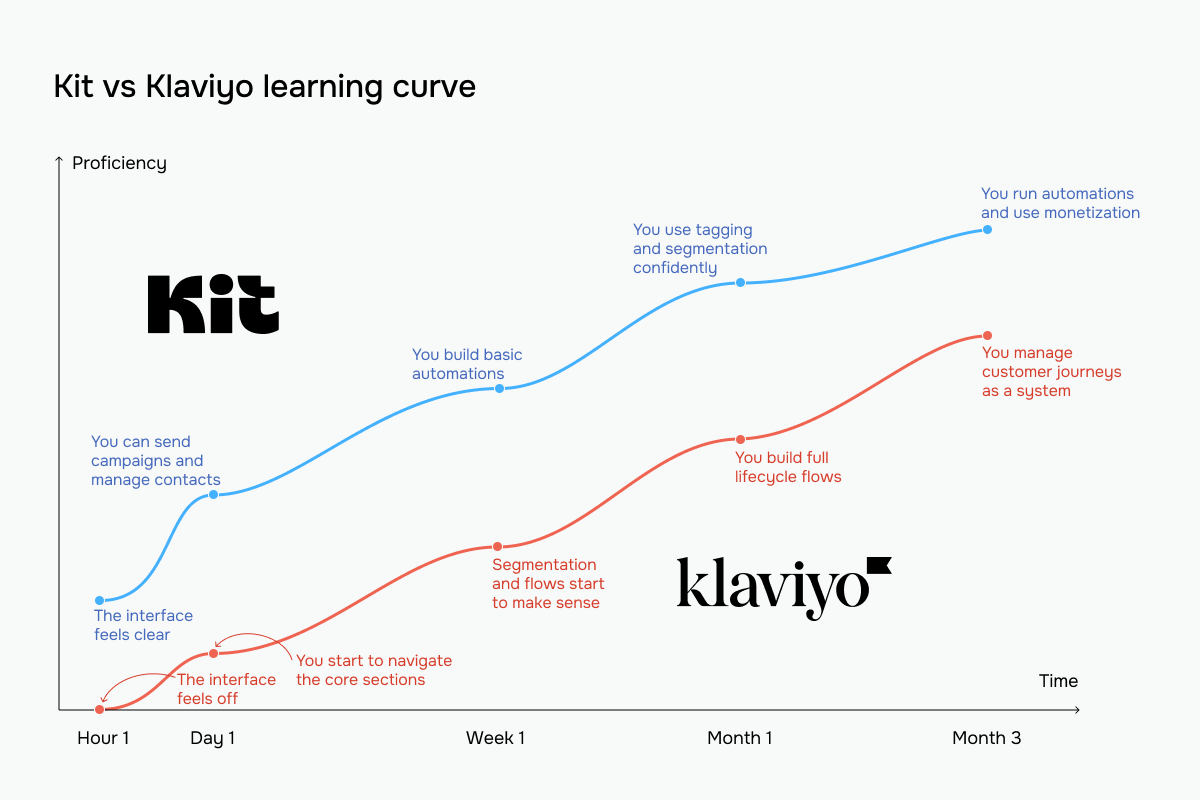 The blue line represents Kit vs Klaviyo’s red line
Email builder and templates
Kit: 7/10 | ⭐ Klaviyo: 9.4/10
One thing is clear from the start – Klaviyo’s email builder is one of the most detailed we’ve ever worked with. Built with sales in mind, it gives you precise control over every element so you can tailor emails for conversion. Kit, on the other hand, is designed for informing and engaging readers, which is why its builder feels closer to a text editor. Here are the details:
| Aspect |
Kit |
Klaviyo |
Winner |
| Templates |
40+ templates; mostly text-focused layouts for newsletters and simple emails |
160+ templates designed for eCommerce and marketing use cases; includes saved templates and reusable sections |
Klaviyo |
| Drag-and-drop editor |
Visual editor with inline content editing; no persistent block panel; sections added directly inside the email |
Drag-and-drop editor with a block panel; elements placed and rearranged visually on a canvas |
Klaviyo |
| Notable content blocks |
Image galleries and personalization blocks |
Product feeds, dynamic table blocks, social links, and review quote blocks |
Klaviyo |
| Mobile responsiveness |
Responsive by default; layouts automatically stack; no separate mobile editing controls |
Responsive by default; includes mobile preview and controls for adjusting layout and visibility |
Klaviyo |
| AI features |
AI subject line suggestions |
AI tools for generating email body, subject lines, and section layouts |
Klaviyo |
| Sending time optimization |
Not available |
Available for email campaigns with 12,000+ recipients |
Klaviyo |
| Total score |
7/10 |
9.4/10 |
Klaviyo |
When we just started with Kit, its email builder felt like writing in a document rather than designing a campaign. The interface is clean and distraction-free, content is edited directly on the page, and only a small set of styling options is available. Nothing pulls your attention away from the text, and the controls are simple enough to adjust quickly without breaking your flow.
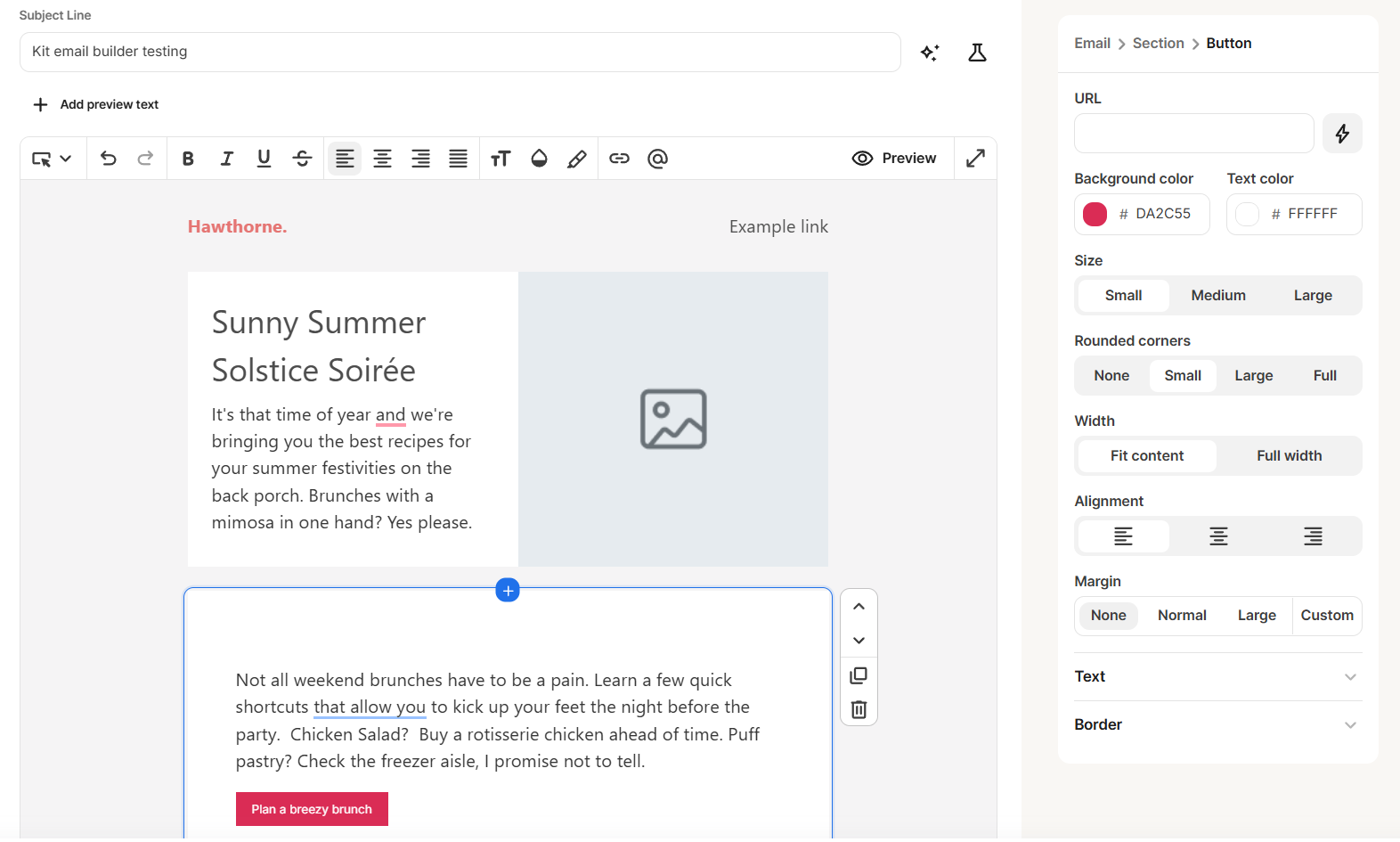 Customizing an email campaign in the Kit email editor
Klaviyo is a different experience altogether. Their email builder feels like a full design environment, closer to a lightweight web page editor. You work with structured layouts, detailed styling controls, and a wide range of customization options, covering everything from typography to spacing and visual effects for every element.
The interface supports complex, visually rich emails with branding, navigation elements, and dynamic content. It’s built for marketers and eCommerce teams who need emails to look polished and align with a broader visual identity.
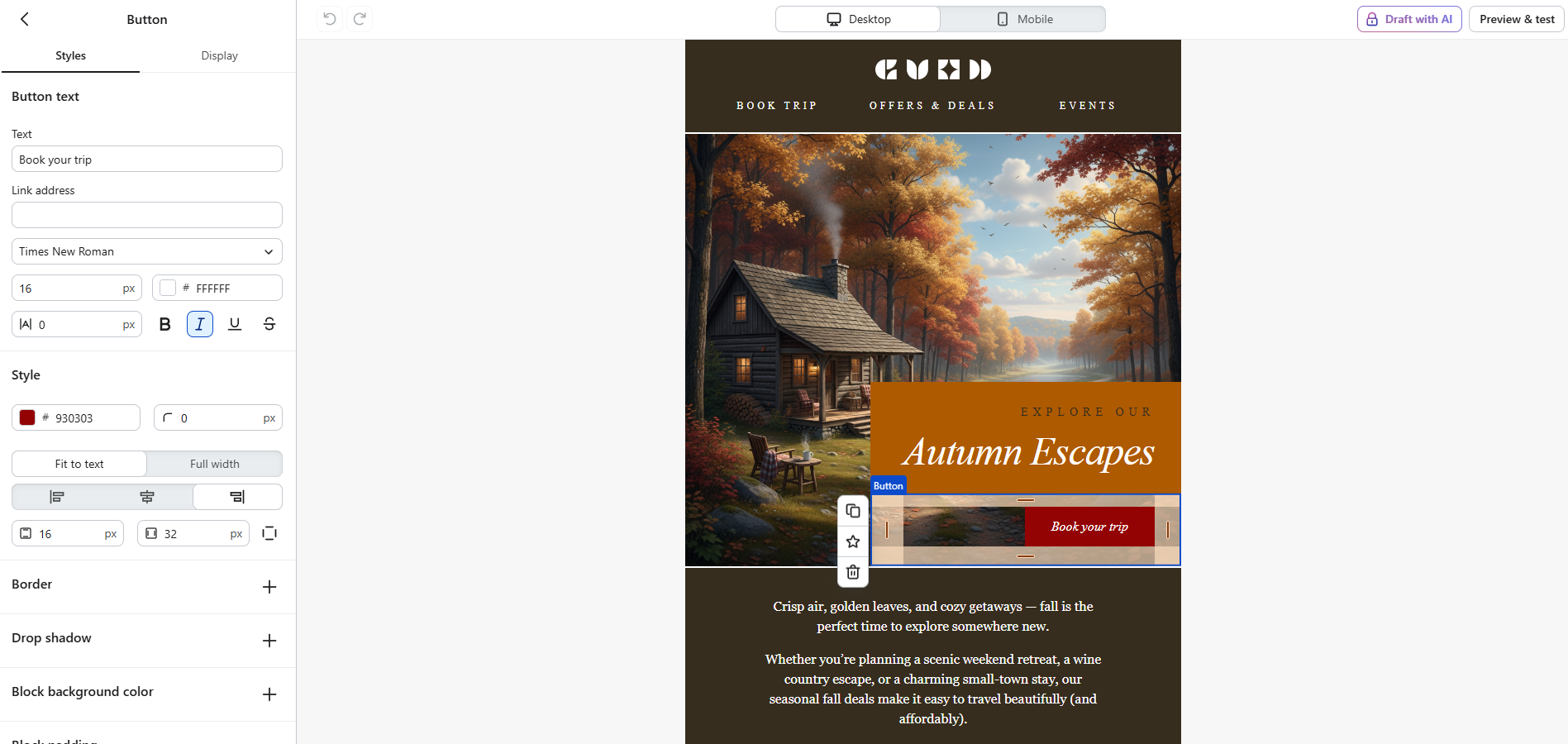 Styling an email button in the Klaviyo builder
In practice, this means Kit helps you move faster by limiting design decisions and keeping the focus on writing, while Klaviyo gives you precise control over how every element looks and behaves. Ultimately, it comes down to whether your emails are meant to feel personal and content-driven or built as fully designed marketing assets.
Marketing automation
Kit: 6/10 | ⭐ Klaviyo: 9.6/10
Automation is where the real difference between Kit and Klaviyo becomes clear. Even on its highest tier, Kit’s automation capabilities don’t come close to the advanced, highly refined flows Klaviyo offers, and the score gap reflects that. Here’s what you should know:
| Aspect |
Kit |
Klaviyo |
Winner |
| Availability by plan |
Full-feature visual automations available on paid plans; free plan limited to 1 basic automation and email sequence |
Automations available on all plans, including free |
Klaviyo |
| Automation builder |
Visual builder with a simple vertical canvas; actions, conditions, and events added inline |
Flow builder with a visual canvas and sidebar of triggers, conditions, delays, and actions; supports complex, multi-step workflows |
Klaviyo |
| Triggers available |
Entry points based on forms, tags, purchases, custom fields, and link clicks |
Extensive trigger set based on events (email behavior, site activity, product views, purchases, dates, API events) |
Klaviyo |
| Pre-built automations |
30+ templates for creator workflows (welcome sequences, product launches, lead nurturing) |
60+ pre-built flows (abandoned cart, browse abandonment, post-purchase, win-back, replenishment, etc.) |
Klaviyo |
| Channels supported |
Email only |
Email, SMS, and mobile push (depending on setup) |
Klaviyo |
| AI features |
Not available for building automations |
AI generates a recommended trigger and flow structure from a prompt |
Klaviyo |
| Automation complexity |
Linear and branching workflows designed for content-driven journeys; limited cross-channel coordination |
Advanced multi-branch workflows with event-based logic and cross-channel capabilities |
Klaviyo |
| Total score |
6/10 |
9.6/10 |
Klaviyo |
Here’s how their automations look in real life.
Kit’s automation builder is intentionally minimal, almost diagram-like. The entire flow is vertical and is built around just three elements: events, actions, and conditions, with a limited set of branching options like tags or email opens.
The logic is subscriber-centric: you’re not creating systems, you’re routing people into the right content paths. There’s no deep integration layer inside the builder itself, as more complex logic gets handled outside the builder via third-party tools. The result is a tool that’s extremely fast to set up and easy to understand at a glance, but deliberately constrained to keep the focus on content delivery.
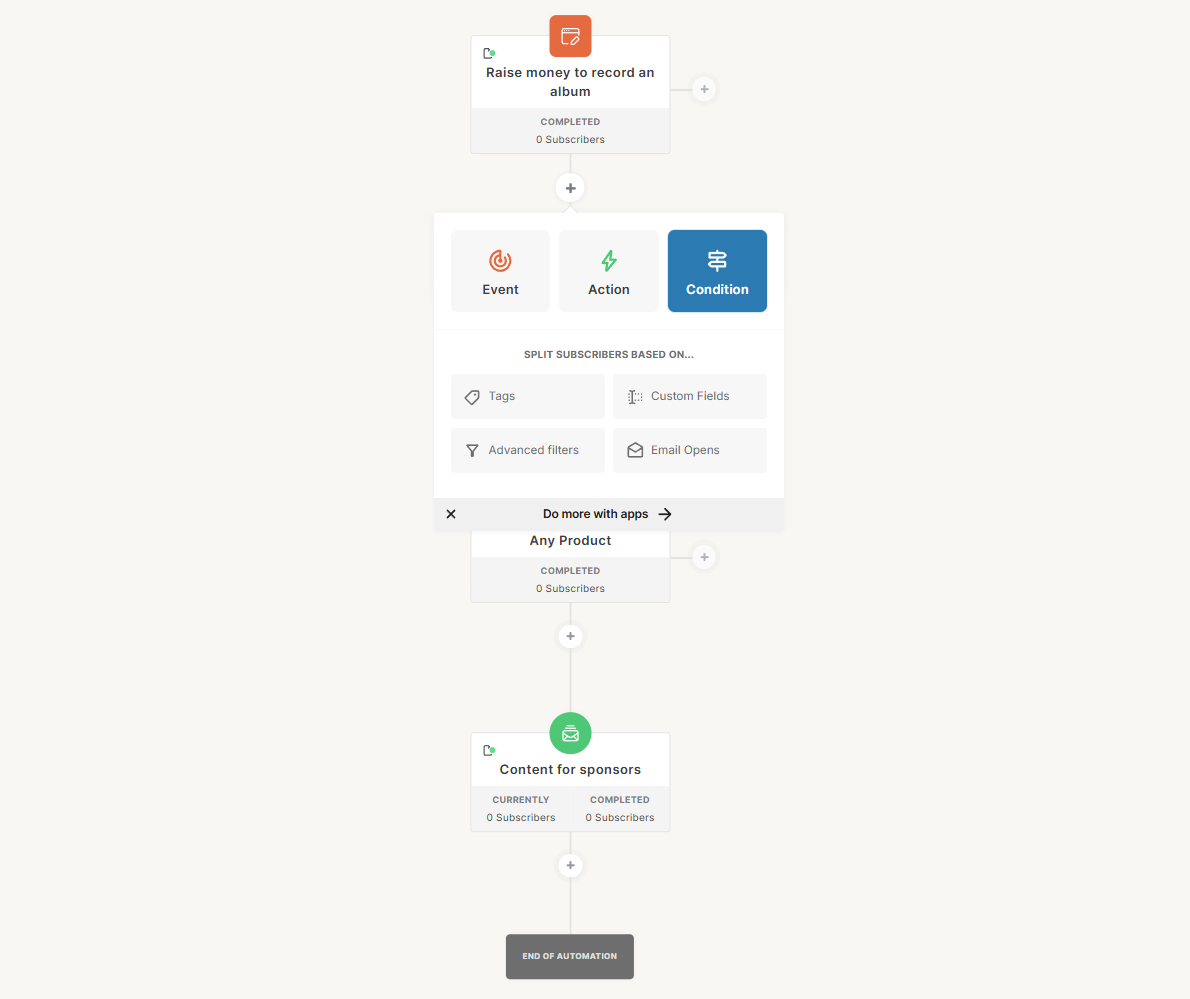 Testing the marketing automation capabilities of Kit
Meanwhile, Klaviyo’s automation builder works on a different level. It’s not a simple flow editor, but a central hub for managing your marketing operations, which combines messaging, data management, and system actions. From a single flow, you can send campaigns across multiple channels, update customer properties, trigger internal alerts, and connect to external systems without ever leaving the builder.
Timing, logic, and structure are clearly visualized, so you can see not just what happens, but when and why. The inclusion of eCommerce-specific flows (like out-of-stock or post-purchase sequences) shows that the system is built around real customer behavior, not just email sends.
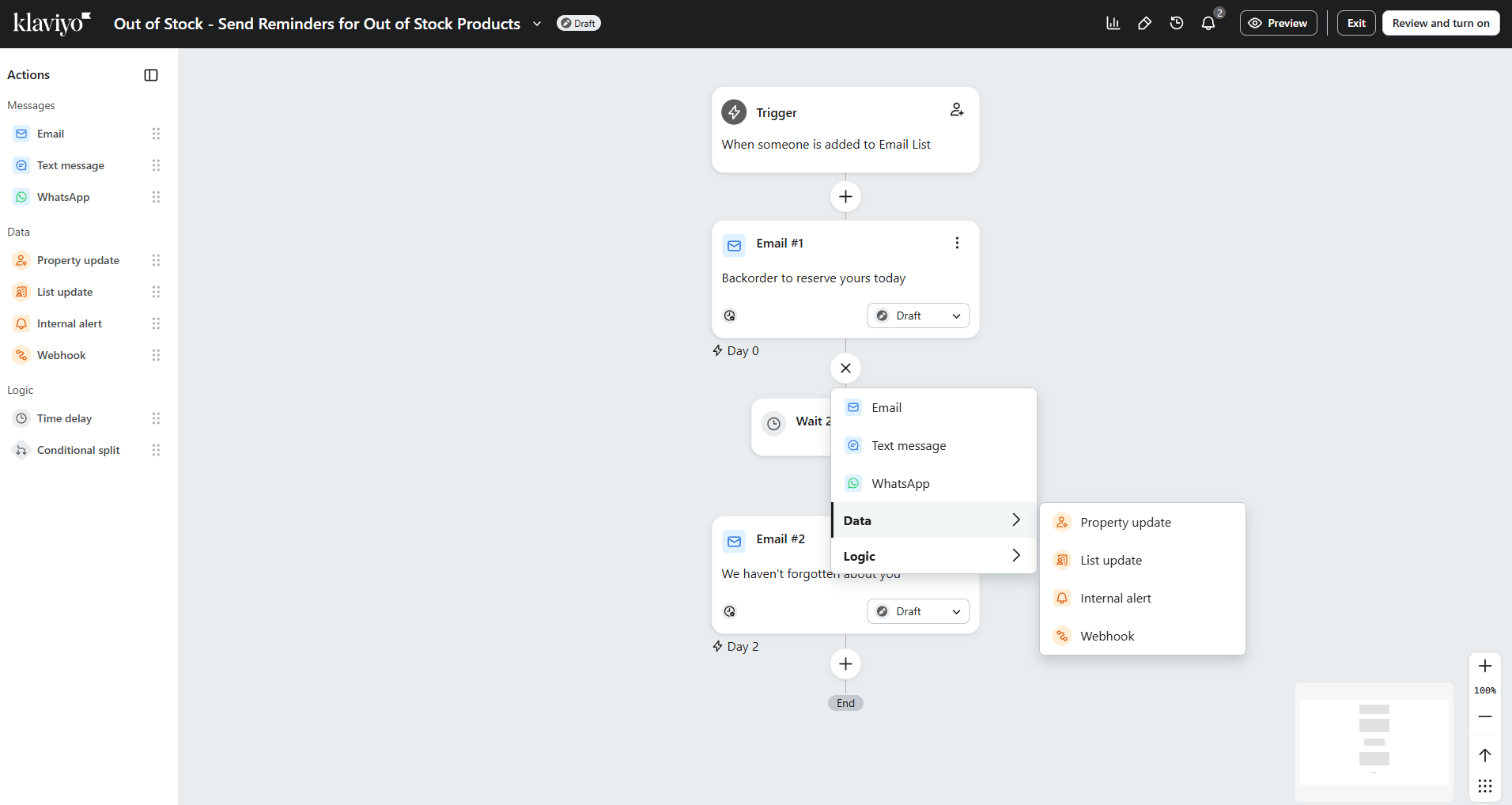 New customer onboarding and engagement automation in Klaviyo
However, the real difference is not even complexity. The two builders serve fundamentally different purposes.
Kit focuses on content delivery – who gets which email next based on simple signals. Klaviyo handles customer lifecycle management – what happens across channels, systems, and teams in response to customer behavior.
In Kit, automation is a readable flowchart for moving subscribers through content. In Klaviyo, it’s a control center that manages data, triggers actions, and coordinates multiple customer touchpoints.
Before choosing between them, ask yourself: do you need automation to send better emails, or to run your entire marketing operation?
Contact management
Kit: 6/10 | ⭐ Klaviyo: 9.5/10
Audience segmentation and tagging are what power automations, so it’s no surprise that Klaviyo, with its highly advanced automation features, also offers more capabilities in contact management. The 3.5-point score gap reflects just how much more sophisticated Klaviyo is compared to Kit’s more basic approach to segmentation.
| Aspect |
Kit |
Klaviyo |
Winner |
| Segmentation capabilities |
Dynamic, rule-based segments built with filter groups using any/all/none logic; multiple filter groups can be combined |
Dynamic segments built from up to 100 conditions; can include/exclude people based on events, profile properties, location, and predictive analytics |
Klaviyo |
| Segmentation criteria |
Segment criteria around tags, forms, custom fields, location, and product/purchase data |
Segment criteria include events/metrics, profile properties, location, and predictive analytics such as CLV or predicted gender |
Klaviyo |
| Segment update speed |
Segments automatically add or remove subscribers as they meet or stop meeting the conditions |
Segments are dynamic and update in near real time |
Klaviyo |
| AI features for segmentation |
Not available |
Creating segments from prompts; segmentation with predictive analytics |
Klaviyo |
| Tagging and manual organization |
Tag-based organization; tags applied manually, on import, and via automations |
No tag-based organization; contacts managed through lists, segments, and profile properties |
Kit |
| Total score |
6/10 |
9.5/10 |
Klaviyo |
Klaviyo comes very close to a perfect score in segmentation, landing at 9.5/10. Its segmentation is not just advanced but deeply integrated into the entire platform, combining behavioral data, predictive analytics, and real-time updates into a system that’s difficult to match.
This allows marketers to build highly precise audiences and act on them immediately, without relying on external tools. At this point, Klaviyo isn’t just ahead of Kit. Instead, it effectively sets the standard for effective contact management, and very few platforms can match this level of depth, let alone surpass it.
Signup forms and landing pages
Kit: 6.4/10 | ⭐ Klaviyo: 7.2/10
Email campaigns start with a signup form, which is why Kit simply calls this set of features “Grow.” With forms, pop-ups, and landing pages, you build your contact list by collecting subscriber data for future campaigns. Both Kit (ConvertKit) and Klaviyo offer solid functionality here, but neither is fully flexible when it comes to form creation and customization. See for yourself:
| Aspect |
Kit |
Klaviyo |
Winner |
| Types of forms available |
Inline, modal, slide-in, and sticky bar forms |
Pop-up, full page, flyout, banners, and embed forms |
Tie |
| Form builder |
Template-based visual builder; limited customization; custom CSS supported |
Visual builder with templates and blank forms; structured settings (styles, targeting, behavior); supports embedded forms |
Klaviyo |
| Pop-up targeting conditions |
Time on page, scroll depth, timers, exit intent, and clicks |
Time delay, exit intent, scroll depth, click triggers, URL targeting, and frequency controls |
Klaviyo |
| Landing page builder |
Template-based pages in a no-code editor; supports custom domain and direct sharing; focused on opt-in and list growth |
Dedicated landing page builder with hosted pages, custom domain support, multi-step forms, UTM tracking, and built-in analytics |
Klaviyo |
| Total score |
6.4/10 |
7.2/10 |
Klaviyo |
Let’s check how signup form builders at Kit and Klaviyo look in real life.
Kit’s form builder is created for speed and simplicity, with a clear focus on collecting email addresses without friction. You work with a clean, pre-designed layout and adjust only essential elements like text, basic styles, and post-submission behavior. We’ve noticed that the customization is intentionally limited, which keeps the setup fast and predictable. The result is a straightforward opt-in page that looks good and works immediately, without requiring any conversion strategy or optimization.
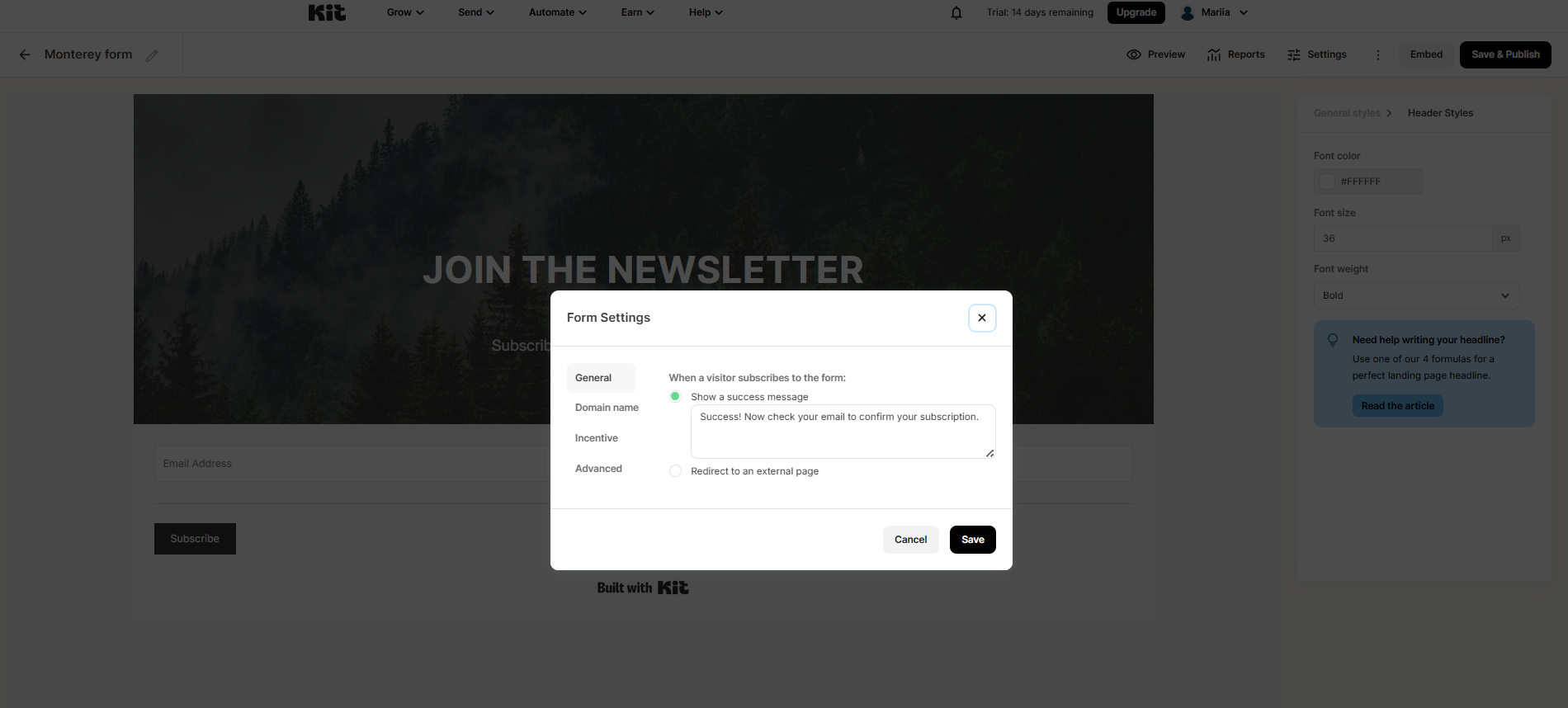 Customizing elements of a signup form with Kit
Klaviyo’s form builder turns signup into an interactive conversion experience. Instead of a single form, you can build multi-step flows that guide users through different stages – for example, a teaser, a gamified spin-to-win wheel with rewards, email capture, SMS opt-in, and a success screen.
Gamification elements like prize wheels reduce friction by making signup feel engaging rather than transactional. Combined with deep design controls and step-by-step logic, this allows you to actively optimize how users convert and not just collect their details.
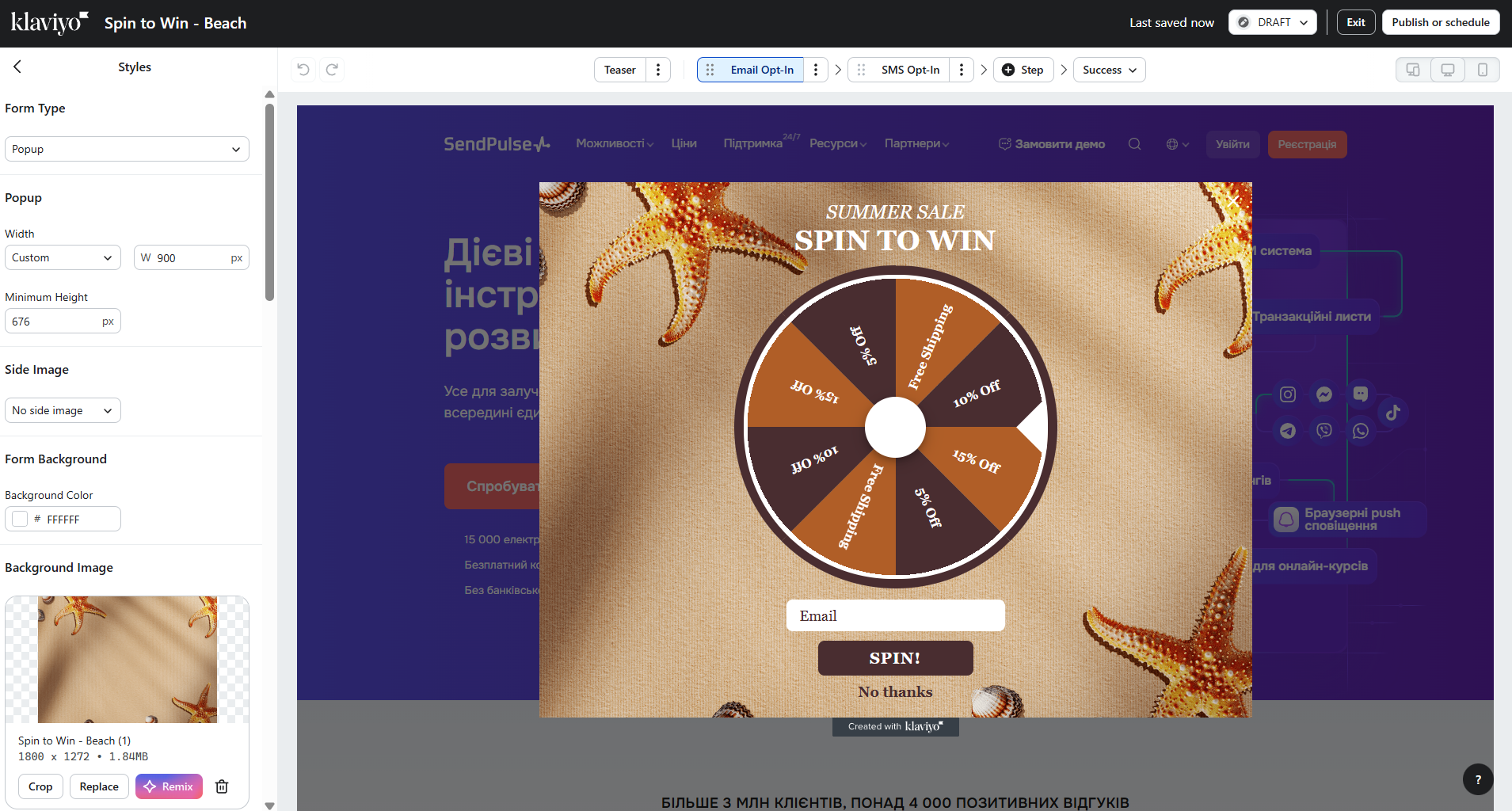 Setting up a pop-up form with Klaviyo
After testing both builders, we’ve noticed that Kit and Klaviyo treat signups differently. Kit gives you a clean, honest opt-in – subscribe, and you’re done. Klaviyo treats signup as something to optimize, using gamification, multi-step flows, and incentives to increase conversion rates. In practice, Kit helps you move fast and grow steadily, while Klaviyo helps you squeeze more value out of each visitor through a more intentional, tailored signup experience.
Deliverability
Kit: 8.7/10 | ⭐ Klaviyo: 9.2/10
Almost 80% of deliverability depends on the marketer's practices, namely list hygiene, permission-based sending, consistent sending pattern, and content relevance. Only about 20% depends on the ESP, which handles infrastructure, authentication, and IP reputation management.

Victoria Lushnenko
Deliverability Expert at SendPulse
Deliverability depends more on how you send emails than on the bulk email sending service you choose. Still, strong platforms like Kit and Klaviyo offer features that help support and improve your deliverability results. Here’s what each platform provides:
| Aspect |
Kit |
Klaviyo |
Winner |
| Authentication |
SPF, DKIM, and DMARC via verified sending domain; manual DNS setup required |
SPF, DKIM, and DMARC supported; shared domain pre-configured; branded domains add records during setup |
Klaviyo |
| Deliverability monitoring |
Basic monitoring via campaign metrics and shared IP monitoring |
Built-in deliverability tools and reputation repair AI; monitors opens, clicks, bounces, spam rates, and sender health score |
Klaviyo |
| List hygiene |
Hard and soft bounces suppressed; inactive subscribers identified; manual cleanup and re-engagement recommended |
Hard bounces suppressed; soft bounces suppressed after repeated failures; never-engaged segments |
Tie |
| Dedicated IP |
Available on request for high-volume senders |
Available for qualifying accounts; requires approval; automated warm-up process of 30–40 days |
Klaviyo |
| Total score |
8.7/10 |
9.2/10 |
Klaviyo |
The score gap is small, and in practice, both Kit and Klaviyo offer solid, reliable deliverability. They won’t fix a poorly managed contact list for you, but if you collect and segment contacts properly and clean your list regularly, they will do their part to keep your emails landing in the inbox.
Reporting and analytics
Kit: 7.2/10 | ⭐ Klaviyo: 10/10
Once your contacts are collected and your campaigns are sent, the next step is understanding how effective they were. This is where reporting and analytics play a key role. Here’s how Kit and Klaviyo help you get those insights:
| Aspect |
Kit |
Klaviyo |
Winner |
| Report coverage |
Broadcast, sequence, form, and landing page reports; Insights dashboards for acquisition and engagement |
Campaign and flow analytics; dashboards; audience and segment reports; growth, funnel, product, and revenue reporting |
Klaviyo |
| Custom reports |
Pre-built reports and insights dashboards only; no custom report builder |
Custom reports available; can be built from scratch or with a template |
Klaviyo |
| Reporting speed |
Refresh-based reporting; updates may take a few minutes |
Refresh-based reporting; some data updates on demand, predictive metrics update periodically |
Tie |
| Export capabilities |
CSV export for broadcasts, subscriber data, forms, and landing pages |
CSV export for campaigns, flows, lists, segments, and reports; additional sharing/export options available |
Klaviyo |
| Total score |
7.2/10 |
10/10 |
Klaviyo |
All features related to data, from automation and segmentation to reporting, are highly developed in Klaviyo, earning it a solid ten out of ten. Kit’s reporting is sufficient for its target audience, but if you need detailed, in-depth analytics, Klaviyo is the better choice.
Customer support
⭐ Kit: 7.5/10 | Klaviyo: 7.3/10
When working with a new platform, you’re likely to need assistance from time to time and it’s crucial that it’s available when you do. Neither Kit nor Klaviyo stands out in this area, as both have some limitations in support channel availability and mixed feedback from long-term users on Capterra.
Here’s what the platforms offer:
| Aspect |
Kit |
Klaviyo |
Winner |
| Channel availability |
24/7 email and live chat support on all plans |
Email and live chat support; availability varies by plan |
Kit |
| Knowledge base |
Focused help center with guides, tutorials, and troubleshooting for core features |
Extensive help center with product guides, tutorials, best practices, and eCommerce resources |
Tie |
| Onboarding assistance |
Self-serve onboarding with checklists and documentation; migration assistance available on paid plans |
Self-serve onboarding with eCommerce checklists, getting-started courses, and live trainings available to all users |
Tie |
| Support quality rating on Capterra |
4.4/5 |
4.3/5 |
Kit |
| Total score |
7.5/10 |
7.3/10 |
Kit |
Overall, both platforms have solid knowledge bases that can help you find what you need, along with generally good ratings on Capterra for customer support provided by the platforms’ representatives. Just keep in mind that getting started with a new platform can feel challenging at first, but it becomes much easier as you get used to it.

Join businesses growing with SendPulse
From solo creators to global brands, thousands of customers trust SendPulse to run email campaigns, chatbots, automations, and more — all in one place.
Get started for free
Your decision checklist
Now that you know how Kit and Klaviyo compare in detail, it’s time to make a decision. Which one will you choose?
| Decision area |
Kit
is a better fit if… |
Klaviyo
is a better fit if… |
| Business type |
? You’re a creator, blogger, or newsletter-first business focused on content and digital products. |
? You run an eCommerce brand or a data-driven business where email supports revenue and customer lifecycle. |
| Budget expectations |
? You want a generous free plan and predictable pricing as your list grows. |
? You prefer a free plan and a single paid plan with no feature tiers, where all capabilities are available and pricing grows with your contacts. |
| Automation needs |
? You need simple, email-based sequences built around tags and subscriber behavior. |
? You need advanced, multi-step automations triggered by customer behavior across email, SMS, and other channels. |
| Analytics focus |
? You’re fine with basic campaign performance and audience growth insights. |
? You need detailed reporting, revenue attribution, and the ability to analyze performance across campaigns, flows, and customer segments. |
| Team setup |
? You work solo or in a small team and need a platform that’s quick to learn and easy to manage. |
? You have a team and can invest time in setup, data structure, and ongoing optimization. |
If three or more of your answers point to one platform, congrats – you’ve likely made a well-informed choice. Still, even then, it might not feel like the perfect fit.
If you’re leaning toward Kit because of its price and simplicity, it’s worth checking out the following tools:
- MailerLite, which offers more design flexibility and stronger automation out of the box;
- SendPulse, an affordable multi-channel platform with a built-in CRM system and chatbots.
If Klaviyo seems like the right direction but doesn’t fully convince you, take a look at one of these platforms:
- ActiveCampaign for its advanced automation;
- Mailchimp, one of the most popular platforms, including among eCommerce businesses.
Final verdict and recommendations
⚖️ Final scores: Kit – 8.4/10 | Klaviyo – 8.6/10
The 0.2-point gap in scores is too small to focus on. What matters is that both Kit and Klaviyo are genuinely strong email marketing solutions, just for different reasons and different audiences.
We can confidently recommend Kit as one of the most generous platforms on the market, built by creators for creators, with their workflows and needs at the center.
At the same time, we can also recommend Klaviyo, which stands out as one of the strongest platforms in the eCommerce space, with powerful automation and contact management capabilities.
In the end, this isn’t a question of which platform is better – it’s about which one fits the way you work. Choose the one that aligns with your goals, and you’ll have a solid foundation to build on.