That’s a battle of titans we’re about to witness! Both platforms have been around almost since the beginning of email marketing: Constant Contact launched in 1995, and GetResponse followed just two years later in 1997. That longevity gave them massive customer bases and years of market experience, but, at times, it also shows in some surprisingly rigid product decisions and business practices.
Here’s a full comparison of their pricing, email and automation features, and customer support to see where they still think alike and where they’ve gone in different directions.
How we scored this comparison: This review was created by the SendPulse team. As an email marketing platform ourselves, we work in the same space as the tools we test, which also means we understand the field deeply.
Each platform was evaluated across nine categories using our independent methodology. Pricing (25%), ease of use (20%), and email and automation features (15% each) carry the most weight because they affect daily workflows the most. All scores reflect hands-on testing and analysis conducted by our team as of May 2026.
Below is a very short comparison of the key aspects of GetResponse vs Constant Contact. If any of these categories is a decisive factor for you, click on it – the page will take you straight to the section where we evaluate it in detail.
| Category |
GetResponse |
Constant Contact |
Winner |
| Best for |
Businesses focused on automation, funnels, webinars, landing pages, eCommerce workflows, and behavioral marketing |
Small businesses, nonprofits, and teams focused on event marketing and newsletter-driven communication |
Depends on the use case |
| Pricing |
8.3/10
Lower pricing on most tiers; free plan available; unlimited emails on paid plans; some reported issues about unexpected charges |
8/10
Higher pricing on most tiers; no free plan; email sending limits on lower-tier plans |
GetResponse |
| Ease of use |
8.2/10
Broader feature set with more sophisticated workflows and AI-assisted onboarding |
8.5/10
Cleaner navigation, more guided workflows, and lower learning friction |
Constant Contact |
| Email design |
9.2/10
Flexible builder with unique content blocks, stronger layout control, extensive template library, and deeper AI support |
8.7/10
Editorial-style builder with structured layouts, strong templates, and AI-generated campaign variations |
GetResponse |
| Automation |
9/10
Behavior-based automation with branching logic, scoring, eCommerce triggers, and multi-step workflows |
5/10
Sequence-focused automation built around straightforward follow-up flows and date-based triggers |
GetResponse |
| Contact management |
8/10
Dynamic segmentation with behavioral conditions, contact scoring, tags, and continuous updates |
7/10
List-based segmentation with strong support for standard targeting and campaign organization |
GetResponse |
| Forms and pages |
8.5/10
Advanced pop-ups, landing pages, targeting conditions, A/B testing, and stronger conversion-focused customization |
6.8/10
Fast-to-launch signup forms and hosted landing pages with basic targeting tools |
GetResponse |
| Deliverability |
7.4/10
Strong infrastructure, dedicated IP availability, and better list hygiene controls; some reported delivery consistency issues |
7/10
Solid authentication setup and bounce handling; no dedicated IP support; some reported delivery consistency issues |
GetResponse |
| Reporting |
8/10
Custom reports, broader export options, and stronger cross-channel analytics |
6.5/10
Standard reporting with heat maps, event tracking, and campaign comparison tools |
GetResponse |
| Customer support |
7/10
Better support channel availability, multilingual support, and AI-assisted onboarding |
7/10
Strong phone support, live training sessions, and extensive onboarding resources |
Tie |
| Final score |
8.2/10 |
7.5/10 |
GetResponse |
A 0.7-point difference in scores is significant. But does it really mean GetResponse is that much better than Constant Contact, or is there something else behind these numbers? To answer that, we’ll need to look closer at the details.
How we tested: We created accounts on both platforms and spent several weeks in April and May 2026 evaluating them across nine categories. During testing, we built email campaigns using drag-and-drop editors, set up multi-step automations with branching logic, tried out pop-up and signup form builders, looked through template libraries, examined AI generators, and checked real-user feedback on Capterra for support quality. All screenshots in this article were captured during our hands-on evaluation.
We start our evaluation with what matters most to modern businesses – pricing and billing – then move on to the core features an email marketing platform is expected to have, and finish with the nice-to-haves that rarely influence the final decision, like customer support. Shall we start?
Pricing plans
⭐ GetResponse: 8.3/10 | Constant Contact: 8/10
Disclaimer: Pricing changes frequently. These figures are accurate as of May 22, 2026. Always verify final costs on official pricing pages.
For both GetResponse and Constant Contact, we included the cheapest and the most expensive pricing tiers so you can see how much it costs to get started, and how much you’ll eventually pay to access all the features and capabilities the platforms offer.
| Contacts |
GetResponse,
Starter |
GetResponse,
Creator |
Constant Contact,
Lite |
Constant Contact,
Premium |
| Free plan/trial |
Up to 500 contacts and 2,500 emails |
30-day trial only (the interface incorrectly shows 14 days at the time of our testing) |
| 1,000 |
$19/mo |
$73/mo |
$30/mo;
10,000 emails |
$110/mo;
24,000 emails |
| 10,000 |
$81/mo |
$134/mo |
$120/mo;
100,000 emails |
$275/mo;
240,000 emails |
| 25,000 |
$175/mo |
$257/mo |
$280/mo;
250,000 emails |
$425/mo;
600,000 emails |
| 50,000 |
$305/mo |
$434/mo |
$430/mo;
500,000 emails |
$575/mo;
1,200,000 emails |
| Note: All indicated paid plans include unlimited email sends unless otherwise specified. |
| Total score |
8.3/10 |
8/10 |
Despite GetResponse offering lower prices on both entry-level and higher-tier plans, as well as a free plan and unlimited emails, the scores are closer than you might expect. We had to deduct 0.2 points from GetResponse’s initial score due to recurring complaints about unexpected charges from long-term users on Capterra. These are exactly the kinds of issues you don’t notice at the start, but that can affect your overall experience with a platform over time.
Note: Throughout this comparison, we evaluate features based on the highest-tier plans, meaning the full capabilities each platform can provide.
Ease of use and interface
GetResponse: 8.2/10 | ⭐ Constant Contact: 8.5/10
Both GetResponse and Constant Contact feel familiar once you start working with them. That’s not really surprising as both platforms have been around for decades and, in many ways, helped define what a “traditional” email marketing platform looks like. Their interfaces differ visually, but overall, the workflows and usability are close.
| Aspect |
GetResponse |
Constant Contact |
Winner |
| First-time experience |
AI-assisted onboarding generates starter assets like landing pages and welcome emails from a short setup flow; phone verification required before the first send |
Self-serve onboarding with setup guides and video tutorials; starter automations available immediately; no verification required before sending |
Constant Contact |
| Daily navigation |
Feature-dense navigation covering email, automation, funnels, websites, webinars, chats, and reporting; broader platform scope |
Simpler navigation with clearly separated sections and standard email marketing terminology; lower feature density |
Constant Contact |
| Learning curve |
Easy for basic campaigns; becomes more complex as advanced tools like automation and funnels are introduced |
Gentler learning curve across core workflows; in-editor guidance and training resources reduce onboarding friction |
Constant Contact |
| Mobile access |
iOS and Android apps for campaign monitoring, contact management, and automation tracking; no mobile email editing |
iOS and Android apps for creating, sending, and tracking campaigns; includes contact and social media management |
Constant Contact |
| Workflow efficiency once mastered |
Efficient for multi-channel marketing workflows |
Efficient for standard email and social media workflows |
Tie |
| Total score |
8.2/10 |
8.5/10 |
Constant Contact |
Constant Contact wins the usability category because it remains simple and easy to navigate throughout the experience. Its interface uses familiar terminology, lower feature density, and more guidance for beginners, which makes the learning curve gentler across most tasks. GetResponse offers more advanced capabilities and stronger AI-assisted onboarding, but that broader feature set also makes the platform feel heavier and more complex over time.
Here’s what you can expect from the learning curve on both platforms:
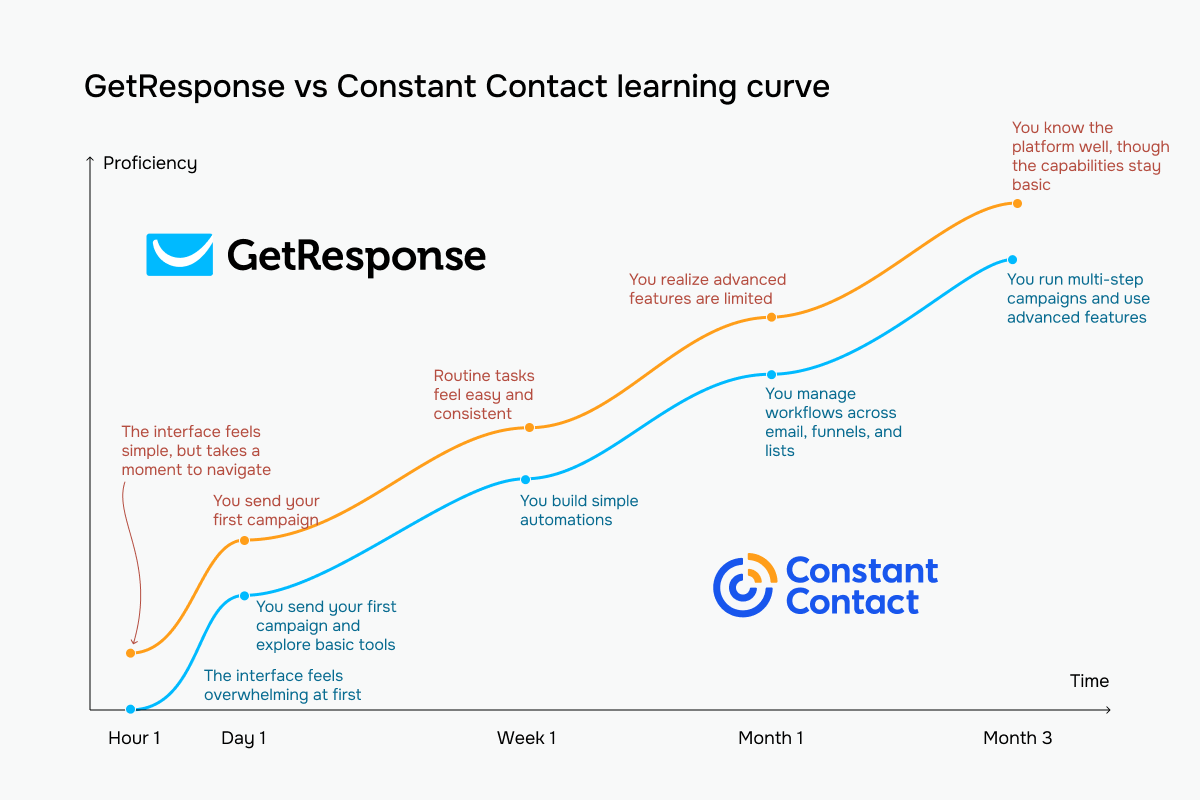 GetResponse vs Constant Contact learning curve based on our testing experience
Email builder and templates
⭐ GetResponse: 9.2/10 | Constant Contact: 8.7/10
Both GetResponse and Constant Contact have strong email builders that make campaign creation quite easy. They offer good template libraries and AI support, which is why both platforms score highly in this category. Here’s what they have in common and what sets their email builders apart:
| Aspect |
GetResponse |
Constant Contact |
Winner |
| Templates |
260+ templates organized by industry and use case; reusable templates and HTML import |
200+ templates organized by industry and campaign type; reusable templates and HTML import |
GetResponse |
| Drag-and-drop editor |
Section-based editor with flexible multi-column layouts, persistent content panel, global styling controls, and autosave |
Layout-first editor with pre-defined structures for faster email assembly; drag-and-drop content blocks |
Tie |
| Notable content blocks |
eCommerce and marketing-focused elements like products, promo codes, countdown timers, webinars, and courses |
Campaign-focused elements like events, RSVPs, surveys, products, videos, and social sharing |
GetResponse |
| Mobile responsiveness |
Automatic mobile optimization with manual desktop/mobile visibility controls |
Fully responsive templates with automatic mobile optimization |
Tie |
| AI features |
AI generates email body content, subject lines, and full campaigns from a prompt |
AI generates multiple campaign variations from a prompt with different layouts, images, and copy; includes subject line recommendations |
Constant Contact |
| Sending time optimization |
Behavior-based send-time optimization and timezone-based delivery |
No behavior-based send-time optimization |
GetResponse |
| Total score |
9.2/10 |
8.7/10 |
GetResponse |
But what really matters is what the experience is actually like once you’re using each builder. Here’s what we found.
GetResponse’s email builder follows a block-first approach. Instead of starting with ready-made layouts, you begin with individual content elements like text or images, and build the structure yourself from the ground up.
The builder clearly targets more advanced marketing use cases than simple newsletters. Dedicated blocks for countdown timers, webinars, custom HTML, eCommerce, and courses suggest a platform built for sales campaigns, launches, automated sequences, and creator businesses.
Visually, the editor feels more modern and feature-heavy. The darker interface and wider canvas create a more “professional marketing suite” feeling, though it also makes campaigns slightly harder to scan quickly while editing.
One thing worth noting is the AI campaign generator. It can create complete emails from a prompt, including text and images, but the results still need careful human review. During our testing, the AI incorrectly interpreted the word “Contact” in “Constant Contact” and inserted a close-up image of contact lenses into a marketing comparison email. The copy itself was usable, but the image completely broke the context. In practice, this means the AI speeds up production, but not quality control.
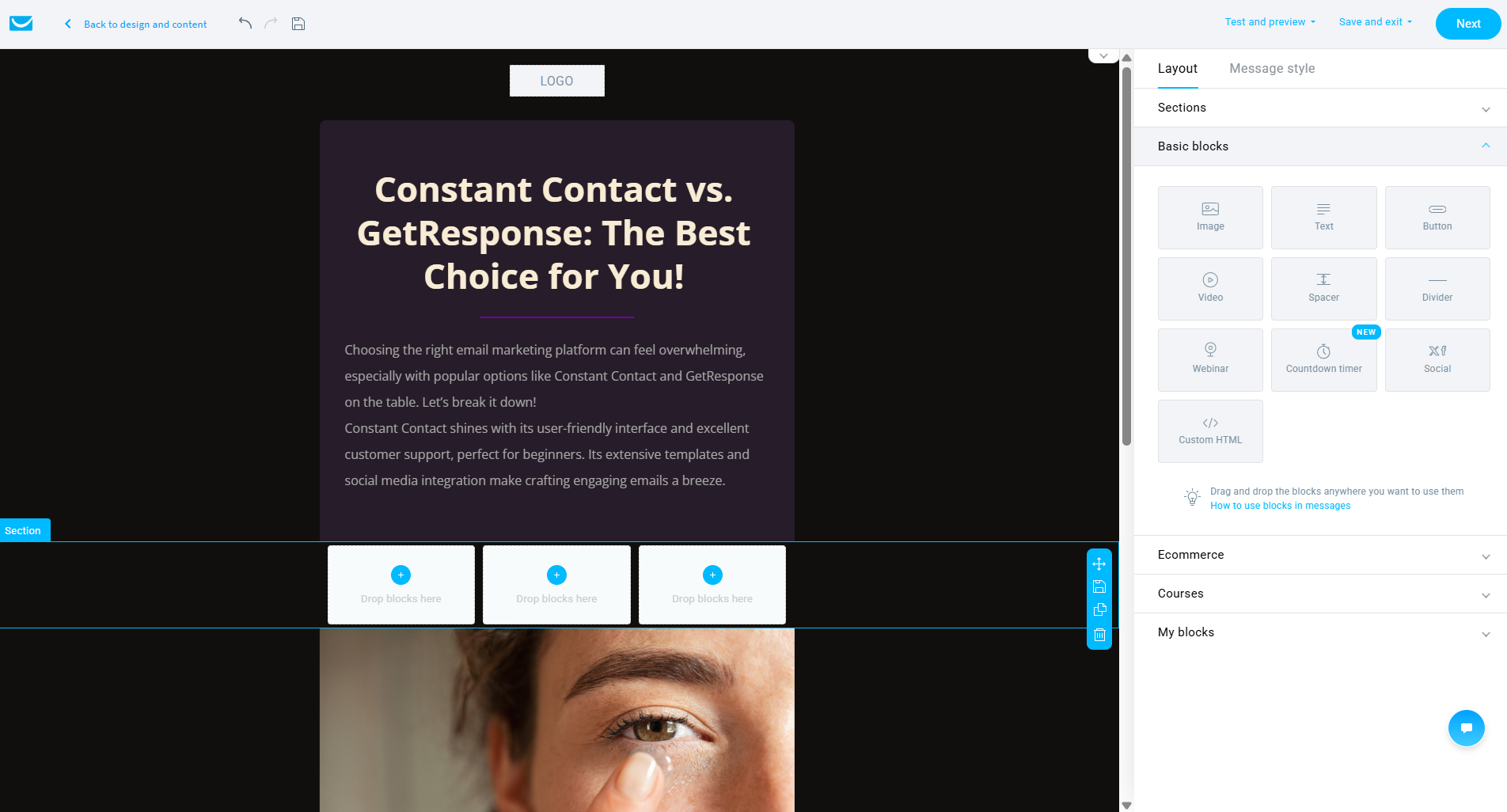 Editing an AI-generated email in GetResponse — the one that added contact lenses instead of “Constant Contact”
Constant Contact takes a different approach, starting with structure. Instead of placing individual blocks onto an empty canvas, you begin with pre-defined layouts like articles, two-column sections, or feature blocks, and then fill them with content. For beginners, this feels much more intuitive because it mirrors the way people naturally think about building newsletters.
The whole editing experience feels editorial. The lighter canvas and clearly separated sections make the platform feel closer to assembling a newsletter than building a complex marketing campaign.
In the interface, everything is organized into three tabs: content, images, and styles, with very little nesting or hidden menus. That lower cognitive load makes the builder easier to learn and quicker to use for routine campaigns.
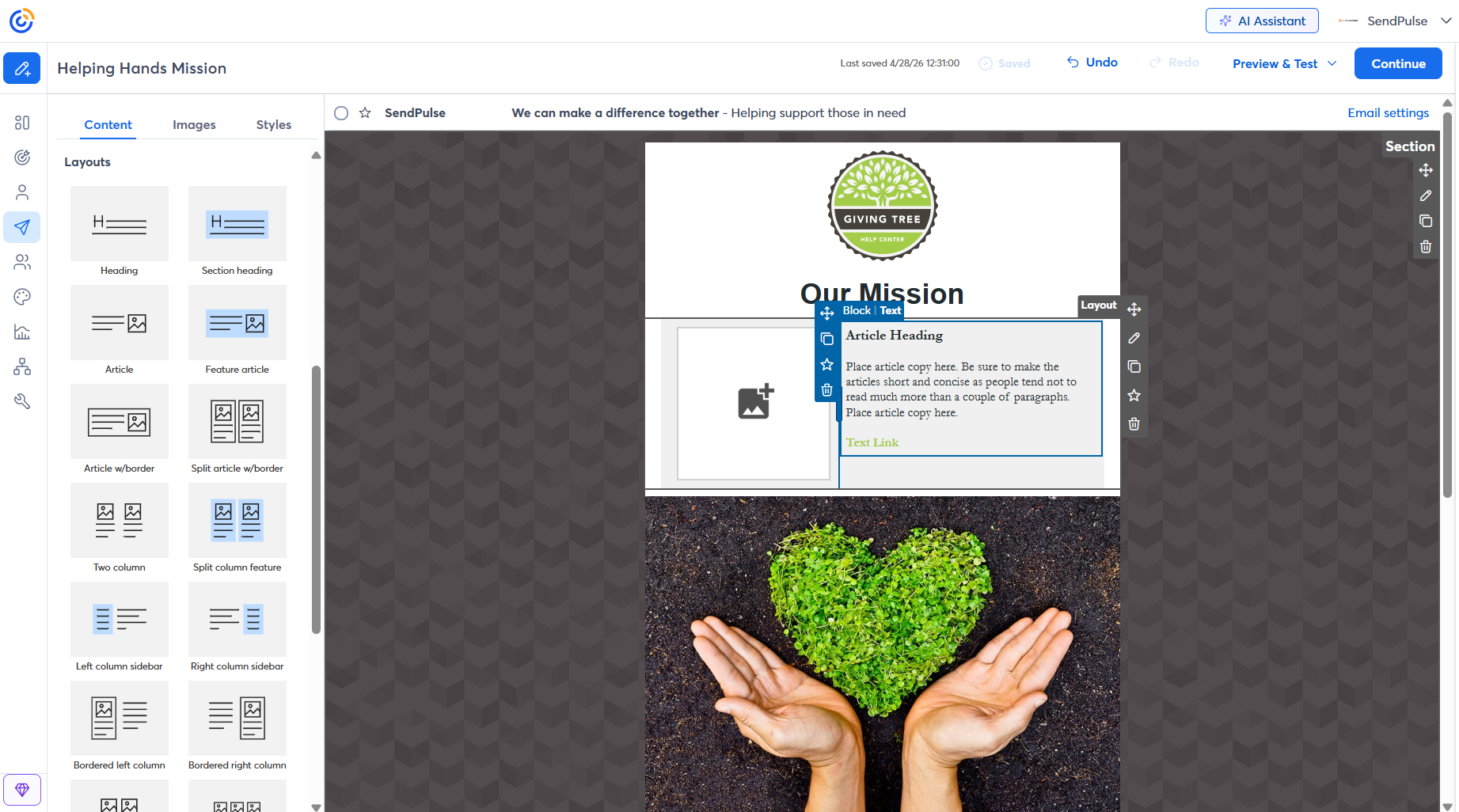 Building a test campaign in Constant Contact’s layout-first email editor
So what’s the practical difference? GetResponse assumes you are running more sophisticated marketing operations with eCommerce campaigns, webinars, automated sequences, or product launches, and its builder reflects that. As a result, you get more flexibility and more marketing-focused tools.
Constant Contact assumes that most of its users just want to assemble a clean-looking newsletter quickly and move on. Its layout-first editor reduces friction by giving you pre-defined structures from the start, while the lighter interface and contextual prompts make the whole process easier to understand. The trade-off is a lower ceiling, as there’s less room for complex campaign design or highly customized workflows.
Marketing automation
⭐ GetResponse: 9/10 | Constant Contact: 5/10
In previous sections, GetResponse and Constant Contact were quite alike, but that changes once we get to automation. While testing their automation builders, we realized that the two platforms had chosen different directions: GetResponse toward complexity and more advanced tools, and Constant Contact toward simplicity and basic flows.
| Aspect |
GetResponse |
Constant Contact |
Winner |
| Availability by plan |
Free plan includes draft-only workflows; lower-tier paid plans limit workflow count and logic depth; higher tiers unlock unlimited workflows and full automation capabilities |
Entry plan limited to a single welcome workflow; mid-tier plans increase workflow count; top tier removes path limits |
GetResponse |
| Automation builder |
Visual workflow canvas with multi-branch logic, parallel paths, and workflow-to-workflow triggers |
Linear workflow builder with simple yes/no branching and sequential logic; no workflow-to-workflow connections |
GetResponse |
| Triggers available |
Subscriber activity, engagement behavior, eCommerce actions, website visits, consent changes, course progress, and webinar activity |
List joins, link clicks, invoice payments, and date-based triggers like birthdays and anniversaries |
GetResponse |
| Pre-built automations |
46 ready-made workflows across eCommerce, lead nurturing, engagement, courses, webinars, sales, and onboarding |
14 ready-made workflows for welcome emails, birthdays, anniversaries, abandoned carts, re-engagement, and invoice follow-ups |
GetResponse |
| Channels supported |
Email, SMS, and web push |
Email and SMS |
GetResponse |
| Automation complexity |
Advanced; supports scoring, loops, dynamic filtering, multi-path branching, and layered behavioral logic |
Basic; supports delays and yes/no branching only; no scoring, loops, or advanced behavioral logic |
GetResponse |
| Total score |
9/10 |
5/10 |
GetResponse |
Here’s what we found during hands-on testing. GetResponse’s automation builder feels like a proper flowchart tool. You connect steps visually, and the logic is easy to read at first glance: one path for when a condition is met, another for when it isn’t.
The real strength is the trigger depth. You can build automations around email behavior, link clicks, custom field changes, tags, purchases, abandoned carts, and much more. This means your workflows can react to what people do across email, website, and store.
In practice, this gives you room to build precise behavioral paths. One contact can be tagged after clicking a link, another routed through a website-visit check, and both can continue through different branches of the same workflow.
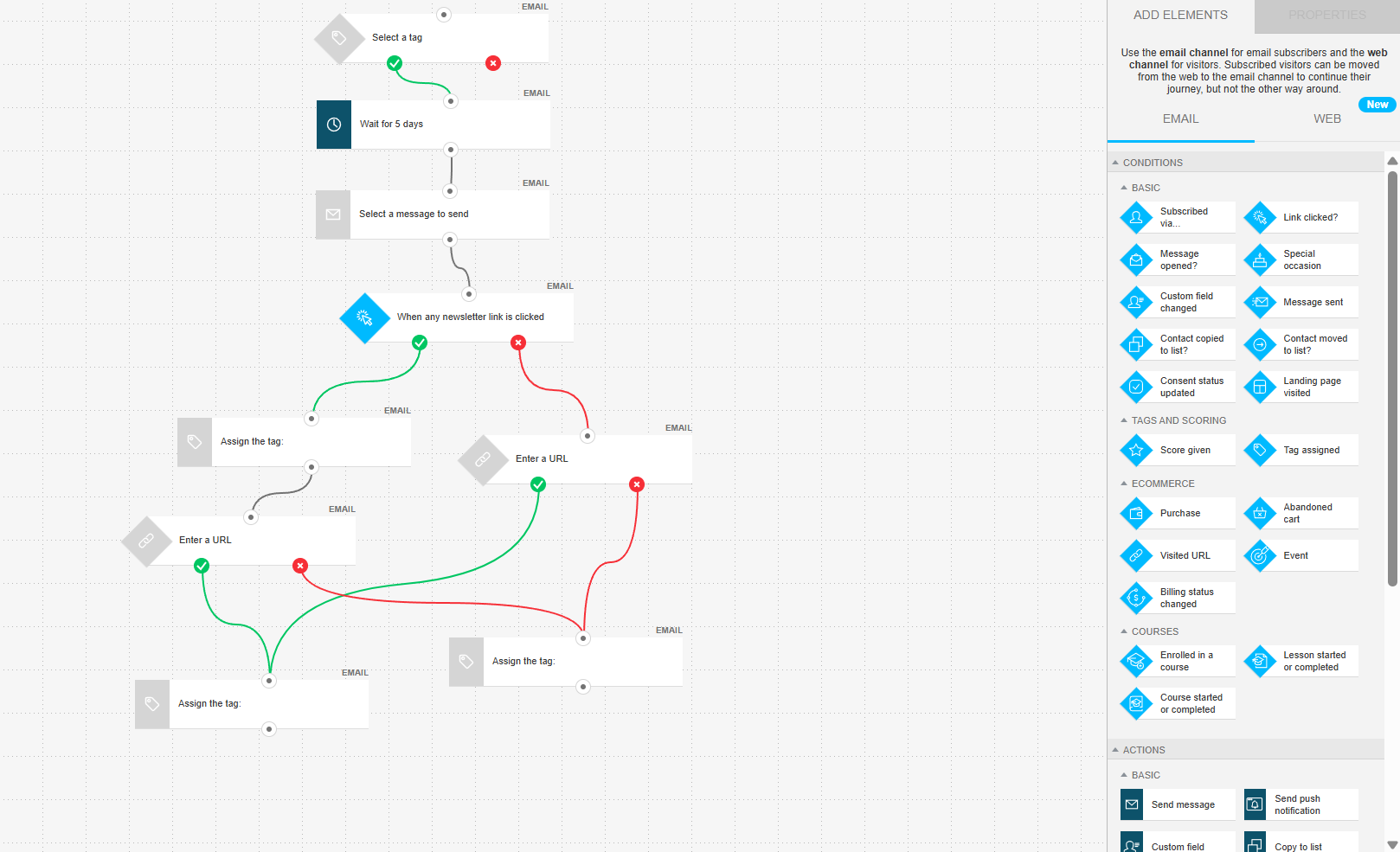 A multi-branch automation in GetResponse with its full condition library on the right
Constant Contact’s automation builder is much simpler. Everything it can do is shown in one small panel: delays, conditional splits, email sends, field updates, tag changes, list changes, and a basic purchase-related action. There’s very little to discover, which makes the tool easy to understand almost immediately.
The workflows are mostly linear. A typical automation starts with a trigger, adds a yes/no split if needed, sends one or two emails, and then ends. For simple welcome flows, invoice follow-ups, or basic post-purchase sequences, this structure works well and doesn’t ask much from you.
What’s missing, though, is deeper behavioral logic. There’s no scoring system or URL-based triggers. Also, the “no” path often simply ends instead of turning into a more complex re-engagement route.
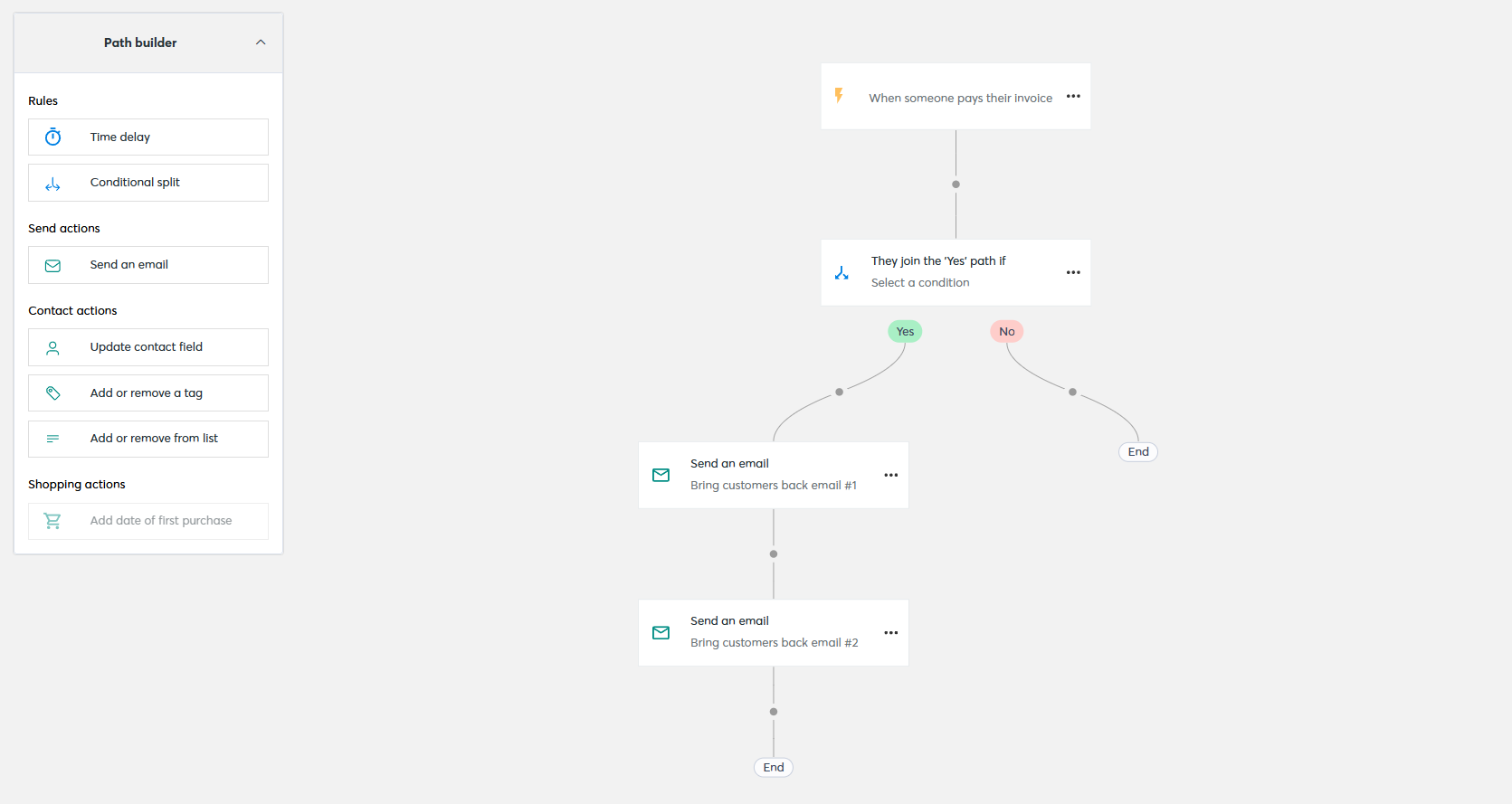 Constant Contact’s “Bring customers back” automation — the Path builder on the left shows all available actions
The difference is obvious. GetResponse gives you more power but also more room to make mistakes if you don’t plan the workflow carefully. Constant Contact gives you fewer options, but it also makes it harder to overcomplicate things.
Need powerful automation at a lower entry point? SendPulse offers a visual automation builder with multi-channel flows (email, SMS, web push, and chatbots), behavioral triggers, and conditional logic. You can test it on a free plan with up to 5 automation flows with 50 steps and 15,000 emails per month.
Contact management
⭐ GetResponse: 8/10 | Constant Contact: 7/10
Contact management, and audience segmentation in particular, is closely tied to automation, so it’s not surprising that GetResponse wins this category as well. The margin is much smaller this time, but it still comes out ahead, and here’s why:
| Aspect |
GetResponse |
Constant Contact |
Winner |
| Segmentation capabilities |
Dynamic rule-based segments within a list-based structure; contacts can belong to multiple lists; supports and/or logic with automatic updates |
List-based segmentation with up to 1,000 lists; rule-based segments; contacts can be automatically added to lists based on link clicks |
Tie |
| Segmentation criteria |
Contact data, subscription details, tags, scoring, consent status, email engagement, eCommerce behavior, webinar activity, and API-based events |
List membership, tags, custom fields, email engagement, eCommerce activity, subscription date, and location |
GetResponse |
| Segment update speed |
Segments update continuously as contact conditions change |
List-based segments update as contacts are added or removed |
GetResponse |
| AI features for segmentation |
No AI-based segmentation |
No AI-based segmentation |
Tie |
| Tagging and manual organization |
Tags applied manually, via import, automations, or bulk actions; supports up to 10 tags per import |
Tags applied manually, via import, or through click-based actions; tags used alongside lists for targeting; up to 500 tags |
Constant Contact |
| Total score |
8/10 |
7/10 |
GetResponse |
In practice, both platforms handle standard audience management well. You can segment contacts, organize lists, and target campaigns based on engagement or customer data. But as your marketing becomes more behavior-driven, the differences start to show.
GetResponse updates segments more dynamically and supports a broader range of conditions, making it better suited for eCommerce, funnels, webinars, and multi-step nurturing. Constant Contact keeps segmentation simpler and easier to manage, which works well for more straightforward campaigns.
Signup forms and landing pages
⭐ GetResponse: 8.5/10 | Constant Contact: 6.8/10
GetResponse pulls ahead in this category because it treats forms and landing pages as full marketing tools rather than simple signup elements. For email marketers, this means more control over how leads are captured, segmented, and converted before they even enter an email flow. Constant Contact covers the basics well, but GetResponse gives noticeably more flexibility for campaigns focused on growth, lead generation, and conversion optimization.
| Aspect |
GetResponse |
Constant Contact |
Winner |
| Types of forms available |
Embedded forms, pop-ups, slide-ins, floating bars, half-screen and full-screen forms; teaser pop-ups |
Embedded forms, pop-ups, slide-ins, sticky bars |
GetResponse |
| Form builder |
Visual drag-and-drop editor with automated styling; real-time editing canvas |
Style-based editor with separate content, image, and design controls; customizable thank-you page |
GetResponse |
| Pop-up targeting conditions |
Advanced targeting, including time delay, scroll depth, exit intent, inactivity, click triggers, device targeting, scheduling, and eCommerce conditions |
Basic targeting limited to time delay and device targeting; no scroll-depth, exit-intent, or advanced behavioral triggers |
GetResponse |
| Landing page builder |
Drag-and-drop builder with 100+ templates, A/B testing, AI-assisted page generation, built-in analytics, tracking integrations, and custom domain support |
11 old-fashioned templates; hosted signup pages and custom landing pages; no A/B testing |
GetResponse |
| Total score |
8.5/10 |
6.8/10 |
GetResponse |
When we opened the pop-up builder in GetResponse, what immediately stood out was how visually complete the templates are before you edit anything. Instead of starting with a blank opt-in box, you get layouts that already look like finished campaign assets – with images, countdown timers, headlines, CTA buttons, and structured content blocks placed together in a coherent design.
The builder also gives much deeper styling control than most built-in pop-up tools. Typography settings go far beyond basic font size changes, and even smaller details like line spacing, alignment, or background colors can be adjusted directly inside the editor.
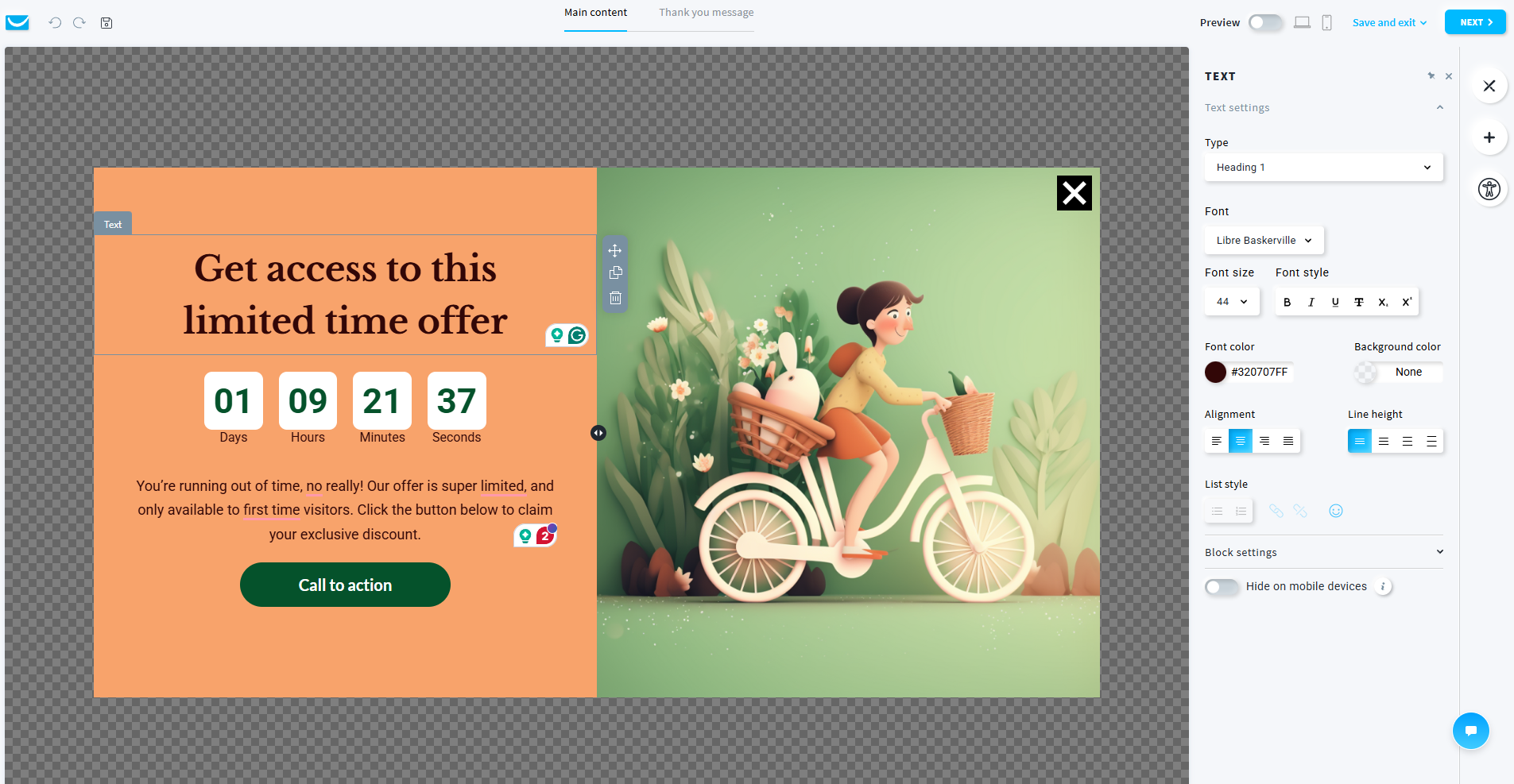 GetResponse’s pop-up builder with a countdown timer, typography controls, and a separate “Thank you message” tab
Another interesting detail is the separate editing state for the post-submission message. Instead of treating the thank-you step as an afterthought, the builder includes it directly in the workflow, making the pop-up experience feel more polished from beginning to end.
Constant Contact, on the other hand, keeps its pop-up builder intentionally minimal. The interface focuses more on behavior settings than on visual editing, with most controls dedicated to timing, device visibility, or pop-up behavior rather than design itself.
The actual pop-up structure stays extremely simple: a title, email field, consent text, and signup button. There’s little emphasis on layout experimentation or visual presentation, and the editing experience reflects that. The preview environment is also much more generic, giving less context for how the pop-up will look once placed on a real website.
For users who simply want to collect emails without spending time adjusting layouts or styling, this straightforward approach can actually feel comfortable. The builder avoids clutter and keeps the setup process very quick.
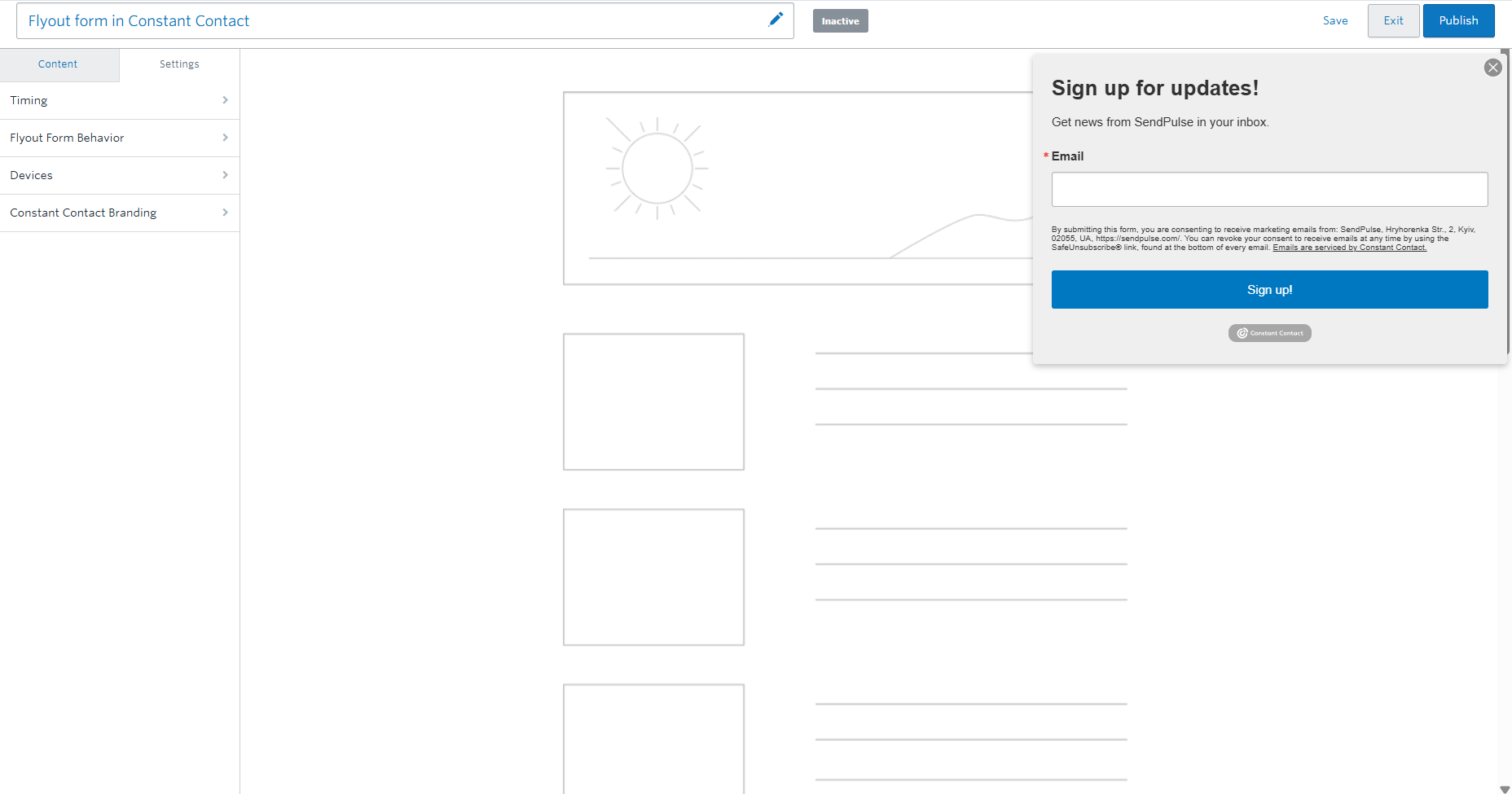 Constant Contact’s flyout form builder with settings focused on behavior and timing
The biggest difference is how much creative control each platform assumes you need.
GetResponse gives you a design-oriented environment where pop-up appearance, urgency elements, typography, and post-submission experience are all treated as part of the campaign itself. The builder feels closer to a lightweight landing page editor than to a standard pop-up tool.
Constant Contact keeps things much narrower and more utility-focused. Its forms are designed primarily to function correctly rather than to become visual centerpieces of the campaign.
Deliverability
⭐ GetResponse: 7.4/10 | Constant Contact: 7/10
Deliverability is about how reliably your emails reach your audience’s inbox instead of landing in spam or promotions folders. Here, we compare the most important, and often quite technical, ways GetResponse and Constant Contact handle deliverability:
| Aspect |
GetResponse |
Constant Contact |
Winner |
| Authentication |
SPF, DKIM, and DMARC; automatic and manual DNS setup; unauthenticated emails sent through a shared sending domain |
DKIM and DMARC; CNAME and TXT record setup; unauthenticated emails automatically routed through a shared sending domain |
Tie |
| Deliverability monitoring |
No built-in inbox placement monitoring; bounce and complaint metrics available at campaign level; shared infrastructure monitored internally |
No built-in deliverability dashboard; detailed bounce categorization with handling guidance |
Tie |
| List hygiene |
Hard bounces removed immediately; soft bounces removed after 4 failed attempts within 32 days; spam complaints suppressed automatically; internal suppression list checked during imports |
7 bounce categories with separate handling rules; “Non-existent” bounces trigger a 15-day suppression hold shared across all accounts; “Recommended for removal” report identifies high-risk contacts per campaign |
GetResponse |
| Dedicated IP |
Available on request for senders above 50,000 emails per week; setup and warm-up handled by the platform |
Not available |
GetResponse |
| Total score |
7.4/10 |
7/10 |
GetResponse |
It’s not often that we give bulk email sending services low deliverability scores because, in most cases, deliverability depends more on marketers themselves and the practices they follow than on the platform itself.
However, Constant Contact receives a lower score due to occasional internal platform-related issues reported by users, even though the deliverability infrastructure described in the table appears solid overall.
 Delivery-delay warning in our Constant Contact test account
GetResponse also loses some points due to Capterra feedback mentioning issues like slow email delivery and messages occasionally landing in spam folders.
But overall, everything is in your hands. Here are some best practices from SendPulse experts that can improve your deliverability when working with modern email marketing platforms:
- always set up SPF, DKIM, and DMARC before sending campaigns;
- keep transactional emails and marketing campaigns on separate sender addresses;
- avoid shortened links like bit.ly in email campaigns;
- attach links to buttons or anchor text instead of pasting raw URLs;
- keep image sizes optimized to maintain a healthy text-to-image ratio;
- send campaigns consistently and avoid sudden spikes in volume;
- don’t mix highly active and inactive contacts in the same campaign;
- warm up large campaigns gradually by sending to active subscribers first;
- segment campaigns by relevance and user interests;
- let subscribers unsubscribe from specific categories, not the entire account;
- monitor sender inboxes regularly for complaints and feedback;
- run re-engagement campaigns before removing inactive contacts;
- keep inactive subscribers in a suppression list if they don’t re-engage.
Reporting and analytics
⭐ GetResponse: 8/10 | Constant Contact: 6.5/10
Yet again, we see a significant difference in scores. GetResponse comes out ahead in reporting, too. Here are the exact reasons why its reporting and analytics feel deeper and more comprehensive:
| Aspect |
GetResponse |
Constant Contact |
Winner |
| Report coverage |
Campaigns, automations, contacts, forms, landing pages, webinars, and eCommerce performance with detailed engagement metrics |
Campaigns, automations, landing pages, forms, events, social media, and click heat maps |
GetResponse |
| Custom reports |
Custom report builder with flexible metrics, filters, scheduling, shareable links, and CSV/PDF export |
No custom report builder |
GetResponse |
| Reporting speed |
Reports update progressively after sending; custom reports generated on demand or on schedule |
Reports update progressively after sending |
GetResponse |
| Export capabilities |
CSV, XLSX, or PDF |
CSV or Excel |
GetResponse |
| Total score |
8/10 |
6.5/10 |
GetResponse |
GetResponse offers custom analytics and gives you more flexibility to organize, compare, export, and work with data across different campaign types and channels. Constant Contact covers standard reporting needs well, but its analytics focus more on quick visibility than on deeper analysis or long-term optimization.
Customer support
GetResponse: 7/10 | Constant Contact: 7/10
Things don’t always go smoothly, especially when you’re learning a new marketing platform. At some point, most users end up needing either help from support teams or solid self-service resources. Here’s what GetResponse and Constant Contact offer in those situations:
| Aspect |
GetResponse |
Constant Contact |
Winner |
| Channel availability |
Email and live chat; 24/7 chatbot; phone support on enterprise plans only; multilingual support |
Live chat (Mon–Fri); phone support (Mon–Sat); async email support; community forum |
GetResponse |
| Average response times |
Free users are redirected to self-service after trial; paid users receive chat and email support during business hours |
Phone and chat support available during business hours; long phone wait times reported by users |
Constant Contact |
| Knowledge base |
Extensive help center with guides, tutorials, videos, and free educational courses |
Help center with articles, videos, onboarding guides, webinars, live training sessions, and a community forum; quality reported as inconsistent |
GetResponse |
| Onboarding assistance |
AI-assisted onboarding generates starter assets during setup; self-serve onboarding on all plans; dedicated onboarding on the enterprise tier |
Self-serve onboarding guides, tutorials, and live training sessions with marketing advisors; no migration assistance |
Constant Contact |
| Support quality rating on Capterra |
4/5 |
4.2/5 |
Constant Contact |
| Total score |
7/10 |
7/10 |
Tie |
The Capterra ratings for both platforms were honestly lower than we expected, and they had a noticeable impact on our final scores.
As mentioned earlier, GetResponse receives recurring criticism over billing issues, and customer support often appears as part of the problem. Constant Contact, meanwhile, struggles with inconsistent and sometimes outdated knowledge base articles and interface texts, which makes relying on self-help resources unnecessarily frustrating. Because of these practical issues, both platforms end up tied in the customer support category with 7/10 scores.

Join 3M+ businesses growing with SendPulse
From solo creators to global brands, millions trust SendPulse to run email campaigns, automations, chatbots, and more — all in one place. Get started for free now!
Get started for free
Your decision checklist
So, now that you know everything there is to know about GetResponse vs Constant Contact, it’s time for the final evaluation. This checklist will help you figure out which platform fits your current needs better:
| Decision area |
GetResponse
is a better fit if… |
Constant Contact
is a better fit if… |
| Business type |
🟦 You run a growing business that needs email, webinars, funnels, landing pages, and eCommerce automation in one platform. |
🟧 You run a small business, nonprofit, or local operation that needs email alongside social media management, event marketing, and SMS. |
| Budget expectations |
🟦 You want a broader feature set at a mid-range price without paying for separate tools for webinars, funnels, or landing pages. |
🟧 You’re comfortable with no free plan and value phone support and live training sessions as part of what you’re paying for. |
| Automation needs |
🟦 You need multi-channel automation with advanced triggers, scoring, loops, multi-path branching, and eCommerce logic. |
🟧 You need simple date-based or activity-based sequences like welcome series, birthday emails, or invoice follow-ups, without complex logic. |
| Analytics focus |
🟦 You need a custom report builder with scheduling, cross-channel coverage, and exportable reports across email, webinars, and eCommerce. |
🟧 You need campaign comparison tools, click heat maps, social media reporting, and event tracking, alongside standard email metrics. |
| Team setup |
🟦 You work in a marketing team managing complex multi-channel campaigns and need automation depth and reporting flexibility |
🟧 You manage a small team or work solo and need a straightforward platform that covers email, social, and events without a steep learning curve. |
If one of the platforms wins in three or more decision areas for you, that’s probably your answer. However, don’t evaluate the platforms only based on what you need right now – think long-term as well. What will your marketing setup look like in a year or two? Switching email platforms often comes with additional costs in time, money, and migration effort, so it’s better to choose a platform that can realistically stay with you for at least a couple of years.
Final verdict and recommendations
⚖️ Final scores: GetResponse – 8.2/10 | Constant Contact – 7.5/10
Would we recommend GetResponse? Yes. It’s a strong and fairly universal platform that goes far beyond basic email marketing. Alongside a capable email builder, it offers solid automation, behavioral tracking, webinars, landing pages, funnels, and even some CRM-like workflows. For many businesses, especially growing ones, it can realistically become a central marketing platform rather than just an email tool.
It’s harder to say the same about Constant Contact. The platform feels much more limited in both flexibility and long-term scalability. While it covers the basics reasonably well, it rarely stands out in any area strongly enough to become the obvious first choice over competitors.
If neither platform feels like the perfect fit, here are several alternatives worth considering, depending on your priorities:
- If you want an affordable all-in-one platform with CRM, automation, chatbots, and multi-channel communication, take a look at SendPulse.
- If you run an eCommerce business and want deep behavior-based automation built around purchases, customer journeys, and predictive analytics, Klaviyo is one of the strongest options on the market.
- If you want a simpler and more affordable platform that even inexperienced marketers can use comfortably, MailerLite remains one of the easiest tools to work with.
- If advanced automation is your main priority and you want AI assistance, lead scoring, CRM pipelines, and extremely flexible workflow logic, ActiveCampaign is probably the strongest alternative in this comparison range.
So, would Constant Contact be our first recommendation? Probably not. Is GetResponse better than Constant Contact? In most cases – yes. Are there platforms stronger than GetResponse in specific areas? Absolutely.
The good news is that modern email marketing platforms have evolved in very different directions, so today there’s usually a tool built specifically for the kind of marketing you want to do. The harder part is understanding what your business actually needs – simple newsletters, advanced automation, eCommerce flows, multi-channel campaigns, or something in between.