MailerLite and Constant Contact are often considered direct alternatives, and at first glance, it’s easy to see why. Both are designed to simplify email marketing; they’re easy to learn, reasonably priced, and focused on getting campaigns out without unnecessary complexity.
But that similarity doesn’t go beyond the surface level. Once you actually start using these platforms, the differences become much more noticeable, especially if your needs go beyond basic email campaigns.
In this comparison, we break down how MailerLite and Constant Contact actually perform in practice, and which one is the better fit based on your goals and marketing setup.
How we scored this comparison: Each platform was evaluated across nine categories using our independent methodology. Pricing (25%), ease of use (20%), and email and automation features (15% each) carry the most weight because they affect daily workflows the most. All scores reflect real testing and analysis as of June 2026.
Before we go deep into details, let’s have a quick overview of the key aspects covered in this comparison. If a particular category matters most to you, click on it to jump straight to the relevant section.
| Category |
MailerLite |
Constant Contact |
Winner |
| Platform focus |
Small businesses, creators, and solopreneurs looking for an affordable, easy-to-use email platform |
Small businesses, nonprofits, and event organizers that need simple email marketing with phone support |
Depends on use case |
| Pricing |
8.8/10
Free plan available; competitive pricing despite recent increases |
7/10
No free plan; 30-day free trial; higher-priced but still affordable paid tiers |
MailerLite |
| Ease of use |
10/10
Beginner-friendly interface with a minimal learning curve; clean and intuitive design |
8.5/10
Simple interface with a minimal learning curve; navigation may take time to get used to |
MailerLite |
| Email design |
8.6/10
Drag-and-drop editor with pre-built templates and flexible content blocks; global design controls for consistent styling |
8.6/10
Drag-and-drop editor with a large template library and structured content blocks; saved brand styles for consistent colors, fonts, and logos |
Tie |
| Automation |
7.5/10
Visual workflow builder with branching logic and multiple entry triggers; supports email channel only |
5/10
Linear workflow builder with limited branching and single trigger per automation; supports email and SMS (US only) |
MailerLite |
| Contact management |
8/10
Rule-based segmentation with automatic updates; supports profile data, location, eCommerce events, email and automation activity |
7.5/10
Rule-based segmentation with updates at send time; supports profile data, list membership, tags, and email activity |
MailerLite |
| Forms and pages |
8.6/10
Embedded forms and pop-ups with exit-intent, scroll, and click triggers; unlimited landing pages on paid plans; built-in website builder |
6.8/10
Inline forms, pop-ups, flyouts, and banners; limited form customization with no pre-designed templates; landing page builder with ready-made templates |
MailerLite |
| Reporting |
6.6/10
Per-campaign reports with click heat maps, geolocation data, device breakdown, and eCommerce revenue tracking |
6.4/10
Per-campaign reports with standard metrics and click heat maps; cross-channel reporting (email and SMS) |
MailerLite |
| Customer support |
7.3/10
24/7 email and live chat; no phone support |
7/10
Live chat Mon–Fri and phone support Mon–Sat |
MailerLite |
| Final score |
8.4/10 |
6.5/10 |
MailerLite |
The numbers are right in front of you, and they already hint at a winner. But if you want to make a well-informed decision and choose a platform that will fit your workflows, it’s worth going a bit deeper and seeing what each one can offer your business.

Create and send high-performing emails
Use an AI assistant, pre-made templates, advanced segmentation, and feature-rich automation to run campaigns without coding. Start for free with up to 15,000 monthly emails.
Get started for free
Now, let’s compare the key aspects that define an email marketing platform, from pricing and automation to customer support, in more detail. Below you will find everything you need to know about MailerLite and Constant Contact in one place.
Pricing and value
⭐ MailerLite: 8.8/10 | Constant Contact: 7/10
Disclaimer: Pricing changes frequently. These figures are accurate as of June 22, 2026. Always verify final costs on official pricing pages.
Let’s start with pricing, as it’s one of the first things most people look at when comparing tools. Tiers, limits, and what you actually get for the price often matter more than features alone.
| Contacts |
MailerLite |
Constant Contact |
Winner |
| Free plan |
250 subscribers; 2,500 emails |
No free plan, only a 30-day trial (the interface mistakenly shows 14 days) |
MailerLite |
| 2,500 |
$33 |
$50 |
MailerLite |
| 10,000 |
$89 |
$120 |
MailerLite |
| 50,000 |
$319 |
$430 |
MailerLite |
| Total score |
8.8/10 |
7/10 |
MailerLite |
Among all the platforms in our comparison series, MailerLite remains one of the most affordable. However, there’s an important nuance to consider: many features that other platforms include for free are only available on MailerLite’s higher-tier plans. Here’s a quick example:
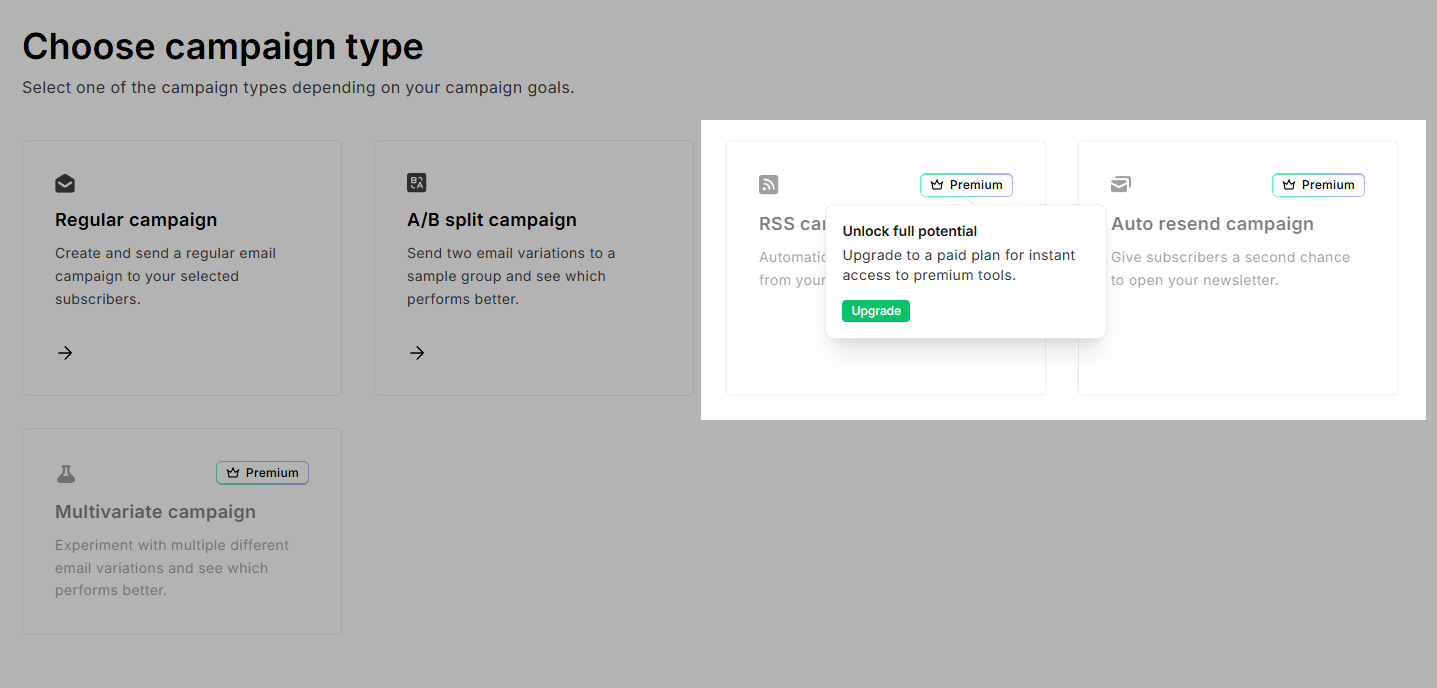 Choosing a campaign type at MailerLite requires a premium plan
When selecting a campaign type, you’ll notice that some options are locked behind higher-tier plans. Features like RSS campaigns and auto-resend, which are often standard elsewhere, are treated as premium in MailerLite.
Since functionality varies across tiers, we made another comparison covering several plans for MailerLite and Constant Contact.
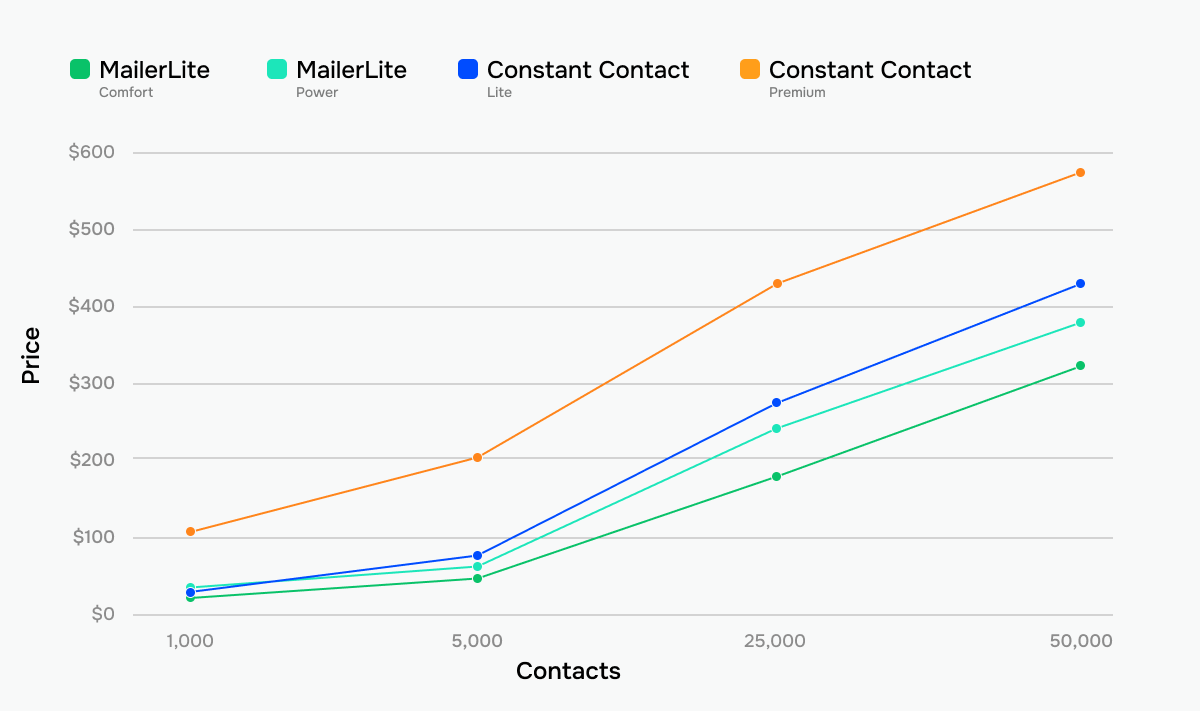 How prices grow across different tiers of MailerLite and Constant Contact
If pricing isn’t your only deciding factor – good for you! Let’s take a look at how the two platforms compare across other key areas.
Ease of use and interface
⭐ MailerLite: 10/10 | Constant Contact: 8.5/10
If MailerLite and Constant Contact are among your top choices, you’re likely looking for a simple, easy-to-use email platform, and both fit that description. However, there are still differences worth noting. Take a look at the table below to find out more.
| Aspect |
MailerLite |
Constant Contact |
Winner |
| First-time experience |
Quick setup with a clean interface and basic in-app guidance; most users can send their first campaign within hours |
Beginner-friendly setup with a guided checklist and structured onboarding; most users can send their first campaign within hours |
Tie |
| Daily navigation |
Clean, intuitive interface organized around core workflows |
Simple interface with straightforward navigation, though it may take some time to get used to the structure |
Tie |
| Learning curve |
Core features can be learned within 1-2 days |
Platform features can be learned within 1-2 days |
Tie |
| Mobile access |
iOS app for creating, scheduling, and tracking campaigns |
Full-featured companion app on iOS and Android |
Constant Contact |
| Workflow efficiency once mastered |
Routine tasks are quick to execute; automation extends to more complex workflows when needed |
Efficient for straightforward campaigns, but limited when handling more complex workflows |
MailerLite |
| Total score |
10/10 |
8.5/10 |
MailerLite |
Both platforms are easy to use, so what explains a 1.5-point gap? MailerLite keeps things simple on the surface, but gives you more to work with underneath, such as stronger automation, more flexible contact management, and better guidance when tackling more complex tasks.
This difference becomes even clearer when you look at the learning curve visualization below:
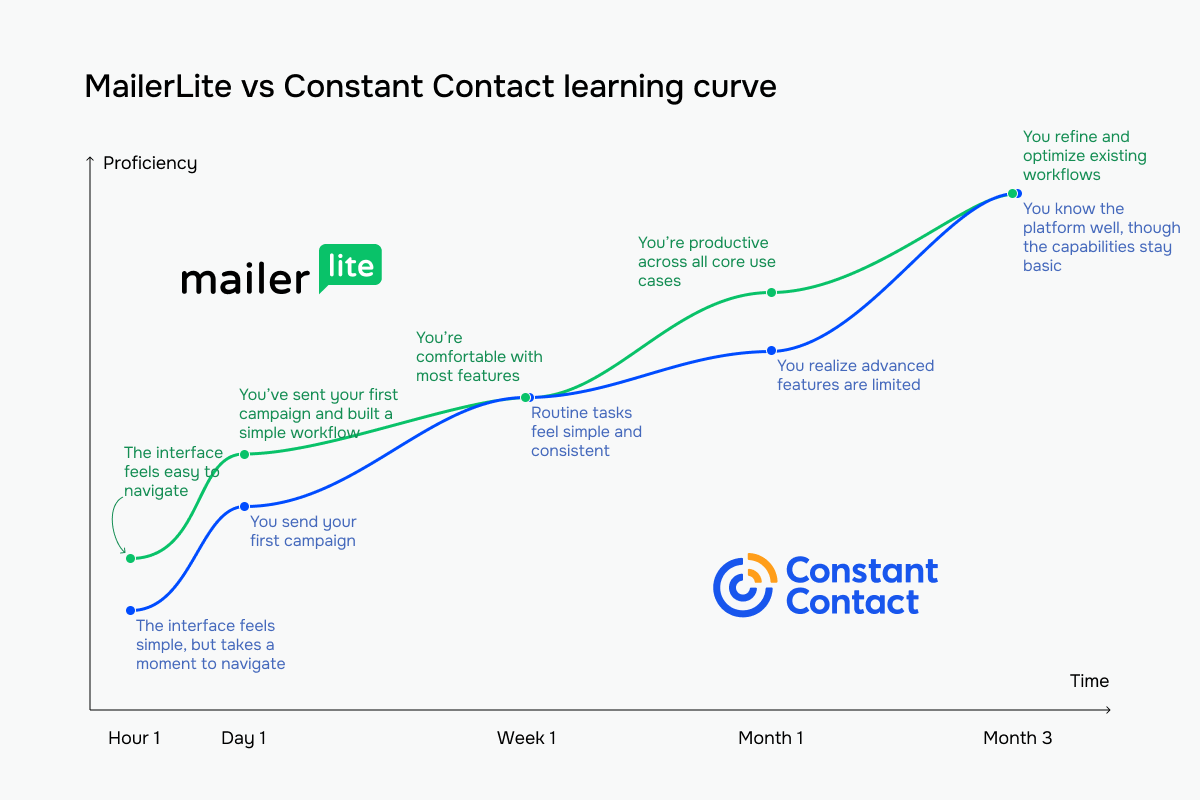 The green line represents MailerLite vs Constant Contact’s blue line
So, both are easy to learn, but for different reasons. Constant Contact is simple because it lacks advanced features, while MailerLite stays beginner-friendly by turning its complex concepts into easy-to-use interfaces.
Email builder and templates
⭐ MailerLite: 8.6/10 | ⭐ Constant Contact: 8.6/10
The email builder is where most of the work happens. At first glance, MailerLite and Constant Contact look quite different, largely due to Constant Contact’s more dated design. However, once you start using them, the differences become less noticeable, as their core functionality is actually quite similar.
| Aspect |
MailerLite |
Constant Contact |
Winner |
| Templates |
108 templates organized by industry and campaign type |
490+ templates for newsletters, promotions, events, and various industries |
Constant Contact |
| Drag-and-drop editor |
Intuitive block-based editor with global design settings and per-block styling controls |
Block-based editor with section-based layouts and reusable style settings |
Tie |
| Notable content blocks |
Survey and quiz, countdown timer, event RSVP, product, and coupon |
Data table, RSVP, event, poll, donation, feedback with visual rating scales |
Tie |
| Customization |
Flexible control over fonts, colors, spacing, and layout; dynamic content based on contact data within a single email |
Section-based control over layout and colors; brand assets (logo, colors, images) can be imported and reused across campaigns |
Tie |
| Mobile responsiveness |
All templates are mobile-responsive by default; desktop and mobile previews are available |
All templates are mobile-responsive by default; multi-device inbox preview available |
Tie |
| AI capabilities |
AI writing assistant for email body and subject lines with tone and content type selection |
AI content generator for email body, SMS, and social media posts; email templates can be generated from a prompt |
Constant Contact |
| Sending time optimization |
Analyzes each contact’s engagement history (opens, clicks, signup date) to determine the optimal sending time for each recipient |
No automated send-time optimization; campaigns are scheduled manually |
MailerLite |
| Total score |
8.6/10 |
8.6/10 |
Tie |
The score is equal, but the two builders work quite differently. MailerLite uses a section-based builder designed for speed and ease of use. You work with pre-built sections, such as hero blocks or product layouts, that already look complete when you add them. This makes the building process faster and more intuitive, especially for beginners. The tradeoff is that you’re mostly working within the limits of pre-defined structures rather than building layouts from scratch.
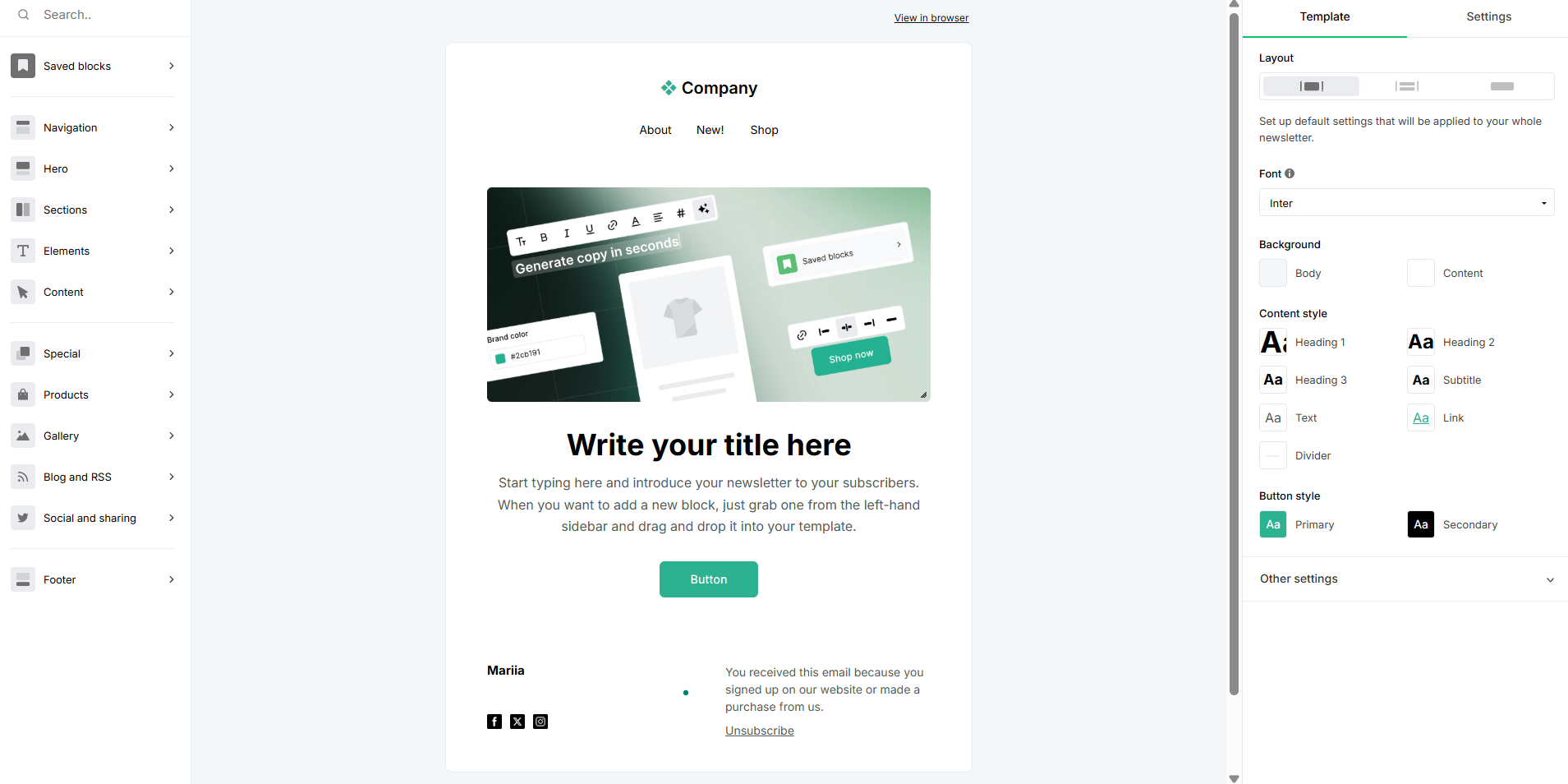 Creating an email template using the MailerLite drag-and-drop builder
Constant Contact takes a more detailed approach. Instead of relying on ready-made sections, you build emails from smaller elements, which gives you more control over your layout. Its design tab exposes more detailed styling options, reflecting a more layered system underneath. This means more flexibility, but also more decisions during the build process.
 Customizing an email template with the Constant Contact email builder
What this means for everyday workflows is that Constant Contact offers more control and depth if you want to fine-tune your layout and styling. MailerLite is faster and easier to work with, letting you produce polished emails with less effort. The better choice comes down to what you value more: flexibility and control, or speed and simplicity.
Marketing automation
⭐ MailerLite: 7.5/10 | Constant Contact: 5/10
Since both MailerLite and Constant Contact focus on simplicity, their automation capabilities are fairly limited. Still, they take different approaches to how that simplicity works in practice.
| Aspect |
MailerLite |
Constant Contact |
Winner |
| Availability by plan |
Free plan includes 3 automations with 5 steps each; higher tiers expand limits to 50–100 automations and up to 100 workflow steps |
1 pre-built template on the Lite plan; 3 templates on Standard; custom automation paths on Premium only |
MailerLite |
| Automation builder |
Visual workflow editor with rules and actions; supports delays, conditions, and email steps |
Linear path builder with conditional splits and time delays; 1 trigger per flow |
MailerLite |
| Triggers available |
11 triggers for group joins, segment matches, link clicks, form completions, field updates, date-based events, and eCommerce activity |
14 triggers for contact list activity, calendar dates, email engagement, and shopping activity |
Tie |
| Pre-built automations |
15 editable templates for welcome, abandoned cart, membership renewal, online courses, and lead nurturing flows |
14 editable templates for welcome, re-engagement, date-based, and eCommerce flows |
MailerLite |
| Channels supported |
Email |
Email and SMS (US only) |
Constant Contact |
| Automation complexity |
Multi-step workflows (up to 100 steps); branching conditions; suited for standard email-based journeys |
Linear workflows (up to 50 steps); basic conditional splits; suited for simple triggered message flows |
MailerLite |
| Total score |
7.5/10 |
5/10 |
MailerLite |
MailerLite lets you build logic into your workflows, not just set up scheduled emails. You can respond to user behavior, such as clicks, engagement, or inactivity, and guide contacts down different paths.
Once everything is set up, the system works for you. Engaged contacts move forward, inactive ones are filtered out, and each step has a clear purpose. It takes a bit more planning upfront, but the result is automation that feels efficient and intentional, not repetitive.
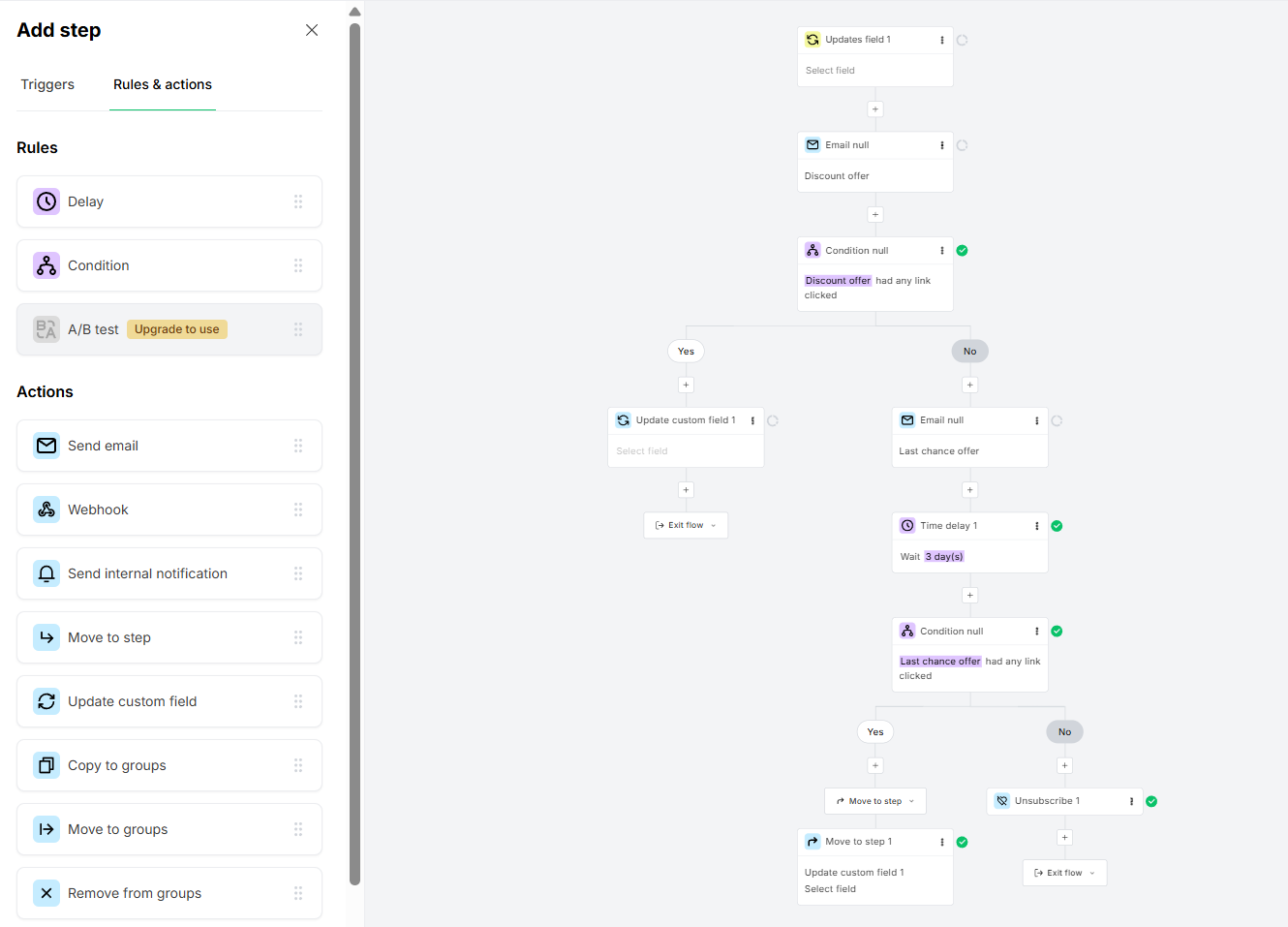 A flow to win back inactive subscribers in the MailerLite automation builder
Constant Contact, in contrast, feels more like a scheduling tool than a true automation system. You decide when emails go out, and the platform follows that timeline without really adapting to what contacts do.
That’s the key difference. MailerLite reacts to behavior, while Constant Contact mostly follows a fixed sequence. This makes Constant Contact easier to set up and understand, but it also limits how much you can personalize communication.
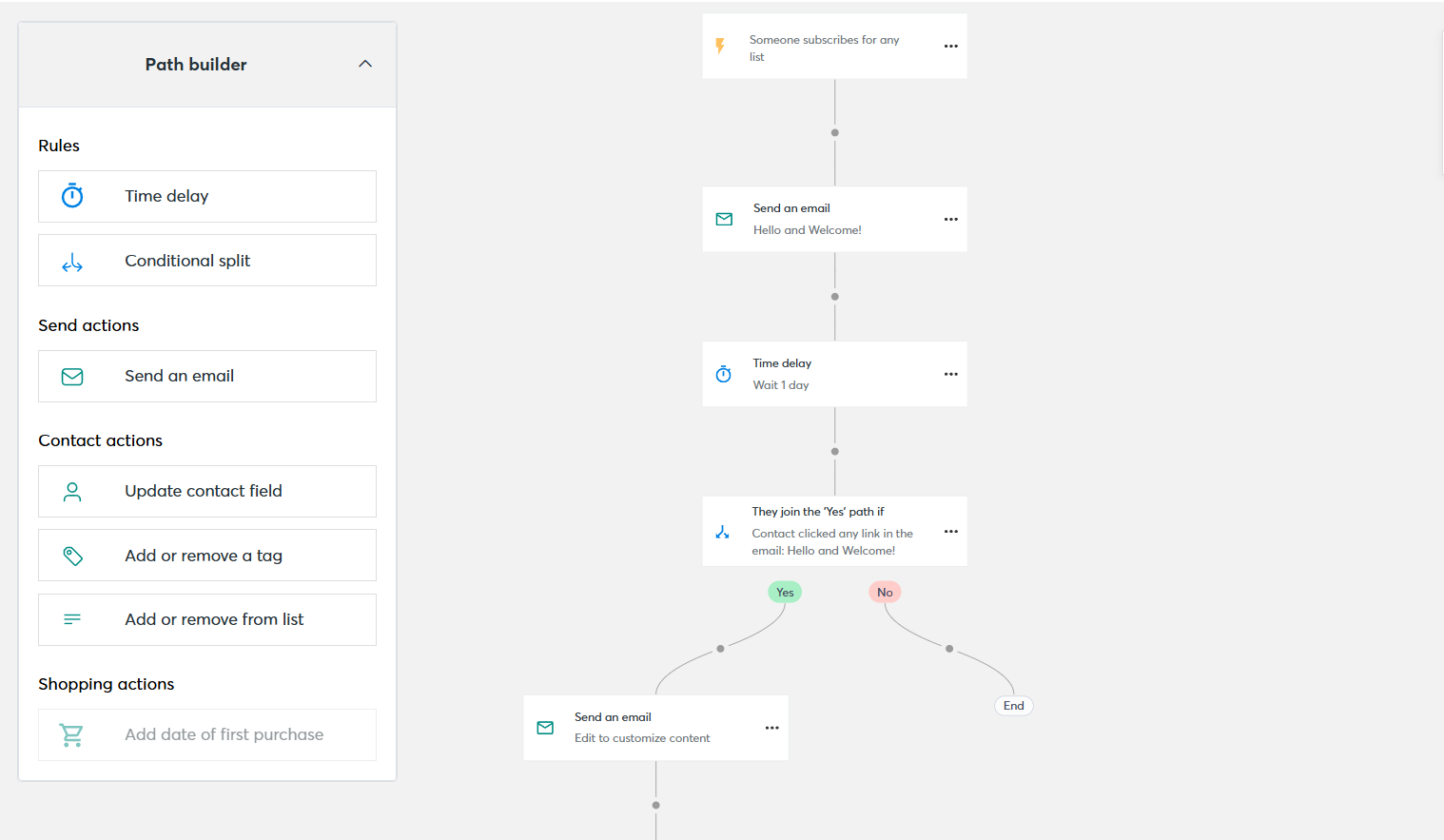 Welcome automation flow in the Constant Contact automation builder
In practice, MailerLite gives you more control. Your campaigns adjust based on engagement, so you avoid sending unnecessary emails to people who have already converted or stopped responding. It feels like a system that works with your data.
Constant Contact is simpler and more predictable. You send the same sequence to everyone and rely on timing rather than behavior. That works well for basic campaigns, but once you want automation to actually improve results, the limitations become clear.
But what if simple automation flows alone aren’t enough? For example, if you also need a CRM built into the same platform. Neither MailerLite nor Constant Contact offers a fully integrated CRM, but SendPulse does.
What we've built in the SendPulse CRM system is a single environment where automation isn't a separate layer – it's part of the same space as your contacts and deals. A deal moves to a new stage, and a flow triggers automatically: a task gets assigned, contact data updates, and the next step happens without manual input. That's what makes the difference between a CRM system that stores data and one that actually runs your sales process.

Iurii Kislitsyn
CRM Project Manager at SendPulse
Contact management
⭐ MailerLite: 8/10 | Constant Contact: 7.5/10
Contact management defines how you store, organize, and filter your audience, which directly affects how precisely you can target your campaigns. It comes down to two things: how your contacts are structured and how quickly your segments update. If both work well, your messages reach the right people at the right time.
Even simple campaigns rely on accurate grouping. More advanced ones require up-to-date data and flexible segmentation. That’s why it’s crucial to look not just at available filters, but also at how quickly and reliably segments update.
| Aspect |
MailerLite |
Constant Contact |
Winner |
| Segmentation capabilities |
Rule-based segmentation with AND/OR logic; supports fields, groups, activity, and automation status |
Rule-based segmentation with AND/OR logic; supports contact data, list membership, tags, and email activity |
MailerLite |
| Segment update speed |
Segments update automatically when a subscriber meets or no longer meets conditions; no manual refresh needed |
Segments refresh automatically at send time; manual refresh available between sends |
MailerLite |
| Available segmentation criteria |
Profile fields, location, time zone, signup source and date, email and automation activity, group membership, custom fields, and eCommerce events |
Contact profile fields, contact source, list membership, tags, and email activity |
MailerLite |
| Tagging and manual organization |
Groups function as tags and can be applied manually, via automation actions, and through forms |
Tags can be applied manually, via CSV import, and automation path actions |
MailerLite |
| Contact and list model |
Unified database |
Unified database |
Tie |
| AI capabilities |
No AI-assisted segmentation |
No AI-assisted segmentation |
Tie |
| Total score |
8/10 |
7.5/10 |
MailerLite |
MailerLite and Constant Contact handle contacts in similar ways at a basic level, as both let you segment audiences using rules, tags, and activity data. The difference comes down to depth and responsiveness. MailerLite updates segments in real time and supports a wider range of criteria, which makes it easier to keep audience data accurate without extra effort.
Constant Contact covers the essentials well, but segments refresh less dynamically and rely on fewer conditions. For simple campaigns, this isn’t a major issue. But once your targeting becomes more detailed or time-sensitive, MailerLite offers a smoother and more efficient workflow.

Power up your business with smart tools
Emails, automation, chatbots, websites, CRM, and more — everything you need to connect with your audience. Try SendPulse for free today.
Get started for free
Signup forms and landing pages
⭐ MailerLite: 8.6/10 | Constant Contact: 6.8/10
Signup forms and landing pages are essential for growing your contact list. But not all email platforms handle them the same way. Some offer only basic customization, while others give you more flexibility and control. Here’s how MailerLite and Constant Contact compare:
| Aspect |
MailerLite |
Constant Contact |
Winner |
| Form types |
Inline forms; pop-ups (featured, full-screen, half-screen, floating, slidebox, and click-triggered) |
Inline forms; banners; flyouts; pop-ups; landing page forms; Facebook Lead Ads |
MailerLite |
| Form builder |
Drag-and-drop editor; full control over layout, fonts, and colors; global brand styles; template gallery |
Section-based editor; basic styling only (background and button colors); no visual layout editor; no templates |
MailerLite |
| Pop-up targeting conditions |
Time delay, scroll percentage, exit intent, and click trigger |
Timer delay, exit intent, and device targeting |
MailerLite |
| Landing page builder |
Drag-and-drop builder; pre-designed sections and blocks; A/B testing; SEO settings |
Drag-and-drop builder; pre-designed templates; supports simple signup pages and basic landing pages |
MailerLite |
| Total score |
8.6/10 |
6.8/10 |
MailerLite |
Let’s get a bit deeper into landing pages.
With MailerLite, building a landing page is natural and purpose-driven. The workflow matches how standalone pages are typically created, so it’s easier to structure content around a specific objective. You get more control, fewer workarounds, and a clearer sense of how everything fits together.
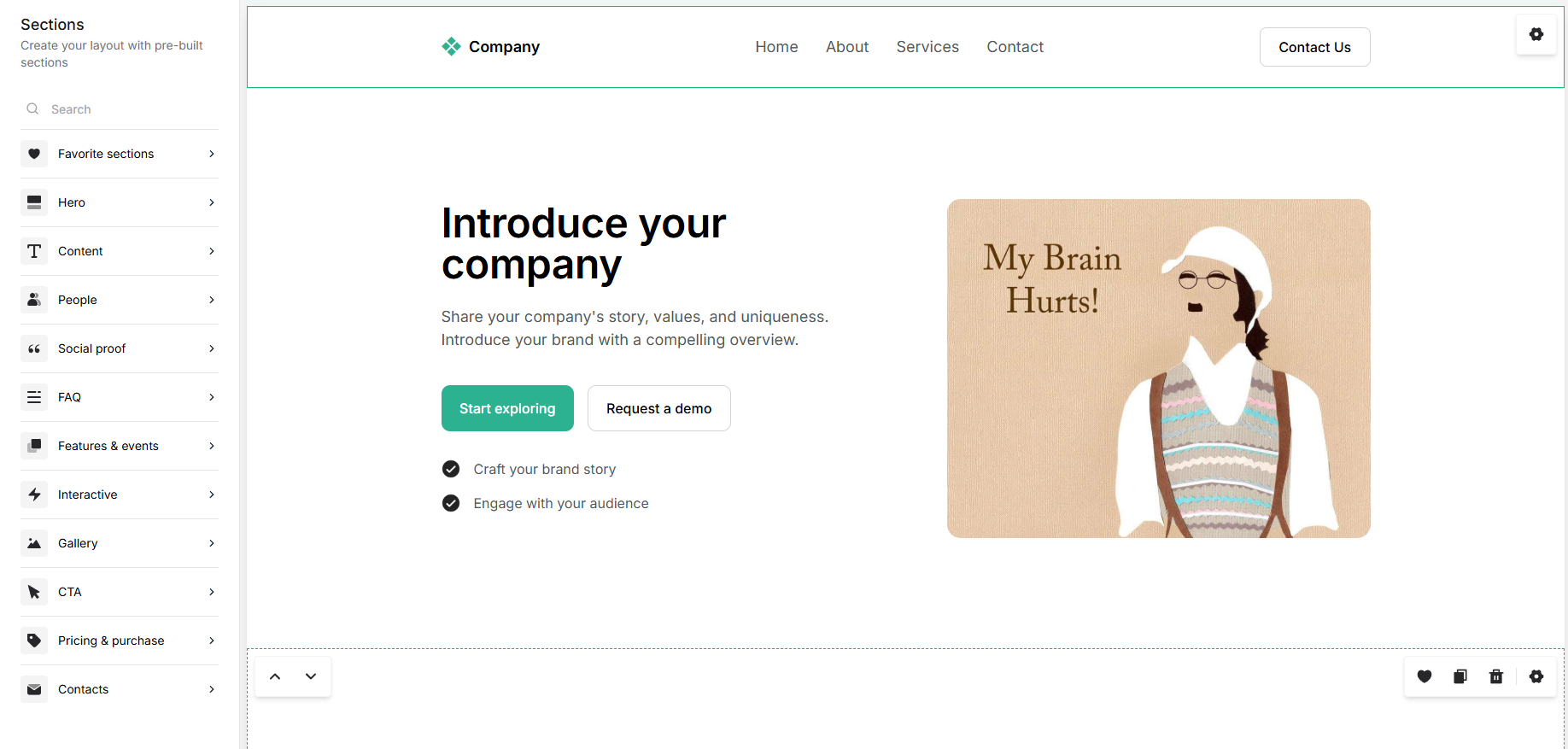 Creating a landing page from scratch in the MailerLite editor
With Constant Contact, creating a landing page feels closer to building an email. It uses the same editor, which makes it easy to learn. At the same time, it can feel like you’re adapting an email tool for something it wasn’t fully designed for. Because of that, building pages may feel a bit limiting, especially when you try to go beyond simple layouts.
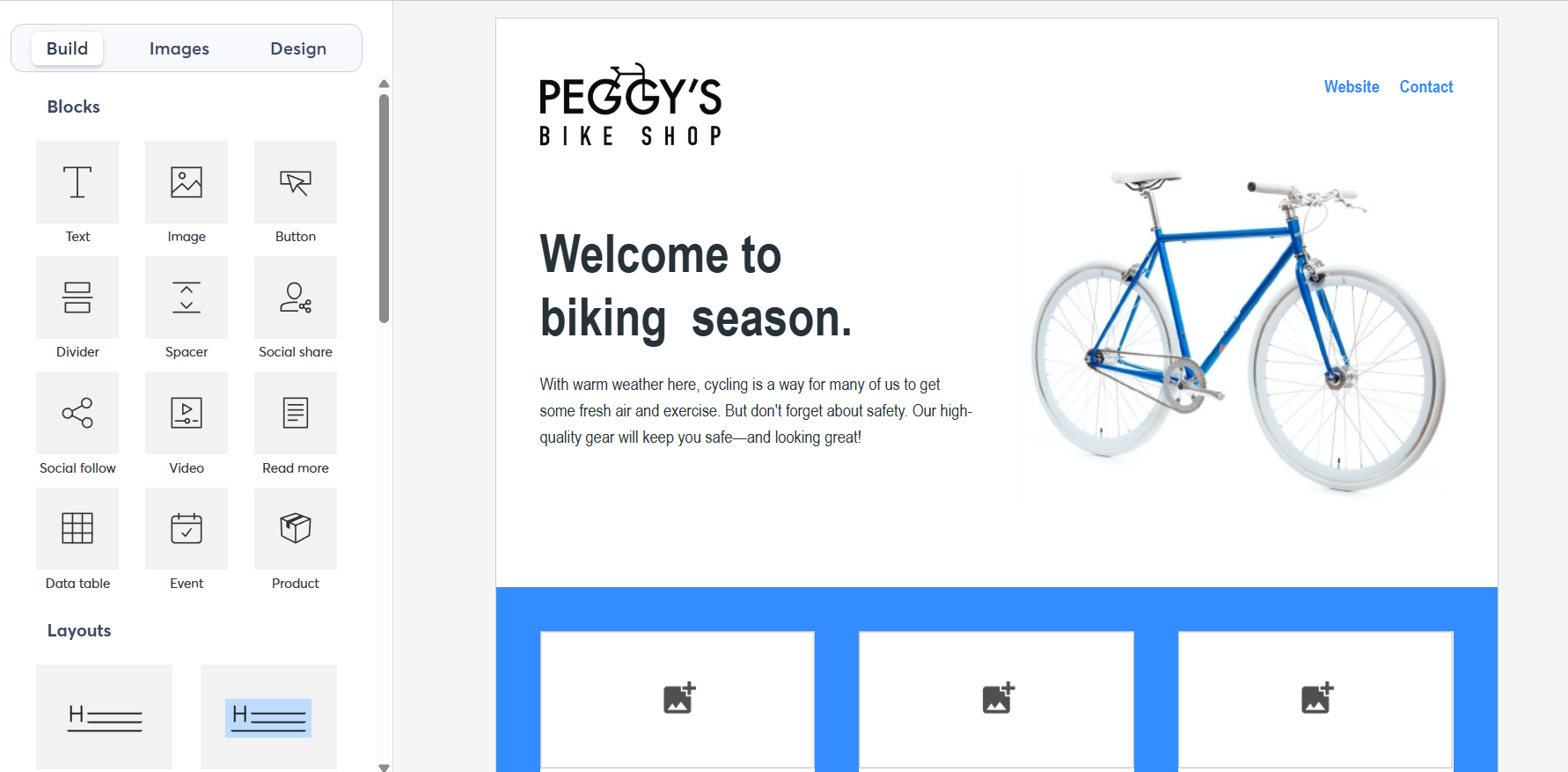 Customizing a landing page template in the Constant Contact editor
Because of these differences, Constant Contact feels familiar and easy to use, but also somewhat limited, as if you’re repurposing an email tool to build pages. MailerLite, on the other hand, feels more natural for landing pages. The workflow is smoother, and it’s easier to see how everything comes together.
If landing pages and signup forms are a key part of your strategy and you want the whole spectrum of customization capabilities, try out SendPulse.
Our pop-ups go far beyond simple forms. You can use gamified elements, such as spin-to-win, surveys, multi-step pop-ups, and interactive offers, to capture attention and increase conversions. You can even connect multiple pop-ups into flows and run A/B tests to optimize performance, which is something neither MailerLite nor Constant Contact offers at the same level.
Reporting and analytics
⭐ MailerLite: 6.6/10 | Constant Contact: 6.4/10
Reporting and analytics show how well your email campaigns perform, and where you can improve. While both platforms cover the basics, the real difference lies in how quickly and clearly the data is delivered. Here’s how MailerLite and Constant Contact compare:
| Aspect |
MailerLite |
Constant Contact |
Winner |
| Report coverage |
Campaign reports with opens, clicks, CTOR, bounces, unsubscribes, click maps, and device/location data; automation reporting; subscriber growth trends |
Campaign reports with standard metrics and click heat maps; cross-channel reporting (email and SMS); contact engagement insights; landing page analytics |
MailerLite |
| Custom reports |
Not available; pre-built reports only |
Not available; pre-built reports only |
Tie |
| Reporting speed |
Metrics update as activity occurs; no manual refresh needed |
Data updates after sending and may take time to refresh |
MailerLite |
| Export options |
CSV and Excel |
CSV and Excel |
Tie |
| Total score |
6.6/10 |
6.4/10 |
MailerLite |
MailerLite has a slight advantage in how quickly and consistently data updates. Metrics refresh as user activity happens, which makes reporting feel more immediate and easier to trust during or right after a campaign.
Constant Contact covers more areas, including email, SMS, and landing pages, but its reporting is more static and can take time to update. As a result, it feels less responsive in day-to-day use.
Customer support
⭐ MailerLite: 7.3/10 | Constant Contact: 7/10
What if something doesn’t work? At that point, support becomes critical. Both MailerLite and Constant Contact have their limitations here, whether it’s channel availability or response formats. Here’s how their customer support compares:
| Aspect |
MailerLite |
Constant Contact |
Winner |
| Channel availability |
24/7 live chat and email support; no phone support |
Live chat (Mon-Fri); phone (Mon-Sat); async email support |
Tie |
| Knowledge base |
Well-structured knowledge base, step-by-step guides, video tutorials, free certification academy |
Extensive help center, articles, video tutorials, community forum; some sections are inconsistent |
MailerLite |
| Onboarding assistance |
Self-serve migration guides; onboarding consultations available for enterprise users |
Live onboarding sessions; live trainer-led sessions (Mon–Fri) |
Constant Contact |
| Support quality rating on Capterra |
4.8/5 |
4.2/5 |
MailerLite |
| Total score |
7.3/10 |
7/10 |
MailerLite |
The difference comes down to how support works in real situations, and how users rate it. MailerLite has a clear edge here, with a 4.8 vs 4.2 rating on Capterra, which suggests a more consistently positive support experience overall.
MailerLite relies more on structured, easy-to-navigate documentation and chat support, which makes it faster to find answers independently. Constant Contact, on the other hand, offers phone support and live onboarding, which can feel more reassuring, especially at the start. However, its knowledge base is less consistent, which contributes to the lower rating.

Join 3M+ businesses growing with SendPulse
From solo creators to global brands, millions trust SendPulse to run email campaigns, automations, chatbots, and more — all in one place. Get started for free now!
Get started for free
Your decision checklist
Before the final verdict, it’s worth taking one more look at the platforms’ target audiences. The checklist below will help you see which platform aligns better with your needs.
| Decision area |
MailerLite
is a better fit if… |
Constant Contact
is a better fit if… |
| Business model |
🟩 You run a small business, a creator brand, or a growing company, and need flexible email marketing that can scale. |
🟦 You run a small business, nonprofit, or event-driven organization focused on simple campaigns. |
| Automation needs |
🟩 You need behavior-based automation with branching logic for targeted workflows. |
🟦 You need simple, time-based automation with limited branching. |
| Analytics focus |
🟩 You’re looking for standard campaign analytics with engagement insights and automation reporting. |
🟦 You need basic campaign reporting with a cross-channel overview (email and SMS). |
| Budget expectations |
🟩 You want a feature-rich platform that remains affordable as your needs grow. |
🟦 You’re willing to pay more for a simpler, more limited toolset. |
| Team and resources |
🟩 Your team is comfortable exploring features and setting up workflows independently. |
🟦 Your team prefers simplicity, minimal setup, and guided onboarding. |
In the end, the right choice depends on your needs. Both MailerLite and Constant Contact require some time to learn and set up. And switching platforms later takes effort. Choose carefully, so the platform can stay with you for many years and support your business growth.
Final verdict and recommendations
⚖️ Final scores: MailerLite – 8.4/10 | Constant Contact – 6.5/10
In our previous comparisons of Constant Contact with Mailchimp, Klaviyo, and ActiveCampaign, the conclusion was usually open-ended. Each of those tools targets a different audience, so the choice depends on specific needs. With MailerLite vs Constant Contact, the situation is different, as they compete for the same users.
Both platforms are built for marketers who prefer simplicity over advanced automation and segmentation. Typically, it’s small businesses looking for an easy, rather affordable solution. But when compared directly, MailerLite comes out ahead in most areas, especially in ease of use and pricing, which are the factors that matter most for this audience.
So, would we recommend Constant Contact over MailerLite? Probably not.
And if MailerLite still doesn’t fully meet your needs, make sure to explore how it compares with other tools like Mailchimp or ActiveCampaign.