ActiveCampaign and Constant Contact often end up in the same conversation – similar pricing, similar positioning, and the same promise to help you reach customers. On paper, it makes perfect sense. In practice, the similarities don’t go much further.
One is built for marketers who need sophisticated automation, including behavioral triggers, branching logic, and deep CRM integration. The other targets users who want to send professional emails without becoming automation engineers.
Let’s dig into what makes them tick, and more importantly, which one fits your actual needs.
How we scored this comparison: Each platform was evaluated across nine categories using our independent methodology. Pricing (25%), ease of use (20%), and email and automation features (15% each) carry the most weight because they affect daily workflows the most. All scores reflect real testing and analysis as of March 2026.
If you want the short version, it comes down to this: ActiveCampaign is more powerful, while Constant Contact is easier to get started with.
Use the table below to quickly compare the details, or jump into any section for a detailed breakdown.
| Category |
ActiveCampaign |
Constant Contact |
Winner |
| Platform focus |
Automation-first marketing platform with a built-in CRM system, designed for complex, behavior-driven customer journeys |
Email marketing platform focused on simplicity, with additional tools for social media, events, and SMS campaigns |
Depends on use case |
| Pricing |
8.8/10
More affordable for smaller contact lists; pricing advantage narrows as lists grow |
8.8/10
Higher starting price; becomes more cost-effective as contact lists grow |
Tie |
| Ease of use |
8.1/10
Feature-rich but dense interface; typically takes 4–5 weeks to get comfortable |
8.5/10
Beginner-friendly interface; first campaign can be launched within hours |
Constant Contact |
| Email design |
9.3/10
Drag-and-drop editor with precise layout control and full HTML support |
8.7/10
Intuitive drag-and-drop editor with pre-built layouts and flexible block positioning |
ActiveCampaign |
| Automation |
10/10
Visual automation builder with branching logic, loops, 32 triggers, and 200+ pre-built recipes |
5/10
Visual path builder for basic sequences with 14 triggers and 14 pre-made templates |
ActiveCampaign |
| CRM capabilities |
8.5/10
Fully integrated CRM system with support for related automation triggers |
3/10
Standalone CRM solution with no support for automation actions |
ActiveCampaign |
| Contact management |
8.5/10
Real-time dynamic segmentation; contacts tagged manually or automatically via behavior, integrations, and API |
7.5/10
Segments refresh before a campaign goes out; tagging supported via manual input, imports, and limited automation |
ActiveCampaign |
| Forms and pages |
7.2/10
Flexible form builder with custom layouts and direct automation triggers; landing page builder with deeper integration with CRM and automation |
6.8/10
Template-based form builder focused on quick setup; landing pages supported but automation mainly triggered via list subscriptions |
ActiveCampaign |
| Reporting |
8.4/10
Customized reports across campaigns, automations, contacts, CRM, and eCommerce |
6.5/10
Standard pre-defined campaign performance reports |
ActiveCampaign |
| Customer support |
7.2/10
Live chat (Mon-Fri); async email support; no phone support; group and 1:1 onboarding |
7/10
Phone and live chat support (Mon-Sat); async ticket-based support; daily drop-in Q&A sessions |
ActiveCampaign |
| Final score |
9.2/10 |
6.5/10 |
ActiveCampaign |
If you’re interested in understanding why one platform could be more suitable for your business than the other, it’s worth exploring each platform’s unique features, potential pitfalls, and the benefits it provides for your email marketing.

Create and send high-performing emails
Use an AI assistant, pre-made templates, advanced segmentation, and feature-rich automation to run campaigns without coding. Start for free with up to 15,000 monthly emails.
Get started for free
Here’s how the two platforms compare across every major category, based on hands-on testing and verified documentation.
Pricing and value
⭐ ActiveCampaign: 8.8/10 | ⭐ Constant Contact: 8.8/10
Disclaimer: Pricing changes frequently. These figures are accurate as of March 2026. Always verify final costs on official pricing pages.
As of March 2026, Constant Contact offers a 30% discount on its cheapest paid plan. That changes the math for the first three months – after that, the regular pricing applies. We’ll show you both discounted and standard prices so you can see what you’ll actually pay over time.
| Contacts |
ActiveCampaign |
Constant Contact
(regular price) |
Constant Contact
(discount price) |
Winner |
| Free trial |
14 days |
30 days
(although the website states 14 days) |
Constant Contact |
| 2,500 |
$39 |
$50 |
$35 |
Active Campaign |
| 10,000 |
$149 |
$120 |
$84 |
Constant Contact |
| 50,000 |
$609 |
$430 |
$301 |
Constant Contact |
| Total score |
8.8/10 |
8.8/10 |
Tie |
Another thing to keep in mind is plan tiers. The comparison above looks at entry-level plans, but many features you’ll likely need are only available with higher tiers.
To give you the full picture, the graph below compares both entry-level and premium plans across platforms. We’ve also included SendPulse (Standard and Pro) to give you extra context – not every platform with similar capabilities sits in the same price range.
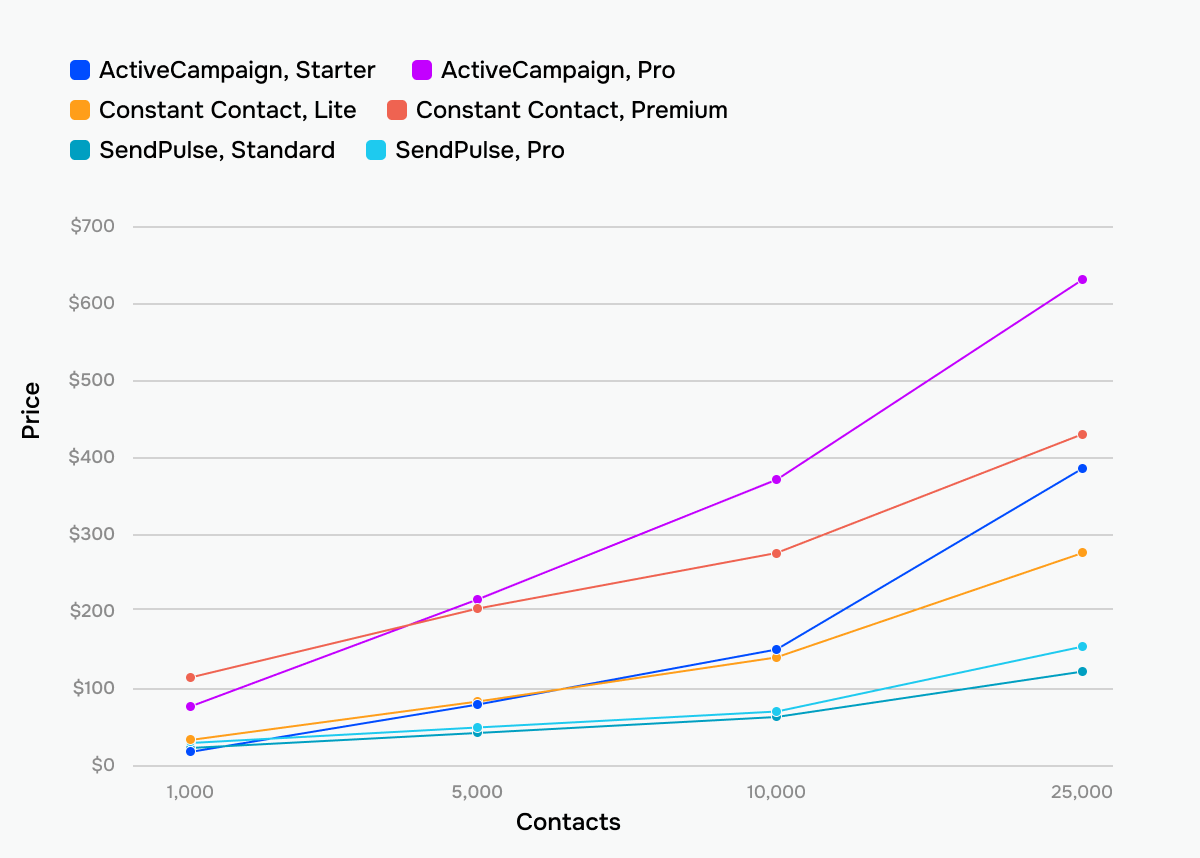 How prices grow across different tiers of three email platforms
You can see that compared to Constant Contact, ActiveCampaign is cheaper for small lists but becomes significantly more expensive as your audience grows. So, beyond plan tiers, consider the size of your audience and the type of business you run.
Ease of use and interface
ActiveCampaign: 8.1/10 | ⭐ Constant Contact: 8.5/10
If you’ve ever used email marketing tools like these before, you’ll recognize the pattern.
Constant Contact is easier to pick up because it has fewer advanced features. In contrast, ActiveCampaign offers you much more to work with, which makes it more powerful but harder to navigate at first. Here’s how that difference shows up in everyday use:
| Aspect |
ActiveCampaign |
Constant Contact |
Winner |
| First-time experience |
Requires initial technical setup before sending; supported by structured onboarding resources and migration assistance |
Beginner-friendly setup with a guided checklist; non-technical users can send their first campaign within hours |
Tie |
| Daily navigation |
Feature-rich, dense interface; powerful but not intuitive initially |
Clean, simple navigation; core tasks require just a few clicks |
Constant Contact |
| Learning curve |
4-5 weeks for automations, CRM workflows, and the platform in general |
8 hours to understand core features |
Constant Contact |
| Mobile access |
iOS and Android apps for CRM management (deals, tasks, contacts) and campaign reporting; no email creation on mobile |
iOS and Android apps support email creation, contact management, reporting, and social media posting |
Tie |
| Workflow efficiency once mastered |
Highly efficient workflows with AI-assisted navigation and powerful automation capabilities |
Consistent, low-friction workflows with predictable editor behavior and automatic brand styling |
ActiveCampaign |
| Total score |
8.1/10 |
8.5/10 |
Constant Contact |
The thing is, simplicity is a valuable feature when it matches your needs. ActiveCampaign still earns a high score because its interface handles complex functionality quite well. Given everything it lets you manage, it could feel far more overwhelming.
To give you an idea, here’s how long it typically takes to get past the learning curve for each platform:
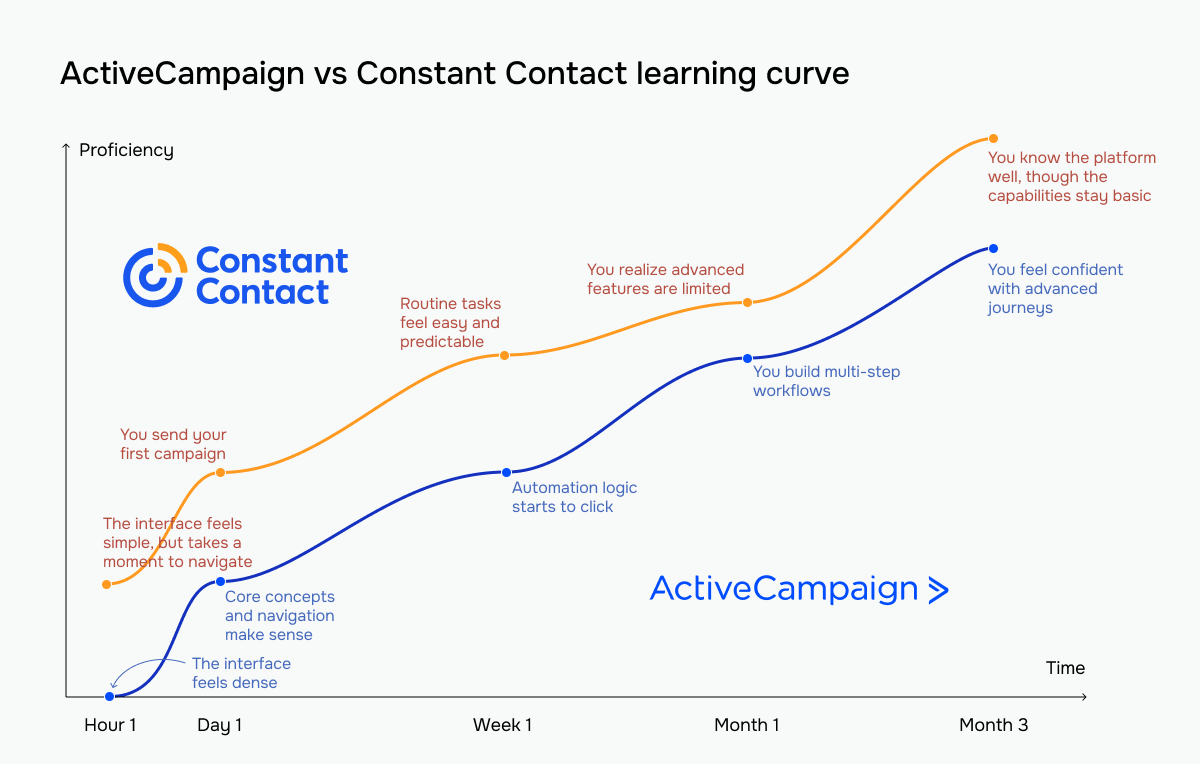 The blue line represents ActiveCampaign; the orange line represents Constant Contact
Email builder and templates
⭐ ActiveCampaign: 9.3/10 | Constant Contact: 8.7/10
The campaign builder is where email marketers spend most of their time, so it needs to be clear, intuitive, and efficient from day one. Though the builders in ActiveCampaign and Constant Contact look quite similar, the experience feels different once you actually start building:
| Aspect |
ActiveCampaign |
Constant Contact |
Winner |
| Templates |
236 pre-designed and 21 basic templates; AI-generated templates aligned with your brand |
Almost 500 templates; unlimited AI-generated templates from a prompt |
Constant Contact |
| Drag-and-drop editor |
Drag-and-drop editor based on column structures, with precise layout control and full HTML support |
Intuitive drag-and-drop editor with pre-built layouts and flexible block positioning |
Tie |
| Notable content blocks |
Live countdown timer and navigation menu block |
Event, RSVP, feedback, and product blocks |
Tie |
| Customization |
Customization through global styles and conditional content for dynamic personalization |
Customization through BrandKit for consistent colors, fonts, and branding |
ActiveCampaign |
| Mobile responsiveness |
Responsive templates with per-element visibility controls and mobile-specific font and layout settings |
Mobile preview available, but no mobile-specific editing controls |
ActiveCampaign |
| AI capabilities |
AI campaign builder from a prompt, in-editor content generation, per-contact dynamic translation, brand kit import, and follow-up suggestions |
In-editor AI content generation with tone selection |
ActiveCampaign |
| Sending time optimization |
Predictive sending for each contact based on individual open behavior, with AI-suggested timing |
Not available |
ActiveCampaign |
| Total score |
9.3/10 |
8.7/10 |
ActiveCampaign |
At first, the email builders in ActiveCampaign and Constant Contact are surprisingly similar. You drag blocks, arrange layouts, and build emails in much the same way.
But let’s take a closer look at their unique content blocks and features. In ActiveCampaign, these blocks support conversion and automation logic. A countdown timer creates urgency, a navigation menu turns an email into a mini-website, and predictive content and AI translations personalize what each contact sees. These are tools for marketers running sophisticated campaigns.
Have a look at its interface:
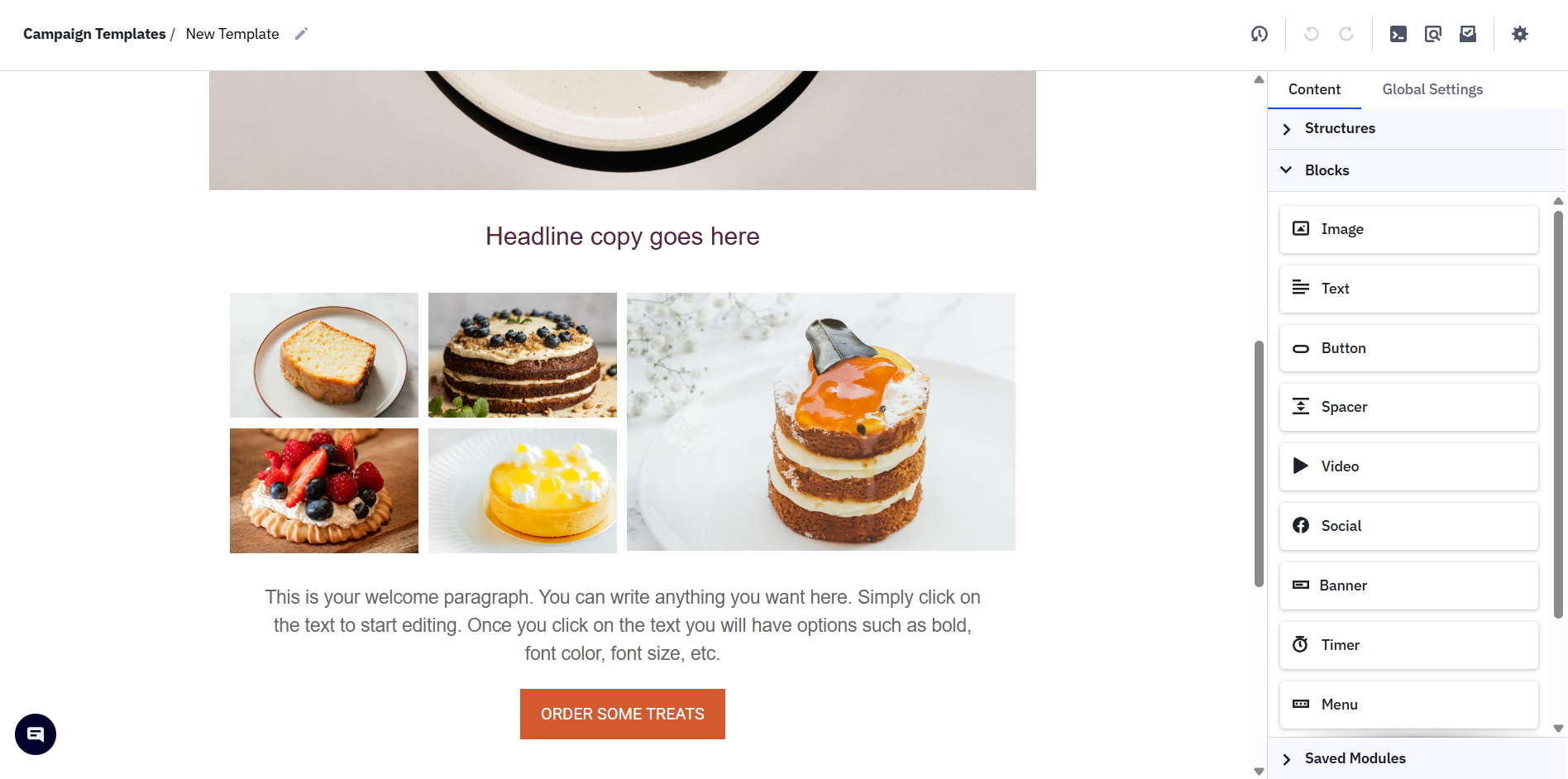 Creating a new template in the ActiveCampaign email editor
Constant Contact’s unique blocks reflect its audience just as clearly. Events, RSVPs, feedback, and product blocks match the everyday needs of small businesses and nonprofits – promoting a local event, collecting responses, or showcasing items for sale. You don’t need branching automation logic to use them; they are self-contained and purpose-built.
Here’s how the Constant Contact email builder and its content blocks look:
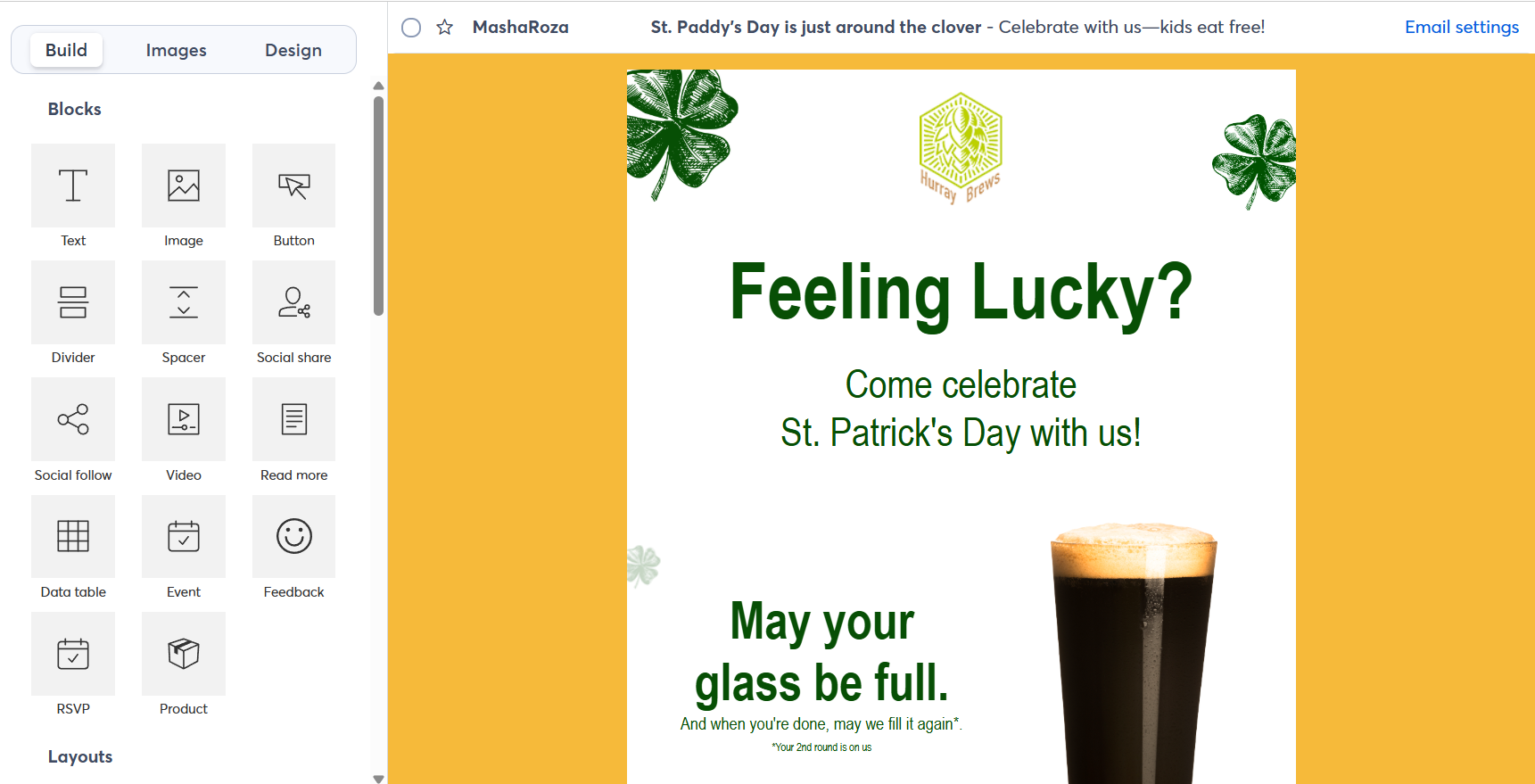 Building a holiday template in the Constant Contact email editor
So the block and tool sets become a microcosm of the platforms themselves: ActiveCampaign adds blocks and features to make your marketing more advanced, while Constant Contact offers blocks to support real-world small-business use cases right out of the box.
Marketing automation
⭐ ActiveCampaign: 10/10 | Constant Contact: 5/10
Automation is where ActiveCampaign and Constant Contact stop being competitors and become completely different tools.
ActiveCampaign’s automation is built around a core idea: your contacts are not all the same, so your marketing shouldn’t treat them that way. Every action a contact takes – opening an email, visiting a page, clicking a link, making a purchase, or hitting a lead score – can trigger a different path, message, or sales action. The system tracks behavior, branches based on conditions, loops when needed, and coordinates across email, SMS, and your sales pipeline simultaneously.
Constant Contact’s automation is built around a whole different idea: most small businesses don’t need that complexity; what they need is reliability. Set up a welcome sequence, send a birthday offer, or follow up after an event. Do it without flowcharts, without a steep learning curve, and without hiring a marketing specialist.
Here’s how those differences show up when you compare the features side by side:
| Aspect |
ActiveCampaign |
Constant Contact |
Winner |
| Availability by plan |
Entry-level plan limits automations to 5 actions; cross-channel automation is restricted to email |
Entry-level plan allows 1 active automation based on a single pre-built template; no custom automations |
ActiveCampaign |
| Automation builder |
Visual builder with branching logic, loops, multiple entry triggers, and AI-generated workflows from a prompt |
Beginner-friendly path editor with conditional splits; supports linear flows with up to 50 steps |
ActiveCampaign |
| Triggers available |
32 triggers covering contact behavior, CRM events, eCommerce activity, website tracking, and integrations |
14 triggers, including calendar dates, contact activity, invoice events, and shopping activity |
ActiveCampaign |
| Pre-built automations |
200+ customizable recipes for welcome, nurturing, abandoned cart, re-engagement, and post-purchase flows |
14 pre-built templates for welcome, date-based, invoice, and eCommerce scenarios |
ActiveCampaign |
| Channels supported |
Email, SMS, website messages, and 1:1 sales emails (on higher tiers) |
Email and SMS (US-based) |
ActiveCampaign |
| Automation complexity |
Non-linear workflows with branching, loops, multiple triggers, and goal-based conditions for complex automation |
Linear paths with Yes/No splits; suited for simple sequences without interdependent logic |
ActiveCampaign |
| Total score |
10/10 |
5/10 |
ActiveCampaign |
Let us show you what each platform’s automation actually looks like. First, ActiveCampaign’s approach:
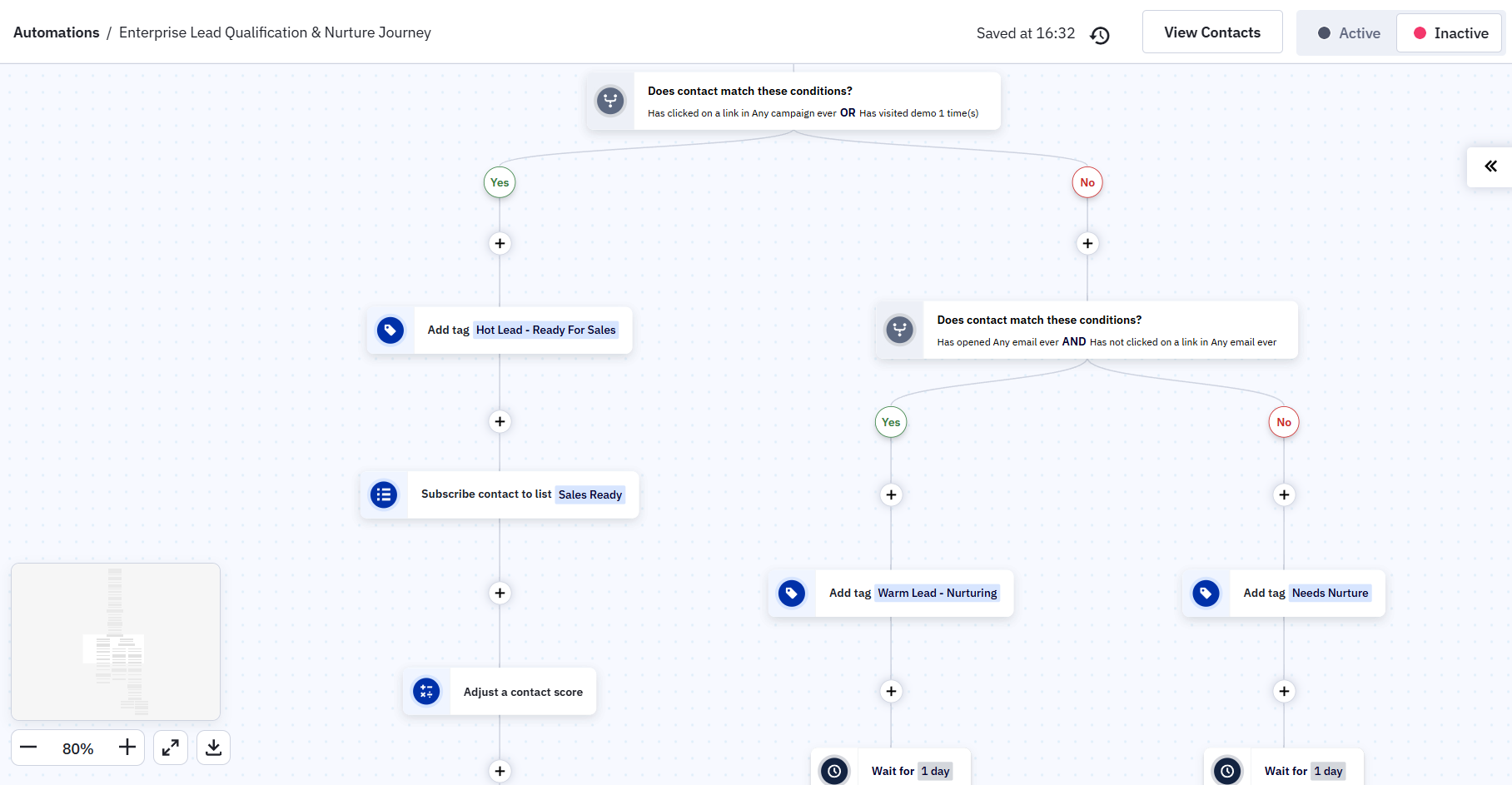 Customizing a lead qualification and nurturing automation recipe with ActiveCampaign
What you’re seeing here isn’t even a complete automation but a fragment of a larger flow. Yet even this segment alone contains more conditional logic than most platforms can handle in an entire workflow.
The system evaluates two behavioral conditions in sequence: first, whether a contact has ever clicked a link in any campaign or visited a demo. If not, a second question follows – have they opened emails but never clicked?
Each branch lands in a different category: “Hot lead – Ready for sales,” “Warm lead – Nurturing,” or “Needs nurture,” each routed differently and each waiting on its own timeline.
Here’s Constant Contact in action:
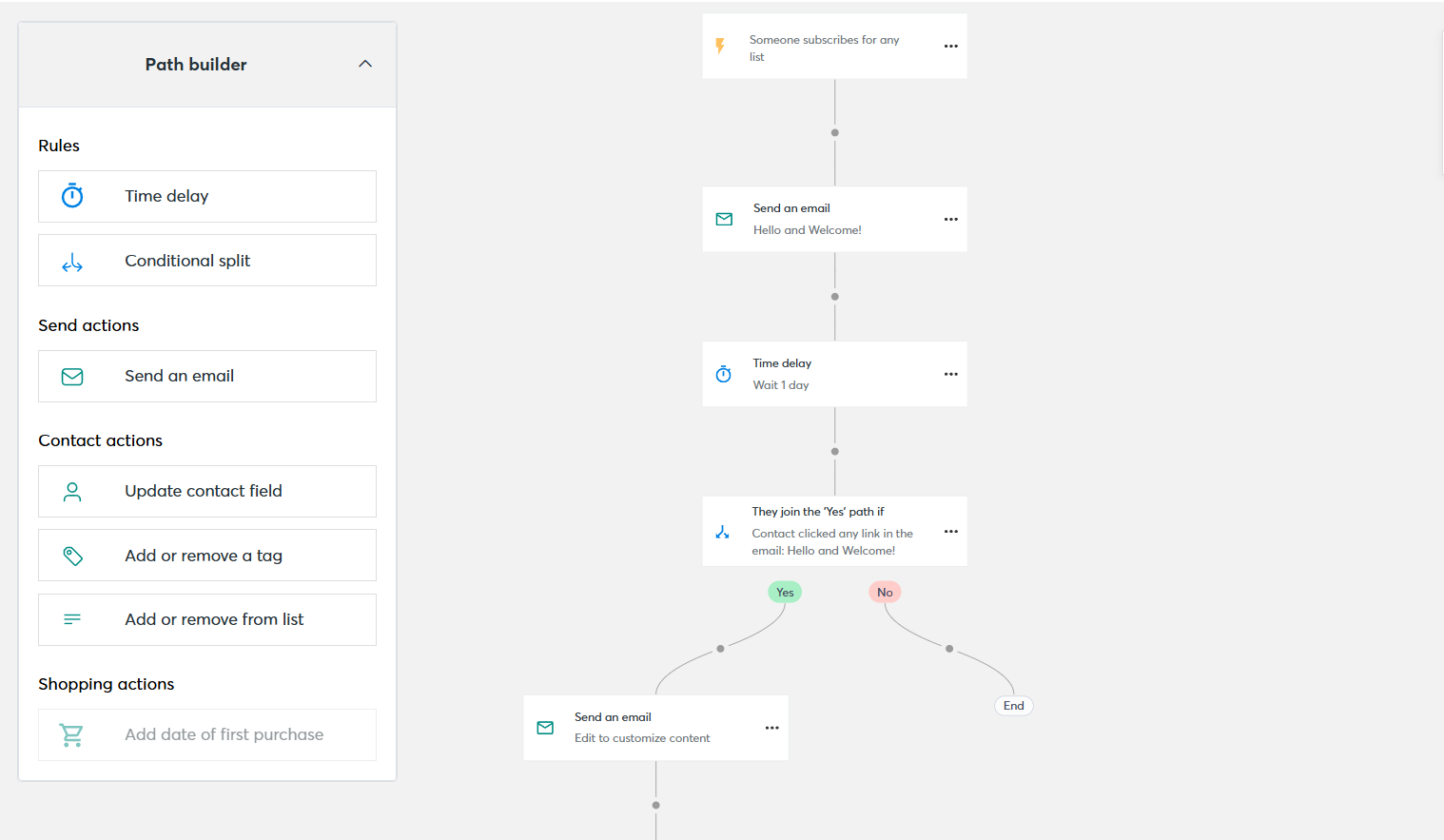 Setting up a welcome automation flow in Constant Contact
It’s welcome series shows how a contact subscribes, receives a welcome email, waits one day, and then reaches the only decision point in the path: did they click a link in that first email? One yes, one no, one follow-up email, and the path ends. The toolkit available to build this is deliberately simple – a handful of actions covering the basics and not much beyond them.
The difference isn’t just visual. In ActiveCampaign, automation helps you make business decisions based on behavior, while in Constant Contact, it just follows a script you wrote.

Power up your business with smart tools
Emails, automation, chatbots, websites, CRM, and more — everything you need to connect with your audience. Try SendPulse for free today.
Get started for free
CRM capabilities
⭐ ActiveCampaign: 8.5/10 | Constant Contact: 3/10
Let’s talk about a problem most growing businesses face: your email marketing tool and your sales pipeline don’t communicate. Contacts move through stages, deals close, opportunities go cold, but your email tool has no idea any of this happened.
To solve this issue, ActiveCampaign offers a CRM system fully embedded within its platform. It shares the same login, contact database, and automation engine. When a deal stage changes in your pipeline, it can instantly trigger a message or action because everything runs inside one platform.
In contrast, Constant Contact acquired a CRM solution (Lead Gen & CRM) in 2021 but kept it separate. It runs on separate infrastructure, has its own login, pricing, and support. You’re essentially connecting two products that happen to be owned by the same company.
In practice, this means that if you’re already a Constant Contact email customer and want to add CRM capabilities, you’ll need to sign up for another product, go through a separate onboarding process, pay a separate bill, and learn a new interface.
| Aspect |
ActiveCampaign |
Constant Contact |
Winner |
| CRM setup |
Built-in CRM solution; one unified interface |
Standalone CRM product; two separate interfaces |
ActiveCampaign |
| Data and sync |
Automatic contact sync (shared database) |
No automatic contact sync (integration needed) |
ActiveCampaign |
| CRM-based automation |
Deal actions trigger automations instantly |
Not available |
ActiveCampaign |
| Total score |
8.5/10 |
3/10 |
ActiveCampaign |
With Constant Contact, your email contacts don’t automatically live inside that CRM either. You can connect the tools, but the data flow isn’t as seamless as in platforms like ActiveCampaign or SendPulse, where email marketing and CRM actions are designed to work together from the start.
Quick note on SendPulse: The platform also includes a built-in CRM system, available even with the free plan. Contacts, deals, flows, and messaging channels are connected within the same environment, making it possible to trigger marketing actions directly from CRM activity and vice versa.
Contact management
⭐ ActiveCampaign: 8.5/10 | Constant Contact: 7.5/10
Here’s something that’s easy to miss: contact management isn’t just about storing names and emails – it’s the foundation that makes or breaks everything else, especially automation.
ActiveCampaign’s advanced automation – all those branching conditions, score-based triggers, and behavior-based splits – only works because the contact data underneath is live and continuously updating. Constant Contact’s linear automation isn’t just a simpler interface – it reflects the fact that the contact data feeding it isn’t specific or real-time enough to support more complex logic.
Think of it this way: Constant Contact’s contact management is meant for organizing contacts, while ActiveCampaign’s is built for acting on their behavior.
| Aspect |
ActiveCampaign |
Constant Contact |
Winner |
| Segmentation capabilities |
Segments built with AND/OR logic combining contact data, email behavior, site activity, and tags; saved segments reusable across campaigns and automations |
Segments built with AND/OR logic across contact details, email activity, list membership, tags, shopping behavior, web tracking, and SMS status |
ActiveCampaign |
| Segment update speed |
Dynamic segments update in real time as contacts meet or stop meeting criteria |
Segments refresh at send time only; no real-time updates between sends |
ActiveCampaign |
| Available segmentation criteria |
Contact fields, tags, list status, email activity, site tracking, automation history, scoring, geolocation, and eCommerce data with order and cart history |
Contact profile fields, contact source, list membership, tags, email activity, and engagement tiers |
ActiveCampaign |
| Tagging and manual organization |
Tags applied manually, via automations, forms, link clicks, integrations, and API |
Tags applied manually, via bulk CSV import, and automations; up to 500 unique tags |
ActiveCampaign |
| Contact and list model |
Contacts stored in a unified database; accounts created after November 2025 are billed for every contact, including unsubscribed and bounced, not just active subscribers |
Contacts stored in a unified database organized into lists; contacts can belong to multiple lists and are automatically deduplicated at send time |
ActiveCampaign |
| AI capabilities |
AI automatically generates 3 suggested segments based on account data |
Not available |
ActiveCampaign |
| Total score |
8.5/10 |
7.5/10 |
ActiveCampaign |
In ActiveCampaign, segments update the moment behavior changes. A contact visits a page, hits a lead score threshold, makes a purchase, clicks a link – and they can immediately enter or exit an automation. The contact database and the automation engine are essentially in constant conversation.
Tagging works the same way: tags get applied automatically through link clicks, form submissions, integrations, or the API, so contact profiles are continuously enriched without any manual effort. Those tags then become triggers and conditions inside your automations.
In Constant Contact, segments only recalculate when you actually send your campaign. Between sends, nothing updates. A contact who made a purchase yesterday still sits in their old segment until you send the next campaign, and the segment refreshes. That means you can’t build automations that react to real-time behavior, because the contact data powering them isn’t updating in real time either.
Signup forms and landing pages
⭐ ActiveCampaign: 7.2/10 | Constant Contact: 6.8/10
Your contact list has to start somewhere, and that’s usually a form or a landing page. Having your forms and pages built into the same platform as your email marketing saves a lot of friction, since there are no third-party tools – just collect leads and start working with them right away.
ActiveCampaign and Constant Contact both provide builders for forms and landing pages – here’s how they compare:
| Aspect |
ActiveCampaign |
Constant Contact |
Winner |
| Form types |
Inline, floating bar, floating box, and modal |
Inline, banner, flyout, and pop-up |
ActiveCampaign |
| Form builder |
Drag-and-drop builder with editable fields and styling; supports post-submission messages and automation triggers |
Template-based builder with editable content (text, button, background) and fields; includes display timing and device targeting options |
ActiveCampaign |
| Pop-up targeting conditions |
Entry timing and scroll-based conditions, with frequency controls for returning visitors |
Time, exit intent, frequency, and device targeting |
Constant Contact |
| Landing page builder |
Drag-and-drop builder with customizable templates, custom domain publishing, and Google Analytics integration |
Flexible drag-and-drop builder for custom pages AND a simplified builder for signup and thank-you pages |
ActiveCampaign |
| Total score |
7.2/10 |
6.8/10 |
ActiveCampaign |
So, here are the actual differences between the two signup form builders.
In ActiveCampaign, you physically drag fields from a panel onto a canvas and position them yourself. You can add, remove, and reorder any field freely – standard, custom, or hidden fields, images, and text blocks. The form layout is entirely up to you.
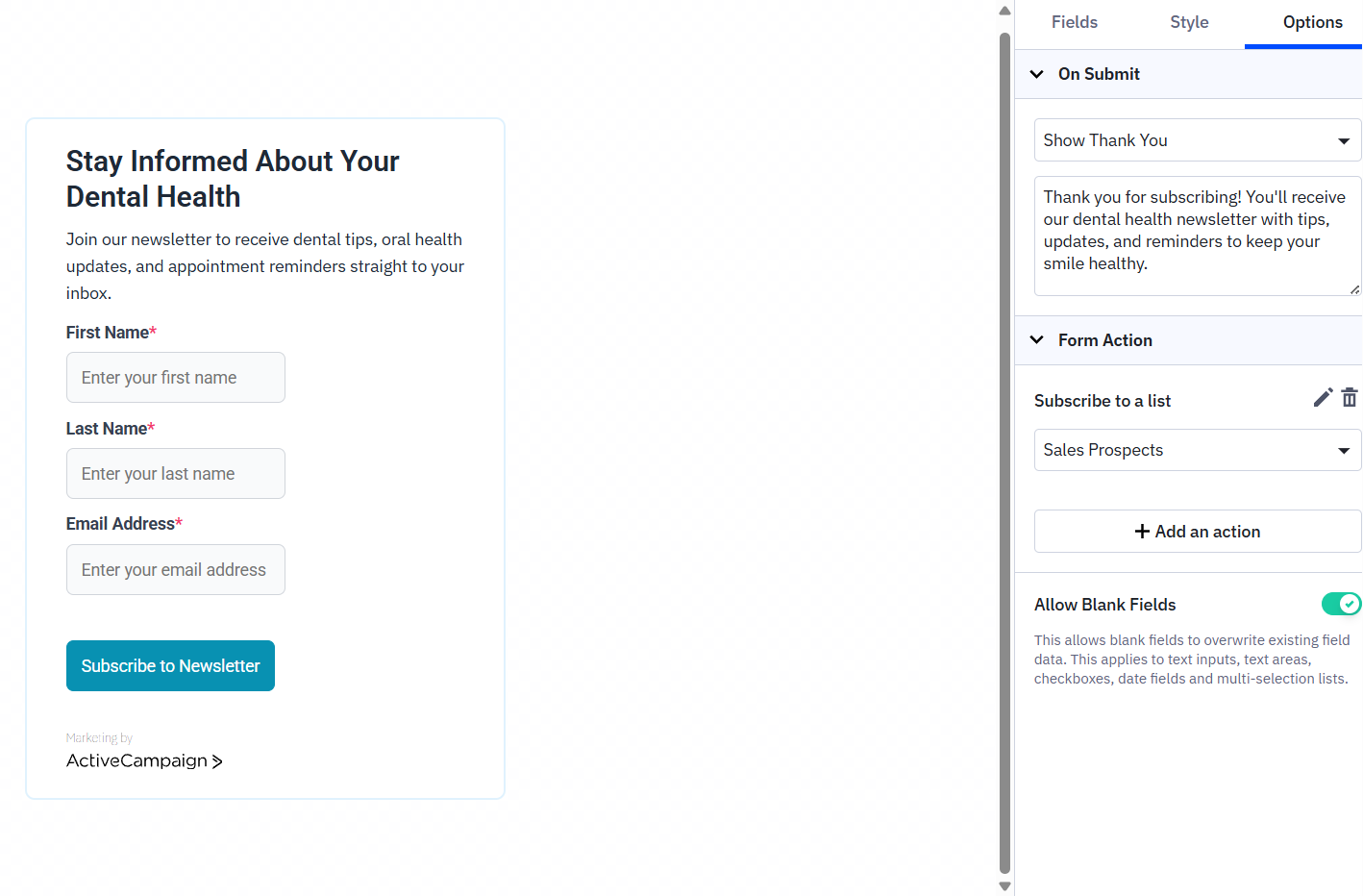 Editing a signup form in ActiveCampaign
Unlike ActiveCampaign, Constant Contact offers signup forms with a preset structure – title, description, contact fields, button, background – and you click into each section to edit it. You’re customizing what’s already there rather than building from scratch.
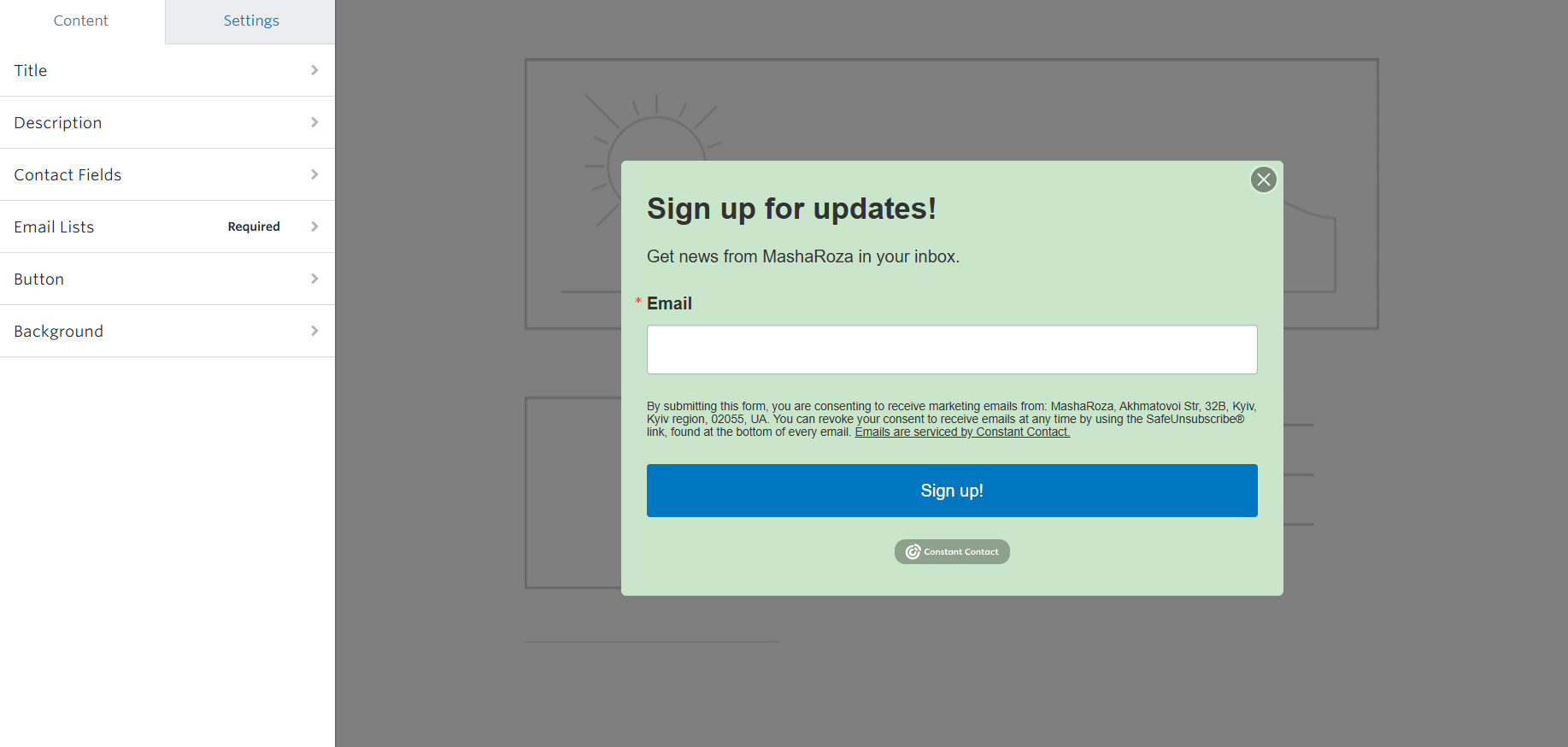 Customizing a preset signup form in Constant Contact
The real gap, though, is in what happens after someone submits a form.
In ActiveCampaign, the form has a “Trigger automation” button built directly into the form builder, so you can connect an automation at the point of your form creation. The moment someone submits, that automation fires, with the full automation engine behind it: emails, delays, behavioral branching, scoring, tagging, and CRM actions.
In Constant Contact, the form adds someone to a list, and a list-join can trigger an automation, but only on mid-tier paid plans and above.
Beyond that, the basics – form types, styling options, embedding – are more or less comparable.
If you need more flexibility with your forms and landing pages, SendPulse is worth a look. With its forms, you can subscribe contacts not only to mailing lists but also directly to chatbots on WhatsApp, TikTok, or Instagram, triggering flows across multiple channels. It also includes gamified elements like spin-to-win and scratch cards to help you boost conversions.
On the landing page side, it goes beyond simple pages. You get a full-featured website builder, built-in payments, and seamless CRM sync, so every submission results in a new contact or deal and triggers an automation right away.
Reporting and analytics
⭐ ActiveCampaign: 8.4/10 | Constant Contact: 6.5/10
Sending emails is one thing. Knowing which ones drive results is another. Reporting is what connects your campaigns, automations, and contact activity to actual business outcomes.
Here’s how ActiveCampaign and Constant Contact compare in terms of the kind of analytics you get:
| Aspect |
ActiveCampaign |
Constant Contact |
Winner |
| Report coverage |
Comprehensive reporting across email and SMS campaigns, automations, contacts, forms, CRM, and eCommerce |
Campaign performance reports, automation path analytics, contact growth, landing page metrics, and event reporting |
ActiveCampaign |
| Custom reports |
Custom report builder available as a paid add-on; supports flexible dimensions, measures, filters, and multiple visualization types |
No custom report builder; all reports are fixed and pre-defined |
ActiveCampaign |
| Reporting speed |
Standard reports refresh every 6-24 hours, depending on report type; no real-time reporting |
Metrics update with a delay |
ActiveCampaign |
| Export options |
CSV, Excel, JSON, TXT, HTML, and Markdown for summary tables; CSV for contacts |
CSV and Excel |
ActiveCampaign |
| Total score |
8.4/10 |
6.5/10 |
ActiveCampaign |
The most immediate thing you will feel when getting to reporting in ActiveCampaign and Constant Contact is the difference between having answers and having to go looking for them.
In ActiveCampaign, reporting covers the entire platform, including campaigns, automations, forms, contacts, CRM deals, and eCommerce, so when you want to understand why a funnel doesn’t convert or where contacts fall out of an automation, that data is all in one place.
With Constant Contact, you get campaign performance, contact growth, and automation analytics, which cover the basics for anyone running newsletters and simple sequences. But when you need to tie email engagement to actual sales outcomes or figure out why an automation is underperforming, the reporting doesn’t go that deep.
Customer support
⭐ ActiveCampaign: 7.2/10 | Constant Contact: 7/10
No platform is perfect, and sooner or later, you may need help resolving an issue or understanding how a feature functions. Support channels, documentation quality, and onboarding resources all shape the day-to-day experience, especially when you’re new to the tool.
| Aspect |
ActiveCampaign |
Constant Contact |
Winner |
| Channel availability |
Live chat during business hours; async email support; no phone support |
Phone and chat during business hours; async ticket support |
Tie |
| Knowledge base |
Comprehensive help center with articles and video tutorials |
Help center is sometimes inconsistent and difficult to navigate |
ActiveCampaign |
| Onboarding assistance |
AI-powered onboarding program with 25-minute quick-learn sessions and live Q&A workshops |
Free group onboarding webinars and daily drop-in Q&A sessions |
Tie |
| Support quality rating on Capterra |
4.4/5 |
4.2/5 |
ActiveCampaign |
| Total score |
7.2/10 |
7/10 |
ActiveCampaign |
Notably, Constant Contact offers phone support, which can be a lifesaver when something breaks right before you need to send a campaign. At the same time, its help center is often criticized for being poorly organized and hard to navigate, so finding answers on your own isn’t always easy.
ActiveCampaign goes the other way. There’s no phone support available, but its documentation is much more comprehensive and well-structured, making it easier to troubleshoot issues without contacting support.
It comes down to how you prefer to get help. Constant Contact prioritizes direct human assistance, while ActiveCampaign relies more on strong documentation and self-service support.

Join businesses growing with SendPulse
From solo creators to global brands, thousands of customers trust SendPulse to run email campaigns, chatbots, automations, and more — all in one place.
Get started for free
Your decision checklist
At this point, the comparison becomes less about features and more about fit. Run through this checklist to quickly spot which platform lines up better with your business needs.
| Decision area |
ActiveCampaign
is a better fit if… |
Constant Contact
is a better fit if… |
| Business model |
🟦 You run complex B2B or B2C funnels, manage a sales pipeline, or need marketing and CRM connected in one place. |
🟧 You run a small business, nonprofit, or event-driven organization that primarily sends newsletters and promotional emails. |
| Automation needs |
🟦 Your strategy relies on automation, with multi-branch logic, advanced triggers, lead scoring, and cross-channel flows. |
🟧 You need simple, template-based automations like welcome emails, abandoned cart reminders, or birthday series. |
| Analytics focus |
🟦 You need to analyze data across contacts, campaigns, automations, and deals in flexible combinations. |
🟧 You only need standard per-campaign metrics (opens, clicks, bounces) and don’t care about cross-object reporting. |
| Budget expectations |
🟦 You’re willing to invest more in a powerful platform, and potentially pay extra for a built-in CRM solution. |
🟧 You’re managing a larger contact list and want competitive pricing. |
| Team and resources |
🟦 You have the time or team to learn the platform and build more advanced workflows. |
🟧 You need a tool that’s quick to use, with minimal setup and a short learning curve. |
Final verdict and recommendations
⚖️ Final scores: ActiveCampaign – 9.2/10 | Constant Contact – 6.5/10
There’s no way to sugarcoat it: ActiveCampaign is a significantly more advanced platform. It consistently outperforms Constant Contact across most categories, including automation, segmentation, CRM integration, reporting depth, and data-driven targeting. It is built for businesses that treat email as part of a broader marketing and sales strategy rather than a standalone newsletter tool.
Go with ActiveCampaign if you need automation at the core, detailed analytics, and tight CRM integration. If you want to double-check, compare it against MailerLite before committing.
Go with Constant Contact if you’re sending regular emails to a growing list and don’t need complex marketing logic. If you’re still unsure, check how it stacks up against Klaviyo.
In simple terms, ActiveCampaign provides far more capabilities, while Constant Contact focuses on simplicity for companies that don’t require those features.