Comparing Kit (formerly ConvertKit) vs Constant Contact might feel odd at first. They’re both US-based email marketing platforms, but they’re built for different kinds of users. Kit focuses on creators, newsletters, and audience monetization. Constant Contact is closer to a small business marketing hub, with email, events, promotions, and social tools.
So the real question isn’t simply which platform is better, but which one fits the way you work. Let’s look at where Kit and Constant Contact actually overlap and where their paths split.
How we scored this comparison: This review was created by the SendPulse team. As an email marketing platform ourselves, we work in the same space as the tools we test, which also means we understand the field deeply.
Each platform was evaluated across nine categories using our independent methodology. Pricing (25%), ease of use (20%), and email and automation features (15% each) carry the most weight because they affect daily workflows the most. All scores reflect hands-on testing and analysis as of May 2026.
Here’s a quick overview of the key aspects of Kit (formerly ConvertKit) and Constant Contact. If any category below is especially important for your business, click on it to jump straight to the part of the comparison where we explore it in detail.
| Category |
Kit |
Constant Contact |
Winner |
| Best for |
Creators, solopreneurs, and newsletter businesses focused on audience growth and monetization |
Small businesses and nonprofits running email, events, social media, and SMS in one platform |
Depends on your use case |
| Pricing |
10/10
Free plan up to 10,000 contacts with unlimited emails; affordable scaling; no email limits |
7/10
No free plan; higher pricing; email send limits; fewer advanced capabilities for the cost |
Kit |
| Ease of use |
8.2/10
Clean, task-based interface; fast workflows once familiar; built around a single audience model |
7.5/10
Familiar, traditional interface; broader toolset but less consistent; includes mobile apps |
Kit |
| Email design |
7/10
Content-focused builder with precise layout control; smaller template library; limited AI |
8.6/10
Large template library; faster layout building; strong AI support and guided editing |
Constant Contact |
| Automation |
6/10
Simple but flexible flows; multiple entry points; integration-based triggers |
5/10
Basic, linear workflows; limited logic; easier to set up, but less flexible |
Kit |
| Contact management |
6/10
Single database with dynamic segmentation; real-time updates; flexible tagging |
5.5/10
List-based structure; solid criteria but less flexible and slower updates |
Kit |
| Forms and pages |
6.4/10
Design-focused pages with more control and targeting; better for conversion-driven use cases |
6.8/10
More form types; faster setup; simpler, more functional pages with less design control |
Constant Contact |
| Deliverability |
8.7/10
Strong infrastructure; dedicated IP available; solid mailing list hygiene controls |
8/10
Strong overall; good built-in mailing list hygiene controls; no dedicated IP option |
Kit |
| Reporting |
7.2/10
Covers core metrics; no custom reports; limited flexibility |
7.4/10
Broader reporting; no custom reports; more export options |
Constant Contact |
| Customer support |
7.5/10
24/7 email and chat; strong knowledge base; higher user ratings |
7/10
Phone support available; broader channels; less consistent knowledge base |
Kit |
| G2/Capterra rating |
4.4/4.6 |
4.1/4.3 |
Kit |
| Final score |
8.4/10 |
6.5/10 |
Kit |
A nearly 2-point score gap is significant. Where exactly does it come from, and is Kit really that much better than Constant Contact? Let’s take a closer look and find out.

Create and send high-performing emails
Use an AI assistant, pre-made templates, advanced segmentation, and feature-rich automation to run campaigns without coding. Start for free with up to 15,000 monthly emails.
Get started for free
We start this Kit (formerly ConvertKit) vs Constant Contact comparison with what matters most to marketers: pricing, email builders, automation, and deliverability. After that, we will move on to secondary factors like customer support and reporting. All the key information has been carefully selected and double-checked by SendPulse experts, so you can trust what you see below.
Pricing plans
⭐ Kit: 10/10 | Constant Contact: 7/10
Disclaimer: Pricing changes frequently. These figures are accurate as of May 15, 2026. Always verify final costs on official pricing pages.
For Kit and Constant Contact, we decided to show both the cheapest and the most expensive plans, because the platforms behave quite differently across tiers. The table below shows how much it will cost to get started and how much you’ll pay to access more advanced features, especially in automation and segmentation.
| Contacts |
Kit, Newsletter/Creator |
Kit, Pro |
Constant Contact, Lite |
Constant Contact, Premium |
Winner |
| Free plan/trial |
Up to 10,000 contacts; unlimited emails |
30-day free trial (some pages mention 14 days) |
Kit |
| 3,000 |
$0/mo;
unlimited emails |
$83/mo;
unlimited emails |
$80/mo;
30,000 emails |
$220/mo;
72,000 emails |
Kit |
| 10,000 |
$0/mo;
unlimited emails |
$158/mo;
unlimited emails |
$120/mo;
100,000 emails |
$275/mo;
240,000 emails |
Kit |
| 25,000 |
$166/mo;
unlimited emails |
$233/mo;
unlimited emails |
$280/mo;
250,000 emails |
$425/mo;
600,000 emails |
Kit |
| 50,000 |
$316/mo;
unlimited emails |
$433/mo;
unlimited emails |
$430/mo;
500,000 emails |
$575/mo;
1,200,000 emails |
Kit |
| Total score |
10/10 |
7/10 |
Kit |
Kit earns a perfect score for its extremely generous free plan and overall affordable pricing, even on higher tiers. Constant Contact receives a 7/10 mainly because of its higher pricing structure, email sending limits, and relatively limited feature expansion on more expensive plans.
Below, we’ll break down exactly what you get for the price with both Kit and Constant Contact.
Ease of use and interface
⭐ Kit: 8.2/10 | Constant Contact: 7.5/10
The key difference between Kit and Constant Contact is that Kit was primarily built for creators. That focus is reflected throughout the platform, from its terminology to its workflow structure and interface design. Constant Contact, on the other hand, is a more traditional email platform that most marketers will understand pretty quickly.
Even so, Kit still wins this category overall. Here’s how the two platforms compare across the most important usability factors.
| Aspect |
Kit |
Constant Contact |
Winner |
| First-time experience |
Guided onboarding focused on audience building and first campaign launch; no sending restrictions at the start |
Standard self-serve onboarding with guides and tutorials; no automated setup; basic configuration required before sending |
Kit |
| Daily navigation |
Task-based navigation with low feature density; focused interface centered on core email workflows |
Feature-based navigation covering email, contacts, reporting, and additional marketing tools; broader interface scope |
Kit |
| Learning curve |
Moderate; core workflows are quick to learn; requires adjustment to a tag-based contact structure |
Easy for basic campaigns; expands with additional channels and tools |
Tie |
| Mobile access |
No dedicated mobile app; browser-based access only |
Dedicated mobile apps for campaign management, contact handling, and performance tracking |
Constant Contact |
| Workflow efficiency once mastered |
High efficiency for recurring email workflows; supports streamlined execution through automation and integrations |
Efficient for standard campaigns across email and social; supports multi-channel execution from a single interface |
Tie |
| Total score |
8.2/10 |
7.5/10 |
Kit |
Our main issue with Constant Contact is the lack of consistency across the platform experience. Small inconsistencies can create unnecessary confusion, especially for new users trying to understand pricing, features, or account limitations.
A good example appears immediately after signing up. Some parts of the platform reference a 14-day free trial, while the actual trial period is 30 days. While the longer trial is obviously beneficial, conflicting information like this makes the overall experience feel less polished. That inconsistency is one of the main reasons Constant Contact scores a relatively modest 7.5/10 in this category.
With that said, this flaw doesn’t make Constant Contact unusable. Here’s what you can actually expect from the learning curve of both Kit and Constant Contact:
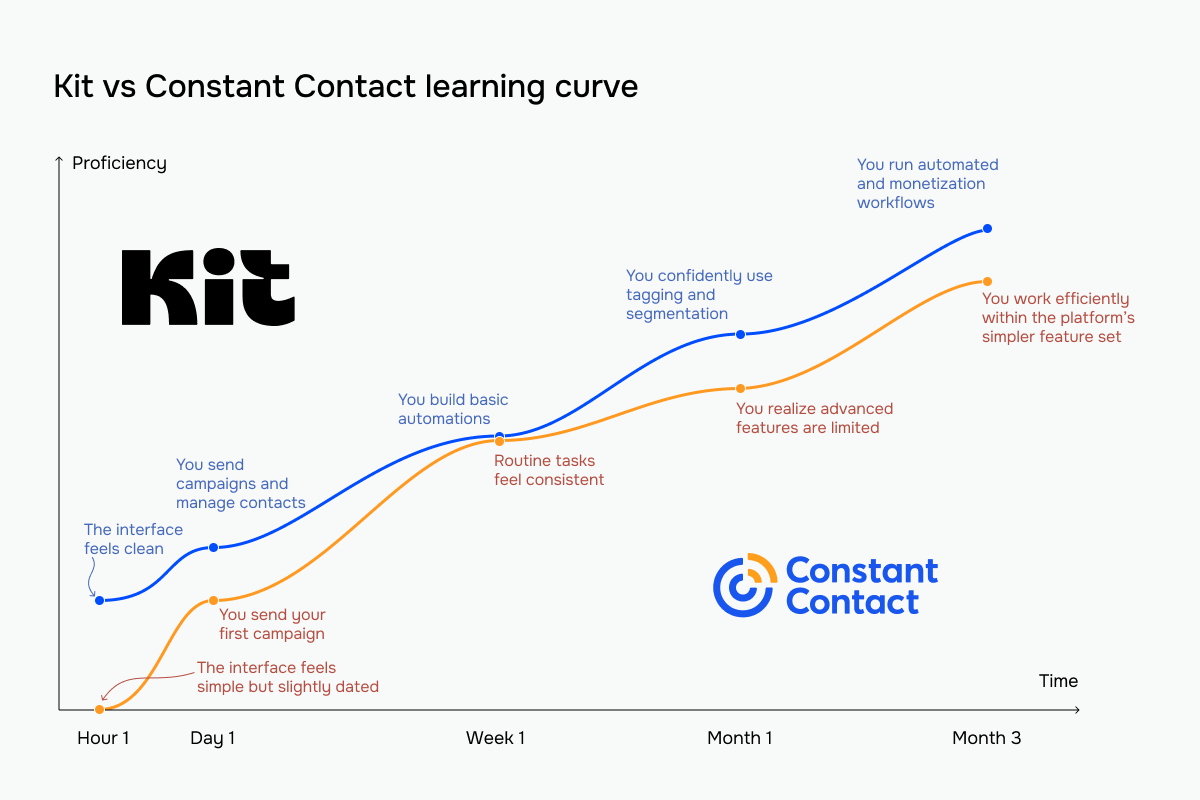 Learning curve comparison based on our team’s onboarding experience
Email builder and templates
Kit: 7/10 | ⭐ Constant Contact: 8.6/10
The first win for Constant Contact comes in the email builder category. Being on the market since 1995, it has built a very traditional, easy-to-use editor that most, if not all, email marketers will feel comfortable with. Kit, on the other hand, has a much more specific approach. Its editor feels most comfortable for users who prefer text-document-style workflows with a simpler, more minimal interface. While that keeps the experience clean and focused, it also means fewer design and customization options. Here’s a closer look at the differences:
| Aspect |
Kit |
Constant Contact |
Winner |
| Templates |
50+ templates across multiple use cases; custom templates and HTML import supported |
200+ templates organized by industry and use case; custom templates and HTML import supported |
Constant Contact |
| Drag-and-drop editor |
Content-first editing with inline building; contextual controls per element; custom styling and A/B testing supported |
Structure-first editor with pre-defined layouts and flexible block placement; faster layout setup; in-context content guidance included |
Tie |
| Notable content blocks |
Polls, video, reusable snippets, and recommendation block for creator networks |
Event, feedback, RSVP, and product blocks; saved reusable blocks |
Constant Contact |
| Mobile responsiveness |
Desktop and mobile preview available; no element visibility controls |
Fully responsive templates by default; mobile preview available; automatic adaptation with minimal manual adjustment |
Constant Contact |
| AI features |
Limited AI support focused on subject line suggestions only |
AI-generated email, SMS, and social media content; templates can be generated from prompts |
Constant Contact |
| Sending time optimization |
Manual scheduling only |
Manual scheduling only |
Tie |
| Total score |
7/10 |
8.6/10 |
Constant Contact |
Here is how using these builders feels and looks in real life.
Kit’s email builder is organized in a clear structure – sections, layouts, and columns – so you can shape your email step by step without the interface getting in your way. You can adjust background images, spacing, borders, and even fine-tune padding for each column, which gives you quite precise control over how everything looks.
One thing that stands out is global styling. You set fonts, colors, and button styles once at the template level, and the whole email follows that logic. At the same time, if you want to go deeper, you still have options like column-level spacing or custom CSS classes.
The block library stays intentionally minimal. You get the core elements, like text, lists, and buttons, without a long list of niche blocks. Together with built-in A/B testing and an image editor, the builder feels focused and efficient.
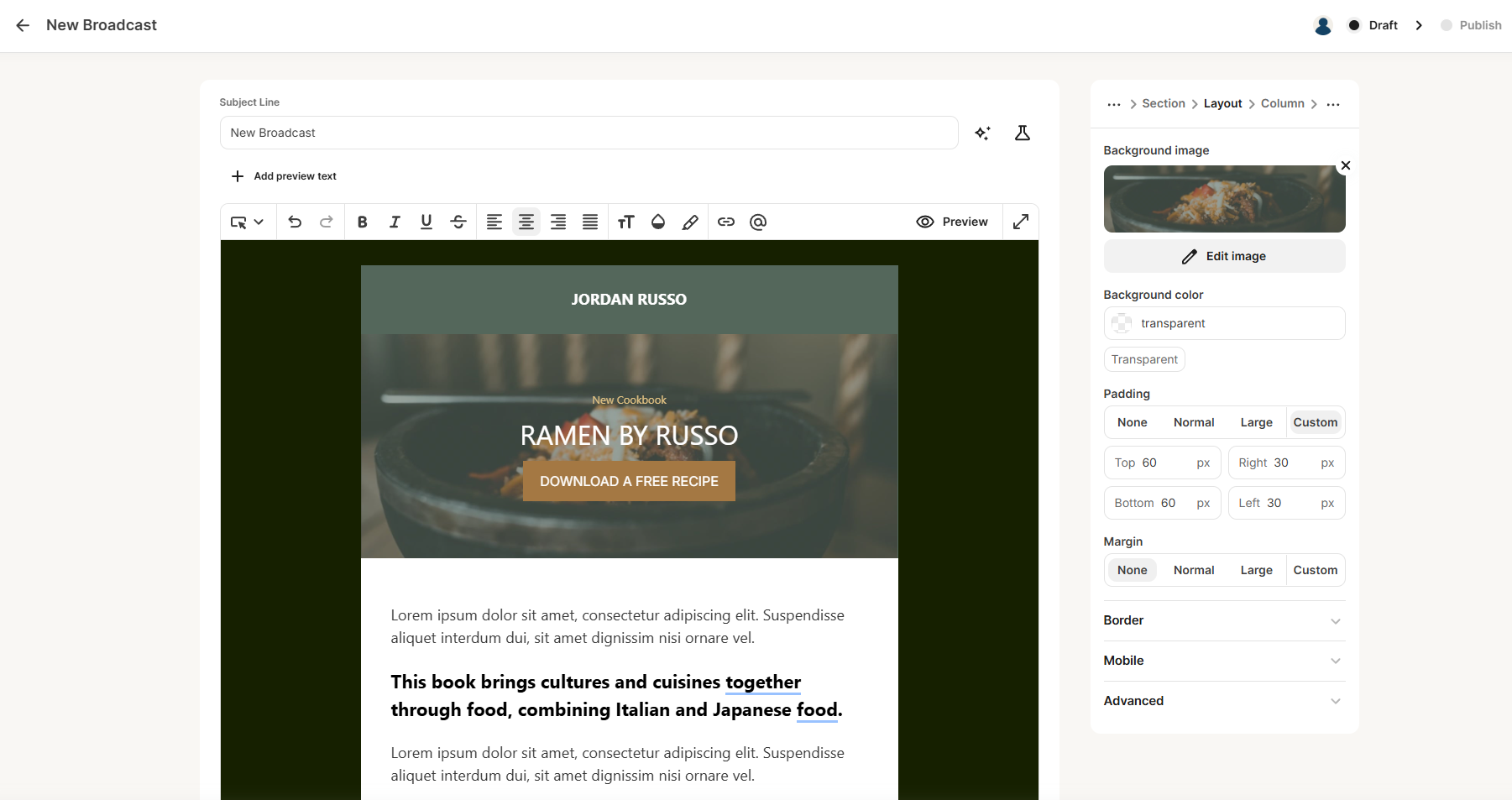 Editing a broadcast email in Kit – the right panel features per-column padding, background image, and border controls for layout tuning
Constant Contact’s builder feels different from the moment you start using it. Instead of building your layout piece by piece, you pick a ready-made structure and fill it in. When we tried it, this made the setup noticeably faster, especially if you just want to get a campaign out without thinking too much about layout.
The block library is also broader and more practical. Beyond the usual text and image blocks, you get dedicated elements for events, RSVPs, feedback, products, and data tables. The platform feels less like a design tool and more like a marketing toolkit built for multiple business scenarios.
One thing that stood out to us is the in-editor guidance. As you write, Constant Contact suggests what to include directly inside content placeholders instead of sending you to separate tutorials or help articles. The platform also keeps your subject line and preview text visible while editing, making it easier to optimize the full email experience, not just the body content.
You can also save and reuse blocks, which is a major advantage for sending recurring campaigns and maintaining a consistent visual identity. Overall, the builder feels like it’s guiding you through the process. You don’t get as much control over layout, but you spend less time figuring things out and more time actually finishing the email.
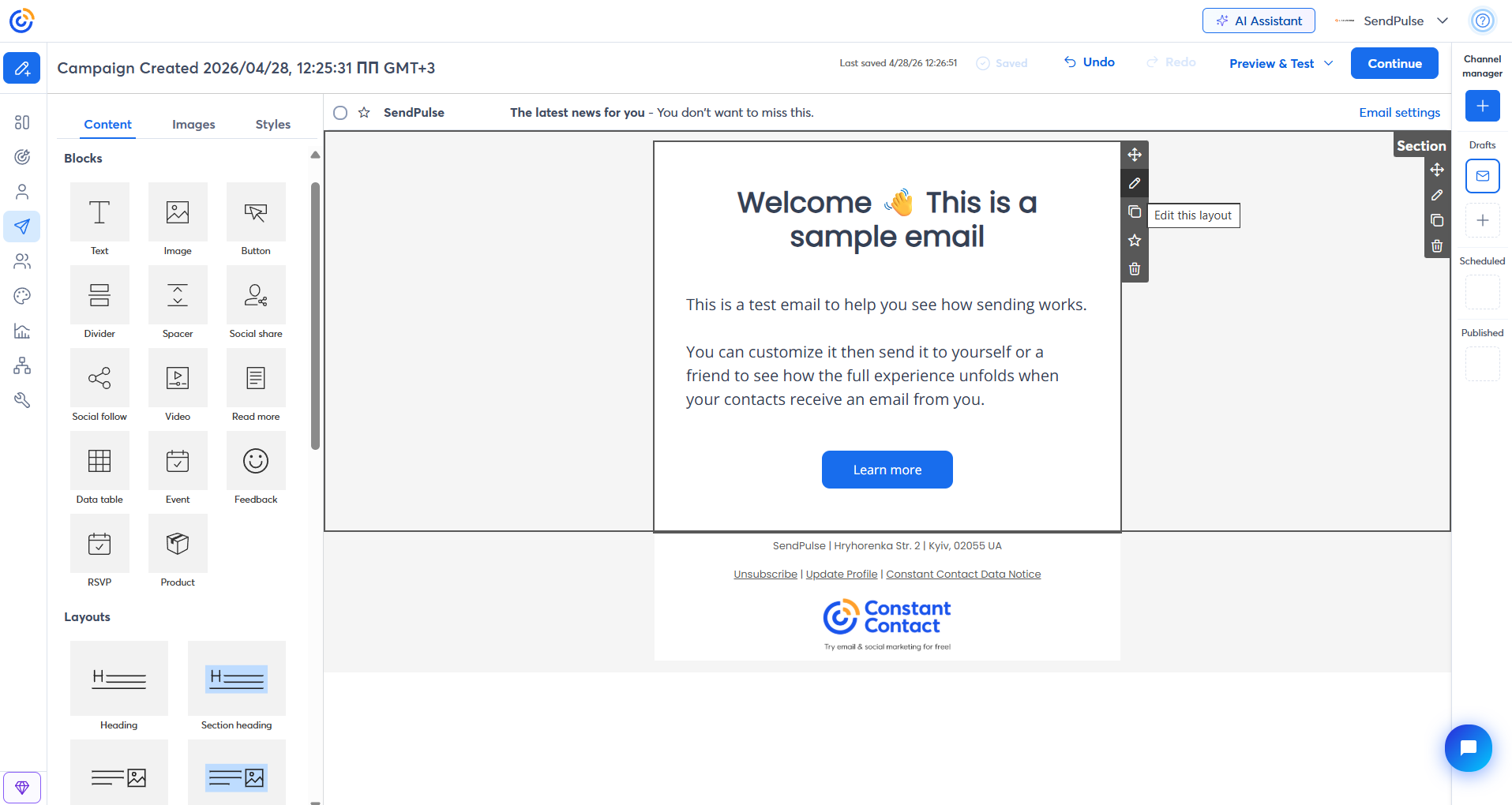 Constant Contact’s email builder with the block library – note the dedicated Event, Feedback, RSVP, and Product blocks below the standard set
The difference is clear: Kit is structured for control, while Constant Contact is created for speed and coverage. With Kit, you build layouts step by step and can fine-tune how each element looks and behaves. In Constant Contact, instead of building layouts, you pick pre-defined patterns and fill them with content.
Marketing automation
⭐ Kit: 6/10 | Constant Contact: 5/10
Automation is one of the weaker areas for both Kit and Constant Contact. While both platforms include core automation features, neither offers the depth or flexibility marketers may expect from advanced automation tools like ActiveCampaign or Klaviyo. Here’s what you’ll find, and what’s missing, in the automation capabilities of Kit and Constant Contact:
| Aspect |
Kit |
Constant Contact |
Winner |
| Availability by plan |
Free plan includes 1 basic workflow and 1 sequence; paid plans unlock unlimited workflows with full conditions and branching |
Entry plan includes 1 basic workflow; mid-tier allows up to 3 workflows; top tier unlocks unlimited workflows |
Kit |
| Automation builder |
Linear workflow canvas with step-based structure; elements added through contextual menus |
Linear workflow canvas with a fixed set of elements available from a side panel; clear and structured setup |
Tie |
| Triggers available |
Supports triggers from form submissions, tag changes, purchases, date-based events, and custom field updates |
Supports triggers from date events, contact activity, and eCommerce actions such as purchases or abandoned carts |
Tie |
| Pre-built automations |
Library of 41 workflows covering onboarding, launches, and monetization scenarios |
Library of 14 workflows covering onboarding, date-based campaigns, re-engagement, and eCommerce follow-ups |
Kit |
| Channels supported |
Email only |
Email on all plans; SMS available as an add-on |
Constant Contact |
| AI features |
Not available |
Not available |
Tie |
| Automation complexity |
Moderate; supports linear workflows with basic branching and up to 5 entry points |
Low to moderate; supports linear workflows with basic branching; limited logic and single-entry structure |
Kit |
| Total score |
6/10 |
5/10 |
Kit |
When working in Kit’s automation builder, the first thing that stands out is how clean and straightforward the canvas feels. Everything flows vertically, from trigger to outcome, so it’s easy to follow what’s happening without getting lost. One thing we found genuinely useful is the ability to have multiple entry points feeding into the same flow. If you have several lead magnets or signup sources, you don’t need to duplicate automations – they can all lead into one sequence.
Triggers go beyond just basic form submissions. You can start automations from tag changes, custom field updates, purchases, or even external tools like scheduling apps. In practice, this makes a difference – you’re not limited to only what happens inside the platform, you can react to actions happening outside of it as well.
Building the flow itself is simple. You add steps like email sequences, delays, tagging, or field updates, and then layer in conditions based on tags, fields, or engagement. It doesn’t try to be overly complex, but it gives enough flexibility to shape different paths. Another thing we liked is that each step shows live data – you can immediately see how many people are going through each part of the flow without opening separate reports.
Overall, it feels like a minimal builder on the surface, but once you start using integrations and multiple entry points, it opens up more possibilities than it first suggests.
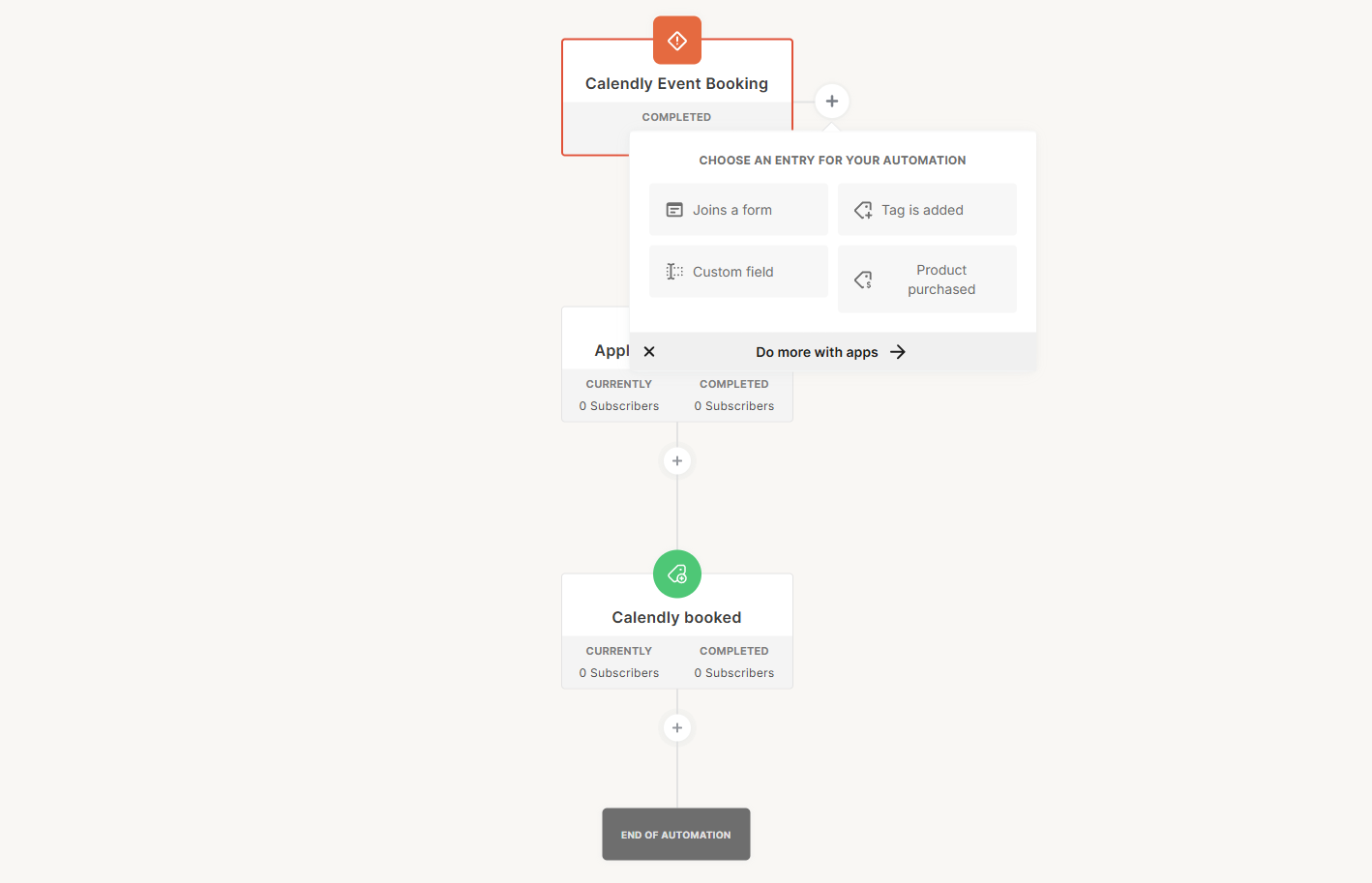 Adding entry points to a Kit automation – this Calendly-triggered flow shows how external app integrations connect directly to the canvas
When working with Constant Contact’s automation builder, what you notice first is how everything is laid out in front of you. There’s a fixed panel with all available elements, so you don’t have to click around to understand what’s available, as you see the full toolkit immediately. At the same time, that toolkit is quite small: delays, simple branching, email sends, and a few basic contact actions.
This means you’re mostly building straightforward sequences. A typical setup is a welcome sequence with a few timed emails, maybe a split based on whether someone clicked a link in the email or made a purchase. It works, and it’s easy to put together, but you don’t go much beyond that. Triggers cover the essentials, such as new subscribers, link clicks, and payments, which are enough for many small business scenarios.
The interface itself is predictable. You don’t spend time figuring things out, and there’s very little risk of overcomplicating a flow. But you also start to feel the limits quite quickly. Everything follows the same linear logic, and there’s not much room to combine different entry points or build more layered paths.
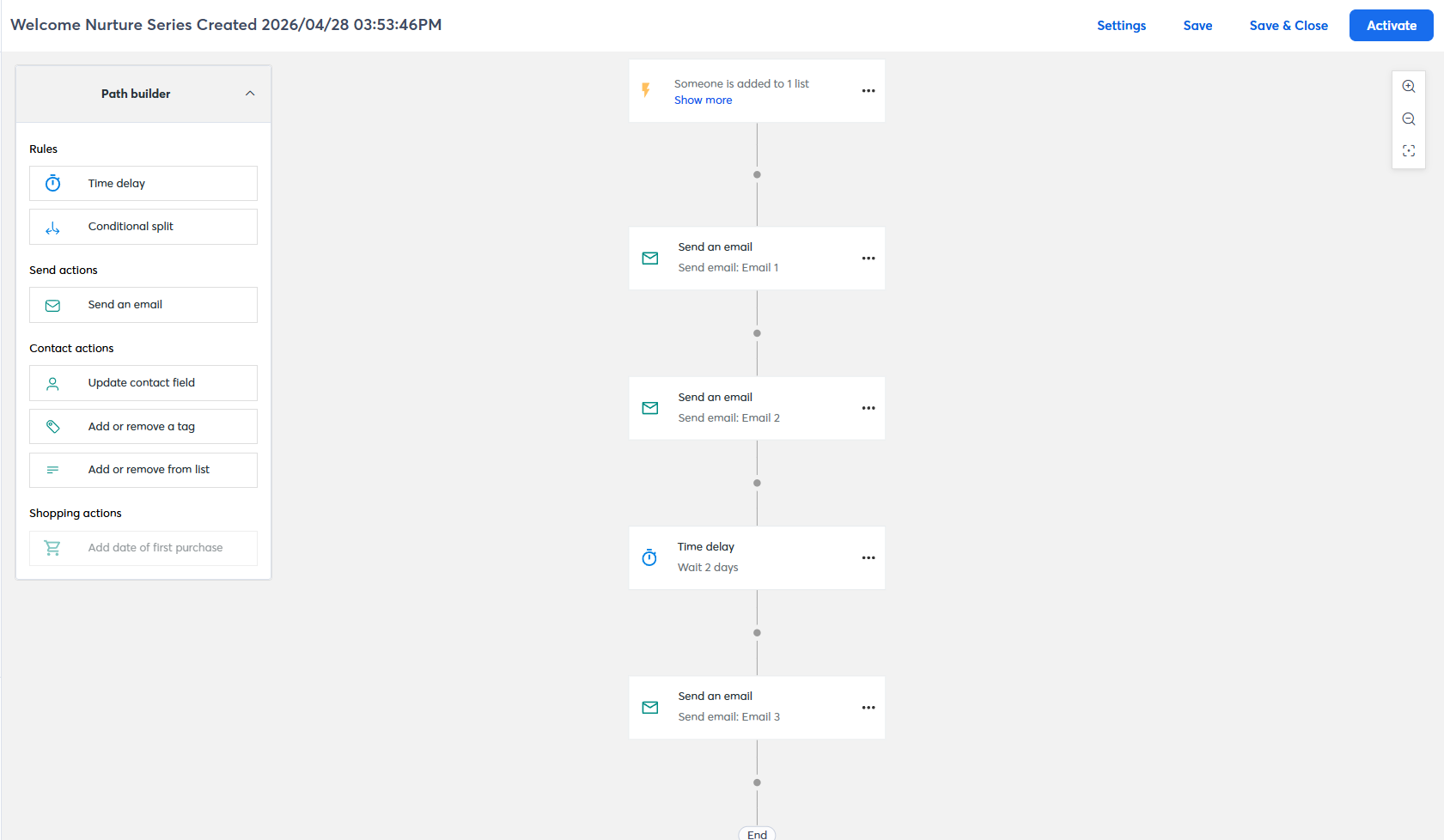 A welcome nurture series we built in Constant Contact – the full element toolkit is visible in the Path builder panel on the left
After working with both builders, the difference becomes clear pretty quickly – Constant Contact works well when your needs are straightforward, such as welcome emails, simple nurturing, and post-purchase follow-ups. Kit makes more sense when you’re dealing with multiple lead sources or want your automations to react to different kinds of events without setting up separate flows for each case.
Worth noting: If you find both platforms limited in this area, you might want to try SendPulse. It provides a more flexible automation builder that supports email, SMS, and chatbot messages within the same flow. While not positioned as a direct competitor to Kit or Constant Contact, SendPulse is a solid choice if you want advanced automation features at a reasonable price.
Contact management
⭐Kit: 6/10 | Constant Contact: 5.5/10
Automation in both Kit and Constant Contact is fairly limited. And since segmentation often relies on automation, especially when you want to react to user behavior, these limitations directly affect how flexible your audience management can be.
As a result, audience segmentation on both platforms stays at a moderate level. It works for basic targeting, but if you’re used to more advanced, behavior-driven setups, it can feel restrictive.
Here’s what each platform offers, and where the limitations start to show:
| Aspect |
Kit |
Constant Contact |
Winner |
| Segmentation capabilities |
Dynamic segments built within a single database; supports flexible AND/OR/NONE logic across multiple conditions |
Rule-based segments with AND/OR logic; contacts can be added to lists based on actions |
Kit |
| Segmentation criteria |
Forms, tags, custom fields, subscriber status, location, engagement score, purchase data |
List membership, tags, contact fields, custom fields, email engagement, eCommerce activity, subscription date, and location |
Constant Contact |
| Segment update speed |
Segments update continuously as conditions change; contacts enter and leave segments automatically |
List-based segments update as contacts are added or removed; custom segments refresh when reused |
Kit |
| AI features for segmentation |
No AI-based segmentation |
No AI-based segmentation |
Tie |
| Tagging and manual organization |
Unlimited tags; can be applied through imports, forms, automations, manual actions, or link triggers |
Up to 500 tags; applied through imports, manual actions, or contact activity; used alongside lists for targeting |
Kit |
| Total score |
6/10 |
5.5/10 |
Kit |
Kit comes out slightly ahead here thanks to its more flexible tagging system and real-time segment updates, but the gap between the two platforms is small. Overall, both platforms feel limited in segmentation depth and are best suited for simpler audience management rather than behavior-driven targeting.
Signup forms and landing pages
Kit: 6.4/10 | ⭐ Constant Contact: 6.8/10
This is another category where neither Kit nor Constant Contact truly excels. Both platforms cover the basics for landing pages and signup forms, but neither offers the level of flexibility you’d expect from dedicated conversion tools. That said, Constant Contact offers a wider range of form types, and, importantly, uses different builders for different formats, instead of relying on a single universal editor. That’s what creates the score gap and gives Constant Contact the edge in this category. Here’s a closer look at how both platforms compare:
| Aspect |
Kit |
Constant Contact |
Winner |
| Types of forms available |
Inline, modal pop-ups, slide-ins, and sticky bars |
Inline (embedded), pop-up, flyout (corner slide-in), banner (top sticky bar) |
Constant Contact |
| Form builder |
Template-based visual editor; layout is fixed after selection; supports custom CSS, tag mapping, custom fields, double opt-in, and incentive emails |
Style-based editor with separate content and design controls; supports custom fields, SMS opt-in, double opt-in, and customizable thank-you pages |
Constant Contact |
| Pop-up targeting conditions |
Time delay, scroll percentage, exit intent, click triggers, device targeting, and frequency controls |
Time delay and device targeting only; no exit intent, scroll targeting, or frequency controls |
Kit |
| Landing page builder |
Template-based editor with custom domain support; includes SEO settings and basic analytics |
Separate builders for signup pages and custom landing pages; includes basic analytics |
Constant Contact |
| Total score |
6.4/10 |
6.8/10 |
Constant Contact |
Let’s take a closer look at how forms and pages work in both platforms.
When working with Kit, it doesn’t really feel like you’re building a form, but more like building a lightweight website page. The signup form sits inside a fully designed layout where you control typography, spacing, background sections, and overall structure. You can use custom fonts, full-width backgrounds, and even add custom CSS, which makes the final result a more refined and professional look.
In practice, this changes the way you approach page creation. Instead of simply adding form fields, you’re designing an experience around the offer itself. The layout, visuals, and structure all play a role in convincing someone to sign up. This becomes especially noticeable when creating lead magnets, content pages, or any content experiences where presentation directly affects conversions.
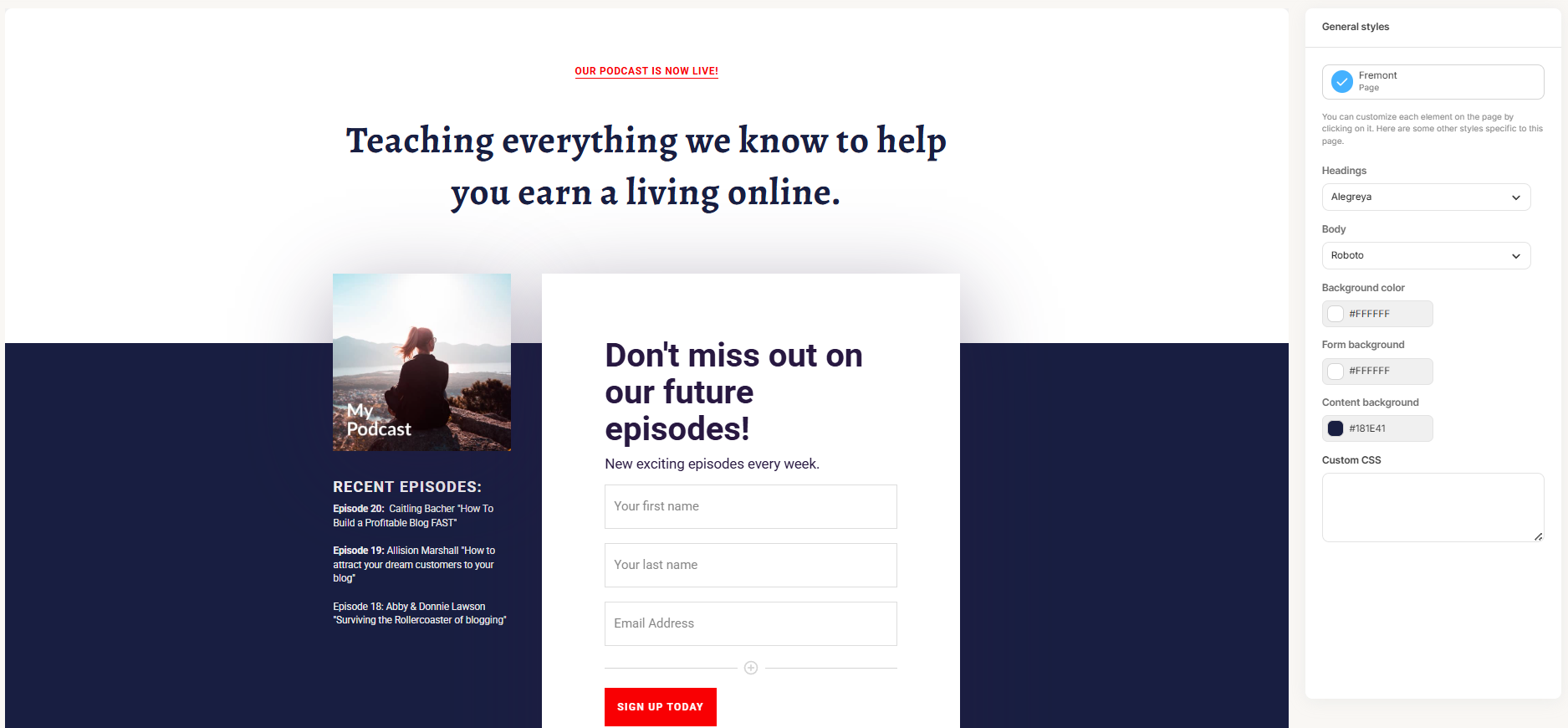 A podcast signup page built with Kit’s template — the General styles panel lets you control fonts, colors, and custom CSS at the page level
Constant Contact takes a much simpler approach. You’re not really building a full page but assembling a simple signup form inside a basic layout. The editor is block-based, so you just add text, images, fields, and a button, and you’re done. The result is clean and functional, but visually quite minimal.
Since it uses the same editor as email campaigns, the experience is familiar, but you also feel the limitations. The layout is mostly pre-defined, styling options are quite basic, and the page ends up looking more like a simplified email than a fully designed landing page. Branding from the platform is there by default, which also affects how polished the final result feels.
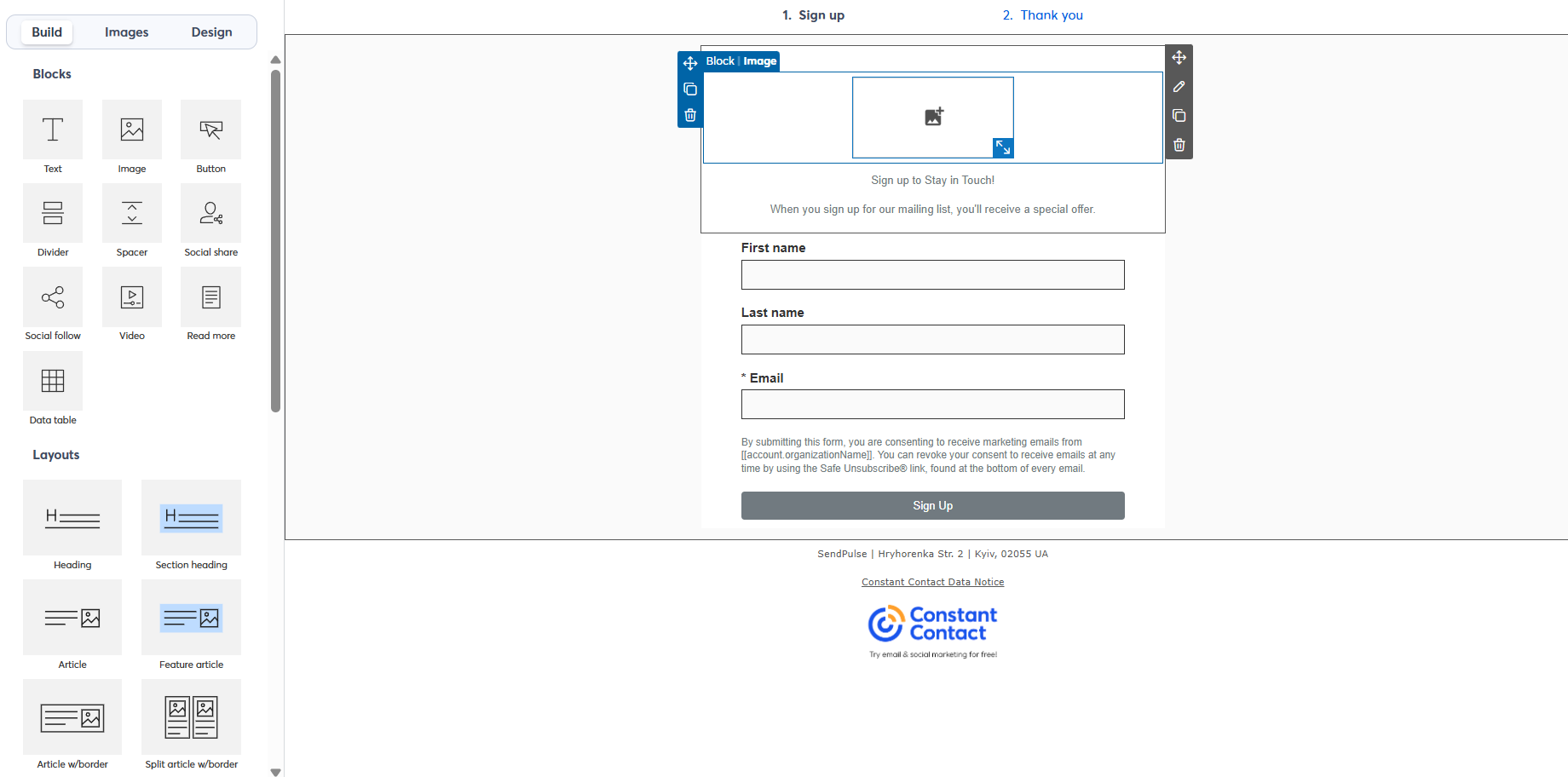 Building a signup form in Constant Contact – the block-based editor has the same structure as the email builder
The key difference is not just design quality but how the platforms treat the role of a signup page. Kit approaches it as a conversion surface. The form is only one part of the page, and the surrounding layout, visuals, and typography are meant to support the decision to subscribe. This gives more control but also requires more input from the user.
Constant Contact approaches it as a form-first tool. The page exists mainly to host the fields and buttons, with minimal design around it. This makes it faster to build, but also limits how much impact the page itself can have on conversions.
So, Kit is better suited for situations where the signup page needs to persuade, like lead magnets, content pages, or branded experiences. Constant Contact works best when speed and simplicity matter more than presentation, and the goal is just to capture an email address and get a working opt-in page live quickly.
Deliverability
⭐ Kit: 8.7/10 | Constant Contact: 8/10
Both Kit and Constant Contact handle deliverability well and provide the core tools needed to help emails reach subscribers’ inboxes. Here’s what each platform does and doesn’t do to support that:
| Aspect |
Kit |
Constant Contact |
Winner |
| Authentication |
Supports SPF, DKIM, and DMARC; automatic and manual DNS setup available |
Supports DKIM and DMARC; setup via CNAME or TXT records, depending on account structure |
Tie |
| Deliverability monitoring |
No built-in dashboard; shared IP reputation monitored internally; support team available for deliverability issues |
No built-in dashboard; detailed bounce categories with guidance; support team assists with ISP-related issues |
Tie |
| List hygiene |
Hard bounces suppressed immediately; inactive contacts flagged after 180 days; unsubscribes handled automatically; cleanup managed via tagging and re-engagement workflows |
Multiple bounce categories with defined handling; invalid addresses placed on a 15-day suppression hold; campaign-level reports highlight high-risk contacts; unsubscribes handled automatically |
Constant Contact |
| Dedicated IP |
Available on request for high-volume senders |
Not available |
Kit |
| Total score |
8.7/10 |
8/10 |
Kit |
Overall, with modern bulk email services, deliverability depends far more on you than on the platform. Here’s what matters most, according to SendPulse deliverability experts:
- consistent sending volumes with no sudden spikes;
- sending to active, engaged audiences first;
- regular removal of inactive contacts from your mailing lists;
- relevant, segmented campaigns instead of generic mass emails;
- gradual re-engagement campaigns and removing users who stay inactive.
That said, the tools a platform provides – authentication setup, list hygiene controls, dedicated IP options – determine how easily you can follow these practices.
Reporting and analytics
Kit: 7.2/10 | ⭐ Constant Contact: 7.4/10
Reporting and analytics are not standout strengths for either Kit or Constant Contact. The main limitation is the lack of custom reporting, which significantly reduces how flexible and actionable their analytics can be. Without custom reporting, you’re limited to pre-defined views and can’t tailor insights to your specific goals, workflows, or campaigns.
This matters because real marketing decisions rarely rely on one fixed report, as you often need to combine metrics, filter by segments, or track specific scenarios over time. Without that flexibility, both platforms feel restrictive, which is exactly why they score pretty low in this category.
| Aspect |
Kit |
Constant Contact |
Winner |
| Report coverage |
Broadcasts, sequences, forms, landing pages, and subscriber growth |
Campaigns, automation paths, landing pages, forms, events, social media, and click heat maps |
Constant Contact |
| Custom reports |
No custom report builder available |
No custom report builder available |
Tie |
| Reporting speed |
Analytics updates progressively after campaigns are sent |
Analytics updates progressively after campaigns are sent |
Tie |
| Export capabilities |
Campaign and subscriber data are exportable as CSV files |
Campaign reports are exportable as CSV or Excel files |
Constant Contact |
| Total score |
7.2/10 |
7.4/10 |
Constant Contact |
With that said, both Kit and Constant Contact offer enough reporting functionality for teams running standard, not heavily data-driven campaigns. If your reporting needs are limited to checking campaign performance and basic trends, their built-in analytics will likely be sufficient.
Customer support
⭐ Kit: 7.5/10 | Constant Contact: 7/10
When something breaks, feels confusing, or simply doesn’t work the way you expected, reliable customer support becomes incredibly important. Here are the communication channels and onboarding support you can expect when you start working with Kit or Constant Contact:
| Aspect |
Kit |
Constant Contact |
Winner |
| Channel availability |
24/7 email and live chat; no phone support |
Live chat (Mon-Fri); phone (Mon-Sat); async email support |
Constant Contact |
| Knowledge base |
Extensive knowledge base with step-by-step guides, troubleshooting resources, and platform migration documentation |
Large help center with articles, video tutorials, guides, live webinars, Q&A sessions, and a community forum; some documentation lacks consistency |
Kit |
| Onboarding assistance |
Self-serve onboarding with structured guides and checklists; free migration help with assisted data transfer |
Self-serve guides and video tutorials; no migration assistance; live training sessions with marketing advisors |
Tie |
| Support quality rating on Capterra |
4.4/5 |
4.2/5 |
Kit |
| Total score |
7.5/10 |
7/10 |
Kit |
The scores, which again aren’t particularly high, come down to a few factors. First, user feedback on platforms like Capterra is decent but not exceptional for either service. Second, specifically in Constant Contact’s case, while it offers phone support, which is quite rare, its knowledge base lacks consistency, which can be frustrating for marketers who prefer to find answers on their own.

Join 3M+ businesses growing with SendPulse
From solo creators to global brands, millions trust SendPulse to run email campaigns, automations, chatbots, and more — all in one place. Get started for free now!
Get started for free
Your decision checklist
At this point, you’ve seen the strengths, weaknesses, pricing details, and feature differences between Kit and Constant Contact. To make the final decision easier, go through the checklist below and see whether you lean more toward Kit or Constant Contact.
| Decision area |
Kit
is a better fit if… |
Constant Contact
is a better fit if… |
| Business type |
🟦 You’re a creator, solopreneur, or small newsletter business focused on audience growth and content monetization. |
🟧 You’re a small business or nonprofit that needs email alongside social media management, event marketing, and SMS in one platform. |
| Budget expectations |
🟦 You want a generous free plan for up to 10,000 contacts with no time limit. |
🟧 You’re comfortable paying from the start and value phone support and a 30-day trial to test before committing. |
| Automation needs |
🟦 You need simple, clean sequences like welcome flows, product launches, and tag-based nurturing, without complex logic. |
🟧 You need date-based triggers like birthdays and anniversaries, invoice payment follow-ups, or basic eCommerce automation alongside email and SMS. |
| Analytics focus |
🟦 Standard campaign and subscriber reporting is enough. |
🟧 You need heat maps, social media reporting, event tracking, and campaign comparison charts alongside standard email metrics. |
| Team setup |
🟦 You work solo or with a small team and want a focused, low-friction tool built around a single audience. |
🟧 You manage multiple lists, locations, or audience types and need a platform that manages email, social, SMS, and events from a single dashboard. |
If one platform comes up three times or more, that’s likely your answer.
One thing to keep in mind: this isn’t a short-term decision. Switching platforms later usually means migrating contacts, rebuilding automations, recreating forms and templates, and potentially affecting deliverability along the way. In other words, it takes time, effort, and often money.
So instead of choosing for where you are today, it’s worth thinking one step ahead – how your setup might evolve, how complex your workflows could become, and whether you’ll need more flexibility or more simplicity in the long run.
Final verdict and recommendations
⚖️ Final scores: Kit – 8.4/10 | Constant Contact – 6.5/10
Let’s be clear at this point. Would we recommend Kit? Yes, without hesitation. It’s generous, affordable, easy to use, and covers all the core needs of email marketing. For creators, solo operators, and small businesses, it’s one of the easiest ways to start and grow without hitting immediate limitations.
Would we recommend Constant Contact? Not really. It’s not the most affordable option, and at the same time, it doesn’t offer the level of depth you’d expect at that price. Most of what it does can be done better by other platforms on the market, either cheaper, more flexible, or both. That makes it hard to justify as a top choice in 2026.
That said, Kit won’t be the perfect fit for everyone. If your needs go beyond its scope, here are a few alternatives worth considering, and when they make more sense:
- SendPulse – if you’re looking for an all-in-one platform that combines email, automation, CRM, and chatbots at a more accessible price;
- ActiveCampaign – if you need more advanced automation logic, deeper segmentation, and CRM-driven workflows without going fully enterprise-level on pricing;
- Klaviyo – if you’re in eCommerce and want your automations, segmentation, and reporting tightly built around customer behavior and purchase data;
- MailerLite – if you want a simpler, easy-to-use tool that still offers solid automation and email features at a lower cost.
Each of these tools is built for a different use case, so the right choice depends on what your marketing setup actually needs.