Some email marketing platforms compete by trying to become simpler. Klaviyo and GetResponse took the opposite path and kept expanding until both evolved into full-fledged marketing ecosystems. At first glance, they may even look similar, as they both offer automation, segmentation, pop-ups, analytics, landing pages, AI tools…
But once you actually start working with them, the difference becomes impossible to miss. One platform is built around eCommerce revenue, customer behavior, and deep personalization. The other focuses on flexibility and broader marketing workflows. And that difference affects almost everything – from pricing and learning curve to how you build campaigns and scale your marketing long-term.
How we scored this comparison: This review was created by the SendPulse team. As an email marketing platform ourselves, we work in the same space as the tools we test, which also means we understand the field deeply.
Each platform was evaluated across nine categories using our independent methodology. Pricing (25%), ease of use (20%), and email and automation features (15% each) carry the most weight because they affect daily workflows the most. All scores reflect hands-on testing and analysis as of June 2026.
TL;DR Quick Klaviyo vs GetResponse comparison
Here’s a quick preview of everything we’re about to compare: pricing, automation, email builders, analytics, forms, deliverability, and more. If one of these areas matters to you more than the others, click on it and jump straight to the detailed breakdown further in the article.
| Category |
Klaviyo |
GetResponse |
Winner |
| Best for |
eCommerce businesses focused on retention, personalization, and revenue-driven marketing |
Broader marketing teams that need email, funnels, webinars, courses, and flexible automation |
Depends on the use case |
| Pricing |
6.5/10
More expensive as the contact list grows; only one paid plan available |
8.4/10
More affordable and versatile for the price |
GetResponse |
| Ease of use |
6.5/10
Powerful but harder to learn because of its eCommerce data focus |
8/10
Easier to approach for general email marketing |
GetResponse |
| Email design |
9.2/10
Stronger for eCommerce personalization and design control |
9/10
Faster for practical campaign creation |
Klaviyo |
| Automation |
9.4/10
Best for eCommerce flows, omnichannel journeys, and customer lifecycle marketing |
9/10
Best for flexible automation across different workflows |
Klaviyo |
| Contact management |
9.5/10
Deeper segmentation, predictive data, and unified customer profiles |
8/10
Strong classic segmentation and tagging tools |
Klaviyo |
| Forms and pages |
8.8/10
Better for eCommerce pop-ups, SMS capture, and conversion-focused forms |
8.2/10
Better for simpler lead capture and broader landing page use |
Klaviyo |
| Deliverability |
9.2/10
Stronger monitoring and sender guidance |
9/10
Solid core deliverability with easier dedicated IP access |
Klaviyo |
| Reporting |
10/10
Best for revenue attribution and eCommerce performance analysis |
8/10
Good for everyday campaign and engagement reporting |
Klaviyo |
| Customer support |
8.3/10
Stronger onboarding, migration, and eCommerce setup support |
8.1/10
Good self-serve support and documentation |
Klaviyo |
| G2/Capterra rating |
4.6/4.6 |
4.3/4.2 |
Klaviyo |
| Final score |
8.6/10 |
8.2/10 |
Klaviyo |
At this point, the contrast probably already feels clear: GetResponse focuses on accessibility and versatility, while Klaviyo goes all in on depth and eCommerce sophistication. But how much does that difference actually affect real marketing work? And can one realistically replace the other? Let’s break it down.
Klaviyo vs GetResponse in pricing and marketing features
We tested Klaviyo and GetResponse ourselves for several weeks to see how these platforms actually behave in real marketing work, not just on pricing pages or feature lists. Throughout this comparison, we’ll show you their strongest sides, weaker spots, hidden complexities, and practical differences so you can make an informed decision without wasting hours researching dozens of separate reviews.
Pricing plans
Klaviyo: 6.5/10 | ⭐ GetResponse: 8.4/10
Disclaimer: Pricing changes frequently. These figures are accurate as of June 4, 2026. Always verify final costs on official pricing pages.
In May 2026, many email marketing platforms changed the way they structure pricing. Klaviyo, for example, moved away from relatively straightforward contact-based pricing toward a system built around a core Marketing plan with additional paid add-ons for analytics, customer data, and support tools.
To keep this comparison clear, we focus only on Klaviyo’s main plan. Since Klaviyo includes its full automation functionality within that single tier, we compare its pricing to both GetResponse’s entry-level paid plan and its higher-tier Creator plan. We did this because GetResponse unlocks its more advanced automation and marketing capabilities on Creator, so this approach allows us to compare the platforms not just at the entry level, but also closer to their full practical potential.
| Contacts |
Klaviyo, Marketing |
GetResponse, Starter |
GetResponse, Creator |
Winner |
| 1,000 |
$30/mo; 10,000 emails |
$19/mo; unlimited emails |
$73/mo; unlimited emails |
Varies |
| 2,500 |
$60/mo; 25,000 emails |
$32/mo; unlimited emails |
$92/mo; unlimited emails |
Varies |
| 10,000 |
$150/mo; 100,000 emails |
$81/mo; unlimited emails |
$132/mo; unlimited emails |
GetResponse |
| 25,000 |
$400/mo; 250,000 emails |
$175/mo; unlimited emails |
$254/mo; unlimited emails |
GetResponse |
| 50,000 |
$720/mo; 500,000 emails |
$305/mo; unlimited emails |
$428/mo; unlimited emails |
GetResponse |
| Note: GetResponse offers a free plan (500 contacts, 2,500 emails). Klaviyo offers a free plan for up to 250 contacts and 500 emails per month. |
| Total score |
6.5/10 |
8.4/10 |
GetResponse |
With its new pricing structure, Klaviyo loses this part of the comparison by a very large margin. And while both Klaviyo and GetResponse can become quite expensive as your contact list grows, they are far from the only options on the market. For additional context, we’ve included SendPulse pricing in the graph below to show how a third platform with similar capabilities compares on cost.
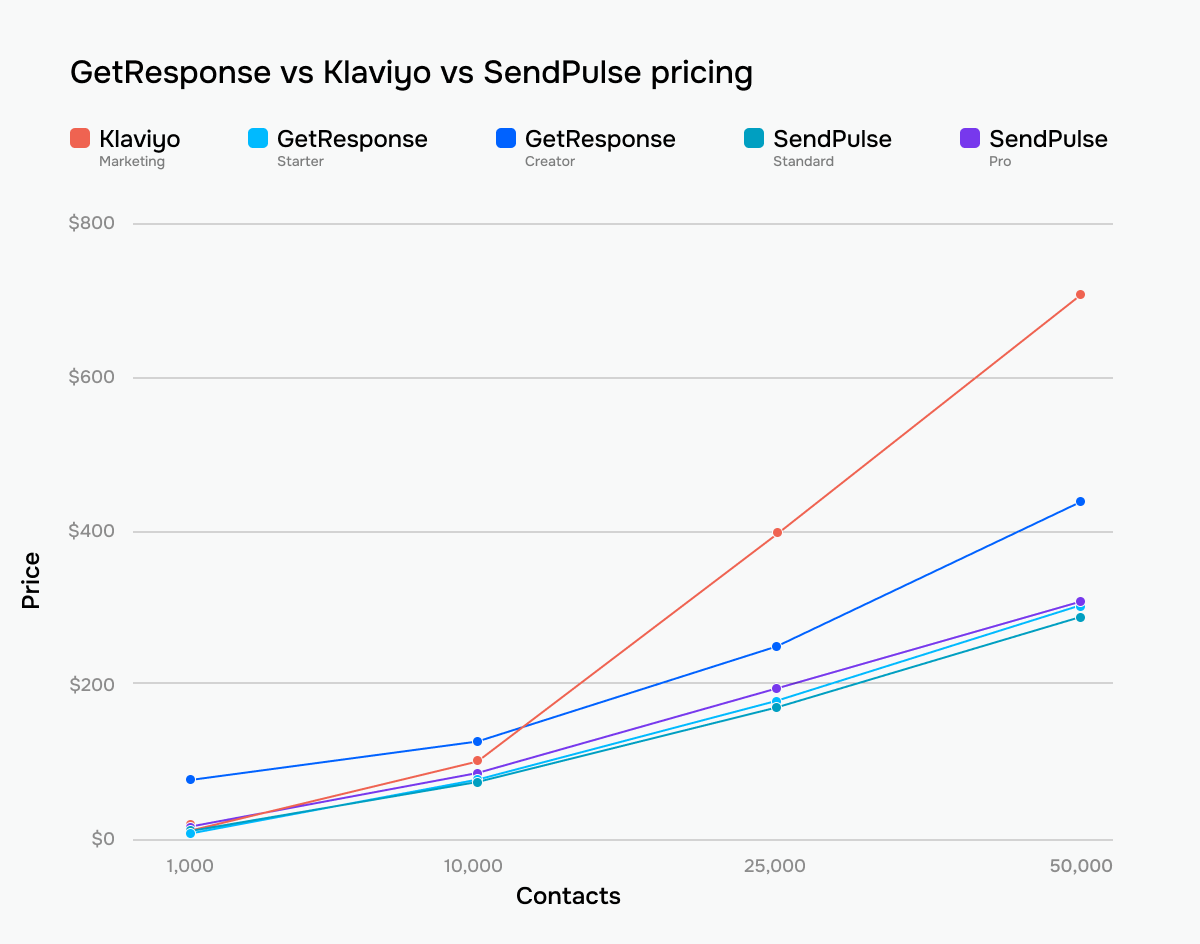 GetResponse vs Klaviyo vs SendPulse pricing across tiers and contact lists
Ease of use and interface
Klaviyo: 6.5/10 | ⭐ GetResponse: 8/10
Once again, we see a noticeable difference in scores. What makes this comparison particularly interesting is that Klaviyo is not difficult because of poor usability. Instead, its complexity comes from the kind of marketing it’s built for. The platform assumes you already think in eCommerce data, customer behavior, revenue attribution, flows, segments, and store events. That immediately raises the learning curve, especially for beginners or general email marketers.
GetResponse, meanwhile, feels broader and more approachable at the beginning. Its onboarding lowers the entry barrier, the terminology is more standard for email marketing, and the platform does not force users into an eCommerce-first mindset from the first screen. Complexity appears later, when you move into advanced automation, funnels, webinars, and multi-tool workflows.
| Aspect |
Klaviyo |
GetResponse |
Winner |
| First-time experience |
eCommerce-focused onboarding with store connection, sender setup, and pre-built automation recommendations |
AI-assisted onboarding generates starter assets like landing pages and welcome emails; broader marketing-oriented setup |
Tie |
| Daily navigation |
Left-side navigation with eCommerce-focused structure and data-heavy dashboards |
Top navigation built around a broader multi-channel marketing toolkit |
Tie |
| Learning curve |
Steep learning curve due to the eCommerce data model, metrics, and advanced flow logic |
Easier for standard campaigns; complexity grows with automation, funnels, and webinars |
GetResponse |
| Mobile access |
No dedicated mobile app |
iOS and Android apps for campaign monitoring, contacts, reports, and automations |
GetResponse |
| Workflow efficiency once mastered |
Extremely efficient for eCommerce marketing with real-time store syncing, advanced segmentation, reusable assets, and automation workflows |
Efficient for broader multi-channel marketing workflows with AI-assisted campaign generation and reusable assets |
Klaviyo |
| Total score |
6.5/10 |
8/10 |
GetResponse |
Here’s how these differences affect the learning curve in practice:
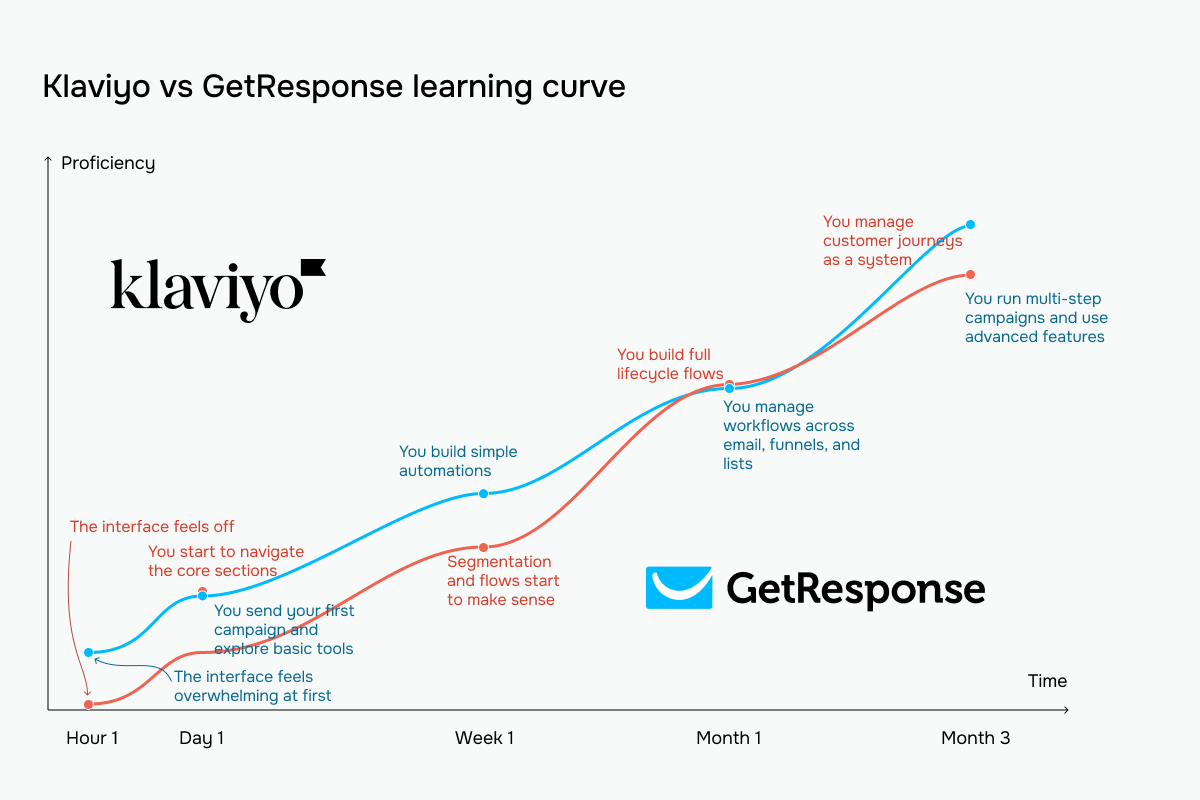 GetResponse vs Klaviyo learning curve based on our testing experience
Email builder and templates
⭐ Klaviyo: 9.2/10 | GetResponse: 9/10
The email builder is one of the core parts of any email marketing platform, so usability matters a lot here. To be fair, both Klaviyo and GetResponse offer efficient and comfortable email builders, but there are some important differences between them.
| Aspect |
Klaviyo |
GetResponse |
Winner |
| Templates |
160+ templates filterable by industry and campaign type |
260+ templates organized by use case |
GetResponse |
| Drag-and-drop editor |
Section-based editor with reusable content blocks, global styling controls, and layouts up to 4 columns |
Section-based editor with 1–6 column layouts, persistent block library, global style controls, and autosave |
Tie |
| Notable content blocks |
Product blocks, split layouts, tables, social blocks, and countdown timers |
eCommerce blocks, promo codes, countdown timers, courses, and webinars |
Tie |
| Mobile responsiveness |
Automatic mobile optimization with desktop/mobile visibility controls, configurable column stacking, and responsive previews |
Automatic mobile optimization with element visibility controls and mobile preview |
Tie |
| AI features |
AI generates full campaigns, sections, and subject lines, and rewrites existing text blocks |
AI generates body copy, subject lines, and full campaigns from prompts |
Tie |
| Sending time optimization |
AI-based audience-level and per-contact send-time optimization; local-time delivery |
Engagement-based per-contact send-time optimization and local-time delivery |
Klaviyo |
| Total score |
9.2/10 |
9/10 |
Klaviyo |
At first glance, the table may make the builders look very similar. However, Klaviyo’s advantage becomes much more noticeable in practice, especially once campaigns become more personalized and structurally complex.
Klaviyo’s builder immediately feels more ambitious and commercially focused. The block library alone reveals the difference: review quotes, coupon blocks, split layouts, drop shadows, and product blocks all point to a platform deeply optimized for eCommerce email marketing.
The biggest thing we noticed during testing was the depth of personalization logic directly inside the builder. Klaviyo allows you to apply conditional logic inside the text. This means the same email can dynamically adapt phrases, recommendations, or repeated product sections for different subscribers without duplicating layouts or creating separate campaigns.
The design control is also quite detailed. Independent padding fields, width controls, responsive layout behavior, and reusable content systems make the builder feel much closer to a lightweight web design environment. Combined with eCommerce-focused blocks and AI-assisted drafting, the whole experience feels designed specifically for high-volume, highly personalized retail email campaigns.
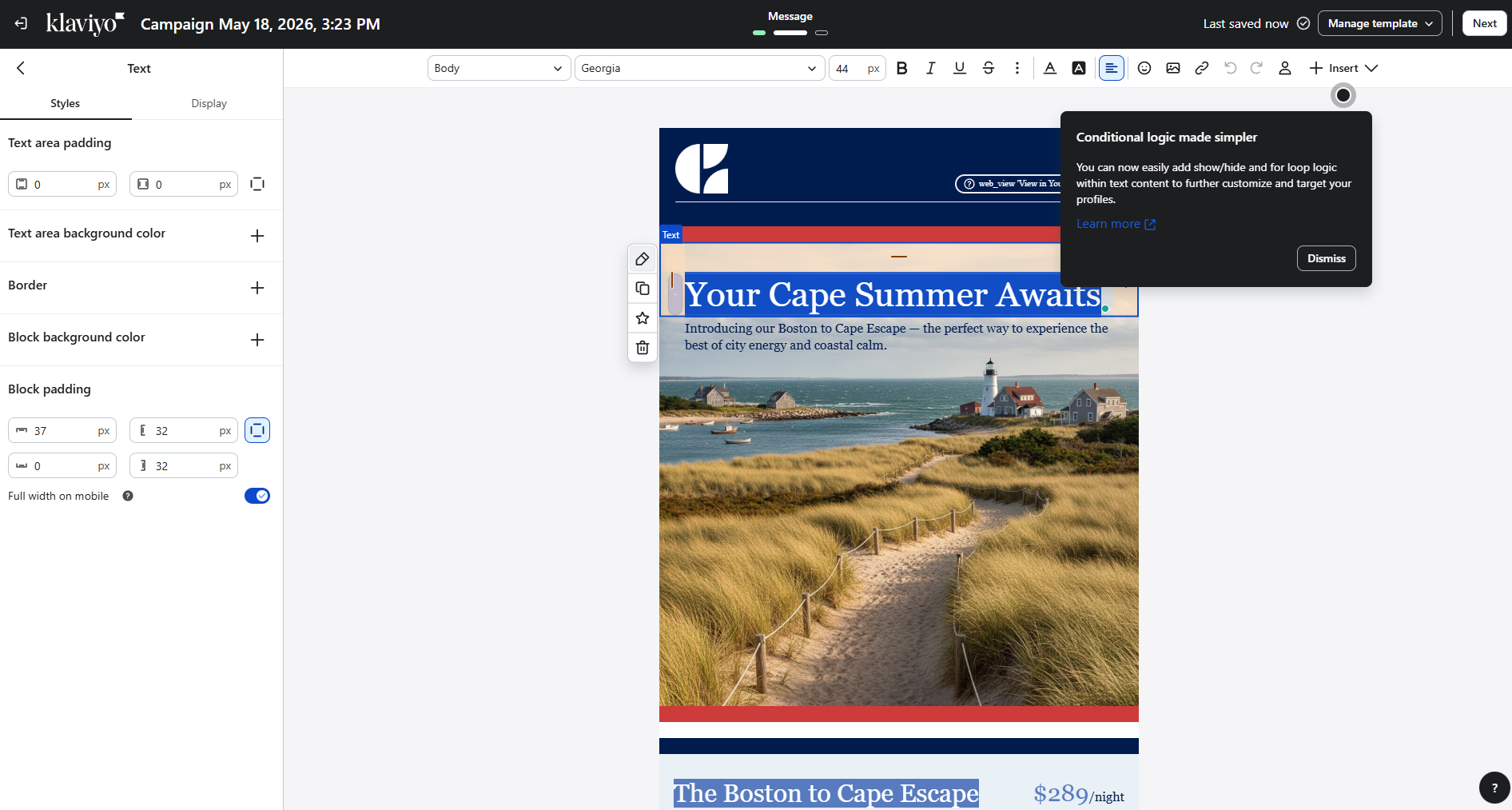 Building a promotional email while testing Klaviyo’s editor
It’s a bit different with GetResponse. While testing its email builder, we noticed that the platform approaches email creation primarily from the marketer’s perspective rather than the designer’s. The whole interface is built around speed and practical campaign assembly: webinars, countdown timers, eCommerce products, courses, and reusable blocks are surfaced immediately inside the editor because these are clearly the workflows GetResponse expects marketers to run most often.
The builder itself feels clean and efficient. The right-side panel exposes the standard controls most marketers actually use daily without overwhelming the interface with too many design-specific settings. Dynamic content is especially important here because it allows you to show or hide entire sections of the email depending on contact attributes or segmentation conditions directly inside the builder.
GetResponse’s editor clearly prioritizes functionality over visual precision. The typography controls are sufficient rather than deep, spacing controls remain relatively simple, and the overall canvas feels optimized for fast workflow execution rather than pixel-perfect email design.
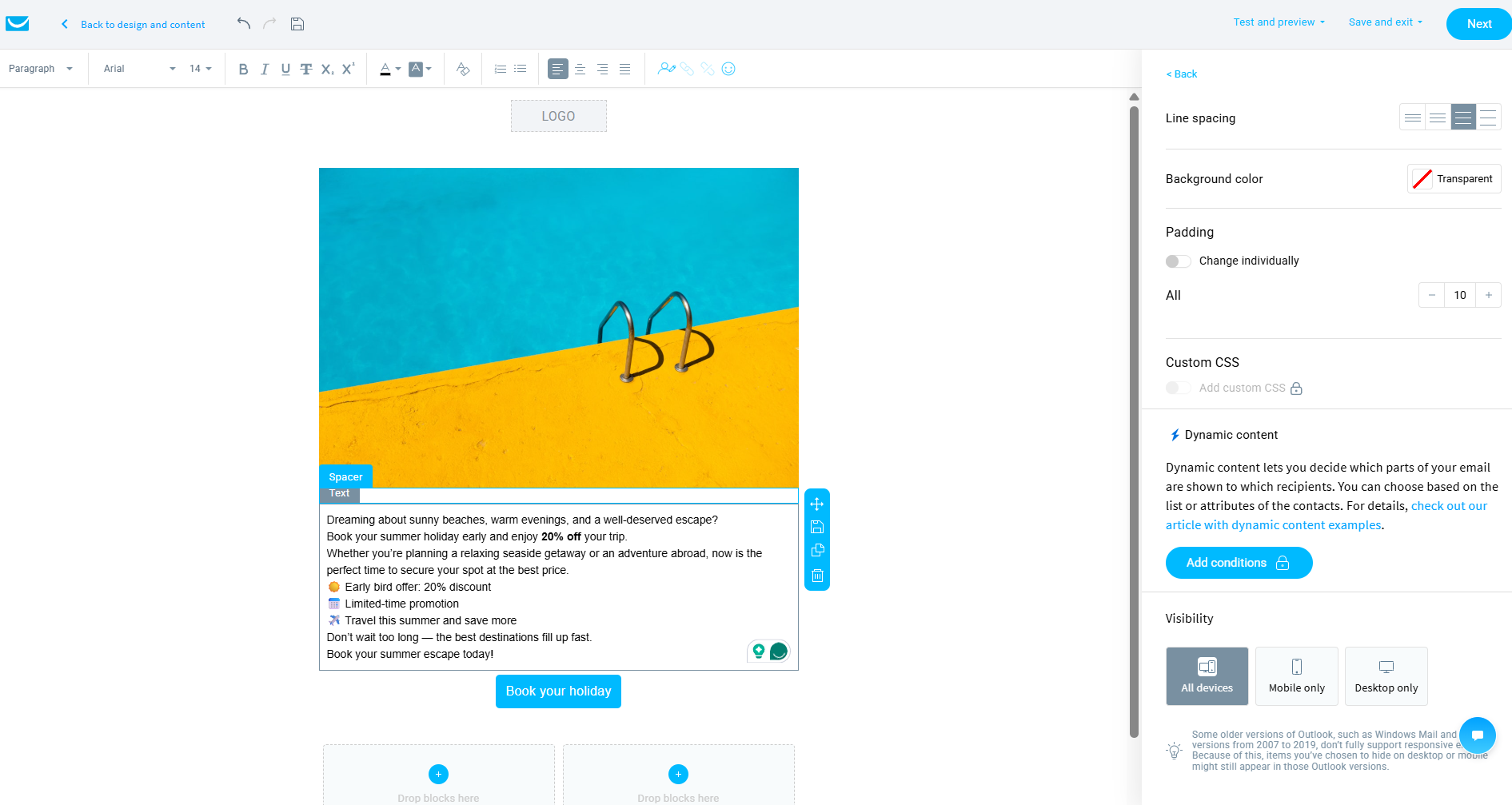 Creating a test campaign from scratch in the GetResponse email builder
The difference is clear: GetResponse is optimized for efficient campaign execution, while Klaviyo is focused on deep eCommerce personalization and design control.
Marketing automation
⭐ Klaviyo: 9.4/10 | GetResponse: 9/10
Even though GetResponse offers genuinely strong automation capabilities, Klaviyo still operates on another level, especially when it comes to eCommerce automation. Both platforms are powerful, but Klaviyo goes noticeably deeper in eCommerce-focused workflows, multi-channel communication, and customer journey management.
| Aspect |
Klaviyo |
GetResponse |
Winner |
| Availability by plan |
Automation flows available on all plans, including the free tier |
Free plan workflows cannot be published; lower tiers limited to 1 workflow and 6 elements; advanced functionality unlocked on higher-tier plans |
Klaviyo |
| Automation builder |
Visual flow builder with branching paths, rejoinable splits, webhook actions, and on-canvas performance metrics |
Visual automation canvas with yes/no branching, parallel paths, cross-workflow triggers, and node-level performance data |
Klaviyo |
| Triggers available |
5 core trigger types plus eCommerce and API-driven events from integrations; supports purchase, checkout, browsing, fulfillment, and price-drop events |
Subscriber actions, engagement, eCommerce behavior, website visits, consent updates, course activity, and webinar activity |
Klaviyo |
| Pre-built automations |
60+ automation templates covering welcome flows, abandoned cart, browse abandonment, post-purchase, win-back, back-in-stock, and more |
40+ templates across 9 categories, including abandoned cart, engagement, lead qualification, courses, webinars, and post-purchase flows |
Klaviyo |
| Channels supported |
Email, SMS, push notifications, and WhatsApp |
Email, SMS, and web push notifications |
Klaviyo |
| AI features |
AI-assisted automation flow generation |
No AI for automation logic generation |
Klaviyo |
| Automation complexity |
Very high; supports conditional splits, rejoinable paths, webhooks, internal alerts, and eCommerce-driven conditions from integrations |
High; supports loops, scoring, dynamic segments, multi-path branching, and cross-workflow triggers |
Klaviyo |
| Total score |
9.4/10 |
9/10 |
Klaviyo |
So, how do all these capabilities actually feel in day-to-day work? Here’s what we noticed while testing the automation builders of both platforms hands-on.
While working with Klaviyo, we noticed how strongly the platform prioritizes clarity and multi-channel communication. The whole flow structure is strictly vertical and sequential: triggers sit at the top, actions stack downward, and the interface deliberately avoids visual chaos even in longer workflows.
The action library itself is relatively compact, but very eCommerce-oriented. Email, SMS, and WhatsApp are treated as equal native channels inside the same automation flow, which means marketers can build coordinated cross-channel journeys without additional integrations or separate systems.
The most interesting part during testing was how much Klaviyo tries to protect sender reputation and subscriber experience directly inside the automation builder. Quiet hours, frequency protections, and inline deliverability warnings are surfaced directly in the workflow configuration instead of being hidden somewhere in account settings. In practice, the builder constantly guides marketers toward safer sending behavior.
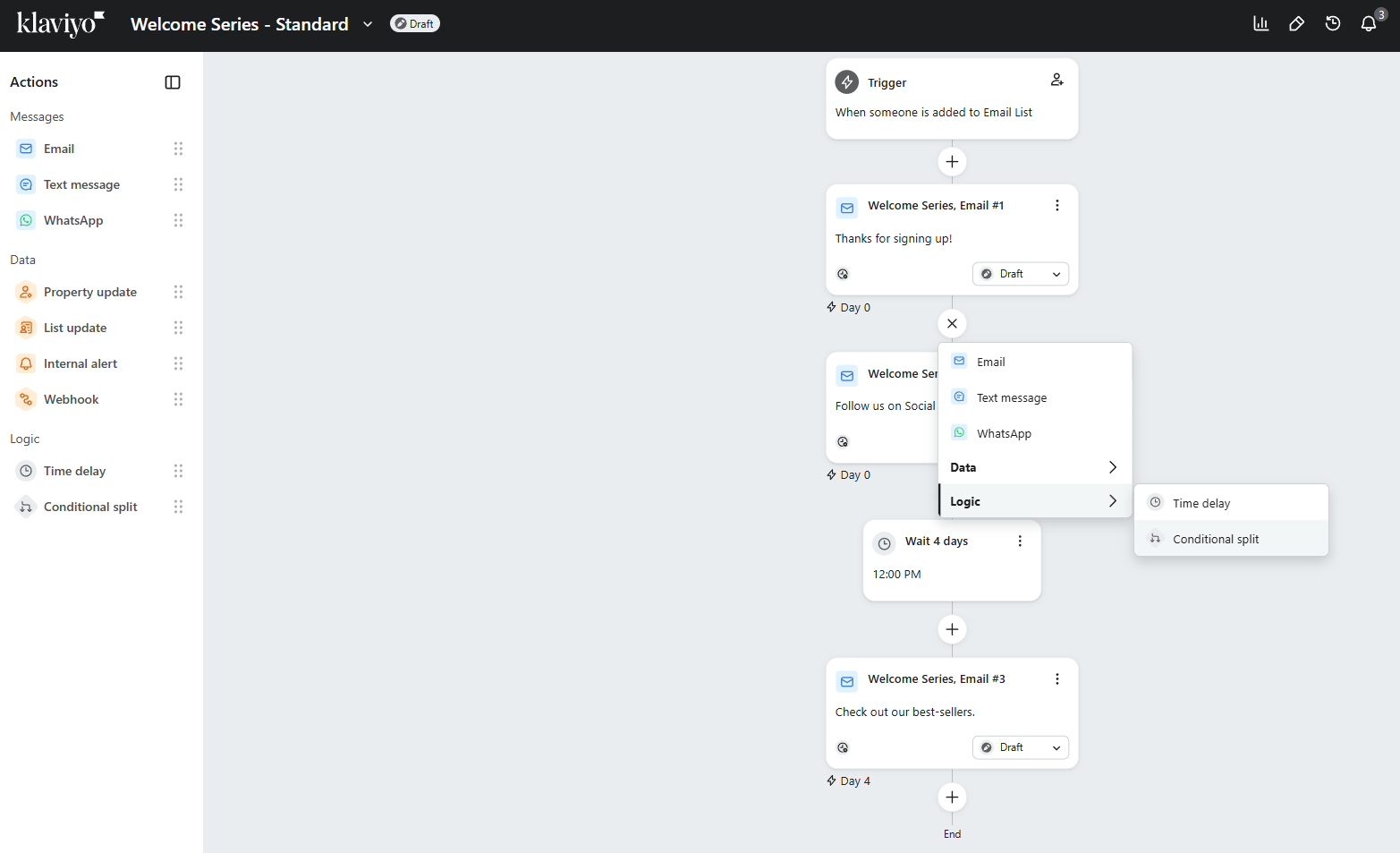 Setting up a welcome flow to test Klaviyo’s builder
GetResponse’s automation builder looks and feels different. Instead of a strict vertical structure, it uses a freeform visual canvas where you can build complex branching paths across multiple directions simultaneously. Conditions are split into yes/no paths, flows intersect visually, and the whole system functions much more like a behavioral logic map than a classic automation sequence.
The depth of conditions and actions is the first thing that stands out. During testing, we saw triggers tied not only to email engagement and eCommerce behavior, but also to consent updates, course activity, webinar participation, URL visits, score thresholds, and dynamic segments.
The platform also exposes unusually deep workflow management tools directly inside the builder. Contacts can be copied or moved between workflows, routed through splitters, filtered dynamically, assigned scores, tagged, or transferred between lists automatically. This creates the possibility to build modular automation ecosystems where multiple workflows interact with each other rather than existing as isolated sequences.
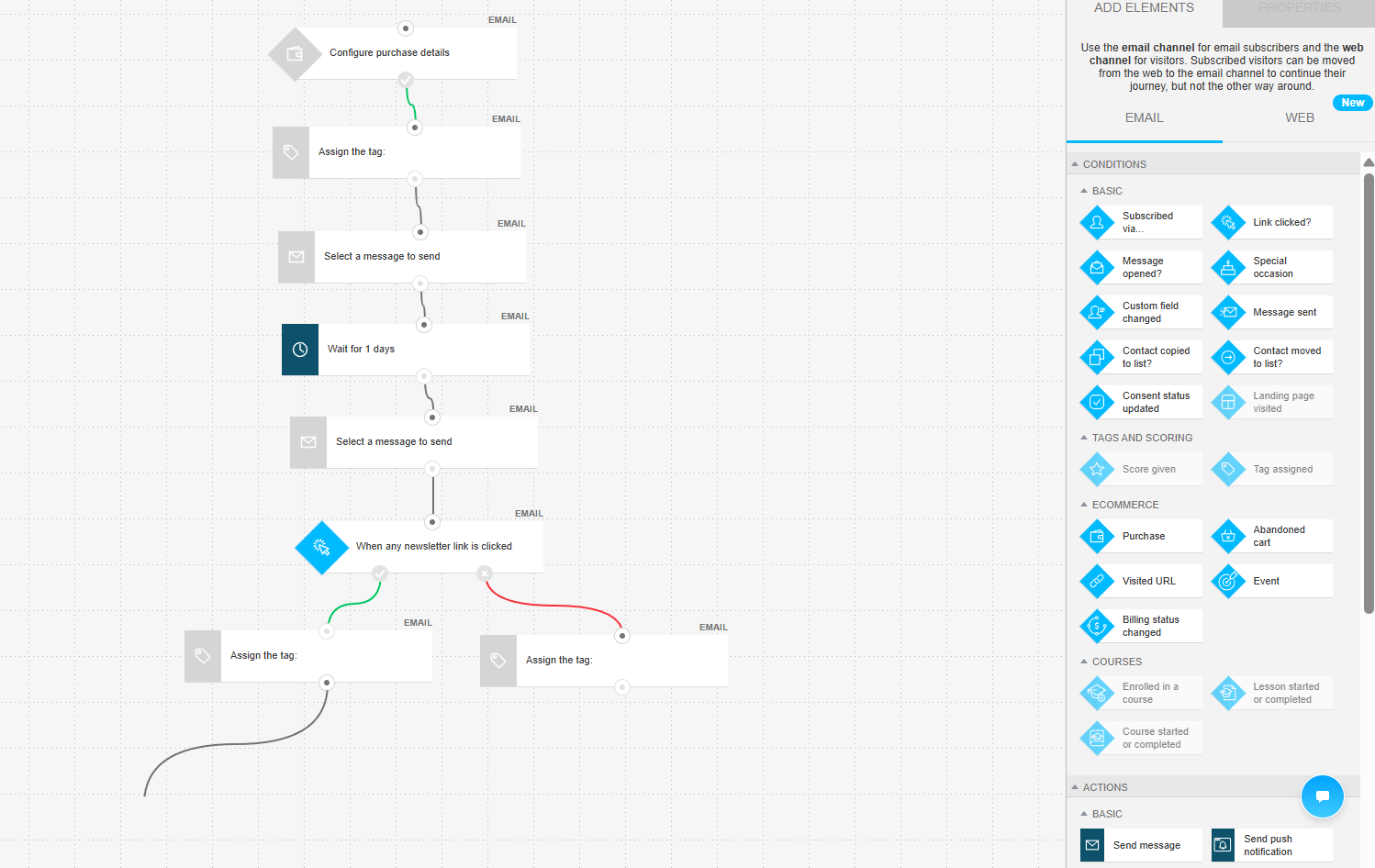 A contact split workflow we built in the GetResponse automation builder
So, what’s the conclusion? Klaviyo is clearly built for eCommerce and multi-channel customer communication, while GetResponse focuses more on behavioral automation and flexible workflow logic. If you run an eCommerce business, Klaviyo is the stronger choice. If you need more versatile automation across different types of marketing workflows, GetResponse may be a better fit.
Contact management
⭐ Klaviyo: 9.5/10 | GetResponse: 8/10
Contact management usually feels like a natural extension of a platform’s automation capabilities. Strong automation almost always goes hand in hand with strong segmentation, tagging, and audience management tools. Since both Klaviyo and GetResponse performed well in automation, it’s not surprising that both platforms are also quite capable in contact management.
Even so, Klaviyo wins this category with a noticeable 1.5-point margin – most likely because of its heavy eCommerce focus, where segmentation and customer data play a critical role. Here’s a closer look at how tagging and segmentation work in Klaviyo vs GetResponse:
| Aspect |
Klaviyo |
GetResponse |
Winner |
| Segmentation capabilities |
Dynamic rule-based segments with up to 100 conditions, AND/OR logic, event-funnel segmentation, and static segment snapshots; segments pull data from all profiles across the account |
Dynamic rule-based segments inside a list-based structure; contacts can belong to multiple lists; AND/OR logic with automatic updates |
Klaviyo |
| Segmentation criteria |
Profile properties, tracked events, predictive analytics, list and segment membership, email and SMS engagement, eCommerce activity, date-based conditions, regex matching, and up to 100 conditions per segment |
Contact data, subscription details, engagement, scoring, tags, consent, eCommerce behavior, webinar activity, and API-based sources |
Klaviyo |
| Segment update speed |
Near real-time event-based updates; time-based conditions refresh every 24 hours; manual refresh up to 15 minutes |
Continuous updates as conditions change |
Klaviyo |
| AI features for segmentation |
AI-generated segment definitions and AI-assisted condition refinement |
No AI-based segmentation |
Klaviyo |
| Tagging and manual organization |
Profile organization built around custom properties and dynamic segments; profiles unified by email address and billed once regardless of list membership |
Tags are applied manually, through imports, automations, or bulk actions; tags are used for segmentation and automation triggers |
Klaviyo |
| Total score |
9.5/10 |
8/10 |
Klaviyo |
Both platforms are genuinely strong at segmentation and contact management, and for many businesses, GetResponse will already be more than enough. It covers the classic marketing needs very well: dynamic segments, tags, scoring, engagement tracking, eCommerce behavior, and automation-based organization.
Klaviyo becomes noticeably stronger once marketing shifts heavily toward eCommerce and data-driven approaches. Predictive analytics, funnel-based segmentation, unified customer profiles, AI-assisted segment creation, and much deeper behavioral data give eCommerce marketers significantly more precision when targeting customers.
So, is Klaviyo better? For eCommerce personalization and retention marketing – clearly yes. Is GetResponse enough? Also, yes, unless your business depends heavily on advanced eCommerce segmentation, predictive targeting, and highly personalized customer journeys.
Signup forms and landing pages
⭐ Klaviyo: 8.8/10 | GetResponse: 8.2/10
Signup forms are yet another area where the difference between the two platforms becomes very visible. Klaviyo approaches forms as eCommerce conversion tools, while GetResponse keeps them broader and more universal for different marketing use cases.
| Aspect |
Klaviyo |
GetResponse |
Winner |
| Types of forms available |
Pop-ups, flyouts, full-page forms, embedded forms, banners, and teaser add-ons |
Pop-ups, slide-ins, floating bars, half-screen forms, full-screen forms, embedded forms, and teaser add-ons |
Tie |
| Form builder |
Visual drag-and-drop builder with templates, multi-step forms, built-in A/B testing, automatic CAPTCHA protection, configurable double opt-in, and custom profile properties created directly in the editor |
Drag-and-drop builder with consent fields, automated brand styling, double opt-in support, and a fully visual editing canvas |
Klaviyo |
| Pop-up targeting conditions |
Exit intent, time delay, scroll depth, pages viewed, custom triggers, configurable frequency caps, and combined |
Time delay, scroll depth, exit intent, inactivity, click triggers, page-level targeting, scheduled display dates, device targeting, and eCommerce-based conditions |
Tie |
| Landing page builder |
Hosted landing pages with analytics, conversion tracking, and basic block-based editing |
Drag-and-drop landing page builder with a templates library, A/B testing, AI-assisted setup, and built-in analytics |
GetResponse |
| Total score |
8.8/10 |
8.2/10 |
Klaviyo |
In practice, Klaviyo treats pop-ups as full-fledged conversion tools. Even the builder structure itself reflects this: instead of a single pop-up screen, Klaviyo allows you to build multi-step signup experiences with separate stages for teaser screens, email capture, SMS opt-in, intermediate steps, and success pages, all inside one interface.
The most impressive part during testing was the depth of eCommerce-focused conversion mechanics. It is clearly visible in the example we took – a spin-to-win form. It is not just a visual gimmick – you can configure exact probability percentages for each reward, control visual styling down to individual wheel segments, automatically attach acquisition-source properties to subscriber profiles, and distribute unique coupon codes connected directly to eCommerce platforms.
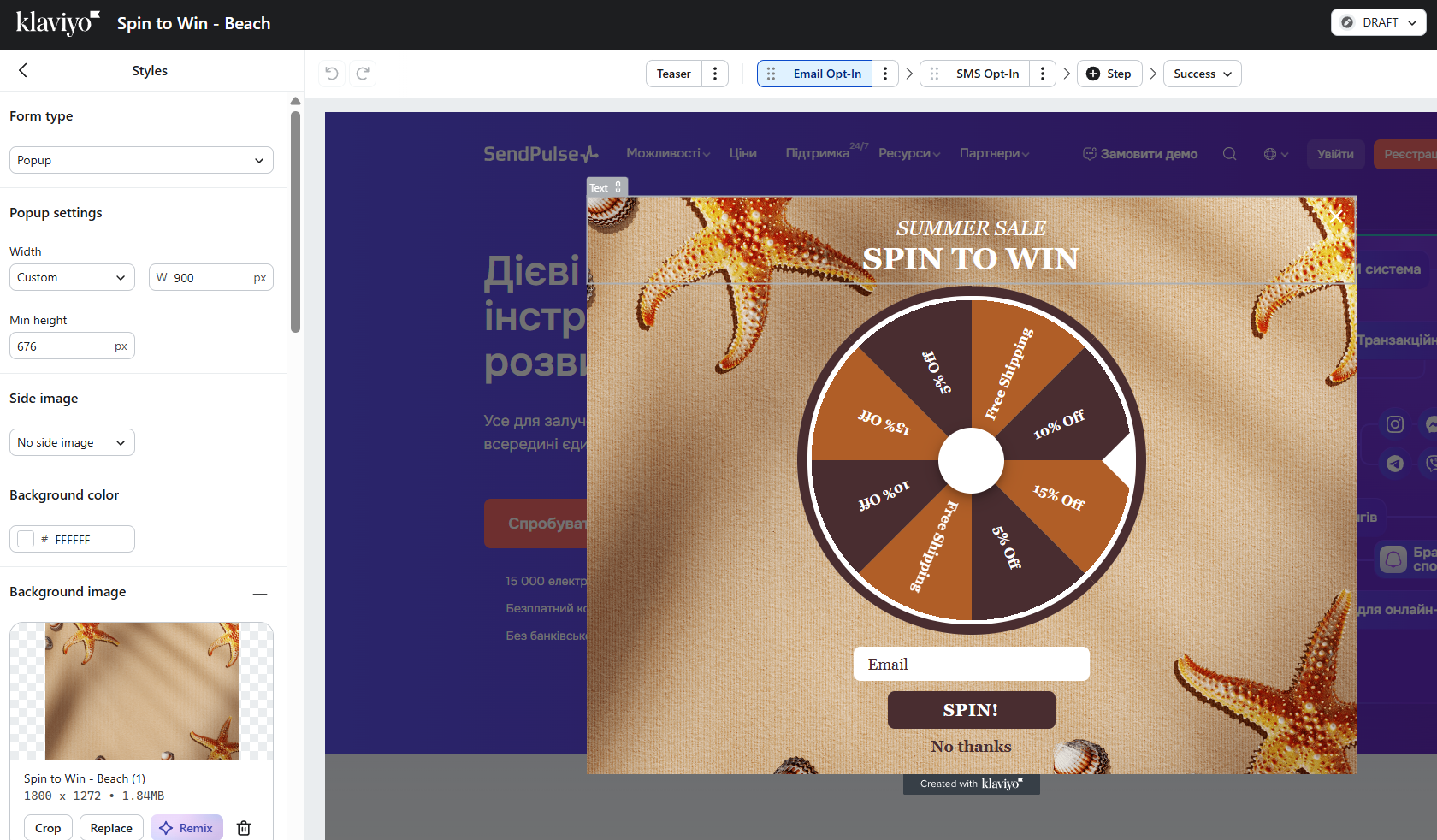 Testing a spin-to-win signup form at the Klaviyo form builder
The block library also reveals how conversion-focused Klaviyo’s builder is. Reviews, signup counters, coupon blocks, countdown timers, phone number fields, and SMS collection are all treated as first-class elements rather than optional add-ons. The builder is designed specifically for aggressive eCommerce list growth and multi-channel subscriber acquisition.
GetResponse’s signup form builder feels more lightweight. During testing, the whole experience resembled a simplified version of its email editor: familiar typography controls, spacing settings, color management, mobile visibility toggles, and a clean two-step structure with a main form and a thank-you message. For basic lead generation campaigns, the builder covers the standard needs comfortably: collect an email address, show a confirmation screen, and optionally display a static discount code or message.
At the same time, the builder intentionally avoids deeper conversion mechanics. The thank-you experience stays static, coupon delivery lacks eCommerce-specific logic, and there are no visible tools for acquisition-source tagging, multi-step subscriber collection, or dynamic reward systems directly inside the form itself.
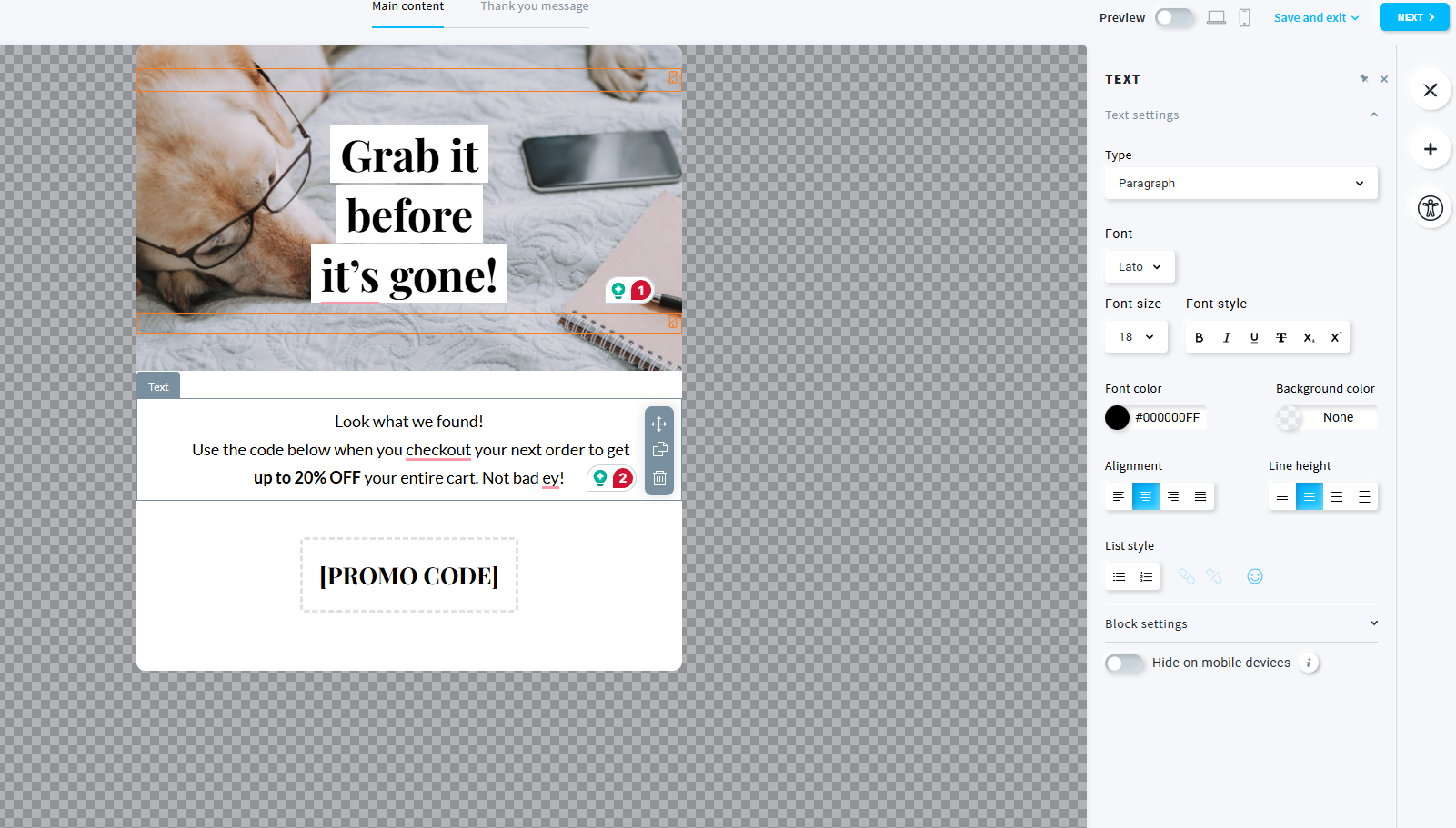 A promo pop-up we set up while testing GetResponse
Here are our conclusions:
GetResponse is faster and simpler to launch. For businesses that simply need clean pop-ups integrated into existing email workflows, the builder is more than sufficient and avoids unnecessary complexity.
Klaviyo, meanwhile, goes much deeper into subscriber acquisition strategy. Gamified opt-ins, sequential email and SMS capture, unique coupon distribution, hidden-field attribution tracking, social proof elements, and eCommerce integrations all solve real growth and data problems directly inside the form builder itself. This gives eCommerce marketers far more tools to maximize signup rates, capture richer customer profiles, and connect pop-up performance directly to revenue generation.
Deliverability
⭐ Klaviyo: 9.2/10 | GetResponse: 9/10
Both Klaviyo and GetResponse are quite strong in deliverability and support the core technical standards modern email marketing requires. For many businesses, the difference between them will not dramatically affect inbox placement. Here are some details:
| Aspect |
Klaviyo |
GetResponse |
Winner |
| Authentication |
SPF handled automatically; DKIM enabled through branded sending domains; DMARC configured externally; BIMI supported |
SPF, DKIM, and DMARC supported; automatic setup available for supported DNS providers; DMARC configured externally |
Klaviyo |
| Deliverability monitoring |
Dedicated deliverability dashboard inside campaigns and automations; engagement and authentication monitoring; internal shared IP and blocklist monitoring |
Bounce and complaint metrics available at the campaign level; internal infrastructure monitoring; dedicated deliverability support available on enterprise plans |
Klaviyo |
| List hygiene |
Automatic hard and soft bounce suppression, spam complaint tracking, suppression list imports, and inactive-contact cleanup recommendations |
Automatic hard and soft bounce removal, spam complaint suppression, and suppression list handling during imports |
Klaviyo |
| Dedicated IP |
Dedicated IP available only for qualifying high-volume senders; IP warming and managed for approved accounts |
Dedicated IP available from lower sending thresholds; setup and warming handled by the team |
GetResponse |
| Total score |
9.2/10 |
9/10 |
Klaviyo |
Not that much depends on a bulk email service per se when it comes to deliverability. What matters more is your good practices. Here’s what SendPulse’s expert on deliverability says:
Almost 80% of deliverability depends on the marketer's practices, namely list hygiene, permission-based sending, consistent sending pattern, and content relevance. Only about 20% depends on the ESP, which handles infrastructure, authentication, and IP reputation management.

Victoria Lushnenko
Deliverability Expert at SendPulse
Follow these recommendations to improve your deliverability:
- Set up SPF, DKIM, and DMARC for every sending domain.
- Keep sending volumes steady and avoid sudden spikes.
- Segment active and inactive subscribers separately.
- Never send to unsubscribed, unconfirmed, or inactive contacts.
- Use reactivation campaigns before removing inactive users.
- Avoid URL shorteners and oversized images in emails.
- Separate transactional and marketing emails across sender addresses.
- Warm up large campaigns gradually instead of blasting the whole list at once.
- Monitor bounce rates, spam complaints, and sender inbox replies.
- Use double opt-in or email validation to reduce spam traps and fake signups.
Reporting and analytics
⭐ Klaviyo: 10/10 | GetResponse: 8/10
Even though GetResponse performs quite well in reporting and analytics with its solid 8/10 score, Klaviyo wins this category quite confidently. And a perfect 10/10 does say a lot here. Let’s take a closer look at the details:
| Aspect |
Klaviyo |
GetResponse |
Winner |
| Report coverage |
Campaign, automation, signup form, deliverability, revenue, conversion, A/B testing, and eCommerce reports across email, SMS, push, and WhatsApp channels |
Campaigns, automations, contacts, forms, landing pages, webinars, and eCommerce performance reports with engagement metrics across channels |
Klaviyo |
| Custom reports |
Custom reporting with campaign, automation, funnel, product, and metric analysis; scheduling, cloning, grouping, filtering, and combined campaign/automation reporting available |
Custom report builder with filters, scheduling, shareable links, and CSV or PDF exports |
Klaviyo |
| Reporting speed |
Campaign metrics update progressively after sending; live performance monitoring available for email campaigns; custom reports require manual refresh |
Metrics update progressively after sending; custom reports are generated on demand or on schedule |
Klaviyo |
| Export capabilities |
CSV |
CSV and XLSX |
GetResponse |
| Total score |
10/10 |
8/10 |
Klaviyo |
In practice, both platforms provide enough analytics for everyday email marketing work, and for many businesses, GetResponse will already cover all essential reporting needs. The difference appears once marketing becomes heavily data-driven and tied to revenue optimization. Klaviyo simply gives marketers more visibility into customer behavior and campaign impact, making it easier to spot patterns, refine targeting, and make decisions based on deeper performance data rather than surface-level engagement metrics alone.
Customer support
⭐ Klaviyo: 8.3/10 | GetResponse: 8.1/10
Sooner or later, every marketer runs into a bug, a confusing setup, or an automation that suddenly stops behaving as expected. In moments like these, good documentation and responsive support stop being a “nice extra” and become genuinely important. Luckily, both Klaviyo and GetResponse perform quite well in this area.
| Aspect |
Klaviyo |
GetResponse |
Winner |
| Channel availability |
24/7 email support; live chat with escalation to human agents; premium onboarding and customer success support add-ons; no phone support |
Email and live chat; self-serve support on free plan; 24/7 chatbot; phone support on enterprise plans only |
Klaviyo |
| Knowledge base |
Extensive help center with troubleshooting, migration guides, certification courses, community forum, live training sessions, and certified partner directory |
Extensive help center with guides, tutorials, videos, and educational courses |
Klaviyo |
| Onboarding assistance |
Guided account setup, eCommerce onboarding checklists, migration guides, and dedicated onboarding specialists and customer success managers as add-ons |
Self-serve onboarding through guides, tutorials, and videos |
Klaviyo |
| Support quality rating on Capterra |
4.3/5 |
4/5 |
Klaviyo |
| Total score |
8.3/10 |
8.1/10 |
Klaviyo |
Klaviyo offers a noticeably more developed support ecosystem around the platform itself. The difference becomes especially visible during onboarding, migrations, and eCommerce setup, where the platform provides more structured guidance and more ways to get help beyond basic documentation. One important thing to keep in mind, though, is that many of the more advanced support options are now tied to paid add-ons under Klaviyo’s new pricing model.
GetResponse, meanwhile, covers the essential support needs quite well, especially for users who are comfortable learning through documentation and self-serve resources.

Join businesses growing with SendPulse
From solo creators to global brands, thousands of customers trust SendPulse to run email campaigns, chatbots, automations, and more — all in one place.
Get started for free
Your decision checklist and recommendations
By this point, you probably already have a favorite. But if the choice still feels difficult, here’s one final checklist to help you see which platform fits your business, workflows, and marketing style better:
| Decision area |
Klaviyo
is a better fit if… |
GetResponse
is a better fit if… |
| Business type |
? You run an eCommerce business focused on retention, personalization, and customer lifecycle marketing. |
? You run a broader type of business that needs email marketing, funnels, webinars, courses, or multi-purpose automation. |
| Budget expectations |
? You are ready to pay more for advanced eCommerce capabilities and deeper customer data tools. |
? You want strong marketing functionality at a more moderate price. |
| Automation needs |
? You need advanced eCommerce automations, omnichannel flows, and highly personalized customer journeys. |
? You need flexible automation for different marketing workflows, lead nurturing, webinars, or courses. |
| Analytics focus |
? You rely heavily on revenue attribution, funnel analysis, and eCommerce performance tracking. |
? You need solid reporting and engagement analytics for everyday marketing tasks. |
| Team setup |
? Your team includes experienced eCommerce marketers or data-driven specialists. |
? Your team prefers a broader, easier-to-approach marketing platform with a gentler learning curve. |
If one platform gets three or more matches in the checklist above, that’s probably your winner. But what if even the “winner” still doesn’t feel like the perfect fit for your business? In that case, it’s worth taking a look at a few strong alternatives with very different positioning:
- SendPulse – an affordable all-in-one marketing platform that combines email marketing, chatbots, CRM, automation, and landing pages in one ecosystem;
- ActiveCampaign – one of the strongest automation-focused platforms on the market, especially for behavioral workflows, CRM-driven marketing, and advanced customer journeys beyond eCommerce;
- Kit – a creator-focused email platform with a very generous free plan, simple newsletter workflows, and tools designed primarily for bloggers, writers, and content creators;
- MailerLite – a simpler and more affordable platform focused on ease of use, straightforward email campaigns, and clean workflow design for small businesses and creators.
Final verdict
⚖️ Final scores: Klaviyo – 8.6/10 | GetResponse – 8.2/10
The final score difference is not dramatic, and that reflects the overall picture we saw throughout this comparison. Klaviyo and GetResponse are both strong platforms – they simply prioritize different things. GetResponse is more affordable, easier to approach, and more versatile across a wider range of marketing workflows. Klaviyo, meanwhile, goes significantly deeper in eCommerce-focused segmentation, automation, personalization, and analytics.
Our conclusion? If you run an eCommerce business and plan to actively use advanced customer data, behavioral targeting, and revenue-driven automation, Klaviyo can absolutely justify its higher price. But for broader marketing use cases and general email marketing, GetResponse will likely feel like the more balanced and practical choice.