We love it when the platforms we compare are actual competitors and not tools from completely different corners of the market. Brevo and HubSpot come pretty close. They might not be direct competitors per se, but they certainly have a lot in common – particularly their versatility and built-in CRM capabilities. So, what else do they share, and where do they differ? Let’s find out in our new comparison.
How we scored this comparison: This review was created by the SendPulse team. As an email marketing platform ourselves, we work in the same space as the tools we test, which also means we understand the field deeply.
Each platform was evaluated across the key categories using our independent methodology. Pricing (25%), ease of use (20%), and email and automation features (15% each) carry the most weight because they affect daily workflows the most. All scores reflect hands-on testing and analysis as of September 2026.
TL;DR Brevo vs HubSpot at a glance
In our 2026 testing, Brevo scored 8.5/10 and HubSpot 7.9/10: Brevo offers better value for SMB multi-channel marketing, while HubSpot wins for larger B2B teams needing a full-featured CRM system.
Here’s a quick recap of all our findings and testing experience. If any of these categories are critical to your decision, click on them to jump straight to the section where we analyze and evaluate them in detail.
| Category |
Brevo |
HubSpot |
Winner |
| Best for |
Small and medium-sized companies wanting multichannel marketing and a lightweight CRM |
B2B and larger teams needing marketing, sales, service, and advanced CRM |
Depends on the use case |
| Pricing |
8.5/10
Affordable, with useful features on lower tiers |
4/10
Expensive, with key features on higher tiers |
Brevo |
| Ease of use |
8.5/10
Quick to learn and easy to navigate |
7/10
Powerful but considerably harder to learn |
Brevo |
| Email design |
8.4/10
More design flexibility and personalization |
8.4/10
More CRM-connected and eCommerce-focused |
Tie |
| SMS |
8.6/10
International, flexible, and accessible on all plans |
7.4/10
CRM-connected but limited by region and plan |
Brevo |
| Automation |
8.8/10
Powerful but approachable multichannel workflows |
9.3/10
Advanced cross-object business automation |
HubSpot |
| Contact management |
9/10
Strong real-time marketing segmentation |
9.5/10
Deeper CRM-based segmentation across objects |
HubSpot |
| CRM |
8.7/10
Solid CRM for marketing and straightforward sales |
9.8/10
Advanced CRM for complex sales and multi-team operations |
HubSpot |
| Forms and pages |
8.5/10
Better for list growth and marketing lead capture |
8.5/10
Better for lead qualification and CRM workflows |
Tie |
| Integrations |
8.8/10
150+ integrations with strong eCommerce coverage |
9.2/10
2,000+ integrations and a much broader ecosystem |
HubSpot |
| AI features |
9/10
Marketing-focused AI for content, workflows, and predictions |
9.2/10
Business-wide AI across marketing, CRM, sales, and reporting |
HubSpot |
| Deliverability |
10/10
Excellent tools and automated setup |
10/10
Excellent tools and advanced monitoring |
Tie |
| Reporting |
9/10
Strong marketing and real-time reporting |
9.2/10
Broader cross-functional business analytics |
HubSpot |
| Customer support |
7.6/10
Better self-service support; limited human channels |
7.4/10
More hands-on options, but at extra cost |
Brevo |
| G2/Capterra rating |
4.5/4.6 |
4.4/4.5 |
Brevo |
| Final score |
8.5/10 |
7.9/10 |
Brevo |
Quite a few categories end in a tie, which is unusual in our comparisons. What’s more interesting is that they tie not because the platforms offer the same functionality, but because their different strengths and weaknesses balance each other out. From this perspective, it was a particularly interesting comparison for us to make. We hope you enjoy reading it as much as we enjoyed putting it together.

Create and send high-performing emails
Use an AI assistant, pre-made templates, advanced segmentation, and feature-rich automation to run campaigns without coding. Send up to 15,000 monthly emails at no cost.
Get started for free
Brevo vs HubSpot pricing and feature differences
How we tested: We signed up for both platforms and spent several weeks testing them. We compared pricing plans, built email campaigns, set up multi-step automations, and sent SMS messages. We created signup forms and landing pages, organized contacts into segments, and checked out template libraries and AI content tools. We also reviewed deliverability settings and compared reporting dashboards side by side. For customer support, we examined real user feedback on Capterra and G2. All screenshots in this article were captured during our hands-on evaluation.
Below is a detailed analysis of the key email marketing categories, starting with those most likely to affect your decision, like pricing and usability, and moving on to things like integrations and customer support. Overall, you’ll find answers to pretty much any question you might have about Brevo, HubSpot, and how the two compare.
Pricing plans
⭐ Brevo: 8.5/10 | HubSpot: 4/10
Disclaimer: Pricing changes frequently. All prices in this comparison were verified against Brevo’s official pricing and HubSpot’s official pricing as of September 14, 2026. Always confirm current costs on the official pages.
Comparing Brevo with other email marketing platforms can be tricky because it charges for emails sent rather than the number of contacts, as most platforms do. HubSpot is a good example of a traditional pricing model: it charges by the number of marketing contacts and sets your monthly sending limit as a multiple of that tier – 5× on Starter, 10× on Professional.
The table below compares each plan on its own terms: what you pay to start, how many contacts and emails you get, and what affects the price as you grow.
| Pricing |
Brevo Starter |
Brevo Professional |
HubSpot Starter |
HubSpot Professional |
| Starting price |
$9/mo |
$499/mo |
$10/mo |
$890/mo |
| Contacts included |
500 |
2M (maximum) |
1,000 |
2,000 |
| Emails included |
5,000/mo |
150,000/mo |
5,000/mo |
20,000/mo |
| Seats included |
1 |
10 |
1 |
3 |
| Sending limit |
Selected email volume |
5× contact tier/mo |
10× contact tier/mo |
| Price scales by |
Email volume |
Marketing contacts |
HubSpot’s Starter plan looks cheap on paper, but the catch is what you get for it and how quickly the price scales. Much of what makes HubSpot appealing, including advanced automation workflows, in-depth reporting, and robust CRM capabilities, is available on Professional, which starts at $890/mo. Brevo’s features scale by tier too, but the progression is more gradual.
HubSpot can also get more expensive as your business grows. Additional marketing contacts are billed on top of your plan, in 1,000-contact blocks, for $50/mo on Starter and in 5,000-contact blocks for $250/mo on Professional.
On top of that, HubSpot’s pricing model is seat-based as of March 2024. View-Only Seats are free, while Core Seats, which give users access to the tools in the plans you buy, are paid once you need more than the plan includes. The Starter plan comes with one Core Seat, and each extra one costs $10/month. The Professional plan includes three Core Seats, and each additional one is $50/month.
With Brevo, by contrast, your plan is based on monthly email volume, with contacts and a set number of seats included.
For perspective, SendPulse also prices by contacts but includes unlimited emails and a full-featured CRM system on paid plans. Its free plan covers 500 contacts and 15,000 emails a month, and paid plans start at $18/mo for 1,000 contacts.
So does HubSpot offer enough to justify the jump to Professional? That’s what the rest of our comparison is here to explore.
Ease of use and interface
⭐ Brevo: 8.5/10 | HubSpot: 7/10
Brevo is easier for the vast majority of businesses. It focuses on email marketing, so the interface stays clean, the learning curve is short, and most users can become productive within a few days. HubSpot asks for a much bigger investment of time, but that’s largely because you’re learning an entire business platform rather than just an email marketing tool. The thing is, while Brevo limits its scope, HubSpot tries to centralize marketing, CRM, sales, and customer service in one place.
| Aspect |
Brevo |
HubSpot |
Winner |
| First-time experience |
Simple, beginner-friendly onboarding; easy to set up in minutes without overwhelming new users |
AI-guided onboarding, but CRM-first interface and broad feature set require more time to learn |
Brevo |
| Daily navigation |
Clean interface with easy-to-find email marketing tools |
Hub-based navigation across marketing, CRM, sales, and service; powerful but more complex |
Brevo |
| Learning curve |
Quick to learn for email marketing; advanced automations require more time |
Steeper learning curve due to CRM, sales, and marketing tools |
Brevo |
| Mobile access |
Mobile apps for conversations and sales only; campaigns, contacts, and reporting require desktop |
Full-featured iOS and Android app for CRM, marketing, reporting, conversations, and lead management |
HubSpot |
| Workflow efficiency once mastered |
Fast campaign creation, segmentation, and scheduling |
End-to-end workflows across marketing, CRM, sales, and service from one platform |
Tie |
| Total score |
8.5/10 |
7/10 |
Brevo |
Here’s what learning the platform looks like in practice:
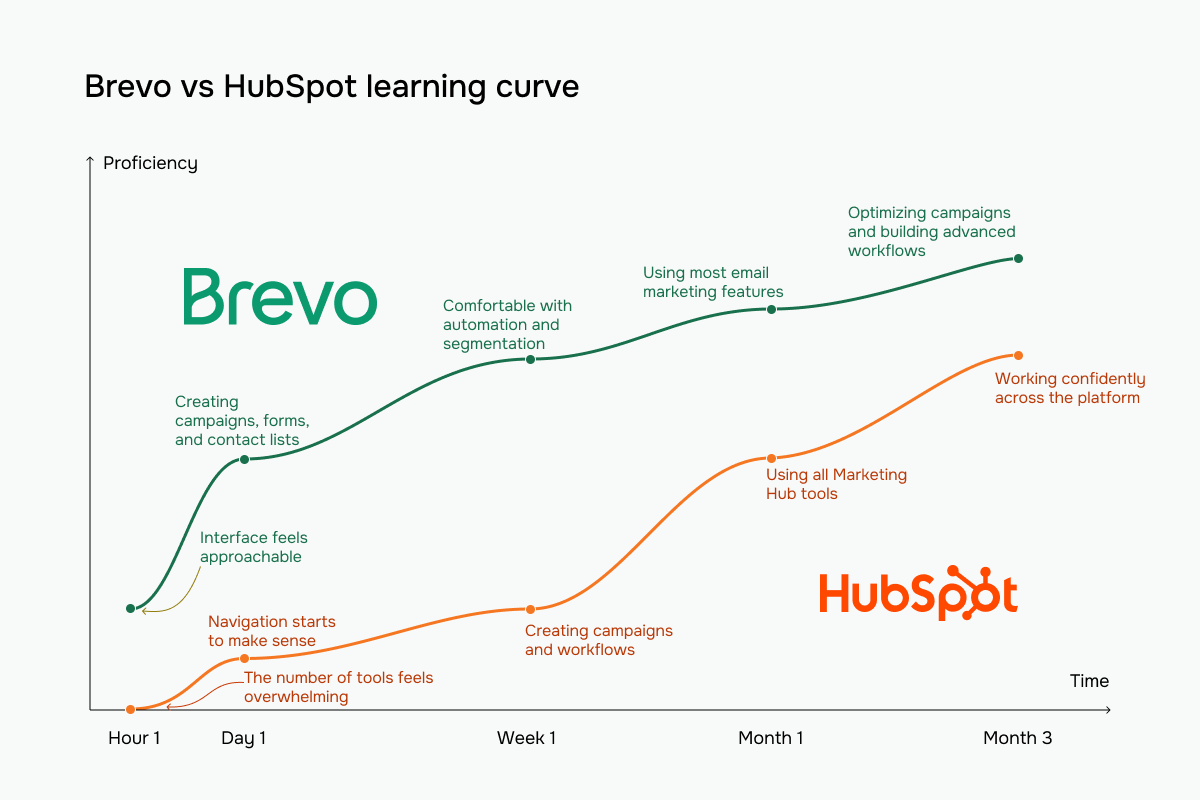 Brevo vs HubSpot learning curve based on our testing experience
Email builder and templates
⭐ Brevo: 8.4/10 | ⭐ HubSpot: 8.4/10
Brevo puts the email at the center of the experience – its builder is modern, easy to use, and includes advanced features without becoming difficult to navigate. It offers the kind of flexibility most of us need for day-to-day email creation.
HubSpot’s builder is strongest when email is just one part of a larger customer journey. Its real advantage comes from how naturally emails fit into the rest of the platform, connecting with CRM records, eCommerce modules, and broader marketing workflows. On editing alone, though, neither editor is more capable than the other, so it’s a tie.
| Aspect |
Brevo |
HubSpot |
Winner |
| Templates |
53 templates |
54 templates |
Tie |
| Drag-and-drop editor |
Visual editor with desktop/mobile preview, undo/redo, version history, and optional HTML/CSS editing |
Modular drag-and-drop editor; flexible on layout, limited on per-device styling and email-specific modules |
Brevo |
| Notable content blocks |
Dynamic content, product blocks |
Products, cart, payments |
Tie |
| Mobile responsiveness |
Responsive by default with mobile preview and per-element width adjustments |
Responsive templates with per-device visibility and layout controls |
Tie |
| Sending time optimization |
Optimization for each recipient based on engagement |
Optimization based on engagement; per-contact optimization on Enterprise tier (beta) |
HubSpot |
| Total score |
8.4/10 |
8.4/10 |
Tie |
Now, let’s have a look at how these builders look in practice.
Brevo’s email builder is much more capable than its market position suggests. The interface is clean and easy to navigate, but it also offers several advanced features. For example, dynamic content is available as a dedicated drag-and-drop block instead of being hidden behind menus or personalization settings. The builder also gives precise layout control, with adjustable block width, independent margin and padding settings, multiple line-height options, and dynamic background images that can change based on contact data.
Altogether, Brevo strikes an excellent balance between ease of use and advanced personalization.
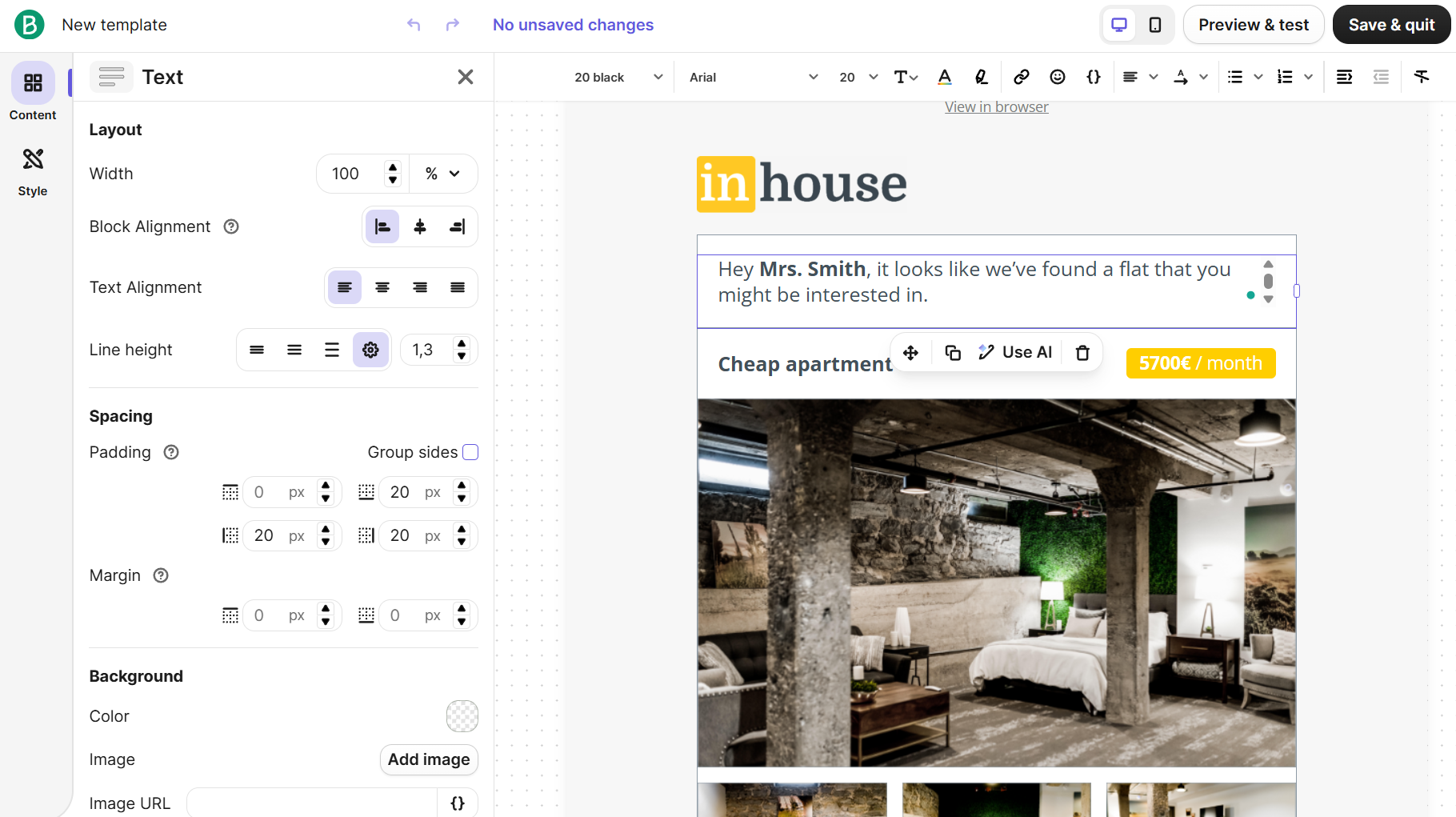 Fine-tuning a text block’s spacing and layout in Brevo’s email builder
For HubSpot, it’s always a CRM-first approach. Personalization tokens render live contact data directly in the preview, so you can see exactly what recipients will receive before sending. Thanks to native eCommerce modules like Products, Cart, and Payments, you can create sales and transactional emails without custom development.
The builder is less customizable than Brevo’s, but far more connected to the rest of the platform.
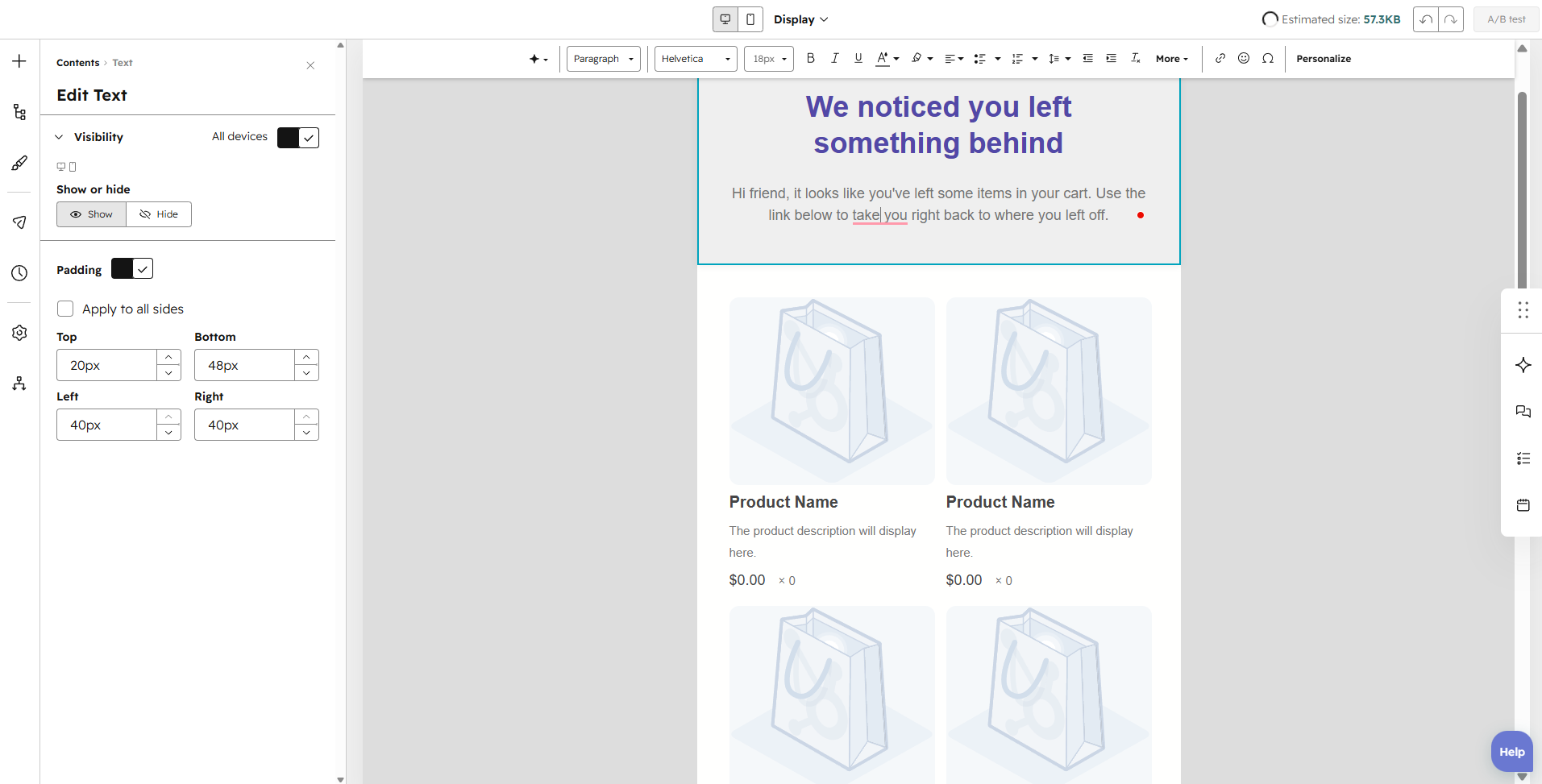 Building an abandoned cart email with HubSpot’s product blocks
Brevo focuses on giving you maximum creative freedom without increasing complexity. HubSpot, meanwhile, treats email as one touchpoint in a much larger customer relationship. Its strongest capabilities come from CRM integration, eCommerce modules, and business context rather than design flexibility.
SMS capabilities
⭐ Brevo: 8.6/10 | HubSpot: 7.4/10
Email isn’t the only marketing channel these platforms support. If SMS is part of your strategy, here’s what Brevo and HubSpot bring to the table.
| Aspect |
Brevo |
HubSpot |
Winner |
| Plans that include SMS |
SMS available as a pre-paid or pay-as-you-go add-on on all plans |
SMS available as a paid add-on on Professional and Enterprise tiers |
Brevo |
| Supported countries |
International SMS with country-based pricing |
US and Canada only |
Brevo |
| Pricing model |
Credit-based pricing with non-expiring pre-paid credits |
Monthly message-segment allowance; additional segments purchased separately |
Brevo |
| SMS-specific automation and keywords |
SMS in automations; compliance keywords |
SMS in workflows with automatic consent management; no custom SMS keyword automations |
Tie |
| Two-way messaging SMS |
Native two-way messaging with AI drafting and saved replies for US and Canada |
Two-way messaging through Conversations Inbox |
Brevo |
| Total score |
8.6/10 |
7.4/10 |
Brevo |
Brevo offers the more complete SMS marketing platform. It makes SMS accessible regardless of your subscription tier, supports a much broader range of countries, and provides greater flexibility with pre-paid credits, native two-way messaging, and AI-assisted conversations.
HubSpot’s SMS capabilities are well integrated into its CRM and workflows, but they’re clearly aimed at existing HubSpot customers rather than businesses looking for a dedicated SMS marketing platform.
Marketing automation
Brevo: 8.8/10 | ⭐ HubSpot: 9.3/10
Both platforms earn high scores in automation, and that’s for a reason. Brevo does an excellent job of making automation approachable. The builder is easy to understand, and AI can generate complete workflows from a prompt. For most of us, it provides all the automation needed while remaining quick to learn and manage.
HubSpot treats automation as part of an entire business process – its workflows can connect marketing, CRM, sales, service, and custom business objects in a single automation. That depth comes with a steeper learning curve, but it also allows you to create far more sophisticated business automation.
| Aspect |
Brevo |
HubSpot |
Winner |
| Availability by plan |
Available on all plans; Free tier supports up to 2,000 active contacts in automations |
Limited to simple flows (up to 10 actions) on Starter; unlimited actions and omni-channel flows on Professional and Enterprise |
Brevo |
| Automation builder |
Visual builder with triggers, rules, actions, and AI-generated workflows |
Visual builder with branching, goals, delays, re-enrollment, and AI assistance |
Tie |
| Triggers available |
List changes, email activity, CRM events, tasks, deals, and custom events |
CRM events, forms, properties, page views, schedules, webhooks, and custom objects |
HubSpot |
| Pre-built automations |
14 pre-built email workflows |
58 workflow templates |
HubSpot |
| Channels supported |
Email, SMS, WhatsApp, and web push notifications |
Email and SMS |
Brevo |
| Automation complexity |
Easy-to-follow workflows with optional branching |
Advanced branching, goals, multiple CRM objects, and cross-platform workflows |
HubSpot |
| Total score |
8.8/10 |
9.3/10 |
HubSpot |
Let’s see how their automation builders perform in practice.
Brevo’s automation builder is one of the most intuitive we’ve seen. It organizes everything into three clearly separated categories – Triggers, Actions, and Rules – making even complex workflows easy to understand. The builder also uses color-coded nodes, so you can instantly distinguish triggers, conditions, actions, and endpoints without reading every step. One particularly thoughtful touch is the inline email preview, which displays a miniature version of the email directly on the automation canvas.
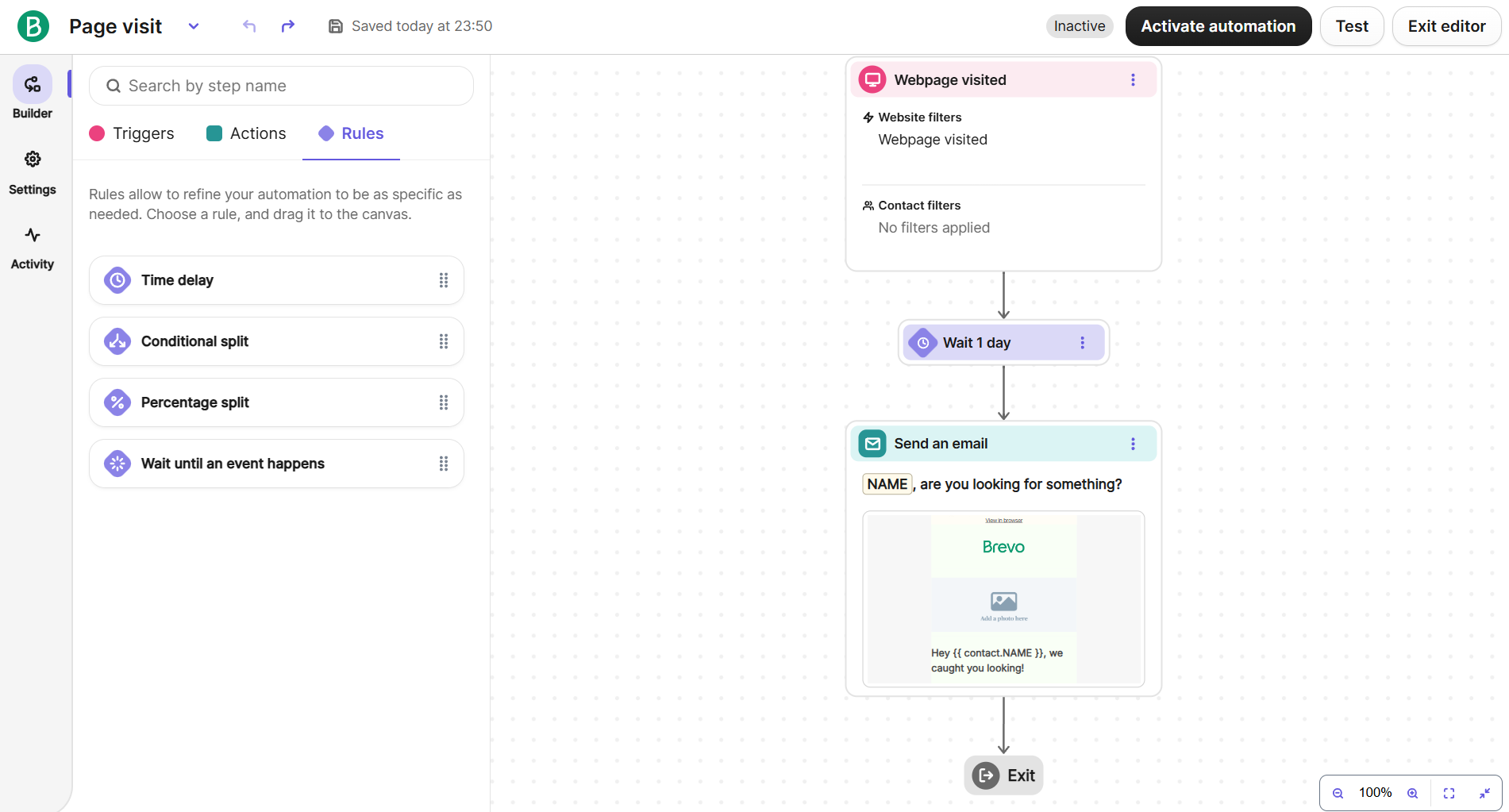 Building a page visit email in Brevo’s automation builder, previewed right on the canvas
HubSpot’s automation builder is created around CRM processes. The biggest highlight is its action library, which is the most comprehensive we’ve seen. Instead of presenting a flat list of actions, HubSpot organizes them into categories, like communications, CRM, marketing, and data operations.
AI is deeply integrated throughout the builder, so you can configure individual automation steps with prompts. On top of that, advanced workflow controls help automate processes that extend beyond email marketing, making HubSpot a business process automation platform.
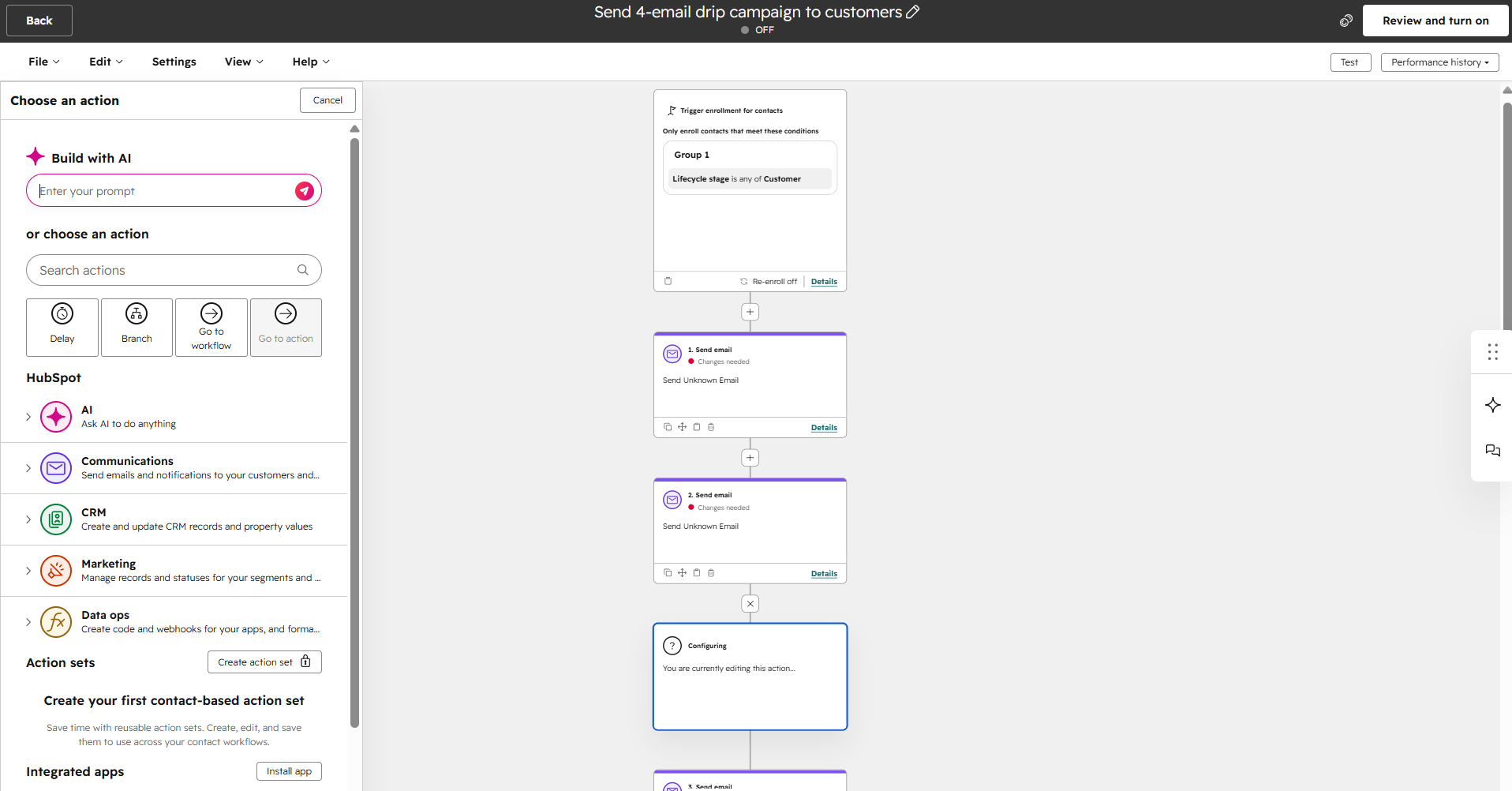 Setting up a CRM-triggered drip campaign in HubSpot’s workflow builder
The biggest difference between the two is their depth. Brevo keeps sophisticated automations approachable through visual clarity, intuitive organization, and thoughtful usability features, while HubSpot embraces complexity, as it’s designed to automate entire business processes.
Contact management
Brevo: 9/10 | ⭐ HubSpot: 9.5/10
For email marketing alone, the difference between the two platforms in contact management is small. HubSpot pulls ahead because segmentation becomes part of a much broader business system rather than a marketing tool, making it a stronger choice if your company relies on CRM data across multiple teams.
| Aspect |
Brevo |
HubSpot |
Winner |
| Segmentation capabilities |
Dynamic segments with up to 100 AND/OR conditions |
Dynamic and static segments with cross-object filtering |
HubSpot |
| Segmentation criteria |
Contact attributes, email engagement, eCommerce activity, website behavior, CRM events, and custom objects |
Contact, company, deal, ticket, and custom object properties, forms, website activity, email engagement, lifecycle stages, and CRM activities |
HubSpot |
| Segment update speed |
Real-time updates (manual refresh required for databases over 2 million contacts) |
Immediate in theory, but complex or large segments may update with delays |
Brevo |
| Tagging and manual organization |
No contact tags; uses custom attributes, lists, and segments |
No contact tags; uses custom properties, lists, segments, and lifecycle stages |
Tie |
| Total score |
9/10 |
9.5/10 |
HubSpot |
One interesting thing here is that neither platform supports freeform contact tags. HubSpot has deliberately chosen to organize contacts through structured properties instead of tags, arguing that dedicated fields create cleaner, more consistent customer data than freeform labels. Brevo also relies on attributes and segments instead of tags, but hasn’t publicly explained the decision despite repeated user requests.
CRM
Brevo: 8.7/10 | ⭐ HubSpot: 9.8/10
Brevo has everything many small and medium-sized businesses need to manage customer relationships. It combines contacts, companies, deals, pipelines, and automations in one place, making it a strong CRM for marketing and straightforward sales processes.
HubSpot’s CRM is designed as the foundation of the entire platform, connecting marketing, sales, customer service, and reporting around the same customer records. Thanks to linked business objects, advanced forecasting, and team collaboration, it is suitable for companies where multiple departments work with the same customer data every day.
| Aspect |
Brevo |
HubSpot |
Winner |
| Pipeline management |
Sales pipelines with 3-20 stages and win probability |
Multiple pipelines for deals, tickets, projects, and custom objects; stage automations, approvals, and team-based access |
HubSpot |
| Contact and company records |
Contacts, companies, deals, tasks, and custom objects with customizable attributes |
Unified CRM connecting contacts, companies, deals, tickets, and custom objects through linked records |
HubSpot |
| Sales forecasting |
Weighted pipeline forecast based on deal value and win probability |
Advanced forecasting with forecast categories, team rollups, accuracy tracking, and AI revenue projections |
HubSpot |
| CRM automation |
Deal creation and stage-based automation within workflows |
Deal-based workflows, stage automations, task assignment, record updates, and branching CRM workflows |
HubSpot |
| Total score |
8.7/10 |
9.8/10 |
HubSpot |
If you’re looking for a practical CRM system alongside email marketing, Brevo is quite capable. If CRM is the center of your business operations, HubSpot remains one of the strongest platforms on the market.
Signup forms and landing pages
⭐ Brevo: 8.5/10 | ⭐ HubSpot: 8.5/10
With Brevo, you will see a more marketing-oriented approach to lead capture. It gives you everything you need to build signup forms, pop-ups, landing pages, and subscription management from one place.
HubSpot, yet again, approaches forms from a CRM perspective. In the case of their signup forms, every submission becomes structured customer data that can feed sales, marketing, and service processes across the platform. That might be a huge advantage if you use forms to qualify leads rather than just grow a mailing list.
| Aspect |
Brevo |
HubSpot |
Winner |
| Types of forms available |
Embedded, full-page, pop-up, profile update, and unsubscribe forms |
Embedded, standalone, and multi-step forms; pop-ups available through the CTAs tool |
Tie |
| Form builder |
Drag-and-drop builder with contact fields, CAPTCHA, double opt-in, multi-list subscriptions, and submission notifications |
Multi-step builder with CRM fields, meeting scheduling, and customizable themes |
Tie |
| Pop-up targeting conditions |
Exit intent, time delay, page targeting, frequency caps, and display rules |
Exit intent, scroll depth, inactivity, time delay, button click, URL, and visitor targeting through the CTAs tool |
Tie |
| Landing page builder |
Drag-and-drop builder with section templates, SEO settings, custom domains, and tracking scripts |
Drag-and-drop builder with themes, AI page generation, SEO recommendations, topic clusters, and custom templates |
HubSpot |
| Total score |
8.5/10 |
8.5/10 |
Tie |
Let’s make a signup form with both builders to see how they compare in practice.
Brevo’s form builder keeps things simple – the interface is clean and easy to navigate, with separate tabs for building the form and customizing its design. Also, instead of hiding privacy settings in menus, Brevo gives GDPR consent, privacy declarations, and CAPTCHA their own dedicated section alongside form fields and content blocks. Overall, the builder is designed for marketers who need to create compliant signup forms without unnecessary complexity.
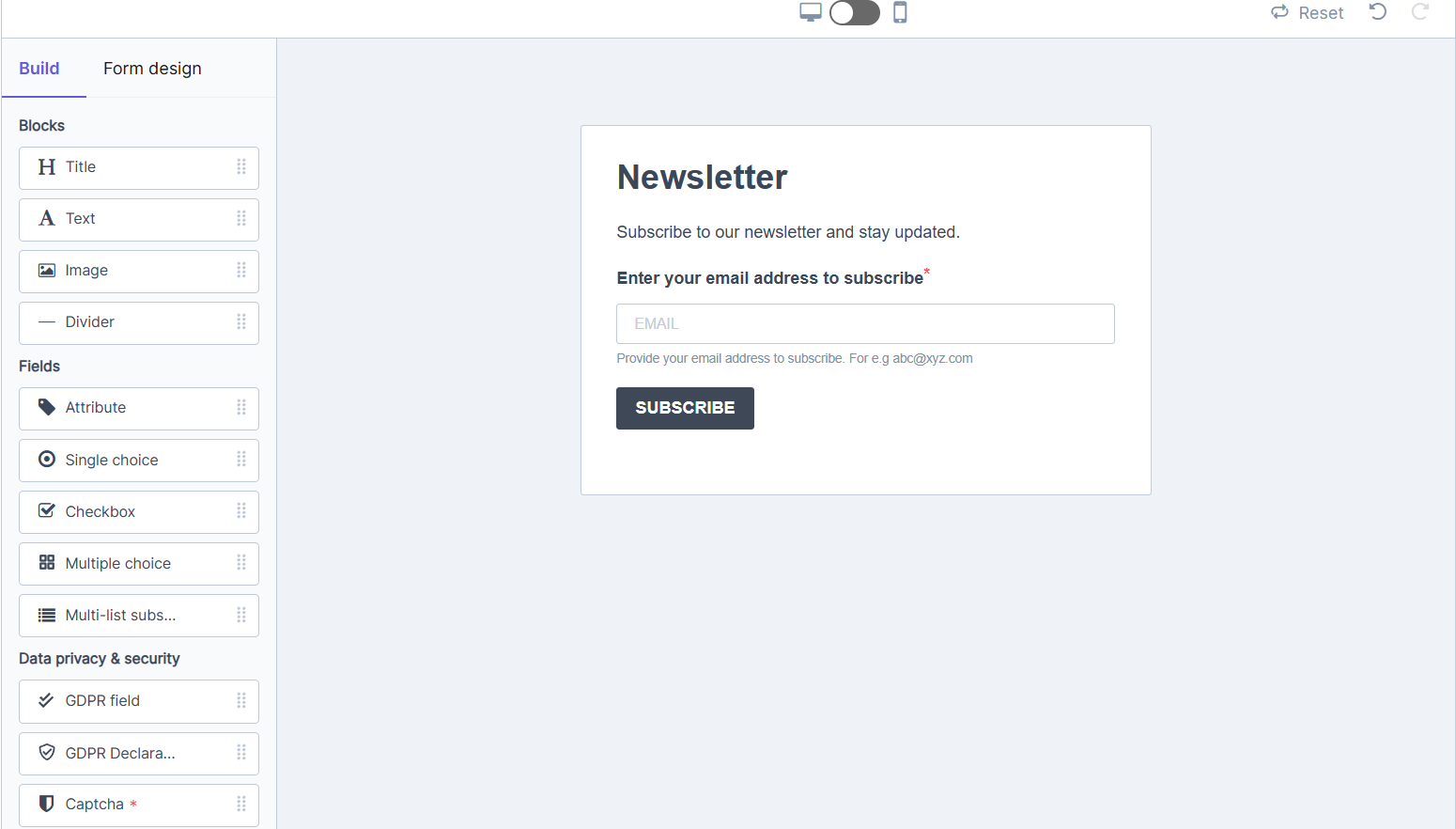 Adding blocks to a signup form in Brevo’s builder
HubSpot’s form builder is tightly connected to its CRM. Every field maps directly to a contact property, making forms part of a structured customer database. The builder includes progressive profiling, so that returning visitors can see new questions instead of repeatedly filling in the same fields. Dedicated automation settings let forms trigger workflows immediately after submission. Even the legacy editor demonstrates how deeply forms are integrated into the platform, with searchable CRM properties and payment collection connections built into the editing experience.
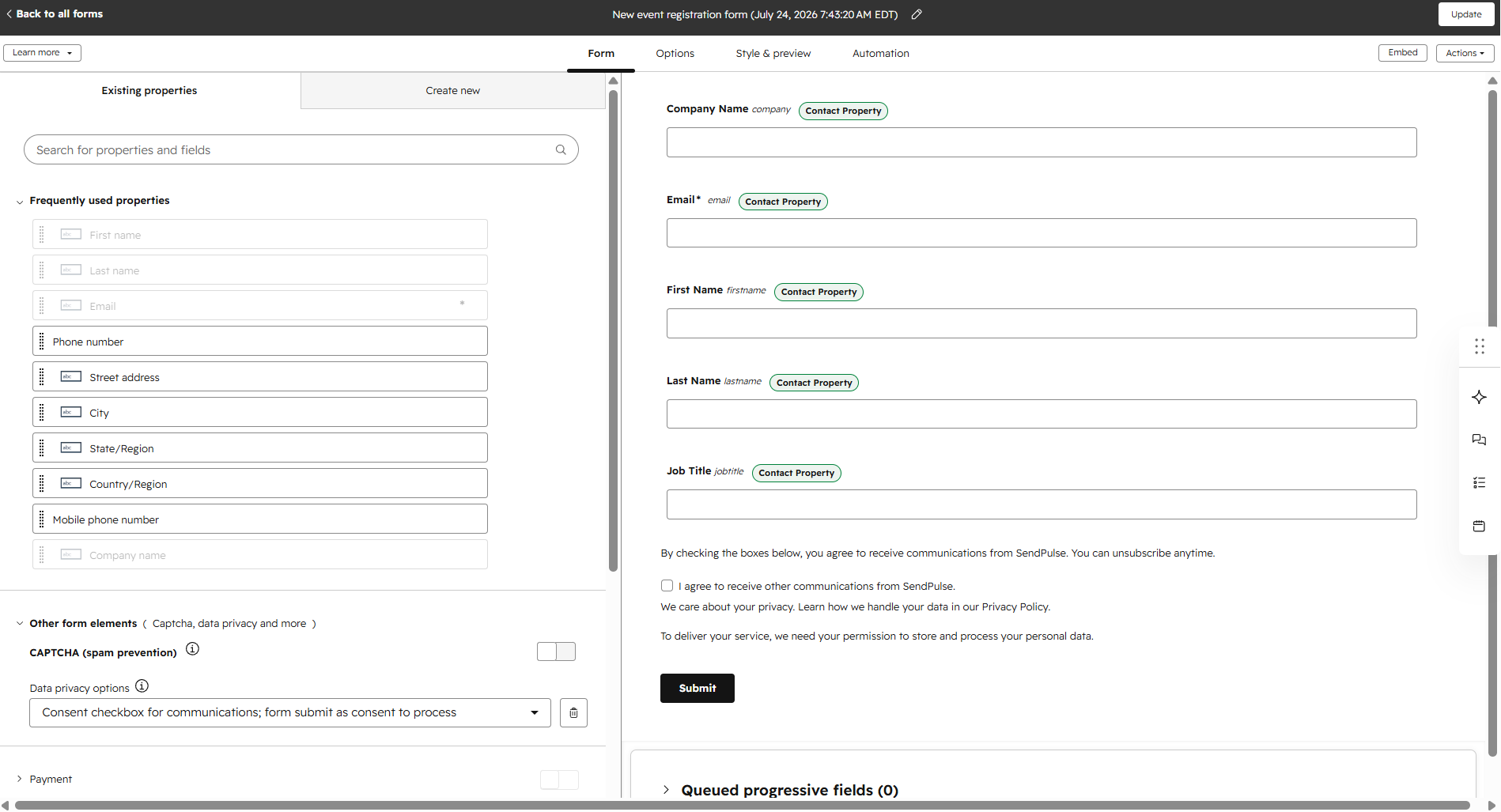 Mapping form fields to CRM contact properties in HubSpot’s form editor
In the end, the better choice comes down to your main goal. If your priority is growing a mailing list while staying compliant, Brevo provides a smoother experience. If forms are primarily a way to qualify leads and feed a CRM, HubSpot offers much deeper capabilities.
Integrations
Brevo: 8.8/10 | ⭐ HubSpot: 9.2/10
For most businesses, Brevo’s integrations will cover everything they need. HubSpot earns the higher score because it scales much further, offering an ecosystem that’s difficult for almost any email marketing platform to match.
| Aspect |
Brevo |
HubSpot |
Winner |
| Integration catalog |
150+ integrations across eCommerce, CMS, CRM, and other business tools |
2,000+ integrations in the App Marketplace |
HubSpot |
| eCommerce platforms |
Native integrations for Shopify, WooCommerce, and BigCommerce with real-time sync |
Native Shopify integration with eCommerce insights and deal creation; API framework for other platforms |
Brevo |
| CRM systems |
Built-in CRM and native Salesforce integration |
Full-featured CRM system; data sync with Salesforce, Pipedrive, Zoho CRM, Microsoft Dynamics 365, and others |
HubSpot |
| API capabilities |
REST API, inbound and outbound webhooks for email, SMS, WhatsApp, contacts, and campaigns |
REST API, advanced webhooks, workflow webhooks, and support for up to 1,000 webhook subscriptions |
HubSpot |
| Zapier support |
17 triggers and 16 actions |
27 triggers and 60+ actions |
HubSpot |
| Total score |
8.8/10 |
9.2/10 |
HubSpot |
Brevo focuses on quality over quantity and integrates well with the most popular eCommerce platforms, includes its own CRM, and offers enough APIs and automation tools for the vast majority of small and medium-sized businesses. For many users, its integration options will be more than enough.
HubSpot’s approach is much broader. Its marketplace, APIs, and developer tools are designed to connect marketing, sales, customer service, and third-party business software around the same customer data. That makes it a better fit for larger companies that rely on many specialized applications working together.
AI features
Brevo: 9/10 | ⭐ HubSpot: 9.2/10
AI now runs through almost everything both platforms do. Here’s how Brevo and HubSpot compare on the AI features that matter most.
| Aspect |
Brevo |
HubSpot |
Winner |
| Email generation |
AI generates complete emails, brand identity from a website, translations, SMS content, and chat replies |
AI generates and rewrites email copy, applies brand voice, and creates subject lines and preview text |
Tie |
| Automation generation |
AI creates complete workflows |
AI creates workflows, suggests actions, and generates custom workflow code |
HubSpot |
| Predictive customer analytics |
Predictive CLV, churn risk, purchase probability, and AI analytics for eCommerce |
Predictive lead scoring, deal scoring, contact priority, and AI revenue forecasting |
Tie |
| Smart segmentation suggestions |
AI generates segments from natural language prompts |
AI generates segment filters and descriptions across CRM objects |
HubSpot |
| Total score |
9/10 |
9.2/10 |
HubSpot |
Brevo’s AI is built to save marketers time. AI automates content creation from start to finish, helps generate campaigns, workflows, translations, and even a brand identity from a website with very little manual work. HubSpot’s AI, on the other hand, is woven throughout the platform – it helps with CRM, sales, reporting, workflow creation, and segmentation.
Deliverability
⭐ Brevo: 10/10 |⭐ HubSpot: 10/10
There isn’t a meaningful winner here. Both platforms provide enterprise-grade deliverability tools, so the deciding factor is no longer the software but the marketer behind it. Authentication, list hygiene, and reputation monitoring are well covered on both sides. What ultimately determines inbox placement is sending relevant emails to engaged subscribers, maintaining a healthy contact list, and following deliverability best practices.
| Aspect |
Brevo |
HubSpot |
Winner |
| Authentication |
Automated domain authentication with one-click DNS setup; DKIM, DMARC, dedicated IP setup, and BIMI support |
Guided manual DNS setup for SPF, DKIM, DMARC, and BIMI |
Tie |
| Deliverability monitoring |
Real-time deliverability dashboard with domain-level insights and reputation monitoring |
Email health dashboard with benchmarks, deliverability warnings, and sender reputation tracking |
Tie |
| List hygiene |
Automatic suppression of hard bounces, spam complaints, unsubscribes, and repeated soft bounces; contact verification on import |
Automatic suppression of hard bounces, spam complaints, unsubscribes, quarantined contacts, and global bounce protection |
Tie |
| Dedicated IP |
Add-on available on Professional and Enterprise tiers; automated or guided warm-up |
Add-on available on Professional and Enterprise tiers (Marketing Hub); automated 40-day warm-up |
Tie |
| Total score |
10/10 |
10/10 |
Tie |
Strong inbox placement is something nearly every email marketing platform promises – at least according to its own knowledge base. Real-world experience can tell a different story, which is why we also check reviews on Capterra and G2. However, with Brevo and HubSpot, we found no recurring complaints in this area. That gives us more confidence that their claims hold up in practice.
Reporting and analytics
Brevo: 9/10 | ⭐ HubSpot: 9.2/10
If you’re a marketer, you won’t find much difference between the platforms in this category. Brevo is likely to satisfy almost every reporting need. HubSpot earns a slightly higher score because its reporting extends across the entire business, so it becomes a stronger choice for those of you who rely on cross-functional analytics rather than marketing data alone.
| Aspect |
Brevo |
HubSpot |
Winner |
| Report coverage |
Pre-built dashboards for email, SMS, revenue, transactional messages, and customer data |
Pre-built dashboards for marketing, sales, service, attribution, and CRM analytics |
HubSpot |
| Custom reports |
Custom dashboards with AI queries, formulas, and multi-source analysis |
Custom reports across marketing, sales, service, CRM objects, and funnels |
Tie |
| Reporting speed |
Real-time transactional reporting; marketing reports generated on demand |
Marketing reports update every 40 minutes; CRM data updates in 2–5 minutes |
Brevo |
| Export capabilities |
CSV and PDF |
CSV, XLS/XLSX, PNG |
HubSpot |
| Total score |
9/10 |
9.2/10 |
HubSpot |
Brevo makes reporting accessible and immediately actionable. Its dashboards focus on marketing performance, eCommerce revenue, and customer engagement. If your primary goal is optimizing email and SMS performance, the platform provides everything needed without unnecessary complexity.
HubSpot connects data from marketing, sales, CRM, and customer service into a single reporting environment. That makes it easier to measure the entire customer journey and understand how marketing contributes to business outcomes beyond opens, clicks, and conversions.
Customer support
⭐ Brevo: 7.6/10 | HubSpot: 7.4/10
Support isn’t a defining strength of either platform. Both of them have updated self-service resources, expecting users to solve most questions through documentation, training materials, and AI before contacting a human. That approach works well for experienced marketers, but it can be frustrating for beginners or businesses that expect fast access to a support agent.
| Aspect |
Brevo |
HubSpot |
Winner |
| Channel availability |
Ticket and email support on all plans; phone support on Professional and Enterprise tiers |
Chat and email support from cheapest paid plan; phone on more expensive tiers |
Brevo |
| Knowledge base |
Smaller in scope but consistently reliable – uniform format, no contradictions found |
Deeper and more technically precise, but uneven – some articles directly contradict newer ones |
Brevo |
| Onboarding assistance |
Self-service onboarding; certified agency partners for paid implementation |
Paid onboarding with a dedicated implementation specialist; advanced migration and consulting services |
HubSpot |
| Support quality sub-rating on Capterra |
4.5/5 |
4.4/5 |
Brevo |
| Total score |
7.6/10 |
7.4/10 |
Brevo |
Brevo keeps onboarding largely self-directed, while HubSpot offers a much more structured onboarding experience, but only if you’re willing to pay for higher-tier plans and onboarding services. In other words, HubSpot provides more assistance, but much of it comes at an additional cost. Overall, the gap between the two platforms is minimal.
Brevo and HubSpot pros and cons
By now, it should be quite clear which platform is better for your business, but let’s put all their pros and cons in one place one last time.
| Platform |
Pros |
Cons |
| Brevo |
✔️ A real free plan (300 emails/day) with no premium paywall
✔️ Fast, self-serve setup with automated, one-click domain authentication
✔️ True multi-channel reach, including email, SMS, WhatsApp, and web push
✔️ Priced by emails sent, so a large contact list doesn’t inflate the bill
✔️ Built-in AI (Aura) drafts emails and translations and predicts CLV and churn for eCommerce |
❌ No live chat support
❌ Basic CRM with no advanced forecasting, approval workflows, or contact tags
❌ Smaller integration catalog
❌ Built for marketing-first use; less suited to complex, multi-team B2B operations |
| HubSpot |
✔️ Genuine all-in-one CRM with contacts, companies, deals, tickets, and custom objects
✔️ Deep forecasting, pipeline governance, and cross-object custom reporting
✔️ Massive integration ecosystem that scales with custom objects
✔️ Broad AI scope (Breeze) across workflows, segmentation, and forecasting
✔️ Full-featured mobile app, with a free CRM tier as a foundation |
❌ Most of what makes it powerful sits behind expensive tiers starting at $890/mo
❌ Real automation starts on Professional tier; free and Starter are very limited
❌ Steeper learning curve; many users need tutorials before they’re productive
❌ SMS is US and Canada only and gated behind a separate paid add-on on top of already expensive plans |
All their drawbacks are direct consequences of what each platform is trying to be. Brevo stays easier to adopt and more affordable because it doesn’t attempt to manage every part of your business. HubSpot can do far more because it does, and that inevitably brings higher costs and more complexity. So before choosing between them, the better question may not be “Which platform can do more?” but “How much of what it can do will we actually use?”

Join businesses growing with SendPulse
From solo creators to global brands, thousands of customers trust SendPulse to run email campaigns, chatbots, automations, and more — all in one place.
Get started for free
Your decision checklist
At the end of the day, it’s all about what you need, since both platforms are objectively good in their own ways. Here’s a quick checklist to help you make the final choice.
| Decision area |
Brevo
is a better fit if… |
HubSpot
is a better fit if… |
| Business type |
You’re a small or medium business running email/SMS/WhatsApp marketing with a lightweight CRM on the side. |
You’re B2B or need a real CRM system with sales, service, and marketing unified. |
| Budget expectations |
You want predictable, lower-cost pricing with automation and CRM basics included at every tier. |
You’re prepared to pay higher-tier prices for depth, since automation, workflows, and forecasting all sit behind that gate. |
| Automation needs |
You want simple automation available even on the free plan. |
You need branching, cross-object workflows tied into deals, tickets, and forecasting. |
| Analytics focus |
You want fast, real-time transactional and multi-channel reporting out of the box. |
You need cross-functional reporting spanning marketing, sales, and service. |
| Team setup |
One marketer or a small team that will handle most marketing and CRM tasks. |
Multiple teams that need to work from the same customer data and processes. |
If three or more of your answers point to the same platform, you probably have your winner.
Final verdict and recommendations
⚖️ Final scores: Brevo – 8.5/10 | HubSpot – 7.9/10
Can we recommend Brevo? Absolutely. It’s a well-rounded and affordable platform that gives you email, SMS, WhatsApp, automation, forms, AI tools, and a solid CRM in one place. Its biggest advantage is balance – you get a lot without having to learn or pay for a huge business platform.
Can we recommend HubSpot? Yes, but only if you actually need what makes it special. Its CRM sits at the center of everything, connecting contacts, companies, deals, sales pipelines, marketing, and customer service. This can be incredibly useful when several teams work with the same customers. But if you mostly need email campaigns and automation, HubSpot is too much and definitely too expensive.
And if neither feels like the perfect fit, that’s completely normal. Brevo and HubSpot both have specific strengths, and there are plenty of other options:
- SendPulse — if you want AI-driven email and chatbot automation with a built-in CRM system. It captures, nurtures, and converts leads in one place, so scaling teams can personalize outreach and drive sales.
- ActiveCampaign — if you want serious automation without HubSpot’s price or complexity. It offers deep marketing automation with a lightweight CRM, sitting between Brevo and HubSpot.
- Klaviyo — if you run an eCommerce store and want marketing built around what customers browse and buy. It’s especially strong in segmentation, product personalization, and predictive analytics.
- Kit — if you’re a creator or newsletter-first business on a budget. Its generous free plan and simple, newsletter-focused setup make more sense than paying for a heavy CRM you won’t use.
The good news is that you have plenty of choice in 2026. You don’t need the platform with the most features. Instead, look for one that meets your needs today without limiting what you can do as your business grows.