Brevo (formerly Sendinblue) and Mailchimp are often mentioned side by side as close competitors. And even though they come from different generations – Mailchimp was one of the first email marketing platforms, launched in 2001, while Brevo entered the market in 2012 – they have a lot in common. Both are easy to grasp, affordable, and built for a broad audience. And yet, they’re very different once you look closer. That’s exactly what we did – and by the end of this comparison, you’ll know which one suits your business better.
How we scored this comparison: This review was created by the SendPulse team. As an email marketing platform ourselves, we work in the same space as the tools we test, which also means we understand the field deeply.
Each platform was evaluated across the key categories using our independent methodology. Pricing (25%), ease of use (20%), and email and automation features (15% each) carry the most weight because they affect daily workflows the most. All scores reflect hands-on testing and analysis as of September 2026.
TL;DR Brevo vs Mailchimp comparison at a glance
Here’s a quick summary of all the aspects we researched and tested. If any category is particularly important to your decision, click on it to jump straight to the section where we discuss it in detail.
| Category |
Brevo |
Mailchimp |
Winner |
| Best for |
Multi-channel marketing, larger lists, and built-in CRM |
eCommerce marketing, smaller active lists, and broader marketing tools |
Depends on the use case |
| Pricing |
8.5/10
Pay by emails sent; better for large, lightly emailed lists |
7/10
Pay by contacts; better for smaller lists emailed frequently |
Brevo |
| Ease of use |
8.5/10
Streamlined desktop experience; quick to learn |
9/10
Beginner-friendly across desktop and mobile |
Mailchimp |
| Email design |
8.4/10
Simpler builder; convenient dynamic content |
9.4/10
More design freedom, templates, and content options |
Mailchimp |
| SMS |
8.6/10
Flexible, accessible SMS for occasional sending |
6.8/10
Better for keyword-based SMS list growth |
Brevo |
| Automation |
8.8/10
Multi-channel workflows connected with CRM and customer data |
7.8/10
Email/SMS-focused workflows with strong survey automation |
Brevo |
| Contact management |
9/10
Real-time, data-driven segmentation for automation |
7.5/10
Flexible manual organization with tags |
Brevo |
| Forms and pages |
8.5/10
Straightforward, compliance-friendly forms and flexible landing pages |
8.8/10
Advanced, conversion-focused forms and pop-ups |
Mailchimp |
| Integrations |
8.8/10
More self-contained ecosystem with built-in CRM |
9/10
Broader external ecosystem, especially for eCommerce |
Mailchimp |
| AI features |
9/10
Builds emails, workflows, and segments from prompts |
6.5/10
Assists with content, design, and customer predictions |
Brevo |
| Deliverability |
10/10
Strong monitoring, authentication, and sender controls |
8.5/10
More adaptive list-hygiene controls; more user complaints |
Brevo |
| Reporting |
9/10
Flexible custom analysis and BI-style dashboards |
8.8/10
Broader ready-made cross-channel reporting |
Brevo |
| Customer support |
7.6/10
Better user-rated support; mostly ticket-based |
7/10
More support channels and hands-on onboarding |
Brevo |
| G2/Capterra rating |
4.5/4.6 |
4.4/4.5 |
Brevo |
| Final score |
8.5/10 |
8.4/10 |
Brevo |
That’s almost a tie, but the similarities end with the final scores. Brevo (formerly Sendinblue) and Mailchimp perform very differently across individual categories, so read on to see which one better fits your business needs.

Create and send high-performing emails
Use an AI assistant, pre-made templates, advanced segmentation, and feature-rich automation to run campaigns without coding. Send up to 15,000 monthly emails at no cost.
Get started for free
Brevo vs Mailchimp pricing and feature differences
Here’s how we tested. We spent several weeks working with both platforms as actual users, starting from signup and gradually moving into more advanced tasks. The goal was to see not only what each platform claims to offer, but how its tools really feel and work in practice. We also looked beyond our own experience where it mattered, including customer feedback on Capterra and G2 for support. All screenshots in this article come directly from our hands-on testing.
Pricing plans
Brevo: 8.5/10 | ⭐ Mailchimp: 7/10
Disclaimer: Pricing changes frequently. All prices in this comparison were verified against Mailchimp’s official pricing and Brevo’s official pricing as of September 22, 2026. Always confirm current costs on the official pages.
Comparing Brevo and Mailchimp pricing in a single table is nearly impossible because the two platforms use completely different billing models. Brevo charges based on the number of emails you send, while Mailchimp takes the more traditional approach and charges based on the size of your contact list.
But there’s another detail that makes the comparison even trickier. Mailchimp offers a 50% discount for the first year, which makes its initial pricing look very attractive. Once the discount ends in month 13, however, your subscription price effectively doubles.
With all this in mind, we decided that two separate tables would make the comparison much clearer: one for Brevo and its different tiers, and another for Mailchimp showing its tiers both with and without the first-year discount.
Let’s start with Brevo. It has a free plan that allows you to send up to 300 emails per day, but sending volume isn’t the only limitation. Some key features are also restricted – for example, the free plan comes with fewer email and automation templates, while higher tiers add capabilities such as deliverability specialist support and advanced eCommerce features. For this comparison, we looked beyond the free plan and tested Brevo’s higher tiers as well, since they give a much better picture of what the platform can actually do.
| Emails per month |
Brevo, Starter |
Brevo, Standard |
| 5,000 emails |
$9/mo |
$18/mo |
| 15,000 emails |
$25/mo |
$49/mo |
| 30,000 emails |
$39/mo |
$79/mo |
| 100,000 emails |
$82/mo |
$139/mo |
| 500,000 emails |
N/A |
$429/mo |
There’s also a higher tier, Professional, but it starts at 150,000 emails per month and may require you to speak with a sales representative before purchasing.
Mailchimp also has a free plan, limited to 250 contacts and core features. If you need more advanced capabilities, additional seats, or personalized support, you’ll have to move to a paid plan. Below, we compare Mailchimp’s paid tiers both with and without the first-year discount:
| Contacts |
Essentials, year 1 |
Essentials, year 2 |
Standard, year 1 |
Standard, year 2 |
Premium, year 1 |
Premium, year 2 |
| 500 |
$6.50/mo |
$13/mo |
$10/mo |
$20/mo |
$175/mo |
$350/mo |
| 1,500 |
$13.25/mo |
$26.50/mo |
$22.50/mo |
$45/mo |
$175/mo |
$350/mo |
| 5,000 |
$37.50/mo |
$75/mo |
$50/mo |
$100/mo |
$175/mo |
$350/mo |
| 10,000 |
$55/mo |
$110/mo |
$67.50/mo |
$135/mo |
$175/mo |
$350/mo |
| 50,000 |
$192.50/mo |
$385/mo |
$225/mo |
$450/mo |
$407.50/mo |
$815/mo |
If pricing is a major factor in your decision, think about how your contact list compares with your sending volume. Brevo’s email-based pricing can work particularly well if you have a large database but don’t email everyone frequently – for example, an eCommerce store that targets different customer segments instead of sending every campaign to the entire list.
Mailchimp’s contact-based model can be easier to predict if you have a smaller, highly engaged list that you email regularly. Also, keep in mind that Mailchimp counts more than active subscribers toward your contact limit: unsubscribed and non-subscribed contacts can also count, and keeping the same person in multiple audiences can increase your contact count further.
Brevo and Mailchimp also differ significantly in how they charge for transactional emails. Brevo includes transactional email on every plan, including the Free plan. Marketing and transactional emails share the same allowance, with 300 emails/day on Free and paid plans starting at $9/month for 5,000 emails. SMTP, REST APIs, webhooks, and unlimited log retention are included.
Mailchimp Transactional, formerly Mandrill, is a separate add-on for Standard and Premium plans. Emails are sold in 25,000-email blocks, starting at $20/block and dropping to $10/block at 4M+ emails/month. Unused emails don’t roll over, and new users get only 500 trial sends.
For most small and mid-sized businesses, Brevo is a simpler and cheaper option because transactional email doesn’t require another subscription or separate email credits. Mailchimp makes more sense for high-volume senders, as its block pricing becomes more competitive at millions of emails per month.
Ease of use and interface
Brevo: 8.5/10 | ⭐ Mailchimp: 9/10
Let’s be clear – both platforms are easy to understand and use, and they might even be among the simplest we’ve tested so far. However, Mailchimp still wins this category, and here’s why:
| Aspect |
Brevo |
Mailchimp |
Winner |
| First-time experience |
Few setup steps; little technical knowledge required |
Beginner-friendly onboarding; broader feature set remains manageable |
Tie |
| Daily navigation |
Straightforward menu with minimal interface clutter |
Well-structured workspace for campaigns, audiences, and analytics |
Tie |
| Learning curve |
Core email/SMS tools picked up quickly; advanced automation takes longer |
Wider feature set takes longer to master; learning curve is a recurring complaint |
Brevo |
| Mobile access |
Conversations by Brevo and Brevo Phone, which are not unified apps for marketers |
Full iOS/Android app for campaigns, automations, contacts, reports, and more |
Mailchimp |
| Workflow efficiency once mastered |
Reusable automation templates support fast, repeatable workflows |
Strong scheduling, segmentation, and tagging; automation can become limiting |
Brevo |
| Total score |
8.5/10 |
9/10 |
Mailchimp |
Brevo feels more efficient once you move beyond the basics, while Mailchimp takes a little longer to fully get into but eventually becomes just as familiar. What gives Mailchimp the edge is that its usability extends beyond the desktop – you can manage much more of your marketing without being tied to your computer. So, for desktop work, we slightly prefer Brevo; for overall usability across devices, Mailchimp comes out ahead.
Here’s what you can expect from each platform’s learning curve:
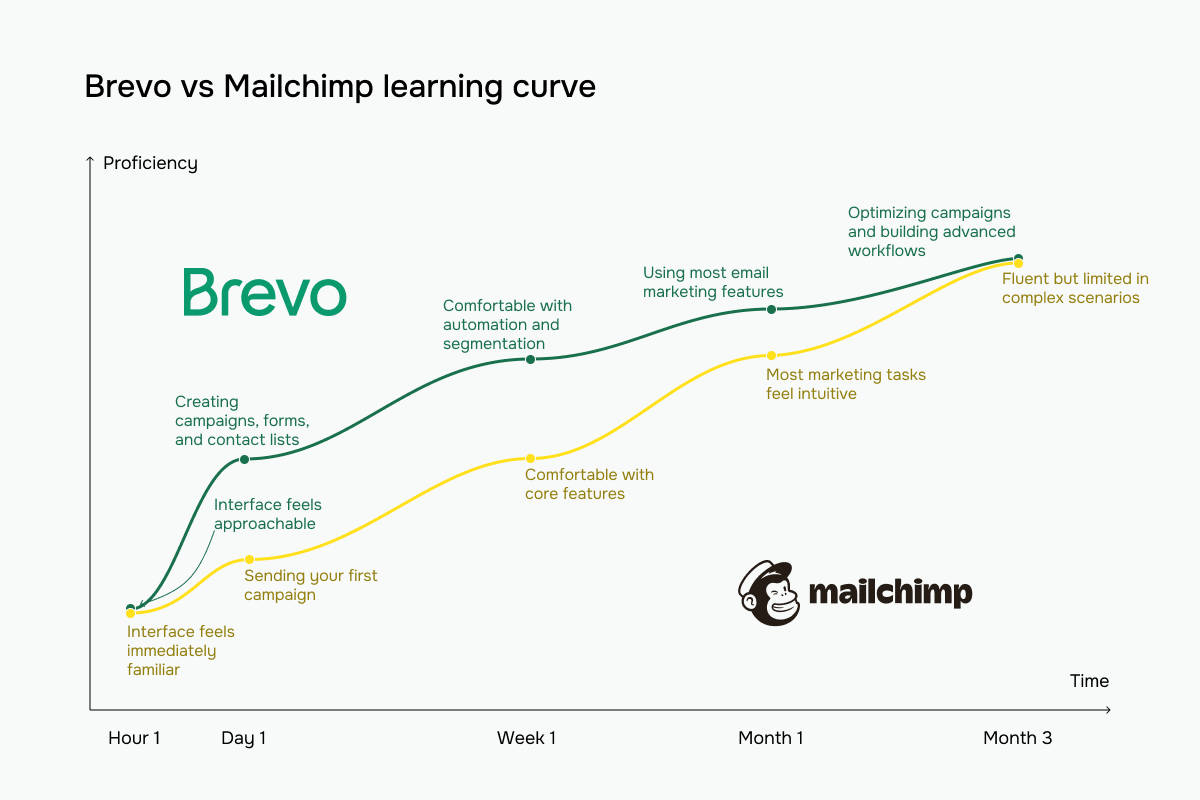 Brevo vs Mailchimp learning curve based on our testing experience
Email builder and templates
Brevo: 8.4/10 | ⭐ Mailchimp: 9.4/10
Mailchimp is the clear winner for email design. It gives you more room to experiment and create more sophisticated campaigns without leaving the platform or relying on technical workarounds. Brevo still covers the essentials well and should be more than enough for straightforward campaigns, but you’re more likely to hit its limits as your design and personalization needs grow. Mailchimp simply gives you more creative freedom and more tools to fine-tune the final email.
| Aspect |
Brevo |
Mailchimp |
Winner |
| Templates |
53 templates |
382 templates, and the number grows every month |
Mailchimp |
| Drag-and-drop editor |
One editor; desktop/mobile preview, undo/redo, version history, optional HTML/CSS mode |
New and legacy editors; undo/redo; legacy editor is used for custom code and RSS emails |
Tie |
| Notable content blocks |
Product block with live items from Shopify, Shopware, or PrestaShop |
Product and product recommendations, apps and survey blocks; conditional content available for any block |
Mailchimp |
| Mobile responsiveness |
Responsive by default; mobile preview with element-width adjustments |
Auto-stacking columns; device-specific alignment, padding, and margins |
Mailchimp |
| Sending time optimization |
Per-recipient best sending time based on engagement |
Best sending time within 24 hours and Timewarp by recipient time zone |
Mailchimp |
| Total score |
8.4/10 |
9.4/10 |
Mailchimp |
Now, let’s get to how email builders look and feel during real use.
Brevo keeps its builder relatively lean with 13 blocks, but there are some quite useful ones among them. For example, dynamic content, which is a block of its own, so you can drag conditional content into an email just like an image or button – a particularly convenient setup for newsletters or campaigns where different subscribers need to see different content.
Unfortunately, there are no dedicated survey, product recommendation, coupon, countdown, or advanced column blocks. You can fall back on HTML, but at that point some of the builder’s simplicity disappears.
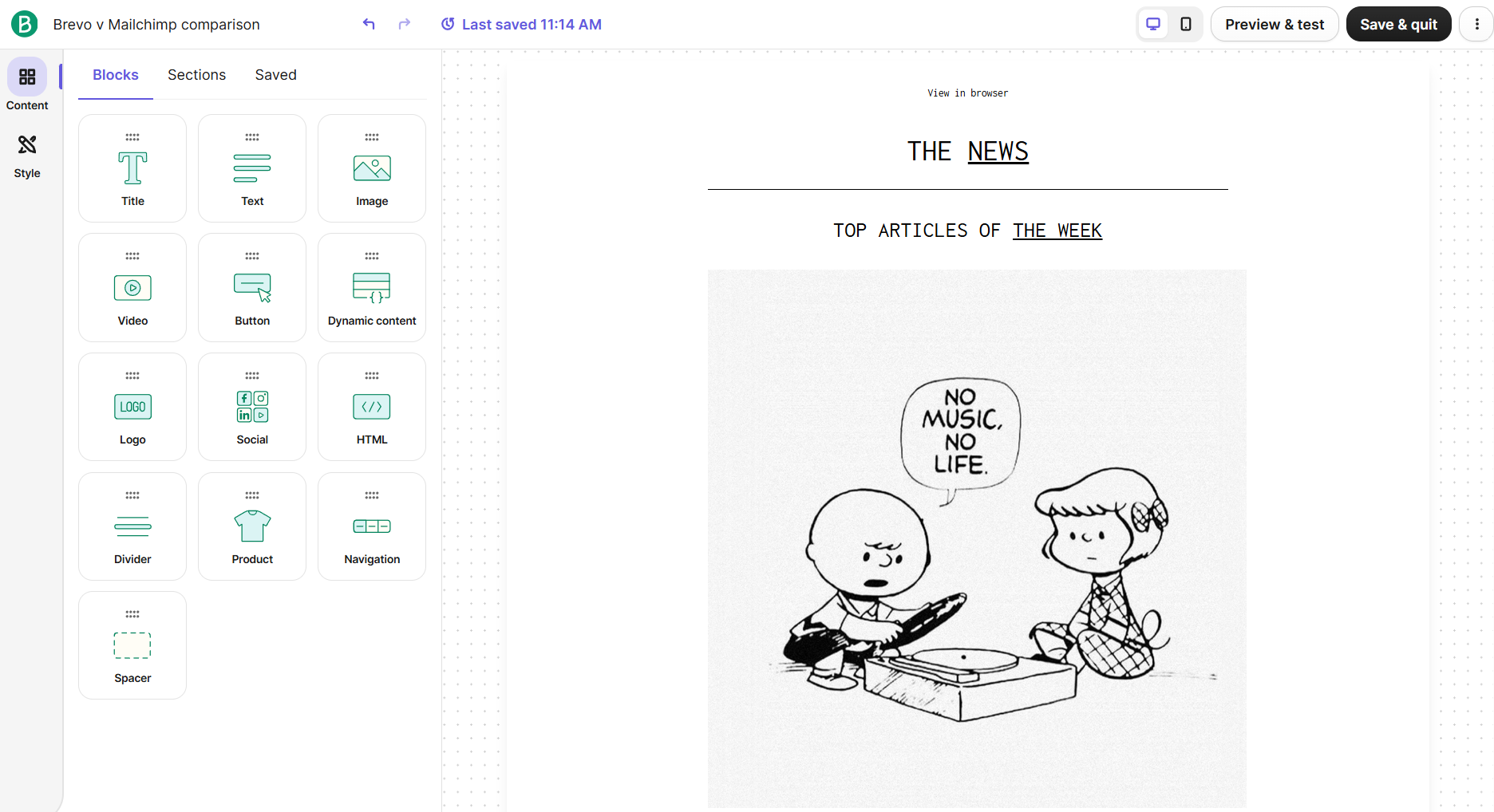 Hands-on testing of the Brevo email builder
Mailchimp gives you 15 blocks, but the real advantage is not the number but what they allow you to do. Its column controls are particularly good: you can visually choose one to four columns or asymmetric layouts before adding your content. For eCommerce, there are separate Product and Product Recommendations blocks, so you can add both selected products and behavioral recommendations.
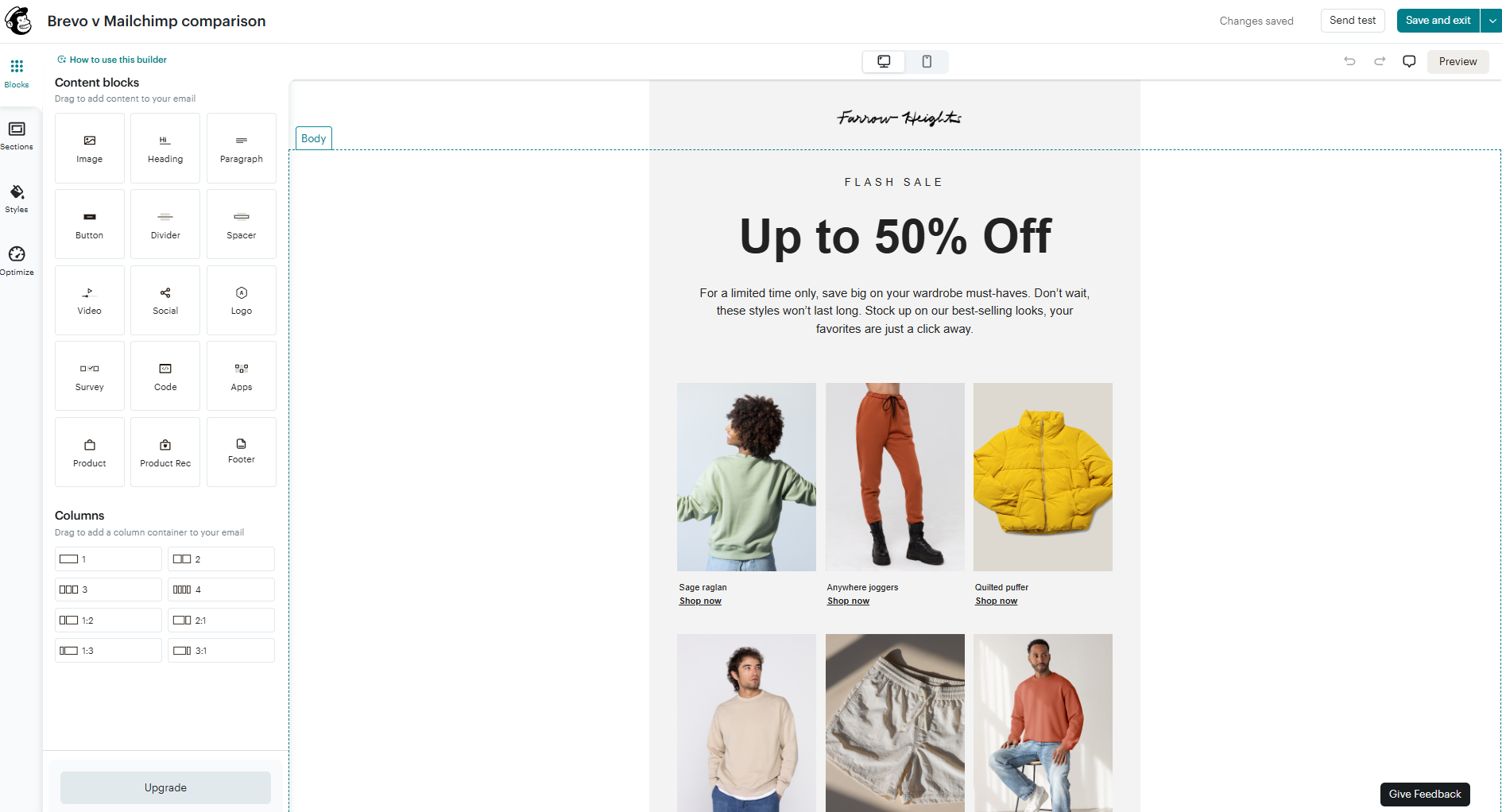 Trying out the Mailchimp email builder
Overall, Mailchimp gives you more ways to actually construct an email. Its notable blocks and visual column system are helpful once you move beyond a basic newsletter. It also offers more help, with optimization tools built into the editor.
Brevo has one feature that may outweigh all of that for the right marketer: conditional content is treated as a normal building block instead of an advanced feature. That’s useful if personalization is part of how you build campaigns. So, Mailchimp has the more versatile builder overall, while Brevo has the cleaner approach to dynamic, personalized emails.
SMS capabilities
⭐ Brevo: 8.6/10 | Mailchimp: 6.8/10
Not every business needs SMS campaigns, but for eCommerce, retail, hospitality, and appointment-based businesses, it can become an important companion to email. And while built-in SMS is no longer unusual among email marketing platforms, having both channels in one place makes it much easier to coordinate campaigns, automations, and customer data. So, let’s see how Brevo and Mailchimp handle it.
| Aspect |
Brevo |
Mailchimp |
Winner |
| Plans that include SMS |
Available on all plans; credits purchased separately |
Available on paid plans only; requires application and approval |
Brevo |
| Supported countries |
Broad country pricing via Brevo’s calculator; two-way, one-to-one messaging limited to dedicated numbers in the US, Canada, and France |
US, Canada, Australia, and over half of Europe, including the UK, Spain, France, Germany, the Netherlands, Switzerland, Austria, Ireland, and Italy |
Brevo |
| Pricing model |
Credit-based; pre-paid credits never expire; MMS costs 2.1 SMS credits |
Credit-based; unused monthly credits expire; MMS limited to Standard/Premium plans and US/Canada only |
Brevo |
| SMS-specific automation and keywords |
SMS available in workflows; only compliance keywords supported |
SMS workflows and custom keyword triggers for text-to-join automations |
Mailchimp |
| Two-way messaging SMS |
Native inbox messaging in US, Canada, and France |
Native inbox messaging with 10DLC numbers; no replies with branded sender IDs |
Tie |
| Total score |
8.6/10 |
6.8/10 |
Brevo |
Brevo gets the higher score for SMS, and its main advantage is accessibility: you can add SMS to any plan, credits don’t expire, and you don’t have to commit to regular sending for the pricing to work. This makes Brevo a particularly good fit if SMS is an occasional or supporting marketing channel.
Mailchimp has one important advantage, though – custom keyword automations. If growing your SMS list through campaigns like “Text JOIN to subscribe” is part of your strategy, that feature alone could make Mailchimp the better option. So, Brevo is better for affordable and flexible SMS sending, while Mailchimp has the edge for marketers who want to use SMS keywords actively for list growth and automation.
Marketing automation
⭐ Brevo: 8.8/10 | Mailchimp: 7.8/10
Brevo wins in automations for several reasons. Not only can it build more complicated workflows, but automation feels more central to the platform and reaches further across the customer journey. You can use it to connect marketing with conversations, sales processes, customer data, and operational tasks, so it can replace quite a bit of manual work.
Mailchimp supports typical email and SMS lifecycle campaigns, and its survey automation gives it a niche advantage. But you’re more likely to encounter limits as your workflows expand, especially if you want automation to connect several communication channels or parts of the business.
| Aspect |
Brevo |
Mailchimp |
Winner |
| Availability by plan |
Available on all plans; Free capped at 2,000 contacts in active automations |
No automation on Free plan; advanced marketing automation flows require higher plans |
Brevo |
| Automation builder |
Trigger → Rule → Action builder; classic and new editor; AI can generate complete workflows |
Classic linear automations and advanced marketing automation flows with branching, multiple triggers, and AI-assisted templates |
Brevo |
| Triggers available |
List changes, email engagement, website/custom events; WhatsApp and web push triggers on higher tiers |
Signups, contact data, tags, purchases, dates, and API events; multiple triggers in advanced flows |
Tie |
| Pre-built automations |
14 email templates, with new ones added regularly, and 4 SMS templates |
103 email/SMS templates; 89 of them email-only |
Mailchimp |
| Channels supported |
Email, SMS, WhatsApp, web push notifications |
Email and SMS |
Brevo |
| Automation complexity |
Consistent Trigger → Rule → Action structure even for advanced workflows |
Simple linear automations, advanced branching and complex flows on higher plans |
Brevo |
| Total score |
8.8/10 |
7.8/10 |
Brevo |
Brevo’s automation builder goes well beyond basic email workflows, with 16 triggers and 18 actions covering contacts, email, SMS, WhatsApp, website activity, and CRM events. Some options are particularly interesting: an Anniversary trigger can start a recurring birthday or renewal flow, while an incoming WhatsApp reply can trigger an automation, not just receive an automated response.
CRM is well represented too – deal creation and stage changes can start workflows, while actions can create or update deals, assign contacts to team members, update company data, or send a 1:1 email from a salesperson’s actual mailbox. There are also less common actions to automatically blocklist or delete contacts, which can be useful for compliance.
The builder itself is easy to navigate, since triggers, actions, and rules have separate, color-coded tabs. Rules include delays and conditional splits, but also percentage splits for A/B-style branching and a wait-until-event option. However, many advanced WhatsApp and CRM features are available only in higher tiers.
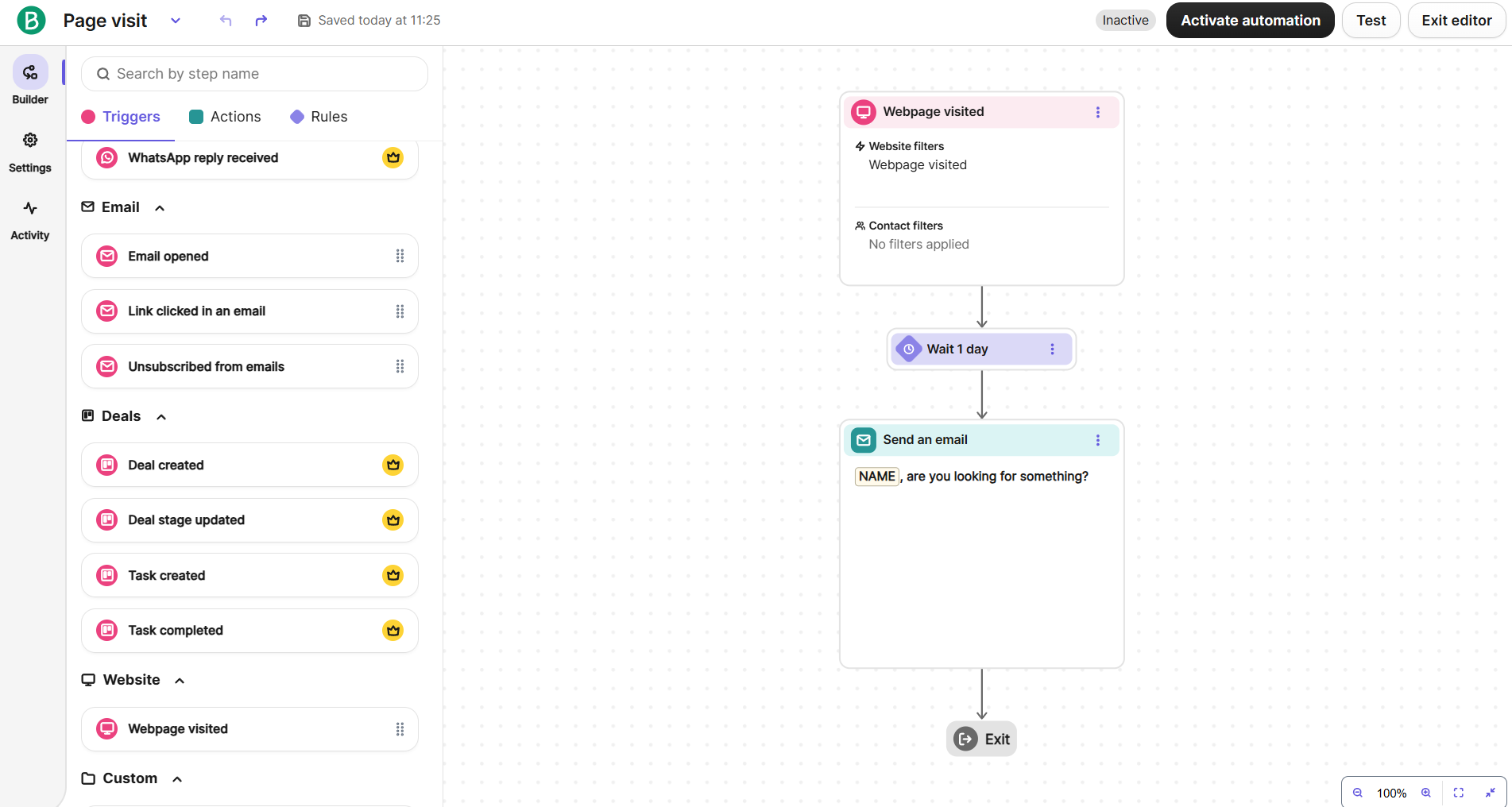 Customizing an automation flow in the Brevo builder
Mailchimp’s automation builder has 9 actions, including email, SMS, webhooks, contact updates, tags, groups, and archiving, alongside familiar rules such as If/Else, Split Path, Wait for trigger, and Time delay. The canvas is nicely designed: orange indicators immediately show which steps still need configuration, completed ones are marked in green, and + buttons between every step make it easy to insert something into an existing flow. You can also filter who enters an automation directly from its trigger node.
There is one capability here that Brevo doesn’t match: native survey automation. A survey response can trigger a workflow, and another survey can be sent from inside it, creating a complete feedback loop for NPS surveys, post-purchase feedback, or event follow-ups.
The bigger problem is plan gating. Mailchimp lets you build a flow, then tells you you need to upgrade before you can activate it; Essentials allows only four steps, while Standard allows 100. A simple survey workflow with a trigger, delay, email, and tag already uses all four Essentials steps.
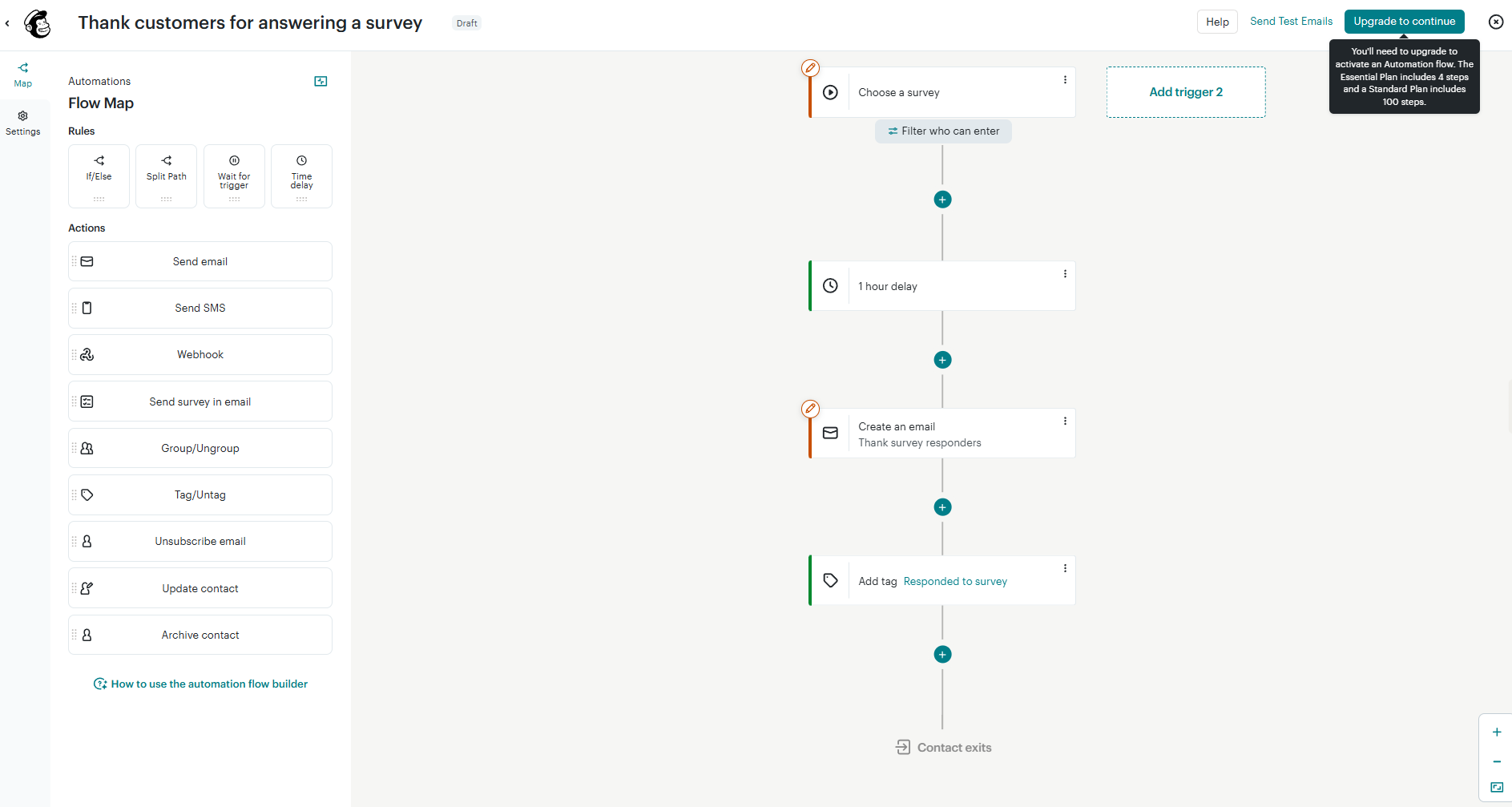 Checking out Mailchimp’s automation builder
There’s a considerable gap here. Brevo has roughly twice the automation vocabulary with more triggers and actions, but that’s not all. Its extra steps open up things Mailchimp largely can’t automate: incoming WhatsApp conversations, recurring dates, CRM deals, sales handoffs, company records, compliance tasks, personal sales emails, and more.
Mailchimp’s strongest counterpoint is surveys. If automated customer feedback is central to your strategy, its native trigger-and-send survey loop is very useful. Otherwise, Brevo is the much stronger automation platform, both in what you can automate and how easily you can find and assemble the necessary steps. Both platforms have plan restrictions, but Brevo marks individual premium features upfront, while Mailchimp’s more frustrating approach can prevent you from activating a workflow you’ve already built.
Contact management
⭐ Brevo: 9/10 | Mailchimp: 7.5/10
Contact management matters most once you start using customer data for more than just sending newsletters. Brevo should work particularly well for eCommerce businesses and marketers running behavioral automations, where contacts need to move between segments as their activity changes. Mailchimp may be more convenient for businesses that prefer to organize their audience manually, especially teams that already rely heavily on tags to target different customer groups.
| Aspect |
Brevo |
Mailchimp |
Winner |
| Segmentation capabilities |
Dynamic segments with up to 100 AND/OR conditions on all plans; AI-generated segments on higher tiers |
Basic segments with up to 10 conditions and one AND/OR operator; advanced tiers add unlimited nested AND/OR conditions |
Brevo |
| Segmentation criteria |
Contact data, engagement, eCommerce activity, website behavior, custom objects, and CRM deal events |
Contact data, tags/groups, engagement, eCommerce and website activity, forms, surveys, VIP status, contact rating, and predicted demographics |
Tie |
| Segment update speed |
Automatically updates in real time as contact data changes |
Updates can take minutes to 2 hours; send-time updating must be enabled to include newly qualified contacts |
Brevo |
| Tagging and manual organization |
No contact tags; uses structured contact attributes instead |
Freeform contact tags usable for organization, segmentation, and campaign targeting |
Maillchimp |
| Total score |
9/10 |
7.5/10 |
Brevo |
Brevo has an edge in contact management, especially if you rely heavily on automation. Good automation depends on customer data staying accurate and immediately reflecting what people do, and Brevo handles that connection particularly well. Its approach also avoids the extra list-management problem you get with Mailchimp, where separate audiences can turn the same person into multiple billable contacts.
Overall, Brevo feels stronger for data-driven marketing, since customer data is easier to keep current and put to work immediately in campaigns and automations.
Signup forms and landing pages
Brevo: 8.5/10 | ⭐ Mailchimp: 8.8/10
Mailchimp wins this category since it gives you more room to turn a simple signup form into a conversion tool. Brevo is a good fit when you want to collect contacts quickly and keep the process straightforward, especially when compliance is a priority. Mailchimp makes more sense when forms are an important part of your acquisition strategy, and you want to experiment with how, when, and where visitors convert.
| Aspect |
Brevo |
Mailchimp |
Winner |
| Types of forms available |
Embedded/full-page, pop-up, profile update, and unsubscribe forms |
Pop-up, embedded, and hosted forms |
Brevo |
| Form builder |
Drag-and-drop editor; contact fields, CAPTCHA, 3 embed options, double opt-in, and submission alerts |
Up to 30 custom fields; CAPTCHA, hidden fields, custom-code mode, and pop-up A/B testing |
Mailchimp |
| Pop-up targeting conditions |
Time delay, exit intent, page targeting, and frequency controls |
Time, inactivity, quick scroll, and exit intent triggers; device, frequency, and session targeting |
Mailchimp |
| Landing page builder |
Drag-and-drop editor; custom domains, reCAPTCHA, SEO settings, and custom tracking scripts |
Store products, analytics, and tracking; no custom HTML, iframes, or personalization |
Brevo |
| Total score |
8.5/10 |
8.8/10 |
Mailchimp |
Now let’s see how this all looks in practice when you try to create a signup form with both platforms.
Brevo keeps form building simple, with separate areas for adding content and styling the form as a whole. Its field selection covers the essentials, including attributes, single and multiple choice, and multi-list subscriptions, but its strongest point is privacy and compliance. Dedicated GDPR field, GDPR Declaration, and CAPTCHA blocks make these requirements part of the normal building process.
The design side follows the same straightforward philosophy: typography, background, container, buttons, alerts, and spacing are controlled globally, so you can style the whole form quickly and keep everything consistent. There are no per-element overrides, animations, hover states, or device-specific styling, though Brevo does offer one unusual feature – native right-to-left writing support for Arabic and Hebrew.
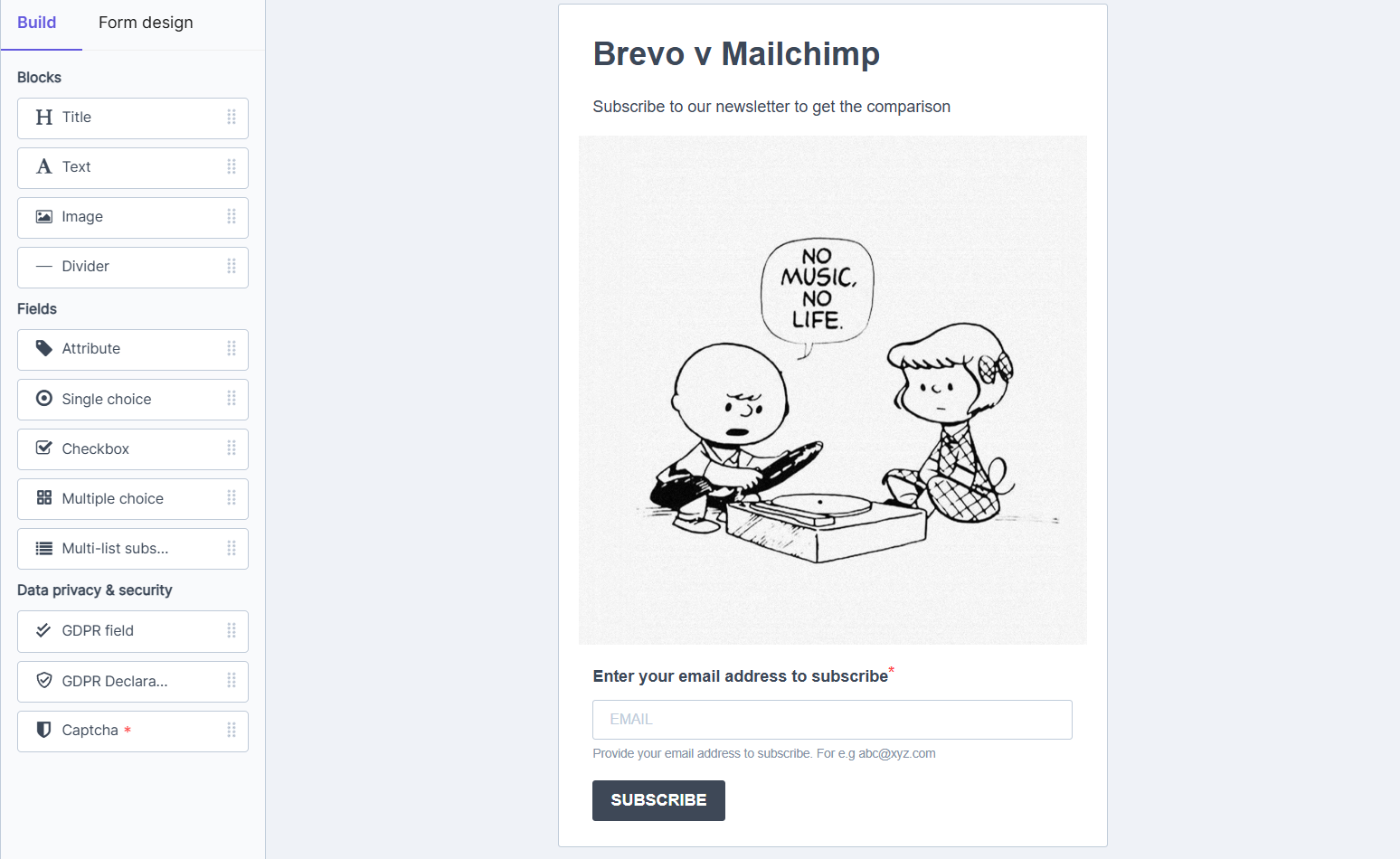 Checking out Brevo’s pop-up form
Mailchimp is far beyond a standard signup form. You can create multi-step pop-up campaigns with conditional branching, including follow-up paths triggered by what visitors do. One particularly interesting example is a second-chance offer that appears when someone tries to close the original pop-up, bringing abandonment recovery logic into the form builder itself.
The design controls are very deep for an email marketing platform. Individual elements can have reusable named styles, separate Normal and Hover states, animations with duration and delay, shadows, opacity, rotation, fixed positioning with exact pixel offsets, and flexbox-style controls for direction, alignment, justification, and gaps. Mobile and desktop image positioning can also be configured separately – for example, an image can sit below the content on mobile but occupy 45% of the right side on desktop.
Mailchimp’s signup form builder is less like a typical form editor and more like a dedicated web design or conversion optimization tool.
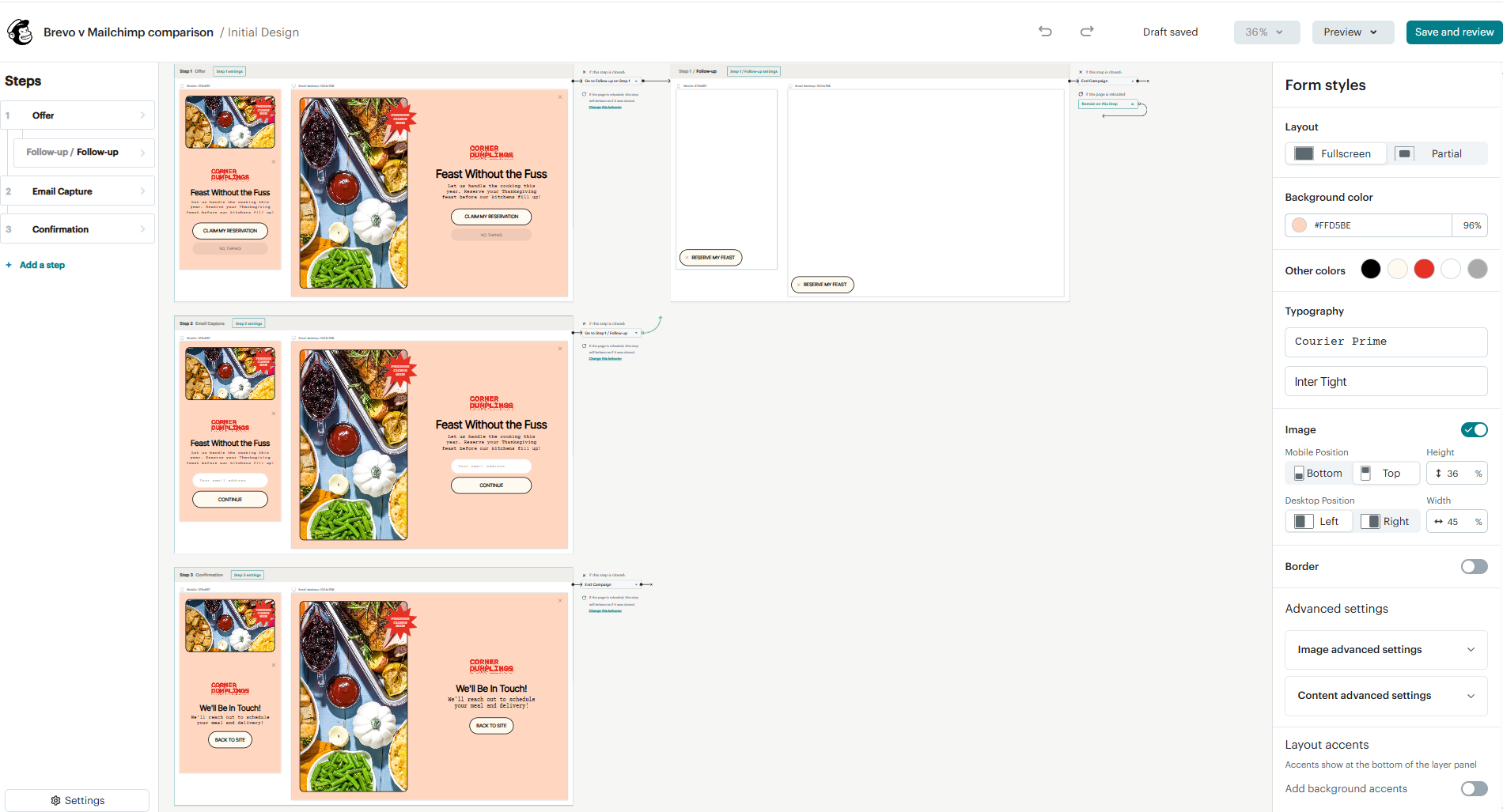 Signup form creation in Mailchimp
Mailchimp clearly wins this comparison, with one of the most detailed form builders we’ve come across while testing email marketing platforms. Brevo is much simpler, which can still be an advantage when all you need is a straightforward signup form. For basic, GDPR-ready forms, Brevo does the job well; for design flexibility, advanced pop-ups, and conversion optimization, Mailchimp is considerably stronger.
Integrations
Brevo: 8.8/10 | ⭐ Mailchimp: 9/10
Integrations matter because your email marketing platform rarely works alone. Your store, CRM, website, analytics tools, and other apps all generate customer data that can make your campaigns more relevant and your workflows less manual. Good integrations keep that data moving between tools automatically, while a limited integration ecosystem can mean more manual work or reliance on third-party connectors. Here’s how Brevo and Mailchimp compare in this category:
| Aspect |
Brevo |
Mailchimp |
Winner |
| Integration catalog |
150+ integrations |
300+ integrations |
Mailchimp |
| eCommerce platforms |
Shopify, WooCommerce, and BigCommerce |
Shopify, WooCommerce, BigCommerce, PrestaShop, Magento, Big Cartel, Lightspeed POS, and Squarespace Commerce |
Mailchimp |
| CRM systems |
Built-in sales CRM and native bidirectional Salesforce sync |
No built-in CRM; native Salesforce sync is limited; third-party apps offer deeper sync |
|
| API capabilities |
Event/profile and REST APIs; webhooks limited to 15 requests/min |
Separate marketing and transactional APIs with dedicated webhook events; 10 simultaneous marketing API connections |
Mailchimp |
| Zapier support |
17 triggers and 16 actions, spanning contacts, companies, deals, and campaign events |
10 triggers (new campaign, link clicked, new subscriber, unsubscribe, etc.) and 22 actions (create campaign, click report, create custom event, add/update subscriber, etc.) |
Mailchimp |
| Total score |
8.8/10 |
9/10 |
Mailchimp |
Mailchimp wins this category since it connects more naturally to a wider variety of external tools, making it a better fit if your marketing setup already relies on several platforms, especially for eCommerce. Brevo, on the other hand, already has more built-in business functionality, particularly CRM, so you may need fewer external integrations in the first place. That makes it attractive if you want to keep more of your marketing and sales work under one roof. Overall, Mailchimp is stronger for building a broad external tech stack, while Brevo is better suited to businesses that prefer a more self-contained setup.
AI features
⭐ Brevo: 9/10 | Mailchimp: 6.5/10
We’ve already covered some of these AI features throughout the comparison, but here we’ve brought them all together in one place. If AI is an important factor in your decision, this table should make it easier to see what each platform can do and where the biggest differences are.
| Aspect |
Brevo |
Mailchimp |
Winner |
| Email generation |
Generates full email designs from prompts; pulls brand style from a website; creates subject/preview text; translates campaigns |
Generates email copy; creates/resizes layouts; generates alt text; suggests stock images |
Tie |
| Automation generation |
Builds a complete workflow, including trigger, rules, and actions, from a prompt |
Doesn’t generate workflow logic |
Brevo |
| Predictive customer analytics |
Predicts CLV, churn risk, and purchase count/rate |
Predicts CLV, churn risk, next purchase time, age, and gender |
Tie |
| Smart segmentation suggestions |
Offers complete segments from prompts |
No prompt-based segment generation |
Brevo |
| Total score |
9/10 |
6.5/10 |
Brevo |
Brevo wins this category. Both platforms can help with content creation and customer predictions, but Brevo’s AI is more involved in doing the marketer’s work. It can take a request and turn it into something usable across different parts of a campaign. Mailchimp’s AI is also useful, but it works more like an assistant within tools and processes you’ve already chosen. So, Mailchimp is strong at helping you create and optimize, while Brevo goes further in actually building things for you.
Deliverability
⭐ Brevo: 10/10 | Mailchimp: 8.5/10
Deliverability isn’t determined by the platform alone. Your list quality and sending practices matter just as much – even a strong deliverability infrastructure can’t compensate for poor list hygiene or consistently bad sending habits. So, don’t base your decision on deliverability scores alone. Also consider how your team manages contacts, follows email marketing best practices, and protects sender reputation.
| Aspect |
Brevo |
Mailchimp |
Winner |
| Authentication |
Sets up DKIM and DMARC automatically with one click; supports BIMI |
Guided or manual DKIM setup, DMARC and BIMI support; SPF is handled on Mailchimp’s sending domain |
Brevo |
| Deliverability monitoring |
Real-time deliverability score, issue alerts, and domain-level performance |
Standard campaign metrics, automated risk detection and account monitoring; no visible deliverability score |
Brevo |
| List hygiene |
Hard bounces blocked immediately; soft bounces retried for 36h and blocked after 5 consecutive bounces |
Engagement-based handling; 7–15 soft bounces allowed depending on activity; risky sends can trigger account restrictions |
Mailchimp |
| Dedicated IP |
Available as a paid-on on higher tiers; automated or guided warm-up |
Only for transactional emails; no dedicated IP for marketing emails |
Brevo |
| Total score |
10/10 |
8.5/10 |
Brevo |
Reporting and analytics
⭐ Brevo: 9/10 | Mailchimp: 8.8/10
Yes, reporting matters, but how much it matters depends on the business. For a small company sending an occasional newsletter, basic campaign statistics may be enough. For eCommerce businesses, agencies, and teams running multiple communication channels and automations, reporting becomes much more important – you need to know what drives engagement and revenue, compare campaigns, and decide where to invest your budget. The more complex your marketing gets, the more valuable good reporting becomes. Here’s what Brevo and Mailchimp offer:
| Aspect |
Brevo |
Mailchimp |
Winner |
| Report coverage |
Ready-made dashboards for email, SMS, transactional messages, revenue, and customer data; 48-hour eCommerce attribution |
Reports across email, automation, SMS, forms, surveys, landing pages, ads, social, websites, and audiences; unified marketing and predictive dashboards |
Mailchimp |
| Custom reports |
BI-style dashboards with custom queries, charts, filters, AI queries, and formulas |
Custom email, SMS, and eCommerce reports with audience/campaign grouping; 2 years of data |
Brevo |
| Reporting speed |
Real-time transactional reporting; marketing reports generated on demand |
Campaign engagement updates as events happen; automation reports update as contacts progress |
Tie |
| Export capabilities |
CSV and PDF |
CSV and PDF |
Tie |
| Total score |
9/10 |
8.8/10 |
Brevo |
Brevo wins this category by a small margin. Mailchimp is excellent if you want plenty of ready-made reports covering different marketing activities, but Brevo offers more flexibility when you want to build your own analysis. For most marketers, either platform should provide more than enough data; Brevo has the edge in customization, while Mailchimp may feel more convenient if you mostly rely on ready-to-use reports.
Customer support
⭐ Brevo: 7.6/10 | Mailchimp: 7/10
Customer support matters most when you’re new to a platform and don’t yet know where everything is or how it works. Good support can save hours when you’re setting up your account, importing contacts, configuring authentication, or launching your first campaigns and automations. Later, you may rarely need it, but during onboarding or when something goes wrong, fast access to someone who can help can make a big difference.
| Aspect |
Brevo |
Mailchimp |
Winner |
| Channel availability |
Tickets on all plans; phone support on higher tiers; no live chat |
Free plan gives email support for 30 days; higher plans offer 24/7 chat and email; the highest plan has phone, priority support, and screen sharing |
Mailchimp |
| Knowledge base |
Help center and free Academy with courses, quizzes, and certification; Community and video tutorials |
Extensive, well-structured help center; easy to search, though some articles contain conflicting or outdated information |
Tie |
| Onboarding assistance |
Mainly self-service; certified third-party agencies available for hands-on help |
1:1 onboarding on higher plans during the first 90 days; the highest plan adds a Customer Success Team |
Mailchimp |
| Support quality sub-rating on Capterra |
4.5/5 |
4.2/5 |
Brevo |
| Total score |
7.6/10 |
7/10 |
Brevo |
Brevo wins by such a wide margin because of the feedback from real users we found on Capterra. Its support rating is considerably higher, suggesting that in practice, Brevo users find the support they receive more helpful.

Join businesses growing with SendPulse
From solo creators to global brands, thousands of customers trust SendPulse to run email campaigns, chatbots, automations, and more — all in one place.
Get started for free
Your decision checklist
You now have all the information in front of you, including the final scores. But the scores alone don’t tell us much – there’s only a 0.1-point difference, with Brevo technically winning the comparison. Does that mean Brevo is the better choice for you? Not necessarily. Your decision will largely depend on your type of business, especially since Brevo uses a different pricing model, charging for emails sent instead of the number of contacts you have. Here are a few other things to consider before making your final decision.
| Decision area |
Brevo
is a better fit if… |
Mailchimp
is a better fit if… |
| Business type |
You run multi-channel outreach (email, SMS, WhatsApp) with light CRM needs, and your list is large or growing, but you send infrequently or in bursts – since Brevo charges by emails sent, not list size, that shape of business pays less. This tends to be small businesses/startups on a budget, agencies managing several small clients, nonprofits and newsletters with big but lightly-emailed lists, and businesses where WhatsApp matters as a customer channel. |
You’re ecommerce-focused (especially Shopify/WooCommerce) and send frequently to a smaller, tighter list – since Mailchimp charges by contact count, frequent sending to a modest list stays predictable, while a big dormant list costs more than it would on Brevo. This tends to be eCommerce sellers and solo creators who want revenue-driving features (predictive CLV, abandoned cart, real tags) and richer live support built in. |
| Budget expectations |
You want automation and CRM basics included at every tier, without needing a premium plan to unlock them. |
You’re fine paying more as you climb tiers, since Mailchimp’s higher plans unlock real added capability, not just higher contact limits. |
| Automation needs |
You want stronger multi-channel automation that connects marketing, CRM, and customer communication. |
You mainly automate email/SMS and value built-in survey workflows. |
| Analytics focus |
You want deeper custom reporting and more flexibility to analyze your data. |
You want broader ready-made reporting across more marketing channels. |
| Team setup |
You have a small team and want one lightweight tool with basic CRM built in. |
You have a team focused specifically on marketing and eCommerce, without needing built-in sales or CRM tooling. |
If three or more answers point to one platform, you may have found your winner. But what if neither Brevo nor Mailchimp feels quite right? In that case, check out our recommendations below.
Final verdict and recommendations
⚖️ Final scores: Brevo – 8.5/10 | Mailchimp – 8.4/10
With their scores being that high, we would definitely recommend both Brevo and Mailchimp. They’re established email marketing platforms with large user bases, strong feedback from real users, and affordable pricing. But they’re also fairly general-purpose tools. What if your business needs something more specific?
- If you want to connect email marketing with lead management and chatbot conversations, consider SendPulse. It combines email, a built-in CRM, and chatbots for multiple communication channels.
- If your business is built around content, newsletters, or subscriptions, consider Kit. It’s designed for creators, with a generous free plan and subscriber-focused tools.
- If you need eCommerce-focused marketing, consider Klaviyo. Its automation, segmentation, and personalization tools are closely tied to customer and purchase data.
Whichever platform you choose, take time to decide. Setting up a new email marketing platform takes time, and migrating later can cost both time and money. Check out our other comparisons before committing to make sure you choose a platform that will still work for you as your business grows.
Brevo vs Mailchimp FAQ
What is the difference between Mailchimp and Brevo?
Brevo prices by how many emails you send per month, not by list size; it also includes automation and a basic CRM on every plan, even free. Mailchimp prices by contact count and gates its more powerful features, like branching automation and custom reports, behind higher tiers.
Is Brevo as good as Mailchimp?
Ratings are close (Brevo runs slightly ahead), so yes, we can say so. Brevo is very capable, as well as Mailchimp, although they are a bit different.
Is Brevo cheaper than Mailchimp?
Depends on your sending pattern, not just features. Brevo charges by emails sent, so a large list emailed occasionally stays cheap. Mailchimp charges by contact count, so a smaller list emailed often stays cheap there instead. Neither is flatly cheaper; it flips based on your list size versus how often you send.
Can Brevo replace Mailchimp?
For core email marketing, yes, for most businesses. Not that many gaps: Brevo has no freeform contact tags (Mailchimp does), a smaller native eCommerce integration list, and no live chat to reach the support team.