SMS campaigns remain one of the fastest ways to reach customers when timing matters most. Unlike other marketing channels that depend on internet access or crowded inboxes, text messages appear directly on recipients’ phones and are typically seen within minutes. That makes SMS a reliable choice for everything from flash sales and appointment reminders to product launches and transactional updates.
In this guide, you’ll learn how to run SMS campaigns that are both effective and compliant: how to get consent and follow the rules in your market, choose the right campaign type, write messages, create and send them in SendPulse, and measure performance.
TL;DR SMS campaigns at a glance
SMS campaigns give businesses a direct way to reach customers with time-sensitive messages. They can take the form of one-time broadcasts, triggered messages, or two-way conversations. SMS is particularly useful when you want customers to act quickly, whether that’s claiming an offer or replying to a message.
An SMS campaign is a planned message or series of messages sent to a specific, consented audience to achieve a measurable goal. A typical campaign moves through a simple lifecycle: confirm consent, set a goal, segment the audience, create the message, send or trigger it, measure the response, and optimize future sends.
Whatever the use case, three rules matter most: get permission before messaging, give every message a clear purpose, and measure what recipients do afterward. Delivery alone doesn’t make a campaign successful. The real result might be a purchase, review, or another meaningful action.
What is an SMS campaign?
An SMS campaign is a planned text message or series of messages sent to a specific, consented audience to achieve a measurable business goal. That goal might be generating sales, recovering abandoned carts, reminding customers about appointments, or sharing important service updates.
A well-planned SMS campaign has several core components:
- a clear goal;
- an eligible audience;
- a message and sender;
- timing or cadence;
- a call to action;
- a KPI.
This distinction matters because not every text a business sends is a standalone SMS campaign. Some messages are part of ongoing automation or a broader SMS marketing strategy.

Start growing with SendPulse
Join thousands of businesses using SendPulse to make marketing, automation, and sales easier. Explore the tools built for growth.
Get started for free
SMS campaign vs SMS marketing strategy
An SMS campaign is one execution within a broader SMS marketing strategy. Your strategy determines why, when, and how your business uses SMS over time, while individual campaigns turn those decisions into specific actions.
| SMS marketing strategy |
SMS campaign |
| Defines the role of SMS in the customer journey |
Addresses one specific business goal |
| Establishes target audiences and consent practices |
Targets an eligible audience or segment |
| Determines messaging principles and frequency |
Contains a specific message, offer, or update |
| Sets long-term measurement priorities |
Has its own KPI and timeframe |
| May include multiple campaign types and automations |
Is one execution within the strategy |
For example, an eCommerce brand’s strategy might use SMS for urgent, high-intent communication and limit promotional frequency. A 48-hour Black Friday sale for loyalty members would be one campaign built within that strategy.
SMS campaign vs automated SMS flow
Another useful distinction is between scheduled campaigns and automated flows.
A scheduled SMS campaign is sent at a marketer-defined time to an eligible audience. A Black Friday announcement sent to opted-in customers at 10 AM is a straightforward example.
An automated SMS flow starts when a customer action or another predefined event occurs. For instance, instead of manually sending cart reminders every day, you can trigger an SMS when a shopper abandons their cart and suppress the message automatically if they complete the purchase.
Promotional vs transactional vs conversational SMS
The purpose of a message also determines how an SMS campaign should be handled.
- Promotional SMS encourages a commercial action, such as purchasing a product, claiming a discount, or checking out a new collection. These messages should only go to recipients who have the appropriate marketing consent.
- Transactional SMS provides information related to an existing transaction or service, such as an order confirmation or appointment reminder. Keep these messages focused on their operational purpose. A customer’s permission to receive an order update doesn’t automatically mean you can send them unrelated promotions.
- Conversational SMS invites customers to reply and continue the interaction. A business might ask recipients to reply BOOK to schedule an appointment or HELP to contact support. Responses can then be handled by an agent or routed through an SMS chatbot.
The right format depends on what should happen after the message arrives: should the customer buy, get informed, or reply? That decision makes it much easier to choose the campaign type, CTA, automation, and metric that follow.
How to get consent and stay compliant
SMS marketing compliance isn’t the last box to tick before you send — it’s the foundation the whole campaign stands on. You can’t build an audience, choose a sender, or click send until you have permission and a way for people to opt out.
As a practical baseline, obtain the appropriate permission, make the sender recognizable, explain what people are signing up for, send content that matches that permission, provide an easy way to opt out, and keep records of consent and withdrawal.
These principles travel well across markets, but the exact legal requirements don’t. Consent standards, sender registration, and other details can vary by country and sometimes by state. Treat the guidance below as a starting point and verify the rules that apply to every market you target.
Country-by-country SMS marketing laws
The table below is a quick reference to the main frameworks and regulators across five major markets, namely the US (TCPA/FCC), the EU/EEA (GDPR and ePrivacy), the UK (PECR), Canada (CASL), and Australia (Spam Act), with links to the official regulatory documents for each.
| Market |
Main frameworks and authorities |
What marketers should pay particular attention to |
| United States |
TCPA, FCC, CTIA guidelines, A2P 10DLC/The Campaign Registry, state laws |
Consent requirements, sender/campaign registration, revocation, carrier rules, and state-specific quiet hours |
| European Union / EEA |
GDPR, the ePrivacy Directive (implemented in national law), national data protection authorities |
Prior consent for marketing SMS, a lawful basis for handling phone numbers, sender identification, and an easy opt-out |
| United Kingdom |
UK GDPR, PECR, ICO |
SMS-specific consent in many cases, limited soft opt-ins, identification, and easy opt-out |
| Canada |
CASL, CRTC |
Consent, sender identification, unsubscribe mechanism, and expiry of certain forms of implied consent |
| Australia |
Spam Act 2003, ACMA |
Express or inferred consent, sender identification, functional unsubscribe, and sender ID registration |
Last reviewed September 2026. SMS compliance rules change and vary by market, so remember this is general guidance, not legal advice. Verify the current requirements for every market you target.
TCPA and carrier registration in the United States
In the US, SMS marketers need to consider both legal requirements and mobile-carrier requirements. Under the Telephone Consumer Protection Act (TCPA) and FCC rules, certain automated marketing texts require prior express written consent. Keep evidence of how and when that consent was obtained. Do not rely only on the presence of a phone number in your database.
Consumers must also be able to revoke consent. FCC rules that took effect on April 11, 2025 confirmed that recipients can revoke consent to covered robocalls and robotexts by any reasonable means, including replying STOP, QUIT, END, CANCEL, or UNSUBSCRIBE, and generally require revocation requests to be honored within 10 business days.
One part of the rule is still on hold. The requirement that a revocation sent in response to one type of message apply to all future robocalls and robotexts from that sender, even on unrelated matters, has been delayed to January 31, 2027. Until then, honor opt-outs as they apply to the message the recipient responded to.
If you send business messages through US 10-digit long-code numbers (10DLC), A2P 10DLC registration is another operational requirement to consider. The Campaign Registry connects verified brands and campaign use cases with the 10DLC messaging ecosystem. Your messaging provider will typically guide you through the registration process.
Carrier and industry requirements matter too. CTIA’s Messaging Principles and Best Practices emphasize consent and opt-out handling, and its SHAFT rules restrict content involving sex, hate, alcohol, firearms, and tobacco (plus cannabis). Carriers can filter or block traffic that violates them, so treat these as practical requirements even though they aren’t law. State-level “mini-TCPA” laws may add requirements such as different quiet hours, so a federal-only compliance check may not be enough.
You may also see CAN-SPAM mentioned for texts. Its wireless rule covers commercial messages sent to a wireless address that includes an internet domain (email-to-text), not ordinary SMS. For SMS marketing, TCPA, CTIA, and 10DLC are the frameworks that matter most.
One more change is worth flagging so you don’t rely on outdated guidance: the FCC’s “one-to-one consent” rule, which would have tightened consent for certain lead-generation arrangements, was vacated by the US Court of Appeals for the Eleventh Circuit in January 2025, and the FCC has since formally repealed it. It is not in effect.
GDPR and ePrivacy in the EU and EEA
In the EU and EEA, marketing SMS is governed by the ePrivacy Directive alongside the GDPR. The ePrivacy Directive generally requires prior consent before sending marketing texts to individuals, with a limited soft opt-in for existing customers being marketed similar products, subject to an opt-out both when details are collected and in every message. Because the directive is implemented through national laws, the exact rules vary by member state, so check the requirements in each country you target.
Under the GDPR, a phone number is personal data, so you also need a lawful basis to process it. For marketing, that is almost always freely given, specific, informed, and unambiguous consent, not a pre-ticked box. Every message should identify the sender and offer a simple way to opt out.
The long-proposed ePrivacy Regulation, which would eventually replace the Directive, is still not in force, so the Directive continues to govern.
PECR and UK GDPR in the UK
In the UK, SMS marketing falls under PECR alongside UK GDPR and other data-protection requirements. For unsolicited marketing texts to individual subscribers, businesses generally need valid consent unless a relevant soft opt-in applies.
Consent should be specific to the communication channel. Someone agreeing to receive marketing emails doesn’t automatically consent to marketing texts. Likewise, collecting a phone number to send a booking confirmation doesn’t by itself give a business permission to start sending promotional SMS.
The product and service soft opt-in provides a limited exception for existing customers under specific conditions. Among other requirements, the organization must have obtained the contact details directly during a sale or negotiation for a sale, market its own similar products or services, and provide an opt-out both when collecting the details and in subsequent messages. UK rules now also include a separate charitable-purposes soft opt-in introduced by the Data (Use and Access) Act 2025, which the ICO clarified in updated direct-marketing guidance in 2026.
Every marketing message should clearly identify the sender and provide a simple way to opt out. UK businesses should use current ICO guidance as their primary practical reference rather than treating consent collected for another channel or purpose as universal permission.
CASL in Canada
Canada’s Anti-Spam Legislation, or CASL, generally requires consent before businesses send commercial electronic messages, including SMS. Messages also need appropriate sender identification, contact information, and a working unsubscribe mechanism.
CASL distinguishes between express and implied consent. Express consent generally doesn’t expire unless the recipient withdraws it, while implied consent can have a limited lifespan. For example, an existing business relationship may commonly support implied consent for two years after a qualifying purchase or transaction, while an inquiry can support it for six months, depending on the circumstances.
This makes consent dates important operational data. A contact may still exist in your CRM even though the legal basis you relied on to message them has expired.
Spam Act 2003 in Australia
Under Australia’s Spam Act 2003, businesses generally need express or inferred consent to send commercial SMS messages. The message must identify the sender and provide a functional unsubscribe method.
An unsubscribe request must be honored within the applicable timeframe — ACMA guidance specifies five working days — and the unsubscribe facility should remain functional for the required period without imposing an additional fee or unnecessary steps.
Sender identity also has a deliverability dimension. ACMA warns that SMS using unregistered sender IDs can be labeled “Unverified,” and it has launched an SMS Sender ID Register to reduce scam messaging. Businesses using branded sender IDs should check registration requirements with their messaging provider rather than assuming the brand name alone establishes trust.
Running email alongside SMS? Our guide to email marketing laws breaks down consent, opt-outs, and sender requirements on the email side.
Consent records and suppression lists
“Opted in” shouldn’t be a field with no history behind it. Keep enough evidence to reconstruct the permission if necessary, including:
- the form or signup version;
- exact consent wording;
- date and timestamp;
- IP address or acquisition source where appropriate;
- communication channel;
- program or campaign category;
- expected message frequency where applicable;
- subsequent opt-out or withdrawal.
In practice, a single record might look like this:
| Field |
Example |
| Consent wording |
“Yes, send me SMS offers from Acme. Frequency varies. Reply STOP to opt out.” |
| Source / form |
Checkout page, signup checkbox v3 |
| Date & timestamp |
2026-03-14, 10:22 ET |
| Channel / type |
SMS — promotional |
| Opt-out record |
STOP received 2026-05-02, suppressed |
Maintain suppression lists separately from active marketing lists. Deleting an unsubscribed contact without retaining enough information to suppress future imports can result in accidentally adding them back later.
Unsubscribe and preference management
Make leaving the list as easy as joining it. Depending on the market and sender setup, this might mean replying “STOP” or another recognized keyword, following an unsubscribe link, or changing preferences.
Define what an opt-out actually covers. A customer may be leaving one SMS program or withdrawing permission for all promotional SMS from your business. Your systems should distinguish these cases when applicable and ensure suppression rules are applied consistently.
A preference center can also give customers more control without forcing an all-or-nothing choice, for instance, allowing them to receive order updates while declining promotional messages.
Sender IDs, long numbers, toll-free numbers, and short codes
The sender you choose affects recognition, reply capability, throughput, registration requirements, geographic availability, and cost.
Alphanumeric sender IDs make a brand immediately recognizable but may not support replies in some markets. Long numbers can support conversational messaging but may require registration for business traffic. Toll-free numbers and short codes come with their own verification, throughput, pricing, and use case requirements.
Choose the sender based on what the SMS campaign needs customers to do. If you’re asking people to reply “BOOK,” a sender that doesn’t accept replies defeats the campaign mechanics.
Timing, time zones, and quiet hours
Don’t build a global campaign around one server time. Store or infer the recipient’s local time where appropriate, segment sends by time zone, and schedule delivery accordingly.
Before launching, use this workflow: identify the recipient’s jurisdiction → check applicable national and local requirements → establish permitted sending windows → convert them to recipient-local time → apply those rules in your campaign schedule.
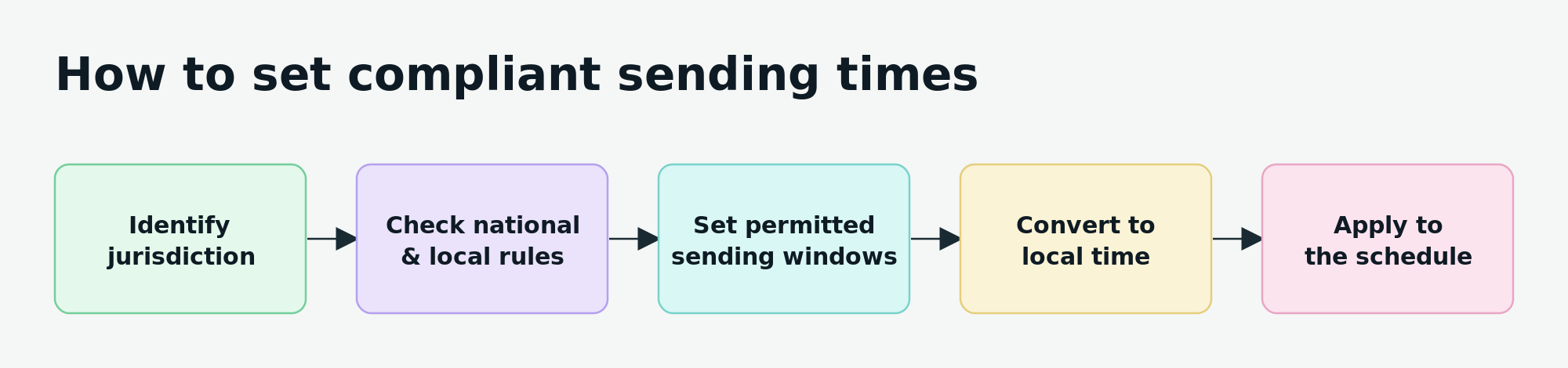 A five-step workflow for scheduling SMS within each recipient’s legal sending window
This is especially important in markets where state or regional rules can impose additional restrictions. Avoid turning a general recommendation such as “don’t text customers late at night” into a universal legal cutoff.
Timing works differently across communication channels. For email specifically, see our guide to the best time to send emails with day- and hour-level benchmarks.
Deliverability and list hygiene
Legal permission gets you onto the starting line; it doesn’t guarantee that the message will reach the recipient. Carriers also evaluate sender identity, traffic patterns, content, and recipient behavior. In practice, compliance and deliverability reinforce each other: wanted, recognizable messages are less likely to generate complaints and filtering signals.
Phone numbers can become inactive or be recycled, and old databases accumulate contacts whose permission or interest may no longer be reliable. Regularly remove or suppress invalid phone numbers and investigate unusual delivery failures. Avoid sudden unexplained volume spikes, misleading sender identities, prohibited or high-risk content, broken links, and domains customers won’t recognize.
Relevance matters here too. If recipients repeatedly receive messages they didn’t expect or don’t value, they’re more likely to opt out, report the sender, or ignore future campaigns.

Power up your business with smart tools
SMS, emails, chatbots, automation, CRM, and more — everything you need to connect with your audience.
Get started for free
Types of SMS campaigns and when to use each
Different SMS campaigns solve different problems. Start with the action you want customers to take, then choose the campaign type that supports it.
The matrix below covers the main SMS campaign types at a glance, including their goal, audience, CTA, primary KPI, the main risk to avoid, and the execution that usually fits.
| SMS campaign type |
Goal |
Best audience or trigger |
Recommended CTA |
Primary KPI |
Main risk to avoid |
Best execution |
| Welcome & activation |
Deliver promised value and move a new subscriber toward their first action |
Newly opted-in subscribers |
“Use your discount,” “Shop now,” “Choose preferences” |
First conversion or preference completion |
Delaying the incentive, unrelated offers, or overwhelming new subscribers |
Automated flow; one-time for simple confirmation |
| Promotional & flash sale |
Generate conversions or revenue in a defined window |
Opted-in customers matching eligibility, interest, or history |
“Shop the sale,” “Claim your discount,” “Get the offer” |
Conversion rate or revenue |
Irrelevant offers, false urgency, hidden conditions, mismatched landing page |
Scheduled broadcast; series if a reminder is justified |
| Product launch & back-in-stock |
Generate early demand or convert existing interest |
Waitlist, VIPs, past buyers, viewers of an unavailable item |
“Shop early,” “Get yours,” “Buy before it sells out” |
Product-page conversion or purchase rate |
Low-intent audiences, exaggerated scarcity, messaging past purchasers |
Broadcast for launches; automated flow for back-in-stock |
| Cart & browse recovery |
Bring high-intent visitors back and recover lost purchases |
Opted-in cart abandoners or strong browse signals |
“Complete your order,” “Return to your cart” |
Recovered-order rate or revenue |
Sending after purchase, weak signals, overlapping SMS and email |
Automated flow with purchase suppression |
| Appointment, booking & event |
Confirm bookings and reduce no-shows |
Customers with a confirmed appointment, booking, or registration |
“Confirm,” “Reschedule,” “View details,” “Add to calendar” |
Attendance, confirmation, or completion rate |
Reminders too late, missing details, hard rescheduling |
Triggered automation; broadcasts for event-wide changes |
| Loyalty, VIP & early access |
Increase retention, repeat purchases, and loyalty engagement |
Loyalty members, VIP tiers, milestone reachers |
“Redeem your reward,” “Shop early access,” “Use your points” |
Repeat revenue, redemption rate, or loyalty engagement |
Overusing “exclusive,” fake VIP perks, perks offered to non-members |
Broadcast for member promos; automated for milestone triggers |
| Re-engagement & win-back |
Reactivate inactive customers or identify who to stop messaging |
Customers past a defined inactivity threshold |
“Come back,” “Claim your offer,” “Update preferences” |
Reactivation or repeat-purchase rate |
Arbitrary thresholds, over-relying on discounts, messaging the unresponsive |
Scheduled series or automated flow with suppression rules |
| Review, survey & feedback |
Collect feedback, measure satisfaction, or generate reviews |
Customers just after a purchase, appointment, or interaction |
“Rate your experience,” “Take the survey,” “Leave a review” |
Survey, response, NPS, or review completion rate |
Poor timing, long surveys, repeat asks, non-compliant review incentives |
Triggered automation at the right interval |
| Transactional & service |
Deliver necessary, timely order, payment, or service information |
A customer action or system event |
“Track your order,” “View payment,” “Access your course” |
Successful delivery or completion of the service action |
Delays, missing details, or promo content that reclassifies the message |
Automated transactional trigger |
| Two-way & keyword response |
Generate replies, collect preferences, qualify, book, or support |
Opted-in recipients invited to reply, or an inbound keyword |
“Reply BOOK,” “Reply YES,” “Reply HELP” |
Qualified reply rate or completed chatbot flow |
Unclear keywords, unrecognized replies, dead ends, no human fallback |
SMS chatbot flow with human handoff |
| Seasonal & lifecycle |
Drive timely purchases, renewals, or reorders around relevant dates |
Holiday segments, birthdays, renewals, replenishment windows |
“Claim your birthday reward,” “Renew now,” “Reorder” |
Conversion, renewal, reorder, or redemption rate |
Irrelevant dates, ignoring regions, mistiming, over-promoting |
Automated for lifecycle; scheduled for seasonal |
A matrix can’t capture everything, so keep these nuances in mind:
- Deliver the promised welcome incentive immediately, and use the first message to set frequency expectations.
- For promotions, answer four questions: What’s the offer? Who can get it? When does it expire? What should the recipient do next? Make sure any scarcity is genuine.
- For product launches and back-in-stock alerts, target people who have already shown interest and suppress anyone who has already bought.
- For recovery campaigns, coordinate SMS with email rather than duplicating it. Keep purchase suppression on, and consider reserving SMS for high-value or highly engaged carts.
- For win-back campaigns, escalate gradually instead of opening with your biggest discount, and stop messaging contacts who ignore the entire sequence.
- For feedback, keep the ask proportional to what you need to learn, and check the review platform’s rules before offering an incentive.
- Keep transactional messages free of promotional CTAs, which can reclassify them under marketing consent rules.
- Protect VIP exclusivity. If every exclusive offer reaches everyone else a few hours later, the label quickly loses its value.
How to write an SMS campaign that earns the click
SMS copy has a small job to do, but every part of it matters.
A useful formula is: recognizable sender + relevant context + value or information + clear action + real deadline (if applicable) + opt-out mechanism (where required).
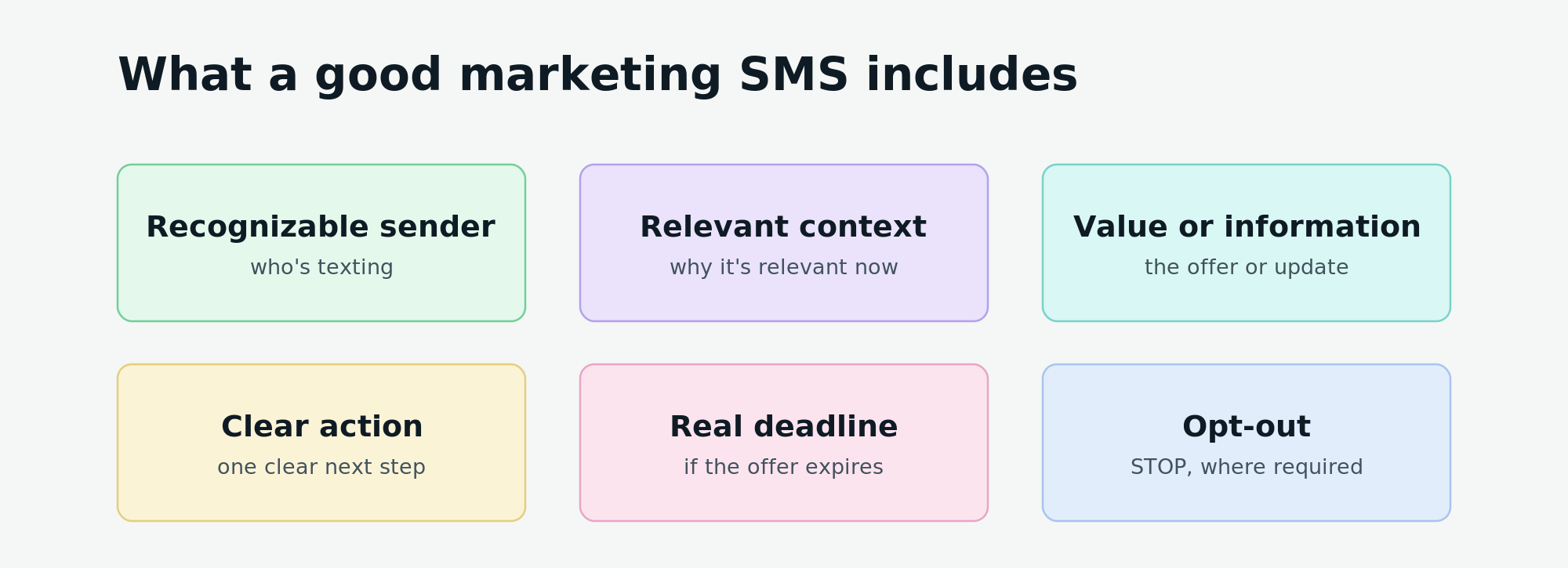 The six building blocks of a marketing text people recognize, trust, and act on
Shorter isn’t automatically better. A 140-character message that answers the recipient’s questions can outperform an 80-character message that leaves them guessing.
Understand character encoding and multipart SMS
A standard SMS using the GSM character set can contain up to 160 characters. Messages containing Unicode characters, including many non-Latin alphabets, have a limit of 70 characters for a single SMS.
Longer messages are split into concatenated parts, and some characters are reserved for the technical information required to join those parts. As a result, multipart messages generally allow up to 153 GSM characters or 67 Unicode characters per part.
That means a seemingly small change like adding an emoji or a longer link can turn one billable SMS into two or more.
If the message fundamentally needs rich media, don’t force it into SMS. MMS can carry images and longer multimedia content where supported, typically at a different cost. RCS is better suited to richer branded experiences with elements such as images and interactive buttons on supported devices and networks. SMS remains useful when concise, broadly accessible communication is the priority.
Write the first line for recognition and relevance
An SMS often arrives without the visual context customers get from an email or branded app. If the opening sounds like an anonymous promotion, even a legitimate offer can resemble spam.
Start with your recognizable brand or organization name, then quickly establish why the message matters to this recipient.
Here’s a retail SMS example:
| Weak |
Improved |
Why it works |
| “Your exclusive offer is waiting! Save 20% today: [link]”
57 characters, ~1 SMS part |
“[Brand]: Your saved sneakers are 20% off today. Shop the offer: [link]. STOP to opt out.”
~90 characters, ~1 SMS part |
The recipient immediately sees who sent the message and why the offer may be relevant to them. |
Use one clear value proposition
A feature describes what something has. An offer describes what you’re giving. A benefit explains why the recipient should care.
Suppose a hotel has a late checkout and is offering it free to loyalty members. “Late checkout available” is a feature. “Free late checkout” is an offer. “Sleep in and check out at 2 PM at no extra cost” makes the customer benefit concrete.
Avoid squeezing several competing promotions into the same SMS. One strong reason to act is easier to understand than 10% off, free shipping, bonus points, and a giveaway.
Here’s a hospitality SMS example:
| Weak |
Improved |
Why it works |
| “[Hotel]: Get 10% off, free breakfast, bonus points, and late checkout this weekend: [link]. STOP to opt out.”
~107 characters, ~1 SMS part |
“[Hotel]: Stay this weekend and enjoy free breakfast for two. Book by Friday: [link]. STOP to opt out.”
~101 characters, ~1 SMS part |
The improved version gives the recipient one concrete benefit and one deadline instead of asking several offers to compete for attention. |
Use one specific CTA
Your CTA should tell people what happens after they act. Generic phrases such as “Click here” waste valuable copy because the link itself already communicates that it can be clicked.
Use actions tied to the outcome:
- “Book your slot”
- “Claim early access”
- “Reserve your seat”
- “Donate now”
- “Track your order”
Here’s how you could improve an event promotion SMS:
| Weak |
Improved |
Why it works |
| “[Event]: Registration is now open. Click here for more information: [link]. STOP to opt out.”
~92 characters, ~1 SMS part |
“[Event]: 20 seats remain for Saturday’s workshop. Reserve your seat: [link]. STOP to opt out.”
~92 characters, ~1 SMS part |
“Reserve your seat” describes the next step, while the remaining-seat context gives recipients a reason to act now. |
Personalize with meaningful data
Hi [first name] doesn’t automatically make a message relevant.
Consider personalizing your messages with data such as location, appointment time, product interest, or course progress. For example, a student who has completed 80% of a course needs a different prompt from someone who hasn’t started it.
Here’s how you could make an education SMS more specific:
| Weak |
Improved |
Why it works |
| “[Academy]: Hi [name], don’t forget about your course. Continue here: [link]. STOP to opt out.”
~91 characters, ~1 SMS part |
“[Academy]: You’re 80% through [course]. Finish your final 2 lessons here: [link]. STOP to opt out.”
~96 characters, ~1 SMS part |
Progress data gives the message context and makes the next step feel achievable. |
Match the message and landing page
The click isn’t the finish line. If your SMS promises $20 tickets until Friday but the landing page shows $25, uses another currency, or makes visitors search for the advertised event, you’ve created doubt exactly where you wanted conversion.
Keep the offer, product, price or discount, deadline, currency, and language consistent between the SMS and its destination.
Here’s how that could look in a nonprofit SMS campaign:
| Weak |
Improved |
Why it works |
| “[Charity]: Help us reach our goal today. Donate here: [homepage link]. STOP to opt out.”
~82 characters, ~1 SMS part |
“[Charity]: $10 provides a school meal kit. Fund one today: [campaign link]. STOP to opt out.”
~88 characters, ~1 SMS part |
The message connects the donation to a tangible outcome, while the campaign-specific link can take donors directly to the matching donation page. |
The same principle applies to service businesses. If an SMS says “Book your 30-minute consultation for $40,” the landing page should already show that service, duration, price, and available appointments. Every extra search, mismatch, or unexplained step gives the customer another reason to leave.

Power up your business with smart tools
From solo creators to global brands, thousands of customers trust SendPulse to run email campaigns, chatbots, automations, and more — all in one place.
Get started for free
How to create and send a compliant SMS campaign in SendPulse
This section brings planning and setup together in one place. We’ll walk through the process in SendPulse using one example: a local education business promoting a weekend marketing workshop to consented leads who have shown interest in marketing but haven’t enrolled yet. Each step pairs the decision you need to make with where you make it in the product.
Step 1. Set the objective and prepare the campaign brief
Start with the business outcome. A campaign might aim to sell a new product, move excess inventory, reactivate dormant customers, or collect survey responses.
Avoid combining unrelated objectives in one SMS. Asking customers to shop a sale, join your loyalty program, and complete a survey gives them three decisions to make in a channel where clarity matters. If the goals require different actions, treat them as separate campaigns.
A useful way to phrase your objective is: “We want [audience] to [action] within [timeframe].”
Then decide how you’ll measure it. Your primary KPI should reflect the desired action rather than simply what is easiest to track:
| SMS campaign objective |
Primary KPI |
| Drive traffic to an offer |
Click-through rate |
| Sell a product |
Conversion rate or revenue |
| Fill available appointments |
Bookings |
| Confirm event attendance |
Confirmation rate |
| Start conversations |
Qualified replies |
| Collect customer feedback |
Completed surveys |
| Win customers back |
Reactivation rate |
You can still monitor secondary metrics such as delivery and unsubscribe rates, but one primary KPI keeps the campaign focused.
Put the essential decisions in one place before you build. For our example, the brief could look like this:
| SMS campaign element |
Example |
| Goal |
Generate workshop bookings |
| Audience |
Consented leads interested in marketing who haven’t enrolled |
| Offer |
Limited seats for a weekend workshop |
| CTA |
Reserve a seat |
| Landing page |
Workshop registration page |
| Schedule |
Before the weekend, with enough time to register |
| Primary KPI |
Paid registrations |
This brief becomes your checklist throughout the setup. If a message, segment, or additional CTA doesn’t support the goal, it probably doesn’t belong in this campaign.
Step 2. Register or select the sender
Before creating your campaign, make sure you have an approved sender. In SendPulse, you can add the available sender ID or phone number based on the destination country and type of SMS traffic.
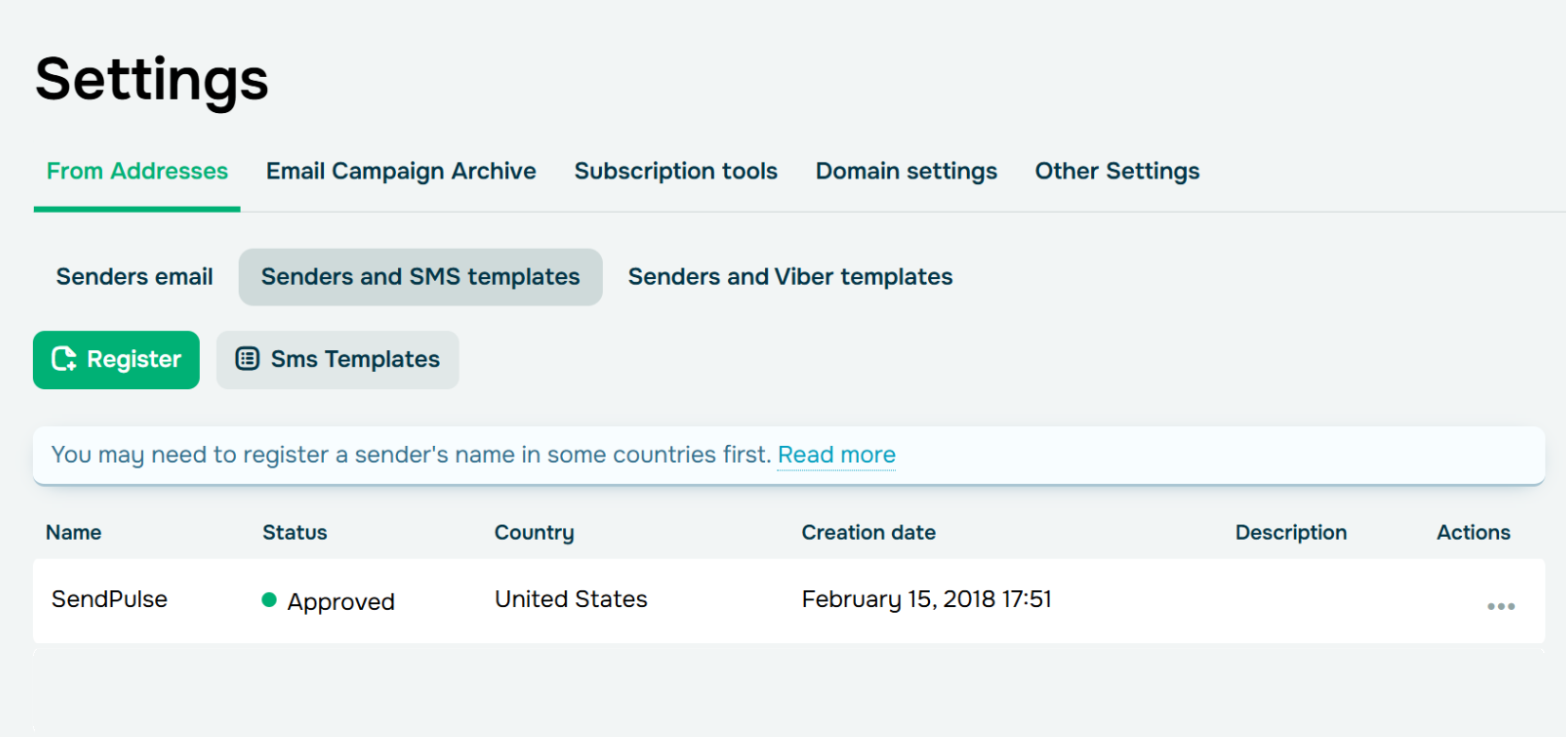 A registered SMS sender in SendPulse
Sender requirements differ by market. Some countries require businesses to register their sender or messaging use case before sending. Depending on the market, SendPulse may request information such as your company name, website, messaging purpose, opt-in process, and sample messages.
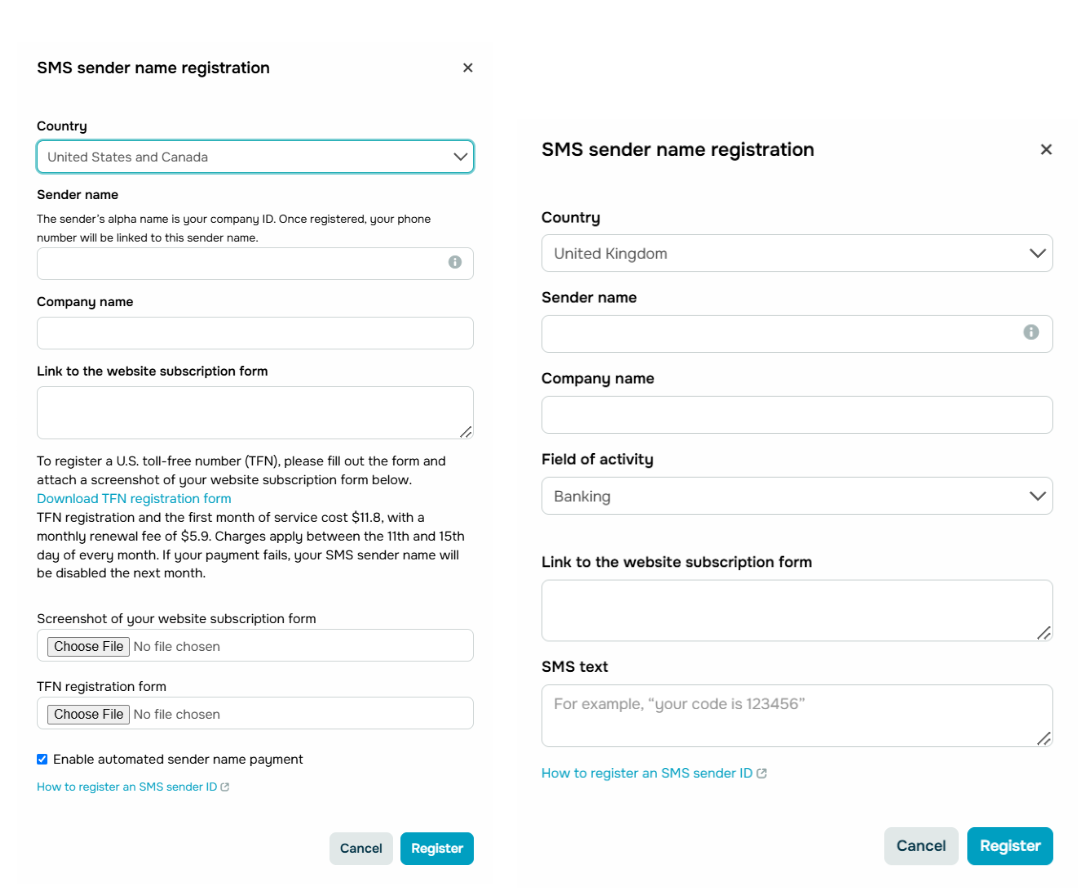 Differences in SMS sender registration forms for the US, Canada, and UK in SendPulse
Approval times can also vary, so it’s best to handle sender registration before a time-sensitive campaign is due to launch.
Step 3. Add your contacts and verify eligibility
Next, prepare the contacts eligible for your SMS campaign. You can work with an existing mailing list or add contacts with phone numbers in international format, along with variables that will help with segmentation and personalization.
For our workshop campaign, useful fields could include first name, interest, location, workshop date, and enrollment or customer status.
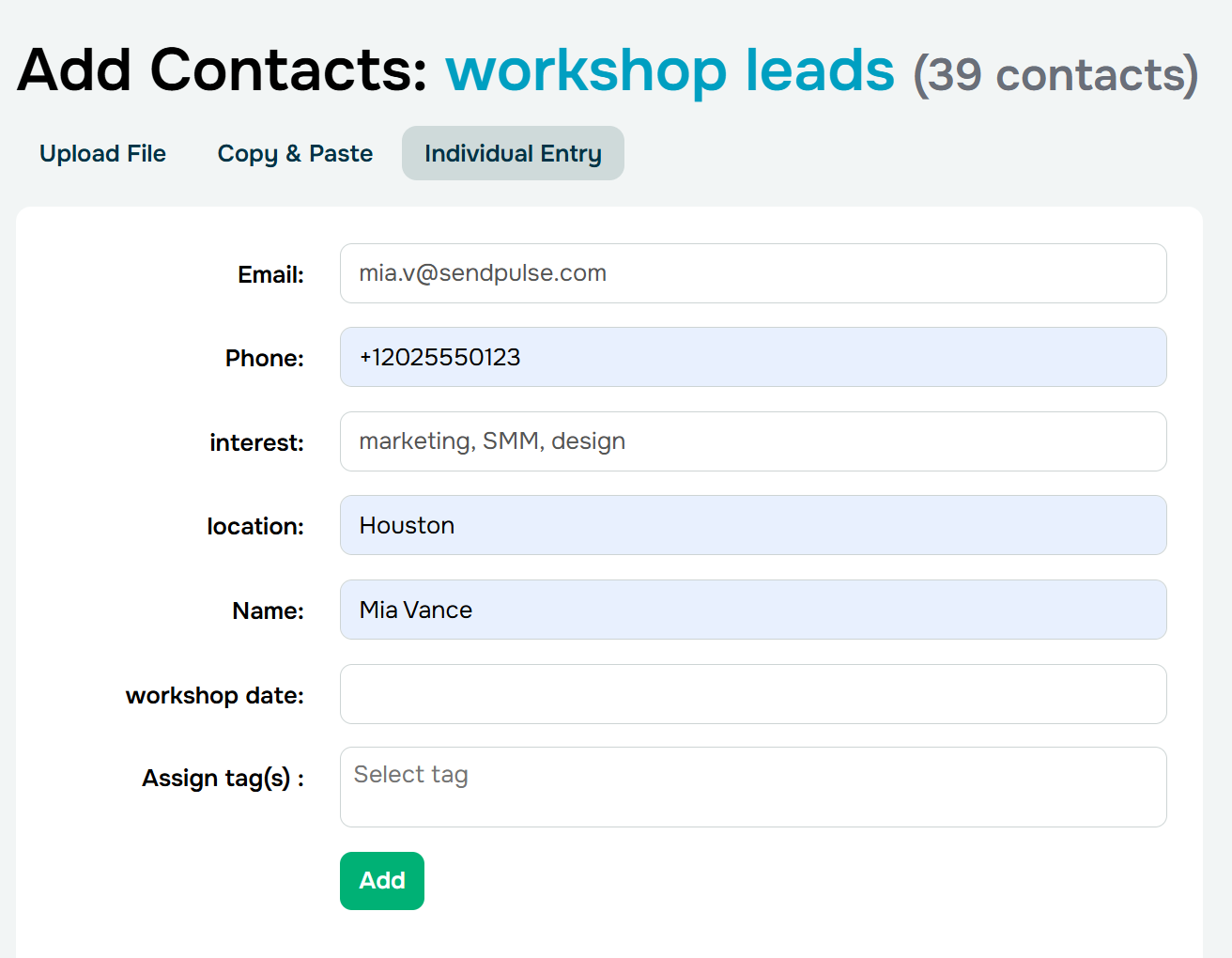 Adding contacts with custom variables to personalize and segment later
Before deciding who might be interested, establish who is actually eligible to receive the message. A phone number in your database isn’t proof of SMS marketing consent. Keep records of where and when consent was obtained, what wording the person agreed to, which types of messages they agreed to receive, and which country’s rules apply.
Before each send, exclude unsubscribed contacts, invalid numbers, suppressed recipients, and anyone who doesn’t meet the consent or campaign eligibility requirements. If consent evidence is stored outside SendPulse, make sure you can connect each contact to the relevant source, date, and permission before including them in the campaign.
Step 4. Choose or create an SMS template
If your route or destination requires moderated SMS templates, create and submit the template before you need to send the campaign. You can do this in the same “Settings” tab you use to add a sender ID.
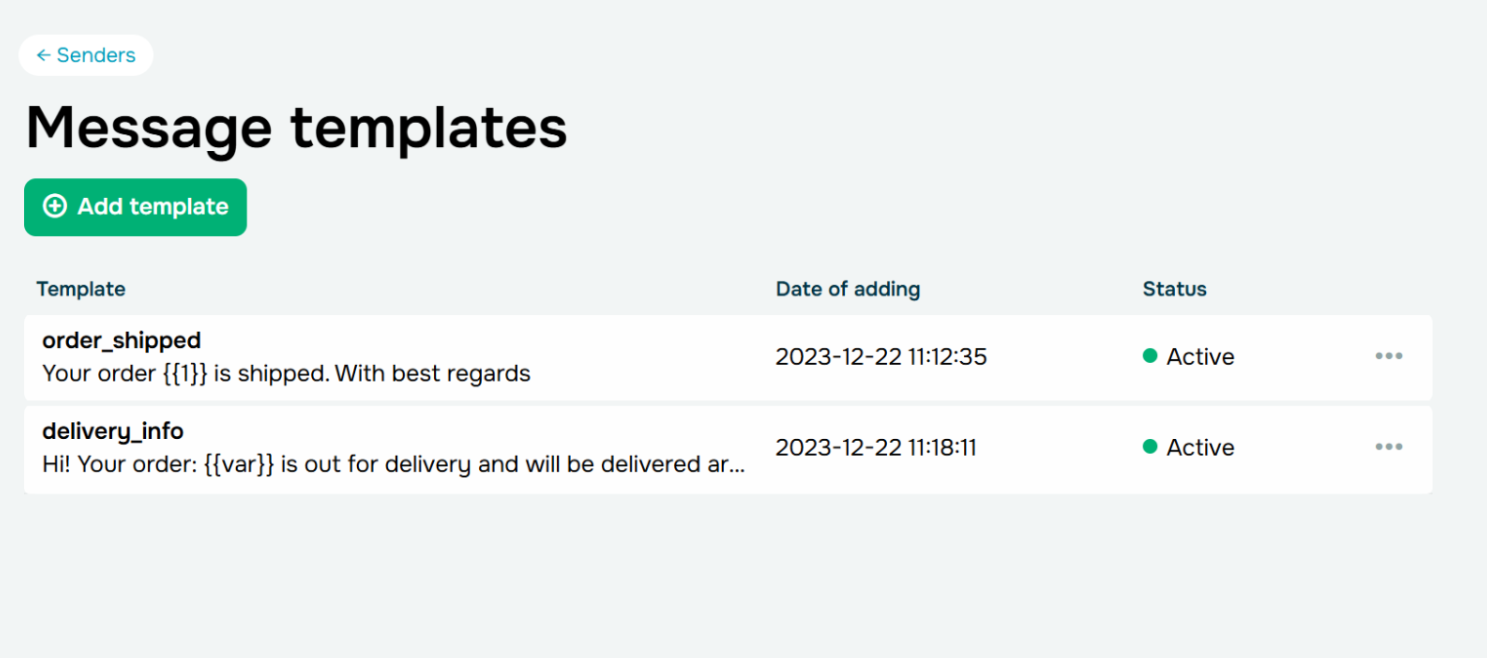 Approved SMS templates in SendPulse
Give your SMS template a recognizable internal name, add the necessary variables, and make sure its content reflects the approved use case. Variables go in as a {{var}} placeholder; when you send a campaign using the template, you replace each {{var}} with a variable name from your mailing list, for example, the contact’s first name.
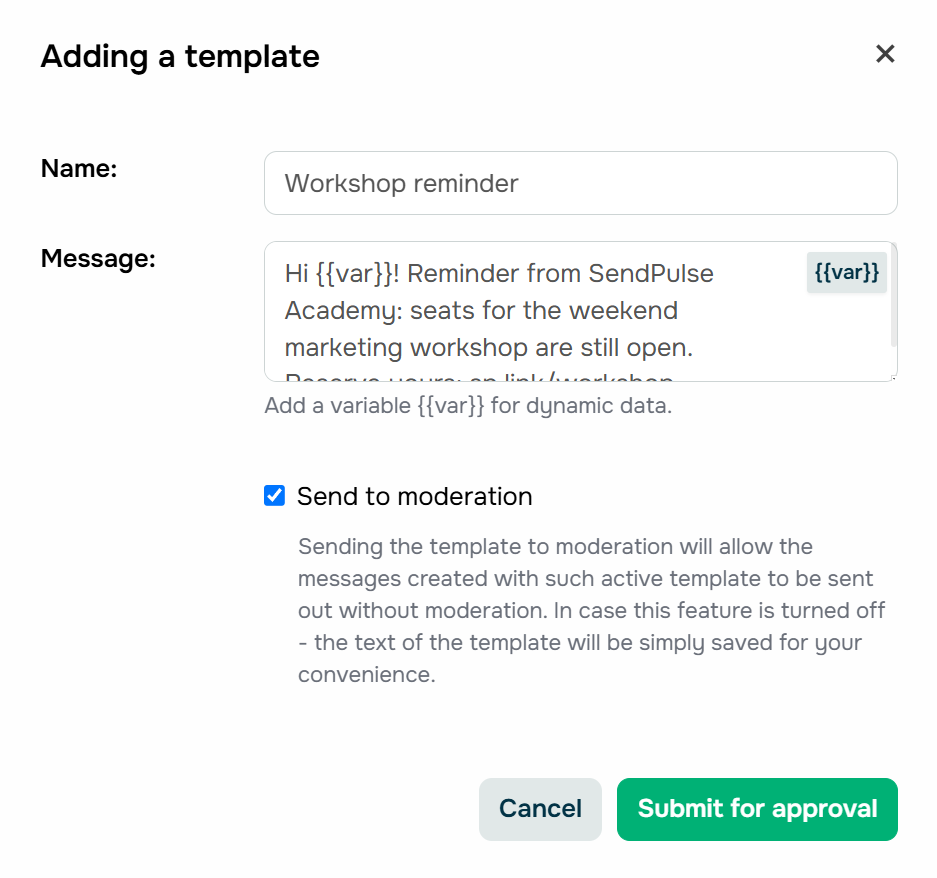 Adding an SMS template in SendPulse
For a recurring send like the weekend workshop, saving it as a reusable template — say, a “workshop reminder” — means you don’t rebuild the message every time you run it.
Step 5. Write and personalize the message
Now, turn your campaign brief into the actual SMS. Write down exactly what the recipient gets and what they need to do next — the offer value, eligibility requirements, expiration date, and exclusions — before writing the copy itself, and apply the writing principles from the section above.
Here’s what that could look like:
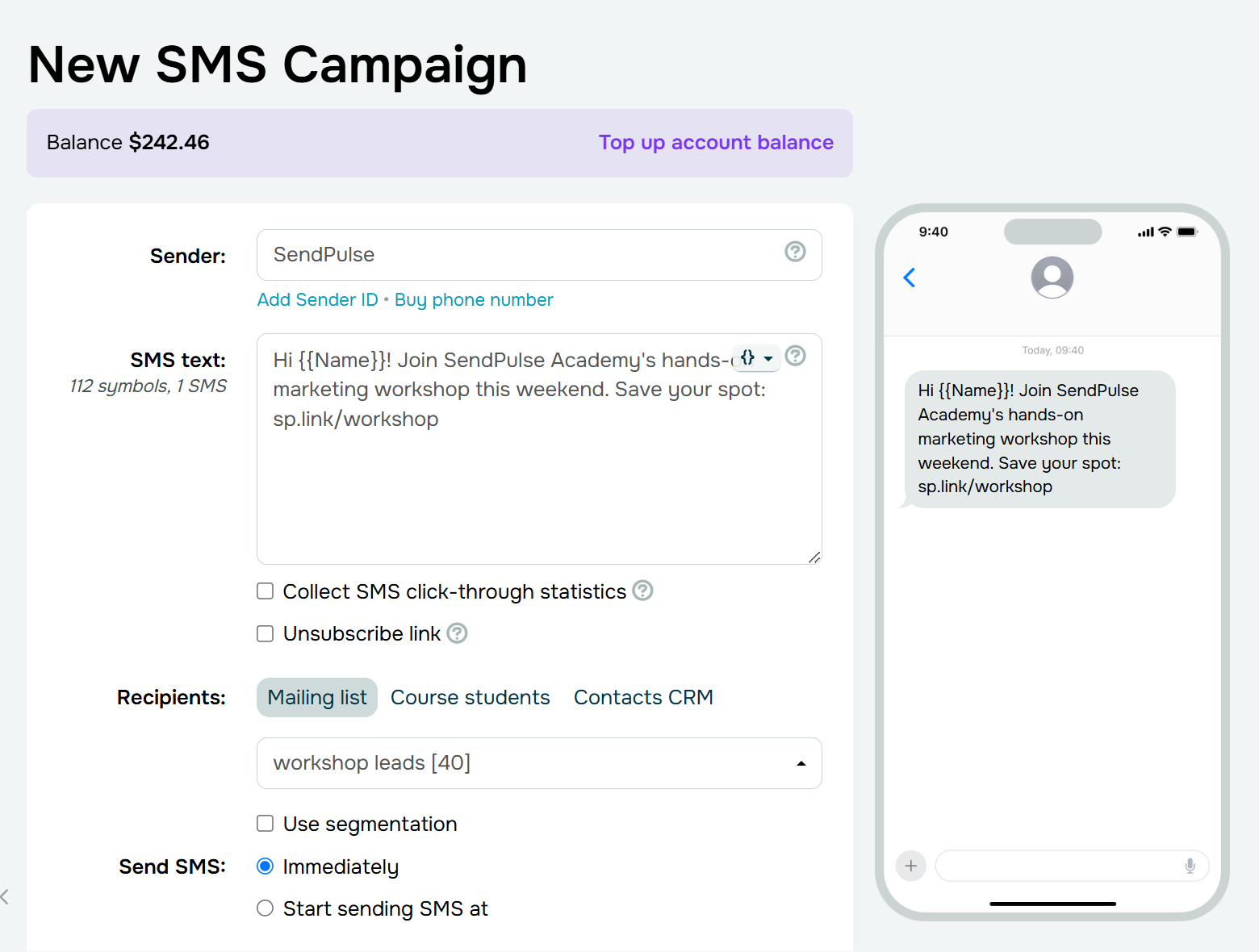 Creating a text for an SMS campaign
Besides a first name, you might use the workshop topic, location, date, or another variable that explains why the offer is relevant.
Pay attention to the rendered message length, not just the template. A short placeholder such as {{Name}} can become a much longer value for a real recipient, potentially pushing the message into an additional billable SMS part.
Step 6. Add a tracked link and unsubscribe option
Add the workshop registration URL and enable click collection so you can measure how many recipients visit the page.
A campaign link has two jobs: get the recipient to the right destination and let you measure whether they got there. Use a recognizable destination whenever possible, and be consistent with the domains your customers normally see from your brand. Add campaign-specific UTM parameters if you want to distinguish this campaign in your web analytics, then test the final shortened or converted URL rather than assuming the redirect works correctly.
Before launch, open the destination page on a phone. It should load quickly, repeat the same offer as the SMS, and make the intended action easy to complete. Keep forms short, test checkout and payment flows, and remove unnecessary steps between the click and conversion.
Finally, include the appropriate unsubscribe mechanism for the campaign and destination market, such as an unsubscribe link or supported reply-based option.
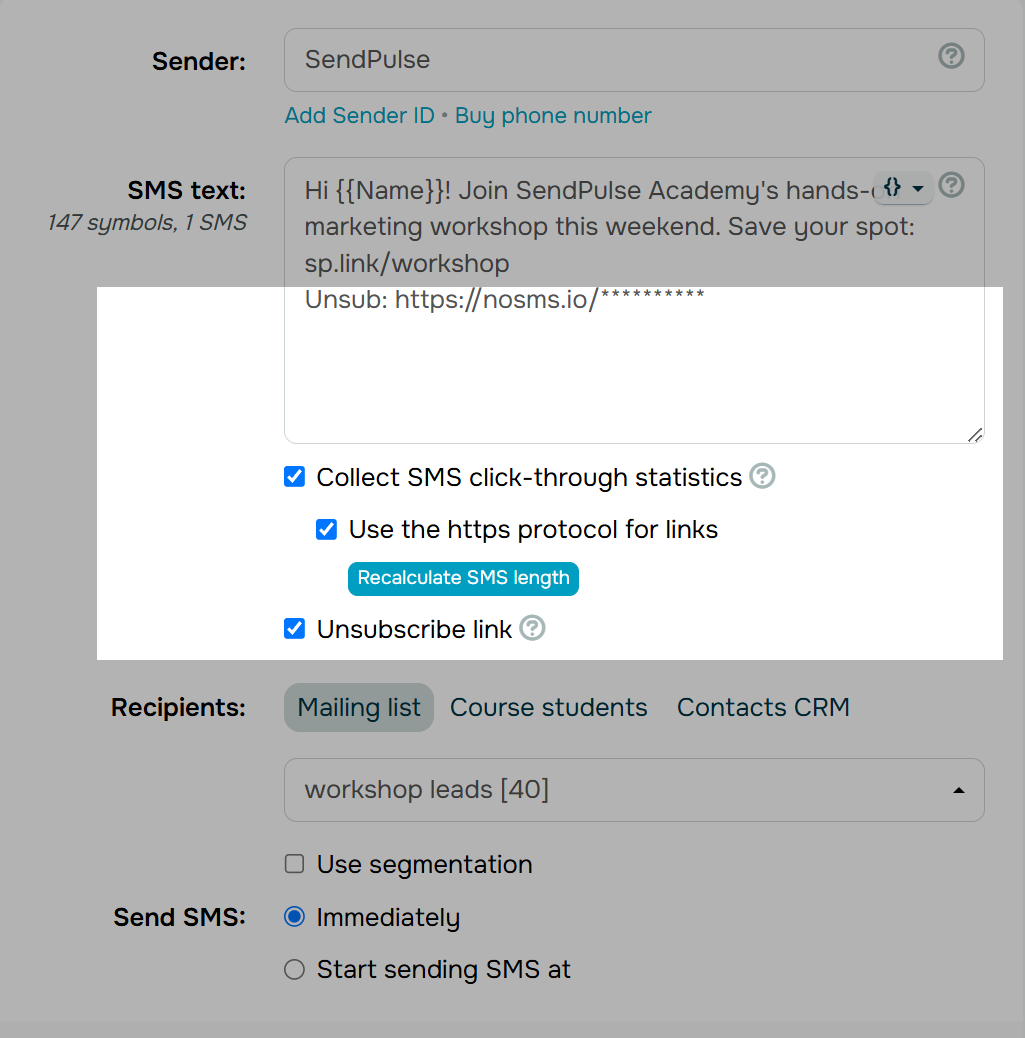 Adding an unsubscribe link to an SMS and enabling click collection
Step 7. Segment your recipients
Under Recipients, choose “Mailing list” and select the one you need (in our case, it’s the workshop leads list). You can also send to your course students or CRM contacts. Tick the “Use segmentation” box to narrow it to the people this campaign is for — fewer, more relevant messages can be more valuable than maximizing reach.
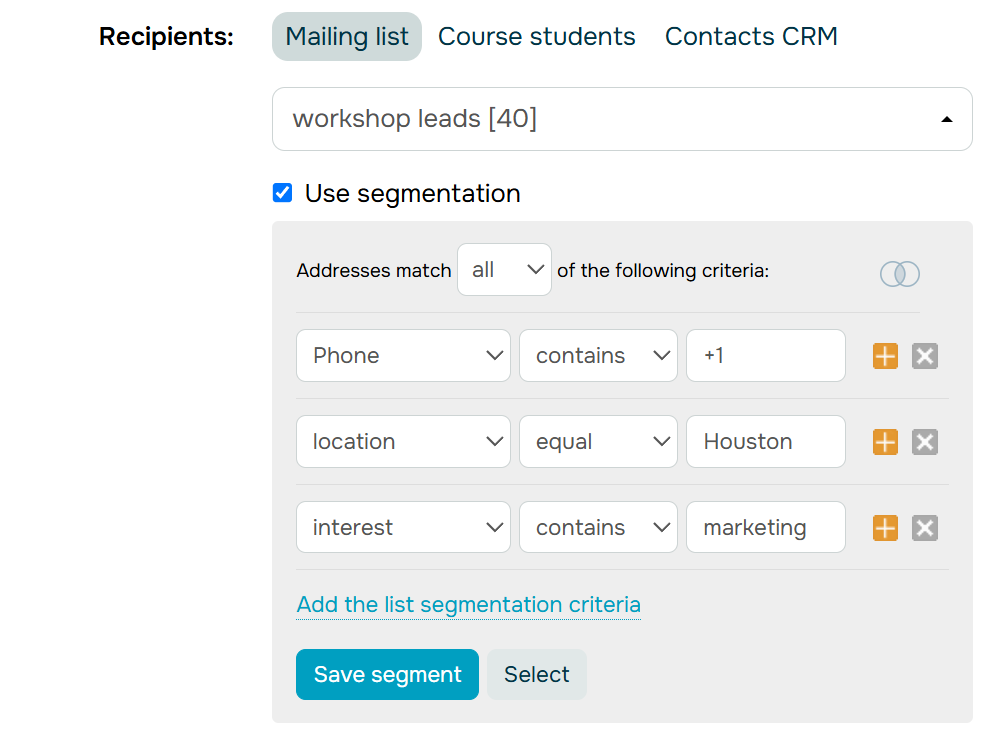 Segmenting recipients for an SMS campaign
Add a condition per row: pick the variable, choose how to match it, and enter the value. For the workshop example, the segmented audience might include contacts whose location is equal to the target city and whose interest contains marketing.
The objective is to create the smallest audience that still contains the people the campaign is meant for.
Step 8. Schedule your SMS campaign
There is no single “best time to send an SMS” that applies to every campaign; timing should follow customer context and campaign intent. Consider recipients’ local time zones, business operating hours, when an offer becomes available, and how close a reminder should be to an appointment or event. Respect quiet hours, and if you plan follow-ups, define their timing and purpose in advance rather than sending another SMS simply because the first one didn’t convert.
In SendPulse, you can send the campaign immediately or schedule it for later. For scheduled campaigns, check the account time zone and consider recipients’ local time rather than assuming everyone should receive the SMS at the same clock time.
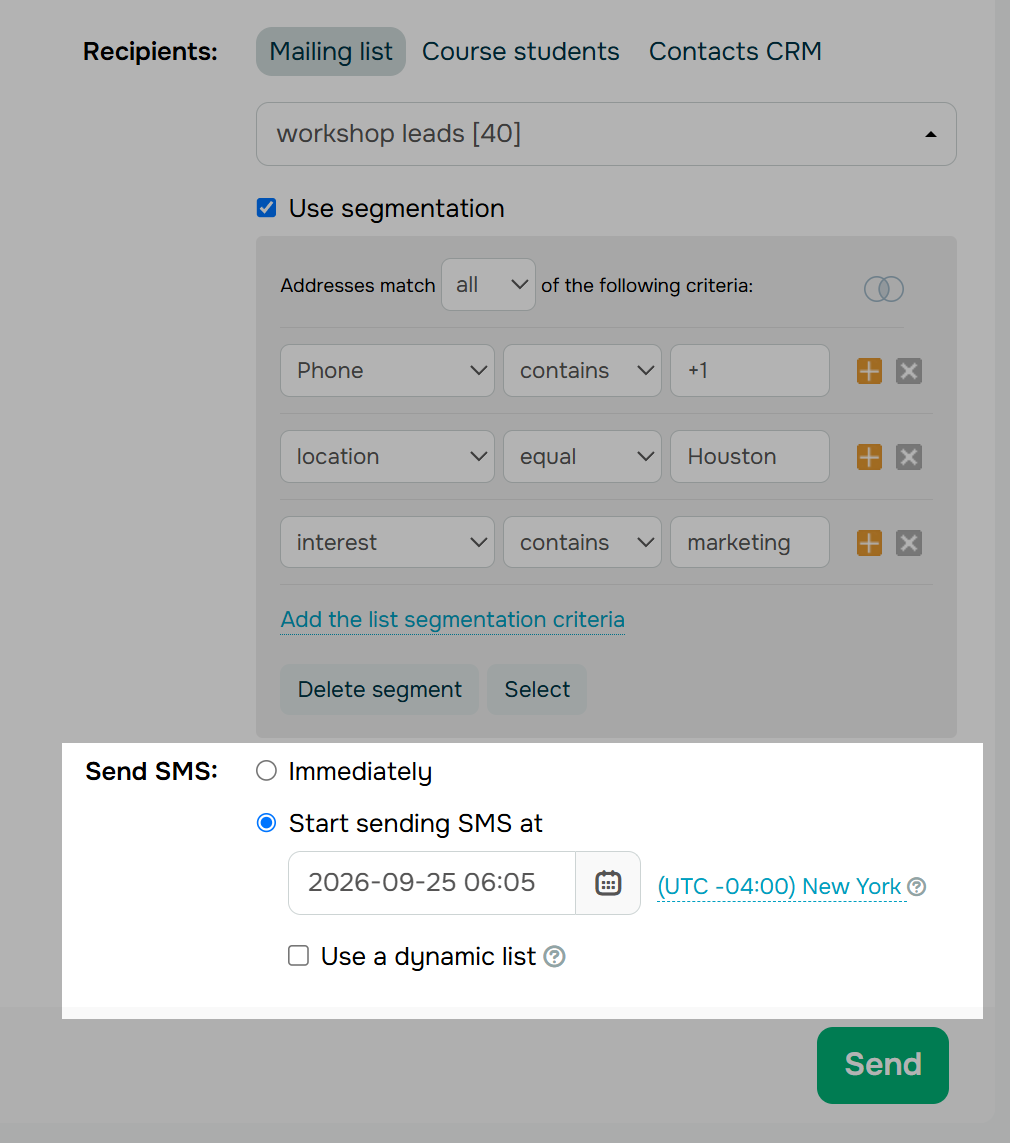 Scheduling an SMS campaign
Also, decide whether your audience should remain fixed. SendPulse’s dynamic list option can include eligible contacts added to the selected list before the scheduled campaign launches. For our workshop, that could be useful if new leads continue signing up during the week. However, your segment and consent requirements should still determine whether those new contacts qualify for the send.
Step 9. Review message parts, recipients, and total cost
You don’t have to work out the cost by hand. When creating an SMS campaign, you can see how many characters it consists of and how many messages will be sent to each recipient. On the final review screen, SendPulse breaks down the billable SMS parts and the total cost by destination country before you send.
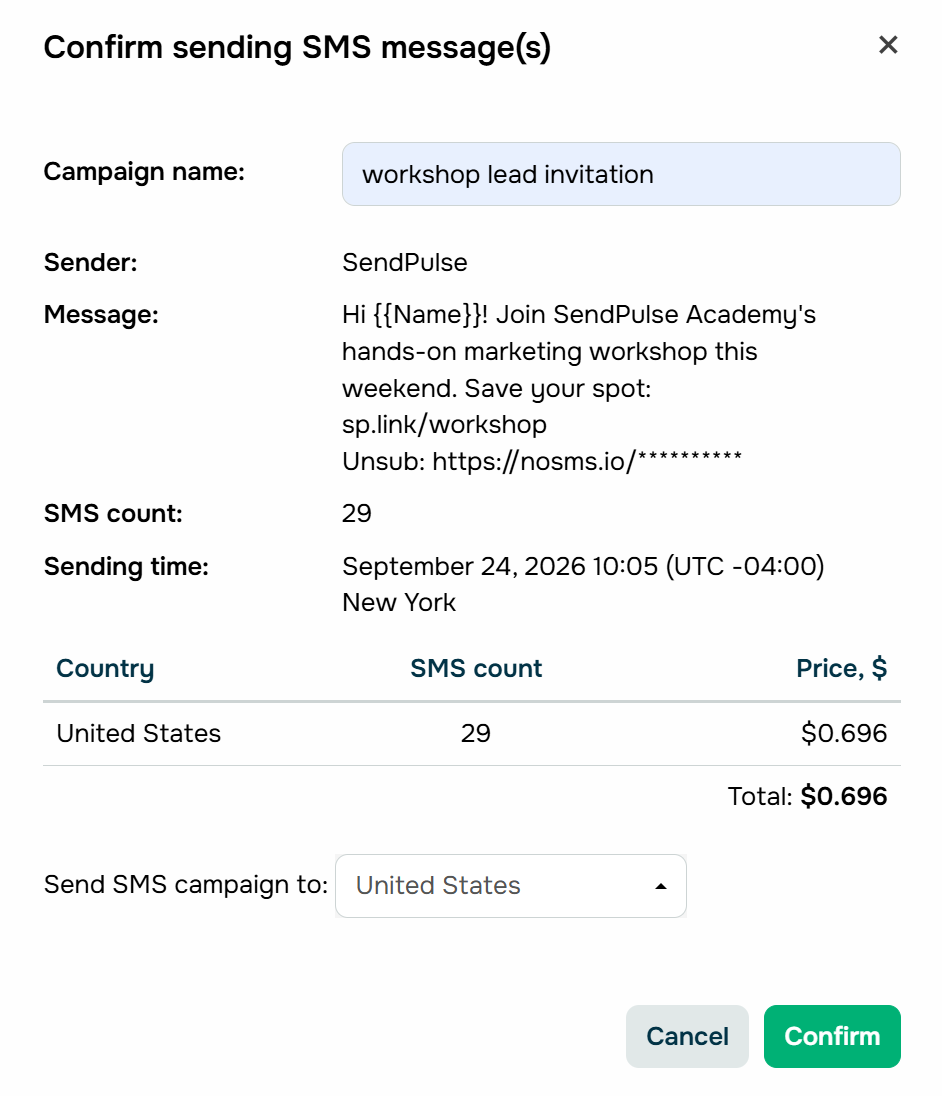 SendPulse shows the SMS parts and total cost by country before you send
Still, review that screen deliberately: check the sender, recipient count, message length and part count, destination countries or operators, and the total, and confirm there are no invalid contacts and that the offer, deadline, URL, and landing page still match. This is where you catch surprisingly expensive mistakes. An extra character, a Unicode symbol, or a longer personalized value can push a message into another SMS part and raise the total.
To budget before you build, the cost still comes down to the same three factors: recipients, billable SMS parts per recipient, route or country price.
Rates vary widely by destination. Here’s what a single SMS part costs across a range of markets as of September 2026:
| Country |
SMS rate |
| United States |
$0.024 |
| Canada |
$0.035 |
| United Kingdom |
$0.047 |
| Germany |
$0.086 |
| France |
$0.049 |
| Spain |
$0.06 |
| Brazil |
$0.031 |
| Mexico |
$0.02 |
| India |
$0.059 |
| Indonesia |
$0.365 |
| Nigeria |
$0.353 |
Prices also vary by operator and route and change over time; check current rates for your destinations on SendPulse’s SMS pricing page.
Step 10. Send a controlled test
Send the SMS to internal devices first, ideally covering relevant mobile carriers and operating systems. Check the message as a recipient would:
- Does the sender look recognizable?
- Do variables render correctly?
- Does the link open the right mobile page?
- Does registration work?
- What happens when someone opts out or replies?
Also, test fallback values. A personalized campaign shouldn’t arrive as “Hi, ,” simply because one contact is missing a first name.
Step 11. Launch and monitor status
After launch, SMS campaign statistics tell you whether the message reached recipients and what happened next. In SendPulse, review statuses such as sent, delivered, invalid, and not delivered, along with available link or URL click data.
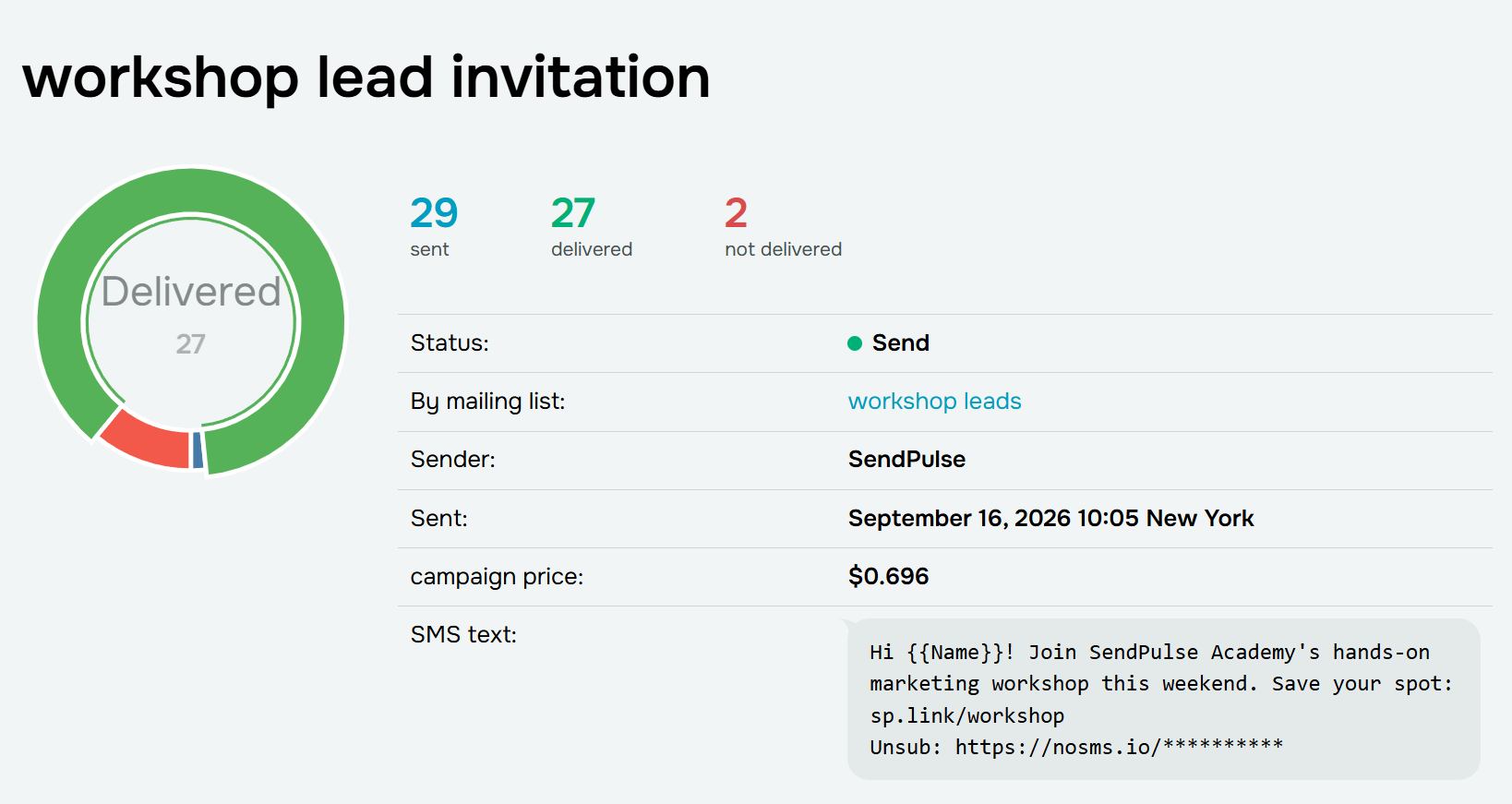 Sample SMS campaign statistics
Step 12 (optional). Turn replies into an SMS chatbot flow
You don’t have to end the campaign at the click. If replies are supported by your sender setup, you can use a keyword to turn interest into a guided conversation. The initial SMS could say:
SendPulse: Interested in our weekend workshops? Reply WORKSHOP to find the right date.
To build the flow, go to your SMS chatbot, open “Bot structure,” and click “Create a new trigger.” Select the “Keyword” trigger and enter WORKSHOP. When a subscriber sends that word, SendPulse will launch the connected flow.
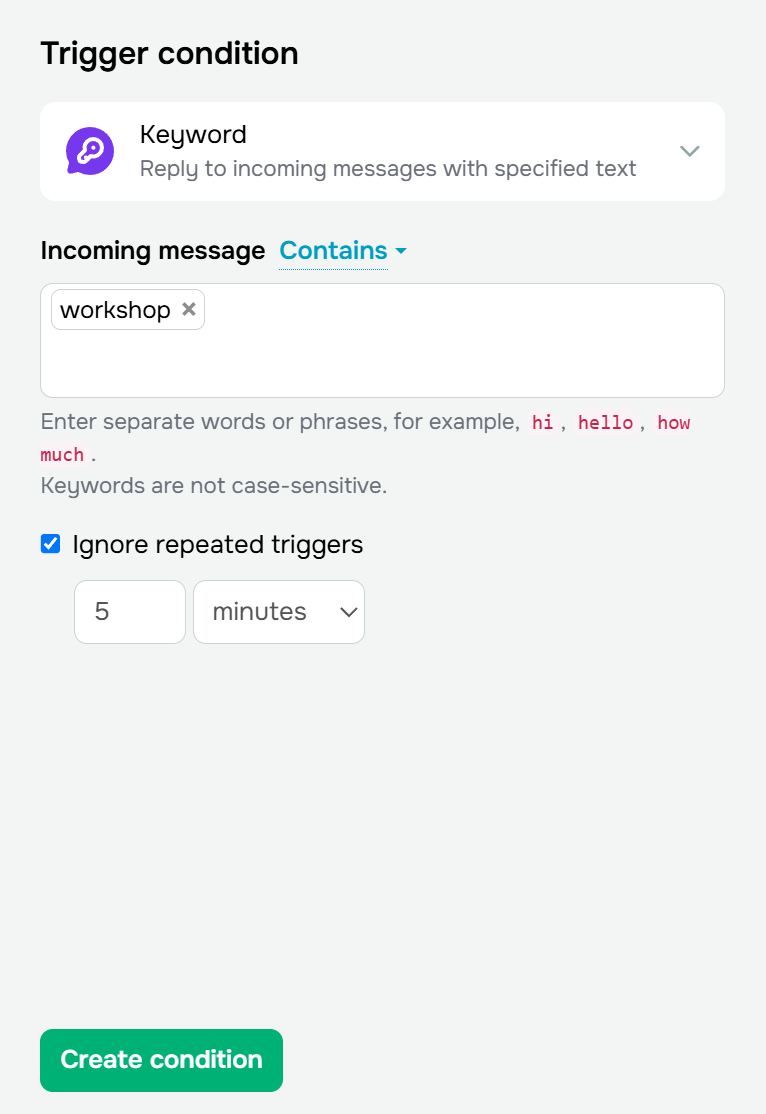 Setting up a keyword trigger for an SMS chatbot
Next, open the flow builder and add a “Message” element. Start with a simple question, something like:
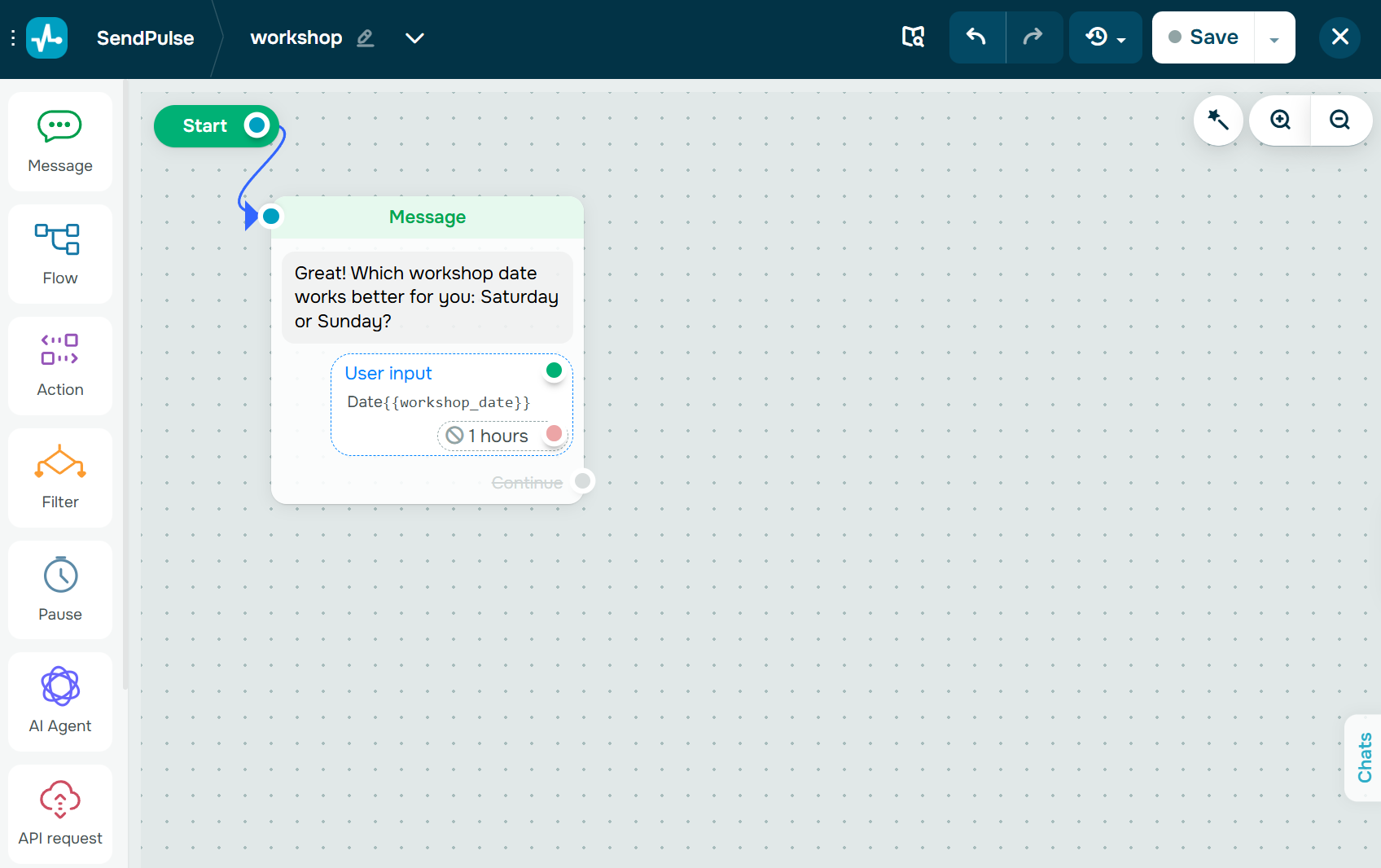 Creating an SMS flow in the SendPulse builder
Set the message to wait for the subscriber’s response and save their answer to a variable such as workshop_date. You can add conditions or other flow elements when the journey needs to branch: a subscriber who chooses “Saturday” can receive the Saturday registration link, while someone choosing “Sunday” gets a different option.
For predictable questions, continue the automated flow; if a subscriber asks something outside the predefined scenario, use the bot’s fallback logic or route the conversation for human handling. This turns a promotional SMS into a small conversion flow — you capture intent, collect useful data, and then direct people to the most relevant next step.
SMS campaign reporting should answer three questions: did the message reach the customer, did they engage with it, and did that engagement produce the intended business result? Keeping them separate also avoids the most common SMS measurement mistake: treating delivery as an “open.” Unlike email, standard SMS has no reliable open rate metric, so focus on delivery, clicks, conversions, revenue, replies, and opt-outs.
| Metric |
Formula |
What it tells you |
| Delivery rate |
delivered ÷ sent × 100 |
List and sender health |
| CTR |
clicks ÷ delivered × 100 |
Message and offer relevance |
| Conversion rate |
conversions ÷ delivered (or clicks) × 100 |
End-to-end campaign effectiveness |
| Opt-out rate |
unsubscribes ÷ delivered × 100 |
Potential frequency or relevance problems |
| ROI |
(revenue − campaign cost) ÷ campaign cost × 100 |
Business return |
Two things to standardize before you compare campaigns: decide whether you count conversions from delivered messages or from clicks, and keep it consistent so comparisons stay meaningful; and treat opt-out rate as a compliance signal, not just a number to push toward zero.
SMS benchmarks to compare against
These figures can give you a useful sense of how SMS performs across businesses and industries. Treat them as reference points rather than targets, since results will vary by audience, campaign, and use case. All figures come from SimpleTexting’s SMS Marketing Report:
| Benchmark |
Figure |
| Businesses with an average SMS CTR of 20% or higher |
66.2% |
| Businesses with an SMS CTR above 20%, by industry |
Finance: 80% | Healthcare: 77% | Education: 71% |
| Businesses generating 21–30% of online revenue from SMS |
31% |
| Businesses rating text marketing as effective or very effective |
76% |
| Businesses with an average unsubscribe rate of 2% or lower |
45% (30% average 1–2%) |
| Businesses reporting higher SMS opt-in rates year over year |
53% |
How to improve results
When performance starts to slip, look at where the problem is happening before changing the whole campaign:
- Delivery rate falling – check your sender setup and list hygiene.
- Click-through rate falling – review your segment, offer, CTA, and timing.
- Conversion rate falling – check whether the offer and mobile landing experience match the message.
- Opt-out rate rising – review your sending frequency, targeting, and whether your messages still match what subscribers agreed to receive.
When you test improvements, change one meaningful variable at a time (the offer, CTA, timing, or sender) so you know what actually made the difference. And don’t focus on the SMS alone. Segmentation determines who sees the message, timing gives it context, the copy earns the click, and the landing page has to carry that momentum through to conversion.
How to fit SMS campaigns into an omnichannel strategy
Customers don’t think in communication channels. They might discover an offer in an email, get an SMS reminder, ask a question on WhatsApp, and buy on your website. An omnichannel strategy connects those interactions instead of asking every channel to do the same job.
For SMS, this means using its strengths — speed, brevity, and broad mobile reach — where they add value, while leaving detailed content and longer conversations to communication channels better suited to them.
Start with what the customer needs to do next, then pick the communication channel that fits:
| Channel |
Best for |
| SMS |
Time-sensitive alerts, OTPs, reminders, flash sales |
| RCS |
Interactive promotions, product launches, branded campaigns |
| WhatsApp |
Two-way conversations, support, guided sales |
| Email |
Long-form content, newsletters, receipts, onboarding |
The real gain comes from sequencing these channels into one journey rather than firing them in parallel. For a product launch, that might look like this: email announcement → SMS reminder before the offer expires → WhatsApp conversation with interested customers → RCS loyalty promotion after purchase → email onboarding sequence.
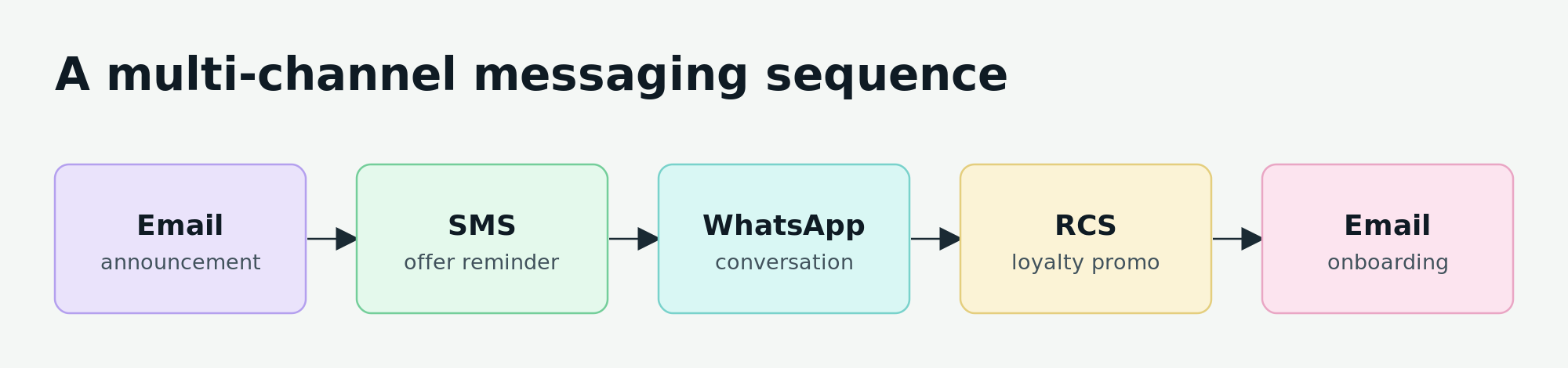 How SMS fits into a multi-channel journey, from first announcement to post-purchase onboarding
This is where cross-channel automation matters. With tools such as SendPulse’s Automation 360, businesses can trigger messages based on customer actions and move between channels within the same automated flow rather than managing each send separately.
AI and what’s changing in SMS for 2026 and beyond
The fundamentals of a good SMS campaign don’t change much from year to year: get consent, give each message a clear purpose, and measure the results. What is changing is what businesses can do with the channel and the tools around it. Three developments are especially worth watching in 2026.
RCS is going mainstream
The RCS you saw in the channel mix above is the biggest near-term shift. For years, richer mobile messaging was largely limited to Android. That changed when Apple added RCS to the iPhone with iOS 18 in September 2024, followed by RCS for Business in iOS 18.1. RCS is now genuinely cross-platform, allowing a verified business sender to reach both iPhone and Android users, with automatic SMS fallback where RCS isn’t available.
For marketers, RCS Business Messaging adds features that plain SMS can’t offer: a verified, branded sender with a company name, logo, and verification checkmark instead of an anonymous number, along with rich cards and carousels, images, suggested replies, read receipts, and typing indicators. There is one caveat worth knowing: RCS for Business is encrypted in transit but not end-to-end, so it’s suitable for marketing and alerts, but not for sensitive data.
That doesn’t mean you need to replace SMS with RCS. It makes more sense to keep SMS as the universal baseline and fallback and use RCS when you want a richer, branded experience and know it’s supported. The same consent, opt-out, and sender-registration rules covered in the compliance section still apply.
AI is finding its place in the workflow
AI in SMS is becoming more about the everyday jobs it can help with:
- Drafting and variants — generating or suggesting message copy and A/B variants for a person to review before sending, keeping brand voice and compliance under human control.
- Sending time optimization — using engagement history to choose when each segment is most likely to act instead of sending to everyone at the same time.
- Personalization and segmentation — adapting content based on purchase history and previous engagement rather than simply inserting a first name.
- Conversational replies — recognizing intent in two-way messages, answering common questions, and handing the conversation over to a human when a request gets more complex.
There is one rule AI doesn’t change: consent still comes first. A well-written message sent to an unsubscribed number, outside permitted hours, or more often than someone agreed to receive is still a compliance failure. Opt-outs and suppression rules need to stay in place regardless of how the message was created.
Verification and anti-scam rules keep tightening
At the same time, sender verification is becoming harder to ignore. Carrier registration programs such as A2P 10DLC in the US and sender ID registers such as Australia’s are expanding as regulators and carriers try to reduce scams.
For businesses, that means registered and verified senders are becoming increasingly important for trust and deliverability, while unregistered traffic faces greater filtering. Getting your sender setup right now can save you trouble as these requirements expand.
Make every SMS campaign worth sending
A successful SMS campaign is not the one that reaches the largest list. It is the one that reaches the right person, at the right moment, with one clear reason to act.
With SendPulse, you can create and automate SMS alongside chatbot messages and email campaigns. Try SendPulse to turn SMS from another broadcast channel into a coordinated part of your customer journey.
Compliant SMS campaign FAQ
Is SMS marketing legal without consent?
In almost every major market, including the US, UK, EU, Canada, and Australia, the answer is no. Marketing texts generally require some form of prior permission, and simply having someone’s number in your CRM system isn’t enough. One limited exception is the soft opt-in, which some regions allow when marketing similar products to existing customers, provided specific conditions are met.
Do I need 10DLC registration to send SMS in the US?
If you send business (application-to-person) texts using standard US 10-digit numbers, yes. You need to register your brand and campaign through The Campaign Registry, and carriers may throttle or filter unregistered traffic. Toll-free numbers and short codes follow their own approval processes.
What are the opt-out rules for SMS marketing?
Every marketing message should give recipients an easy way to opt out, and you need to honor those requests promptly. In the US, you must act on a revocation within ten business days, while Australia allows five working days. “STOP” is the most widely recognized keyword, but what matters most is making sure opt-outs and suppression are applied consistently across every program you run.
Is SMS marketing covered by GDPR?
Yes. In the EU/EEA and the UK, a phone number is personal data, so the GDPR (or UK GDPR) applies alongside the ePrivacy Directive or PECR. In practice, that means having consent for marketing texts, a lawful basis for storing the number, a clearly identified sender, and a simple way to opt out of every message.
How much does an SMS campaign cost?
The SMS cost mainly depends on three things: how many people you’re texting, how many SMS parts each message uses, and the rate for the destination country. A message that splits into two parts costs twice as much per recipient.
When is the best time to send an SMS campaign?
There’s no single best time to send an SMS. It depends on what the message is about and where the recipient is. Time your campaign around the customer’s context, stay within local quiet hours, and don’t send another message simply because the first one didn’t convert.