Kit (formerly ConvertKit) and Mailchimp are often compared, and at first glance, they seem interchangeable. Both let you build a list, send campaigns, create automations, and track results. But the similarity pretty much ends there.
The thing is, Kit was built for creators who treat email as their primary marketing channel, while Mailchimp takes a more all-in-one approach, where email is just one part of a larger system. This difference in philosophy affects everything, from how you build emails to how you structure your audience.
How we scored this comparison: Each platform was evaluated across nine categories using our independent methodology. Pricing (25%), ease of use (20%), and email and automation features (15% each) carry the most weight because they affect daily workflows the most. All scores reflect real testing and analysis as of April 2026.
TL;DR Kit vs Mailchimp comparison
Here’s a quick summary of our findings on how Kit (formerly ConvertKit) and Mailchimp compare, based on hands-on testing and carefully verified official data. If a particular category matters most to you, click on it to jump straight to the detailed breakdown.
| Category |
Kit |
Mailchimp |
Winner |
| Best for |
Creators, bloggers, newsletter-driven businesses |
Small to mid-sized businesses, marketing teams, and eCommerce brands |
Depends on your use case |
| Pricing |
10/10
Free plan for up to 10,000 contacts; paid plans unlock full visual automations and third-party integrations |
9/10
Free plan for up to 250 contacts; advanced features on paid tiers only; pricing scales with contacts and features |
Kit |
| Ease of use |
8.9/10
Clean, writing-first interface; fast onboarding; minimal setup required |
9/10
User-friendly but more layered; broader feature set requires more navigation and setup |
Mailchimp |
| Email design |
7/10
Minimalist editor focused on content; limited templates and layout flexibility |
9.4/10
Drag-and-drop editor with 300+ templates; strong layout control and design flexibility |
Mailchimp |
| Automation |
6/10
Visual canvas builder with conditional logic, multiple triggers, and pre-built templates |
7.8/10
Multi-step automation with conditional logic, multiple triggers, and over 120 pre-built templates |
Mailchimp |
| Contact management |
6/10
Tag-based system; segmentation based on forms, tags, and basic behavioral data |
7.5/10
Audience-based structure; segmentation with conditions, tags, and behavioral data |
Mailchimp |
| Forms and pages |
6.4/10
Forms and landing pages with simple targeting and minimal customization |
8.2/10
Forms, pop-ups, and landing pages with flexible targeting and A/B testing |
Mailchimp |
| Deliverability |
9/10
SPF, DKIM, and DMARC supported; manual setup; limited built-in monitoring tools |
9.4/10
SPF, DKIM, and DMARC supported; guided setup; additional deliverability tools and recommendations |
Mailchimp |
| Reporting |
7.2/10
Basic campaign and sequence reporting; limited customization |
7.8/10
Detailed reports with campaign performance, audience insights, and comparative analytics |
Mailchimp |
| Customer support |
7.5/10
Email support; 24/7 live chat; free migration assistance |
7.2/10
Email, live chat, and phone support; extensive knowledge base and onboarding resources |
Kit |
| Final score |
8.4/10 |
8.7/10 |
Mailchimp |
The difference in scores isn’t significant, which means the right choice between Kit and Mailchimp comes down to your specific needs and priorities. Keep reading to see which platform fits you better.

Create and send high-performing emails
Use an AI assistant, pre-made templates, advanced segmentation, and feature-rich automation to run campaigns without coding. Start for free with up to 15,000 monthly emails.
Get started for free
Kit vs Mailchimp across pricing and key email features
We’ll start our comparison with the most important aspects, such as pricing and ease of use, then move through core features, and finally cover categories that are still important but less likely to influence your decision, like reporting or customer support.
Pricing plans
⭐ Kit: 10/10 | Mailchimp: 9/10
Disclaimer: Pricing changes frequently. These figures are accurate as of April 2026. Always verify final costs on official pricing pages.
Alas, capitalism wins, and we still need to look at pricing before choosing any service, including an email marketing platform. There is a clear difference between Kit and Mailchimp pricing, and even more so, a difference between Mailchimp’s first year and what comes after. This detail is often overlooked, but it’s important – you’re rarely choosing a platform for just one year. Starting from month 13, Mailchimp will charge roughly twice as much as it did during the first year. Take a look at how this plays out:
| Contacts |
Kit |
Mailchimp, year 1 |
Mailchimp, year 2 |
Winner |
| Free plan |
10,000 contacts;
unlimited emails |
250 contacts; 500 emails |
Kit |
| 2,500 |
$0/mo;
unlimited emails |
$22.50/mo;
25,000 emails |
$45/mo;
25,000 emails |
Kit |
| 10,000 |
$0/mo;
unlimited emails |
$55/mo;
100,000 emails |
$110/mo;
100,000 emails |
Kit |
| 25,000 |
$166/mo;
unlimited emails |
$135/mo;
250,000 emails |
$270/mo;
250,000 emails |
Tie |
| Total score |
10/10 |
9/10 |
Kit |
Kit’s free plan is undeniably generous, but the features that matter most are locked behind paid plans. The moment your workflow moves beyond a single welcome flow, the limitations become clear – you need visual automations with branching logic, multiple entry points, and the ability to react to subscriber behavior. Paid plans also unlock integrations with external tools, which are essential if your email marketing is part of a broader strategy rather than a standalone channel.
There are also practical growth and monetization features that only exist on paid plans. You can remove Kit’s own recommendation slot and fully control how you earn from recommendations, including getting paid for promoting other creators. At higher tiers, you gain access to deeper analytics, subscriber scoring, and tools like referral programs, which help you understand and scale your audience more effectively.
Because of this, while Kit’s free plan is a strong starting point, it doesn’t reflect the platform’s full capabilities. For the sake of this comparison, we’ll evaluate Kit based on its paid plans, where its core features are fully available.
Ease of use and interface
Kit: 8.9/10 | ⭐ Mailchimp: 9/10
How easy a platform feels depends largely on who it was built for. If you’re the target audience, it will likely feel intuitive right away. Kit was built for creators, and its terminology and interface reflect that, not the conventions of email marketing. Mailchimp, on the other hand, is one of the most popular email marketing platforms, designed for marketers who already know the core concepts of bulk email sending.
This difference in philosophy directly affects how the platform is perceived. Since we’re evaluating from an email marketer’s perspective, Mailchimp scores higher in this category as the more natural fit for that audience.
| Aspect |
Kit |
Mailchimp |
Winner |
| First-time experience |
Guided, minimal setup with a clear checklist; most users can send their first email within hours |
Structured onboarding with tips and prompts; more steps due to broader feature set |
Kit |
| Daily navigation |
Clean interface with a few core sections (Grow, Send, Automate, Earn, Apps); terminology tailored to creators |
Feature-rich interface with multiple menus; navigation is consistent but more layered |
Tie |
| Learning curve |
Quick to pick up; core workflows (campaigns, forms, sequences) understood within hours |
Moderate; basic tasks are easy, but automation and segmentation take time to master |
Kit |
| Mobile access |
No native mobile app; browser-only access |
iOS and Android apps for campaign monitoring, contact management, and basic actions |
Mailchimp |
| Workflow efficiency once mastered |
Fast for writing emails, managing subscribers, and running simple automations |
Efficient for managing campaigns, segmentation, and more complex marketing workflows |
Mailchimp |
| Total score |
8.9/10 |
9/10 |
Mailchimp |
But what does all of this mean in practice? How long will it take you or your team to learn the platform and start using its features confidently? Take a look at a typical learning curve for Kit and Mailchimp:
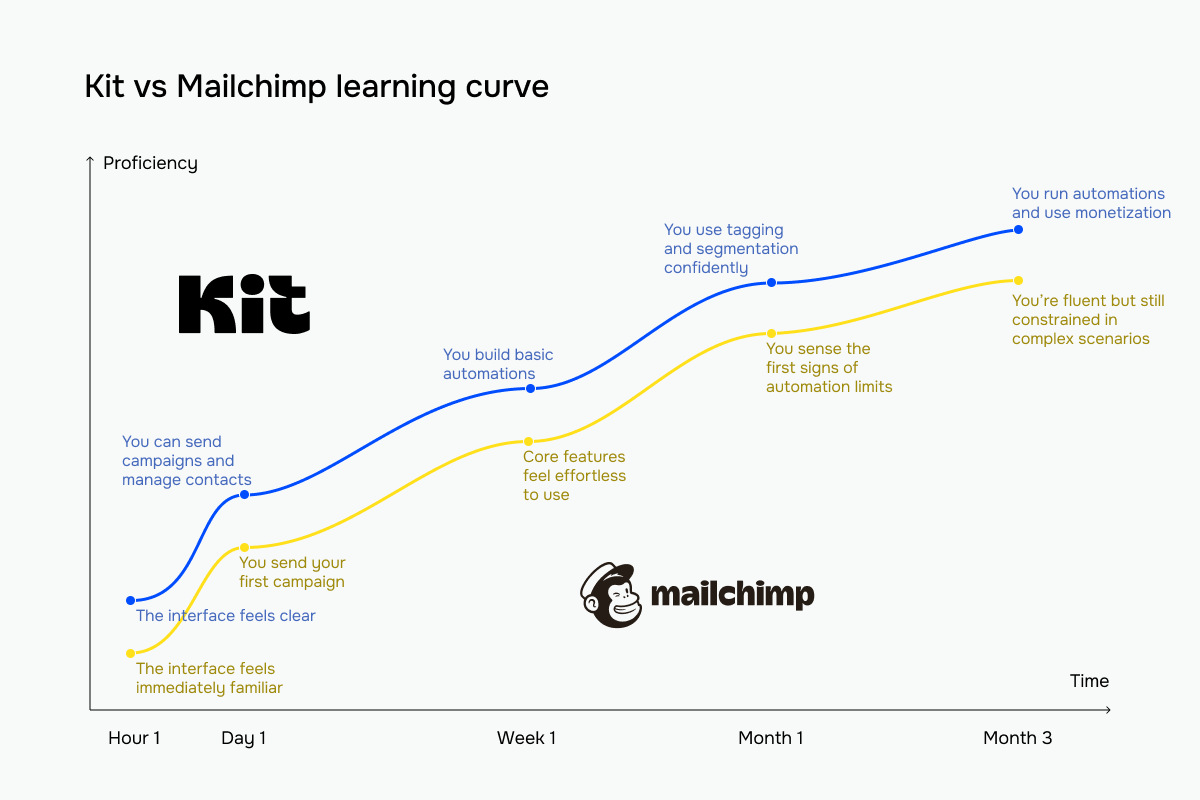 The blue line represents Kit vs Mailchimp’s yellow line
Even though the time spent learning a new platform matters, the key features and capabilities of an email service provider are what ultimately drive the decision. Let’s get to that.
Email builder and templates
Kit: 7/10 | ⭐ Mailchimp: 9.4/10
In this category, we evaluate how easily, quickly, and efficiently you can use a platform’s email builder to create campaigns. In the case of Kit (formerly ConvertKit) and Mailchimp, Mailchimp leads with a 2.4-point gap thanks to its more detailed and flexible approach to this core functionality. Take a look for yourself:
| Aspect |
Kit |
Mailchimp |
Winner |
| Templates |
23 basic templates and 35 pre-designed templates; focused on simple newsletter layouts |
367 pre-designed templates across industries and use cases (newsletters, promotions, eCommerce, events) |
Mailchimp |
| Drag-and-drop editor |
Visual editor with a section-based layout; elements are added directly within the email; no traditional block panel |
Drag-and-drop builder with content blocks; persistent panel for adding and arranging elements |
Mailchimp |
| Notable content blocks |
Gallery and file download |
Product recommendations, discount, and payment |
Depends on your needs |
| Customization |
Template-level styling; editable sections with custom CSS support; limited layout control |
Detailed style controls for fonts, colors, spacing, and sections; custom HTML template support |
Mailchimp |
| Mobile responsiveness |
Responsive layouts; automatic section stacking |
Responsive by default; separate desktop/mobile style controls |
Mailchimp |
| AI features |
AI subject line suggestions only; no AI body copy generation |
AI copy generation for email body, subject lines, and layout sections; AI-generated emails within automation flow templates |
Mailchimp |
| Sending time optimization |
Not available natively |
Available based on engagement data |
Mailchimp |
| Total score |
7/10 |
9.4/10 |
Mailchimp |
But how do these builders compare when you’re actually building an email?
Kit’s email builder is more like writing in a document than designing a campaign. You open the editor and start typing, adding elements inline only when needed, without dealing with panels or layout controls. The interface stays minimal, and customization is intentionally limited to keep the focus on content. This makes the process fast and distraction-free, especially for creators who want to send clean, personal emails without thinking about design.
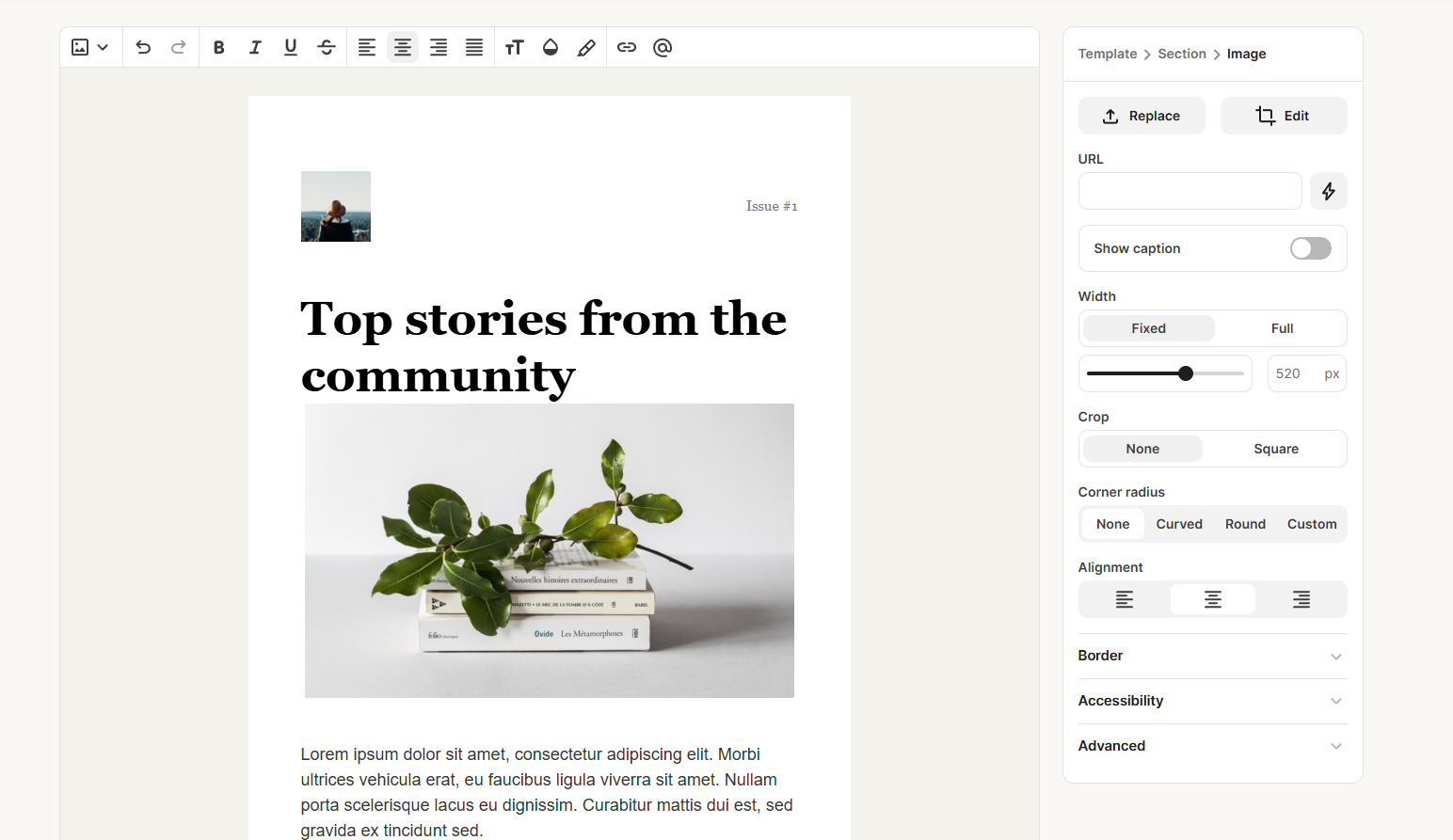 Hands-on testing of the Kit email builder
Mailchimp’s email builder feels like a full design environment built for structured campaigns. A persistent panel of blocks and layout options makes it easy to assemble complex emails with multiple sections and columns. Styling controls are detailed, with options for spacing, visibility, and separate desktop and mobile adjustments. The result is a flexible tool that supports polished, branded emails and more complex visual layouts.
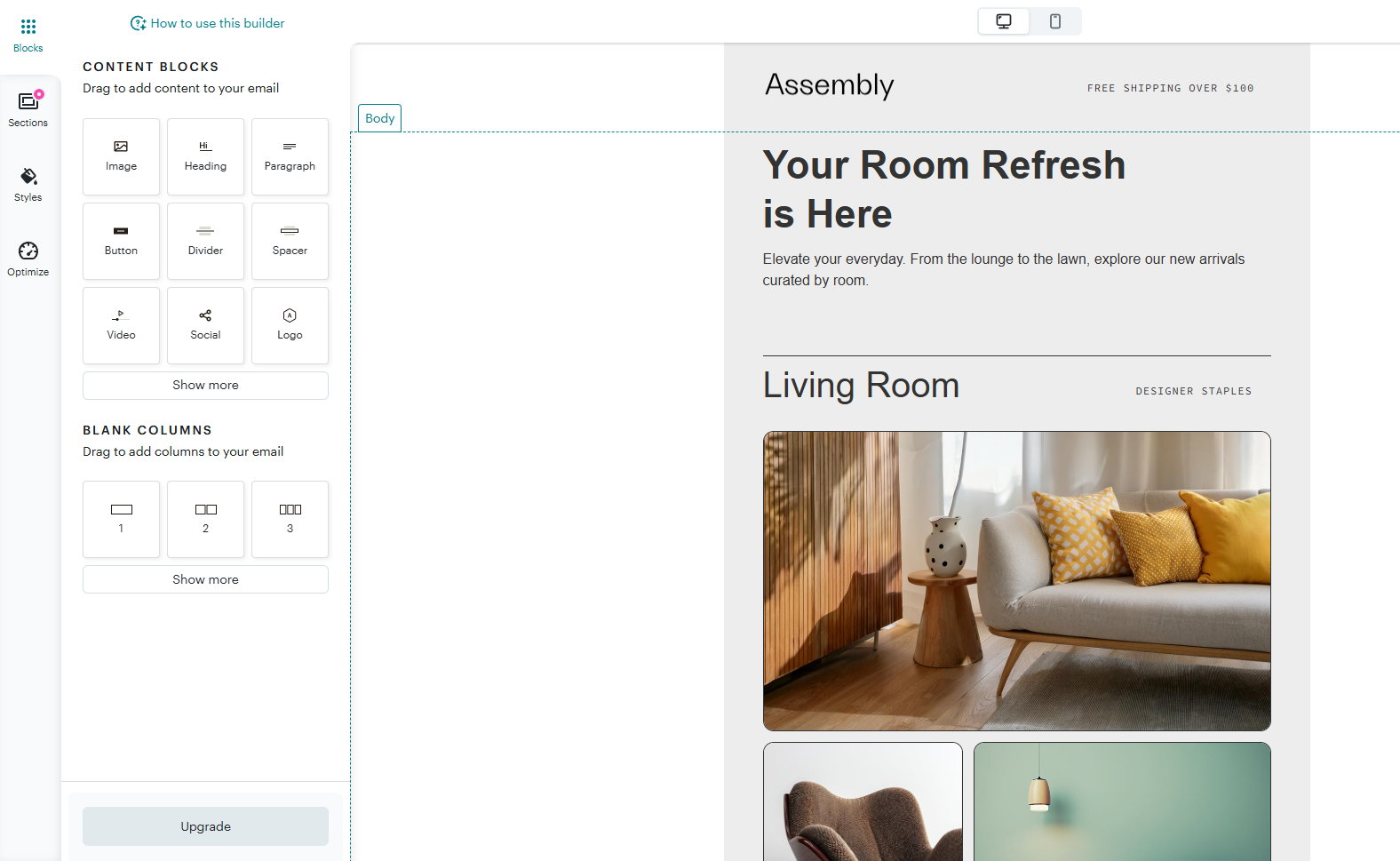 Customizing an email template in the Mailchimp email editor
These differences shape your day-to-day experience. Kit prioritizes speed and simplicity, which is great for writing and sending quickly. Mailchimp prioritizes control and presentation, giving you more tools to design and structure emails in detail. It really comes down to what matters more to you: content or design.
Marketing automation
Kit: 6/10 | ⭐ Mailchimp: 7.8/10
Automation is another core feature where Mailchimp leads with a significant score gap. This difference again comes down to the platforms’ target audiences.
Kit is built for creators who primarily send newsletters and don’t need complex automation, so its capabilities remain intentionally simple. Mailchimp, on the other hand, serves a broader range of users and offers more advanced automation tools, along with a large library of templates and customization options. Let’s explore it in detail:
| Aspect |
Kit |
Mailchimp |
Winner |
| Availability by plan |
Full visual automations available on paid plans; free plan limited to basic automation |
Automation available across plans; advanced journeys and features unlocked on higher tiers |
Tie |
| Automation builder |
Visual automation builder with simple canvas; focused on sequences, tags, and conditions |
Customer journey builder with visual workflow editor; supports multi-step journeys and branching logic |
Mailchimp |
| Triggers available |
Triggers based on forms, tags, purchases, custom fields, and link clicks |
Broad trigger set including email activity, site behavior, purchases, dates, and audience changes |
Mailchimp |
| Pre-built automations |
39 automation templates for common creator workflows (welcome, product launches, nurture) |
121 pre-built journeys for onboarding, abandoned cart, re-engagement, and more |
Mailchimp |
| Channels supported |
Email only |
Email, SMS, ads, and social integrations |
Mailchimp |
| Automation complexity |
Supports multi-step workflows with conditions and branching; optimized for linear and content-driven flows |
Supports complex, multi-branch workflows with behavioral logic and cross-channel actions |
Mailchimp |
| Total score |
6/10 |
7.8/10 |
Mailchimp |
Let’s see what kind of automations Kit and Mailchimp are capable of in practice.
Kit’s automation builder feels simple and focused on guiding subscribers through content-driven journeys. You start with a trigger and build flows vertically, adding steps as needed without dealing with complex panels or logic layers. Branching is straightforward and works well for splitting audiences based on interests or actions. The whole experience is fast to build and easy to follow, making it ideal for nurturing subscribers with targeted email flows.
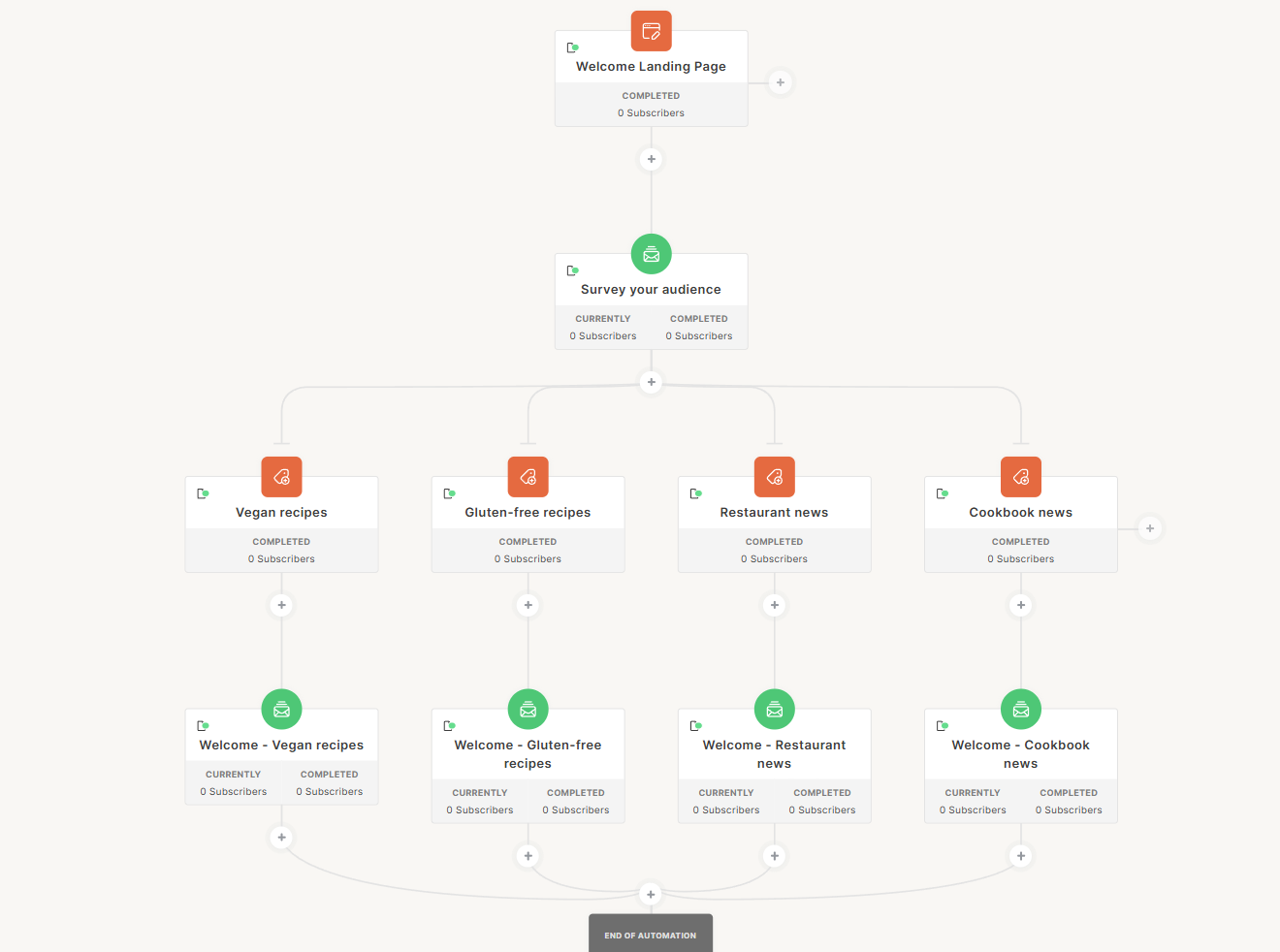 Survey your audience automation in Kit
Mailchimp’s automation is more like a full marketing operations tool. You work with a visual canvas and a persistent panel of rules and actions, building flows that can react to behavior across multiple channels. There are many triggers, conditions, and pre-built journeys available, covering everything from eCommerce events to integrations with external tools. It takes more time to set up, but gives you the flexibility to manage complex, multi-step customer journeys.
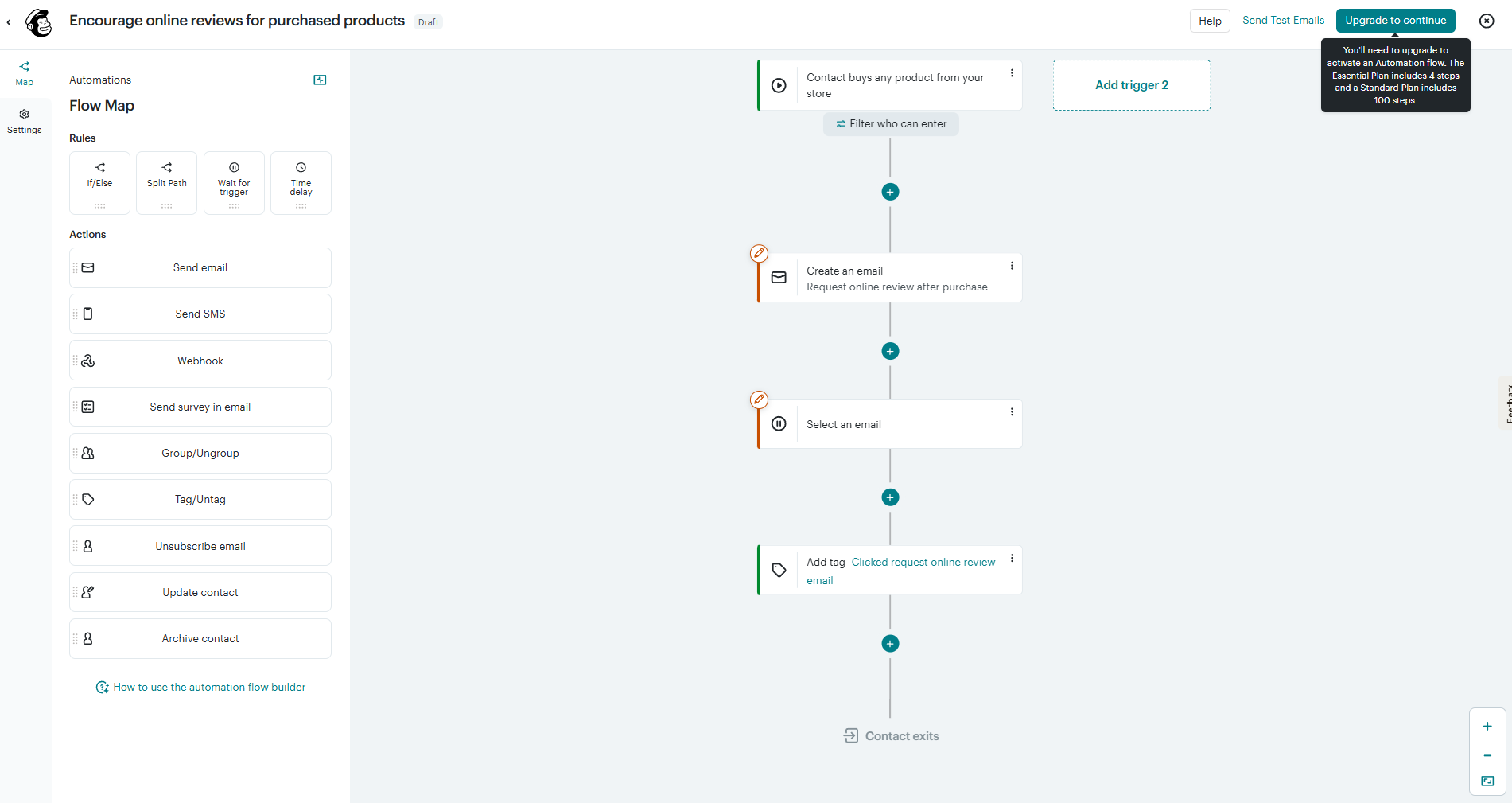 New customer onboarding and engagement automation at Mailchimp
For users, this means that Kit helps you guide subscribers through structured email sequences based on their interests, while Mailchimp lets you build broader, behavior-driven workflows across your marketing ecosystem. In automations, Kit prioritizes speed and clarity, while for Mailchimp, flexibility and scope are more important.
Contact management
Kit: 6/10 | ⭐ Mailchimp: 7.5/10
Good contact management is what makes segmentation actually useful – it’s how you make sure the right emails reach the right people. Here’s how Kit and Mailchimp compare in segmentation and tagging:
| Aspect |
Kit |
Mailchimp |
Winner |
| Segmentation capabilities |
Tag-based segmentation across a single subscriber list; flexible filtering using tags, custom fields, and behavior |
Segmentation across audiences, tags, and groups; supports pre-defined segments and condition-based filtering |
Mailchimp |
| Segment update speed |
Segments update automatically as contact data and behavior change |
Segments update automatically as contact data and behavior change |
Tie |
| Available segmentation criteria |
Tags, forms, sequences, custom fields, and basic engagement and purchase data |
Contact data, tags, groups, email engagement, purchase activity, and behavioral data |
Mailchimp |
| AI features for segmentation |
Not available |
Predictive segmentation based on purchase likelihood, churn risk, CLV, predicted next purchase date, predicted age, and gender |
Mailchimp |
| Tagging and manual organization |
Single list with tag-based organization; each subscriber exists once and is labeled with tags |
Multiple audiences with tags and groups; contacts can exist in separate lists with different attributes |
Mailchimp |
| Contact structure |
Single subscriber list; each subscriber exists once, regardless of tags or segments; no duplicate billing |
Audience-based structure; contacts organized within audiences using tags, groups, and segments; the same email address in multiple audiences counts as multiple contacts toward billing |
Kit |
| Total score |
6/10 |
7.5/10 |
Mailchimp |
There’s one detail we need to emphasize here.
Even though Mailchimp is stronger in segmentation overall, it has one major drawback – contacts are stored in separate audiences. If the same email address appears in multiple audiences, it’s counted multiple times, which increases your billing. This is something to keep in mind if you want to avoid unexpectedly high costs.
If you want segmentation that works in real time across all your channels, not just email, SendPulse offers a fundamentally different approach. Its dynamic segments update instantly as contact data and behavior change, with no manual refresh needed. What makes it stand out is the cross-channel scope – segments can include data from email, SMS, chatbots, and CRM, all in one place.
Signup forms and landing pages
Kit: 6.4/10 | ⭐ Mailchimp: 8.2/10
Signup forms and landing pages are key tools for growing your audience and collecting contacts. This is another area where Mailchimp leads, thanks to a more detailed builder that allows for deeper customization, while Kit keeps things simpler. Here are the details:
| Aspect |
Kit |
Mailchimp |
Winner |
| Types of forms available |
Inline, modal, slide-in, sticky bar, and standalone landing pages |
Embedded forms, pop-ups, and landing pages |
Kit |
| Form builder |
Visual editor with customizable signup forms; easy embedding on websites or standalone use |
Drag-and-drop form builder with structured editing and integration into campaigns |
Mailchimp |
| Pop-up targeting conditions |
Time delay, scroll percentage, exit intent, and link/button click triggers |
Time delay, scroll behavior, exit intent, and inactivity triggers |
Tie |
| Landing page builder |
Template-based landing pages with no-code editor; built for list growth and direct integration with email automations |
Drag-and-drop landing page builder with templates, analytics, and integrations |
Mailchimp |
| Total score |
6.4/10 |
8.2/10 |
Mailchimp |
Here’s what landing page building looks like in both Kit and Mailchimp.
With Kit, you start from a pre-built template and edit content directly on the page, adjusting fonts, colors, and backgrounds through global settings. The structure is fixed, so you don’t spend time arranging sections or building layouts; everything is already in place. If your goal is list growth rather than elaborate design, you can have a clean, conversion-focused page up and running in minutes.
 Creating a landing page with a signup form at Kit
Mailchimp’s landing page builder works as a full-page composition tool with a drag-and-drop interface. You can build pages from scratch using blocks, arrange them in different sections, and create multi-column layouts with detailed styling controls. Each element can be customized individually, which helps you create more visually complex and branded pages.
It takes more time to set up, but gives you the flexibility to create pages that look like proper marketing or product pages.
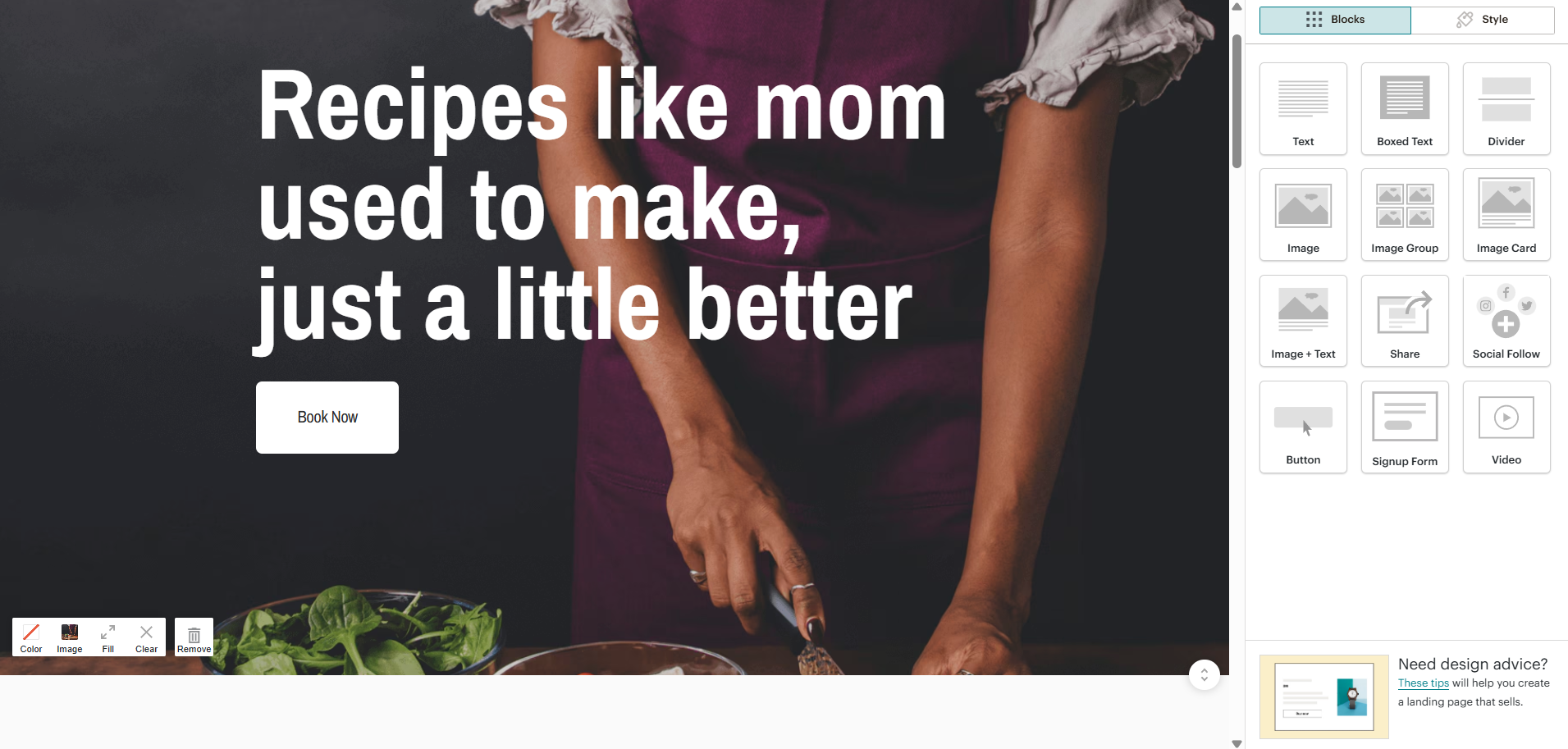 Customizing a landing page template at Mailchimp
In practice, Kit removes most layout decisions so you can publish pages quickly and focus on content, while Mailchimp gives you full control over structure and design. Kit is better suited for fast, functional pages tied to email growth, while Mailchimp works better when the page itself is part of a larger campaign and needs a more polished, custom layout. The difference comes down to speed versus control.
Unlike landing pages, pop-up builders at Kit and Mailchimp are pretty similar and offer basic customization options.
But if you need more than a standard signup form, SendPulse pop-ups offer capabilities that go beyond what Kit and Mailchimp provide. You can use built-in gamification elements like spin-to-win wheels or scratch cards, create multi-step pop-up flows, and target visitors based on detailed rules such as exit intent, scroll depth, or traffic source. Collected data feeds directly into segmentation and can trigger automations instantly, without extra setup.
Deliverability
Kit: 9/10 | ⭐ Mailchimp: 9.4/10
Even though most deliverability outcomes depend on the marketer, email service providers also need to follow best practices to support their users. Both Mailchimp and Kit (formerly ConvertKit) perform well in this area. See for yourself:
| Aspect |
Kit |
Mailchimp |
Winner |
| Authentication |
SPF, DKIM, and DMARC via verified sending domain; manual setup required |
SPF, DKIM, and DMARC supported; guided domain authentication setup |
Tie |
| Deliverability monitoring |
Deliverability reporting per broadcast and sequence |
Inbox preview; content optimizer checks links and merge tags |
Tie |
| List hygiene |
Hard bounces suppressed; inactive subscribers identified; manual cleanup and re-engagement recommended |
Hard bounces and unsubscribes suppressed; inactive contact management tools and engagement-based segmentation available |
Tie |
| Dedicated IP |
Available on request; minimum 150,000 emails/week required; $250/month; no IP warm-up |
Available on request for high-volume senders; $29.95/mo; IP warm-up included |
Mailchimp |
| Total score |
9/10 |
9.4/10 |
Mailchimp |
Among the best practices that can significantly improve your deliverability are maintaining a clean list, sending emails consistently, and creating relevant, permission-based content that drives engagement. These are all factors you or your email marketer controls – neither Kit nor Mailchimp can do this for you.
Reporting and analytics
Kit: 7.2/10 | ⭐ Mailchimp: 7.8/10
Data drives decisions, and email marketing is no exception. To understand which campaigns performed well and which didn’t, and to learn more about your audience and their behavior, you need reliable reporting.
Here’s how Kit and Mailchimp compare in this area:
| Aspect |
Kit |
Mailchimp |
Winner |
| Report coverage |
Per-campaign reports with opens, clicks, unsubscribes, and bounces; sequence reports; form and landing page conversion tracking; basic revenue tracking |
Per-campaign reports with opens, clicks, bounces, unsubscribes, link activity, geography, and revenue attribution; automation and eCommerce reports |
Mailchimp |
| Custom reports |
Pre-built reports only; no custom reporting |
Custom reports and audience insights; advanced segmentation and comparative analytics |
Mailchimp |
| Reporting speed |
Reports update with a short delay; data refreshes after sending and when filters are applied |
Reports update continuously for campaigns; some reports (automation, custom) update on a set schedule |
Mailchimp |
| Export capabilities |
CSV export only |
CSV files for campaign reports; CSV or PNG files for custom reports |
Mailchimp |
| Total score |
7.2/10 |
7.8/10 |
Mailchimp |
Kit and Mailchimp reporting differ, but the importance of that difference depends on how you use the platform. For basic needs, such as checking opens, clicks, unsubscribes, and overall campaign performance, both tools are very similar and fully sufficient. The gap appears when you need deeper analysis: Mailchimp offers cross-campaign reports, revenue attribution for eCommerce, and more advanced insights like geography and click maps.
For a creator or small newsletter, this difference is often irrelevant, as Kit already covers everything you actually use day to day. But for businesses that need to track performance over time, compare campaigns, or connect email results to revenue, Mailchimp’s reporting becomes much more valuable.
Customer support
⭐ Kit: 7.5/10 | Mailchimp: 7.2/10
In this section, we look at customer support from a practical point of view – how clear and helpful the knowledge base is, what support channels are available, and what real users say about their experience. To reflect that, we also consider Capterra’s support quality ratings, which closely match what we’ve observed ourselves.
Here’s what you need to know about customer support in Kit and Mailchimp:
| Aspect |
Kit |
Mailchimp |
Winner |
| Channel availability |
Email support on all plans; live chat on paid plans; no phone support |
Email support on all plans; live chat on paid plans; phone support on higher tiers |
Mailchimp |
| Knowledge base |
Help center with guides, tutorials, and troubleshooting articles; focused on core features |
Extensive help center with articles, tutorials, and video guides; broader coverage across features |
Tie |
| Onboarding assistance |
Self-serve setup with onboarding checklist and migration guides; free migration assistance available |
Guided onboarding resources, including tutorials, checklists, and recommendations |
Kit |
| Support quality rating on Capterra |
4.4/5 |
4.2/5 |
Kit |
| Total score |
7.5/10 |
7.2/10 |
Kit |
Both platforms have solid knowledge bases and offer email and chat support, which already covers the majority of typical questions. The difference becomes noticeable at the edges: Kit is more accessible for smaller teams, with 24/7 chat and hands-on migration help, while Mailchimp offers more structured support at higher tiers, including onboarding sessions and phone support.
Solo creators are likely to benefit more from Kit’s accessibility and migration support, while larger teams may find Mailchimp’s advanced onboarding and phone support more valuable.

Join 3M+ businesses growing with SendPulse
From solo creators to global brands, millions trust SendPulse to run email campaigns, automations, chatbots, and more — all in one place. Get started for free now!
Get started for free
Your decision checklist
Now that you know everything there is to know about Kit and Mailchimp, let’s match them to your specific needs:
| Decision area |
Kit
is a better fit if… |
Mailchimp
is a better fit if… |
| Business type |
🟦 You’re a creator, blogger, or newsletter-driven business focused on content and digital products. |
🟨 You run a small to mid-sized business, an eCommerce brand, or a marketing team with wider marketing needs. |
| Budget expectations |
🟦 You want a generous free plan and predictable pricing as your list grows. |
🟨 You’re comfortable paying more for extra features and a more complex marketing toolkit. |
| Automation needs |
🟦 You need simple, email-based automations built around sequences and tags. |
🟨 You need more advanced automations with multiple triggers, conditions, and broader marketing use cases. |
| Analytics focus |
🟦 You’re focused on standard email performance metrics and basic conversion tracking. |
🟨 You need more detailed reporting, audience insights, and performance comparisons. |
| Team setup |
🟦 You work solo or in a small team and want a fast, easy-to-manage platform. |
🟨 You have a team and can handle a more feature-rich platform with a slightly steeper learning curve. |
If you get three or more answers pointing to either Kit or Mailchimp, congrats – you’ve likely found your email platform. But what if the winner still doesn’t feel like a perfect match?
In that case, it’s worth exploring other platforms in the same space of simplicity and affordability, for example:
- MailerLite, if you need an easy-to-use platform with great value for money;
- ActiveCampaign, if you want advanced automation and built-in CRM capabilities;
- Constant Contact, if you’re looking for simple campaigns with guided setup and support;
- SendPulse, if you want a multi-channel platform with email, SMS, chatbots, landing pages, online forms, a built-in CRM, and pop-ups in one place.
Final verdict and recommendations
⚖️ Final scores: Kit– 8.4/10 |Mailchimp– 8.7/10
The 0.3-point gap in final scores highlights something important: neither platform is objectively better. They’re built for different users, and the right choice depends almost entirely on what you’re building and who you’re building it for.
Kit stands out where focus matters. It deliberately avoids unnecessary complexity, and for creators, that is more of a strength and not a limitation. If your business revolves around a newsletter, a community, or digital products, Kit gives you exactly what you need without the overhead of features you won’t use. Its pricing model can also save you a significant amount as your list grows.
Mailchimp, on the other hand, is a better fit when you need a wider range of features. If email is just one part of a larger marketing system, alongside eCommerce, multiple channels, and team collaboration, it provides the infrastructure to support that. Its automation, segmentation, and reporting capabilities are more advanced, and the time invested in learning the platform pays off as you scale.
What both platforms have in common is reliability. They are mature, well-supported products, and choosing either one is unlikely to be a long-term mistake. If you outgrow Kit, moving to a more advanced platform is manageable. If Mailchimp feels too complex, you can always simplify your setup.
Our recommendation is:
- Choose Kit if you’re a creator, solo operator, or newsletter-first business that wants to grow and monetize audience engagement without unnecessary complexity.
- Choose Mailchimp if you need email to support a broader marketing strategy, rely on behavior-driven automation, or have a team that will benefit from its advanced features.