Imagine you have to choose between two tools – one is broadly efficient and reliable, the other is narrow, but built specifically for your niche. With Kit and ActiveCampaign, you don’t have to imagine – this is exactly the situation.
ActiveCampaign was created for email marketers, with automation and workflows at the core. Kit, previously known as ConvertKit, on the other hand, was built by a creator for other creators, with simplicity and speed in mind. Let’s take a closer look at where these approaches differ, and what they mean in practice.
How we scored this comparison: Each platform was evaluated across nine categories using our independent methodology. Pricing (25%), ease of use (20%), and email and automation features (15% each) carry the most weight because they affect daily workflows the most. All scores reflect real testing and analysis as of April 2026.
TL;DR Quick Kit vs ActiveCampaign comparison
Take a quick look at a summary of our findings for Kit and ActiveCampaign across pricing, email functionality, automation features, and more. If any aspect stands out as key for your decision, click through to explore it in more detail and see the full breakdown.
| Category |
Kit |
ActiveCampaign |
Winner |
| Best for |
Creators, bloggers, newsletter writers, and solopreneurs who need a simple email platform with tools to grow an audience and sell digital products |
B2B companies, SaaS teams, and eCommerce brands that run behavior-driven automation and engage customers across multiple communication channels |
Depends on use case |
| Pricing |
10/10
Free plan up to 10,000 contacts; affordable paid tiers with transparent scaling |
8.8/10
14-day free trial; pricing scales with contact count and access to advanced features |
Kit |
| Ease of use |
8.2/10
Beginner-friendly interface with guided setup; core features can be learned within a few hours; no native mobile app |
8.8/10
Clean but feature-dense interface with a steeper learning curve; iOS and Android apps available |
ActiveCampaign |
| Email design |
7/10
Block-based editor with a limited number of templates; AI-driven subject line suggestions |
8.8/10
Structure-based drag-and-drop editor with global styling controls; AI campaign generation, including subject line and copy, from a prompt |
ActiveCampaign |
| Automation |
6/10
Visual canvas builder with tag- and sequence-based workflows; supports email only |
9.6/10
AI-powered builder for multi-channel automation with 200+ templates and 40+ triggers; supports email, SMS, WhatsApp, and site messages |
ActiveCampaign |
| Contact management |
6/10
Segmentation based on tags, custom fields, and engagement history; rule-based filters using any/all/none logic |
8.5/10
Segmentation across lists, tags, scores, deal status, site behavior, and eCommerce activity; AI-assisted segment suggestions |
ActiveCampaign |
| Forms and pages |
6.4/10
Template-based form and landing page builder focused on quick list growth; 4 form types with basic targeting rules |
7.2/10
Flexible form builder with image layouts, CSS controls, and targeting options; drag-and-drop landing page builder with site tracking, Google Analytics, and CRM integration |
ActiveCampaign |
| Deliverability |
8.5/10
Solid sending infrastructure with limited built-in monitoring tools; dedicated IP available for $250/month |
9.2/10
Advanced monitoring tools with built-in spam checks and stronger sending infrastructure; dedicated IP available for $750 (one-time payment) |
ActiveCampaign |
| Reporting |
7.2/10
Campaign and sequence reports; form and landing page conversion tracking; CSV export only |
8.4/10
Campaign, automation, and eCommerce reports; custom reports across multiple data sources; exports in CSV, Excel, JSON, and more |
ActiveCampaign |
| Customer support |
7.5/10
24/7 live chat and email support; comprehensive knowledge base; migration assistance for users moving from major platforms |
7.2/10
Live chat available Mon–Fri and Sunday (limited hours); email support; onboarding training and live workshops |
Kit |
| Final score |
8.4/10 |
9.2/10 |
ActiveCampaign |
The scores give you a snapshot, but they’re not enough on their own to make a fully informed decision. Let’s go over the details behind them, along with the key pros and trade-offs for each platform.

Create and send high-performing emails
Use an AI assistant, pre-made templates, advanced segmentation, and feature-rich automation to run campaigns without coding. Start for free with up to 15,000 monthly emails.
Get started for free
Kit vs ActiveCampaign across pricing and key email marketing features
Below is a detailed breakdown, based on hands-on testing of both Kit and ActiveCampaign, covering every step of getting to know and using the platforms. We have verified all the information, so you can trust what you read here.
Pricing plans
⭐ Kit: 10/10 | ActiveCampaign: 8.8/10
Disclaimer: Pricing changes frequently. These figures are accurate as of April 2026. Always verify final costs on official pricing pages.
Before we discovered Kit, ActiveCampaign was one of our favorites in terms of pricing – it offered a strong set of advanced features, AI tools, and solid deliverability at a fair cost, without hidden drawbacks. But then we came across Kit and got a new perspective on what “generosity” can look like. Check out what we mean:
| Contacts |
Kit |
ActiveCampaign |
Winner |
| Free plan |
Up to 10,000 contacts and unlimited emails |
14-day free trial |
Kit |
| 2,500 |
$0/mo;
unlimited emails |
$39/mo;
up to 25,000 emails |
Kit |
| 10,000 |
$0/mo;
unlimited emails |
$149/mo;
up to 100,000 emails |
Kit |
| 25,000 |
$166/mo;
unlimited emails |
$391/mo;
up to 250,000 emails |
Kit |
| Total score |
10/10 |
8.8/10 |
Kit |
We have rarely seen a free plan this generous – Kit allows up to 10,000 contacts. Compare it to Mailchimp – the platform’s free tier is capped at only 250 contacts.
That generosity comes with clear limitations, though. The free plan, called “Newsletter” in Kit, covers the basics: you can send emails, grow your list, and set up a simple triggered email. However, the moment your workflow becomes more advanced, the limits start to show. Automation is a major constraint – you can only create a single linear email sequence, with no branching, multiple triggers, or behavior-based logic, which makes it tough to build a proper funnel.
There are also practical limitations around growth. For example, you can’t integrate with external tools, use a custom domain for landing pages, or automate RSS feed updates.
Because of this, while Kit’s free plan is genuinely strong for getting started, our comparison focuses on its paid plans that include the platform’s pro features.
Ease of use and interface
Kit: 8.2/10 | ⭐ ActiveCampaign: 8.8/10
When considering ease of use, it’s important to highlight that both Kit and ActiveCampaign are built for very specific audiences. If you fall outside their target user profile, the platform may feel unintuitive – even at the usability level.
To give you an idea, Kit uses creator-focused terminology that works well for bloggers and solopreneurs, but can be confusing even for experienced marketers. ActiveCampaign, on the other hand, can feel overwhelming at first for creators with no marketing background – not because it’s poorly designed, but because of the depth of its functionality.
In other words, perceived complexity often depends on who is using the tool. That said, by evaluating both platforms across consistent, objective criteria, we can keep the comparison fair and grounded.
| Aspect |
Kit |
ActiveCampaign |
Winner |
| First-time experience |
Guided setup with a checklist; most users can send their first campaign within an hour |
Clear onboarding for core tasks; automation setup requires significant initial investments of time |
Tie |
| Daily navigation |
Simple interface built around creator-specific labels (Grow, Send, Automate, Earn, Apps) that can feel confusing at first |
Structured interface with a feature-rich sidebar; navigation remains consistent but more layered due to broader functionality |
ActiveCampaign |
| Learning curve |
Core features are quick to learn; automation builder feels intuitive, especially for users switching from more advanced platforms |
Requires time to understand automation logic and data structure; becomes comfortable once learned |
Kit |
| Mobile access |
No dedicated mobile app; browser access only |
Fully functional iOS and Android apps |
ActiveCampaign |
| Workflow efficiency once mastered |
Efficient for one-time campaigns, basic email series, and tag-triggered workflows |
Highly efficient for complex, multi-step automations once properly set up |
ActiveCampaign |
| Total score |
8.2/10 |
8.8/10 |
ActiveCampaign |
But how long will it actually take you or your team to get comfortable using Kit or ActiveCampaign? The graph below shows how their learning curves typically compare:
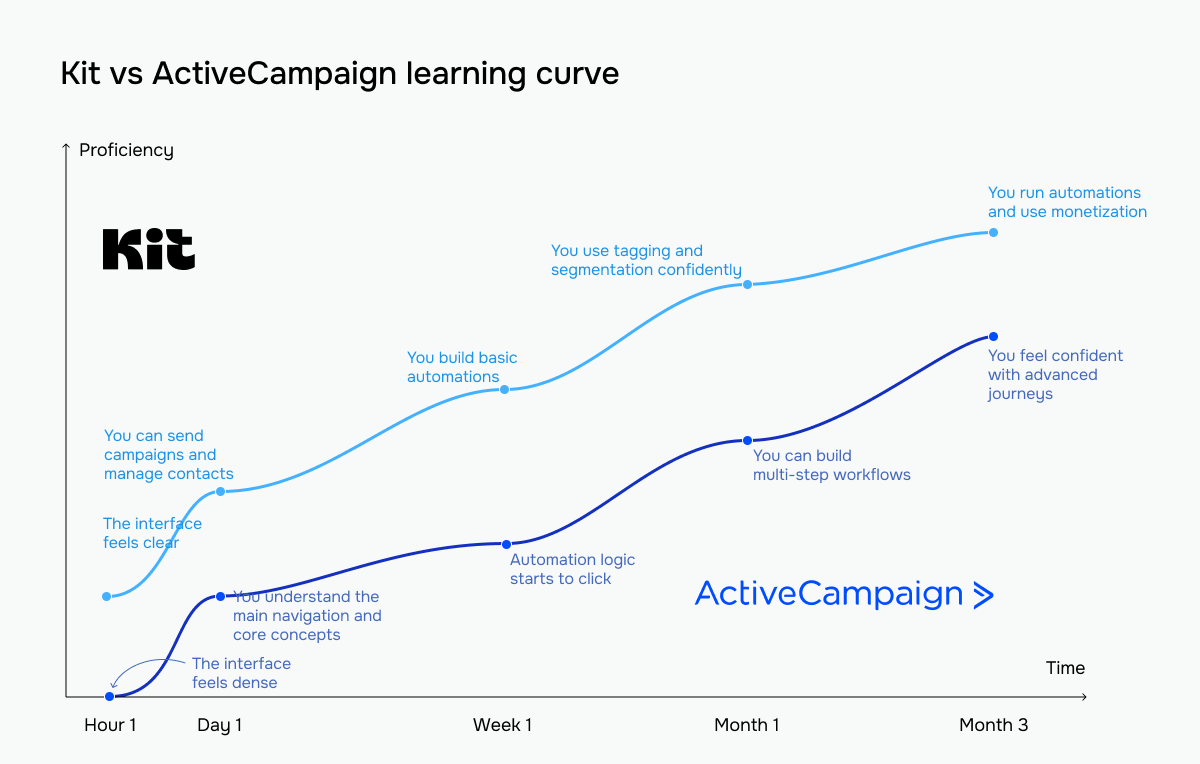 The bright blue line represents Kit; the blue line represents ActiveCampaign
Kit is clearly easier and faster to learn, especially for those who have never used an email marketing platform before. However, ease of use and pricing aren’t the only factors that matter. Let’s take a closer look at how Kit and ActiveCampaign compare across the key features.
Email builder and templates
Kit: 7/10 | ⭐ ActiveCampaign: 8.8/10
On average, marketers spend around 3–6 hours creating an email campaign, including everything from planning and writing to design and testing. Of that time, they spend roughly 25% to 40% directly in the email builder, tweaking layout, formatting, and content setup.
When you’re spending an hour or more per campaign in the builder, the tool itself becomes crucial for overall efficiency. Here’s how Kit and ActiveCampaign perform in this area:
| Aspect |
Kit |
ActiveCampaign |
Winner |
| Templates |
23 basic and 35 pre-designed templates |
236 pre-designed templates and 21 basic layouts; AI-generated templates tailored to your brand |
ActiveCampaign |
| Drag-and-drop editor |
Block-based editor with global styles applied to templates; supports inline HTML blocks and personalization via custom fields |
Structure-based drag-and-drop editor with global styling controls and full HTML access; supports personalization and conditional content based on contact data |
ActiveCampaign |
| Notable content blocks |
Gallery, file download |
Countdown timer, navigation menu, predictive content |
Depends on the use case |
| Mobile responsiveness |
Responsive by default; multi-column layouts automatically stack on mobile devices |
Responsive design with a dedicated mobile editing mode and element visibility controls |
ActiveCampaign |
| AI features |
AI suggests subject lines; 5 options per prompt |
AI generates whole campaigns, including subject lines and body copy; 3 options per prompt |
ActiveCampaign |
| Sending time optimization |
Not available |
Per-contact sending time optimization based on open history; applies to campaigns and automated emails; recalculated weekly |
ActiveCampaign |
| Total score |
7/10 |
8.8/10 |
ActiveCampaign |
Kit’s email builder feels like writing in a clean document editor rather than designing a marketing email. The interface is minimal, with no constant panels – you add elements inline, and settings appear only when needed. This keeps the experience fast and distraction-free, especially if your focus is on content.
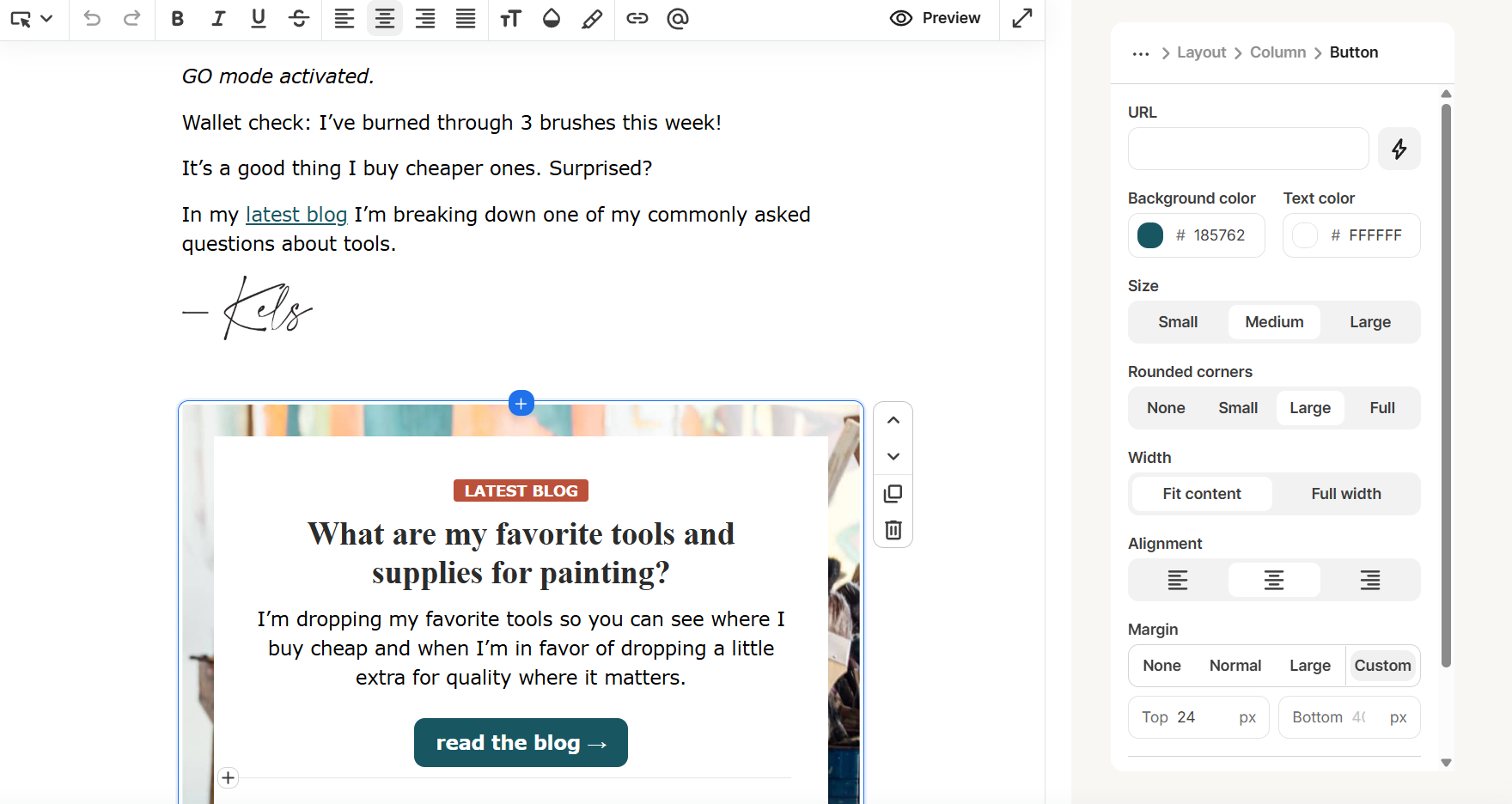 Customizing an email campaign in the Kit email editor
Customization is simple and mostly preset-based, so you don’t spend time pixel-pushing. Overall, it’s built to help you create clean, uncluttered newsletters and send them quickly, not design complex layouts.
ActiveCampaign’s builder feels more like a design tool than a writing space. You always have a panel of layouts and blocks visible, which makes it clear what you can build at any moment. The editor gives you precise control over structure, spacing, and styling, including global settings that apply across the whole email.
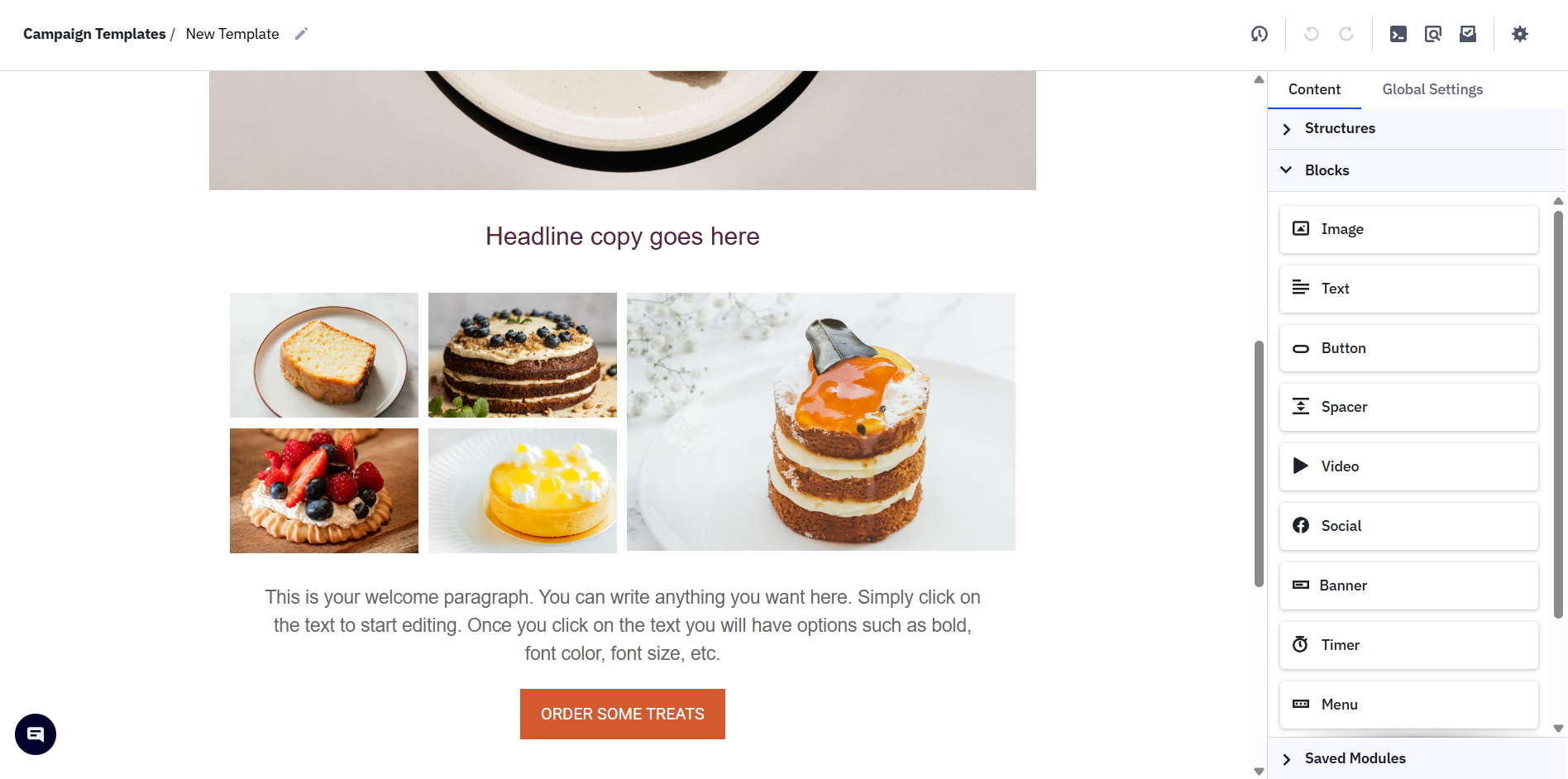 Adding content blocks to an email template in the ActiveCampaign builder
It takes more time to get used to, but once you do, it becomes very predictable and flexible. The experience is geared toward building structured, branded emails rather than quick drafts.
All this means that Kit is faster and simpler – you open the builder, write your email, and send it without worrying about the layout. ActiveCampaign gives you more control – you can design complex, multi-column emails and keep everything consistent across campaigns.
The trade-off is straightforward: Kit saves time but limits your design flexibility, which is completely okay if you aim to send minimalistic, plain-text emails that look closer to personal letters. At the same time, ActiveCampaign requires more effort but lets you customize how your templates look and behave, which is crucial when emails must reflect your brand’s visual identity.
Marketing automation
Kit: 6/10 | ⭐ ActiveCampaign: 9.6/10
Automation is what really sets these platforms apart. With a near-perfect score, ActiveCampaign offers one of the strongest automation toolkits we’ve tested so far. Kit, in contrast, keeps its automation as simple as possible. The gap is now clear, and, quite honestly, it helps explain the difference in their pricing.
| Aspect |
Kit |
ActiveCampaign |
Winner |
| Availability by plan |
Visual automations available on paid plans only; free plan limited to one basic email sequence |
Available on all plans; entry-level plan limits automations to 5 actions; full functionality unlocked on higher tiers |
ActiveCampaign |
| Automation builder |
Visual canvas builder with entry points, actions, conditions, and events; supports up to 5 entry points and multi-path branching |
Visual canvas builder with if/else conditions, wait steps, jump-to actions, and revision history; connected automations displayed on a map |
ActiveCampaign |
| Triggers available |
Basic triggers, including form submission, tag and custom field updates, and purchases |
40+ triggers, including engagement, website activity, eCommerce events, and data changes |
ActiveCampaign |
| Pre-built automations |
39 templates for welcome, launch, and audience growth funnels |
200+ templates for lifecycle, eCommerce, and engagement scenarios |
ActiveCampaign |
| Channels supported |
Email only |
Email, SMS, WhatsApp, and site messages |
ActiveCampaign |
| AI features |
Not available |
AI-generated automations from prompts; AI actions update contact data for dynamic personalization |
ActiveCampaign |
| Automation complexity |
Multi-step workflows with branching, delays, and loops; email sequences can be nested within automations |
Multi-step, multi-branch workflows; automations can trigger or stop other automations; supports complex, long-running customer journeys |
ActiveCampaign |
| Total score |
6/10 |
9.6/10 |
ActiveCampaign |
To make this easier to understand, it helps to look at what typical flows can look like in these platforms.
Kit keeps the automation simple and linear. A trigger initiates a sequence, and contacts move through a predefined set of emails. It also comes with creator-oriented automation templates like “Run an evergreen newsletter” or “Welcome subscribers to your podcast.” In general, the flow is easy to follow and quick to set up, but it doesn’t respond to what contacts actually do.
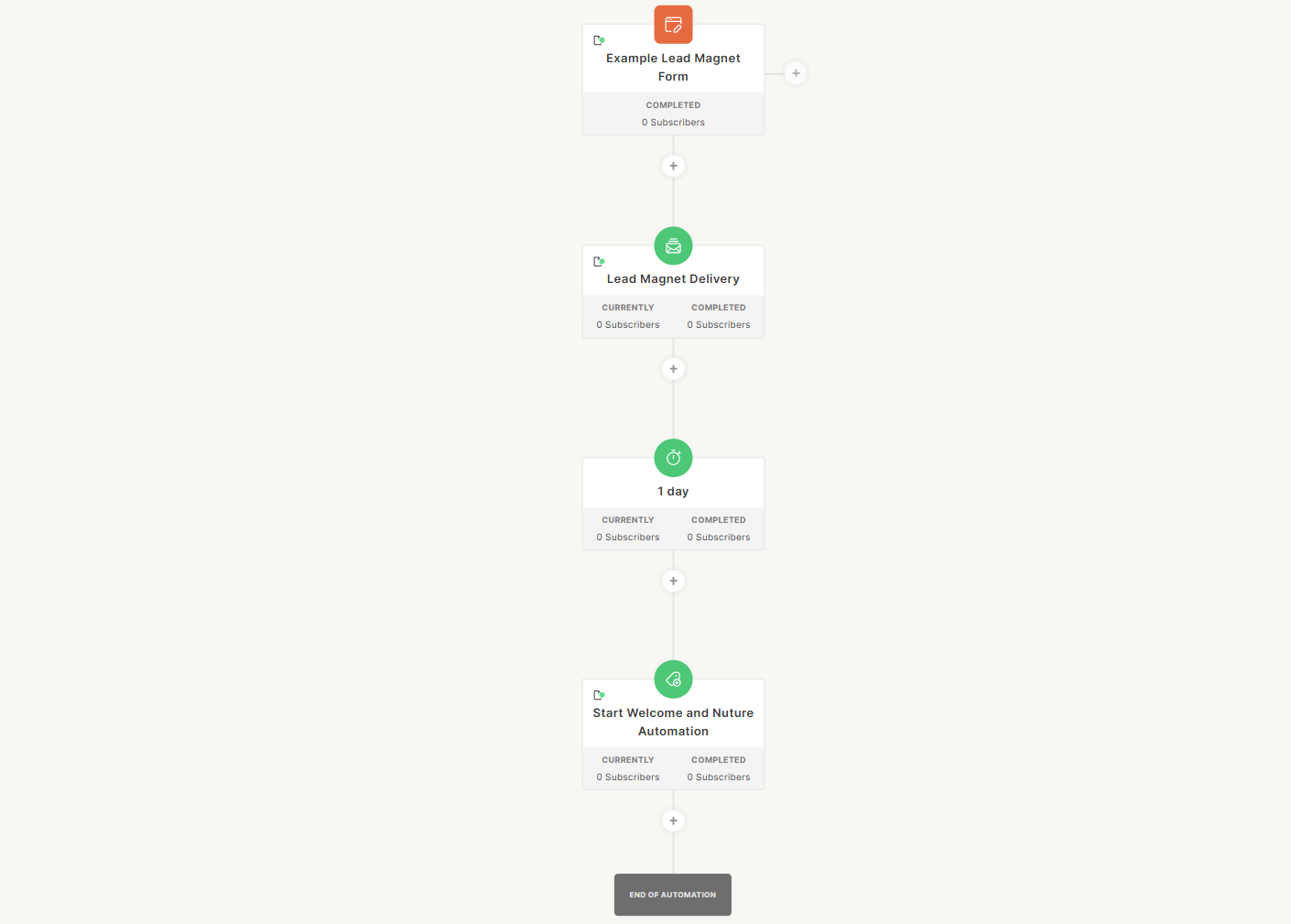 Lead magnet delivery followed by a welcome sequence in Kit
ActiveCampaign automation is much more dynamic and logic-driven. A single flow can branch into multiple paths based on how contacts behave – whether they click, buy, or ignore a message. You can tag contacts, move them between lists, and trigger different actions – all within one automation. It surely takes longer to set up, but it gives you far more flexibility.
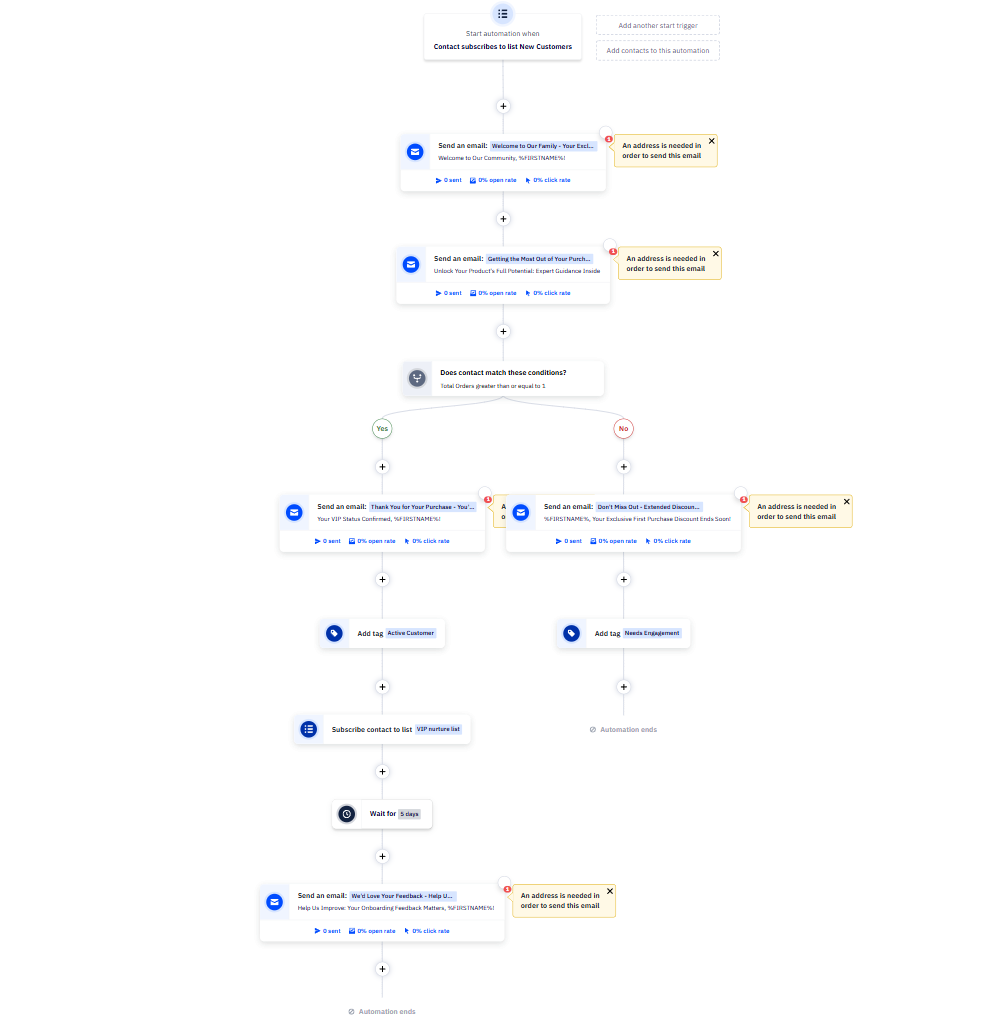 New customer onboarding and engagement automation in ActiveCampaign
In practice, this means that Kit delivers emails on a schedule, while ActiveCampaign reacts to how users act. With Kit, everyone in the same automation gets a similar experience unless you manually separate them beforehand. With ActiveCampaign, one automation can handle multiple scenarios, so buyers and non-buyers can follow different paths without extra setup.
Contact management
Kit: 6/10 | ⭐ ActiveCampaign: 8.5/10
Contact management shows a clear difference between the Kit and ActiveCampaign target users. Kit works well for businesses that mainly use email. You can grow your list, share content, sell digital products, and manage your subscriber journey through emails and forms. Its segmentation supports this approach effectively.
ActiveCampaign is a better fit if your customer journey goes beyond email and includes your website, CRM system, or eCommerce store. It lets you build segments based on a full view of customer activity, not just email engagement, enabling truly targeted campaigns. Here are the details:
| Aspect |
Kit |
ActiveCampaign |
Winner |
| Segmentation capabilities |
Rule-based segmentation with any/all/none logic across filter groups |
Rule-based segmentation with AND/OR logic across condition groups |
ActiveCampaign |
| Segmentation criteria |
Tags, forms, landing pages, sequences, custom fields, location, purchase history, subscriber status, and engagement score |
Contact data, tags, list membership, email engagement, site visits, date-based fields, custom fields, eCommerce data, deal status, and contact score |
ActiveCampaign |
| Segment update speed |
Segments update automatically as contacts meet or stop meeting conditions |
Segments update in real time as contact data and behavior change |
ActiveCampaign |
| AI features for segmentation |
Not available |
AI suggests 3 segments based on contact behavior and data; AI can build and edit segments from natural language prompts |
ActiveCampaign |
| Tagging and manual organization |
Tags applied manually or via automations, link clicks, and form submissions |
Tags applied manually or via automations, form submissions, link clicks, API, and integrations |
ActiveCampaign |
| Total score |
6/10 |
8.5/10 |
ActiveCampaign |
In Kit, segmentation mostly relies on what happens within the platform – forms, sequences, tags, and digital purchases. You can build segments based on email activity and basic interactions, but you don’t see what happens outside of it.
ActiveCampaign goes further, combining multiple data sources into segmentation. By including behavioral, transactional, and CRM data, the platform lets you create much more precise segments that reflect the full customer journey and not just email interactions.
If cross-channel segmentation is what you’re looking for, consider SendPulse‘s approach to it.
SendPulse dynamic segmentation functions across multiple tools at once – contacts can enter a segment based on actions from email, chatbots, CRM, or courses, with real-time updates as their data changes. It also unifies fields from different sources into a single variable, so data stays consistent regardless of how it was originally collected. In practice, segments act as live, multi-channel entry points that can immediately trigger auto-flows when a contact qualifies.

Tetiana Moroz
Automation Product Manager at SendPulse
Signup forms and landing pages
Kit: 6.4/10 | ⭐ ActiveCampaign: 7.2/10
Signup forms and landing pages are where your funnel actually begins – this is where subscribers turn into contacts, and contacts into customers. Everything downstream depends on these entry points working well.
Kit treats them as growth tools. You can find them in the “Grow” section and are meant to help you with list building and content distribution. The platform focuses on getting you live quickly with minimal friction.
In ActiveCampaign, they are conversion optimization tools. How, when, and to whom a form shows up matters just as much as how it looks. So the platform gives you more control over behavior, targeting, and performance.
Here are the details:
| Aspect |
Kit |
ActiveCampaign |
Winner |
| Types of forms available |
Inline, modal, slide-in, and sticky bar |
Inline, modal, floating box, and floating bar |
ActiveCampaign |
| Form builder |
Visual builder with inline editing; fields map to tags and custom fields; simple, built-in signup flow |
Visual builder with separate logic and settings panels; form actions and list settings control signup flow; more structured setup |
ActiveCampaign |
| Pop-up targeting conditions |
Time delay, scroll depth, exit intent, and click triggers |
Time delay and scroll depth; frequency controls for display and repeat behavior |
ActiveCampaign |
| Landing page builder |
Drag-and-drop builder with template-based layouts; built-in conversion tracking and attribution; SEO settings |
Drag-and-drop builder with flexible layouts and blocks; Google Analytics and site tracking integration; SEO settings |
ActiveCampaign |
| Total score |
6.4/10 |
7.2/10 |
ActiveCampaign |
Kit offers pre-designed templates for signup forms, unlike ActiveCampaign, which starts from a more basic structure. This makes Kit’s builder feel visual and template-driven – you begin with a polished layout that’s ready to use and adjust it through colors, images, and simple styling options.
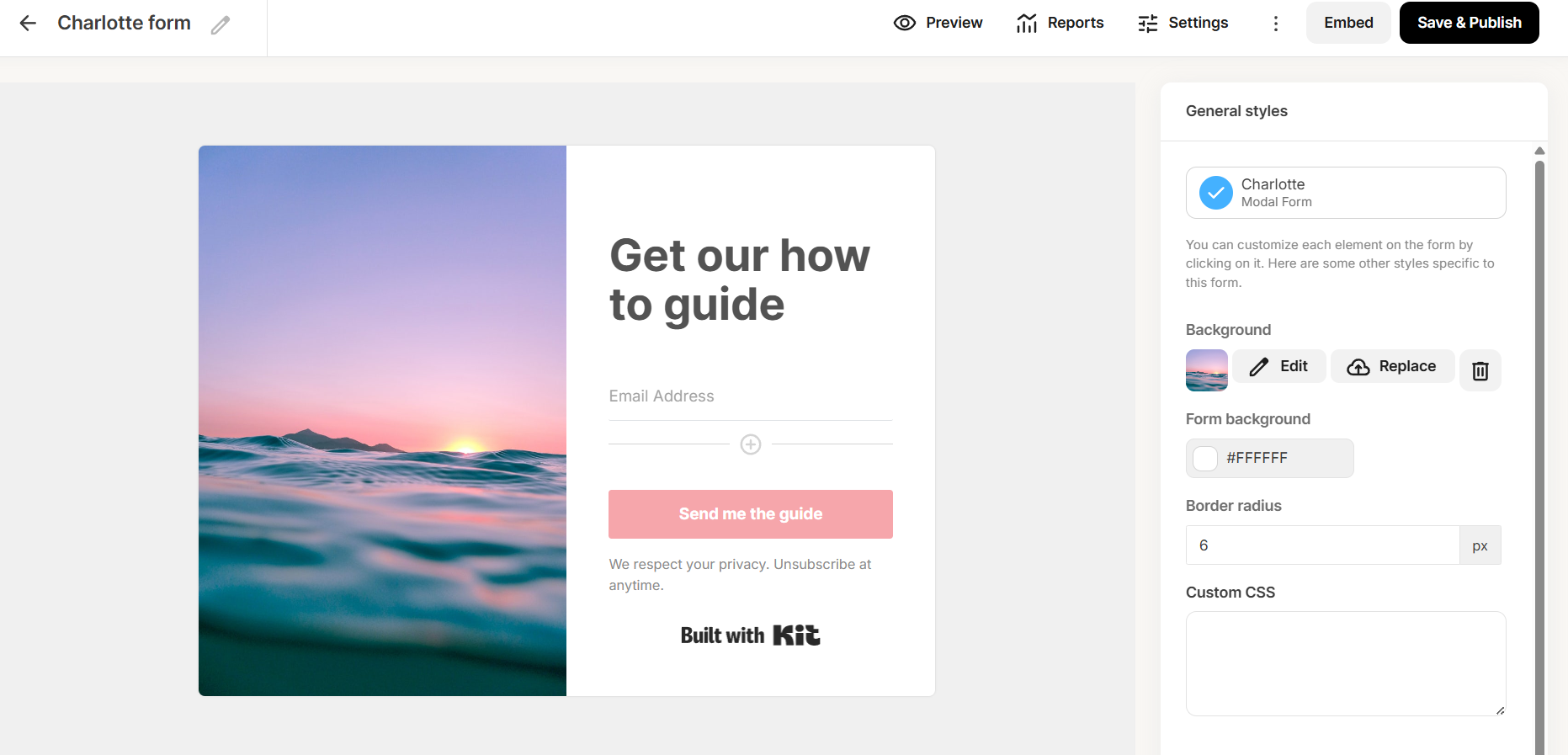 Customizing elements of a signup form with Kit
ActiveCampaign’s form builder is more functional and control-driven. You work with a structured panel that lets you define not just how the form looks but also set up animations, visibility rules, and post-submit actions. The interface exposes these settings directly, making it easier to fine-tune how and when the form appears.
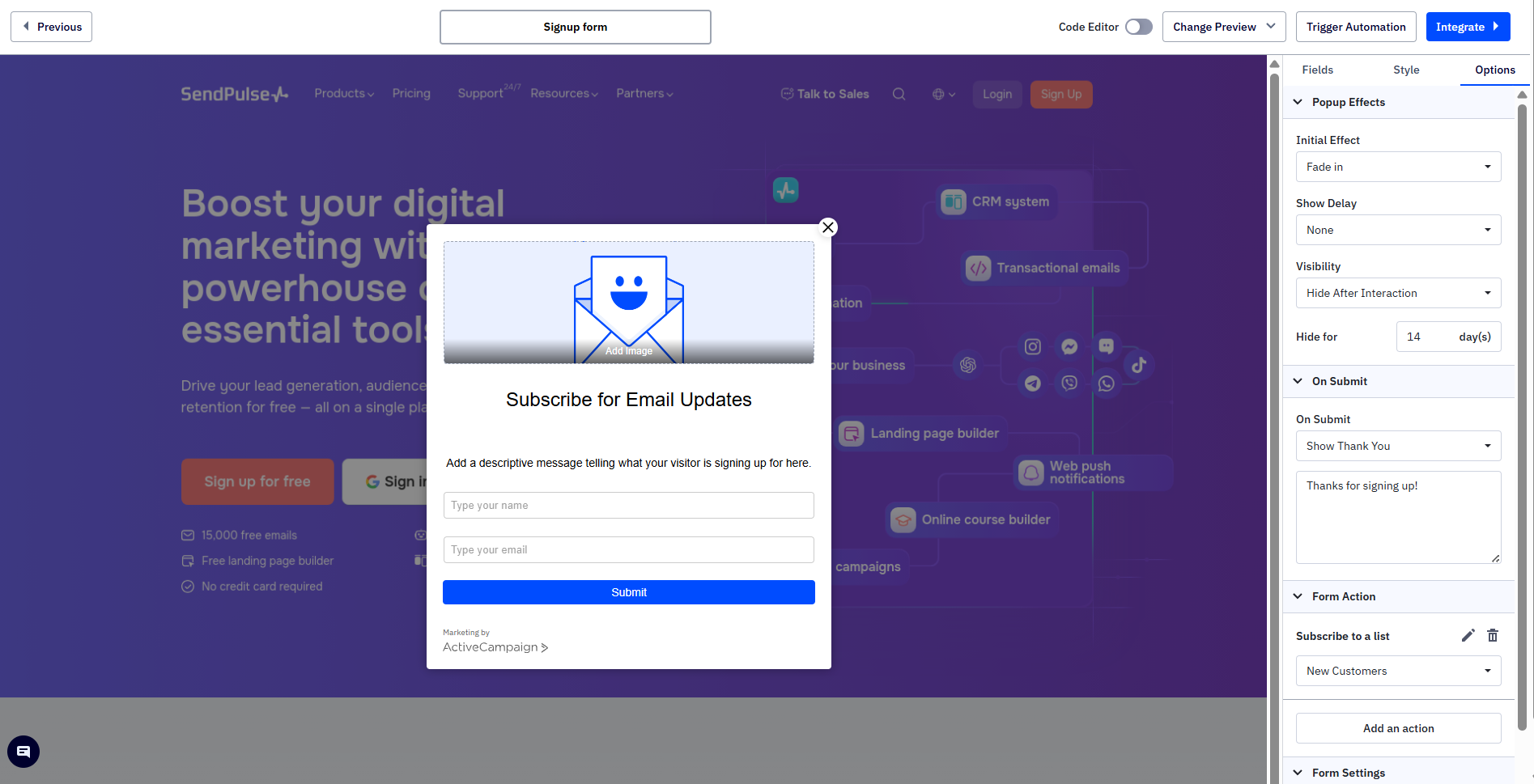 Setting up pop-up effects with ActiveCampaign
So, Kit helps you launch good-looking forms quickly, while ActiveCampaign is more flexible, letting you set up when the form is displayed, how often site visitors see it, and what happens after they submit it.
If you’re looking for more advanced ways to capture leads, take a look at the SendPulse pop-ups. They combine detailed display conditions, including time, frequency, behavior, clicks, and user data, with gamification elements like spin wheels, scratch cards, slot machines, and thimbles. This turns lead capture into an interactive experience without additional tools.
Deliverability
Kit: 8.5/10 | ⭐ ActiveCampaign: 9.2/10
Before getting into features, it’s worth keeping one thing in mind: deliverability depends more on how you send emails than on the platform you use.
Almost 80% of deliverability depends on the marketer's practices, namely list hygiene, permission-based sending, consistent sending pattern, and content relevance. Only about 20% depends on the ESP, which handles infrastructure, authentication, and IP reputation management.

Victoria Lushnenko
Deliverability Expert at SendPulse
So while the platform does matter, it’s only part of the picture. Here’s how Kit and ActiveCampaign handle their part.
| Aspect |
Kit |
ActiveCampaign |
Winner |
| Authentication |
SPF, DKIM, and DMARC via verified sending domain; automatic or manual setup; domain verification required; no BIMI support |
SPF, DKIM, and DMARC via domain authentication; automatic setup with manual option; domain verification required; BIMI supported |
ActiveCampaign |
| Deliverability monitoring |
Shared IP reputation monitoring; Google Postmaster Tools integration; no built-in spam check; advanced reporting on higher tiers |
Built-in spam and DNS checks; Google Postmaster Tools integration; shared IP monitoring; optional deliverability consulting |
ActiveCampaign |
| List hygiene |
Hard bounces suppressed; soft bounces remain active; inactive contacts flagged |
Hard bounces suppressed; soft bounces suppressed after repeated failures; spam complaints suppressed |
Tie |
| Dedicated IP |
Available on request; high sending volume required; $250/month; no warm-up included |
Available on request; engaged contact threshold required; $750 one-time fee; pre-warmed IPs included |
Kit |
| Total score |
8.5/10 |
9.2/10 |
ActiveCampaign |
But honestly, for most marketers, these platforms are nearly identical in practice in terms of deliverability. Both will get your emails delivered if your mailing list is clean and your sending practices are sound. The winner column on authentication and monitoring technically goes to ActiveCampaign. Still, in day-to-day practice, a Kit user sending newsletters to an engaged list will see identical inbox placement.
Reporting and analytics
Kit: 7.2/10 | ⭐ ActiveCampaign: 8.4/10
Reporting is another area where ActiveCampaign shows its depth, while Kit keeps things simple. Let’s start with a side-by-side comparison, then look at what that means in practice.
| Aspect |
Kit |
ActiveCampaign |
Winner |
| Report coverage |
Per-campaign reports with opens, clicks, delivery, unsubscribes, and bounces; sequence reports; form and landing page conversion tracking with UTM attribution; revenue tracking |
Per-campaign reports with opens, clicks, bounces, unsubscribes, geography, and revenue attribution; automation and eCommerce reports |
Kit |
| Custom reports |
Pre-built reports; no custom reporting |
Custom reports across campaigns, automations, contacts, deals, and eCommerce data |
ActiveCampaign |
| Reporting speed |
Reports update on a refresh cycle; delays of a few minutes are possible |
Individual campaign reports refresh every minute; automation reports every 24 hours; custom reports once daily |
ActiveCampaign |
| Export capabilities |
CSV |
CSV, TXT, Excel, JSON, HTML, and Markdown for campaign and automation reports |
ActiveCampaign |
| Total score |
7.2/10 |
8.4/10 |
ActiveCampaign |
Kit gives you a clear view of email performance and conversions, especially if your workflow revolves around campaigns and simple funnels. The reporting is straightforward, but mostly static and limited to pre-built views.
ActiveCampaign lets you analyze data across campaigns, automations, contacts, deals, and eCommerce activity, and build custom reports based on your needs. Faster updates and more export options also make it easier to work with larger datasets or share insights across teams.
In short, Kit helps you track results, while ActiveCampaign helps you understand them.
Customer support
⭐ Kit: 7.5/10 | ActiveCampaign: 7.2/10
Users haven’t reported many issues with either Kit or ActiveCampaign. This suggests that both platforms are reliable and that you probably won’t need help often. However, if you do run into issues – whether it’s setup, troubleshooting, or a specific feature – the quality and availability of support do matter.
| Aspect |
Kit |
ActiveCampaign |
Winner |
| Channel availability |
24/7 live chat and email support on all plans; typical email response within 24 hours |
Live chat available Mon–Fri and Sunday (limited hours; English only); email support available |
Kit |
| Knowledge base |
400+ articles, including feature guides and troubleshooting content; searchable and regularly updated |
Multi-language help center with guides and tutorials; community forum; video courses and webinars |
Kit |
| Onboarding assistance |
Self-serve onboarding with setup checklist and migration guides; free list migration handled by a dedicated team |
Structured onboarding with webinars, training sessions, and optional 1:1 support |
Tie |
| Support quality rating on Capterra |
4.4/5 |
4.4/5 |
Tie |
| Total score |
7.5/10 |
7.2/10 |
Kit |
The same score on Capterra says more than the differences in support hours or documentation. In practice, both Kit and ActiveCampaign offer support that’s reliable enough for everyday use.

Join 3M+ businesses growing with SendPulse
From solo creators to global brands, millions trust SendPulse to run email campaigns, automations, chatbots, and more — all in one place. Get started for free now!
Get started for free
Your decision checklist
Now that you’ve seen how Kit and ActiveCampaign compare in all the key aspects, it’s time to make a decision. Use this quick checklist to determine which platform is the better fit for your business:
| Decision area |
Kit
is a better fit if… |
ActiveCampaign
is a better fit if… |
| Business type |
You’re a creator, blogger, or newsletter writer using email as your primary communication channel and selling digital products. |
You run a B2B, SaaS, eCommerce, or service-based business that needs behavior-driven automation and multi-channel customer journeys. |
| Budget expectations |
You want a generous free plan and predictable, affordable pricing as your list grows. |
You’re willing to invest more in exchange for advanced automation, deeper segmentation, and a built-in sales pipeline. |
| Automation needs |
You need simple email sequences. |
You need sophisticated, behavior-based automations. |
| Analytics focus |
You’re focused on standard campaign metrics with basic conversion and attribution tracking. |
You need custom reports across campaigns, automations, contacts, and eCommerce data with flexible filtering and export options. |
| Team setup |
You work solo or in a small team and need a platform that’s quick to learn and easy to manage. |
Your team can invest time in learning and setting up more advanced workflows. |
If most of your answers fall into one column, your choice is likely clear. Still, it’s worth double-checking – switching platforms later is not that simple. Migration usually involves moving contacts, rebuilding automations, recreating forms and landing pages, and reconnecting integrations, all of which take time and can disrupt your workflows. Taking a moment to choose the right platform now will save you effort down the line.
Final verdict and recommendations
⚖️ Final scores: Kit – 8.4/10 | ActiveCampaign – 9.2/10
Kit and ActiveCampaign aren’t really trying to win the same user.
Kit is optimized for speed, clarity, and a creator-led workflow, where email is the core communication channel and simplicity is a feature, not a limitation. ActiveCampaign is built for businesses that need automation, segmentation, and communication across multiple touchpoints, and you need everything to connect and react.
If you’re still unsure, it’s worth checking a few other options before making your choice:
- MailerLite for a simpler, budget-friendly setup;
- Klaviyo for eCommerce-focused automation;
- Mailchimp for a broader marketing toolkit;
- SendPulse for email, chatbots, and CRM in one platform.
In the end, the right choice is the one that makes your work easier, not more complicated.