Kit and MailerLite are often mentioned in the same breath, and for good reason. Both are known for simple interfaces and affordable pricing, and both appeal to a similar audience. But they’re not interchangeable. There are real differences in how they’re built, what they prioritize, and who they’re best suited for. To help you find the right email marketing platform for your needs, we analyzed their pricing and tested all the core features hands-on.
How we scored this comparison: This review was created by the SendPulse team. As an email marketing platform ourselves, we work in the same space as the tools we test, which also means we understand the field deeply.
Each platform was evaluated across nine categories using our independent methodology. Pricing (25%), ease of use (20%), and email and automation features (15% each) carry the most weight because they affect daily workflows the most. All scores reflect hands-on testing and analysis as of June 2026.
TL;DR Quick Kit vs MailerLite comparison
Here’s a brief overview of Kit and MailerLite’s features, pricing, and key capabilities. If you’re especially interested in any particular category, click on it to jump straight to the detailed breakdown.
| Category |
Kit |
MailerLite |
Winner |
| Best for |
Creators and small businesses focused on email-first growth and simple monetization |
Small to mid-sized businesses needing a balanced, affordable all-in-one marketing toolkit |
Depends on your needs |
| Pricing |
10/10
Generous free plan, with solid value from entry-level to higher tiers |
8.8/10
Competitive pricing backed by solid functionality |
Kit |
| Ease of use |
8.2/10
Clean interface, but requires adapting to creator-focused terminology |
10/10
Intuitive, conventional structure, easy to learn quickly |
MailerLite |
| Email design |
7/10
Simple editor, best suited for text-focused emails with basic design options |
8.6/10
Flexible drag-and-drop builder with richer design control |
MailerLite |
| Automation |
6/10
Straightforward, best for simple sequences and linear workflows |
7.5/10
More flexible workflows with broader triggers and actions |
MailerLite |
| Contact management |
6/10
Single-list system with tags and segments, flexible but less intuitive than list-based models |
8/10
Clear list-based structure with segments and groups; easier to navigate and manage |
MailerLite |
| Forms and pages |
6.4/10
Functional, with stronger behavior controls than design flexibility |
7.6/10
More advanced builders with stronger design and targeting controls |
MailerLite |
| Deliverability |
8.7/10
SPF/DKIM authentication, automatic bounce and unsubscribe handling |
9.8/10
SPF/DKIM authentication, automatic bounce handling, campaign-level bounce rate reporting |
MailerLite |
| Reporting |
7.2/10
Covers core metrics; limited depth and customization options |
7.8/10
Broader reporting coverage; more visibility across campaigns and assets |
MailerLite |
| Customer support |
7.5/10
Reliable support; strong documentation and learning resources |
7.8/10
Reliable support; extensive educational content and guidance |
MailerLite |
| Final score |
8.4/10 |
8.4/10 |
Tie |
As you can see, Kit (formerly known as ConvertKit) and MailerLite are close in many respects. However, this table alone may not be enough to show where each platform truly fits your business needs or where it might fall short. Let’s dive into the details!

Create and send high-performing emails
Use an AI assistant, pre-made templates, advanced segmentation, and feature-rich automation to run campaigns without coding. Start for free with up to 15,000 monthly emails.
Get started for free
Kit vs MailerLite across pricing and email marketing features
In this section, we’ll cover everything that matters to a business in an email service provider. We’ll start with pricing and plans, move on to ease of use, explore how the email builder and automations work, walk you through deliverability at Kit and MailerLite, and finish with secondary factors like reporting and customer support.
Hope you’re ready to explore these two platforms and see how they can make your email marketing easier and more efficient.
Pricing plans
⭐ Kit: 10/10 | MailerLite: 8.8/10
Disclaimer: Pricing changes frequently. These figures are accurate as of June 22, 2026. Always verify final costs on official pricing pages.
Price is one of the most important factors for any business looking to maximize value and get the most out of every dollar spent. Kit and MailerLite have long been known as some of the most affordable email platforms on the market. However, MailerLite’s pricing changes in June 2026 have altered the landscape, and what used to be a battle between two equally affordable platforms is no longer as straightforward.
Here are the official prices for Kit and MailerLite as of June 22, 2026:
| Contacts |
Kit,
Newsletter/Creator |
Kit,
Pro |
MailerLite,
Comfort |
MailerLite,
Power |
| Free plan |
Up to 10,000 contacts and unlimited emails |
Up to 250 contacts and 2,500 emails |
| 2,500 |
$0/mo |
$83/mo |
$33/mo;
25,000 emails |
$49/mo |
| 10,000 |
$0/mo |
$158/mo |
$89/mo;
100,000 emails |
$129/mo |
| 25,000 |
$166/mo |
$233/mo |
$179/mo;
250,000 emails |
$239/mo |
| Note: All indicated paid plans include unlimited email sends unless otherwise specified. |
| Total score |
10/10 |
8.8/10 |
In Kit’s case, we show both the free plan and the most expensive tier. The reason is simple: many features are locked behind paid plans, and the free version is quite limited. At the same time, since we evaluate platforms based on their full capabilities, it wouldn’t be fair to judge Kit’s pricing only by its cheapest plan. We focus on its highest tier, while also showing how pricing changes across plans.
Including both lower and higher pricing tiers also helps illustrate an important point. While Kit is known for its generous free plan, it isn’t always more affordable than MailerLite.
Ease of use and interface
Kit: 8.2/10 | ⭐ MailerLite: 10/10
While both Kit and MailerLite are relatively easy to use, their interfaces differ quite a bit. Kit was built with a specific audience in mind – creators – so some of its logic and terminology may feel less intuitive if you’re coming from a traditional email marketing background.
MailerLite, on the other hand, was designed for a broader audience, which makes its interface more familiar and easier to pick up. If you’ve used any email marketing tool before, it will likely feel intuitive right away, and that’s what drives the difference in scores.
| Aspect |
Kit |
MailerLite |
Winner |
| First-time experience |
Guided setup, focused onboarding, clear first steps; creator-focused terminology and logic |
Smooth start, all-in-one setup, beginner-friendly flow |
MailerLite |
| Daily navigation |
Task-based structure, minimal clicks, fast access |
Conventional layout, predictable sections, easy to follow |
MailerLite |
| Learning curve |
Moderate; intuitive for creators, less so for traditional email marketers |
Gentle; familiar structure that most users adapt to quickly |
MailerLite |
| Mobile access |
Browser-only, no mobile app |
Dedicated iOS app for campaign management, subscriber monitoring, and scheduling |
MailerLite |
| Workflow efficiency once mastered |
High; fast execution, optimized for repetition |
High; streamlined workflows, efficient content creation |
Tie |
| Total score |
8.2/10 |
10/10 |
MailerLite |
If you’re wondering how these differences translate into real-life use, here’s a visual representation of how long it might take you or your team to get comfortable with each platform.
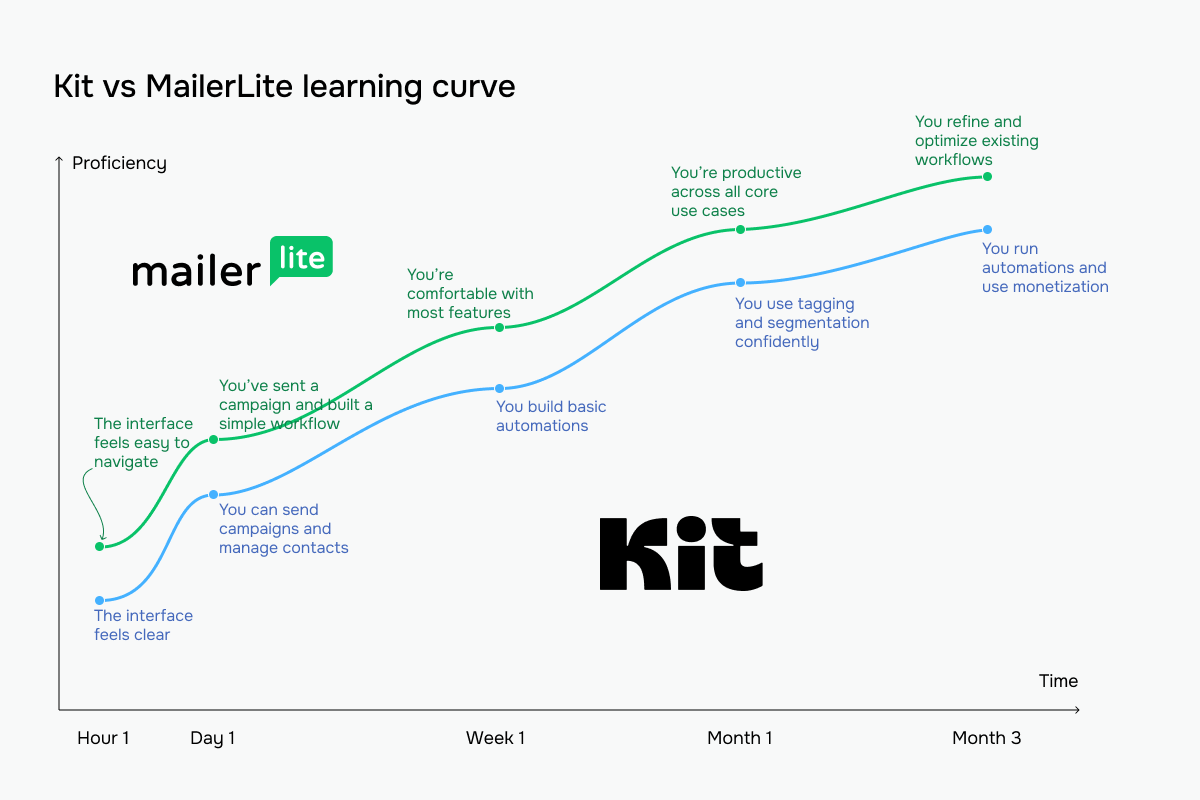 The blue line represents Kit; the green line represents MailerLite
Email builder and templates
Kit: 7/10 | ⭐ MailerLite: 8.6/10
The level of customization an email builder offers, along with the number of available templates, says a lot about a bulk email service. Below, you’ll find key details about Kit and MailerLite email builders, followed by our observations based on using them.
| Aspect |
Kit |
MailerLite |
Winner |
| Templates |
50+ customizable templates |
100+ professionally designed templates |
MailerLite |
| Drag-and-drop editor |
Simple visual editor with inline content blocks; focused on writing rather than building complex layouts |
Full drag-and-drop editor with inline editing and block-based assembly |
MailerLite |
| Notable content blocks |
Layout sections, polls, video, social icons, media tools, reusable snippets |
Survey, quiz, countdown timer, accordion, FAQ, event, product, and coupon blocks |
MailerLite |
| Mobile responsiveness |
Mobile-adaptive emails with a preview available; limited control over responsive behavior |
Mobile-friendly emails with preview and greater control over layout and responsiveness |
MailerLite |
| AI features |
AI subject line suggestions |
AI writing assistant for generating and rewriting email body content; AI subject line generator |
MailerLite |
| Sending time optimization |
Manual scheduling only; no predictive send-time optimization |
Built-in send-time optimization; timezone-based scheduling |
MailerLite |
| Total score |
7/10 |
8.6/10 |
MailerLite |
Here’s what we noticed when testing both Kit and MailerLite email builders hands-on.
Kit’s email builder feels closer to a document editor than a traditional email design tool. The interface is minimal, centered around a clean writing canvas with a simple inline toolbar for basic formatting. There’s no persistent block library; instead, content is added sequentially using a small “+” between sections, which keeps the flow linear and distraction-free.
The right-side settings panel is straightforward and functional, covering essentials like colors, alignment, spacing, and button styling without going deep into design controls. Everything is simplified to reduce friction.
| Pros |
Cons |
- Clean, distraction-free writing canvas
- Fast setup with minimal email configuration
- Reusable snippets help maintain consistency across campaigns
|
- Limited design flexibility and minimal control over mobile-specific styling
- No persistent block library; content options are less discoverable
- Fewer content block types compared to design-oriented builders
|
Overall, the experience is fast and focused, but intentionally limited. It works well for text-first emails and simple layouts, but it doesn’t give much room for visual experimentation or complex design work.
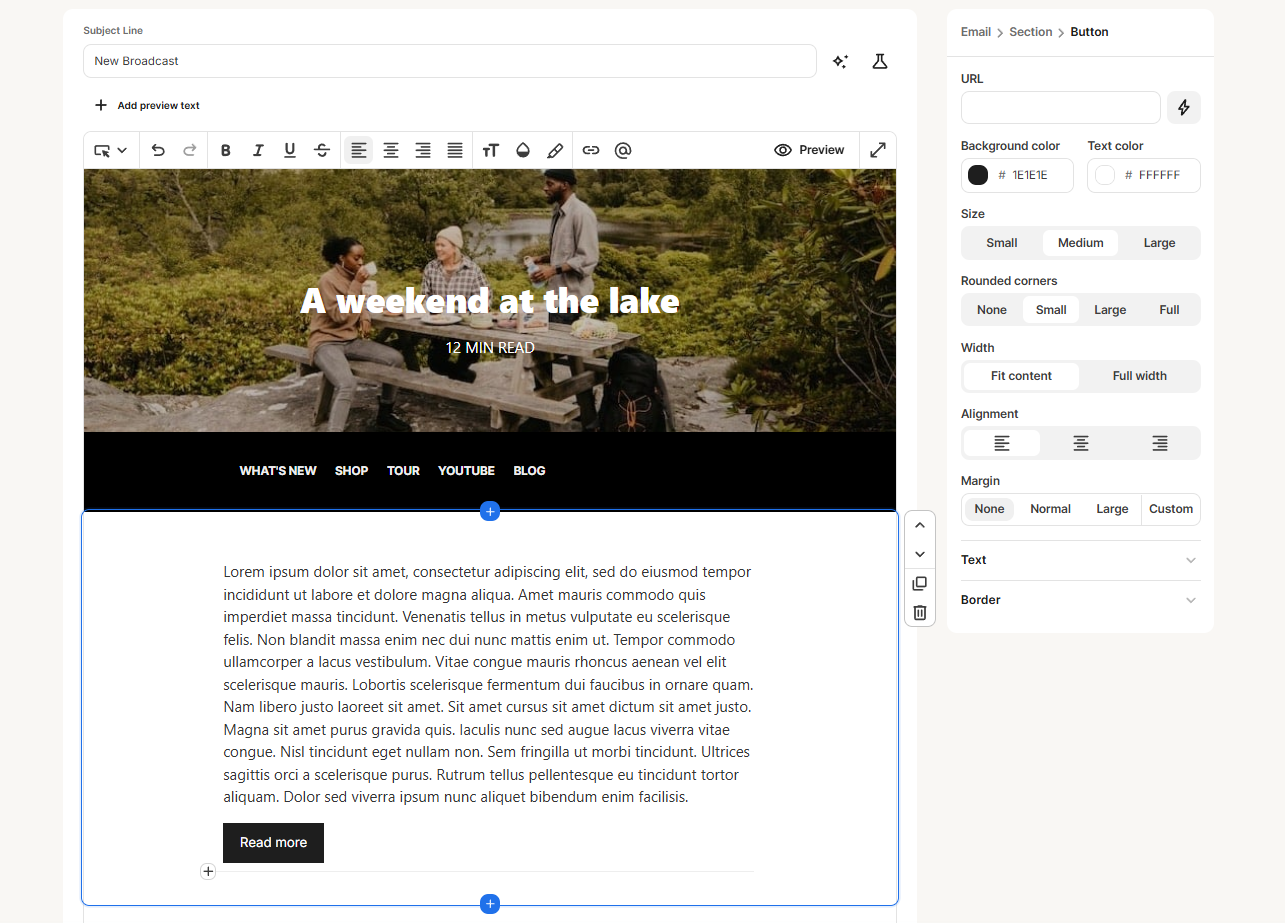 Editing a button element in the Kit email builder
MailerLite’s builder is clearly design-oriented. A persistent left sidebar exposes a full block library, organized into multiple categories, making it easy to assemble emails visually from pre-built sections. The canvas itself often starts with a structured layout, and the right-side panel provides detailed control over styling – padding, backgrounds, typography, buttons, and more.
| Pros |
Cons |
- Strong visual control with many styling options
- Large, well-organized block library
- Pre-built sections speed up layout creation
- Reusable blocks and structured templates improve consistency
|
- More complex interface with a higher cognitive load
- Requires more decisions during setup (layout, spacing, styles)
- Slower to use for simple text emails
|
Overall, it’s a flexible builder suited for polished, design-heavy campaigns, but it trades simplicity for control.
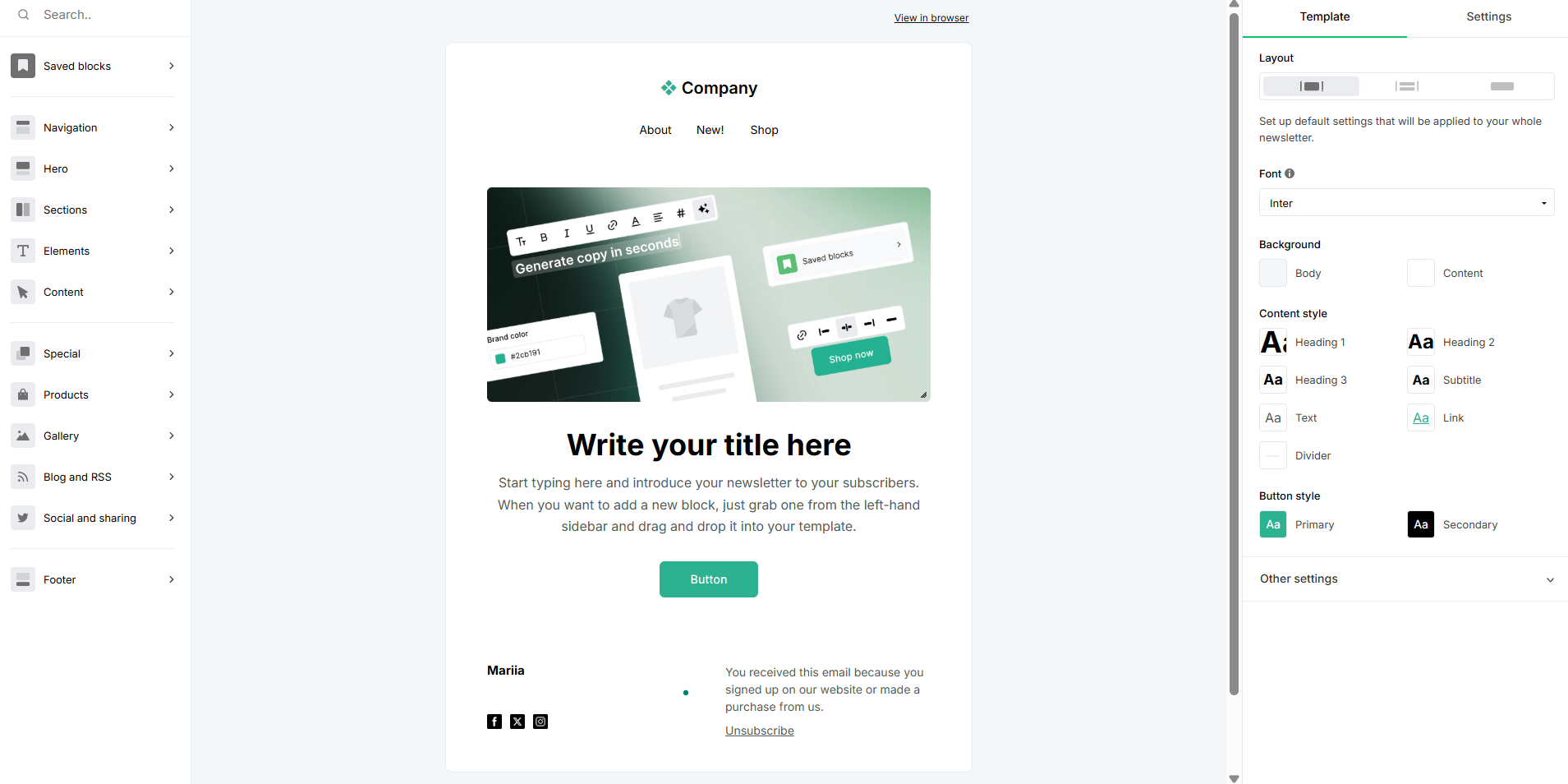 Testing a drag-and-drop email editor at MailerLite
We can say that the difference comes down to priorities.
Kit is text-first. It removes most design decisions and keeps the interface focused on writing and flow. There’s no visible block system upfront, minimal controls, and a linear editing experience. It’s optimized for speed and clarity.
MailerLite is design-first. It surfaces structure immediately through a block library, template sections, and detailed styling controls. You’re building layouts as much as writing content, which gives more flexibility but requires more input.
In practice, we kept coming back to the same distinction: Kit is a lightweight writing tool with layout options, MailerLite is a full-page builder adapted for email.
Marketing automation
Kit: 6/10 | ⭐ MailerLite: 7.5/10
Automation can significantly streamline your email marketing and improve efficiency. However, neither Kit nor MailerLite offers the kind of advanced, end-to-end automation you’d find in platforms like Klaviyo, which is often considered the benchmark in this area. That said, both platforms bring useful capabilities to the table. Below, you’ll find what the features look like, followed by our hands-on observations from testing the automation builders in Kit and MailerLite.
| Aspect |
Kit |
MailerLite |
Winner |
| Availability by plan |
Free plan limited to 1 basic visual automation and 1 sequence; paid plans unlock unlimited visual automations with full event, condition, and branching support |
Free users can run up to 3 automations with 5 steps each; mid-tier plans support up to 50 active automations; higher-tier plans increase limits to 100 automations and 100 steps per workflow |
MailerLite |
| Automation builder |
Vertical canvas builder; entry points, action steps, events, and conditions added inline |
Visual, block-based builder; more flexible flow construction |
MailerLite |
| Triggers available |
Moderate range, centered on forms, tags, and purchases |
11 triggers, including 4 eCommerce triggers; up to 3 triggers per workflow |
MailerLite |
| Pre-built automations |
39 templates with starter flows for common use cases |
15 automation templates, including multi-trigger templates |
Kit |
| Channels supported |
Email only |
Primarily email; SMS available as an add-on on higher-tier plans in selected regions |
MailerLite |
| AI features |
Not available |
MCP integration allows connecting external AI tools like Claude or ChatGPT for automation performance analysis |
MailerLite |
| Automation complexity |
Moderate; designed for linear and clean workflows |
Advanced; supports more branching and flexible logic |
MailerLite |
| Total score |
6/10 |
7.5/10 |
MailerLite |
When we first tried out automation builders at Kit and MailerLite, the difference was immediately obvious.
Kit’s automation builder feels clean and readable, with a strong emphasis on clarity over capability. The canvas is spacious and easy to follow, with each step connected in a simple vertical flow. Adding new steps happens inline, directly on the canvas, which keeps the experience focused and avoids overwhelming the user with too many options at once.
The logic is built around a small set of concepts, such as events, actions, and conditions, most of which revolve around tags, purchases, and basic subscriber data. This keeps workflows consistent, but also limits the range of actions available natively. More advanced behavior usually means combining tags or relying on external integrations.
One thing that stood out was the live subscriber counts visible on each step, showing how many people are currently in a step and how many have completed it. This makes monitoring automations feel immediate and intuitive, without needing to switch to a separate reporting view.
Overall, the builder is easy to understand and efficient for straightforward workflows, but its simplicity comes from a narrower action set and less built-in flexibility.
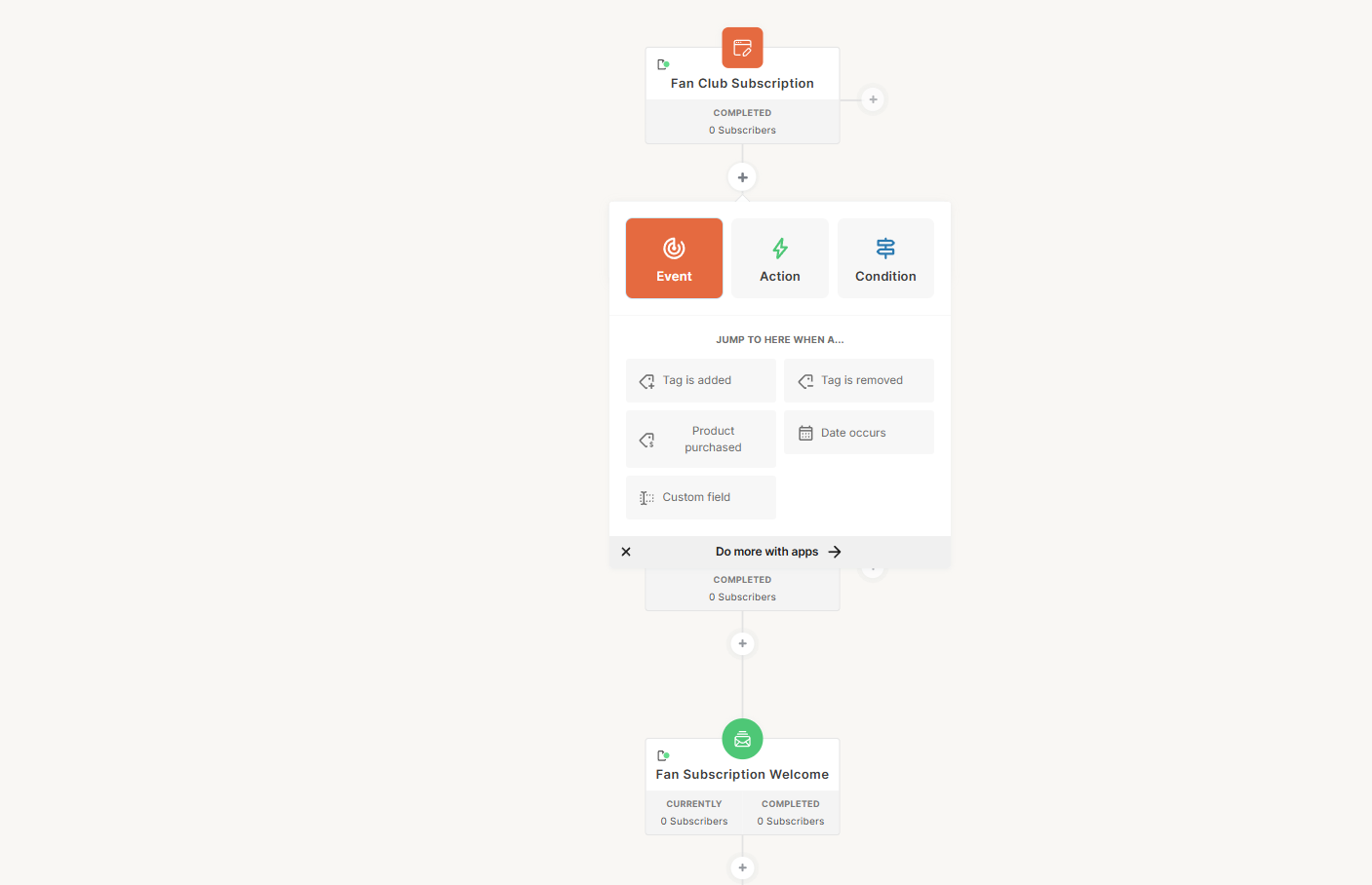 Editing a fan club subscription automation in Kit
MailerLite’s automation builder is more structured and functionally broader. The canvas is still vertical, but denser, with compact step cards and clearly visible branching paths. A persistent sidebar exposes all available steps at all times, which makes the system feel more transparent but also more complex.
The builder supports a wider range of actions directly within the workflow. In addition to emails and delays, it includes webhooks, internal notifications, field updates, and group management actions. Conditional branching is explicit, with clearly defined paths and endpoints, and A/B testing is built into the automation system itself, although not available on all plans.
This added capability comes with more complexity. Each step introduces more configuration choices, and the interface requires more deliberate setup. Monitoring is less immediate than in Kit, as performance data is not embedded into the canvas but accessed separately.
Overall, the builder is more flexible and capable, designed to support more complex automation scenarios without relying on external tools.
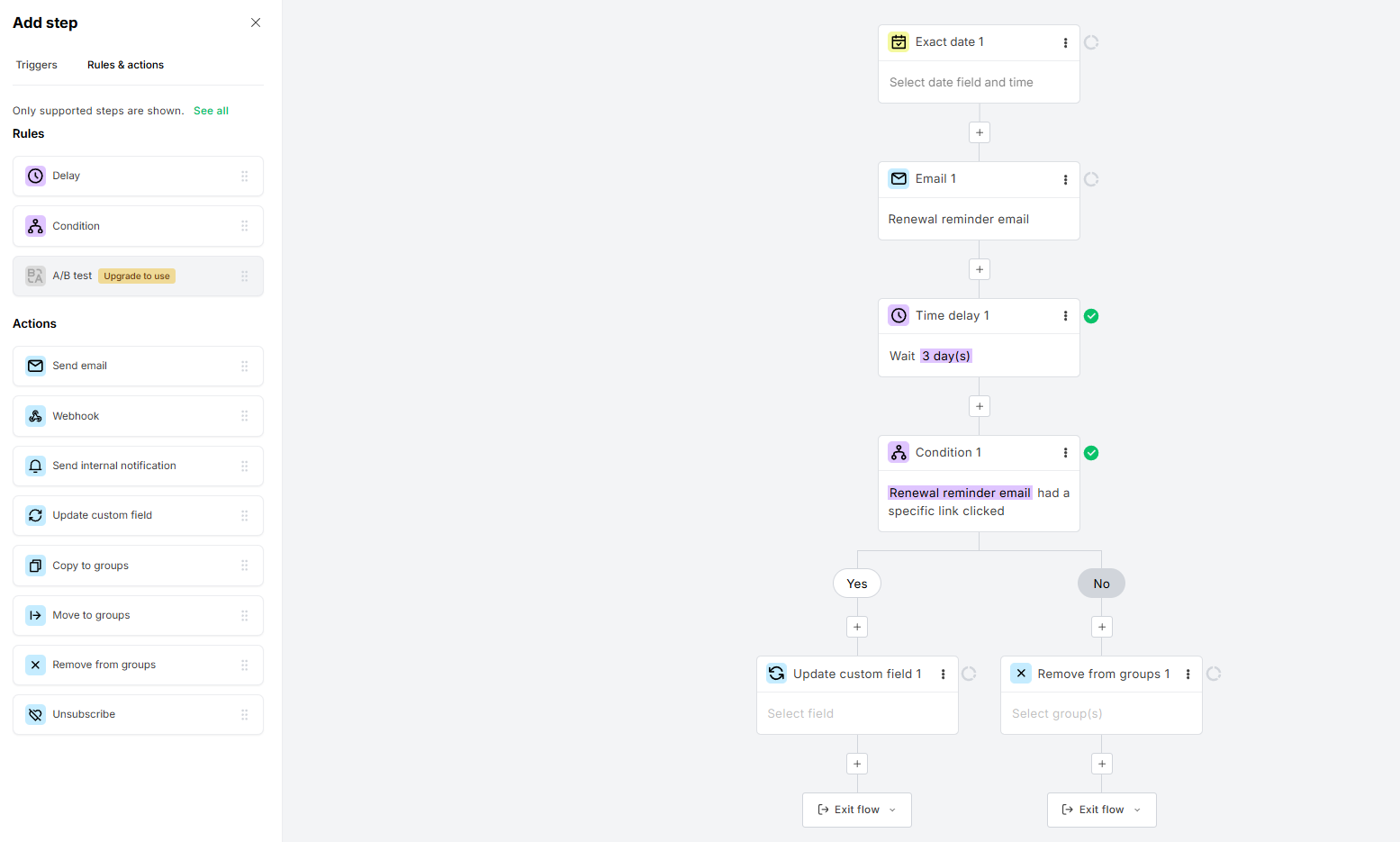 Editing a membership renewal automation in MailerLite
The difference between the two builders is structural rather than cosmetic.
Kit is designed around reducing complexity. It limits the number of visible options, keeps the interface focused on the flow itself, and relies on a small set of building blocks that are reused across workflows. This makes automations easier to read and manage, especially as they grow, but it also means that more advanced scenarios require indirect solutions using tags or integrations.
MailerLite takes the opposite approach. It exposes more functionality directly in the builder and makes all available actions visible from the start. This increases flexibility and allows more complex workflows to be built natively, but also makes the interface denser and more demanding to use.
What we have as a result is that Kit feels like a streamlined automation system built around clarity and speed, while MailerLite feels like a more complete workflow engine with a broader action set.
Contact management
Kit: 6/10 | ⭐ MailerLite: 8/10
One of the features that most directly supports automation and deliverability is contact management – the way a platform segments and tags contacts to group them into smaller audiences and send more personalized emails. In this area, MailerLite comes out ahead, offering broader capabilities. See for yourself:
| Aspect |
Kit |
MailerLite |
Winner |
| Segmentation capabilities |
Flexible tag and segment system with dynamic grouping |
Segment and tag system with rule-based and manual grouping |
Tie |
| Segmentation criteria |
Tag and segment-based filtering on forms, tags, custom fields, location, subscriber status, and combined conditions |
Rule-based segmentation based on subscriber data, behavior, and custom conditions |
MailerLite |
| Segment update speed |
Dynamic updates multiple times per day; slight delay possible |
Dynamic updates when conditions are met; rule-based auto-inclusion |
MailerLite |
| AI features for segmentation |
Not available |
Not available |
Tie |
| Tagging and manual organization |
Strong tagging system, manual and automated tagging; unlimited tags per subscriber |
Groups function as manual tags; not rule-based; subscribers added and removed manually or via automation action steps |
Kit |
| Total score |
6/10 |
8/10 |
MailerLite |
Unfortunately, neither Kit nor MailerLite offers a truly advanced approach to contact management – both come with their limitations. To give you a sense of what more advanced contact management looks like, here’s how SendPulse approaches it:
SendPulse dynamic segmentation functions across multiple tools at once – contacts can enter a segment based on actions from email, chatbots, CRM, or courses, with real-time updates as their data changes. It also unifies fields from different sources into a single variable, so data stays consistent regardless of how it was originally collected. In practice, segments act as live, multi-channel entry points that can immediately trigger auto-flows when a contact qualifies.

Tetiana Moroz
Automation Product Manager at SendPulse
Signup forms and landing pages
Kit: 6.4/10 | ⭐ MailerLite: 7.6/10
A good email platform doesn’t just send emails, but also helps you grow your audience and collect contacts. Both Kit and MailerLite let you create signup forms right in your account and embed wherever you need. Here’s what they offer and how their forms differ in real-life use.
| Aspect |
Kit |
MailerLite |
Winner |
| Types of forms available |
Inline, pop-up, slide-in, and sticky bar forms |
Pop-up, slidebox, floating bar, half-screen, full-screen, embedded forms; teaser available as an add-on to any pop-up |
MailerLite |
| Form builder |
Visual editor; template-based; focused on simple customization |
Drag-and-drop builder; block-based; highly customizable |
MailerLite |
| Pop-up targeting conditions |
Time delay, scroll percentage, exit intent, link and button click triggers, device targeting, and frequency cap (once every X days) |
Time delay, scroll depth, exit intent, frequency cap, page-level visibility, device targeting, and scheduled start/end dates |
Tie |
| Landing page builder |
Built-in builder with simple standalone pages focused on conversion |
Full-featured builder with templates, reusable blocks, and strong customization options |
MailerLite |
| Total score |
6.4/10 |
7.6/10 |
MailerLite |
When we looked at both form builders in the accounts, the difference in focus was immediately clear. Kit’s form builder is centered around behavior and display logic rather than visual design. The settings interface brings key controls into one place, allowing you to define when and how a form appears, including timing, scroll depth, position, device targeting, and frequency limits.
The editing side is simpler, with basic styling options, but the builder’s strength lies in how precisely you can control form behavior without digging through multiple screens.
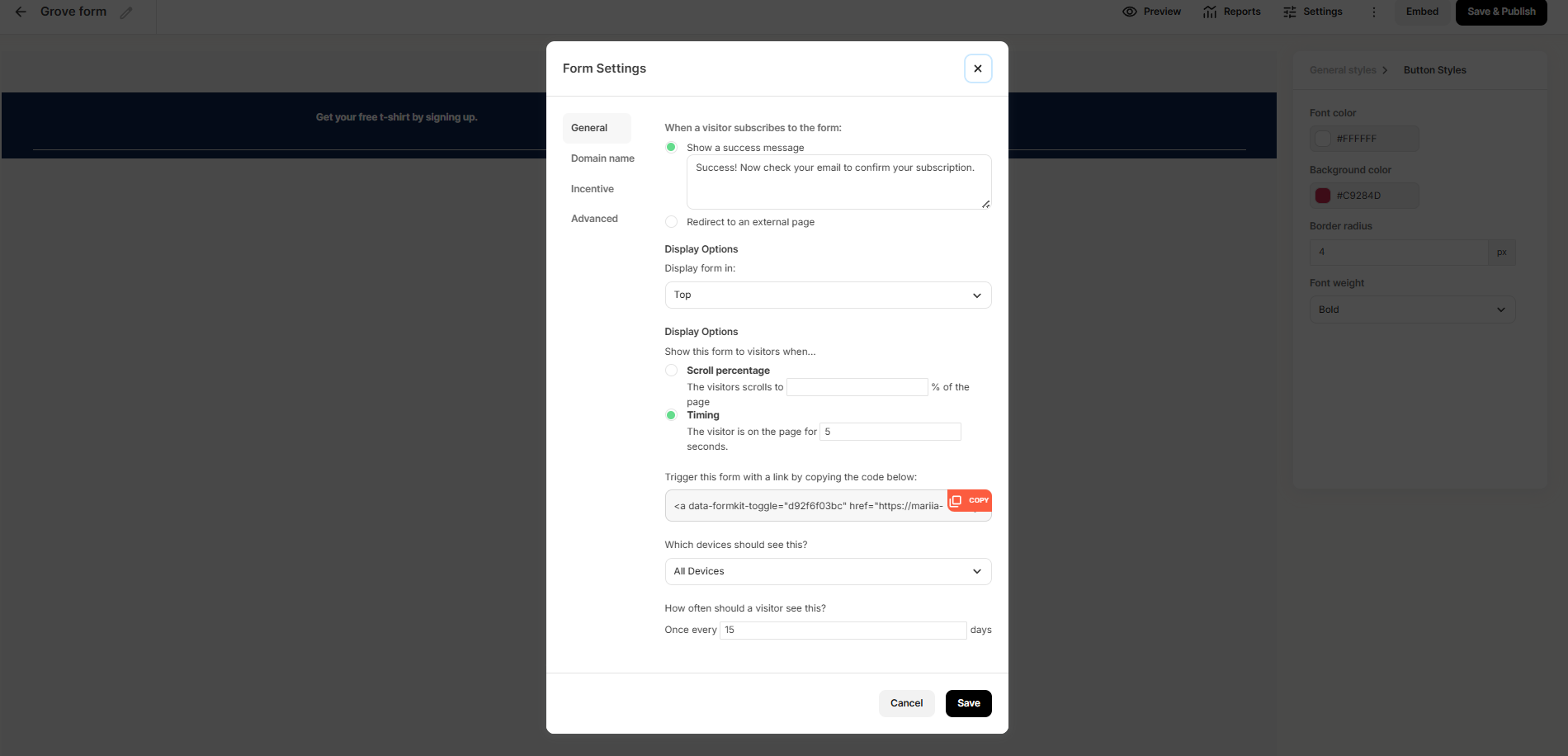 Settings of a sticky bar in the Kit account
MailerLite’s form builder is focused on visual editing and content control. The interface is built around a live canvas, where you can edit text directly, adjust formatting, and structure the form visually. The right panel offers detailed control over content and styling, including formatting tools and variables, while separate tabs handle states like the success message. It gives you more flexibility in how forms look and feel, but behavioral settings are handled elsewhere in the flow.
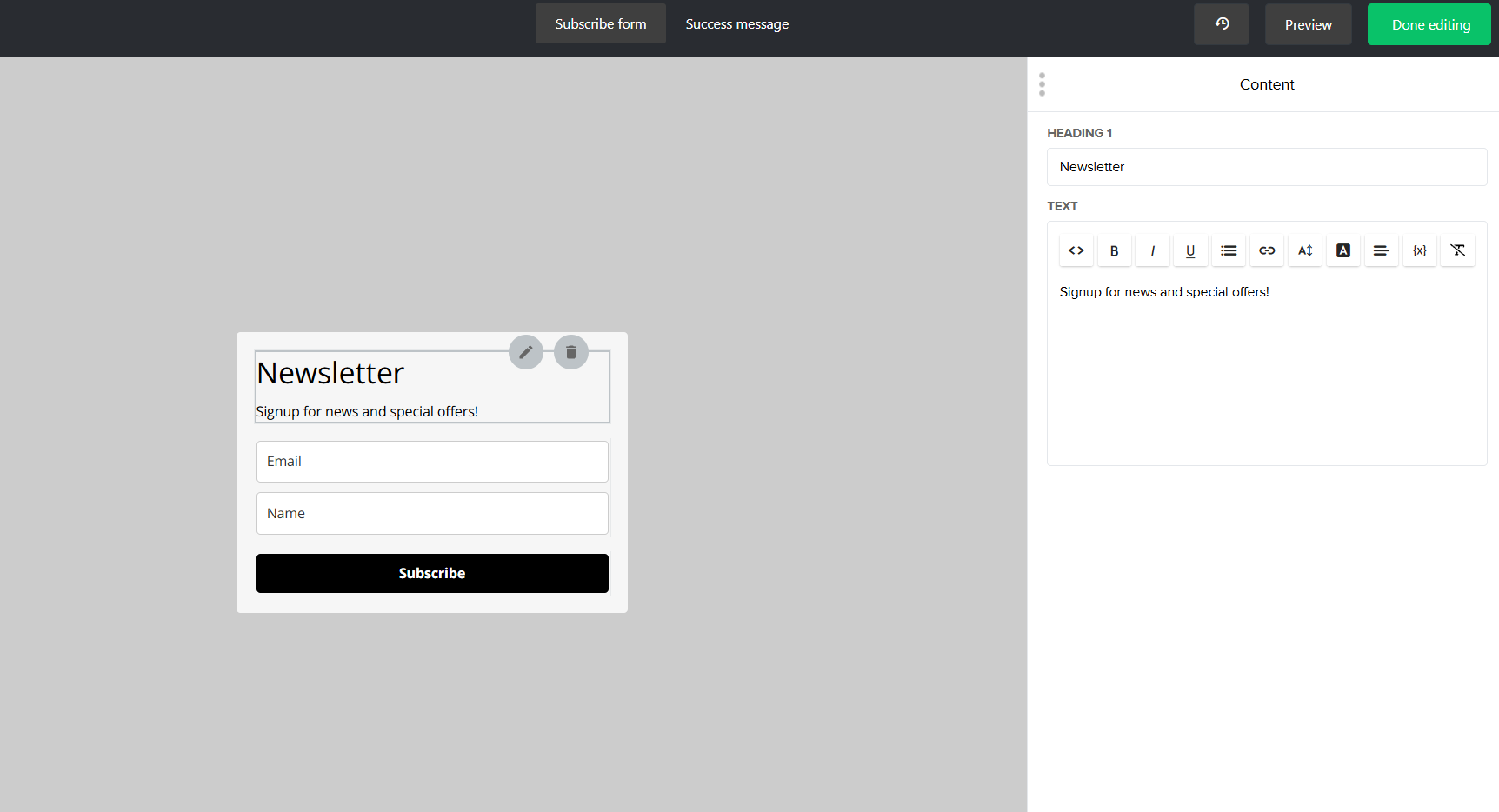 Setting up pop-up effects with MailerLite
The difference comes down to what they prioritize. Kit focuses on when and where a form appears, consolidating targeting and display logic into a single, clear interface. MailerLite focuses on how the form looks, offering more control over layout, text, and styling directly on the canvas.
Deliverability
Kit: 8.7/10 | ⭐ MailerLite: 9.8/10
While there is a difference in deliverability scores between Kit and MailerLite, both platforms offer solid deliverability capabilities. Here are the key differences that influenced the final score:
| Aspect |
Kit |
MailerLite |
Winner |
| Authentication |
Supports SPF, DKIM, and DMARC via verified sending domain; both automatic and manual DNS setup available |
Supports SPF, DKIM, and DMARC via sending domain authentication; automatic setup available for supported DNS providers |
Tie |
| Deliverability monitoring |
No built-in deliverability dashboard; Kit’s internal team monitors shared IP health |
Campaign-level reporting covers bounce rate, open rate, and spam complaints; no built-in blocklist or inbox placement tools |
MailerLite |
| List hygiene |
Automatic handling of unsubscribes, bounces, and complaints; tagging enables manual cleanup workflows |
Automatic suppression of bounced and unsubscribed contacts; tools and guidance for removing inactive subscribers |
Tie |
| Dedicated IP |
Available on request for senders of 150,000+ emails per week |
Available on request for senders of 50,000+ emails per week |
MailerLite |
| Total score |
8.5/10 |
9.8/10 |
MailerLite |
Overall, it’s important to remember that deliverability depends far more on your email marketing practices and list quality than on platform settings, especially with modern tools like Kit or MailerLite.
Here are a few quick tips from SendPulse experts to improve deliverability:
- Keep your contact list clean and remove inactive subscribers regularly.
- Use confirmed (double) opt-in to ensure high-quality contacts.
- Avoid spam-trigger words and excessive formatting.
- Maintain a consistent sending schedule.
- Authenticate your domain with SPF and DKIM.
Reporting and analytics
Kit: 7.2/10 | ⭐ MailerLite: 7.8/10
Reporting isn’t always the deciding factor when choosing an email platform, but it plays an important role in how marketers track and improve performance. Both Kit and MailerLite offer analytics and reporting, but neither stands out in this area – custom reports and deeper data are limited. Here’s what they provide:
| Aspect |
Kit |
MailerLite |
Winner |
| Report coverage |
Broadcast, sequence, form, and landing page reports, subscriber charts |
Campaign, automation, subscriber, form, and site performance coverage |
Tie |
| Custom reports |
Limited; mostly fixed dashboards with filtering options |
Custom report builder with selectable metrics, time period, and campaign grouping, segment and campaign type filtering, and eCommerce metrics support |
MailerLite |
| Reporting speed |
Data appears after sending and updates progressively |
Reports update in the dashboard when viewed |
Tie |
| Export capabilities |
Subscriber data and reports exportable as CSV |
Subscriber data, campaign reports, automation activity, and custom reports exportable as CSV; campaign reports can also be exported as PDF |
MailerLite |
| Total score |
7.2/10 |
7.8/10 |
MailerLite |
MailerLite still wins this round with a 0.6-point score gap due to its slightly broader reporting scope and more flexible export options, which give marketers a bit more room to analyze and share performance data.
Customer support
Kit: 7.5/10 | ⭐ MailerLite: 7.8/10
If something goes wrong or the knowledge base isn’t enough, you may need customer support. Both platforms offer help from real people via email and live chat, but neither provides phone support. Here’s what you can expect from Kit and MailerLite customer support:
| Aspect |
Kit |
MailerLite |
Winner |
| Channel availability |
24/7 email and live chat on all plans; no phone support |
14-day trial includes email and live chat; after trial, free plan is self-serve only; paid plans provide 24/7 email and live chat support; no phone support |
Kit |
| Knowledge base |
Focused help center with step-by-step guides, tutorials, and core feature coverage |
Extensive help center with guides, tutorials, videos, and broader feature use-case coverage |
MailerLite |
| Onboarding assistance |
Self-serve onboarding, structured guides, checklists, and educational resources |
Self-serve onboarding, tutorials, academy content, and guided setup resources |
Tie |
| Support quality rating on Capterra |
4.4/5 |
4.8/5 |
MailerLite |
| Total score |
7.5/10 |
7.8/10 |
MailerLite |
The difference in our scores is primarily based on feedback from real users who reviewed the customer support of Kit and MailerLite on Capterra. Kit holds a 4.4/5 rating, while MailerLite scores 4.8/5 – a gap that reflects the overall user experience with support and is factored into our evaluation.

Join businesses growing with SendPulse
From solo creators to global brands, thousands of customers trust SendPulse to run email campaigns, chatbots, automations, and more — all in one place.
Get started for free
Your decision checklist
Before you decide, here’s a quick checklist to guide your choice.
| Decision area |
Kit
is a better fit if… |
MailerLite
is a better fit if… |
| Business type |
? You’re a creator, solo operator, or small business focused on email-first communication and monetization. |
? You’re a small to mid-sized business needing a broader marketing toolkit with more design and workflow flexibility. |
| Budget expectations |
? You want a generous free plan and predictable pricing as your list grows. |
? You value features and ease of use as much as pricing. |
| Automation needs |
? You need simple, clean automations built around tags and sequences. |
? You need more advanced workflows with branching, broader actions, and built-in flexibility. |
| Analytics focus |
? You mainly need core campaign performance insights without deep analysis. |
? You want more visibility across campaigns, automations, and assets in one place. |
| Team setup |
? You work solo or in a small team and prefer a clean, low-complexity environment. |
? You work with a team and need more structure, control, and feature depth across workflows. |
If three or more areas point to one platform, you’ve likely found the right fit for your business. If not, it’s worth looking beyond this comparison.
Since Kit and MailerLite are positioned so closely, they share many of the same competitors:
- explore SendPulse if you need more advanced, 360-degree automation in an all-in-one platform with CRM and chatbots;
- consider ActiveCampaign if eCommerce automation and complex flows are your priority;
- look at Mailchimp if you prefer a widely adopted platform with a strong user base.
Final verdict and recommendations
⚖️ Final scores: Kit – 8.4/10 | MailerLite – 8.4/10
If you’re wondering whether we recommend Kit or MailerLite, the answer is yes. Both are strong email marketing platforms that can reliably support a wide range of marketing needs. The fact that they end up with the same score simply means they deliver value in different ways.
Kit remains one of the most attractive options for creators, publishers, and independent businesses that want to focus on email without getting distracted by unnecessary complexity. MailerLite offers a broader toolkit and greater flexibility, making it appealing to businesses that want more room to expand their marketing activities over time.
Ultimately, the decision comes down to the type of workflow you prefer. If simplicity, focus, and a generous free plan matter most, Kit is difficult to ignore. If you want a more versatile platform with a wider range of tools under one roof, MailerLite remains a strong choice. Neither platform is a wrong decision – the better one is the one that best matches the way you work today and where you expect your marketing to be tomorrow.