Mailchimp has long been known for being one of the cheapest and simplest email marketing platforms on the market. But today, there’s a Lithuanian kind of outsider scoring higher and picking up steam – this platform is MailerLite. It’s easy to use and quite affordable, too, but there sure are some differences. Our detailed Mailchimp vs MailerLite comparison is here to help you pinpoint those.
How we scored this comparison: This review was created by the SendPulse team. As an email marketing platform ourselves, we work in the same space as the tools we test, which also means we understand the field deeply.
Each platform was evaluated across nine categories using our independent methodology. Pricing (25%), ease of use (20%), and email and automation features (15% each) carry the most weight because they affect daily workflows the most. All scores reflect real testing and analysis as of June 2026.
TL;DR Mailchimp vs MailerLite at a glance
Both platforms play on the same ground – affordability and simplicity, but differ in how they go beyond these two aspects, especially for eCommerce use, automation options, and integrations with your favorite marketing tools. Here’s a super-quick look at all of this:
| Category |
Mailchimp |
MailerLite |
Winner |
| Best for |
B2B services, agencies, SaaS startups, and local businesses where email supports broader marketing efforts |
Small businesses, creators, and budget-conscious retailers looking for a simple email marketing tool |
Depends on use case |
| Pricing |
9/10
Limited free plan; competitive pricing at scale; advanced features on higher-tier plans |
8.8/10
Free plan available; reasonable pricing and solid value for growing businesses |
Mailchimp |
| Ease of use |
9.5/10
Intuitive interface even for beginners, with guided onboarding and extensive tutorials |
10/10
Very simple interface designed for first-time users, with step-by-step guidance |
MailerLite |
| Email design |
9.4/10
Drag-and-drop editor with 135+ pre-designed email templates categorized by purpose |
8.6/10
Drag-and-drop email builder with 108 templates organized by industry and event |
Mailchimp |
| Automation |
7.8/10
Basic automation on lower-tier plans; more flexible multi-step workflows on higher-tier plans; 35 + templates |
6.5/10
Flexible automation on all plans; multi-step flows with multi-trigger entry points on higher tiers; 15 templates |
Mailchimp |
| Deliverability |
9.6/10
Strict list quality policies; automated bounce and spam suppression; dedicated IP add-on available for $29.95/mo with warm-up assistance |
9.8/10
Permission-first sending policy; automated bounce and complaint handling; dedicated IP available on request for high-volume senders with guided warm-up |
MailerLite |
| Integrations |
7.7/10
300+ integrations across marketing, CRM, analytics, and general-purpose tools |
6.4/10
185+ integrations in eCommerce, CRM, finance, analytics, and other categories |
Mailchimp |
| AI features |
7.2/10
AI tools for email content generation, optimization, spam checks, and best sending time suggestions |
5/10
AI is limited to email body and subject line creation; native MCP server |
Mailchimp |
| Reporting and analytics |
7.8/10
Clear campaign-level reporting with standard metrics |
6.4/10
Visual dashboards with fast-updating, basic campaign and automation insights |
Mailchimp |
| Customer support |
7/10
24/7 email and chat support on mid-tier plans; phone support on premium plans; well-structured help center |
7.3/10
24/7 email and live chat support on paid plans; extensive, beginner-friendly help center |
MailerLite |
| Final score |
8.5/10 |
8.4/10 |
Mailchimp |
Let’s take a closer look so you can decide what platform would work best for your business needs.

Create and send high-performing emails
Use an AI assistant, pre-made templates, advanced segmentation, and feature-rich automation to run campaigns without coding. Start for free with up to 15,000 monthly emails.
Get started for free
Side-by-side comparison between Mailchimp vs MailerLite
MailerLite positions itself as an easy-peasy alternative to Mailchimp, making assisted switching, round-the-clock support, and a generous free plan part of its pitch. But given that both platforms target similar audiences and overlap heavily in features, it makes sense to look past the marketing claims and focus on how they stack up in practice. For starters, let’s talk money.
Pricing and value for money
⭐ Mailchimp: 9/10 | MailerLite: 8.8/10
Disclaimer: Pricing changes frequently. These figures are accurate as of June 22, 2026. Always verify final costs on official pricing pages.
Looking only at Mailchimp‘s first-year pricing can be misleading. The platform becomes substantially more expensive after month 12, which is why we’ve included both introductory and regular pricing in this comparison. After all, most businesses choose an email marketing platform for years, not for a single promotional period.
| Contacts |
Mailchimp, year 1 |
Mailchimp, year 2 |
MailerLite |
| Free plan |
250 contacts and 500 emails/mo |
– |
250 contacts and 2,500 emails/mo |
| 2,500 |
$22.50/mo |
$45/mo |
$22.50/mo |
| 10,000 |
$55/mo |
$110/mo |
$65.70/mo |
| 50,000 |
$192.50/mo |
$385/mo |
$260.10/mo |
| Total score |
9/10 |
– |
8.8/10 |
| Note: Prices may vary based on your location and applicable local tax regulations. |
Overall, Mailchimp is like a classic low-cost airline for email marketing. It’s cheap at first, but whenever you need what most marketers would consider basic “extras” – using the platform for more than one year at the same price or counting only active subscribers for billing – additional costs start to build up.
MailerLite doesn’t play that game – its pricing stays consistent, and you won’t be charged extra for every step you take.
That said, the pricing scores still need context. How come Mailchimp scores so high against MailerLite in this category? Its solid 9/10 reflects how it actually compares across the broader email marketing platform market. While Mailchimp is clearly more expensive than MailerLite after the first year, it remains more affordable compared to, say, Klaviyo.
Ease of use and interface
Mailchimp: 9.5/10 | ⭐ MailerLite: 10/10
Both Mailchimp and MailerLite have built interfaces that feel approachable rather than intimidating. Mailchimp’s interface has been around for years and remains intuitive for most users, even as new features have been introduced over time.
MailerLite takes a more stripped-down approach. It took everything that already worked in Mailchimp, simplified it one more notch, and then added tooltips for anything that might confuse someone.
Here’s what matters when you use Mailchimp and MailerLite daily:
| Category |
Mailchimp |
MailerLite |
Winner |
| First-time experience |
Guided onboarding with predefined setup paths; most users can launch a first campaign within two hours |
Low-friction onboarding with constant, helpful guidance; most users can launch their first campaign in an hour or less |
MailerLite |
| Daily navigation |
Clean, uncluttered interface with features grouped into clear sections like Campaigns, Audiences, and Reports |
Simple interface with navigation organized around core workflow areas and integrated support resources |
MailerLite |
| Learning curve |
Core features are easy to comprehend within the first week, thanks to in-product tips and extensive tutorials |
Core features are easy to pick up quickly, supported by structured guides, video tutorials, and free Academy courses |
MailerLite |
| Mobile access |
iOS and Android apps support basic email creation, contact management, campaign scheduling, and performance tracking |
iOS app lets you create, preview, and schedule campaigns, manage subscribers, and monitor metrics |
Mailchimp |
| Workflow efficiency once mastered |
Very fast for routine tasks; advanced workflows can feel restrictive and require extra navigation steps |
Fast and consistent for routine tasks once learned; advanced customization is limited, but workflows remain straightforward |
MailerLite |
| Total score |
9.5/10 |
10/10 |
MailerLite |
Both platforms are genuinely easy to use, which is reflected in consistent user feedback. To give you an idea, here’s what users like about Mailchimp the most:
 One of the recent Mailchimp reviews at G2
MailerLite customers echo the same sentiment, often describing the experience as clear and lightweight, while the platform itself is extremely easy to learn.
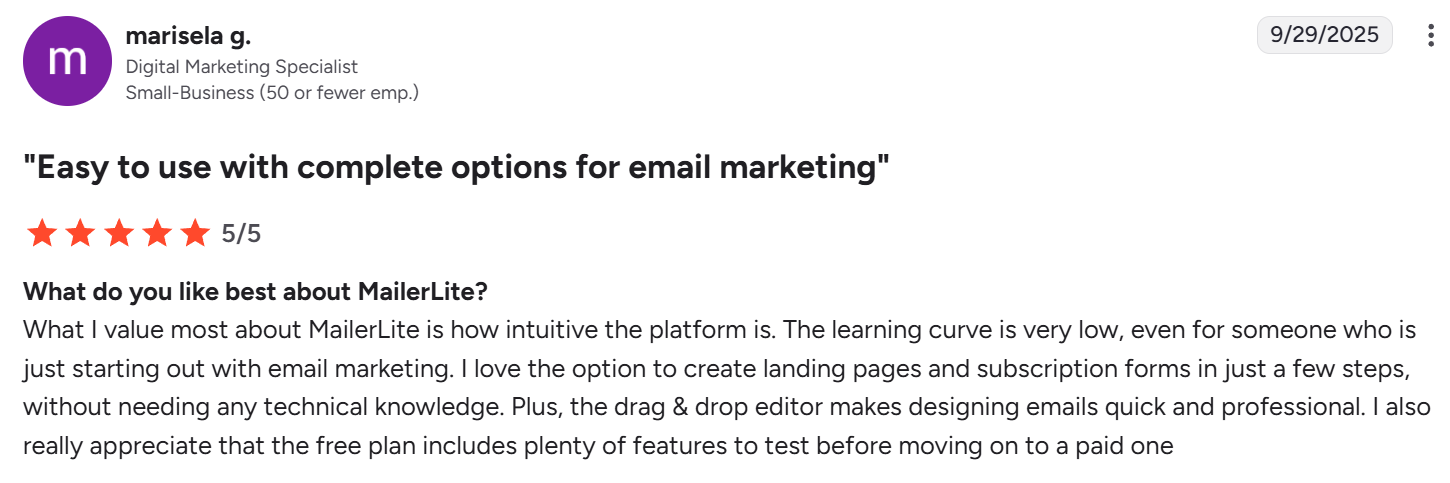 One of the recent MailerLite reviews at G2
With Mailchimp, you spend the first hour thinking, “Okay, there’s a lot here, but I can figure it out.” Everything’s labeled clearly, the interface makes sense, and you can launch a campaign by the end of your first session.
With MailerLite, you spend the first hour thinking, “Oh, that’s it?” Everything feels obvious. When you hover over something, a tooltip explains it. If you look confused, a little video tutorial offers to help. You’ll probably send your first campaign in half the time.
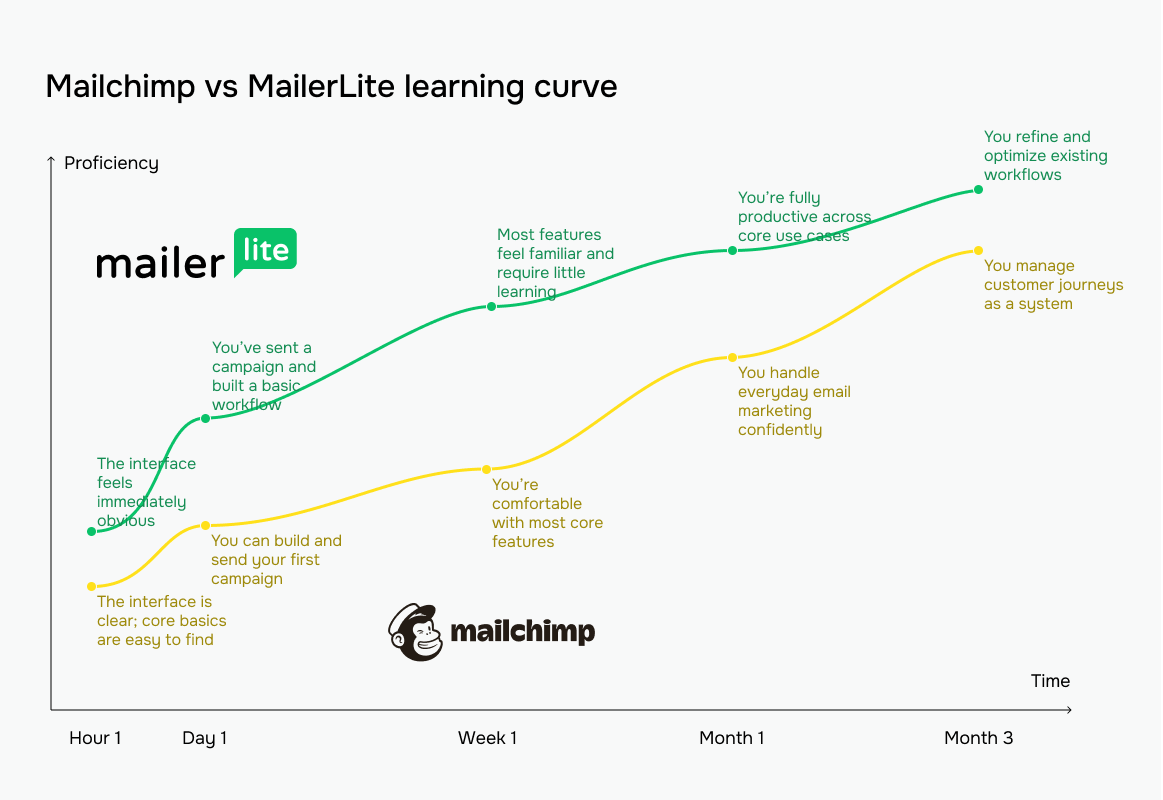 The yellow line represents Mailchimp vs MailerLite’s green line
Email builder and templates
⭐ Mailchimp: 9.4/10 | MailerLite: 8.6/10
If you’re going to spend time in one part of an email platform, it’s the template builder. MailerLite keeps things as simple as possible from the very first click – everything is designed to help you get from idea to sent email with as few decisions as possible.
Mailchimp, on the other hand, offers more room to customize, like more templates, more design controls, and more ways to fine-tune your layout. Notably, you’re not writing HTML unless you want to in either platform.
Here’s how those differences play out in practice:
| Category |
Mailchimp |
MailerLite |
Winner |
| Templates |
350 professionally designed email templates categorized by purpose and industries |
108 templates categorized by specific campaign types |
Mailchimp |
| Drag-and-drop editor |
Block-based visual editor with layout controls, Creative Assistant for design suggestions, and asset reuse via Content Studio |
Visual editor with pre-made content blocks with global brand and specific block settings; AI writing assistance directly in the editor |
Mailchimp |
| Notable content blocks |
Product recommendation and review, discount, payment, and survey |
Survey and quiz, applications, feature highlights, signature, and eCommerce |
MailerLite |
| Customization |
Advanced control over layouts, fonts, colors; custom HTML/CSS, dynamic content, and some design options limited to higher-tier plans |
Extensive design controls for fonts, colors, spacing, layouts; dynamic content and HTML/CSS coding available |
Tie |
| Mobile responsiveness |
All templates are responsive by default, with email preview tools |
All templates are responsive by default, with mobile preview mode |
Tie |
| Total score |
9.4/10 |
8.6/10 |
Mailchimp |
Not the only difference, but a very noticeable one between Mailchimp and MailerLite is the number of templates you can choose from. But here’s the catch: if you’re on Mailchimp’s free plan, you get only seven basic templates. Pay for a mid-tier or higher plan, and suddenly you have an impressive number of options to browse through.
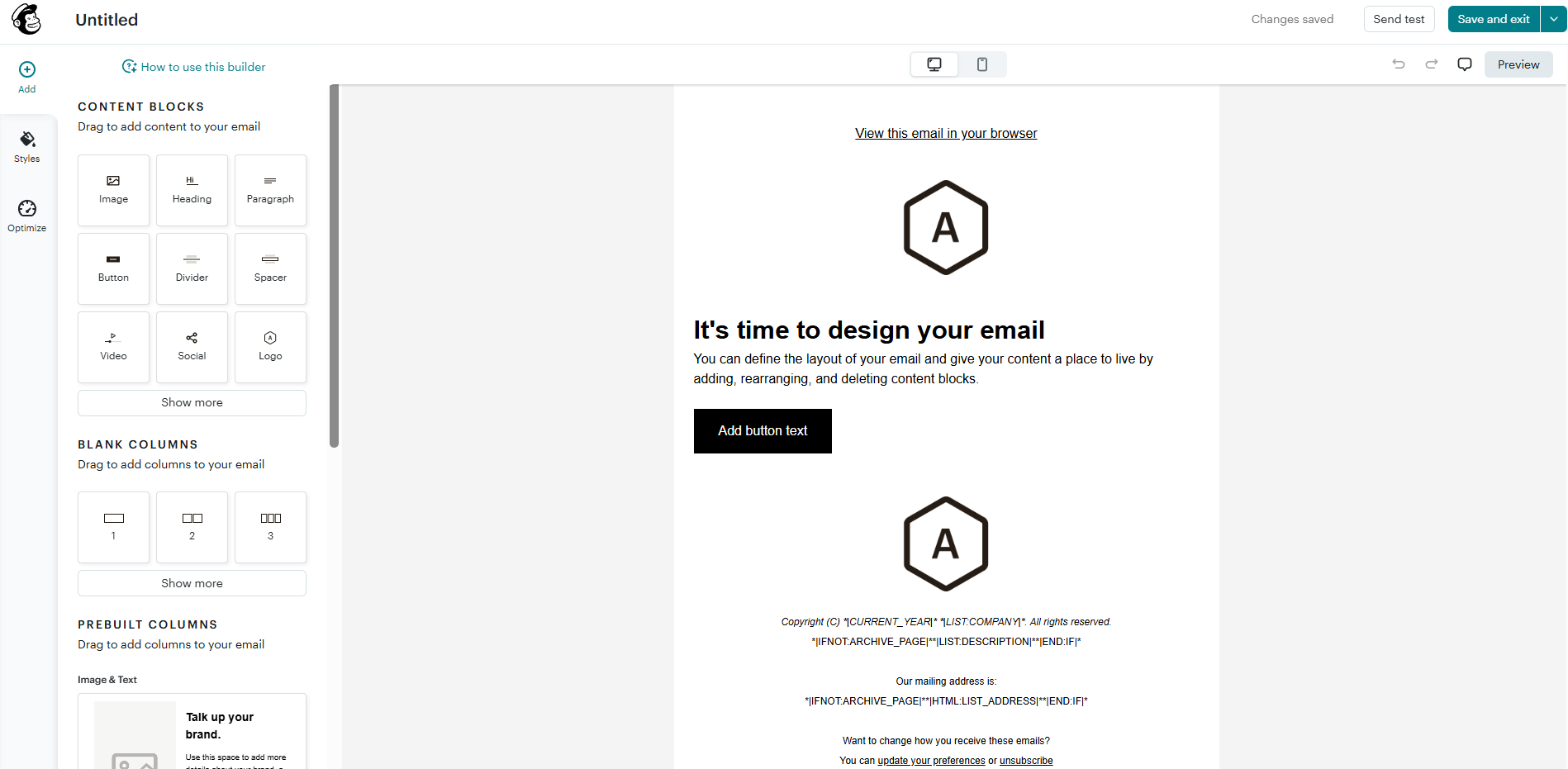 Inside the Mailchimp email editor
Mailchimp’s email builder is powerful and flexible, with plenty of design controls to refine layouts, styles, and content blocks to match your brand perfectly. The trade-off is that it can feel a bit busy – great if you love tweaking details, less so if you just want to build your email and send it fast.
MailerLite gives you its entire library right away. The selection is smaller, but honestly, 108 templates cover most use cases. You’ve got options for newsletters, promotions, events, abandoned carts – all the standard basics.
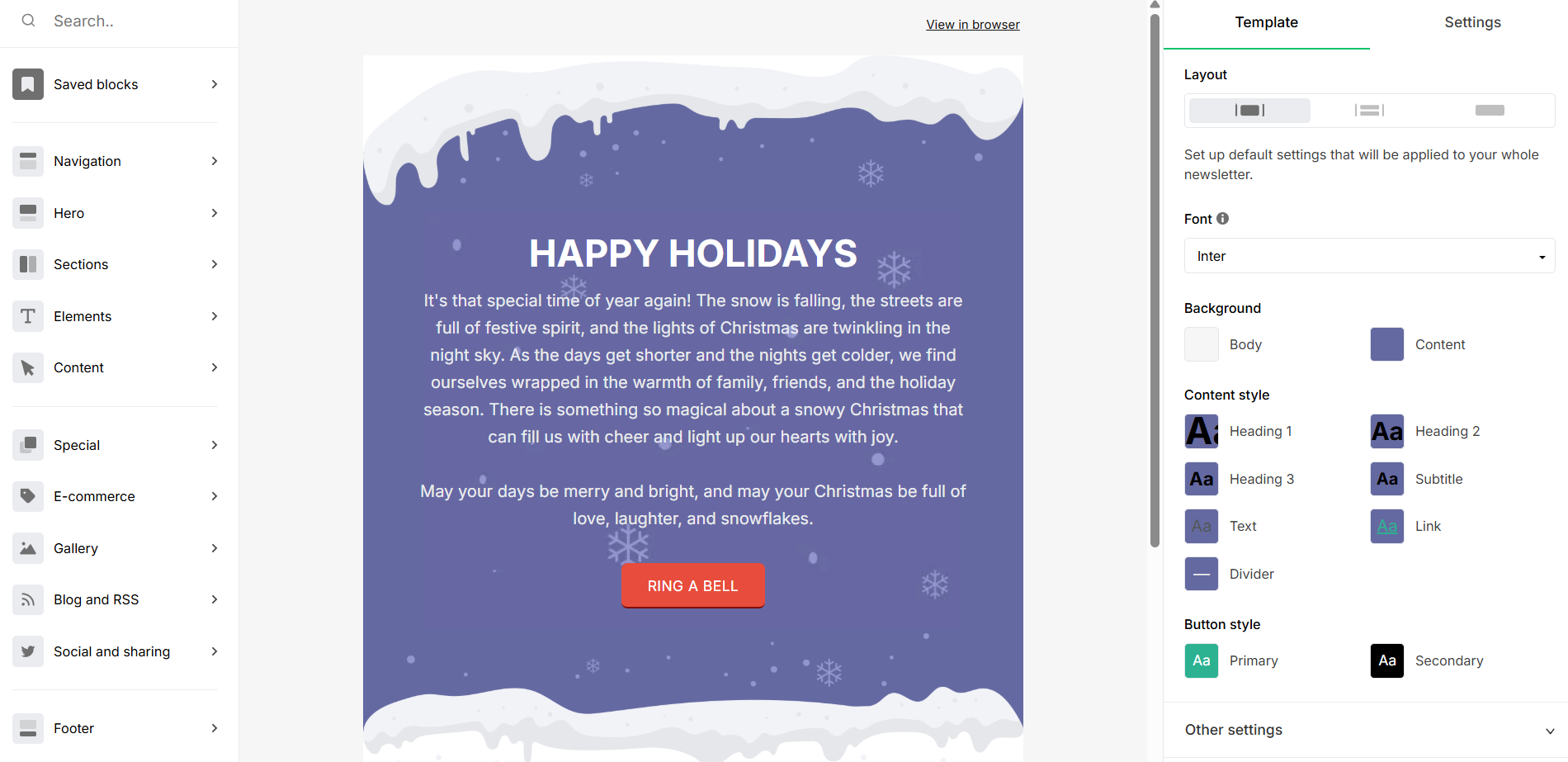 Inside the MailerLite email editor
MailerLite’s email builder is clean, lightweight, and hard to overcomplicate. It gives you fewer knobs to turn, but all the essential ones are right where you expect them to be. Building a good-looking email is quick and almost frictionless, which makes it especially comfortable for beginners and teams that value speed over deep customization.
Marketing automation
Mailchimp: 7.8/10 | ⭐ MailerLite: 7.5/10
Automation handles repetitive tasks so you can focus on your strategy. Both platforms keep it practical – not overwhelming – so their focus is on the workflows most businesses actually use, not on building endless branching logic trees. That makes automation accessible, but also clearly defines where each platform’s limits are.
| Category |
Mailchimp |
MailerLite |
Winner |
| Availability by plan |
Limited automation on the free plan; full access starting from mid-tier plans |
Automation available on all plans; limits increase from 3 automations on the free plan to 100 on the highest tier |
MailerLite |
| Automation builder |
Visual automation builder with basic, rule-based branching and conditional logic; advanced capabilities require paid plans |
Workflow editor with rules and actions; split A/B testing and some other features require paid plans |
Mailchimp |
| Triggers available |
38 automation triggers covering contact actions, dates, engagement, eCommerce events, API calls, and integrations |
11 automation triggers, 4 of them being eCommerce-specific when store integrations are enabled |
Mailchimp |
| Pre-built automations |
35 ready-made automation templates for core scenarios such as welcome series, abandoned cart recovery, re-engagement, milestones, and basic nurturing |
15 automation templates that are editable after selection – a user can fill in missing fields and add, edit, and delete steps |
Mailchimp |
| Channels supported |
Email and SMS |
Email |
Mailchimp |
| Automation complexity |
Effective for short, linear customer journeys; advanced features require higher-tier plans |
Good branching capabilities, with some advanced features gated by plan |
Mailchimp |
| Total score |
7.8/10 |
7.5/10 |
Mailchimp |
Mailchimp does support automation, but you won’t see much of it with the free plan. Most sophisticated tools, including multi-step journeys, multi-trigger entry, and advanced branching logic and rules, are locked behind higher-tier plans. As a result, automation feels more like a premium add-on than a core feature. Once unlocked, the automation builder is clean and reliable. You get a solid set of triggers, conditions, and ready-made templates for common scenarios.
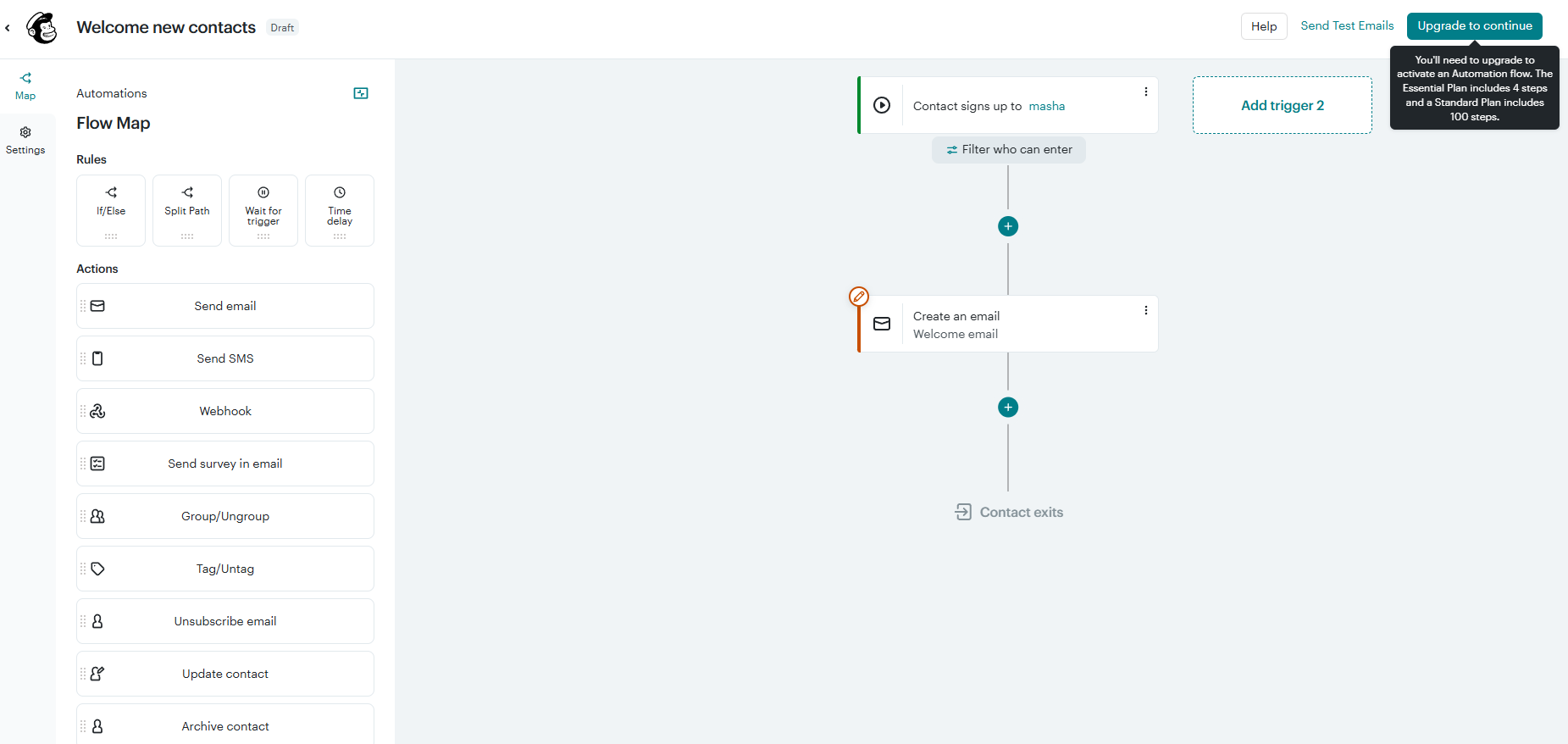 Automation builder with a welcome flow at Mailсhimp
MailerLite treats automation as a basic feature and not a paid luxury. Even on the free plan, you can build real workflows – up to 100 steps long – which already puts it ahead of many email platforms. It also allows up to three triggers per automation on paid plans, so one flow can start from different entry points, like a form signup or a purchase. The result is automation that feels surprisingly flexible without becoming complicated.
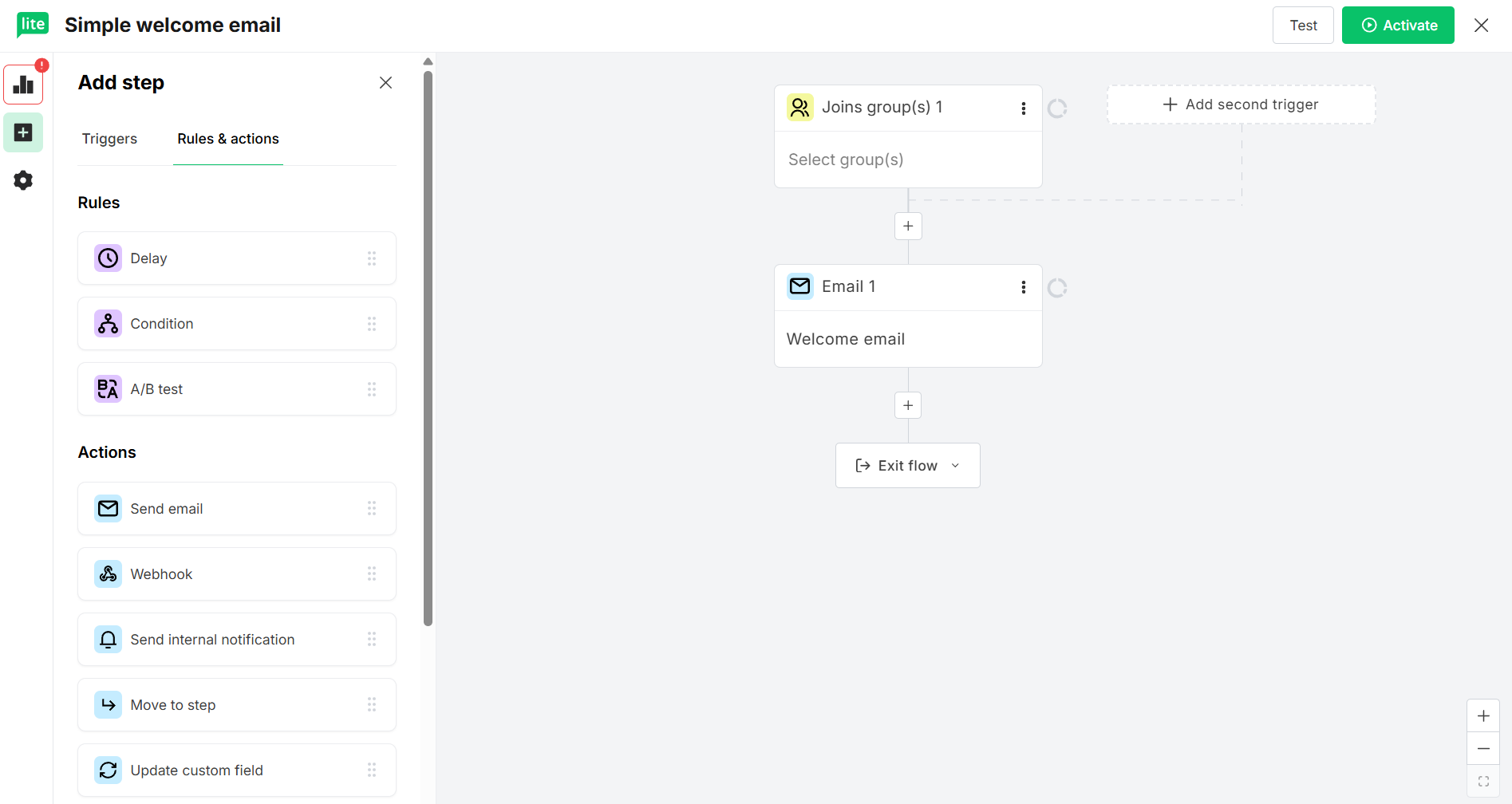 Welcome email automation flow at MailerLite
This comparison also highlights a common boundary of traditional ESP automation: most workflows stop at email and, sometimes, SMS. So, if you need a broader, multi-channel approach, we’ve got you covered.
SendPulse takes that wider view by extending automation across email, SMS, web push notifications, and messaging apps, while tying each step back to a built-in CRM system. This keeps interactions connected as part of an ongoing customer journey rather than isolated campaign actions.
Contact management
Mailchimp: 7.5/10 | ⭐ MailerLite: 8/10
Contact management and segmentation are those things of email marketing that decide whether your work feels organized or chaotic. They affect how easy it is to find the right people, avoid mistakes, and keep costs under control as your list grows.
Here’s how Mailchimp and MailerLite compare in this area:
| Category |
Mailchimp |
MailerLite |
Winner |
| Segmentation capabilities |
Rule-based segmentation using contact fields, tags, engagement, and purchase data with AND/OR logic; pre-built segments generated from common conditions |
Rule-based segmentation using fields, groups (tags), and campaign activity; supports basic AND/OR logic; segment library available |
Mailchimp |
| Segment update speed |
Segments recalculate every 2 hours; manual refresh required for immediate or time-sensitive updates |
Segments update automatically when conditions are met; no manual refresh required |
MailerLite |
| Available segmentation criteria |
Demographics, signup source, email engagement data, basic purchase history, custom fields, and tags |
Location and profile fields, time zone, signup source and date, email and automation actions, groups (tags) |
Tie |
| Tagging and manual organization |
Tags used to label and filter contacts across audiences |
Groups (tags) used to label and filter contacts within a shared list |
Tie |
| Contact structure |
Separate audiences; the same contact can be counted multiple times for billing |
Single shared list; contacts can belong to multiple groups without duplicate billing |
MailerLite |
| Total score |
7.5/10 |
8/10 |
MailerLite |
For most businesses, MailerLite comes out slightly ahead in contact management, and pricing is only part of the reason. They keep all subscribers in a single shared list and use groups and segments for organization. A contact can belong to multiple groups and is still counted only once toward your plan’s limit.
Mailchimp, on the other hand, relies on separate audiences. Once the same person fits into multiple categories, that structure can lead to duplicate contacts and higher costs.
To put this into perspective, imagine you have 5,000 contacts. In Mailchimp, if 2,000 of them appear in both “Customers” and “Newsletter” audiences, you’re billed for 7,000 contacts. In MailerLite, you’re billed for 5,000, regardless of how many groups they’re in.
Combined with simpler tagging, automatic segment updates, and more consistent feature availability across plans, MailerLite’s approach tends to feel easier to manage over time.

Power up your business with smart tools
Emails, automation, chatbots, websites, CRM, and more — everything you need to connect with your audience. Try SendPulse for free today.
Get started for free
Signup forms
⭐ Mailchimp: 8.2/10 | MailerLite: 7.6/10
Both platforms give you the tools to capture leads without using third-party solutions. Mailchimp offers more customization options and templates, but its form-building experience is a bit all over the place. MailerLite keeps things simpler, so you get the result you need faster.
| Category |
Mailchimp |
MailerLite |
Winner |
| Form builder |
Drag-and-drop form creator with 119 templates, but no option to build a form from scratch; embedded forms, pop-ups, and hosted pages supported; form language display settings |
Visual form builder with 33 templates for embedded and pop-up forms and the possibility to create a form from scratch; form visibility settings, GDPR fields, and A/B test supported |
Mailchimp |
| Pop-up targeting conditions |
Advanced display conditions like traffic source, device type, time on page, scroll behavior, and exit intent |
Configurable display triggers, such as time delay, scroll depth, and exit intent, with frequency limits, scheduling, device visibility, and page-level rules |
Mailchimp |
| Landing page builder |
Drag-and-drop landing page builder with basic and themed templates, customizable URLs, and built-in tracking for page visits and signup conversions |
Built-in landing page builder with 30 templates, block-based editing, SEO settings, publishing controls, custom domain support, and basic analytics |
Mailchimp |
| Total score |
8.2/10 |
7.6/10 |
Mailchimp |
Mailchimp pop-up forms look fairly simple in the editor, but many customization options are tucked away in different settings panels. You get a lot of control over content, design, and display conditions – it just takes some clicking to uncover it. Powerful, but not immediately obvious.
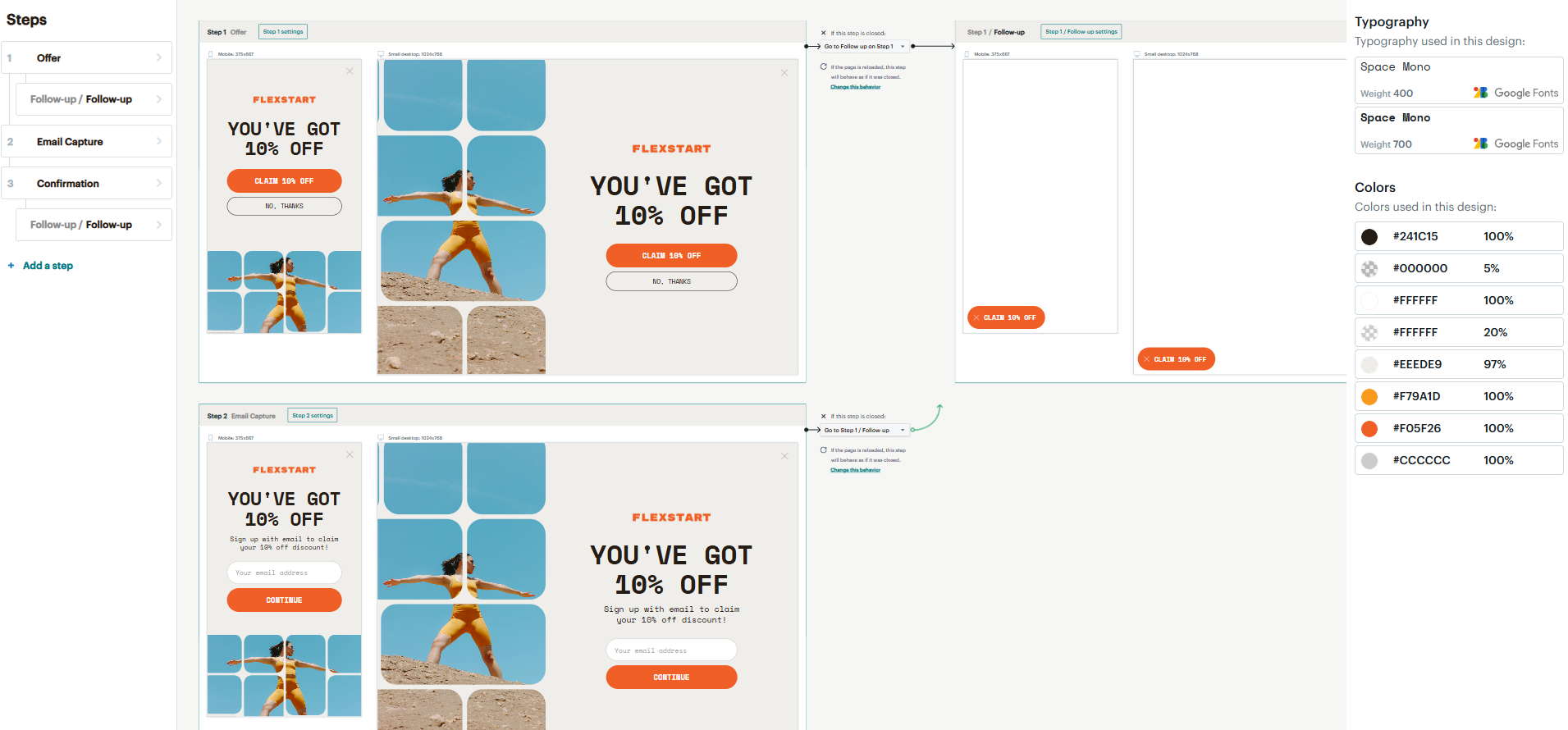 Editing a pop-up form in Mailchimp
MailerLite pop-up forms are exactly what they look like – simple and straightforward. The builder shows you most options upfront, so there’s less guesswork and little digging through settings. You won’t find dozens of style options, but you can build and publish a clean form in minutes.
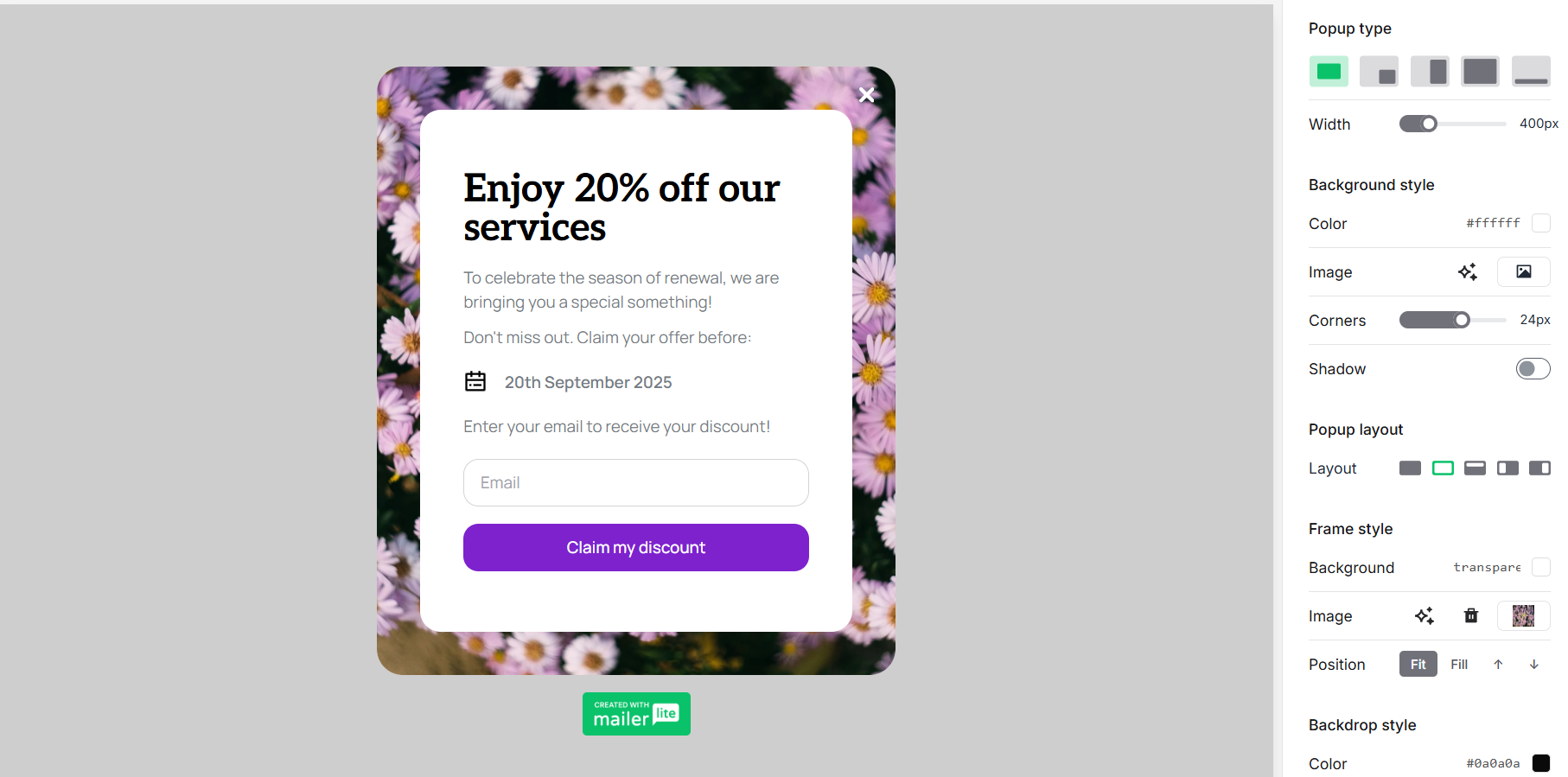 Editing a pop-up form in MailerLite
If this feels like a choice between control and speed, some platforms try to balance both.
SendPulse, for example, offers pop-ups with interactive elements and granular display conditions. On top of that, the built-in AI assistant can generate a customizable pop-up draft to save you time.
Deliverability
Mailchimp: 9.6/10 | ⭐ MailerLite: 9.8/10
When it comes to email marketing, deliverability is key. You can write the perfect email with a brilliant subject line, but if it lands in spam, none of that matters.
The good news: Mailchimp and MailerLite score high because they both take deliverability seriously and deliver emails reliably to inboxes. Both platforms require proper authentication to prove to inbox providers that you’re actually authorized to send emails from your domain, don’t allow purchased mailing lists, and help you catch potential problems before you send.
| Category |
Mailchimp |
MailerLite |
Winner |
| Authentication |
Guided setup for SPF, DKIM, and DMARC with clear instructions and status monitoring |
Guided setup for SPF, DKIM, and DMARC records; automatic domain authentication for most hosting providers |
MailerLite |
| Deliverability monitoring tools |
Built-in content analysis and spam filter testing |
Domain and blocklist activity tracking, email contact checks against spam filters, and inbox placement predictions |
Tie |
| List hygiene features |
Automatic handling of bounces, complaints, and unsubscribeв contacts, with engagement-based filtering for inactive subscribers |
Automatic bounce handling, complaint suppression, and built-in email verification to detect risky or invalid addresses |
MailerLite |
| Dedicated IP |
Available as a paid add-on for high-volume senders at $29.95 per month, with warm-up assistance |
Available on request for high-volume senders, with assessment and managed warm-up by the deliverability team |
Tie |
| Total score |
9.6/10 |
9.8/10 |
MailerLite |
Mailchimp and Mailerlite do a good job of covering the foundational deliverability requirements. You’ll find clear documentation guiding you through the authentication process, and you can count on automated handling of hard bounces and unsubscribed contacts. Besides, a dedicated deliverability expert team can help you protect your sender reputation and improve inbox placement.
Where they differ is in list cleaning. MailerLite users can clean and verify email addresses on their lists via the built-in MailerCheck tool on a pay-as-you-go basis. Mailchimp, by contrast, doesn’t offer native list cleaning and typically requires external services for comprehensive list cleaning.
Integrations
⭐ Mailchimp: 7.7/10 | MailerLite: 6.4/10
Comparing integrations comes down to one simple question: how much work will this platform add to your day? A well-connected ESP saves time, and this is where Mailchimp comes out ahead. MailerLite doesn’t match the same breadth of integrations but leverages clever marketing – its dedicated Mailchimp migration tool makes it dead simple to switch from Mailchimp to MailerLite, removing a barrier for potential switchers.
| Category |
Mailchimp |
MailerLite |
Winner |
| Integration catalog |
339 integrations |
185 integrations |
Mailchimp |
| eCommerce platforms |
73 integrations, including Shopify, WooCommerce, BigCommerce, and Adobe Commerce |
19 integrations, including Shopify, WooCommerce, BigCommerce, and Adobe Commerce |
Mailchimp |
| CRM systems |
82 integrations, including Salesforce, Zoho CRM, and Pipedrive; includes a built-in, lightweight CRM focused on audience data and campaign insights |
17 integrations, including Zoho CRM, Pipedrive, Salesforce, Kommo, and HubSpot |
Mailchimp |
| Analytics and data tools |
37 analytics integrations, including Google Analytics |
17 analytics integrations, including Google Sheets and SurveyMonkey |
Mailchimp |
| Zapier support |
10 available triggers and 22 supported actions for cross-app workflows |
13 triggers and 6 actions for subscriber, campaign, and automation events |
Mailchimp |
| MCP server |
AI access via MCP requires third-party tools |
Native MCP server available for connecting ChatGPT, Claude, and Cursor |
MailerLite |
| Total score |
7.7/10 |
6.4/10 |
Mailchimp |
This round clearly goes to Mailchimp. It connects with far more tools out of the box, making it easier to plug into complex marketing stacks without extra workarounds. MailerLite covers the essentials and even smooths the path for switchers, but its ecosystem is still much smaller. If integrations are your priority, Mailchimp simply gives you more doors to open.
AI features
⭐ Mailchimp: 7.2/10 | MailerLite: 5/10
When it comes to AI, Mailchimp shows up fully armed. It uses AI across writing, sending time optimization, predictive insights, and pre-send checks, weaving it deeply into everyday workflows.
MailerLite took a more conservative approach: they added an AI writing assistant and called it a day. No fancy predictions, no automated workflow generation, just help with email copy when you need it.
| Category |
Mailchimp |
MailerLite |
Winner |
| Email generation |
Intuit Assist creates and refines on-brand email copy, subject lines, and preview text using historical performance and audience engagement data |
OpenAI-powered writing assistant generates email copy and subject lines with tone and style controls |
Mailchimp |
| Automation generation |
AI-assisted workflow creation from natural-language prompts (beta), with human review required |
Automation is built manually, with support for AI actions from external tools via MCP |
Mailchimp |
| Sending time optimization |
Send-time recommendations based on aggregated engagement trends |
Smart sending optimizes delivery per subscriber based on past engagement and time zone |
MailerLite |
| Predictive customer analytics |
Purchase probability and estimated customer lifetime value for connected eCommerce stores |
Not available |
Mailchimp |
| Smart segmentation suggestions |
Predictive insights available for manual segmentation; no automatic segment generationor AI-suggested segments |
Not available |
Mailchimp |
| Deliverability tips |
Pre-send spam checks and content quality recommendations built into the editor |
Deliverability checks available via the MailerCheck integration |
Mailchimp |
| Total score |
7.2/10 |
5/10 |
Mailchimp |
Mailchimp’s AI is more comprehensive and more sophisticated; it’s integrated across the platform. MailerLite takes a more cautious, deliberate approach, rolling out AI features at a slower pace.
Reporting and analytics
⭐ Mailchimp: 7.8/10 | MailerLite: 6.4/10
Reports and analytics don’t get people excited about email marketing, but they determine whether you’re guessing or making informed decisions. One platform gives you layers of data to analyze and compare. The other shows you what’s working right now without burying you in numbers.
Here’s what Mailchimp and MailerLite let you analyze:
| Category |
Mailchimp |
MailerLite |
Winner |
| Report types |
Deep campaign, audience, comparative, and eCommerce reports |
Campaign and automation performance reports, click and heat maps, eCommerce overview, and subscriber reports |
Mailchimp |
| Custom reports |
Predefined templates, no custom dashboards |
Predefined dashboards with limited filtering |
Tie |
| Reporting speed |
Metrics update with a delay |
Dashboards update periodically |
Tie |
| Export capabilities |
CSV exports for campaign performance, contact data, and reports |
CSV exports for campaigns, reports, and contact data |
Tie |
| Total score |
7.8/10 |
6.4/10 |
Mailchimp |
Analytics is yet another area where Mailchimp pulls ahead. It offers more report types and deeper breakdowns. Unlike MailerLite, Mailchimp filters out bot clicks so that they don’t inflate engagement metrics. MailerLite is solid for basic insights; it also offers purchase tracking, but it is limited to Shopify and WooCommerce.
Customer support
Mailchimp: 7/10 | ⭐ MailerLite: 7.3/10
Support usually stays invisible while everything works, and becomes critical the moment it doesn’t. At that point, response time and the kind of help you get matter far more than extra AI features.
Here’s how Mailchimp and MailerLite handle support when you actually need assistance:
| Category |
Mailchimp |
MailerLite |
Winner |
| Channel availability |
24/7 email support on paid plans and for the first 30 days for free accounts; 24/7 live chat support on paid plans; phone support for premium accounts; multilingual support |
24/7 multilingual email and live chat support on paid plans and during the free trial |
Tie |
| Knowledge base |
Comprehensive self-service help center with clearly structured articles, step-by-step instructions, and video tutorials |
Well-organized, searchable knowledge base with regularly updated articles, tutorials, videos, and troubleshooting guides |
Tie |
| Onboarding assistance |
Guided setup with in-app tips and resources; onboarding specialist sessions included or available on paid plans |
Tooltips and mini video tutorials in context; free online courses; dedicated onboarding help with higher-tier plans |
Tie |
| Support quality rating on Capterra |
—
|
4.8/5 |
MailerLite |
| Total score |
7/10 |
7.3/10 |
MailerLite |
MailerLite looks a bit stronger on paper: 24/7 live chat and priority email support on paid plans, rather quick access, and plenty of self-serve resources. However, some G2 reviews point out a catch – getting a real human can take time, as chatbots and AI often handle the first line of support.
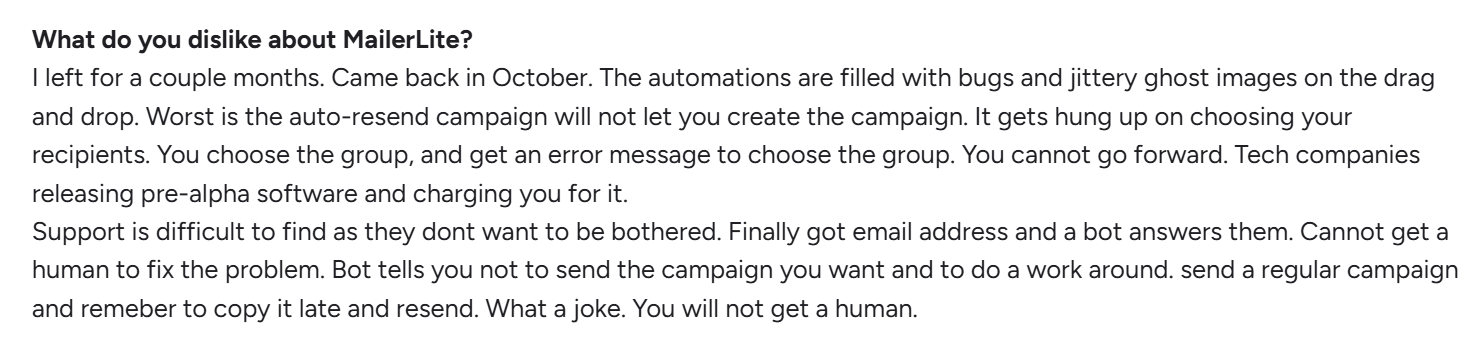 A review of MailerLite’s customer support at G2
Mailchimp offers fewer always-on options, and its customer support can be slow during peak times, but when you reach a person, the interaction feels more personal and hands-on. In general, multiple user reviews describe it as efficient and helpful.

Join 3M+ businesses growing with SendPulse
From solo creators to global brands, millions trust SendPulse to run email campaigns, automations, chatbots, and more — all in one place. Get started for free now!
Get started for free
Your decision checklist
You’ve read all the categories of our Mailchimp vs MailerLite comparison. Now it comes down to fit. The right platform isn’t about features on paper — it’s about how well it matches your business, team, and expectations.
Use the checklist below to see which email marketing platform aligns better with how you work today and how you plan to grow.
| Decision area |
Mailchimp
is a better fit if… |
MailerLite
is a better fit if… |
| Business type |
🟨 Established SMBs, online retailers, B2B SaaS companies, and service businesses with complex marketing stacks. |
🟩 Small online businesses, startups, content creators, bloggers, and solopreneurs that are growing fast. |
| Budget expectations |
🟨 You’re comfortable with lower first-year costs and can budget for higher year-two pricing. |
🟩 You’re budget-sensitive and expect to scale with predictable pricing over the long term. |
| Automation needs |
🟨 You rely on ready-made workflows and don’t mind unlocking advanced automation on paid plans. |
🟩 You want flexible, multi-step automation from day one, even with the free plan. |
| Analytics focus |
🟨 You need detailed reports, product-level analytics, and AI-driven insights. |
🟩 You prefer simple, easy-to-read dashboards that show what’s working. |
| Team setup |
🟨 You have a dedicated marketing team and can invest time in learning a more complex platform. |
🟩 You work solo or in a small team and want a fast setup with minimal training. |
| Platform maturity |
🟨 You value an established platform with 20+ years of development. |
🟩 You’re fine with a newer platform that’s still adding features. |
If one column clearly feels closer to how your business operates today, that’s your answer.
Final verdict and recommendations
⚖️ Final scores: Mailchimp – 8.5/10 | MailerLite – 8.4/10
Both Mailchimp and MailerLite remain strong email marketing platforms that can serve a wide range of businesses. The difference is that Mailchimp combines its mature feature set with increasingly competitive first-year pricing, making it a more compelling option than many marketers might expect.
MailerLite remains one of the most affordable and user-friendly platforms on the market, but recent pricing changes have narrowed one of its biggest advantages. It still offers excellent value and a well-balanced set of features, particularly for small businesses and marketers who prioritize simplicity.
Mailchimp, meanwhile, delivers broader capabilities, deeper eCommerce functionality, and a larger integration ecosystem. For businesses that expect their marketing needs to become more sophisticated over time, those advantages may justify the additional cost after the introductory period ends.
If you find yourself making too many compromises with either platform, it may be worth stepping back and exploring solutions built around your priorities. Look into more alternatives to Mailchimp and MailerLite — you’ll find solutions with deeper automation across channels, tighter CRM integration, and more flexible pricing at scale. In some cases, those may be a better long-term fit.