Email marketing platforms are often compared as if one were universally better than the other. In reality, the right choice depends on how your business operates, engages with customers, and drives conversions.
In this in-depth comparison, SendPulse examines Mailchimp and Klaviyo in an email marketing face-off. Mailchimp is known as an easy-to-use, all-in-one solution for various businesses. Set against it, Klaviyo focuses on eCommerce brands that depend on customer data, behavioral automation, and revenue-driven lifecycle marketing.
By breaking down features, pricing, and real-world performance, this Mailchimp vs Klaviyo comparison will help you determine which platform fits your business needs best.
How we scored this comparison: Each platform was evaluated across nine categories using our
independent methodology. Pricing (25%), ease of use (20%), and email and automation features (15% each) carry the most weight because they affect daily workflows the most. All scores reflect real testing and analysis as of January 2026.
TL;DR Mailchimp vs Klaviyo at a glance
Here’s how Mailchimp and Klaviyo compare across the categories that matter most. For the full breakdown of any category, jump to the detailed overview below.
| Category |
Mailchimp |
Klaviyo |
Winner |
| Best for |
B2B services, agencies, SaaS startups, local businesses – anywhere email is one of many channels, not the revenue engine |
Shopify and WooCommerce stores, DTC brands, online retailers – anywhere behavioral automation and customer data directly drive sales |
Depends on use case |
| Pricing |
9/10
500 contacts free;
lower cost at all tiers, but advanced features locked to higher-tier plans;
more affordable at scale |
7/10
250 contacts free with advanced feature access;
costs rise steeply with list growth;
expensive at scale |
Mailchimp |
| Ease of use |
9.5/10
Beginner-friendly with guided setup, intuitive interface, and extensive tutorials |
6.5/10
Steeper learning curve and data-heavy interface |
Mailchimp |
| Email design |
9.4/10
Intuitive builder with 135+ pre-built templates |
9.4/10
Drag-and-drop editor with 160+ customizable templates |
Tie |
| Automation |
7.8/10
Solid on mid-tier+ plans with 35+ flow templates; basic on free and entry tiers |
10/10
Advanced flows on all plans with 60+ pre-built automation templates and 40+ triggers |
Klaviyo |
| Deliverability |
10/10
Consistently high inbox rates across industries; one of the few ESPs publishing long-term deliverability benchmarks |
10/10
Excellent for eCommerce senders with behavior-based flows; slightly less consistent outside eCommerce use cases |
Tie |
| Integrations |
7.7/10
300+ integrations across marketing, CRM, and analytics tools, designed to fit easily into diverse, general-purpose marketing stacks |
7.7/10
350+ integrations centered on eCommerce and real-time customer data, built to power event-driven automation and lifecycle marketing |
Tie |
| AI features |
7.2/10
AI focuses on content generation like emails, subject lines, and preview text and campaign optimization with send-time suggestions and spam checks, reducing time to launch |
8.7/10
AI is embedded into data, automation, and lifecycle logic, driving predictive targeting, timing, and revenue-focused decision-making |
Klaviyo |
| Reporting and analytics |
5.8/10
Clear, campaign-focused reporting with standard email metrics and limited depth beyond basic performance analysis |
10/10
Advanced, real-time analytics built around customer behavior, lifecycle tracking, and revenue attribution |
Klaviyo |
| Customer support |
7/10
Multi-channel support across email and chat for mid-tier plans and phone for premium plans; clear and accessible help center for non-tech-savvy users |
5.4/10
Email and chat only with access that varies by plan level; vast help documentation mainly focused on eCommerce-specific issues |
Mailchimp |
| Final score |
8.5/10 |
8.6/10 |
Depends on use case |
If this quick comparison doesn’t clarify your choice, you’re likely in a gray area where simple recommendations fall short. The detailed breakdown below shows where each platform excels, how well it scales with your business, and where it might feel limiting for your specific needs.

Create and send high-performing emails
Use an AI assistant, pre-made templates, advanced segmentation, and feature-rich automation to run campaigns without coding. Start for free with up to 15,000 monthly emails.
Get started for free
Side-by-side comparison between Mailchimp vs Klaviyo
We’ve scored each platform across key categories, with brief explanations of how features perform in practice. Let’s go over each area one by one and see what each platform has to offer.
Pricing and value for money
⭐ Mailchimp: 9/10 | Klaviyo: 7/10
Disclaimer: Pricing changes frequently. These figures are accurate as of January 2026. Always verify final costs on official pricing pages.
Mailchimp is more affordable compared to Klaviyo across all list sizes, especially for small and mid-level senders, during the first year. Its free plan is generous enough, and paid tiers scale more gradually. Klaviyo offers some advanced functionality even on its free plan, but pricing rises steeply as your list grows because costs are tied to both profile count and message volume.
Here’s how monthly costs during the first 12 months of using each platform compare at common business sizes:
| Contacts |
Mailchimp |
Klaviyo |
Cost difference |
| Free plan |
500 contacts and 1,000 emails/mo |
250 contacts and 500 emails/mo + 150 SMS credits |
Mailchimp is better for list size |
| 2,500 |
$37.50/mo |
$70/mo |
Mailchimp is 46% cheaper |
| 10,000 |
$90/mo |
$175/mo |
Mailchimp is 48% cheaper |
| 50,000 |
$315/mo |
$790/mo |
Mailchimp is 60% cheaper |
| Total score |
9/10 |
7/10 |
Mailchimp |
If budget is a primary concern, SendPulse offers a compelling alternative. Full disclosure: this is our platform, but the numbers speak for themselves.
Like Mailchimp, SendPulse’s free plan includes 500 contacts, but instead of 1,000 emails per month, you can send up to 15,000 monthly emails. On paid plans, SendPulse is almost twice as cheap as Mailchimp and three times as affordable as Klaviyo.
To give you an idea: a business with 10,000 contacts will pay $175 per month for Klaviyo, $90 for Mailchimp, and $29 for SendPulse. For high-volume senders and growing businesses, the difference in pricing is even bigger: 50,000 contacts cost $790/month in Klaviyo, $315/month in Mailchimp, and just $105/month in SendPulse.
Here’s how email marketing costs scale as your business grows:
| With Mailchimp |
With Klaviyo |
| You can start for free and switch to relatively low-cost paid plans as your list grows. Lower tiers limit advanced automation, AI features, and analytics, so many teams eventually upgrade to higher-tier plans.
Over time, costs increase based on both mailing list size and the need for more advanced features. |
All core features are available from day one. What scales is capacity: profiles and emails sent. The free plan is powerful but limited, so growing businesses quickly move to paid plans.
Costs then rise in direct proportion to the number of active profiles, making Klaviyo more expensive at comparable list sizes but better suited to revenue-focused eCommerce brands. |
However, cost alone doesn’t tell the whole story.
Ease of use and interface
⭐ Mailchimp: 9.5/10 | Klaviyo: 6.5/10
This category shows one of the widest gaps in our comparison: Mailchimp scores 9.5/10 while Klaviyo scores 6.5/10. The difference is fundamental. Mailchimp prioritizes confidence and speed, allowing most users to send their first email within hours. Klaviyo optimizes for accuracy and data access, requiring teams to first understand profiles, events, and flow logic. Neither approach is wrong; they just serve different user types.
| Aspect |
Mailchimp |
Klaviyo |
Winner |
| First-time experience |
You go through setup with step-by-step onboarding, clear prompts, and pre-built paths. Most users can send their first campaign within a few hours, even with no prior email marketing experience. |
You get into a data-focused dashboard that requires an understanding of profiles, events, and integrations. There’s minimal hand-holding – you either know what you’re doing or are willing to invest time learning. |
Mailchimp |
| Daily navigation |
Features are clearly organized into top-level categories like campaigns, audiences, and reports. Navigation is intuitive, and the interface feels clean and uncluttered. |
The interface is dense and data-heavy. The dashboard surfaces metrics, segments, and flow performance prominently, which can be visually overwhelming and less intuitive for beginners. |
Mailchimp |
| Learning curve |
Most teams become comfortable within their first week thanks to in-product guidance and comprehensive tutorials. You can learn by doing without fear of breaking something. |
Expect a few weeks before your team feels confident building flows and segments independently. Documentation is excellent, but you must read it – the interface doesn’t teach itself. |
Mailchimp |
| Mobile access |
Mailchimp offers high-rated iOS and Android apps that are not feature-complete but cover essential campaign and audience management and let you track performance metrics on the go. |
Klaviyo has no native iOS or Android app. You can use mobile browsers or integrations for access, which provides a suboptimal experience. It’s a notable drawback for a platform marketed to eCommerce teams who often work irregular hours. |
Mailchimp |
| Workflow efficiency once mastered |
Fast and low-friction for standard tasks, but complex workflows may feel constrained or require clicking through multiple menus. Power users sometimes find the simplicity limiting. |
Highly efficient once learned. The data-first design means advanced users can build sophisticated segments and flows faster, but they must get over the learning curve first. |
Klaviyo |
| Total score |
9.5/10 |
6.5/10 |
Mailchimp |
Overall, Mailchimp is well-suited to beginners and small teams that prioritize clarity and quick execution. At the same time, Klaviyo is a better fit for experienced marketers willing to trade ease of use for greater precision and deeper access to data.
To understand how these differences play out over time, here’s what the first three months typically look like:
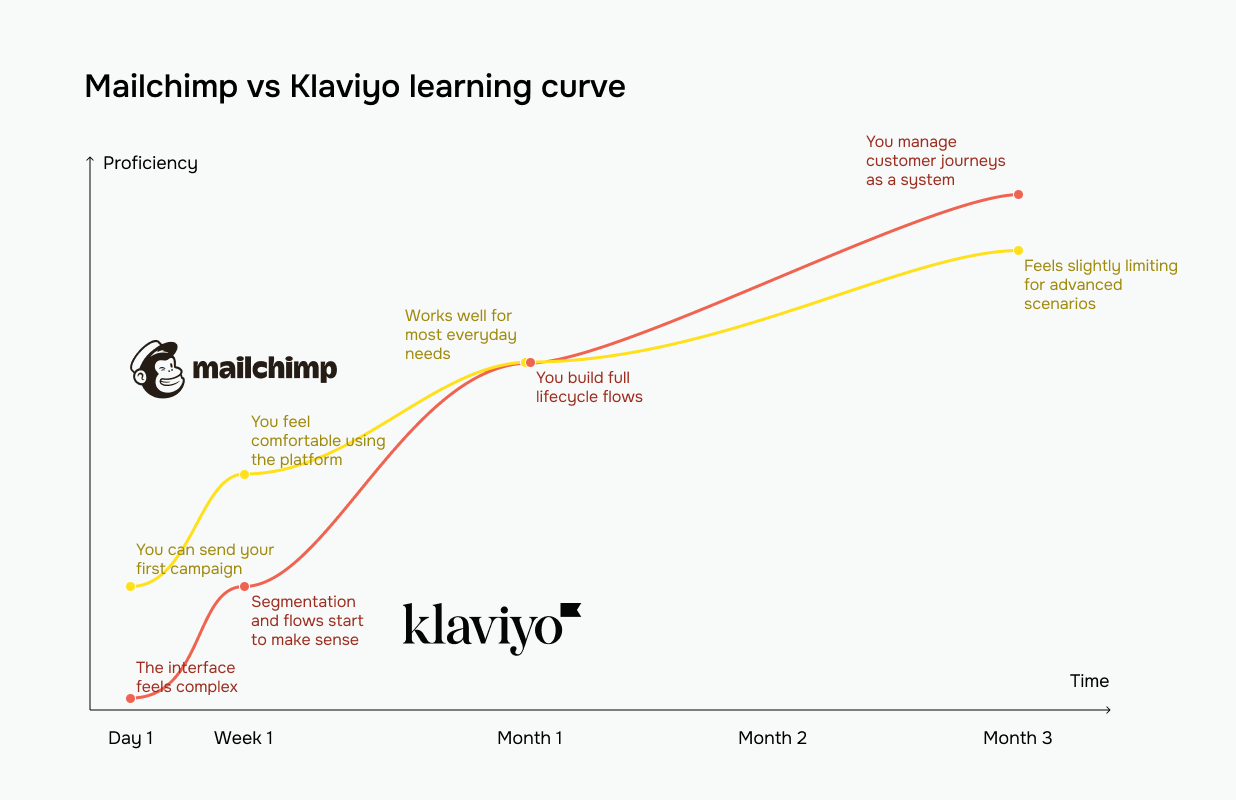 The yellow line represents Mailchimp vs Klaviyo’s red line
Mailchimp gets you productive in days, but may limit you in months. Klaviyo costs you weeks upfront, but continues delivering more power as you master it.
Email builder and templates
⭐ Mailchimp: 9.4/10 | ⭐ Klaviyo: 9.4/10
Both platforms tie in an overall score, but they approach email design differently. Mailchimp feels easier to work with right away, especially for building clean layouts and standard campaigns. By contrast, Klaviyo takes more time to learn but gives precise control over eCommerce emails through dynamic content and behavioral personalization.
| Aspect |
Mailchimp |
Klaviyo |
Winner |
| Templates |
Mailchimp offers a large library of professionally designed templates. Paid plans unlock the complete set of 135+ templates, while the free plan includes a smaller selection. Designs cover many use cases, so it is easy to find a starting point for most campaigns. |
Klaviyo offers 160+ email templates designed for eCommerce scenarios. They are fully customizable and responsive, with a stronger focus on performance, meaning templates are built around conversion patterns: clear product hierarchies, prominent CTAs, and visible pricing. |
Tie |
| Drag-and-drop editor |
Mailchimp’s drag-and-drop email editor is intuitive, with clear content blocks and a straightforward layout. It also includes a Creative Assistant and a built-in Content Studio to help you manage and reuse your assets. |
Klaviyo’s editor is modern and flexible, with a true drag-and-drop block system. It supports dynamic content and reusable sections, but feels more technical and less guided than Mailchimp’s editor. |
Mailchimp |
| Customization |
You can customize almost every element, including layout, fonts, and colors. Advanced users can also import custom HTML templates. Some sophisticated design options are only available with higher-tier plans. |
Klaviyo is strong for brand consistency and data-driven design. You can tailor templates with your logo, colors, and fonts, and pull eCommerce product feeds directly into emails. You can also import custom HTML if needed. |
Klaviyo |
| Mobile responsiveness |
All templates and designs are mobile responsive out of the box, with preview tools and adjustments to ensure emails look good on mobile devices and tablets. |
Klaviyo’s templates adapt well to mobile by default, and you can preview designs on multiple devices before sending. |
Tie |
| Total score |
9.4/10 |
9.4/10 |
Tie |
If email design is one of your top priorities, both platforms are great options. Mailchimp is a user-friendly solution with diverse templates. It’s perfect for small teams creating quick, polished emails without advanced design skills. Klaviyo may be better if you represent an eCommerce business that needs data-driven emails with dynamic content and doesn’t mind a steeper learning curve.

Join businesses growing with SendPulse
From solo creators to global brands, thousands of customers trust SendPulse to run email campaigns, chatbots, automations, and more — all in one place.
Get started for free
Marketing automation
Mailchimp: 7.8/10 | ⭐ Klaviyo: 10/10
Automation is where Klaviyo clearly leads: 10/10 versus Mailchimp’s 7.8/10. This significant gap stems from a fundamental architectural difference. Mailchimp treats automation as a premium add-on that unlocks gradually as you upgrade, with only 35 automation templates on lower-tier plans. Klaviyo treats automation as its foundation, offering over 60 pre-built flows and more than 40 triggering events, even on the free plan. If behavioral lifecycle marketing is central to your strategy, this 2.2-point gap matters enormously.
| Aspect |
Mailchimp |
Klaviyo |
Winner |
| Automation builder |
Visual and intuitive, but advanced features require paid plans |
Powerful builder across all plans with full branching logic |
Klaviyo |
| Triggers available |
38 pre-defined triggers across categories like contact actions, dates, eCommerce events, engagement, API calls, and integrations |
40+ pre-built triggers across list, segment, metric, price drop, inventory, and date property categories and unlimited custom events |
Klaviyo |
| Pre-built automations |
35 templates covering basics: welcome, abandoned cart, re-engagement, milestone, nurture series |
60+ templates for eCommerce lifecycle: browse abandonment, cart recovery, post-purchase, cross-sell, replenishment, win-back flows |
Klaviyo |
| Automation complexity |
Handles short, linear journeys effectively; requires upgrade for complex lifecycle flows |
Purpose-built for multi-step, conditional customer journeys |
Klaviyo |
| Total score |
7.8/10 |
10/10 |
Klaviyo |
Let’s check out what the automation builders actually look like.
Mailchimp’s free plan limits you to fewer-step automations with no advanced branching logic. While it works perfectly fine for basic “someone joins a mailing list → send a welcome email” sequences, it breaks down for any behavioral complexity. To unlock multi-step flows, conditional branching, and eCommerce triggers, you need a higher-tier plan.
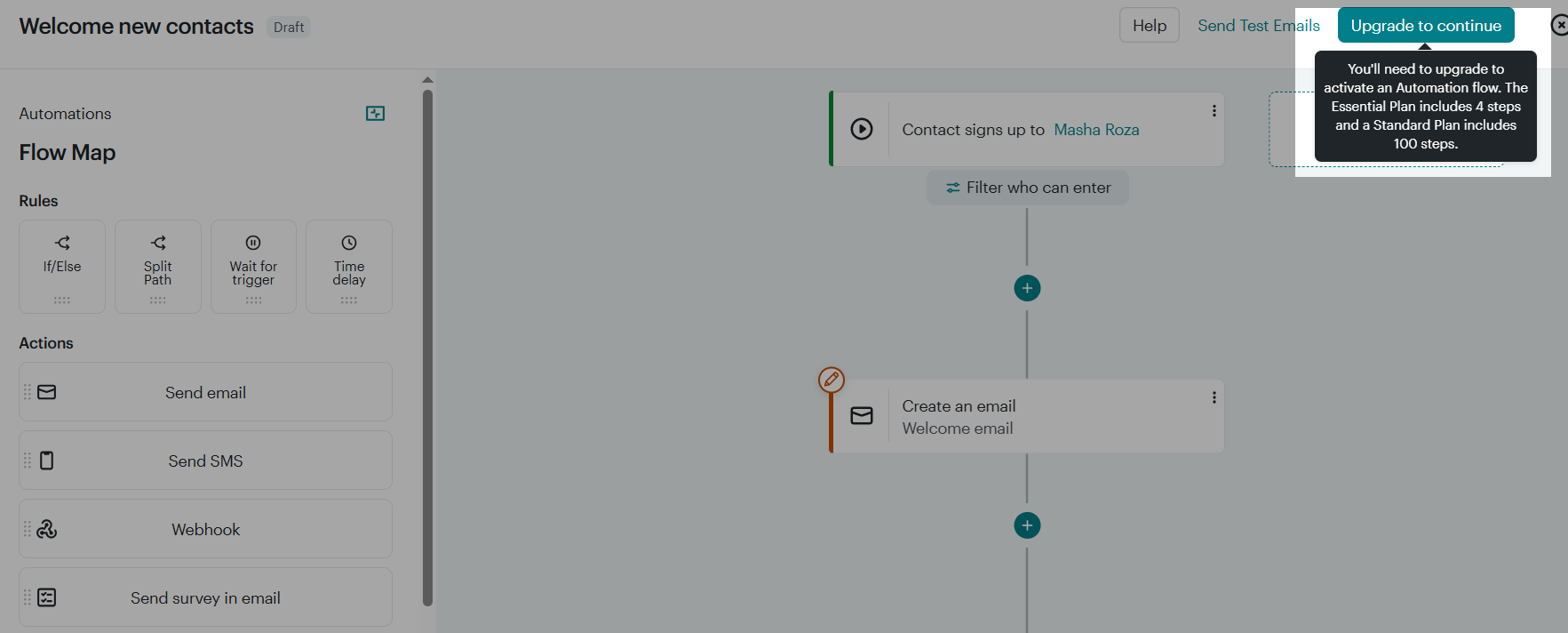 Mailchimp’s free plan automation restrictions
Klaviyo’s flow builder gives you triggers, actions, conditional splits, and time delays within automation, even with the free plan.
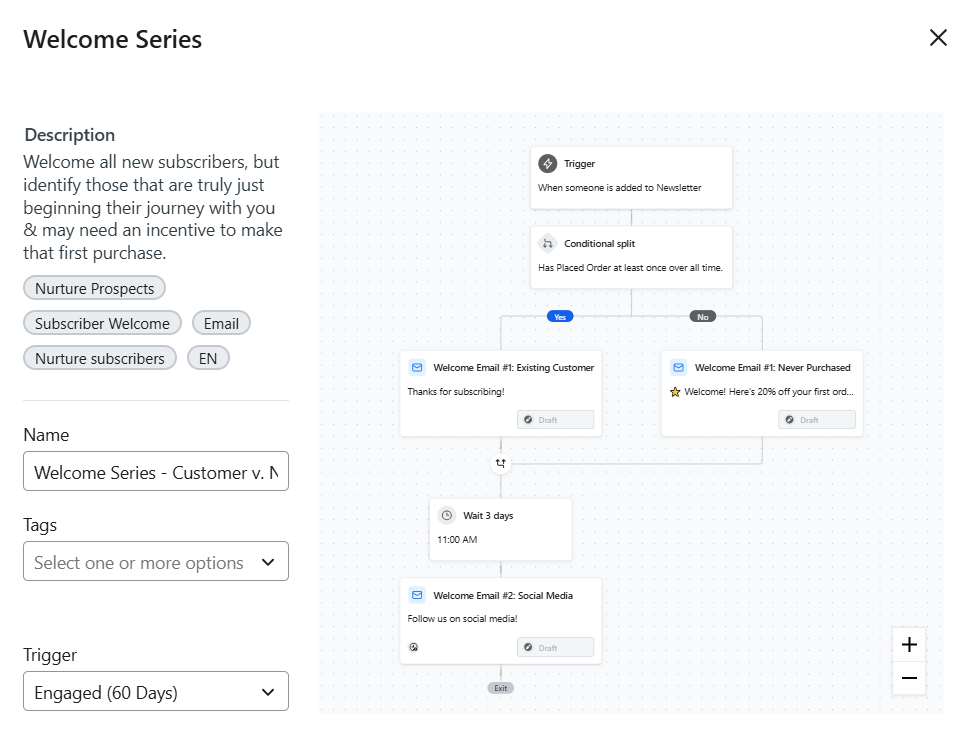 Customizable welcome flow template in Klaviyo
The key question is, “Does your business model need advanced automation?” We mean browse abandonment, predictive replenishment, and segment-specific flows. If your answer is yes, Klaviyo’s 2.2-point advantage can translate to real revenue. If not, Mailchimp’s simpler approach might work just fine.
Contact management
Mailchimp: 7.5/10 | ⭐ Klaviyo: 9.5/10
Both platforms handle list management well, but the two-point score gap reflects how differently they approach segmentation, which is where the real distinction lies. Mailchimp’s segmentation tools let you target users by demographics, engagement, and purchase history with reasonable depth on mid-tier plans and above. Klaviyo’s segmentation is built for behavioral lifecycle marketing, with real-time updates, unlimited conditions, and predictive data.
| Aspect |
Mailchimp |
Klaviyo |
Winner |
| Segmentation capabilities |
Rule-based segmentation with AND/OR logic and basic behavioral filters on paid plans |
Event-driven segmentation with nested AND/OR logic, behavioral sequences, predictive, and lifecycle metrics |
Klaviyo |
| Segment update speed |
Segments refresh within two hours; manual refresh needed for time-sensitive campaigns |
Segments refresh automatically within minutes as customer behavior changes |
Klaviyo |
| Available segmentation criteria |
Demographics, location, signup source, email engagement, basic purchase data, custom fields, and tags |
Standard criteria, plus browse behavior, cart activity, purchase frequency, product affinity, time-based patterns, predicted next purchase date, CLV bands, engagement score, etc. |
Klaviyo |
| Tagging and manual organization |
Flexible tag system for manual contact categorization; easy to apply, search, and filter by tags |
Tags available but secondary to behavioral data; condition-based segments prioritized over manual labels |
Mailchimp |
| Contact structure |
Separate, non-shared audiences that can duplicate contacts and increase billing totals |
One profile per email address across the entire account, with all behavioral data attached to it |
Klaviyo |
| Data fields |
Supports custom fields, but data depth depends on plan and integrations |
Extensive profile properties, event data, transactional metrics, and predictive fields available by default |
Klaviyo |
| Total score |
7.5/10 |
9.5/10 |
Klaviyo |
On paper, the contrast is already clear, but it becomes even more obvious when you look at how segmentation is presented in each tool. Mailchimp focuses on clean lists and practical labels.
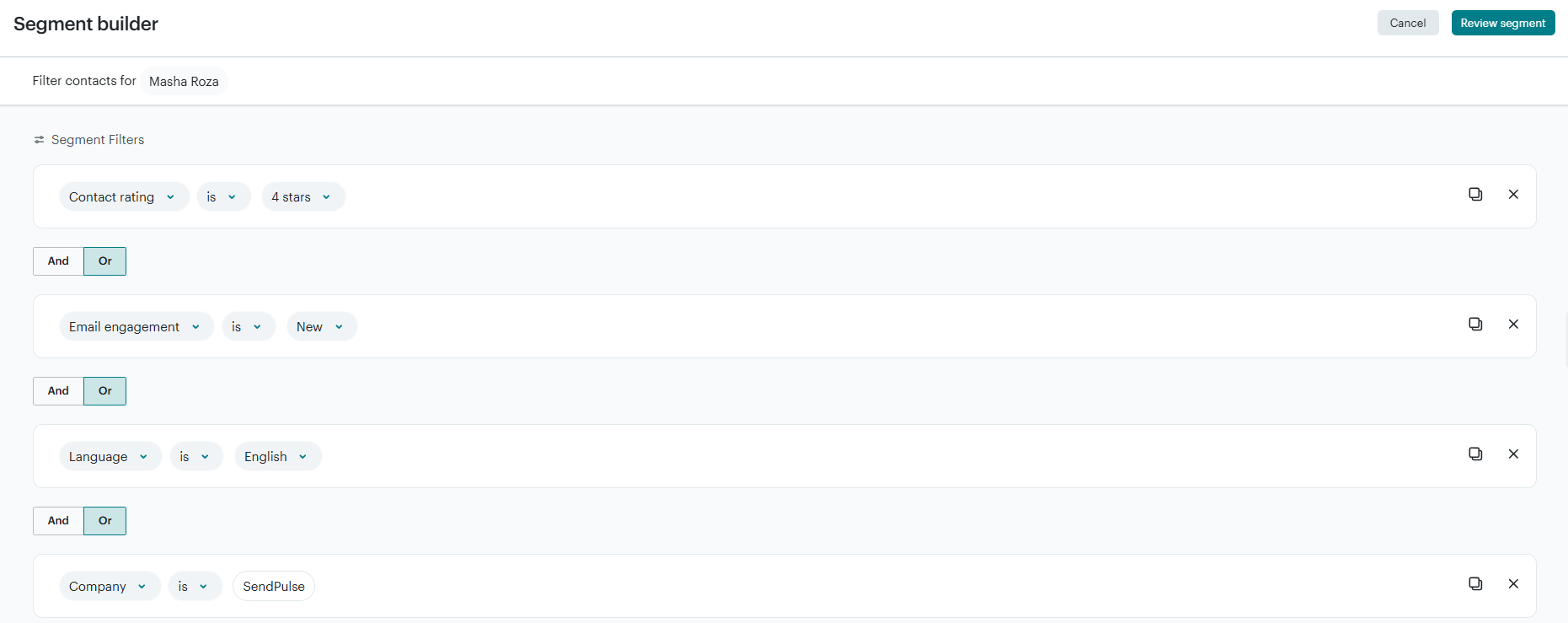 Segmentation options at Mailchimp
Klaviyo takes segmentation further by combining multiple event-based conditions, including positive and negative purchase behavior at the product-variant level. To give you an idea, the segment below targets customers who bought one product but have never purchased a related item, enabling dynamic cross-sell or replenishment flows that update automatically as behavior changes.
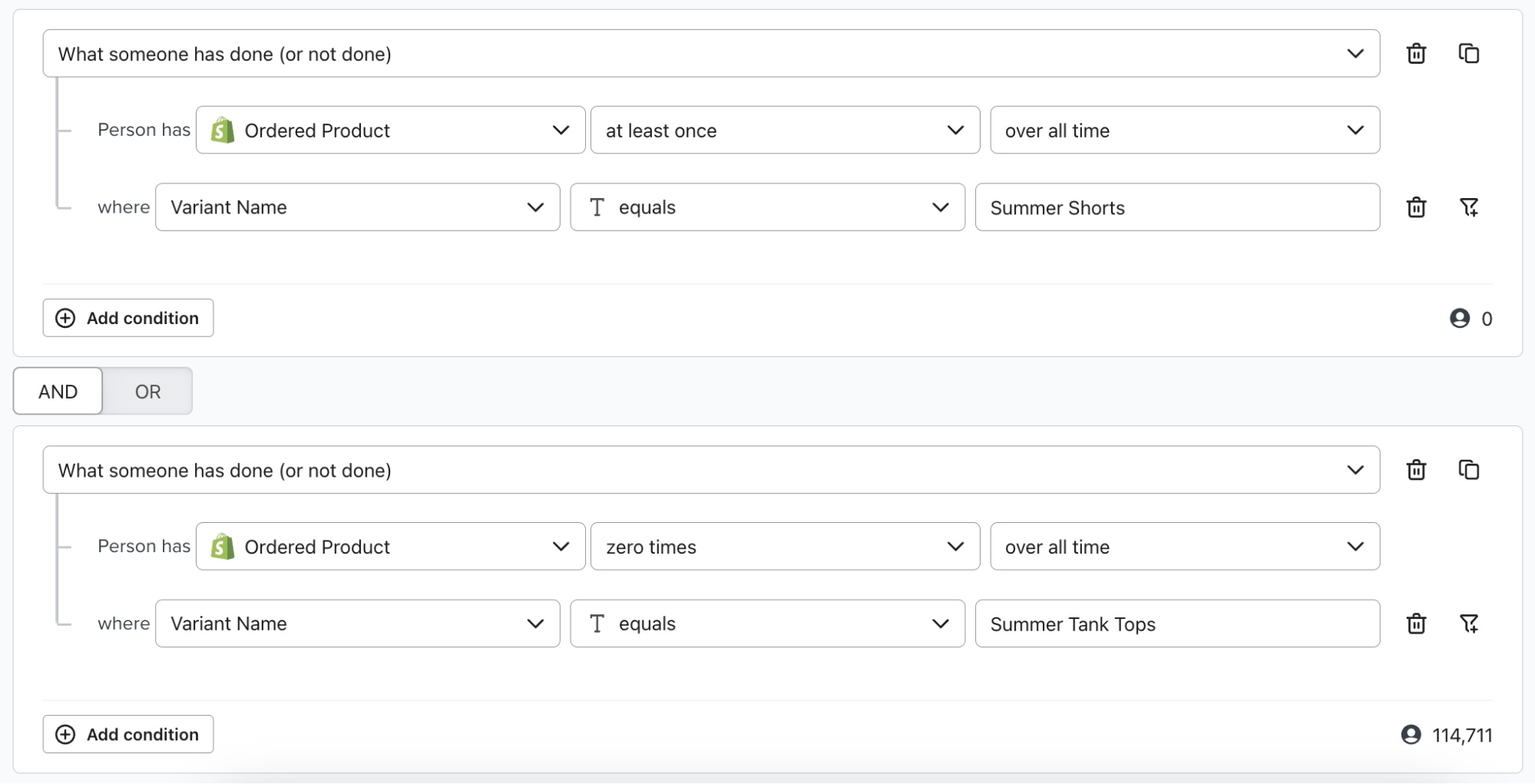 Cross-sell segment at Klaviyo; source: Klaviyo
The deciding factor: if your campaigns are primarily meant for “everyone who purchased” or “subscribers interested in a specific topic,” Mailchimp will work well for you. If you need to target “customers who bought Product A but not Product B, have CLV greater than $200, and browsed Category C in the past week,” then Klaviyo is the better choice.
Deliverability
⭐ Mailchimp: 10/10 | ⭐ Klaviyo: 10/10
Email deliverability depends primarily on factors you control: mailing list quality, content value, sending patterns, and proper authentication setup. The platform itself accounts for roughly 20% of deliverability, preventing infrastructure-related risks and supporting best practices. Both Mailchimp and Klaviyo handle that 20% excellently.
| Aspect |
Mailchimp |
Klaviyo |
Winner |
| Authentication |
Full SPF, DKIM, and DMARC support with clear step-by-step setup guides |
Full SPF, DKIM, and DMARC support with solid documentation |
Tie |
| Deliverability monitoring tools |
Built-in content checker, spam filter diagnostics, and inbox preview tools |
Built-in deliverability health indicators, flow-level engagement tracking, and strong sender reputation guidance |
Tie |
| List hygiene features |
Automated contact suppression due to bounces, spam complaints, and unsubscribes; engagement-based filters to identify inactive contacts |
Global and list-specific profile suppression due to bounces and spam complaints; auto-generated never-engaged segments to maintain list hygiene |
Tie |
| Dedicated IP |
Available as an optional add-on for an additional $29.95/mo fee; recommended for high-volume senders |
Available to accounts that qualify by request |
Tie |
| Total score |
10/10 |
10/10 |
Tie |
The 10/10 tie means deliverability won’t be your deciding factor. If you follow the basics, both Mailchimp and Klaviyo will get your emails to the inbox.
Forms and landing pages
⭐ Mailchimp: 8.2/10 | Klaviyo: 7.4/10
Mailchimp has a clear advantage in this category: 8.2/10 versus Klaviyo’s 7.4/10. It provides core lead generation tools, including a landing page and a form builder with templates and analytics. In contrast, Klaviyo focuses exclusively on eCommerce data-capturing forms but offers no native landing page builder at all.
| Aspect |
Mailchimp |
Klaviyo |
Winner |
| Form builder |
Beginner-friendly, visual form builder with 80+ pre-built form templates, including embedded forms and pop-ups |
Strong form builder with pre-made templates for pop-ups, fly-outs, embedded forms, and teasers, all designed to feed into automation |
Mailchimp |
| Pop-up targeting conditions |
Traffic source, device type, geolocation, specific actions like time on page, inactivity, quick scroll, exit intent, etc. |
Timing, frequency, and behavior rules like exit intent, scroll depth, time on page, and page views, along with device type, visitor status, segments, URL and UTM parameters, location, and cart contents |
Klaviyo |
| Landing page builder |
Full-featured landing page builder with basic and themed templates, custom URLs, SEO settings, and analytics |
No native landing page builder; relies on external tools |
Mailchimp |
| Total score |
8.2/10 |
7.4/10 |
Mailchimp |
Mailchimp includes landing pages but basic pop-up targeting. Klaviyo offers sophisticated behavioral pop-ups but no landing pages. Each platform excels in one area while compromising the other.
If you need both,
SendPulse combines behavioral pop-ups with a landing page builder in one platform. This way, you avoid paying for separate tools and keep your forms and pages connected to multi-channel automation.
Integrations
⭐ Mailchimp: 7.7/10 | ⭐ Klaviyo: 7.7/10
Most businesses actively use five to ten integrations at most, regardless of what’s available. These typically include eCommerce solutions, CRM systems, payment gateways, and analytics tools. Both Mailchimp and Klaviyo cover these core needs well, making it easy to connect with almost any tool. The key is to ensure that your critical integrations operate the way you need them to.
| Aspect |
Mailchimp |
Klaviyo |
Winner |
| Integration catalog |
300+ integrations |
350+ integrations |
Klaviyo |
| eCommerce platforms |
Connects to Shopify, WooCommerce, BigCommerce, and Adobe Commerce, syncing customer names, emails, order totals, and purchase history for targeted campaigns, but needs some workarounds to trigger on specific behavior |
Deep, pre-built integrations for pulling in data about placed orders, started checkout, viewed products, and other events from Shopify, OpenCart, WooCommerce, BigCommerce, Adobe Commerce, etc. |
Klaviyo |
| CRM systems |
Includes a basic built-in CRM tool for collecting and interpreting customer data and dedicated connections to stand-alone CRM solutions, including Salesforce, Zoho, and Pipedrive |
Includes no built-in CRM features, but personalizes and targets your emails based on the custom property data Klaviyo syncs from external solutions like Salesforce, Zoho, and Monday |
Mailchimp |
| Analytics tools and data warehouses |
Integrates with Google Analytics to track campaign traffic; exports campaign opens, clicks, and revenue via CSV files or direct connectors to popular data visualization tools |
Syncs your customer profile and event data to and from data warehouses like Google BigQuery, Snowflake, Amazon Redshift, and Microsoft Azure |
Klaviyo |
| API capabilities |
REST API for syncing contact data, sending campaigns, and pulling reports |
Event-streaming API designed to ingest customer behavior in real-time |
Klaviyo |
| Zapier support |
10 triggers and 22 actions |
3 triggers and 21 actions |
Mailchimp |
| Total score |
7.7/10 |
7.7/10 |
Tie |
The tie between platforms reflects that both approaches serve their target audiences well: Mailchimp for general marketing stacks, Klaviyo for eCommerce data ecosystems.
AI features
Mailchimp: 7.2/10 | ⭐ Klaviyo: 8.7/10
Klaviyo has a strong advantage over Mailchimp in AI features. The 1.5-point gap comes from different focus areas. Mailchimp uses AI primarily for email content creation; it’s helpful for teams that need writing assistance, brand voice consistency, and faster email production. In addition to AI-powered email generation, Klaviyo offers AI features for building automation flows. More importantly, it focuses on predictive analytics and revenue optimization: identifying which customers will buy next, when they’ll churn, and what their lifetime value will be.
| Aspect |
Mailchimp |
Klaviyo |
Winner |
| Email generation |
Intuit Assist generates and rewrites on-brand email copy, subject lines, and preview text |
Email AI generates text, images, buttons, product blocks, and layouts, edits copy tone and length |
Tie |
| Automation generation |
Intuit Assist can generate automated workflows from natural-language prompts in beta |
Flows AI transforms natural language into an automation draft with recommended triggers, filters, and structure you can refine in the flow builder |
Klaviyo |
| Subject line suggestions |
AI-powered subject lines based on data points from your email performance history and audience engagement data |
3 AI-generated subject line variants based on your brand and message goals |
Mailchimp |
| Predictive customer analytics |
Purchase likelihood and customer lifetime value for customers who connected their eCommerce stores |
Customer lifetime value, churn risk, average time between orders, and gender based on behavioral and transaction data |
Klaviyo |
| Smart segmentation suggestions |
Provides predictive metrics for manual segmentation; does not suggest or auto-create segments |
Actively suggests segments based on behavior, engagement patterns, and predictive signals; offers AI-assisted segment creation from natural language descriptions |
Klaviyo |
| Deliverability tips |
Offers pre-send spam checks and content quality feedback to reduce common spam filter triggers |
AI-driven sender reputation repair that involves automated removal of unengaged contacts within a specific period to improve your deliverability score |
Klaviyo |
| Total score |
7.2/10 |
8.7/10 |
Klaviyo |
AI sounds impressive, but if you’re choosing between Mailchimp and Klaviyo, decide based on automation depth, segmentation power, and pricing first. AI features are a secondary consideration that may tip the scales slightly, but shouldn’t override fundamentals.
Reporting and analytics
Mailchimp: 5.8/10 | ⭐ Klaviyo: 10/10
Reporting and analytics show the second-largest gap in our comparison, though both platforms offer extensive data. The gap reflects different priorities: in-depth revenue attribution and customer lifecycle data from Klaviyo vs Mailchimp’s broader view of marketing performance data.
| Aspect |
Mailchimp |
Klaviyo |
Winner |
| Standard reports |
Opens, clicks, bounce rate, unsubscribes, and basic revenue attribution |
Open, click, click-through, placed order, bounce, spam, and unsubscribe rates and revenue per recipient across each campaign or flow |
Klaviyo |
| Advanced reports |
Campaign, audience, comparative, and eCommerce reports |
Business performance summary, audience performance reports, RFM and funnel analysis, and product catalog insights |
Klaviyo |
| Custom reports |
Limited customization |
Extensive, flexible customization |
Klaviyo |
| Reporting speed |
Delayed |
Real-time |
Klaviyo |
| Export capabilities |
Reports, contacts, and campaign data in the CSV format |
Profiles, events, segments, and revenue data via CSV files |
Klaviyo |
| Total score |
5.8/10 |
10/10 |
Klaviyo |
Analytics matter most when they help you make decisions that improve results over time. Mailchimp offers comprehensive campaign reporting for everyday marketing needs, while Klaviyo builds analytics around customer behavior, revenue, and long-term value. If you run an eCommerce business where revenue attribution, repeat purchases, and customer lifetime value drive decisions, Klaviyo’s 10/10 score is hard to ignore.
Customer support
⭐ Mailchimp: 7/10 | Klaviyo: 5.4/10
Both Mailchimp and Klaviyo offer solid support through different channels depending on your plan tier. Mailchimp provides broader coverage and more predictable access across plans, supported by extensive self-service resources. Klaviyo’s support team excels at eCommerce-specific issues, but access and response times vary significantly by plan level, which affects its overall reliability score.
| Aspect |
Mailchimp |
Klaviyo |
Winner |
| Channel availability |
Email 24/7 (30 days free); chat 24/7 for paid accounts; phone for premium plans |
Email 24/7 (60 days free); chat 24/5 for paid accounts; no phone support |
Mailchimp |
| Email response time |
Average response time: up to 24 hours |
Priority-based response times: urgent takes 1 to 2 hours; high – 4 to 8 hours; normal – up to 24 hours (premium support) |
Klaviyo |
| Knowledge base |
Help center with comprehensive articles organized in topics, step-by-step guides, and video tutorials |
Extensive documentation with detailed guides on automation, eCommerce data workflows, deliverability, and analytics |
Tie |
| Onboarding assistance |
Guided setup with onboarding specialist sessions included with paid plans; in-app tips and resources |
Step-by-step setup guides and eCommerce onboarding checklists for key integrations and workflows; onboarding team 1:1 sessions on higher-tier plans |
Mailchimp |
| Total score |
7/10 |
5.4/10 |
Mailchimp |
While customer support plays a role, it is rarely the deciding factor when choosing an email marketing platform. For most teams, long-term success depends far more on automation, data, integrations, and reporting. Support becomes most critical for beginners or small teams during initial setup, but its impact decreases once core workflows are established.

Power up your business with smart tools
Emails, automation, chatbots, websites, CRM, and more — everything you need to connect with your audience. Try SendPulse for free today.
Get started for free
Your decision checklist
Both email marketing platforms are strong, but they’re built for different types of businesses. Use the checklist below to see which one aligns with how you grow and monetize.
| Decision area |
Mailchimp
is a better fit if… |
Klaviyo
is a better fit if… |
Business model
|
🟨 you run a small business, nonprofit, or content-driven brand |
🟥 you run an eCommerce or retail business where repeat purchases matter |
| 🟨 email marketing supports your business growth but isn’t the core revenue engine |
🟥 your business key growth drivers are CLV retention, and repeat revenue |
| 🟨 you don’t rely heavily on repeat purchases or lifecycle marketing |
🟥 your revenue depends on personalized, behavior-based communication |
Automation needs
|
🟨 you need simple, quick-to-launch flows |
🟥 you want advanced, event-driven lifecycle flows |
| 🟨 you don’t prioritize advanced behavioral targeting |
🟥 you need granular segmentation based on real-time customer behavior |
Analytics expectations
|
🟨 you rely on campaign performance like opens, clicks, and engagement |
🟥 you need deep analytics tied directly to revenue |
| 🟨 you don’t need deep revenue attribution or customer-level analytics |
🟥 you want to track attribution, cohort performance, and lifetime value over time |
Team and resources
|
🟨 you want a tool that’s easy to learn and manage with a small team |
🟥 you’re willing to invest more setup time for long-term flexibility and control |
| 🟨 you prefer simplicity and speed over customization |
🟥 your team can handle a steeper learning curve in exchange for deeper insights |
Rule of thumb: If you consistently agree with more statements in different decision areas under one platform, that’s likely your best fit.
Final verdict and recommendations
⚖️ Final scores: Mailchimp – 8.5/10 | Klaviyo – 8.6/10
Looking at the Mailchimp vs Klaviyo features, these two platforms serve pretty different target users.
Mailchimp is designed for broad marketing needs. It offers a gentle learning curve and a unified toolkit that includes email, forms, landing pages, and basic CRM features. It works best when the goal is clear communication, ongoing engagement, and steady audience growth. For service businesses, nonprofits, SaaS startups, and content-driven brands, this simplicity is a practical advantage.
Klaviyo is created for eCommerce growth. It uses customer behavior, event data, and predictive analytics to power highly targeted automation. It takes more effort to learn and costs more as your profile count increases, but online stores often see strong revenue results when they build optimized flows.
The best way to decide is to test both email platforms using their free plans and see which one aligns better with your business goals and workflow.
Additional resources to check: