Constant Contact (which is 31) and Brevo (which is 14) are much like Millennials and Gen Z: not exactly the same, although they belong to the same species. Many of the differences we found between them reflect that age gap. Let’s take a closer look at what those differences mean for your business.
How we scored this comparison: This review was created by the SendPulse team. As an email marketing platform ourselves, we work in the same space as the tools we test, which also means we understand the field deeply.
Each platform was evaluated across the key categories using our independent methodology. Pricing, ease of use, and email and automation features carry the most weight, and the final score also reflects how well each platform serves its core use case. All scores reflect hands-on testing and analysis as of October 2026.
Before we get into the details, here’s our verdict: Brevo is the stronger all-around marketing platform, while Constant Contact is a good choice for non-profits and small teams that value simplicity, personal support, and built-in event management. Both have their strengths, but they’re designed for somewhat different needs.
Choose Brevo if you want an affordable all-in-one platform that combines email marketing, a CRM, SMS, WhatsApp, transactional emails, and advanced automation without paying for several separate tools.
Choose Constant Contact if you prefer an established, easy-to-use platform with phone and live chat support on every plan, especially if your business involves organizing events, managing registrations, and selling tickets.
| Category |
Brevo |
Constant Contact |
Winner |
| Best for |
Tech-oriented businesses, eCommerce brands, and marketers who need advanced automation and multi-channel marketing |
Small businesses, non-profits, and teams that prioritize simplicity, event marketing, and ease of use |
Depends on the use case |
| Pricing |
8.5/10
Generous free plan; email-volume tiers that also set your contact allowance; affordable scaling |
7/10
No free plan; Contact-based pricing with monthly send caps; higher costs as your list grows |
Brevo |
| Ease of use |
8.5/10
Clean interface and efficient workflows; advanced features take time to learn |
8.5/10
Beginner-friendly setup and mobile app; has some workflow limitations |
Tie |
| Email design |
8.4/10
Flexible editor, mobile styling controls, and dynamic content |
8.8/10
Extensive template library, interactive blocks, and convenient AI design tools |
Constant Contact |
| SMS |
8.6/10
International reach, pay-as-you-go pricing, two-way messaging, and multi-channel automation |
6.5/10
US-focused (plus Australia), subscription-based SMS with no access to replies |
Brevo |
| Automation |
8.8/10
Advanced multi-channel workflows with AI generation and broad availability |
5/10
Simple email and SMS workflows; only 1–3 active automations below Premium |
Brevo |
| Contact management |
9/10
Advanced dynamic segmentation, behavioral targeting, and AI-assisted audience building |
7.5/10
Straightforward list management, contact tags, and segment limits on lower plans |
Brevo |
| Forms and pages |
8.5/10
Detailed data collection and consent tools; pop-ups on Professional, landing pages from Standard |
7.5/10
Wide variety of signup forms, pop-ups on every plan, and simple landing pages |
Brevo |
| Integrations |
8.8/10
Deep eCommerce automation, CRM connectivity, and extensive API capabilities |
7.8/10
Broad integration catalog and practical connections for popular eCommerce platforms |
Brevo |
| AI features |
9/10
AI-assisted campaign creation, automation, segmentation, and predictive analytics |
5/10
AI email design, copywriting, and campaign assistance |
Brevo |
| Deliverability |
10/10
Strong authentication, reputation monitoring, and automated list hygiene |
7/10
Solid authentication and bounce handling; concerning user feedback on deliverability |
Brevo |
| Reporting |
9/10
Custom analytics, cross-channel revenue attribution, and advanced data exploration |
7.5/10
Accessible campaign reports, industry benchmarks, and convenient exports |
Brevo |
| Customer support |
7.6/10
Consistent documentation and free training; phone support only on Professional and Enterprise |
7/10
Phone and live chat on every plan and hands-on onboarding, but inconsistent documentation |
Brevo |
| G2/Capterra rating |
4.5/4.6 |
4.1/4.3 |
Brevo |
| Final score |
8.5/10 |
7.5/10 |
Brevo |
Key differences between Brevo and Constant Contact as of October 2026:
- Free plan. Brevo Free lets you send 300 emails per day and store up to 100,000 contacts. Constant Contact has no free plan, only a time-limited free trial.
- Entry price. Brevo Starter starts at $9/month for 5,000 emails. Constant Contact Lite starts at $12/month for up to 500 contacts.
- Pricing model. Brevo prices plans mainly by monthly email volume, and each tier also sets your contact allowance. Constant Contact charges by contact count, with monthly sends capped at 10, 12, or 24 times your contact tier.
- Discounts. Brevo gives non-profits 20% off. Constant Contact gives non-profits up to 30% off with a 12-month prepay.
- Customer support. Constant Contact includes phone and live chat on every plan. Brevo offers phone support only on Professional and Enterprise.
- Events. Constant Contact includes event registration, ticketing, and payments on every plan. Brevo only offers appointment booking.
- Transactional email. Brevo includes it on every plan through API and SMTP. Constant Contact doesn’t offer it.
- CRM. Brevo includes a free sales CRM system on every plan (1 pipeline and 50 open deals), with paid Sales packages from $31/month per user. Constant Contact sells its CRM separately as a Lead Gen & CRM platform.
- Social media and ads. Constant Contact lets you post to Facebook, Instagram, LinkedIn, and other networks on every plan, and adds post scheduling and a social ads manager from Standard. Brevo doesn’t post to social networks or run ads itself, but it syncs your segments to Meta, Google Ads, and TikTok audiences, including lookalikes, and adds leads from Meta lead ad forms straight to your contacts. Accounts created after October 13, 2026 that have an eCommerce integration can also use Ad Studio to turn product images into static and video ads, which you download and run yourself. Ad Studio is billed separately.
This information may be enough to help you choose, but if you enjoy digging into the details as much as we do, welcome to our in-depth comparison of both platforms.

Create and send high-performing emails
Use an AI assistant, pre-made templates, advanced segmentation, and feature-rich automation to run campaigns without coding. Send up to 15,000 monthly emails at no cost.
Get started for free
We logged in and tested both platforms hands-on, and all the examples and screenshots you’ll find here are our own. We pulled prices from official websites, but we also checked most figures directly in the platforms’ dashboards (and they often differ from what vendors claim on their websites). Based on our findings, we’ve put together a detailed comparison of Brevo and Constant Contact’s real pros and cons, so you can choose with confidence without testing both platforms yourself.
Pricing plans
⭐ Brevo: 8.5/10 | Constant Contact: 7/10
Disclaimer: Pricing changes frequently. All prices in this comparison were verified against Brevo’s official pricing and Constant Contact’s official pricing as of October 30, 2026. They are shown in USD, billed monthly. Always confirm current costs on the official pages.
We usually compare prices in a single table, but Brevo and Constant Contact use different pricing models. Brevo prices its plans mainly by monthly email volume, and each tier also sets how many contacts you can store. Constant Contact charges by the number of contacts and gives each plan a monthly sending allowance. So, we decided to present the pricing plans in two separate tables to make it easier to see which model best fits your sending strategy, whether you regularly email your entire list or target smaller segments.
How Brevo pricing works in 2026
Brevo has five plans: Free, Starter, Standard, Professional, and Enterprise. The Free plan includes 300 emails per day and storage for up to 100,000 contacts. On paid plans, you choose a monthly email volume, and that tier also sets your contact limit. The three smallest Starter and Standard tiers support 500, 1,500, and 2,500 contacts. Starting with the 20,000-email tier, the contact limit rises to 500,000, so businesses with more than 2,500 contacts need to start there.
| Monthly emails |
Contacts you can store* |
Brevo, Starter |
Brevo, Standard |
Brevo, Professional |
| 5,000 |
500 |
$9/mo |
$18/mo |
– |
| 10,000 |
1,500 |
$17/mo |
$35/mo |
– |
| 15,000 |
2,500 |
$25/mo |
$49/mo |
– |
| 20,000 |
500,000 |
$32/mo |
$69/mo |
– |
| 100,000 |
500,000 |
$82/mo |
$139/mo |
– |
| 150,000 |
500,000 |
– |
$179/mo |
$499/mo |
| *Starter and Standard. Professional stores up to 2 million contacts at every tier. |
Starter is the cheapest paid option, but it comes with more limitations. It includes one user, Brevo branding unless you pay $12/month to remove it, no A/B testing or landing pages, and automation for up to 2,000 contacts. Standard adds those missing features, while Professional starts at $499/month and includes pop-ups, WhatsApp, predictive analytics, and phone support.
How Constant Contact pricing works in 2026
Constant Contact has three self-serve plans, namely Lite (from $12/month), Standard (from $35/month), and Premium (from $80/month), and a Multi-Account option for teams that need five or more accounts. Your price depends on your number of contacts, and each plan includes monthly email sends of 10, 12, or 24 times your contact tier. If you go over, your emails still go out, but you pay $0.002 per email. Lists above 50,000 contacts need a custom quote.
| Number of contacts |
Constant Contact, Lite |
Constant Contact, Standard |
Constant Contact, Premium |
| 500 |
$12 and 5,000 emails/mo |
$35 and 6,000 emails/mo |
$80 and 12,000 emails/mo |
| 1,000 |
$30 and 10,000 emails/mo |
$55 and 12,000 emails/mo |
$110 and 24,000 emails/mo |
| 5,000 |
$80 and 50,000 emails/mo |
$110 and 60,000 emails/mo |
$200 and 120,000 emails/mo |
| 10,000 |
$120 and 100,000 emails/mo |
$160 and 120,000 emails/mo |
$275 and 240,000 emails/mo |
| 25,000 |
$280 and 250,000 emails/mo |
$310 and 300,000 emails/mo |
$425 and 600,000 emails/mo |
| 50,000 |
$430 and 500,000 emails/mo |
$460 and 600,000 emails/mo |
$575 and 1,200,000 emails/mo |
There’s no free plan, but you can try Constant Contact free for 30 days with up to 100 email sends, and paid plans come with a 30-day money-back guarantee.
Discounts for annual billing and non-profits
Both platforms offer discounts. Brevo takes 10% off annual billing and gives non-profits 20% off. Constant Contact saves you 15% when you pay annually. Non-profits get 20% off a 6-month prepay or 30% off a 12-month prepay, but there’s no non-profit discount on monthly billing.
What 10,000 contacts cost on each platform
To put the two models side by side, take a list of 10,000 contacts that you email once a week, or about 40,000 emails a month. On Brevo, that costs $46/month on Starter or $89 on Standard. On Constant Contact, the same list costs $120 on Lite, $160 on Standard, or $275 on Premium. Add Brevo’s free plan to the picture, and it’s easy to see why Brevo wins this category.
Ease of use and interface
⭐ Brevo: 8.5/10 | ⭐ Constant Contact: 8.5/10
We’re calling this one a tie, but with a slight preference for Brevo. Both platforms are approachable enough for beginners, so neither should be difficult to get started with. The difference becomes more noticeable over time, when convenience matters less than how comfortably you can handle increasingly demanding tasks. Brevo seems better prepared for that, while Constant Contact remains a good choice for users who prefer to keep things simple. Still, the gap isn’t significant enough to justify giving either platform a clear win.
| Aspect |
Brevo |
Constant Contact |
Winner |
| First-time experience |
Quick setup, clean interface, beginner-friendly onboarding |
Easy onboarding, first campaign in a few clicks, live support |
Tie |
| Daily navigation |
Clean menus, easy access to most features |
Intuitive dashboard, but some outdated interfaces and less intuitive contact organization |
Brevo |
| Learning curve |
Email and SMS are easy to learn; advanced automation takes longer |
Gentle learning curve, helpful webinars and tutorials |
Brevo |
| Mobile access |
iOS and Android apps for chat and calling only; no campaign management |
iOS and Android apps for email creation, scheduling, contacts, reporting, and social posting; AI assistant on iOS |
Constant Contact |
| Workflow efficiency once mastered |
Fast campaign creation and repeatable automations |
Easy campaign duplication and scheduling |
Tie |
| Total score |
8.5/10 |
8.5/10 |
Tie |
Here’s how we would evaluate the testing and onboarding experience overall, and how we expect your team to feel when getting started with each platform:
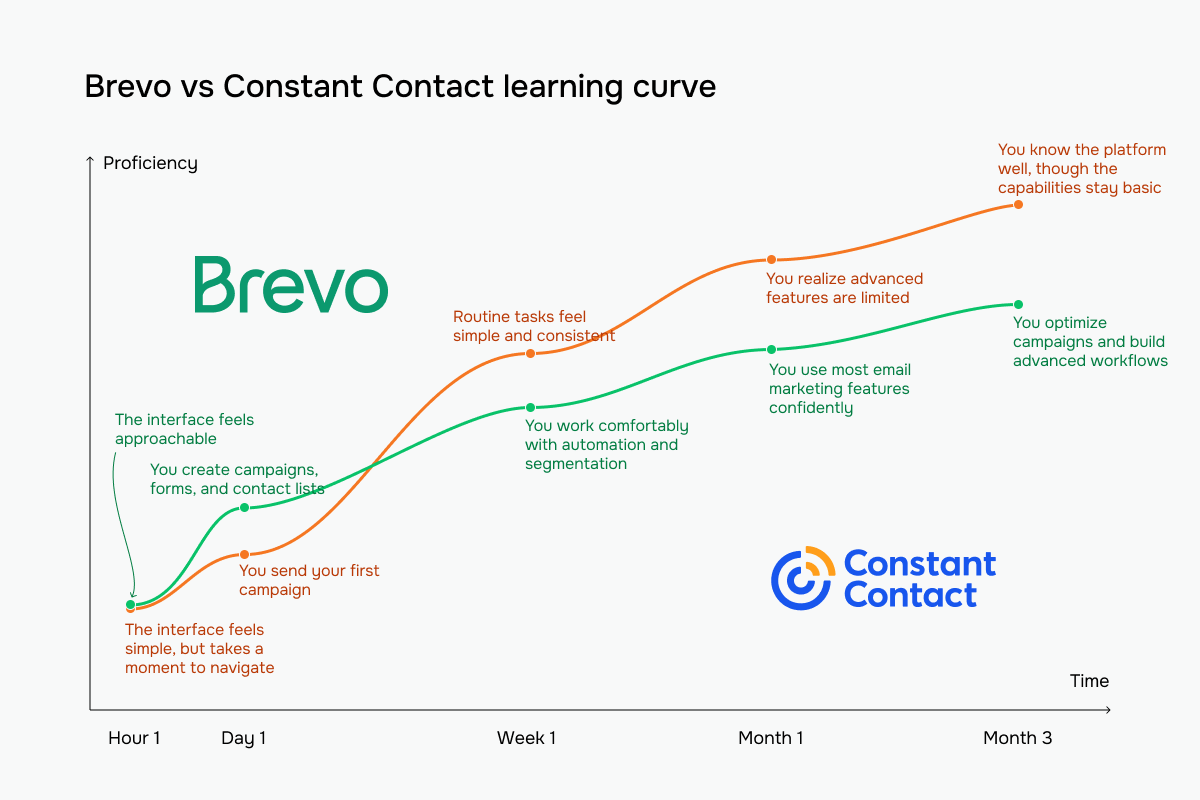 Brevo vs Constant Contact learning curve based on our testing experience
Email builder and templates
Brevo: 8.4/10 | ⭐ Constant Contact: 8.8/10
The email builder is still one of the most important parts of an email marketing platform, but today, simply being able to create an attractive email isn’t enough. Most platforms can do that. What matters more is how quickly you can turn an idea into a finished campaign, how easily you can personalize it, and how much work the builder saves you along the way.
That’s why we paid particular attention to this category. Constant Contact scores higher, with 8.8/10 compared to Brevo’s 8.4/10, largely thanks to its much wider template selection, practical interactive blocks, and AI-assisted design features. Brevo offers more options for layouts and mobile styling, which experienced marketers may appreciate. But for teams creating campaigns regularly, Constant Contact has a slight advantage.
| Aspect |
Brevo |
Constant Contact |
Winner |
| Templates |
50+ templates* |
490+ templates* |
Constant Contact |
| Drag-and-drop editor |
Unified editor, desktop/mobile preview, undo/redo, version history, HTML/CSS Developer Mode |
Drag-and-drop editor, desktop/mobile preview, inbox previews (paid add-on), Canva integration, AI branding |
Constant Contact |
| Notable content blocks |
Live product feeds (Shopify, Shopware, PrestaShop), dynamic content |
Feedback (polls), event, RSVP, product, and data table blocks; dynamic content on Premium |
Constant Contact |
| Mobile responsiveness |
Responsive templates, manual mobile styling, and device-specific content visibility |
Responsive templates, automatic column stacking, and dark mode adjustments |
Tie |
| Sending time optimization |
Per-contact optimization based on engagement (Standard and higher) |
No automatic sending time optimization; scheduling from Standard |
Brevo |
| Total score |
8.4/10 |
8.8/10 |
Constant Contact |
| *Template counts reflect what we saw in our test accounts in October 2026. |
For this article, we decided to compare not just how the email builders work, but how well their AI tools create branded emails when you provide your website URL. And here, the difference is astonishing. Constant Contact wins this particular aspect hands down, as it picked up our brand styling, photos, and writing style and created a nice sequence of emails that barely needed any editing. It also took just seconds. With Brevo, we had a long dialogue with the AI and got a rather “meh” result after more than three minutes.
But now – to the builders as they are. Brevo gives you a dedicated, distraction-free workspace for designing emails. Its content blocks are organized alongside ready-made sections and saved elements, so you can quickly switch between building something from scratch and reusing previous designs.
But what is most beneficial for business is how naturally personalization fits into the editing process. You can see contact variables directly in your email, add conditional content, and insert custom HTML when the standard blocks aren’t enough. The editor gives you plenty of possibilities without making everyday tasks too complicated. One thing we would change, though, is having to leave the builder to work on the subject line and preview text. We’d prefer to edit those alongside the email itself.
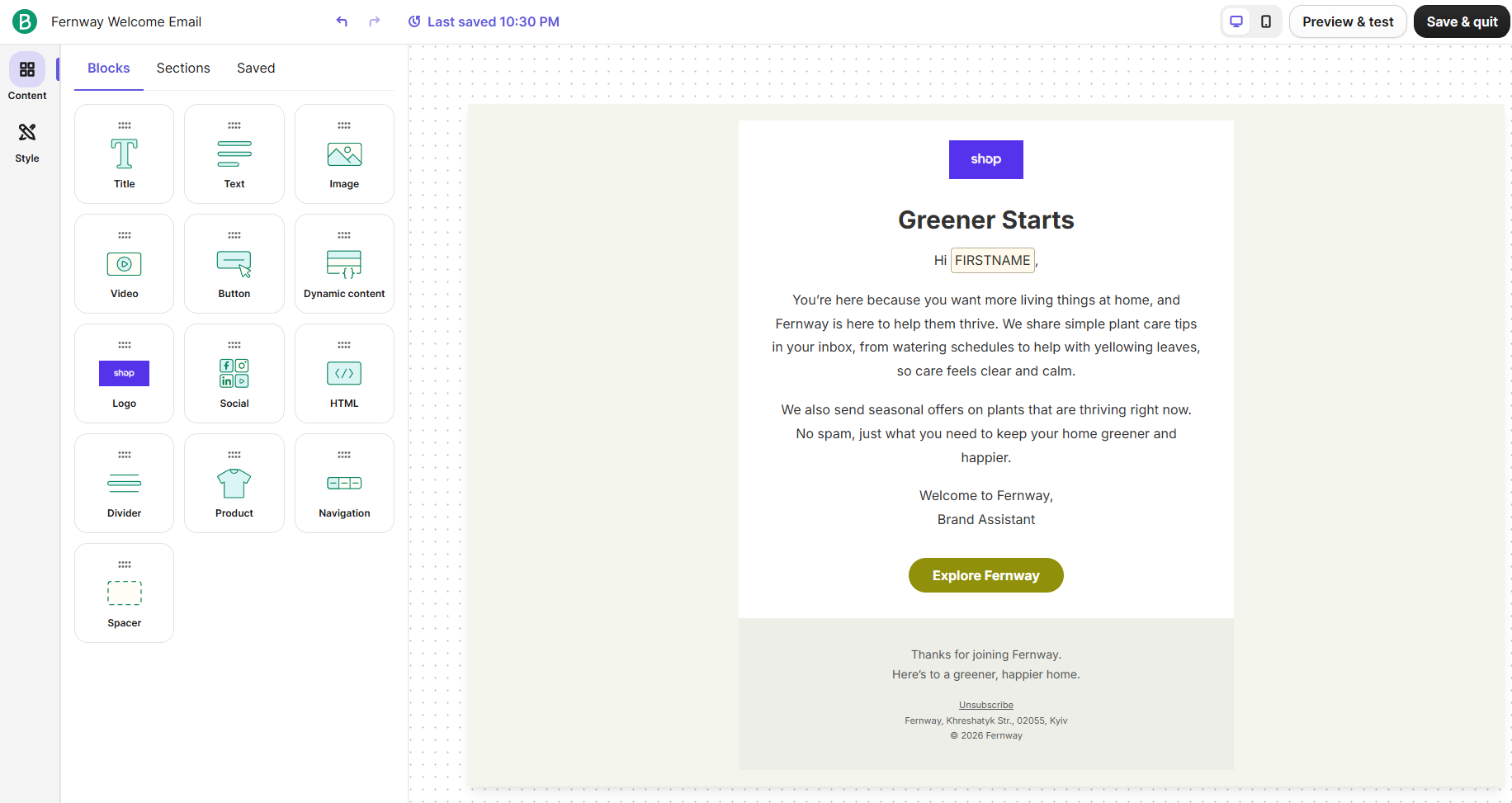 Working on an email in Brevo’s email builder after a few rounds with its AI assistant
Constant Contact’s editor has some thoughtful features that we wish more email builders offered. For example, you can edit your subject line and preview text right above the email. Images also get their own tab, and the AI assistant is always within reach.
In the content block selection, we liked that, alongside the usual text, images, and buttons, there are options for collecting feedback, promoting events, and letting subscribers RSVP directly from an email.
The editor also includes ready-made layouts, saved content, and accessibility-focused features, including screen reader support. It’s well suited to people who want to create and send professional emails without spending much time on technical details.
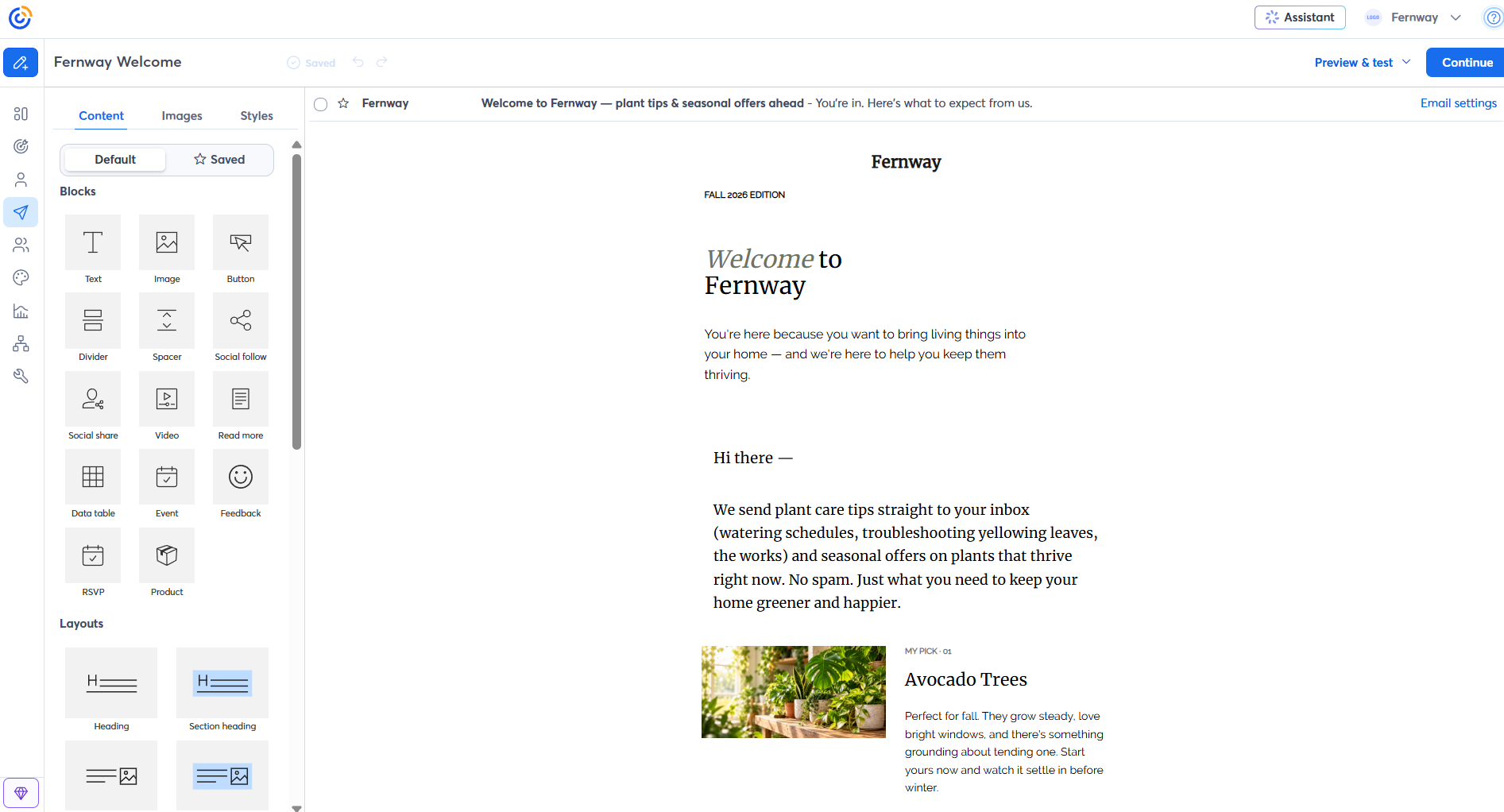 Editing an email created by Constant Contact’s AI assistant
We’d give Constant Contact the win for everyday email creation. It makes the entire process more connected, from writing the subject line to adding content and preparing the campaign for sending. We also appreciate that some of its features help subscribers interact with you directly, instead of clicking through to another website.
Brevo has an advantage when emails need more personalization or custom development. This might matter to experienced marketers and those managing different audiences and complex campaigns.
Transactional email
Winner: ⭐ Brevo (not scored separately)
Order confirmations, password resets, receipts, and shipping updates may not be marketing emails, but they need to arrive even more reliably. If your website, store, or app sends them, transactional email is an important difference between these two platforms.
Brevo includes transactional email on every plan, including Free. You can connect your website or app through Brevo’s REST API or SMTP relay, build transactional templates in the same editor as your campaigns, and monitor deliveries, opens, and bounces from the same account. A single API request can send up to 1,000 emails.
These messages count toward your plan’s email volume, so it’s worth including them when you estimate how much sending capacity you need.
Constant Contact doesn’t include transactional email. Its own blog recommends using a separate provider for those messages, which means managing another platform, another set of limits, and another subscription.
SMS capabilities
⭐ Brevo: 8.6/10 | Constant Contact: 6.5/10
Not every marketing message should be sent via email. Flash sales, appointment reminders, delivery updates, and last-minute event changes often need a quicker way to reach customers. SMS can be valuable for eCommerce stores, restaurants, healthcare providers, travel companies, and other service-based businesses where timing matters. It also gives you another way to reach subscribers who might overlook an email, or when an offer is about to expire.
Let’s compare how much you can do with SMS in Brevo and Constant Contact.
| Aspect |
Brevo |
Constant Contact |
Winner |
| Plans that include SMS |
Available on all plans; pay-as-you-go credits with no subscription |
Available on paid plans only; Premium includes 500 messages/month; Lite and Standard add SMS from $10/month for 500 messages |
Brevo |
| Supported countries |
180+ countries; dedicated numbers for one-to-one messaging in the US, Canada, and France |
US businesses only (excluding Puerto Rico and the US Virgin Islands) plus a separate Australian offer; EIN/TIN required for full sending limits |
Brevo |
| Pricing model |
Credits never expire; MMS costs 2.1 credits |
Monthly message tiers from $10 for 1–500 SMS; automatic tier upgrades; each ~160-character segment counts as a message; unused messages don’t roll over |
Brevo |
| SMS-specific automation and keywords |
SMS steps in workflows; fixed compliance keywords only (such as STOP and HELP) |
Email and SMS steps in automation paths; JOIN text-to-join with YES confirmation, STOP, HELP, START/UNSTOP |
Constant Contact |
| Two-way SMS messaging |
One-to-one SMS conversations in the US, Canada, and France with Sales Advanced (Professional and higher); replies to campaigns in the US and Canada |
One-way campaigns only; you can’t see subscribers’ replies |
Brevo |
| Total score |
8.6/10 |
6.5/10 |
Brevo |
Brevo wins SMS marketing by a considerable margin. You can use it for occasional promotions or make SMS a regular part of your marketing strategy without paying for features you barely use. Constant Contact is much more restrictive, and its SMS capabilities seem best suited to US businesses that already use the platform and just want to send a few promotional texts now and then. If you’re planning to reach customers internationally, communicate with them directly, or expand your SMS marketing over time, we’d definitely go with Brevo.
Marketing automation
⭐Brevo: 8.8/10 | Constant Contact: 5/10
It’s hard to imagine a modern email marketing platform without automation. Even businesses with smaller lists can save time by setting up welcome emails, abandoned cart reminders, and follow-ups instead of sending everything manually. As your audience grows, automation becomes even more useful because you can respond differently based on what subscribers do.
But platforms vary enormously in what they let you automate, and some reserve the most useful features for expensive plans. The table below shows how Brevo and Constant Contact compare.
| Aspect |
Brevo |
Constant Contact |
Winner |
| Availability by plan |
All plans; 2,000 contacts in active automations on Free and Starter; unlimited from Standard |
1 active automation on Lite, 3 on Standard, unlimited on Premium; custom paths and eCommerce templates on Premium only |
Brevo |
| Automation builder |
Visual drag-and-drop editor with triggers, rules, and actions; AI-generated workflows |
Visual path builder with delays, conditional splits, email and SMS steps, contact updates, and tags; AI campaign builder on Standard and Premium |
Brevo |
| Triggers available |
List and segment changes, email engagement, forms, website/custom events, and web push clicks; WhatsApp replies and keywords on Professional and higher |
Subscriptions, form submissions, link clicks, tags, birthdays and anniversaries, purchases and abandoned carts, re-engagement, and Xero invoices (Premium) |
Brevo |
| Pre-built automations |
18 templates |
17 templates |
Tie |
| Channels supported |
Email, SMS, web push, and chat auto-replies on all paid plans; WhatsApp on Professional and Enterprise |
Email and SMS (US-only add-on) |
Brevo |
| Automation complexity |
Multi-step, multi-channel workflows with conditions and CRM actions |
Basic to moderate workflows with delays, splits, and tagging; limited branching, no advanced lead scoring or pipeline actions |
Brevo |
| Total score |
8.8/10 |
5/10 |
Brevo |
For automation, we chose the simplest welcome email templates to give you a better look at the builders themselves, what they offer, and how many options you have when creating a workflow.
Brevo’s automation builder gives you plenty of room to experiment, and we liked how much information it displays without forcing you to open every step. Triggers, actions, and rules have their own color-coded categories, so even a complicated workflow should be easy to follow.
The editor looks well equipped for serious work. You get autosaving, undo and redo buttons, a testing option, and an Activity tab where you can review previous runs. And with triggers covering everything from contact activity and form submissions to WhatsApp interactions, there’s plenty of potential for building complex customer journeys.
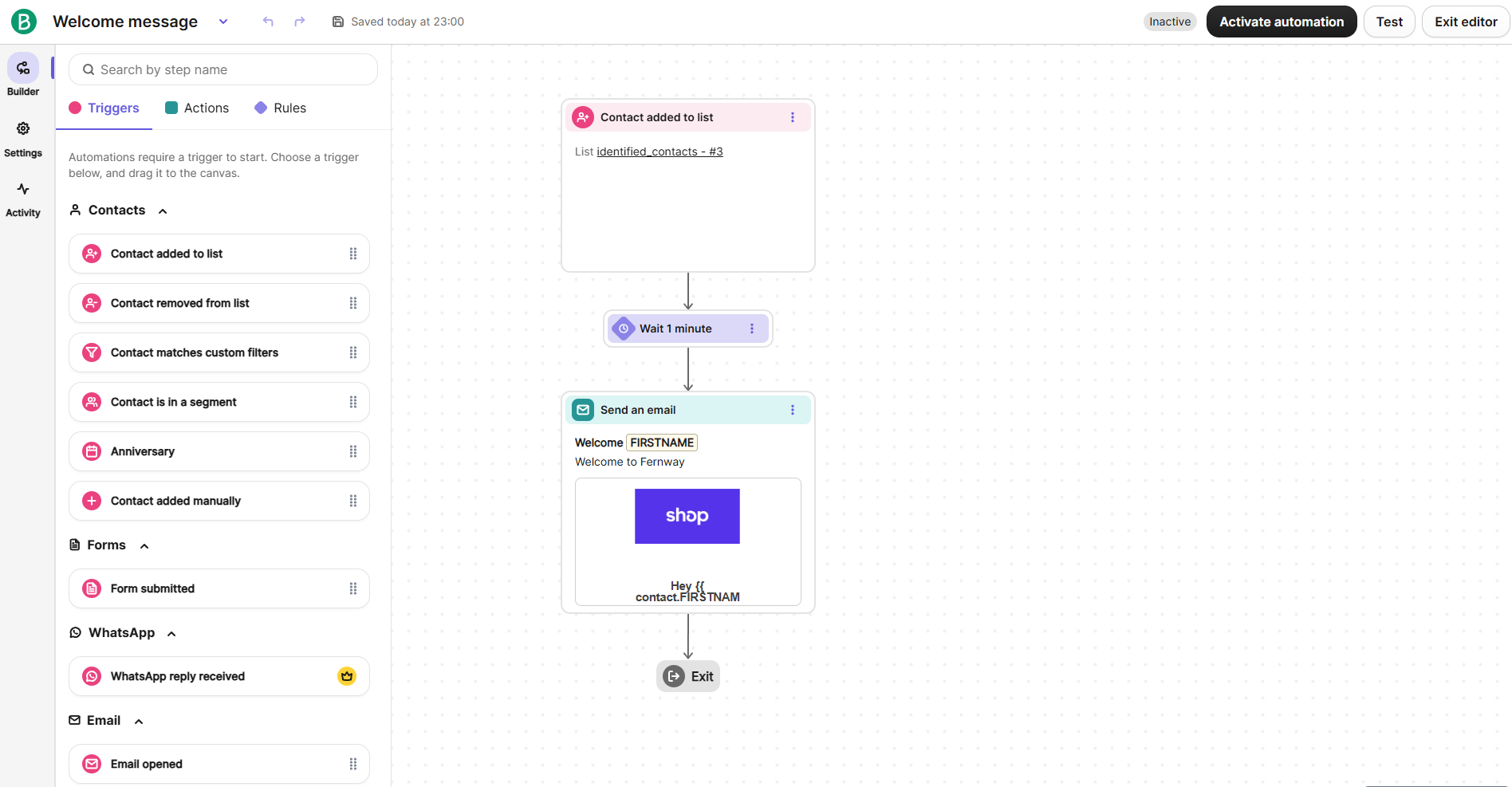 Building a welcome email automation in Brevo
Constant Contact’s automation builder is considerably simpler. If you’ve never created an automated workflow before, you’ll probably appreciate how little there is to figure out. The available steps are organized into four categories: rules, email actions, contact actions, and shopping actions. You can add delays, create conditional splits, send emails, update contact information, and move subscribers between lists or tags.
We also liked that the builder stays within Constant Contact’s main interface. You can switch to your contacts or other tools without leaving the automation editor, and there are helpful prompts guiding you toward the next step.
However, we found the actual workflow canvas less informative than Brevo’s. Email steps display their names but don’t show a preview of the message, so checking the content of a longer sequence requires more clicking.
Another limitation to keep in mind is the 50-step maximum per automation. That’s unlikely to bother someone creating a welcome series, but it could become frustrating as your workflows get more complicated.
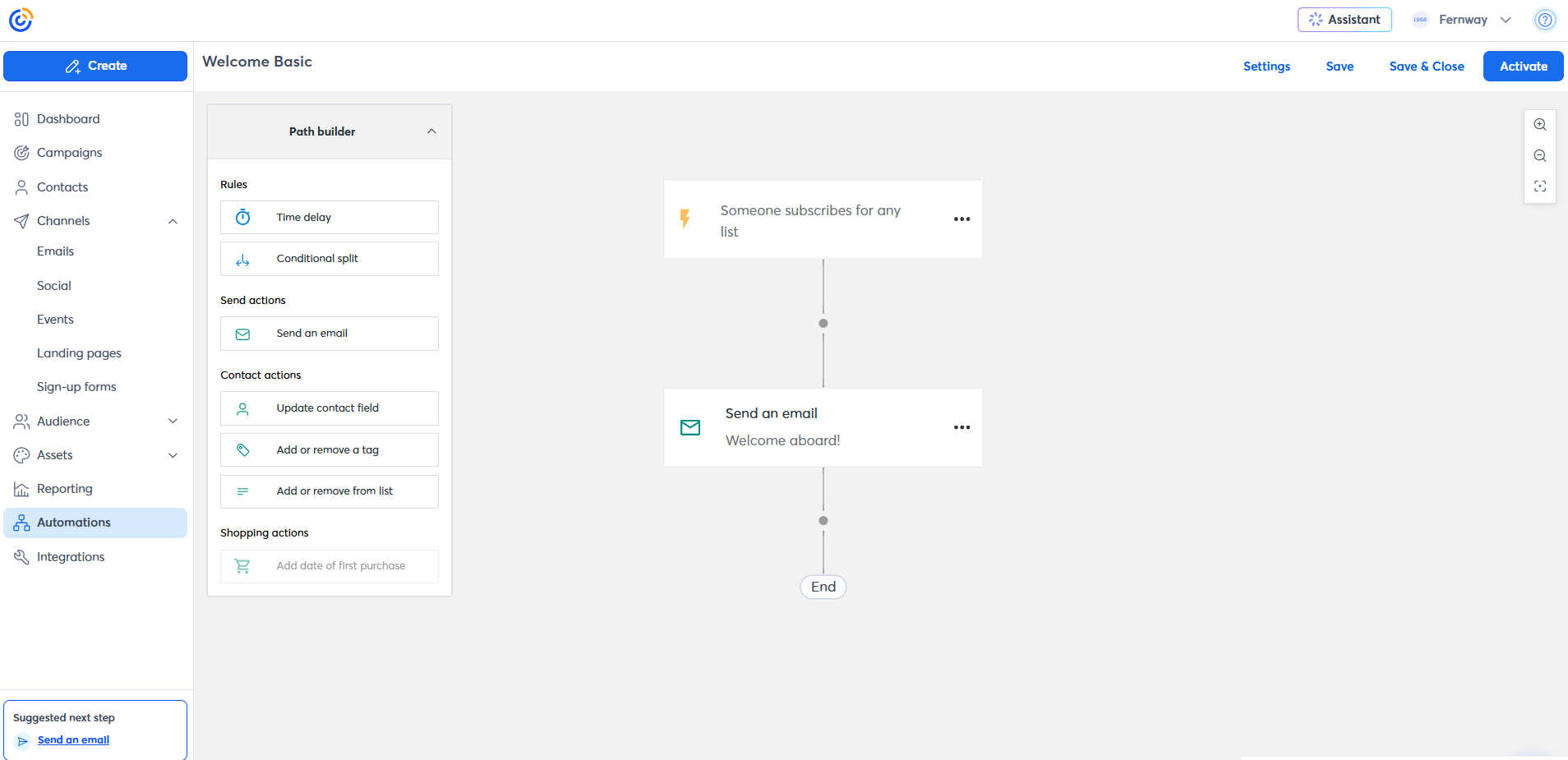 Building a welcome email series in Constant Contact
Brevo wins this comparison, and the difference is much bigger than it was with the email builders. Constant Contact makes a good first impression with its simplicity, but once you start thinking beyond basic welcome emails and follow-up sequences, its limitations become harder to ignore.
Contact management
⭐Brevo: 9/10 | Constant Contact: 7.5/10
Not everyone on your contact list is interested in the same things. Some subscribers may respond to discounts, others only want product updates, and some haven’t opened an email from you in months. Segmentation and tagging help you separate those groups and send more relevant messages.
Good contact management also matters for deliverability. Repeatedly emailing people who aren’t interested can lead to spam complaints and weaken your sender reputation.
Here’s how Brevo and Constant Contact compare when it comes to segmentation, tagging, and managing subscriber data.
| Aspect |
Brevo |
Constant Contact |
Winner |
| Segmentation capabilities |
Dynamic segments with up to 100 AND/OR conditions and templates; AI segment builder on Professional and higher |
Dynamic AND/OR segments; 1 custom segment on Lite, 10 on Standard, unlimited on Premium; no AI builder |
Brevo |
| Segmentation criteria |
Contact attributes, email engagement, eCommerce activity, website behavior, custom objects, CRM deal activity |
Contact details, custom fields, engagement, lists, and tags; pre-built eCommerce segments from Standard, custom eCommerce segments on Premium |
Brevo |
| Segment update speed |
Real-time, automatic updates |
Refreshed before every send |
Brevo |
| Tagging and manual organization |
Contact attributes; no contact-level tags, campaign tags only |
Multiple contact tags, cross-list organization, automation-based tagging, non-opener tagging |
Constant Contact |
| Total score |
9/10 |
7.5/10 |
Brevo |
Brevo wins contact management, and the difference is quite significant. We appreciate how much you can do with customer data even on lower plans. This makes it a much better choice for businesses that want to understand their audience and make their campaigns more relevant as they grow. Constant Contact is easier to work with if you mainly need to organize subscribers into groups and keep your lists tidy, but its custom segment limits on Lite and Standard can feel tight. Once you want to use customer behavior to decide who receives which message, Brevo gives you more options.
Signup forms and landing pages
⭐Brevo: 8.5/10 | Constant Contact: 7.5/10
Where do the contacts on your mailing list come from? Unless you’re importing an existing audience, you’ll need a way for people to subscribe, and signup forms are usually the simplest option. Most email marketing platforms include them, but the range of tools can differ quite a bit. Some give you little more than a basic email field, while others add pop-ups, preference fields, and landing pages. Keeping these tools inside your email platform also means new contacts can move straight into your lists and automations without extra integrations.
The table below compares what Brevo and Constant Contact offer for forms, pop-ups, and landing pages.
| Aspect |
Brevo |
Constant Contact |
Winner |
| Types of forms available |
Full-page, embedded, profile update, and unsubscribe forms; pop-ups on Professional and Enterprise only |
Inline, banner, flyout, and pop-up forms, WordPress forms, signup pages, and SMS text-to-join; signup forms and pop-ups on every plan |
Constant Contact |
| Form builder |
Drag-and-drop editor, reCAPTCHA or Cloudflare protection, 3 embed options, customizable double opt-in, submission alerts |
Editable fields, list selection, device targeting, removable branding; limited field customization |
Brevo |
| Data collection and consent |
Single- and multiple-choice fields, checkboxes, multi-list subscription, opt-in field, and GDPR blocks |
Custom fields must be created in your contacts first, and field labels can’t be renamed in the builder |
Brevo |
| Pop-up targeting conditions |
Time delay, exit intent, page targeting, frequency limits |
Time delay, exit intent, frequency limits, device targeting (form timing isn’t available on every plan) |
Tie |
| Landing page builder |
Drag-and-drop builder, custom domains, CAPTCHA, SEO settings, and tracking scripts; 1 page on Standard, 10 on Professional, none on Free or Starter |
Signup, custom, and event pages on every plan; templates, email/SMS opt-ins, custom thank-you pages, free URL |
Tie |
| Total score |
8.5/10 |
7.5/10 |
Brevo |
Brevo’s form builder is straightforward but flexible. It offers 12 draggable elements, including different field types, consent options, and CAPTCHA protection. You can also collect subscriber preferences and let people choose which mailing lists to join, making segmentation easier from the start.
The design settings are also quite detailed, with options to customize fonts, buttons, spacing, error messages, and writing direction for different languages. Our example shows a basic signup form created on the Free plan. For more engaging pop-ups, you’ll need at least the Professional plan.
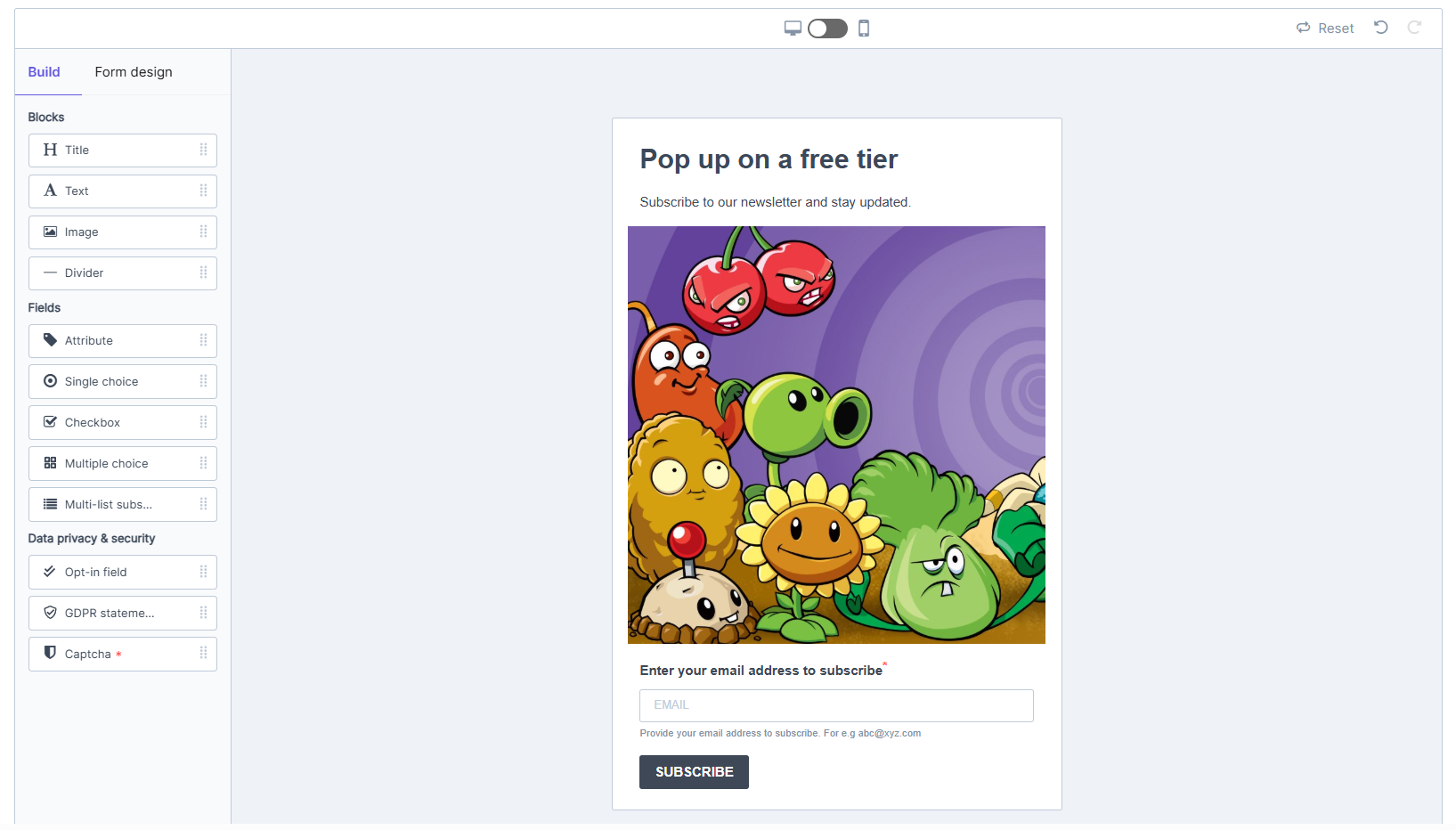 Building a basic signup form in Brevo’s form builder
Constant Contact’s form builder is more like a landing page editor, with plenty of content blocks, ready-made layouts, and styling options. We also liked the Thank you tab, which makes customizing the post-signup experience easy.
However, managing form fields is less convenient. They’re hidden in a separate menu, custom fields must be created elsewhere in the account, and you can’t rename field labels directly in the builder. So while creating an attractive signup page is easy, collecting more detailed subscriber information takes extra effort.
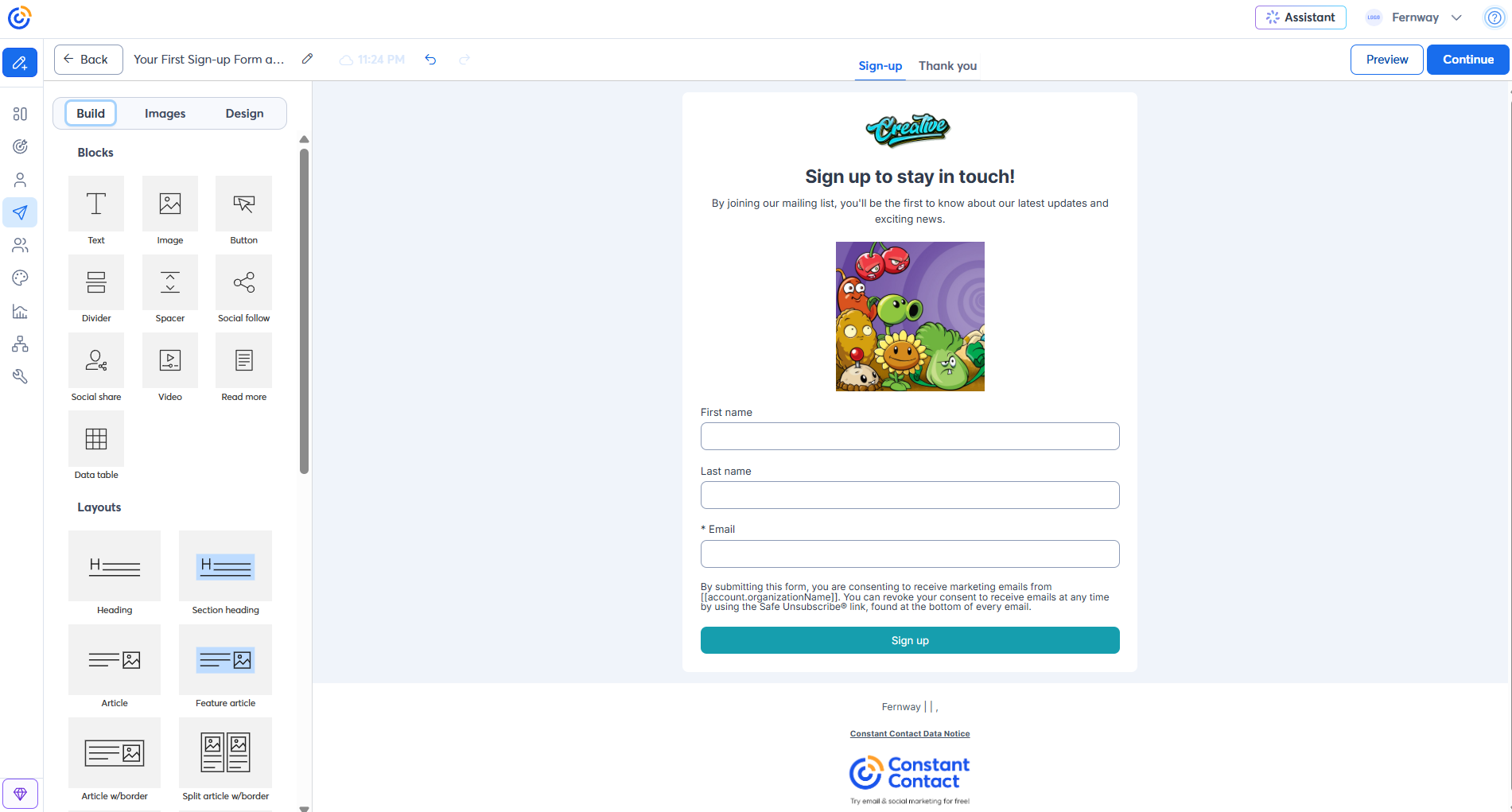 Creating a signup page in the Constant Contact form builder
Brevo wins this category because with it you can collect more information about your subscribers. Its flexible fields, list selection, and consent settings make it useful for businesses that want to segment subscribers from the moment they sign up. Constant Contact has the edge for quick, attractive signup pages and pop-ups on every plan, thanks to its ready-made layouts and convenient thank-you page editor. But for more advanced data collection and customization, we’d choose Brevo.
Integrations
⭐ Brevo: 8.8/10 | Constant Contact: 7.8/10
Your email marketing platform isn’t the only tool your business uses. Online stores, CRMs, booking systems, and payment processors all collect useful customer data, and ideally, that information should also be available in your email platform. Integrations make that possible. They help you follow up on purchases, personalize offers based on customer behavior, and keep contact details up to date without moving data manually.
You can manage without many integrations, especially with a platform like Brevo, which already includes CRM, SMS, and chat. Still, no platform covers every business need. The table below compares how Brevo and Constant Contact connect with external tools and platforms.
| Aspect |
Brevo |
Constant Contact |
Winner |
| Integration catalog |
150+ integrations |
300+ integrations |
Constant Contact |
| eCommerce platforms |
Shopify, WooCommerce, PrestaShop, Magento 2, Shopware, BigCommerce, OpenCart, and more; Wix and Squarespace only through Zapier or Make |
Shopify, WooCommerce, BigCommerce, Magento, Wix, Squarespace, eBay, and Square |
Constant Contact |
| CRM systems |
Built-in sales CRM; Salesforce app (Professional and Enterprise) with bi-directional lead, contact, and opportunity sync |
Salesforce offers one-way contact and lead sync |
Brevo |
| Shopify integration |
Real-time customer, product, and order sync; multi-channel cart recovery, browse abandonment, back-in-stock flows; product block |
Two-way contact sync, daily behavioral segments, product block with sales tracking; abandoned cart emails on Premium; 1 store limit |
Brevo |
| WooCommerce integration |
Real-time contact sync, order tracking, revenue attribution |
Contact sync, purchase-based segments, cart recovery, revenue tracking |
Tie |
| API capabilities |
REST v3 for email, SMS, WhatsApp, contacts, eCommerce, CRM, and custom objects; webhooks |
REST v3 with up to 10,000 requests/day and 1,000 queued bulk jobs; webhooks for partner billing events only |
Brevo |
| Zapier support |
17 triggers and 16 actions covering marketing, CRM, transactional email, and SMS |
4 triggers and 9 actions, including API request in Beta |
Brevo |
| Total score |
8.8/10 |
7.8/10 |
Brevo |
Brevo wins integrations with 8.8/10 against Constant Contact’s 7.8/10, though Constant Contact puts up a good fight. It advertises twice as many integrations and connects natively to hosted store builders like Wix and Squarespace, as well as eBay and Square. For smaller online stores, Constant Contact may be sufficient, particularly if the goal is to keep customer information organized and run straightforward email campaigns.
Brevo is a better fit for businesses that want to do more with their customer data. It offers native plugins for self-hosted stores built on WooCommerce, PrestaShop, Magento, and Shopware, and we like its potential for building personalized shopping experiences and connecting marketing activities across different channels. So, while Constant Contact offers plenty of connections, we’d choose Brevo for more ambitious eCommerce marketing.
AI features
⭐ Brevo: 9/10 | Constant Contact: 5/10
AI has become a regular part of how marketers work, and email platforms have been quick to incorporate it. The difference is how useful those features actually are. Some tools stop at subject line generation and copy suggestions, while others use AI for campaign creation, segmentation, automation, or sending time optimization. Here’s where Brevo and Constant Contact currently differ.
| Aspect |
Brevo |
Constant Contact |
Winner |
| Email generation |
Full email design and copy from prompts; URL-based branding, subject lines, preview text, AI images, and campaign translation (Aura AI on all plans) |
Branded email design and copy from prompts or your website URL; AI subject lines and preview text on Standard and Premium; multi-channel campaign generation for email, social, SMS, and landing pages |
Constant Contact |
| Automation generation |
Complete workflows (triggers, rules, actions) from a single prompt |
No workflow generation |
Brevo |
| Predictive customer analytics |
Predictive CLV, churn risk, purchase count, and purchase rate (Professional and higher; requires eCommerce data) |
No predictive metrics |
Brevo |
| Segment generation |
Prompt-based segments using contact, email, SMS, and eCommerce data; AI audience suggestions (Professional and higher) |
No AI segment generation |
Brevo |
| Total score |
9/10 |
5/10 |
Brevo |
After exploring what both platforms offer, we’re not surprised by the gap in the scores. Brevo’s AI can take on a good portion of your marketing work, especially if you’re managing complex campaigns, although its predictive analytics and AI segments are reserved for Professional and higher. We wouldn’t dismiss Constant Contact’s AI entirely, though. It’s great for getting campaigns off the ground quickly, and for businesses with fairly simple marketing needs, that may be enough.
Deliverability
⭐ Brevo: 10/10 | Constant Contact: 7/10
You can spend hours building a strong campaign and still lose a large share of its impact if the message never reaches the inbox. That makes deliverability more than a technical detail. It affects how much value you get from everything else the platform offers.
The comparison below looks at how Brevo and Constant Contact handle authentication, sender reputation, and other factors that affect inbox placement.
| Aspect |
Brevo |
Constant Contact |
Winner |
| Authentication |
One-click DNS setup for supported providers; DKIM (1024-bit by default, 2048-bit through CNAME setup), DMARC, verification records, BIMI support |
Manual DNS setup with 2 DKIM CNAMEs or 1 TXT record; DMARC; 24–48-hour verification; DKIM-only DMARC alignment; BIMI supported, but you set it up yourself |
Brevo |
| Deliverability monitoring |
Real-time deliverability score, issue alerts, domain-level reporting |
7 bounce categories, spam complaint reporting with a 0.1% complaint-rate target; no deliverability score |
Brevo |
| List hygiene |
Automatic suppression of hard bounces, complaints, and unsubscribes; soft bounces retried for 36 hours and blocked after 5 consecutive failures; import verification |
Undeliverable emails retried for up to 3 days; repeatedly invalid addresses suspended across all accounts; inactive contacts removed manually |
Tie |
| Dedicated IP |
$251/year add-on on Professional; included on Enterprise; warm-up support |
Not available |
Brevo |
| Total score |
10/10 |
7/10 |
Brevo |
Brevo wins deliverability with 10/10, while Constant Contact scores 7/10. Brevo gives you more control over your sending reputation and makes it easier to identify and address potential problems before they affect campaigns.
Constant Contact advertises a 98% inbox rate based on 2025 Validity Everest tests, but its users tell a different story, and that’s the main reason for its lower score. Of 142 reviews on Capterra discussing deliverability and spam filtering, 74% were negative, with reviewers reporting emails that end up in spam, ongoing deliverability struggles, and account suspensions. That’s a concerning pattern for a platform whose primary job is to get emails into subscribers’ inboxes.
Of course, user complaints don’t necessarily mean everyone will experience these problems, but they’re difficult to ignore. Combined with Brevo’s stronger deliverability tools, they make our choice pretty straightforward.
Reporting and analytics
⭐ Brevo: 9/10 | Constant Contact: 7.5/10
It’s easy to focus on building and sending campaigns and pay less attention to what happens afterward. Did the promotion lead to sales? Which emails drove clicks or conversions? Which ones barely got noticed? Good reporting should make those answers easy to find. Here’s how Brevo and Constant Contact compare on campaign analytics and performance tracking.
| Aspect |
Brevo |
Constant Contact |
Winner |
| Report coverage |
Dashboards for email, SMS, transactional messages, revenue, and customer data |
Email and SMS reports covering engagement, bounces, unsubscribes, contact activity, resend results, and devices; open and click details from Standard |
Tie |
| Custom reports |
AI queries, Excel-style formulas, and custom dashboards (Analytics Studio, Professional and higher) |
Multi-campaign email/SMS Report Builder on Standard and Premium; no custom dashboards or formulas |
Brevo |
| Revenue attribution and benchmarks |
eCommerce revenue attribution across email, SMS, and automations; 48-hour last-touch window; no industry benchmarks |
Revenue reporting on Premium; store sales attribution with a 72-hour last-touch window; SMS conversions; industry engagement benchmarks |
Brevo |
| Reporting speed |
Real-time transactional data; on-demand campaign statistics |
Campaign and A/B test results |
Brevo |
| Export capabilities |
CSV or PDF reports |
Excel/CSV reports, PNG/PDF/CSV charts, CSV exports of contact-level results |
Constant Contact |
| Total score |
9/10 |
7.5/10 |
Brevo |
Brevo wins reporting, but we wouldn’t call Constant Contact’s reporting weak, though. It gives small businesses a good understanding of how their campaigns are performing, and for those of you who mainly want to check results and figure out what worked, there’s plenty to appreciate.
Customer support
⭐ Brevo: 7.6/10 | Constant Contact: 7/10
Modern email marketing platforms can do so much that even experienced marketers need help figuring out certain features. And when you’re dealing with automation flows, integrations, authentication, and dozens of settings, good documentation and responsive support can save you hours of frustration.
The table below compares the support options and learning resources available with Brevo and Constant Contact.
| Aspect |
Brevo |
Constant Contact |
Winner |
| Channel availability |
Email tickets on all plans (priority email from Standard); phone on Professional and Enterprise (Mon–Fri); no live chat |
Phone and live chat on every plan (chat Mon–Fri, phone Mon–Sat); dedicated priority support team on Premium; community forum |
Constant Contact |
| Knowledge base |
Consistent help center with plan-specific guidance; free Academy |
Extensive guides, videos, community Q&A, and free webinars; however, some documentation is outdated or contradictory |
Brevo |
| Onboarding assistance |
Self-service Academy; paid third-party Agency Partners for hands-on help |
Live 1:1 onboarding on Lite and Standard; priority onboarding on Premium; free Ask a Trainer sessions |
Constant Contact |
| Support quality sub-rating on Capterra |
4.5/5 |
4.2/5 |
Brevo |
| Total score |
7.6/10 |
7/10 |
Brevo |
Brevo wins customer support with 7.6/10, compared to Constant Contact’s 7/10. This might seem surprising, considering that Constant Contact offers more ways to reach a real person. And we certainly appreciate having phone and chat support available without paying for an expensive plan.
However, Constant Contact’s lower support ratings on Capterra make us question how well that support works in practice. Phone support is great, but ideally, you shouldn’t need to call someone every time you run into a problem. Good documentation and self-service resources should answer most questions, and we repeatedly encountered outdated or contradictory information in Constant Contact’s help materials while researching this comparison. That doesn’t inspire much confidence, especially when you’re trying to solve something quickly on your own.
Event marketing and management
Winner: ⭐ Constant Contact (not scored separately)
If you run workshops, webinars, classes, or fundraisers, Constant Contact gives you something Brevo doesn’t: built-in event management on every plan.
Under Channels > Events, you can create in-person, virtual, or hybrid events, whether they’re free or paid. Once the event is active, Constant Contact generates a registration page and a shareable link. You can also set up multiple ticket types, control prices and quantities, limit how many tickets each person can buy, choose when sales open and close, hide tickets behind promo codes, and set an overall attendance limit. Payments go through PayPal or Stripe, and Constant Contact charges 2.9% per transaction on top of the payment processor’s fees.
Because the event tools are in the same platform as your email campaigns, promotion is fairly simple. You can create invitations, reminders, and last-chance emails in the regular campaign editor, then target people based on whether they registered or responded. The event dashboard also lets you track registrations and payments, edit attendee details, add people manually, cancel registrations, and check attendees in.
Brevo doesn’t offer a comparable event management tool. You can’t sell event tickets, manage attendance limits, or check people in from the platform itself. Brevo Meetings is the closest alternative. It lets you create booking pages for in-person, phone, or video appointments and accept payments, which works well for consultations or one-to-one sessions but not for a workshop with 200 attendees.

Join businesses growing with SendPulse
From solo creators to global brands, thousands of customers trust SendPulse to run email campaigns, chatbots, automations, and more – all in one place.
Get started for free
Your decision checklist
Let’s do one final check to see which platform fits your needs best. If you choose the same platform three times or more, it’s probably the right choice for you.
| Decision area |
Brevo
is a better fit if… |
Constant Contact
is a better fit if… |
| Business type |
You’re a tech-oriented business or have a team comfortable with advanced marketing tools. |
You’re a non-profit or small organization managing marketing alongside other responsibilities. |
| Budget expectations |
You have a large list and email it once a week or less, or you want a generous free plan to start. |
You prefer contact-based pricing with live support included and qualify for a non-profit discount of up to 30%. |
| Automation needs |
You want multi-channel automation (email, SMS, web push, and WhatsApp on higher plans) with AI help building workflows. |
You need a few simple automations and are willing to pay for Premium to get unlimited custom ones. |
| Analytics focus |
You want real-time transactional stats, a visible deliverability score, and predictive scores. |
You want industry benchmarks, event reporting, and exports to Excel or PNG. |
| Team setup |
Your team is comfortable with self-serve setup and wants a basic CRM alongside email. |
Your team wants live phone and chat support and human onboarding from the vendor. |
Still unsure which platform is closer to your needs? We found an interesting clue in Capterra’s user demographics. Brevo seems to attract a more technical audience, with software and IT services accounting for 52% of reviewers. Constant Contact has a very different audience: among its reviewers from the past two years, 37% come from non-profits, and administrative staff are almost twice as common as marketers (37% vs 19%).
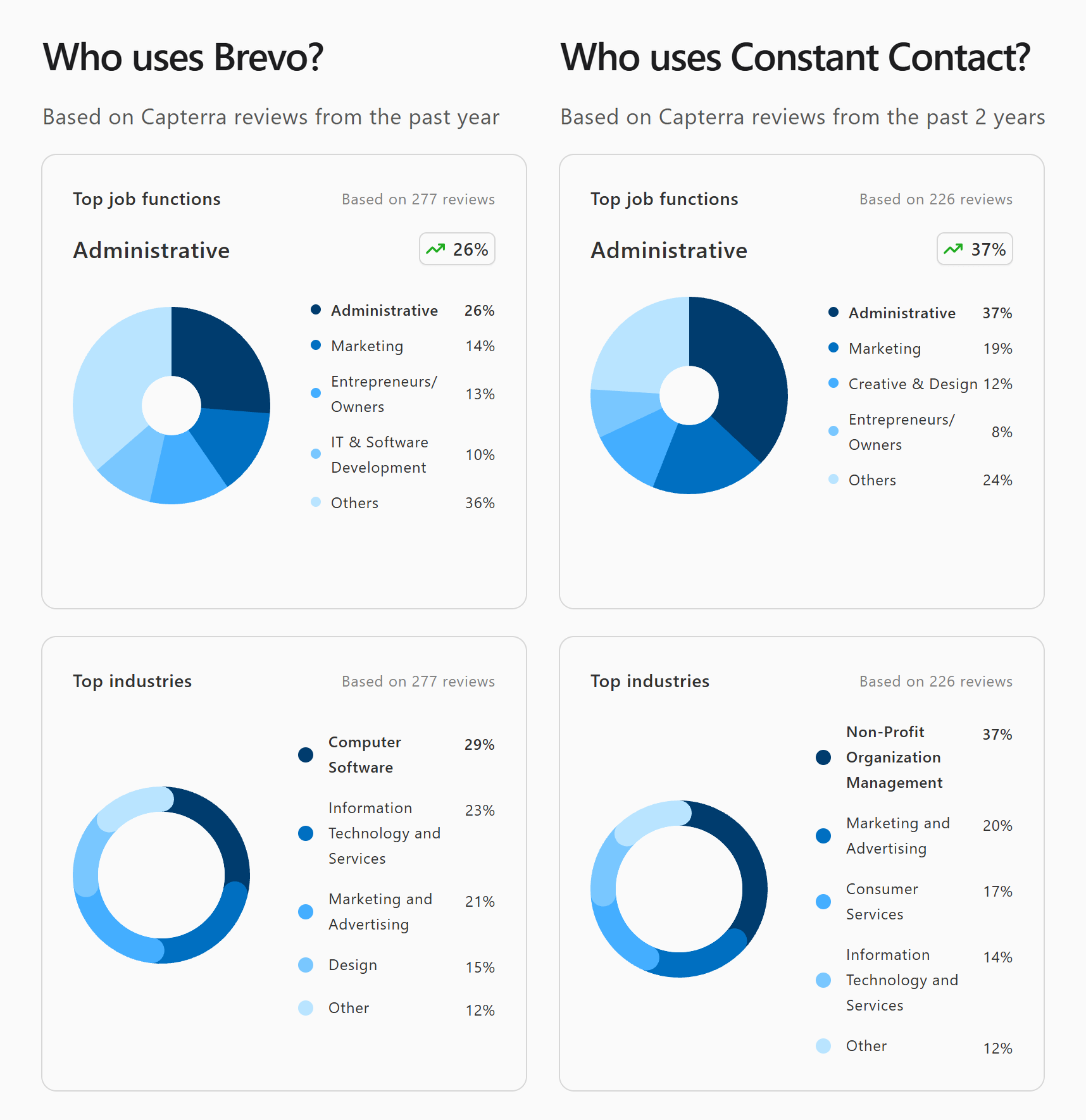 Who uses Brevo and Constant Contact, based on Capterra statistics for Brevo and Constant Contact
This fits quite well with our experience testing both platforms. Brevo gives technically confident teams more room to experiment and build sophisticated marketing processes, while Constant Contact is better suited to organizations where email marketing is just one of many responsibilities.
Of course, these figures describe Capterra reviewers, not the platforms’ entire customer bases. The samples also cover different periods and sizes. Still, they’re a useful reminder that the best platform isn’t necessarily the one with the most features but the one that fits how you and your team work.
Final verdict
⚖️ Final scores: Brevo – 8.5/10 | Constant Contact – 7.5/10
Would we recommend Brevo? For sure. It’s an affordable, easy-to-use, and quite versatile platform that both newcomers and experienced marketers will appreciate. Its pricing model takes a minute to understand, but it works in your favor if you email a large list once a week or less.
How about Constant Contact? It isn’t the most flexible platform we’ve tested, and its automation and SMS feel limited next to Brevo’s. Still, it’s a good fit for a fairly specific group of users, particularly non-profits and businesses that regularly organize events, sell tickets, and manage registrations as part of their marketing strategy, and that value live support on every plan.
Fortunately, if neither Brevo nor Constant Contact fits your business perfectly, there are plenty of fish in the sea, or rather, email marketing platforms on the web.
- Try SendPulse if you want a platform as versatile as Brevo, plus a chatbot builder for WhatsApp, Instagram, Facebook Messenger, TikTok, and Telegram.
- Try Klaviyo if you run an eCommerce business and are willing to pay for a powerful tool that can significantly increase your profits in experienced hands.
- Try Kit if you want something much simpler, mostly for newsletters, with a free plan to start.
In any case, if you’re that kind of person, you’re welcome to try them out yourself and choose based on your feelings rather than arguments and facts.