HubSpot and Mailchimp are two of the biggest names in email marketing. Having been around for 20 and 25 years, respectively, they’ve built huge fan bases, and many of their users will happily tell you their favorite is the only platform worth considering. But is that really true? Let’s find out whether both platforms still deserve their reputation and, more importantly, which one does email marketing better.
How we scored this comparison: This review was created by the SendPulse team. As an email marketing platform ourselves, we work in the same space as the tools we test, which also means we understand the field deeply.
Each platform was evaluated across the key categories using our independent methodology. Pricing (25%), ease of use (20%), and email and automation features (15% each) carry the most weight because they affect daily workflows the most. All scores reflect hands-on testing and analysis as of August 2026.
TL;DR HubSpot vs Mailchimp comparison at a glance
Mailchimp scored an 8.4/10 in our 2026 hands-on testing, while HubSpot got a 7.9/10. Mailchimp is a better solution for companies focused on email marketing, while HubSpot is only worth its premium price for teams that need email as part of an all-in-one CRM, sales, and marketing platform.
Here’s a quick summary of all the aspects we compared.
| Category |
HubSpot |
Mailchimp |
Winner |
| Best for |
Mid-sized and large B2B businesses, sales teams, and companies that need CRM, marketing, and automation in one platform |
Small and mid-sized businesses, creators, nonprofits, and eCommerce brands focused on email marketing |
Depends on the use case |
| Pricing |
4/10
Expensive all-in-one enterprise-level platform |
7/10
More affordable email marketing platform |
Mailchimp |
| Ease of use |
7/10
Takes time to learn |
9/10
Intuitive and beginner-friendly |
Mailchimp |
| Email design |
8.4/10
CRM-focused builder with solid customization |
9.4/10
Highly flexible builder with excellent design control |
Mailchimp |
| Automation |
9.3/10
Advanced CRM-powered workflows |
7.8/10
Marketing automations with external integrations |
HubSpot |
| Contact management |
9.5/10
Enterprise-grade CRM segmentation |
7.5/10
Email-focused audience management |
HubSpot |
| Forms and pages |
8.8/10
Lead qualification and CRM data collection |
8.5/10
Beautiful forms and landing pages |
HubSpot |
| Integrations |
9.2/10
Broad business ecosystem with native CRM |
9/10
Strong marketing and eCommerce integrations |
HubSpot |
| AI features |
9.2/10
AI across the entire platform |
6.5/10
AI mainly for content creation |
HubSpot |
| Deliverability |
9.5/10
Advanced monitoring and sender control tools |
8.5/10
Strong deliverability with fewer control tools |
HubSpot |
| Reporting |
9.2/10
Business-wide analytics and attribution |
8.8/10
Marketing and eCommerce reporting |
HubSpot |
| Customer support |
7.4/10
Strong learning resources, average direct support |
7/10
Helpful onboarding, limited lower-tier support |
HubSpot |
| G2/Capterra rating |
4.4/4.5 |
4.4 |
Tie |
| Final score |
7.9/10 |
8.4/10 |
Mailchimp |
HubSpot wins more categories, but Mailchimp takes the top score because the three heaviest-weighted categories (pricing, ease of use, and email features) all go its way. But before you make your decision, let’s look at where each platform excels, because the highest score doesn’t automatically mean it’s the best fit for your business.

Create and send high-performing emails
Use an AI assistant, pre-made templates, advanced segmentation, and feature-rich automation to run campaigns without coding. Start for free with up to 15,000 monthly emails.
Get started for free
HubSpot vs Mailchimp pricing and feature differences
How we tested: We signed up for both platforms and spent several weeks testing them. We compared pricing details, built email campaigns, and set up multi-step automations. We created signup forms and landing pages, organized contacts into segments, and checked out template libraries and AI content tools. We also reviewed integrations and deliverability settings and compared reporting dashboards side by side. For customer support, we examined real user feedback on Capterra. All screenshots in this article were captured during our hands-on evaluation.
They’re both in their 20s, both American, and both very popular – but that’s about where the similarities end. Most of the things that matter when choosing an email marketing platform differ quite a lot between HubSpot and Mailchimp. Below, we’ll go through them one by one, starting with the most important: pricing.
Pricing plans
HubSpot: 4/10 | ⭐ Mailchimp: 7/10
Disclaimer: Pricing changes frequently. All prices in this comparison were verified against Mailchimp’s official pricing and HubSpot’s official pricing as of August 26, 2026. Always confirm current costs on the official pages.
Neither HubSpot nor Mailchimp is particularly affordable. HubSpot is an enterprise-level platform with enterprise-level pricing, while Mailchimp is just not among the most affordable email marketing tools on the market.
For this comparison, we included the entry-level and one of the higher-tier plans for both HubSpot and Mailchimp. We also added SendPulse’s Standard plan as a benchmark to show that email marketing doesn’t necessarily have to cost this much.
One more thing: we used Mailchimp’s regular prices, not the 50% introductory discount offered during the first year. Most businesses don’t switch email platforms every 12 months, so what you’ll actually pay after that first year is far more relevant than a temporary discount.
| Contacts |
HubSpot, Starter |
HubSpot, Professional |
Mailchimp, Essentials |
Mailchimp, Standard |
SendPulse, Standard |
| Free plan |
1,000 CRM contacts; up to 2,000 emails/mo |
250 contacts; 500 emails/mo |
500 contacts; 15,000 emails/mo |
| 1,000 |
$11.50/mo; 5,000 emails |
N/A |
$26.50/mo; 15,000 emails |
$45/mo; 18,000 emails |
$18/mo; unlimited emails |
| 10,000 |
$449/mo; 50,000 emails |
$1,584/mo; 100,000 emails |
$110/mo; 100,000 emails |
$135/mo; 120,000 emails |
$78/mo; unlimited emails |
| 25,000 |
$1,120/mo; 125,000 emails |
$2,410/mo; 250,000 emails |
$270/mo; 250,000 emails |
$310/mo; 300,000 emails |
$159/mo; unlimited emails |
| 50,000 |
$2,240/mo; 250,000 emails |
$3,616/mo; 500,000 emails |
$385/mo; 500,000 emails |
$450/mo; 600,000 emails |
$281/mo; unlimited emails |
The differences in pricing and even in email sending limits are quite telling. Now the question is whether HubSpot offers something extraordinary enough to justify the price, or if it is simply too expensive. The following sections will tell the full story.
Ease of use and interface
HubSpot: 7/10 | ⭐ Mailchimp: 9/10
While testing both platforms, we concluded that Mailchimp is a tool you can pick up and start using the same day, while HubSpot is software you’ll have to grow into. Both approaches work well, yet for different use cases.
If email marketing is your main focus, Mailchimp is much easier and more enjoyable to work with, while HubSpot shows its value only when you begin using the rest of its tools alongside email.
| Aspect |
HubSpot |
Mailchimp |
Winner |
| First-time experience |
AI-guided onboarding, though the large number of hubs can feel overwhelming if you only need email marketing |
Clean onboarding with familiar email marketing terminology, though the audience model takes time to understand |
Mailchimp |
| Daily navigation |
Hub-based navigation with access to marketing, sales, CRM, and service tools |
Task-focused navigation with quick access to campaigns, contacts, reports, and a centralized marketing dashboard |
Mailchimp |
| Learning curve |
Steep; covers marketing, CRM, sales, service, content, and data |
Moderate; the audience model is the main adjustment, while the rest follows familiar email marketing workflows |
Mailchimp |
| Mobile access |
iOS and Android apps with campaign management, CRM, reports, AI insights, business card and QR scanning, and deal management |
iOS and Android apps for campaigns, contacts, analytics, landing pages, and social posts; automations must be built on desktop |
HubSpot |
| Workflow efficiency once mastered |
Excellent for businesses running marketing, sales, and service together; complex automations, CRM, reporting, and pipelines work from one platform |
Fast for recurring email campaigns, with reusable assets and resend-to-non-openers; the audience model can become limiting as databases grow |
Tie |
| Total score |
7/10 |
9/10 |
Mailchimp |
Here’s how we think the learning curve progresses over time:
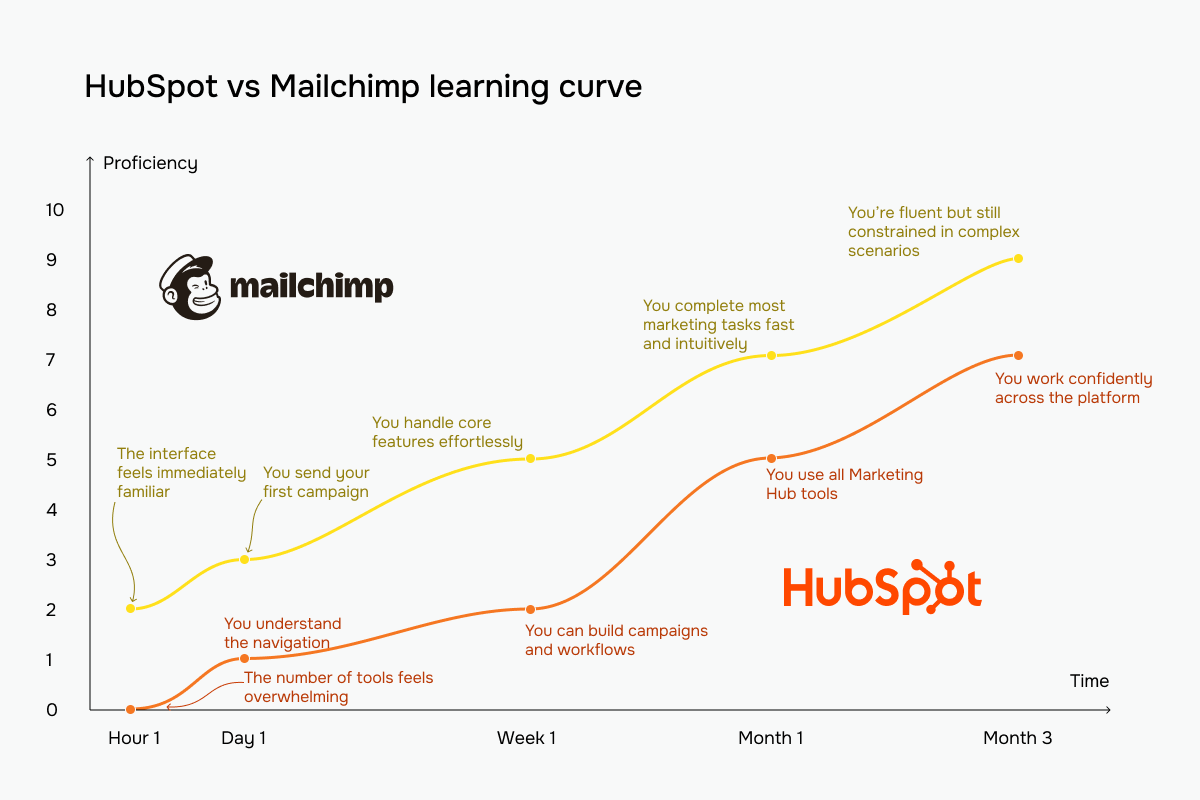 Mailchimp vs HubSpot learning curve based on our testing experience
Email builder and templates
HubSpot: 8.4/10 | ⭐ Mailchimp: 9.4/10
This category shows why it’s difficult to compare HubSpot and Mailchimp based on the email builder alone. Mailchimp has one of the best email builders we’ve tested, while HubSpot treats email as one part of a much broader marketing system. That’s also why the two platforms are so different in day-to-day use, even when you’re doing the exact same task.
| Aspect |
HubSpot |
Mailchimp |
Winner |
| Templates |
50+ templates |
360+ templates |
Mailchimp |
| Drag-and-drop editor |
Module-based editor with reusable sections, section visibility controls, and optional HTML editor |
New and legacy editors with drag-and-drop interface, up to 4 columns, undo/redo, inline HTML blocks, dynamic content, and repeatable and variable blocks |
Mailchimp |
| Notable content blocks |
Products, Cart, and Payments |
Product Recommendations, dynamic content on any block |
Tie |
| Mobile responsiveness |
Responsive templates, separate desktop and mobile settings, section visibility controls, compatibility guidance |
Responsive templates, separate mobile styles per block, live mobile preview on your phone, compatibility guidance |
Tie |
| Sending time optimization |
AI suggests the best sending time based on recipient engagement |
Optimizes sending time based on recipient’s engagement and timezone |
Tie |
| Total score |
8.4/10 |
9.4/10 |
Mailchimp |
Before we get to the email builder itself, there’s one thing you should know about HubSpot. Unlike almost every other email marketing platform we’ve tested, it starts with a marketing campaign, not a pure email.
Instead of creating a template first, you create a campaign with a goal and then build everything it needs in one place. That can include a landing page, signup form, promotional and automated emails, workflows, ads, social posts, CTAs, follow-up surveys, and more. All assets belong to the same campaign, so your whole team can see what’s finished and how the campaign performs overall.
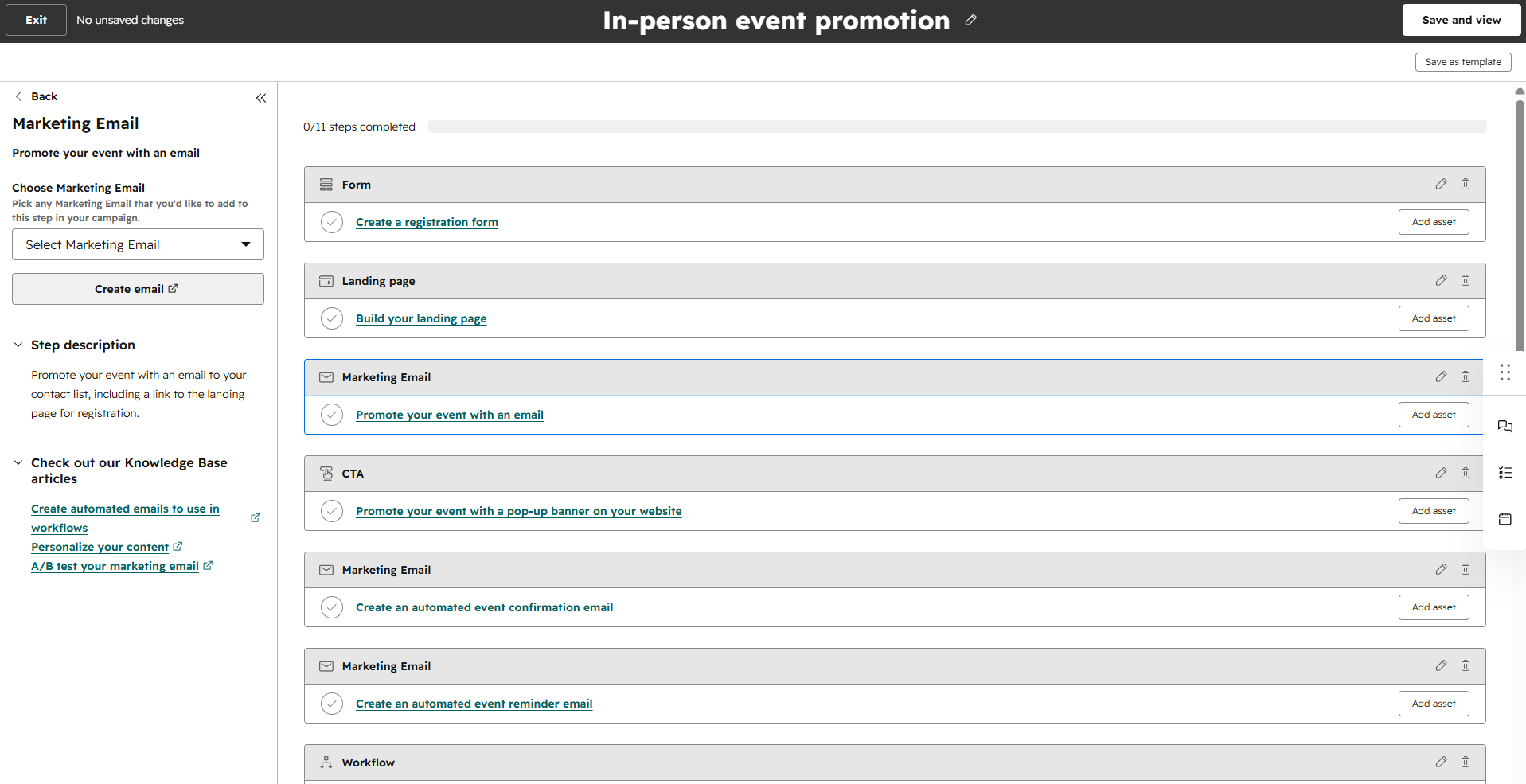 Creating a campaign at HubSpot
That’s possible because HubSpot is built around a CRM system. Marketing, sales, and customer data all live in the same system, allowing HubSpot to connect more than 30 different asset types under a single campaign. We haven’t seen anything quite like this in any other platform we’ve reviewed.
Of course, not every business needs this type of functionality. If you’re sending newsletters or occasional promotions, it’s more than you’ll ever use. Still, for B2B companies, agencies, and larger teams running coordinated campaigns across multiple communication channels, it’s one of HubSpot’s biggest advantages.
Now, to the email builder itself. HubSpot’s builder isn’t trying to give you endless design options, but it still has some impressive features. One of them is sender personalization. Instead of sending every email from the same marketing email address, HubSpot can automatically use the contact’s assigned sales representative as a sender. For B2B businesses where every lead has a sales rep, this creates a much more personal experience than a standard marketing email.
The builder also includes several practical tools you don’t normally see. You can exclude specific contact groups directly while building the campaign, monitor email size in real time to avoid overly large messages, collaborate with teammates in the editor, and run A/B tests without leaving the builder. eCommerce businesses also get dedicated Products, Cart, and Payments modules, while larger teams can create custom modules to keep every email consistent with their brand.
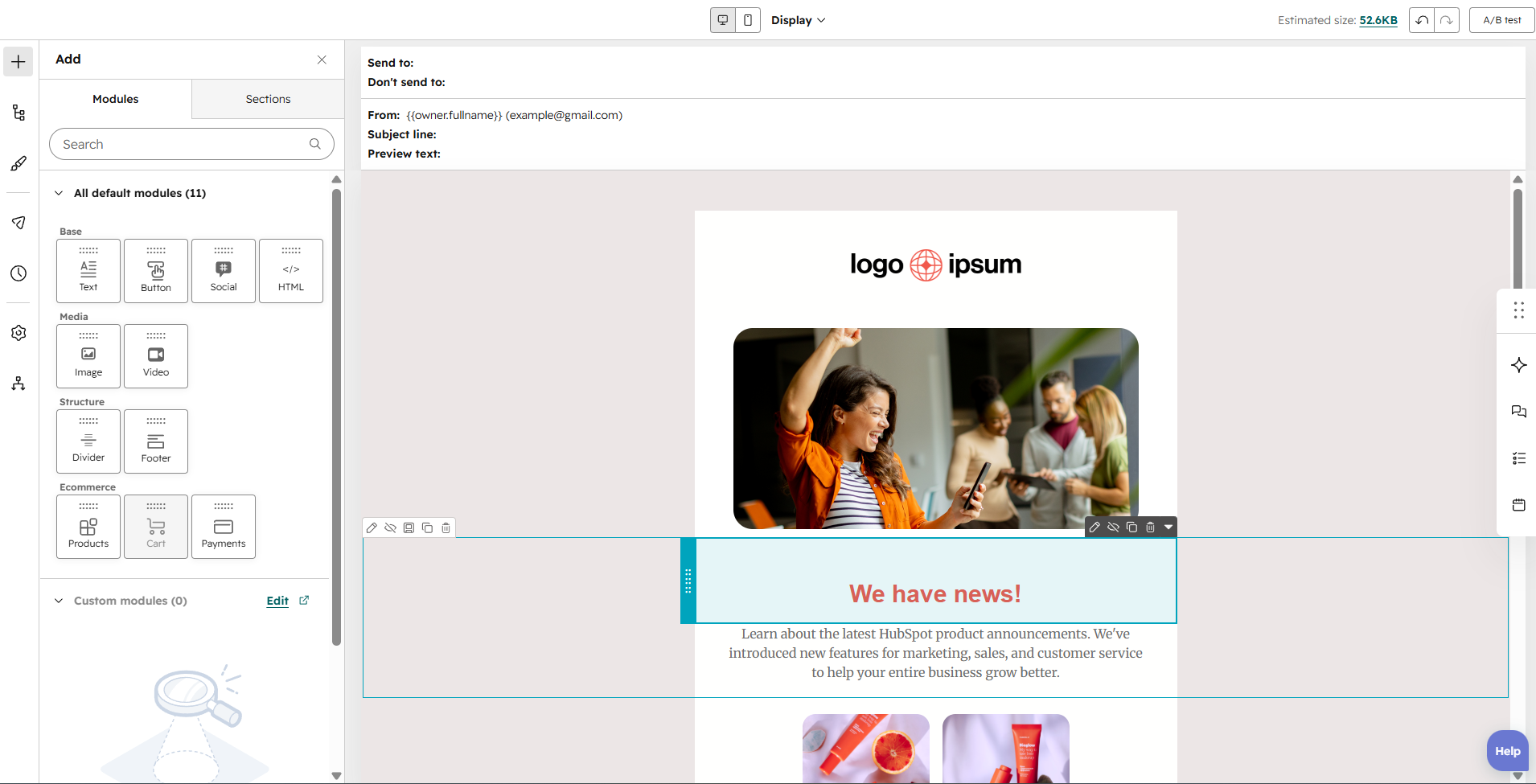 Creating a test template in the HubSpot email builder
If HubSpot focuses on CRM, Mailchimp’s key focus is design. Its builder offers one of the richest editing experiences we’ve tested. Besides the usual formatting options, you can insert anchor links for long emails, place images directly inside text blocks, adjust letter spacing, control borders and rounded corners, and even apply different spacing for desktop and mobile. If you’re very particular about typography and layout, Mailchimp gives you far more control than most competitors.
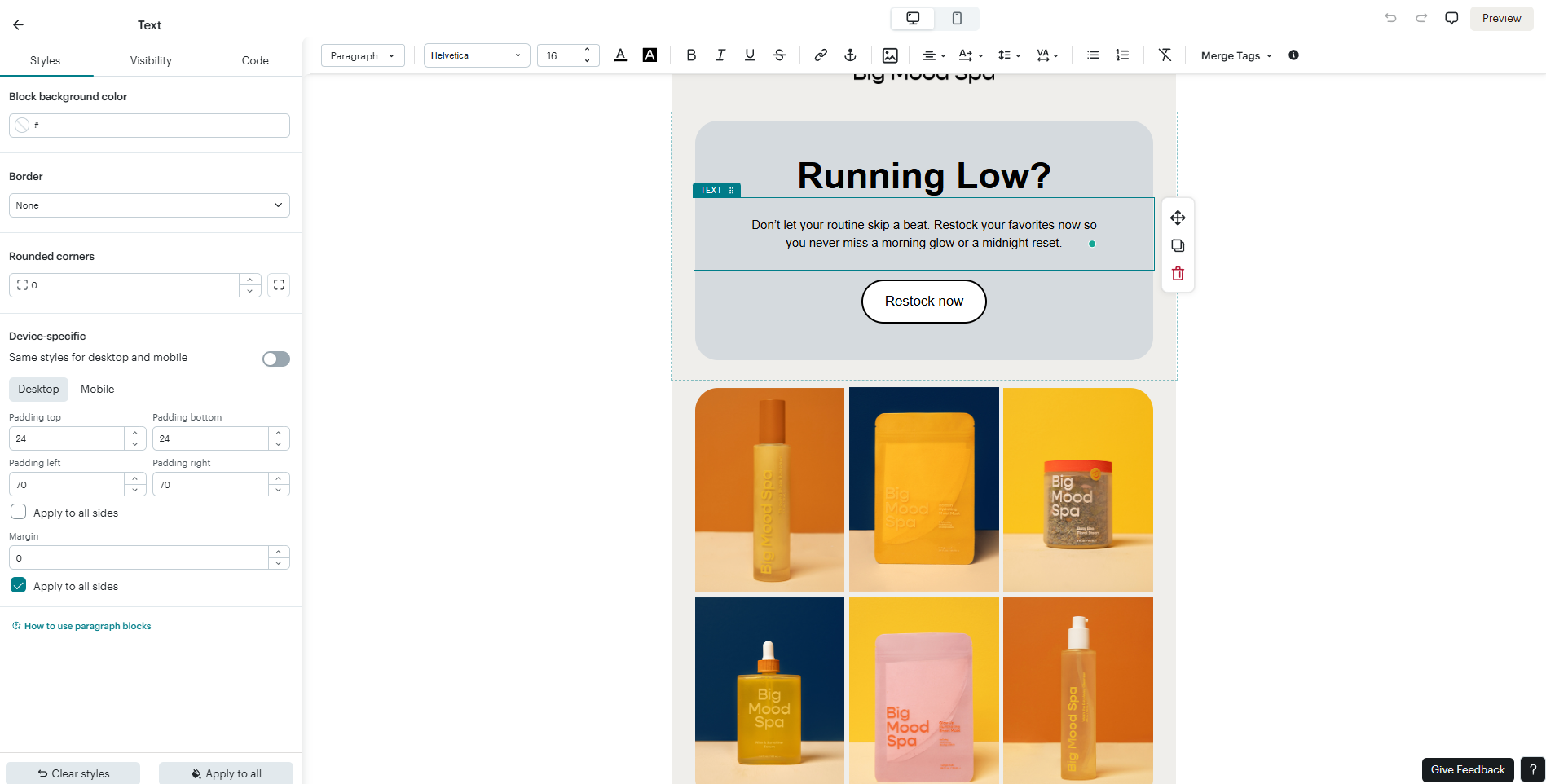 Creating a test template in the Mailchimp email builder
Overall, both builders are excellent. HubSpot is the better choice if your emails are closely connected to your CRM and sales process, while Mailchimp gives designers much more freedom. If creating polished, pixel-perfect emails is your priority, Mailchimp wins.
Marketing automation
⭐ HubSpot: 9.3/10 | Mailchimp: 7.8/10
Both platforms have visual automation builders, triggers, conditions, and templates, yet in practice, they don’t feel like competitors at all. HubSpot is built for businesses that want to automate almost every customer interaction, while Mailchimp focuses on marketing workflows that are much easier to build but also easier to outgrow.
| Aspect |
HubSpot |
Mailchimp |
Winner |
| Availability by plan |
Free and Starter plans offer basic form-triggered workflows with up to 10 actions; Professional and Enterprise plans include unlimited workflows with all trigger types |
Essentials plan offers 1 trigger and 4 steps; Standard and Premium plans offer 3 triggers and 200 steps |
HubSpot |
| Automation builder |
Visual builder with if/then branches, cross-workflow links, suppression lists, delays, and pause dates |
Visual customer journey builder with drag-and-drop interface, if/then conditions, and percentage splits |
HubSpot |
| Triggers available |
CRM events, forms, emails, ads, meetings, schedules, webhooks, manual triggers, and up to 250 enrollment filters per trigger |
Email/SMS signups, tags, audience changes, email clicks, keywords, page views, abandoned carts, product restocks, reviews, churn risk, and predicted purchases |
HubSpot |
| Pre-built automations |
58 templates |
123 templates |
Mailchimp |
| Channels supported |
Email and SMS (add-on) |
Email and SMS (add-on) |
Tie |
| Automation complexity |
Advanced; supports branching, goals, suppression lists, pause dates, and cross-workflow automation |
Moderate; supports branching, conditional paths, multiple triggers, and extended workflows |
HubSpot |
| Total score |
9.3/10 |
7.8/10 |
HubSpot |
HubSpot’s automation builder goes far beyond sending emails after someone clicks a link or fills out a form. It can build automations around almost any CRM object, including contacts, companies, deals, tickets, and abandoned carts.
That opens up possibilities you won’t find in a typical email marketing platform. Take abandoned carts. In most tools, the workflow is enrolled on the contact, and “cart abandoned” is simply one of the available triggers. In HubSpot, the workflow can be enrolled on the cart record itself, so you can filter by cart properties like its status or the store it came from. From there, it automatically finds the contacts associated with that cart and sends the appropriate email.
Another thing that stands out is how much business data HubSpot lets you use when building automations. Beyond standard conditions, you can trigger workflows based on AI-powered buyer-intent signals or company data, making it much easier to build highly targeted B2B automations.
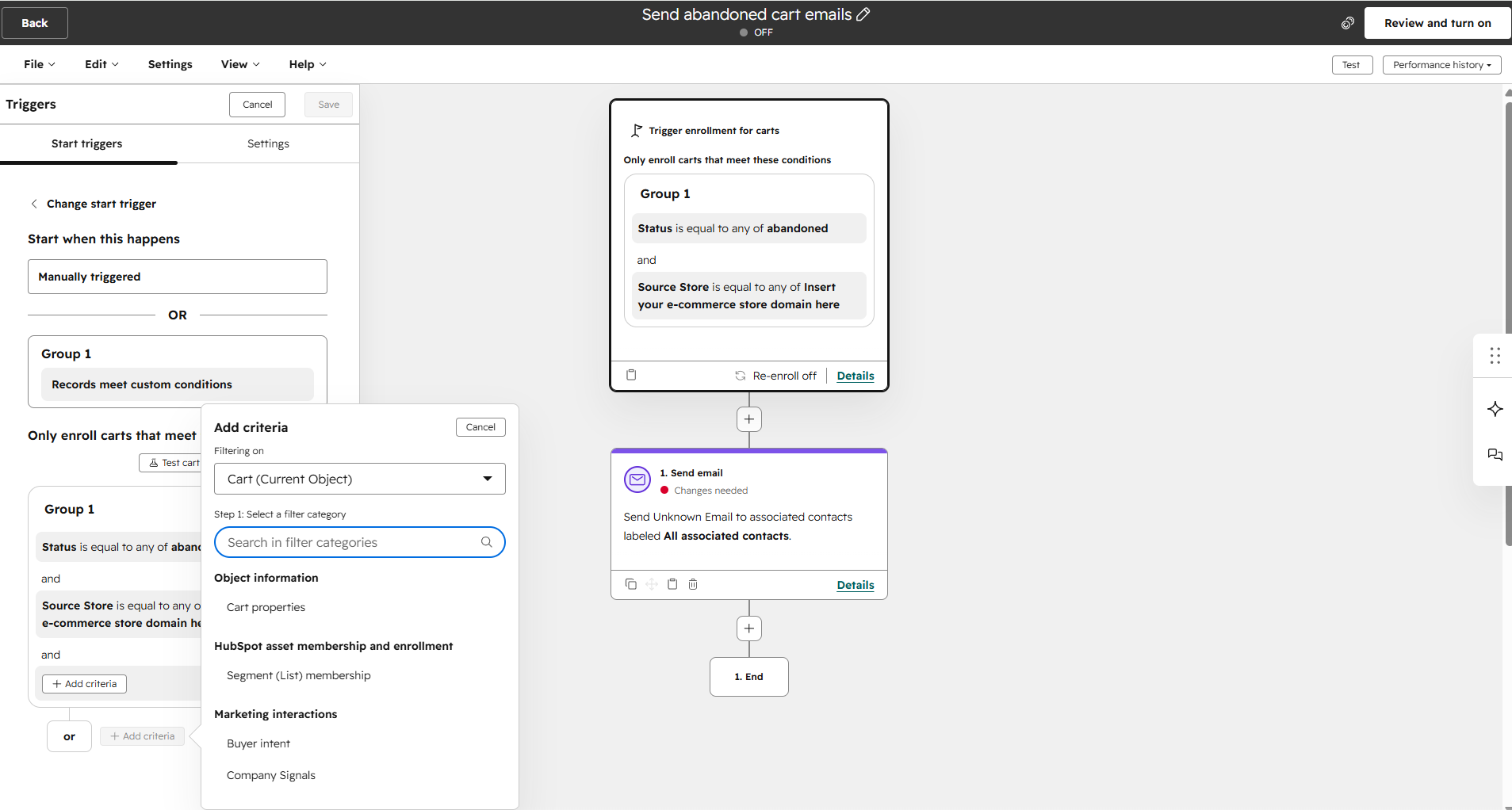 Setting up abandoned cart automation in HubSpot’s workflow builder
Mailchimp is different: instead of focusing on CRM objects, it helps you connect automation to external platforms. One of the most interesting examples is LinkedIn Lead Gen Forms. Mailchimp can receive leads directly through its Events API and immediately launch an automation when someone submits a LinkedIn form. If your marketing relies on external tools or custom integrations, this flexibility can be very useful.
The customer journey builder itself is also pleasant to work with. Unlike the traditional vertical layout, Mailchimp uses a freeform canvas where branches spread across the screen, making larger workflows easier to follow. Helpful touches like visible entry filters, clearly marked exit points, and unfinished branch placeholders make building automations more intuitive, even as they become more complex.
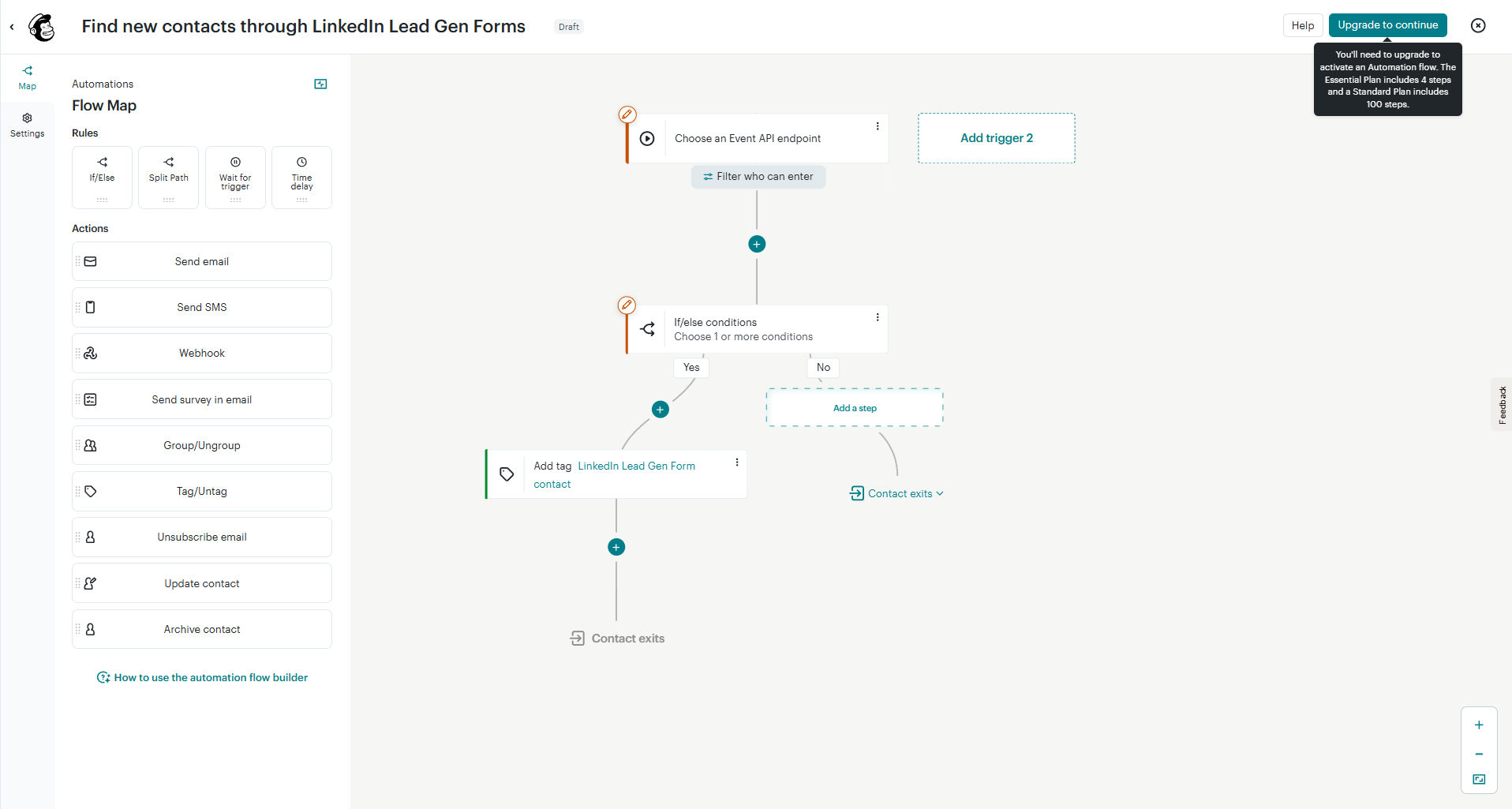 Creating a LinkedIn Lead Gen Forms automation in Mailchimp’s builder
For most growing businesses, HubSpot is the more powerful automation platform. Mailchimp remains a good option for simpler marketing workflows.
Contact management
⭐ HubSpot: 9.5/10 | Mailchimp: 7.5/10
Mailchimp does a great job in contact management for traditional email marketing, and most businesses will never run out of segmentation options. But HubSpot is created for companies that want every customer interaction to become usable data. That’s why its segmentation is so much more powerful and why it earns a 2-point higher score.
| Aspect |
HubSpot |
Mailchimp |
Winner |
| Segmentation capabilities |
Up to 250 filters combined using AND/OR logic, with data from contacts, companies, deals, tickets, carts, orders, or custom objects |
Unlimited conditions combined using AND/OR logic |
HubSpot |
| Segmentation criteria |
CRM properties, email engagement, page views, forms, ads, workflow activity, sequences, and custom objects |
Tags, groups, contact data, email/SMS engagement, eCommerce activity, page views, forms, surveys, location, churn risk, and predicted purchase timing |
Tie |
| Segment update speed |
Active segments update automatically; complex updates may take up to 1 hour |
Basic segments refresh automatically; new data may take up to 2 hours to appear |
HubSpot |
| Tagging and manual organization |
No tags |
Tags, groups, and multiple audiences; tags can be used in segments and automations |
Mailchimp |
| Total score |
9.5/10 |
7.5/10 |
HubSpot |
One important thing to keep in mind with Mailchimp is how contacts are counted. Audiences are separate databases, so the same contact added to multiple audiences is counted multiple times toward your billing limit. This makes keeping your audience structure clean especially important as your list grows.
For a business choosing between HubSpot and Mailchimp specifically for email marketing, the absence of contact tags in HubSpot is a real friction point if the team has a tag-heavy workflow. It’s not a dealbreaker, though, as properties can replicate anything tags do, but it requires a mindset shift and some upfront configuration. For teams coming from a tag-based tool like Mailchimp or ActiveCampaign, that’s a real adjustment. For anyone already thinking in CRM properties, it’s a non-issue.
Signup forms and landing pages
⭐ HubSpot: 8.8/10 | Mailchimp: 8.5/10
Most businesses won’t choose a platform because one has an extra pop-up trigger or better design options. What happens after someone subscribes is usually the deciding factor. If you need every new lead to go through a sales pipeline, HubSpot wins. If your main goal is to collect email addresses with polished, on-brand forms, Mailchimp can be a more enjoyable tool.
| Aspect |
HubSpot |
Mailchimp |
Winner |
| Types of forms available |
Embedded forms, hosted forms, sticky bars, pop-ups, and slide-ins |
Embedded forms, hosted forms, and pop-ups |
HubSpot |
| Form builder |
CRM-connected builder with AI form shortening, progressive profiling, conditional logic, and multi-step flows |
Visual, design-system builder with synced styles, Google Fonts typography, hover/active states, and responsive per-breakpoint styling |
HubSpot |
| Pop-up targeting conditions |
Exit intent, scroll depth, time delay, button click, URL, visitor segments, device, location, browser language, scheduling, and advanced AND/OR targeting |
Exit intent, time on page, inactivity, scroll trigger, device targeting, frequency rules, and pop-up behavior settings |
HubSpot |
| Landing page builder |
Drag-and-drop builder with A/B and adaptive testing, personalized content, SEO settings, and custom domains |
Drag-and-drop builder with a few templates, analytics integrations, subscriber source tagging, and custom domains |
HubSpot |
| Total score |
8.8/10 |
8.5/10 |
HubSpot |
And here’s how they differ in practice. HubSpot’s form builder collects only the information you need. Its standout feature is AI-powered form shortening. Instead of asking returning visitors to fill in the same fields over and over again, HubSpot automatically hides information it already has in the CRM system. If it already has a visitor’s company name or job title, those fields disappear. The result is a shorter form, a better user experience, and potentially higher conversion rates without sacrificing valuable data.
The builder also gives you plenty of control over each field. You can create multi-step forms, add conditional logic, customize placeholders and help text, block specific email domains, and connect every field directly to a CRM property.
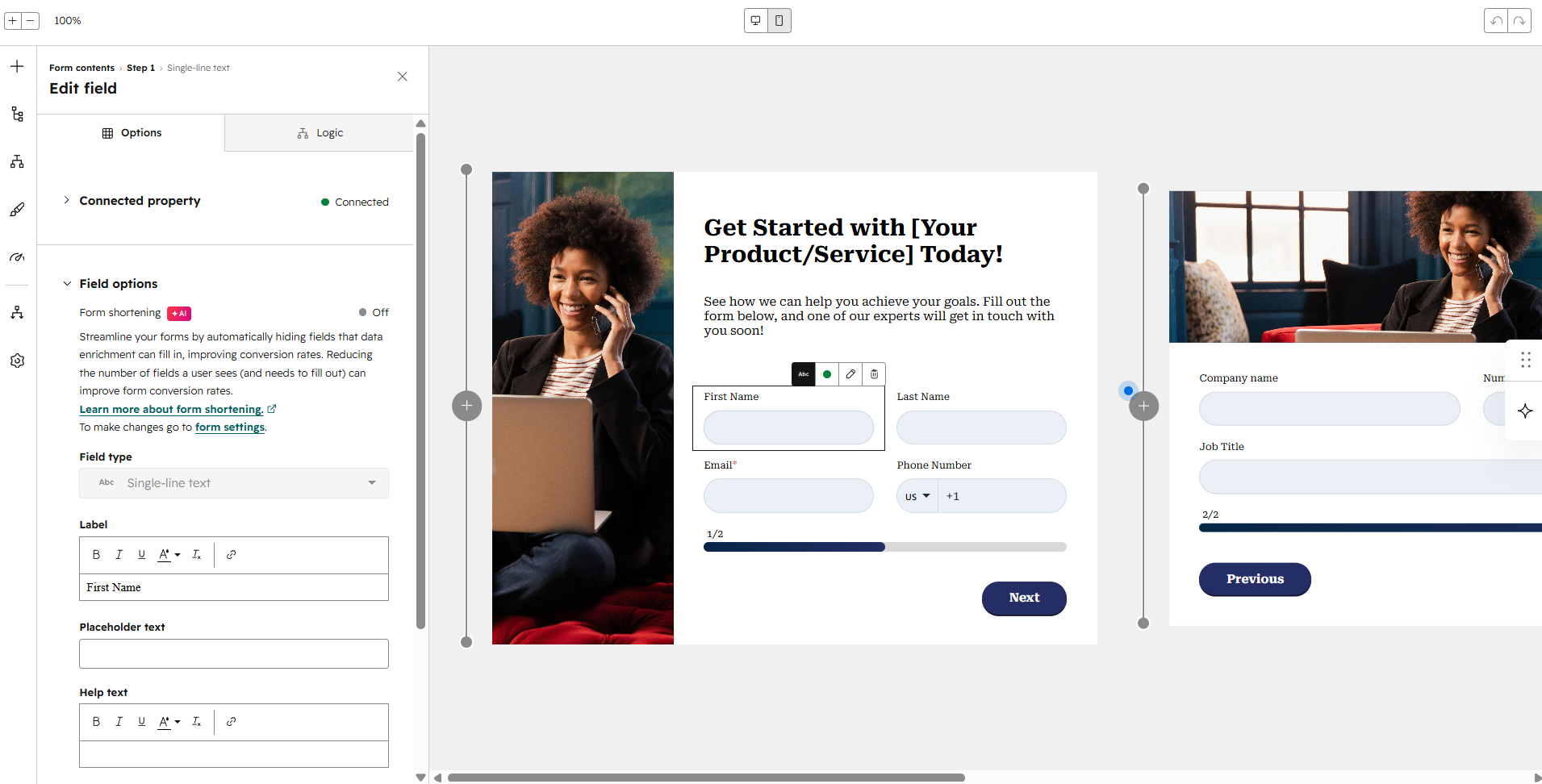 Customizing a pop-up form in HubSpot
Instead of making forms smarter, Mailchimp focuses on making them look exactly the way you want. The builder offers an impressive level of design control. You can create multi-step pop-ups, preview desktop and mobile versions side by side, build reusable style systems that update multiple elements at once, and even customize hover states, animations, shadows, opacity, etc. It’s one of the most design-focused form builders we’ve seen.
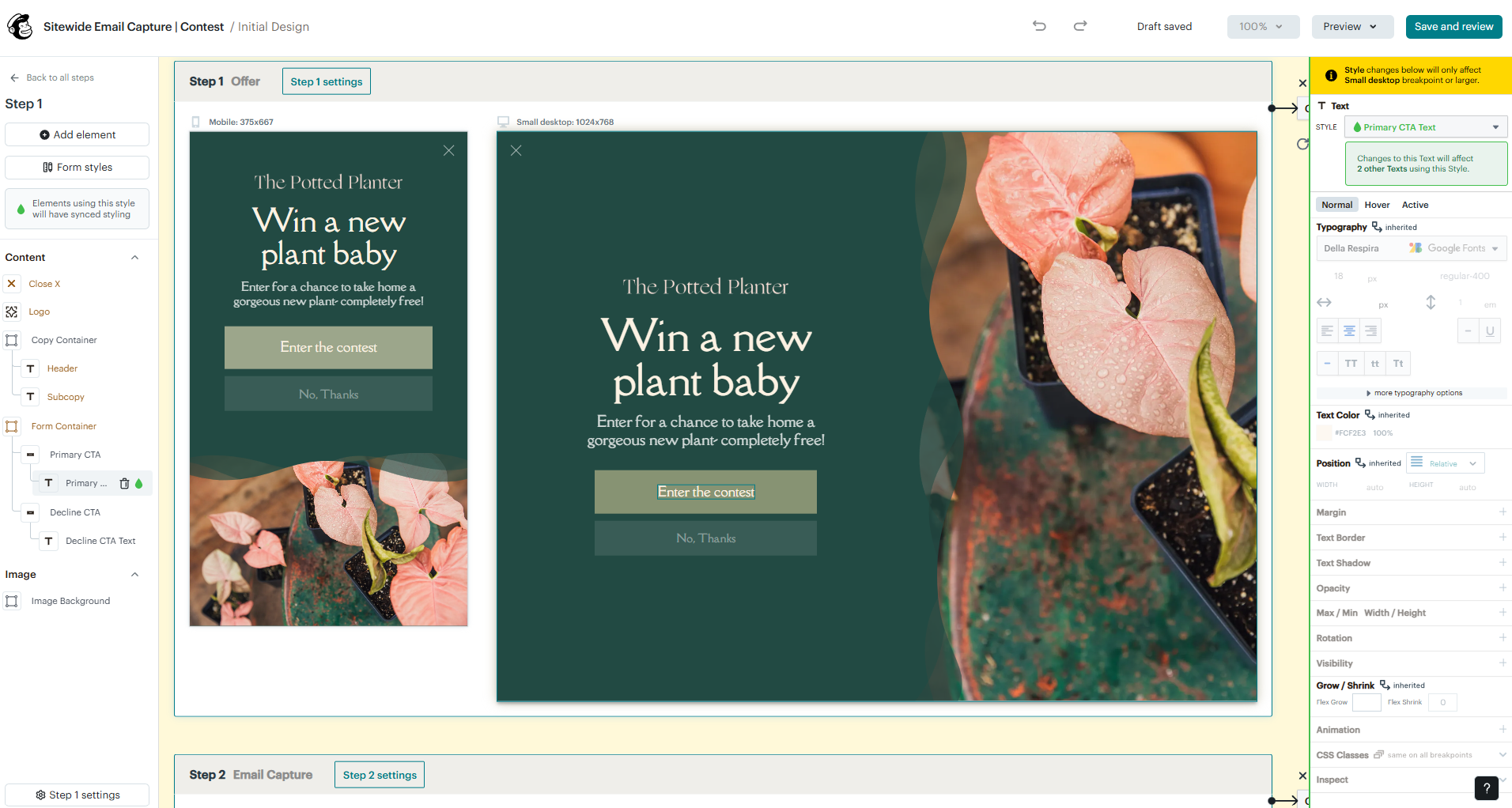 Creating a signup form in Mailchimp
So, if you’re choosing an email marketing platform based on its lead generation tools, ask yourself this: do you care more about collecting better data or creating better-looking forms? HubSpot optimizes the experience for the person filling out the form, while Mailchimp optimizes the experience for the person designing it. Which one is better depends entirely on what matters most to your business.
Integrations
⭐ HubSpot: 9.2/10 | Mailchimp: 9/10
This is one of the closest categories in the comparison. HubSpot wins on paper, but that’s largely because it already includes capabilities that Mailchimp expects you to connect through integrations. If your business already runs on several specialized tools, Mailchimp will fit in just fine. If you want to reduce the number of tools your team uses every day, HubSpot has the advantage.
| Aspect |
HubSpot |
Mailchimp |
Winner |
| Integration catalog |
2,000+ certified integrations across marketing, sales, finance, productivity, and more |
300+ integrations across eCommerce, analytics, CRM, booking, customer service, forms, surveys, and developer tools |
HubSpot |
| eCommerce platforms |
Native Shopify integration with multi-store support, 5-minute sync, and custom field mapping; WooCommerce, NetSuite, and others |
Shopify, WooCommerce, BigCommerce, Adobe Commerce, and PrestaShop; custom API connections and purchase data sync |
Tie |
| CRM systems |
Built-in CRM with native data model; bidirectional Salesforce sync for contacts, companies, deals, and opportunities |
One-way Salesforce sync for contacts and leads; campaign activity displayed in Salesforce; no deal or opportunity sync |
HubSpot |
| API capabilities |
REST API for CRM objects, workflows, carts, orders, webhooks, custom events, and workflow triggers |
Marketing and Transactional APIs, webhooks, automation events, audience events, and developer documentation |
HubSpot |
| Zapier support |
12 triggers and 15 actions across contacts, companies, deals, products, tickets, and more |
10 triggers and 22 actions across subscribers, campaigns, orders, tags, and custom events |
Mailchimp |
| Total score |
9.2/10 |
9/10 |
HubSpot |
But let’s talk about the CRM system for a minute, because this is one of the biggest differences between the two platforms.
With HubSpot, CRM is the core of the platform. Contacts, companies, deals, and tickets all live in the same database. That means every email open, meeting, deal update, and customer interaction is connected to the same record. When a deal moves from Proposal to Closed Won, HubSpot can automatically send a follow-up email, create a task, notify the team, or trigger another workflow without anyone switching tools. Mailchimp, by comparison, doesn’t have a full-featured CRM system.
AI features
⭐ HubSpot: 9.2/10 | Mailchimp: 6.5/10
While Mailchimp’s AI is like a helpful tool you can turn to when needed, HubSpot’s AI assistant is more like another team member that can take work off your plate. HubSpot integrates AI throughout the platform, while Mailchimp uses it to simplify individual tasks.
| Aspect |
HubSpot |
Mailchimp |
Winner |
| Email generation |
Generates complete emails from prompts, imports HTML into editable templates, and automatically applies the brand kit |
Generates complete emails from prompts or a website URL, writes and rewrites copy, and optimizes subject lines and tone |
Tie |
| Automation generation |
Builds complete workflows with triggers, actions, delays, and settings; edits individual steps; generates custom workflow code on higher plans |
No AI for building automation logic or flow structure |
HubSpot |
| Predictive customer analytics |
Predictive lead scoring, contact priority, and AI revenue forecasting |
Purchase likelihood, customer lifetime value, churn risk, predicted purchase timing, and predicted demographics |
Tie |
| Smart segmentation suggestions |
Creates segments from natural language and automatically generates segment descriptions |
No AI recommendations for creating segments |
HubSpot |
| Total score |
9.2/10 |
6.5/10 |
HubSpot |
For occasional campaigns, Mailchimp’s AI will cover everything you need. But as your workflows become more sophisticated, HubSpot’s AI starts saving time in ways that go beyond writing emails, which explains the much larger score gap in this category.
Deliverability
⭐ HubSpot: 9.5/10 | Mailchimp: 8.5/10
Both platforms follow email marketing best practices for deliverability, but HubSpot provides more tools and insights for managing it. Actual inbox placement still depends on a combination of the platform’s infrastructure and your own sending practices. For high-volume senders, HubSpot’s additional diagnostics and deliverability controls can be a real advantage, while smaller senders may simply have less need for that level of control.
| Aspect |
HubSpot |
Mailchimp |
Winner |
| Authentication |
Guided setup for SPF, DKIM, DMARC, MX, and BIMI; authentication dashboard |
Guided or manual DKIM setup, DMARC and BIMI support; SPF is handled on Mailchimp’s sending domain |
Tie |
| Deliverability monitoring |
Email health dashboard, recipient-level delivery status, bounce categorization (7 categories), AI performance insights |
No built-in deliverability dashboard; account-level bounce, complaint, and unsubscribe rate tracking |
HubSpot |
| List hygiene |
Automatic hard bounce suppression, global bounce protection, and graymail suppression |
Automatic bounce management, audience reconfirmation tool, automatic account suspension for poor list quality |
Tie |
| Dedicated IP |
Dedicated IP available with 40-day automated warm-up and separate IPs for multiple brands |
No dedicated IP for marketing emails |
HubSpot |
| Security and compliance |
SOC 2 Type II and SOC 3 (Trust Center, no NDA for SOC 3), GDPR via DPA, regional data residency (US, EU, Canada, Australia), and HIPAA-relevant handling via Sensitive Data properties |
SOC 2 and ISO 27001, GDPR via DPA plus EU-U.S. Data Privacy Framework, US-based data centers; not HIPAA compliant and won’t sign a BAA |
Tie |
| Total score |
9.5/10 |
8.5/10 |
HubSpot |
Mailchimp’s lower score is also influenced by customer feedback. On Capterra, 80% of the 585 reviews mentioning deliverability describe negative experiences, making it one of the platform’s most frequently criticized areas. While many users send emails successfully, the volume of complaints suggests deliverability issues occur more often than we’d expect from a platform of this size.
Reporting and analytics
⭐ HubSpot: 9.2/10 | Mailchimp: 8.8/10
Both platforms give you enough data to understand how your marketing is performing, but what’s next? Mailchimp focuses on helping you improve your marketing campaigns, while HubSpot connects marketing performance to the rest of your business. If you want to know which email generated the most clicks, both will tell you, but if you want to understand how your marketing influences sales and revenue, HubSpot will be a better helper.
| Aspect |
HubSpot |
Mailchimp |
Winner |
| Report coverage |
Email, campaigns, website, forms, workflows, CRM, sales, revenue, customer journeys, and ads |
Email, automations, landing pages, website, social, SMS, surveys, eCommerce, and Google Ads |
HubSpot |
| Custom reports |
Multi-source report builder combining CRM objects with marketing and sales activity data; AI reporting assistant |
Custom report builder for email, SMS, and eCommerce metrics, with campaign, audience, and time-frame grouping and 2 years of data; AI reporting assistant with suggested next actions |
HubSpot |
| Reporting speed |
Live CRM reports; custom reports refresh about every 2 hours; campaign reports update progressively |
Automation reports update continuously as subscribers move through the flow; campaign reports update as subscribers open emails or click links |
Tie |
| Export capabilities |
CSV, XLS/XLSX, PNG |
CSV, PNG |
HubSpot |
| Total score |
9.2/10 |
8.8/10 |
HubSpot |
The small difference in scores reflects that both platforms have strong analytics. HubSpot, however, gives you more room to grow before you outgrow its reporting capabilities.
Customer support
⭐ HubSpot: 7.4/10 | Mailchimp: 7/10
Neither platform stands out for customer support, as they both rely on self-service resources, with direct access to human agents only on higher-priced plans. If you expect to contact support regularly, neither platform is particularly generous. The good news is that both have nice documentation, so you’ll often find the answer yourself before you need to open a ticket.
| Aspect |
HubSpot |
Mailchimp |
Winner |
| Channel availability |
Chat and email on cheaper paid plans; higher tiers add phone, callback support, and a dedicated Customer Success Manager |
30 days of email support on the free plan, then chatbot only; chat and email on cheaper paid plans; higher tiers add phone, screen sharing, and a dedicated support team |
Tie |
| Knowledge base |
Extensive knowledge base, Academy with free courses and certifications, classroom training, and AI-powered in-product assistance |
Searchable knowledge base, tutorials, migration guides, and Academy courses for Mailchimp & Co members |
HubSpot |
| Onboarding assistance |
Personalized onboarding checklist, AI-guided setup, paid onboarding and migration services |
First-login walkthrough, migration guides, onboarding sessions on higher tiers |
Tie |
| Support quality sub-rating on Capterra |
4.4/5 |
4.2/5 |
HubSpot |
| Total score |
7.4/10 |
7/10 |
HubSpot |
Support isn’t a strong selling point for either platform, but Mailchimp’s lower Capterra support rating suggests users are more likely to be disappointed when they do need assistance.
What changed in 2025–2026 for Mailchimp and HubSpot?
Both platforms have added plenty of AI capabilities and other new features over the past two years. Looking at them can give you a better sense of where each platform is heading and whether that aligns with your own vision.
What changed in 2025–2026 for Mailchimp?
Mailchimp maintained its four-tier plan lineup (Free, Essentials, Standard, and Premium) and, in 2025-2026, introduced a combination of AI capabilities and everyday feature updates.
- Analytics AI that answers questions about campaign performance and recommends next steps;
- support for both ChatGPT and Claude when creating email and SMS campaigns from a website URL or text prompt;
- enhanced website tracking for Wix and WooCommerce;
- reusable saved email sections for faster email creation;
- MMS support on Standard and Premium (US and Canada) with built-in SMS age verification.
What changed in 2025–2026 for HubSpot?
HubSpot introduced significant changes to its price structure, transitioning partially to seat-based pricing, which ended up in a hybrid model. Now the platform is more expensive for growing teams. Breeze AI agents also switched to usage-based charging.
HubSpot introduced several major features, including the following:
- Data Hub, replacing Operations Hub with expanded data capabilities;
- Breeze Marketplace with 15+ AI agents for marketing, sales, and customer service;
- smarter Breeze Assistant with web search, memory, file uploads, and Google Workspace and Slack integrations;
- Answer Engine Optimization (AEO) for improving visibility in AI search engines like ChatGPT, Gemini, and Perplexity;
- Smart Deal Progression, using AI to analyze meetings, update CRM records, and draft follow-up emails.

Join businesses growing with SendPulse
From solo creators to global brands, thousands of customers trust SendPulse to run email campaigns, chatbots, automations, and more — all in one place.
Get started for free
HubSpot and Mailchimp pros and cons
Here we’ve gathered the most important strengths and weaknesses of HubSpot and Mailchimp, so you can see them all at a glance before deciding which platform to choose.
| Platform |
Pros |
Cons |
| HubSpot |
✔️ Native CRM included on all plans
✔️ Marketing, sales, service, and CRM in one platform
✔️ Breeze AI integrated across the platform
✔️ Predictive lead scoring and AI revenue forecasting |
❌ High cost of paid plans; free plan offers little for email marketing
❌ Steep learning curve
❌ SMS available only in certain regions and requires a higher-tier plan plus a separate add-on |
| Mailchimp |
✔️ Easy to learn and navigate
✔️ Large template library and detailed email builder
✔️ Predictive analytics for customer behavior
✔️ Feature-rich mobile app |
❌ Restrictive free plan with 250 contacts and 500 emails/month
❌ Audience-based contact model can increase costs; the same email address in two audiences counts twice for billing
❌ Automation flows unavailable on the free plan |
Your decision checklist
Now that you’ve seen how HubSpot and Mailchimp compare, use this checklist to make sure you’re choosing the right platform for your business.
| Decision area |
HubSpot
is a better fit if… |
Mailchimp
is a better fit if… |
| Business type |
You run a growing business where marketing, sales, and service teams need to work from the same customer data. |
You run a small- to mid-sized business focused on email marketing, eCommerce campaigns, and multi-channel outreach. |
| Budget expectations |
You have the budget and expect the investment to pay off across multiple teams and use cases. |
You want capable email marketing at a predictable and affordable price. |
| Automation needs |
You need automation that crosses team boundaries, enrolling contacts based on changes in deal stage, meeting bookings, CRM property updates, and more. |
You need email and SMS automation covering welcome series, abandoned carts, product back-in-stock alerts, and predicted purchase timing. |
| Analytics focus |
You need attribution reporting across channels, AI-powered revenue forecasting, predictive lead scoring, and analytics that span marketing, sales, CRM, and service in one reporting system. |
You need clear campaign reporting, eCommerce revenue tracking, predictive audience analytics, and an AI assistant that answers plain-language questions about your data. |
| Team setup |
You work across marketing, sales, and service teams that need a single shared platform. |
You work in a lean marketing team focused on email campaigns, audience growth, and eCommerce. |
If three or more answers point to one platform, that’s a strong sign it’s the better fit. But before making your final decision, consider where your business is heading. The best email marketing platform is the one that will still support your business as it grows over the coming months and years.
Final verdict and recommendations
⚖️ Final scores: HubSpot – 7.9/10 | Mailchimp – 8.4/10
Our scores put Mailchimp ahead as an email marketing platform, and for most businesses, we think that’s the right call. HubSpot’s higher price makes more sense when you also use its CRM, sales, and customer service tools. If email marketing is your main priority, paying for the broader platform may be difficult to justify.
If Mailchimp isn’t quite right for you either, there are several alternatives worth considering:
- SendPulse if you want an AI-powered platform that combines email marketing, chatbot automation, and CRM for managing and nurturing leads.
- ActiveCampaign if you need more advanced marketing automation and complex customer journeys.
- Kit if you’re a creator or newsletter-based business looking for subscriber-focused tools and a generous free plan.
- MailerLite if you want a simpler, more affordable email marketing platform for a small business or creator brand.
- Klaviyo if you run an eCommerce business and need more advanced personalization and revenue-focused automation.
The good news is that whichever direction you go, you’ll end up with a mature platform that’s trusted by millions of businesses. The challenge here is not to find the best platform, but the one that best matches how your team works.