HubSpot and Constant Contact may both send emails, but that’s where the similarities end. One is a full-scale CRM system with built-in email marketing, while the other is a traditional email marketing platform. They target different businesses, come with different price tags, and solve different problems, which should make this comparison an easy one. Or does it?
How we scored this comparison: This review was created by the SendPulse team. As an email marketing platform ourselves, we work in the same space as the tools we test, which also means we understand the field deeply.
Each platform was evaluated across the key categories using our independent methodology. Pricing (25%), ease of use (20%), and email and automation features (15% each) carry the most weight because they affect daily workflows the most. All scores reflect hands-on testing and analysis as of August 2026.
Here’s a quick overview of how HubSpot and Constant Contact compare across the most important categories. Click any category to jump directly to the section that covers it in detail.
| Category |
HubSpot |
Constant Contact |
Winner |
| Best for |
Growing businesses needing CRM and advanced automation |
Small businesses focused on simple email marketing |
Depends on the use case |
| Pricing |
4/10
Expensive with seat-based pricing |
7/10
Affordable for small teams |
Constant Contact |
| Ease of use |
7/10
Steeper learning curve |
8.5/10
Beginner-friendly and intuitive |
Constant Contact |
| Email design |
8.4/10
Flexible builder with strong personalization tools |
8.8/10
Easier builder with a larger library of ready-made templates |
Constant Contact |
| Automation |
9.3/10
Advanced multi-step business workflows |
5/10
Basic email automation |
HubSpot |
| Contact management |
9.5/10
Full-feature CRM with deep segmentation |
7/10
Simple contact lists and segmentation |
HubSpot |
| Forms and pages |
8.5/10
Lead generation and conversion tools |
6.8/10
Basic signup forms and landing pages |
HubSpot |
| Integrations |
9.2/10
Extensive business ecosystem |
6.2/10
Covers most everyday integrations |
HubSpot |
| AI features |
9.2/10
AI tools embedded throughout the platform |
5/10
AI mainly used for email content creation |
HubSpot |
| Deliverability |
10/10
Excellent infrastructure with strong sender reputation |
7/10
Good infrastructure with some recurring deliverability complaints |
HubSpot |
| Reporting |
9.2/10
Revenue and customer journey analytics |
6.5/10
Campaign performance reporting |
HubSpot |
| Customer support |
7.4/10
Strong onboarding resources with mixed direct support experience |
7/10
Helpful support with a somewhat inconsistent knowledge base |
HubSpot |
| G2/Capterra rating |
4.4/4.5 |
4.1/4.3 |
HubSpot |
| Final score |
7.9/10 |
7.5/10 |
HubSpot |
Spoiler alert – neither platform scored particularly high. In our comparisons, email marketing platforms usually land somewhere between 8.5 and 9 points thanks to their unique features, affordability, or ease of use. These two are different. Something feels off, and throughout this comparison, we’ll find out exactly what it is.

Create and send high-performing emails
Use an AI assistant, pre-made templates, advanced segmentation, and feature-rich automation to run campaigns without coding. Start for free with up to 15,000 monthly emails.
Get started for free
How we tested: We signed up for both platforms and spent several weeks testing them. We compared pricing plans, built email campaigns, and set up multi-step automations. We created signup forms and landing pages, organized contacts into segments, and checked out template libraries and AI content tools. We also reviewed integrations and deliverability settings and compared reporting dashboards side by side. For customer support, we examined real user feedback on Capterra. All screenshots in this article were captured during our hands-on evaluation.
We’ll start with the biggest decision-makers – pricing, followed by the core marketing features like template building, automation, and lead generation. Then we’ll move on to the extras that probably won’t make or break your decision but are still worth considering, such as reporting, integrations, and customer support.
Pricing plans
HubSpot: 4/10 | ⭐ Constant Contact: 7/10
Disclaimer: Pricing changes frequently. All prices in this comparison were verified against Constant Contact’s official pricing and HubSpot’s official pricing as of August 6, 2026. Always confirm current costs on the official pages.
The prices of HubSpot and Constant Contact are extremely different, and the key reason is that with HubSpot, you never pay only for email marketing. You pay for the whole platform they created so businesses can manage almost everything from one place. However, Constant Contact, as a standalone platform for email campaigns, is not that affordable either. To prove that point, we added SendPulse as a benchmark to show that an all-in-one email marketing tool doesn’t have to cost a fortune.
One thing to keep in mind as you read the table: both tools cap your monthly emails as a multiple of your contact count. HubSpot lets you send 5× your contacts on Starter, 10× on Professional, and 20× on Enterprise, while Constant Contact allows 10× on Lite, 12× on Standard, and 24× on Premium.
| Contacts |
HubSpot, Starter |
HubSpot, Professional |
Constant Contact, Lite |
Constant Contact, Premium |
SendPulse, Standard |
| Free plan |
1,000 contacts; 2,000 emails |
30-day free trial (the interface incorrectly shows 14 days at the time of our testing) |
500 contacts; 15,000 emails |
| 1,000 |
$11.50/mo;
5,000 emails |
N/A |
$30/mo;
10,000 emails |
$110/mo;
24,000 emails |
$14.40/mo;
unlimited emails |
| 10,000 |
$449/mo;
50,000 emails |
$1,584/mo;
100,000 emails |
$120/mo;
100,000 emails |
$275/mo;
240,000 emails |
$62.40/mo;
unlimited emails |
| 25,000 |
$1,120/mo;
125,000 emails |
$2,410/mo;
250,000 emails |
$280/mo;
250,000 emails |
$425/mo;
600,000 emails |
$127.20/mo;
unlimited emails |
| 50,000 |
$2,240/mo;
250,000 emails |
$3,616/mo;
500,000 emails |
$430/mo;
500,000 emails |
$575/mo;
1,200,000 emails |
$224.80/mo;
unlimited emails |
We also included several pricing tiers for HubSpot and Constant Contact because, depending on the plan, you’re often getting quite different products. In HubSpot’s case, all the fancy features only become available on the higher-priced tiers.
The price difference is so huge that it’s worth mentioning again – with HubSpot, email marketing is only one part of what you’re paying for. If you’re planning to use it only for creating email campaigns, you should reconsider your choice.
Ease of use and interface
HubSpot: 7/10 | ⭐ Constant Contact: 8.5/10
HubSpot is a huge machine that can’t be mastered in a day. Constant Contact, by contrast, is much easier to understand, especially if you’ve used other email marketing platforms before. Here’s what you can expect from the learning curve and daily navigation of both platforms.
| Aspect |
HubSpot |
Constant Contact |
Winner |
| First-time experience |
The platform is big – there’s a lot to explore, and it takes time to find your footing |
Immediately familiar – the interface is clean, the first steps are obvious, and you can send your first email within minutes |
Constant Contact |
| Daily navigation |
Workspace organized by business area, including marketing, sales, CRM, and reporting; AI assistant and quick-create menu always available |
Traditional left navigation with familiar email marketing sections; straightforward layout focused on marketing channels |
Constant Contact |
| Learning curve |
Steeper because it combines CRM, marketing, sales, service, and content tools; AI, onboarding checklists, and free courses help shorten the learning process |
Easier to learn thanks to a narrower feature set; guides, video tutorials, and live trainer sessions help new users get started |
Constant Contact |
| Mobile access |
Dedicated iOS and Android apps for marketing and CRM management, including deals, reports, AI, approvals, business card scanning, and call playback |
Dedicated iOS and Android apps with the cross-device email editor, email and social management, image editing, AI writing, multi-profile support, and test emails |
Tie |
| Workflow efficiency once mastered |
Excels at handling large volumes of work; AI, reusable actions, bulk operations, and synced workspaces let experienced teams build and manage campaigns much faster |
Excels at repetitive marketing tasks; saved templates, one-click multi-channel campaigns, resend to non-openers, and multi-account management help speed up everyday work |
HubSpot |
| Total score |
7/10 |
8.5/10 |
Constant Contact |
If you’re looking for something you can pick up quickly, Constant Contact is the easier choice. But if you’re willing to spend a little more time learning the platform, HubSpot gives you far more ways to save time later. Here’s how their learning curves look:
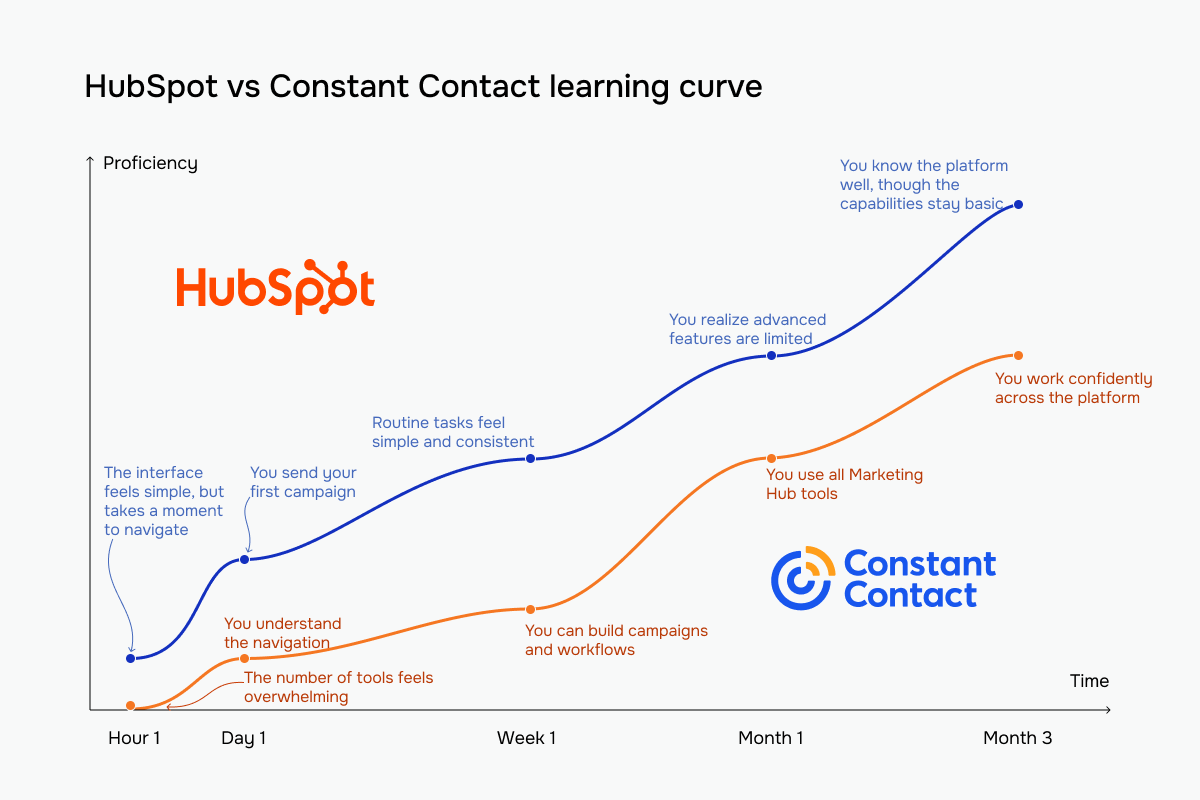 Constant Contact (blue) vs HubSpot (orange) learning curve based on our testing experience
Email builder and templates
HubSpot: 8.4/10 | ⭐ Constant Contact: 8.8/10
Because HubSpot is such a huge platform, we expected it to come out on top in a key email marketing category – the email builder. But after working with both editors, Constant Contact surprised us, as it’s more comfortable for everyday email creation. There are more templates, more ready-made blocks to work with, and less effort required before an email looks the way you want it to.
HubSpot fights back in a different way. Once you’ve finished designing the email, it gives you better tools for optimizing and refining your campaigns. Those extras won’t matter to everyone, but if email marketing is a big part of your job, they’re nice to have.
| Aspect |
HubSpot |
Constant Contact |
Winner |
| Templates |
50+ templates |
600+ templates |
Constant Contact |
| Drag-and-drop editor |
Module-based editor with reusable sections, desktop/mobile editing per section, visibility controls, and optional HTML editor |
Flexible block-based editor with drag-and-drop or click-to-place editing, reusable blocks, global styles, and block-level customization |
Constant Contact |
| Notable content blocks |
eCommerce blocks – Products, Cart, Payments |
Event, RSVP, Feedback, Data table, and Product |
Constant Contact |
| Mobile responsiveness |
Responsive templates with separate desktop/mobile settings and show/hide controls for individual sections |
Responsive templates with automatic mobile stacking, mobile preview, and touchscreen editing |
HubSpot |
| Sending time optimization |
Manual scheduling; recipient time zone delivery; AI-powered sending time suggestion based on engagement data on higher tiers |
Manual scheduling only; resend to non-openers on higher tiers lets you schedule a second send to contacts who didn’t open the first |
HubSpot |
| Total score |
8.4/10 |
8.8/10 |
HubSpot |
Let’s see now how working with these platforms feels in practice.
HubSpot doesn’t try to impress you with dozens of blocks. Instead, it puts its effort into making every block as customizable as possible. During our tests, we found some of the most detailed editing controls we’ve seen: advanced typography options, separate padding for each side of a block, and device-specific visibility. A real-time email size indicator, reusable custom modules, and always-available AI assistant also add to the efficiency of this builder.
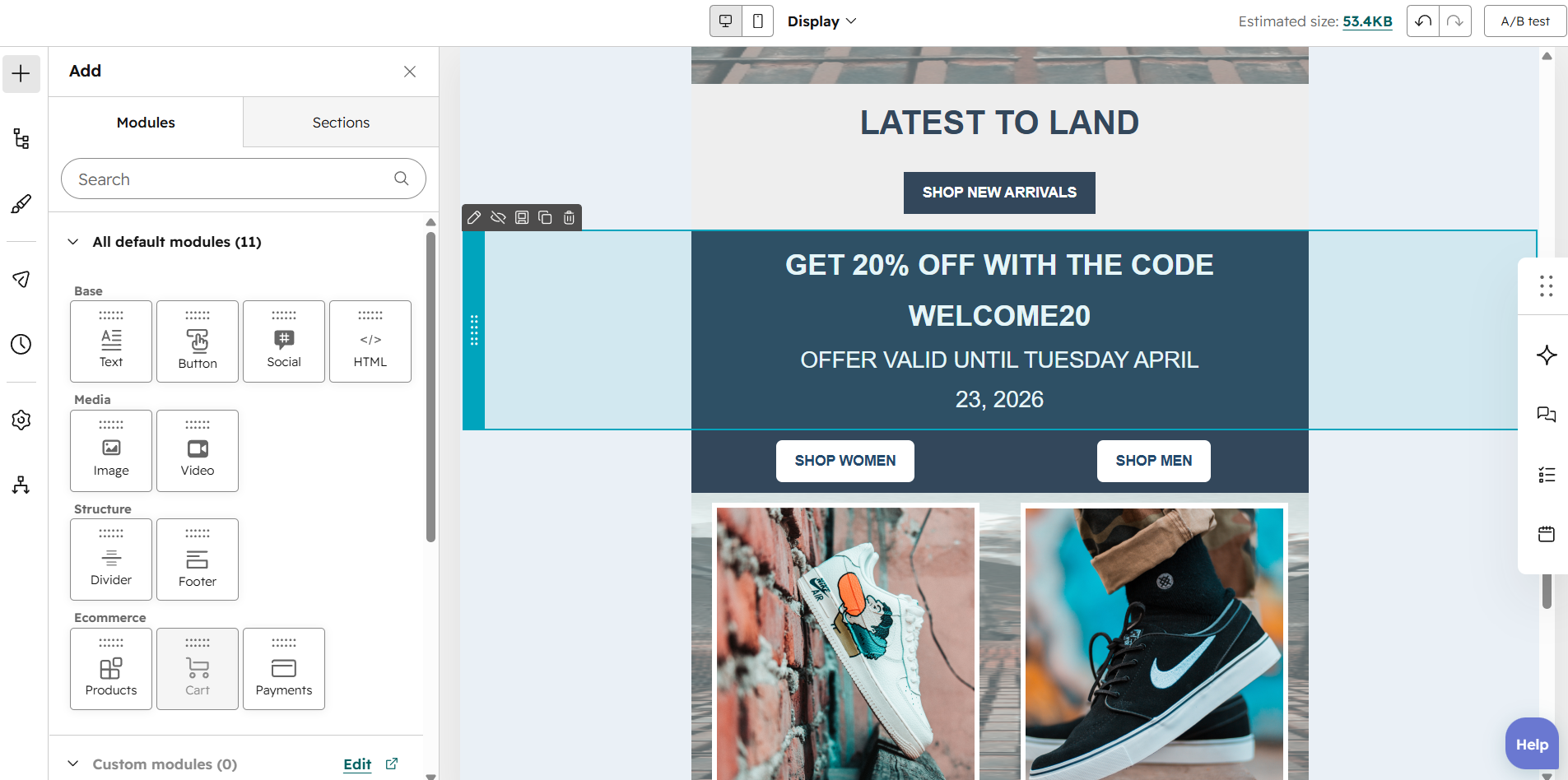 Trying out HubSpot’s email builder
Constant Contact is way more straightforward. It doesn’t give you the same level of design precision, but instead it provides a much wider selection of ready-to-use content blocks. There are also more unusual blocks, like Event or RSVP, that can be useful for nonprofits, local companies, and businesses running events. The three-tab sidebar keeps everything organized, and the AI assistant is always visible if you need help writing your content.
 Hands-on testing of the Constant Contact email builder
Our takeaway is that Constant Contact helps you put together a good-looking template with less effort, while HubSpot asks for more time but rewards you with more control over the final result. If email is just one part of your marketing and sales process, HubSpot is the better fit. But if your priority is creating and sending emails as quickly as possible, Constant Contact will suit you better.
Marketing automation
⭐ HubSpot: 9.3/10 | Constant Contact: 5/10
Automation is surely not a close comparison in the case of HubSpot and Constant Contact. While Constant Contact can only automate some very common email marketing tasks, HubSpot lets you automate far more than emails. Once your marketing starts involving CRM data, multiple communication channels, or more advanced customer journeys, the difference between these two becomes obvious.
| Aspect |
HubSpot |
Constant Contact |
Winner |
| Availability by plan |
Free and Starter tiers offer simple workflows with 1–10 actions; Professional and Enterprise tiers offer access to unlimited workflow actions and all trigger types |
Lite tier offers only 1 automation path, Standard gives up to 3 paths, and Premium opens unlimited paths |
HubSpot |
| Automation builder |
Visual workflow builder with branching, cross-workflow actions, suppression lists, undo/redo, and built-in AI |
Linear workflow builder with branching, delays, filters, tag and field updates, and editable triggers |
HubSpot |
| Triggers available |
CRM events, properties, schedules, webhooks, and manual enrollment; up to 250 enrollment filters per trigger |
Date, contact activity, invoice, and eCommerce triggers |
HubSpot |
| Pre-built automations |
58 workflow templates |
14 automation templates |
HubSpot |
| Channels supported |
Email and SMS |
Email and SMS |
Tie |
| AI features |
Creates complete workflows from prompts, edits workflow steps, and generates custom code for advanced actions |
No AI for building automation logic |
HubSpot |
| Automation complexity |
Advanced branching, goals, suppression lists, cross-workflow automation, and detailed enrollment rules |
Branching, delays, filters, tags, and field updates for standard automation sequences |
HubSpot |
| Total score |
9.3/10 |
5/10 |
HubSpot |
Now, let’s see how these differences play out in practice. The first thing we noticed while working with HubSpot is that it thinks of automation way beyond sending emails. Instead, it assumes you’re automating the entire customer journey. In one workflow, for example, we enrolled companies rather than contacts, sent an email to specific people associated with that company, and automatically updated the company’s lead status in the CRM system. That’s a level of automation most email marketing platforms don’t even offer.
What also stood out were all the little details that make complex workflows easier to manage. HubSpot explains what each action will do before you publish it, lets you see which records are currently in the workflow, and provides helpful guidance as you set everything up.
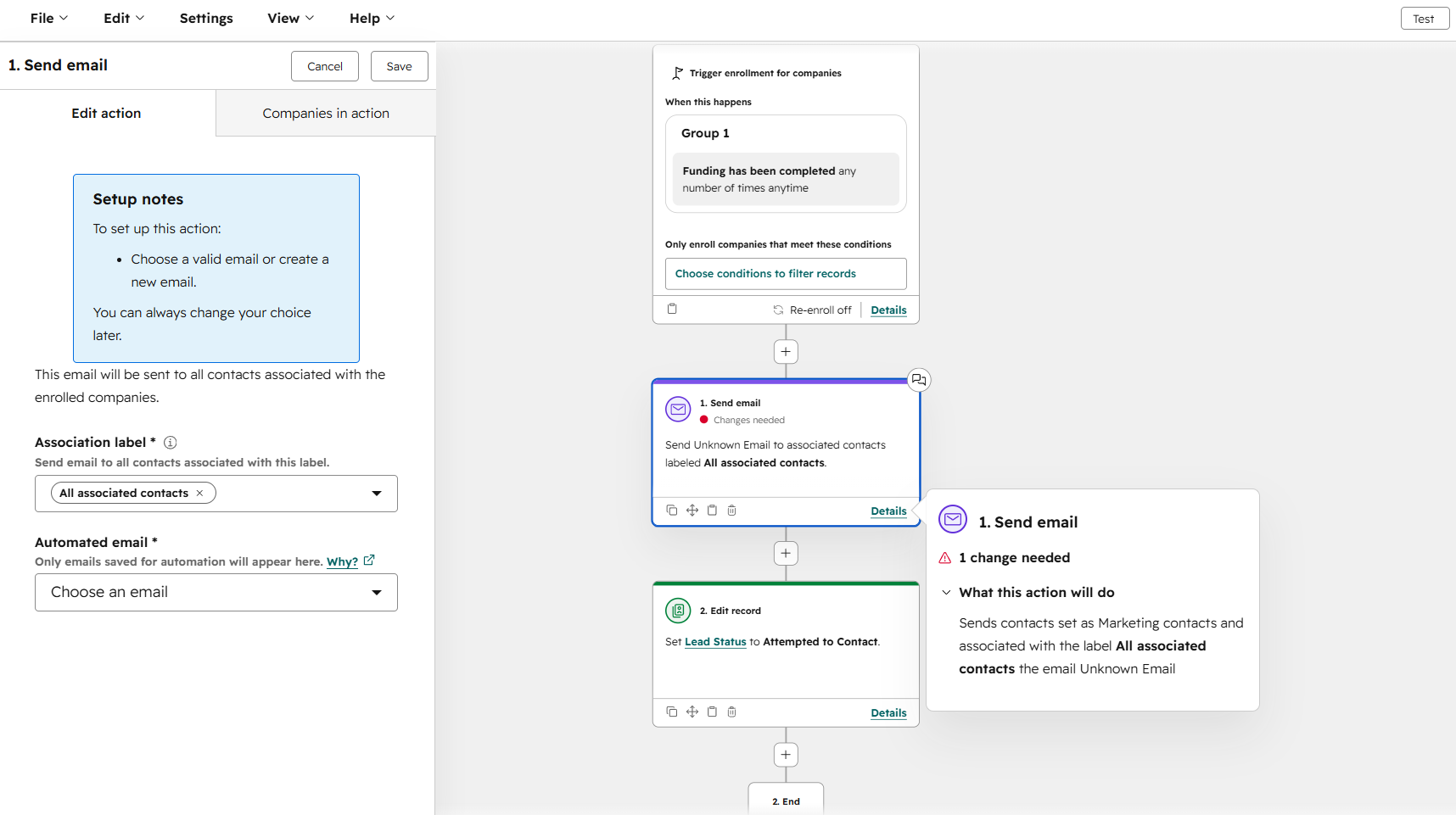 Customizing an automation flow in the HubSpot builder
Constant Contact is, yet again, more straightforward. The workflows are simple, easy to read, and don’t try to overwhelm you with dozens of options. You can build welcome emails, birthday campaigns, update contact information, apply tags, or organize subscribers into lists from a clean, linear workflow that’s easy to follow.
You won’t find CRM objects, company records, or advanced workflow logic here, but that’s also the point. If all you want is to automate your email marketing, Constant Contact gets you there without making you learn an entirely new system.
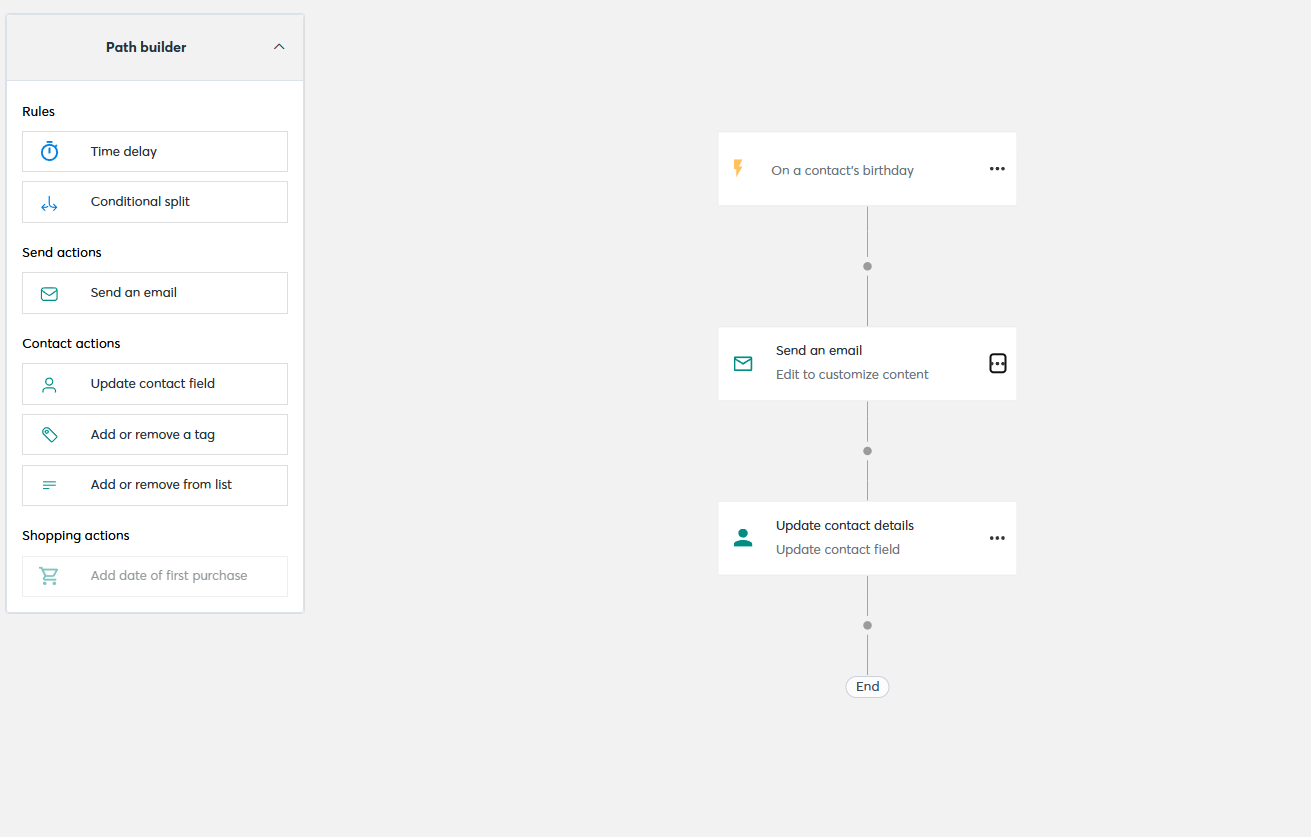 Testing Constant Contact’s birthday automation
These builders belong to completely different products. With HubSpot, we often forgot we were inside an email marketing platform because so much of the automation revolved around the CRM system. Emails are just one part of the workflow.
Constant Contact never tries to be that ambitious. It stays focused on email marketing, and for many businesses, that’s what makes it appealing. There’s less to learn, fewer decisions to make, and it’s much easier to build your first automation.
Contact management
⭐ HubSpot: 9.5/10 | Constant Contact: 7/10
Segmentation is what makes automation work, and at HubSpot it’s tightly connected to your CRM data. That’s one of the biggest reasons it scored so highly in our comparison. Constant Contact doesn’t go nearly as deep.
| Aspect |
HubSpot |
Constant Contact |
Winner |
| Segmentation capabilities |
Active and static segments; nested AND/OR logic; up to 250 filters per segment, including 60 associated object filters; works across contacts, companies, deals, tickets, carts, and orders |
Dynamic segments with AND/OR logic; up to 1,000 lists per account; number of segments depends on the plan; can trigger automations |
HubSpot |
| Segmentation criteria |
Contact, company, deal, ticket, and custom object data; email engagement; page visits; form submissions; ads; workflows; segment membership |
Contact details; tags; list membership; email and SMS engagement; Shopify purchase activity; website visits |
HubSpot |
| Segment update speed |
Active segments update automatically, usually immediately, up to 1 hour for complex updates; static segments update manually |
Dynamic segments update automatically as contacts meet or leave the criteria |
Tie |
| Tagging and manual organization |
No tags; uses custom properties and segments instead |
Up to 500 tags; tags can be added manually, by import, automation, or link clicks, and used for segmentation and automations |
Constant Contact |
| Total score |
9.5/10 |
7/10 |
HubSpot |
For everyday email marketing, Constant Contact has everything most businesses will need. But once you want to combine marketing, sales, and customer data into a single audience, HubSpot definitely wins, as it works with a much richer picture of each contact, which opens the door to much more targeted campaigns.
Signup forms and landing pages
⭐ HubSpot: 8.5/10 | Constant Contact: 6.8/10
Before we get to technical details, here’s the key difference between the two platforms and how they perceive signup forms: Constant Contact is great at collecting email addresses, and HubSpot is created to collect opportunities. If your forms play a role in bringing in new business, this difference becomes obvious very quickly.
| Aspect |
HubSpot |
Constant Contact |
Winner |
| Types of forms available |
Embedded forms, hosted forms, sticky banners, pop-ups, and slide-ins |
Embedded forms, banners, slide-ins, and pop-ups |
HubSpot |
| Form builder |
Visual builder with CRM fields, progressive profiling, brand-specific forms, GDPR support, and double opt-in |
Drag-and-drop builder with contact and SMS fields, flexible layouts, GDPR support, and double opt-in |
Tie |
| Pop-up targeting conditions |
Scroll depth, exit intent, button click, time delay, URL, visitor segments, login status, device, language, scheduling, and advanced targeting logic |
Time on page and exit intent |
HubSpot |
| Landing page builder |
Drag-and-drop builder with custom domains, SEO settings, A/B testing, AI-powered adaptive testing, and personalized content |
Hosted signup landing pages with email and SMS signup, and multiple lists |
HubSpot |
| Total score |
8.5/10 |
6.8/10 |
HubSpot |
All these differences show up in practice in both pop-ups and landing page builders. HubSpot’s landing page builder surprised us. We expected something more advanced than Constant Contact, but not something that felt this close to a website builder. Instead of putting a few blocks above a signup form, you’re building an actual marketing page. You can create long pages with multiple sections, add navigation anchors, customize the layout, optimize SEO, and build anything from a demo request page to a webinar registration or product launch page.
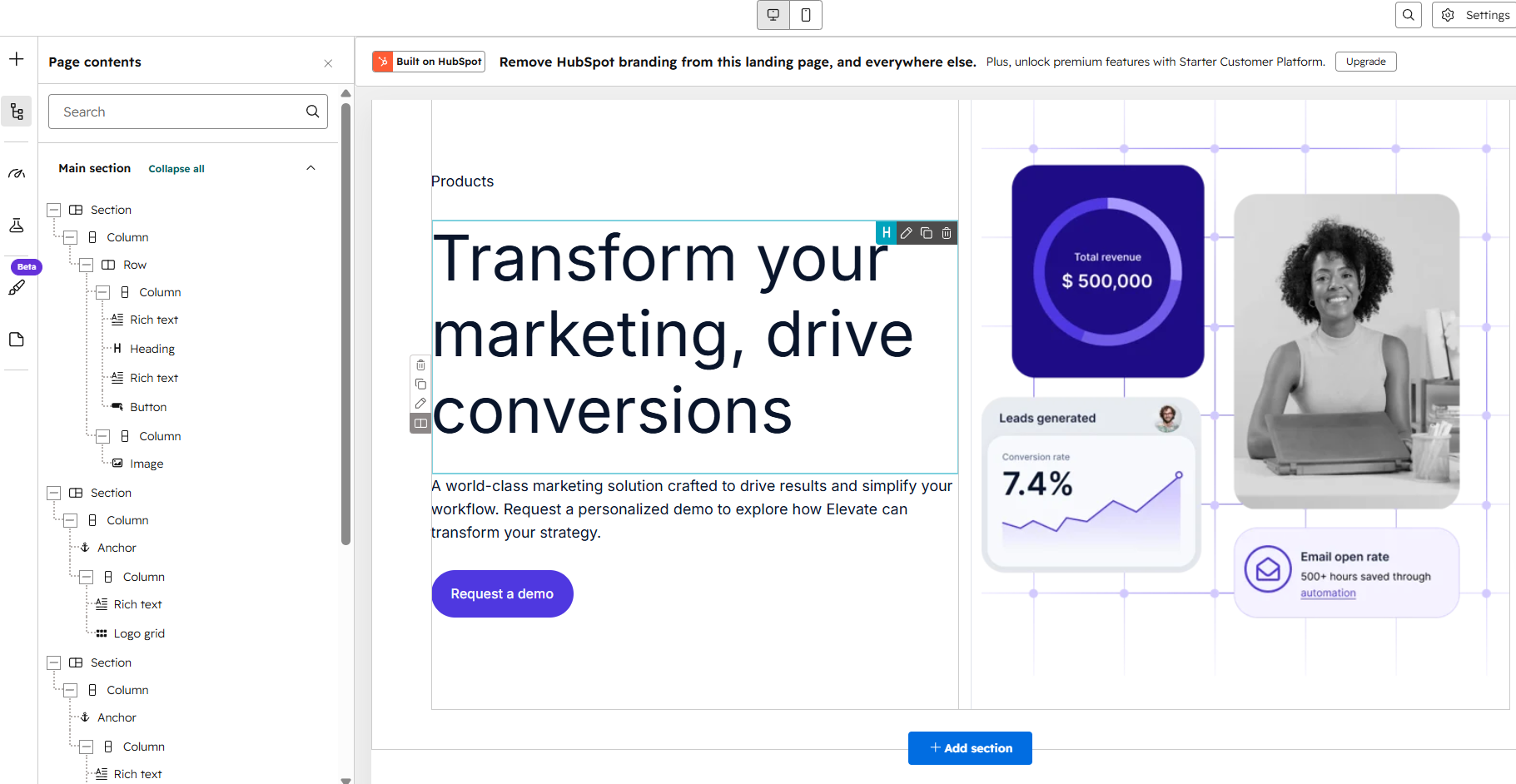 Testing HubSpot’s landing page builder
Constant Contact keeps things much simpler. The page is built around the signup form, and everything else supports that goal. You can add text, images, videos, social buttons, and a few different content layouts to make the page more engaging, but you’re still creating a signup page rather than a full landing page.
Signup landing page creation in Constant Contact
So, if you need a page that can promote a product, collect demo requests, or support a larger marketing campaign, HubSpot gives you far more flexibility. But if all you want is a clean page where people can subscribe to your newsletter or sign up for an event, Constant Contact gets you there faster and with much less work.
Integrations
⭐ HubSpot: 9.2/10 | Constant Contact: 6.2/10
The 3-point difference in score says a lot here. Constant Contact does a good job connecting the tools most small businesses already use. HubSpot takes those connections further, letting your marketing, sales, and reporting tools work as one system instead of a collection of separate apps.
| Aspect |
HubSpot |
Constant Contact |
Winner |
| Integration catalog |
2,000+ certified native integrations in App Marketplace and 1,400+ additional via Zapier |
300+ native integrations; thousands more via Zapier |
HubSpot |
| eCommerce platforms |
Native Shopify sync with 5-minute updates and multiple stores; WooCommerce, NetSuite, and more through the marketplace |
Native integrations with Shopify, WooCommerce, BigCommerce, Magento, eBay, ShipStation, etc. |
Tie |
| CRM systems |
Built-in CRM; deep two-way Salesforce sync with property mapping and sandbox support |
One-way Salesforce sync for contacts and leads |
HubSpot |
| API capabilities |
REST API for CRM, eCommerce, workflows, and custom objects |
REST API for contacts, campaigns, SMS, and reporting |
HubSpot |
| Zapier support |
12 triggers and 15 actions, including contacts, companies, deals, tickets, and social posts |
3 triggers and 7 actions for contacts, lists, and tags |
HubSpot |
| Total score |
9.2/10 |
6.2/10 |
HubSpot |
One of the key aspects that made HubSpot a winner in this category is its built-in CRM system. With HubSpot, the CRM isn’t an extra feature but the heart of the platform. Everything you do happens in the same place. Someone fills out a form, opens an email, books a meeting, or moves through your sales pipeline? It’s all automatically connected to the same contact record. Even the free plan includes a fully functional CRM, so there’s nothing else to buy or connect.
Constant Contact is an email marketing platform first. While it stores your contacts and their email activity, it doesn’t include a true CRM tool with pipelines, deals, or sales forecasting. If you need those features, you’ll have to purchase Constant Contact’s separate Lead Gen & CRM product.
If your business needs both email marketing and a CRM system, HubSpot gives you everything in one system. Your marketing and sales data stay connected automatically, with no extra setup. With Constant Contact, email marketing and CRM live in separate products. That means another subscription, another tool to manage, and potentially another integration to keep everything in sync.
This is actually the biggest difference between the two platforms. HubSpot was built around a CRM system. Constant Contact is an email marketing platform that can add a CRM if you need it.
AI features
⭐ HubSpot: 9.2/10 | Constant Contact: 5/10
AI is one of the biggest differences between these two platforms. HubSpot has its own AI assistant, Breeze, while Constant Contact limits AI mostly to text generation. That explains the 4.2-point gap in the category score.
| Aspect |
HubSpot |
Constant Contact |
Winner |
| Email generation |
AI creates complete emails from prompts, imports HTML into the drag-and-drop editor, summarizes campaign performance, and applies brand styling automatically |
AI creates email copy from prompts, suggests subject lines and preheaders, and builds multi-channel campaigns (email, SMS, and social) from marketing goals |
Tie |
| Automation generation |
AI creates complete workflows from prompts, edits workflow steps with AI, and generates custom code for advanced actions |
AI recommends campaign strategy and channels but doesn’t build automation workflows |
HubSpot |
| Predictive customer analytics |
Predictive lead scoring, contact priority, and AI revenue forecasting with 0–100% close probability |
No predictive analytics |
HubSpot |
| Smart segmentation suggestions |
AI creates segments from natural language and generates segment descriptions |
No AI-powered segmentation |
HubSpot |
| Total score |
9.2/10 |
5/10 |
HubSpot |
These differences change how the platforms feel to use. HubSpot regularly suggests, generates, and automates tasks as you work. Constant Contact uses AI much more selectively, so it’s something you open when you need help rather than something that’s built into your daily workflow.
Deliverability
⭐ HubSpot: 10/10 | Constant Contact: 7/10
When it comes to deliverability, Constant Contact covers the essentials and takes care of most authentication for you, which might be enough if you follow email marketing best practices. HubSpot goes further by helping you monitor, troubleshoot, and improve deliverability.
| Aspect |
HubSpot |
Constant Contact |
Winner |
| Authentication |
SPF, DKIM, DMARC, and MX; SPF updates automatically; BIMI supported |
DKIM and DMARC; SPF included automatically |
HubSpot |
| Deliverability monitoring |
Deliverability dashboard and recipient-level delivery status |
No built-in deliverability dashboard |
HubSpot |
| List hygiene |
Automatic hard bounce suppression, global bounce protection across accounts, 7 bounce categories, graymail suppression |
Automatic bounce handling, 7 bounce categories, 15-day cross-account suppression, automatic unsubscribe processing |
HubSpot |
| Dedicated IP |
Dedicated IP add-on with automated 40-day warm-up |
No dedicated IP option |
HubSpot |
| Total score |
10/10 |
7/10 |
HubSpot |
HubSpot didn’t just win the technical comparisons. Constant Contact’s own users also raised concerns about deliverability on Capterra. On G2, a July 2026 review from a commercial real estate user describes internal test campaigns being flagged as spam multiple times, while another reviewer reports frequent bounces, attributing many of them to firewall restrictions. Since deliverability is one of the most important factors when choosing an email marketing platform, we couldn’t ignore that feedback. It had a significant impact on Constant Contact’s deliverability score.
Reporting and analytics
⭐ HubSpot: 9.2/10 | Constant Contact: 6.5/10
Powerful automation needs equally powerful reporting. After all, there’s little value in building complex workflows if you can’t measure their results. That’s why HubSpot’s reporting is just as advanced as its automation capabilities, while Constant Contact keeps things much more basic.
| Aspect |
HubSpot |
Constant Contact |
Winner |
| Report coverage |
Email, campaigns, website, social, ads, forms, workflows, CRM, revenue, forecasting, customer journeys, and attribution |
Email, automations, social, events, SMS, and eCommerce revenue |
HubSpot |
| Custom reports |
Single-source and multi-source report builders, scheduled delivery, dashboard support |
No custom report builder |
HubSpot |
| Reporting speed |
Near real-time CRM reporting; custom reports refresh about every 2 hours |
Reports update after sending |
HubSpot |
| Export capabilities |
CSV, XLS/XLSX, and PDF |
CSV and Excel |
HubSpot |
| Total score |
9.2/10 |
6.5/10 |
HubSpot |
Constant Contact focuses on showing you how your email campaigns performed. HubSpot goes a step further by showing how your marketing contributes to revenue. That’s why HubSpot is a better fit for businesses that rely on data to improve both marketing and sales, while Constant Contact remains a solid choice for straightforward email reporting.
Customer support
⭐ HubSpot: 7.4/10 | Constant Contact: 7/10
With both HubSpot and Constant Contact, you’ll likely need help at some point during onboarding or troubleshooting. With HubSpot, that’s because the platform is objectively difficult to learn. With Constant Contact, it’s because users report occasional glitches and a knowledge base that isn’t always up to date.
| Aspect |
HubSpot |
Constant Contact |
Winner |
| Channel availability |
Chat and email on lower plans; phone and call-back on higher plans |
Live chat, phone, and free Ask a Trainer sessions |
Constant Contact |
| Knowledge base |
Extensive and clear |
Extensive yet not always up-to-date |
HubSpot |
| Onboarding assistance |
Personalized onboarding, paid onboarding and migration services, Customer Success Manager on higher plans |
Free Ask a Trainer sessions, onboarding webinars, QuickStart guides, and self-service resources |
Tie |
| Support quality sub-rating on Capterra |
4.4/5 |
4.2/5 |
HubSpot |
| Total score |
7.4/10 |
7/10 |
HubSpot |
Support turned out to be one of the weaker areas for both platforms. HubSpot has a slight edge thanks to its broader learning resources and onboarding options, but neither platform stands out in this category. Their Capterra sub-ratings for customer support are quite low: 4.4/5 for HubSpot and 4.2/5 for Constant Contact, with Constant Contact receiving more negative feedback from users.
Both platforms have been busy over the past two years, introducing new AI features, expanding their capabilities, and changing their pricing. Here’s a quick look at what changed.
What changed in 2025–2026 for Constant Contact? First, pricing. The company replaced the old Core and Plus plans with Lite, Standard, and Premium.
Constant Contact also introduced a bunch of new features:
- AI Assistant for campaign creation, brainstorming, marketing strategy, and in-product support;
- Campaign Builder AI that creates complete email, SMS, and social campaigns from a marketing goal;
- Lead Magnet tool for turning social media followers into email subscribers;
- cross-device email editor for creating and editing emails across desktop and mobile;
- social media improvements, including direct video publishing to Facebook, Instagram, and LinkedIn;
- enhanced reporting with side-by-side campaign comparisons;
- visual rating scales for collecting customer feedback inside emails.
These updates make Constant Contact easier to use, but they are just improvements to its existing email marketing toolkit and not major platform changes.
What changed in 2025–2026 for HubSpot? The platform has changed pricing too, layering per-seat charges on top of its existing contact-tier pricing. You now pay for both the number of users and the size of your contact list, which makes it significantly more expensive as teams and audiences grow.
HubSpot’s new features for 2026 include:
- Data Hub, replacing Operations Hub with expanded data management capabilities;
- Breeze Marketplace with 15+ AI agents for marketing, sales, and customer service;
- Smarter Breeze Assistant with web search, memory, file uploads, and Google Workspace and Slack integrations;
- Answer Engine Optimization for improving visibility in AI search engines like ChatGPT, Gemini, and Perplexity;
- Smart Deal Progression, using AI to analyze meetings, update CRM records, and draft follow-up emails;
- AI-generated workflow code, allowing users to create custom automation actions from plain-language prompts; and
- new CTAs tool, replacing the legacy pop-up forms builder.
HubSpot’s updates are much broader than Constant Contact’s. While Constant Contact focused on improving email marketing, HubSpot expanded its AI capabilities across marketing, sales, CRM, and automation, although those improvements came with a much higher price tag.
These updates show where both platforms are heading and how they’re adapting to AI and other changes in the industry.

Join businesses growing with SendPulse
From solo creators to global brands, thousands of customers trust SendPulse to run email campaigns, chatbots, automations, and more — all in one place.
Get started for free
Your decision checklist
By now, you know how HubSpot and Constant Contact compare across the features that matter most. If you’re still unsure which one is the better fit, here’s a quick checklist to help you make the final decision.
| Decision area |
HubSpot
is a better fit if… |
Constant Contact
is a better fit if… |
| Business type |
You run a growing business that needs marketing, sales, CRM, and service teams working from the same platform and the same contact data. |
You run a small business, nonprofit, or local organization that needs professional email marketing alongside social posting, event management, and SMS. |
| Budget expectations |
You’re prepared to invest significantly, and you expect that investment to pay off across multiple teams and departments. |
You want straightforward, affordable pricing, transparent contact-based billing, and a free trial to test before committing. |
| Automation needs |
You need automation that connects marketing, sales, and service, enrolling contacts based on deal stage changes, meeting bookings, or revenue events, not just email behavior. |
You need simple, reliable automation for standard marketing scenarios – welcome series, birthday emails, abandoned cart, invoice follow-ups – without complex logic. |
| Analytics focus |
You need attribution reporting across channels, AI-powered sales forecasting, predictive lead scoring, and revenue analytics covering invoices, quotes, payments, and subscriptions. |
You need clear per-campaign reporting with revenue tracking from connected eCommerce stores and social post performance, all in one straightforward dashboard. |
| Team setup |
You work across marketing, sales, and service teams that need a single shared platform where a contact’s full journey lives in one system. |
You work solo or with a small marketing team focused on email, social, events, and SMS. |
HubSpot and Constant Contact are so different that choosing between them should be easy. But remember that you’re choosing a long-term software partner. Migrating to another email platform takes time and, in HubSpot’s case, is expensive. Think beyond your current needs and choose the platform that will still fit your business a few years from now.
Final verdict and recommendations
⚖️ Final scores: HubSpot – 7.9/10 | Constant Contact – 7.5/10
Would we recommend HubSpot? Yes, but only if you need all the features it offers and if your entire team is going to use it, including your sales and support teams. If all you need is a solid email marketing platform, you simply don’t need all of HubSpot’s capabilities and benefits, and you surely don’t want to pay for features you won’t use.
Would we recommend Constant Contact? Not really. Even though it’s a fairly simple email marketing platform without much complexity, we’ve tested enough platforms to say with confidence that Constant Contact isn’t the best option on the market. If you’re looking for a simple and affordable email marketing platform, consider these alternatives:
- SendPulse if you want an all-in-one platform with CRM, chatbots, forms, websites, and strong email marketing features.
- ActiveCampaign if automation matters to you but you don’t want to pay a fortune for it.
- Omnisend if you’re an eCommerce business looking to boost sales with email marketing.
HubSpot is an excellent platform for the right business. For everyone else, there are simpler, more affordable tools that will do the job just as well or even better.
HubSpot vs Constant Contact FAQ
What platform to choose for a small business, HubSpot or Constant Contact?
For most small businesses, Constant Contact is the more practical choice. It was built specifically for small businesses – it covers email, social media posting, event management, and SMS from one straightforward interface. The learning curve is gentle, email templates are plentiful, and you can get productive within a day.
Have prices changed for HubSpot in 2026?
Yes. HubSpot added seat-based pricing in 2024, with the changes fully rolled out across plans by 2025–2026. Marketing Hub Professional now starts at $890/month, depending on your contact tier and number of seats, replacing the previous flat-rate pricing model. The mandatory onboarding fee is now $3,000 for Professional and $7,000 for Enterprise. In addition, HubSpot moved some AI features, including Breeze Customer Agent and Breeze Prospecting Agent, to outcome-based pricing in April 2026, charging per resolved conversation or recommended lead instead of a flat subscription fee.
Have prices changed for Constant Contact in 2026?
Yes. Constant Contact updated both its pricing and plan structure in 2026, introducing Lite (from $12/month), Standard (from $35/month), and Premium (from $80/month) in place of the previous Core and Plus plans.