There is a 19-year age gap between these platforms, and in many ways, it feels like a full generation of software separates them. Constant Contact is one of the oldest email marketing platforms still operating today. It takes a broad approach, aiming to serve as many businesses as possible, particularly in the US market.
Omnisend comes from a very different era of software. Instead of trying to be everything to everyone, it focuses almost exclusively on eCommerce businesses. That narrower positioning makes the platform feel more modern, as its features, workflows, and overall experience are clearly designed with a specific audience in mind.
But does that focus automatically make Omnisend the better platform? And are the differences between these two tools really as large as they appear at first glance? Let’s find out.
How we scored this comparison: This review was created by the SendPulse team. As an email marketing platform ourselves, we work in the same space as the tools we test, which also means we understand the field deeply.
Each platform was evaluated across nine categories using our independent methodology. Pricing (25%), ease of use (20%), and email and automation features (15% each) carry the most weight because they affect daily workflows the most. All scores reflect hands-on testing and analysis conducted by our team as of July 2026.
Below is a brief summary of our key findings. If any of these areas is particularly important to your decision, simply click on it, and you’ll be taken directly to the section of the article where we discuss and evaluate that category in more detail.
| Category |
Omnisend |
Constant Contact |
Winner |
| Best for |
eCommerce brands and online stores |
Small businesses and local organizations |
Depends on the use case |
| Pricing |
8/10
Strong value for eCommerce businesses |
7/10
Similar pricing, fewer advanced capabilities |
Omnisend |
| Ease of use |
8.5/10
Easy for eCommerce marketers |
8.5/10
Easy for general email marketing |
Tie |
| Email design |
8.8/10
eCommerce personalization and product recommendations |
8.8/10
Events, engagement, and AI-assisted content |
Tie |
| Automation |
9.2/10
Advanced customer journeys and multi-channel workflows |
5/10
Simple email automations and follow-ups |
Omnisend |
| Contact management |
9.2/10
Advanced segmentation and targeting |
7/10
Practical audience organization |
Omnisend |
| Forms and pages |
8.3/10
Lead generation and audience growth |
6.8/10
Basic list building |
Omnisend |
| Deliverability |
9.9/10
Strong monitoring and deliverability controls |
7/10
Good deliverability tools, but recurring delivery concerns in user reviews |
Omnisend |
| Reporting |
8.2/10
Business and revenue-focused analytics |
6.5/10
Campaign performance reporting |
Omnisend |
| Customer support |
8.4/10
24/7 support and consistent documentation |
7/10
Phone support and extensive learning resources, but documentation can be inconsistent |
Omnisend |
| G2/Capterra rating |
4.6/4.7 |
4.1/4.3 |
Omnisend |
| Final score |
8.6/10 |
7.5/10 |
Omnisend |
The table gives you the final scores, but not the reasoning behind them. Keep reading to see what helped Omnisend pull ahead in some categories, where Constant Contact held its ground, and what that means for your business.
For this comparison, we spent two weeks testing and evaluating both Omnisend and Constant Contact. To make the analysis as practical and informative as possible, we created campaigns, built automations, designed landing pages, tested segmentation tools, and even contacted customer support. In other words, we did the work so you can focus on the results and our conclusions.
We begin with the areas that tend to matter most when choosing an email marketing platform, such as pricing, ease of use, and automation capabilities, and then move on to topics that may be less critical for some businesses, such as reporting and lead generation tools. Hopefully, by the end of this comparison, you’ll have a much clearer idea of which platform is the better fit for your needs.
Pricing plans
⭐ Omnisend: 8/10 | Constant Contact: 7/10
Disclaimer: Pricing changes frequently. These figures are accurate as of July 7, 2026. Always verify final costs on official pricing pages.
Neither Omnisend nor Constant Contact sits in the budget segment of the email marketing market. To put their pricing into perspective, we’ve compared their plans across different contact list sizes. We’ve also included SendPulse as a reference point to show how much pricing can vary between modern email marketing platforms.
| Contacts |
Omnisend, Standard |
Omnisend, Pro |
Constant Contact, Lite |
Constant Contact, Premium |
SendPulse, Standard |
| Free plan/trial |
250 contacts and 500 emails |
30-day trial (the interface incorrectly shows 14 days at the time of our testing) |
500 contacts and 15,000 emails |
| 1,000 |
$20/mo; 12,000 emails |
$59 |
$30/mo; 10,000 emails |
$110/mo; 24,000 emails |
$18 |
| 10,000 |
$132/mo; 120,000 emails |
$150 |
$120/mo; 100,000 emails |
$275/mo; 240,000 emails |
$78 |
| 25,000 |
$282/mo; 300,000 emails |
$400 |
$280/mo; 250,000 emails |
$425/mo; 600,000 emails |
$159 |
| 50,000 |
$413/mo; 600,000 emails |
$715 |
$430/mo; 500,000 emails |
$575/mo; 1,200,000 emails |
$281 |
| All indicated paid plans include unlimited email sends unless otherwise specified. |
If you find graphs easier to read than tables, here’s a visual representation of the pricing data:
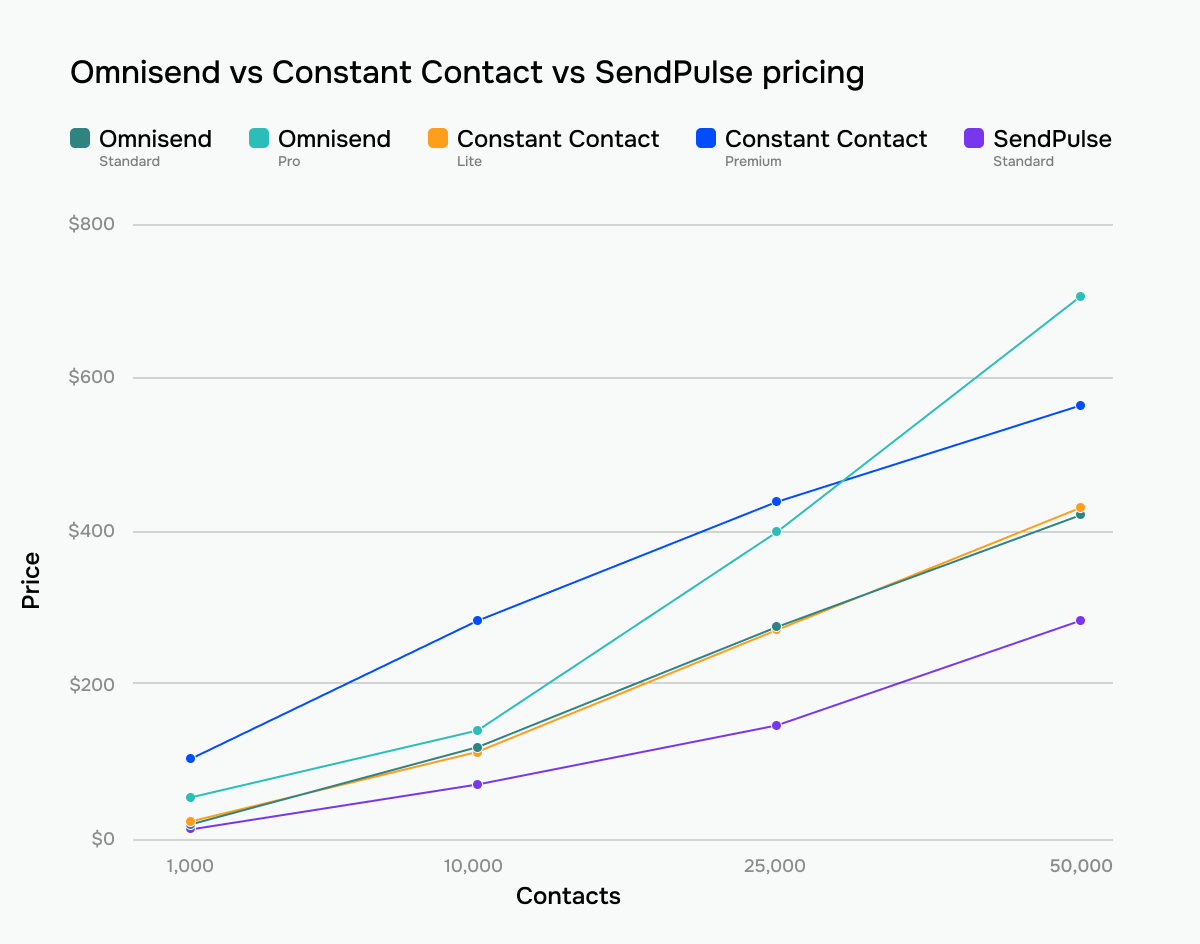 Omnisend, Constant Contact, and SendPulse prices across tiers and contact list sizes
Note: Throughout this comparison, we evaluate features based on the highest-tier plans, meaning the full capabilities each platform can provide.
Ease of use and interface
⭐ Omnisend: 8.5/10 | ⭐ Constant Contact: 8.5/10
The tie suggests that neither Omnisend nor Constant Contact is objectively easier to use; they are just optimized for different audiences. Omnisend feels more natural if eCommerce is central to your marketing, while Constant Contact prioritizes accessibility and a gentler day-to-day experience. In practice, the better choice depends less on the interface itself and more on the type of marketing you plan to do with it.
| Aspect |
Omnisend |
Constant Contact |
Winner |
| First-time experience |
Guided onboarding focused on store connection, sender verification, signup forms, and first campaign |
Guided onboarding focused on sender verification, contacts, branding, and first campaign; starter assets created automatically |
Tie |
| Daily navigation |
eCommerce-focused navigation organized around campaigns, automations, audience, forms, and reporting |
Simpler navigation organized around channels, contacts, reporting, and campaign tools |
Constant Contact |
| Learning curve |
Easy for eCommerce users |
Easy for basic email marketing |
Tie |
| Mobile access |
Browser-based account management only |
Dedicated iOS and Android apps |
Constant Contact |
| Workflow efficiency once mastered |
Optimized for eCommerce marketing with multi-channel campaigns |
Optimized for email and social media marketing |
Omnisend |
| Total score |
8.5/10 |
8.5/10 |
Tie |
But how does all of this translate into real-life use? Here’s what the learning curve with Omnisend and Constant Contact might look like for you and your marketing team.
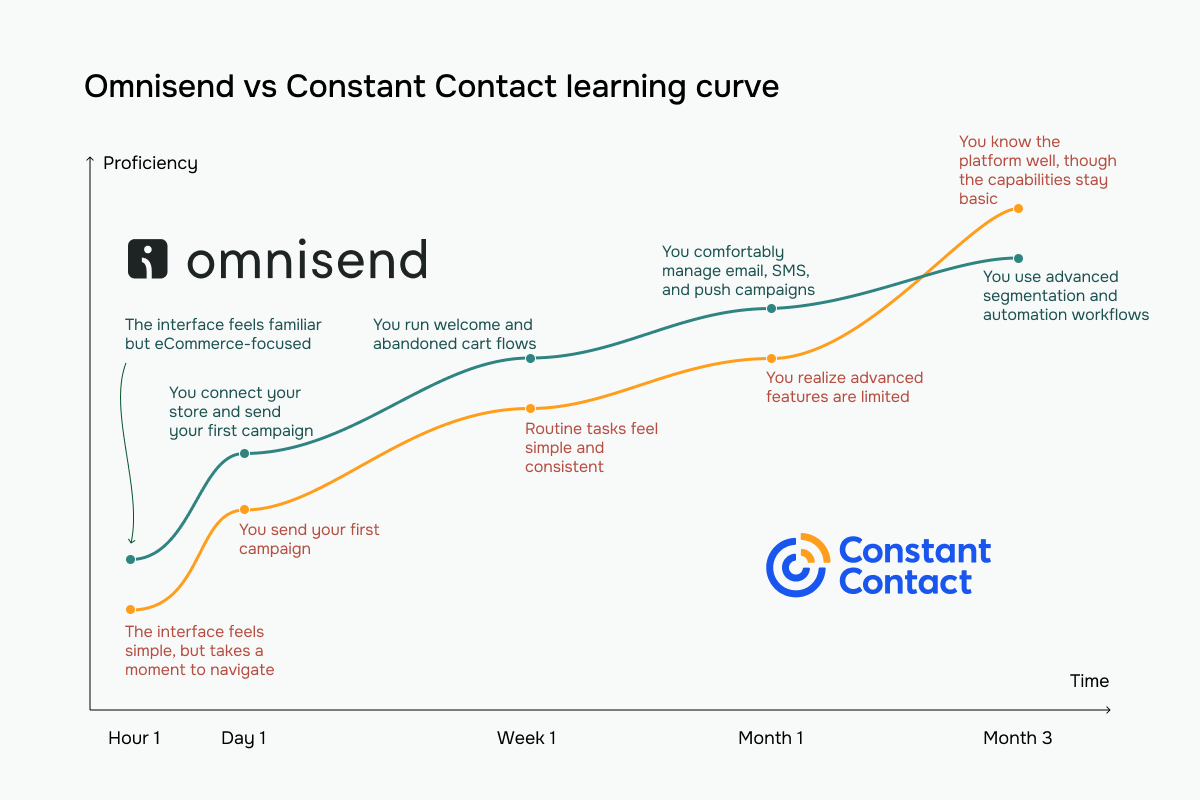 Omnisend vs Constant Contact learning curve based on our testing experience
Email builder and templates
⭐ Omnisend: 8.8/10 | ⭐ Constant Contact: 8.8/10
Neither Omnisend nor Constant Contact managed to pull ahead in the email builder category. Both platforms earned 8.8/10 thanks to strong template libraries, modern editing tools, and useful AI features. What makes them different is their purpose: Omnisend helps online stores sell products, while Constant Contact helps clients engage and communicate with their audiences.
| Aspect |
Omnisend |
Constant Contact |
Winner |
| Templates |
370+ templates organized by goal |
490+ templates organized by industry and campaign type |
Constant Contact |
| Drag-and-drop editor |
Layout-first builder with content blocks, product blocks, and global brand styling tools; HTML block available |
Section-based builder with draggable content blocks, multi-column layouts, and HTML block support |
Tie |
| Notable content blocks |
Discount code, product listing, AI-powered product recommendations |
Event, RSVP, feedback, data table, product |
Omnisend |
| Mobile responsiveness |
Mobile-first templates, mobile preview, and per-block device visibility controls |
Mobile-responsive templates with automatic layout adaptation and preview tools |
Tie |
| AI features |
AI subject line, preheader, and content generation |
AI-generated email, SMS, and social media content; complete email drafts created from prompts |
Constant Contact |
| Sending time optimization |
Automatic local-time delivery based on subscriber time zone |
No automated send-time optimization |
Omnisend |
| Total score |
8.8/10 |
8.8/10 |
Tie |
Here’s what we observed during testing and what you can expect when working with Omnisend and Constant Contact email builders in practice.
Omnisend is built with eCommerce in mind. One thing we particularly liked was the separation between layouts and content blocks, which keeps even complex emails organized and easy to manage. More importantly, the builder includes features that go beyond standard email design, such as block-level content visibility and product recommendations based on customer behavior.
Instead of simply displaying products, Omnisend can recommend recently viewed items or products similar to previous purchases. For online stores, this creates additional personalization opportunities and helps build more relevant eCommerce campaigns without adding much manual work.
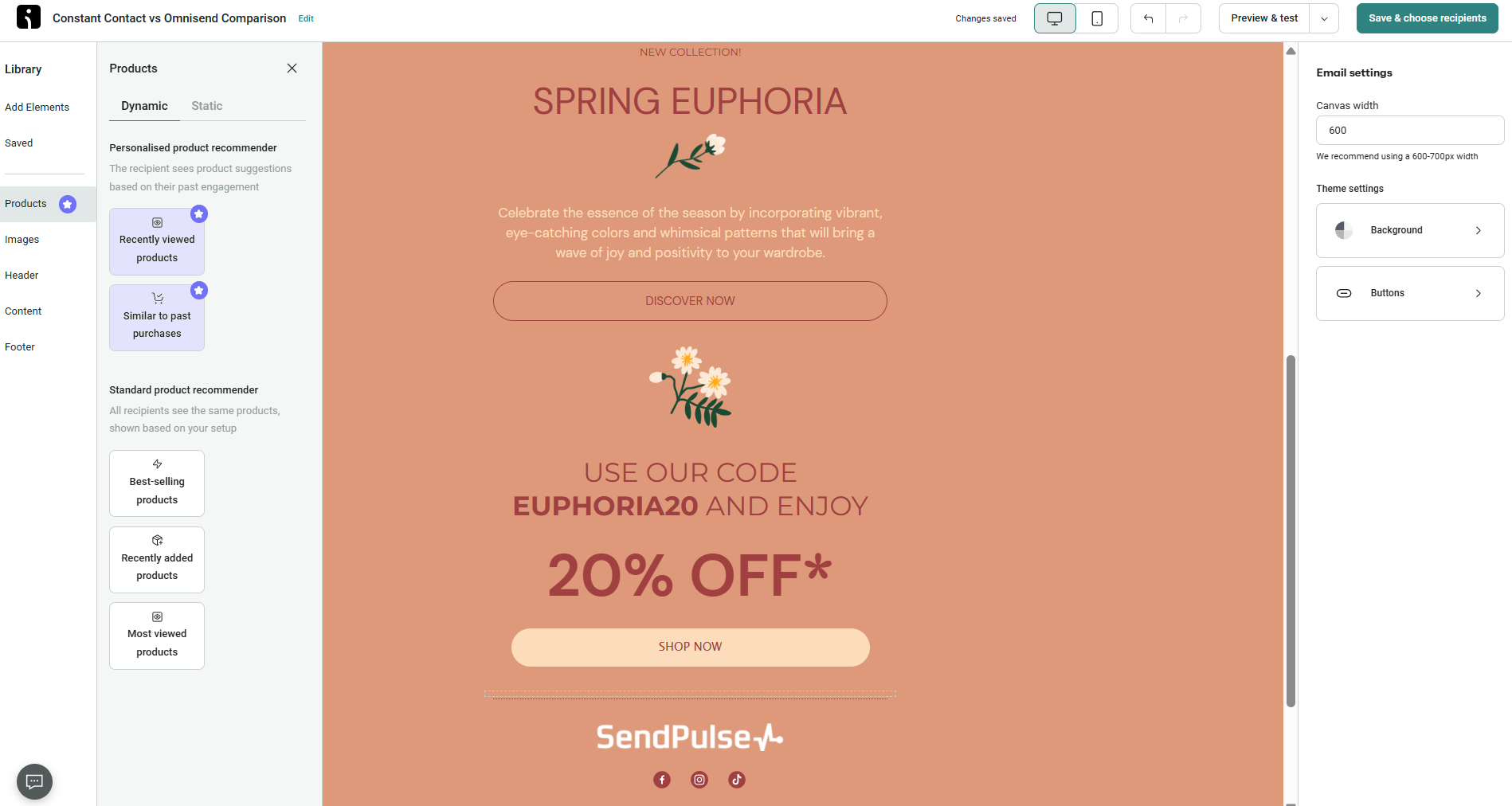 Editing an AI-generated email in Omnisend
Email design in Constant Contact is quite different. Instead of focusing on eCommerce personalization, it emphasizes communication and engagement. During testing, we found several uncommon content blocks, including Event, RSVP, and Feedback, which immediately stood out from what most email builders offer.
The platform’s most distinctive feature is its AI assistant, which generates copy suggestions directly in the editor as you build an email. Combined with the event-focused content blocks, this makes Constant Contact particularly well-suited for clients who use email to inform, engage, and collect responses from their audiences.
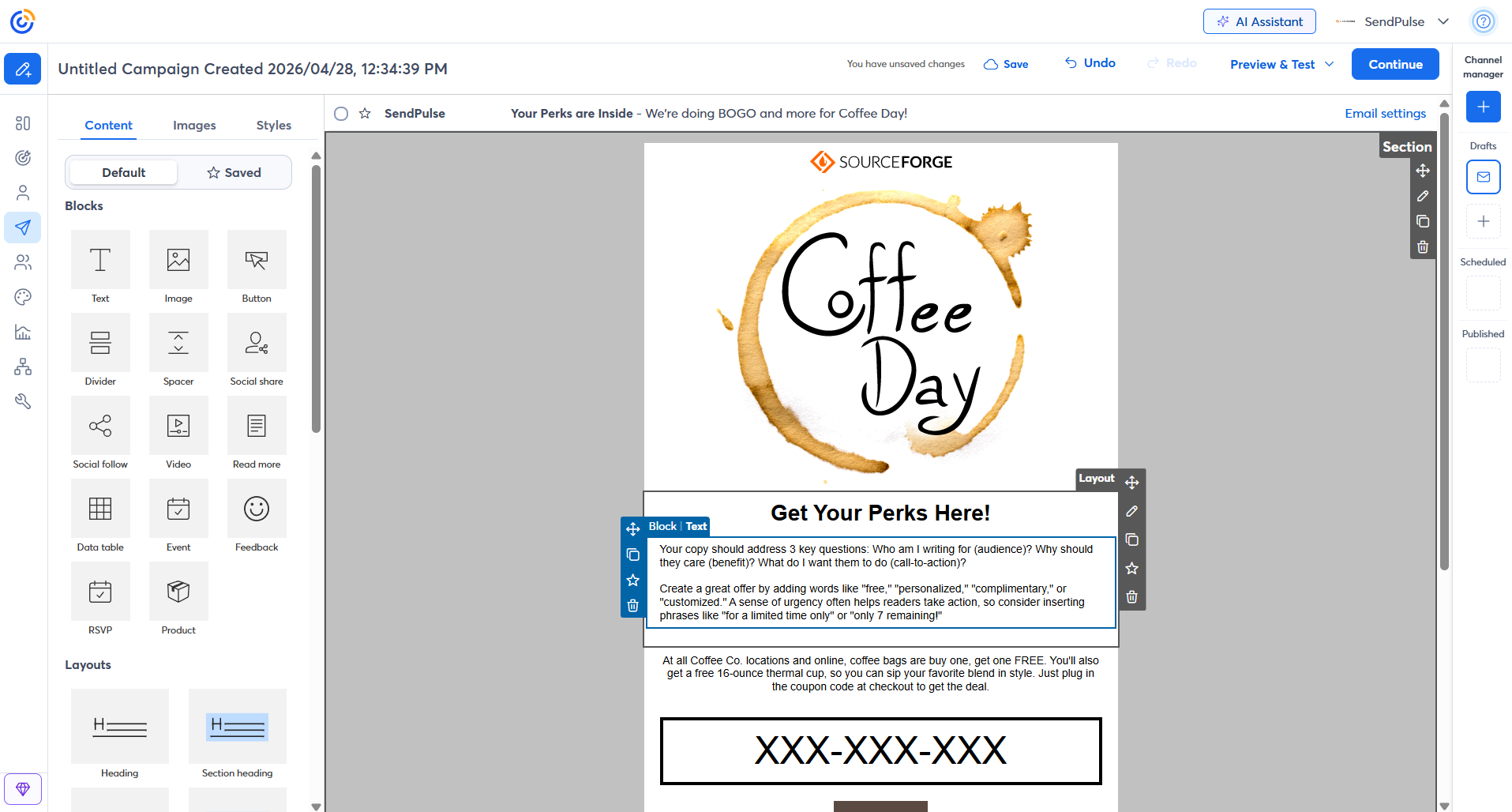 Creating a template in the Constant Contact email builder
The biggest difference between these builders is not how they look but what they are designed to accomplish. As a result, choosing a winner is surprisingly difficult. eCommerce businesses will likely get more value from Omnisend’s personalization features, while nonprofits, associations, and event-driven organizations may find Constant Contact’s specialized content blocks more useful.
Marketing automation
⭐ Omnisend: 9.2/10 | Constant Contact: 5/10
Unlike the email builder category, the comparison of Omnisend and Constant Contact automation capabilities did not end in a close race. Omnisend provides enough depth to support sophisticated marketing as your business grows, whereas Constant Contact remains focused on simpler automation needs. For many small businesses, that may be perfectly sufficient, but if you’re looking to build automation-heavy strategies, your business will likely outgrow Constant Contact much sooner.
| Aspect |
Omnisend |
Constant Contact |
Winner |
| Availability by plan |
Unlimited workflows on all plans; email and push notifications available in every workflow; SMS available on the highest tier |
1 workflow on entry-level paid plans, 3 on mid-tier plans, unlimited on top-tier plans; SMS available on mid-tier and top-tier plans |
Omnisend |
| Automation builder |
Visual workflow builder with messages, delays, splits, audience filters, and exit conditions |
Visual workflow builder with messages, delays, splits, contact actions, shopping actions, and automatic exit rules |
Tie |
| Triggers available |
Signup, segment entry, eCommerce events, date-based triggers, and custom events via API |
Date-based, contact activity, eCommerce activity, and invoice activity triggers |
Omnisend |
| Pre-built automations |
15+ templates for welcome, cart recovery, checkout recovery, post-purchase, reactivation, shipping update, birthday, and other flows |
14 templates for welcome, birthdays, anniversaries, cart recovery, invoice follow-ups, and eCommerce re-engagement flows |
Omnisend |
| Channels supported |
Email, SMS, and push notifications |
Email and SMS |
Omnisend |
| Automation complexity |
Moderate-to-advanced eCommerce automation with audience filters, exit conditions, trigger filters, and event-based logic |
Moderate-to-low automation with splits, delays, contact actions, shopping actions, and automatic exit rules |
Omnisend |
| Total score |
9.2/10 |
5/10 |
Omnisend |
Here’s what we’ve noticed in practice. Omnisend’s automation builder is clearly designed for businesses that rely on customer and purchase data. During testing, we liked how much functionality it packs into a relatively clean interface. The builder supports email, SMS, push notifications, and webhooks in a single workflow, so you can coordinate multiple channels through a single automation.
One of its strengths lies in the trigger system, as Omnisend includes a large library of eCommerce events, from cart activity and purchases to refunds, fulfillment updates, and back-in-stock notifications. Their frequency and flow-collision controls also help prevent subscribers from receiving overlapping automations. Combined with in-flow A/B testing and the ability to edit emails directly inside the automation builder, the result is a sophisticated platform for eCommerce automation.
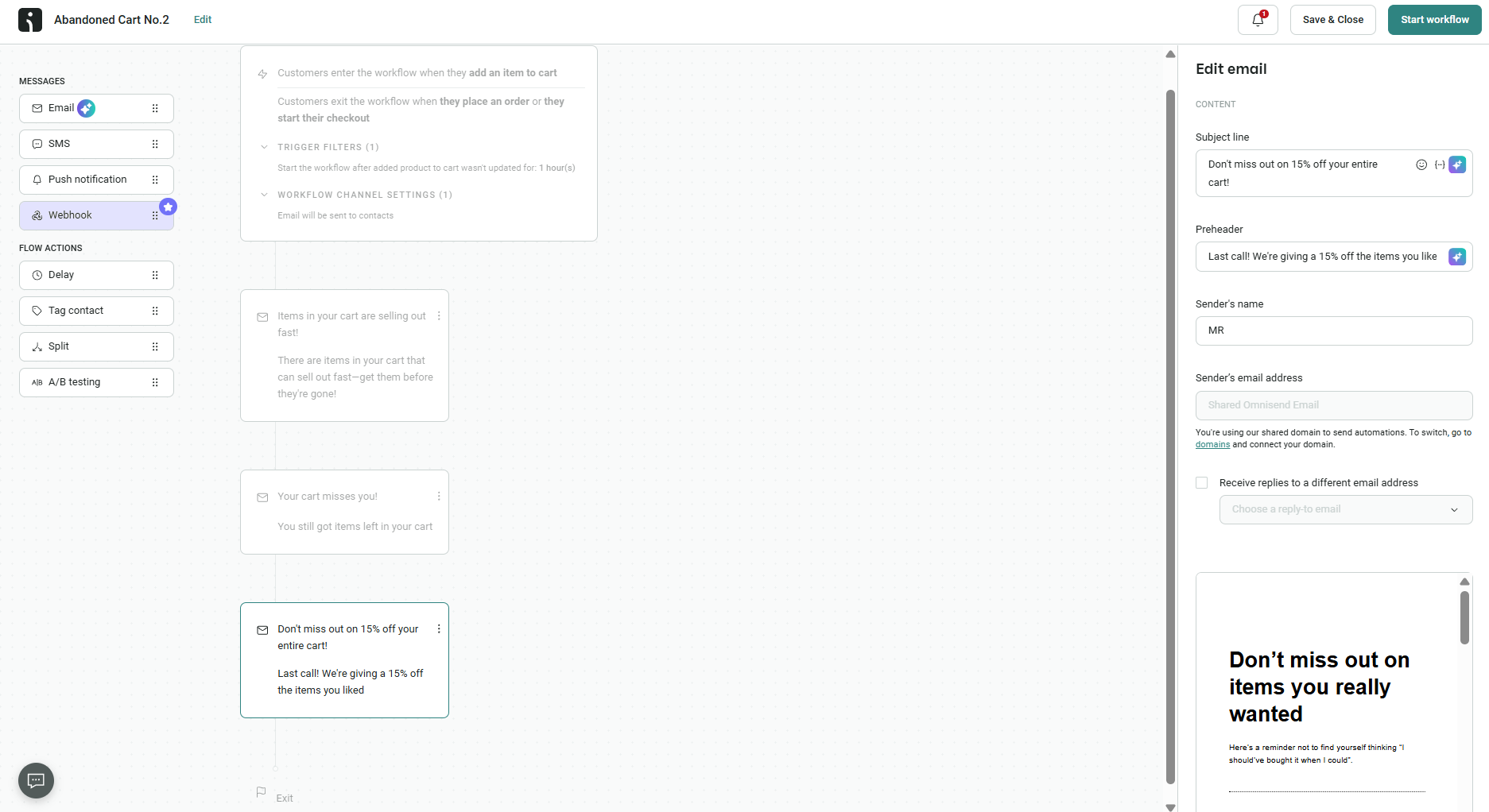 Editing an abandoned cart automation in Omnisend builder
In contrast, Constant Contact offers a much simpler approach to automation. Their builder uses a visual canvas with clearly visible Yes/No branches, making workflows easy to understand at a glance.
The available actions and triggers focus on common business scenarios but not advanced automation. Birthday campaigns, email engagement triggers, contact updates, tags, and list management are all easy to configure, and the builder avoids overwhelming users with options. If you prefer straightforward email sequences to complex customer journeys, that simplicity can be an advantage.
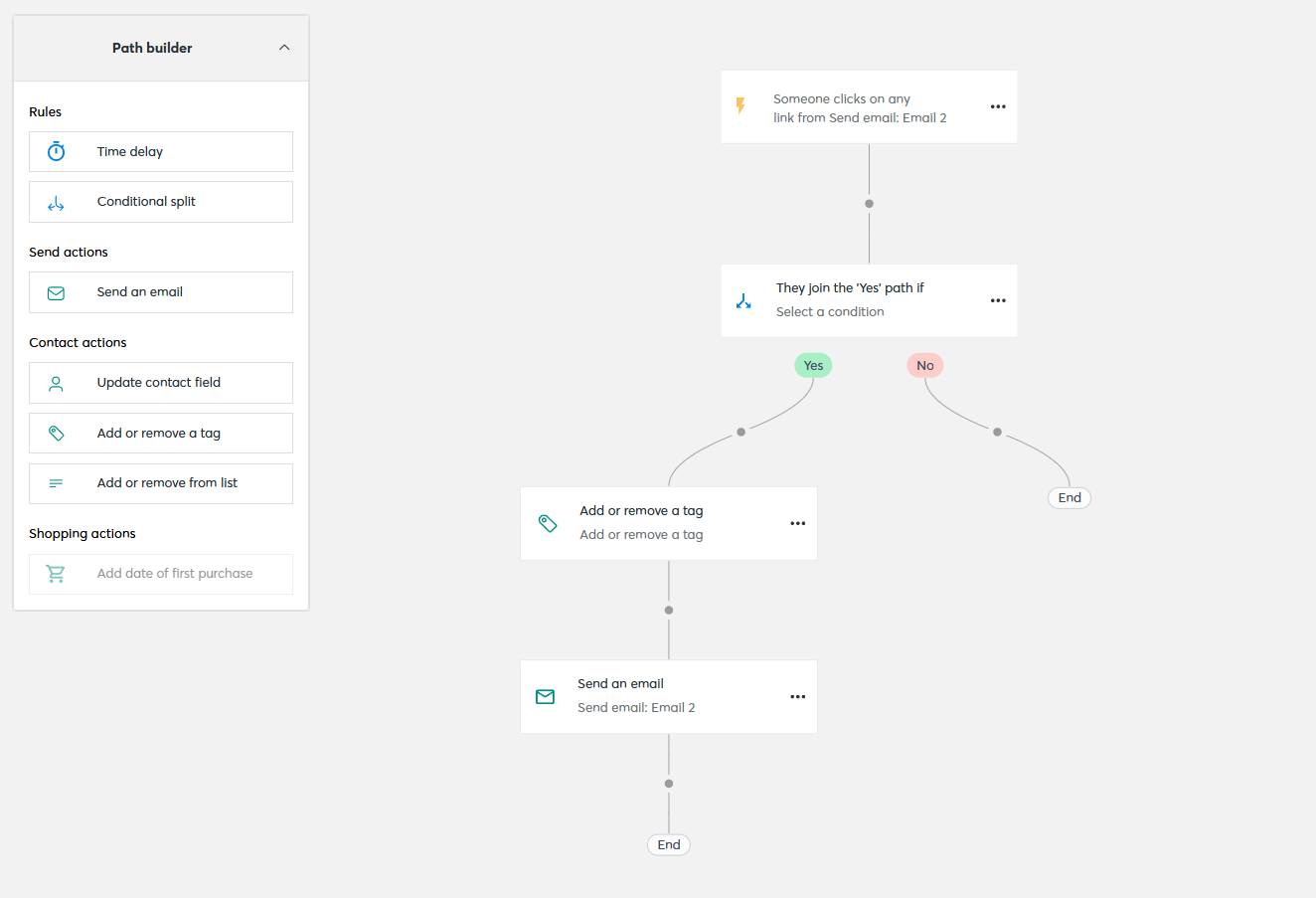 Setting up a welcome automation in Constant Contact
Both platforms connect to the major eCommerce systems. Omnisend offers one-click native integrations with Shopify, WooCommerce, and BigCommerce that sync products, orders, and customer data to power automations and segmentation. Constant Contact also connects to Shopify, WooCommerce, and many other apps through its marketplace, but its integrations don’t pull in the same depth of store data and play a smaller role in the platform overall.
The difference between these automation builders became obvious almost immediately during testing. Omnisend offers a significantly stronger automation builder. Its eCommerce focus places it in a different category from Constant Contact. That said, Constant Contact deserves credit for one thing: its visual branching is easier to read, and its simpler approach may actually be preferable for small businesses that just need reliable email automations without the complexity of a feature-rich builder.
If automation is one of your main priorities, it is worth looking at SendPulse. Alongside a visual automation builder, it includes a built-in CRM system, allowing automations to work directly with deals, contacts, and customer data without relying on a separate tool. Given its lower price point, it can be an interesting alternative if you are looking for advanced automation and customer management on a single platform.
Contact management
⭐ Omnisend: 9.2/10 | Constant Contact: 7/10
Contact management becomes much more important once you move beyond newsletters and start sending campaigns based on customer behavior. That’s one reason eCommerce platforms often invest heavily in audience segmentation – the more precisely you can group customers, the more relevant your automations and campaigns become. It’s therefore not surprising to see Omnisend, a platform built around eCommerce marketing, take the lead in this category.
| Aspect |
Omnisend |
Constant Contact |
Winner |
| Segmentation capabilities |
Dynamic segments with AND/OR logic, multiple filter groups, segment templates, and AI-assisted segment creation |
Dynamic segments with AND/OR logic across contacts, lists, tags, email activity, and eCommerce data; advanced segmentation requires a paid plan |
Omnisend |
| Segmentation criteria |
Contact data, subscription status, tags, campaign activity, eCommerce behavior, website activity, lifecycle stage, and custom events |
Contact data, email activity, list membership, tags, eCommerce activity, and link-click activity |
Omnisend |
| Segment update speed |
Real-time updates as contact data changes |
Updated when contacts change and before each send |
Omnisend |
| AI features for segmentation |
AI segment builder with natural-language prompts and editable segment suggestions |
No AI-based segmentation |
Omnisend |
| Tagging and manual organization |
Tags applied through imports, forms, automations, or manual updates; source tracking and bulk tag management available |
Tags and lists used for organization and targeting; tags applied manually, through imports, or automations |
Omnisend |
| Total score |
9.2/10 |
7/10 |
Omnisend |
The score gap becomes much easier to understand once you start working with both platforms. Constant Contact does a good job of organizing contacts and creating practical audience groups, but Omnisend allows marketers to do much more with the data they collect. As your contact list grows and your targeting becomes more sophisticated, Omnisend gives you noticeably more flexibility.
Signup forms and landing pages
⭐ Omnisend: 8.3/10 | Constant Contact: 6.8/10
The score gap in this category comes down to priorities and not the form design itself. Constant Contact sees signup forms as a useful supporting feature, while Omnisend treats them as an important part of capturing leads. As a result, Omnisend gives you more opportunities to test, optimize, and improve how visitors become subscribers, making it the stronger choice for businesses focused on list growth.
| Aspect |
Omnisend |
Constant Contact |
Winner |
| Types of forms available |
Pop-ups, flyouts, embedded forms, and gamified spin-to-win forms; multi-step forms supported |
Pop-ups, flyouts, banners, and embedded forms |
Omnisend |
| Form builder |
Drag-and-drop builder with customizable fields, consent blocks, reCAPTCHA, double opt-in, automatic tagging, and A/B testing |
Form editor with contact fields, SMS opt-in, consent options, and double opt-in support |
Omnisend |
| Pop-up targeting conditions |
Time on page, scroll depth, exit intent, page visits, URL, location, UTM, audience, device, frequency, and schedule targeting |
Time delay and device targeting |
Omnisend |
| Landing page builder |
Landing pages with customizable fields, signup redirects, scheduling, custom domains, and form analytics |
Signup landing pages with email and SMS capture, list selection, and shareable URLs |
Tie |
| Total score |
8.3/10 |
6.8/10 |
Omnisend |
In practice, we saw that Omnisend’s pop-up builder goes far beyond basic email capture. During testing, we were impressed by the combination of multi-step forms, interactive elements, and targeting controls. Features like wheel of fortune and countdown timers are built directly into the builder and don’t require separate tools or integrations.
What stood out most was the amount of control available behind the scenes. Omnisend allows you to build multi-step flows that collect email and SMS subscribers in separate stages, automatically tag contacts, control how often forms appear, suppress pop-ups for existing subscribers, and even run A/B tests on forms.
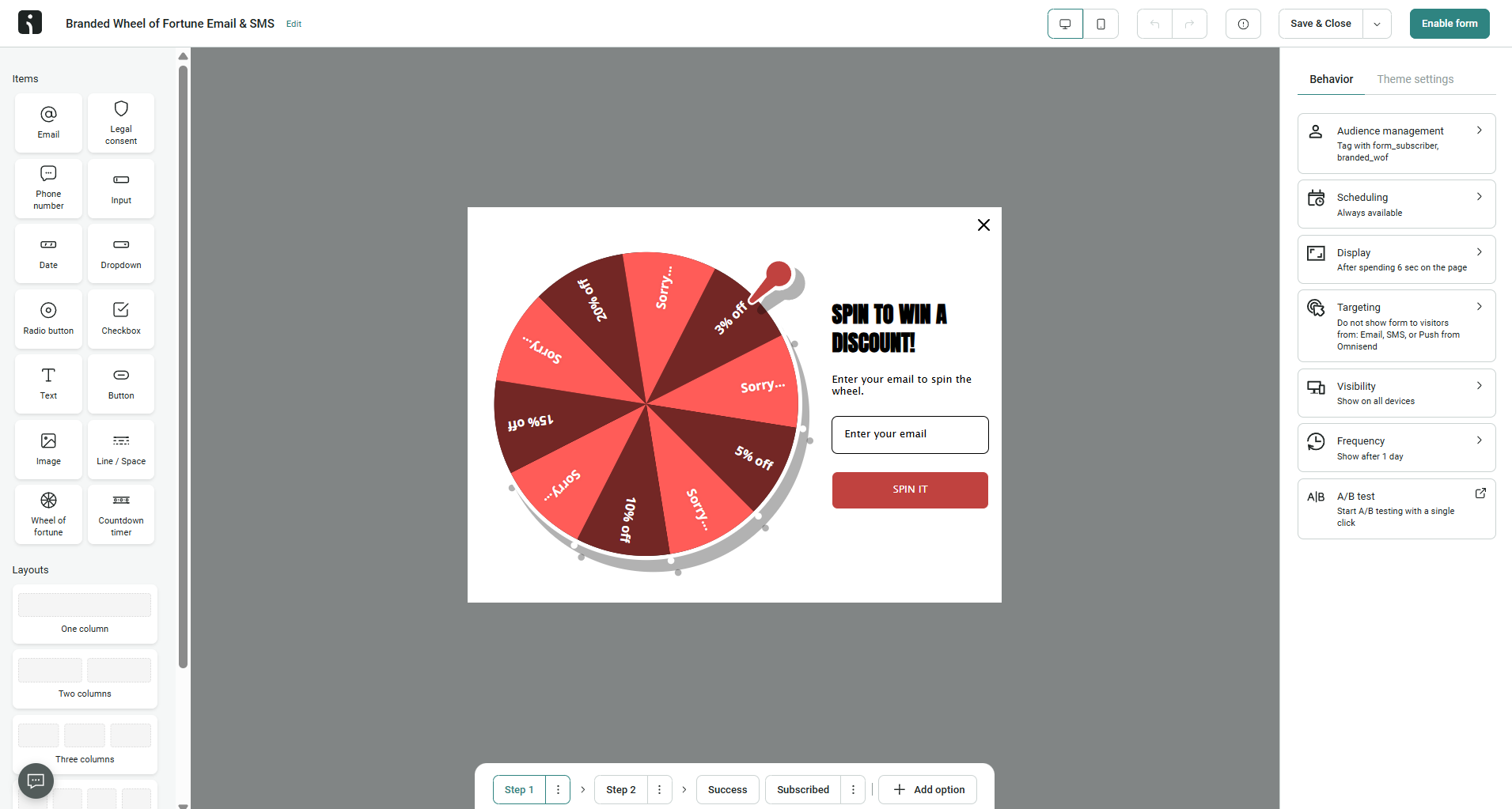 Testing Omnisend’s wheel of fortune pop-up
Constant Contact is, again, much simpler. Its inline signup forms focus on collecting contact information with minimal setup, while its signup landing pages reuse the same content blocks available in the email builder. During testing, we found the experience straightforward and easy to understand, with very little risk of getting lost in settings or configuration options.
The tradeoff is flexibility. Instead of advanced targeting, multi-step flows, or interactive elements, you get basic and quick-to-set-up signup forms and landing pages.
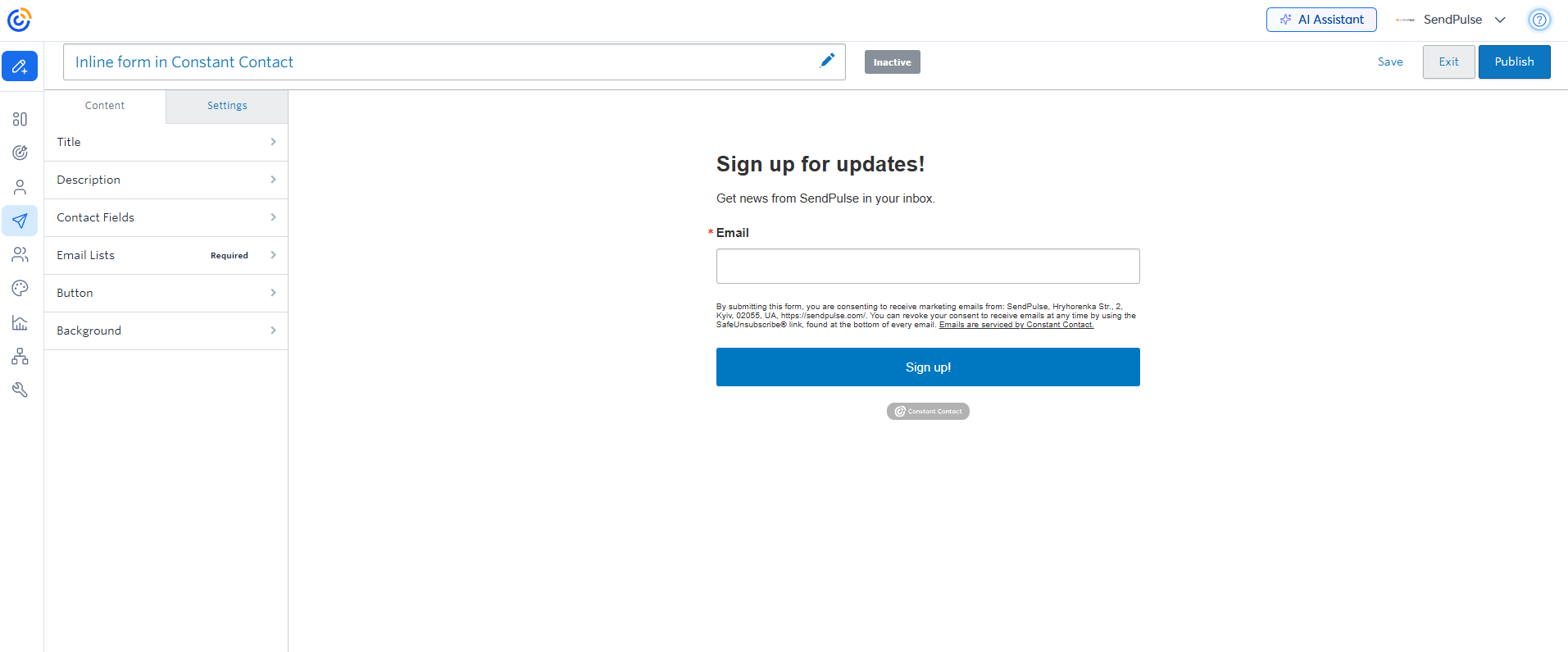 Creating an inline signup form in Constant Contact
Overall, Omnisend offers a stronger builder by a considerable margin. Their subscriber suppression, multi-step email-to-SMS flows, and interactive elements create opportunities that don’t exist in Constant Contact. While Constant Contact’s forms are perfectly adequate for basic list building, Omnisend is built for businesses that actively invest in audience growth and lead generation.
Deliverability
⭐ Omnisend: 9.9/10 | Constant Contact: 7/10
Getting emails delivered is a shared responsibility between the marketer and the platform. Your list quality, sending habits, and subscriber engagement will always play a major role, but the platform should help, not get in your way. Domain authentication, bounce management, list hygiene tools, and deliverability monitoring have become standard expectations – here’s what Omnisend and Constant Contact offer:
| Aspect |
Omnisend |
Constant Contact |
Winner |
| Authentication |
SPF, DKIM, and DMARC supported; guided domain authentication and setup alerts |
DKIM and DMARC supported; domain authentication via CNAME or TXT records |
Tie |
| Deliverability monitoring |
Deliverability dashboard with bounce, complaint, and unsubscribe tracking; list quality alerts |
Campaign-level bounce reporting with detailed bounce categories and list cleanup recommendations |
Omnisend |
| List hygiene |
Automatic bounce suppression, list cleaning tools, and account-level quality controls |
Bounce management guidance, temporary suppression of invalid addresses, and removal recommendations |
Tie |
| Dedicated IP |
Available for high-volume senders who meet eligibility requirements |
Not available |
Omnisend |
| Total score |
9.9/10 |
7/10 |
Omnisend |
Most email marketing platforms offer good to very good deliverability and usually earn 9 points or more in our comparisons, so why does Constant Contact have such a low score? This is due to feedback on Capterra, which explicitly states the platform sometimes has “delivering and spam filtering issues” – a red flag we couldn’t ignore in this comparison. Keep this in mind if you want to choose Constant Contact as your bulk email service.
Reporting and analytics
⭐ Omnisend: 8.2/10 | Constant Contact: 6.5/10
Both platforms offer sufficient reporting to measure campaign performance; however, it appears they have different aims. Constant Contact focuses on how your emails perform, while Omnisend places greater emphasis on how your marketing drives business results. That’s the main reason Omnisend earns the higher score in this category.
| Aspect |
Omnisend |
Constant Contact |
Winner |
| Report coverage |
Campaign, automation, revenue, product, form, deliverability, customer lifecycle, and customer value reporting |
Campaign, automation, form, landing page, event, and social media reporting |
Omnisend |
| Custom reports |
Fixed reporting dashboards with date filtering, comparisons, and API access for external analysis |
Fixed reporting dashboards with email comparison tools and chart exports |
Tie |
| Reporting speed |
Real-time store activity view; campaign and automation reporting updates after sending |
Campaign reporting updates after sending; click heat maps available |
Omnisend |
| Export capabilities |
Reports exportable as CSV or PDF |
Reports exportable as CSV, Excel, PDF, and PNG |
Constant Contact |
| Total score |
8.2/10 |
6.5/10 |
Omnisend |
The reason for the sizeable score gap lies in the different priorities of the two platforms. Omnisend was built for eCommerce businesses, where reporting is expected to connect marketing activity with customer behavior and revenue. This naturally leads to broader analytics capabilities and more opportunities to improve marketing performance.
Customer support
⭐ Omnisend: 8.4/10 | Constant Contact: 7/10
No matter how intuitive a platform is, most users will need help at some point. It may be something simple, such as importing contacts, or something more complex, such as troubleshooting an automation workflow. That assistance may come in the form of a 24/7 chatbot, detailed documentation, or direct access to human support. Here’s what Omnisend and Constant Contact offer.
| Aspect |
Omnisend |
Constant Contact |
Winner |
| Channel availability |
24/7 live chat and email support on all plans |
Live chat and phone support during business hours |
Constant Contact |
| Knowledge base |
Help center, video training, release notes, glossary, and migration guides |
Help center, video tutorials, QuickStart guides, webinars, live training sessions, and community forum |
Omnisend |
| Onboarding assistance |
Guided setup checklist, migration resources, and dedicated onboarding services on higher-tier plans |
Live training sessions, webinars, and video tutorials |
Omnisend |
| Support quality rating on Capterra |
4.6/5 |
4.2/5 |
Omnisend |
| Total score |
8.4/10 |
7/10 |
Omnisend |
The difference in scores comes from more than just support channels. Omnisend receives stronger feedback from real users, suggesting a better overall support experience. We also found Omnisend’s documentation easier to navigate, whereas Constant Contact’s knowledge base, despite being extensive, sometimes contained conflicting information or made simple answers harder to find than they should be.

Join businesses growing with SendPulse
From solo creators to global brands, thousands of customers trust SendPulse to run email campaigns, chatbots, automations, and more — all in one place.
Get started for free
Your decision checklist
We’ve covered pricing, email creation, automation, segmentation, reporting, support, and everything in between. Now it’s time to turn all that information into a decision. Use the guide below to identify the platform that best aligns with your business needs.
| Decision area |
Omnisend
is a better fit if… |
Constant Contact
is a better fit if… |
| Business type |
🟩 You run an eCommerce store and need email, SMS, and push automation built around purchase behavior, cart activity, and product data. |
🟧 You run a small business, nonprofit, or local operation that needs email alongside social media posting, event marketing, and SMS in one place. |
| Budget expectations |
🟩 You expect strong value for money and advanced marketing capabilities. |
🟧 You are comfortable paying similar prices for a simpler feature set. |
| Automation needs |
🟩 You need eCommerce-specific automation – abandoned cart, browse abandonment, post-purchase, and cross-sell flows. |
🟧 You need simple date-based or activity-based sequences – welcome emails, birthday messages, and invoice follow-ups. |
| Analytics focus |
🟩 You need eCommerce revenue reporting, customer lifetime value, lifecycle maps, product performance, and live store activity tracking. |
🟧 You need campaign comparison charts, click heat maps, social media reporting, and event attendance tracking alongside standard email metrics. |
| Team setup |
🟩 You work in an eCommerce marketing team that needs multi-channel automation, AI segmentation, and deep store data integration. |
🟧 You manage a small team or work solo and need a straightforward platform that covers email, social, SMS, and events from a single dashboard. |
Keep in mind that migrating between email marketing platforms takes time, effort, and often money, so this is a decision you’ll likely live with for several years. As you evaluate your options, think not only about your current needs but also about where your business is heading – the features you’ll need in a year may be just as important as the ones you need today.
Final verdict and recommendations
⚖️ Final scores: Omnisend – 8.6/10 | Constant Contact – 7.5/10
So, overall, would we recommend Omnisend? Absolutely. It is a strong platform with a very clear focus. If you’re running an online store, there’s a good chance you’ll find it both efficient and enjoyable to work with.
If Omnisend doesn’t feel like the perfect fit, take a look at Klaviyo. It is usually more expensive, but it also offers some of the deepest eCommerce segmentation, personalization, and reporting capabilities available today.
Would we recommend Constant Contact? Not really. Despite being one of the oldest email marketing platforms on the market (founded in 1995), it lacks a clear area where it truly stands out from modern competitors. It works, but we can’t say: “This is exactly why you should choose Constant Contact.”
Depending on your needs, there are several alternatives worth considering:
- Kit – if you’re a creator, blogger, educator, or newsletter-focused business. It’s affordable, easy to use, and built around audience growth.
- SendPulse – if you want something more universal. In addition to email marketing and automation tools, it includes CRM, chatbots, and web push notifications, making it a practical all-in-one platform for many businesses.
- Mailchimp – if you prefer a platform with a large ecosystem, extensive integrations, and a huge user community. It remains one of the most recognizable names in email marketing for a reason.
So yes, we would recommend Omnisend. As for Constant Contact, there are simply too many platforms that do the same job better, cheaper, or both.