It may seem that GetResponse and Omnisend are not even direct competitors. GetResponse is older, broader, and tries to cover almost every marketing scenario possible. Omnisend is much more focused and heavily centered around eCommerce. And that’s exactly what made this comparison interesting for us – the deeper we tested the platforms, the more obvious the difference in their approach became.
So this comparison quickly stopped being just “which platform has more features” and turned into an evaluation of two very different ideas of what modern email marketing can look like.
How we scored this comparison: This review was created by the SendPulse team. As an email marketing platform ourselves, we work in the same space as the tools we test, which also means we understand the field deeply.
Each platform was evaluated across nine categories using our independent methodology. Pricing (25%), ease of use (20%), and email and automation features (15% each) carry the most weight because they affect daily workflows the most. All scores reflect hands-on testing and analysis as of June 2026.
TL;DR Quick GetResponse vs Omnisend comparison
In short, GetResponse is an all-in-one marketing platform best for funnels, webinars, and mixed workflows, while Omnisend is an eCommerce-focused tool built for store revenue and retention. The table below shows how they compare across pricing and features – and if any aspect matters most for your decision, click it to jump straight to that section.
| Category |
GetResponse |
Omnisend |
Winner |
| Best for |
Broad marketing workflows, funnels, webinars, and flexible automation |
eCommerce marketing, retention, and revenue-focused campaigns |
Depends on the use case |
| Pricing |
8.4/10
Better long-term balance between features and cost |
8/10
More expensive, especially as lists grow |
GetResponse |
| Ease of use |
8/10
Broader but slightly more complex platform |
8.5/10
More guided and eCommerce-oriented experience |
Omnisend |
| Email design |
9/10
Strong all-around builder with tight integration across marketing workflows |
8.8/10
More visual control and eCommerce-focused email design |
GetResponse |
| Automation |
9/10
Flexible automation across many marketing scenarios |
9.2/10
Deep eCommerce and multi-channel automation |
Omnisend |
| Contact management |
8/10
Broad segmentation for mixed marketing workflows |
9.2/10
Advanced eCommerce-focused audience targeting |
Omnisend |
| Forms and pages |
8.5/10
Stronger landing pages and lead generation tools |
8.3/10
Stronger pop-ups and eCommerce subscriber capture |
GetResponse |
| Deliverability |
9/10
Good deliverability infrastructure, yet some negative feedback from users |
10/10
Excellent deliverability and eCommerce-focused deliverability practices |
Omnisend |
| Reporting |
8/10
Flexible and analytical reporting system |
8.2/10
Revenue-focused eCommerce reporting and live store insights |
Omnisend |
| Customer support |
7.1/10
More self-serve support |
8.4/10
More guided onboarding and accessible support |
Omnisend |
| G2/Capterra rating |
4.3/4.2 |
4.6/4.7 |
Omnisend |
| Final score |
8.2/10 |
8.6/10 |
Omnisend |
Looks like the scores make the winner obvious – Omnisend, right? Well, not so fast. There are plenty of nuances here, and choosing between these two platforms is much more complicated than simply comparing numbers. To make the right decision, you’ll need to look deeper into how the platforms work.
GetResponse vs Omnisend pricing and feature differences
How we tested: We signed up for both platforms and spent several weeks in June 2026 testing them in nine different areas. We built email campaigns, set up multi-step automations, created signup forms and pop-ups, checked out template libraries and AI content tools, and compared reporting dashboards side by side. For support quality, we examined real user feedback on Capterra. All screenshots in this article were captured during our hands-on evaluation.
This comparison turned out to be less about features and more about philosophy. GetResponse behaves like a broad marketing ecosystem that happens to include email marketing. Omnisend behaves like a revenue engine built specifically for eCommerce. And almost every feature inside both platforms reflects that difference. Keep reading to find out more about their pricing and feature differences.
Pricing plans
⭐ GetResponse: 8.4/10 | Omnisend: 8/10
Disclaimer: Pricing changes frequently. These figures are accurate as of June 25, 2026. Always verify final costs on official pricing pages.
The choice of an email marketing platform almost always starts with pricing because it doesn’t really matter how powerful a tool is if you simply can’t afford it long-term. And in the case of GetResponse and Omnisend, the pricing difference becomes very noticeable quite fast.
We also added pricing for the SendPulse Standard plan to the table to add another point of reference for pricing. The comparison makes it clear that both GetResponse and SendPulse remain in the more affordable end of the market, while Omnisend positions itself much closer to the premium end of the pricing range.
| Contacts |
GetResponse, Starter |
GetResponse, Creator |
Omnisend, Standard |
Omnisend, Pro |
SendPulse, Standard |
| Free plan |
500 contacts; 2,500 emails |
250 contacts; 500 emails |
500 contacts; 15,000 emails |
| 1,000 |
$19 |
$72 |
$20 |
$59 |
$18 |
| 10,000 |
$81 |
$132 |
$132 |
$150 |
$78 |
| 25,000 |
$175 |
$255 |
$282 |
$400 |
$159 |
| 50,000 |
$305 |
$429 |
$413 |
$715 |
$281 |
| Note: All prices reflect monthly billing. |
And here are all the prices shown in a graph for those of you who prefer visuals over tables packed with numbers.
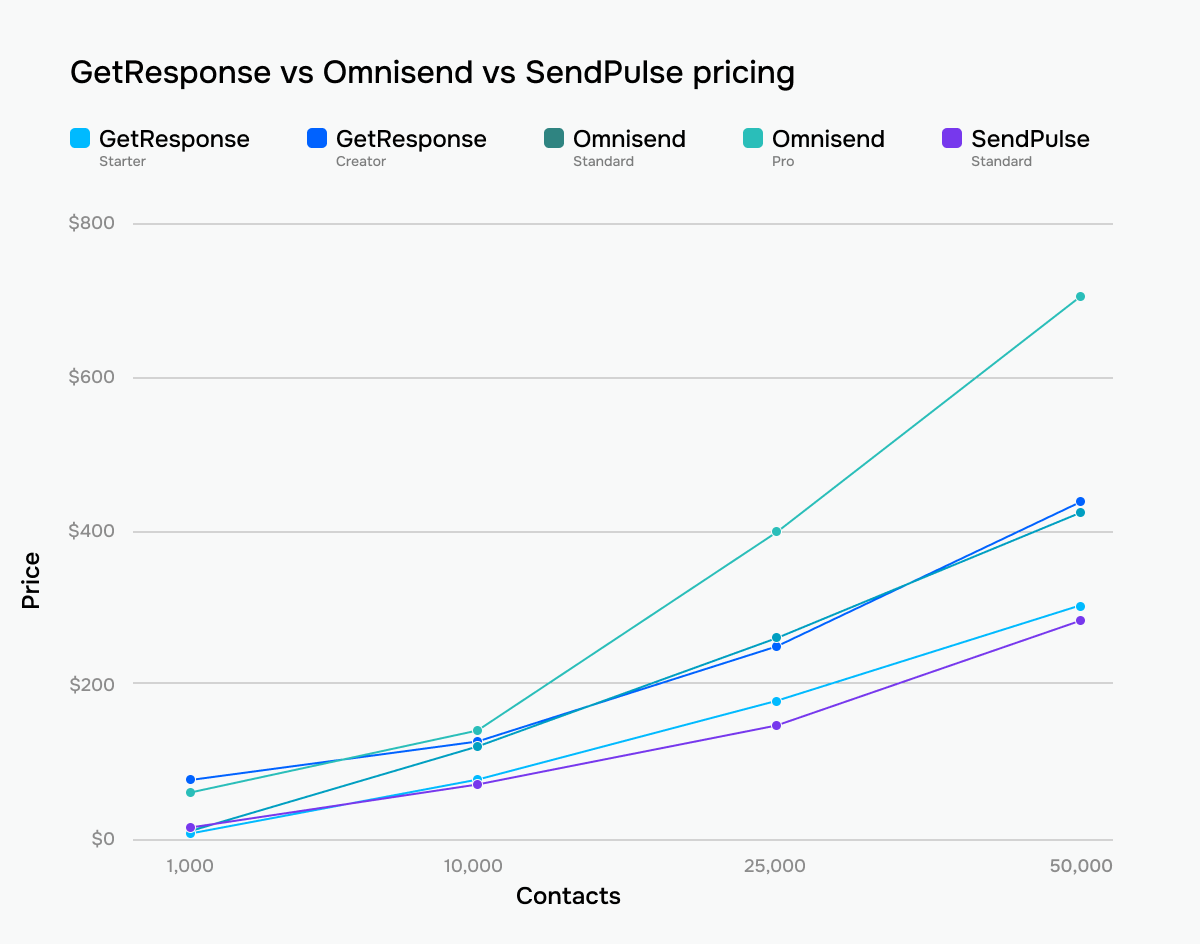 GetResponse vs Omnisend vs SendPulse prices across tiers and contact list sizes
What you actually get per plan: GetResponse’s Starter covers core email marketing with AI tools and basic automation, while its eCommerce tools (abandoned cart recovery, promo codes, revenue reports) sit on the Marketer plan and higher. The Creator plan actually unlocks webinars, courses, paid newsletters, and the full automation suite. Omnisend’s Standard, meanwhile, lets you send 12× your list size and includes core automation and eCommerce tools, while Pro unlocks unlimited emails and the option to add Global SMS credits.
Both platforms reward upfront commitment — GetResponse takes 18% off annual billing, while Omnisend lets you pay three months upfront to save 30%. Each also has a free plan, so the monthly figures above are the ceiling, not the floor. That said, where you land within that range matters, and the two platforms pull apart quickly as you scale.
Omnisend’s entry-level pricing is fair, especially considering its strong eCommerce focus. But as your contact list grows, the platform becomes significantly more expensive than GetResponse on mid and higher tiers. Moreover, its free plan turned out to be among the weakest of all the platforms we tested in this comparison series. So, while Omnisend’s higher price is partially justified by its eCommerce depth, from an email marketing pricing perspective alone, it becomes much less competitive.
Ease of use and interface
GetResponse: 8/10 | ⭐ Omnisend: 8.5/10
Both GetResponse and Omnisend perform well in terms of ease of use, and the difference mostly comes down to the type of marketer each platform was built for. Omnisend is easier to navigate if your business already revolves around an online store. The platform constantly guides you toward eCommerce-focused workflows, so product campaigns, store integrations, subscriber collection, and sales-driven automations feel natural almost immediately.
GetResponse, meanwhile, is more universal in scope. It takes longer to fully understand because the platform tries to cover many different marketing scenarios at once: email marketing, funnels, webinars, websites, automations, and more. That makes it slightly less approachable at first but also more flexible for businesses that need something beyond eCommerce-focused workflows.
| Aspect |
GetResponse |
Omnisend |
Winner |
| First-time experience |
AI-assisted onboarding generates initial marketing assets from setup questions |
Guided onboarding checklist focused on store connection, signup forms, and first campaign setup; eCommerce training course available immediately |
Omnisend |
| Daily navigation |
Feature-heavy navigation with emails, automations, funnels, websites, webinars, chats, and reports |
Cleaner eCommerce-focused navigation with campaigns, automations, audience, forms, and reports |
Omnisend |
| Learning curve |
Moderate for basic email marketing; steeper with funnels and advanced automation |
Easier for eCommerce workflows; more difficult without an online store; support and training available on all plans |
Omnisend |
| Mobile access |
Dedicated iOS and Android apps for campaign monitoring and contact management |
No dedicated marketer mobile app |
GetResponse |
| Workflow efficiency once mastered |
Efficient multi-channel workflows with AI setup, templates, bulk actions, and API access |
Efficient eCommerce workflows with multi-channel campaigns, resend automation, templates, bulk actions, and API access |
Tie |
| Total score |
8/10 |
8.5/10 |
Omnisend |
Here’s a more practical look at how your team may adapt to each platform over time:
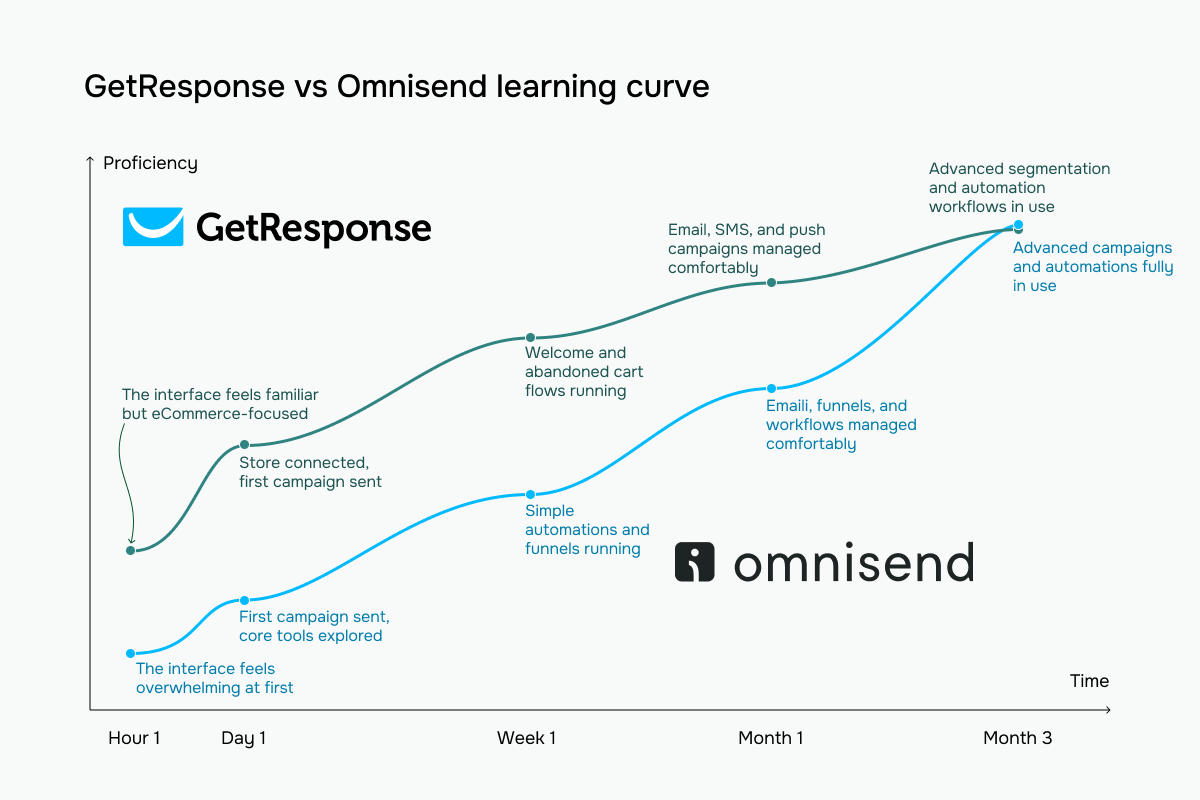 GetResponse (navy) vs Omnisend (green) learning curve based on our testing experience
Email builder and templates
⭐ GetResponse: 9/10 | Omnisend: 8.8/10
Both GetResponse and Omnisend offer genuinely strong email builders. Omnisend will probably feel more enjoyable for those of you who care about the visual side of eCommerce emails. It offers more freedom, more direct control over styling, and, overall, feels more modern and retail-oriented during the design process itself.
And yet, GetResponse still slightly wins in this category because its builder fits more naturally into the rest of the platform. The editor integrates better with automations, webinars, segmentation, and dynamic content workflows, making it a stronger all-around tool.
| Aspect |
GetResponse |
Omnisend |
Winner |
| Templates |
260+ templates organized by use case |
370+ templates you can filter by goal |
Omnisend |
| Drag-and-drop editor |
Section-based editor with multi-column layouts, reusable blocks, global style controls, autosave, and custom CSS |
Layout-first editor with drag-and-drop content blocks, eCommerce-focused product sections, global brand styling, and HTML support |
Tie |
| Notable content blocks |
Product blocks, promo codes, countdown timers, webinars, and courses |
Product listings, product recommendations, and discount codes |
GetResponse |
| Mobile responsiveness |
Automatic mobile adaptation with per-element visibility controls and mobile preview |
Mobile-first templates with device visibility controls and desktop/mobile previews |
Tie |
| AI features |
AI campaign generation, subject lines, and body content creation |
AI subject lines, preheaders, body text generation, and AI-powered product recommendations |
GetResponse |
| Sending time optimization |
Engagement-based send-time optimization and local-time delivery for campaigns and automations |
Local-time delivery optimization for email campaigns only |
GetResponse |
| Total score |
9/10 |
8.8/10 |
GetResponse |
Now let’s see how all this looks and feels in practice.
GetResponse’s email builder is very familiar if you’ve ever worked inside a traditional email marketing platform. The interface is predictable, the block structure is clean, and most things behave exactly the way you expect them to. The builder focuses on speed and consistency, not deep visual customization.
Product blocks, countdown timers, webinars, surveys, dynamic content, and reusable sections are all there, making GetResponse especially practical for those of you who run segmented campaigns, funnels, webinars, or automation-heavy workflows. The strongest part is probably how smoothly the builder works alongside other platform tools – if you already use GetResponse’s automations, lists, or CRM tools, everything feels connected and coherent.
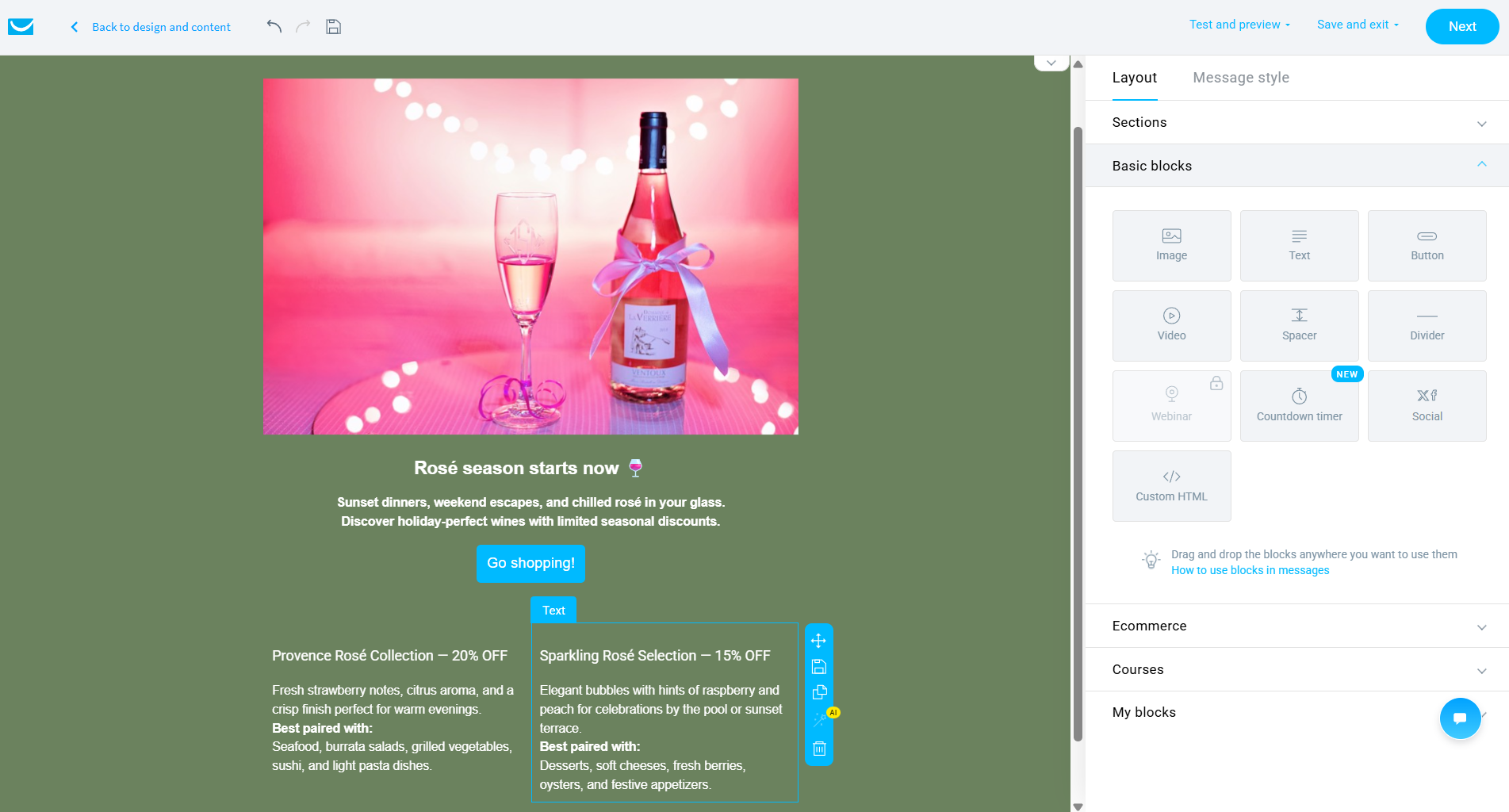 GetResponse email builder during testing
Omnisend’s builder approaches email design from a clearly eCommerce-focused perspective. Product recommendations, discount blocks, menus, and product listings are treated as core email elements rather than optional add-ons hidden somewhere in the interface. But the more interesting difference is the level of design control. Omnisend offers much finer control over typography and spacing: independent padding values, letter spacing, line height, and detailed button styling are all directly available without touching code.
It also supports GIFs directly inside templates – the visual on the screenshot is actually a GIF – which we surprisingly hadn’t encountered before while testing email marketing platforms for this comparison series.
Altogether, the builder feels less like a generic newsletter editor and more like a tool designed specifically for polished retail emails.
 Omnisend email builder – hands-on look at the block library and email settings panel
The difference between the two platforms is more about your priorities. GetResponse focuses on marketing workflows and ecosystem consistency, while Omnisend clearly prioritizes eCommerce presentation and visual control.
So if email is just one piece of your marketing workflow, GetResponse will be more comfortable. If your emails are closely tied to products, storefront aesthetics, promotions, and eCommerce branding, Omnisend will probably feel more satisfying to work with.
Marketing automation
GetResponse: 9/10 | ⭐ Omnisend: 9.2/10
Automation is another category where the difference between GetResponse and Omnisend depends less on raw power and more on the type of marketing each platform was built for. Both automation builders are genuinely capable, but they clearly focus on different workflows.
Omnisend feels stronger for eCommerce automation specifically. In fact, to properly test its automation system, we first had to connect an online store because the automation builder simply does not appear until a shop is linked to the account. That alone says a lot about the platform’s priorities.
GetResponse feels more versatile. Its automations fit better within mixed marketing workflows that involve funnels, webinars, lead generation, and audience nurturing, beyond eCommerce alone. Here are some other details:
| Aspect |
GetResponse |
Omnisend |
Winner |
| Availability by plan |
Free and lower tiers heavily limit workflows and automation complexity; higher tiers unlock full automation capabilities |
Unlimited automation workflows and triggers available across all plans |
Omnisend |
| Automation builder |
Visual builder with branching paths, parallel workflows, and cross-workflow triggers |
Visual builder with split conditions, audience filters, exit conditions, trigger debugging, and workflow A/B testing |
Tie |
| Triggers available |
Engagement, eCommerce, website activity, webinars, courses, and consent-based triggers |
eCommerce-heavy triggers, including cart activity, product views, checkout events, segments, and custom API events |
Omnisend |
| Pre-built automations |
46 workflow templates |
40 eCommerce workflows |
GetResponse |
| Channels supported |
Email, SMS, and push notifications |
Email, SMS, and push notifications |
Tie |
| AI features |
No AI automation builder |
No AI automation builder |
Tie |
| Automation complexity |
Advanced automation logic with loops, scoring, dynamic filters, and cross-workflow triggers |
Advanced eCommerce automation with behavioral splits, audience filters, retrospective triggers, and custom events |
Tie |
| Total score |
9/10 |
9.2/10 |
Omnisend |
Here’s what it all means in practice: GetResponse’s automation builder is created for flexibility. Its freeform canvas allows deeply customized, multi-branch workflows in which email subscribers and anonymous website visitors can coexist within the same automation and be routed to different actions, channels, and conditions.
That email/web split is probably the platform’s most interesting idea. A person can first interact with your website as an anonymous visitor – triggering pop-ups, push notifications, or other web actions – and then continue through the same automation after subscribing to your emails. So instead of separating “website visitors” and “email contacts” into different systems, GetResponse lets you work with both inside one workflow.
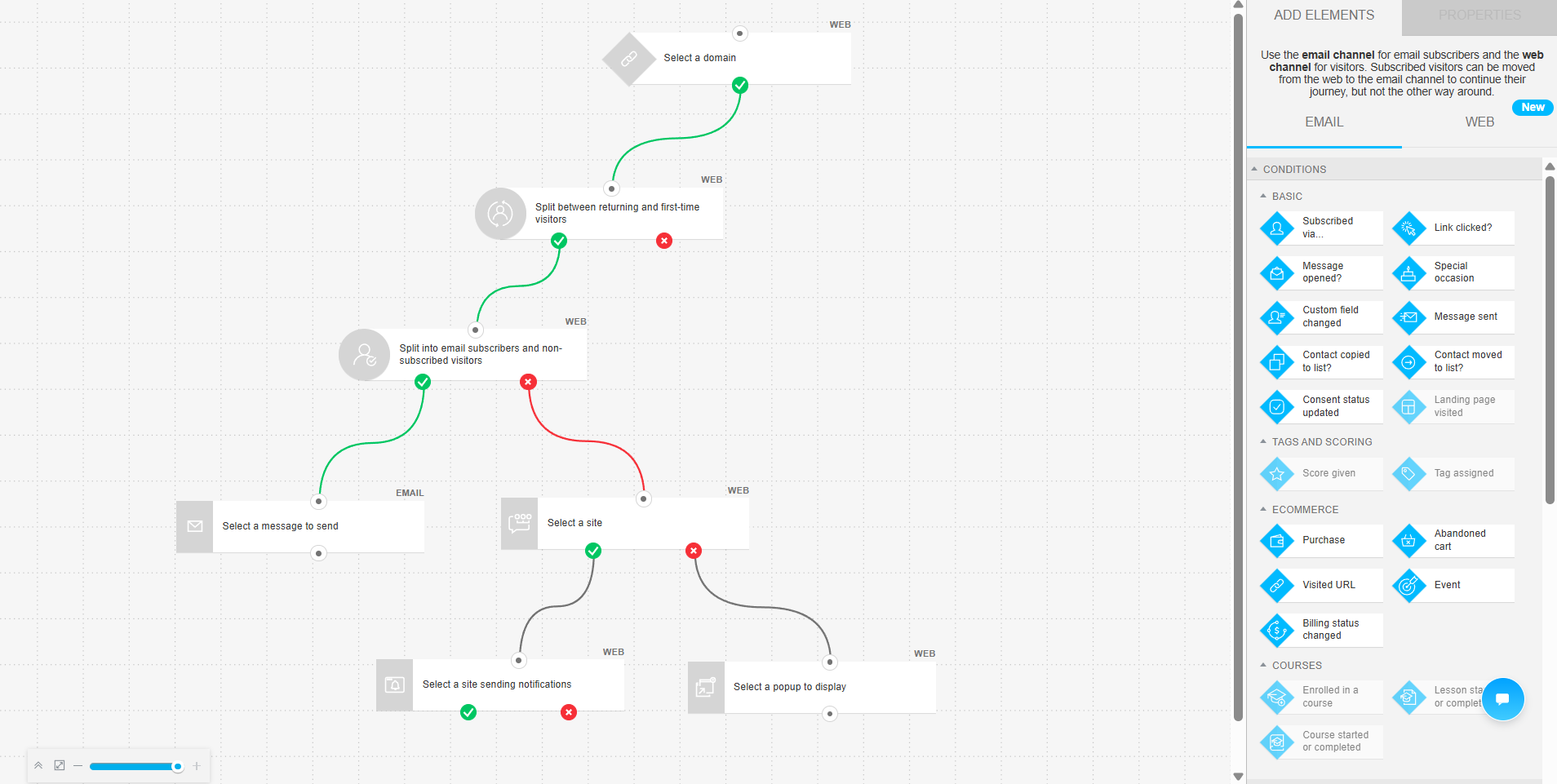 Hands-on testing of the GetResponse automation builder
Omnisend looks much more well-structured. The vertical canvas stays clean and readable even in larger workflows, which makes automations easier to audit and manage. But the more revealing detail is how deeply the builder assumes you run an online store. Cart value splits, product views, abandoned carts, and purchase events are treated as native workflow conditions.
Even the workflow design reflects this eCommerce focus: email settings, UTM controls, exit conditions, and A/B testing all live directly inside the automation nodes, reducing unnecessary context switching.
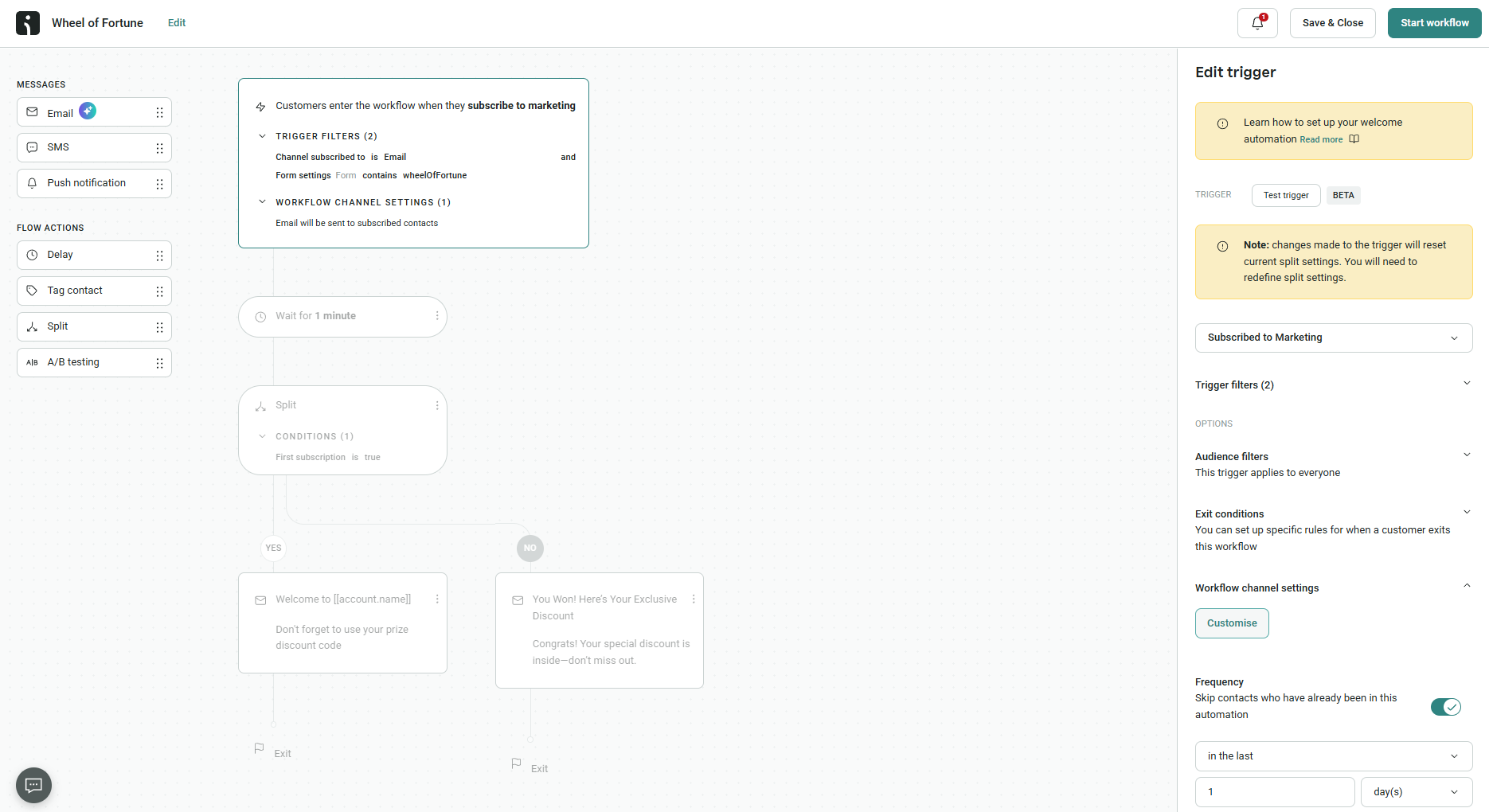 Figuring out eCommerce automations in Omnisend automation builder
Omnisend is narrower, but within eCommerce specifically, it often feels more polished, efficient, and natural because the entire builder was designed around store behavior from the very beginning. GetResponse spans far more business models, including SaaS, courses, newsletters, webinars, lead generation, but that breadth doesn’t mean it ignores eCommerce: it connects natively to Shopify and WooCommerce, syncs products and orders, and runs abandoned cart recovery, promo code sync, and a product recommendation engine right inside its automations.
Contact management
GetResponse: 8/10 | ⭐ Omnisend: 9.2/10
As is often the case with email marketing platforms, strong automation usually goes hand in hand with more advanced contact management. Since Omnisend offers deep, highly capable eCommerce automation, its segmentation system is noticeably stronger, ultimately giving it a 1.2-point advantage over GetResponse in the contact management category.
| Aspect |
GetResponse |
Omnisend |
Winner |
| Segmentation capabilities |
Dynamic rule-based segments with AND/OR logic and automatic updates |
Dynamic rule-based segments with unlimited filters, prebuilt templates, and AI-assisted segment creation |
Omnisend |
| Segmentation criteria |
Contact data, engagement, tags, scoring, webinars, eCommerce activity, consent, and API events |
Contact data, campaign engagement, eCommerce behavior, website activity, channel subscriptions, tags, and custom API events |
Omnisend |
| Segment update speed |
Continuous automatic updates as contact conditions change |
Mostly real-time updates; slight delay possible for segment-based automation filters |
Omnisend |
| AI features for segmentation |
No AI-based segmentation |
AI segment builder using natural language prompts |
Omnisend |
| Tagging and manual organization |
Tags managed through imports, automations, and bulk actions |
Tags managed through imports, signup forms, automations, and bulk actions; source tags assigned automatically |
Tie |
| Total score |
8/10 |
9.2/10 |
Omnisend |
Omnisend is built with eCommerce in mind, and it shows. Almost everything within its segmentation system centers on shopping behavior and customers’ intent to buy. What’s more, the AI segment builder makes advanced eCommerce targeting feel much easier and less technical.
GetResponse is a broader platform. It still offers strong segmentation, but it is designed for many different kinds of marketing workflows, like newsletters, webinars, lead generation, etc. Because of that, it is more flexible and less centered around online store activity.
Signup forms and landing pages
⭐ GetResponse: 8.5/10 | Omnisend: 8.3/10
The difference in this category, once again, is in how your business uses forms. Omnisend is stronger when forms are tightly connected to an online store: pop-ups, subscriber capture, discount offers, and eCommerce-focused targeting are clearly the platform’s natural environment. GetResponse, meanwhile, once again shows its broader marketing ambitions. Its landing page builder is powerful enough to work as a complete lead generation tool on its own instead of simply supporting pop-ups and signup forms.
Here are some details about the GetResponse vs Omnisend forms and pages:
| Aspect |
GetResponse |
Omnisend |
Winner |
| Types of forms available |
Pop-ups, slide-ins, floating bars, and embedded forms |
Pop-ups, flyouts, embedded forms, spin-to-win pop-ups, teasers, and multi-step forms |
Omnisend |
| Form builder |
Visual drag-and-drop builder with automated brand styling, consent fields, and double opt-in support |
Drag-and-drop builder with multiple field types, GDPR and reCAPTCHA support, automatic brand styling, and switchable form formats |
Tie |
| Pop-up targeting conditions |
Time delay, scroll depth, exit intent, inactivity, device targeting, page targeting, scheduling, and eCommerce-based triggers |
Time on page, exit intent, page visits, URL targeting, location, UTM parameters, audience exclusion, device targeting, scheduling, and frequency controls |
Omnisend |
| Landing page builder |
Dedicated landing page builder with 100+ templates, A/B testing, AI setup, analytics, and marketing integrations |
Simpler hosted landing pages connected to forms with basic content blocks and signup tracking |
GetResponse |
| Total score |
8.5/10 |
8.3/10 |
GetResponse |
So, GetResponse wins here basically due to the landing pages it has, while Omnisend keeps them very basic. Let’s check how the platforms compare in practice in a category where they are much closer – signup forms.
GetResponse’s signup form builder will seem familiar if you’ve already worked inside the platform. The builder uses the same clean visual style and editing controls as GetResponse’s email builder, so there’s almost no learning curve. But that familiarity also reveals the platform’s philosophy: the form builder is not treated as a standalone marketing tool. It’s essentially a straightforward lead capture surface with two screens – the form itself and a thank-you message. There are no complex states, multi-step flows, or advanced behavioral layers inside the builder. The upside is speed and accessibility. You can create a functional signup form very quickly without getting lost in settings or configuration.
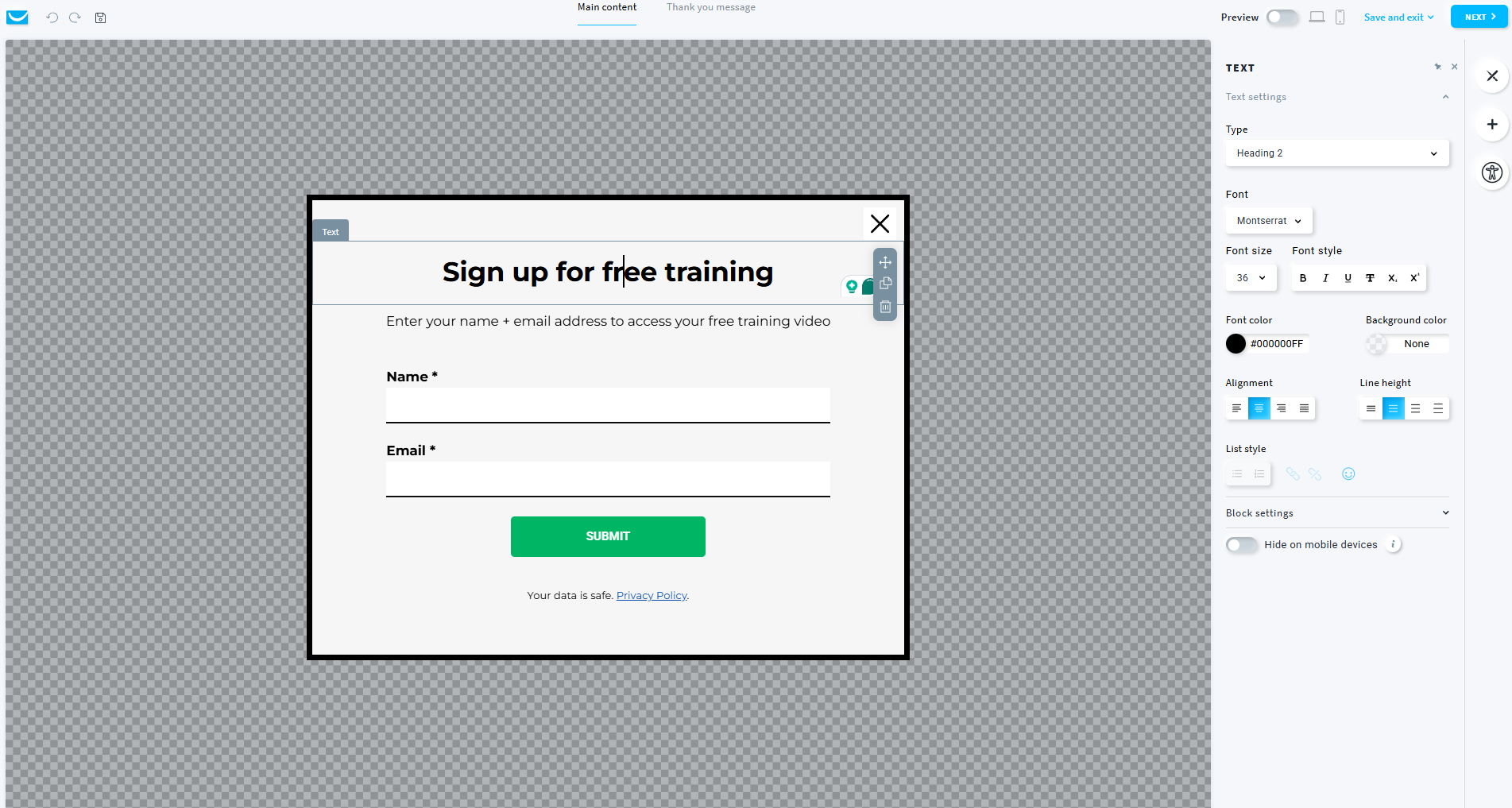 Customizing a simple GetResponse signup form to test the builder
Omnisend’s builder behaves like a mini acquisition funnel. The interface supports multiple independently editable steps, including separate states for new subscribers and already-subscribed visitors – a thoughtful detail that prevents existing contacts from repeatedly seeing the same signup experience.
The builder also reflects Omnisend’s eCommerce and SMS focus. Phone number collection with pre-written TCPA-compliant consent text is built directly into the flow, discount delivery becomes a designed visual element rather than plain text, and countdown timers can be added directly to the success state to push immediate purchases. Even gamified spin-to-win mechanics are treated as native form blocks and not isolated pop-up templates.
On top of that, the builder automatically handles tagging, subscriber exclusion, A/B testing, frequency settings, and targeting rules inside the same interface.
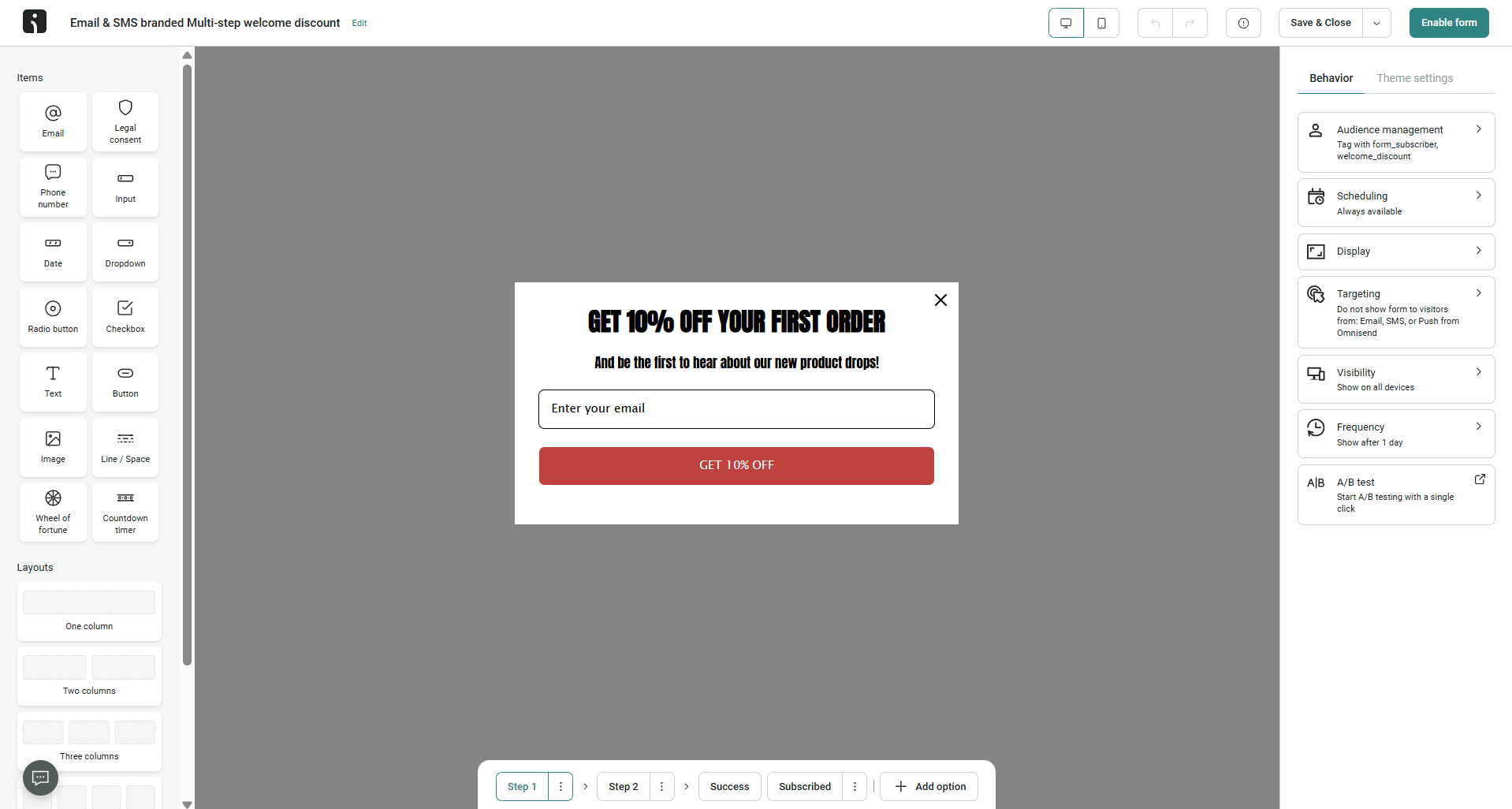 Working on the Omnisend-powered signup form
What’s the conclusion? GetResponse sees forms as a clean way to collect leads and feed them into multi-step customer journeys. Omnisend treats forms as conversion-focused eCommerce acquisition funnels designed to collect emails, grow SMS lists, distribute discounts, manage compliance, and immediately influence purchasing behavior.
So, for a standard newsletter signup form, GetResponse is simpler and faster. But for eCommerce brands actively optimizing subscriber acquisition and post-signup conversions, Omnisend’s builder would be preferable.
Deliverability
GetResponse: 9/10 | ⭐ Omnisend: 10/10
When you use modern bulk email services, deliverability often depends more on your own practices: how well you segment audiences, how clean your lists are, how frequently you send campaigns, and how engaged your subscribers are. Still, the platform itself also matters, so we paid attention to what GetResponse and Omnisend actually bring to the table in terms of deliverability.
| Aspect |
GetResponse |
Omnisend |
Winner |
| Authentication |
SPF, DKIM, and DMARC supported; automatic setup for supported DNS providers; emails sent through shared domain without custom authentication |
SPF, DKIM, and DMARC supported with guided setup, DNS verification, setup alerts, and domain warm-up recommendations |
Omnisend |
| Deliverability monitoring |
Bounce and complaint metrics; shared infrastructure monitored internally |
Bounce and list quality warnings inside the account; automatic sending suspension for unhealthy lists |
Omnisend |
| List hygiene |
Automatic suppression of bounces and spam complaints; suppression lists applied during import |
Automatic suppression, built-in list cleaning guidance, inactive contact management, and account warnings for poor list quality |
Omnisend |
| Dedicated IP |
Available from 50,000+ emails/week with setup and warm-up support |
Available from 300,000+ emails/week with account manager approval and warm-up guidance |
GetResponse |
| Total score |
9/10 |
10/10 |
Omnisend |
On paper, both platforms look genuinely strong in deliverability and could probably qualify for a 10 out of 10. So why does GetResponse fall behind here? The reason is that independent review platforms where real users share their long-term experiences with software, like Capterra, mention “email deliverability challenges” among GetResponse’s drawbacks. And that’s too serious a signal to ignore. Because of that, we decided to lower GetResponse’s score by a full point in the deliverability category.
Reporting and analytics
GetResponse: 8/10 | ⭐ Omnisend: 8.2/10
Understanding how well your email marketing actually performs is crucial for data-driven businesses, especially in eCommerce. And because reporting is so closely tied to revenue tracking and sales performance, Omnisend, as an eCommerce-focused platform, takes the lead in this category. Here’s exactly why:
| Aspect |
GetResponse |
Omnisend |
Winner |
| Report coverage |
Campaigns, automations, contacts, forms, landing pages, webinars, and eCommerce activity |
Campaigns, automations, revenue, products, forms, deliverability, customer lifecycle, and real-time store activity |
Omnisend |
| Custom reports |
Custom report builder with filters, scheduling, shareable links, and CSV/PDF export |
Fixed dashboards with date filtering and comparison tools; API available for deeper analysis |
GetResponse |
| Reporting speed |
Reports update progressively; scheduled and on-demand reporting available |
Real-time store activity tracking; progressively updated campaign and automation reports |
Omnisend |
| Export capabilities |
CSV, XLSX, and PDF |
CSV and PDF |
GetResponse |
| Total score |
8/10 |
8.2/10 |
Omnisend |
For Omnisend, reporting is all about eCommerce: revenue attribution, customer lifecycle tracking, product performance, and live store activity are deeply integrated into the reporting experience.
GetResponse is more balanced and analytical. Its reporting system is better suited for marketers who need custom reports, scheduled reporting, and deeper campaign analysis across different marketing workflows.
Customer support
GetResponse: 7.1/10 | ⭐ Omnisend: 8.4/10
It’s not always sunshine and rainbows when you start working with new software – sometimes you need explanations, troubleshooting, or simply human advice. And that’s where customer support becomes important. Here’s what both platforms offer in this category:
| Aspect |
GetResponse |
Omnisend |
Winner |
| Channel availability |
Email and live chat; 24/7 chatbot; phone support on enterprise plans only |
24/7 email and live chat support; no phone support |
GetResponse |
| Knowledge base |
Help center with guides, tutorials, videos, and marketing courses |
Help center with onboarding collections, migration guides, glossary, release notes, and email marketing course |
Omnisend |
| Onboarding assistance |
AI-assisted onboarding setup; self-serve migration and onboarding guides; dedicated onboarding for enterprise plans |
Guided setup checklist for all users; migration assistance and dedicated onboarding/account managers for higher plans |
Omnisend |
| Support quality rating on Capterra |
4/5 |
4.6/5 |
Omnisend |
| Total score |
7.1/10 |
8.4/10 |
Omnisend |
This category ended up being one of the clearest wins in the entire comparison. Omnisend is simply more supportive toward its users: onboarding is more guided, support is easier to access, and the platform overall gives the impression that helping users succeed is treated as part of the product itself and not an extra service layer around it.
GetResponse is not bad in customer support by any means, but compared side by side, it feels noticeably more self-serve. So if strong onboarding, accessible support, and fast help during setup or migration matter a lot to your business, Omnisend is the stronger platform here by a fairly significant margin.

Join businesses growing with SendPulse
From solo creators to global brands, thousands of customers trust SendPulse to run email campaigns, chatbots, automations, and more — all in one place.
Get started for free
Your decision checklist
By now, you most probably already know what to choose as your email marketing platform, especially considering how different GetResponse and Omnisend are in terms of their positioning and overall philosophy. But just to be absolutely sure you’re making the right choice, here’s one final quick checklist:
| Decision area |
GetResponse
is a better fit if… |
Omnisend
is a better fit if… |
| Business type |
? You run a broader marketing operation with funnels, webinars, lead generation, or mixed workflows beyond eCommerce. |
? You run an eCommerce business focused on store sales, retention, and customer lifecycle marketing. |
| Budget expectations |
? You want strong marketing functionality at a more balanced long-term price. |
? You are comfortable paying more for deeper eCommerce-focused functionality. |
| Automation needs |
? You need flexible multi-purpose automations across different marketing scenarios. |
? You need revenue-focused eCommerce automations tied to store behavior and multi-channel campaigns. |
| Analytics focus |
? You need customizable reports and comprehensive campaign analytics. |
? You care most about revenue attribution, product performance, and live store insights. |
| Team setup |
? Your team is comfortable learning a wider in scope platform with more self-serve workflows. |
? Your team values guided onboarding, accessible support, and faster eCommerce-oriented setup. |
If three or more of your answers point toward one of the platforms, you’ve probably found your hero! Still, before making the final choice, try to think not only about what your business needs today, but also about how you plan to grow in the future. Switching email marketing platforms later is usually both time- and money-consuming, so it’s better to choose the right option from the very beginning.
Final verdict and recommendations
⚖️ Final scores: GetResponse – 8.2/10 | Omnisend – 8.6/10
And still, what if neither GetResponse nor Omnisend felt absolutely perfect for your business? Well, luckily, the email marketing market is huge, and there are plenty of other strong platforms worth considering. Here are some alternatives you may want to look at:
- Choose SendPulse if you want an affordable all-in-one platform that combines email marketing, automation, CRM, chatbots, web push, landing pages, and even online courses inside a single ecosystem.
- Check out Klaviyo if you’re deep into eCommerce and want extremely detailed customer data, predictive analytics, and some of the strongest eCommerce automation on the market.
- Look at ActiveCampaign if advanced automation is your priority and you want sophisticated workflows, CRM-driven marketing, and powerful segmentation without moving fully into enterprise pricing.
Overall, would we recommend GetResponse as a flexible and fairly universal email marketing platform? Probably yes. It’s capable, broad, and covers many different marketing scenarios well – even though some competitors outperform it in individual areas like automation depth, eCommerce specialization, or pricing.
Would we recommend Omnisend? Yes – but only for eCommerce businesses. Outside online retail, the platform starts to lose some of its biggest strengths, and in many cases, a more universal and affordable platform will simply make more sense.