You know what MailerLite and Omnisend have in common besides email marketing? They both started in Lithuania. Today, one is headquartered in California and the other in London, but both platforms trace their roots back to the same small Baltic country. That’s where the similarities largely end.
Over the years, the two products evolved in very different directions. MailerLite became a broadly applicable email marketing platform known for its affordability and simplicity. Omnisend became increasingly focused on eCommerce and invested more of its product development in that area.
Today, the two platforms have far more differences than similarities. And after spending weeks testing them side by side, we found that choosing between them is often less about features and more about the type of business you’re running.
How we scored this comparison: This review was created by the SendPulse team. As an email marketing platform ourselves, we work in the same space as the tools we test, which also means we understand the field deeply.
Each platform was evaluated across nine categories using our independent methodology. Pricing (25%), ease of use (20%), and email and automation features (15% each) carry the most weight because they affect daily workflows the most. All scores reflect hands-on testing and analysis as of June 2026.
TL;DR Quick MailerLite vs Omnisend comparison
Here’s a brief summary of what we discovered during the weeks of testing MailerLite and Omnisend. If any category plays an important role in your decision, click it to jump directly to the part in the article where we examine it in detail.
| Category |
MailerLite |
Omnisend |
Winner |
| Best for |
General-purpose email marketing across multiple industries |
eCommerce businesses focused on customer behavior and sales growth |
Depends on the use case |
| Pricing |
8.8/10
No longer the obvious pricing leader, but still highly competitive |
8/10
Higher pricing justified by eCommerce-focused capabilities |
MailerLite |
| Ease of use |
9/10
Clean, intuitive interface with a gentle learning curve |
8.5/10
User-friendly but more complex due to broader feature depth |
MailerLite |
| Email design |
8.6/10
Fast, content-focused builder with strong design consistency |
8.8/10
More advanced builder with deeper personalization and product merchandising |
Omnisend |
| Automation |
7.5/10
Solid automation for newsletters, courses, and lead nurturing |
9.2/10
Advanced customer journey automation built around shopping behavior |
Omnisend |
| Contact management |
8/10
Straightforward segments and groups for everyday marketing |
9.2/10
Rich customer profiles with extensive behavioral and eCommerce data |
Omnisend |
| Forms and pages |
8.5/10
Strong balance of forms, pop-ups, and landing pages |
8.3/10
More advanced pop-up functionality and lead capture flows |
MailerLite |
| Deliverability |
9.8/10
Excellent deliverability foundations and list hygiene tools |
9.9/10
Excellent deliverability foundations with stronger monitoring capabilities |
Omnisend |
| Reporting |
7.8/10
Flexible reporting with custom report builder |
8.2/10
Broader business and revenue analytics for online stores |
Omnisend |
| Customer support |
7.8/10
Highly rated support with strong self-service resources |
8.4/10
Better support availability and onboarding assistance |
Omnisend |
| G2/Capterra rating |
4.6/4.7 |
4.6/4.7 |
Tie |
| Final score |
8.4/10 |
8.6/10 |
Omnisend |
The final scores show a balanced comparison. MailerLite and Omnisend excel in different areas, but neither platform has a decisive advantage across the board. One particularly interesting finding comes from user reviews – MailerLite and Omnisend have virtually identical overall ratings on both G2 and Capterra. That’s uncommon in software comparisons and suggests that, despite their differences, customers are generally just as satisfied with one platform as with the other.
In other words, this isn’t a comparison between a good platform and a bad one, but an evaluation of two equally good platforms built for different audiences.
MailerLite vs Omnisend pricing and feature differences
How we tested: We signed up for both platforms and spent several weeks in May and June 2026 testing them in nine different areas. We built email campaigns, set up multi-step automations, created signup forms and pop-ups, checked out template libraries and AI content tools, and compared reporting dashboards side by side. For support quality, we examined real user feedback on Capterra. All screenshots in this article were captured during our hands-on evaluation.
This comparison is based on our hands-on experience with both MailerLite and Omnisend, as well as information publicly available on their websites and in their documentation. We evaluated the platforms by completing the types of tasks email marketers deal with on a daily basis.
To make the comparison easier to follow, we begin with the categories that tend to have the biggest impact on platform selection and gradually move toward those that are typically less decisive. Let the battle begin.
Pricing plans
⭐ MailerLite: 8.8/10 | Omnisend: 8/10
Disclaimer: Pricing changes frequently. These figures are accurate as of June 17, 2026. Always verify final costs on official pricing pages.
Competing with MailerLite on pricing used to be really hard, as it was one of the most affordable email marketing platforms. That changed on June 16, 2026, when MailerLite introduced new pricing and limits. Omnisend is still more expensive, especially as your contact list grows, but MailerLite’s new pricing is the reason it no longer holds a strong 10 out of 10 in this category.
| Contacts |
MailerLite,
Comfort |
MailerLite,
Power |
Omnisend,
Standard |
Omnisend,
Pro |
Winner |
| Free plan |
250 contacts; 2,500 emails |
250 contacts; 500 emails |
MailerLite |
| 1,000 |
$19; 10,000 emails |
$39 |
$20; 12,000 emails |
$59 |
MailerLite |
| 10,000 |
$89; 100,000 emails |
$129 |
$132; 120,000 emails |
$150 |
MailerLite |
| 25,000 |
$179; 250,000 emails |
$239 |
$282; 300,000 emails |
$400 |
MailerLite |
| 50,000 |
$319; 500,000 emails |
$389 |
$413; 600,000 emails |
$715 |
MailerLite |
| Note: All prices reflect monthly billing. The indicated paid plans include unlimited email sends unless otherwise specified. |
| Final score |
8.8/10 |
8/10 |
MailerLite |
If you prefer visual comparisons, the chart below illustrates how pricing changes as your contact list grows:
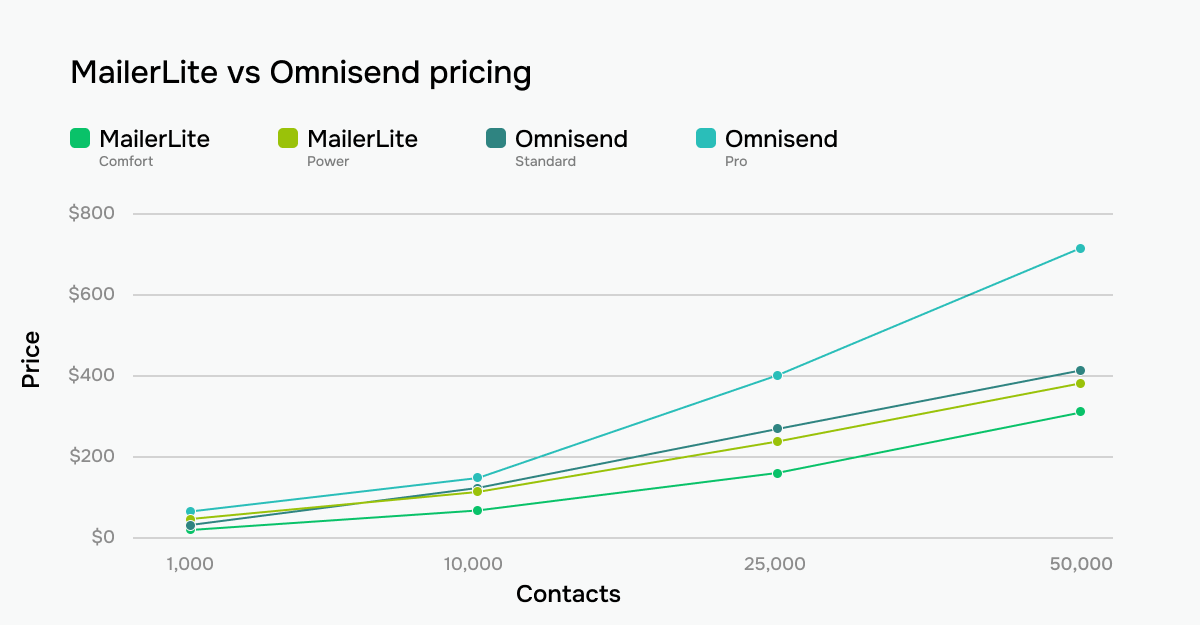 MailerLite vs Omnisend monthly pricing across contact list sizes
It’s also worth noting a recent pricing change: as of May 4, 2026, new Omnisend subscribers on the Standard plan can no longer purchase SMS credits. If SMS is part of your marketing mix, you’ll need to upgrade to the Pro plan — which starts at $59/month and scales steeply. This effectively makes the real cost of multi-channel marketing on Omnisend even higher than the table above suggests, and further widens the pricing gap between the two platforms.
Ease of use and interface
⭐ MailerLite: 9/10 | Omnisend: 8.5/10
During testing, neither MailerLite nor Omnisend felt particularly difficult to learn, and most users should be able to become productive with either platform within a short time. MailerLite earns the win because its simplicity applies to a wider range of businesses.
Omnisend is equally approachable when you’re running an online store, but many parts of the platform make less sense without eCommerce data behind them. As a result, MailerLite feels more universally intuitive, while Omnisend feels intuitive primarily within its intended eCommerce environment.
| Aspect |
MailerLite |
Omnisend |
Winner |
| First-time experience |
Quick start for email marketers with minimal setup requirements |
Guided setup process that walks eCommerce businesses through store and campaign configuration |
Tie |
| Daily navigation |
Clean, low-density interface with familiar navigation and standard email marketing terminology |
Clean navigation with eCommerce-focused terminology and workflows; dashboard evolves as setup progresses |
MailerLite |
| Learning curve |
Gentle learning curve across all core features; help resources available throughout the platform |
Gentle learning curve for eCommerce users; steeper outside eCommerce |
MailerLite |
| Mobile access |
Dedicated mobile app for marketers |
No dedicated mobile app |
MailerLite |
| Workflow efficiency once mastered |
Efficient for everyday email marketing tasks |
Efficient for eCommerce marketing with multi-channel campaigns, automation tools, bulk actions, and API access |
Omnisend |
| Total score |
9/10 |
8.5/10 |
MailerLite |
Scores and feature lists only tell part of the story. To make the comparison more practical, here’s what the learning curve might look like for your marketing team on each platform.
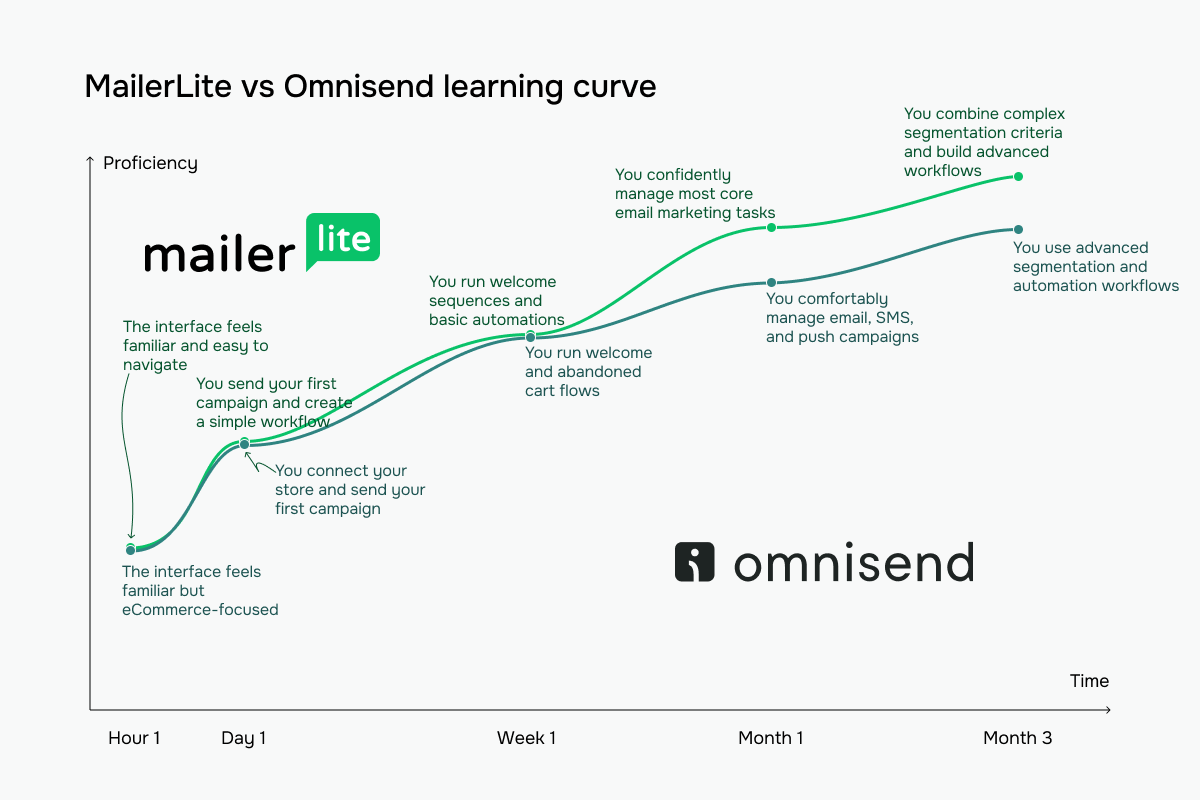 MailerLite vs Omnisend learning curve based on our testing experience
Email builder and templates
MailerLite: 8.6/10 | ⭐ Omnisend: 8.8/10
In template building, both MailerLite and Omnisend cover the essentials very well, and neither leaves the impression that you’re sacrificing email creation quality by choosing one over the other.
The main difference is that MailerLite seems to focus on giving you more control over how emails are built and delivered, while Omnisend focuses more on helping online stores turn emails into sales.
| Aspect |
MailerLite |
Omnisend |
Winner |
| Templates |
100+ email templates organized by category |
350+ email templates organized by campaign goal |
Omnisend |
| Drag-and-drop editor |
Block-based editor with categorized content blocks, global design settings, saved content blocks, and alternative rich-text/HTML editors |
Layout-based editor with drag-and-drop content blocks, product-focused elements, global brand kit settings, and HTML support |
MailerLite |
| Notable content blocks |
Surveys, quizzes, FAQ accordions, events/webinars, app download links, countdown timers, videos |
Product listings, AI-powered product recommendations, discount codes |
Tie |
| Mobile responsiveness |
Responsive emails by default with mobile preview; custom HTML emails require manual optimization |
Mobile-first templates, mobile preview, and device-specific visibility controls for content blocks |
Omnisend |
| AI features |
AI email writer and AI subject line generator |
AI email writer, AI subject line and preheader generator |
Omnisend |
| Sending time optimization |
Send-time optimization based on individual subscriber engagement patterns |
Time zone–based delivery for campaigns only |
MailerLite |
| Total score |
8.6/10 |
8.8/10 |
Omnisend |
MailerLite’s email builder is designed around a simple idea: help users create good-looking emails without making too many design decisions. Instead of starting with empty blocks, you can browse a library of pre-styled layouts that already look polished and professional. Combined with global typography settings that automatically maintain consistency across the entire email, the builder removes much of the manual work typically involved in email design.
This approach makes MailerLite particularly comfortable for content creators, newsletter publishers, and small businesses. The platform guides users toward clean, consistent results and minimizes the risk of creating visually inconsistent campaigns. The trade-off is that experienced marketers may eventually find themselves wanting more detailed control over individual design elements than the builder exposes.
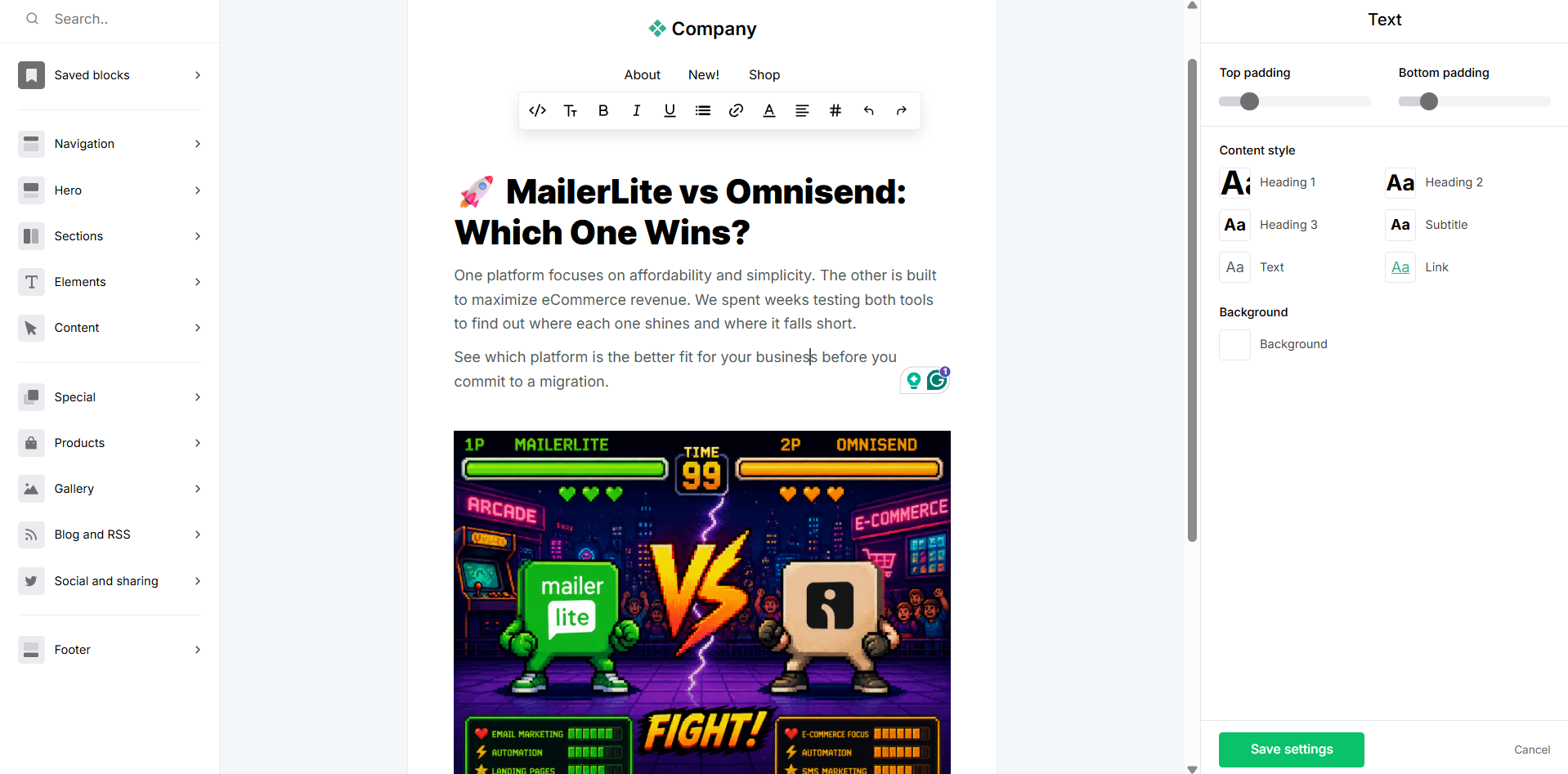 Creating a template in the MailerLite email builder during testing
Omnisend’s builder feels less like a traditional email editor and more like an extension of an eCommerce platform. Product merchandising, personalization, discounts, and shopping-related elements are woven directly into the editing experience rather than added as afterthoughts. The standout feature is the behavioral product recommendation system, which can automatically display different products to different recipients based on their browsing or purchase history.
The builder also offers deeper control over typography and content editing, with settings such as line height, letter spacing, and AI-assisted text refinement available directly inside the editing panel. As a result, Omnisend gives you more opportunities to fine-tune both the design and the shopping experience, though it also introduces more complexity than a typical newsletter-focused builder.
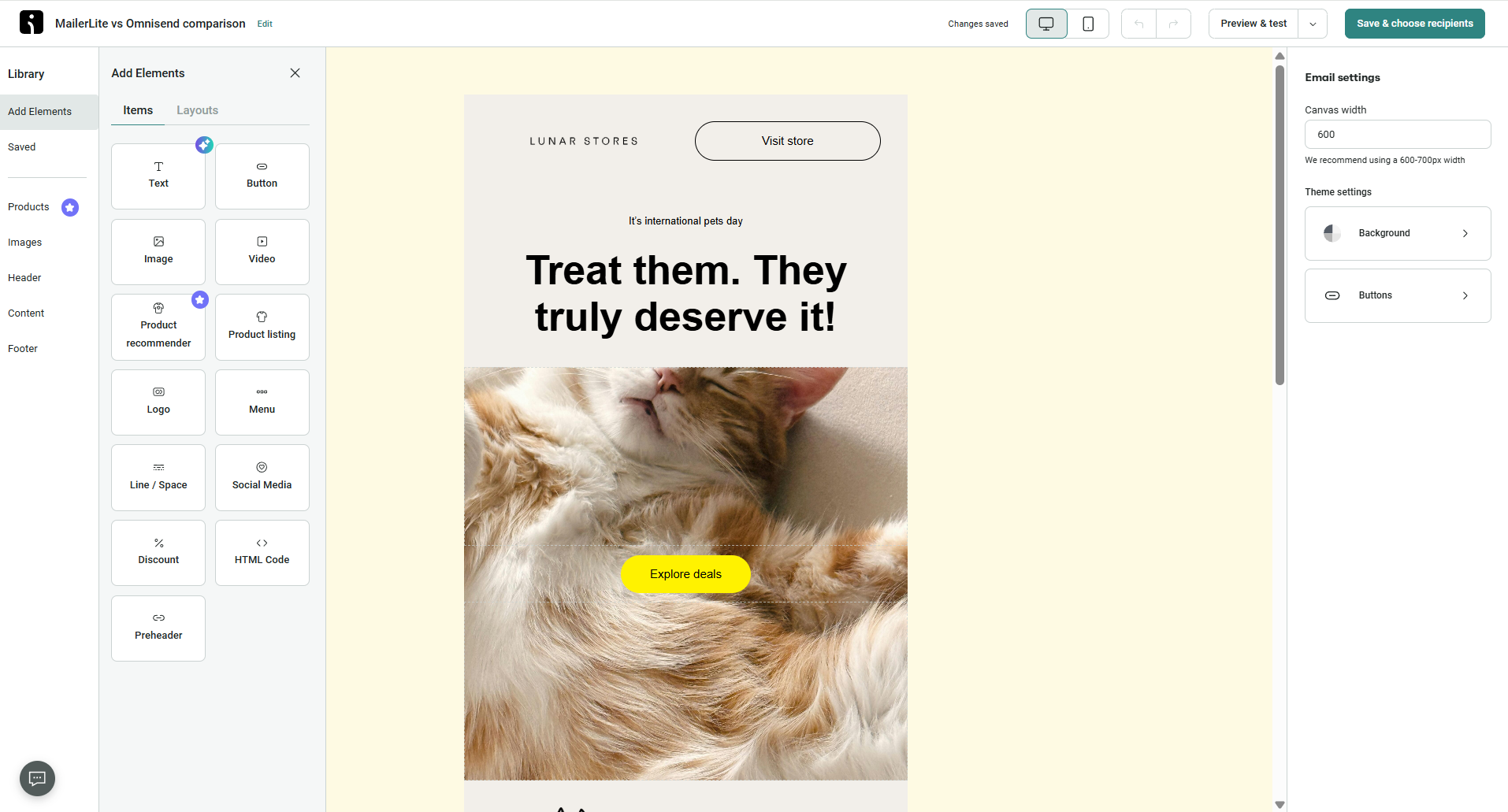 Omnisend email builder – hands-on look at the block library and email settings panel
Our takeaway here is that neither builder is universally better because they’re optimizing for different outcomes. MailerLite helps marketers create attractive emails quickly and consistently, while Omnisend helps online stores generate more revenue from every campaign.
The biggest difference is where each platform adds value. MailerLite improves the building process itself through guided design and consistency tools. Omnisend improves the email’s business impact through personalization and product-focused functionality.
If you’re primarily sending content, newsletters, updates, or educational emails, MailerLite’s approach is likely the more practical one. If your emails exist to showcase products and drive purchases, Omnisend offers capabilities that MailerLite simply doesn’t.
Marketing automation
MailerLite: 7.5/10 | ⭐ Omnisend: 9.2/10
Automation is where MailerLite and Omnisend begin to feel like products from different categories. MailerLite focuses on straightforward marketing workflows, while Omnisend is designed around the customer journey of an online store.
MailerLite is built to make common automations easy to create and manage. It’s well-suited for welcome series, lead nurturing, re-engagement campaigns, and other everyday marketing workflows. Omnisend goes much further, with automation tools built around how customers browse, shop, and buy. That makes it possible to create workflows that feel more personalized and react to a much wider range of customer actions.
| Aspect |
MailerLite |
Omnisend |
Winner |
| Availability by plan |
Free plan supports up to 3 automations; paid plans increase limits to 50–100 automations and up to 100 workflow steps |
Unlimited workflows, triggers, and channels on all plans, including the free one |
Omnisend |
| Automation builder |
Visual workflow builder with conditions, delays, A/B splits, and actions; YES/NO branching |
Visual workflow builder with messages, delays, conditions, audience filters, and exit rules; includes trigger debugging and A/B splits |
Tie |
| Triggers available |
Contact, form, API, field update, and date-based triggers; up to 3 triggers per workflow on the Comfort plan |
Contact, segment, date-based, eCommerce, custom API, and third-party event triggers |
Omnisend |
| Pre-built automations |
15 editable workflow templates covering core marketing scenarios |
40 pre-built eCommerce workflows |
Omnisend |
| Channels supported |
Email only |
Email, SMS, and push notifications |
Omnisend |
| AI features |
No AI-assisted workflow creation |
No AI-assisted workflow creation |
Tie |
| Automation complexity |
Moderate; supports branching, A/B testing, multiple triggers, and webhooks |
Advanced; supports behavioral conditions, audience filters, exit rules, retrospective triggers, and custom events |
Omnisend |
| Total score |
7.5/10 |
9.2/10 |
Omnisend |
During testing, MailerLite’s automation builder was easy to evaluate because all automation features were immediately available. The visual workflow canvas remained clear even as we added more steps, and the builder exposed a broad set of triggers and actions without making the interface feel cluttered.
What stood out most was how well the platform handles content delivery. We were able to create workflows around specific days and times rather than relying solely on generic delays, which is particularly useful for courses, onboarding programs, and newsletter series.
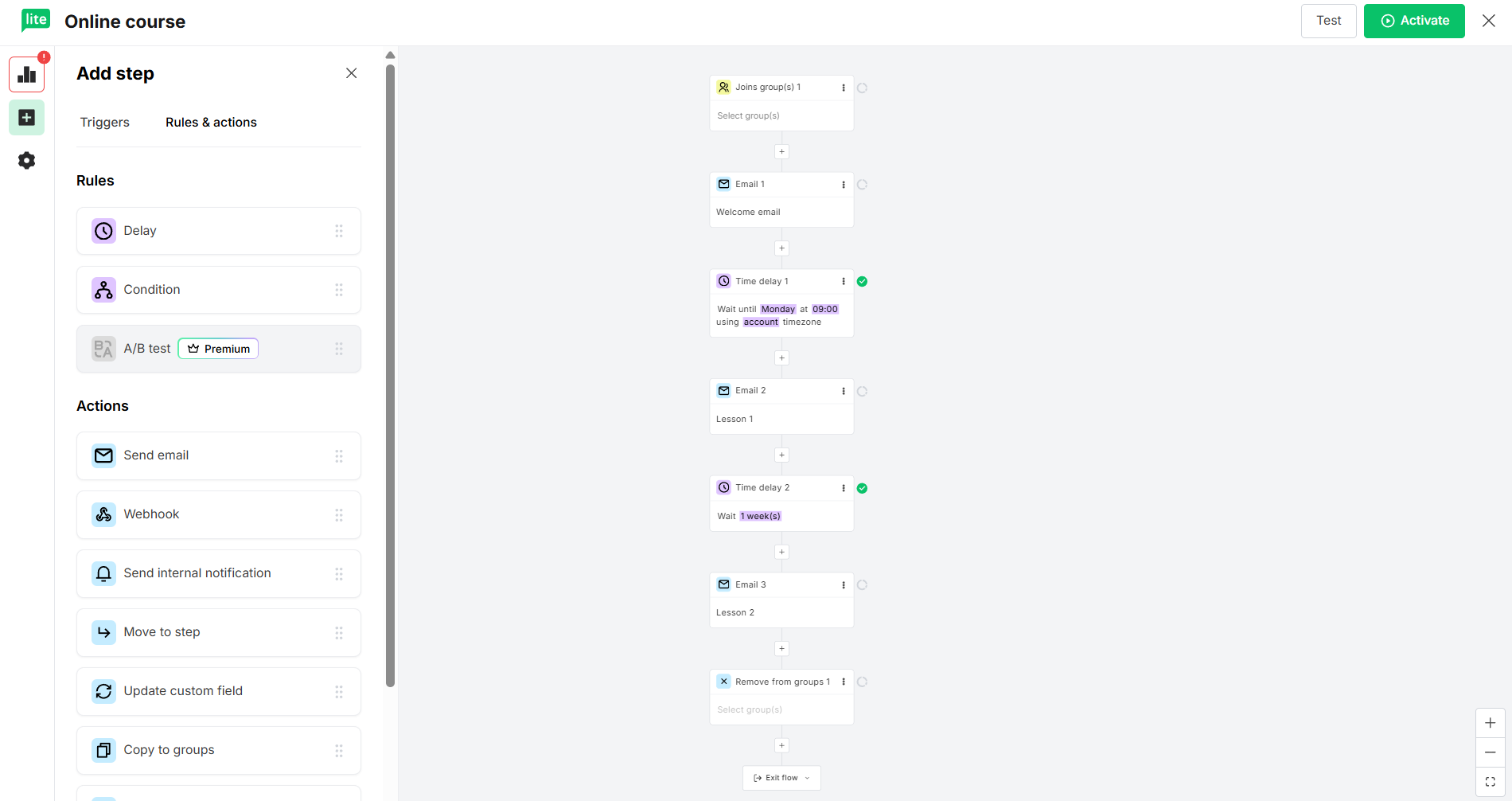 Inside MailerLite’s automation builder – setting up a multi-step online course delivery flow
Testing Omnisend’s automation builder required more preparation. All their automation capabilities only become available after connecting an online store, so we had to create and connect a test store before we could properly evaluate the workflow builder.
Once we got into it, it became clear why Omnisend scores highly in this category. The builder itself is straightforward, but what stands out is the logic surrounding workflow entry and customer behavior. During testing, we were able to create automations that responded differently depending on how a subscriber joined the list and coordinate communication across email, SMS, and push notifications within a single workflow. The entire experience feels designed around managing customer journeys rather than simply sending automated emails.
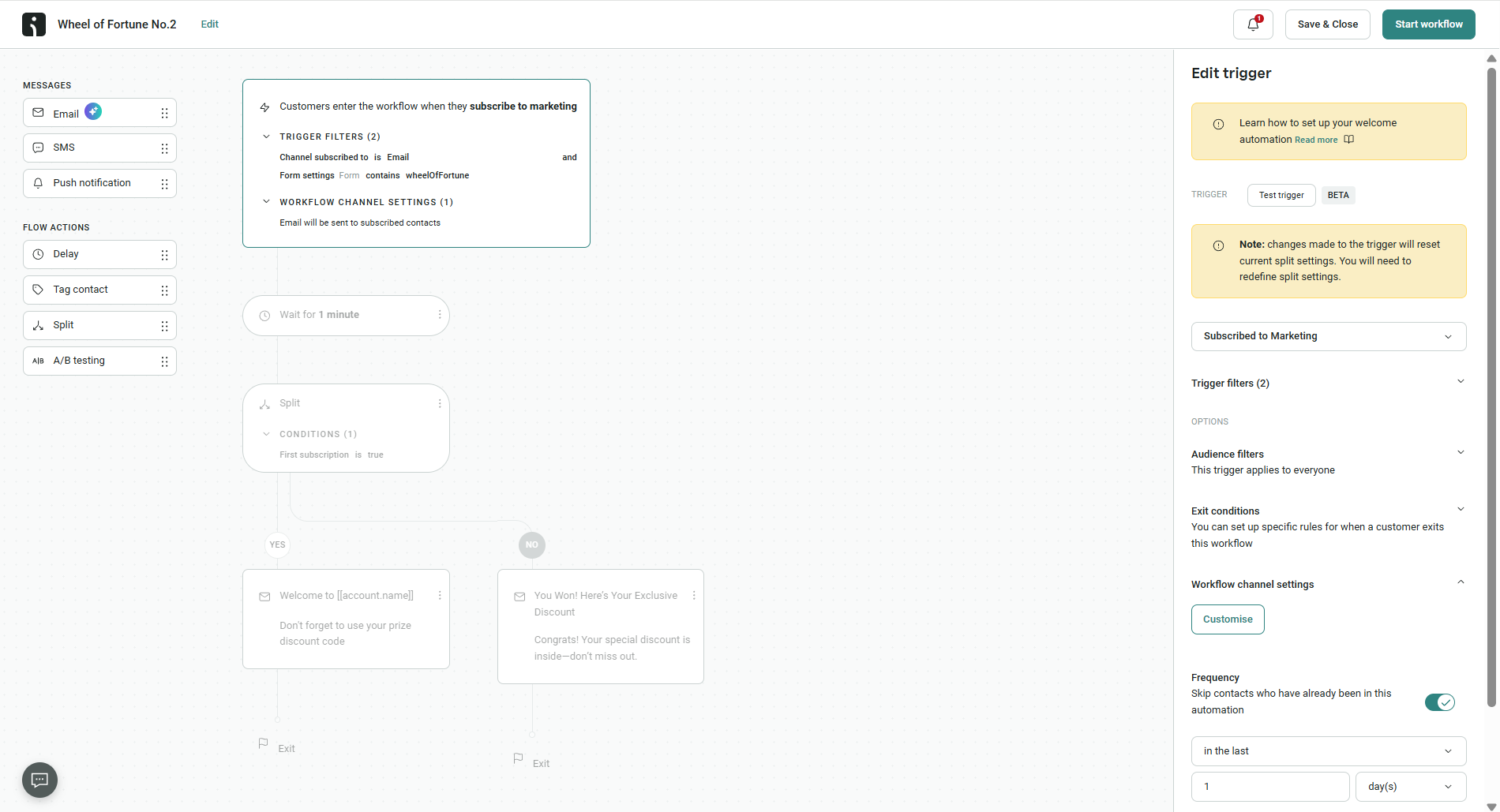 Omnisend’s automation builder with a welcome flow that splits new subscribers based on how they signed up
Here are our conclusions: MailerLite is easier to access, easier to understand, and offers a wider range of useful automation tools for content-driven marketing from the moment you create an account.
Omnisend requires more setup, particularly because all of its automation features depend on store data, but that investment unlocks capabilities that MailerLite doesn’t attempt to provide. The ability to build workflows around acquisition sources, customer behavior, and multiple communication channels makes Omnisend a stronger automation platform overall. However, for newsletters, courses, lead nurturing, and other non-eCommerce use cases, we often found MailerLite’s builder more immediately practical and easier to work with.
Contact management
MailerLite: 8/10 | ⭐ Omnisend: 9.2/10
Contact management and automation are closely connected. The more precisely you can organize contacts, the more relevant and personalized your automations become. This is especially important for eCommerce businesses, where marketers often need to respond to browsing behavior, purchase history, customer lifecycle stage, and dozens of other signals. Given Omnisend’s strong focus on online stores, it’s not surprising that it comes out ahead in this category.
| Aspect |
MailerLite |
Omnisend |
Winner |
| Segmentation capabilities |
Rule-based segments with AND/OR logic; pre-built segment templates; automatic segment updates; single contact database |
Rule-based segments with nested AND/OR logic; pre-built segment templates; AI segment builder; all segmentation tools available on every plan |
Omnisend |
| Segmentation criteria |
Contact properties, groups, signup data, location, timezone, campaign engagement, automation activity, open/click rates, segment membership |
Contact properties, subscription status, tags, campaign engagement, eCommerce activity, website behavior, customer lifecycle stage, and custom events |
Omnisend |
| Segment update speed |
Real-time updates as contacts match or leave segment criteria |
Near real-time updates for profile changes; date-based segments refresh daily |
MailerLite |
| AI features for segmentation |
Segment creation via external AI tools connected through MCP and API integrations |
Native AI segment builder with natural-language prompts and follow-up clarification |
Omnisend |
| Tagging and manual organization |
Groups for manual organization and automation triggers; segments for rule-based targeting; contacts can belong to multiple groups |
Tags for manual organization, acquisition tracking, and automation workflows; tags can be combined with segment rules |
Tie |
| Total score |
8/10 |
9.2/10 |
Omnisend |
The gap between the platforms is noticeable, but not because MailerLite’s contact management is weak. In fact, its combination of groups and segments is straightforward, easy to understand, and more than sufficient for most content-driven businesses. Omnisend pulls ahead because it gives you access to a much richer customer profile and more ways to turn customer data into targeting opportunities. As your marketing becomes more behavior-driven and revenue-focused, Omnisend’s contact management system has significantly more room to grow with you.
Signup forms and landing pages
⭐ MailerLite: 8.5/10 | Omnisend: 8.3/10
The final scores in this category are remarkably close because both MailerLite and Omnisend handle signup forms well. Omnisend has a slight edge in form functionality and display options, while MailerLite offers a much more capable landing page experience. That balance ultimately gives MailerLite the win, especially for marketers who rely on landing pages as a core part of their lead generation strategy.
| Aspect |
MailerLite |
Omnisend |
Winner |
| Types of forms available |
Pop-ups, slide-ins, floating bars, and embedded forms; teaser option available |
Pop-ups, flyouts, embedded forms; teaser option available; multi-step forms supported across all types |
Omnisend |
| Form builder |
Drag-and-drop builder with global style controls, typography settings, GDPR consent options, double opt-in support, and A/B testing |
Drag-and-drop builder with flexible field types, GDPR consent, reCAPTCHA, double opt-in support, and automatic brand styling; A/B testing for pop-ups and flyouts |
Tie |
| Pop-up targeting conditions |
Time delay, scroll depth, and exit intent triggers; URL targeting, device targeting, frequency controls, and scheduling |
Time delay, scroll depth, page visits, exit intent, and custom triggers; URL, location, UTM, audience, and device targeting; frequency controls and scheduling |
Omnisend |
| Landing page builder |
Dedicated landing page builder with SEO settings, A/B testing, analytics, custom domains, and code integrations |
Landing page forms with custom domains, multi-step forms, scheduling, and signup redirects |
MailerLite |
| Total score |
8.5/10 |
8.3/10 |
MailerLite |
Both platforms are more closely matched on pop-up forms, so let’s take a closer look.
MailerLite’s pop-up builder is designed around simplicity. During testing, we were able to understand the entire interface within seconds because almost everything revolves around two screens: the signup form itself and the success message shown after submission. The field management experience is equally straightforward, with a small set of clearly visible options instead of a long list of settings and controls.
The most interesting part isn’t the design editor but the settings layer hidden behind it. MailerLite allows marketers to collect preference data through Interest Groups directly inside the form, redirect subscribers to a custom success page, and add GDPR permissions, consent checkboxes, and reCAPTCHA without relying on third-party tools. The result is a builder that feels optimized for newsletter growth and audience building rather than for aggressive lead-capture tactics.
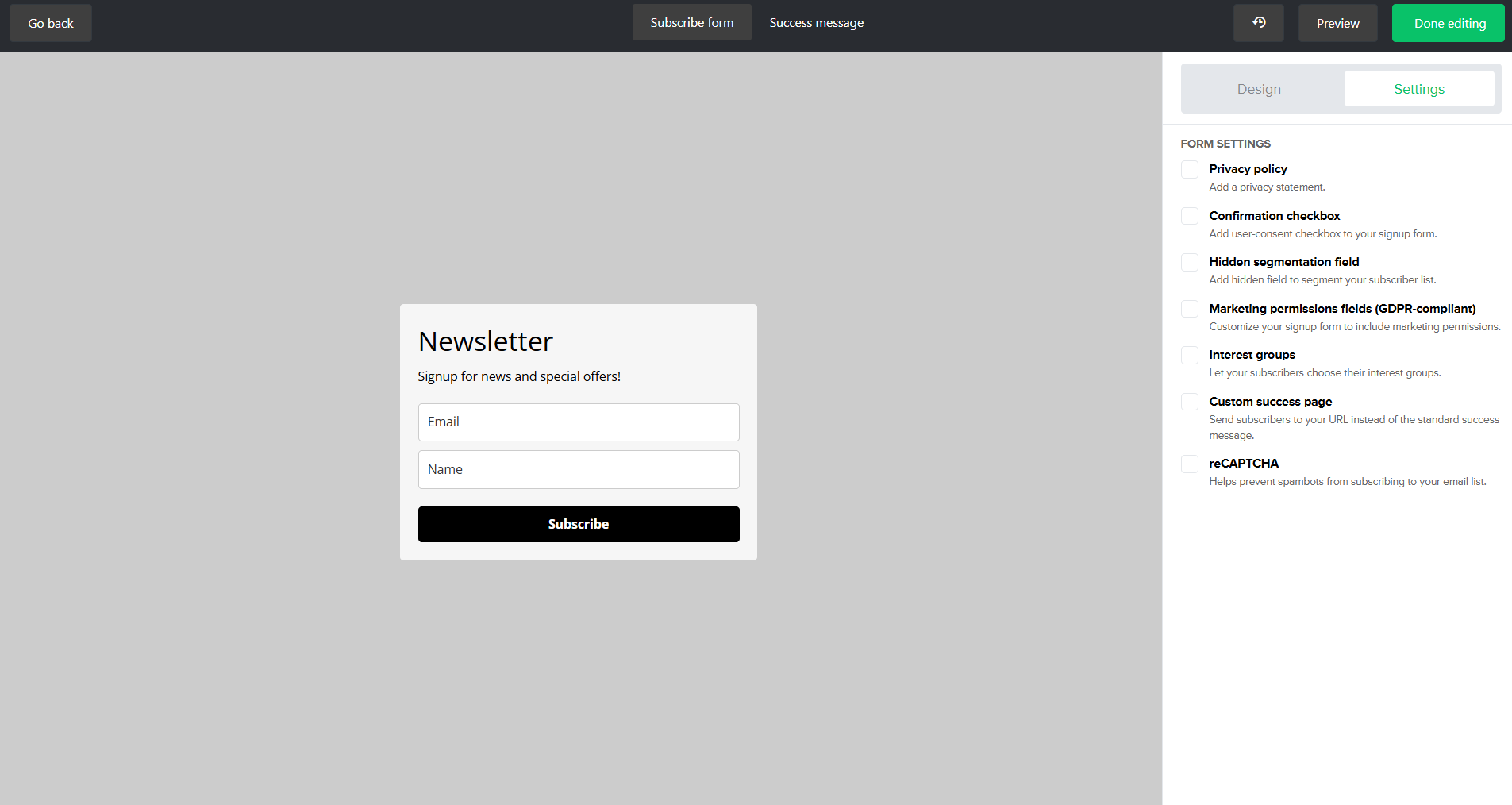 MailerLite’s signup form builder, with GDPR permissions, interest groups, reCAPTCHA, and custom success pages in the settings panel
Omnisend treats pop-ups less like forms and more like conversion funnels. During testing, the first thing we noticed was the multi-step structure: instead of asking for everything at once, the builder can collect an email address on one screen and a phone number on the next, with subscribers free to skip the second step if they prefer.
This architecture enables capabilities that aren’t available in MailerLite. Omnisend can capture both email and SMS subscribers in a single flow, automatically apply acquisition tags, hide forms from existing subscribers, and handle SMS consent using built-in compliance language. Combined with elements such as countdown timers and “Wheel of Fortune” promotions, the builder feels purpose-built for eCommerce brands focused on maximizing conversions.
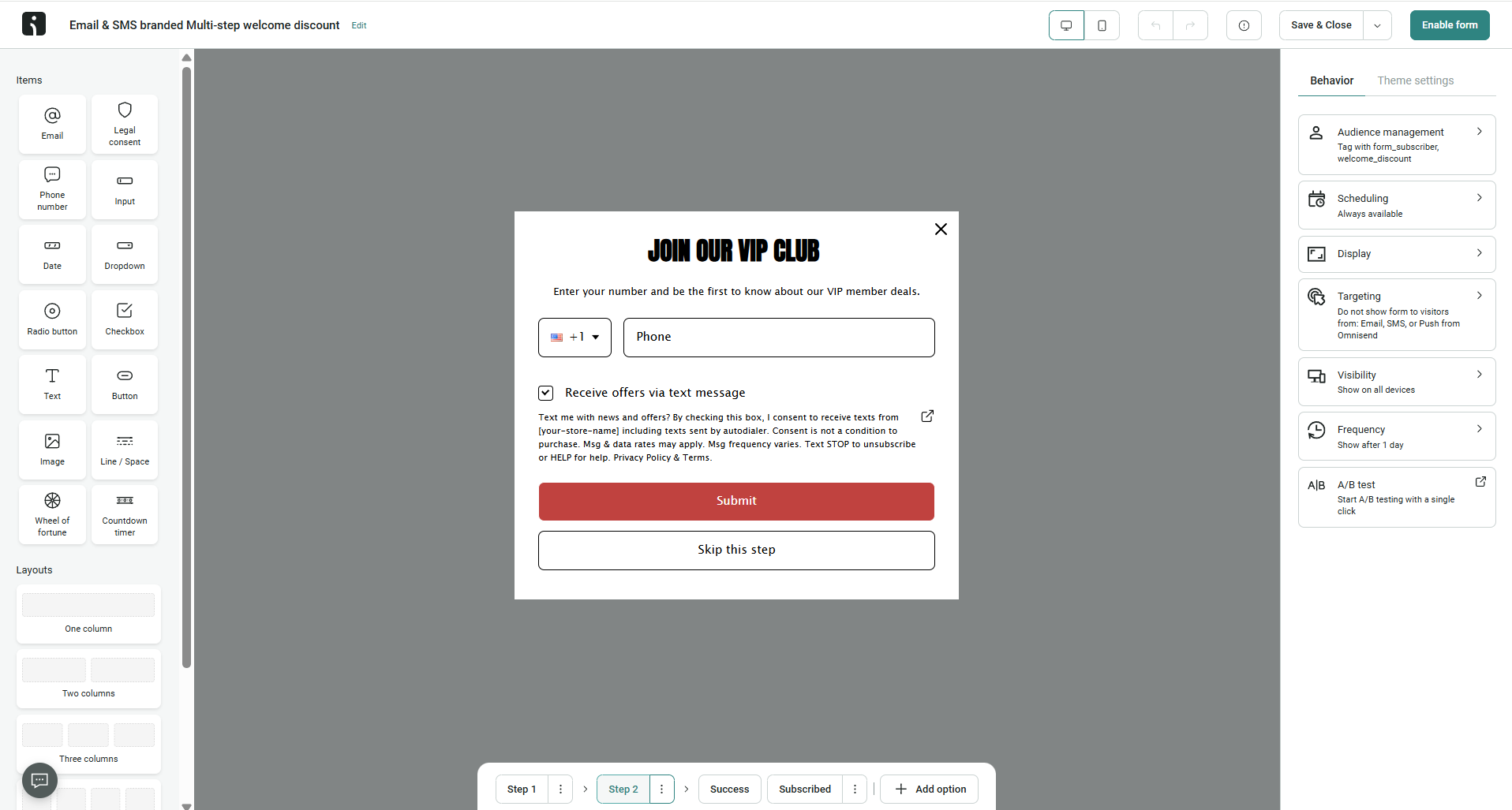 Omnisend’s multi-step signup form to collect phone numbers with built-in SMS consent language – subscribers can skip if they prefer email only
After testing both builders, we came away with the impression that they are solving different problems. MailerLite focuses on making list building easy and approachable, with a clean interface and thoughtful tools for collecting subscriber preferences and managing compliance.
Omnisend is the more capable builder overall. The ability to create multi-step signup experiences, collect both email and SMS contacts, automatically manage subscriber visibility, and tag contacts based on acquisition source gives it significantly more flexibility.
Deliverability
MailerLite: 9.8/10 | ⭐ Omnisend: 9.9/10
Both MailerLite and Omnisend support modern authentication standards, enforce list hygiene, and provide access to dedicated IPs for high-volume senders. Omnisend earns a slight edge because it exposes more deliverability data directly inside the platform and offers more proactive guidance when problems arise. Here are some technical details:
| Aspect |
MailerLite |
Omnisend |
Winner |
| Authentication |
SPF and DKIM authentication with guided or manual setup; automatic SPF record merging to prevent conflicts; DMARC configured externally |
SPF, DKIM, and DMARC authentication with guided setup, setup validation, and in-app alerts for authentication issues |
Tie |
| Deliverability monitoring |
Campaign-level bounce and engagement metrics; inactive subscriber cleanup tools; reputation monitoring relies on external tools |
Dedicated deliverability dashboard with provider-level metrics, list quality alerts, automated compliance enforcement, and deliverability team support |
Omnisend |
| List hygiene |
Automatic bounce handling, unsubscribe processing, and inactive subscriber identification tools |
Automatic bounce suppression, unsubscribe suppression lists, list cleaning tools, and account-level hygiene alerts |
Tie |
| Dedicated IP |
Available for senders of 50,000+ emails per week with managed setup and warm-up support |
Available for senders of 300,000+ emails per week with eligibility review and self-managed warm-up |
MailerLite |
| Total score |
9.8/10 |
9.9/10 |
Omnisend |
In practice, sender behavior has a far greater impact on inbox placement than the differences between these two platforms. Here are some recommendations from SendPulse’s deliverability expert, Victoria Lushnenko:
- Authenticate all sending domains with SPF, DKIM, and DMARC.
- Keep transactional and marketing emails on separate sender addresses.
- Avoid URL shorteners and use descriptive links or buttons instead.
- Optimize images and maintain a healthy text-to-image ratio.
- Send emails consistently and avoid sudden spikes in volume.
- Warm up large sends by mailing active subscribers first, then less active segments.
- Segment by relevance and engagement, not just by product or topic.
- Exclude unsubscribed, unconfirmed, deleted, and inactive contacts from regular campaigns.
- Run re-engagement campaigns regularly and suppress contacts who do not respond.
- Use double opt-in or form validation whenever possible.
- Monitor sender inboxes for unsubscribe requests, complaints, and feedback.
- Track both email engagement and customer activity – active users are not always active email recipients.
- Clean lists regularly by removing hard bounces and reviewing inactive subscribers.
- Never buy, scrape, or import unverified contact lists.
- Validate new contacts to reduce typos, spam traps, and invalid addresses.
- Spread large campaigns across multiple sends instead of sending to the entire list at once.
These best practices matter far more for inbox placement than the choice between MailerLite, Omnisend, or any other modern bulk email service.
Reporting and analytics
MailerLite: 7.8/10 | ⭐ Omnisend: 8.2/10
Reporting often reflects a platform’s overall philosophy. Tools that focus heavily on automation, customer behavior, and revenue attribution tend to invest more in analytics because their users need to understand what’s driving results, not just whether an email was opened or clicked. Given Omnisend’s strong eCommerce and automation focus, it’s not surprising that it offers broader reporting coverage and ultimately wins this category.
| Aspect |
MailerLite |
Omnisend |
Winner |
| Report coverage |
Subscribers, campaigns, automations, forms, websites, and eCommerce |
Sales, campaigns, automations, products, forms, deliverability, customer lifecycle, customer value, attribution, and real-time store activity |
Omnisend |
| Custom reports |
Custom report builder with engagement and eCommerce metrics, filtering, saved reports, and CSV/PDF export |
Fixed reporting dashboards with date filtering and comparison tools |
MailerLite |
| Reporting speed |
Reports update progressively after sending; custom reports are generated on demand |
Real-time store activity reporting; campaign and automation reports update progressively after sending |
Omnisend |
| Export capabilities |
CSV and PDF |
CSV and PDF |
Tie |
| Total score |
7.8/10 |
8.2/10 |
Omnisend |
The difference between the two platforms is not that large. MailerLite covers most of the reporting needs of a typical email marketer and even offers something Omnisend lacks: a built-in custom report builder. Omnisend pulls ahead because it brings together more parts of the customer journey in one place, making it easier to understand how campaigns, automations, products, and customer behavior contribute to revenue. For newsletter publishers and content-driven businesses, the practical difference may be minimal. For eCommerce brands, Omnisend’s reporting ecosystem provides a more complete picture of marketing performance.
Customer support
MailerLite: 7.8/10 | ⭐ Omnisend: 8.4/10
Customer support rarely matters when everything works as expected. It becomes important when you’re migrating from another platform, setting up complex automations, troubleshooting deliverability issues, or trying to fix a campaign that isn’t behaving as planned. In those moments, the speed and quality of support can directly impact your results, making it one of the most overlooked aspects when choosing an email marketing platform.
| Aspect |
MailerLite |
Omnisend |
Winner |
| Channel availability |
Email support on paid plans and during the 14-day trial; live chat on the Power plan; free plan users rely on self-service resources; no phone support |
24/7 email and live chat support on all plans, including free; no phone support |
Omnisend |
| Knowledge base |
Help center, video tutorials, migration guides, certification courses, community forum, and certified expert directory |
Help center, video training course, migration guides, release notes, and glossary of terms |
Tie |
| Onboarding assistance |
Self-serve setup guides, migration documentation, and trial-period access to support agents |
Guided onboarding checklist, migration assistance for qualifying plans, dedicated onboarding specialists on higher tiers, and self-serve migration guides |
Omnisend |
| Support quality rating on Capterra |
4.8/5 |
4.6/5 |
MailerLite |
| Total score |
7.8/10 |
8.4/10 |
Omnisend |
The difference between the two platforms is real, but it comes down more to accessibility than expertise. MailerLite’s higher user rating suggests its support team does a great job helping customers when they reach out. Omnisend wins because it puts human assistance in front of more users and invests more heavily in onboarding and migration support. If you prefer figuring things out yourself, the practical difference may be small. If you expect hands-on help during setup or migration, Omnisend offers a stronger overall support experience.

Join businesses growing with SendPulse
From solo creators to global brands, thousands of customers trust SendPulse to run email campaigns, chatbots, automations, and more — all in one place.
Get started for free
Your decision checklist
By now, you’ve probably noticed that choosing between MailerLite and Omnisend isn’t really about finding the “better” platform. It’s about finding the platform that matches the way you market. Use this quick checklist to see which side sounds more like your business.
| Decision area |
MailerLite
is a better fit if… |
Omnisend
is a better fit if… |
| Business type |
You run a newsletter, content business, course platform, blog, creator brand, or service-based business. |
You run an online store and rely on customer, product, and purchase data to drive marketing. |
| Budget expectations |
You want to keep costs rather low while still getting strong email marketing, automation, forms, and landing pages. |
You’re willing to pay more for deeper eCommerce functionality and multi-channel marketing. |
| Automation needs |
You primarily need a welcome series, lead nurturing, onboarding sequences, newsletter automations, or course delivery workflows. |
You need automations driven by customer behavior, purchase activity, signup source, and multi-channel communication. |
| Analytics focus |
You mainly care about campaign performance, engagement metrics, and flexible custom reporting. |
You want visibility into revenue attribution, customer lifecycle, product performance, and store activity. |
| Team setup |
You have a small marketing team, a creator-led business, or a solo marketer who values simplicity and speed. |
You have an eCommerce marketing team that can take advantage of advanced targeting, personalization, and customer-journey tools. |
One final observation from our testing: neither MailerLite nor Omnisend is trying to be everything for everyone. MailerLite leans toward content-driven marketing, while Omnisend is heavily optimized for eCommerce.
If neither approach feels like a perfect fit, there are several other platforms worth considering:
- Klaviyo – worth considering if you’re running a growing online store and want even deeper personalization, customer data, and eCommerce automation than Omnisend offers. Just be prepared for significantly higher pricing as your list grows.
- Kit – a strong pick for creators, bloggers, and newsletter publishers who want to monetize their audience. It offers paid subscriptions, digital product sales, and a free plan for up to 10,000 subscribers — though paid plans scale quickly once you need advanced automation.
- SendPulse – worth a look if you need more than email marketing. It combines email, CRM, chatbots, and automation in one platform, with a free plan covering 15,000 emails to 500 subscribers and paid plans starting at $8/month.
Final verdict and recommendations
⚖️ Final scores: MailerLite – 8.4/10 | Omnisend – 8.6/10
So, would we recommend MailerLite? Absolutely. It’s affordable, easy to use, versatile enough for most marketing scenarios, and consistently receives strong feedback from its users.
Would we recommend Omnisend with the same confidence? Only if you’re running an eCommerce business. Its biggest strengths revolve around store data, product recommendations, customer behavior, and multi-channel retail marketing. If you don’t operate an online store, you’re likely paying for capabilities you won’t use.