Mailchimp is one of the most popular email marketing platforms on the market, while Omnisend is one of the strongest players for eCommerce businesses. They both help you send email campaigns, but are they interchangeable?
In this Omnisend vs Mailchimp comparison, we’ll answer that question, along with many others, by analyzing their pricing, features, and overall usability. If you’re choosing between these platforms, make sure to read our comparison first!
How we scored this comparison: This review was created by the SendPulse team. As an email marketing platform ourselves, we work in the same space as the tools we test, which also means we understand the field deeply.
Each platform was evaluated across the key categories using our independent methodology. Pricing (25%), ease of use (20%), and email and automation features (15% each) carry the most weight because they affect daily workflows the most. All scores reflect hands-on testing and analysis as of July 2026.
TL;DR Omnisend vs Mailchimp at a glance
In short, Omnisend (8.7/10) is the best choice for eCommerce and SMS, while Mailchimp (8.4/10) stands out for design, reporting, and general marketing. Here’s a quick look at each category we reviewed, so you can easily compare them. If you want more details on a specific category, just click to go straight to that section.
| Category |
Omnisend |
Mailchimp |
Winner |
| Best for |
eCommerce businesses that want to grow sales with automation, SMS, and omnichannel marketing |
Businesses beyond eCommerce that need versatile marketing tools, polished design, and extensive integrations |
Depends on the use case |
| Pricing |
8/10
Transparent pricing with most core features included on every plan |
7/10
Competitive entry pricing, but many key features require higher tiers |
Omnisend |
| Ease of use |
8.5/10
eCommerce-focused interface that’s easy to learn and navigate |
9/10
Polished interface with smooth navigation and user-friendly mobile apps |
Mailchimp |
| Email design |
8.8/10
Intuitive drag-and-drop builder with eCommerce content blocks |
9.4/10
More flexible builder with richer design and layout options |
Mailchimp |
| SMS |
8.2/10
SMS features integrated with eCommerce automation; available on the highest paid plan |
6.8/10
Solid SMS features; available only on high-tier plans |
Omnisend |
| Automation |
9.2/10
Advanced eCommerce workflows available on every plan |
7.8/10
Flexible automation builder, but key workflows require higher tiers |
Omnisend |
| Contact management |
9.2/10
Unified contact database with advanced segmentation and contact profiles |
7.5/10
Rule-based segmentation, but separate audiences can increase costs |
Omnisend |
| Forms and pages |
8.6/10
Conversion-focused forms with targeting and behavioral triggers |
8.8/10
Customizable forms and landing pages with vast design settings |
Mailchimp |
| Integrations |
8.2/10
Native integrations with leading eCommerce platforms |
9/10
Larger integration marketplace covering a wider range of business tools |
Mailchimp |
| AI features |
7.2/10
AI tools for content creation, segmentation, and customer insights |
6.5/10
AI assistance for content and marketing tasks with more plan restrictions |
Omnisend |
| Deliverability |
10/10
Built-in deliverability monitoring, list hygiene, and optional dedicated IP |
8.5/10
Dedicated IP via a separate tool (Mandrill); limited deliverability monitoring tools |
Omnisend |
| Reporting |
8.2/10
eCommerce dashboards with campaign performance and business metrics |
8.8/10
Custom reporting with deeper analysis and reporting flexibility |
Mailchimp |
| Customer support |
8.4/10
24/7 support on every plan with consistently high user ratings |
7/10
Good support resources, but live assistance varies by plan |
Omnisend |
| G2/Capterra rating |
4.6/4.7 |
4.4 |
Omnisend |
| Final score |
8.7/10 |
8.4/10 |
Omnisend |
This table says a lot on its own, but if you want a deeper explanation of what stands behind these scores, you’re very welcome to read the full comparison.
Omnisend vs Mailchimp pricing and feature differences
How we tested: We signed up for both platforms and spent several weeks in June and July 2026 trying them out. We looked at pricing plans, built email campaigns, set up multi-step automations, and sent SMS messages. We also made signup forms and landing pages, organized contacts into segments, and explored template libraries and AI content tools.
We reviewed integrations and deliverability settings, and compared reporting dashboards side by side. To check customer support, we looked at real user feedback on Capterra. All screenshots in this article come from our own hands-on testing.
Let’s begin by looking at what matters most to every business: money. After that, we’ll go through each platform’s features, starting with overall usability and moving to specific tools like the email builder and automation. By the end, you’ll know where Omnisend and Mailchimp differ, where they’re alike, and which platform is the better fit for your business.
Pricing plans
⭐ Omnisend: 8/10 | Mailchimp: 7/10
Disclaimer: Pricing changes frequently. All prices in this comparison were verified against Omnisend’s official pricing and Mailchimp’s official pricing as of July 21, 2026. Always confirm current costs on the official pages.
Before we look at prices, it’s important to know how email marketing platforms structure their plans. Some charge you for the number of contacts you store, while others charge based on how many emails you send each month. Both Omnisend and Mailchimp use contact-based pricing, but each plan also has a sending limit. On lower-tier plans, you can usually send about 10 to 15 emails per contact each month. Higher-tier plans offer much higher limits or even unlimited emails. To help you compare, the table below lists both the contact limits and the monthly email sending caps for the lower-tier plans.
On top of that, we compared two Mailchimp pricing scenarios, because Mailchimp’s pricing can be misleading. New customers get a 50% discount for the first year, making the platform look much more affordable than it actually is in the long run. Since most businesses choose an email marketing platform for years rather than months, we’ve also included the regular price you’ll pay after the discount period ends.
We added SendPulse to both pricing charts as well. We did this to show that if Omnisend or Mailchimp are outside your budget, there are still solid email marketing platforms available at a significantly lower price.
| Contacts |
Omnisend Standard |
Mailchimp Essentials, year 1 |
Mailchimp Essentials, year 2 |
SendPulse, Standard |
| Free plan |
250 contacts and 500 emails |
250 contacts and 500 emails |
500 contacts and 15,000 emails |
| 5,000 |
$81;
60,000 emails |
$37.50;
50,000 emails |
$75;
50,000 emails |
$52;
unlimited emails |
| 10,000 |
$132;
120,000 emails |
$55;
100,000 emails |
$110;
100,000 emails |
$78;
unlimited emails |
| 25,000 |
$282;
300,000 emails |
$135;
250,000 emails |
$270;
250,000 emails |
$159;
unlimited emails |
| 50,000 |
$413;
600,000 emails |
$192.50;
250,000 emails |
$385;
250,000 emails |
$281;
unlimited emails |
| Note: All prices reflect monthly billing. |
If tables full of numbers aren’t your thing, here’s the same comparison in a visual graph.
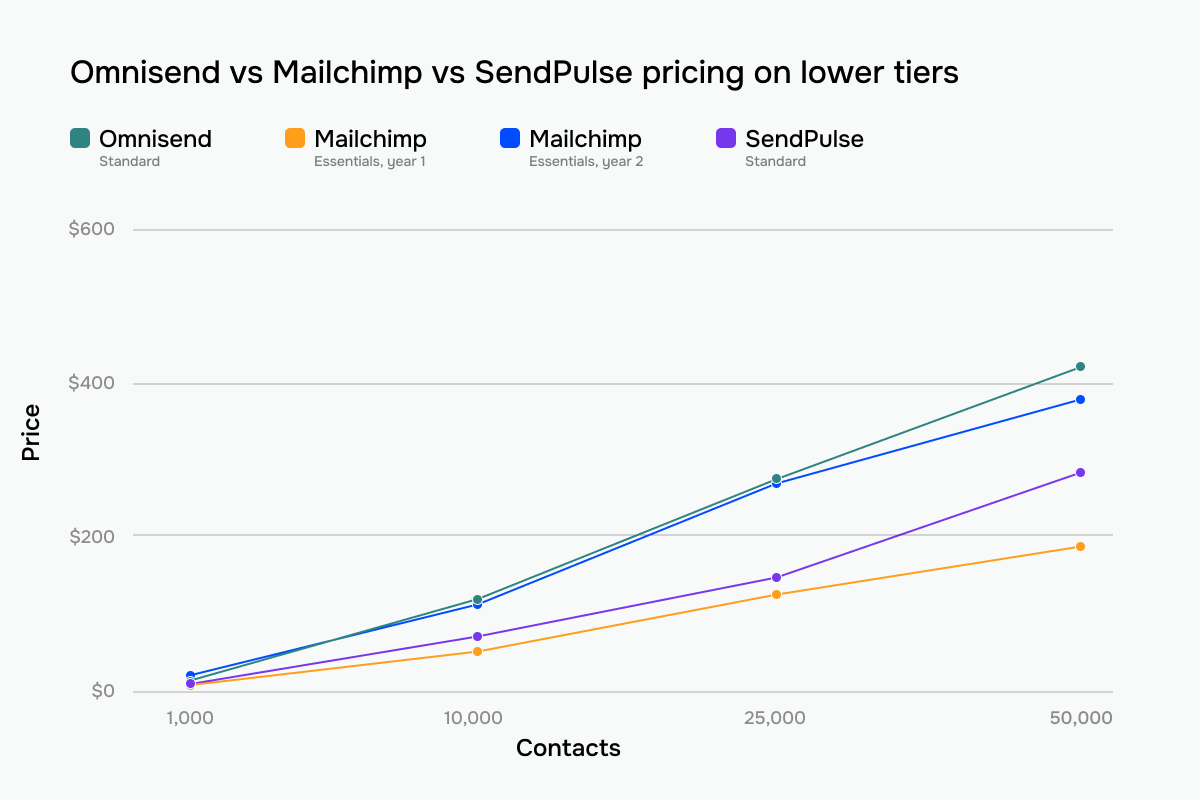 Omnisend, Mailchimp, and SendPulse prices comparison across lower-tier plans
As to higher-tier plans, Omnisend and Mailchimp approach them differently. With Omnisend, most core features are included in every plan, so upgrading mainly gives you higher sending limits, access to SMS marketing, and some extra tools. In contrast, Mailchimp uses higher tiers to unlock core functionality. This means that the jump from Essentials to Standard or Premium is almost essential for businesses that need advanced automation and marketing features.
| Contacts |
Omnisend Pro |
Mailchimp Premium, year 1 |
Mailchimp Premium, year 2 |
SendPulse, Pro |
| 5,000 |
$90 |
$175;
150,000 emails/mo |
$350;
150,000 emails/mo |
$62.40 |
| 10,000 |
$150 |
$175;
150,000 emails/mo |
$350;
150,000 emails/mo |
$93.60 |
| 25,000 |
$400 |
$310;
375,000 emails/mo |
$620;
375,000 emails/mo |
$190.80 |
| 50,000 |
$715 |
$407.50;
815,000 emails/mo |
$815;
815,000 emails/mo |
$337.20 |
| Note: All prices reflect monthly billing, and all the plans include unlimited email sends unless otherwise specified. |
And again, if you prefer graphs over tables, here’s the visualization of the numbers above. It compares higher-tier pricing for Omnisend, Mailchimp, and SendPulse.
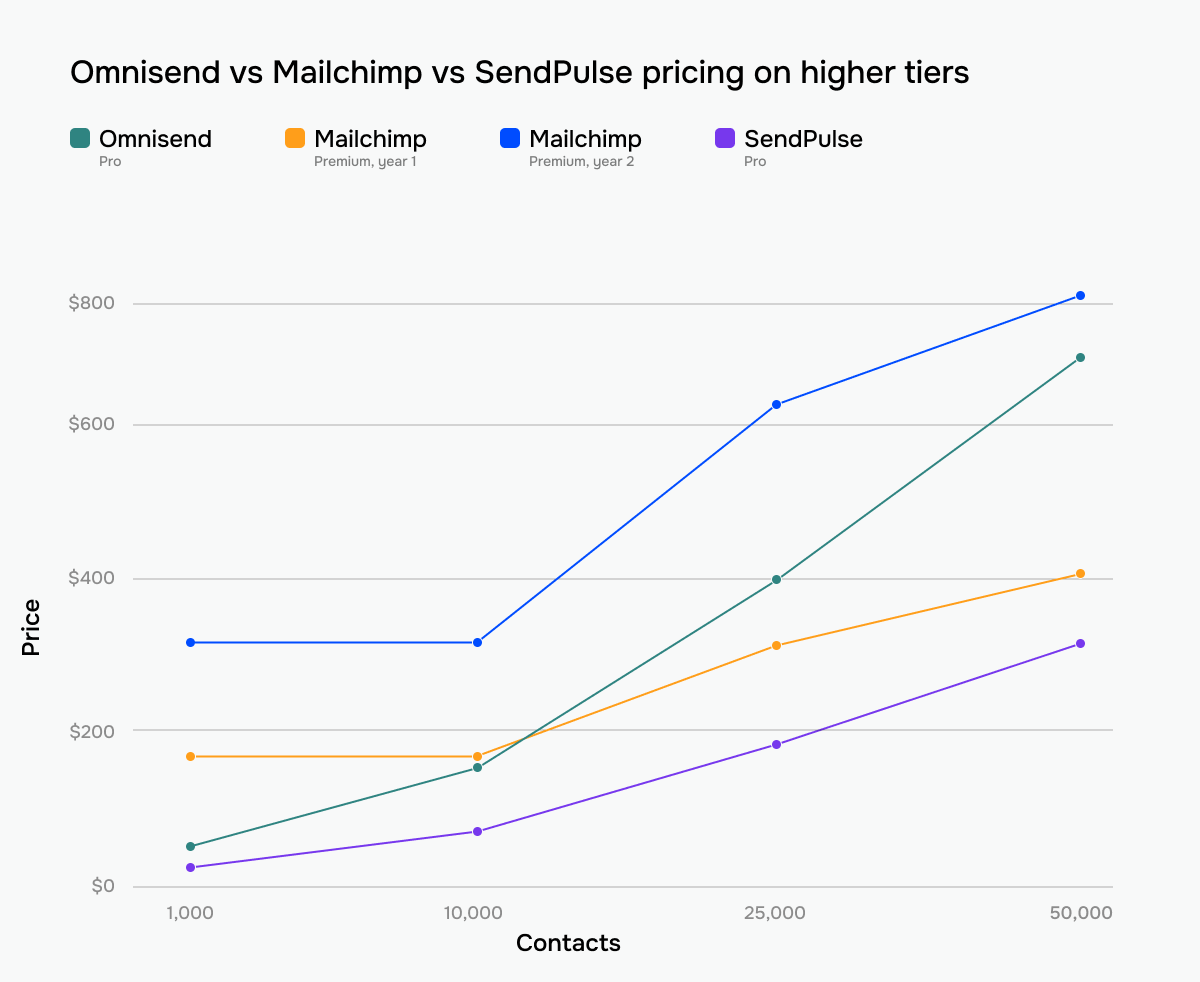 Omnisend, Mailchimp, and SendPulse prices comparison across higher-tier plans
Omnisend and Mailchimp are often close in cost, so the better comparison is what each platform includes at those price points.
Ease of use and interface
Omnisend: 8.5/10 | ⭐ Mailchimp: 9/10
Omnisend makes a stronger first impression, guiding new users through setup with very little friction. Mailchimp, however, offers a more refined day-to-day experience and feels like the more complete product over time, which is why it earns the higher overall score despite Omnisend’s smoother onboarding.
| Aspect |
Omnisend |
Mailchimp |
Winner |
| First-time experience |
Guided onboarding with a setup checklist, store connection, and a 5-step campaign wizard |
Guided account setup with an automatically generated signup form and audience-first onboarding |
Omnisend |
| Daily navigation |
Clean eCommerce-focused workspace with campaigns, automations, contacts, forms, and reports |
Intuitive marketing workspace with campaigns, contacts, analytics, and a responsive mobile browser experience |
Mailchimp |
| Learning curve |
Store-focused onboarding with step-by-step setup guidance |
Progressive onboarding covering contacts, campaigns, and automations |
Omnisend |
| Mobile access |
No dedicated app |
Native iOS and Android apps for campaigns, contacts, analytics, and account management |
Mailchimp |
| Workflow efficiency once mastered |
Most repetitive eCommerce tasks run automatically after setup |
Common marketing tasks completed fast and efficiently |
Tie |
| Total score |
8.5/10 |
9/10 |
Mailchimp |
Based on our hands-on testing, here’s how the experience unfolds over your first days, weeks, and months with each platform.
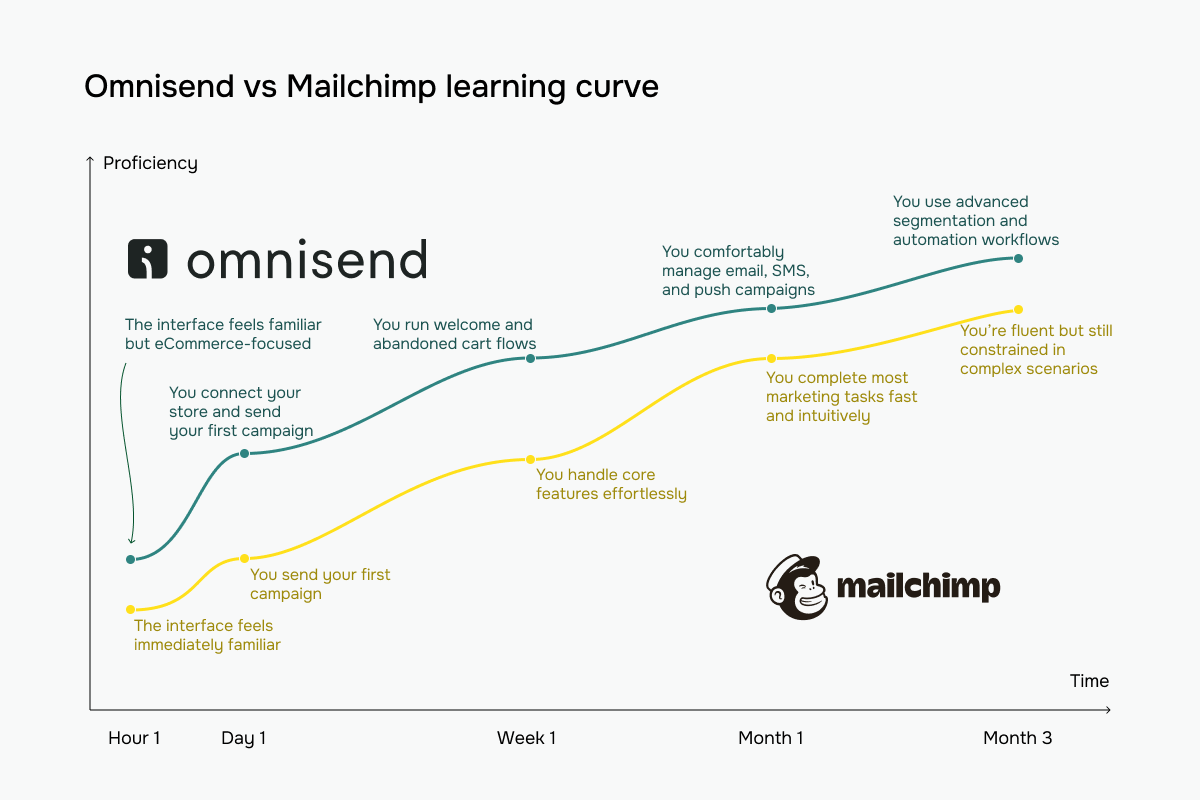 Omnisend vs Mailchimp learning curve based on our testing experience
Email builder and templates
Omnisend: 8.8/10 | ⭐ Mailchimp: 9.4/10
Both platforms can produce professional-looking campaigns, but Mailchimp gives you more control over the final design. Its builder offers greater layout flexibility and finer styling options, so it’s easier to create polished, visually appealing templates without custom coding.
| Aspect |
Omnisend |
Mailchimp |
Winner |
| Templates |
370+ email templates |
135+ email templates |
Omnisend |
| Drag-and-drop editor |
Visual, block-based editor with a live WYSIWYG canvas, reusable brand/theme styles, eCommerce blocks, and HTML support |
Structured drag-and-drop editor with up to 4 columns, reusable sections, separate styling/optimization workspaces, and HTML support |
Mailchimp |
| Notable content blocks |
Product recommendations, product listings, discount codes, navigation menus |
Product recommendations, dynamic content, surveys |
Omnisend |
| Mobile responsiveness |
Mobile-first templates, desktop/mobile preview, per-block device visibility |
Mobile-responsive templates, separate desktop/mobile styling, inbox preview, mobile preview app |
Mailchimp |
| Sending time optimization |
Sends campaigns at each subscriber’s local time |
Optimizes delivery based on each subscriber’s engagement history |
Mailchimp |
| Total score |
8.8/10 |
9.4/10 |
Mailchimp |
Let’s pay closer attention to the practical differences between email builders.
Omnisend’s email builder has a single goal: help eCommerce businesses create campaigns without unnecessary complexity. You work on a live visual canvas, dragging in content blocks, and because the interface stays consistent across the platform, it’s quick to learn. Dedicated product recommendation, discount, and navigation blocks keep product-focused emails fast to build.
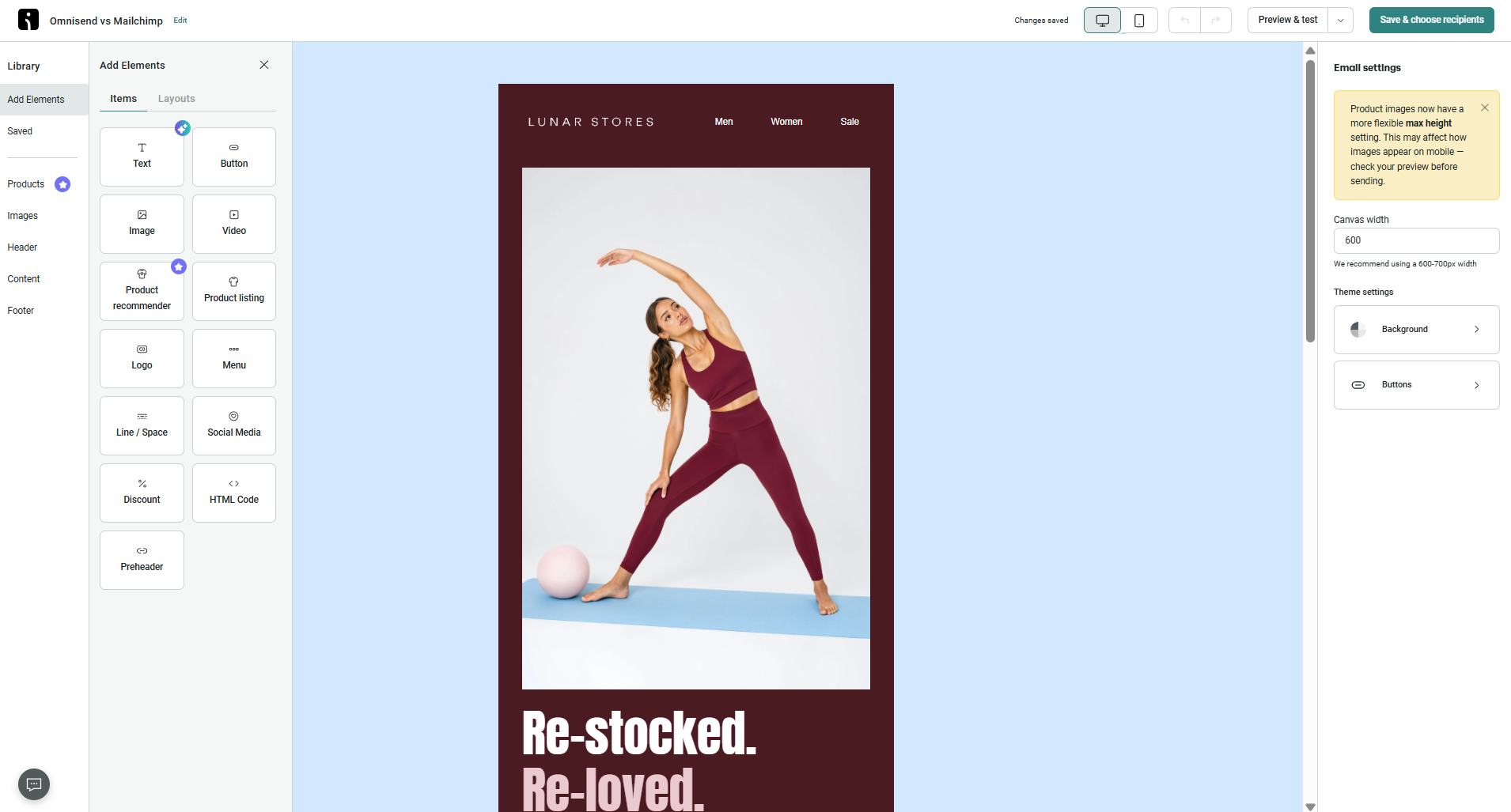 Building a product email in Omnisend’s editor
Mailchimp gives you more tools for designing and refining different types of content. Instead of putting everything in one panel, it separates content, structure, styling, and optimization into dedicated workspaces, with an explicit column grid for precise layouts. This keeps even elaborate, multi-section designs organized as you build them. Built-in surveys, third-party app blocks, collaboration tools, and optimization suggestions also make it well-suited to content-heavy campaigns beyond eCommerce.
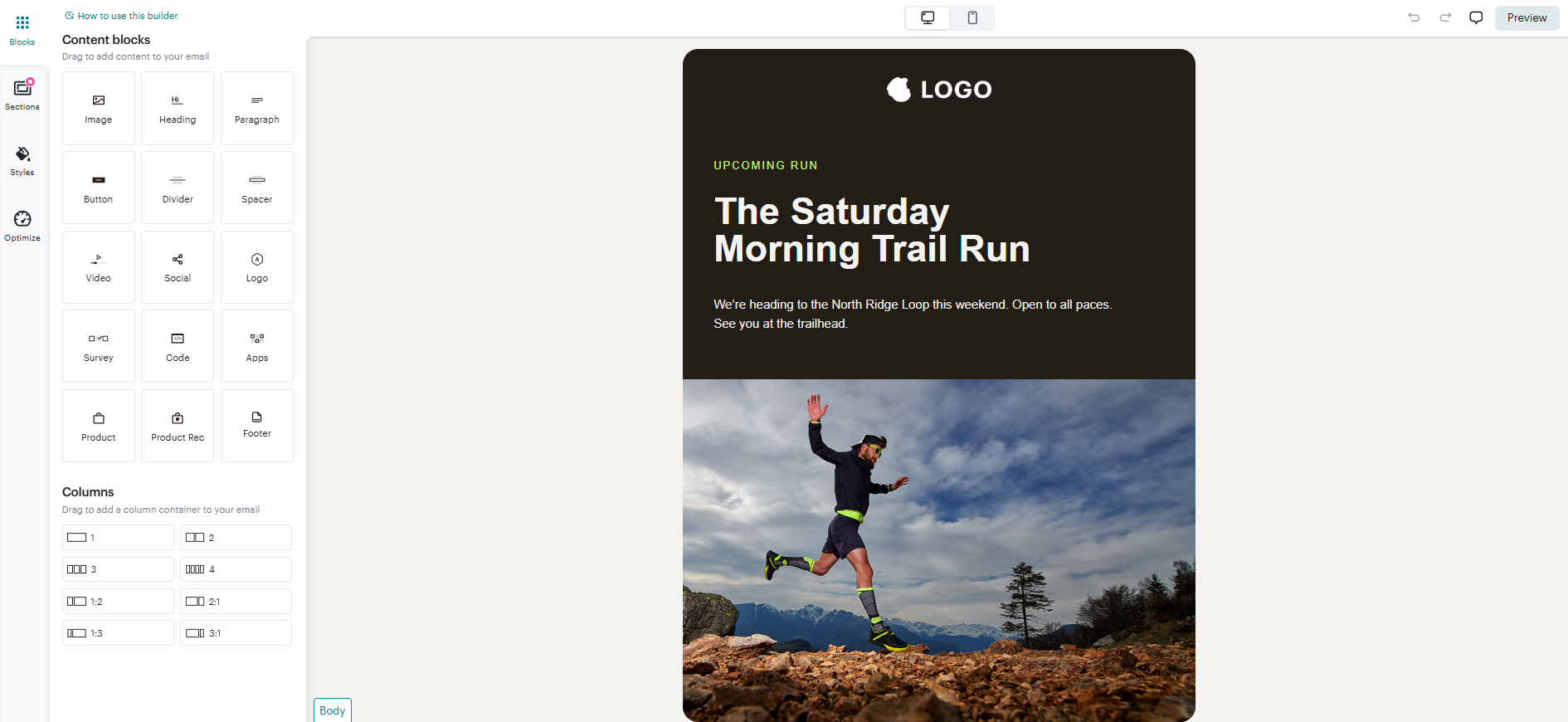 Building a newsletter in Mailchimp’s editor
Both builders are strong, but they have different priorities. Omnisend optimizes for speed, consistency, and eCommerce marketing. With Omnisend, product-driven campaigns are easy to assemble. Mailchimp offers more creative flexibility, optimization tools, and collaboration features, making it the better choice if you produce a wider variety of marketing content.
SMS capabilities
⭐ Omnisend: 8.2/10 | Mailchimp: 6.8/10
SMS has evolved from a nice-to-have into a key revenue channel for many brands, particularly those working in eCommerce. Both Omnisend and Mailchimp support SMS, including inside automation workflows, so for most users the choice comes down to a few practical points, namely which plans include SMS, how it’s priced, and where it’s available.
| Aspect |
Omnisend |
Mailchimp |
Winner |
| Plans that include SMS |
Included only on the highest-tier plan |
Available as a paid add-on for all paid plans |
Mailchimp |
| Supported countries |
US, UK, EU countries, Canada, Australia, India, and most other regions worldwide |
Europe, North America, and Australia |
Omnisend |
| Pricing model |
Volume-based and country-based pricing; from $0.007/SMS |
SMS credits with country-based pricing |
Omnisend |
| Compliance tools |
TCPA and GDPR compliance, AI-powered opt-out detection, automatic keyword recognition, separate SMS consent |
TCPA and CTIA compliance, multilingual opt-out keywords, built-in unsubscribe support where required |
Omnisend |
| SMS automation and keywords |
SMS available in all automation workflows (on Pro); keyword opt-in support |
SMS available in automation workflows, including keyword-triggered campaigns |
Tie |
| Two-way messaging SMS |
Two-way conversations via third-party integration |
Native two-way SMS inbox for managing customer replies |
Mailchimp |
| Total score |
8.2/10 |
6.8/10 |
Omnisend |
On the core SMS features, the two are fairly close. Omnisend pulls ahead on country coverage, usage-based pricing, and a more complete set of compliance features. Mailchimp still holds up well, with SMS available as an add-on on any paid plan and a native inbox for two-way conversations. Although Omnisend is a stronger choice if SMS is central to your strategy, the trade-off is that it is reserved for its top-tier plan.
Marketing automation
⭐ Omnisend: 9.2/10 | Mailchimp: 7.8/10
Mailchimp includes powerful, CRM-style automation, but many of its features are spread across higher plans and come with step and trigger limits. Omnisend keeps things more consistent: its advanced, eCommerce-focused workflows are available across paid plans, so you don’t constantly run into plan restrictions. That combination is what gives it the edge in this category.
| Aspect |
Omnisend |
Mailchimp |
Winner |
| Availability by plan |
Unlimited automations with all triggers and channels on every paid plan |
Available from Essentials; workflow limits increase by plan (1 trigger/3 steps on Essentials, 3 triggers/200 steps on Standard and Premium) |
Omnisend |
| Automation builder |
Visual builder with conditional splits, time delays, audience filters, exit conditions, and up to 5 trigger filters |
Visual builder with multiple triggers, conditions, delays, contact actions, and webhooks |
Tie |
| Triggers available |
Signups, eCommerce events, segments, dates, and custom events |
Signups, tags, groups, field updates, website activity, eCommerce events, SMS keywords, predictive analytics, and review data |
Mailchimp |
| Pre-built automations |
40 eCommerce-focused templates across email, SMS, and push notifications |
35 templates across email, SMS, RSS |
Omnisend |
| Channels supported |
Email and push notifications in every workflow on all plans, SMS on Pro with automatic channel routing |
Email automations on Essentials+; SMS as a paid add-on; webhooks on Standard+ |
Omnisend |
| Automation complexity |
Conditional splits, audience filters, exit rules, A/B testing, workflow debugging, and up to 5 trigger filters; 1 trigger per workflow |
Conditional and percentage splits, up to 3 triggers per workflow, up to 200 steps, wait-for-trigger rules, and predictive analytics triggers |
Tie |
| Total score |
9.2/10 |
7.8/10 |
Omnisend |
So, what do Omnisend and Mailchimp automation builders actually look like, and how do they work?
Omnisend’s automation builder is designed specifically for eCommerce marketing, and its strength is reacting to shopping behavior. Alongside conditions and splits, it includes practical controls such as product availability filters, purchase-based exit rules, frequency limits, and protection against contacts entering multiple automations at the same time. Small UX details, like warning you before a trigger change resets workflow logic, also make complex automations easier to manage.
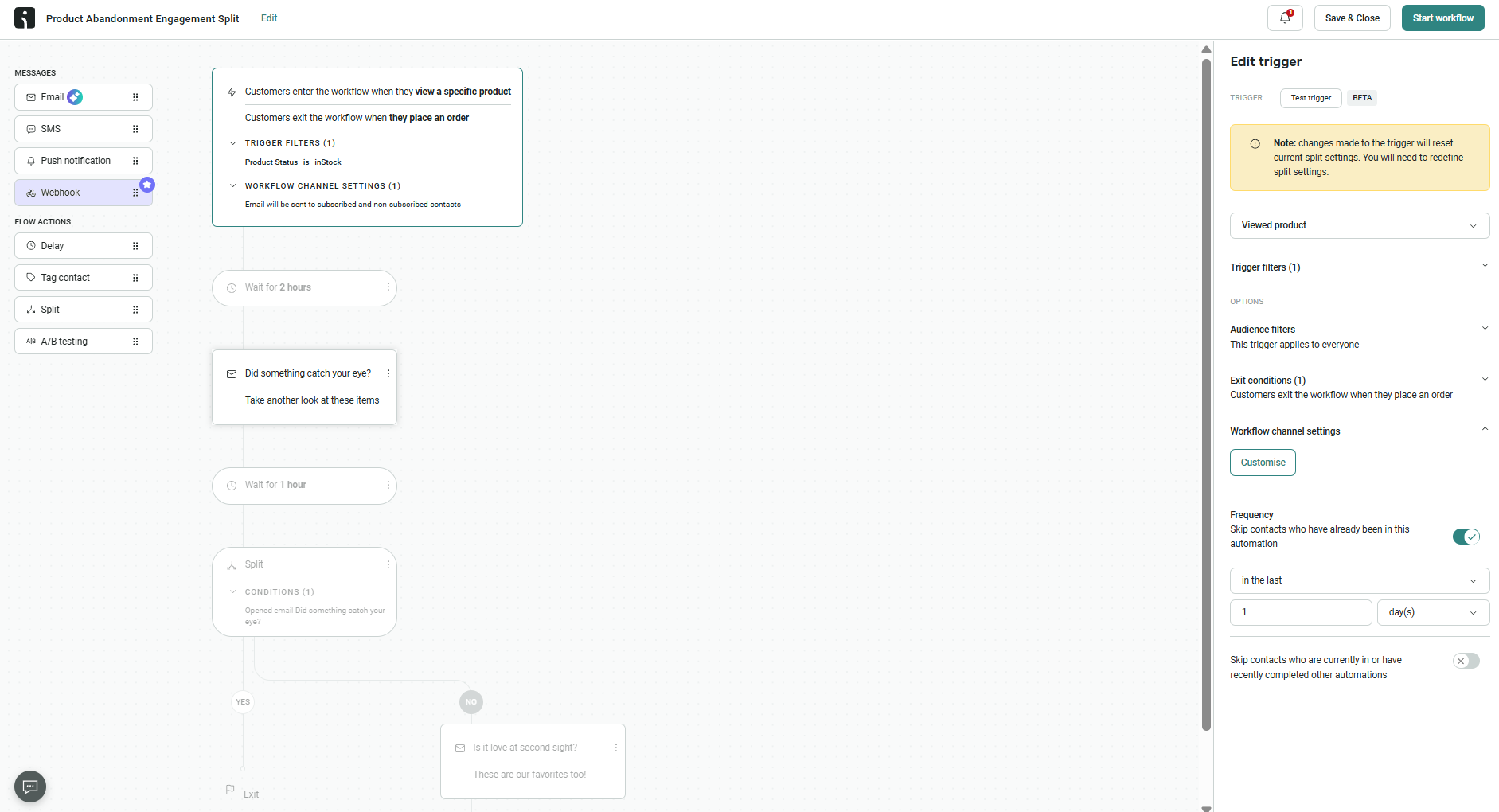 Building a product abandonment flow while testing Omnisend’s automation builder
Mailchimp’s automation builder leans toward customer data and lifecycle management. It handles eCommerce journeys too (the flow below is actually a post-purchase review request), but its real strength is what happens to the contact along the way: multiple entry triggers, event-based waiting, and actions that update, tag, group, or archive contacts give you greater control over your data as automations run. The biggest drawback is plan gating, as even moderately sized workflows can quickly exceed the step limits on lower-tier plans.
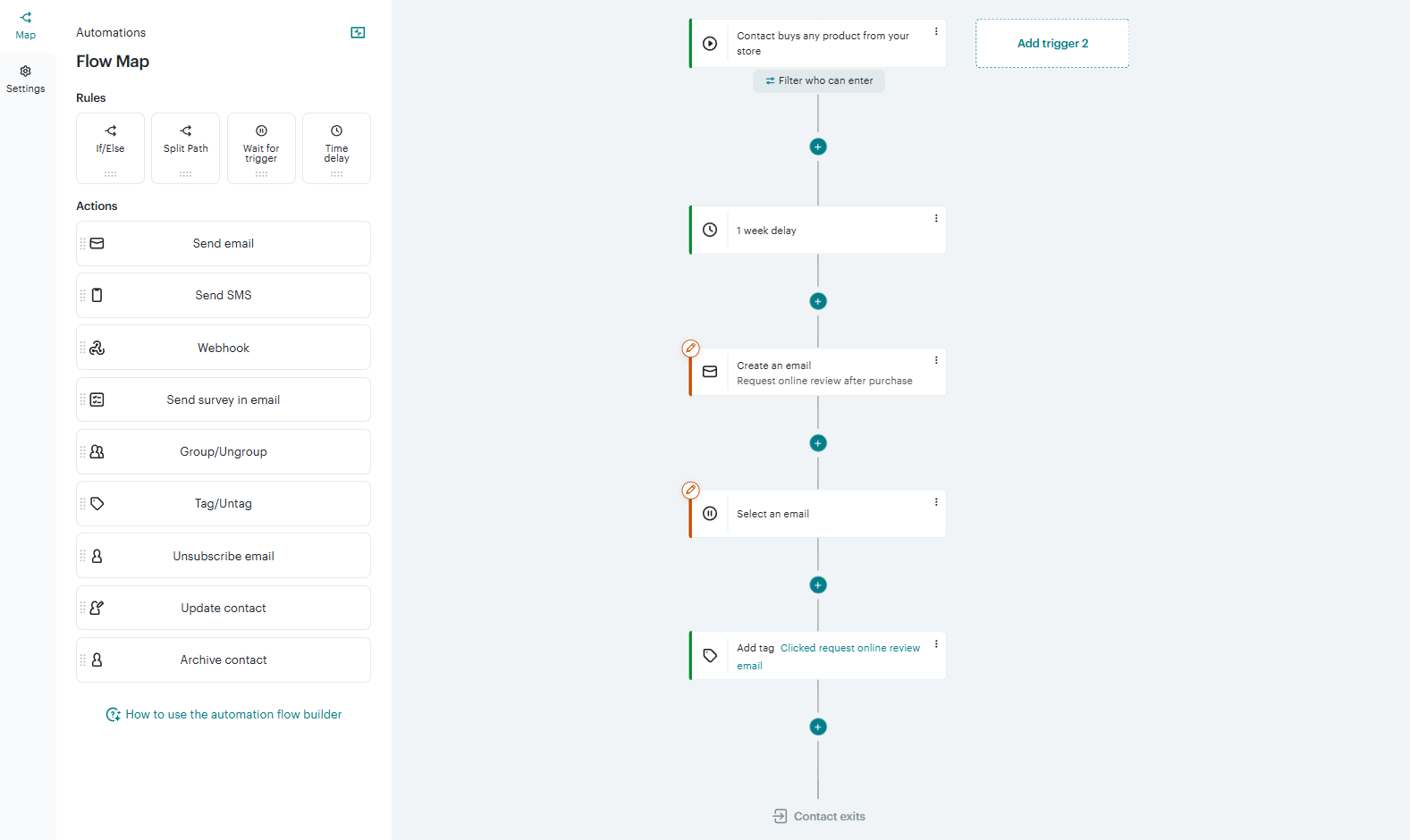 Building a post-purchase review flow while testing Mailchimp’s automation builder
Our takeaway? Omnisend is the stronger choice for eCommerce businesses running multiple sales and retention automations, where preventing message collisions and reacting to shopping behavior matter most. Mailchimp is better suited to businesses that combine marketing automation with CRM workflows and lifecycle campaigns.
Contact management
⭐ Omnisend: 9.2/10 | Mailchimp: 7.5/10
Effective segmentation is one of the foundations of successful email marketing, particularly in eCommerce, and it’s an area where Omnisend takes a clear lead, with a 1.7-point advantage.
| Aspect |
Omnisend |
Mailchimp |
Winner |
| Segmentation capabilities |
Dynamic segments with unlimited conditions, AND/OR logic, pre-built templates, AI-assisted segment creation, and real-time updates on all plans |
Basic segments on Free and Essentials (single AND/OR group); advanced segments on Standard+ with nested conditions and unlimited rules |
Omnisend |
| Segmentation criteria |
Contact attributes, subscription status, tags, campaign engagement, eCommerce activity, website behavior, lifecycle stage, and custom events |
Contact attributes, tags, groups, email and SMS engagement, predictive insights, survey activity, and email domains |
Tie |
| Segment update speed |
Real-time updates as contact data changes |
Automatic or manual updates for basic segments; advanced segments refresh before sending or after regeneration |
Omnisend |
| Tagging and manual organization |
Tags applied through imports, forms, automations, and bulk actions |
Tags and groups for contact organization and audience segmentation |
Tie |
| Contact structure |
Unified contact database with a single profile across segments, tags, and channels, preventing duplicate records and billing |
Separate audiences where the same contact can exist multiple times and count toward billing in each audience |
Omnisend |
| Total score |
9.2/10 |
7.5/10 |
Omnisend |
Accurate segmentation depends on rich customer data, and both platforms offer a wide range of tools to organize contacts and create targeted audiences. Omnisend takes the lead because its unified contact database and real-time segmentation work seamlessly with its automation tools, keeping targeting aligned with the latest customer activity.
Mailchimp loses points not because its segmentation is weak, but because its audience-based architecture can create duplicate contacts and increase billing costs.
Signup forms and landing pages
Omnisend: 8.6/10 | ⭐ Mailchimp: 8.8/10
Both platforms make it easy to build high-converting signup forms. Mailchimp offers a more polished building experience thanks to stronger design controls, while Omnisend is a more practical choice for marketers who prioritize targeting, testing, and lead capture.
| Aspect |
Omnisend |
Mailchimp |
Winner |
| Form types |
Pop-ups, flyouts, embedded, teaser, and multi-step forms |
Pop-ups, embedded, and multi-step forms; opt-in/out pages |
Tie |
| Form builder |
Drag-and-drop builder with customizable layouts, gamification elements, display targeting, A/B testing, double opt-in, and GDPR compliance tools |
Structured, component-tree builder with centralized brand controls, simultaneous desktop/mobile preview, and translation and custom-code support |
Mailchimp |
| Pop-up targeting conditions |
Time on page, scroll depth, exit intent, page visits, URL, location, UTM parameters, audience, device, frequency, and schedule |
Time on page, inactivity, quick scroll, exit intent, device, location, interaction rules, and frequency limits |
Omnisend |
| Landing page builder |
Landing pages with forms, media, CTAs, automatic redirects, and custom domains |
Template-based landing pages with custom domains, lead generation templates, and automatic source tagging (up to 5 tags) |
Tie |
| Total score |
8.6/10 |
8.8/10 |
Mailchimp |
Let’s look at how creating pop-ups works in Omnisend and Mailchimp.
Omnisend uses the same drag-and-drop approach found throughout the platform, so creating forms is easy and familiar. You don’t have to work inside a pre-defined template; instead, you build forms freely, with practical controls such as audience targeting, frequency limits, and redirects. As a result, you get a builder tuned for conversion rather than a pixel-perfect design.
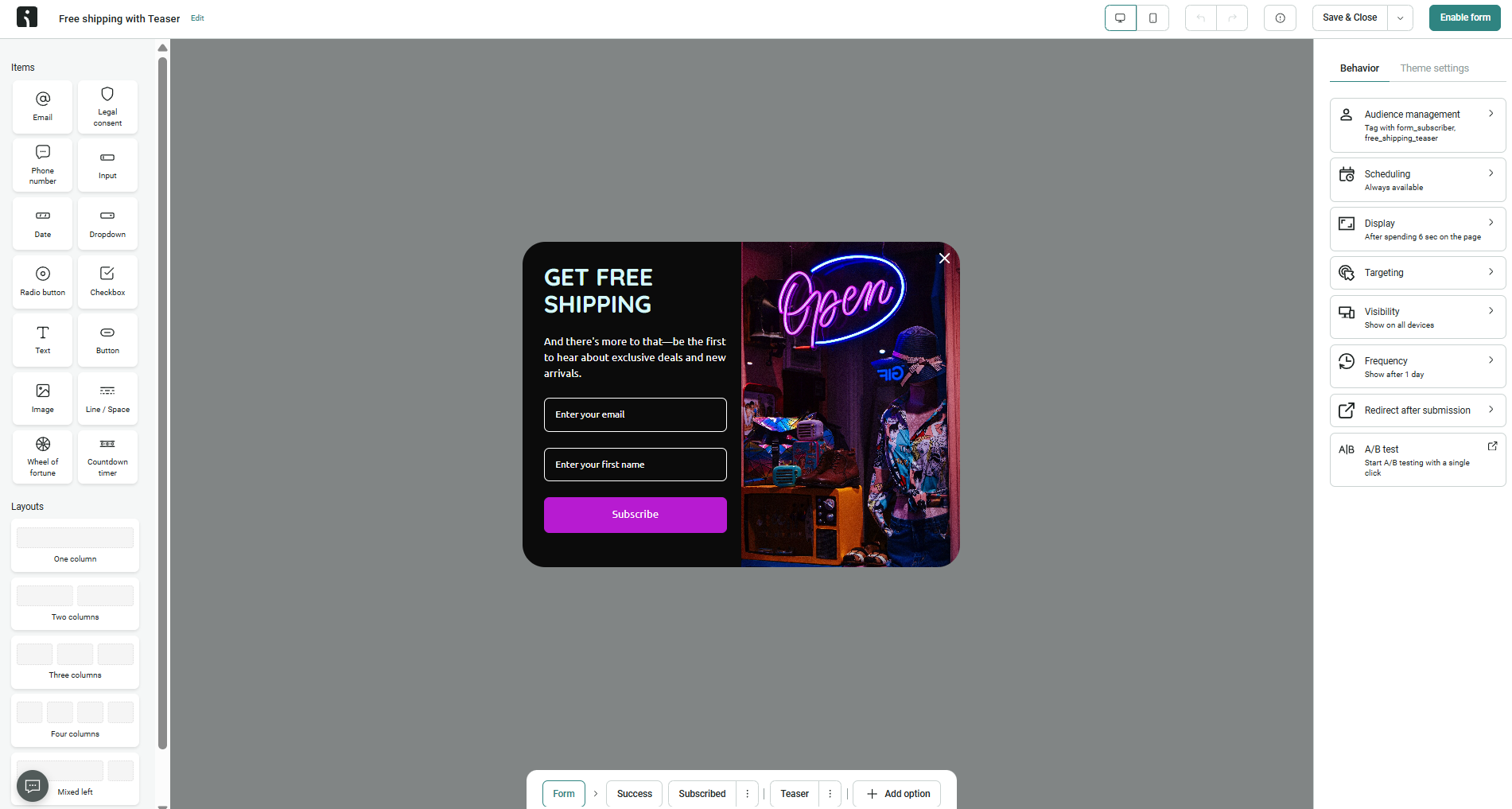 Testing Omnisend’s pop-up form builder
Mailchimp takes a much more structured approach. Instead of assembling forms from individual blocks, you customize a pre-defined component tree with centralized typography, color, and layout controls, so brand consistency is easier to maintain. Simultaneous desktop and mobile previews, pre-publish validation, and purpose-driven multi-step forms make the builder closer to a professional design tool than a traditional pop-up editor.
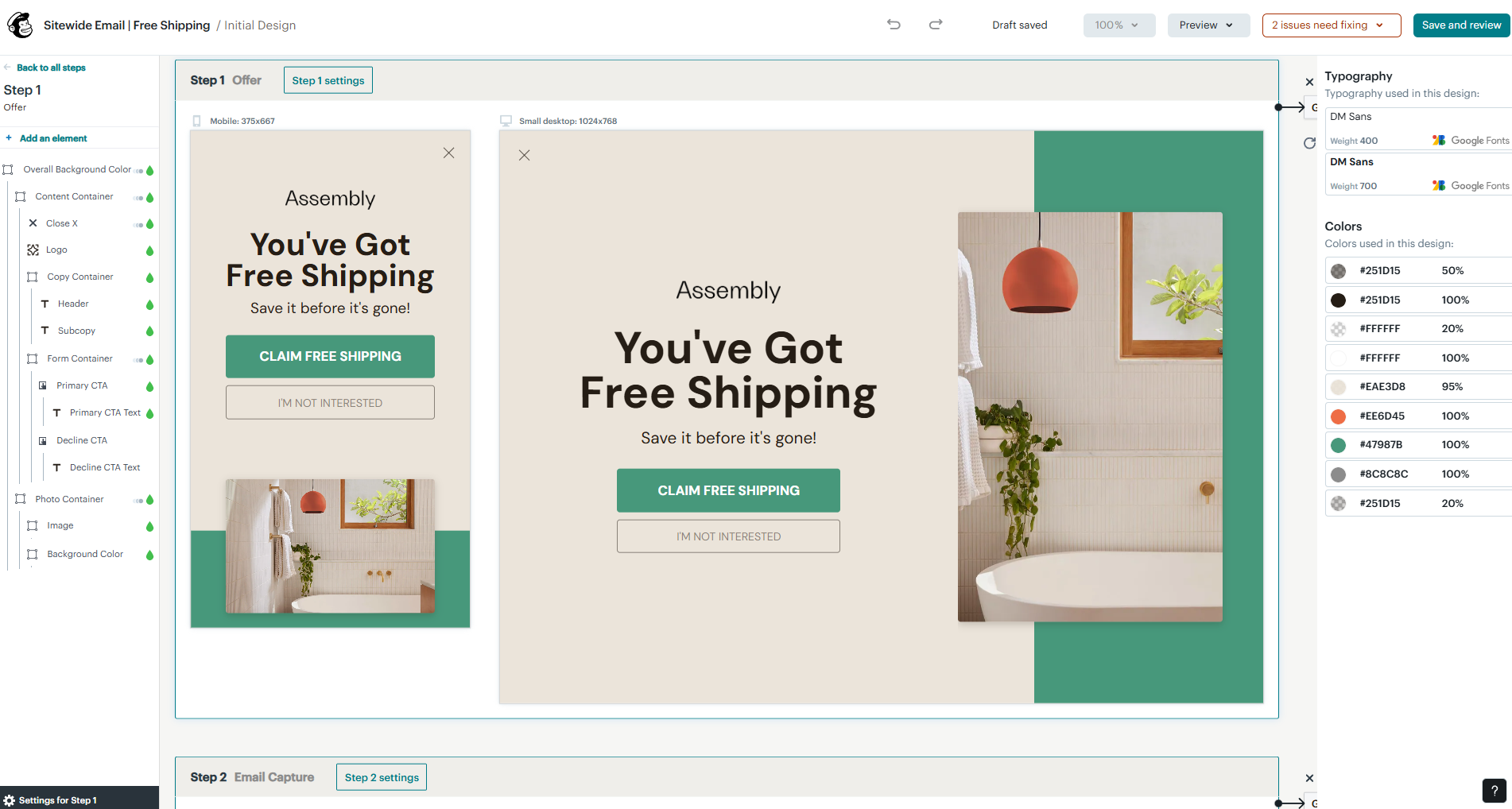 Creating a free shipping pop-up in the Mailchimp multi-step builder
The contrast here is easy to sum up. Omnisend focuses on how and when forms are shown, giving marketers extensive control over targeting and visitor behavior. Mailchimp focuses on how forms are designed, with stronger tools for brand consistency, design quality, and pre-publish checks.
If your primary goal is collecting more leads and optimizing conversions, Omnisend is a better choice. If you care just as much about having a polished, on-brand identity across assets as you do about lead generation, Mailchimp is a stronger option.
Integrations
Omnisend: 8.2/10 | ⭐ Mailchimp: 9/10
Mailchimp is a better choice if your marketing relies on several external platforms working together. In contrast, Omnisend supports many eCommerce-focused features natively, so growing online stores might benefit more from it.
| Aspect |
Omnisend |
Mailchimp |
Winner |
| Integration catalog |
240+ apps |
300+ apps |
Mailchimp |
| eCommerce platforms |
Native integrations for Shopify, WooCommerce, and BigCommerce; supports Magento, OpenCart, and other custom stores |
Native integrations for Shopify, WooCommerce, BigCommerce, PrestaShop, Adobe Commerce (Magento), and Lightspeed |
Tie |
| CRM systems |
No native CRM integrations |
Native Salesforce and HubSpot integrations |
Mailchimp |
| API capabilities |
REST API (v3/v5) for contacts and eCommerce events; JavaScript API for real-time on-site events, server-side custom events, and outbound webhooks triggered from automation workflows; Postman collection provided |
Marketing API (audiences, campaigns, templates, automations, reports) with sync webhooks; separate Transactional API (Mandrill) for event-driven email with its own delivery/open/click/bounce webhooks |
Tie |
| Zapier support |
2 triggers (new and updated contacts) and 17 actions, including campaign management, subscriber creation, template management, and segment deletion |
10 triggers (subscribers, campaigns, audiences, orders, tags, and more) and 22 actions, including subscriber management, campaign creation, audience management, notes, custom events, and contact removal |
Mailchimp |
| Total score |
8.2/10 |
9/10 |
Mailchimp |
Most online stores run on Shopify, so it’s worth comparing the two integrations directly.
| Shopify integration aspect |
Omnisend |
Mailchimp |
| Certified technology partners |
✅ |
✅ |
| Native vs third-party connection |
Native |
Native |
| Shopify Flow integration |
✅ |
✅ |
| Shopify segment sync |
✅
hourly auto-sync |
✅
manual mapping |
| eCommerce event triggers |
Rich
(cart, browse, orders, stock) |
Standard
(cart, purchase, page visits) |
| Bidirectional sync |
✅ |
✅ |
Although both connect to Shopify natively, sync data in both directions, support Shopify Flow, and cover the core eCommerce events, the distinction lies in how they use that data. With Omnisend, product, cart, and order data power much of its automation, segmentation, and personalization. Mailchimp connects to Shopify just as reliably, but for the platform, it’s just one store connector among many.
AI features
⭐ Omnisend: 7.2/10 | Mailchimp: 6.5/10
AI is now a standard part of the marketer’s toolkit. Both platforms build it into their email features, but Omnisend applies it across more areas.
| Aspect |
Omnisend |
Mailchimp |
Winner |
| Content generation |
AI subject lines, preheaders, email copy, product recommendations, and automatic brand import on all plans |
AI subject lines and email copy on Standard+ |
Omnisend |
| Automation generation |
Not available |
Not available |
Tie |
| Predictive customer analytics |
AI-powered RFM analysis, customer lifecycle insights, churn prediction, and CLV |
Predictive gender, age range, churn risk, and next purchase timing for segmentation and automation |
Omnisend |
| AI segment builder |
AI-powered builder with natural-language prompts |
Not available |
Omnisend |
| Total score |
7.2/10 |
6.5/10 |
Omnisend |
Neither platform is an AI leader, but Omnisend gets more practical, day-to-day use out of it. Instead of leaning on one or two headline features, it applies AI to writing, segmentation, branding, and customer insights, so routine tasks go faster. Mailchimp’s AI tools are useful but narrower in scope, and most of them require higher-tier plans.
Deliverability
⭐ Omnisend: 10/10 | Mailchimp: 8.5/10
Deliverability isn’t usually a problem with established email platforms. As long as you follow best practices, your emails will most likely reach the inbox. What sets the platforms apart is the tools they give you to protect your sender reputation. Here’s how Omnisend and Mailchimp compare:
| Aspect |
Omnisend |
Mailchimp |
Winner |
| Authentication |
SPF, DKIM, and DMARC support with guided DNS setup, in-account validation, and setup alerts |
SPF, DKIM, and DMARC support with setup guidance; recommends custom domains and DMARC for bulk senders |
Omnisend |
| Deliverability monitoring |
Dedicated deliverability dashboard with bounce, spam complaint, unsubscribe, provider-level metrics, and automatic account warnings |
Inbox preview for email rendering across devices and clients; no dedicated dashboard |
Omnisend |
| List hygiene |
Automatic bounce suppression, suppression lists, list cleaning tools, and account health alerts |
Automatic bounce cleaning, suppression lists for unsubscribes and complaints, and soft-to-hard bounce conversion |
Tie |
| Dedicated IP |
Available for consistent high-volume senders (300,000+ emails/week) with approval required |
Not available on the marketing platform; only via Mailchimp’s separate Transactional Email (Mandrill) product, as a $29.95/month IP add-on |
Omnisend |
| Total score |
10/10 |
8.5/10 |
Omnisend |
An 8.5 doesn’t mean Mailchimp has poor deliverability but that it provides less visibility and fewer management tools. Both platforms are capable of sending emails reliably when best practices are followed, but Omnisend gives you more information and built-in tools to monitor, protect, and maintain sender reputation. That’s a meaningful advantage and enough to justify a gap of 1.5 points.
Reporting and analytics
Omnisend: 8.2/10 | ⭐ Mailchimp: 8.8/10
Reporting is one of the areas where the results of our comparison come as a surprise. Although eCommerce platforms like Omnisend are often known for strong analytics, Mailchimp takes the lead in this comparison. The biggest reason is its flexible custom reporting, which gives you much more freedom to analyze campaign performance.
| Aspect |
Omnisend |
Mailchimp |
Winner |
| Report coverage |
Sales, campaigns, automations, products, forms, deliverability, click maps, UTM tracking, live activity, RFM, lifecycle, and CLV |
Email, SMS, automations, landing pages, websites, surveys, social posts, ads, eCommerce, and integration reports |
Tie |
| Custom reports |
No custom report builder; Fixed dashboards with filters and AI report assistant |
Fully customizable reports with filters, grouping, comparisons, scheduled snapshots, exports, and AI insights |
Mailchimp |
| Reporting speed |
Real-time store activity (last 7 days) and auto-refreshing campaign reports |
Live campaign and automation reports; scheduled report snapshots |
Tie |
| Export capabilities |
CSV and PDF |
CSV, PNG, and PDF |
Mailchimp |
| Total score |
8.2/10 |
8.8/10 |
Mailchimp |
Both platforms provide more than enough reporting for most businesses, and the difference isn’t the amount of data, as they both collect plenty. The thing is, Omnisend organizes eCommerce metrics into ready-made dashboards that are easy to understand and act on, while Mailchimp gives you more freedom to customize, compare, and explore that data, making it the stronger choice for teams that rely on detailed reporting and recurring analysis.
Customer support
⭐ Omnisend: 8.4/10 | Mailchimp: 7/10
Getting comfortable with new software always takes time. Unfamiliar terminology and workflows can make the first few days challenging, so clear documentation and responsive customer support can make all the difference. Here’s what to expect from Omnisend and Mailchimp:
| Aspect |
Omnisend |
Mailchimp |
Winner |
| Channel availability |
24/7 live chat and email support on all plans, including Free |
Email and chat on paid plans; phone and screen sharing on Premium; 30 days of email support on Free |
Omnisend |
| Knowledge base |
Focused and easy-to-navigate help center with step-by-step articles; Academy with video tutorials and webinars |
Extensive help center with detailed guides in 6 languages and video tutorials |
Tie |
| Onboarding assistance |
Guided setup for all users; dedicated onboarding on higher-tier plans |
Personalized onboarding on Standard and Premium, with 1 session on Standard and up to 4 sessions on Premium during the first 90 days |
Tie |
| Support quality sub-rating on Capterra |
4.6/5 |
4.2/5 |
Omnisend |
| Total score |
8.4/10 |
7/10 |
Omnisend |
Omnisend offers support from day one, while Mailchimp keeps more of its onboarding and support behind higher-tier plans. Users notice the difference: Omnisend scores 4.6/5 for support on Capterra to Mailchimp’s 4.2/5, which is why it’s the better fit for teams that want help readily available.

Join businesses growing with SendPulse
From solo creators to global brands, thousands of customers trust SendPulse to run email campaigns, chatbots, automations, and more — all in one place.
Get started for free
Your decision checklist
By now, you should have a clear picture of how Omnisend and Mailchimp compare. Here’s a quick checklist to match each platform to your priorities.
| Decision area |
Omnisend
is a better fit if… |
Mailchimp
is a better fit if… |
| Business type |
You run an eCommerce business and need email, SMS, push notifications, and automation designed for online sales. |
You combine email marketing with content, events, surveys, websites, and other digital marketing channels. |
| Budget expectations |
You want predictable pricing, advanced features on lower tiers, and 24/7 support on every plan. |
You’re willing to pay more for additional marketing capabilities and a larger integration library. |
| Automation needs |
You rely on eCommerce automations with purchase-based triggers, message coordination, and conversion-focused workflows. |
You rely on lifecycle automations with multiple entry triggers, contact updates, and CRM-oriented workflow actions. |
| Analytics focus |
You want eCommerce reporting with ready-to-use sales and campaign performance dashboards. |
You need customizable reporting, campaign comparisons, and greater flexibility to analyze marketing performance. |
| Team setup |
You have a small or growing team that values quick onboarding, responsive support, and an easy learning curve. |
You have a marketing or creative team that prioritizes brand consistency, collaboration, and a broad toolkit. |
Boiled down, it’s a straightforward choice. Omnisend is the better pick for a Shopify or WooCommerce store focused on recovering abandoned carts, personalized product recommendations, and eCommerce marketing without a steep learning curve. Mailchimp fits better if you manage newsletters, events, surveys, or websites, work with a larger marketing team, and need more flexibility for reporting, design, and integrations.
Final verdict and recommendations
⚖️ Final scores: Omnisend – 8.7/10 | Mailchimp – 8.4/10
The scores are so close that this comparison is nearly a tie. Both platforms perform well, but each is better suited to a different audience.
For eCommerce businesses, Omnisend is one of the best options out there. It offers strong automation, segmentation, SMS marketing, and Shopify integration, all in a platform that’s easy to use.
If you want to explore more options, here are some tools to consider:
- Klaviyo is a great option for brands looking for an even more advanced eCommerce solution and ready to pay a higher price.
- ActiveCampaign is another solid alternative for businesses that prioritize automation but want a lower price than Klaviyo.
Outside eCommerce, Mailchimp is definitely worth considering. It has one of the best email and signup form builders we’ve tested, a huge integration library, and flexible reporting that suits many types of businesses. Just remember that its long-term pricing is higher, lower-tier plans have some feature limits, and duplicate contacts can affect your billing.
If Mailchimp isn’t the right fit, there are several other platforms to explore:
- SendPulse is an all-in-one platform that combines email marketing, chatbots, and automation in a built-in CRM system at a much lower price.
- Kit (formerly ConvertKit) is a great choice for creators and newsletter-focused businesses looking for a generous free plan and a simpler email marketing experience.
So, would we recommend Omnisend? Absolutely. It’s one of the best eCommerce email marketing platforms we’ve tested that offers outstanding value for online stores. Would we recommend Mailchimp? Definitely. Its polished builders, flexible reporting, and broad marketing toolkit make it a strong choice for businesses whose needs extend beyond eCommerce.
Omnisend vs Mailchimp FAQs
Is Omnisend better than Mailchimp?
It depends on your business. Omnisend is a better fit for eCommerce, with more advanced automation, integrated SMS marketing, responsive customer support, and one of the strongest Shopify integrations. Mailchimp is a good choice for businesses that need more marketing channels, flexible reporting, and a larger integration library.
Which is cheaper, Omnisend or Mailchimp?
Mailchimp’s entry Essentials plan costs less than Omnisend’s Standard plan, especially with its 50% first-year discount. However, Essentials is feature-limited, so to match what Omnisend offers, you often need to upgrade to Mailchimp’s more expensive Standard or Premium plan. With more features included on lower plans, free 24/7 support, and no duplicate contact billing, Omnisend generally offers better value at a similar price.
What are Omnisend's and Mailchimp's free plan limits in 2026?
Both platforms limit their free plans to 250 contacts. Omnisend includes 500 emails per month, while giving users access to all core features, except for SMS campaigns. Mailchimp includes 500 email sends per month (with a 250-email daily limit).
How much do Omnisend and Mailchimp cost for 5,000 contacts?
With monthly billing on their entry-level paid plans, Omnisend Standard costs $81/month for 5,000 contacts (or $56.70/month if you prepay three months) and includes 60,000 emails. Mailchimp Essentials costs $75/month at the regular price, or $37.50/month during the first year with Mailchimp’s 50% introductory discount, and includes up to 50,000 emails.
Which has better automation, Omnisend or Mailchimp?
For eCommerce, Omnisend comes out ahead. It includes unlimited workflows on every paid plan, purchase-based triggers, and advanced controls for managing customer journeys. Mailchimp offers more CRM-oriented workflow actions but limits many automation capabilities by plan.
Can I switch from Mailchimp to Omnisend?
Yes. Omnisend offers migration guides and dedicated migration assistance on qualifying plans, so you can transfer your contacts, automations, and signup forms from Mailchimp.