MailerLite and GetResponse are not usually seen as direct competitors. Which honestly feels a bit strange once you start testing them side by side. Both platforms are relatively affordable, both offer strong email marketing capabilities, and both try to balance simplicity with more advanced marketing tools. And yet, the actual experience of using each platform feels surprisingly different.
So what is really going on here? Is one platform objectively better, or were they simply built for completely different kinds of marketers? To answer that, we spent several weeks testing, comparing, and evaluating both platforms in real workflows, from email building and automation to forms, analytics, deliverability, and everyday usability. Here’s what we found and which platform we’d actually choose depending on the business scenario.
How we scored this comparison: This review was created by the SendPulse team. As an email marketing platform ourselves, we work in the same space as the tools we test, which also means we understand the field deeply.
Each platform was evaluated across nine categories using our independent methodology. Pricing (25%), ease of use (20%), and email and automation features (15% each) carry the most weight because they affect daily workflows the most. All scores reflect hands-on testing and analysis as of June 2026.
TL;DR Quick MailerLite vs GetResponse comparison
Here’s a very brief summary of what we discovered while working on this comparison. And if any of the categories feel especially important for your business, simply click on it to jump directly to the part of the article where we break everything down in much greater detail.
| Category |
MailerLite |
GetResponse |
Winner |
| Best for |
Beginners, newsletter creators, and everyday email marketing |
eCommerce, funnels, webinars, and advanced marketing workflows |
Depends on the use case |
| Pricing |
8.8/10
Affordable, but recent pricing changes have narrowed its advantage |
8.4/10
More expensive with a broader feature set |
MailerLite |
| Ease of use |
9.6/10
Beginner-friendly interface with an intuitive layout |
8/10
Feature-heavy interface with a steeper learning curve |
MailerLite |
| Email design |
8.6/10
Clean, creative editor that’s easy to use |
9.2/10
More advanced personalization and dynamic content capabilities |
GetResponse |
| Automation |
7.5/10
Simple and approachable workflow builder |
9/10
Deep multi-channel automation |
GetResponse |
| Contact management |
8/10
Cleaner and easier audience organization |
8/10
Broader segmentation inputs and targeting |
Tie |
| Forms and pages |
7.6/10
Polished and easy-to-use pop-up builder |
8.5/10
Stronger conversion optimization and landing page tools |
GetResponse |
| Deliverability |
9.8/10
Excellent deliverability reputation with strong list hygiene |
9.2/10
Solid technical foundation with some user-reported concerns |
MailerLite |
| Reporting |
7.8/10
Clear and practical reporting tools |
8/10
More comprehensive reporting workflows |
GetResponse |
| Customer support |
7.8/10
Higher user satisfaction and stronger support ratings |
7.1/10
Solid support ecosystem with lower user review scores |
MailerLite |
| G2/Capterra rating |
4.6/4.7 |
4.3/4.2 |
MailerLite |
| Final score |
8.4/10 |
8.2/10 |
MailerLite |
The numbers give us a solid overview, but the most interesting part starts when we move beyond scores and into the real hands-on experience. Let’s dive into the juicy details.

Create and send high-performing emails
Use an AI assistant, pre-made templates, advanced segmentation, and feature-rich automation to run campaigns without coding. Start for free with up to 15,000 monthly emails.
Get started for free
Differences between MailerLite and GetResponse in pricing and key email features
To put this comparison together, we looked at three things: official platform documentation and feature pages, what we actually experienced while testing both hands-on, and what real users say on review websites like G2 and Capterra.
We then filtered, compared, and condensed all that information down to what actually matters when choosing an email marketing platform without the marketing fluff. Here’s what we found.
Pricing plans
⭐ MailerLite: 8.8/10 | GetResponse: 8.4/10
Disclaimer: Pricing changes frequently. These figures are accurate as of June 22, 2026. Always verify final costs on official pricing pages.
MailerLite used to be one of the strongest performers in this category and held a perfect 10/10 score for pricing. Recent pricing changes have made the competition much closer. While MailerLite remains reasonably affordable, especially on lower-tier plans, it no longer stands as far ahead of its competitors as it once did. GetResponse remains competitively priced as well, particularly considering the breadth of features it offers.
Another important thing to understand in this comparison is the plan structure. Both MailerLite and GetResponse have lower-cost entry tiers and more advanced plans designed for businesses that need deeper automation, segmentation, analytics, and other professional marketing features. That’s why we included both starting and higher-tier plans for each platform in our table.
| Contacts |
MailerLite, Comfort |
MailerLite, Power |
GetResponse, Starter |
GetResponse, Creator |
| Free plan |
250 contacts; 2,500 emails |
500 contacts; 2,500 emails |
| 1,000 |
$19/mo; 10,000 emails |
$39/mo |
$19/mo |
$73/mo |
| 2,500 |
$33/mo; 25,000 emails |
$49/mo |
$31/mo |
$92/mo |
| 10,000 |
$89/mo; 100,000 emails |
$129/mo |
$81/mo |
$134/mo |
| 25,000 |
$179/mo; 250,000 emails |
$239/mo |
$175/mo |
$257/mo |
| 50,000 |
$319/mo; 500,000 emails |
$389/mo |
$305/mo |
$434/mo |
| Note: All indicated paid plans include unlimited email sends unless otherwise specified. |
To make the MailerLite vs GetResponse pricing differences easier to understand, we put everything into a graph. We also included SendPulse to put both platforms into perspective. It is not part of this comparison, but it helps illustrate that some modern email marketing platforms are still affordable for most businesses.
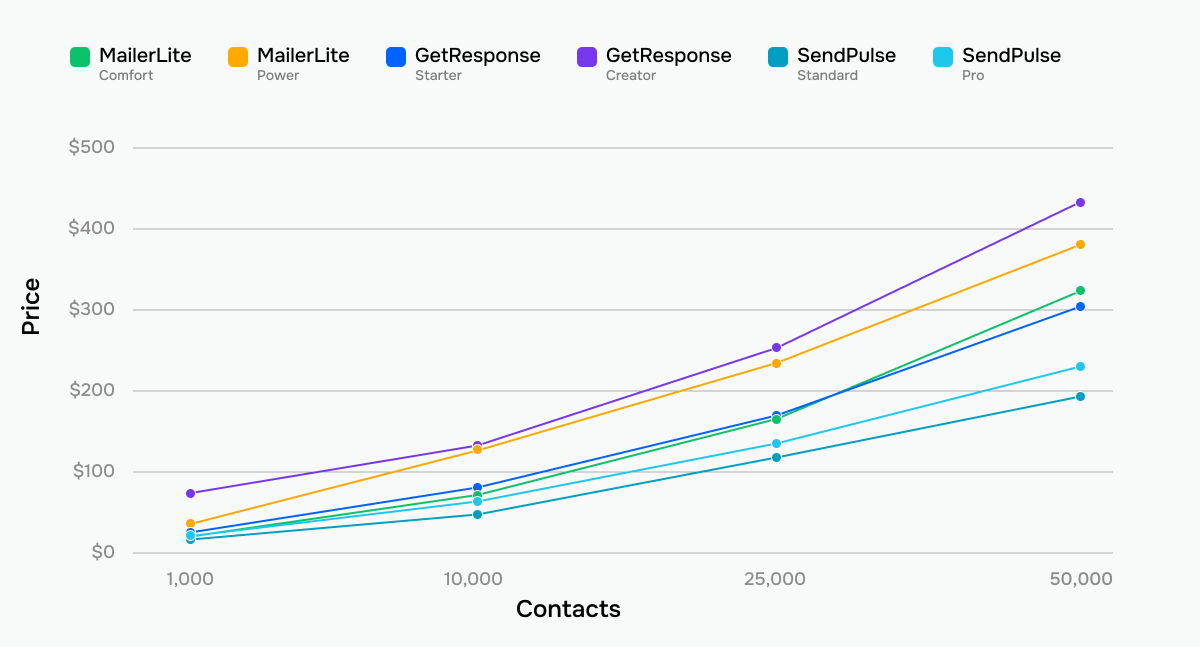 MailerLite, GetResponse, and SendPulse price comparison across tiers and contact list sizes
One thing becomes clear from these tables and graphs: pricing alone is unlikely to make the decision for you. The differences between MailerLite and GetResponse are often smaller than the differences in what the platforms actually offer. Let’s look at the features and see where each one delivers the most value.
Ease of use and interface
⭐ MailerLite: 9.6/10 | GetResponse: 8/10
Ease of use is another category where MailerLite earns near-perfect marks. It’s difficult for GetResponse to compete with a platform that was clearly designed with beginners in mind. MailerLite intentionally simplifies almost every step of the experience to make email marketing as accessible as possible.
GetResponse, meanwhile, feels more like a classic email marketing platform built for marketers with some prior experience. It is perfectly manageable, but compared to MailerLite, the learning curve is noticeably steeper.
| Aspect |
MailerLite |
GetResponse |
Winner |
| First-time experience |
Simple self-serve onboarding with subscriber import, campaign setup, and dashboard guidance |
AI-assisted onboarding that generates landing pages, welcome emails, and newsletters from setup questions |
Tie |
| Daily navigation |
Clean left-side navigation with low feature density and standard email marketing terminology |
Feature-heavy navigation with funnels, webinars, chats, websites, and broader marketing toolkit sections |
MailerLite |
| Learning curve |
Beginner-friendly across core features with multiple editor options, in-app guidance, and help center access |
Moderate for basic email marketing; becomes more complex with funnels and advanced automation |
MailerLite |
| Mobile access |
iOS mobile app for campaign sending, scheduling, subscriber management, and automation monitoring |
iOS and Android apps for dashboard access, contact management, campaign statistics, and automation monitoring |
Tie |
| Workflow efficiency once mastered |
Fast workflows for standard email marketing with reusable templates and bulk subscriber actions |
Efficient multi-channel workflows with AI campaign generation and broader marketing capabilities |
GetResponse |
| Total score |
9.6/10 |
8/10 |
MailerLite |
Here’s a side-by-side look at the learning curves for both platforms, so you can see how these differences play out in practice:
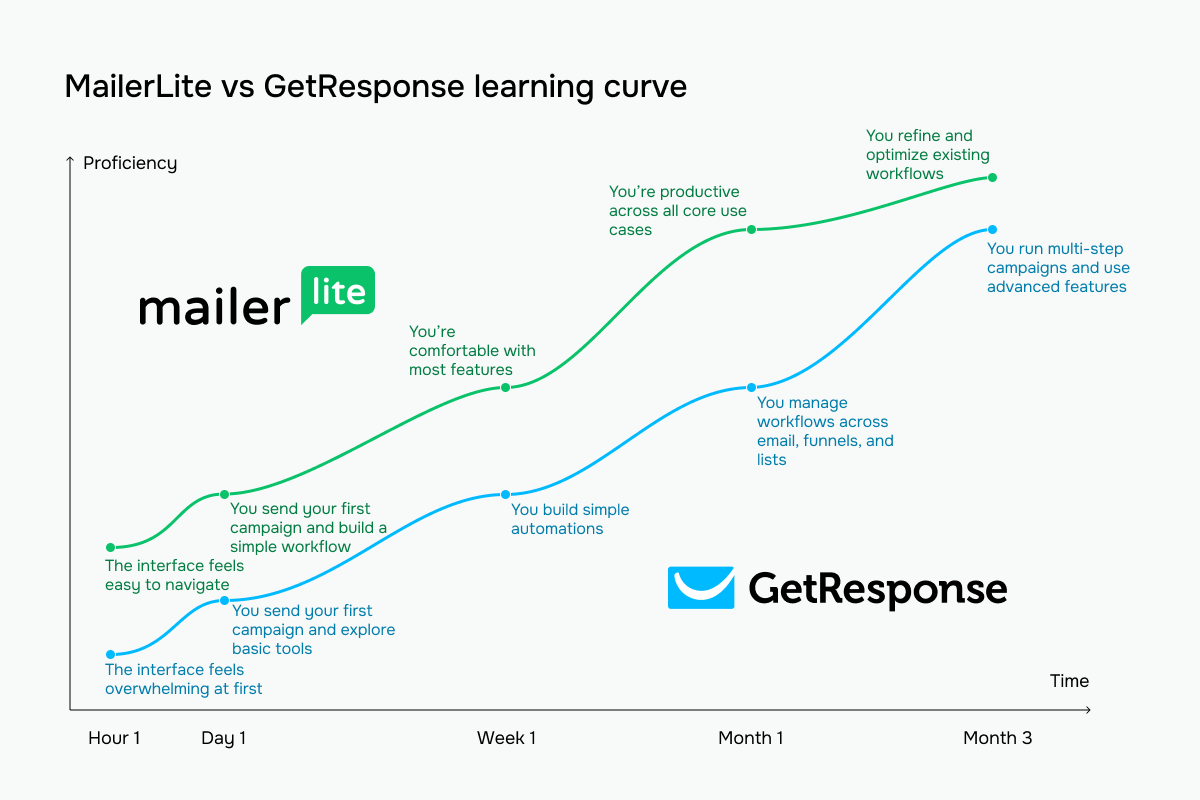 MailerLite vs GetResponse learning curve based on our testing experience
Email builder and templates
MailerLite: 8.6/10 | ⭐ GetResponse: 9.2/10
This is the first category where GetResponse wins, even if only by a small margin. And honestly, this result is not that surprising. Email builder is the core tool of any email marketing platform – the feature these products were originally built around. And since GetResponse has existed since 1998, the platform has had decades to refine, redesign, tweak, and polish its editor based on what marketers actually wanted over the years. The result is a builder that feels extremely polished and well-balanced in everyday use.
| Aspect |
MailerLite |
GetResponse |
Winner |
| Templates |
50+ templates filterable by category |
260+ templates organized by use case |
GetResponse |
| Drag-and-drop editor |
Block-based editor with categorized content blocks, reusable saved blocks, global style settings, and text-based editor |
Section-based editor with 1–6 column layouts, persistent block library, global style controls, autosave, and custom CSS support |
Tie |
| Notable content blocks |
Survey and quiz blocks, FAQ accordion, webinar and event blocks, countdown timers, RSS, and videos |
eCommerce product blocks, recommended products, promo codes, countdown timers, courses, and webinars |
Tie |
| Mobile responsiveness |
Mobile preview available |
Automatic mobile adaptation with per-element visibility controls and mobile preview |
GetResponse |
| AI features |
AI generates email body content and subject lines |
AI generates email body content, subject lines, and creates full campaigns from a prompt |
GetResponse |
| Sending time optimization |
AI-based send-time optimization using subscriber engagement and activity history |
Engagement-based send-time optimization; local-time delivery for campaigns and automations |
GetResponse |
| Total score |
8.6/10 |
9.2/10 |
GetResponse |
Here’s what we saw while testing both email builders.
MailerLite’s editor stands out because of how visually organized it feels. Instead of giving you a flat library of generic blocks, the platform structures the builder around categories like Hero, Sections, Products, Survey, and others. Each category contains ready-made visual patterns shown as previews, so instead of building an email block by block from scratch, you choose layouts that already look close to the final result.
The builder is clearly designed to lower the barrier to entry for non-technical users. Global style settings let you define fonts, colors, email width, buttons, and other brand elements once, then apply them automatically across the entire template. Interactive blocks like Accordion, Quiz, Survey, and multi-platform product imports make the builder feel unusually rich for content-heavy newsletters and creator-style emails.
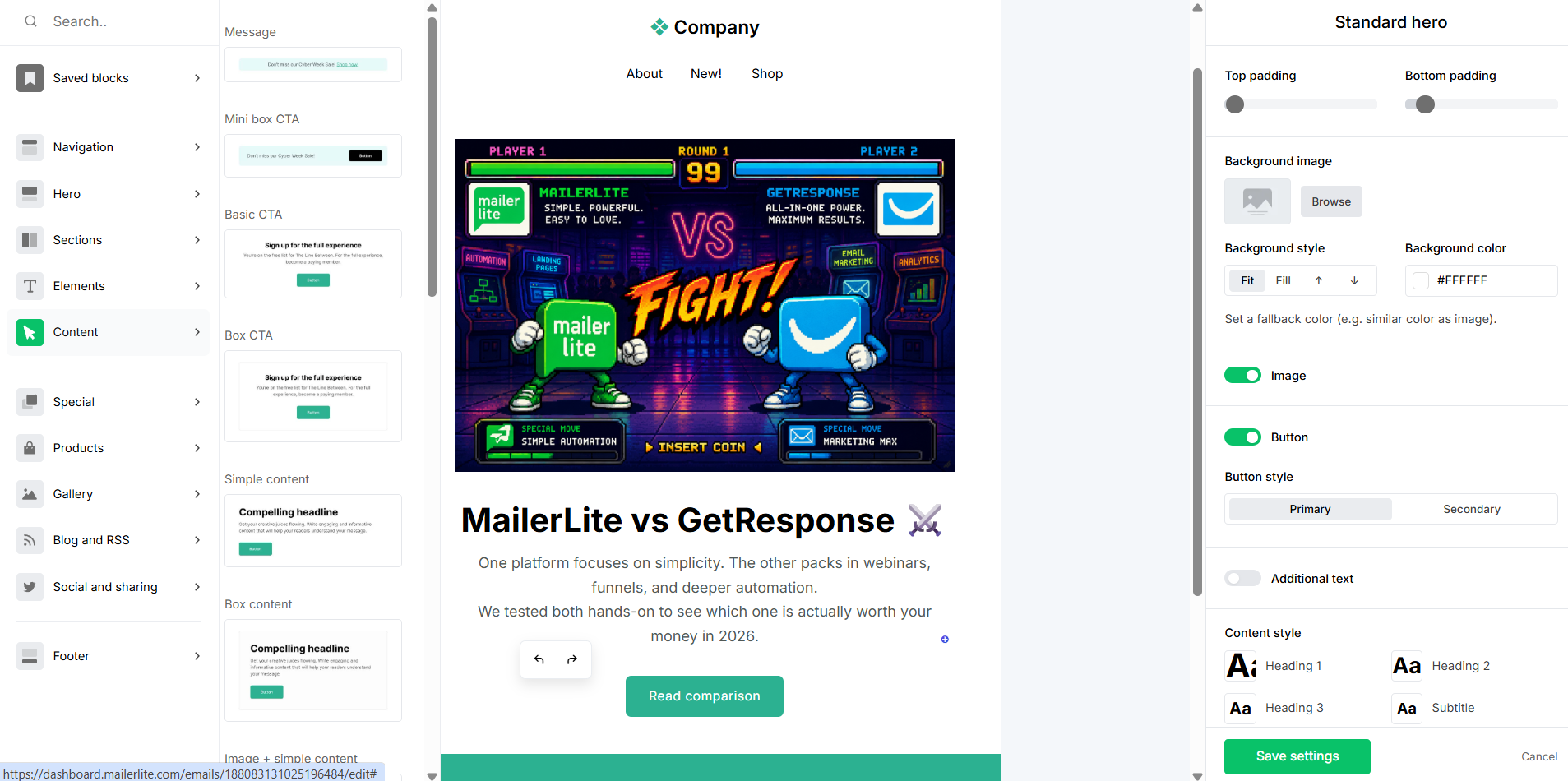 Creating a test template in MailerLite’s email builder
GetResponse’s editor focuses much more on structure, segmentation, and behavioral personalization. The builder uses a section-based layout system with clear multi-column selectors, making it especially practical for complex email structures and multi-part campaigns. Core blocks include countdown timers, eCommerce products, and promo codes, reflecting the platform’s strong focus on automation, events, and conversion-driven marketing.
The most distinctive feature is dynamic content. GetResponse allows you to define visibility conditions directly in the email builder, controlling which blocks different subscribers see based on list membership or contact attributes. Device-level visibility controls and rendering considerations further reinforce the feeling that the builder prioritizes personalization logic and campaign control.
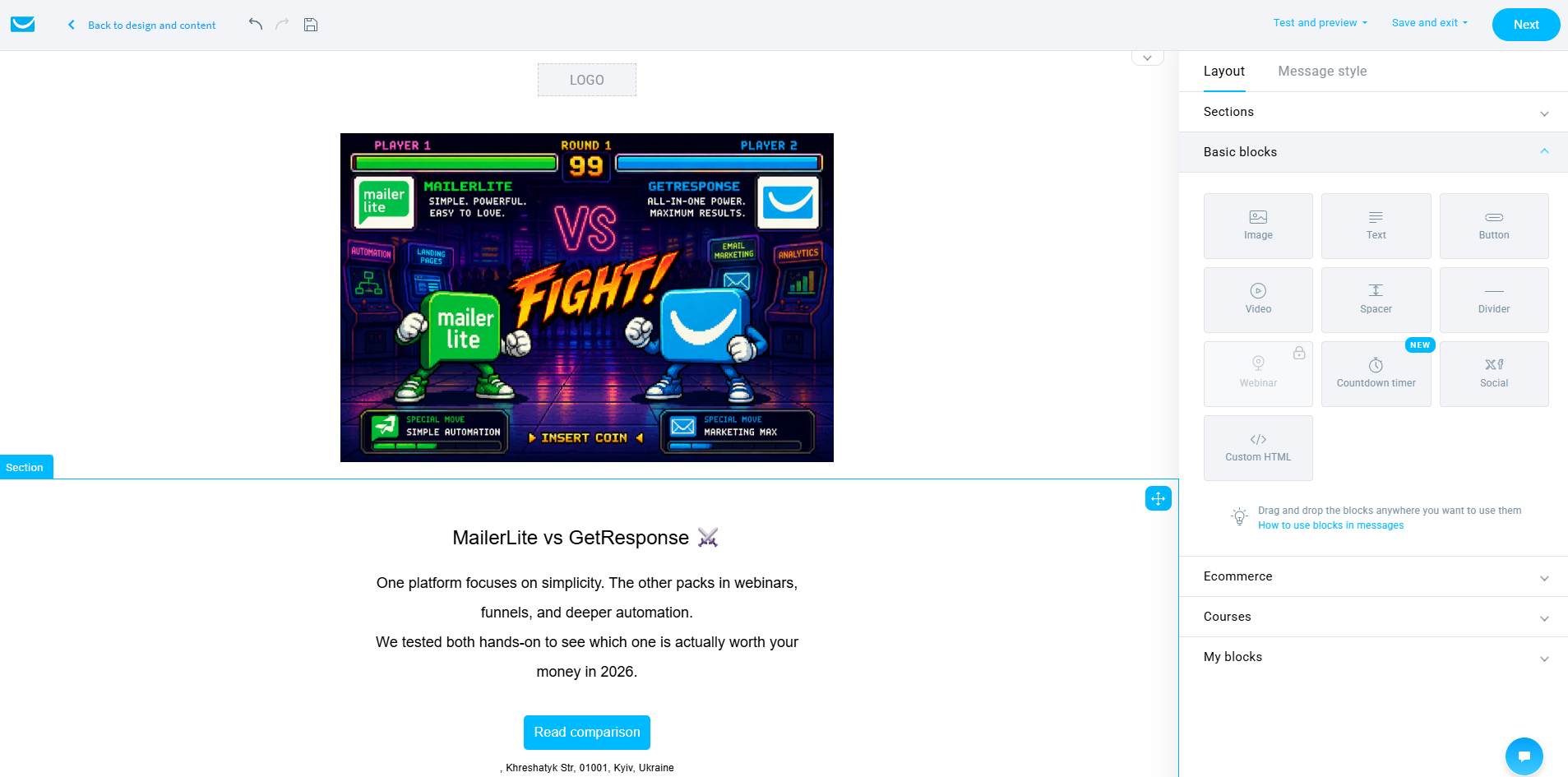 Creating a test template in the GetResponse email builder
In short, MailerLite is built for design simplicity and creative usability, while GetResponse centers around segmentation and personalization depth. MailerLite helps you produce polished, visually engaging emails, even without strong design skills.
GetResponse, meanwhile, becomes stronger once email marketing grows more behavior-driven. Dynamic content conditions and visibility settings make it better suited for marketers running segmented lists, automated funnels, webinars, or event-based campaigns where different subscribers need to see different content inside the same email.
Marketing automation
MailerLite: 7.5/10 | ⭐ GetResponse: 9/10
Marketing automation is another category where GetResponse shows a clear advantage. The platform is built for marketers who want to create larger, more sophisticated customer journeys across multiple channels and touchpoints.
Compared to GetResponse, MailerLite intentionally keeps automation simpler and easier to manage, which also means some advanced capabilities are simply not there.
| Aspect |
MailerLite |
GetResponse |
Winner |
| Availability by plan |
Free plan supports up to 3 active automations and 5 steps per workflow; mid-tier plan unlocks 50 active automations; higher-tier plan supports up to 100 active automations and 100 automation steps |
Free plan workflows cannot be published; lower-tier paid plans are limited to 1 workflow with up to 6 elements and basic logic; higher tiers unlock unlimited workflows with webinars and course support |
MailerLite |
| Automation builder |
Visual drag-and-drop builder with YES/NO branching paths and separate panels for rules and actions |
Visual drag-and-drop builder with YES/NO branching, parallel paths, and cross-workflow triggers |
Tie |
| Triggers available |
Group joins, form completions, API events, field updates, anniversaries, and date-based triggers |
Subscriber activity, engagement, eCommerce behavior, course and webinar actions, website visits, and consent updates |
GetResponse |
| Pre-built automations |
39 editable templates covering welcome flows, re-engagement, eCommerce, and other core workflows |
46 templates for abandoned cart, affiliate marketing, lead qualification, webinars, post-purchase, and welcome flows |
GetResponse |
| Channels supported |
Email |
Email, SMS, web push, and web visitor-based automations |
GetResponse |
| AI features |
No AI features for automation building or workflow generation |
No AI features for automation building or workflow generation |
Tie |
| Automation complexity |
Moderate complexity with branching logic, A/B testing, multiple triggers, and webhook actions; no scoring, loops, or cross-workflow triggers |
Advanced automation with loops, scoring, dynamic segment filters, multi-path branching, and cross-workflow triggers |
GetResponse |
| Total score |
7.5/10 |
9/10 |
GetResponse |
We have tested both automation builders to show you how they differ in practice.
MailerLite’s builder is structured around a semi-linear canvas with clearly labeled Yes/No branches running side by side. A workflow stays visually organized even as conditions and parallel paths are added. The platform combines a simple vertical flow structure with enough flexibility to build more advanced logic without turning the canvas into visual chaos.
The builder itself is divided into triggers, rules, and actions. Triggers cover subscriber activity, dates, and eCommerce events, while actions include sending emails, updating custom fields, moving subscribers between groups, unsubscribing contacts, webhooks, and internal notifications. One particularly notable capability is the “Move to step” action, which allows contacts to loop back or jump to another part of the flow instead of moving strictly forward. Combined with built-in list hygiene actions (unsubscribe and remove from groups), the whole system feels very practical for managing real-world email sequences.
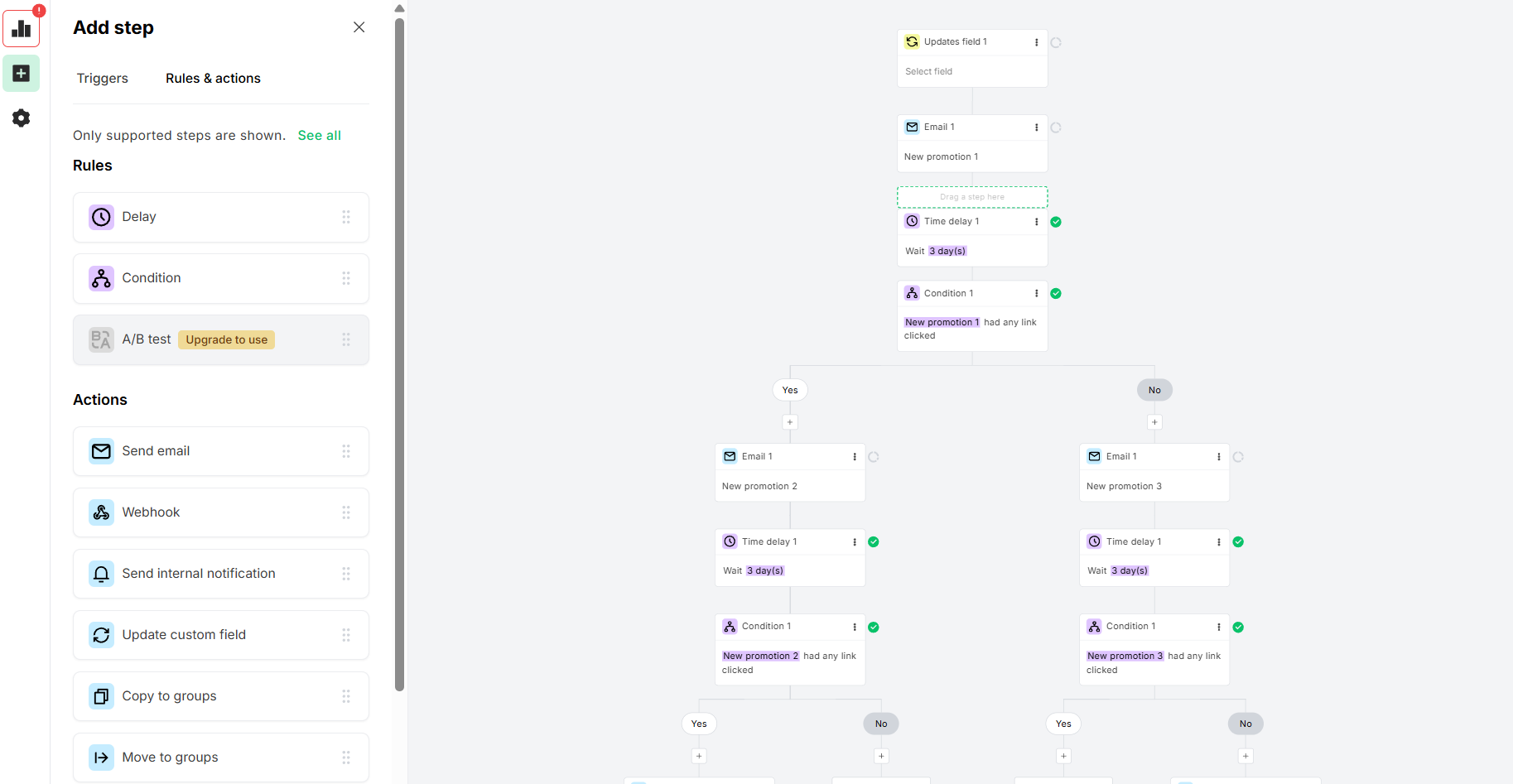 Editing a new promotion sequence while testing MailerLite’s automation builder
GetResponse uses a much freer form of automation canvas built around cross-channel behavior and web activity. The builder supports not only email conditions and actions, but also web-based triggers connected to anonymous visitor behavior. Conditions like “Product viewed,” “Category viewed,” “Visited URL,” and “Engagement events” allow you to react to what people do on the website before they even become subscribers.
The action system reflects this broader marketing scope. Alongside email sends, the builder supports push notifications, pop-up triggers, web engagement actions, scoring conditions, tag-based routing, and subscriber filtering by device, country, or visitor type. It makes the platform feel much closer to a full marketing automation environment rather than a classic email-only workflow builder.
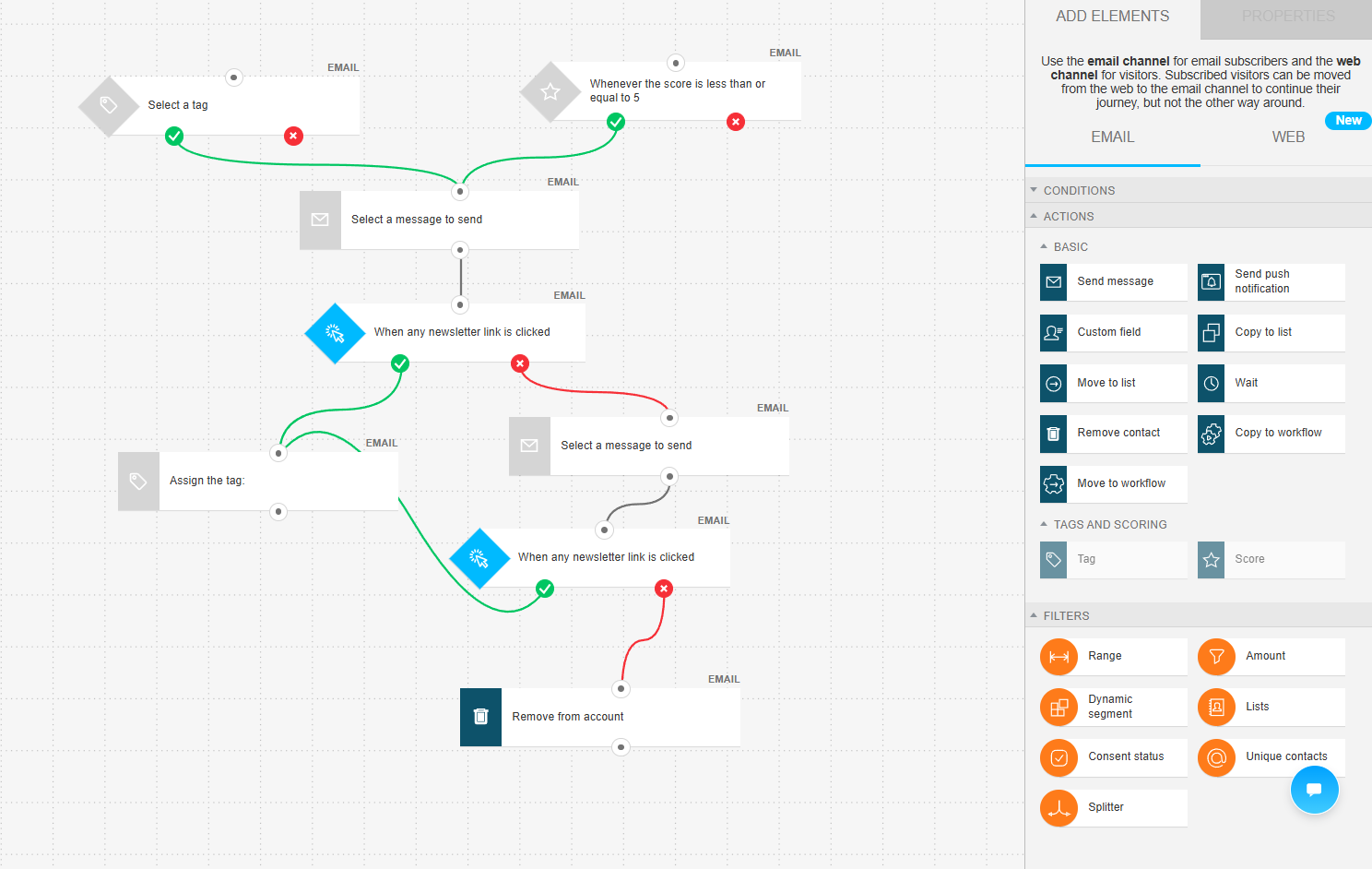 Editing a win-back sequence while testing GetResponse’s automation builder
So, MailerLite focuses on making automations easy to read and manage, while GetResponse goes further into behavioral and cross-channel automation. However, the more powerful their workflow becomes, the harder the canvas becomes to manage visually.
Contact management
⭐ MailerLite: 8/10 | ⭐ GetResponse: 8/10
It’s a tie, but surely not because MailerLite and GetResponse look alike along our segmentation criteria. The thing is, both platforms have their strengths and weaknesses. GetResponse has broader and more advanced segmentation inputs. MailerLite has a cleaner and more practical audience organization. And neither MailerLite nor GetResponse clearly dominates across all aspects listed below.
| Aspect |
MailerLite |
GetResponse |
Winner |
| Segmentation capabilities |
Automatically updated rule-based segments with AND/OR logic; segments usable for campaigns, automation triggers, and workflow branching |
Dynamic rule-based segments inside a list-based structure with automatic updates and AND/OR logic |
Tie |
| Segmentation criteria |
Group membership, custom fields, signup date, timezone, location, campaign engagement, automation activity, open rate, click rate, and segment membership |
Contact data, subscription details, engagement, scoring, tags, consent, eCommerce behavior, webinar activity, and API-based sources |
Tie |
| Segment update speed |
Automatic real-time updates as subscriber conditions change |
Continuous updates as contact conditions change |
Tie |
| AI features for segmentation |
No AI-based segmentation |
No AI-based segmentation; engagement scoring available separately |
Tie |
| Tagging and manual organization |
Two-system structure with manually managed groups and automatically updated segments; groups usable for campaigns and automation triggers |
Manual tags are managed through imports, automations, and bulk actions; the scoring system works separately from tags |
MailerLite |
| Total score |
8/10 |
8/10 |
Tie |
So, what does all this mean in practice? GetResponse gives you a broader set of data points to work with, making the platform stronger for businesses that rely heavily on behavioral targeting, eCommerce activity, or more advanced audience analysis. MailerLite keeps segmentation much more approachable and transparent. Its organization system feels cleaner and easier to manage in everyday work, especially for those of you who want solid targeting capabilities without turning audience management into a technical process.
When you start thinking seriously about managing contacts, segmentation, and customer data, CRM naturally becomes the next step. And this is one of the limitations of both MailerLite and GetResponse. Despite their solid audience management capabilities, neither platform offers a fully developed, built-in CRM for deeper sales and customer relationship workflows.
Better sales and customer connections are why many businesses eventually start looking for platforms that connect email marketing with sales processes more directly. Like SendPulse does.
What we've built in the SendPulse CRM system is a single environment where automation isn't a separate layer – it's part of the same space as your contacts and deals. A deal moves to a new stage, and a flow triggers automatically: a task gets assigned, contact data updates, and the next step happens without manual input. That's what makes the difference between a CRM system that stores data and one that actually runs your sales process.

Iurii Kislitsyn
CRM Project Manager at SendPulse
Signup forms and landing pages
MailerLite: 7.6/10 | ⭐ GetResponse: 8.5/10
While testing MailerLite, we felt that it already covers the vast majority of everyday signup form needs quite comfortably. It supports all the major form types, the builder stays simple and easy to understand, and features like double opt-in and even spin-the-wheel pop-ups are already there without making the whole experience overly complicated. For creators, newsletters, and many smaller businesses, this will probably be more than enough in practice.
GetResponse started feeling stronger once we moved into more optimization-focused scenarios. The extra targeting options, eCommerce pop-up conditions, landing page A/B testing, AI-assisted setup, and deeper analytics make the platform feel more oriented toward actively improving conversions rather than simply collecting subscribers. MailerLite feels simpler and more approachable, while GetResponse looks more growth-oriented.
| Aspect |
MailerLite |
GetResponse |
Winner |
| Types of forms available |
Pop-ups, embedded forms, slide-ins, floating bars, half-screen and full-screen forms, teaser add-ons |
Pop-ups, slide-ins, floating bars, half-screen and full-screen forms, embedded forms, and teaser add-ons |
Tie |
| Form builder |
Drag-and-drop editor with style controls, custom fields, GDPR consent fields, double opt-in settings, and spin-the-wheel templates |
Drag-and-drop editor with consent fields, automated brand styling, double opt-in support, and a fully visual editing canvas |
Tie |
| Pop-up targeting conditions |
Time delay, scroll depth, exit intent, display frequency limits, scheduling, page targeting, and device targeting |
Time delay, scroll depth, exit intent, inactivity, click triggers, page targeting, scheduling, device targeting, and eCommerce-based conditions |
GetResponse |
| Landing page builder |
Drag-and-drop landing page builder with 30 templates, SEO settings, analytics, and custom domains |
Drag-and-drop landing page builder with 100+ templates, A/B testing, AI-assisted setup, built-in analytics, tracking integrations, and custom domains |
GetResponse |
| Total score |
7.6/10 |
8.5/10 |
GetResponse |
Here’s what we’ve noticed while testing MailerLite and GetResponse form builders.
MailerLite’s form builder is polished and thoughtfully organized. The canvas previews the pop-up directly over a realistic website background, making it easier to understand how the form will look to visitors. Even visually rich layouts, like full-background-image pop-ups with overlaid text and inline signup fields, feel simple to build and edit inside the interface.
The builder itself is structured around three clear sections: Form, Options, and Success. This separation works well because field setup, behavior settings, and post-signup states are never mixed into a single overwhelming settings panel. The Form section stays intentionally minimal and fast to work with, while the Options section goes much deeper into things like GDPR fields, privacy policies, marketing permissions, etc.
MailerLite treats subscriber management and list quality as an important part of the form-building process itself. Features like Interest groups and hidden segmentation fields allow you to collect preference and segmentation data directly during signup, so you don’t need additional automation later.
 Editing a newsletter opt-in form in MailerLite’s form builder
GetResponse’s pop-up builder looks lightweight and low-friction. The canvas takes up most of the screen, and almost everything is edited directly in place – click an element, adjust it on the spot, drag it where needed, and continue building. The whole experience feels closer to working inside a simple website builder than a traditional pop-up editor full of menus and settings panels.
What stood out most is how little the interface gets in the way. The sidebar stays intentionally minimal, the navigation remains clean, and the builder rarely forces you to dig through nested settings. Instead of overwhelming users with controls, GetResponse keeps the focus on the canvas itself, making the whole workflow fast, intuitive, and easy to understand even without a tutorial.
 Setting up a test pop-up form with GetResponse
GetResponse clearly focuses more on optimization, targeting, analytics, and conversion-driven workflows, particularly for eCommerce marketing.
And MailerLite feels more refined, particularly as a pop-up builder. The interface stays cleaner, the workflow feels more intentional, and the platform pays noticeably more attention to the signup experience, compliance, and interactive form design without making the builder harder to use.
Deliverability
MailerLite: 9.8/10 | ⭐ GetResponse: 9.2/10
Most modern bulk email sending services already provide good to excellent deliverability because inbox placement is the core function of any ESP. Over the years, the technical gap between established platforms has also become smaller: authentication, bounce handling, spam prevention, and shared IP management are now fairly standard across the industry.
Because of that, deliverability increasingly depends on the marketer’s own practices rather than on the platform alone.
Almost 80% of deliverability depends on the marketer's practices, namely list hygiene, permission-based sending, consistent sending pattern, and content relevance. Only about 20% depends on the ESP, which handles infrastructure, authentication, and IP reputation management.

Victoria Lushnenko
Deliverability Expert at SendPulse
And if we look strictly at the technical deliverability features in the table, MailerLite and GetResponse appear quite similar:
| Aspect |
MailerLite |
GetResponse |
Winner |
| Authentication |
SPF and DKIM authentication supported; automatic setup available for supported hosting providers; DMARC configured externally; branded subdomains available for users without custom domains |
SPF, DKIM, and DMARC supported; automatic setup available for supported DNS providers; DMARC configured externally; shared sending domain used without custom authentication |
Tie |
| Deliverability monitoring |
Campaign-level bounce, spam complaint, and engagement metrics available; no built-in inbox placement monitoring; shared IP reputation monitored internally |
Campaign-level bounce and complaint metrics available; no built-in inbox placement monitoring; shared infrastructure monitored internally; dedicated deliverability support on enterprise tiers |
Tie |
| List hygiene |
Automatic removal of hard bounces, repeated soft bounces, and spam complaints; built-in inactive subscriber cleanup tools; inactivity filters for manual cleanup |
Automatic removal of hard bounces, repeated soft bounces, and spam complaints; suppression lists applied during import |
MailerLite |
| Dedicated IP |
Dedicated IP available on request from 50,000+ emails per week; setup and warm-up handled by the deliverability team |
Dedicated IP available from 50,000+ emails per week; setup and warm-up handled by the platform |
Tie |
| Total score |
9.8/10 |
9.2/10 |
MailerLite |
Looking purely at the technical capabilities in the table, there is no major difference between MailerLite and GetResponse in deliverability. Both platforms support the core authentication standards, list hygiene tools, and deliverability management features expected from a modern email marketing platform.
However, while evaluating them, we also considered real user feedback. And in GetResponse reviews, email deliverability issues appeared often enough to stand out as a recurring complaint. Since deliverability is one of those areas where real-world experience matters just as much as documented features, we decided this was significant enough to lower GetResponse’s score in this category.
Reporting and analytics
MailerLite: 7.8/10 | ⭐ GetResponse: 8/10
Both MailerLite and GetResponse provide enough reporting capabilities for the vast majority of email marketing work. Campaign analytics, automation performance, engagement tracking, eCommerce reporting, exports, and custom reports are all present on both sides, so neither platform feels limited or weak in everyday use.
| Aspect |
MailerLite |
GetResponse |
Winner |
| Report coverage |
Reporting for subscribers, campaigns, automations, forms, websites, and eCommerce activity |
Reporting for campaigns, automations, contacts, forms, landing pages, webinars, and eCommerce performance with engagement metrics across channels |
GetResponse |
| Custom reports |
Custom report builder with engagement and eCommerce metrics, comparative reporting, and custom date ranges |
Custom report builder with filters, scheduling, and shareable links |
Tie |
| Reporting speed |
Dashboard and campaign reports update progressively after sending; custom reports are generated on demand |
Metrics update progressively after sending; custom reports are generated on demand or on schedule |
Tie |
| Export capabilities |
CSV and PDF |
CSV, XLSX, and PDF |
GetResponse |
| Total score |
7.8/10 |
8/10 |
GetResponse |
GetResponse pulls slightly ahead, mostly because its reporting system offers a bit more flexibility for ongoing analysis and team workflows. Still, the gap here is small. This isn’t a case where one platform provides analytics and the other offers only basic reporting. MailerLite already covers most practical reporting needs very comfortably, while GetResponse mainly adds some extra convenience around how reports are managed and shared.
Customer support
⭐ MailerLite: 7.8/10 | GetResponse: 7.1/10
Customer support may seem unimportant, right until something breaks or stops working the way you expected. And at that moment, you either need fast human help or a knowledge base organized well enough to solve the problem. Here’s what MailerLite and GetResponse offer in this area:
| Aspect |
MailerLite |
GetResponse |
Winner |
| Channel availability |
14-day trial includes email and live chat support; free plan limited to community forum and self-serve help center; higher tiers add 24/7 email and live chat support; no phone support |
Email and live chat available during trial and on paid plans; free plan limited to self-serve support after trial; 24/7 chatbot; phone support on enterprise tier only |
Tie |
| Knowledge base |
Extensive help center with step-by-step guides, and community forum access |
Extensive help center with guides, tutorials, videos, and training courses |
Tie |
| Onboarding assistance |
Self-serve onboarding guides and migration documentation |
AI-assisted onboarding setup, self-serve onboarding guides, and dedicated onboarding on the enterprise tier |
GetResponse |
| Support quality rating on Capterra |
4.8/5 |
4/5 |
MailerLite |
| Total score |
7.8/10 |
7.1/10 |
MailerLite |
Even though the technical support capabilities in the table look quite similar, real user reviews tell a more nuanced story. And honestly, customer support is one of those things you can only properly evaluate once you actually run into a problem you can’t solve on your own.
This is where MailerLite starts standing out much more clearly. On Capterra, MailerLite holds an impressive 4.8/5 customer support rating, while GetResponse scores only 4/5 – a surprisingly large 0.8-point gap for such a competitive market. That difference appeared too significant to ignore, so we gave MailerLite the higher score in this category.

Join 3M+ businesses growing with SendPulse
From solo creators to global brands, millions trust SendPulse to run email campaigns, automations, chatbots, and more — all in one place. Get started for free now!
Get started for free
Your decision checklist and recommendations
Now that you’ve seen all the major strengths, weaknesses, and differences between MailerLite and GetResponse, choosing between them should feel much easier. And to make the final decision even simpler, here’s a quick checklist:
| Decision area |
MailerLite
is a better fit if… |
GetResponse
is a better fit if… |
| Business type |
🟩 You run a newsletter, a small business, or have a straightforward email marketing setup. |
🟦 You run eCommerce campaigns, webinars, funnels, or broader multi-channel marketing workflows. |
| Budget expectations |
🟩 You want a well-rounded platform with reasonable pricing across most list sizes. |
🟦 You are ready to pay more for deeper marketing and optimization capabilities. |
| Automation needs |
🟩 You need approachable automations that are easy to build and manage. |
🟦 You need advanced behavioral workflows, multi-channel automations, and more complex customer journeys. |
| Analytics focus |
🟩 You mainly need a clear everyday campaign and subscriber reporting. |
🟦 You rely on ongoing optimization, scheduled reporting, and broader performance analysis. |
| Team setup |
🟩 You prefer a simple interface with a low learning curve and minimal onboarding friction. |
🟦 You work with more advanced marketing processes and don’t mind a more feature-heavy environment. |
If most of your answers point toward one platform, you’ve probably found your best match. But if neither MailerLite nor GetResponse feels quite perfect for your business, there are several strong alternatives worth considering:
- Take a look at Kit if you prefer a creator-focused platform with a generous free plan, a minimalist interface, and a strong focus on newsletters and audience building.
- Explore Klaviyo if you run an eCommerce business and need deeper segmentation, advanced behavioral automation, and analytics built specifically around online store revenue and customer activity.
- Check out SendPulse if you want a more all-in-one marketing ecosystem that combines CRM, chatbots, landing pages, automation, and email marketing in a single platform.
Our final verdict
⚖️ Final scores: MailerLite – 8.4/10 | GetResponse – 8.2/10
We do think MailerLite deserves the higher final score here. And not because GetResponse is weak. GetResponse is a genuinely powerful marketing platform with strong automation, solid reporting, advanced targeting, webinars, funnels, and deeper optimization capabilities overall. For eCommerce businesses and marketers running complex multi-step campaigns, it can absolutely be the better choice.
But after spending weeks testing both platforms side by side, MailerLite consistently felt easier, cleaner, calmer, and more pleasant to work with in everyday email marketing. The platform removes friction instead of adding more systems, menus, and configuration layers. And the impressive part is that it manages to stay simple without feeling stripped down or “cheap.”
That’s really the core of this comparison. GetResponse often wins when we evaluate maximum feature depth. MailerLite wins when we evaluate the overall experience of actually using the platform day after day. And for many businesses, especially creators, newsletters, small businesses, and teams that do not need enterprise-level automation complexity, that difference matters more than having another advanced trigger or analytics filter hidden somewhere in the interface.
So our recommendation is fairly straightforward:
- Choose MailerLite if you want a low learning curve, strong everyday email marketing tools, and a platform that stays approachable even as your marketing grows.
- Choose GetResponse if your business heavily relies on advanced automation, eCommerce workflows, funnels, webinars, behavioral targeting, and deeper conversion optimization.
And if we’re being fully transparent: for many typical email marketing use cases, MailerLite simply feels like the smarter and more balanced choice overall.