In this comparison series, we’ve looked at many email marketing platforms, but few feel as far apart as Klaviyo and Constant Contact. Both are familiar names in the industry, yet they operate in very different environments.
Think of it like a shark and a crocodile.
Klaviyo is closer to a white shark – powerful, data-hungry, built to hunt in the deep waters of eCommerce. It thrives when you feed it customer behavior data and need sophisticated automation. Constant Contact resembles a crocodile – it doesn’t chase every signal, but waits for simple, pre-defined triggers like scheduled sends or basic subscriber actions.
In this article, we’re figuring out which of these creatures actually belongs in your marketing ecosystem.
How we scored this comparison: Each platform was evaluated across key categories using our independent methodology. Pricing (25%), ease of use (20%), and email and automation features (15% each) carry the most weight because they affect daily workflows the most. All scores reflect real testing and analysis as of March 2026.
Quick context: Klaviyo is 14 years old and built its reputation in advanced eCommerce automation. Constant Contact is 31 years old and has become the go-to for small businesses and nonprofits that need simplicity. Both are good at sending emails, but differ in almost everything surrounding that core function.
This table will help you spot dealbreakers early – click any category to jump straight to the full breakdown.
| Category |
Klaviyo |
Constant Contact |
Winner |
| Best for |
eCommerce brands needing advanced behavioral automation |
Small businesses, nonprofits, and teams that prioritize simplicity |
Depends on your use case |
| Pricing |
7/10
Higher cost, but all features included |
7/10
Lower entry price, but features locked behind higher tiers |
Tie |
| Ease of use |
6.5/10
Powerful but complex platform |
7.5/10
Simple and beginner-friendly platform |
Constant Contact |
| Email design |
9.4/10
Flexible email builder with reusable content blocks |
8.7/10
Large template library, user-friendly email editor |
Klaviyo |
| Automation |
10/10
Advanced, behavior-based automation flows |
5/10
Basic linear email sequences |
Klaviyo |
| Contact management |
9.5/10
Real-time segmentation and data-driven profiles |
7.5/10
Lists, tags, and simple segmentation |
Klaviyo |
| Forms and pages |
7.4/10
Customizable forms with timing, device, URL, and visitor profile targeting options |
6.8/10
Simple forms and landing pages with limited design and targeting options |
Klaviyo |
| Reporting |
10/10
Deep analytics with behavioral insights |
6.5/10
Basic campaign reporting |
Klaviyo |
| Customer support |
7.3/10
24/7 email, 24/5 chat support; strong help documentation |
7/10
24/7 email, 8/5 chat, live phone support; weaker help documentation |
Klaviyo |
| Final score |
8.6/10 |
6.5/10 |
Klaviyo |
That was a short version of the comprehensive comparison we have below. Keep reading to find out more about all the pros and cons of Klaviyo and Constant Contact.

Create and send high-performing emails
Use an AI assistant, pre-made templates, advanced segmentation, and feature-rich automation to run campaigns without coding. Start for free with up to 15,000 monthly emails.
Get started for free
This comparison will walk you through the key aspects that shape your choice of a new email platform – pricing, usability, and core tools first, with reporting and customer support coming later. By the end, you’ll have everything you need to make a well-informed decision about your next email marketing platform.
Pricing plans and value
⭐ Klaviyo: 7/10 | ⭐ Constant Contact: 7/10
Disclaimer: Pricing changes frequently. These figures are accurate as of March 2026. Always verify final costs on official pricing pages.
Numbers seem like the most objective thing there is. However, in marketing, that’s not always the case. Take a quick look at this comparison of Klaviyo and Constant Contact pricing, then scroll below the table for a small revelation that might surprise you.
| Contacts and emails |
Klaviyo |
Constant Contact |
Winner |
| Free plan |
Free plan includes up to 250 contacts and 500 emails/mo |
No free plan, only a 30-day trial period (although the website states 14 days) |
Klaviyo |
| 2,500 / 25,000 |
$60 |
$50 |
Constant Contact |
| 10,000 / 100,000 |
$150 |
$120 |
Constant Contact |
| 50,000 / 500,000 |
$720 |
$430 |
Constant Contact |
These were the cheapest paid plans available on the platforms – until, oh wait, Klaviyo doesn’t have tiers at all! The platform gives you access to all its premium features for email creation, automation, segmentation, and analytics in a single paid plan – you just pay for your list size.
Constant Contact, by contrast, has three paid tiers (Lite, Standard, and Premium) that unlock features as you pay more. To get features comparable to Klaviyo’s included capabilities, you need the Constant Contact Premium plan rather than the Lite option.
So, just for the sake of fairness, let’s compare Klaviyo to both Constant Contact Lite and Constant Contact Premium plans. We’ve also added SendPulse Pro plan prices to show you that not all email marketing platforms have to be this expensive – the Pro plan includes all the advanced features and unlimited emails.
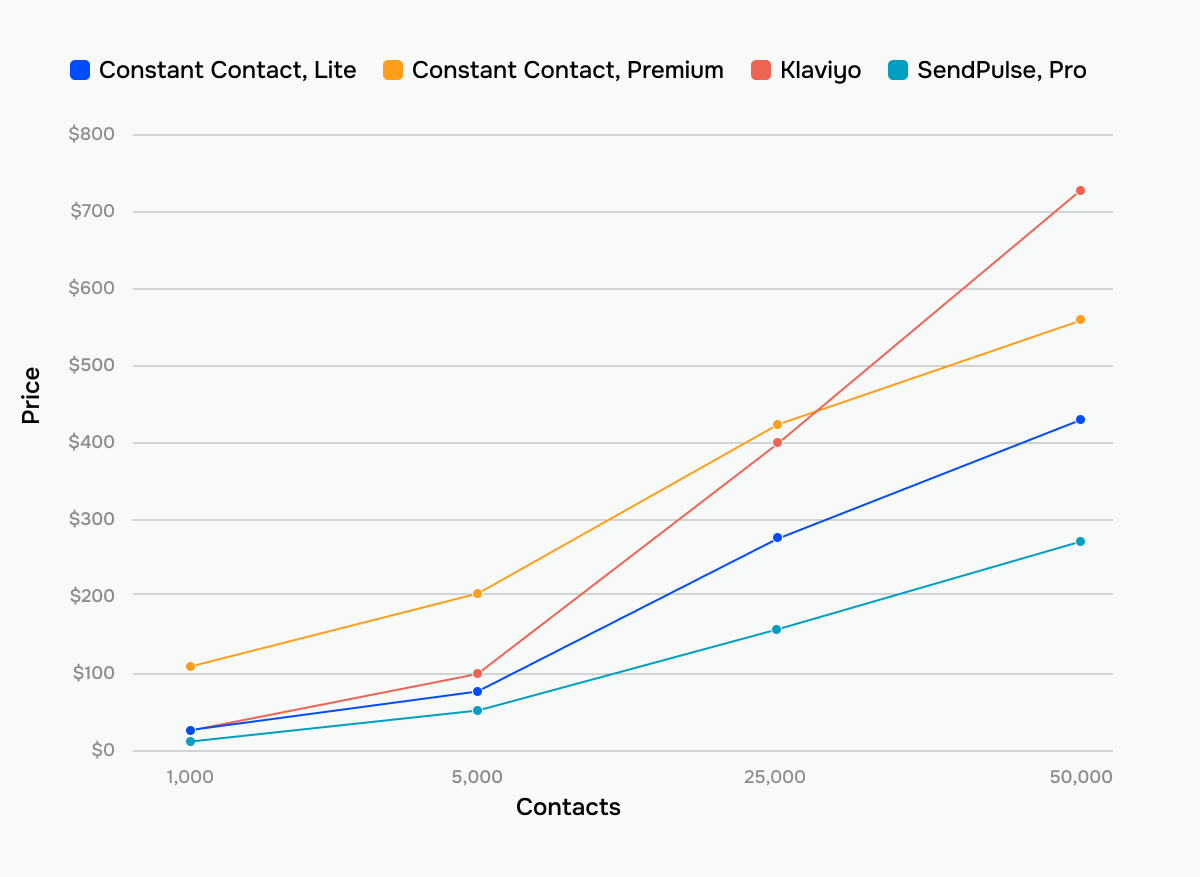 How prices grow across Constant Contact’s different tiers, Klaviyo, and SendPulse
The value for money looks really different now, right? This comparison of tiers shows that Klaviyo isn’t actually that expensive, and Constant Contact isn’t really that cheap once you evaluate not just contact volume but also the features each platform gives you.
Important note: Everything that follows in this comparison mostly evaluates Constant Contact Premium – the tier with comparable features to Klaviyo’s paid plan. If you’re considering Constant Contact Lite or Standard, expect significantly fewer capabilities than what we describe.
Ease of use and interface
Klaviyo: 6.5/10 | ⭐ Constant Contact: 7.5/10
Klaviyo was never really built with beginners in mind. Constant Contact, on the other hand, was designed for people who don’t want – or simply don’t need – a wide collection of features, tools, and settings in their email marketing software.
Because these platforms speak to very different target audiences, their interfaces look and feel different, too. Here is more about their UI and usability:
| Aspect |
Klaviyo |
Constant Contact |
Winner |
| First-time experience |
Guided but setup-heavy interface |
Faster setup to launch your first campaign |
Constant Contact |
| Daily navigation |
Feature-dense dashboard |
Simple interface |
Constant Contact |
| Learning curve |
Learning all the capabilities of the platform can take months |
Learning all the capabilities of the platform will take days |
Constant Contact |
| Mobile access |
Not available |
Full-featured companion app on iOS and Android |
Constant Contact |
| Workflow efficiency once mastered |
Highly efficient for complex automation and well-segmented campaigns |
Efficient for straightforward campaigns |
Klaviyo |
| Total score |
6.5/10 |
7.5/10 |
Constant Contact |
So what does all this actually mean in practice? Can you launch your first campaign on day one? How much time should pass before the platform stops feeling new? Here’s what the typical learning progression of Constant Contact and Klaviyo usually looks like:
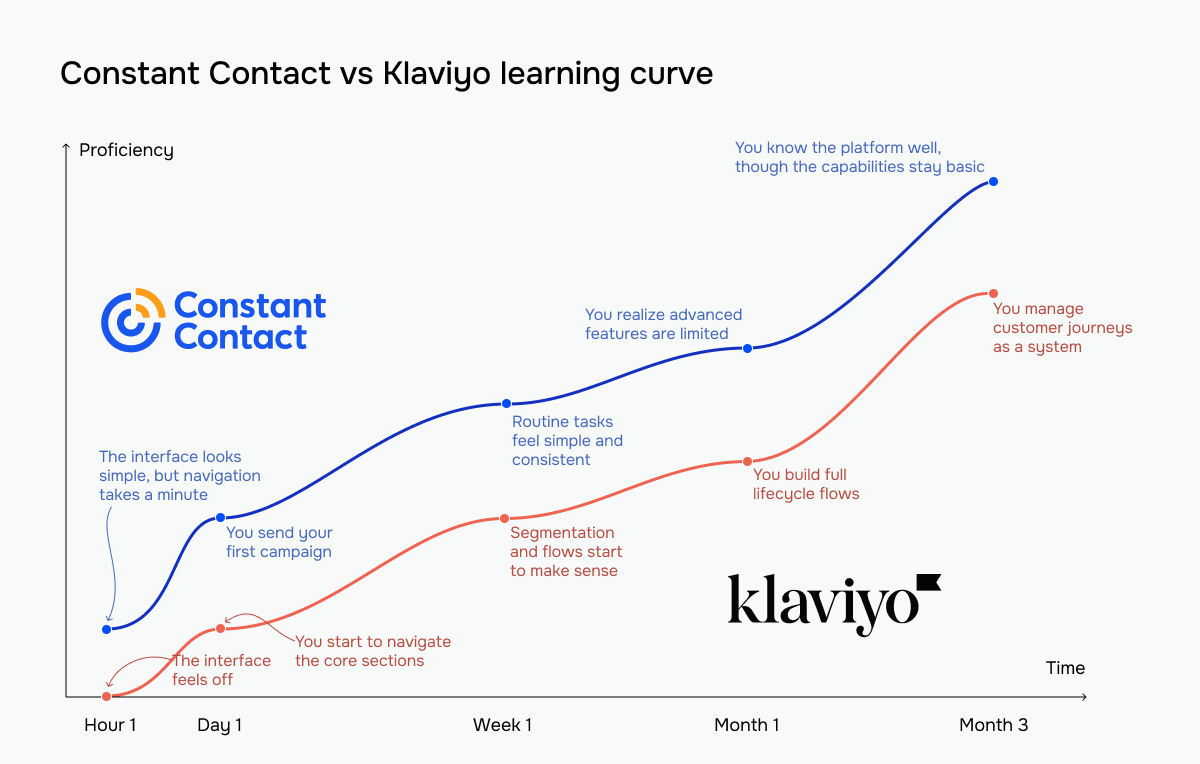 The red line represents Klaviyo vs Constant Contact’s blue line
With Constant Contact, you’ll create email campaigns on day one without training or consultant assistance. The platform simply has no complex features to master, which is the whole point.
On the other hand, Klaviyo’s learning curve is genuinely steep. If you can invest time in training and need advanced capabilities, its eventual efficiency justifies somewhat painful onboarding.
Email builder and templates
⭐ Klaviyo: 9.4/10 | Constant Contact: 8.7/10
Within an email marketing platform, you’ll spend most of your time in the campaign builder, where you create and send your messages to subscribers. Because of that, its usability, simplicity, and overall functionality matter a lot. Let’s look at how the email builders in Klaviyo and Constant Contact compare across several key aspects.
| Aspect |
Klaviyo |
Constant Contact |
Winner |
| Templates |
160+ email templates; up to 99 AI-generated email sections per day |
490+ email templates; unlimited AI-generated templates |
Constant Contact |
| Drag-and-drop editor |
Visual sidebar editor with section/block hierarchy; full HTML support |
Flexible editor where blocks can be used independently or grouped into layouts and sections; support for custom code |
Klaviyo |
| Notable content blocks |
Coupon, table, review quote |
Table, event, feedback, RSVP |
Tie |
| Customization |
Flexible, multi-level design control with global styles; section and block-level customization; detailed styling options for layout, typography, spacing, and colors |
Limited layout flexibility – content is arranged in pre-defined structures rather than freely positioned; section-based customization with control over backgrounds, spacing, borders, and layout blocks |
Klaviyo |
| Design consistency |
Brand Library and universal content system |
BrandKit and theme auto-apply system |
Klaviyo |
| Mobile responsiveness |
Mobile editing mode with device-specific content visibility and layout controls |
Mobile preview available; no mobile-specific customization options |
Klaviyo |
| AI capabilities |
3 AI-generated subject lines; “Draft email content” feature helps with email content |
AI-generated templates; AI assistance when working with text blocks within the email builder |
Tie |
| Sending time optimization |
Determines the best time to send campaigns for the whole audience or each recipient based on engagement history |
Not available |
Klaviyo |
| Total score |
9.4/10 |
8.7/10 |
Klaviyo |
The interfaces of email builders might look different, but the features they offer are quite similar – you can customize your template by adding and deleting blocks, changing the appearance of footers, buttons, headers, and images, and more.
Here’s what the Klaviyo email builder looks like:
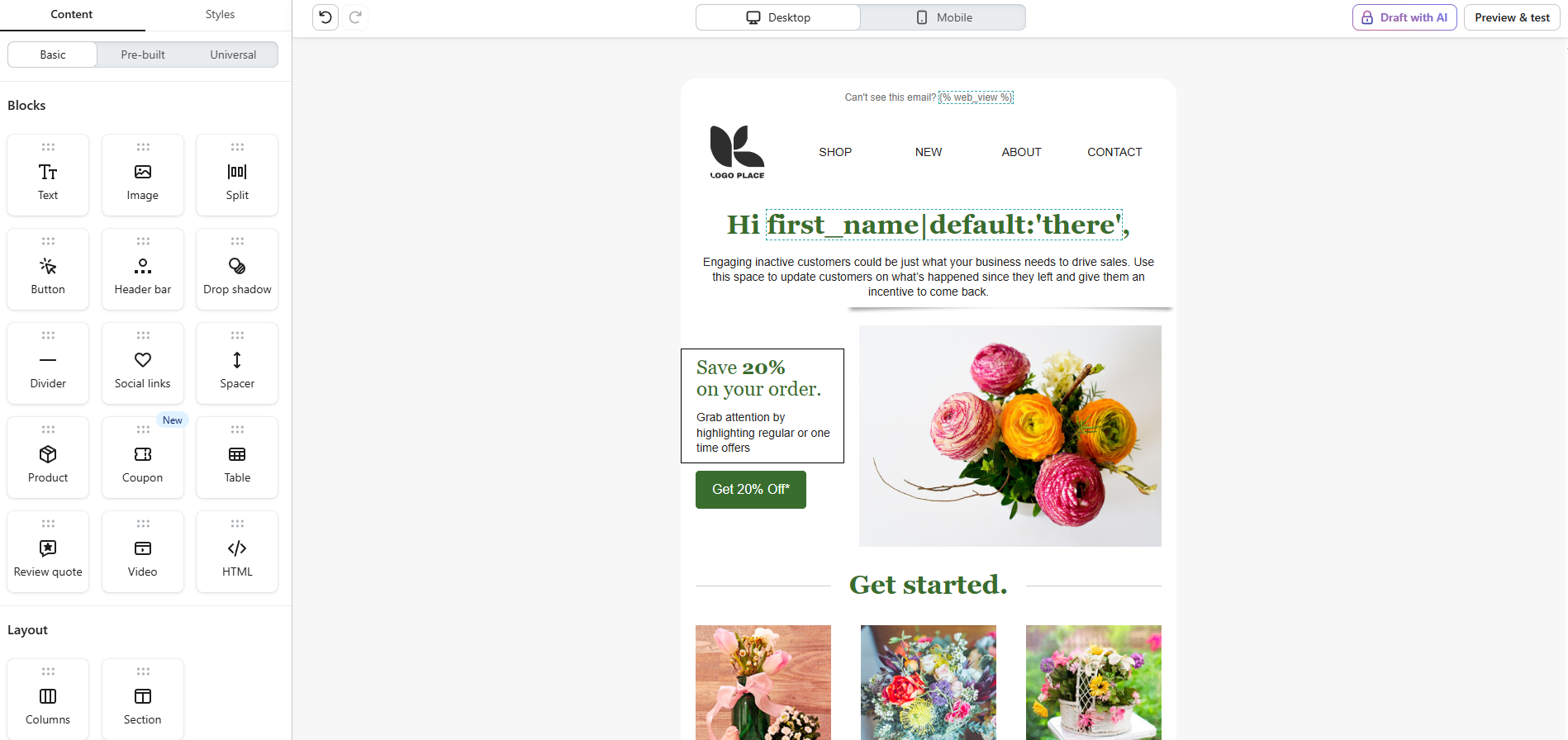 Building a template in the Klaviyo email editor
Constant Contact’s builder might feel a bit outdated at first because of oversized icons or not-very-modern templates. Its block editing is also more dynamic – some layout options only appear when you click on a text, image, or any other block, so part of the builder’s flexibility isn’t visible right away.
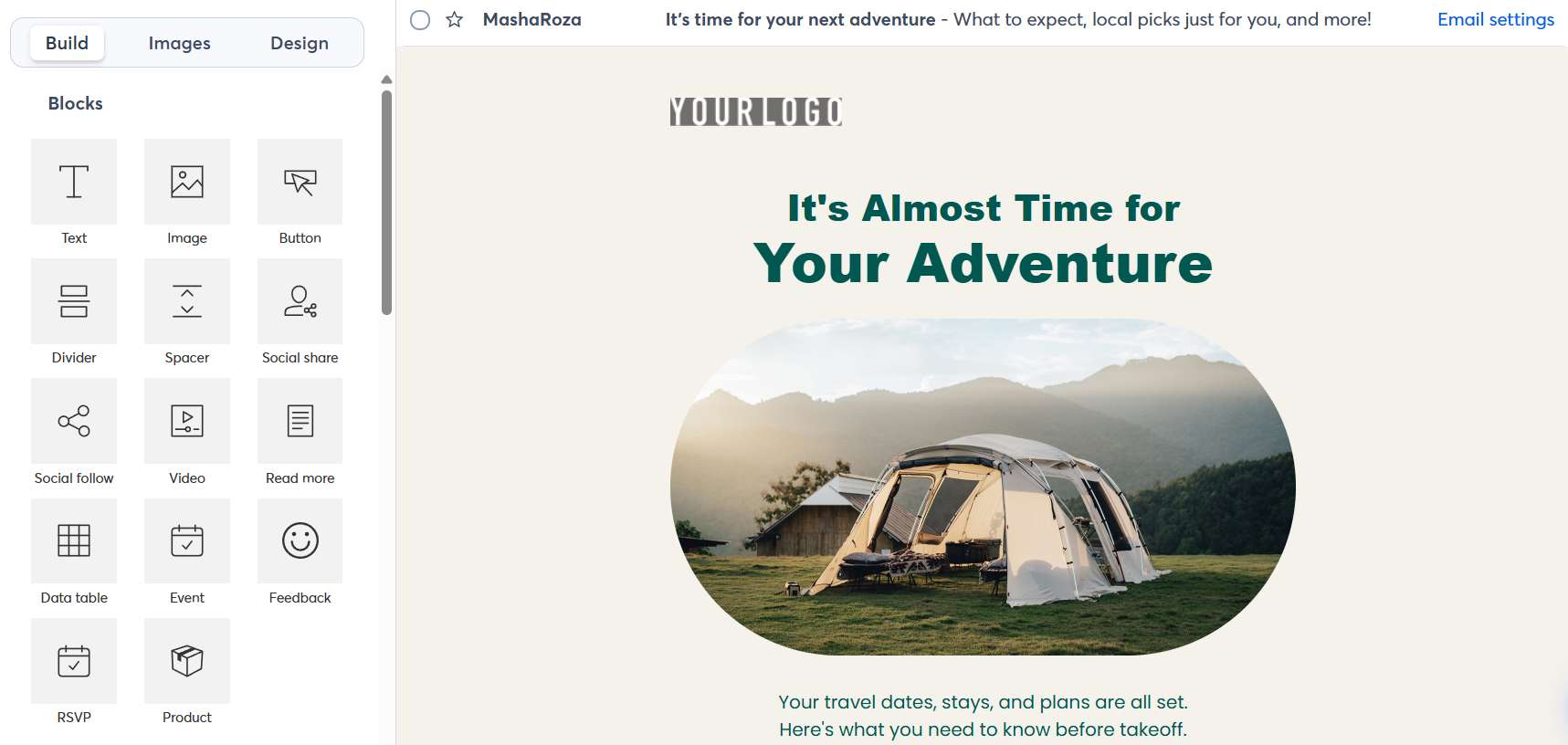 Creating a template in the Constant Contact email editor
Although the builders themselves are quite similar, the related functionality makes a difference. For example, Constant Contact offers unlimited AI-generated email templates, whereas Klaviyo’s AI is more limited: it produces only three templates per prompt and allows up to 99 generated email sections per day.
With Klaviyo, on the other hand, you can create branded content blocks or sections once, like a header or footer, save them to your library, and then reuse them across campaigns. Whenever you update the block or section in the library, your edits can be reflected, if you want them to, in every template containing this piece of universal content. Constant Contact doesn’t offer reusable blocks, but lets you define your brand colors, fonts, and logo to apply your branding to new emails automatically.
Marketing automation
⭐ Klaviyo: 10/10 | Constant Contact: 5/10
Automation is Klaviyo’s defining feature, the reason eCommerce brands pay premium prices. Constant Contact includes automation features, but they remain limited to simple sequences.
This is where the shark vs crocodile comparison becomes literal: Klaviyo hunts with precision, using behavioral triggers like product views, purchase history, and cart activity to launch automated flows. Constant Contact mostly reacts to simpler signals, such as calendar dates or basic contact actions.
Let’s see what exactly Klaviyo can do – and what Constant Contact can’t:
| Aspect |
Klaviyo |
Constant Contact |
Winner |
| Availability by plan |
Flows are available on all plans |
1 active automation, no custom automations, no eCommerce-related templates or steps with the cheapest plan |
Klaviyo |
| Automation builder |
Triggers, time delays, conditional splits, trigger splits, actions, and A/B test branches you can drag and drop onto an open canvas; unlimited flow steps |
Path-based builder with draggable steps – email actions, rules, and contact updates; up to 50 steps per path |
Klaviyo |
| Triggers available |
5 trigger categories (list, segment, metric, price drop, or date property) and custom events depending on integrations |
14 triggers across 4 categories (calendar date, contact activity, invoice activity, and shopping activity) |
Klaviyo |
| Pre-built automations |
60+ pre-built flow templates |
5 general and 9 eCommerce templates |
Klaviyo |
| AI automation |
Generates a draft with recommended trigger, filters, and flow structure |
Not available |
Klaviyo |
| Channels supported |
Email, SMS, mobile push notifications, and WhatsApp |
Email and SMS |
Klaviyo |
| Automation complexity |
Highly flexible; behavioral data and events can power dynamic branching and advanced lifecycle workflows |
Moderate flexibility; suitable for basic nurturing sequences and triggered campaigns, but limited behavioral and data-driven splits |
Klaviyo |
| Total score |
10/10 |
5/10 |
Klaviyo |
Of course, not every business requires advanced automation. Sometimes you just send a newsletter occasionally and don’t rely on elaborate workflows. In that case, Constant Contact might be the better fit. Its automation is simpler and built around linear paths, with fewer triggers, limited flow personalization, and restricted automation flexibility compared to Klaviyo.
But if you’re ready to dive into more sophisticated automation, Klaviyo is a stronger choice. It is built for complex, data-driven workflows that will power long-term growth goals.
Contact management
⭐ Klaviyo: 9.5/10 | Constant Contact: 7.5/10
Segmentation is one of the areas where the difference between the platforms becomes especially noticeable. Constant Contact keeps things simple and easy to understand, focusing on basic criteria and straightforward grouping.
Unlike Constant Contact, Klaviyo offers a much more advanced approach. Its segmentation allows for more detailed conditions and data-driven targeting, but this also makes it harder to grasp at first. To balance that complexity, the platform provides AI-powered suggestions that help users build segments even when working with more advanced criteria.
Here are more details and differences:
| Aspect |
Klaviyo |
Constant Contact |
Winner |
| Segmentation capabilities |
Dynamic segments based on profile properties, events, eCommerce data, and predictive analytics |
Dynamic segments based on contact data, list membership, tags, and email activity |
Tie |
| Segment update speed |
As close to real time as possible (up to 15 minutes) |
Segments are refreshed when contacts are added or updated; contacts are re-checked to determine who belongs in the segment right before an email is sent |
Klaviyo |
| Available segmentation criteria |
What someone has or hasn’t done, properties about someone, location, list membership, marketing consent, predictive analytics, etc. |
Contact profiles, email activity, engagement level, list membership, tags, shopping activity, invoice activity, website tracking |
Klaviyo |
| AI segmentation suggestions |
AI generates segments with editable conditions from a prompt |
Not available |
Klaviyo |
| Tagging and manual organization |
Tags are attached to account items (campaigns, flows, lists, and segments) and cannot be used to group profiles |
Tags are manually applied to individual contacts |
Constant Contact |
| Total score |
9.5/10 |
7.5/10 |
Klaviyo |
In practice, this means that Klaviyo lets businesses tailor messages to very specific customer behaviors, while Constant Contact is better suited for broader campaigns sent to larger, less differentiated audiences.
Signup forms and landing pages
⭐ Klaviyo: 7.4/10 | Constant Contact: 6.8/10
Let’s be upfront: neither Klaviyo nor Constant Contact treats forms and landing pages as a priority feature. You can capture leads with either one, but if this is a major part of your marketing strategy, you’ll likely feel the limitations pretty quickly.
With what Constant Contact offers, you can create a simple signup form, embed it on your site, and new subscribers will automatically flow into your list. Klaviyo adds more sophistication with behavioral targeting and flexibility with multi-step forms, but the core experience isn’t dramatically different.
| Aspect |
Klaviyo |
Constant Contact |
Winner |
| Form types |
Pop-up, flyout, embedded, and banner |
Inline, banner, flyout, and pop-up |
Klaviyo |
| Form builder |
Flexible layout customization; 115 templates; support for multi-step forms |
Limited customization; no templates |
Klaviyo |
| Pop-up targeting conditions |
Exit intent, time delay, scroll depth percentage, page count per session, or their combination |
Time on page, exit intent, or their combination |
Klaviyo |
| Landing page builder |
Builder for basic signup pages in beta |
Builder for signup and thank-you pages; builder for custom pages, featuring 11 customizable templates |
Constant Contact |
| Total score |
7.4/10 |
6.8/10 |
Klaviyo |
Klaviyo’s form builder can feel a bit overloaded, as it combines form design, targeting, and behavior settings in one place. It is complex at first and requires some time to get used to.
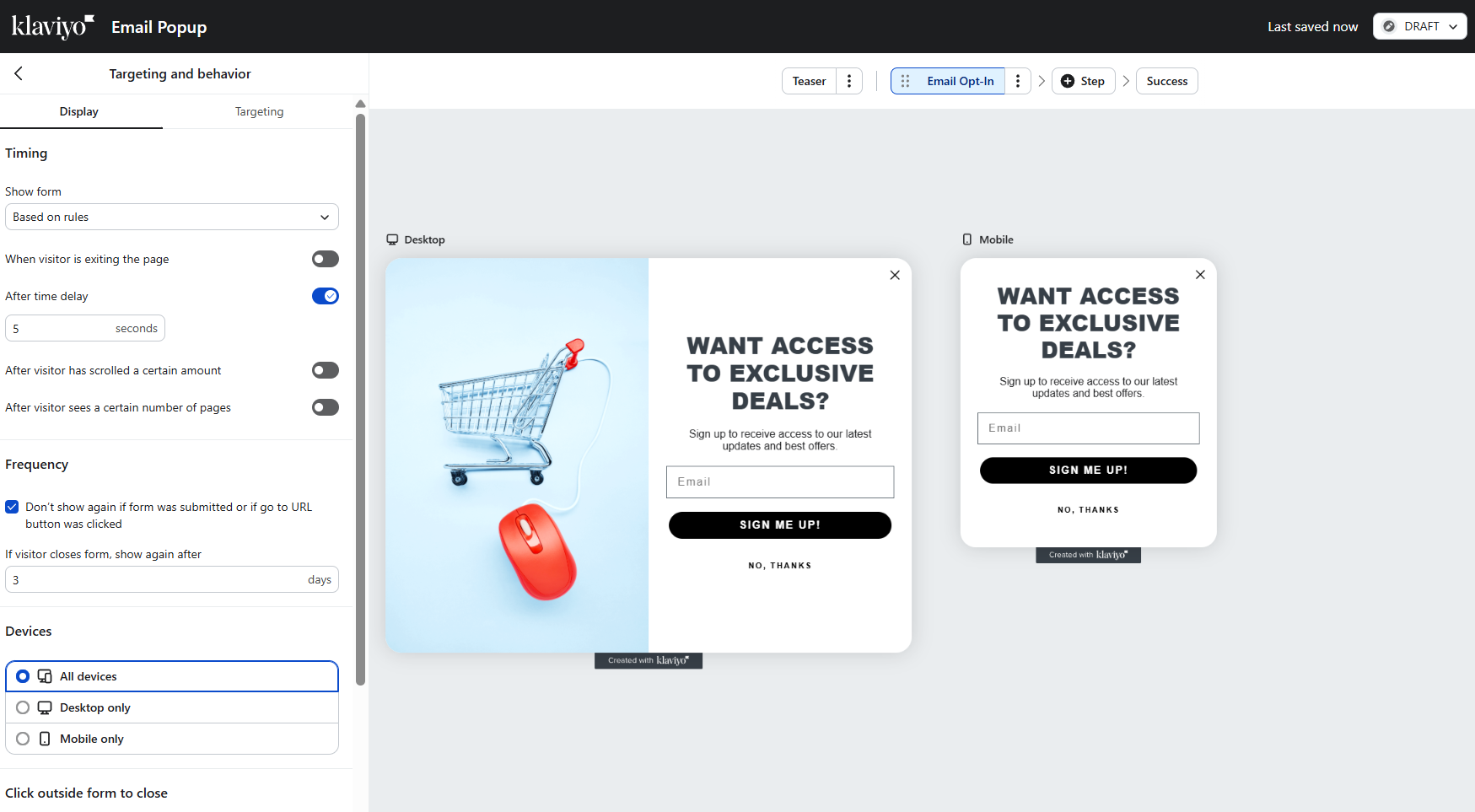 Creating a new signup form using Klaviyo’s form builder
On the other hand, Constant Contact offers almost no design flexibility and very limited targeting conditions. Because of these restrictions, its interface is simple and easy to grasp within minutes.
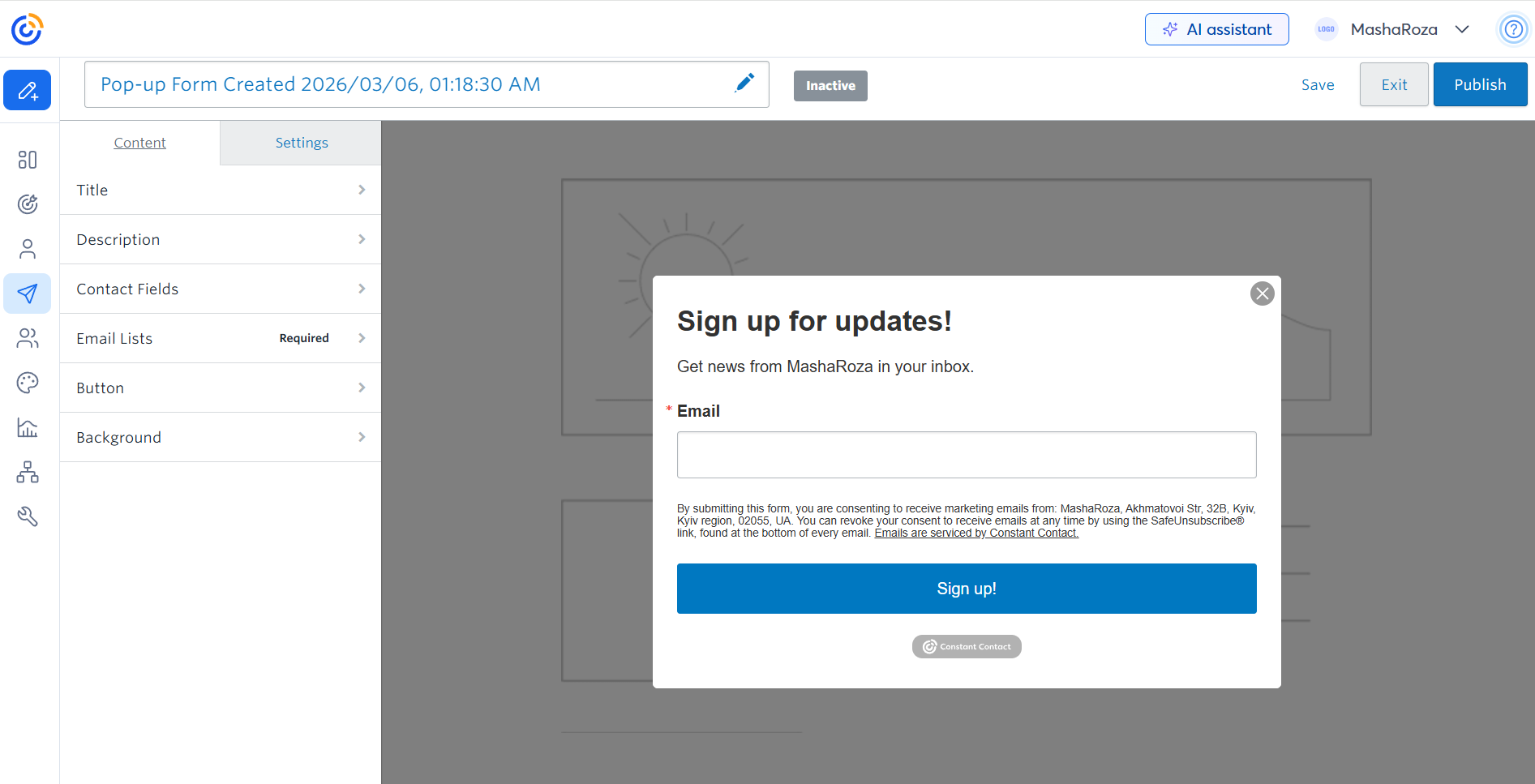 Building a pop-up form using Constant Contact’s form builder
But what if you need more – like a full-fledged signup form and landing page builder with plenty of layout flexibility, and the ability to instantly send lead data to power automation, chatbots, or other communication channels?
In this case, you should check out SendPulse. With the platform, you can create multi-page websites, add smart signup forms, embed chatbot and payment widgets, and connect everything to email automation and CRM – all without juggling multiple tools.
Reporting and analytics
⭐ Klaviyo: 10/10 | Constant Contact: 6.5/10
If data are your bread and butter, you will love Klaviyo’s reporting capabilities. It matches what sophisticated marketers need: real-time data, automation analytics, predictive insights, and custom dashboards.
Constant Contact provides a solid overview of your email campaigns. Compared to Klaviyo, it falls short when you need any kind of depth to optimize revenue based on data, insights that turn into automation or segmentation actions, or predictive analytics to help improve your retention strategy.
Here’s what Constant Contact and Klaviyo offer in terms of reporting:
| Aspect |
Klaviyo |
Constant Contact |
Winner |
| Report coverage |
Full suite of reporting tools covering campaigns, flows, forms, lists and segments, metrics, and benchmarks across all marketing channels |
Email reporting includes sends, deliveries, opens, clicks, bounces, unsubscribes, and conversions when an eCommerce store is connected |
Klaviyo |
| Custom reports |
Pre-built and customizable reports for campaigns, flows, and product performance; detailed analytics for single and multiple metrics in one report |
Not available |
Klaviyo |
| Reporting speed |
Near real-time updates |
Metrics update with a delay |
Klaviyo |
| Predictive customer analytics |
Predictive metrics for connected online stores, including purchase likelihood and estimated CLV |
Not available |
Klaviyo |
| Export capabilities |
CSV files |
CSV or Excel files |
Constant Contact |
| Total score |
10/10 |
6.5/10 |
Klaviyo |
Think about how you usually use reporting.
If it’s something you check occasionally — to see open rates, clicks, or general performance — Constant Contact will cover that without much effort. However, if reporting is something you actively use to optimize campaigns, build segments, and improve revenue over time, Klaviyo fits that workflow much better. It gives you enough detail to actually act on the data rather than just review it.
Customer support
⭐ Klaviyo: 7.3/10 | Constant Contact: 7/10
If something doesn’t function properly, you have the option to consult the knowledge base for a solution on your own or reach out to customer support for assistance.
Constant Contact offers phone support that is uncommon for email platforms, while Klaviyo provides thorough documentation — every feature has comprehensive guides with screenshots — that reduces support dependency. Here’s how the platforms stack up against each other:
| Aspect |
Klaviyo |
Constant Contact |
Winner |
| Channel availability |
Email 24/7; live chat 24/5 (Mon-Fri); no phone support |
Phone support 6 days/week (Mon-Sat); live chat 5 days/week (Mon-Fri); async email/ticket support |
Constant Contact |
| Knowledge base |
Comprehensive, deeply structured, and regularly updated documentation |
Extensive yet inconsistent and misleading documentation |
Klaviyo |
| Onboarding assistance |
Onboarding course and free live training workshops to guide the setup; dedicated 1:1 onboarding sessions |
Initial setup call to understand business goals and help new customers get started |
Tie |
| Support quality rating on Capterra |
4.3/5 |
4.2/5 |
Klaviyo |
| Total score |
7.3/10 |
7/10 |
Klaviyo |
One interesting signal that reveals more than support resources is the Capterra rating, where real users review the software. How does Klaviyo, an objectively complex platform that isn’t in any way beginner-friendly, score higher on support satisfaction than the much simpler Constant Contact?
One potential explanation for this Capterra rating paradox is the quality of their knowledge bases. Klaviyo’s documentation is generally clear and well-organized. It reduces friction and creates a positive experience since users can solve problems without contacting the support team.
Contrary to Klaviyo, Constant Contact’s help center can be confusing, often providing inconsistent information across resources (the article says one thing, the platform shows another), which creates frustration and forces users to contact support more often. You simply don’t expect poor self-service resources from a platform that old and big, and phone support can’t compensate for it.

Join 3M+ businesses growing with SendPulse
From solo creators to global brands, millions trust SendPulse to run email campaigns, automations, chatbots, and more — all in one place. Get started for free now!
Get started for free
Your decision checklist
Before making a final decision, consider how each platform fits your business in the following areas:
| Decision area |
Klaviyo
is a better fit if… |
Constant Contact
is a better fit if… |
| Business type |
🟥 You run an eCommerce or data-driven online business. |
🟦 You run a small business, nonprofit, or local service. |
| Budget expectations |
🟥 You’re ready to pay more for advanced marketing capabilities. |
🟦 You’re ready to pay a lot for quite basic tools. |
| Automation needs |
🟥 You need complex, behavior-based automation flows. |
🟦 You only need basic sequences like welcome or follow-up series. |
| Analytics focus |
🟥 You want deep behavioral insights and detailed campaign analysis. |
🟦 You mainly need basic campaign performance metrics. |
| Team setup |
🟥 Your team includes marketers comfortable with complex tools. |
🟦 Your team prefers simple tools that are easy to learn quickly. |
As we said at the beginning, like a shark and a crocodile, they have very little in common.
In case neither of them is exactly what you were looking for, check out SendPulse — a multi-channel platform that includes email, automation, CRM, and chatbots at a fraction of the price.
Final verdict and recommendations
⚖️ Final scores: Klaviyo – 8.6/10 | Constant Contact – 6.5/10
The score gap reflects the difference in the overall capability of these platforms.
Klaviyo is a modern, AI-powered, feature-rich platform built around eCommerce and data. It stands out in the way it handles automation and ties everything together, so your campaigns don’t just run but evolve based on how your customers act.
Constant Contact feels more old-fashioned. Its AI capabilities are limited, and it remains quite shallow in automation, segmentation, and reporting. Its knowledge base is also inconsistent, which makes it harder to find answers on your own.
So yes, Klaviyo is the stronger choice for most growing businesses.
However, Constant Contact still has its place. If you’re a small business or nonprofit that needs a simple, quick-to-launch tool for basic campaigns and doesn’t require advanced automation or deep analytics, it can get the job done.
Just keep in mind: switching platforms later is often harder than starting with the right one.