If you know at least a few email marketing platforms by name, chances are GetResponse and Mailchimp are among them. Both are extremely popular, which naturally raises the question: are they actually that different – and if they are, which one should you choose for your email marketing? Which platform is better overall, and which one fits your specific needs better? In this GetResponse vs Mailchimp comparison, we tested both hands-on to answer exactly these questions. Enjoy reading!
How we scored this comparison: This review was created by the SendPulse team. As an email marketing platform ourselves, we work in the same space as the tools we test, which also means we understand the field deeply.
Each platform was evaluated across nine categories using our independent methodology. Pricing (25%), ease of use (20%), and email and automation features (15% each) carry the most weight because they affect daily workflows the most. All scores reflect hands-on testing and analysis as of May 2026.
TL;DR Quick GetResponse vs Mailchimp comparison
Here’s a summary of everything we found while spending several weeks testing both platforms and exploring their strengths and weaknesses in practice. If any category is especially important for your business, click on it to jump straight to the section of the comparison where we evaluate that specific aspect in detail.
| Category |
GetResponse |
Mailchimp |
Winner |
| Best for |
SaaS businesses, eCommerce brands with advanced funnels, course creators, and experienced automation-focused teams |
Beginners, small businesses, eCommerce brands focused on design, agencies, creators, and teams prioritizing ease of use |
Depends on the use case |
| Pricing |
8.4/10
More affordable long-term pricing with broader feature access |
8.2/10
Strong first-year pricing and lower entry cost |
GetResponse |
| Ease of use |
8/10
Feature-heavy interface with a steeper learning curve |
9/10
Beginner-friendly, guided flows, and intuitive interface |
Mailchimp |
| Email design |
9/10
Workflow-oriented builder with strong personalization tools |
9.4/10
More polished and design-focused builder with deeper styling controls |
Mailchimp |
| Automation |
9/10
Deep behavioral automation with advanced logic |
8.3/10
Structured and collaborative workflows with easier management |
GetResponse |
| Contact management |
8/10
Flexible segmentation and automatic updates |
7.5/10
Strong predictive analytics, but problematic audience structure |
GetResponse |
| Forms and pages |
8.5/10
Fast and practical lead-capture tools |
9.2/10
Highly customizable, conversion-focused forms and pop-ups |
Mailchimp |
| Deliverability |
9.2/10
Strong infrastructure with enterprise-level options |
9.4/10
Slightly stronger monitoring and dedicated IP flexibility |
Mailchimp |
| Reporting |
8/10
More workflow-oriented and export-friendly reporting |
7.8/10
Broader cross-channel marketing overview |
GetResponse |
| Customer support |
7.1/10
Better support channel availability |
7.4/10
Better onboarding, migration help, and user ratings |
Mailchimp |
| G2/Capterra rating |
4.3/4.2 |
4.3 |
Mailchimp |
| Final score |
8.2/10 |
8.7/10 |
Mailchimp |
If that still isn’t enough information, and you want to understand each platform more deeply before making a choice that will affect your entire email marketing workflow, welcome to our detailed hands-on evaluation of GetResponse vs Mailchimp.
GetResponse vs Mailchimp pricing and feature differences
How we tested: We signed up for both platforms and spent several weeks in May 2026 testing them in nine different areas. We built email campaigns, set up multi-step automations, created signup forms and pop-ups, checked out template libraries and AI content tools, and compared reporting dashboards side by side. For support quality, we examined real user feedback on Capterra. All screenshots in this article were captured during our hands-on evaluation.
We start this comparison with the key things that usually shape a marketer’s decision when choosing an email marketing platform. From pricing and ease of use to core features like email builders and automation, and further into contact management, deliverability, reporting, and customer support. By the end of this article, you should have a much clearer understanding of which email service provider fits your business best.
Pricing plans
⭐ GetResponse: 8.4/10 | Mailchimp: 8.2/10
Disclaimer: Pricing changes frequently. These figures are accurate as of May 28, 2026. Always verify final costs on official pricing pages.
We’re starting this GetResponse vs Mailchimp comparison with a lot of numbers because, for many businesses, pricing is the deciding factor. One important thing to mention upfront is that Mailchimp’s pricing structure is quite unusual. The platform draws you in with very generous first-year pricing and then – bam! – 12 months pass, and your monthly bill doubles.
That’s a significant jump, and we want to make sure it’s visible. For that reason, we’ve included Mailchimp pricing for both year one and year two side by side. We’ve also added SendPulse in the pricing comparison, so you can better understand how these platforms compare to other email platforms on the market.
| Contacts |
GetResponse,
Starter |
Mailchimp,
Essentials |
Mailchimp, Essentials year 2 |
SendPulse, Standard |
| Free plan |
500 contacts; 2,500 emails |
250 contacts; 500 emails |
500 contacts; 15,000 emails |
| 1,000 |
$19 |
$13.25 |
$26.50 |
$18 |
| 10,000 |
$81 |
$55 |
$110 |
$78 |
| 25,000 |
$175 |
$135 |
$270 |
$159 |
| 50,000 |
$305 |
$192.50 |
$385 |
$281 |
| Note: All prices reflect monthly billing. |
All these numbers can feel overwhelming, so we also put them into a graph to make the pricing comparison easier to understand at a glance. This way, you can immediately see how different platforms, including Mailchimp’s first vs second-year pricing, compare across contact list sizes.
 GetResponse vs Mailchimp vs SendPulse mid-tier plan pricing from 1K to 50K contacts
Most businesses start with a free plan or the cheapest tier. But as your marketing grows, you may start needing more advanced automation, analytics, segmentation, or support features. And since in this comparison we evaluate both platforms at their full potential, on their highest tiers, we also need to show you how much these advanced plans cost.
| Contacts |
GetResponse,
Creator |
Mailchimp,
Premium |
Mailchimp,
Premium year 2 |
| 2,500 |
$92 |
$175 |
$350 |
| 10,000 |
$132 |
$175 |
$350 |
| 25,000 |
$254 |
$310 |
$620 |
| 50,000 |
$428 |
$407.50 |
$815 |
| 100,000 |
$694 |
$512.50 |
$1,025 |
| Note: All prices reflect monthly billing. |
| Total score |
8.4/10 |
8.2/10 |
Considering all of this, when evaluating Mailchimp pricing, we strongly recommend thinking long-term rather than focusing only on the entry price. Migrating from one email marketing platform to another is usually expensive, time-consuming, and disruptive, so you might prefer to avoid doing it twice.
Ease of use and interface
GetResponse: 8/10 | ⭐ Mailchimp: 9/10
Both GetResponse and Mailchimp are fairly clear and approachable platforms, yet only one of them truly feels intuitive from the very beginning – Mailchimp. The platform has built much of its reputation around beginner-friendliness, and its interface, workflows, and learning curve clearly reflect that positioning.
| Aspect |
GetResponse |
Mailchimp |
Winner |
| First-time experience |
AI-assisted setup generates starter assets like newsletters, landing pages, and welcome emails from a short onboarding flow; sender verification required before first campaign |
Guided onboarding after account activation; audience created automatically; higher-tier plans include a 1:1 onboarding consultation during the first 90 days |
Tie |
| Daily navigation |
Broad navigation built around a multi-tool marketing suite, including funnels, webinars, chats, and websites; higher feature density |
Cleaner left-side navigation using familiar email marketing terminology; easier to scan and navigate daily |
Mailchimp |
| Learning curve |
Straightforward for email campaigns, but complexity increases noticeably once automation, funnels, and webinars enter the workflow |
Beginner-friendly onboarding with guided tours, tooltips, and extensive documentation; the biggest adjustment is understanding the single-audience structure and segmentation logic |
Mailchimp |
| Mobile access |
Mobile apps support campaign monitoring, contacts, reports, and automations, but not full email editing |
Mobile apps support full campaign creation, landing pages, social media posts, audience management, reporting, and inbox replies |
Mailchimp |
| Workflow efficiency once mastered |
Efficient for multi-channel marketing workflows with AI-assisted asset generation, templates, bulk actions, and API access |
Fast recurring campaign workflows with reusable templates, bulk actions, multi-account switching, and contextual shortcuts that surface features during use |
Tie |
| Total score |
8/10 |
9/10 |
Mailchimp |
When we tried and tested the two platforms, we saw that Mailchimp is clearly the easier platform to learn and navigate day-to-day. The main difference is that Mailchimp feels more focused and guided, while GetResponse feels broader and more feature-heavy from the start.
So if ease of use is one of your highest priorities, especially if you’re a beginner, work alone, or mainly need newsletters and standard campaigns, Mailchimp is probably the better choice. If you’re willing to accept a steeper learning curve in exchange for broader marketing capabilities and stronger automation later on, then GetResponse becomes more attractive.
Here’s how the learning curve might look in practice for your team:
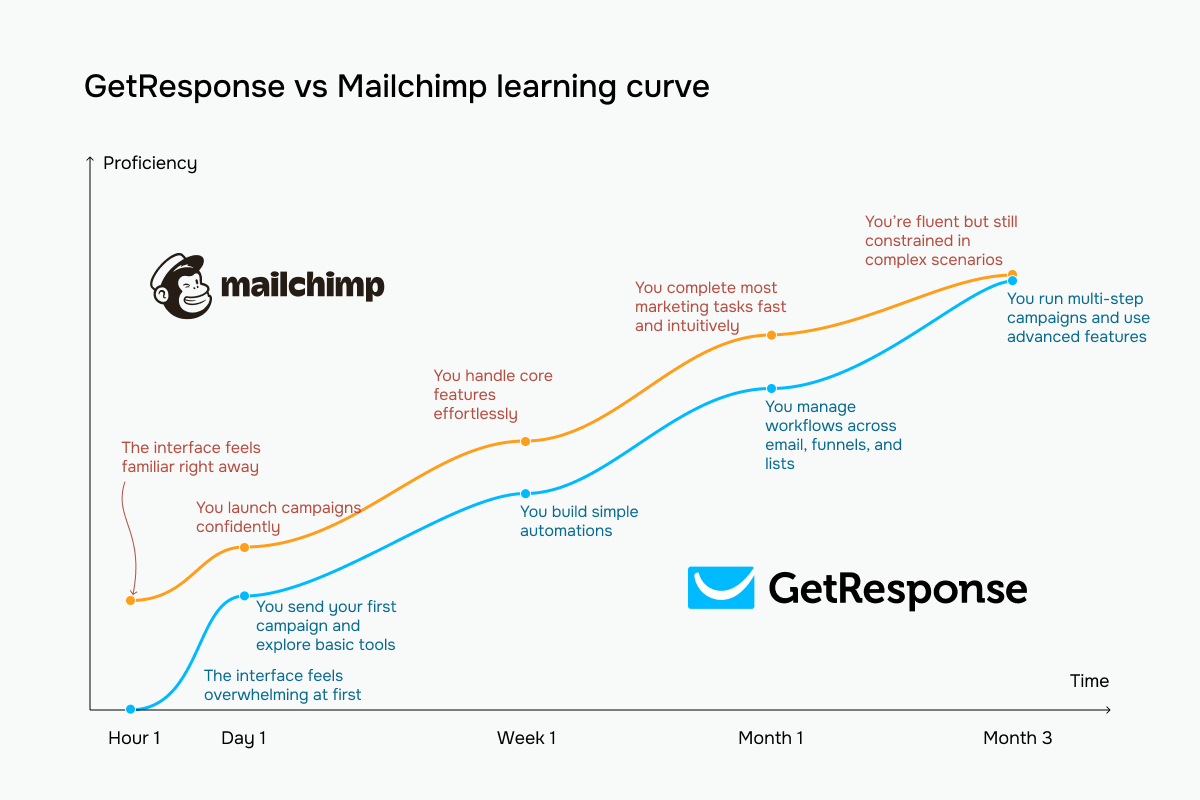 GetResponse vs Mailchimp learning curve based on our testing experience
Email builder and templates
GetResponse: 9/10 | ⭐ Mailchimp: 9.4/10
Both GetResponse and Mailchimp have strong email builders, and after building the same newsletter template in both, we found them similar in many ways. Here are their key differences and how the two compare:
| Aspect |
GetResponse |
Mailchimp |
Winner |
| Templates |
260+ templates organized by use case |
360+ templates filterable by category, style, and industry |
Mailchimp |
| Drag-and-drop editor |
Section-based editor with flexible column layouts, persistent content panel, global styling controls, autosave, and custom CSS |
2 editors available: a modern inline editor and a classic section-based editor |
Mailchimp |
| Notable content blocks |
eCommerce blocks, promo codes, countdown timers, webinars, and courses |
Product recommendations, surveys, videos, GIFs, and dynamic content blocks |
Mailchimp |
| Mobile responsiveness |
Automatic mobile optimization with element visibility controls and mobile preview |
Automatic mobile optimization with separate desktop/mobile styling controls, mobile preview, and inbox rendering previews |
Mailchimp |
| AI features |
AI-generated body copy, subject lines, and full campaigns from prompts |
AI-assisted content generation and optimization directly inside content blocks |
GetResponse |
| Sending time optimization |
Engagement-based send-time optimization and timezone-based delivery |
Engagement-based send-time optimization and timezone-based delivery |
Tie |
| Total score |
9/10 |
9.4/10 |
Mailchimp |
While testing GetResponse’s builder, we quickly noticed that the platform approaches email building from a marketer’s perspective, rather than a designer’s. The block library immediately pushes you toward campaigns tied to sales and automation: webinars, countdown timers, eCommerce products, and courses are all treated as core elements rather than niche add-ons.
The most impressive part in practice was the dynamic content system built directly into blocks. Instead of duplicating campaigns for different audience segments, we could show or hide sections inside the same email depending on tags, subscriber attributes, or conditions. Combined with device-specific visibility settings, the builder felt deeply connected to automation and segmentation workflows.
At the same time, the editor itself feels more functional than artistic. During testing, building emails was fast and efficient, but the platform’s focus is unmistakably on campaign logic and personalization rather than tiny visual adjustments or pixel-perfect spacing.
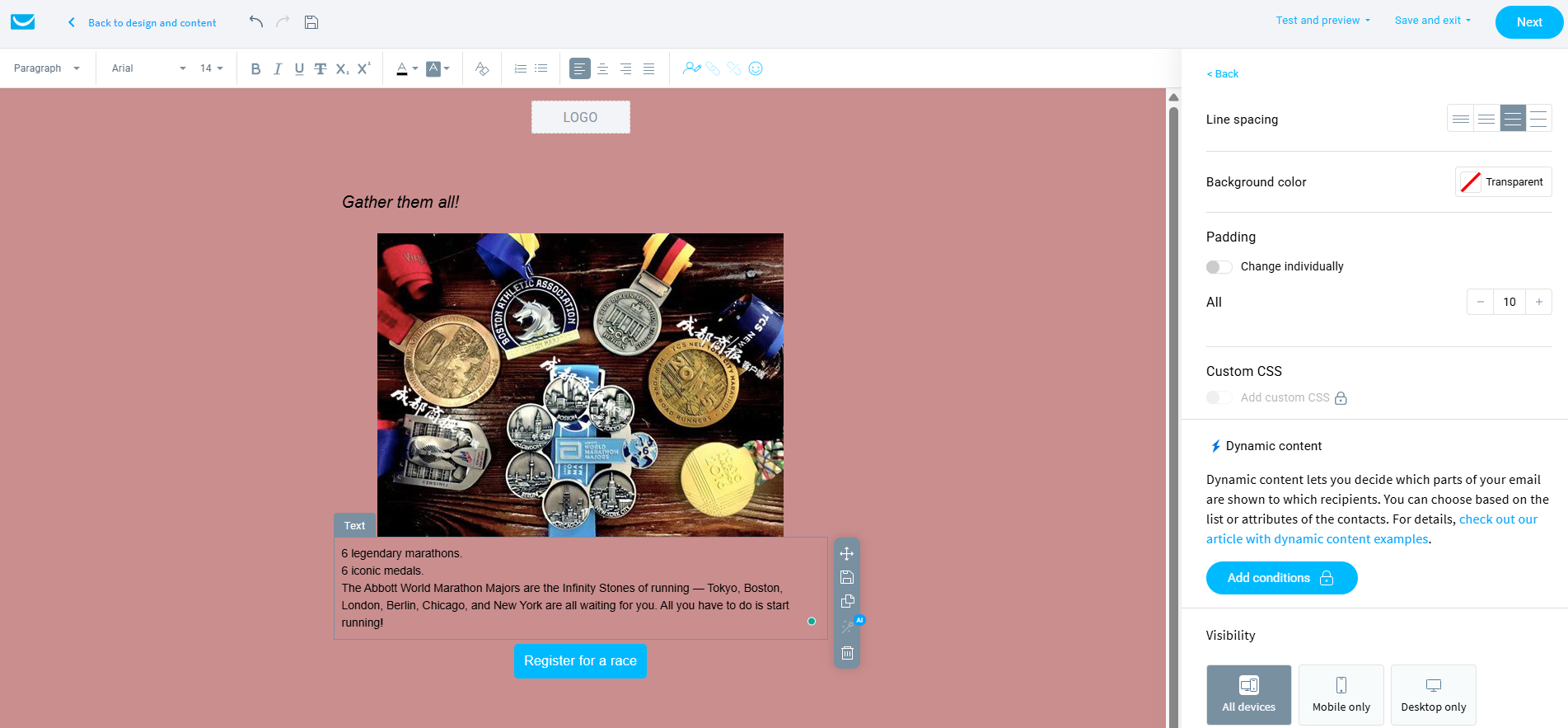 Building a newsletter in GetResponse’s editor – the right panel shows the dynamic content conditions and device-level visibility controls we tested during our review
Trying out Mailchimp’s builder felt much more like working inside a design tool. Almost every block opened detailed styling controls directly beside the canvas with margins, independent padding values, rounded corners, and even separate desktop/mobile styling options surfaced immediately.
What stood out most was how polished and visually coherent the editing experience felt. The platform constantly helped us make cleaner-looking emails through visual column previews, inline optimization suggestions, and highly structured layout controls. Compared to GetResponse, Mailchimp consistently felt more refined from a design-system perspective.
Some blocks were also genuinely more creative than expected. The embedded survey block especially stood out during testing because it allows subscribers to interact directly inside the email itself rather than opening external forms. Combined with GIFs, product recommendation blocks, and app integrations, the builder felt richer and more interactive overall.
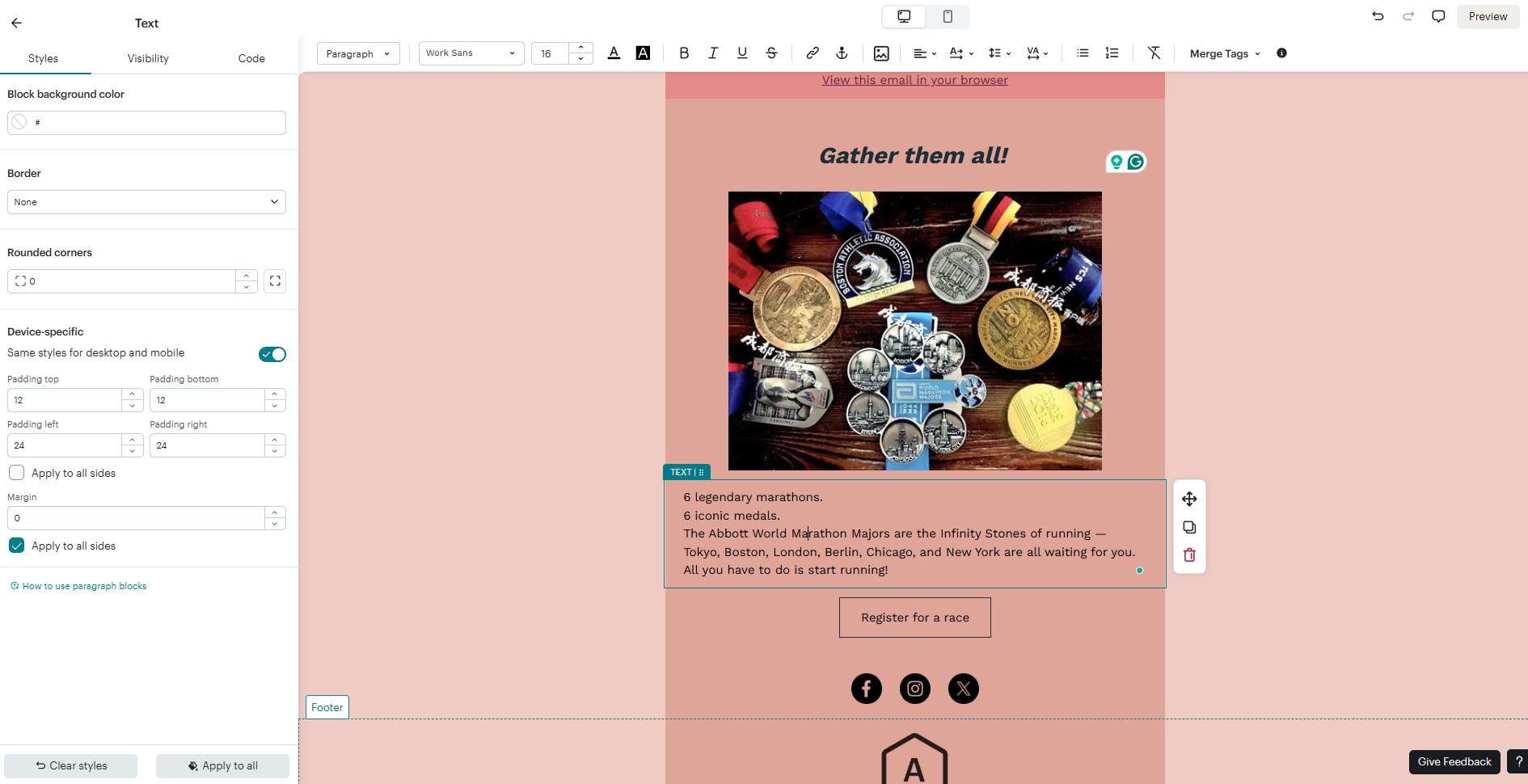 The same newsletter template in Mailchimp’s editor – note the styling panel on the left with independent padding values, rounded corners, and device-specific layout controls
While testing both platforms side by side, the difference became very clear quite quickly: GetResponse is built around marketing workflows, while Mailchimp is built around design precision.
GetResponse felt stronger for marketers running automated customer journeys and segmented campaigns, while Mailchimp felt more comfortable for agencies, designers, and brand-focused teams that care deeply about layout precision and visual presentation.
Marketing automation
⭐ GetResponse: 9/10 | Mailchimp: 8.3/10
Finally, we arrive at the category where GetResponse’s overall philosophy becomes fully clear – marketing automation. Many of the things we noticed earlier in its email builder, from dynamic content to webinar blocks and behavior-focused tools, start making much more sense once you see how deeply automation is built into the platform.
Here’s how GetResponse and Mailchimp compare across the key aspects of automation and what those differences mean in practice for email marketers:
| Aspect |
GetResponse |
Mailchimp |
Winner |
| Availability by plan |
Free plan includes draft-only automations; lower-tier paid plans limit workflow count and logic; higher tiers unlock unlimited workflows, webinars, and course automation |
Lower-tier plans support basic flows with limited triggers and steps; higher tiers unlock multi-trigger workflows, branching, and SMS actions |
GetResponse |
| Automation builder |
Visual drag-and-drop canvas with branching paths, parallel workflows, and cross-workflow triggers |
Visual flow builder with branching logic, multiple triggers, and up to 200 steps per workflow |
GetResponse |
| Triggers available |
Subscriber actions, engagement, eCommerce activity, webinars, courses, website visits, and consent updates |
Audience changes, engagement events, eCommerce activity, SMS signup, website behavior, and landing page interactions |
Tie |
| Pre-built automations |
46 automation templates across different categories |
121+ automation templates organized by channels, goals, and integrations |
Mailchimp |
| Channels supported |
Email; SMS and web push on higher tiers |
Email; SMS on higher-tier plans |
GetResponse |
| AI features |
No AI-generated automation logic |
No AI-generated automation logic |
Tie |
| Automation complexity |
High; supports scoring, loops, dynamic segmentation, multi-path branching, and cross-workflow logic |
Moderate; supports branching, conditional paths, multiple triggers, and large workflows, but no scoring or loop logic |
GetResponse |
| Total score |
9/10 |
8.3/10 |
GetResponse |
While testing GetResponse’s automation builder, we immediately understood that the platform treats automation as behavioral logic rather than as a simple email sequence. The canvas is completely freeform: conditions branch in multiple directions, paths cross each other, and the same contact can move through several logic layers simultaneously, depending on actions, tags, purchases, or engagement.
What stood out most was the depth of behavioral conditions available directly inside the builder. Website visits, abandoned carts, billing events, course progress, consent updates, scoring, tags, and email engagement all live inside the same workflow environment. The web/email channel toggle was especially interesting because it allows automations to react not only to subscribers but also to anonymous website behavior, which is something many ESPs separate into entirely different tools.
At the same time, the platform absolutely demands planning. During testing, even moderately advanced workflows became visually tangled surprisingly quickly. The builder is extremely powerful, but it’s also easy to create overlapping logic, conflicting tags, or branches that become difficult to audit later. GetResponse clearly rewards marketers who already think in terms of segmentation and automation systems rather than simple campaign sequences.
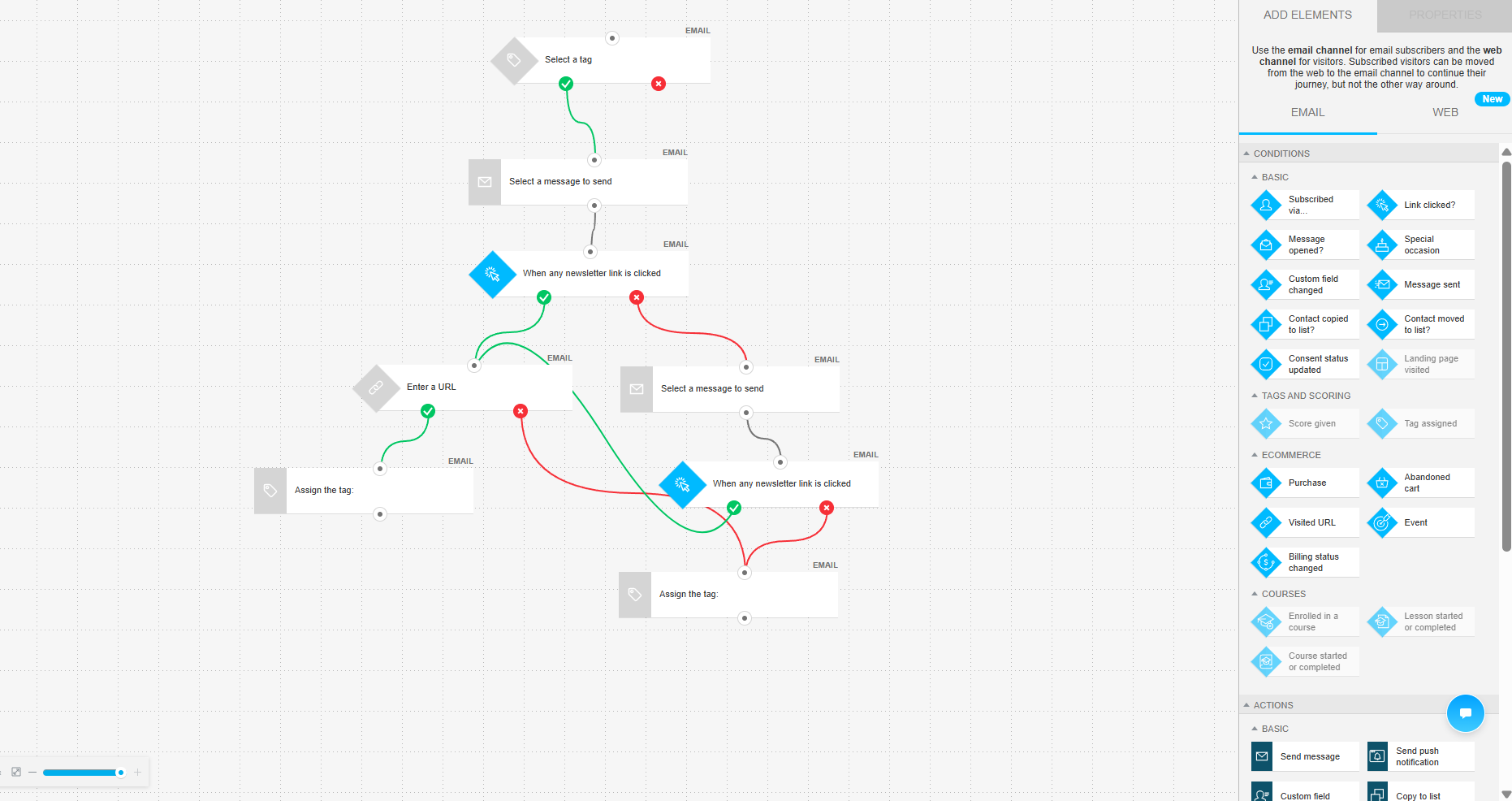 A product recommendation automation we built in GetResponse – the freeform canvas allows branching paths, cross-workflow triggers, and behavioral conditions
Mailchimp’s automation builder felt much more structured and controlled during testing. Instead of a freeform canvas, the entire workflow follows a strict top-to-bottom logic where contacts enter from a trigger and move through clearly stacked steps. Compared to GetResponse, Mailchimp’s flows immediately felt easier to read, troubleshoot, and hand over to another team member.
One of the smartest things Mailchimp does is onboarding directly inside the builder itself. Trigger categories are grouped by real marketing goals and business cases rather than just technical names, and the platform constantly explains what each trigger is useful for. During testing, this made the builder feel much more approachable, even when creating multi-step automations for the first time.
The platform also surprised us with several practical workflow actions that many users would genuinely use daily. SMS actions, in-email surveys, webhooks, archive contact actions, and automated unsubscribe steps make the system feel very operational and team-friendly. At the same time, Mailchimp keeps tighter structural control over workflows, which reduces the risk of building broken or overly chaotic multi-step customer journeys.
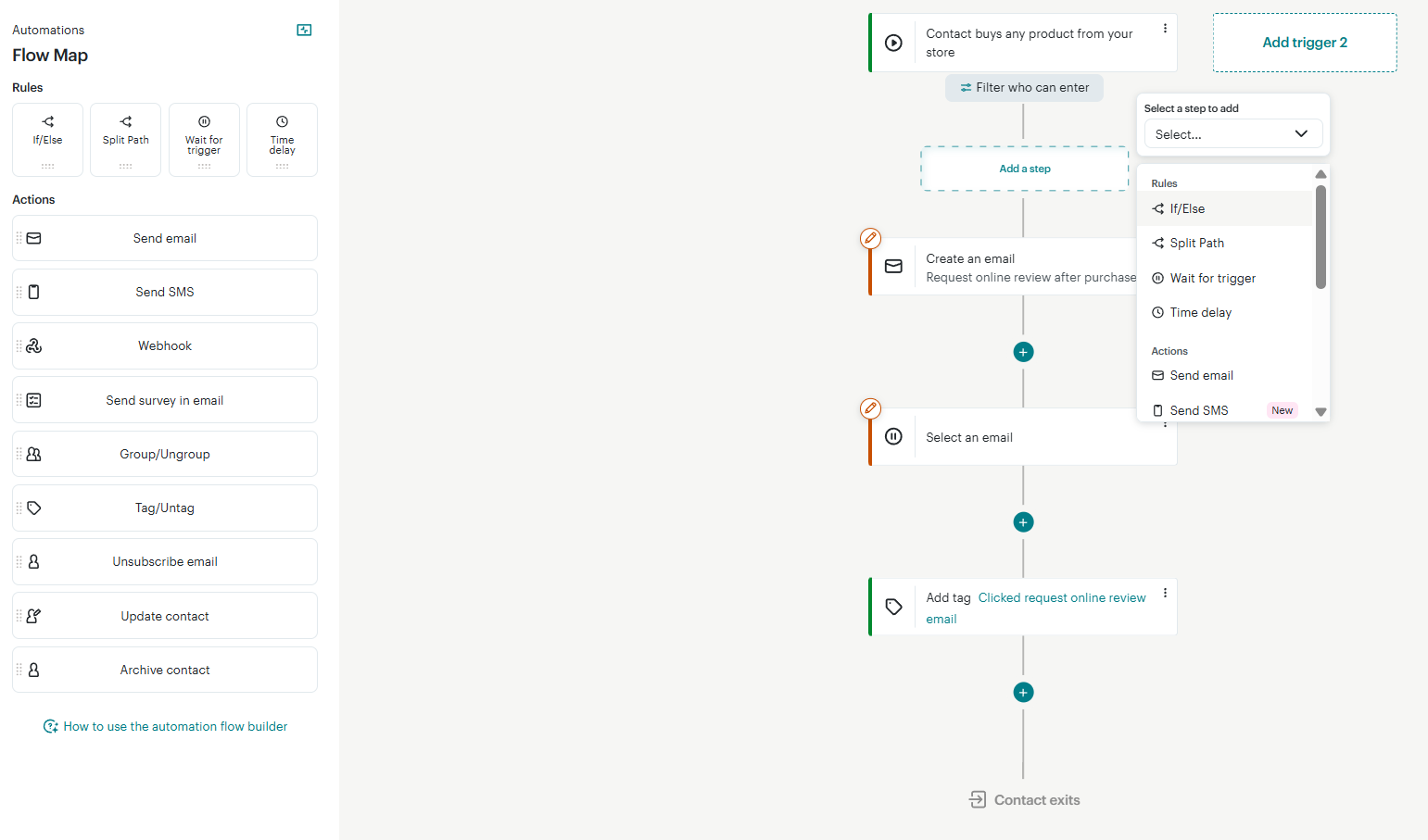 A post-purchase review request flow in Mailchimp – the strict top-to-bottom layout and clearly labeled action menu make this automation easier to read
What’s the takeaway? GetResponse gives marketers enormous flexibility. It’s built for marketers running sophisticated funnels, SaaS onboarding, advanced segmentation, or heavily behavior-driven journeys. Mailchimp is much more controlled and collaborative. It prioritizes readability, structure, onboarding guidance, and workflow clarity over raw flexibility.
In practice, this made Mailchimp much easier to audit, maintain, and share inside teams, while GetResponse felt more like a power-user tool for marketers comfortable with deeply layered automation logic.
For marketers who want maximum behavioral control, GetResponse is stronger. For teams that value clean workflows, maintainability, and lower operational friction, Mailchimp feels considerably more comfortable to work with.
Contact management
GetResponse: 8/10 | ⭐ Mailchimp: 7.5/10
Contact management is tightly connected to automation, so it’s not surprising that GetResponse wins this category as well. However, its stronger automation capabilities are not the only reason why Mailchimp falls behind here. Here’s what else we noticed while testing both platforms:
| Aspect |
GetResponse |
Mailchimp |
Winner |
| Segmentation capabilities |
Dynamic rule-based segmentation with automatic updates; contacts can exist across multiple lists; supports nested AND/OR logic |
Audience-based segmentation with advanced nested conditions; pre-built segments available; contacts duplicated across audiences count toward billing multiple times |
GetResponse |
| Segmentation criteria |
Contact data, engagement, tags, scoring, consent status, eCommerce activity, webinars, and API-based events |
Contact data, tags, groups, engagement, eCommerce behavior, customer value, churn risk, predicted reorder timing, and AI-based demographic predictions |
Mailchimp |
| Segment update speed |
Continuous updates as contact data or behavior changes |
Basic segments update automatically; advanced segments may require manual refresh or take up to 2 hours to update |
GetResponse |
| AI features for segmentation |
No AI-based segmentation |
AI-powered predictive segmentation covering purchase likelihood, lifetime value, churn risk, reorder timing, and demographic estimates |
Mailchimp |
| Tagging and manual organization |
Tags usable for segmentation and automation; applied manually, via imports, bulk actions, or automations |
Tags and groups both available for manual organization and segmentation; applicable via imports and automations |
Tie |
| Total score |
8/10 |
7.5/10 |
GetResponse |
One important detail here – and one that can directly affect both your daily workflow and your monthly bill – is Mailchimp’s audience-based structure. The same contact can exist in several separate audiences at once, and Mailchimp counts each of those entries separately for billing purposes.
In practice, this means that if one subscriber appears in three audiences, you may effectively end up paying for that person three times. Because of this, many marketers try to keep everything inside a single audience and rely on tags and segments for organization instead.
Signup forms and landing pages
GetResponse: 8.5/10 | ⭐ Mailchimp: 9.2/10
In the signup forms category, Mailchimp once again shows how much importance it places on the visual and design side of email marketing. Its form builder is extremely detailed and customizable, which earns the platform one of the highest scores we’ve given in this comparison series so far.
| Aspect |
GetResponse |
Mailchimp |
Winner |
| Types of forms available |
Pop-ups, slide-ins, floating bars, half-screen, full-screen, and embedded forms; teaser mode |
Pop-ups, embedded forms, and signup landing pages; teaser and reminder bar elements |
Tie |
| Form builder |
Visual drag-and-drop builder with consent fields, automatic brand styling, and double opt-in support |
Style-focused builder with logo, fonts, and color customization; pop-up A/B testing, SMS opt-in, and custom HTML |
Mailchimp |
| Pop-up targeting conditions |
Time delay, scroll depth, exit intent, inactivity, click trigger, page-level targeting, scheduling, device targeting, and eCommerce conditions |
Time on page, inactivity, quick scroll, exit intent, device targeting, frequency caps, and pop-up interaction rules |
Tie |
| Landing page builder |
Drag-and-drop builder with 100+ templates, A/B testing, AI-assisted setup, analytics integrations, and custom domains |
Drag-and-drop builder with 9 lead generation and product promotion templates, analytics integrations, subscriber source tagging, and custom domains |
GetResponse |
| Total score |
8.5/10 |
9.2/10 |
Mailchimp |
While testing GetResponse’s pop-up builder, we found it clean, fast, and very easy to understand. The whole experience is centered around a simple two-step structure: the main signup screen and a thank-you message after submission. For marketers who just need a functional pop-up connected to their automation flows, this keeps the setup process quick and straightforward.
The editor itself follows the same logic as the rest of the GetResponse platform. Typography, spacing, colors, alignment, and mobile visibility settings are all handled through a familiar side panel, so existing users won’t need to relearn the interface. During testing, this consistency made the builder feel practical and efficient, even if it wasn’t especially deep.
At the same time, the platform clearly prioritizes functionality over complexity. There are no multi-step journeys, advanced funnel structures, or highly detailed design systems inside the pop-up builder itself. It works well as a clean lead capture tool, but not as a sophisticated conversion-focused experience.
 GetResponse’s two-tab form builder in action, with familiar text and mobile visibility controls on the right
Mailchimp’s pop-up builder immediately felt much more advanced and conversion-oriented. Instead of treating a pop-up as a simple email capture form, the platform structures it almost like a mini landing-page funnel with multiple stages, conditional interactions, and deeply customizable elements.
The biggest difference was the multi-step flow system. The pop-up can first present an offer, then ask for the email address, and finally reveal a discount code or confirmation message – all inside the same experience. Combined with CTAs, unique discount code delivery, and Shopify integration, the builder felt heavily optimized for eCommerce conversion rather than just subscriber collection.
The design controls were also significantly deeper. Every pop-up element exists inside a visible hierarchy and can be styled individually with detailed typography, spacing, visibility, animation, and responsive settings.
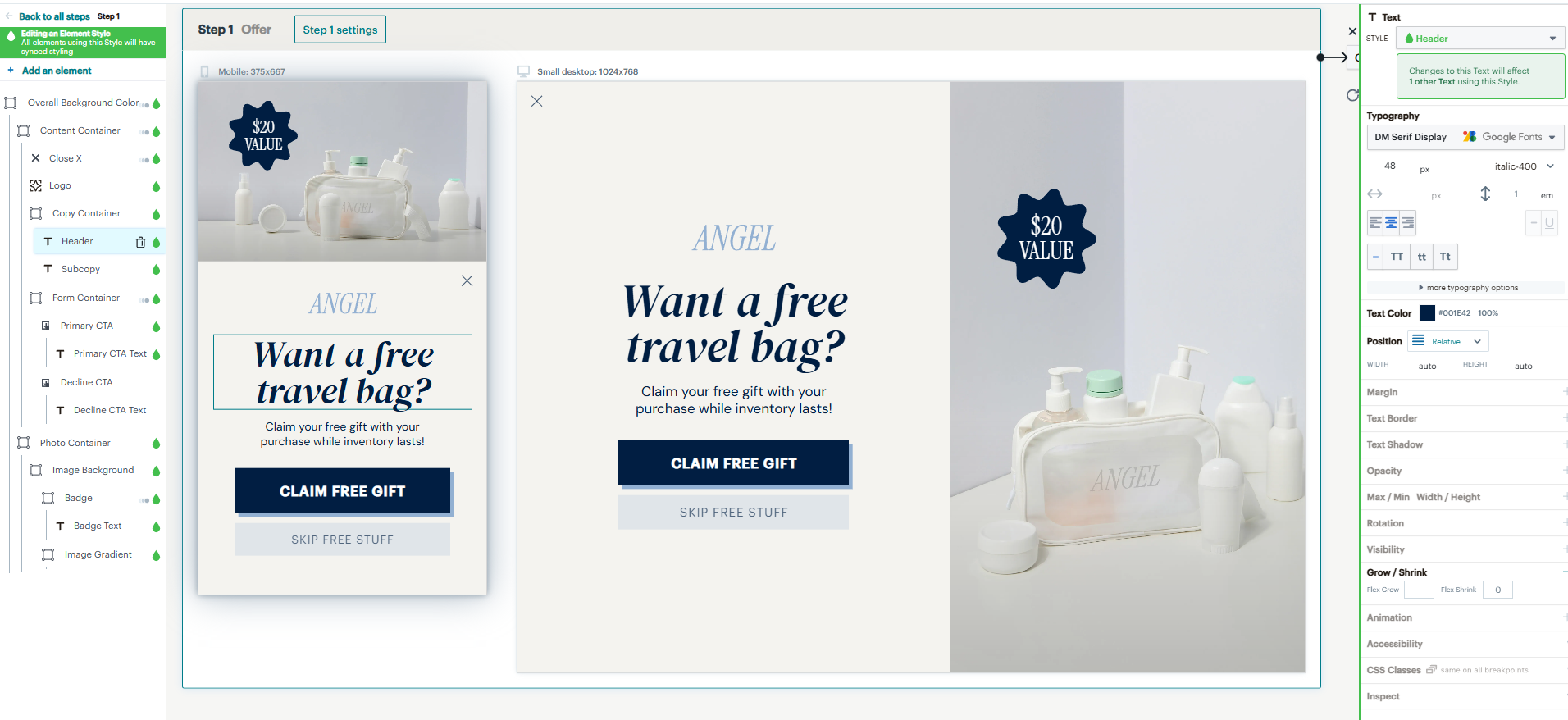 Mailchimp’s multi-step pop-up builder in action, with a full element hierarchy on the left and deep typography and CSS controls on the right
In practice, GetResponse is better for marketers who want simplicity and speed, while Mailchimp is the more powerful option for eCommerce brands and design-focused campaigns.
Deliverability
GetResponse: 9.2/10 | ⭐ Mailchimp: 9.4/10
Both GetResponse and Mailchimp, like most modern bulk email services, perform quite well when it comes to how efficiently emails land in subscribers’ inboxes. Here are some of the technical details behind how the two platforms handle deliverability:
| Aspect |
GetResponse |
Mailchimp |
Winner |
| Authentication |
SPF, DKIM, and DMARC; automatic and manual DNS setup; unauthenticated emails sent via shared sending domain |
DKIM and DMARC; automatic and manual DNS setup; domain verification required before sending; unauthenticated emails may display shared sending domain label |
Tie |
| Deliverability monitoring |
Campaign-level bounce and complaint metrics; shared infrastructure monitored internally; dedicated deliverability support on enterprise plans |
Delivery alerts for authentication and bounce issues; denylist monitoring; inbox rendering previews |
Mailchimp |
| List hygiene |
Hard bounces removed immediately; soft bounces suppressed after repeated failures; spam complaints handled automatically; suppression list applied during imports |
Hard bounces suppressed automatically; soft bounces retried and monitored; accounts automatically restricted when bounce or complaint thresholds are exceeded |
Tie |
| Dedicated IP |
Available on request for high-volume senders; setup and warm-up handled by the platform team |
Available as a paid add-on; automated warm-up process; multiple IPs and IP pools available |
Mailchimp |
| Total score |
9.2/10 |
9.4/10 |
Mailchimp |
With that being said, we still have some doubts about GetResponse’s deliverability. The reason comes from Capterra reviews, where real users mentioned “email deliverability challenges” among the platform’s downsides. This is especially worth keeping in mind if your business operates in industries where inbox placement is traditionally more difficult, like gaming, gambling, crypto, finance, supplements, or affiliate marketing.
Reporting and analytics
GetResponse: 8/10 | ⭐ Mailchimp: 7.8/10
As it often happens, platforms that are strong in automation also tend to perform well in other data-connected areas, like reporting and analytics. That’s the case here too: GetResponse wins over Mailchimp, even if only by a small margin. Here are some details about the reporting and analytics capabilities of both platforms:
| Aspect |
GetResponse |
Mailchimp |
Winner |
| Report coverage |
Campaigns, automations, contacts, forms, landing pages, webinars, and eCommerce performance |
Campaigns, automations, SMS, landing pages, pop-ups, social posts, eCommerce, audience growth, and conversion tracking |
Mailchimp |
| Custom reports |
Custom report builder with flexible filters, scheduling, and shareable links |
Custom report builder with filtering, grouping, comparative reporting, and up to 2 years of historical data |
Tie |
| Reporting speed |
Reports update progressively after sending; custom reports generated on demand or on schedule |
Campaign reports update progressively, but dashboard and custom report data may take several hours to refresh |
GetResponse |
| Export capabilities |
CSV and XLSX |
CSV and PNG |
GetResponse |
| Total score |
8/10 |
7.8/10 |
GetResponse |
Both platforms give you enough data to understand how campaigns perform and what should be optimized next. The difference is that GetResponse feels slightly more operational and workflow-oriented in day-to-day use, while Mailchimp focuses more on giving a broad marketing overview across multiple channels. For teams constantly exporting, comparing, and reacting to campaign data, that small difference can become noticeable over time.
Customer support
GetResponse: 7.1/10 | ⭐ Mailchimp: 7.4/10
Neither platform is particularly strong when it comes to customer support, so it’s worth setting realistic expectations – some issues may take time to resolve. Here are the things we noticed about support while testing GetResponse and Mailchimp:
| Aspect |
GetResponse |
Mailchimp |
Winner |
| Channel availability |
Email and live chat; 24/7 chatbot; multilingual support; phone support limited to enterprise plans |
Email and chat; phone and screen-sharing support available on the highest tier |
GetResponse |
| Knowledge base |
Large help center with guides, tutorials, videos, and free educational courses |
Extensive searchable documentation, migration guides, certification courses, and partner-focused educational resources |
Mailchimp |
| Onboarding assistance |
AI-assisted and self-serve onboarding |
Personalized onboarding consultations on higher-tier plans, including phone and screen-sharing sessions; migration guidance for major ESPs |
Mailchimp |
| Support quality rating on Capterra |
4/5 |
4.2/5 |
Mailchimp |
| Total score |
7.1/10 |
7.4/10 |
Mailchimp |
The two platforms are very close here, and the margin is small. Mailchimp wins this category for two main reasons: it offers noticeably stronger onboarding and migration guidance, and it also has a slightly higher rating on Capterra, where long-term users share feedback about the software they use.

Join businesses growing with SendPulse
From solo creators to global brands, thousands of customers trust SendPulse to run email campaigns, chatbots, automations, and more — all in one place.
Get started for free
Your decision checklist
You now officially know everything about GetResponse and Mailchimp – their pricing, features, strengths, and drawbacks. So which one should you choose? Go through this checklist to finally find out:
| Decision area |
GetResponse
is a better fit if… |
Mailchimp
is a better fit if… |
| Business type |
? Your business relies on automation-heavy workflows, funnels, webinars, courses, or behavior-driven marketing. |
? Your business focuses on eCommerce, branding, visual campaigns, or straightforward email marketing. |
| Budget expectations |
? You want broader marketing functionality for the money and lower long-term costs as your business grows. |
? You are comfortable paying more for a polished interface and strong design-focused tools. |
| Automation needs |
? You need complex behavioral automation, advanced segmentation, and highly personalized customer journeys. |
? You need structured automations that are easier to build, manage, and collaborate on inside a team. |
| Analytics focus |
? Your team regularly exports, compares, and works with campaign data in operational workflows. |
? You prefer a broader marketing overview with data from multiple channels gathered in one place. |
| Team setup |
? Your team includes experienced marketers comfortable working with feature-heavy systems. |
? Your team values intuitive workflows, guided onboarding, and easier day-to-day collaboration. |
Did one platform win three or more decision areas for you? Then you probably have your answer. Just remember that an email marketing platform is usually a long-term investment, as migrating later takes both time and money, so it’s better to choose carefully from the start.
Final verdict and recommendations
⚖️ Final scores: GetResponse – 8.2/10 | Mailchimp – 8.7/10
Both GetResponse and Mailchimp are solid, mature platforms with years of market experience, established ecosystems, and large user bases. Either one is a reliable choice for modern email marketing.
Mailchimp is more recognizable, easier to learn, and has more attractive pricing during the first year. GetResponse, meanwhile, stands out with stronger automation, deeper behavioral workflows, and a broader all-in-one marketing approach, while still staying relatively affordable. As they are positioned quite differently, the better choice usually becomes obvious once you clearly understand your business priorities.
But what if neither of them feels like the right fit? In that case, their competitors might suit your workflow better.
- Choose SendPulse if you want an affordable all-in-one platform that combines email marketing with chatbots, CRM, web push, SMS, and automation in a single ecosystem.
- Take a closer look at Klaviyo if you run an eCommerce business and want deep customer data, predictive analytics, and highly sales-focused automation built specifically for online stores.
- Check out MailerLite if you want a platform that stays simple and lightweight, but still offers modern email marketing features at a noticeably lower price.
- Consider Kit (formerly ConvertKit) if you’re a creator, blogger, educator, or newsletter-focused business that values a generous free plan, creator-friendly workflows, and audience monetization tools.
The good news is that the email marketing market has become mature enough that almost every type of business can now find a platform built around the way it actually works. The hardest part is simply understanding what kind of marketer you are before choosing one.