If WhatsApp support used to be a $0 line in your budget, that changed on October 1, 2026. Meta has reintroduced per-message charges for service messages — the free-form replies your team or chatbot sends inside the 24-hour customer service window. It’s the most significant update to WhatsApp Business pricing to date, and it affects the cost of most customer support conversations.
This guide explains what changed, how the new pricing works, what it can cost your business, and how to keep those costs under control.
Disclaimer: This guide reflects publicly available information as of October 2026, including the current service message rates, the monthly free allowance, and the extended free entry-point window. Meta can revise rates each quarter, so always confirm current rates with your provider or in
Meta’s rate cards before budgeting.
TL;DR Key changes to WhatsApp service message pricing
- Service messages have been billed since October 1, 2026. Free-form replies sent by a human agent or a third-party chatbot within WhatsApp’s 24-hour customer service window are now charged per message. They were free from November 1, 2024, to September 30, 2026.
- Utility templates sent within the 24-hour customer service window have been billed since October 1, 2026. They were free from July 1, 2025, to September 30, 2026.
- Service messages have the same price as utility and authentication templates sent to the same country. Meta confirmed country-specific rates on September 1, 2026.
- Every business phone number gets 1,000 free service messages per month. Charges apply only from the 1,001st; the allowance resets each month and doesn’t roll over.
- Meta Business Agent, Meta’s built-in AI, switched to token-based billing on August 1, 2026. The cost is $2.00 per million tokens, which is about 4 to 5 cents per reply worldwide. This price includes message delivery.
- The free entry-point window now lasts up to seven days. If a customer messages you from a Click-to-WhatsApp ad and you reply within 24 hours, all marketing, utility, authentication, and service messages you send while the window is open are free. The only exception is Meta Business Agent, which incurs token charges.
- These changes only apply to the WhatsApp Business Platform (API). Businesses using the API directly or through a provider like SendPulse are affected; the consumer WhatsApp app and the free WhatsApp Business app are not.
What is a WhatsApp service message?
A WhatsApp service message is a free-form reply (not an approved template) from a human agent or a third-party chatbot or AI (not Meta Business Agent) sent in response to a customer who messaged you within the last 24 hours.
Importantly, all three conditions have to be true at once. Miss any of them, and it’s a different, separately priced message type.
In practice, that covers a big slice of everyday support. Typed out by an agent or a chatbot flow, each of these counts as a service message:
- “Got it! I’ve updated the shipping address on your order.”
- “That color’s back in stock. Want me to set one aside for you?”
- “Which browser are you on? That’ll help me track down the glitch.”
- “Happy to reschedule. What day works best for you?”
- “Good news: your refund’s approved and on its way.”
Individually, replies like these feel too small to matter. Together, they make up the bulk of what a support team sends every day, and now each one is billable.
What changed on October 1
According to Meta’s official developer documentation, inside the 24-hour customer service window, two message types became billable on October 1, 2026, while two others stayed the same. Here’s a quick before-and-after comparison:
| Message type |
Until Sep 30, 2026 |
From Oct 1, 2026 |
| Service messages (free-form replies) |
Free |
Charged per message |
| Utility templates |
Free |
Charged per message |
| Marketing templates |
Charged |
No change
(still charged) |
| Authentication templates |
Charged |
No change
(still charged) |
Utility templates were already billable before July 2025, so October simply reintroduced charges that had been temporarily waived within the customer service window.
Meta also introduced a free monthly allowance: each business phone number gets 1,000 free service messages per month, with charges starting at the 1,001st message. The allowance resets monthly and doesn’t roll over.
Eligible government and non-profit organizations are an exception: their service messages stay free beyond the monthly allowance through December 31, 2027.
Before we get to cost, it’s worth narrowing the scope. This applies only to the WhatsApp Business Platform, including the API used by official providers like SendPulse; the regular WhatsApp app and the free WhatsApp Business app are not affected.
On top of that, chats that start from a Click-to-WhatsApp ad still get a free entry-point window, which can now stay open for up to seven days instead of 72 hours. If you reply within the 24-hour customer service window, every message you send while the window is open is free to deliver. The one exception is replies generated by Meta’s own AI, for which the token charge applies either way.

Access the WhatsApp Business API — no setup or extra fees
With SendPulse, you get everything you need, from a visual editor with a library of ready-made chatbot flow templates to user-friendly analytics, to help you effectively engage your customers on WhatsApp.
Get started for free
How much do WhatsApp service messages actually cost?
You don’t need a completely new price list. On September 1, 2026, Meta confirmed that a service message costs the same as a utility or authentication template sent to the same country. It also means that the same reply can cost more or less depending on where your customer is.
In SendPulse, those rates are currently $0.0098 per message in Brazil, $0.0024 in India, $0.0115 in Mexico, $0.0064 in the US, and $0.0264 in the UK.
To estimate your monthly service message costs, subtract your 1,000 free messages first, then multiply what’s left by your country’s rate. Say your team sends 3,000 free-form replies a month to customers in Brazil. The first 1,000 messages are free, so you pay about $20 for the remaining 2,000 messages (2,000 × $0.0098).
Take a busier team handling 5,000 conversations a month at six replies each. That’s 30,000 service messages. After subtracting the monthly free allowance, you have 29,000 billable messages. At Brazil’s rate, that’s about $284 a month; in a pricier market like the UK ($0.0264), the same volume runs around $766.
At the other end of the scale, if your team sends fewer than 1,000 service messages a month per number, service messages still cost you nothing.
There’s one more pricing change to keep in mind. Meta Business Agent is Meta’s built-in AI assistant that can answer customer questions on WhatsApp, Instagram, and Messenger. Since Meta runs the AI, its replies aren’t billed the same way as messages sent by your support team or your own chatbot, including one powered by SendPulse.
Instead of a flat per-message fee, Meta Business Agent is billed per token. That charge already includes message delivery, so there’s no separate messaging fee. As of August 1, 2026, the rate is $2.00 per million tokens, or about 4–5 cents per reply. Unlike service and template messages, the price is the same worldwide and doesn’t depend on your customer’s country. You can find all details in Meta’s pricing documentation.
So from August onward, there are two billing models to keep in mind:
|
Meta Business Agent |
Service message |
| Who sends the reply? |
Meta’s built-in AI |
Human agent or your own chatbot/AI |
| How is it billed? |
Per token |
Per message |
| What does it cost? |
$2.00 per 1M tokens (4–5¢ per reply) |
Template rate for your customer’s country |
| Is it free during the free entry-point window? |
No |
Yes |
| When did billing start? |
August 1, 2026 |
October 1, 2026 |
How a real WhatsApp conversation gets billed
Imagine a typical booking conversation with an online travel agency. A customer gets a fare-drop alert, asks the AI a couple of questions, needs a human agent to resolve a payment issue, and then receives the booking confirmation.
| Message |
Type |
Category |
As of Aug 1, 2026 |
As of Oct 1, 2026 |
| “Fares to Lisbon just dropped — book by Sunday.” |
Template |
Marketing |
Charged |
Charged |
| AI replies*: “Yes, these fares include one checked bag.” |
Non-template |
Meta Business Agent |
Charged |
Charged |
| AI replies*: “Yes, you can return on the 14th.” |
Non-template |
Meta Business Agent |
Charged |
Charged |
| Human agent helps complete the payment |
Non-template |
Service |
Free |
Newly charged |
| “Your booking is confirmed. Here’s your itinerary.” |
Template |
Utility |
Free (in-window) |
Newly charged |
|
|
Total |
3 charges |
5 charges |
| *These AI replies come from Meta’s own agent; a SendPulse chatbot’s AI replies would be billed as service messages instead. |
For the customer, nothing changed on October 1, 2026. They receive the same five messages and complete the same booking. What changed is the billing: the human agent’s reply and the booking confirmation are now both chargeable.
How to reduce your WhatsApp costs
The October pricing changes don’t automatically mean a much higher bill. In most cases, reducing costs comes down to sending fewer, more useful messages. Here are six practical ways to do that.
Combine replies whenever possible
Service messages are billed per message, not per character. Since a single WhatsApp message can contain up to 4,096 characters (1,500 in SendPulse’s editor, leaving room for personalization), there’s usually no reason to split one response into several messages.
Instead of sending one update at a time, encourage agents to combine the answer, context, and next step into a single message. If a customer asks multiple questions, answer them all at once whenever possible.
| Less efficient |
Better approach |
“Let me check that for you.”
“I found your order.”
“It ships tomorrow.” |
“I found order #4821. It ships tomorrow and should arrive on Friday. Is there anything else I can help you with?” |
Simplify your chatbot flows
Each automated reply costs the same as a service message from a human agent. The more your chatbot goes back and forth with users, the more expensive each conversation becomes.
Look for opportunities to:
- replace open-text questions with buttons;
- collect as many details as possible at once using WhatsApp Flows;
- remove messages that don’t add value (“One moment…” or “Thanks!”);
- combine consecutive chatbot messages whenever one reply can do the job.
Making small changes like these can help you send fewer billable messages.
| Less efficient |
Better approach |
| Welcome → What’s your name? → Thanks! → What’s your order number? → Please describe the issue. |
One WhatsApp Flow collects the customer’s name, order number, and issue in a single interaction. |
Limit how often automations trigger
You can also save money by making sure your chatbot only replies when it really needs to.
In SendPulse, set limits on how often a trigger can fire, for example, no more than one automated reply to the same user every five minutes.
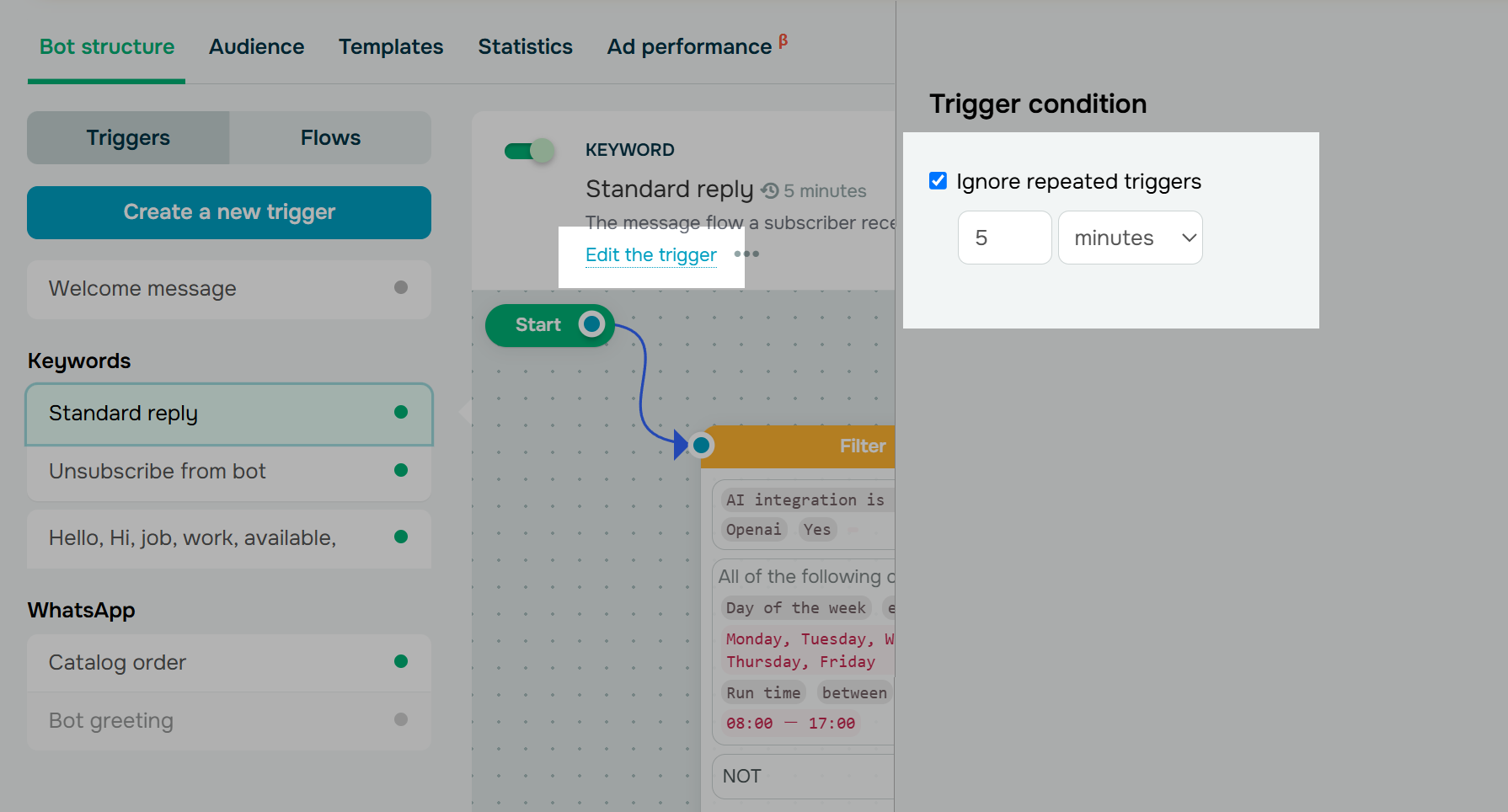 Stopping a trigger from re-firing too often in SendPulse
It’s also worth disabling catch-all triggers, like the default Standard reply, so your chatbot responds only to specific keywords or entry points instead of every incoming message.
Set limits for AI replies
Replies generated by SendPulse AI-powered chatbots are billed as regular service messages. They also consume tokens from your connected AI provider.
To avoid unexpected costs, set a daily reply limit per subscriber in your AI integration settings. That prevents a single long conversation from increasing both your WhatsApp bill and your AI usage.
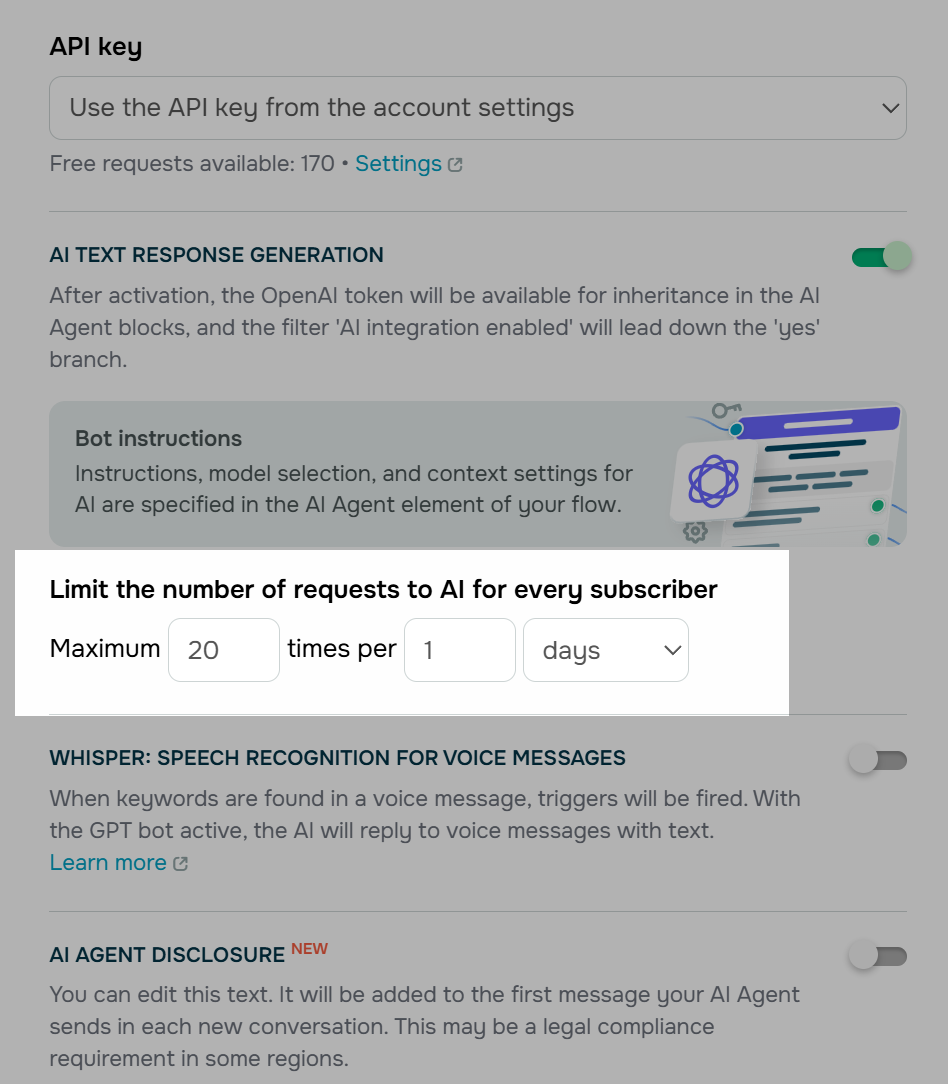 Capping AI requests per subscriber in SendPulse
Make the most of free entry-point windows
When a customer starts a chat from a Click-to-WhatsApp ad in the WhatsApp mobile app (Android or iOS), and you reply within 24 hours, you get a free entry-point window that can stay open for up to seven days. During that period, all messages, template or not, are free to deliver.
Keep in mind that free-form replies are still allowed only within 24 hours of the customer’s last message. To follow up later in the window, use templates, which stay free while it’s open. If you’re already investing in paid acquisition, routing more conversations through Click-to-WhatsApp ads can help balance out the new messaging costs.
Measure cost per conversation
Since October 1, one conversation can include different types of billable messages. Checking the cost of each message alone won’t tell you much. Instead, track the total cost to resolve the entire conversation. That’s the number that shows whether updates to your chatbot, automation, and support workflows are paying off.
It also helps you plan your budget. Charges are deducted from your SendPulse account balance, so keep enough on it to cover your typical monthly volume. If it runs out, your chatbot and automated flows stop sending messages until you top it up.
The bottom line
The new WhatsApp pricing isn’t really about paying for messages. It’s about paying closer attention to how your customer conversations are designed. Efficient chatbot flows, purposeful support replies, and well-tuned automation were always good practices. Now, they also help keep your WhatsApp costs under control.
Give your conversations that attention, and the new charges will stay a manageable line in your budget.
WhatsApp pricing change FAQ
When did the new WhatsApp charges start?
WhatsApp service messages and utility templates sent inside the 24-hour customer service window became billable on October 1, 2026. Separately, Meta Business Agent, Meta’s built-in AI assistant, switched to token-based billing on August 1, 2026.
Are any WhatsApp service messages free?
Yes. Each business phone number gets 1,000 free service messages every month. Billing starts at the 1,001st, and the allowance resets each month and doesn’t roll over. Messages sent in the free entry-point window are also free to deliver. The window opens when you reply within 24 hours to a customer who contacted you from a Click-to-WhatsApp ad, and it can stay open for up to seven days.
Does WhatsApp charge for chatbot replies?
Yes. Starting October 1, 2026, replies sent by your own chatbot, including a SendPulse-powered chatbot, are billed as service messages. They’re charged per message at the applicable country-specific rate.
Why is Meta charging for WhatsApp service messages?
Meta hasn’t given a detailed reason for making service messages billable specifically. The change, however, brings them into the per-message pricing model Meta introduced for WhatsApp Business in July 2025. Until October 1, 2026, free-form replies inside the 24-hour customer service window were an exception to that model.