In recent years, many small and medium-sized business owners have come to realize the significance of WhatsApp as a customer communication channel. The messaging app offers unmatched immediacy and familiarity — with it, you can reach customers at the moments when they’re most responsive and chatty. In markets like India and Brazil, a whopping 80% of local businesses use WhatsApp to connect with their audiences.
Yet, somehow, many companies are still only scratching the surface of what’s possible. The real secret lies in combining WhatsApp with the power of AI. By integrating tools like ChatGPT with WhatsApp, you can handle repetitive conversations at scale, free up valuable time and resources, and still provide the complex, human-like responsiveness your customers expect.
Let’s talk about making customer communication smarter and more scalable. This post will help you learn how to use ChatGPT on WhatsApp for every aspect of customer experience, from answering FAQs and providing product guidance to managing bookings, sending personalized reminders, and even handling negative feedback. Stick around for the best part — we’ll show you how to build a ChatGPT-powered bot for WhatsApp using SendPulse, with zero coding involved.
Why should your business use ChatGPT on WhatsApp?
The numbers don’t lie: when done right, integrating AI with chatbots can yield phenomenal results for businesses. For instance, in 2024, Klarna’s new AI assistant, powered by OpenAI, handled two-thirds of its customer service chats — the workload that would normally be processed by 700 human agents.
So, what exactly makes AI chatbots for businesses so incredibly efficient?
- Much faster response times. Automated responses via ChatGPT can answer common customer queries instantly, dramatically reducing wait times versus human-only support. Pulling data from different sources and rendering more nuanced replies may take a few seconds, but it still beats humans when it comes to reply speed.
- 24/7 availability. ChatGPT doesn’t require sleep, breaks, or vacation time — it can give customers support around the clock, on nights, weekends, and holidays. This improves trust and reduces frustration when people expect help outside standard hours. 51% of customers actually prefer talking to AI when they have an urgent question.
- Handling volume and scaling. 79% of agents acknowledge that AI as a co-pilot helps them deliver superior customer service at scale. With smart chatbots, making customers wait on hold is a thing of the past. An AI-powered bot has no problem dealing with large numbers of simultaneous conversations on WhatsApp without needing to hire more human agents. During peak demand, that means smoother operations and fewer overloads.
- Cost savings. By automating repetitive tasks, like answering FAQs or providing tracking info, you can reduce the number of support staff and cut operating costs. Employing properly trained bots means fewer errors or delays, which minimizes refunds and escalations.
- Reliability and predictability. AI provides clear, consistent answers with empathy, regardless of how stressful the conversational context may be. Intelligent bots can be trained with business guidelines, tone, and knowledge base to prevent drift — the phenomenon where different human reps give slightly different responses.
- Personalized approach at scale. 55% of customers say that AI agents help them discover products they like. Using customer data (past orders, preferences, language) the AI can effortlessly tailor messages, suggest products, and anticipate needs. On WhatsApp, that can feel more conversational and relevant to the user, prompting them to consider another purchase.
- Multilingual reach and cultural sensitivity. Many businesses have diverse audiences, even if they mostly operate locally. ChatGPT models can support multiple languages, understand dialects and regional context, and tailor their language accordingly, which is easier than hiring multilingual staff for all shifts.
- Improved customer satisfaction and retention. Faster, more reliable, more available service boosts satisfaction, which in turn helps retain customers, get better reviews, and reduce churn. Some CEOs even claim that their AI chatbots already surpass human agents when it comes to delivering higher customer satisfaction.
- Seamless handoff to humans in case of uncertainty. ChatGPT WhatsApp integration can organically complement a human agent team, allowing it to focus on more complex, sensitive, high-value issues like complaints, nuanced tech support, or custom orders instead of answering identical surface-level questions. This improves agent morale and productivity.
In short, by integrating ChatGPT with WhatsApp, you can serve more people while simultaneously freeing human agents to focus on high-value interactions. This is the ultimate way to turn the messaging app from a humble chat tool into a true growth driver.

Engage users on WhatsApp
Use our drag-and-drop builder to create AI-powered WhatsApp chatbots that sell, support, and connect. Run campaigns, share updates, and convert leads hands-free.
Get started for free
Imagine pairing the vast knowledge of large language models with your unique brand guidelines and delivering it right where your customers already spend their time, namely, on WhatsApp. With an OpenAI-powered chatbot, your business will be able to effortlessly “outsource” a wide range of conversations that traditionally drain time and resources.
Here are the specific ways in which you can utilize ChatGPT WhatsApp integration to make your subscribers feel understood and supported at every step.
Product guidance
First and foremost, your AI agent chatbot on WhatsApp can act like a digital shopping assistant, guiding customers through choices and helping them find exactly what they’re looking for. Instead of scrolling through endless product pages, customers can simply describe their needs in a chat — “I have sensitive dry skin and need a night cream” or “I’m looking for beginner-friendly running shoes under $100” — and the AI instantly suggests the most relevant options.
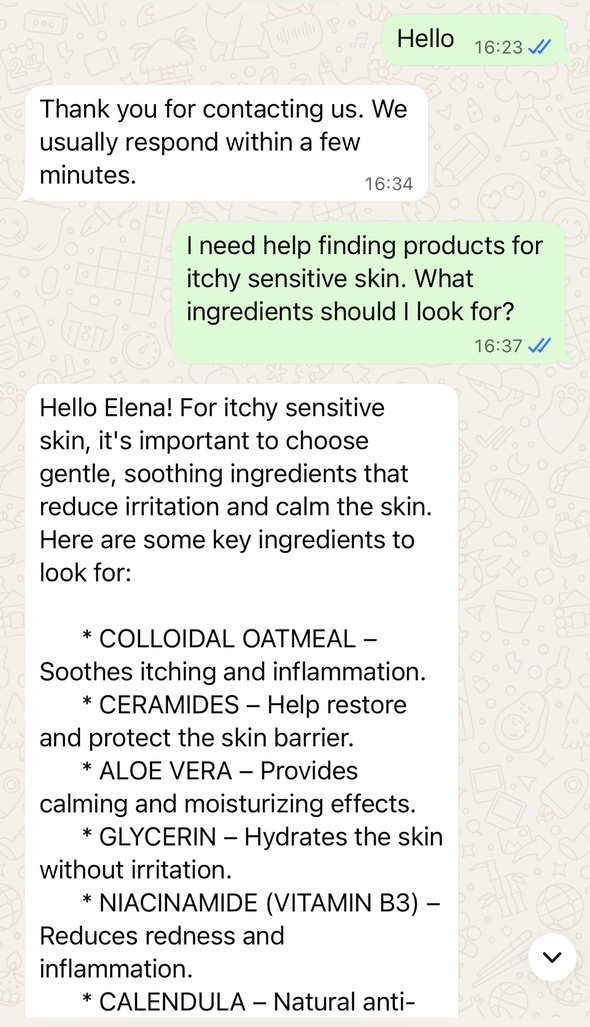 A skincare WhatsApp bot built with SendPulse
Because it’s trained on your catalog and brand guidelines, the recommendations feel personalized, trustworthy, and on-brand. The bot can expertly highlight the key features of the selected product and explain why it’d be the best choice. This eventually boosts confidence in purchases, lowers returns, and reduces cart abandonment.
Customer education and enablement
Instead of static FAQs, ChatGPT explains product or service features in an interactive, conversational style. This means that you can walk new customers through setup in a casual way via WhatsApp, with bite-sized steps and video tutorials. As a result, users onboard faster without needing repeated support calls.
This can look as simple as helping customers build a structured routine with your products if they are overwhelmed by reading countless labels and cryptic terms.
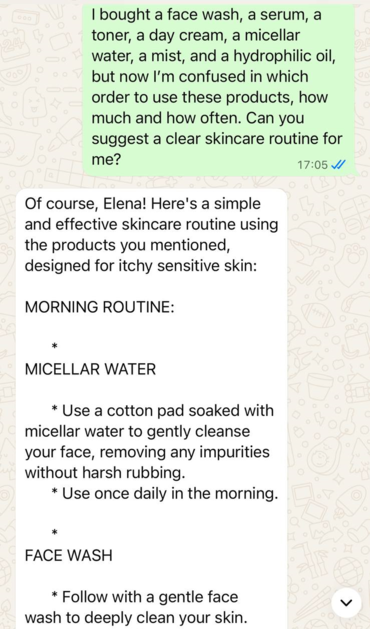 A WhatsApp bot helping a user navigate diverse skincare products
You can provide this kind of guidance through the “AI Agent” element in the SendPulse chatbot builder. The settings allow you to shape the bot’s tone of voice and supply it with the necessary product knowledge.
Try our visual chatbot builder
With SendPulse, you can easily craft AI-powered chatbots on your website, WhatsApp, Telegram, Facebook, and Instagram. Get started for free with up to three bots and 10,000 messages each month.
Get started for free
To give a more complex example, a home appliance brand wants to help a customer who just bought a smart coffee machine. Instead of flipping through a paper manual, the customer gets a ChatGPT-powered WhatsApp message right after delivery: “Welcome to your new coffee experience! Want me to help you set up your machine?” The bot then guides them step by step, from unboxing and connecting the device to Wi-Fi, to running the first cleaning cycle, and finally brewing the perfect cup.
Along the way, it can share short video clips for tricky steps, like attaching the water filter. If the customer asks, “How do I descale the machine?” weeks later, the chatbot instantly provides clear instructions, tailored to their model. The interaction feels effortless and satisfying, while the brand builds trust by being present exactly when and where the customer needs a hand.
Feedback collection and handling
Survey fatigue is a common problem businesses struggle with, and using ChatGPT on WhatsApp is one potential solution. An intelligent chatbot can automate surveys, sentiment analysis, and escalations for serious complaints while maintaining a human-like facade and a natural conversation flow.
For instance, instead of sending customers a generic email with a long survey link, your ChatGPT-powered bot can casually check in after a purchase or service interaction with a short, friendly message: “Hi Alex, thanks for ordering with us! How was your experience?” If the customer replies positively, the bot might follow up with one or two quick, conversational questions, like “What did you like most?” or “Would you recommend us to a friend?”
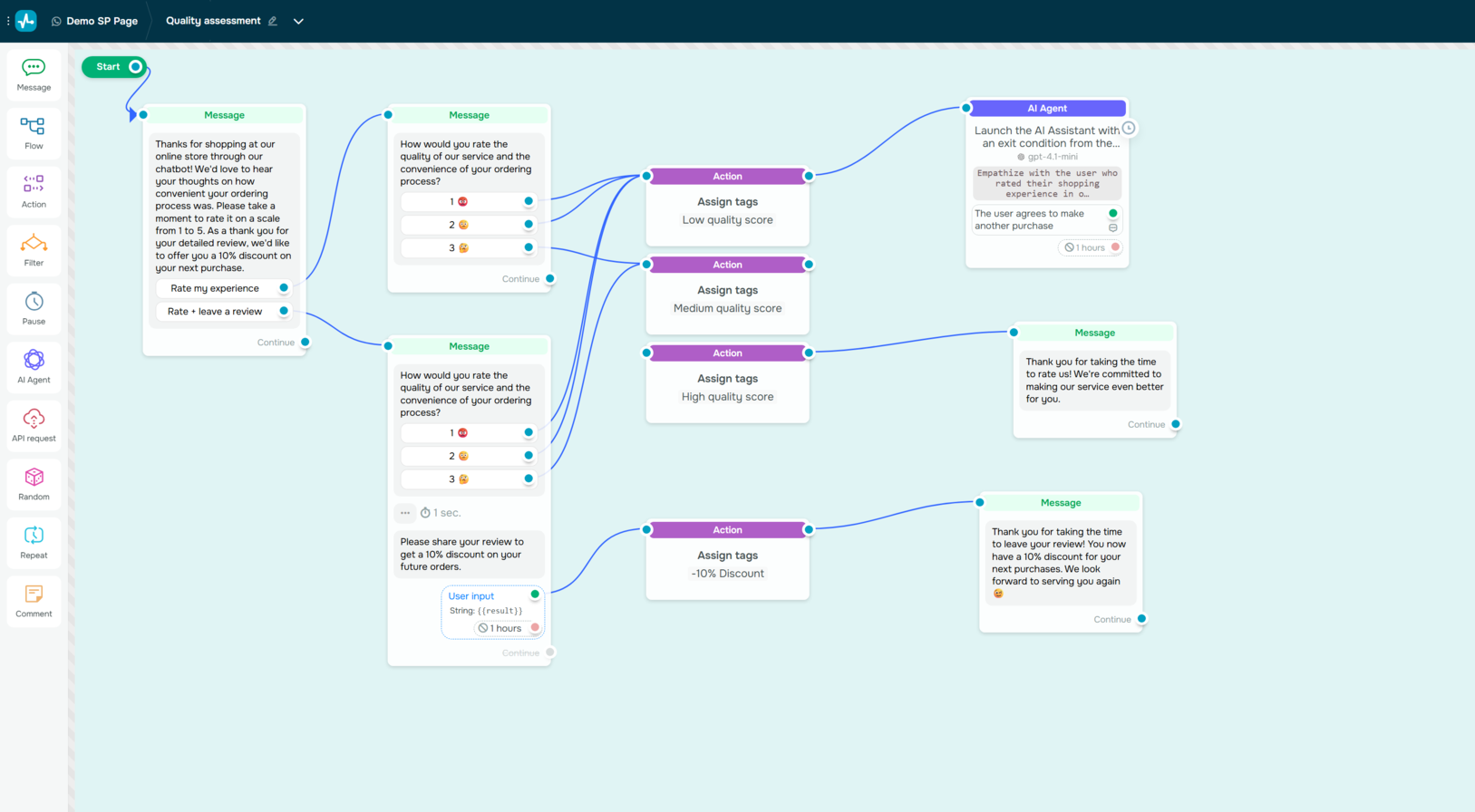 Creating a feedback collection WhatsApp campaign with SendPulse
For less satisfied customers, the chatbot can recognize frustration in their response and shift tone: “I’m really sorry to hear that. Can you tell me what went wrong so we can fix it?” If it detects a serious issue, it can immediately escalate the case to a human agent, ensuring the customer feels heard rather than ignored.
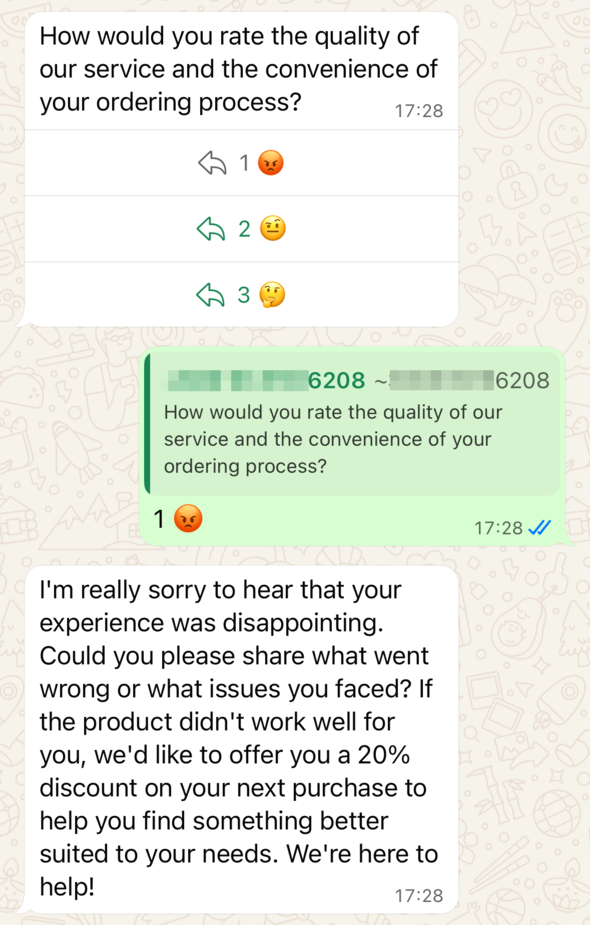 An AI WhatsApp chatbot assessing customer satisfaction
By keeping the feedback process light and conversational, ChatGPT on WhatsApp reduces survey fatigue and captures more genuine insights. You can benefit from real-time sentiment analysis and categorized feedback, while customers feel like they’re chatting with a helpful brand representative rather than filling out yet another yawn-inducing form. This not only improves satisfaction tracking but also strengthens customer trust and loyalty.
Order tracking and updates
Deliveries rarely go 100% smoothly — delays can happen at any stage of the logistical journey, and parcels sometimes get reassigned with new local tracking codes. Instead of leaving customers frustrated and searching through courier websites, you can help them connect with a supportive chatbot powered by ChatGPT on WhatsApp, which can explain what’s happening with the order in real time.
A customer can simply type, “Where’s my order?” and the bot instantly fetches the latest tracking information. If real-time updates are not available yet, the chatbot responds transparently and reassures the customer: “Your order is in transit, but the courier hasn’t shared the next update yet. Don’t worry — you’ll get notified via email as soon as there’s news.”
This proactive, conversational approach prevents anxiety and cuts down on repetitive “Any updates?” inquiries. For the business, it reduces the burden on support teams, and for the customer, it creates a sense of control throughout the delivery journey.
Customer support and troubleshooting
Moving further along the customer journey, AI can be useful for resolving technical issues conversationally, freeing your agents for complex cases. Imagine a telecom company whose customers often run into connectivity issues. Instead of frustratingly waiting on hold for an agent, a user can open WhatsApp and type, “My internet is down.” ChatGPT instantly responds with empathy: “I’m sorry you’re having trouble with your connection. Let’s run a quick check together.”
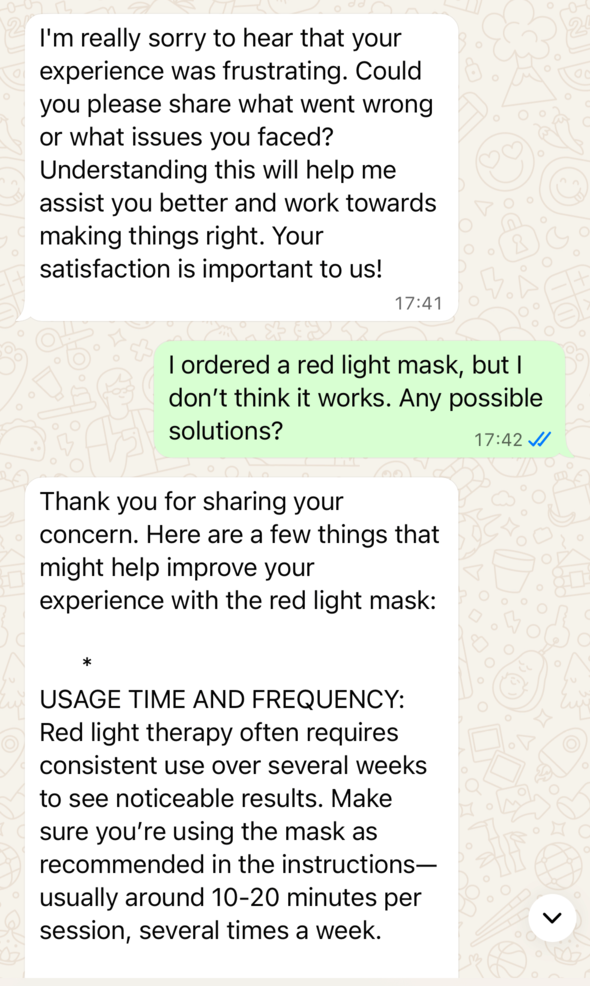 An AI WhatsApp chatbot helping a customer troubleshoot product issues
If you’re building a dedicated support flow, WhatsApp customer support software helps automate first-line troubleshooting and pass the conversation to an agent with full context. It then walks the customer through simple troubleshooting steps like restarting the router, checking cables, or resetting network settings, all in a friendly, conversational tone. If the issue persists, the chatbot automatically escalates the case to a live agent, passing along the troubleshooting history so the subscriber doesn’t need to repeat themselves. The result is faster resolution, less frustration, and a smoother experience for the user while the business saves valuable agent time for the cases that truly require human expertise.
In SendPulse, this can be achieved through the “AI Agent” element, where you instruct your bot how to react to complaints and what possible solutions it could offer without involving the human team.
Lead generation
Another common method of using ChatGPT on WhatsApp is to turn casual exchanges and inquiries into new business opportunities. Unlike pop-up forms, which sometimes can feel intrusive, a chatbot can capture leads in a natural, low-friction way, asking customers for their contact data when they are in the right mood and already express interest in the brand.
The process may look like this: a potential customer messages a furniture store to ask, “Do you deliver to my area?” Instead of just answering with a simple yes or no, the chatbot replies warmly: “Yes, we do! Can I get your ZIP code so I can confirm delivery times and share our latest catalog with you?”
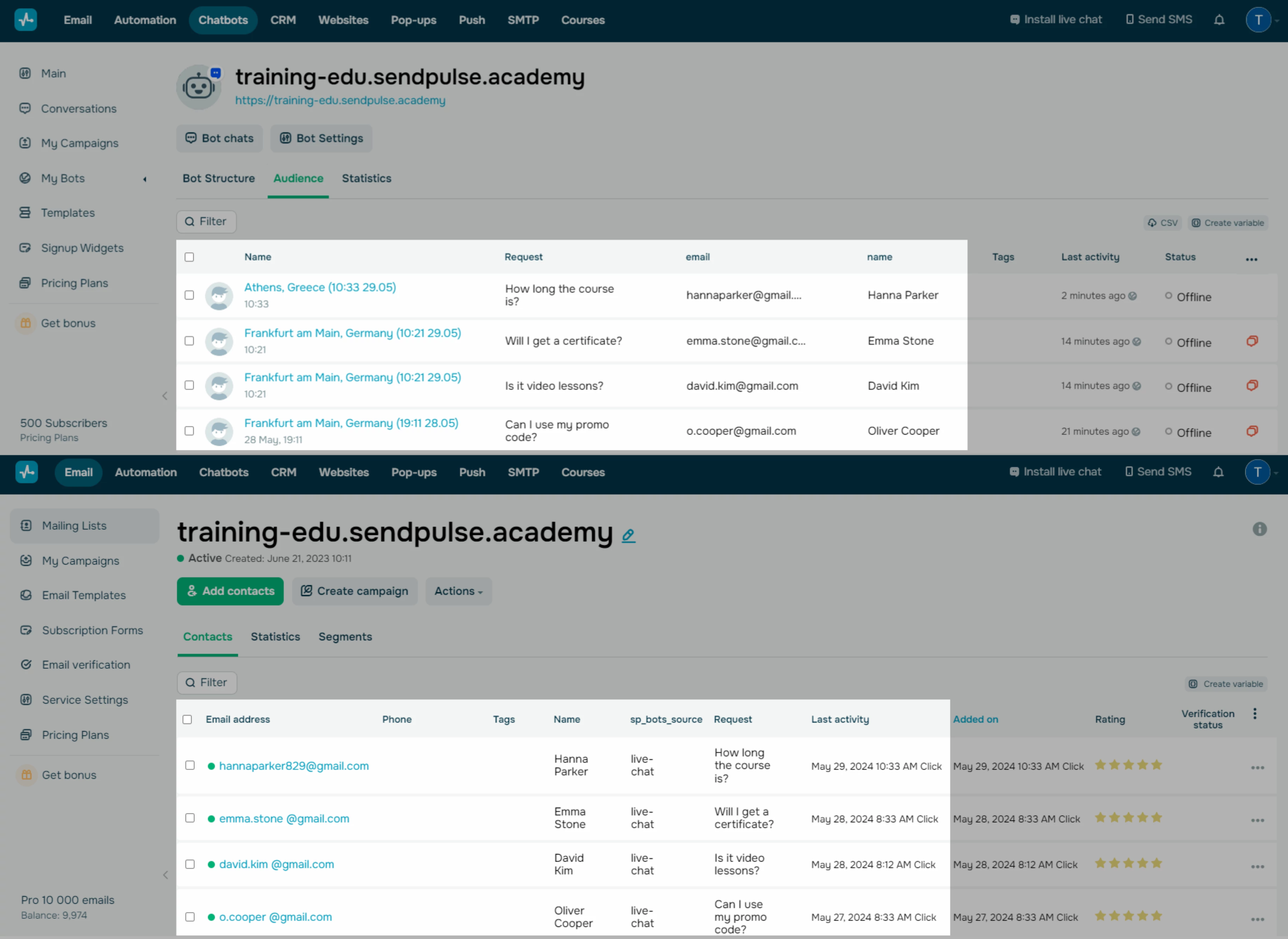 Building a mailing list in SendPulse using a WhatsApp bot
From there, it consensually collects the customer’s details, offers to send personalized product recommendations, and even suggests scheduling a design consultation. What could have been a one-off question is smoothly turned into a lead, nurtured through conversation, and handed over to sales at the perfect time. This way, businesses generate more qualified leads without disrupting the customer journey, while customers feel they are simply having a helpful chat rather than being aggressively “sold to.”
Lead qualification and sales assistance
A ChatGPT-powered chatbot doesn’t just capture leads — it also helps qualify them before they reach your sales team. Instead of passing along every inquiry, the chatbot gathers essential details and directs the most promising prospects to the right agent. For businesses that want a structured lead funnel rather than open-ended AI conversation, a WhatsApp lead generation chatbot offers defined qualification steps, mandatory field capture, and CRM-ready handoff.
For example, an event planning firm’s WhatsApp assistant might start the conversation by learning about the client’s budget, preferred venue size, and expectations. With this context in hand, only the most relevant leads are routed to a manager, saving time and ensuring that sales teams focus on opportunities with the highest potential. This way, businesses filter out unqualified leads automatically while providing prospects with a professional first impression.
Appointment and booking management
Another customer service area where AI shines is appointment scheduling. Booking a session, especially if it’s the customer’s first visit, usually involves multiple back-and-forth messages, which may pull busy agents away from their work and create a choppy, disrupted experience for both sides. These kinds of inquiries can be handled instantly through a conversational flow on WhatsApp, saving both customers and staff time.
A bot paired with ChatGPT on WhatsApp is a fantastic solution for patiently guiding people through the booking process, from checking availability to confirming a slot and even sending reminders. For example, a dental clinic’s chatbot might greet a new patient, suggest open time slots, and confirm the appointment within minutes — all in an automated manner. The result is a seamless, low-effort experience for the user and less admin work for the business.
Personalized marketing campaigns
Chatbots on WhatsApp are extremely useful for running marketing campaigns, and, when enhanced with AI, they move far beyond generic mass blasts — think tailored, conversational messages that reflect customer preferences and purchase history.
Instead of receiving the same promotion as everyone else, each customer gets an offer that feels personal and relevant. For instance, a skincare brand’s chatbot might notify a returning shopper: “Hi Jenna, the new serum from your favorite brand just dropped — want to give it a test?” This kind of individualized approach is a game-changer when it comes to driving conversions and making customers feel recognized and valued rather than spammed.
In SendPulse, variables are used to personalize a bot’s messaging. You can create your own variables in the bot’s settings and later integrate them into the AI assistant’s replies.
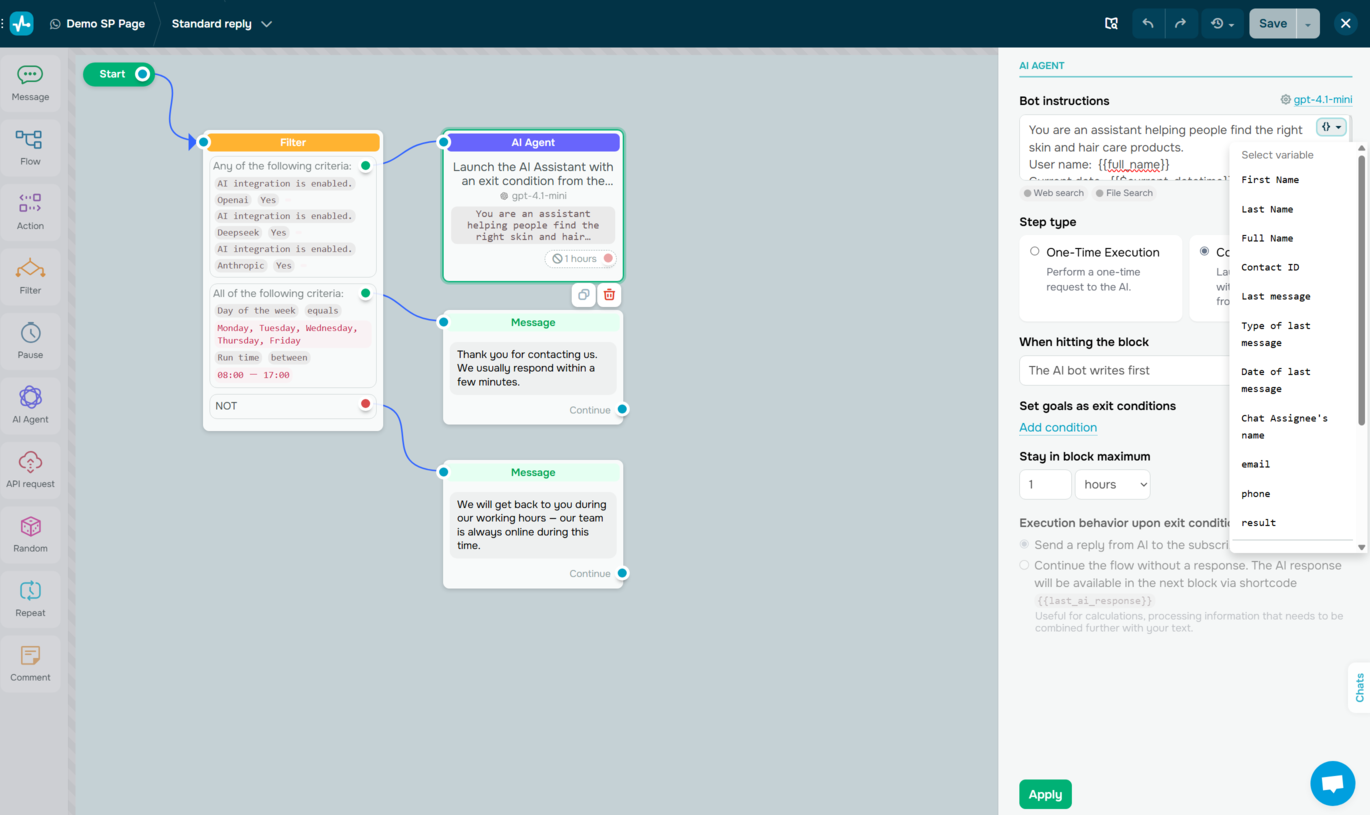 Adding variables to an AI WhatsApp chatbot’s replies in SendPulse
By addressing a subscriber by their name or quoting their last message, your chatbot will be able to make the conversation feel more natural and human. Variables also allow you to store and recall useful details, like purchase history, location, preferred product categories, or appointment times.
Crisis handling and high-volume support
In tense situations, human agents may crumble under pressure and let stress cloud their thinking, but AI will always remain calm, patient, and reliable. WhatsApp bots running on ChatGPT are especially valuable in handling massive spikes in inquiries, delivering accurate updates to thousands of customers at once without delays.
For example, during widespread flight cancellations, an airline’s AI WhatsApp chatbot can instantly share refund information, alternative travel options, and real-time status updates, ensuring every passenger is informed without the stress of emotion-laden hotline calls. By employing intelligent bots, you get to combine speed with empathetic wording when it’s urgently needed — this prevents chaos but also preserves customer trust. The result is fewer overloaded agents, more reassured passengers, and a reputation that stays intact even during emergencies.
Best practices for ChatGPT WhatsApp integration
It might be tempting to think of a ChatGPT-powered WhatsApp bot as a “set it and forget it” solution, but in reality, delivering intelligent customer conversations requires ongoing attention to detail. AI can be incredibly powerful, but only if it’s equipped with the right knowledge, tone, and structure to reflect your brand.
AI is only as good as the data behind it. Without quality data, even the best AI tools will struggle to deliver value.
SourceVladyslav Bohachenko
Head of Sales at RAI
Here are the key things you need to pay attention to when integrating ChatGPT with WhatsApp:
- Introduce the bot and set clear limits. Customers should know what the AI WhatsApp chatbot is for and what it can and cannot do. Without clear boundaries, expectations may be unrealistic, leading to frustration. The best approach is to define specific tasks, like FAQs, bookings, or product guidance, and reroute subscribers to agents when queries fall outside of that scope.
- Equip the chatbot with your own content. A generic AI may sound smart, but it won’t provide accurate information about your products, services, or policies. Feeding it your own knowledge base, FAQs, and brand guidelines ensures relevant responses. This content should be updated regularly to reflect new products, promotions, or changes in policy. For instance, if a customer asks whether they can return a newly purchased pair of shoes, they must receive the correct, brand-approved answer.
- Let your users know the bot can make mistakes or forget things. AI bots tend to remember only several recent user messages — your subscribers shouldn’t expect yours to retain a full scope of their history or complex context. While this short-term memory helps the bot stay efficient in quick conversations, it also means it might lose track if a dialogue drifts too far or stretches over a long period.
- Shape its personality and tone. ChatGPT should mirror your brand’s voice — professional, playful, noble, or whimsical. This consistency reinforces brand identity and makes conversations feel more realistic. Define clear tone guidelines, such as whether emojis are used, the level of formality, or whether humor is okay.
- Run prompt injection testing. Like any AI system, your bot can be tricked into ignoring its instructions or revealing information it shouldn’t. Malicious users might try to “jailbreak” the bot with unusual prompts, causing it to give incorrect answers, expose sensitive data, or behave in ways that don’t align with your brand. By testing for these vulnerabilities early, you ensure both your customers’ trust and your company’s reputation stay intact.
- Establish a failsafe level of automation. While ChatGPT is conversational, many customers appreciate shortcuts, quick-reply buttons, and structured journeys. Combining free-flowing conversation with structured menus and pre-written flows creates the best experience. A restaurant chatbot, for example, may allow patrons to ask anything but also offer buttons like “See Today’s Menu” or “Book a Table,” so there’s no need for excessive texting.
- Enable frictionless human agent handoff. No AI can handle every scenario, and customers should always have the option to reach a human when needed. The bot should escalate complex or emotionally loaded messages smoothly, transferring context, so customers in distress don’t need to repeat themselves. If a user types “I have a complaint,” the chatbot should immediately respond: “Let me connect you with an agent who can help right away.”
- Regularly monitor and train the bot. AI improves with feedback, but only if it is monitored. Reviewing chat logs helps identify gaps or outdated answers that need updating. For example, if many hotel guests ask about pet policies and the bot cannot answer, the knowledge base should be expanded to include this detail. Continuous training keeps the chatbot accurate and useful.
- Consider adding voice support. 74% of customers say an AI bot that understands and responds to their voice would highly elevate their experience because it makes interactions more natural and inclusive. Voice also adds an extra layer of convenience, allowing customers to get the help they need in the way that feels most comfortable to them.
- Prioritize data security and compliance. WhatsApp is a personal channel, and mishandling data can damage trust or even cause legal issues. Businesses should follow GDPR or other local regulations, avoid oversharing, and clarify how data is used. When collecting sensitive information such as email address or insurance details, your chatbot should actively ask for consent, reassure customers (“Your information is safe and only used to process this request”), and link to your privacy policy.
- Measure and optimize continuously. Promising as AI bots are, it takes continuous monitoring and refinement to keep them accurate, relevant, and genuinely helpful. To know whether the chatbot is effective, you’ll need to review conversations and track key metrics such as response time, resolution rate, customer satisfaction, and escalation percentage.
With that in mind, we can now discuss the practical side of using ChatGPT on WhatsApp.
How to integrate ChatGPT with WhatsApp using SendPulse
Building an effective, AI-driven WhatsApp chatbot may sound intimidating at first, but it doesn’t have to be. With SendPulse’s no-code chatbot builder, you can create and launch your own intelligent customer service and support bot without writing a line of code — unless you want to.
The intuitive drag-and-drop interface makes it simple to create and customize the bot’s architecture, while pre-made flow templates help cover common scenarios like lead capture, customer support, and FAQs. You can customize every step to ensure that your bot caters to your business’s unique needs.
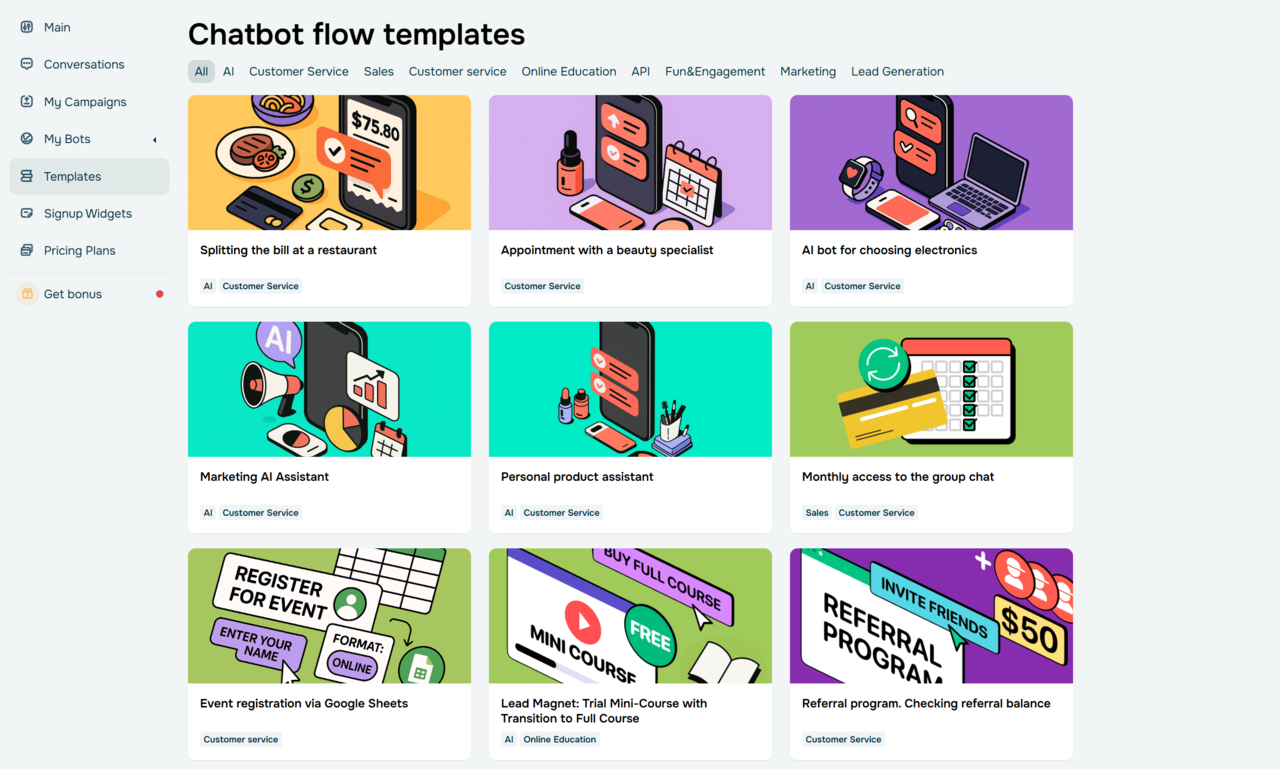 SendPulse’s chatbot flow templates
Firstly, head to the “Chatbots” tab, create a new WhatsApp bot, and connect it to your WhatsApp Business Account. You can also migrate to SendPulse from other WhatsApp Business API providers.
To connect ChatGPT to your WhatsApp bot, you’ll need to enter your API key, activate the AI text response generation, and set limits to avoid bot misuse. At this step, you can also turn on speech recognition — the essential feature for processing users’ voice messages. Besides OpenAI, SendPulse enables you to use AI models from DeepSeek or Claude.
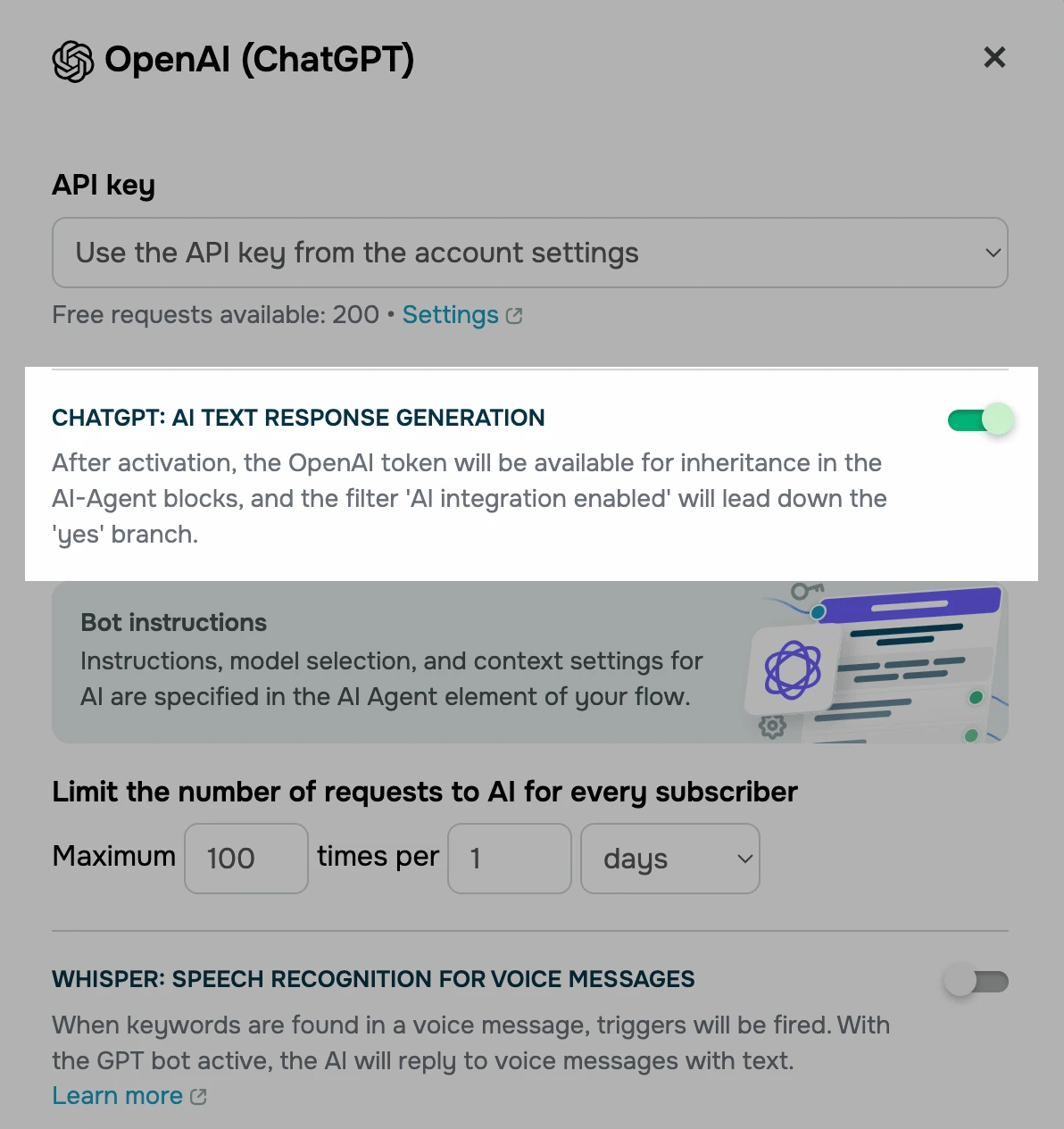 Connecting ChatGPT to a WhatsApp chatbot in SendPulse
The next step is to set up your AI model — the brain power for your bot. The settings are usually dictated by the bot’s purpose. For instance, if your goal is customer education and enablement, you may want to allow the AI model to look up information online before generating a response. For product guidance and niche advice, it makes sense to enable file search, a feature that allows the AI model to answer based on your pre-uploaded content, like brand guidelines, product library, etc.
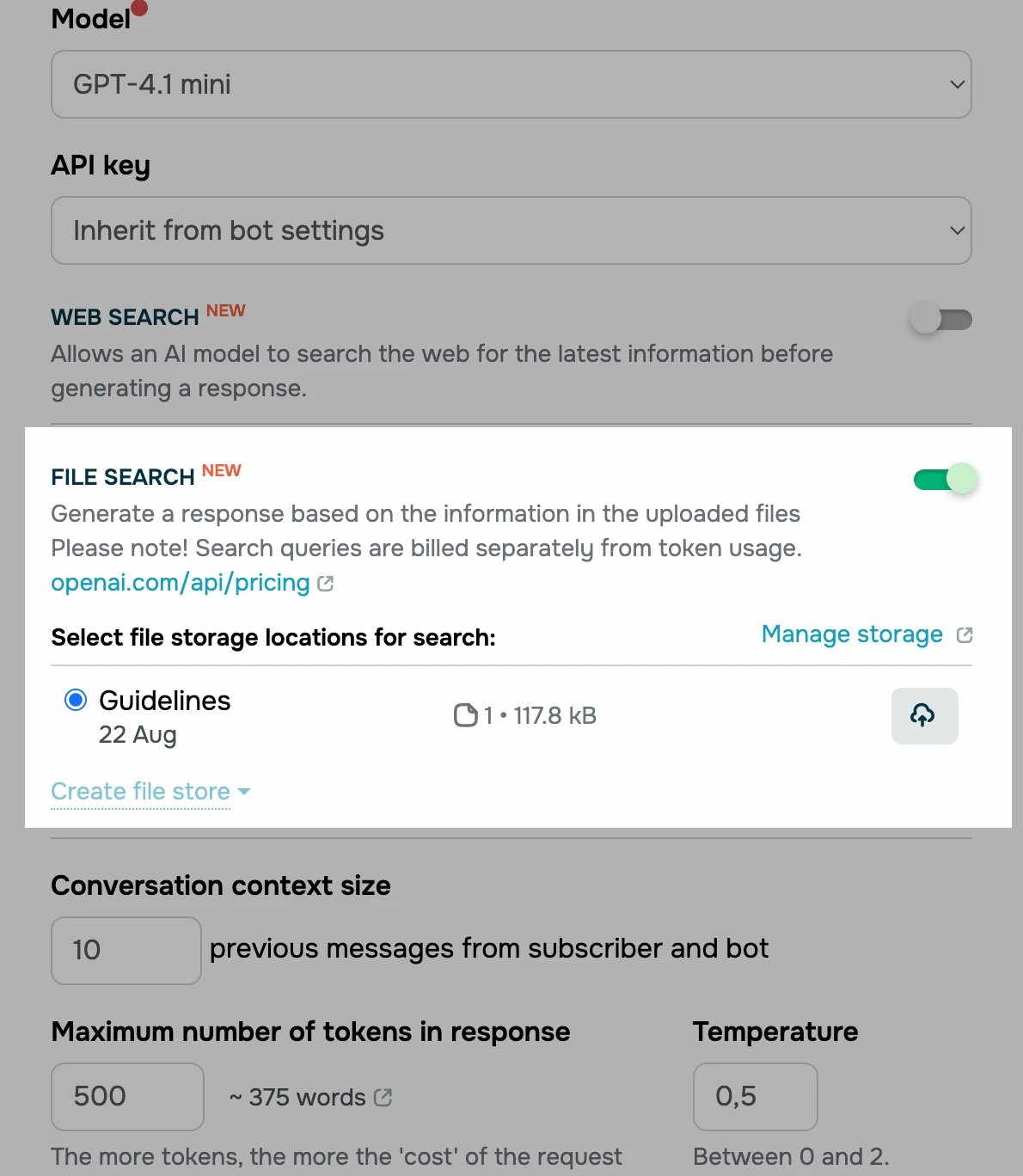 Setting up an AI model in SendPulse’s chatbot builder
You can further configure your AI assistant in the “AI Agent” element by providing detailed instructions, shaping its personality, and setting exit conditions where relevant. The easiest way to get your ChatGPT-powered WhatsApp bot running is by customizing pre-made AI flows from the SendPulse template library.
In this example, we’ve adapted the “Marketing AI Assistant” template to let hypothetical users choose between consulting with the bot, requesting trial lessons, or signing up for a course or private training session.
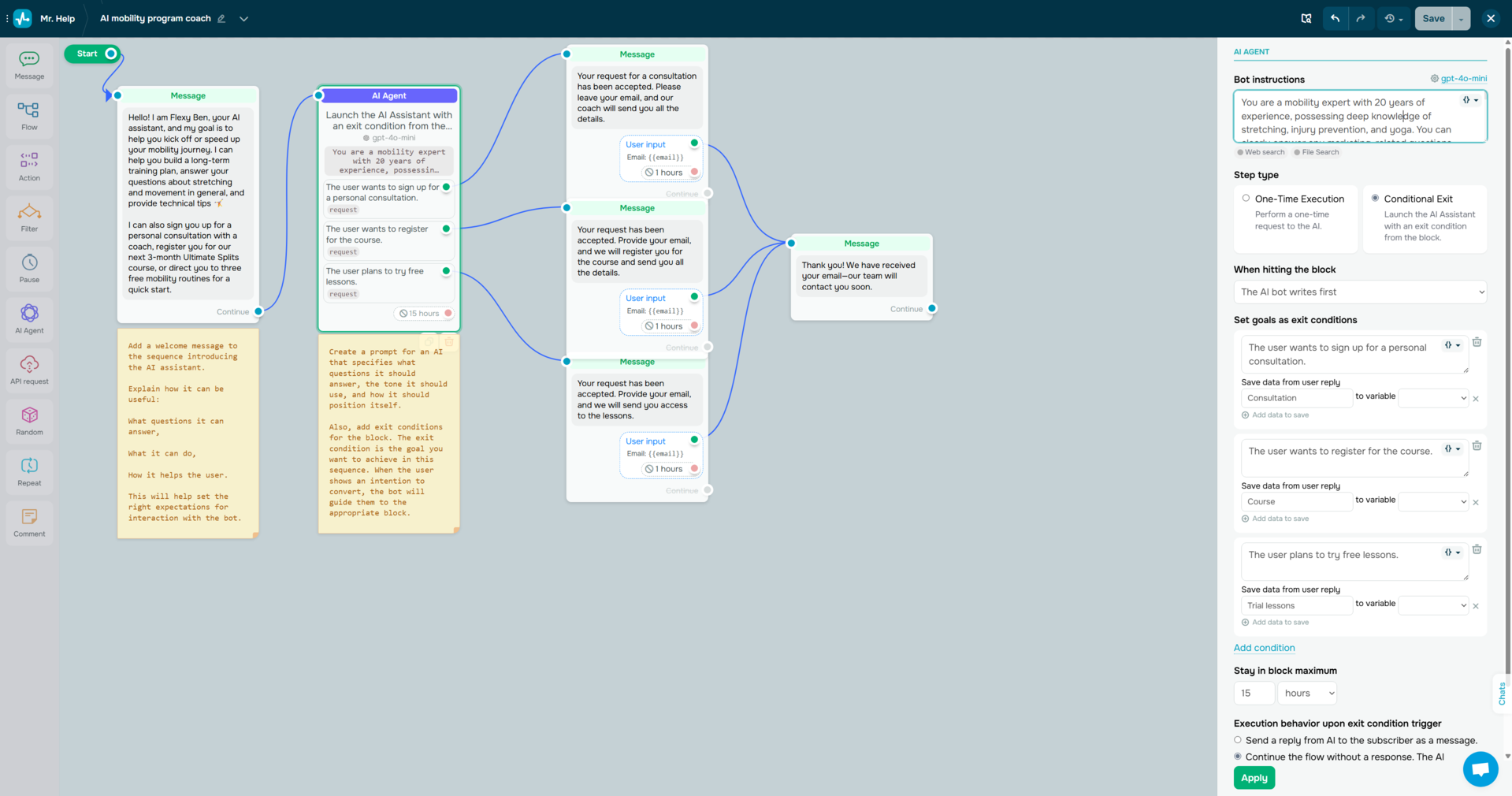 Customizing an AI WhatsApp chatbot flow template in SendPulse
In addition, there’s an integrated AI flow builder, which can help you create entire flows using text prompts. The built-in email service and CRM system allow you to store and manage customer information collected in the chat in a dedicated mailing list and automatically create deals when your customer submits an order or books a service via WhatsApp.
Ready for your next step?
With SendPulse, ChatGPT WhatsApp integration can become a powerful addition to your omnichannel strategy. You can leverage our full marketing and sales automation toolkit to drive conversations not only on WhatsApp, but also across email, website chats, Telegram, Facebook Messenger, Instagram Direct, and SMS.
And as your audience grows, the platform scales with you, thanks to our flexible pay-as-you-go monthly and yearly plans. Whether you’re sending 100 messages or 100,000, SendPulse provides the infrastructure and expert support you need, from WhatsApp API onboarding to message template approvals.
Our platform comes with 24/7 support, a free plan, and an intuitive help center — create your account today and see for yourself!