As of February 2025, over 2 billion people use WhatsApp every month, making it one of the world’s most popular messaging platforms. For businesses, it’s an excellent opportunity to connect with customers directly, personally, and instantly. A well-structured WhatsApp sales funnel can turn a simple list of leads into meaningful conversations that drive conversions. Instead of relying on disconnected forms and emails, you engage with customers where they already communicate — right inside WhatsApp.
A WhatsApp sales funnel is a seamless, automated path that guides prospects from their first interaction to purchase within a single messaging platform. SendPulse WhatsApp marketing automation solutions enable you to build these funnels with pre-built automation templates, lead qualification chatbots, and behavioral triggers that move prospects toward conversion automatically. It’s personal, instant, and aligned perfectly with how customers want to buy: by getting answers, building trust, and making decisions quickly. In this blog post, we’ll walk through actionable strategies for designing each stage of your WhatsApp sales funnel and show you how to implement them using SendPulse.
What is a WhatsApp sales funnel?
Traditional sales funnels often rely on fragmented communication channels and slow, disconnected exchanges. In contrast, a WhatsApp funnel strategy is designed for real-time, human-like interactions. Prospects receive instant responses, personalized recommendations, and can even confirm purchases directly in the chat. Pairing this funnel with a dedicated WhatsApp lead generation chatbot ensures every new contact is captured, tagged, and routed to the right follow-up sequence from the very first message.
Engage users on WhatsApp
Use our drag-and-drop builder to create AI-powered WhatsApp chatbots that sell, support, and connect. Run campaigns, share updates, and convert leads hands-free.
Get started for free
Why do brands need a dedicated WhatsApp sales funnel? Because customer expectations have shifted. Today’s buyers want direct access, instant replies, and a sense that they’re engaging with a real business.
Here’s a clear comparison of how WhatsApp sales funnels differ from traditional ones:
| Aspect |
Traditional sales funnel |
WhatsApp sales funnel |
| User experience |
Multi-channel, fragmented |
One-channel, seamless (in-chat) |
| Speed of interaction |
Delayed (email/phone lag) |
Real-time (chatbot or live agent) |
| Lead qualification |
Static forms, slow routing |
Conversational and automated in chat |
| Personalization |
Generic sequences |
Dynamic replies based on user inputs |
| Conversion process |
Click → form → wait |
Chat → qualify → confirm instantly |
| Automation |
Rigid workflows |
Flexible, chatbot-driven |
| Visual engagement |
Mostly text-based |
Rich media, carousels |
| Mobile friendliness |
Often desktop-first |
100% mobile-native |
| Trust signals |
Domain reputation |
Verified WhatsApp business account |
| Follow-up capability |
Email drip, reminders |
WhatsApp campaigns, template messages |
Unlike a classic funnel that feels linear and slow, a WhatsApp sales funnel keeps the entire journey fast, interactive, and always within reach.
Benefits of using WhatsApp in your sales funnel
Here’s why smart marketers choose WhatsApp over more fragmented funnels:
- Instant reach and high open rates. Unlike other channels where messages might sit unread, WhatsApp messages are typically opened within minutes. That speed is exactly why WhatsApp marketing campaigns — flash sales and cart-recovery offers included — tend to convert faster than email. This makes it ideal for time-sensitive offers or urgent follow-ups. Imagine sending a reminder about an abandoned cart while your customer is already holding their phone.
- Personalized, conversational nurturing. Instead of generic drip emails, you can ask real questions and offer tailored replies instantly. For instance, a chatbot can qualify leads by asking about their budget or needs, then seamlessly connect them with an agent to close the deal.
- Seamless CRM and eCommerce integration. You can pull product details, prices, and order statuses directly into the chat. This means a customer asking “Where’s my order?” will get an instant, up-to-date answer without having to wait for an email reply.
- Frictionless lead progression. No more waiting for forms to be filled out. With WhatsApp, leads move from interest to purchase in a single conversation. A customer can ask for more details, get a quote, and even complete the purchase via a payment link.
- Cost-effective marketing automation. Chatbots can handle FAQs, lead qualification, and reminders, saving you time and the cost of additional staff. For example, a salon can automatically confirm bookings or send follow-up promotions without needing a human on the other end.
- Verified business profiles for trust. The green verification badge assures users that your business is legitimate and secure. This boosts customer confidence and lowers the barrier to sharing personal details or making a purchase.
- High compliance with privacy expectations. WhatsApp’s opt-in structure ensures you’re only messaging people who actually want to hear from you. This keeps your outreach welcome and avoids the trap of spammy marketing.
Get access to WhatsApp Business tools in minutes
Start using the WhatsApp Business API with SendPulse — no setup or extra fees. Build chatbots, send campaigns, and manage conversations easily with our intuitive tools and templates.
Get started for free
Core stages of a WhatsApp sales funnel
WhatsApp funnel strategy still follows the traditional stages of marketing: attracting new leads, nurturing them, and closing the sale. Below, you’ll find practical ways to handle each sales funnel stage directly in WhatsApp.
Awareness and lead capture stage
You can’t sell to people who don’t know you exist. However, asking them to fill out long forms or wait for follow-up emails often kills the momentum. With WhatsApp, you can capture interested leads in real-time, turning curious visitors into actual contacts.
Here are a few practical ways to capture leads with WhatsApp:
- Add WhatsApp links on websites and social media. Make it effortless for users to start a conversation by placing click-to-chat buttons on your website pages, blog posts, or bios.
- Use QR codes for scanning. They are great for stores, flyers, or event booths as visitors scan your QR code and land directly in your WhatsApp inbox.
- Run click-to-WhatsApp ads. With the right setup, users can jump straight from Facebook or Instagram ads into a conversation, skipping landing pages altogether.
- Embed chat CTAs on landing pages. Turn passive pageviews into real chats — add “Chat on WhatsApp” buttons where leads hesitate.
- Offer opt-ins through contests or giveaways. Trade value for access by letting users win something worth their number.
- Qualify leads directly in chats. Ask the right questions upfront — filter serious buyers from casual visitors without ever leaving the conversation.
SendPulse can equip you with the right tools to turn attention into action.
You can drop custom links anywhere, add QR codes that trigger WhatsApp chats on the spot, embed opt-in widgets right where visitors pause, and collect details with WhatsApp forms that visitors fill in without leaving the chat. Everything works together to capture leads without interrupting the conversation.
On top of that, the platform’s intuitive drag-and-drop chatbot builder lets you design flows that collect answers, save variables, and automatically sync all the customer data with our built-in CRM system.
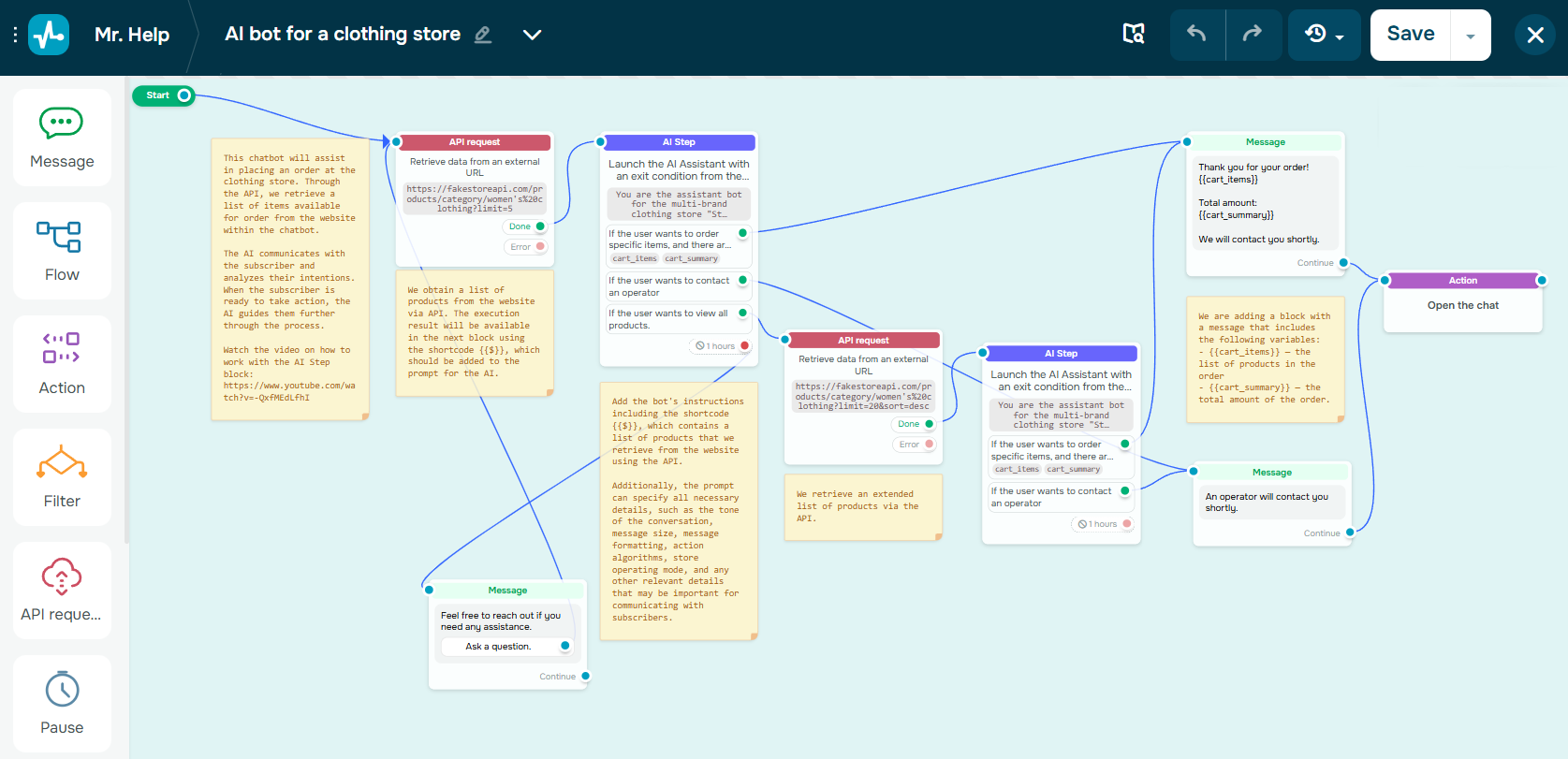 SendPulse’s visual chatbot builder
Nurturing and engagement stage
This is where most funnels stall as people sign up and then forget you exist. WhatsApp makes nurturing feel like an actual conversation instead of a drip campaign they ignore. Keeping that nurturing sequence running without manual follow-up is exactly what automating your WhatsApp marketing pipeline is for.
Here are some effective strategies to keep the conversation going:
- Send personalized welcome messages. Make a strong first impression by greeting new contacts by name. Guide them to their next step with a friendly, automated welcome message that still feels human.
- Use quick reply buttons. Help users navigate their options without needing to type. It’s a great way to reduce friction and boost interaction.
- Set up message flows with approved templates. WhatsApp requires businesses to submit message templates for proactive outreach. Once approved, you can schedule helpful, personalized messages that feel relevant, not intrusive.
- Share useful content right in the chat. Provide valuable content without making users leave the app. Sending rich, helpful content builds trust and shortens the decision-making process.
- Qualify leads automatically. Ask targeted questions, capture intent, and route serious prospects to sales, saving time for both you and your leads.
- Respond quickly with built-in FAQ support. Fast replies prevent frustration and keep users moving toward conversion, especially when addressing common questions.
- Segment contacts for relevant follow-ups. Send personalized content based on interests, actions, or data collected during the conversation. Relevant messages get more attention, while generic ones are often ignored.
With tools like SendPulse, you can automate and streamline all of these actions. Our visual chatbot builder, dynamic segmentation tools, and CRM syncing for WhatsApp make it easier to nurture and engage leads effectively. WhatsApp bulk messaging rounds this out by letting you run top-of-funnel awareness broadcasts to your full subscriber base, keeping cold leads warm with personalized sends until they are ready to move forward.
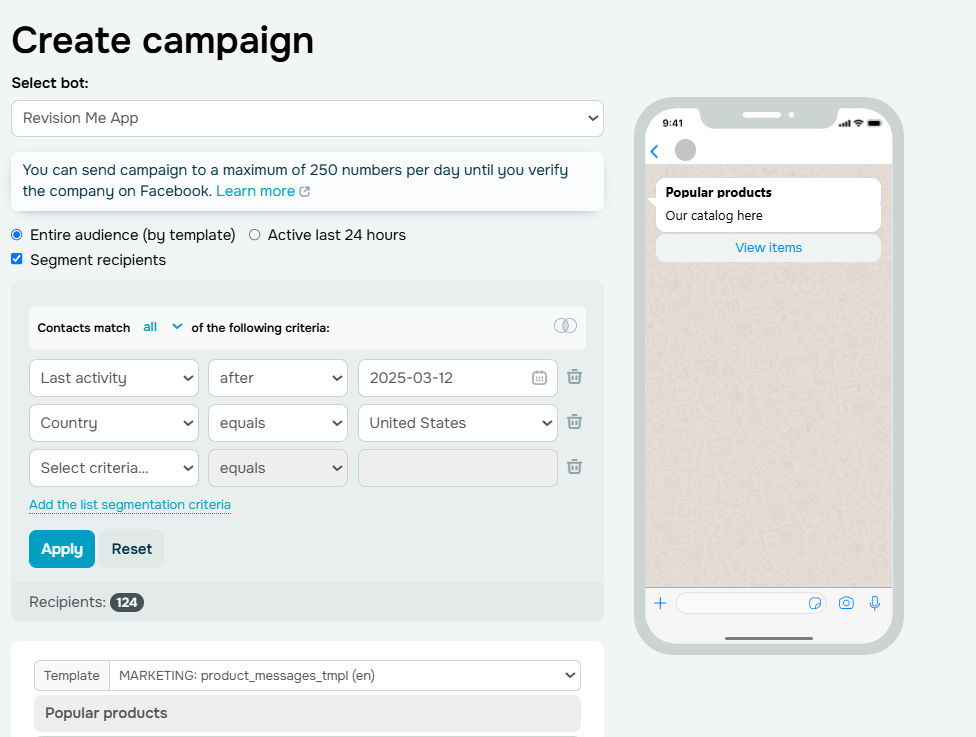 Segmenting recipients for a WhatsApp campaign in SendPulse
Conversion and closing stage
This is the make-or-break stage where you turn an interested prospect into a paying customer. A well-crafted WhatsApp business funnel will help you effectively reduce friction, answer objections, and close sales in real time.
Here’s how you can turn interest into action:
- Share product info and demos instantly. When a prospect asks for more details, respond quickly with rich content like videos, images, or PDFs. This keeps the conversation going and helps build confidence.
- Offer personalized discounts. When a lead shows buying intent, reward them with a special offer. Set up your chatbot to trigger custom promo codes based on user behavior or tags.
- Handle objections with social proof. When leads hesitate, drop a quick customer testimonial or success story to build trust without the sales pitch. Let your best customers do the convincing.
- Guide checkout with payment links. Skip the website detour and send a ready-to-click payment link so they can buy the moment they’re ready.
SendPulse provides you with the tools to act on interest right away. You can send product videos, images, or PDFs directly in chat, making your responses feel personal and conversational. Set up chatbot conditions to trigger personalized promo codes based on user interactions. And when they’re ready to purchase, send them a payment link or integrate a payment system so they can complete the transaction without leaving WhatsApp.
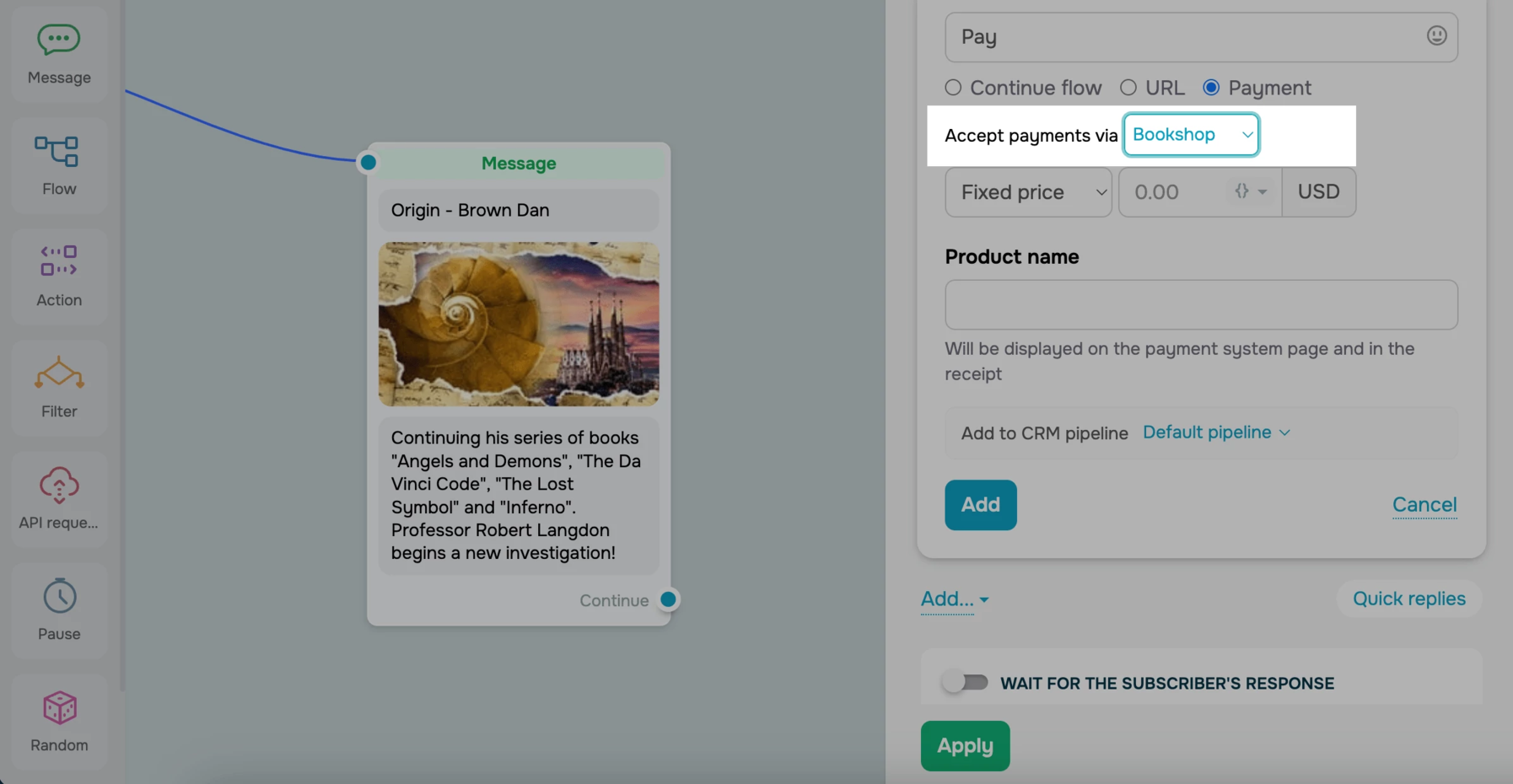 Adding a payment button in the SendPulse builder
Mastering these stages removes barriers so your customer can say “yes” without leaving the chat.
Best practices for a high-converting WhatsApp funnel
Getting people into your WhatsApp marketing funnel is one thing. Moving them toward a decision without losing their attention is another. Below are practical ways to sharpen your funnel to improve its performance. Each point is simple, intentional, and tested.
Personalize with context, not just names
Talk to people as if you know them. Use variables to insert the user’s name, product of interest, or previous responses into your messages.
For example, instead of sending “Hey there, check this out,” say something like: “Hi Anna, still thinking about those black sneakers?”
This kind of message feels more like a natural follow-up than a generic broadcast.
With SendPulse, you can store details like name or product interest as chatbot variables and reuse them automatically in your bot flows and campaigns.
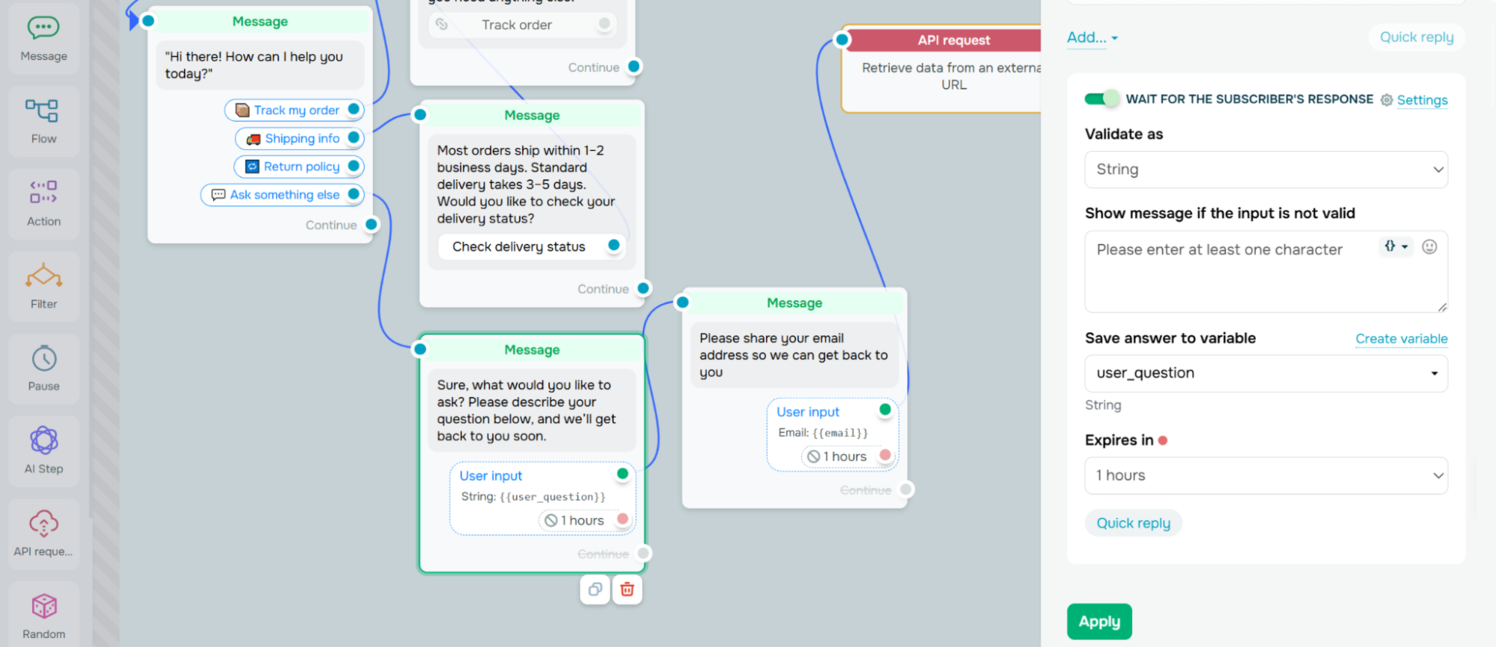 Saving the user’s response as a variable in the chatbot builder
Use buttons to guide action
People don’t want to type, so make it easy for them to choose. Buttons reduce drop-offs by giving users pre-set actions like “Yes,” “Tell me more,” or “Book now.” They keep the flows structured and fast.
Instead of asking users to type their answer manually, offer quick and simple choices to reduce friction. For example:
Choose a service:
- [Haircut]
- [Massage]
- [Consultation]
This approach not only makes the experience easier for users but also gives you cleaner data to work with.
Keep conversations short and goal-oriented
If it reads like an email, it’s already too long. WhatsApp is built for short, focused exchanges. Every message should either deliver value or move the user one step closer to saying yes.
Avoid overwhelming users with long-winded intros or lists. For instance, don’t say:
Hi Alex! We offer various services tailored to your needs. Would you like to learn more about our pricing, availability, or team experience?
A better approach is to use short, action-driven questions with clear options. Here’s how that could look:
Want to see pricing or book a time slot?
If you need to add more information, break it up into smaller chunks. Wait for responses before revealing the next step. Think of it as guiding the user through micro-conversions: open → click → reply → confirm.
Track metrics that matter
Gut feeling will not optimize your funnel, but data will. A 90% open rate looks great until you realize no one’s clicking or, worse, clicking but never converting.
To truly understand how your funnel is performing, focus on these key metrics:
- Click-through rate (CTR). Are users engaging beyond the first message?
- Response rate. Are your messages sparking real conversations?
- Goal completions. Are users taking the actions you want them to take?
For instance, if users are opening your messages but dropping off during the product showcase, the problem may not be visibility; it could be the perceived value of your offer.
Most chatbot platforms, like SendPulse, offer built-in analytics to track user behavior throughout your funnel. These tools show how well each flow performs, which steps users reach, and where they drop off. With this insight, you can quickly identify what’s working and what needs fixing.
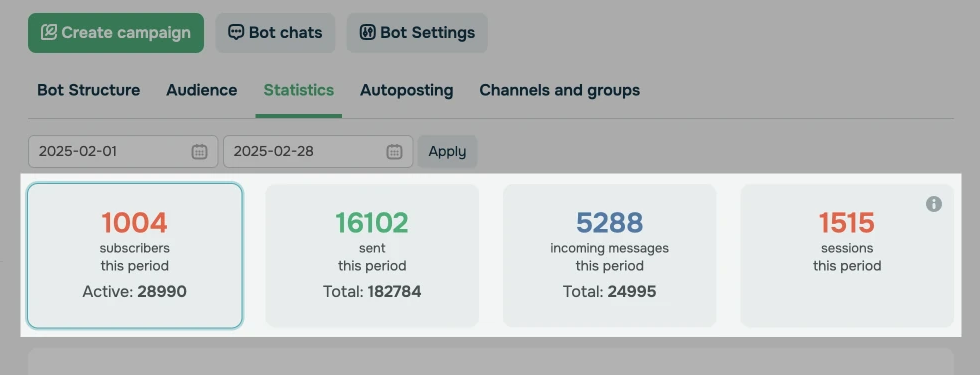 Some chatbot statistics
Respect timing and consent
Just because someone said “yes” once doesn’t mean they’re open to constant messages. Consent is an ongoing agreement, and every message should feel expected, not intrusive. Avoid sending offers at odd hours or spamming users who haven’t interacted in days.
For example, if someone downloads your guide at 10 AM, follow up with a helpful tip later that day, rather than sending a sales offer the next morning.
Smart messaging earns trust by knowing when not to speak. Silence between touchpoints can say just as much as the message itself if timed right.

Build your chatbots with AI
Let AI help you create a perfect bot scenario on any topic — booking an appointment, signing up for a webinar, creating an online course in a messaging app, and more. Sign up now and run up to three bots for free!
Get started for free
WhatsApp funnel examples built with SendPulse
The best way to understand the power of a WhatsApp marketing funnel is to see it in action. Below are three ready-to-launch funnel examples designed for real business use cases and fully buildable with SendPulse. You’ll see how to build it, using tools like chatbot builder, template messages, automation rules, and CRM integration.
Abandoned cart and discount funnel for eCommerce
💡 Scenario. When a shopper adds items to their cart but doesn’t complete the checkout, it’s a missed opportunity. With a WhatsApp sales funnel, you can recover these potential sales by sending a personalized reminder about their cart shortly after. Include a 10% discount in the message to encourage them to finalize their purchase. If there’s no response, send a follow-up message with a product image or an updated offer. If your goal is to turn these follow-ups into purchases, a WhatsApp sales chatbot can handle product questions instantly and nudge shoppers back to checkout at the right moment.
To further enhance this flow, you can also add a virtual assistant that offers real-time support. For example, include a “Need help?” button that triggers your chatbot. If the user taps it, the bot can answer shipping questions, offer a better deal, or tag the lead as cold for follow-up by your sales team.
🎯 Goal. Recover lost sales by prompting users to complete their purchase with an added incentive.
You can build such a campaign with SendPulse. Start by creating a WhatsApp template message. Go to “Chatbots” → “My bots” → “Add template” to get started.
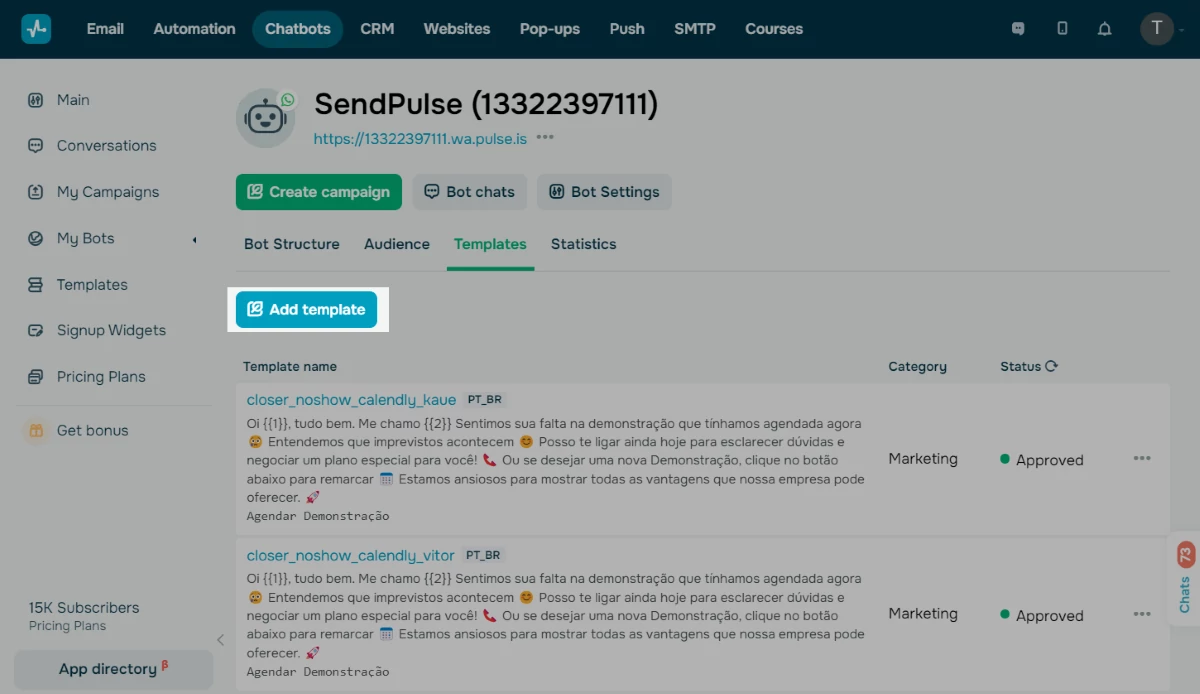
Adding a WhatsApp template in SendPulse
Start by creating a name and message for your template, for instance:
| Name |
abandoned_cart_reminder_1 |
| Message |
Hi {{1}}, we noticed you left something in your cart: {{2}}. Complete your order today and get 10% off! 🛒 Click here: {{3}} |
To make it easier for users to act, add buttons like “Complete order” and “Need help.” These buttons allow users to quickly choose their next step, while the variables will automatically fill in the user’s name, cart details, and a direct link.
Once your template is ready, set up the automation trigger to start your chatbot. To do this, go to “Bot structure” → “Triggers” → “Create new trigger” in your SendPulse account. Then, choose the event that will trigger the flow.
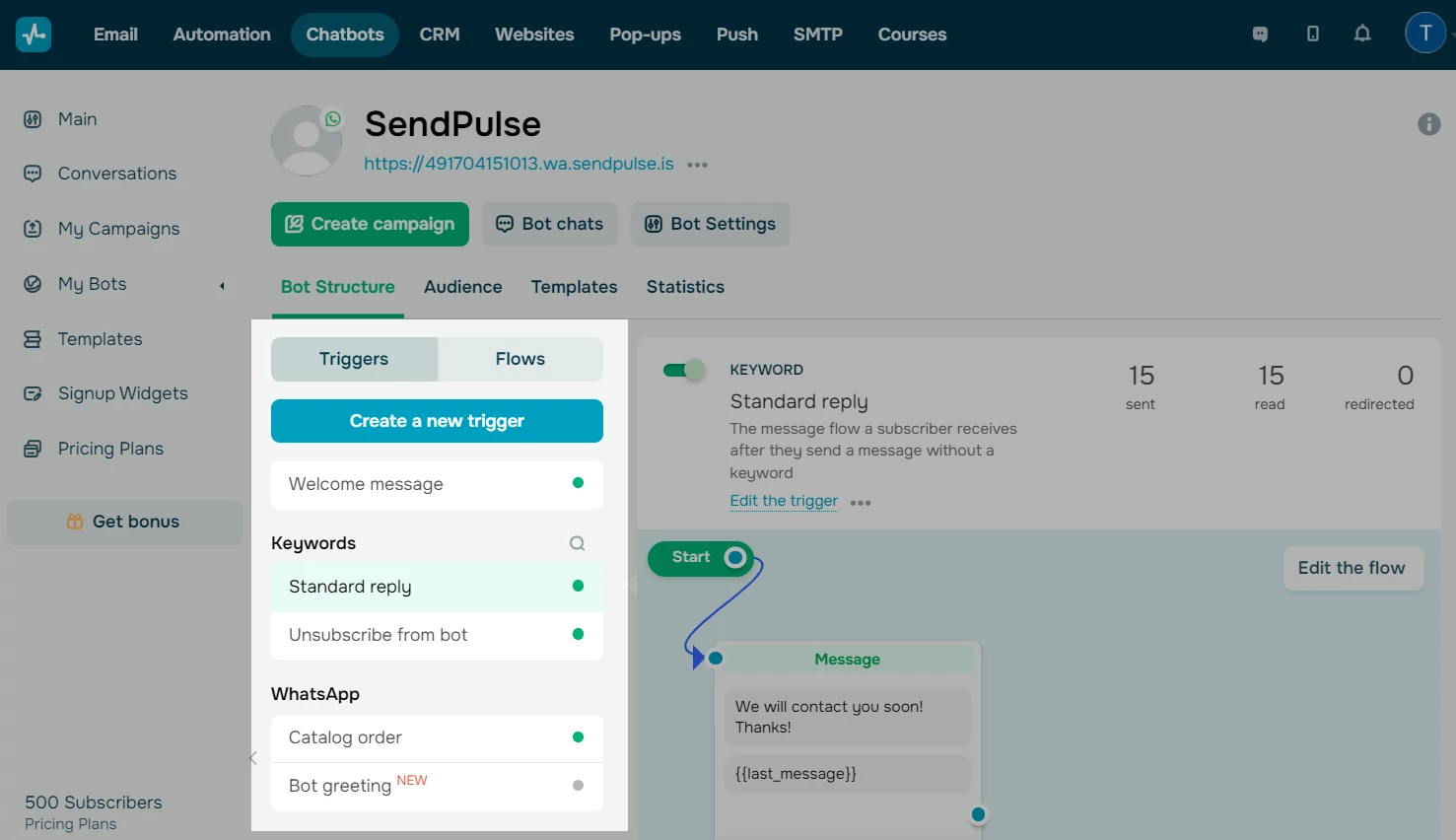 Creating a new chatbot trigger
Then, create a flow in the visual chatbot builder. Start by adding a “Pause” element to create a 15-30 minute delay. This will give the user time to complete their order on their own, preventing unnecessary messages.
After the specified delay, use a “Filter” element to check if the user has completed their checkout. If they haven’t, send the abandoned_cart_reminder_1 message via WhatsApp. If they have, simply end the flow.
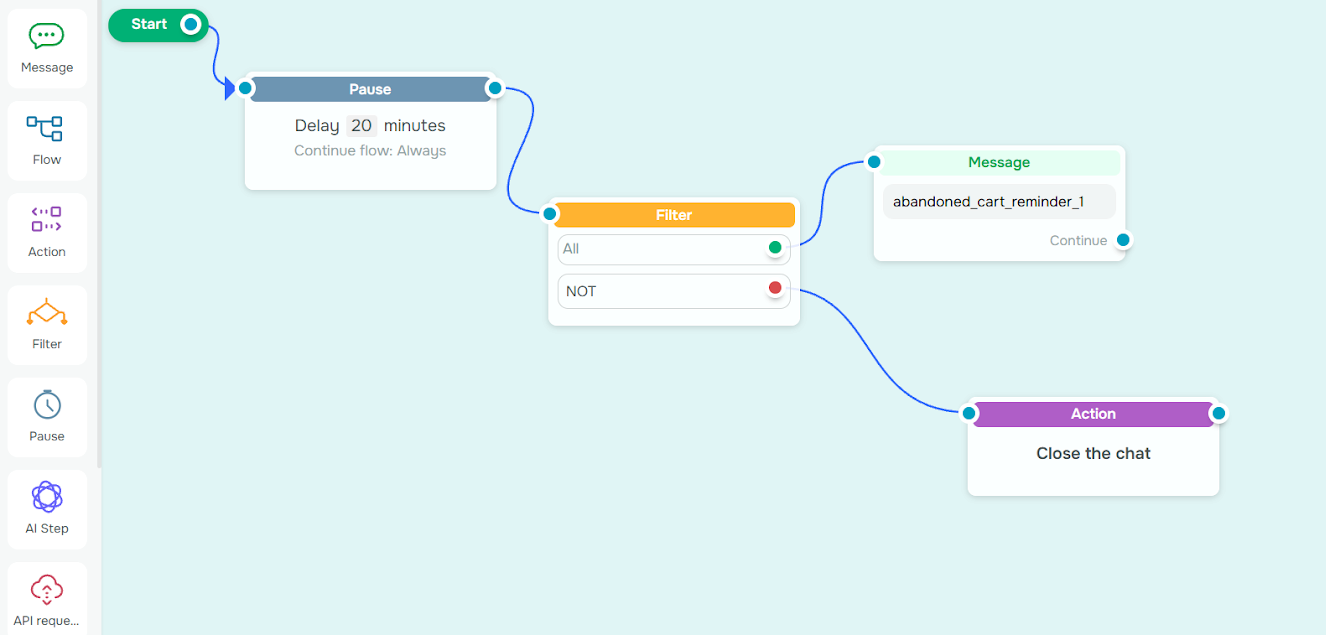 Building a chatbot flow in the visual builder
If the user taps the “Need help?” button, guide them into a brief support flow. You can either build this directly within the current flow or link to a separate chatbot specifically designed for assistance.
To keep the conversation helpful and timely, send a message like “Can I help with anything before checkout?” and offer a few reply options like “Shipping question,” “Want a better deal,” and “I’ll come back later.”
For instance, if a user has a shipping question, your bot can respond automatically with shipping info. If they’re looking for a better deal, consider offering a one-time 15% discount coupon. And if they choose to return later, tag them as a cold lead for future outreach.
You can also enrich the experience by adding product images, prices, or a gentle follow-up 24 hours later to re-engage interest.
Lead capture and free session booking for coaching
💡 Scenario. When a potential client expresses interest in coaching but hasn’t yet taken the next step, this funnel can capture their contact information and guide them toward booking a free consultation.
Start with a warm welcome message that invites users to either schedule a session or learn more. Those who opt in are taken through a brief, high-impact series of questions to understand their needs and preferences.
Once the information is collected, it automatically feeds into your CRM system, triggers internal notifications, and sends confirmation messages. This streamlined process makes it easier to turn interest into actual conversations. You can also add smart follow-ups, reminders, and tags for different coaching niches to convert one-time chats into long-term client relationships.
🎯 Goal. Capture leads and convert interest into a booked consultation with minimal friction.
To build this campaign with SendPulse, create a WhatsApp template message. Go to “Chatbots” → “My bots” → “Welcome message.”
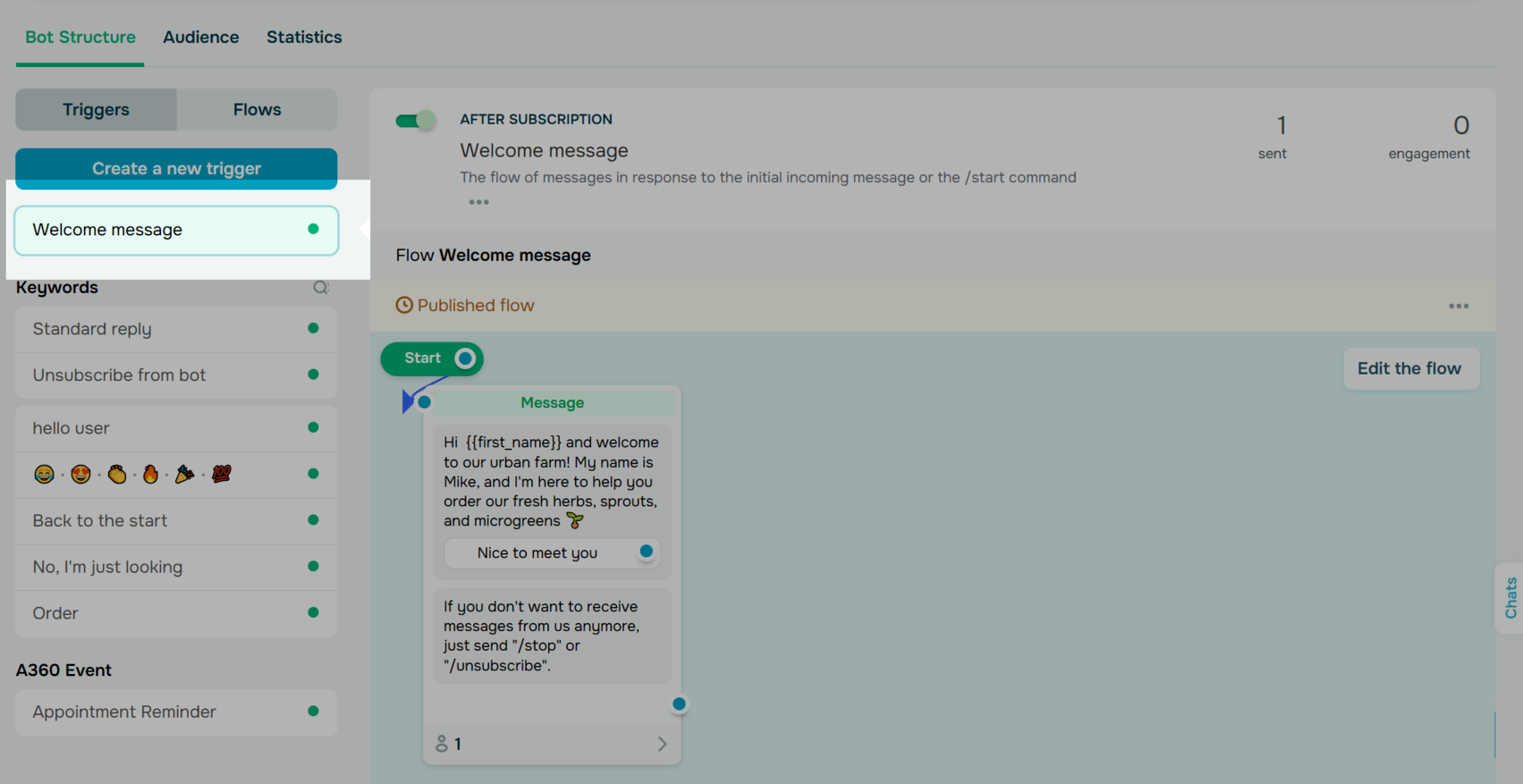 Creating a new welcome message
Create a personalized message for your welcome template using variables, for example:
| Message |
Hi {{1}}, thanks for your interest in coaching with [Name]. Want to book a free 15-minute session? |
| Buttons |
[Book a session] and [Learn more] |
Next, create a lead capture chatbot for users who want to learn more. Use the visual builder to craft a short, high-signal flow. Add a “Message” element with the following questions:
| Question |
Saved as variable |
| What’s your #1 challenge right now? |
challenge |
| Which area are you hoping to improve? (Career / Life / Health) |
area |
| Preferred date/time for your session? |
time_slot |
These answers help you personalize follow-ups and qualify leads.
Finally, confirm the booking by sending a message like:
Thanks, {{name}}. You’re all set for a free call on {{time_slot}}. We’ll send you a reminder!
Behind the scenes, trigger an “Action” element to notify the coach, log the lead in your SendPulse CRM, and schedule a WhatsApp reminder automatically.
Appointment booking flow for local services
💡 Scenario. When a walk-in customer or website visitor wants to book a service, they need a quick and easy way to do so. This WhatsApp marketing funnel can turn casual interest into confirmed local appointments with minimal effort.
Once users scan a QR code or tap a button, they’re guided to a chat with your bot. The flow helps them select a service, pick a time slot, and provide their contact information in just a few taps. After completing the booking, they receive an instant confirmation message.
In the background, the chatbot updates your CRM system, notifies your team, and can sync booking details with a calendar or Google Sheets. With automated reminders and service-specific tags, you stay organized while providing clients with a smooth, friction-free booking experience.
🎯 Goal. Book appointments through WhatsApp and send instant confirmations.
To build it with SendPulse, start by creating an accessible entry point. Place a WhatsApp button on your website or a display a QR code at your reception desk or mirror. This lets walk-ins or visitors scan the code and start chatting instantly.
Go to “Chatbots” → “My Bots” → select your WhatsApp bot → “Link to launch a flow.” You’ll be able to generate a clickable link or QR code that starts a chat with your bot.
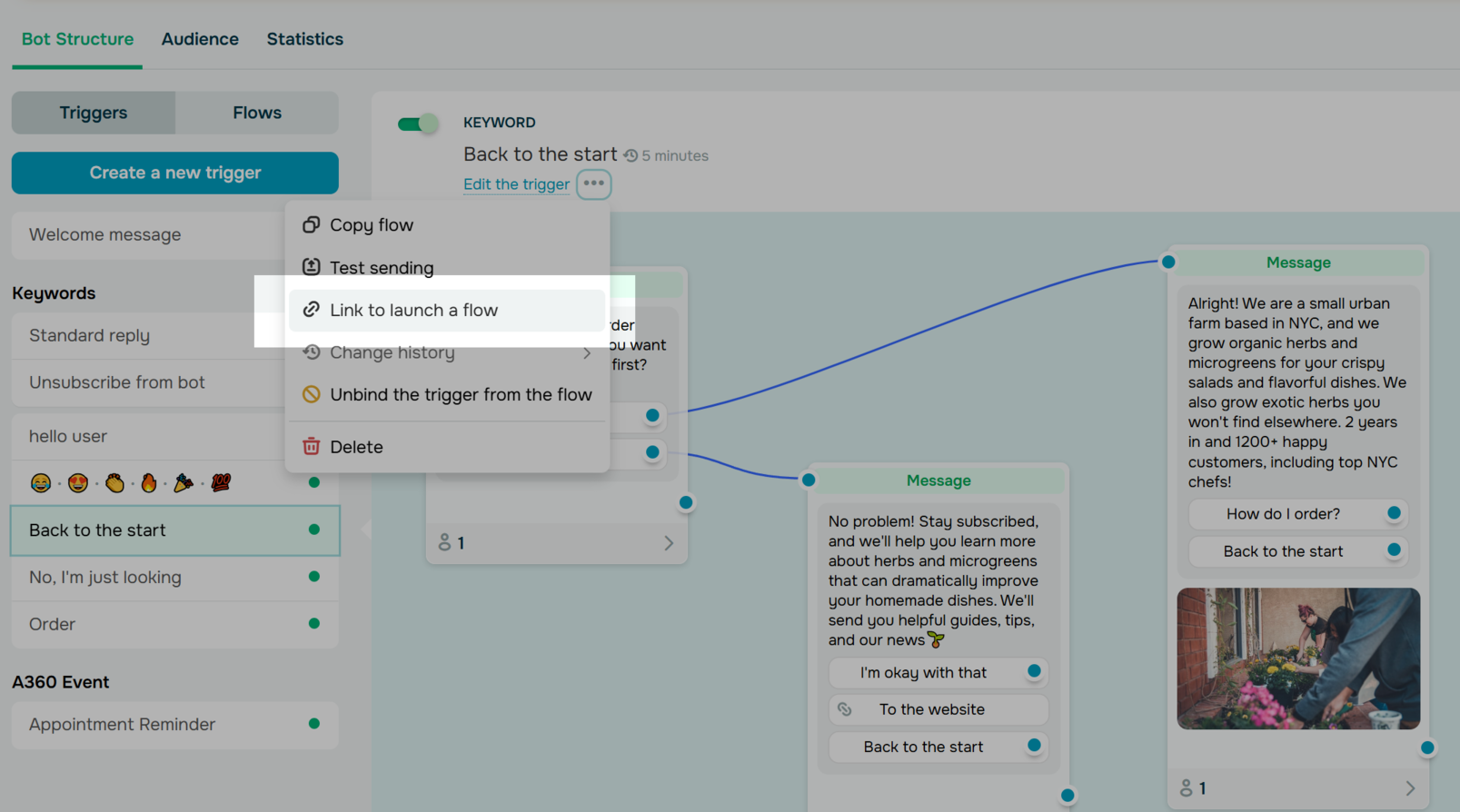 Creating a link to launch a chatbot flow
Build a no-fuss appointment flow by creating a chatbot that opens with a friendly message like:
Hi! 👋 Want to book an appointment? I can help.
From there, guide users through a few quick steps using buttons. Let them choose a service, select an available time slot, and enter their name and phone number. As users move through your flow, save their responses as variables (e.g., service, appointment_time, contact_info), so the booking process stays efficient and fully automated.
Once the booking is complete, the chatbot can automatically mark the goal as achieved and send a confirmation message like:
Hi {{1}}, your {{2}} is booked for {{3}}. We look forward to seeing you!
Simultaneously, the system updates your backend, logs the lead in your SendPulse CRM, and tags them appropriately (e.g., booked_appointment). It can also sync the data with your calendar or Google Sheets to keep internal records up-to-date without manual input.
Build funnels that convert with SendPulse
Traditional sales funnels often lose potential customers at various stages. A well-structured WhatsApp funnel meets people where they are, keeps conversations going, and closes the loop fast.
With smart WhatsApp sales funnel optimization, you can fill in the gaps, increase engagement, and guide leads toward a successful outcome, all while maintaining a personal touch. Whether you’re selling products, booking appointments, or qualifying leads, WhatsApp allows you to automate the entire process without sacrificing the human element.
Ready to build your WhatsApp sales funnel? Try SendPulse’s WhatsApp automation tools and see the difference.