Acquiring new customers isn’t easy, which is why every interaction matters. When someone reaches out to your brand, that moment is an opportunity. A well-crafted greeting message for WhatsApp can help you make a strong first impression and guide potential customers toward the next step.
Brands use many channels to communicate with their audience, but in this blog post, we’ll focus on WhatsApp. Why? It’s an extremely popular platform that consistently shows exceptional results. To give you an idea, its average open rate is around 98%, and that’s just one of many advantages we’ll discuss.
Let’s explore how to use greeting messages for WhatsApp Business effectively, how to set them up, and what templates and real examples you can draw inspiration from.
What is a WhatsApp welcome message?
A WhatsApp welcome message is an automated greeting sent to users after they share their contact details and agree to receive messages from your business. While it may seem like a small touch, a well-written greeting message for WhatsApp can have a big impact on how people perceive your brand.
Engage users on WhatsApp
Use our drag-and-drop builder to create AI-powered WhatsApp chatbots that sell, support, and connect. Run campaigns, share updates, and convert leads hands-free.
Get started for free
When someone shares their phone number, it’s a clear sign of interest. This is your opportunity to show that you value their attention, that support is available, and that reaching you is easy. A timely greeting message on WhatsApp helps build trust before the conversation even starts.
A greeting message for WhatsApp Business also sets the tone for what comes next. It acknowledges the user’s action, explains what they can expect, and gently guides them toward the next step, often before a human agent steps in. This message can be triggered when someone contacts you via a WhatsApp link, QR code, website widget, or a click-to-WhatsApp ad on Facebook or Instagram.
A WhatsApp Business greeting message can help you:
- confirm that the user’s message was received;
- set expectations for response times or available options;
- collect essential information like name, goal, topic, etc.;
- route the user toward the right path, like browsing a catalog, booking a service, or contacting customer support.
The way you implement welcome messages depends on the tools you use: you can either rely on the WhatsApp Business app or the WhatsApp Business API.
WhatsApp Business app vs. WhatsApp Business API welcome flows
The free WhatsApp Business app lets you set up a single, static greeting message for WhatsApp. This message is text-only and applies to every user. While it’s easy to set up, personalization is limited, and the message can’t adapt to different customer intents or entry points.
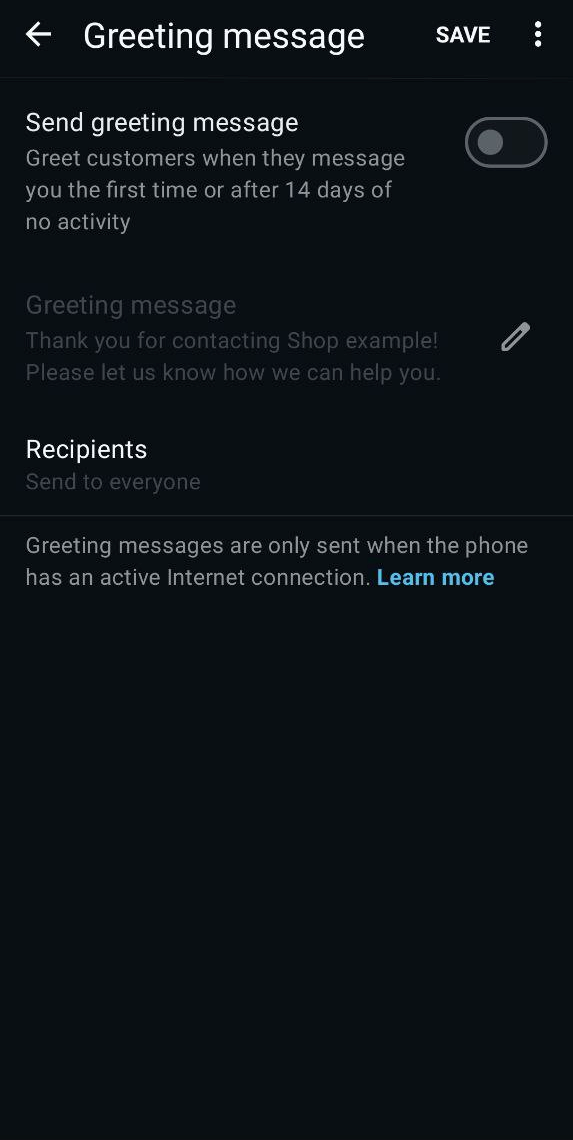 Greeting message in the WhatsApp Business app
In contrast, the WhatsApp Business API, available through official providers like SendPulse, offers far more flexibility. Instead of a single greeting message on WhatsApp, you can create complex welcome message flows, which can include menus, buttons, images, videos, and dynamic variables.
Each user can receive a different greeting based on how they started the chat, whether it’s through a WhatsApp chat widget on your website, a click-to-WhatsApp ad, or an offline QR code. On top of that, the API gives you access to detailed analytics, advanced audience segmentation, and seamless CRM integrations.
6 reasons to automate your greeting messages for customers on WhatsApp
A user’s first interaction with your brand sets the tone for everything that comes after. Automating a greeting message for WhatsApp Business ensures that every new conversation starts quickly and consistently without relying on manual work or agent availability. Here’s what automation unlocks.
Faster first response time
People expect instant replies on messaging apps. When they don’t get one, they often leave and never come back. A greeting message for WhatsApp Business solves this issue by responding immediately, confirming that the message was received, and guiding the user to the next step.
For example, when someone clicks a WhatsApp link from an Instagram ad, they instantly receive a WhatsApp welcome message with a short menu or clear options. This keeps the conversation moving, reduces drop-offs, and makes the experience feel smooth from the very first message.
Always-on lead capture
When your team is offline, manual chats stop, but automated flows keep working. A welcome message for customers on WhatsApp can collect key details right away, such as the customer’s name, language, budget, or intent. Instead of waking up to a pile of unread messages, your team starts the day with contacts that are already organized and ready for follow-up. Instead of waking up to a pile of unread messages, your team starts the day with contacts already organized and readied for follow-up by marketing automation.
Say, if someone messages your store at midnight asking, “Do you deliver today?”, your WhatsApp chatbot can capture their details, confirm the delivery area, and save everything to your CRM system before an agent even logs in.
Better qualification and routing
Not every conversation needs the same response. Some users are ready to buy, others need support, and some just want basic information. Automated welcome flows use buttons and quick replies to guide people to the right path and reduce unnecessary workload for your team. Once a welcome flow qualifies a new contact, it can hand off straight into WhatsApp marketing funnel — a personalized offer or product recommendation, for instance.
Options like “Place an order,” “Ask a question,” or “Track my package” instantly route conversations to sales or support, making sure each request reaches the right team faster.
Higher conversion and upsell potential
A greeting message for WhatsApp Business is an ideal moment to move users closer to a purchase. When you combine it with product cards, carousels, or booking links, it works like a mini landing page inside WhatsApp.
For instance, an eCommerce welcome flow can highlight bestsellers or offer a small WhatsApp-only discount. Often, that’s enough to turn interest into action.
Consistent brand experience
Manual replies vary from agent to agent. Automation ensures that every greeting message on WhatsApp delivers the same tone, clarity, and brand voice. This consistency is especially important when you’re scaling across ads, QR codes, offline stores, or marketplaces. No matter when or how users reach out, they get a polished and predictable experience from the very first message.
Actionable analytics
Manual conversations don’t give you insights. Automated flows do. With analytics, you can see what users click, where they drop off, and which greeting message performs best.
For example, if data shows that 60% of users tap “Browse catalog” but only 20% complete checkout, you know exactly where to optimize next. This turns your welcome message for customers on WhatsApp into a measurable growth tool, not just a greeting.

Access the WhatsApp Business API — no setup or extra fees
With SendPulse, you get everything you need, from a visual editor with a library of ready-made chatbot flow templates to user-friendly analytics, to help you effectively engage your customers on WhatsApp.
Get started for free
A well-structured WhatsApp welcome message can effectively qualify leads and guide users toward the action you want them to take. Below are some tips to help you design WhatsApp greetings that perform consistently.
Define the goal of your WhatsApp greeting message
Your welcome message should have a clear purpose. Decide whether it’s meant to automatically answer quick FAQs, route users to sales, encourage bookings, build your database, or guide shoppers to a catalog.
A simple rule works best: choose one primary goal, such as qualifying the lead, and one secondary goal, like capturing basic information. Trying to do too much in a single message usually leads to confusion.
To give you an idea, the corporate perks platform Plum Benefits uses a WhatsApp chatbot welcome message to clearly explain what the bot does, how it helps users, and which actions are available. This immediately orients new contacts and shows them how to move forward without guesswork.
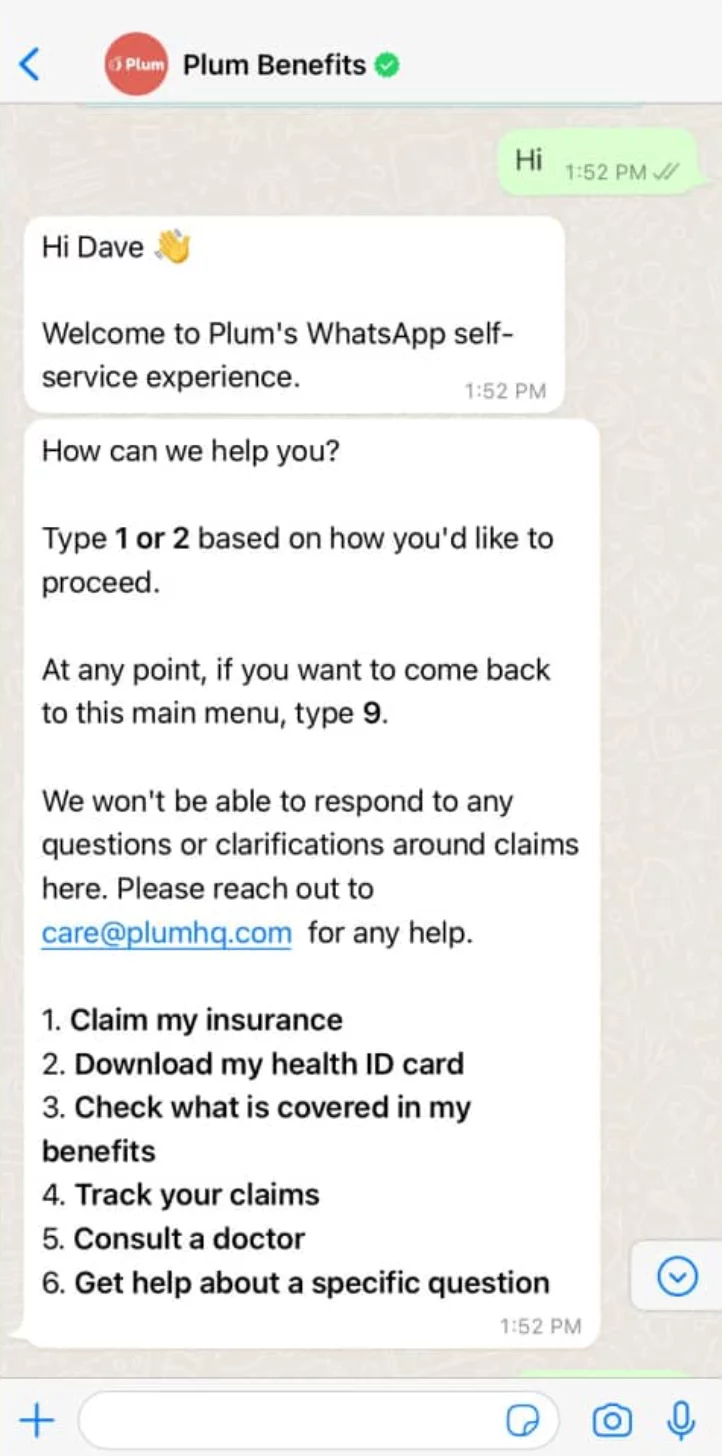 Plum Benefits’ chatbot on WhatsApp
Keep your greeting message for WhatsApp clear and short
Speed is everything on WhatsApp. If your greeting message reads like a long landing page, users are likely to ignore it or leave. A strong welcome message often follows a simple structure: acknowledge the user, guide them, and include one clear call to action.
Here’s the difference in practice:
| Concise and effective |
Overloaded and high-friction |
| Hi {{Name}}! Thanks for reaching out. How can we help today? Choose an option below. |
Hello, thank you for contacting our company. We offer a wide range of products and services that might interest you. Please let us know what exactly you are looking for, and our team will be happy to guide you through all available options as soon as possible. |
The first example drives action while the second demands effort.
Set expectations from the first line
The quickest way to reduce uncertainty and unnecessary follow-up messages is to tell users exactly what to expect the moment they enter the chat. A strong greeting message for WhatsApp Business explains what happens next: how soon they’ll get a reply, what options they can choose, and whether there are alternative channels if they need something urgent.
Here are a few templates:
- You can choose an option below so we can help you faster.
- Our team replies within 10-15 minutes. Meanwhile, pick what you need from the menu.
- We’re online from 9:00 to 18:00. If you need help outside these hours, tap “FAQ” to find quick answers.
Clear expectations prevent confusion and keep users engaged, especially when your automation is part of a larger funnel or ad campaign.
Guide with buttons and menus instead of long text
In WhatsApp, every extra sentence is a point of friction. Buttons and quick replies eliminate guesswork and let users navigate with a single tap. This can improve engagement and reduce time-to-resolution.
Instead of asking people to explain what they need, give them pre-defined paths. This turns your welcome message for customers on WhatsApp into a mini decision tree that segments users and sends them exactly where you want them to go.
High-intent actions like “Shop now,” “Track order,” “Talk to an agent,” “Book a service,” or “View prices” work especially well because they align with typical user goals.
Add visual elements when relevant
Visuals can amplify your welcome message, but only when they serve a clear purpose. A single product card, menu preview, or short demo clip can communicate what text alone would take several lines to explain.
For online stores, a bestseller carousel helps users start browsing right away. For service-based businesses, a simple image showing categories or pricing tiers can make the next step obvious. The key is restraint. The welcome message for customers on WhatsApp is not the place for a full catalog or a five-slide promo. One relevant visual improves clarity; too many slow down the conversation and distract users.
Stay compliant and get proper opt-ins
WhatsApp has strict rules around promotional messaging, and users expect relevance, not spam. Before sending marketing updates, you need a clear opt-in. This can come from a website form, WhatsApp link, QR code, or ad.
Your welcome message for customers on WhatsApp is the ideal place to refine consent. Ask users what they want to receive: discounts, product updates, event reminders, or only order notifications. This keeps you compliant, improves segmentation, and leads to higher engagement from the very first interaction.
12 WhatsApp welcome message templates
A greeting message for WhatsApp Business works best when it speaks the user’s language and matches their intent. Below, you’ll find grouped examples of greeting messages you can easily adapt in SendPulse to match your business goals, traffic sources, and customer journey.
Power up your business with smart tools
From solo creators to global brands, thousands of customers trust SendPulse to run email campaigns, chatbots, automations, and more — all in one place.
Get started for free
eCommerce and retail
First-time shoppers often arrive with high intent: they clicked a product link, browsed your website, or scanned a QR code in-store. Your goal is to turn that interest into action by offering fast, clear paths to browse, compare, or buy. A strong welcome message can also deflect support questions and highlight exclusive perks available only in WhatsApp.
Let’s check out some ready-to-use templates you can adapt.
“Product discovery” welcome message helps shoppers find the right item faster. Use this when users open WhatsApp from a product page, catalog, or homepage. The goal is to reduce search friction and guide them directly to relevant products.
Here’s how you might phrase it:
Hi {{Name}}! Looking for something specific? Explore our bestsellers or ask for recommendations. I’ll help you find the perfect match.
Buttons: [Bestsellers] [New arrivals] [Ask for advice]
“Order help and tracking” welcome message supports returning customers without overwhelming your support team. It’s ideal for post-purchase questions and helps route users to the right path instantly.
A simple version of a greeting message for WhatsApp could look like this:
Welcome back, {{Name}}! Need help with an order? Choose an option below to get instant updates or connect with support.
Buttons: [Track my order] [Return/Exchange] [Talk to support]
My Jewellery, a European fashion and accessories brand, uses this approach to bring customer support directly into WhatsApp. Instead of sending users to FAQs or call queues, their greeting message on WhatsApp explains what the chatbot can do and encourages self-service from the first interaction.
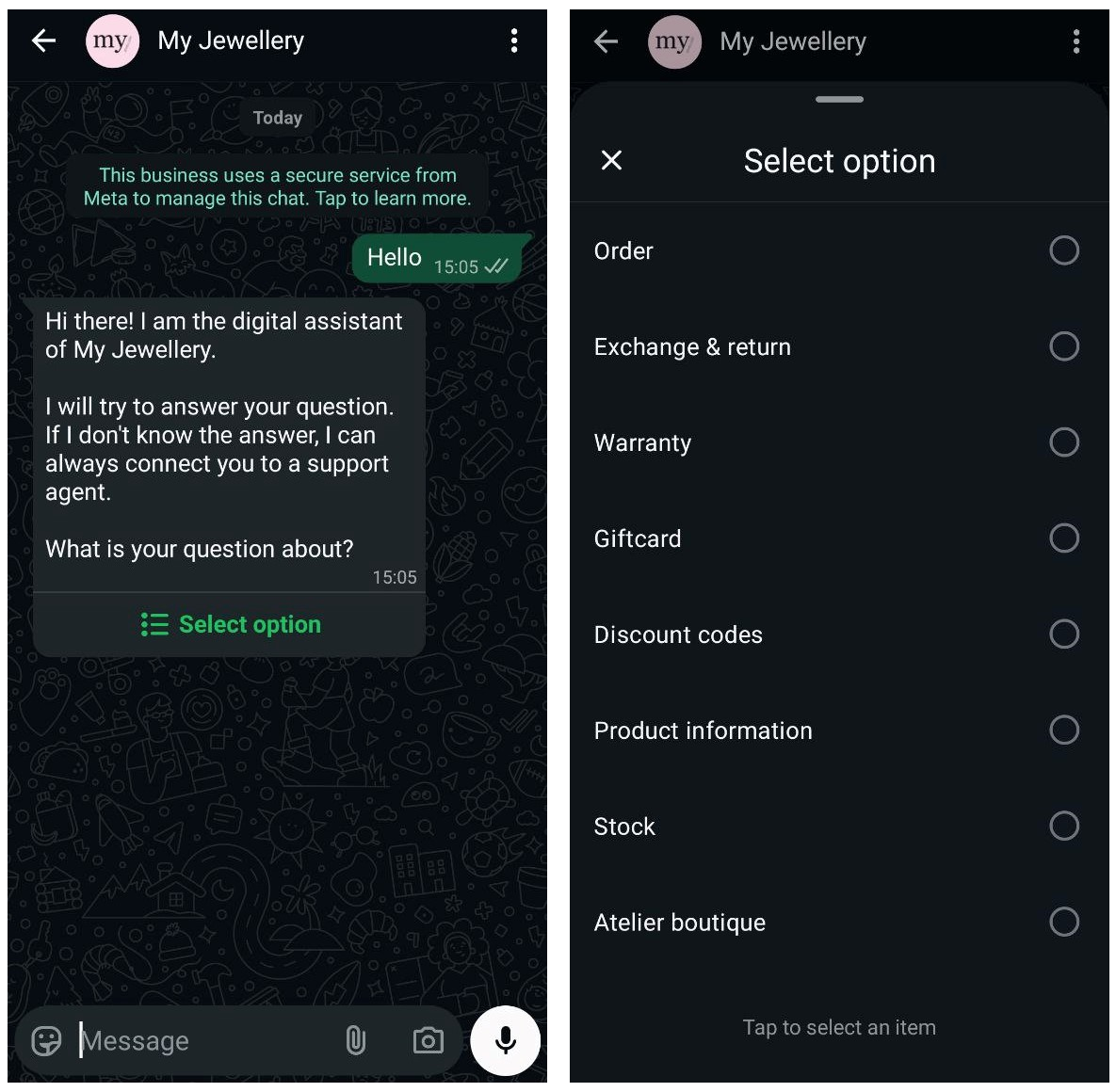 My Jewellery’s WhatsApp welcome message
“Exclusive WhatsApp-only discount” welcome message is designed to boost conversions right away. It’s perfect for users coming from ads, promo pages, or QR codes, when purchase intent is high.
You can introduce it like this:
Hi {{Name}}! Thanks for messaging us on WhatsApp 👋 Enjoy your exclusive {{Discount}}% offer. Tap below to use it right away.
Buttons: [Shop with discount] [View catalog] [Ask a question]
“In-store QR code greeting” bridges offline interest to online action. It’s triggered when someone scans a QR code in your physical store and helps them move forward faster.
Try something like this:
Thanks for scanning! Want to check availability, explore styles, or see today’s offers?
Buttons: [Check availability] [View lookbook] [Check today’s deals]
Service businesses and bookings
For service businesses, every WhatsApp message is a potential booking. People reach out because they’re interested, comparing options, or ready to schedule. But they often need guidance on availability, pricing, or the right service for their needs. A strong welcome message gathers key info and moves them straight into your booking flow or consultation funnel.
Let’s look at the template types and how to use them.
“New client intake” captures details and qualifies leads. It works best when someone messages you for the first time. The goal is simple: collect essential information without overwhelming the user and guide them toward the right service.
You can start with something like:
Hi {{Name}}! 👋 Thanks for reaching out. To help you book the perfect service, could you tell me what you’re looking for today?
Buttons: [Book an appointment] [View services ] [Ask a question]
“Service pre-qualification” helps you understand a client’s needs before scheduling. It’s ideal for salons, clinics, and consultants who require more context upfront. A well-structured greeting message for WhatsApp makes it easier to route users to the right specialist or service package.
A concise version might look like this:
Welcome! To get you matched with the best option, please choose what you need help with.
Buttons: [Consultation] [Pricing info] [Service recommendations]
A great real-world example comes from KLM Royal Dutch Airlines, one of the world’s largest international carriers. KLM uses WhatsApp as an active service channel rather than a passive inbox.
Their WhatsApp welcome message immediately sets expectations and qualifies intent. As soon as a user starts a chat, KLM introduces its virtual assistant, explains its role, and asks a simple but strategic question: whether the inquiry is about a booking or a Flying Blue loyalty account.
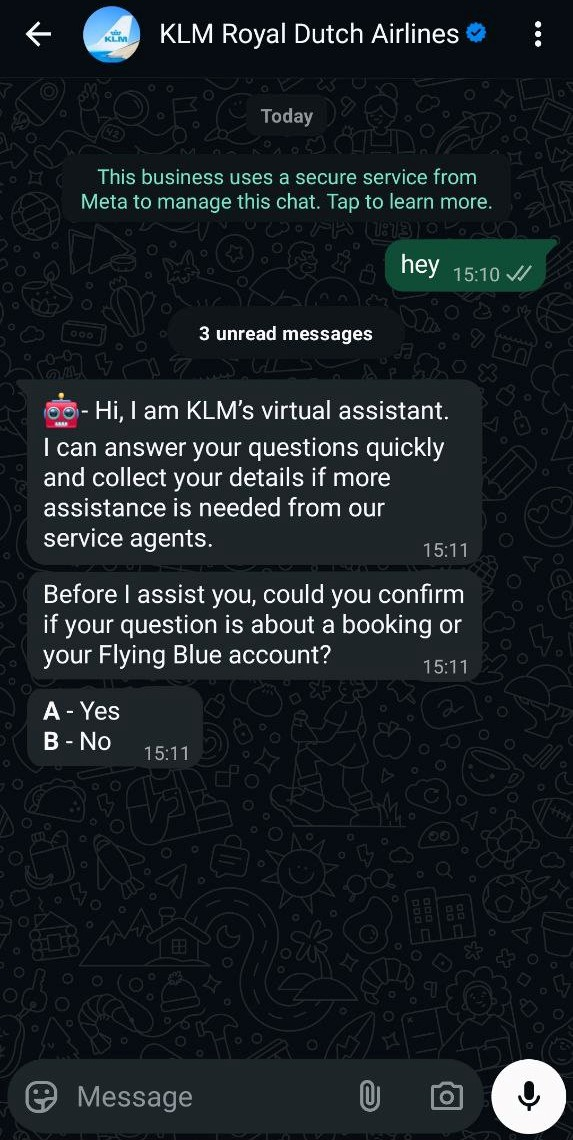 KLM’s WhatsApp welcome message
This first interaction does three things at once: reassures customers they’ll get help quickly, collects context upfront, and routes the conversation efficiently.
“Returning client” welcome message is designed to make repeat bookings fast and friction-free. When existing clients come back to WhatsApp, they’re usually ready to act. A personalized greeting helps them pick up right where they left off.
A friendly approach might be:
Great to see you again, {{Name}}! Ready to book your next session?
Buttons: [Book again] [View availability] [Talk to us]
Education and courses
Prospective students usually come with similar questions about course format, pricing, level, or start dates. They also expect fast, clear answers. A well-structured greeting message for WhatsApp helps you handle these FAQs at scale while collecting the details your sales or admissions team needs to follow up effectively.
Below are common use cases with ready-to-use examples you can adapt to your own flows.
“Course inquiry” welcome message helps you qualify interest early. Use it when someone messages you after visiting a course page or clicking an ad. The goal is to understand intent quickly and guide users to the most relevant information.
You might start the conversation like this:
Hi {{Name}}! 👋 Interested in learning with us? Let me help you choose the right course.
Buttons: [View courses] [Pricing and schedule] [Ask a question]
Parlai is an AI language-learning coach that runs directly in WhatsApp, turning a chat into an educational environment. Instead of starting with a long pitch, Parlai’s welcome message шntroduces the assistant Luna, collects key context, such as the user’s native language, and nudges the user toward action with a clear CTA – “Pick language.”
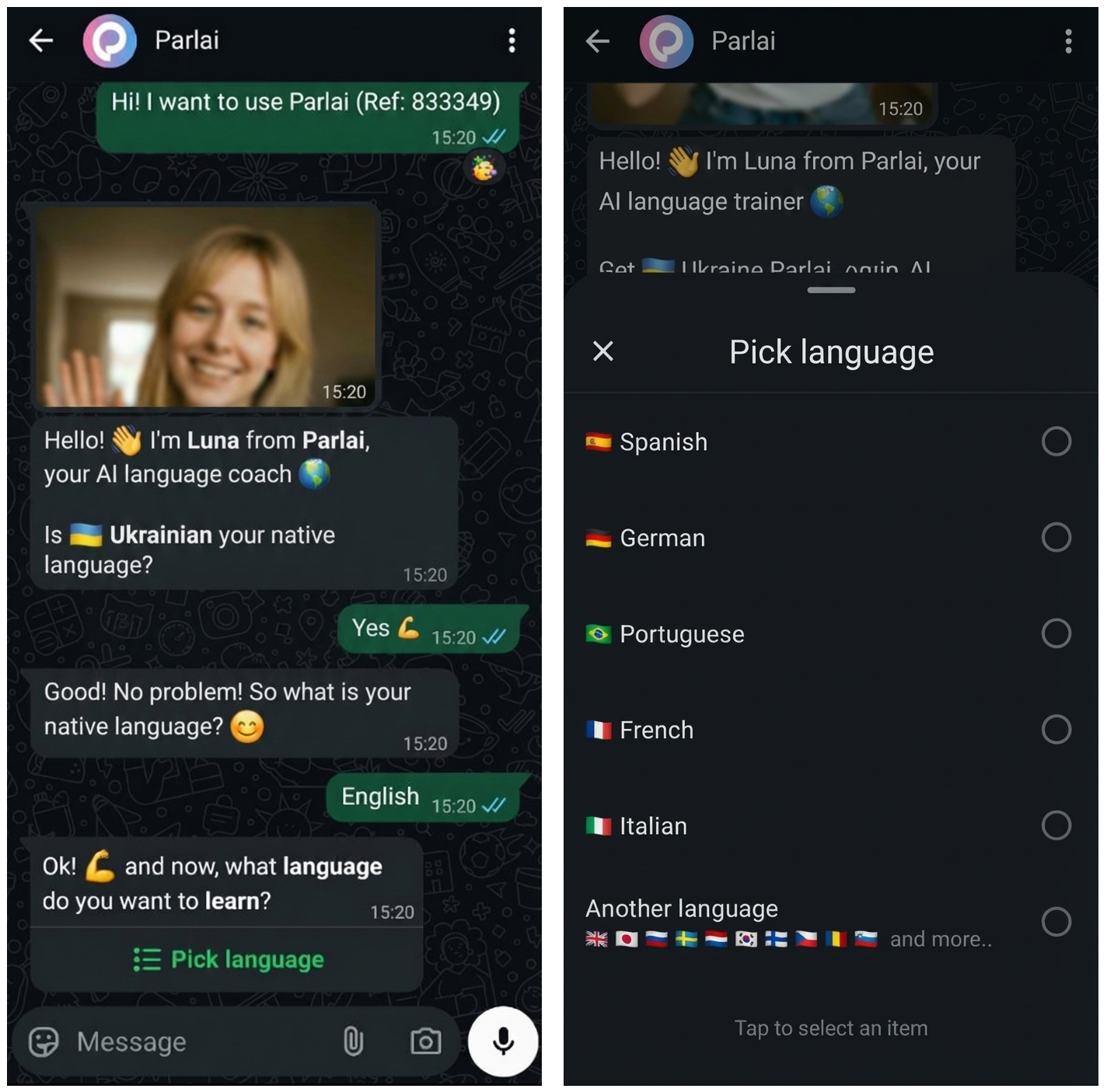 Parlai’s WhatsApp welcome flow
This shows how a greeting message for WhatsApp can qualify users in just a few taps.
“Demo lesson or consultation booking” message allows marketers to move leads to the next step. It’s perfect for schools, online courses, or training programs that offer trial lessons or intro calls.
A simple approach could be:
Welcome, {{Name}}! Want to see how our classes work before enrolling?
Buttons: [Book a demo lesson] [Talk to an advisor] [View syllabus]
“Lead capture for follow-up” message collects data without friction. Use it when users aren’t ready to decide but want additional information. This greeting message for customers on WhatsApp helps you gather key details while keeping the conversation going.
You can phrase it like this:
Happy to help! Tell me a bit about your goals, and I’ll send you the most relevant options.
Buttons: [Beginner] [Intermediate] [Advanced]
B2B and SaaS
In B2B and SaaS, WhatsApp conversations rarely start casually. Usually, they start with a clear intent. Prospects reach out to ask about pricing, demos, integrations, or quick clarification before making a decision. A smart greeting message for customers on WhatsApp helps you qualify leads early, filter out low-intent inquiries, and route high-value prospects straight to sales without wasting time on manual back-and-forth.
Below are two high-impact use cases you can adapt to your own WhatsApp funnel.
“Lead qualification” welcome message helps identify fit from the very first tap. Use it when prospects arrive from pricing pages, demo requests, or click-to-WhatsApp ads. The goal is to quickly understand who they are and what they need. This first exchange often kicks off a bigger WhatsApp lead generation flow, and in SendPulse, the same bot can qualify the lead, route it, and save it to the CRM with no manual work.
Here’s how you can open the conversation:
Hi {{Name}}! 👋 Thanks for reaching out. To help us guide you faster, what are you interested in?
Buttons: [Request a demo] [Pricing and plans] [Product questions]
A good real-world example is Plantix, an AI-powered crop advisory platform that helps farmers identify plant diseases and nutrient deficiencies through photo analysis. On WhatsApp, Plantix uses a clear greeting message to explain what the chatbot does and guide users to the next step right away.
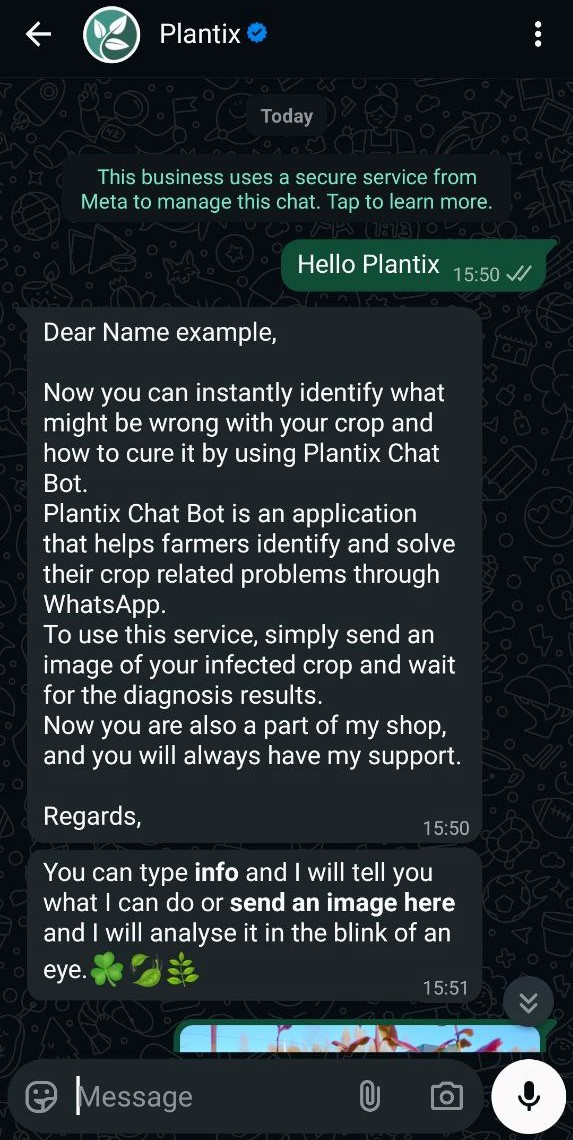 Plantix’s greeting message for customers on WhatsApp
Instead of browsing knowledge bases or apps, farmers can diagnose crop issues directly in chat and get actionable advice within minutes. Such a WhatsApp welcome message educates users, sets expectations, and encourages hands-on product adoption.
“Sales vs support routing” welcome flow directs each conversation to the right team from the start. It works especially well for companies handling both pre-sales and customer support on WhatsApp. By separating intents early, you reduce internal friction and improve response quality.
A simple greeting message for customers on WhatsApp could be:
Welcome! Please choose how we can help you today.
Buttons: [Talk to sales] [Customer support] [Technical questions]
How to set up a basic greeting message for the WhatsApp Business app
If you’re just getting started with WhatsApp or need a simple way to acknowledge incoming messages, the WhatsApp Business app includes a built-in greeting message feature. It’s fast to set up and works well for small teams. That said, it’s important to understand its limits before relying on it long term.
Make sure the essentials are in place: the WhatsApp Business app is installed on your device and you have a completed business profile with name, category, description, and contact details.
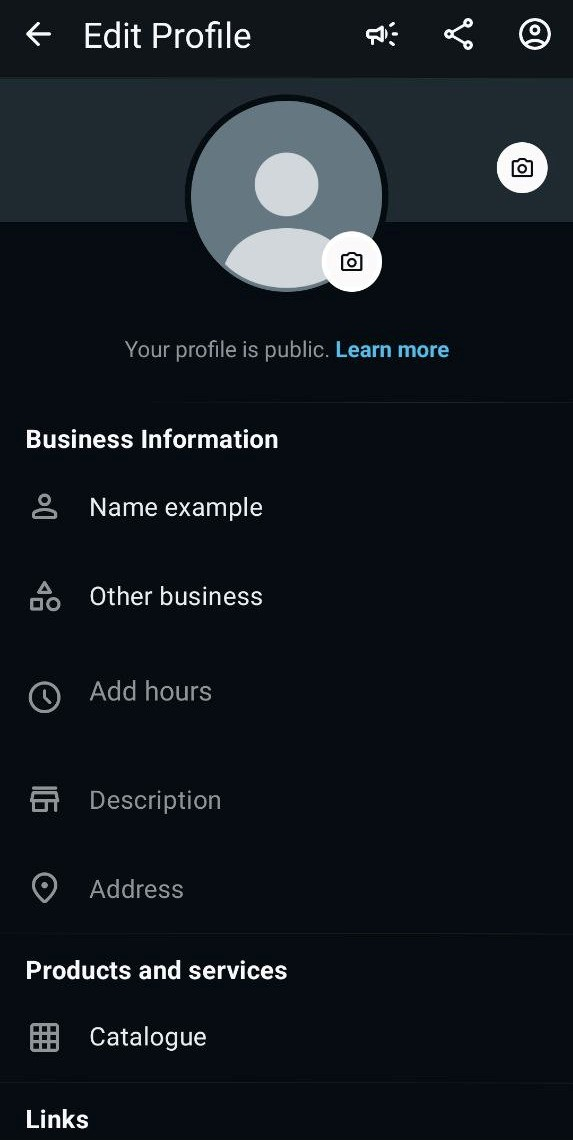 Editing WhatsApp Business profile
Once that’s done, you’re ready to activate your first greeting message.
Open the WhatsApp Business app and go to “Tools,” then select the “Greeting message.”
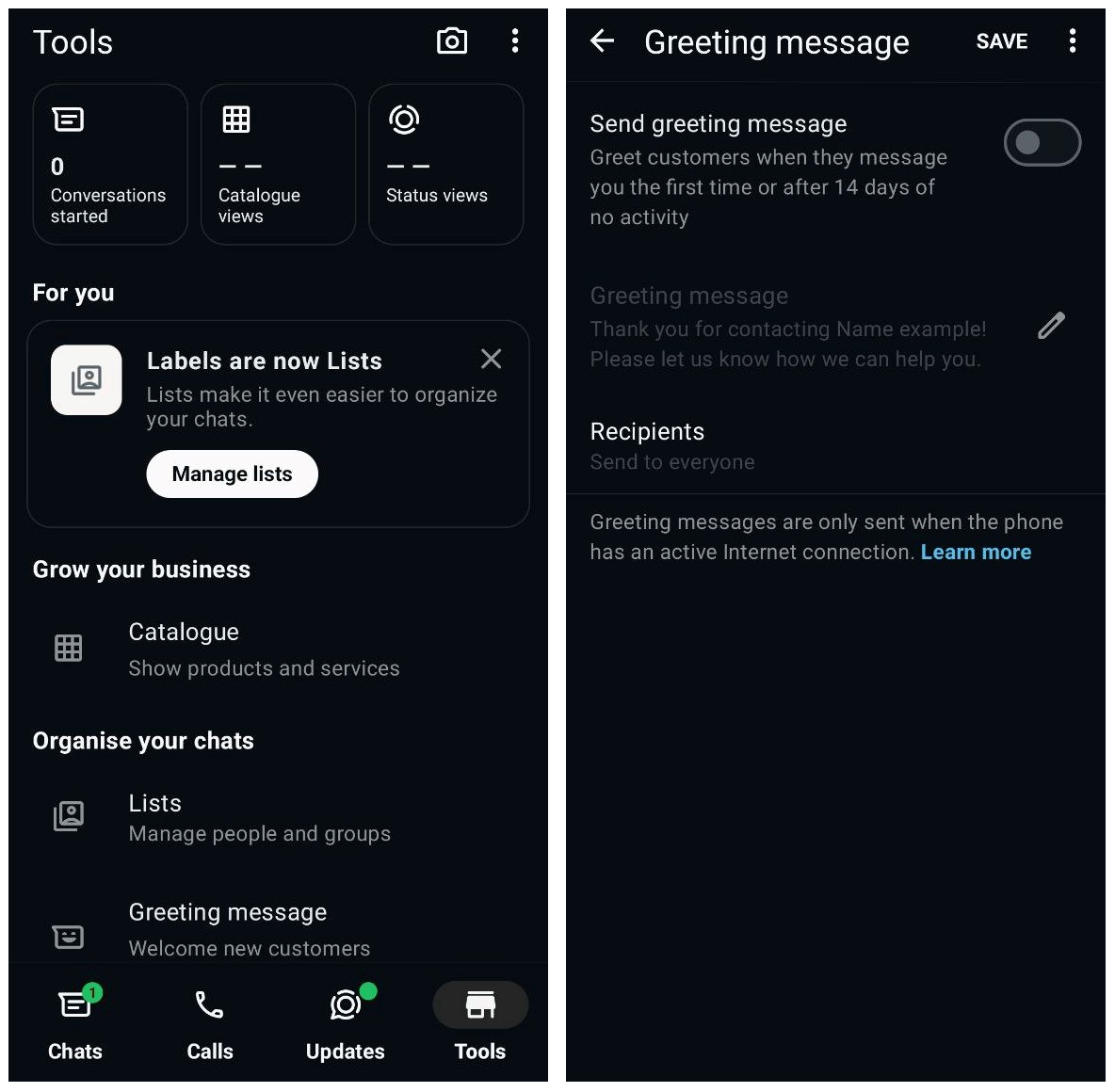 Greeting message setup in WhatsApp Business profile
Turn the feature on and write a short, practical greeting message for WhatsApp that will be sent automatically when a new chat starts. Next, choose who should receive it — everyone, non-contacts, or selected contacts.
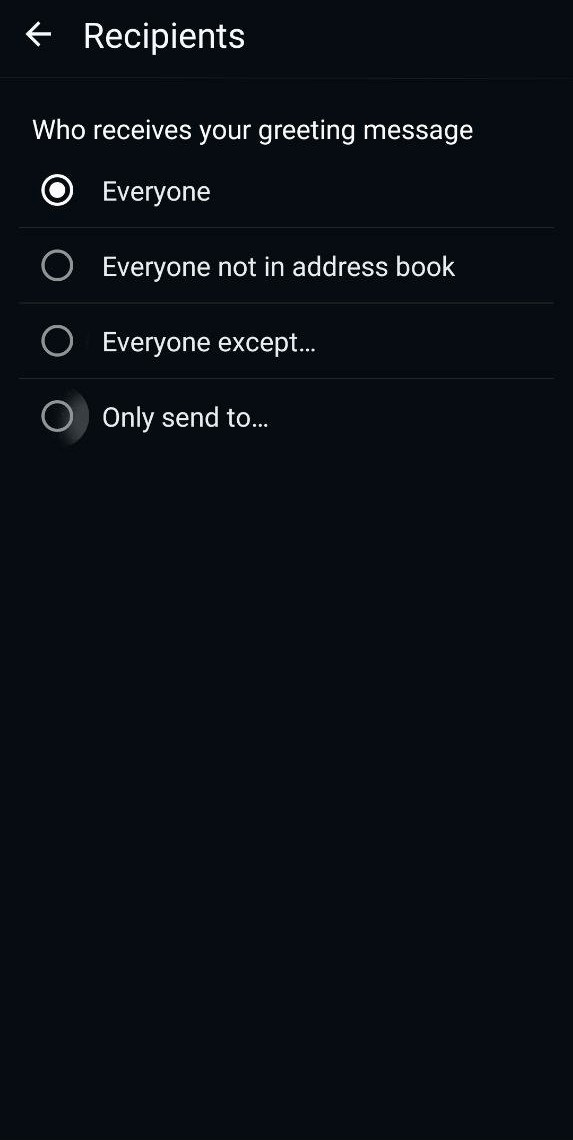 Greeting message setup in WhatsApp Business profile
Once everything is set, save your changes and send a test message to make sure the greeting works as expected.
This setup covers the basics, but it comes with clear limitations. You can only use one generic greeting for all users, the message is text-only, and there’s no way to build flows, add buttons, or personalize the experience based on intent or source.
For businesses running ads, handling high chat volume, or needing lead qualification, this approach is best seen as a starting point.
How to automate WhatsApp welcome flows with SendPulse
If you want more than a single auto-reply, SendPulse lets you build full WhatsApp welcome flows using the WhatsApp Business API. This approach helps you qualify leads, guide users to the right action, and connect WhatsApp with the rest of your marketing stack. It’s a practical solution for teams that treat a WhatsApp welcome message as the start of a real onboarding experience, not just a greeting.
To get started, you’ll need a WhatsApp Business API account connected to SendPulse and access to the SendPulse WhatsApp chatbot builder. This includes verifying your business and phone number with WhatsApp and linking the account to SendPulse.
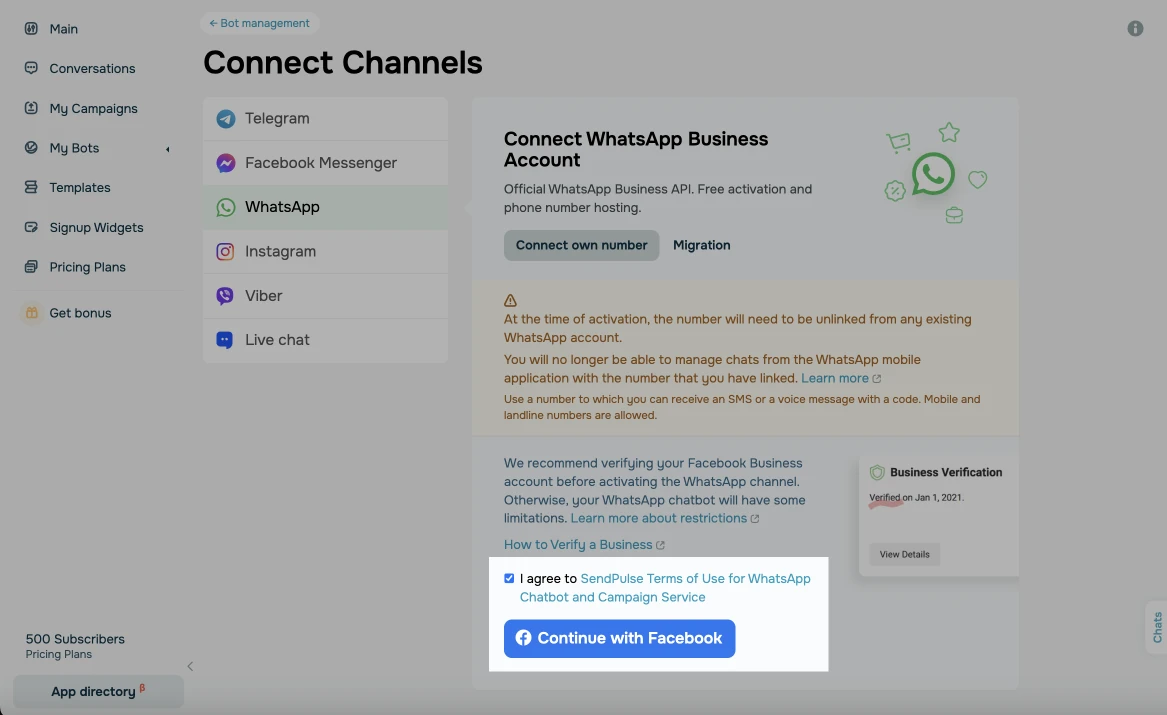 Connecting the WhatsApp Business account in SendPulse
Once your WhatsApp channel is connected, open “Chatbots” → “Manage bots” and create a new chatbot or edit an existing one.
From there, choose a “Welcome message” trigger. This can be the first incoming message, a new subscription event, or an entry point from ads, links, or QR codes. This step defines when your greeting message for WhatsApp is sent and ensures every new conversation follows a structured path instead of starting with a blank chat.
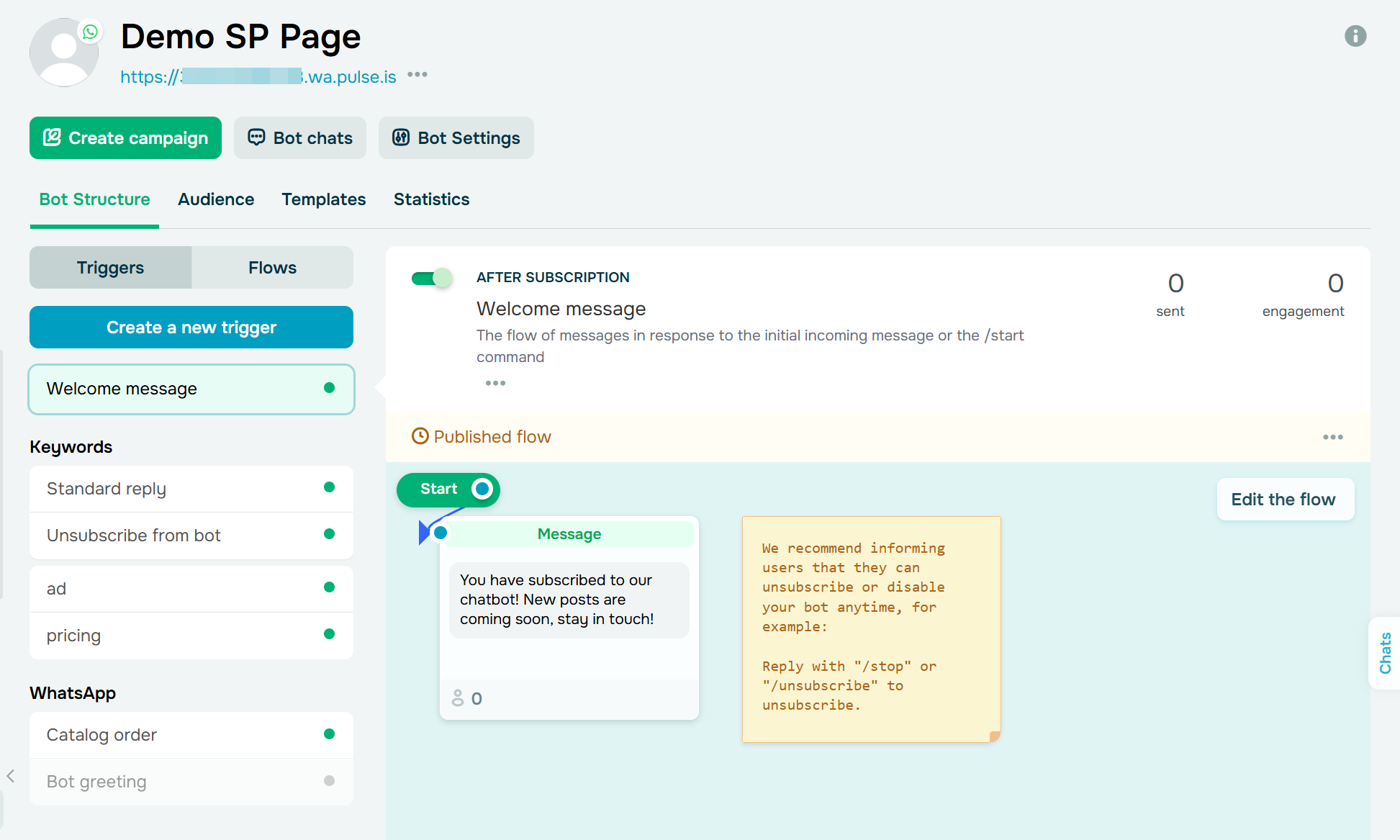 Managing WhatsApp welcome flow
SendPulse uses a no-code visual builder, so you can design your welcome message for customers on WhatsApp without technical skills. You can start with a text block that contains your main greeting message for WhatsApp Business, and personalize it using dynamic variables. Then add buttons or quick replies that reflect common intents, such as shopping, booking, or support.
Build your chatbots with AI
Let AI help you create a perfect bot scenario on any topic — booking an appointment, signing up for a webinar, creating an online course in a messaging app, and more. Run up to three bots for free.
Get started for free
For more advanced scenarios, use condition blocks to split the flow by language, tags, traffic source, or subscription status. You can also add images, product cards, or short videos when visuals help users take action faster.
Automation works best when it adapts to context. In SendPulse, you can insert variables like {{Name}}, {{City}}, or {{Source}} and others directly into your welcome message to make it feel personal from the first line.
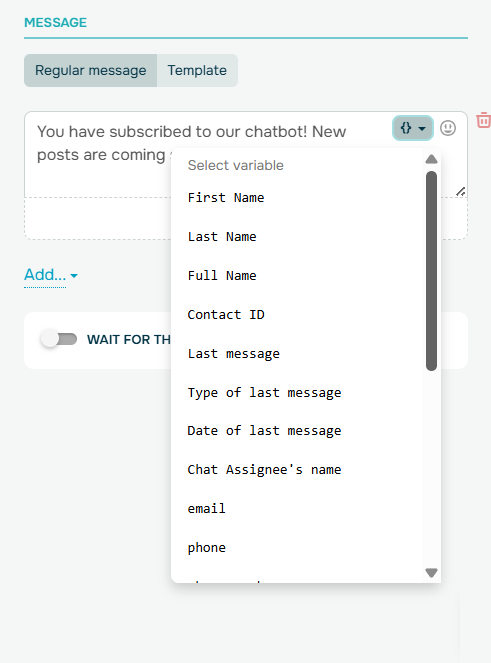 WhatsApp welcome message personalization in the SendPulse builder
You can also create separate paths for different audiences, such as new versus returning customers, high-value leads, or users coming from specific campaigns. One flow can power multiple tailored entry experiences.
Every interaction in your welcome flow can feed into SendPulse CRM system automatically. You can create or update contacts, assign tags based on button clicks, and segment users by interest or intent. From there, your welcome flow becomes the starting point for omnichannel automation. Based on user behavior, you can trigger follow-ups on WhatsApp or other channels, keeping the conversation going beyond the first reply.
Before going live, test your flow using a test number to make sure every branch works as expected. Once launched, monitor key metrics like subscribers, sessions, and engagement.
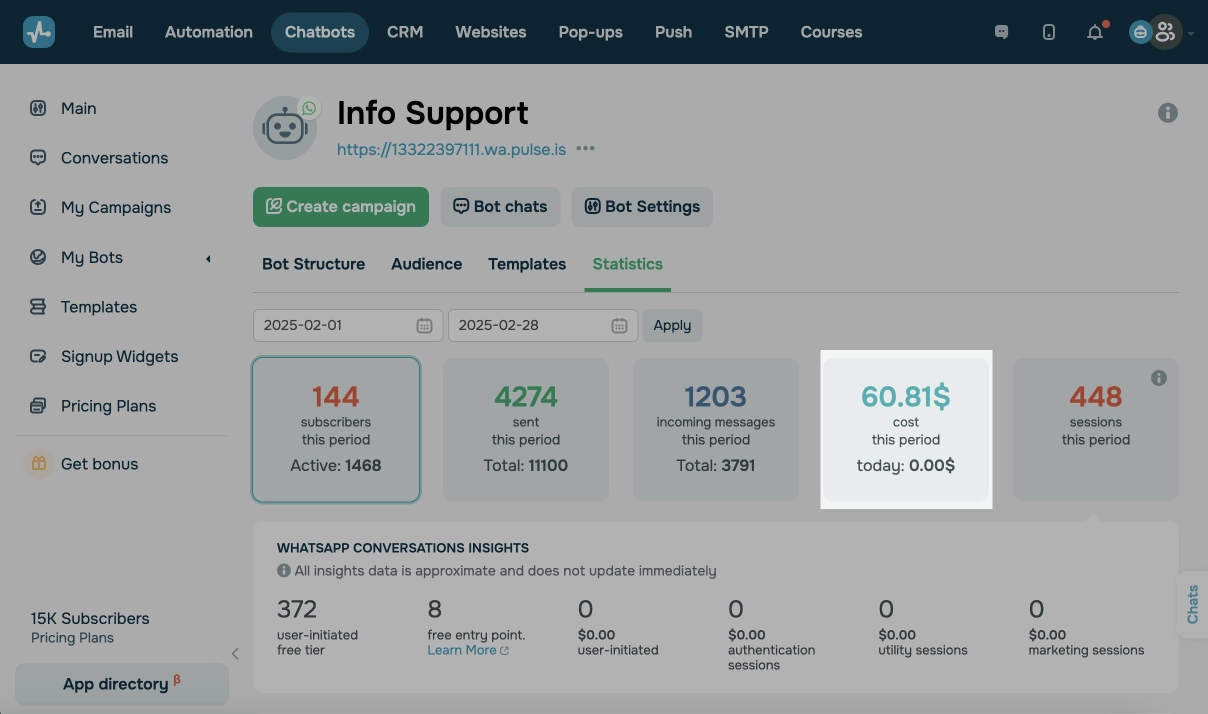 WhatsApp chatbot analytics in the SendPulse
To improve results over time, run simple A/B tests, such as different opening lines or button labels, and let real user behavior guide your optimization.
Conclusion
A WhatsApp welcome message is often the first real interaction a customer has with your brand. A greeting message doesn’t just acknowledge a message. It sets expectations, captures intent, and nudges users toward meaningful action.
For many businesses, the journey starts with a simple greeting in the WhatsApp Business App. But as volume grows and expectations rise, static, one-size-fits-all messages quickly reach their limits. Advanced welcome flows built with SendPulse allow you to personalize entry points, qualify leads, automate routing, and connect WhatsApp with your marketing system.
Connect your WhatsApp Business to SendPulse, build your first welcome flow in the chatbot builder, and see how automated WhatsApp greetings can turn incoming messages into measurable results.
WhatsApp greeting message FAQ