If your business has multiple online communication channels, it’s crucial to keep them connected, so customers can move between them without any friction. When someone finds you on Instagram, they should be able to switch to WhatsApp in just one tap, and that convenience often makes the difference between a casual visitor and a paying customer.
In this blog post, we’ll look at how to add a WhatsApp link to Instagram, walk through different ways to do it, and share simple, step-by-step instructions you can follow right away.
TL;DR
Adding a WhatsApp link to your Instagram makes it easier for users to contact your business directly from your profile or story. This guide shows how to create the WhatsApp link, how to insert it into your Instagram bio, stories, or header, and how to track its performance.
What is a WhatsApp link for Instagram?
A WhatsApp link for Instagram is a direct, clickable URL that opens a WhatsApp chat with your business. Depending on the user’s device, it can open either in the WhatsApp app or in the browser version.
The way it works is really simple: a user taps the link, Instagram redirects them to WhatsApp, and a chat window with your business number appears. You can even include a pre-filled message to speed things up.
Marketers typically use two standard formats:
- https://wa.me/<number> opens a blank chat.
- https://wa.me/<number>?text=<encoded-message> opens a chat with a pre-written message.
For businesses, this link becomes an entry point that moves users straight into action. Instead of browsing your feed or hunting for a contact button, visitors can immediately reach out. Brands can use WhatsApp links to:
- capture leads;
- resolve support issues;
- drive sales;
- confirm appointments;
- build VIP lists for early drops and exclusive offers.
Let’s take a closer look at why using a WhatsApp link on Instagram is both convenient and beneficial.
Why use a WhatsApp link for Instagram
A WhatsApp link for Instagram gives marketers one more opportunity to turn casual scrollers into customers. Instead of asking people to “DM us” or fill out a form, you can offer a single tap that opens a chat instantly.
WhatsApp messages feel personal and immediate, and the numbers back it up. With a 98% open rate, users are way more likely to see, read, and act on messages sent through WhatsApp. When someone taps “Check availability on WhatsApp” or “Get a quick quote,” they’re showing clear interest, and the chat format makes it easier for them to follow through.
It also helps you qualify leads faster. With pre-filled messages like “I want to book a consultation” or “Tell me more about product X,” you know exactly what a user needs from the first message. This helps segment leads, prioritize replies, and route inquiries automatically.
A WhatsApp link adds long-term value, too. Once the conversation starts, you’re no longer limited by Instagram’s interface. The chat continues even if the user leaves the app. That continuity is especially useful for service businesses (bookings, consultations), retail brands (product questions), and creators offering paid services.
And finally, WhatsApp is automation-friendly. You can connect chats to your CRM system and send them into automated flows, chatbots, or pipelines using tools like SendPulse. Whether you trigger a welcome sequence, assign a sales rep, or save the contact for future campaigns, a WhatsApp link helps you turn an Instagram visitor into a qualified, nurturable lead.

Engage users on WhatsApp
Use our drag-and-drop builder to create AI-powered WhatsApp chatbots that sell, support, and connect. Run campaigns, share updates, and convert leads hands-free.
Get started for free
How to create a WhatsApp link for Instagram
To add a WhatsApp link to your Instagram and benefit from everything it offers, you first need to create the link itself. There are several ways to do that, and we’ll walk through each of them.
Create a WhatsApp link manually
If you prefer full control, you can build a WhatsApp link manually in seconds. The structure is simple:
https://wa.me/<full-number-with-country-code>
For example, a U.S.-based business might use:
https://wa.me/15551234567
This link opens a blank chat with your business number.
If you’d like the user to start with a pre-filled message, which is useful for lead qualification, you can add a text parameter and URL-encode it:
https://wa.me/15551234567?text=I%20want%20to%20book%20a%20consultation
Keep in mind that everything must be URL-encoded, so spaces are replaced by %20, punctuation is encoded, and special characters are converted to their URL-safe versions.
A manually created link gives you flexibility as you can tailor the exact action you want the user to take from the very first tap.
Create a WhatsApp link in the WhatsApp Business app
If you’re using WhatsApp Business, the app provides a built-in link generator that’s quick and easy to use. It’s the fastest way for teams that need a clean, reliable URL without any setup.
To access it, open “Tools,” tap the three dots, and select “Short link.”
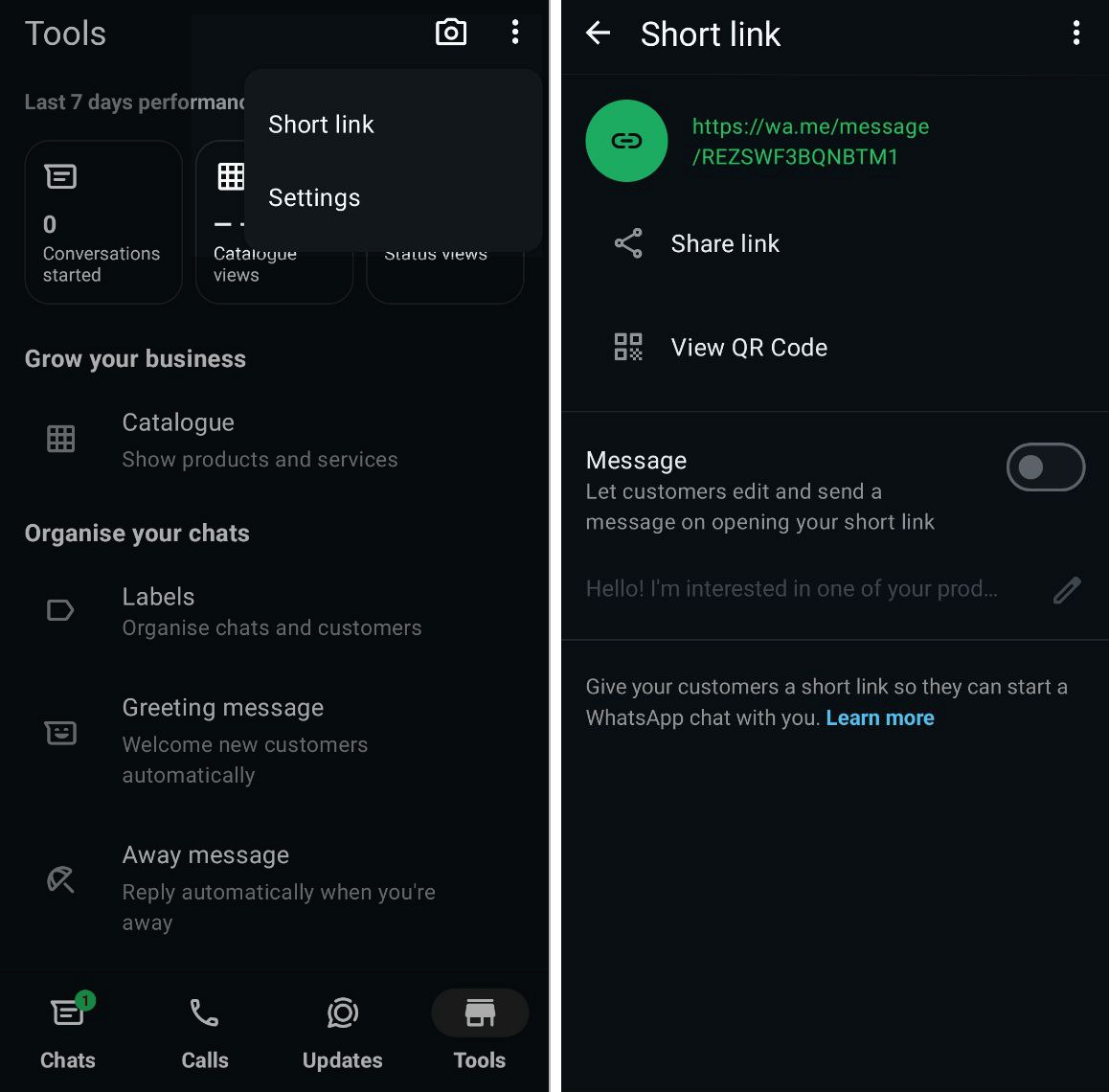 Creating a WhatsApp link through WhatsApp Business tools
Here, WhatsApp generates a unique link tied to your business number. You can copy it directly and paste it into Instagram, a bio link page, or any marketing campaign.
Additionally, you can create or edit a default message that automatically appears when someone taps the link. This can guide users to take the right action right from the start, such as:
- I’d like to check product availability
- I want to book a consultation
- I need help with my recent order
This built-in tool simplifies the process and ensures that the link always points to your correct business account.
Use an online WhatsApp link generator
If you want to save time or avoid manual URL encoding, an online generator is the easiest option. It’s especially useful for non-technical teams, marketers who need dynamic messages, or campaigns that require UTM tracking for analytics.
SendPulse’s free WhatsApp link generator lets you instantly create a link with your business number, a pre-filled message, and a QR-code if needed.
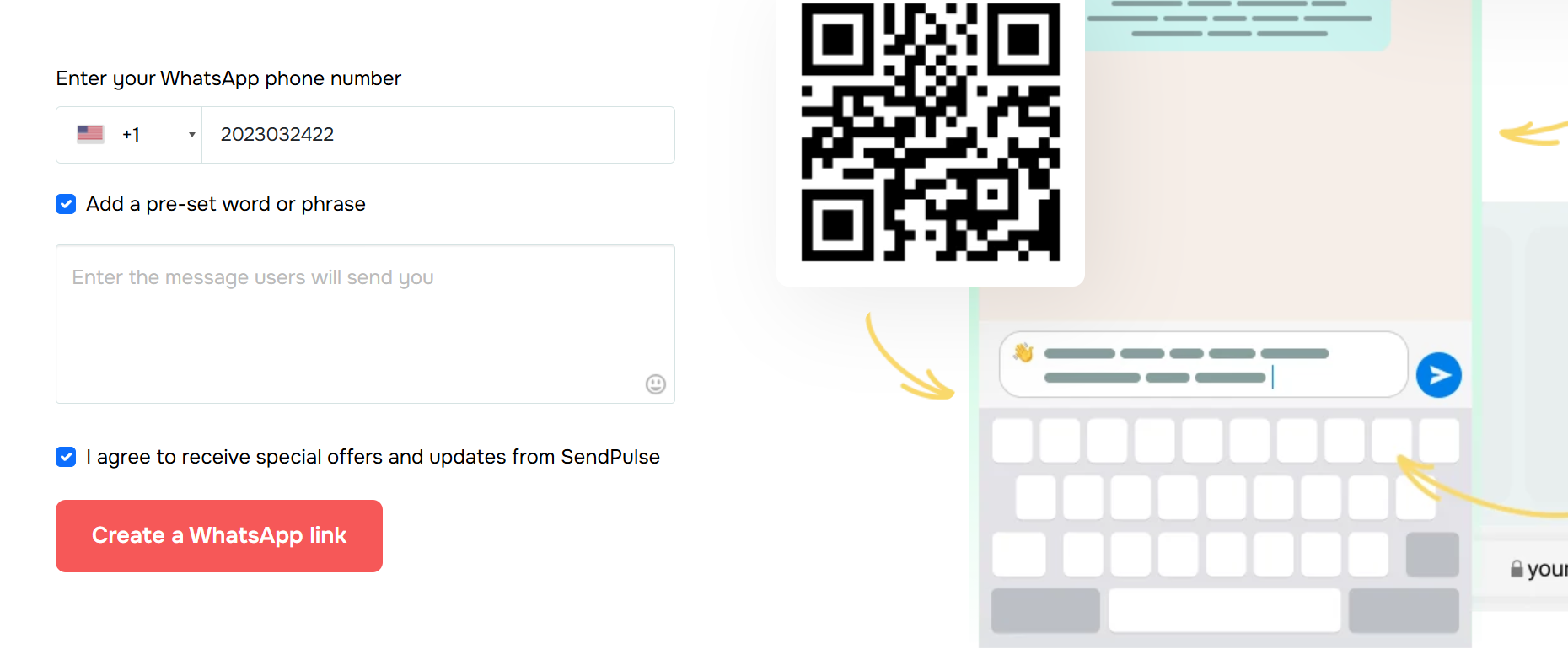 A free WhatsApp link generator by SendPulse
When choosing a generator, look for these features:
- No data collection. It shouldn’t store your number or messages.
- Clean, copy-ready link. It shouldn’t use redirects or shortened URLs that could harm trust.
- Instant preview. You should be able to see exactly what users will open before using the link.
This method is ideal when you’re building multiple links for different funnels, testing messages, or simply want a fast, error-free setup.
How to add a WhatsApp link to your Instagram bio
One of the easiest ways to drive Instagram visitors directly into WhatsApp chats is by adding a WhatsApp link to your Instagram bio. It’s highly visible, simple to tap, and works on any account type. No wonder “how to add a WhatsApp link to Instagram bio” is such a common request from marketers.
By doing this, you’re creating a seamless connection from your Instagram profile to a real-time conversation on WhatsApp. Let’s walk through the steps.
Go to your Instagram profile page and tap “Edit profile.”
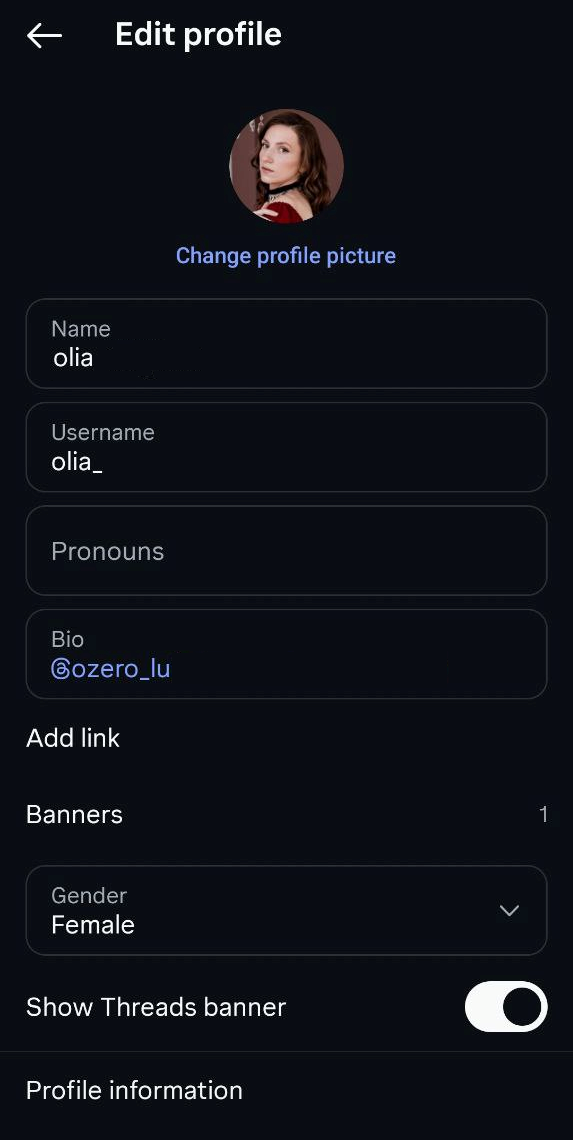 Editing the Instagram profile
Depending on your account type, you’ll see one of the following options:
- Website (for personal accounts)
- Add link → Add external link (for Creator and Business accounts)
Insert the WhatsApp link you generated earlier, for instance, https://wa.me/15551234567.
Add a short title like “Chat on WhatsApp” to guide visitors.
 Adding an external WhatsApp link to Instagram bio
Save your WhatsApp link. Now, it will appear in the bio section of your Instagram profile, right below your name and description.
While this method is effective, there’s a more flexible option available: adding a bio link page with your WhatsApp call to action.
Instead of just having one link in your bio, you can create a bio link page. It’s a mini landing page that houses all your key links, including WhatsApp. This is especially useful for marketers who manage multiple offers, categories, or campaigns.
With the SendPulse bio link builder, you can:
- add a dedicated WhatsApp button;
- include links to your website, promotions, landing pages, and newsletter;
- use brand colors, blocks, icons, and analytics;
- update content anytime without changing your Instagram bio.
Here’s how simple and intuitive the builder interface is:
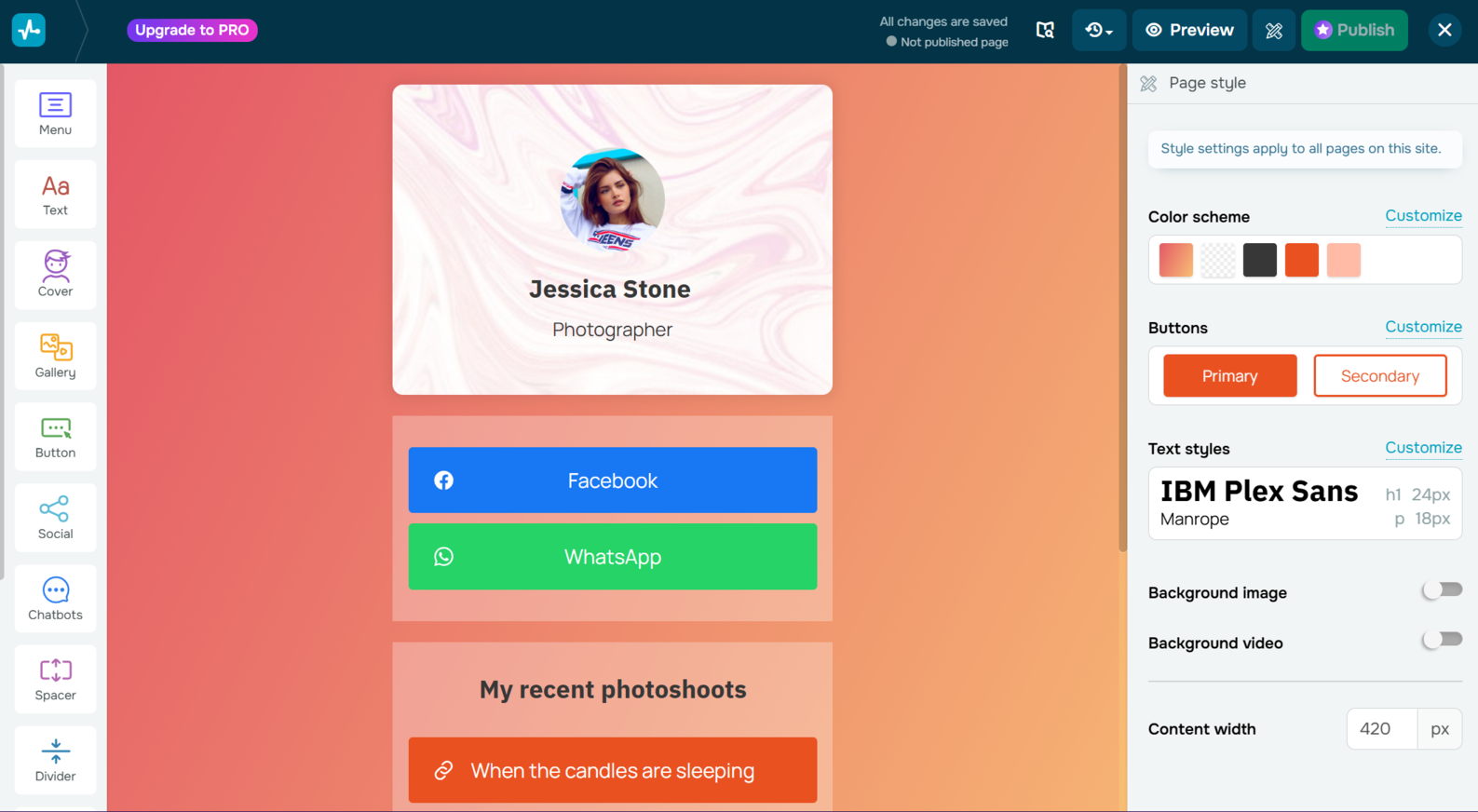 SendPulse’s bio link builder interface
To set it up, open the SendPulse bio link builder and create a new page from scratch or choose a layout that fits your style.
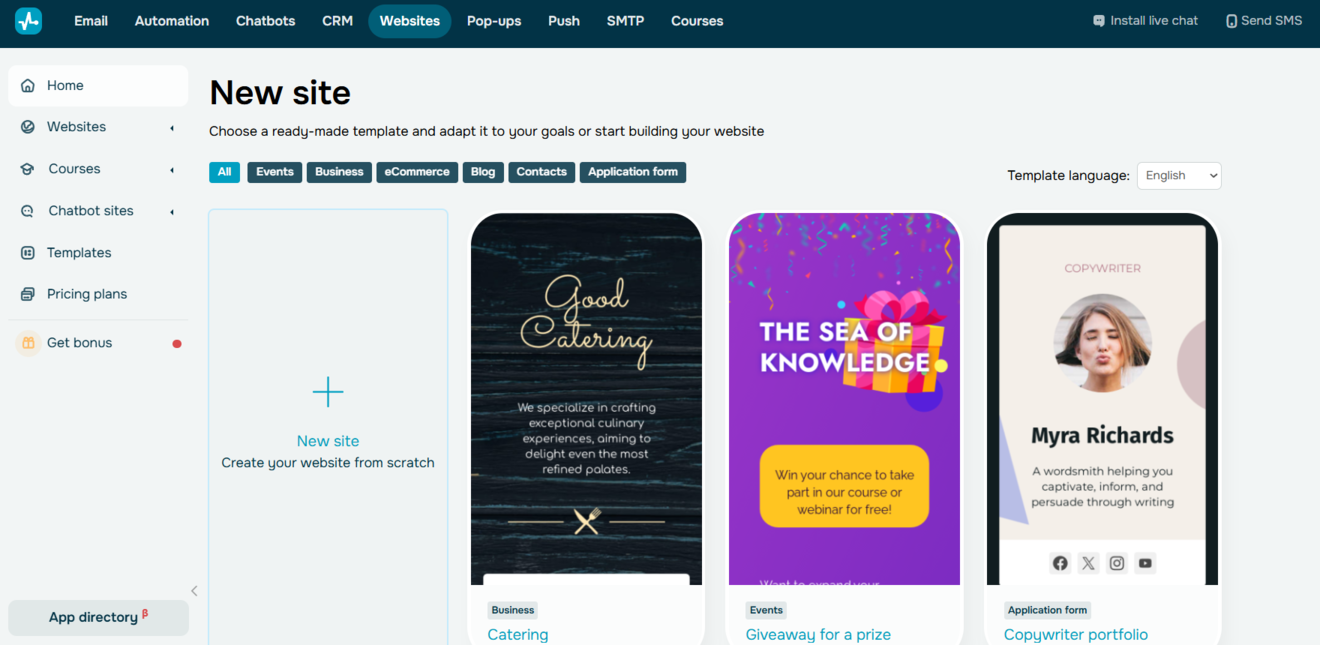 Creating a new website in the SendPulse bio link builder
Add a WhatsApp button or text link, then include any additional links you want to feature.
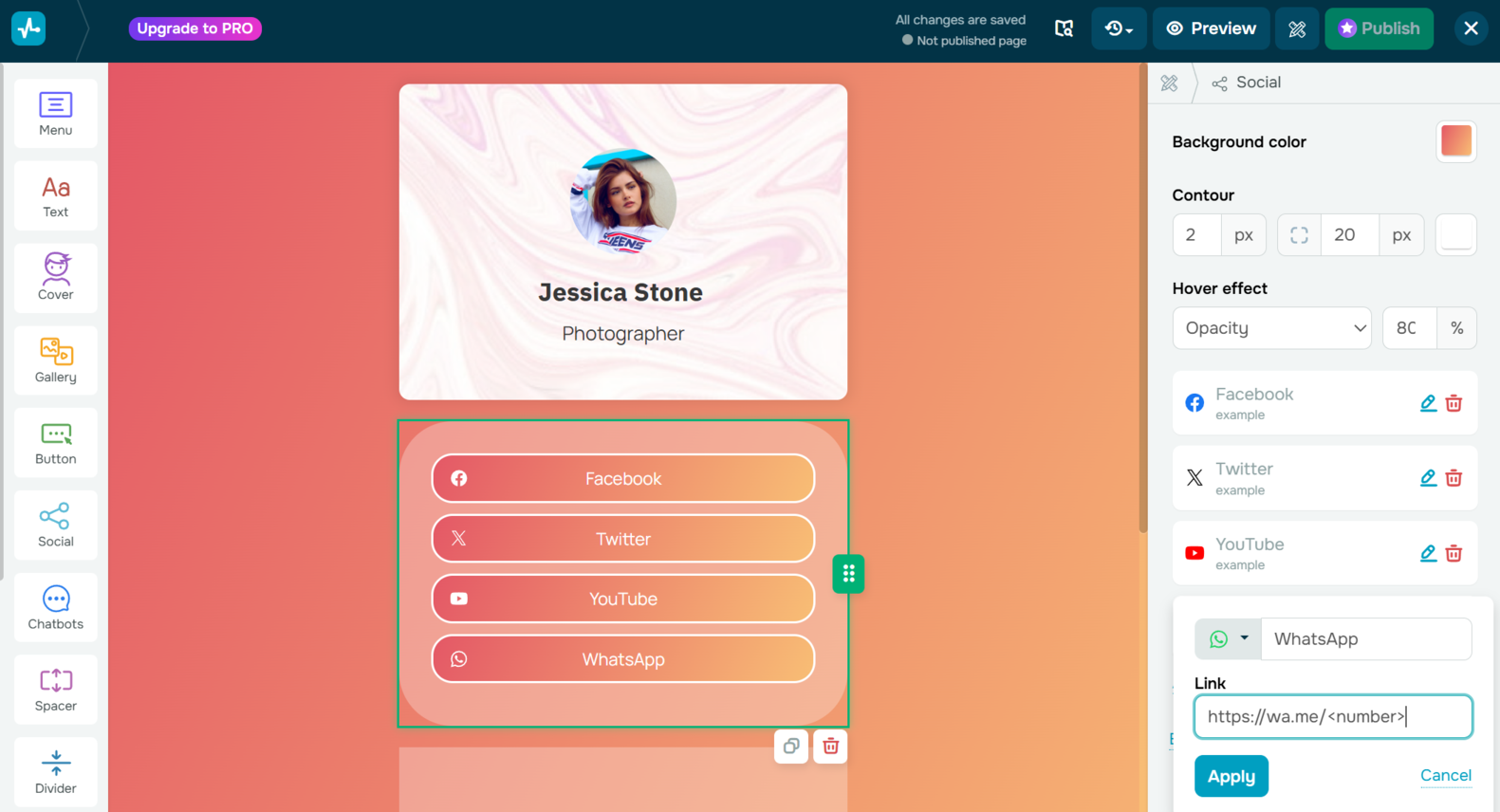 Adding a WhatsApp button in the SendPulse bio link builder
While editing, you can enable the preview mode to see exactly how your bio page will look.
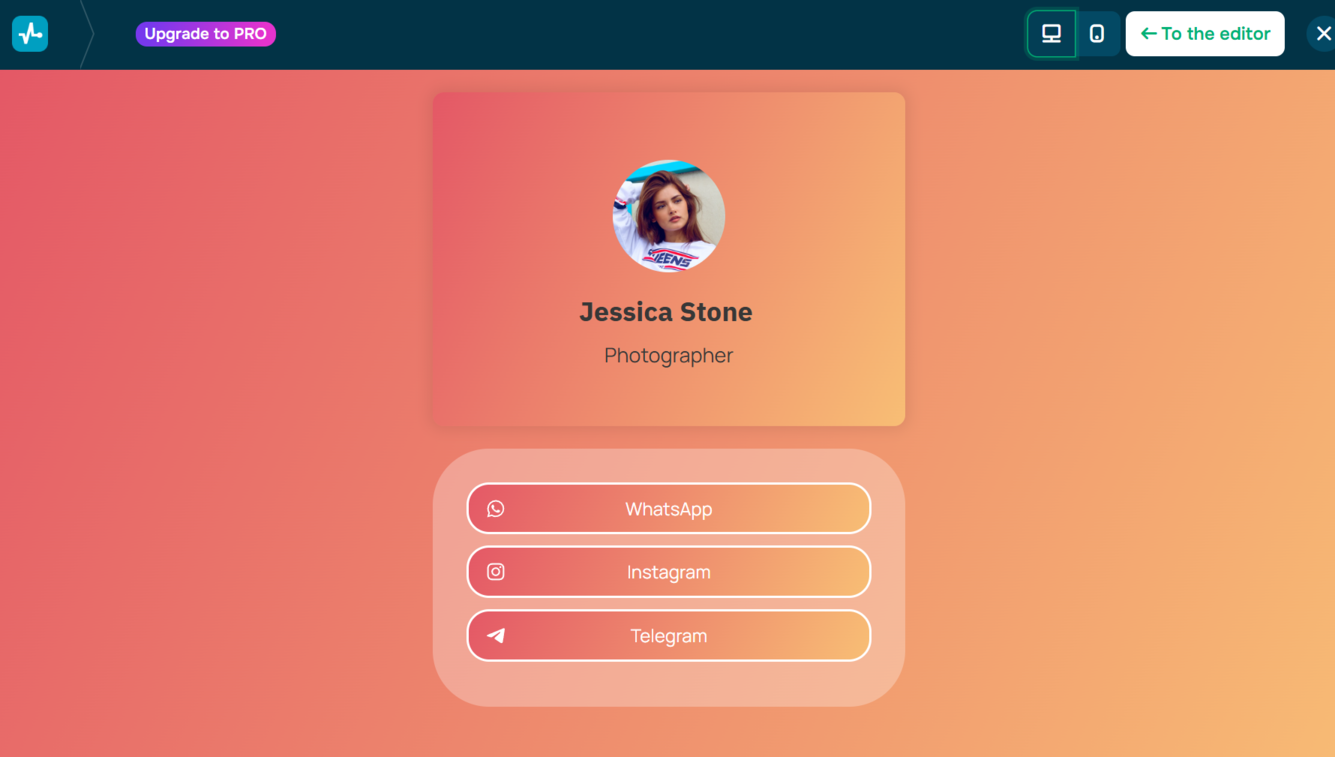 Preview mode in the SendPulse bio link builder
Once your page is ready, publish it and copy the generated URL. Finally, paste this link into your Instagram bio, and your multi-link page is live.
This approach gives your audience more options to engage with your business, and keeps your Instagram profile neat and organized, all while making WhatsApp just one tap away.
Discover the
top link in bio platforms to help you consolidate your key URLs, boost traffic from social media, and choose the tool that fits your digital strategy best.
In addition to the bio link, Business and Creator accounts can add a dedicated WhatsApp button directly to their profile header. This is one of the most visible ways to link WhatsApp to Instagram, and it lets visitors start a conversation with just one tap, without even opening your bio.
Before you start, make sure you have:
- A Business or Creator Instagram account.
- A connected Facebook/Meta account.
- A valid WhatsApp Business phone number.
If you’re still using a personal profile, you’ll need to switch to a professional account, as only Business and Creator profiles support the WhatsApp button.
To add a WhatsApp button, open your Instagram profile and tap “Edit profile.” From there, go to ”Contact options,” where you can add or update your business phone number.
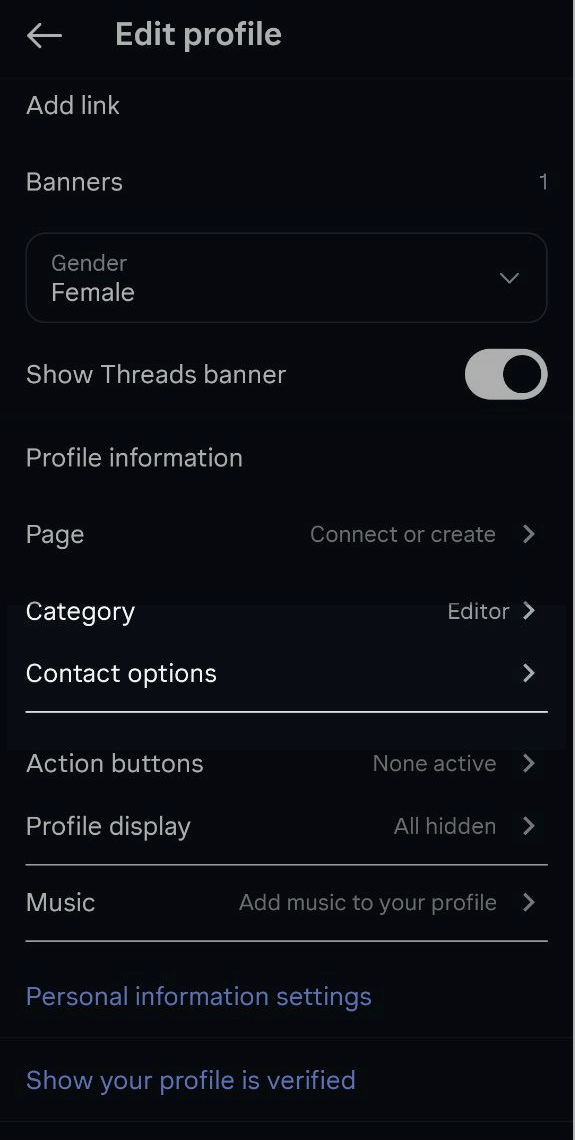 Editing the Instagram profile
Instagram will prompt you to add your WhatsApp Business phone number. Enter the number linked to your WhatsApp Business account, then verify it using the verification code sent to your phone.
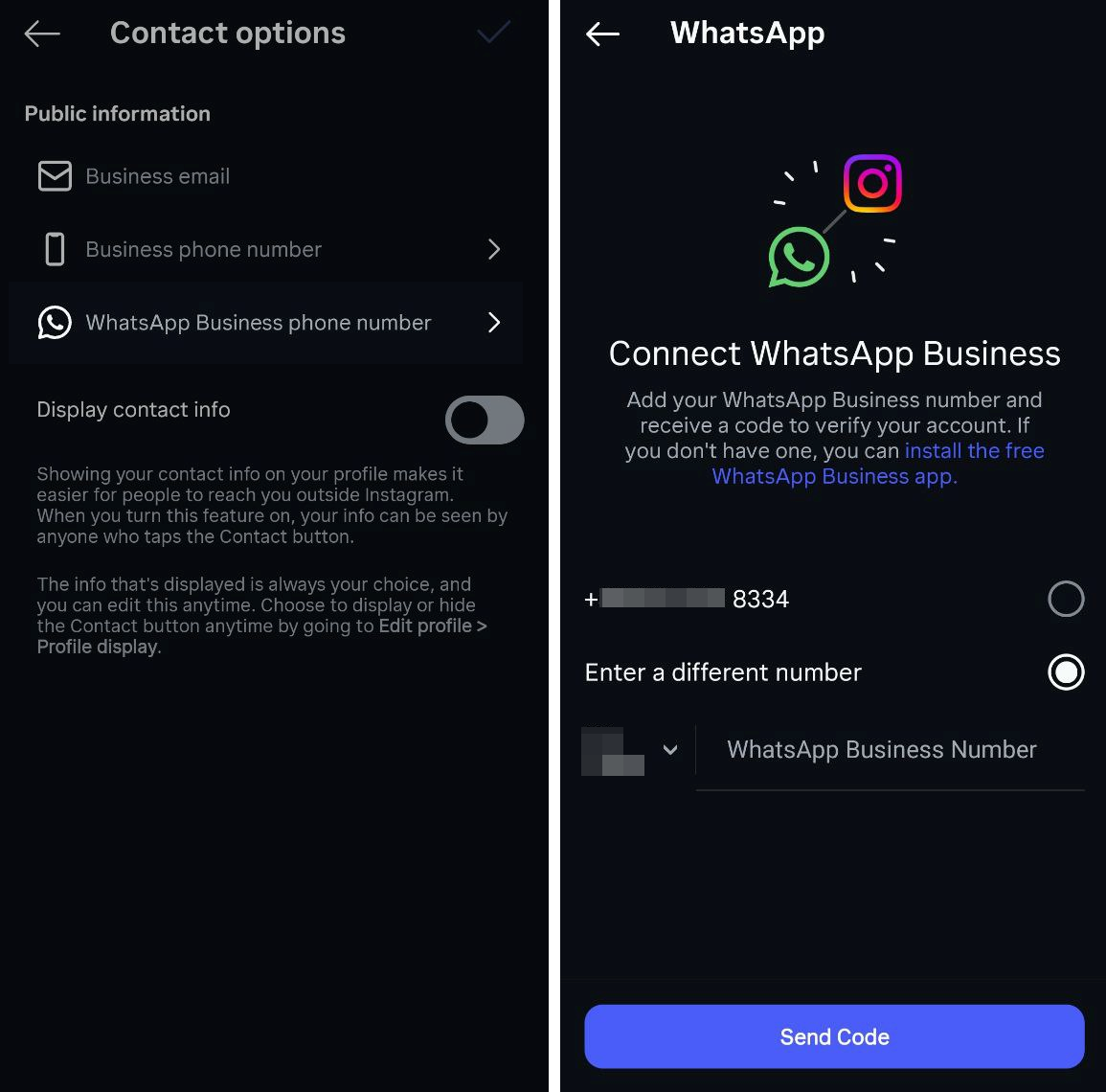 Connecting the WhatsApp Business profile
Once your number is verified, Instagram will automatically add WhatsApp as one of your contact buttons. After saving the changes, return to your profile — the WhatsApp button will appear in your header next to “Message” or “Contact.”
How to add a WhatsApp link to Instagram stories
Instagram stories are one of the quickest ways to grab your audience’s attention, start real-time conversations, or answer questions instantly, as they feel personal and are easy to engage with. By adding a WhatsApp link to your Instagram story, you can create a seamless way for users to connect with your brand across channels.
Start by creating a new story: upload a photo, record a video, or design a branded slide. Tap the “Sticker” icon and select the “Link” sticker. Paste your WhatsApp link into the sticker field and update the sticker text to something actionable, such as “Chat on WhatsApp,” “Book via WhatsApp,” or “Order now.”
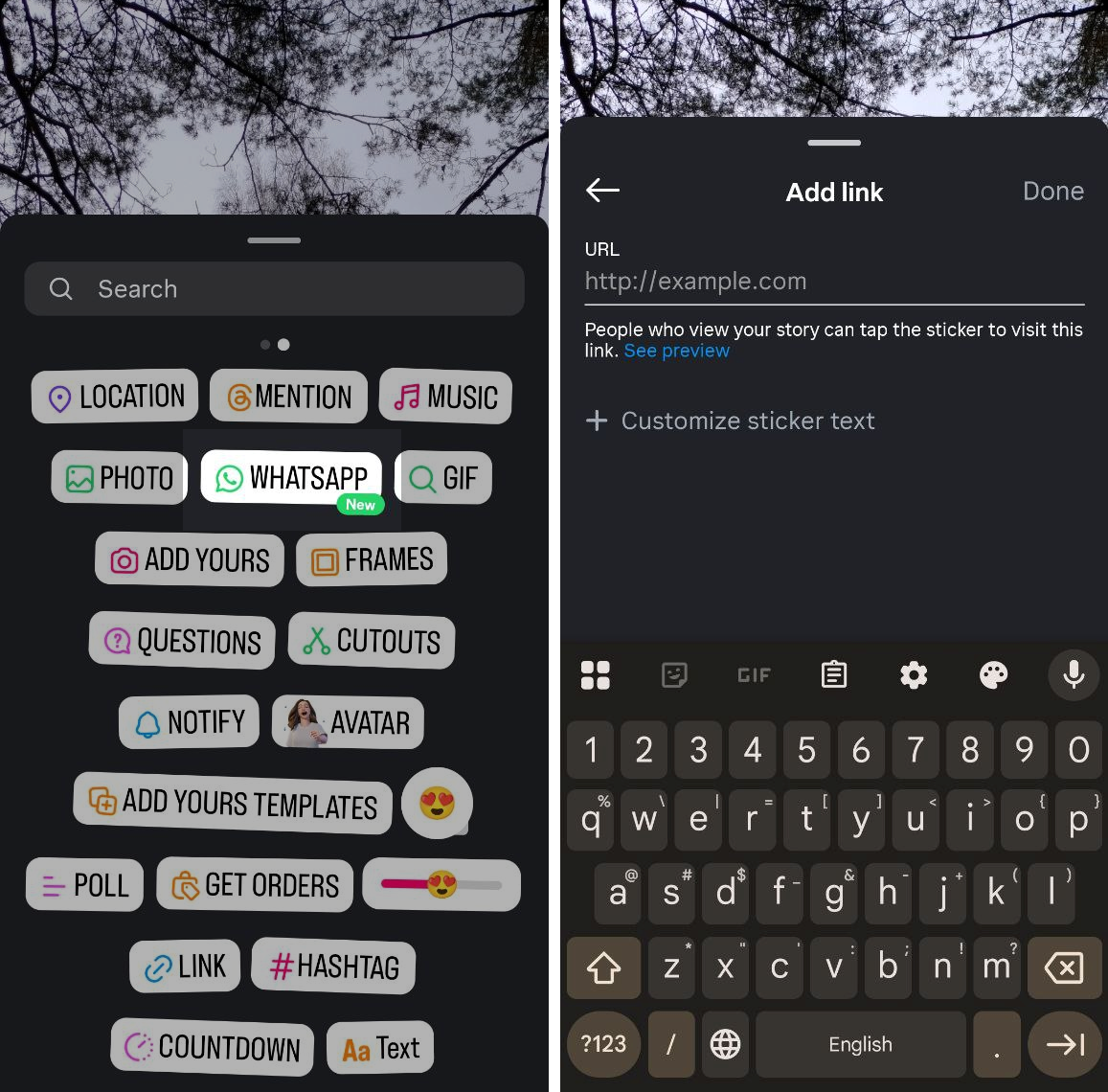 Creating a new story with the WhatsApp sticker
Once published, viewers can tap the sticker and be instantly directed to your WhatsApp chat.
To keep high-performing stories accessible, save them to “Highlights” on your profile. Use themed highlight covers such as “Support,” “Bookings,” or “Orders” to create permanent WhatsApp entry points on your profile.
For more complex funnels, you can save sets of stories into specific highlights like “FAQ,” “Quick Order,” or “VIP Offers.” Each highlight can include a WhatsApp link with a compelling call to action.
Here are a few story formats you can pair with a WhatsApp CTA:
- “Ask us anything” support story with a link to WhatsApp for direct assistance;
- product teaser story with an “Order via WhatsApp” sticker for quick purchases;
- limited-time promotion with a WhatsApp link for claiming a discount or promo code.
These story formats catch users at moments of curiosity or urgency, and the WhatsApp link removes any barriers between interest and conversation.

Access the WhatsApp Business API — no setup or extra fees
With SendPulse, you get everything you need, from a visual editor with a library of ready-made chatbot flow templates to user-friendly analytics, to help you effectively engage your customers on WhatsApp.
Get started for free
Once your WhatsApp link is live on Instagram, the next step is tracking its performance. Measuring how well your link is driving engagement helps you understand which touchpoints are converting and where to focus your efforts.
Start by adding UTM parameters to your WhatsApp link. This will allow you to track clicks from Instagram bio, stories, or ads directly in your analytics tools. By doing this, you can see which entry points are driving the most interactions and identify the CTAs that are most effective.
From there, monitor how many users shift from viewing your Instagram content to messaging you on WhatsApp. Even basic insights, like which stories generate the most inquiries or when users tend to reach out, can help you refine your content strategy.
Bringing users into WhatsApp is just the beginning. Once the conversation starts, you can turn WhatsApp into a powerful, revenue-driving channel. Platforms like SendPulse let you build automated flows for WhatsApp, including everything from welcome messages and lead qualification sequences to support routing and post-purchase follow-ups. You can even send targeted broadcasts to specific segments and use AI-powered chatbots to handle routine inquiries.
All incoming contacts can be automatically tagged and segmented in the SendPulse CRM system, allowing marketers to track deals and manage communications across WhatsApp, email, messaging apps, and other channels. This can transform WhatsApp from just a messaging tool into an integrated part of your multi-channel customer journey.
Conclusion
Linking WhatsApp to Instagram can take several forms: adding a link to your bio, placing a dedicated WhatsApp button in your profile, using stories with a link sticker, or directing users to a bio link page. Each method makes it easier for followers to start a real conversation with your brand.
Fewer clicks mean faster responses and higher-quality leads. When users can reach you instantly, they’re more likely to engage, ask questions, and move toward a purchase.
To maximize these interactions, pair your WhatsApp link with the right tools. Create a bio link page in SendPulse, connect your WhatsApp channel, and automate follow-ups, campaigns, and CRM tracking to create a successful customer journey.
WhatsApp link for Instagram FAQs