As one of the world’s most popular messaging platforms, WhatsApp has grown into much more than a simple messaging app. It’s now a powerful commerce tool that helps businesses sell, support, and engage with customers. With its recently introduced WhatsApp Commerce feature, businesses can offer their customers an effortless shopping experience right inside the app and turn conversations into conversions.
In this post, we’ll break down how WhatsApp Commerce works, explore its key benefits, and share actionable strategies to help you make the most of it.
What is WhatsApp Commerce?
WhatsApp Commerce is a set of business-friendly features within WhatsApp Business that allows companies to showcase products, interact with customers, and process transactions right within the app. It transforms WhatsApp from a simple messaging app into a fully integrated shopping experience, making it easier for businesses to connect with buyers and drive sales.
To understand how WhatsApp for eCommerce works, here are its key features:
- Product catalogs. Businesses can create and display product catalogs directly on WhatsApp, letting customers browse offerings without leaving the app.
- Shopping cart. Customers can add items to their cart and place orders right within the chat.
- Payment integrations. Depending on the region, WhatsApp supports in-app payments through local and third-party payment providers.
- Business profiles. Companies can set up professional profiles with key details like business hours, location, and contact information.
- Quick replies and automated responses. Quick replies and automated responses. Businesses can speed up customer service with pre-set responses for frequently asked questions — or use a WhatsApp sales chatbot to guide shoppers from product questions to checkout.
- Order updates and notifications. Customers can automatically receive real-time updates on their orders, including confirmations, shipping details, and delivery alerts.
By bringing all these features into one platform, WhatsApp Commerce simplifies the buying experience, allowing customers to browse, shop, and interact with businesses effortlessly without switching between platforms.

Access the WhatsApp Business API — no setup or additional fees
With SendPulse, you get all the necessary tools, from a visual editor with a library of ready-made chatbot flow templates to user-friendly analytics, to help you effectively engage your customers on WhatsApp.
Get started for free
Benefits of WhatsApp Commerce for businesses
It’s no secret that WhatsApp Commerce makes shopping more convenient for customers — everything happens in one place, inside an app they already use daily. But what about businesses? Let’s explore how WhatsApp for eCommerce can help brands grow and thrive.
Direct and personalized communication
Unlike emails, which often involve delays in communication, WhatsApp offers real-time, one-on-one interactions with customers. This means businesses can offer quick, personalized support, answer questions instantly, and build stronger relationships. With features like quick replies and automated messages, businesses can also quickly and easily handle frequently asked questions while maintaining a human touch. E-commerce brands can amplify this capability by implementing WhatsApp marketing automation, which enables personalized product recommendations, abandoned cart recovery sequences, and post-purchase engagement—all automated and triggered by customer behavior.
High reach and engagement potential
With over two billion users, WhatsApp Commerce gives businesses access to a massive customer base. Unlike traditional marketing channels, WhatsApp feels more direct and personal to customers, as messages land in a space where people already communicate with friends and family. Plus, with a staggering 98% open rate, businesses can be more confident that their messages are actually seen by their audience.
Simplified product discovery
WhatsApp Commerce turns conversations into sales opportunities by offering a built-in virtual storefront. Customers can browse, ask questions, and make purchases without leaving the app. With interactive product catalogs, high-quality images, videos, and detailed descriptions, WhatsApp help shoppers discover and engage with products in a way that feels natural.
Secure and hassle-free payments
WhatsApp Commerce offers a seamless and secure payment experience for both businesses and customers. In supported regions, businesses can enable in-app transactions, letting customers make purchases directly within the chat, with no need to switch apps or visit external payment platforms. WhatsApp also uses end-to-end encryption and advanced security protocols to keep financial data private and protected from fraud.
Instant order updates and notifications
WhatsApp Commerce lets companies keep their customers informed at every stage of their buyer journey through automated order updates and notifications. Businesses can send real-time updates, including order confirmations, shipping details, and delivery notifications, straight to the customer’s chat. This minimizes follow-ups, builds trust, and ensures a comfortable shopping experience.
Cost-effective marketing tool
WhatsApp Business is an affordable way for companies to market their products and connect with customers. With little cost, businesses can quickly share new product launches, special offers, limited-time deals, and promotions through broadcast lists, reaching a large audience in seconds. Compared to paid advertising, WhatsApp offers a more personal and direct way to engage customers without a hefty budget.

Boost your business with AI-powered chatbots
Integrate OpenAI right into your chatbot flows to tailor replies based on your customer’s intention, preferences, and tone. Teach your chatbot to recognize conversation context and save data for personalized communication.
Get started for free
WhatsApp Commerce use cases
Now that we’ve covered the benefits of WhatsApp Commerce, let’s explore how businesses use it in practice. Below, we’ll dive into real-world examples and show how companies leverage WhatsApp to sell products, engage customers, and streamline transactions.
Customer support
One of the simplest and most effective ways to use conversational commerce on WhatsApp is by offering immediate customer support. It allows businesses to manage chats, answer questions, and assist customers with products or services in a timely manner. To provide the most personalized support, you can have your staff assist directly through the platform.
For example, LX Soho Boutique Hotel uses WhatsApp to inform guests about an alternative check-in point and reassure them that the hotel staff is available throughout their stay. This direct communication makes the process smoother and enhances the overall customer experience.
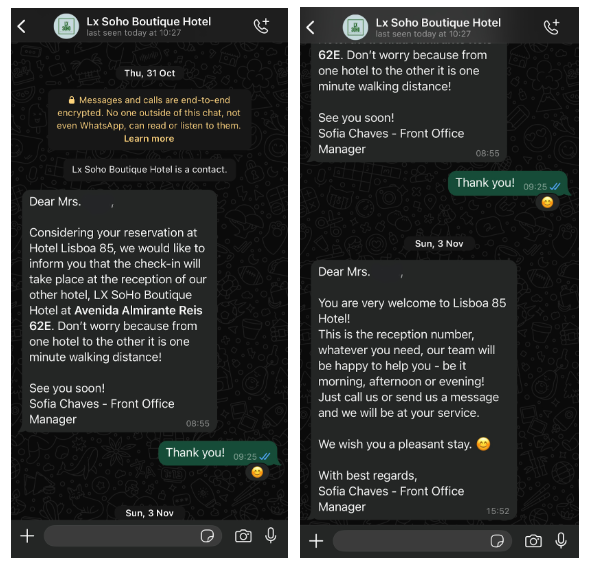 Personalized customer support on WhatsApp
For businesses handling high volumes of customer inquiries, WhatsApp chatbots offer a great solution. They can automate responses to frequently asked questions, reducing the workload on human support teams while keeping response times fast.
A great example is Yust Antwerp Hotel, which introduced a WhatsApp virtual assistant to send real-time notifications about check-in and check-out. The chatbot also offers guests various options to enhance their stay.
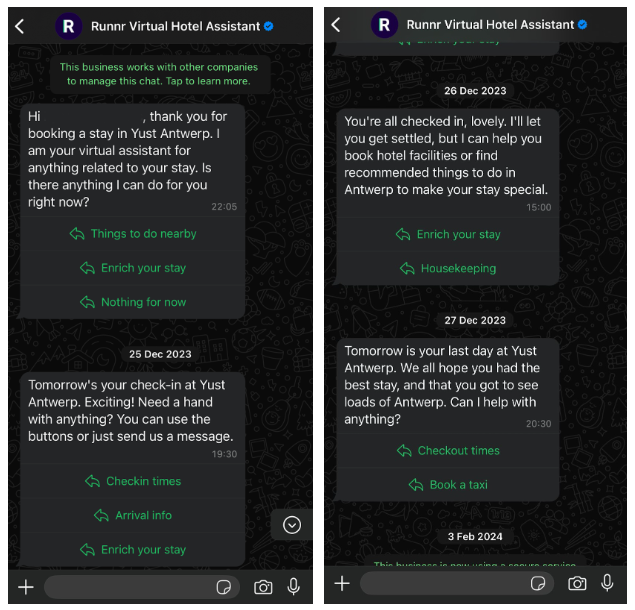 Interactions with a WhatsApp chatbot
With SendPulse’s chatbot builder, businesses can easily create WhatsApp chatbots for multiple purposes, including welcoming new users, assisting customers, selling products, and notifying managers. Users can select from predefined triggers, automated replies, and unsubscribe flows or create custom triggers based on keywords or specific automation events.
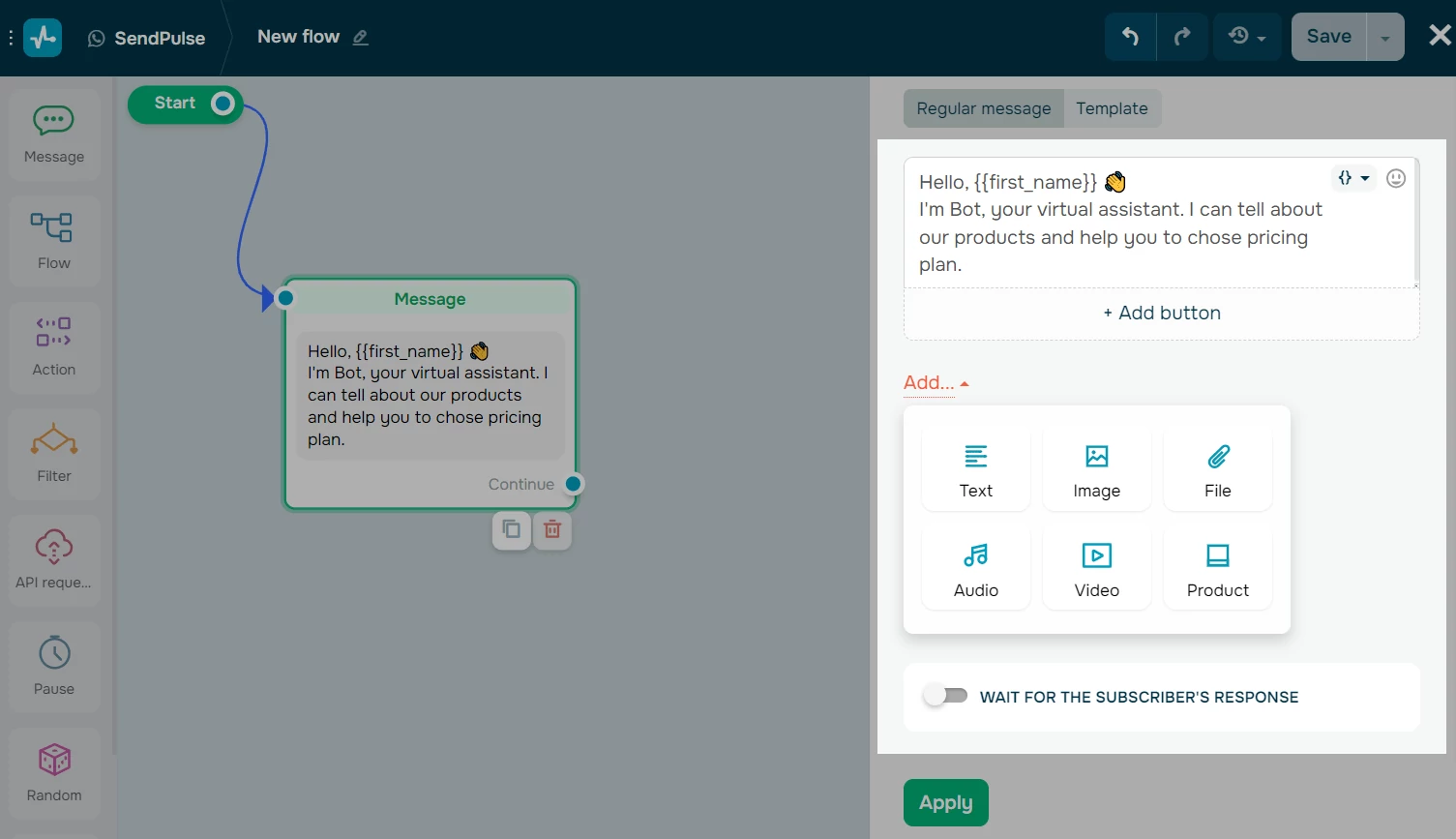 Creating a chatbot flow for WhatsApp in SendPulse
To simplify chatbot setup, SendPulse offers ready-made templates and OpenAI-powered flow generation, allowing businesses to implement advanced automation with minimal effort.
Direct sales
Another way to use WhatsApp for eCommerce is by selling directly through the messaging platform. You can set up an automated flow or have a live agent manage the chat, making it easy for customers to place orders. Within the chat, customers can browse items, receive consultations, and complete their purchases without any hassle. Deploying a chatbot for eCommerce makes this kind of end-to-end in-chat buying possible across WhatsApp and other channels — guiding shoppers from product discovery through to payment confirmation in one conversation.
The platform also enables personalized shopping experiences. By analyzing customer preferences and past purchases, businesses can suggest relevant products, offer tailored promotions, and strengthen customer relationships through one-on-one interactions.
For example, Yebo Fresh introduced a WhatsApp chatbot to help customers place orders. New users are guided through a simple registration process, making it effortless to get started. And during business hours, a live support agent is available to assist with any additional questions.
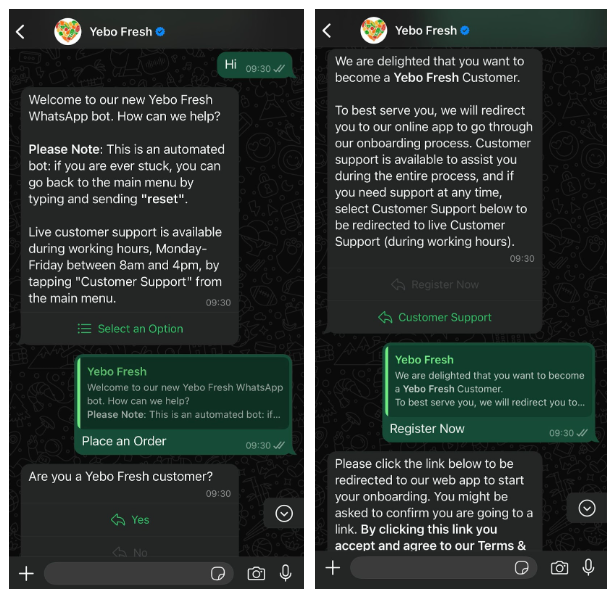 Providing a combination of shopping and customer support on WhatsApp
Offering product catalogs
Product and service catalogs are widely used across different industries, and WhatsApp makes them even more accessible. Businesses can create and share catalogs directly within the app, allowing customers to browse products in a well-organized, visually appealing format with images, descriptions, prices, and product codes. Customers can easily explore the catalog, ask about specific items, and even add products to their cart directly within the chat.
For example, a travel agency can use WhatsApp Commerce to list upcoming tours in a catalog, including dates, times, and prices. Customers can quickly browse the options and select the tours they’re interested in.
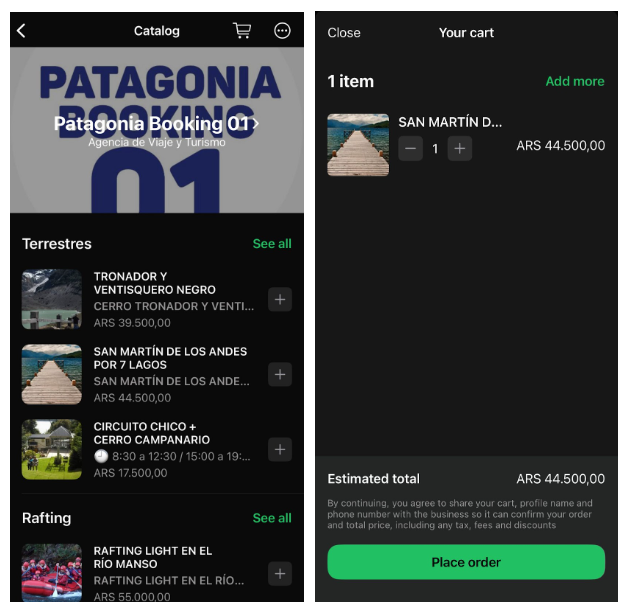 Using product and service catalogs on WhatsApp
Catalogs provide a seamless way to showcase products and drive sales through WhatsApp Commerce. Businesses can promote hotels, flights, travel destinations, or vehicles, with product listings managed through Facebook Commerce Manager to ensure accurate and up-to-date information. Additionally, catalog order triggers enable targeted chatbot flows, allowing businesses to deliver personalized interactions and boost operational efficiency.
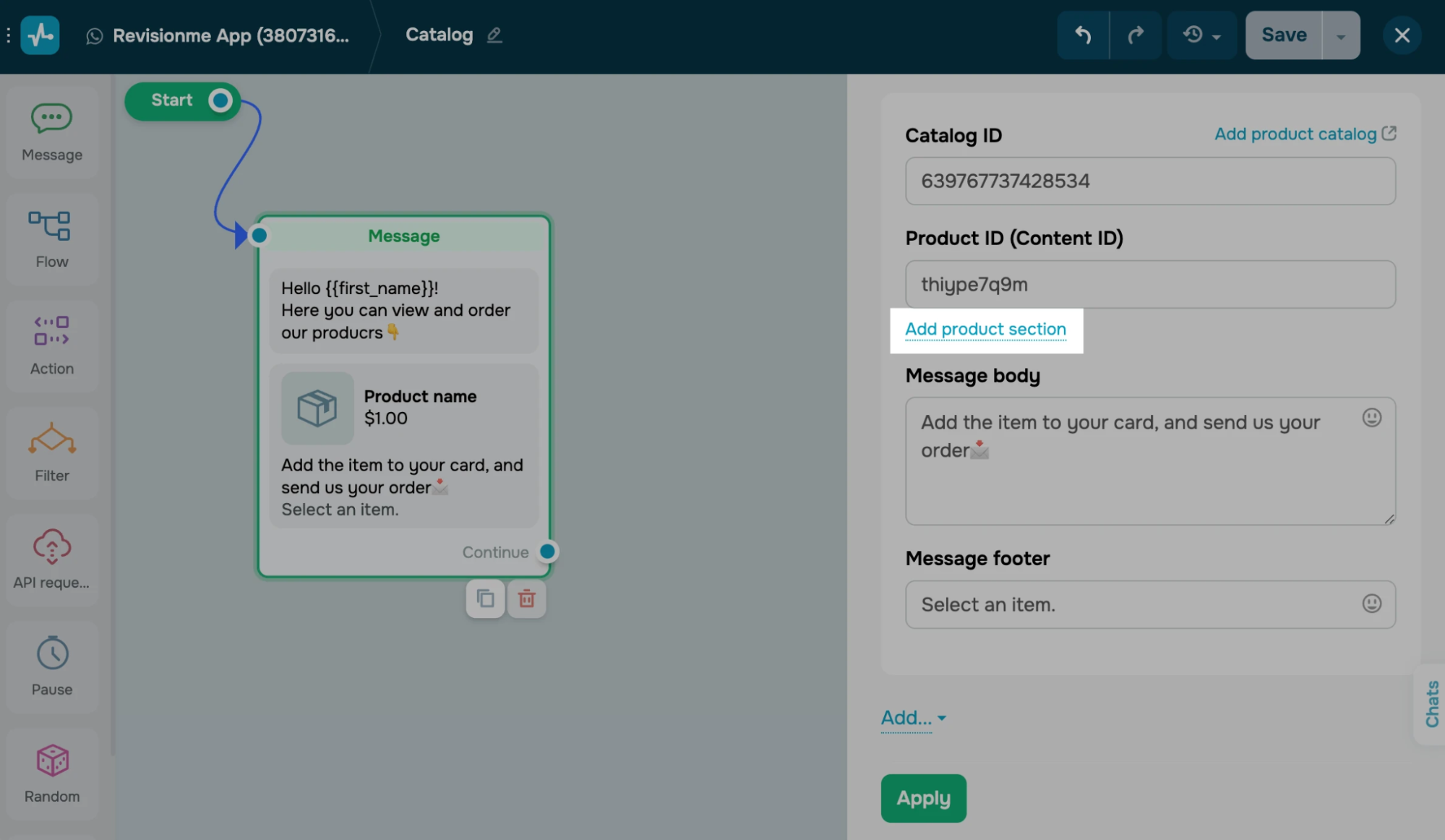 Adding a product catalog to a chatbot message in SendPulse
Interactive campaigns and marketing
Once a customer subscribes to your brand’s WhatsApp updates, you can send promo codes, special offers, and campaign updates directly through chat. This direct, real-time communication makes it easier to engage customers with personalized messages and time-sensitive deals that drive action. Time-sensitive deals like this are exactly what a WhatsApp marketing campaign is built to deliver, alongside promos and new-arrival announcements.
For example, when customers sign up for Shein’s WhatsApp newsletter, they receive a welcome gift along with a direct link to the shop. After a purchase, businesses can continue the conversation by sending order updates through WhatsApp Commerce. The same chat can be used to send notifications about upcoming sales and promotions and keep customers engaged beyond their initial purchase.
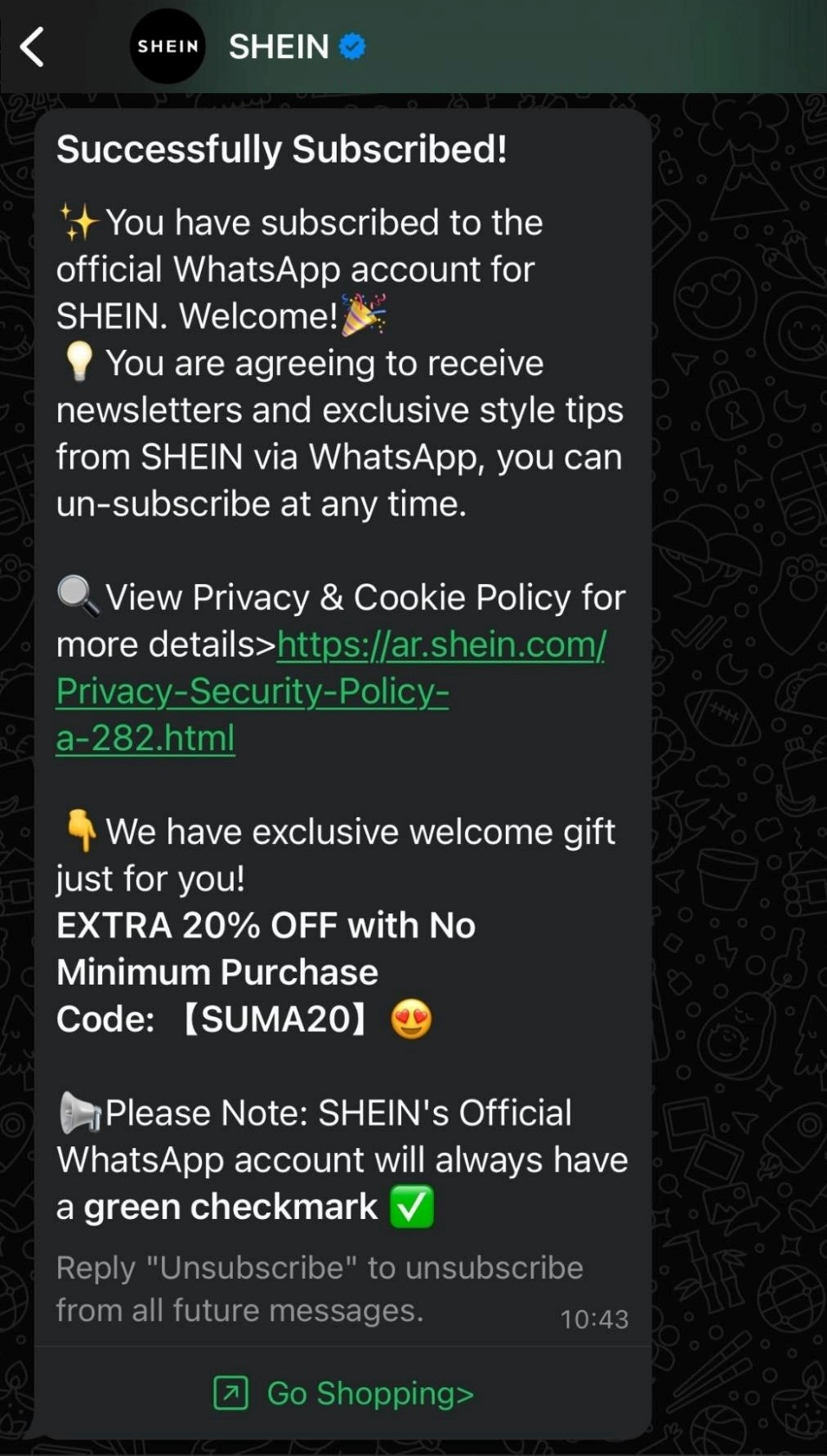 Using WhatsApp Business eCommerce to send marketing offers
With SendPulse’s WhatsApp campaigns, businesses can attract new customers and stay connected with existing ones. You can send promotions to your entire chatbot audience or specifically target active users from the past 24 hours. The platform also includes segmentation and scheduling tools, allowing you to personalize campaigns and send messages at the perfect time.
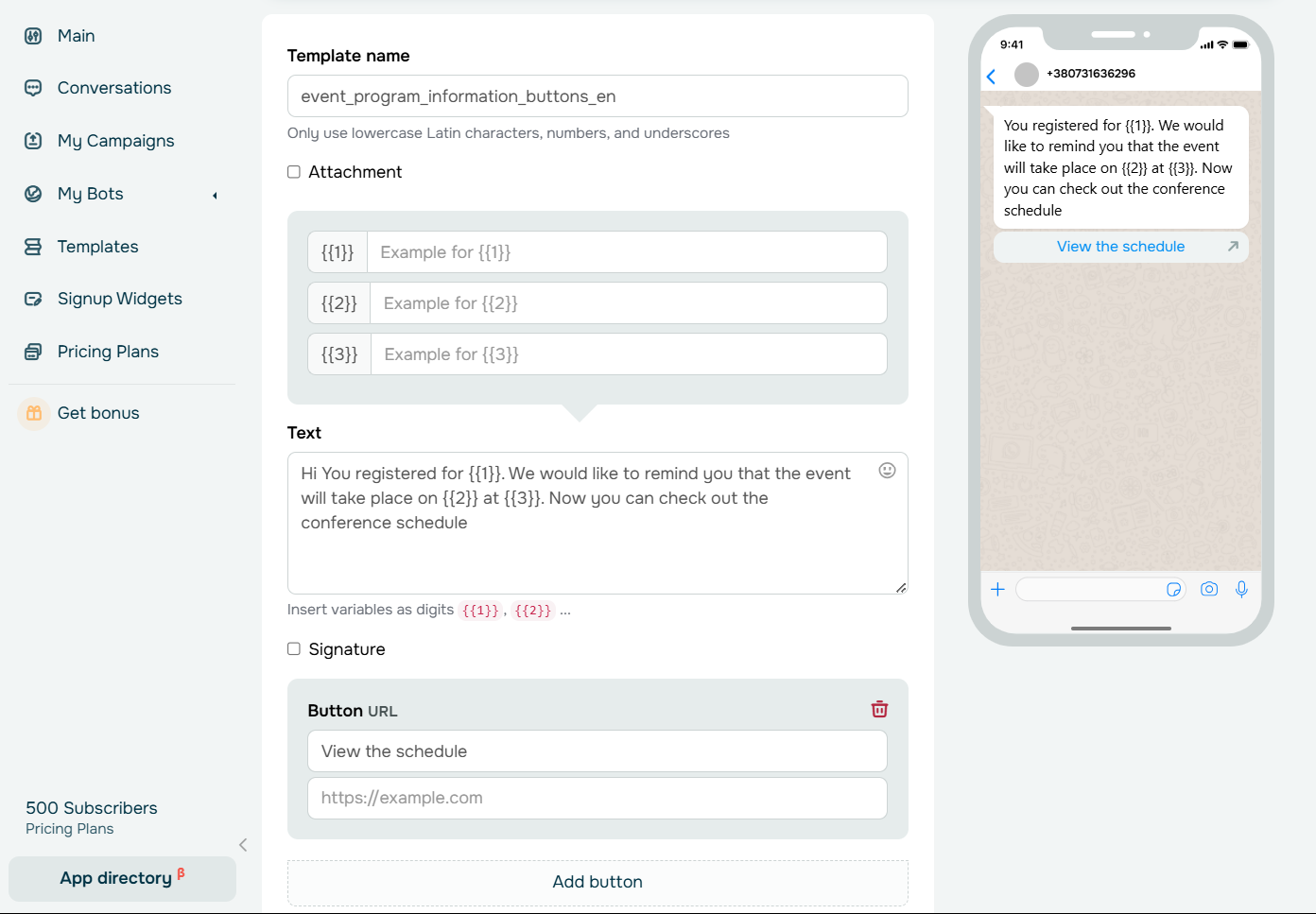 Creating a WhatsApp campaign
Sending payment link
SendPulse’s WhatsApp eCommerce chatbot lets businesses send invoices and take payments right in the chat. By integrating with payment systems, this feature simplifies transactions, making it easy for customers to pay securely without switching apps.
For example, in the scenario below, the company offers multiple payment options, including the ability to complete transactions right inside WhatsApp. Customers can also check their payment status and view past transactions through the app’s payment settings.
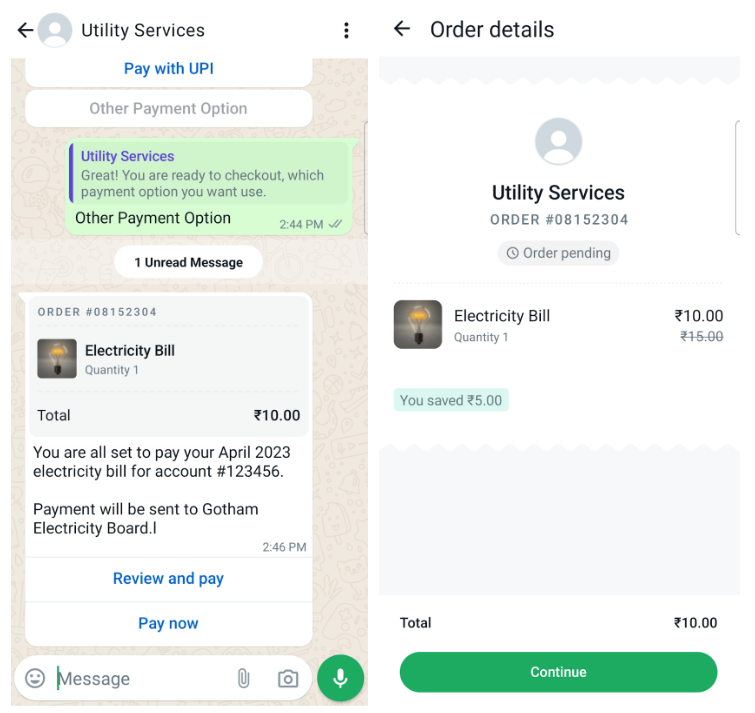 An example of WhatsApp payment; source: Meta
Order confirmations and reminders
WhatsApp Commerce makes it easy for businesses to send order confirmations, delivery reminders, and payment prompts directly through chat. This keeps customers informed every step of the way and makes the shopping experience more convenient.
By integrating WhatsApp with CRM systems, businesses can track orders in real-time, store customer data, and personalize marketing campaigns. This not only improves customer satisfaction but also gives companies valuable insights to refine their services.
For example, Tony’s Chocolonely uses WhatsApp to update customers on their orders. As soon as a purchase is placed, the company sends a tracking link so customers can monitor progress. Once the order is ready for pickup, they get a notification right in their chat.
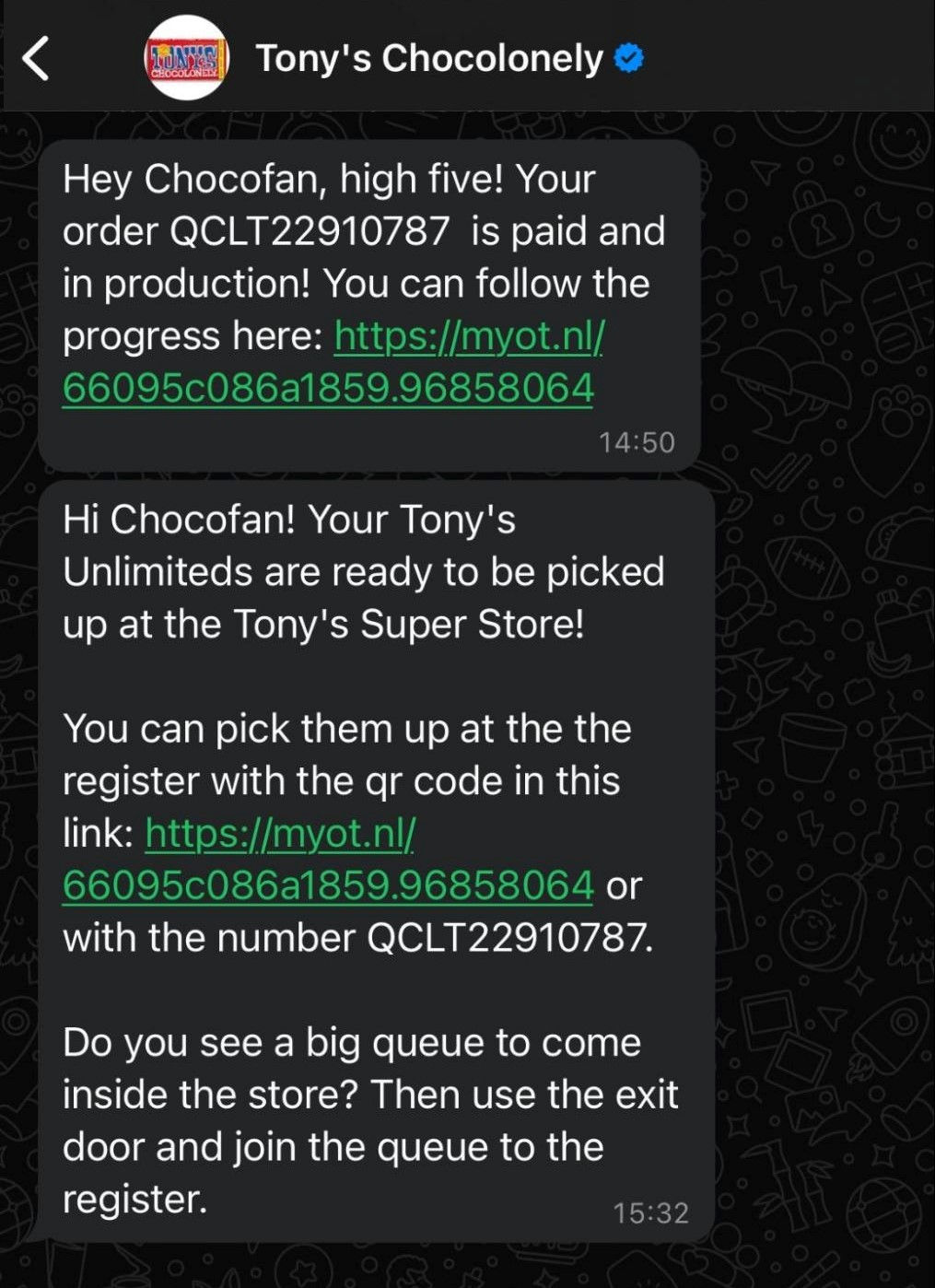 Sending updates in the WhatsApp chat
Financial services
For businesses in the financial sector, WhatsApp makes it easy to offer consultations, banking services, and secure transactions. Customers can check their account balance, transfer funds, get transaction updates, and even receive personalized financial advice without switching between multiple apps.
Take ICICI Bank, for example. Their WhatsApp chatbot lets clients check balances, adjust credit limits, upgrade cards, and more. Essentially, the chatbot serves as a mini banking app, offering many of the same essential functions in a more accessible and user-friendly way.
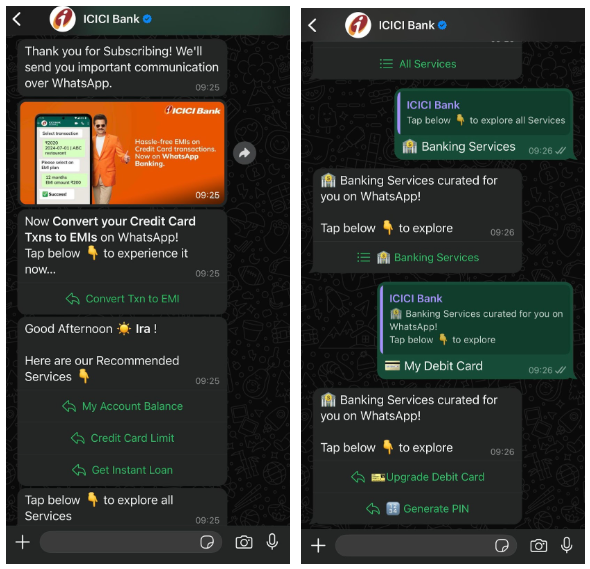 Using WhatsApp in the banking niche
Collecting feedback and reviews
After a purchase or interaction, businesses can easily send personalized messages via WhatsApp, asking customers to share their experiences. You can do this with a simple text message, a direct link to a review site, or even an interactive survey made with SendPulse’s WhatsApp forms right inside the chat.
With WhatsApp’s quick response feature, leaving feedback takes just a tap, making it effortless for customers to respond without switching apps. The personal nature of conversational commerce on WhatsApp also leads to higher response rates and more genuine reviews, helping businesses gain valuable insights to improve their products and services.
Take AiSency, for example. They send a WhatsApp message after events, allowing attendees to rate their experience instantly using quick reply options — a fast and engaging way to collect feedback.
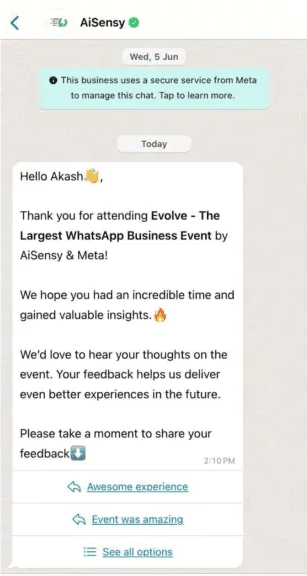 Using WhatsApp Commerce to gather feedback; source: AiSency
Customer segmentation
Customer segmentation in WhatsApp Commerce allows businesses to group customers based on activity, preferences, or behavior to send more relevant and personalized messages. Instead of a one-size-fits-all approach, segmentation ensures customers receive offers and updates that truly match their interests. This not only boosts engagement but also makes marketing campaigns more effective by reaching the right audience with the right message.
For example, Estée Lauder Germany uses a WhatsApp chatbot to engage customers by asking about their specific skincare needs and concerns. By identifying the exact issues customers want to address, the business gathers valuable insights to create personalized and effective WhatsApp Business commerce campaigns.
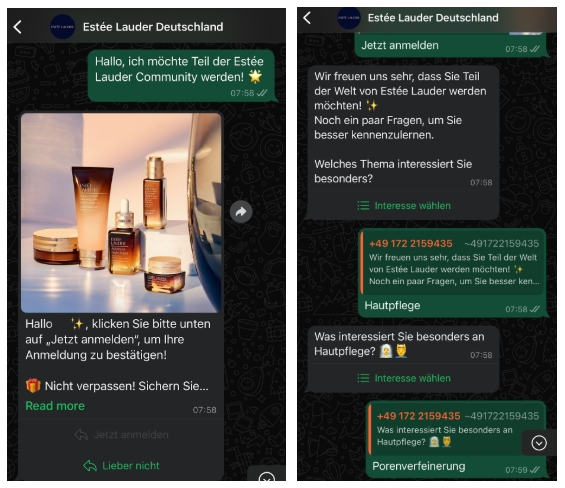 User segmentation on WhatsApp
Key rules for using WhatsApp Commerce
Using WhatsApp for eCommerce comes with great opportunities, but businesses must follow WhatsApp’s policies and best practices to maintain access to the platform and provide a great user experience. Here’s what you need to know.
Create a trustworthy experience
Customers appreciate transparency, and it starts with an accurate, up-to-date business profile. Make sure to include essential details like your email address, phone number, and website so customers can easily reach you. Also, avoid misleading descriptions or impersonating other businesses. It’s the authenticity that builds trust.
One powerful way to establish credibility is by verifying your WhatsApp business account through Meta.
WhatsApp is owned by Meta, and you can apply for official business verification through Meta. Once approved, your WhatsApp number gets a checkmark badge that signals it's authentic and trustworthy. This verification adds an extra layer of credibility and security to your business communication — it shows customers that they’re dealing with an official account.
SourceBianca Coscia
Marketing Manager at SendPulse
Get clear consent before messaging
Only contact people who have explicitly opted in to receive messages from you. The opt-in process should be clear, legally compliant, and inform customers about what kind of messages customers will receive on WhatsApp.
Respect user preferences
Respecting user preferences is vital. If a customer opts out, blocks your messages, or requests to stop communication, honor their request immediately. Sending spam, misleading content, or unexpected promotions can damage trust and negatively impact users’ impression of your brand.
Use approved messaging practices
When reaching out to your audience, only use approved WhatsApp message templates, especially for transactional messages that go beyond the 24-hour customer service window. These templates must align with WhatsApp’s guidelines and be used only for their intended purpose.
Protect user data
Any customer data collected through WhatsApp should be secure and used only for its intended purpose within the conversation. Avoid sharing sensitive information and always comply with privacy laws.
Avoid restricted or prohibited content
Don’t use WhatsApp Business Commerce features to advertise illegal, regulated, or restricted goods and services unless exceptions apply in certain permitted regions. Always check WhatsApp’s official guidelines before promoting products in regulated industries. Additionally, avoid discriminatory, fraudulent, or exploitative content.
Comply with local and global laws
Companies using WhatsApp Business Commerce must follow all applicable privacy, consumer protection, and marketing regulations. If your industry is highly regulated, you may also need licenses or age verification for compliance. Also, make sure to keep track of WhatsApp’s latest policies to remain compliant and maintain a positive brand reputation
Monitor user feedback
Frequent user complaints or policy violations can lead to account restrictions or removal from the platform. To avoid this, regularly track customer interactions and address any issues promptly. Pay attention to complaint trends, negative feedback, or unusually high opt-out rates, as these can signal areas that need improvement.
By following these guidelines, businesses can make the most of conversational commerce on WhatsApp, maintain customer trust, and ensure a smooth and compliant shopping experience.
Wrapping up
All in all, WhatsApp is a powerful platform for businesses, thanks to its widespread familiarity and ease of use. Companies across various industries can leverage its features to create chatbots, send marketing campaigns, gather feedback, accept payments, manage bookings, and more.
To truly make the most of WhatsApp Commerce, having the right tools is key. SendPulse offers an all-in-one solution for building WhatsApp chatbots and automated campaigns tailored to your business needs. Plus, seamless CRM integration and support for omnichannel marketing strategies help you drive engagement and improve marketing performance.
Explore its capabilities today and see the difference it can make for your business!