AI-powered chatbots are quickly becoming the gold standard for customer support and service automation — over 30% of consumers already trust AI to improve their experience. With unlimited availability, rapid trainability, and deep customization, they seem tailor-made for demanding customers who expect instant answers, no matter the time of day. On paper, bots look like the perfect solution to scale support without inflating costs.
At least, that’s the promise. In practice, the story is a bit more nuanced. There’s a reason SaaS companies continue to position live human support as a premium feature — often locked behind higher-tier plans. While chatbots crush it when it comes to speed, consistency, and efficiency, human agents still deliver empathy, nuance, and real-world expertise bots simply can’t possess.
The reality is that chatbots and live chats each come with clear strengths, limitations, and ideal use cases, and that’s what we’re unpacking in this post. We’ll compare the two types of intelligence side by side and show how to implement and blend them in practice using a no-code solution like SendPulse.
What are chatbots?
Chatbots are automated conversational tools designed to handle customer interactions at scale, be it answering FAQs, helping find the right product, or troubleshooting a technical issue without human involvement. They act as the first line of support, available 24/7 to provide instant responses, reduce wait times, and ensure customers never feel abandoned.
Chatbots can take many forms depending on where your audience is most active. You can implement them as widgets embedded directly on your website or as messaging app bots on platforms like Telegram, WhatsApp, or even TikTok, meeting customers in the channels they already use daily. Modern AI-powered bots can recognize voice recordings, too, which makes them more approachable for users on the go.
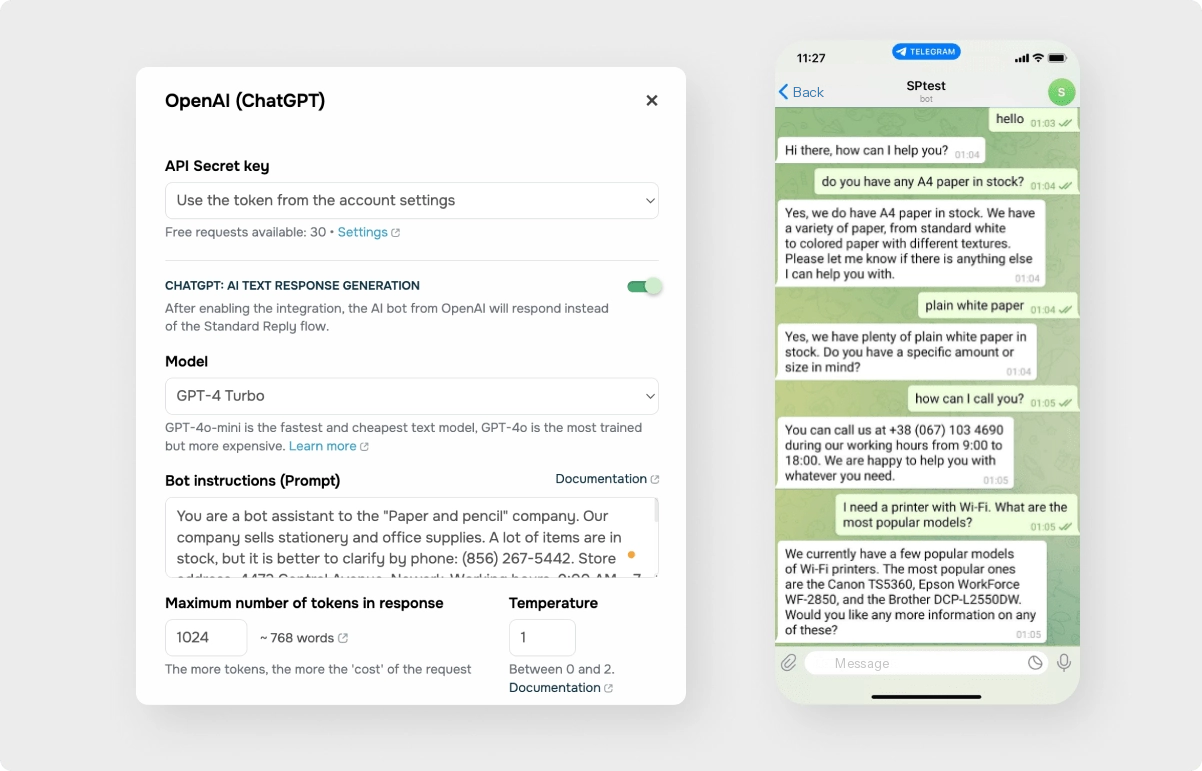 Setting up a chatbot powered by ChatGPT in SendPulse
Integrating your bot with AI is an option — not a requirement. While AI-powered bots can interpret free-form questions and generate dynamic responses, many businesses prefer greater control. In those cases, chatbots can also rely on predefined flows such as welcome sequences, FAQ menus, lead qualification steps, or order status checks. These scripted paths result in predictable outcomes and full compliance with internal policies.
As a chatbot owner, you can define clear triggers for handing conversations over to AI or escalating them to a live agent, ensuring customers get the right level of support at the right moment. Behind the scenes, the data collected by the bot, such as contact details, conversation history, and user feedback, can be seamlessly transferred to a CRM system through integrations. This creates a unified customer profile and supplies sales, marketing, and support teams with the context they need to propel the conversations forward.

Try our visual chatbot builder
With SendPulse, you can easily craft AI-powered chatbots for your website and popular messaging apps. Get started for free with up to three bots and 10,000 messages each month.
Get started for free
What is live chat?
Live chat is a real-time communication channel that connects customers directly with human support or sales agents, making it ideal for situations where nuance, empathy, or on-the-spot decision-making matter. Live chat is often used to resolve complex questions, handle objections, and guide users through high-intent moments right when they’re ready to act — without the delays and formalities associated with email or phone support.
Like chatbots, live chat can be made accessible across multiple touchpoints. It may appear as a widget on your website or extend to popular messaging channels such as WhatsApp, Telegram, Instagram DMs, and other socials, depending on where your core audience spends more time.
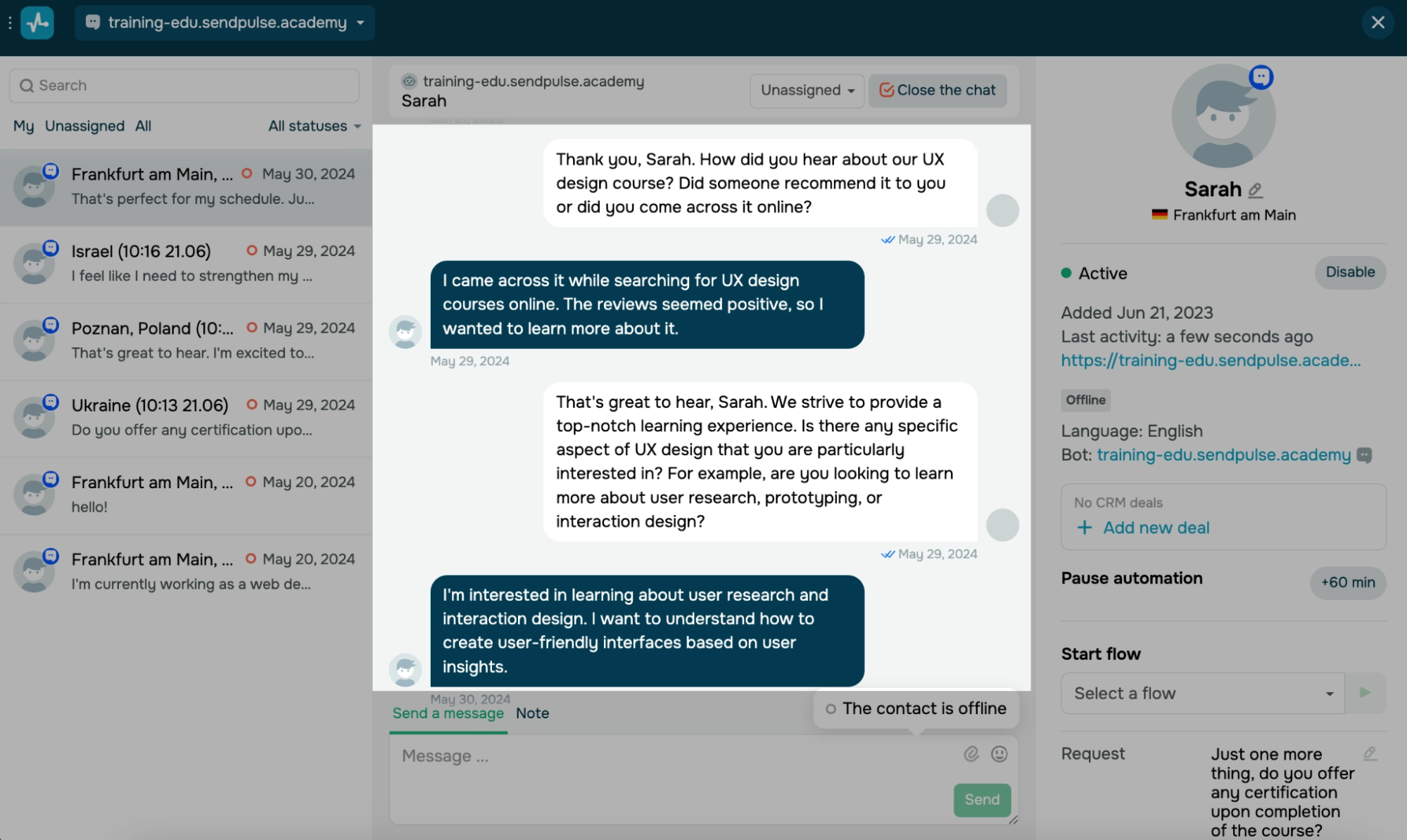 Navigating live chat conversations in a joint inbox in SendPulse
Incoming chat conversations can be distributed to agents either automatically or manually. Rules can route chats based on criteria like topic, language, customer status, or availability, while manual assignment gives team leads more control during peak hours or special cases. Even though the conversation is “live,” automation still plays a role — navigation buttons, quick replies, and canned responses help both users and agents avoid excessive typing.
Behind the scenes, live chat platforms typically provide agents with a single inbox and detailed customer profiles. This means every interaction is stored in one place, giving agents full context before they reply. Instead of asking customers to repeat themselves, reps can pick up the conversation exactly where it left off.
The chat format itself is especially powerful for sales and pre-sales scenarios. Agents can ask clarifying questions, share links, recommend the right product or plan, and address concerns in real time — before frustration sets in or the buying mood shifts.
Boost conversions with live chats
Add a live chat widget to your website to answer your visitors’ questions, help them place orders, and accept payments. Your first 500 active live chat users and 10,000 monthly messages are free.
Get started for free
Side-by-side chatbot vs live chat feature comparison
Let’s discuss the pros and cons of live chat vs chatbots that matter most for customer support and revenue teams from a realistic, hype-free perspective.
| Feature |
Chatbots |
Live chat |
| Scalability |
Built to scale |
Scales linearly |
| Volume |
Excel at high-volume |
Better suited for low-volume, high-value exchanges |
| Working hours |
24/7 |
Limited to actual working hours |
| Privacy |
Depends on guidelines and configuration |
Depends on agents’ adherence to protocols |
| Accountability |
No personal accountability |
Clear personal accountability |
| Implementation |
Can be built in a visual low-code builder |
Can be embedded as a website widget or connected to a messenger |
| Customer preference |
Preferred for surface-level inquiries |
Preferred for complex matters |
| Resolving complicated issues |
Requires escalation |
Strongly preferred for high-priority interactions |
| Upsells and cross-sells |
AI-powered contextual product recommendations |
Psychological selling for high-commitment purchases |
Scalability
Chatbots. A single bot can handle thousands of conversations simultaneously without performance drops or added cost. Some chatbot building platforms offer unlimited monthly messages and flows, with the only extra charge being WhatsApp Business messaging fees. This makes chatbots ideal for fast-growing businesses, seasonal traffic spikes, and global audiences.
Live chat. More conversations require more agents, which means higher costs, onboarding time, and scheduling complexity. Live chat scales best when paired with automation that filters and prioritizes requests as well as empowers users to troubleshoot their issues through self-service resources.
Conversation volume
Chatbots. Excel at high-volume, repetitive inquiries such as FAQs, order status, account actions, and basic troubleshooting. They never queue and never get overwhelmed. However, if the large language model powering the bot isn’t run locally, it relies on a third-party AI provider for availability, speed, and uptime. That means response quality and latency can be affected by external outages, rate limits, or service disruptions outside your direct control.
Live chat. Better suited for lower-volume, higher-value conversations. As volume increases, wait times become bothersome unless you have strong routing and staff in place. When it comes to infrastructure constraints, which used to be a common scaling bottleneck, they aren’t as expressed with modern live chat solutions. For instance, SendPulse offers unlimited live chats even on lower tiers, which allows small businesses to grow their support operations without worrying about hitting conversation caps or paying extra for every additional interaction.
Working hours
Chatbots. Available 24/7 by default. They provide instant responses across time zones and outside business hours, ensuring customers are always acknowledged. Chatbots can also be set up to automatically take over customer conversations once your human agents are off the clock, providing non-stop coverage.
Live chat. Typically limited to business hours unless you maintain round-the-clock staffing, which can be costly. After-hours coverage can rely on chatbots or fallback forms, which capture user intent and preserve it for the next available agent.
Privacy and sensitive data safety
Chatbots. Offer high consistency and rule-based handling of sensitive data. The humans behind the bot have full control over what kind of information their bot requests. Still, when using AI agents, especially those powered by large language models like ChatGPT, customer inputs may be processed for model improvement or learning purposes, depending on configuration and provider policies. This can be a concern if you are in one of the highly regulated or sensitive niches such as healthcare, legal services, or finance.
Live chat. Capable of handling sensitive issues, but outcomes depend on how well your agents adhere to protocols. Human error can still occur, especially in charged situations, but the transparency that chat logs provide allows teams to trace incidents back to the exact exchange, give targeted feedback, and update scripts and guidelines.
Accountability
Chatbots. Highly predictable but lack personal accountability as they always follow predefined logic, scripts, and permissions. While this ensures consistency, it also means limited flexibility when something falls outside the guidelines. When your bot makes a mistake, it cannot recognize or correct that error in real time unless it’s explicitly flagged by a customer or escalated to a human agent. This absence of awareness can lead to repeated errors until the flow or model is manually adjusted.
Live chat. Clear accountability lies with the agent. Humans can take ownership, make judgment calls, and adapt. A properly trained agent can acknowledge their mistakes, course-correct mid-conversation, and take responsibility for outcomes — which is crucial for improving the customer experience.
Ease of implementation
Chatbots. Modern low-code builders allow anyone without a technical background to build and deploy bots faster than ever, especially for rule-based bots. However, designing complex flows and training AI to handle inquiries like a seasoned industry expert still comes with a learning curve.
AI is only as good as the data behind it. Without quality data, even the best AI tools will struggle to deliver value.
SourceVladyslav Bohachenko
Head of Sales at RAI
Live chat. Quick to set up at a basic level by embedding a widget on a website or connecting a business messenger channel to the live chat software. You may see difficulty increase once aspects like routing logic, CRM integration, and omnichannel support are introduced.
Customer preference
Chatbots. Preferred for quick answers and simple tasks, in particular when speed matters more than depth. At least 54% of customers appreciate AI support bots, especially when they “just work” and don’t block access to humans.
Live chat. Strongly preferred for complex, emotional, or high-stakes interactions. Customers tend to trust human agents more when making decisions or resolving problems, partially because of the aforementioned accountability aspect. 57% of customers cite the inability to speak to a real person as the main issue with using AI in retail.
Always keep the human element when using AI, or it can hallucinate. Relying on AI without oversight can quickly harm your company’s reputation.
SourceNrupesh Soni
Founder at Facilit8 Namibia
Ability to solve complicated inquiries
Chatbots. Limited by predefined logic or AI confidence. While they can collect context and suggest solutions, truly complex or unusual cases often require agent intervention.
Live chat. Excels here. Human agents can interpret ambiguity, ask follow-up questions, and resolve edge cases that automation can’t reliably handle.
Upsell and cross-sell potential
Chatbots. Effective for structured, rule-based upsells, such as plan upgrades, add-ons, or promotions triggered by user behavior. Chatbots can provide AI-powered product recommendations based on subtle context cues, so there’s no need for agent involvement.
Live chat. Stronger at consultative selling. Human reps can read intent between the lines, adapt their pitch on the fly, reframe value based on customer priorities, appeal to their personal expertise, and build trust through dialogue, which is often the deciding factor in big-ticket purchases.
How to choose between chatbots vs live chat
Knowing how live chat compares to chatbots makes it easier to match the tool to the task — or to combine their strengths into a single, cohesive support flow.
When should your business use chatbots?
Here’s a quick overview of common use cases where intelligent bots clearly excel and help dramatically reduce team workload:
- Handling repetitive questions. Chatbots are ideal for answering repetitive questions about pricing, features, policies, shipping, availability, or account basics. AI-powered bots can understand varied phrasing and still return the right answer.
- Responding outside of business hours. Bots provide instant responses outside business hours, capturing requests, sharing help resources, and setting expectations for follow-up — instead of letting inquiries pile up overnight.
- Capturing and qualifying leads. Chatbots can ask structured questions, segment leads, and collect contact details automatically. AI helps interpret open-ended replies and route prospects based on intent and fit.
- High-volume peak periods. During launches, promos, outages, or seasonal spikes, bots absorb the surge in conversations and prevent agent overload by resolving routine requests automatically.
- Order status and account lookups. For common self-service checks, bots can guide users through verification steps and deliver instant answers without agent involvement.
- Guided onboarding flows. Chatbots can walk new users through setup steps, feature discovery, and first actions using interactive prompts and adaptive AI explanations.
- Basic troubleshooting. AI-powered bots can ask diagnostic questions, suggest fixes, and link relevant resources without escalation. This is the foundation of a chatbot for IT support — structured automation that resolves common helpdesk requests like account access, software setup, and error troubleshooting before a human agent ever needs to step in.
- Standardized upsell and cross-sell offers. Chatbots can trigger upgrades, add-ons, and promotional offers based on common usage signals or behavior patterns.
- Data collection before agent takeover. Bots can gather context, screenshots, preferences, and problem descriptions before handing off, which shortens resolution time for human reps.
At the very least, a bot can take on the role of a receptionist, greeting visitors, asking the right first questions, collecting essential details, and directing an inquiry to the right destination or even resolving it on the spot.
When should your business use live chat?
As already mentioned, live chat is anything but obsolete — it remains one of the most effective channels for real-time, high-impact customer communication. Here are some examples:
- Addressing complex or non-standard issues. Live agents are best equipped to handle layered problems, edge cases, and situations that fall outside of the norm. They can investigate, clarify, and make flexible decisions.
- High-value and high-ticket sales. When purchases are expensive or strategic, customers often want reassurance from a real person. Agents can explain trade-offs, tailor offers, share their first-hand experience, and build trust during the decision process.
- Personalized guidance. Live chat shines when customers need help choosing between options. Agents can ask probing questions, sense the customer’s mood, and guide them to the best-fit product or plan based on nuanced needs.
- Handling objections and hesitation. Human reps can recognize doubt, confusion, or resistance and adjust their messaging on the spot — something automation struggles to do reliably.
- Sensitive or emotionally charged situations. Billing disputes, complaints, cancellations, and service failures are better handled by humans who can show empathy and take ownership of outcomes.
- Negotiation and custom terms. When deals involve special pricing, bundles, or exceptions, agents can evaluate context and make judgment calls within company guidelines.
- VIP and priority support. Premium customers often expect direct human access. Live chat enables personalized, high-touch service that strengthens those long-term relationships.
- Real-time guided conversions. Agents can walk customers through checkout, setup, or configuration steps live, setting them up for success — the invested time pays off in reduced drop-offs.
- Cross-channel conversation continuity. With a unified inbox and customer history, live agents can continue conversations that started via bot, email, or social messaging without losing context.
- Quality recovery after bot fallback. When AI fails, live chat acts as a safety net, correcting misunderstandings and restoring customer confidence.
Oftentimes, the very fact that human reps take responsibility for their responses gives customers immediate peace of mind as they realize that their concerns are in the hands of someone who can understand, adapt, and own their mistakes.
The benefits of combining live chat with chatbots
A hybrid approach means a support system powered by both automation and human judgment. It’s the optimal way to go if you’re looking to expand support coverage without necessarily growing headcount.
Firstly, you can distribute the load between agents and bots without compromising quality by letting bots handle routine FAQs while agents focus on complex issues. Smooth, rule- and trigger-based handoffs ensure your customers experience the best of both worlds.
Secondly, a hybrid setup preserves context across channels. Information collected by the bot is seamlessly passed to the agent, so customers never have to repeat themselves. Automation platforms like SendPulse allow you to view customer interactions in a unified inbox, which creates a complete picture of each customer’s journey. This full visibility helps support, sales, and marketing teams stay on the same page.
Finally, bots can be configured to reliably capture contact and deal data and register it in your CRM system. Human reps can rely on that data to initiate campaigns, follow up with high-potential leads, or deliver targeted messaging without wasting time on manual data entry.
Create seamless customer experiences
Our chatbot builder, email and SMS tools, and pop-up builder help businesses automate customer interactions while keeping things personal. Seamlessly save and store data from each conversation in our built-in CRM system. Try it out today!
Get started for free
How to implement live chat and chatbots with SendPulse
If you’re looking for a beginner-friendly conversational automation, SendPulse may be the optimal solution as it empowers you to build and launch chatbots and live chat widgets in literal minutes. Moreover, you can effortlessly combine the two for a truly fail-proof support system.
Setting up a chatbot
To get started, create or log in to your SendPulse account, open the “Chatbots” tab, select the channel for your new chatbot, such as Telegram, WhatsApp, Instagram, TikTok, or Facebook, and click “Connect.” If you just want to automate website chat conversations, choose live chat as your primary channel.
You’ll need to link your business account to SendPulse by following channel-specific instructions. After that, you can start designing flows and triggers for your bot — events or keywords that should initiate the bot, as well as introductory and standard reply flows. Add buttons or quick replies to help your users navigate the bot with ease.
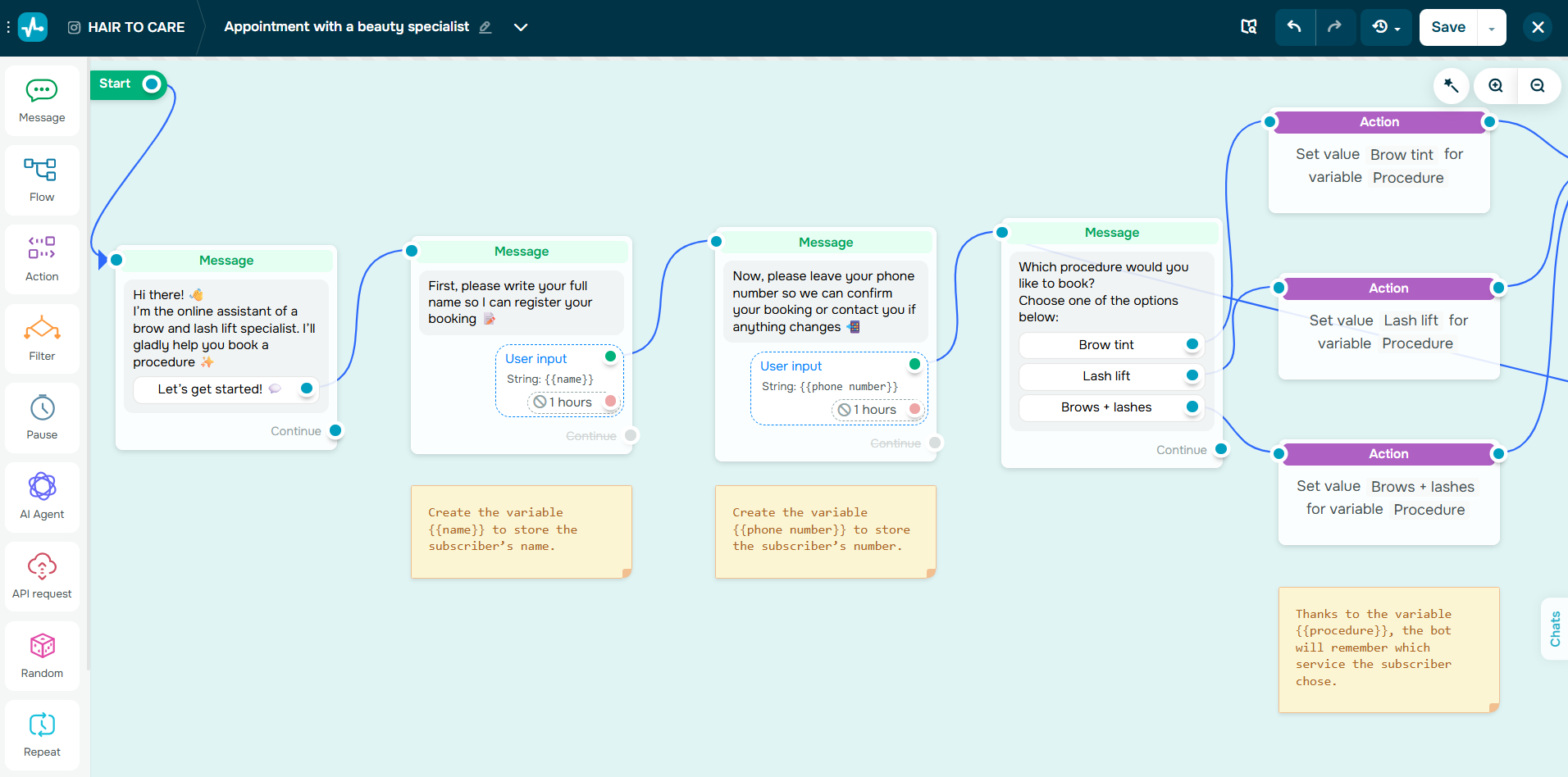 Designing a flow to capture user data in a chatbot conversation
The user data received by the bot can be saved as variables, transferred to the built-in CRM system, used to kick off automation campaigns, or even to enroll the user into an online course.
You can integrate your bot with ChatGPT, Claude, or other LLMs and configure them to mimic your brand voice and rely on your knowledge base to advise customers. There’s an option to set up a handoff to particular agents at any point in a chatbot flow by using the “Action” element.
Adding a live chat widget to a website
Firstly, create or log in to your SendPulse account and navigate to the “Chatbots” tab. Select live chat and hit “Connect.” Customize the appearance of your live chat widget and add it to your website via the generated installation code.
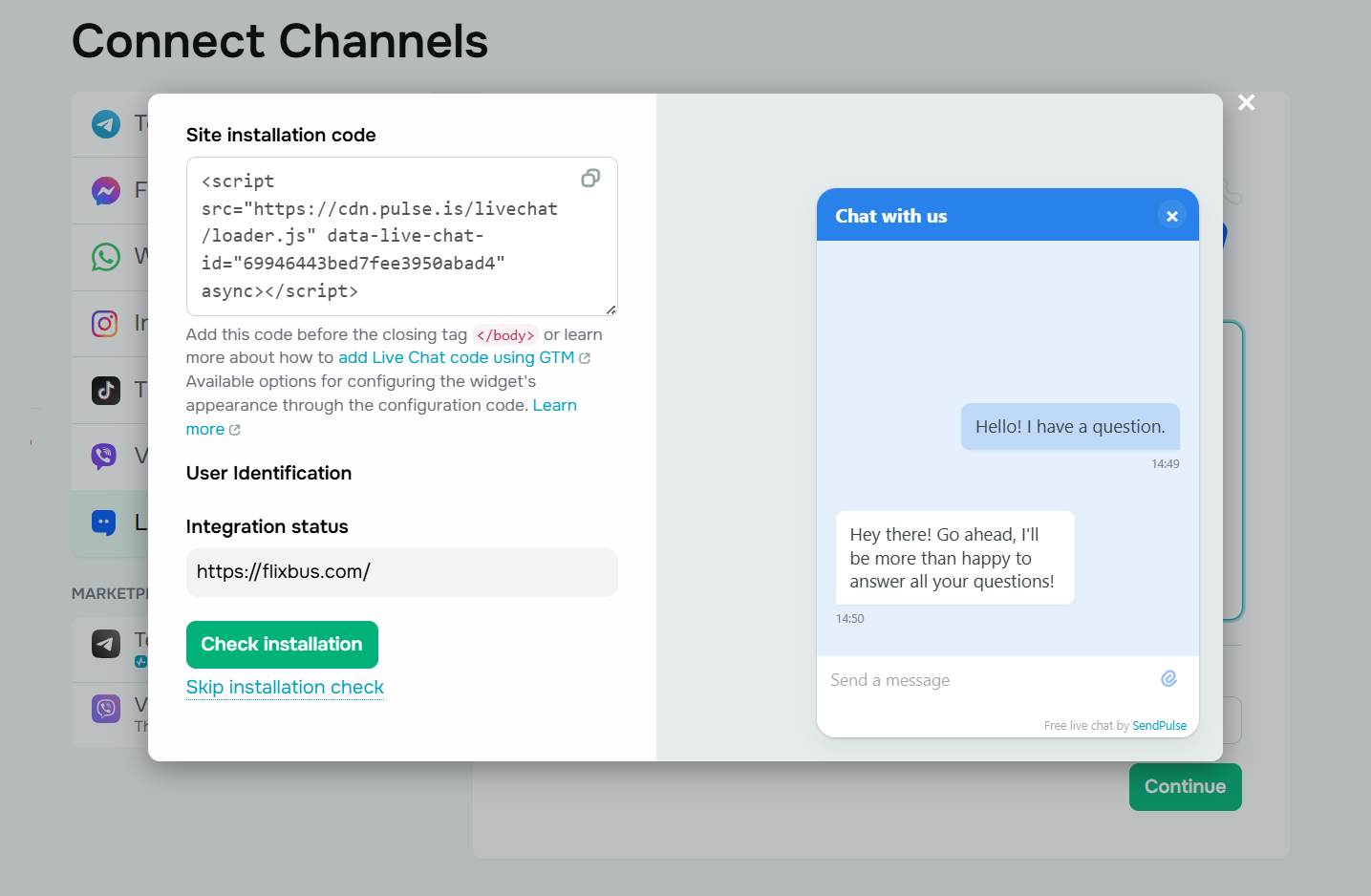 Copy the installation code to add a live chat widget to your website
Once the widget is successfully embedded, you can proceed to set up standardized flows and triggers for your chat, for instance, to greet new visitors and introduce your team or bot. These can be designed in a drag-and-drop builder.
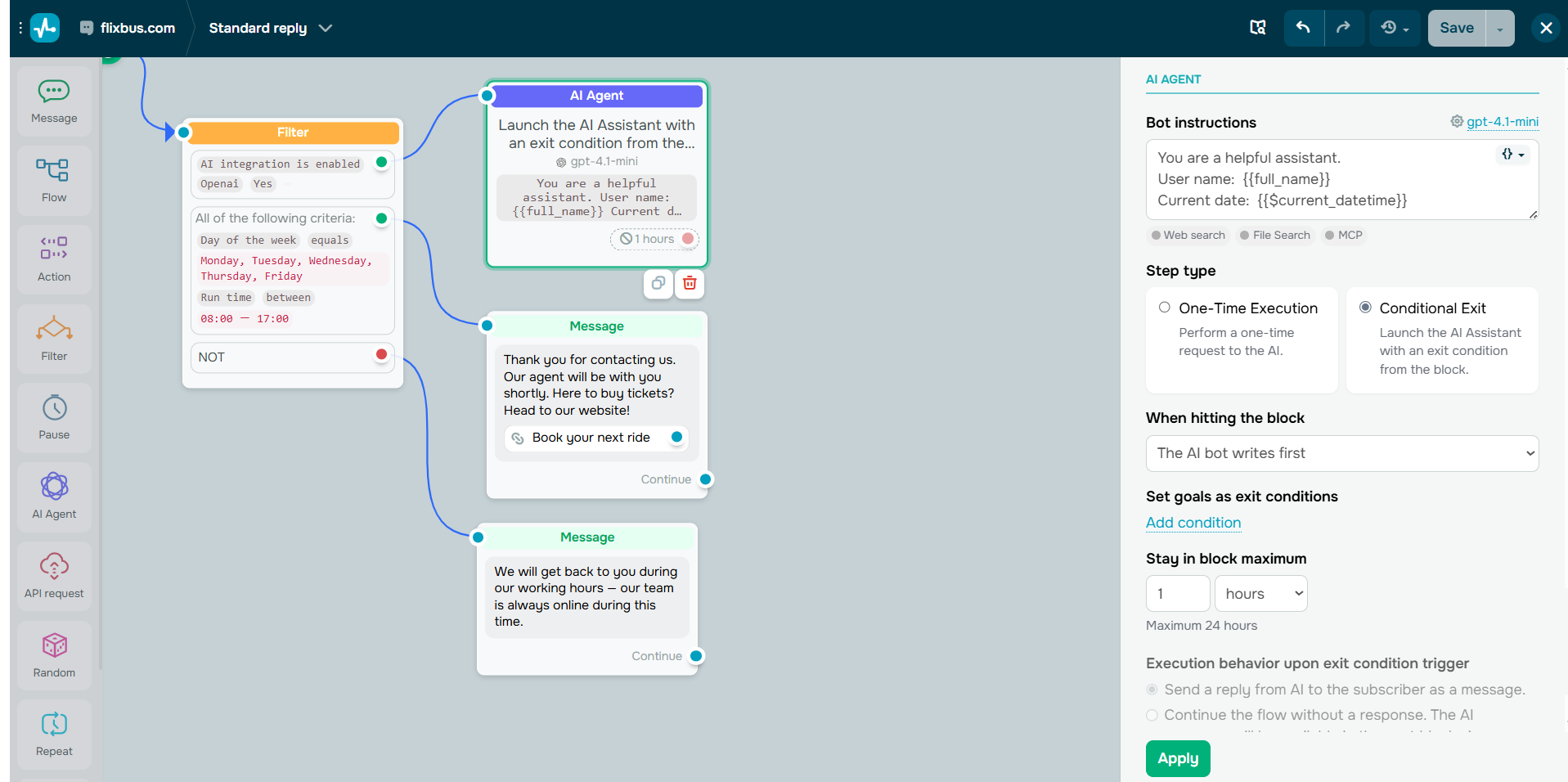 You can incorporate AI into your live chat flows
You can decide where and when to initiate an AI agent to take over common inquiries. The “Action” element allows you to pause automation and escalate chats to assigned agents. To get an overview of all live chat conversations, head to the “Bot chat” or “Conversations” tab. There, you can review chats assigned to you or other agents.
Live chat and chatbot best practices
Whether you opt for an AI-first chatbot or choose a hybrid solution, there are a few practices that can prevent misunderstandings and overlaps down the road.
- Draw a clear line. Always let users know when they’re talking to a bot versus a human agent. Specify the active hours for each.
- State the purpose. Clearly explain what the chatbot can and cannot do. Transparency builds trust and sets proper expectations.
- Maintain a recognizable tone of voice. For brand consistency reasons, your bot should speak in the same tone as your agents.
- Regularly update your knowledge base. This applies both to bots and agents who must rely on up-to-date assets and guidelines for accurate, consistent support.
- Respect user data. Include links to your privacy policy if sensitive data may be collected. Avoid sending personal data to third-party AI providers without proper safeguards.
- Initiate AI where it adds value. Consider pre-defined flows, as they offer more control, along with saving on AI credits.
- Introduce clear navigation. Any chatbot widget can benefit from menus, buttons, or quick-reply options that guide users through available actions or toward self-service resources.
- Provide easy escalation paths. Make sure users can reach a live agent at any point instead of getting stuck with irrelevant AI replies.
- Gather in-chat feedback. Request a quick satisfaction rating or Net Promoter Score immediately after each interaction to keep improving the support system.
- Monitor and optimize both sides. Use chat analytics to identify gaps, retrain AI or human agents, and improve both response time and quality.
With the right chat automation software in place, these practices become a second nature. For instance, SendPulse provides you with clear instructions on how to configure your AI model, track live chat events, specify handoff rules, navigate contact cards in your CRM, and more.
Merging artificial and human intelligence
Why throw all your eggs in one basket when you can design a support experience that does it all? Chatbots and live chat aren’t competing forces but complementary tools, and, with a unified platform like SendPulse, you won’t have to choose between them.
Enhanced by the integrated CRM system, email automation, website builder, and pop-ups, it’s an all-in-one solution for your sales and marketing automation needs. Create your free account today and give it a go!