Run a flow when a user orders from your WhatsApp catalog
In WhatsApp chatbots, you can run flows automatically when a subscriber places an order through your WhatsApp catalog. This helps you process inquiries, send confirmations, and follow up when needed.
In this article, we will talk about how the Catalog order trigger works and how to set it up.
You can use the Welcome message, Standard reply, and Unsubscribe from bot standard triggers in any chatbot. To create your own triggers, use keywords and Automation 360 events.
Read more: Create a new chatbot flow trigger.
Go to your WhatsApp chatbot, and click Catalog order in the WhatsApp section. To activate the trigger, turn on the toggle. To fire the trigger again, click Edit trigger.
Сlick Edit the flow.
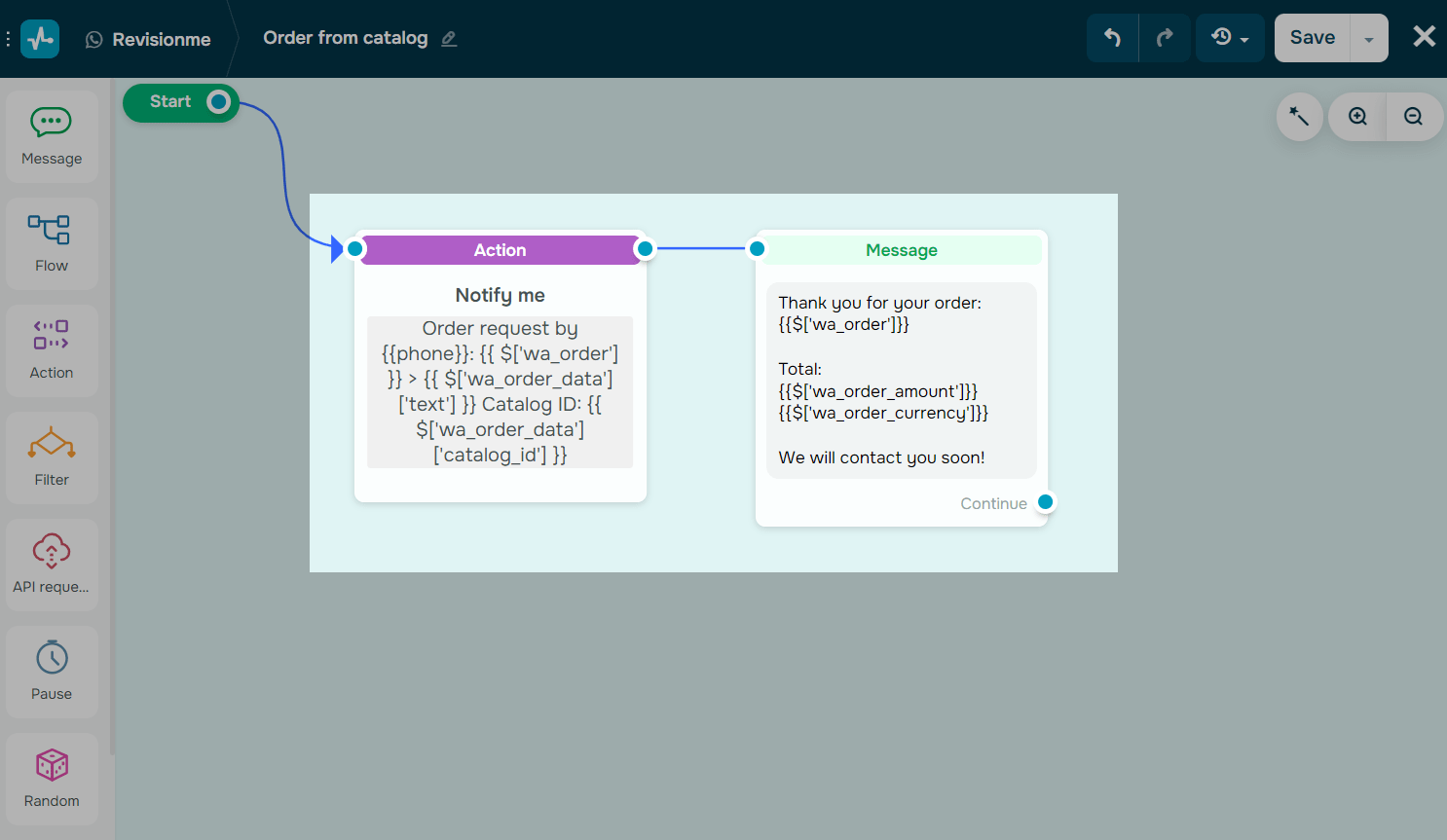
At the start of your flow, you will see the Action element with the Notify me command and an automated reply. You can also add order variables as JSONPath.
Read more: How to create a flow triggered by a catalog order and How to create an automated flow for WhatsApp chatbot.
 Last Updated: 26.11.2025




or