Buy and use AI credits
With AI credits, you can use AI features in SendPulse tools without your own API key. SendPulse connects to OpenAI, Anthropic, Google Gemini, and DeepSeek models for you and charges credits for each AI request.
For example, you can work with models from several AI providers in one place, without buying access and setting up an API key with each of them.
Let's talk about how to buy AI credits, spend and track them, manage your subscription, use your own API key instead, and integrate your AI client with SendPulse.
Benefits and use cases
With AI credits, you can do the following:
- choose OpenAI, Anthropic, Gemini, or DeepSeek models in the same AI window;
- see how many credits each request took;
- keep your own API keys for some providers and use credits for the others.
Here's how businesses can use AI credits:
- An online store shortens and translates sale email copy in the email template builder.
- An online school generates assignments and drafts reviews of student work in the online course builder.
- A marketing team builds an automated flow with the AI assistant in Automation.
AI credits suit marketers and business owners who don't have a paid account with an AI provider, and freelancers who'd rather not manage API keys.
Read more: Improve or generate your email copy with AI, Generate an assignment using AI, Create an automated flow using AI.
AI credits basics
Before you buy a package, check how SendPulse grants, charges, and renews credits:
| Free credits |
SendPulse grants 100,000 free credits once to new accounts when they register and to existing accounts that are active. Free credits don't expire unless you get AI credits as a gift with a pricing plan. Then they join those credits and expire if the subscription ends without renewal. |
| Packages |
A package is a monthly subscription: 3m credits for $15, 12m credits for $60, or 20m credits for $100. SendPulse shows the price in your account currency. |
| Charges |
SendPulse charges credits for each AI request based on the model and the length of the text you send and get back. If a generation fails, SendPulse doesn't charge credits. |
| Validity |
A package is valid for one month. When your subscription renews, unused credits carry over to the next month, but if it expires without renewal, you can't use them. |
| Payment | You pay for packages from your account balance or using another payment method in the cart. |
| Bonuses and discounts | The bonus balance, startup bonuses, and referral discounts don't apply to AI credits. |
| Refunds | When you switch to another package, SendPulse doesn't refund the current one. |
AI credits work with AI features across SendPulse tools. To see what you can do with AI in each tool, read Use AI in SendPulse tools.
Buy AI credits
To keep using AI after your free credits run out, buy a package. Wherever you buy it, SendPulse charges the price to your account balance. If the balance doesn't cover it, you pay the rest in the shopping cart.
Pay from your account balance
To buy a package, go to Account settings > AI tools. In the Corporate limits section, click Activate subscription. If you already have a package, click Upgrade plan.
In the pop-up window, choose a package in the Number of credits list. Click Activate and confirm the action.
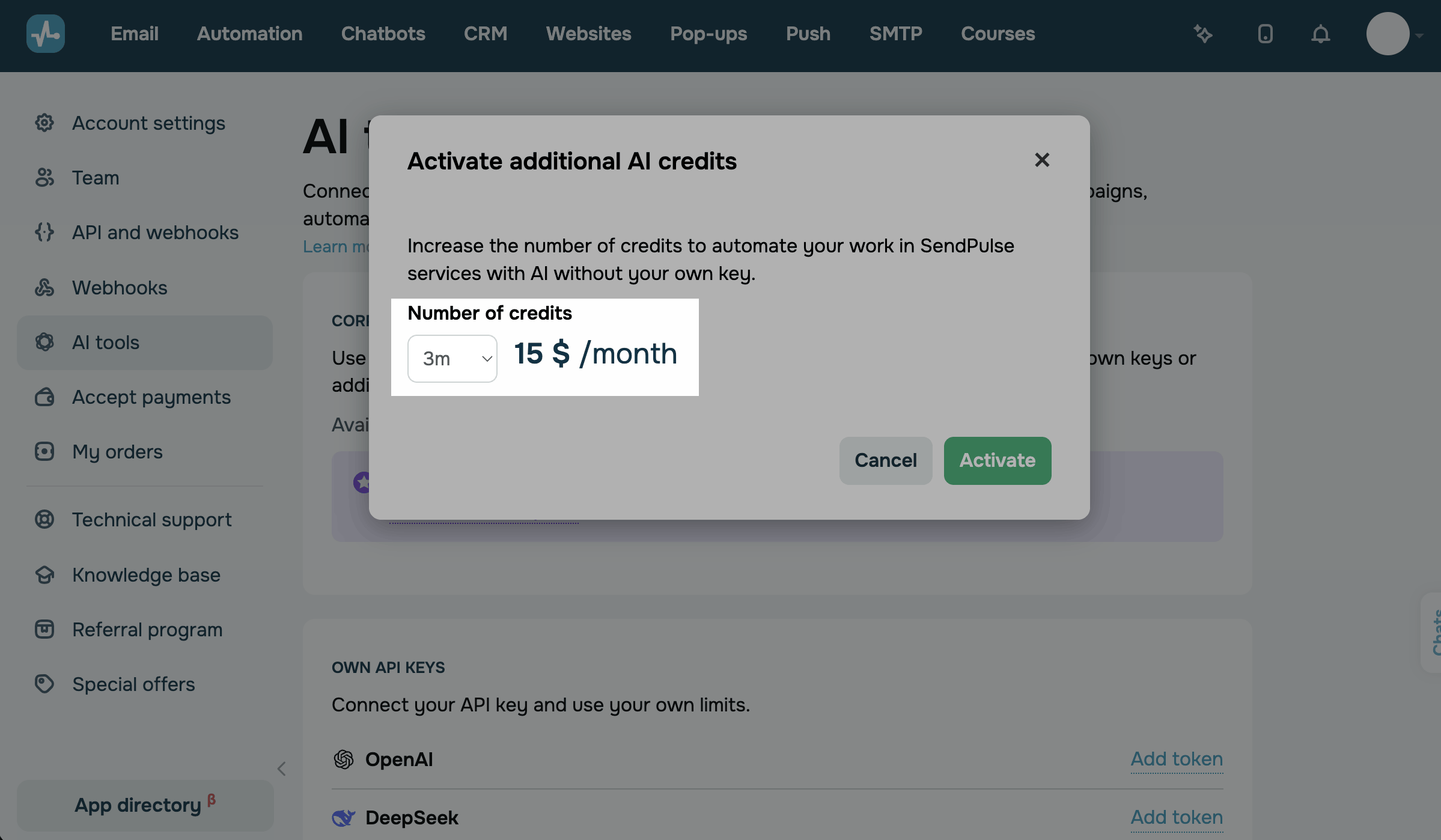
If your account balance covers the price, SendPulse charges it, and the package becomes active.
Pay in the shopping cart
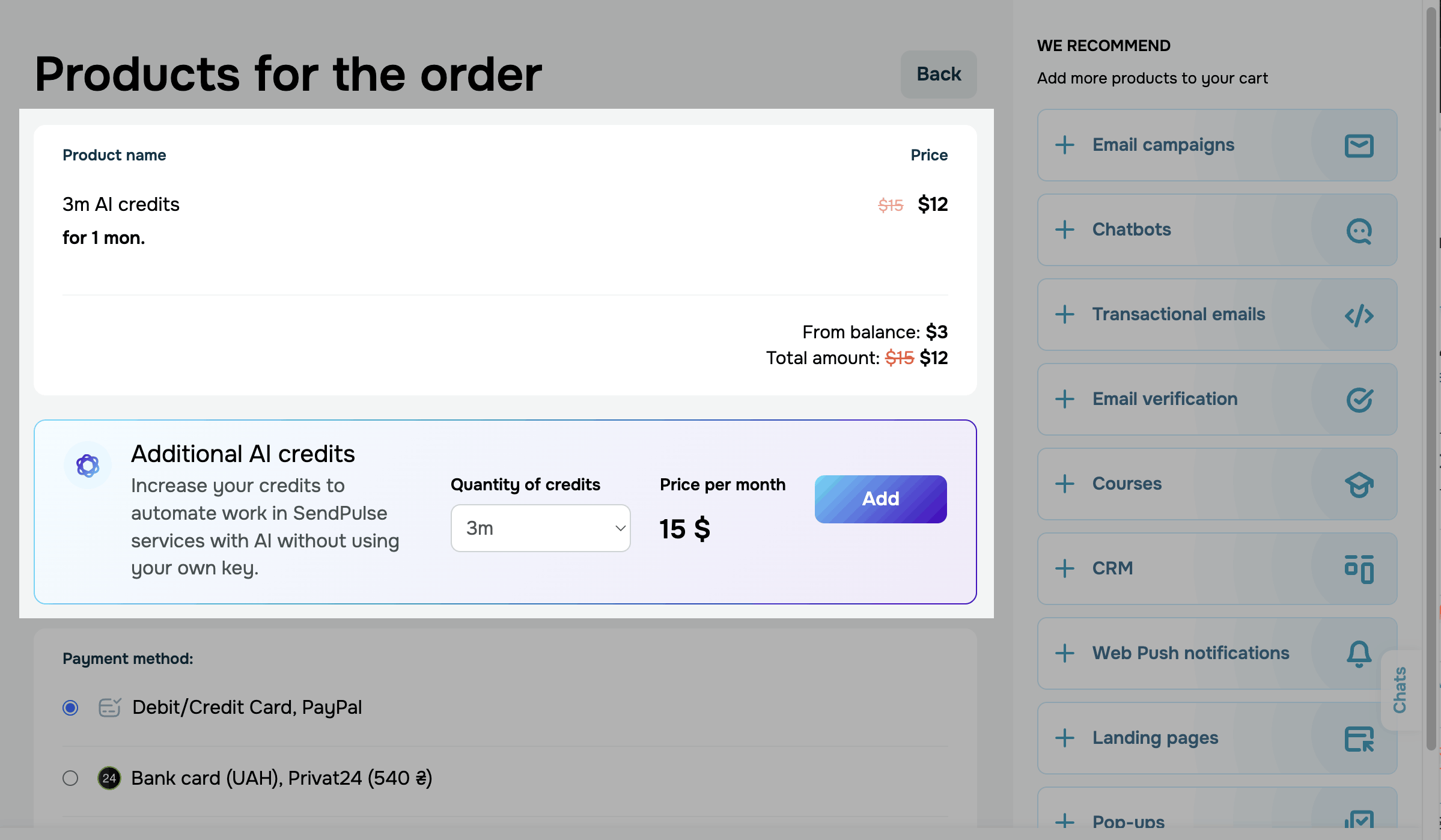
If your account balance doesn't cover the price, SendPulse redirects you to the shopping cart, where you can choose another payment method.
In the cart, From balance shows how much SendPulse takes from your balance, and Total amount shows how much you pay with another method.
The payment methods in the cart depend on your account's country and currency.
For example, you can pay by card or cryptocurrency, pay on behalf of an EU VAT-registered company, or use local payment methods.
Once your payment goes through, the package becomes active.
Read more: Purchase a pricing plan, Pay for the SendPulse tools with cryptocurrency, Get an invoice.
Pay on a pricing page
You can also buy credits on the pricing page of a SendPulse tool. Go to the tool you need and open the Pricing plans tab. Find the Additional AI credits banner, choose a package in the Quantity of credits list, and click Activate.
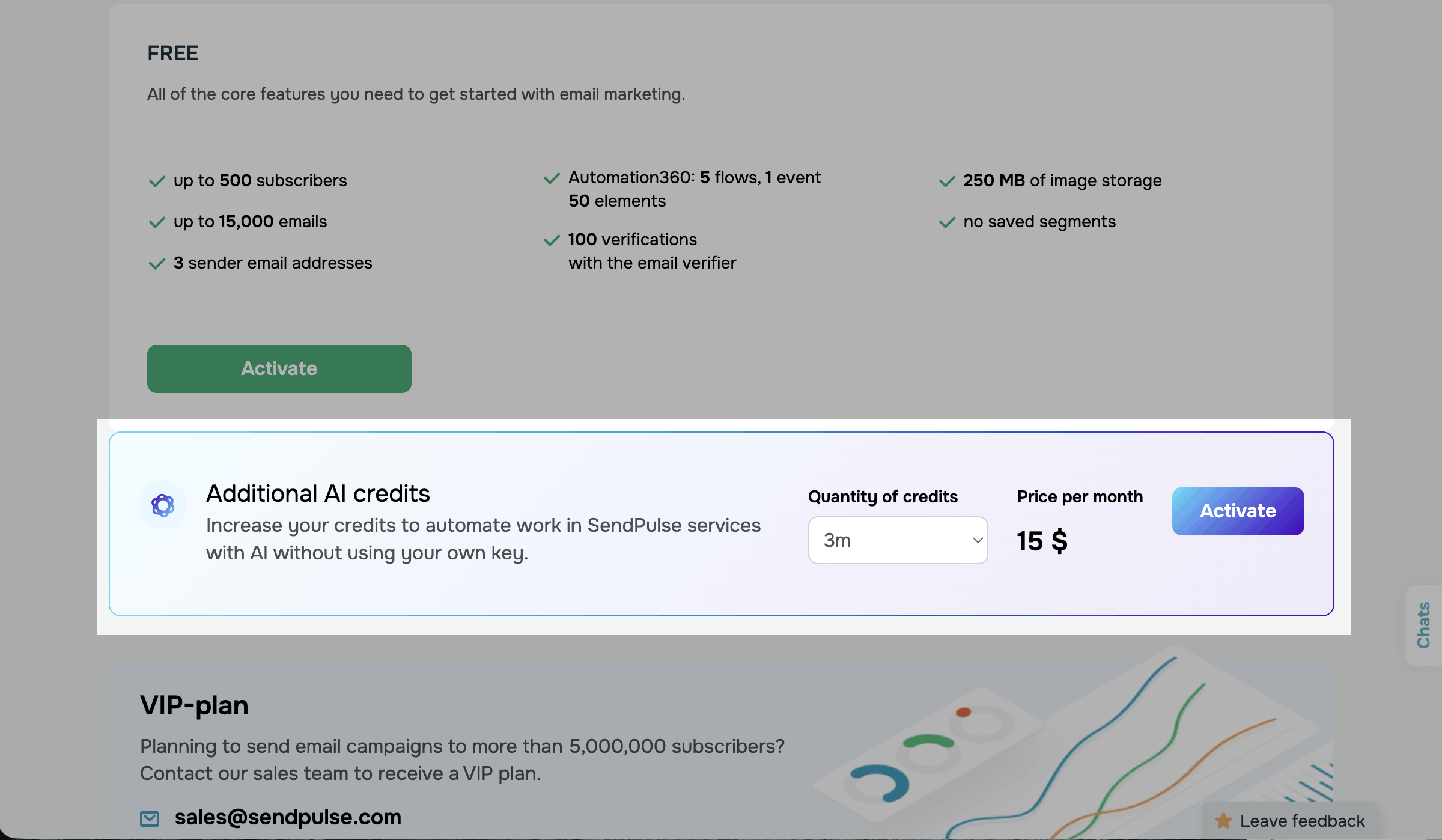
If your balance covers the price, confirm the action, and the package becomes active. If it doesn't, SendPulse redirects you to the shopping cart.
The shopping cart also shows the Additional AI credits banner. To add credits to your order, choose a package in the Quantity of credits list and click Add.
Choose an AI model and spend credits
To spend credits, select a model that runs on SendPulse credits in an AI window.
For example, here's how it works in the email template builder.
Go to Email > Email templates and open a template. Click a Text element, and in the toolbar, click Use AI. The Improve your text with AI window appears.
To choose a model, click the current model name to the right of the action buttons. Select OpenAI, DeepSeek, Anthropic, or Gemini, and then select a model.
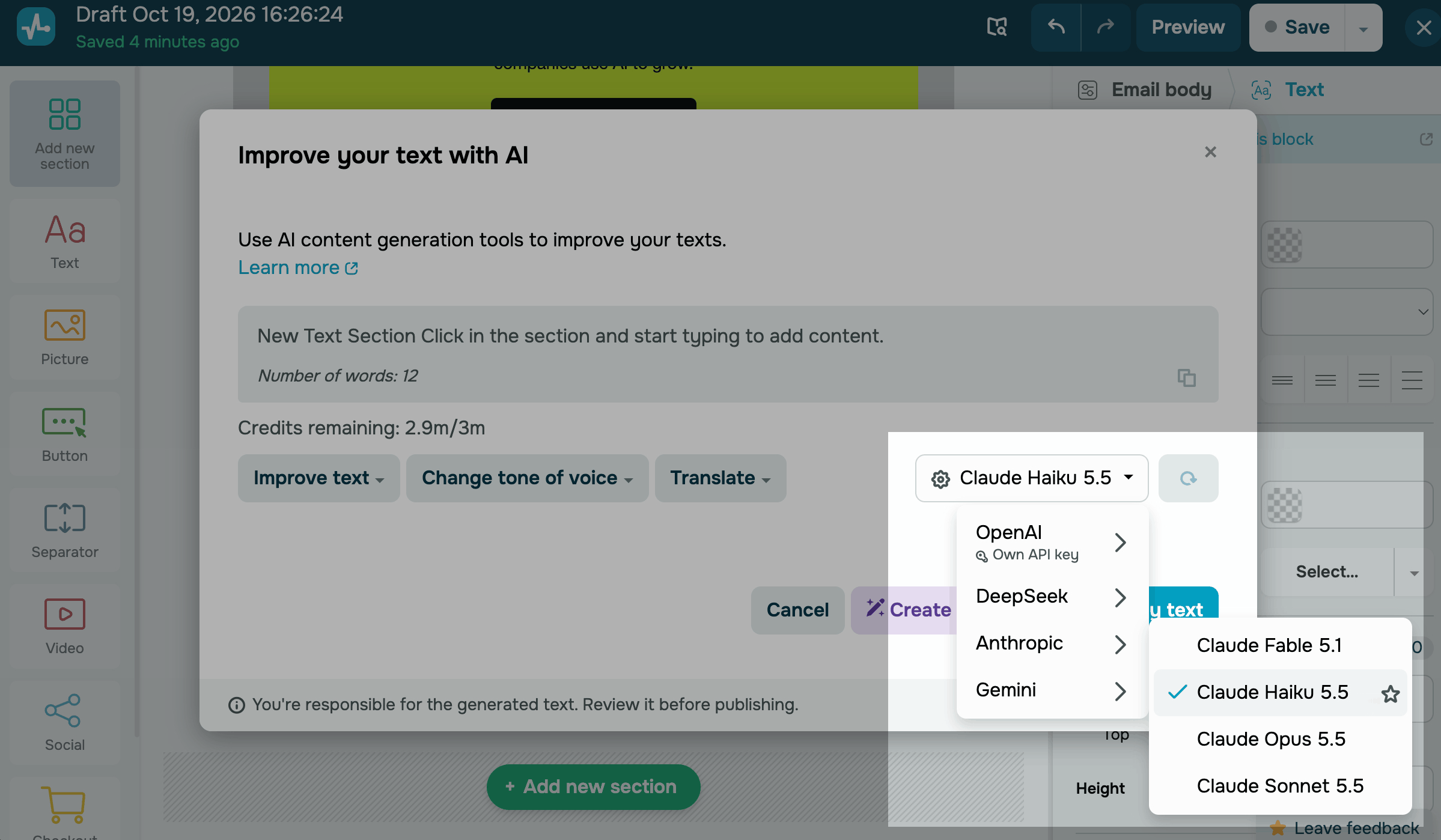
When you select a model that runs on SendPulse credits, Credits remaining appears in the window with your balance.
The same request can cost more credits with one model than with another.
If a provider is marked Own API key in the list, its models run on the key you've connected and don't spend credits.
If your balance doesn't cover a request, a message with the Activate AI credits link appears at the top of the window. To buy more credits, click the link.
If your balance reaches zero, the action buttons become unavailable for models that run on SendPulse credits.
Track your AI credits
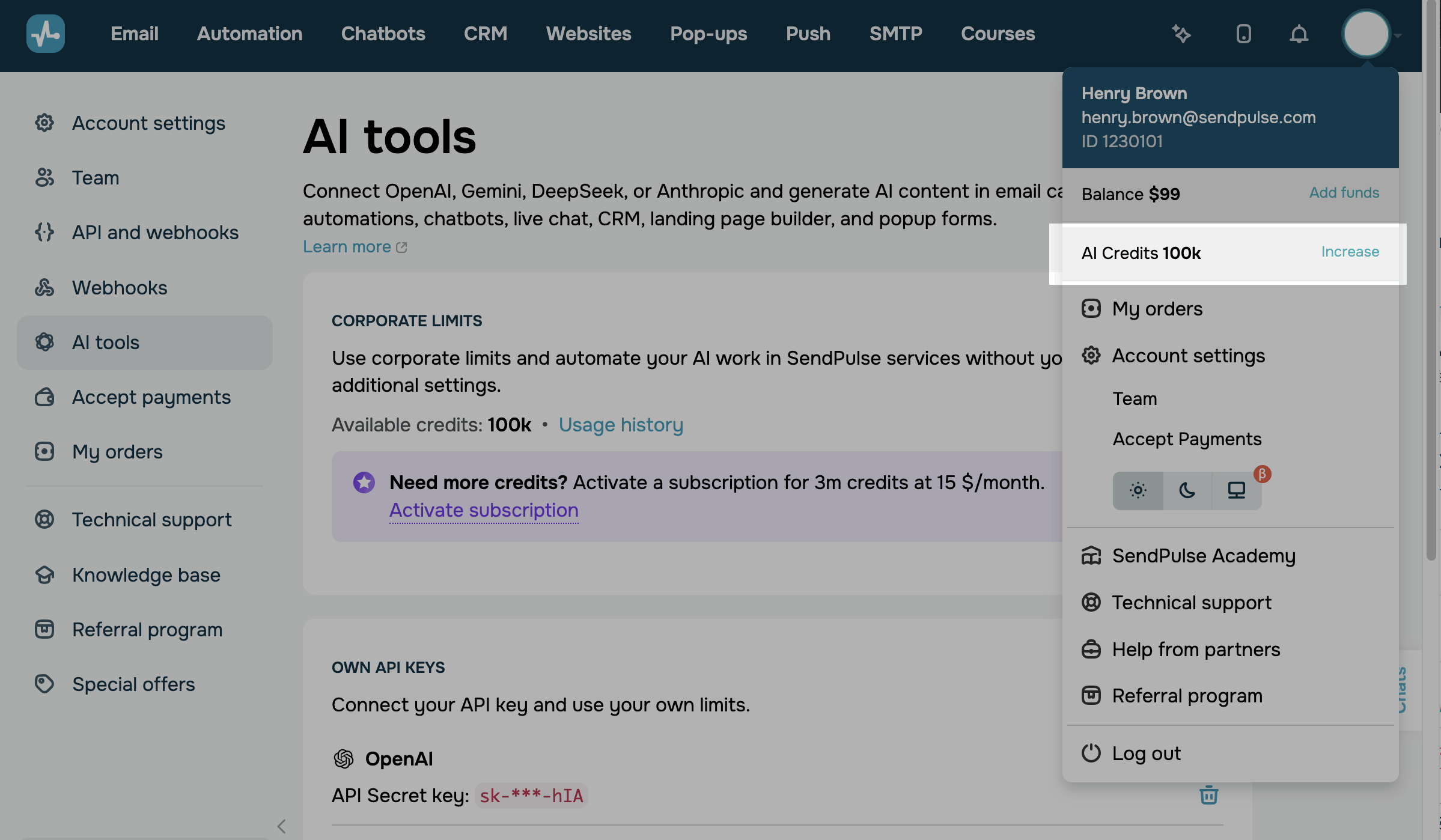
To plan your AI spending, keep track of your credit balance and usage history. Your balance appears on the AI tools page, in the menu under your profile picture, and on the Credit usage history page.
Check your credit balance
To see how many credits you have left, go to Account settings > AI tools.
The Corporate limits section shows your balance in one of the following ways:
| No package |
You're spending your free credits. To get more, click Activate subscription and buy a package. |
| Active package |
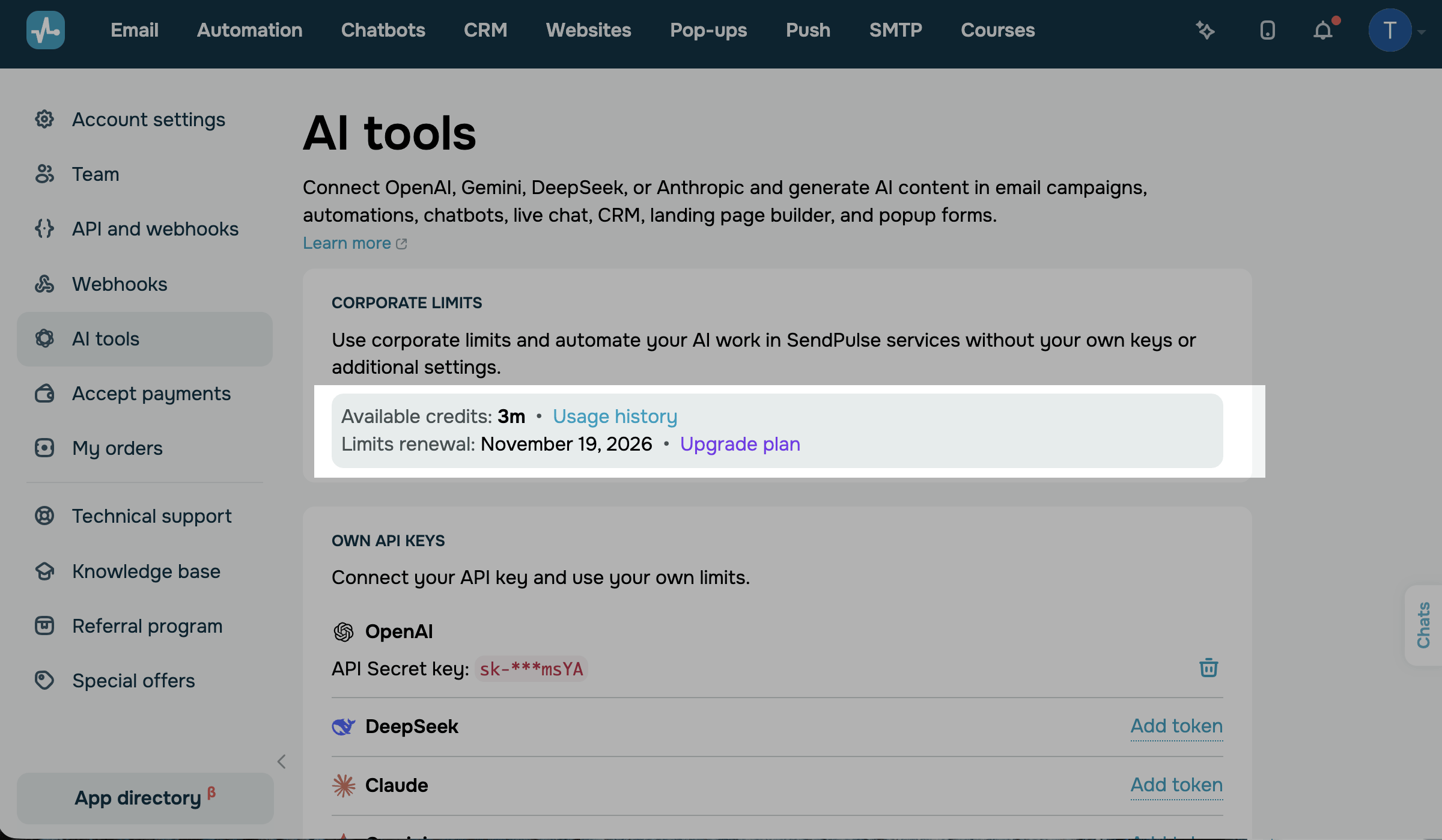
Your package renews on the date next to Limits renewal. To buy another package before then, click Upgrade plan. |
| Subscription expired |
Your package ended without renewal, so you can't spend the remaining credits. To use credits again, click Renew plan. |
SendPulse shortens large numbers. 1k stands for a thousand credits, and 1m for a million.
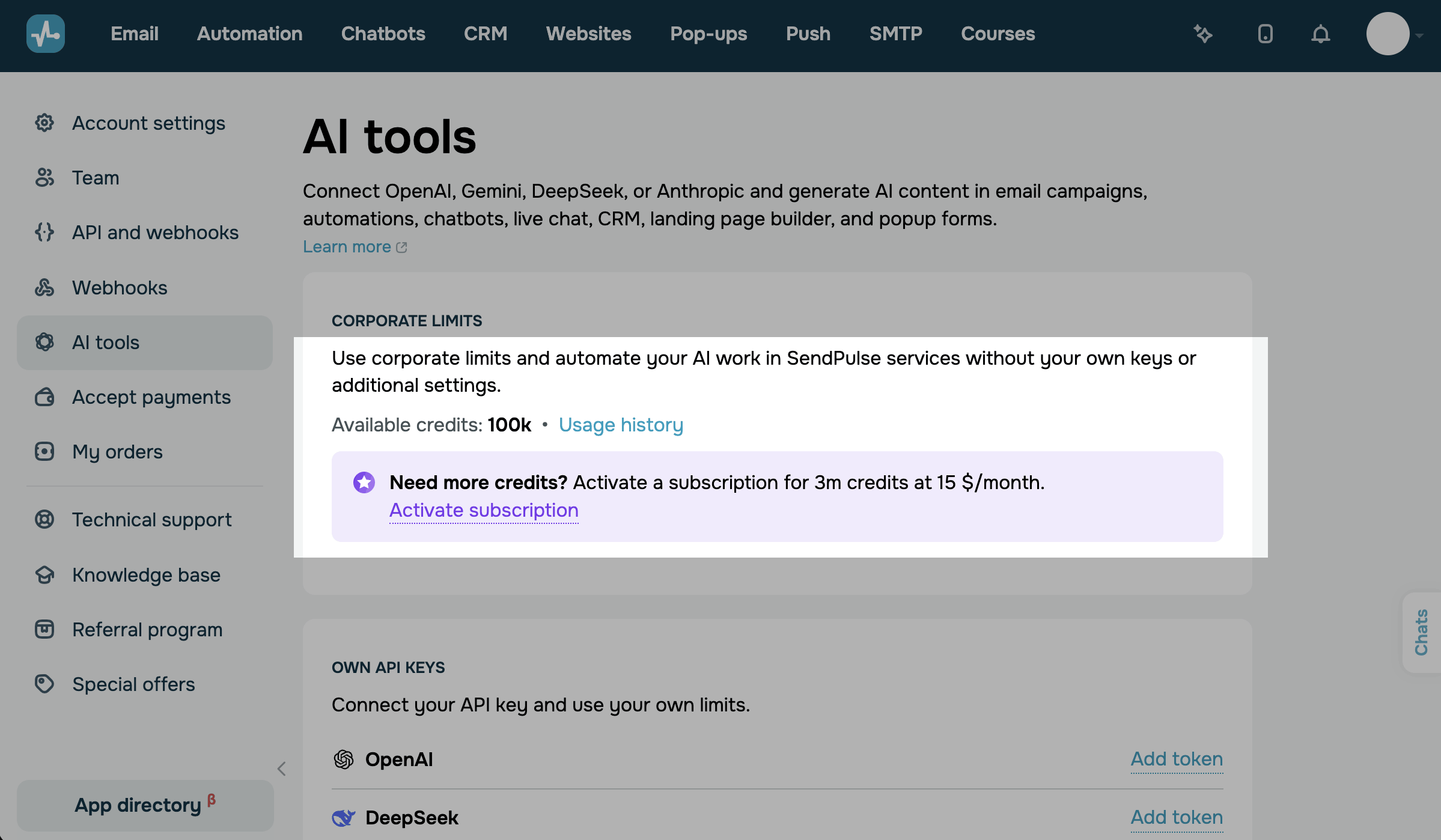
With an active package, Available credits shows your balance, and Limits renewal shows the date of the next renewal.
To check your balance on any page, click your profile picture in the upper-right corner. The AI Credits shows your current balance. Click it to open the AI tools page.
To buy a package, click Increase.
View your credit usage history
To see how many credits each request took, open your usage history.
Go to Account settings > AI tools. In the Corporate limits section, click Usage history. The table shows the date and time of each request, the model, and the number of credits SendPulse charged.
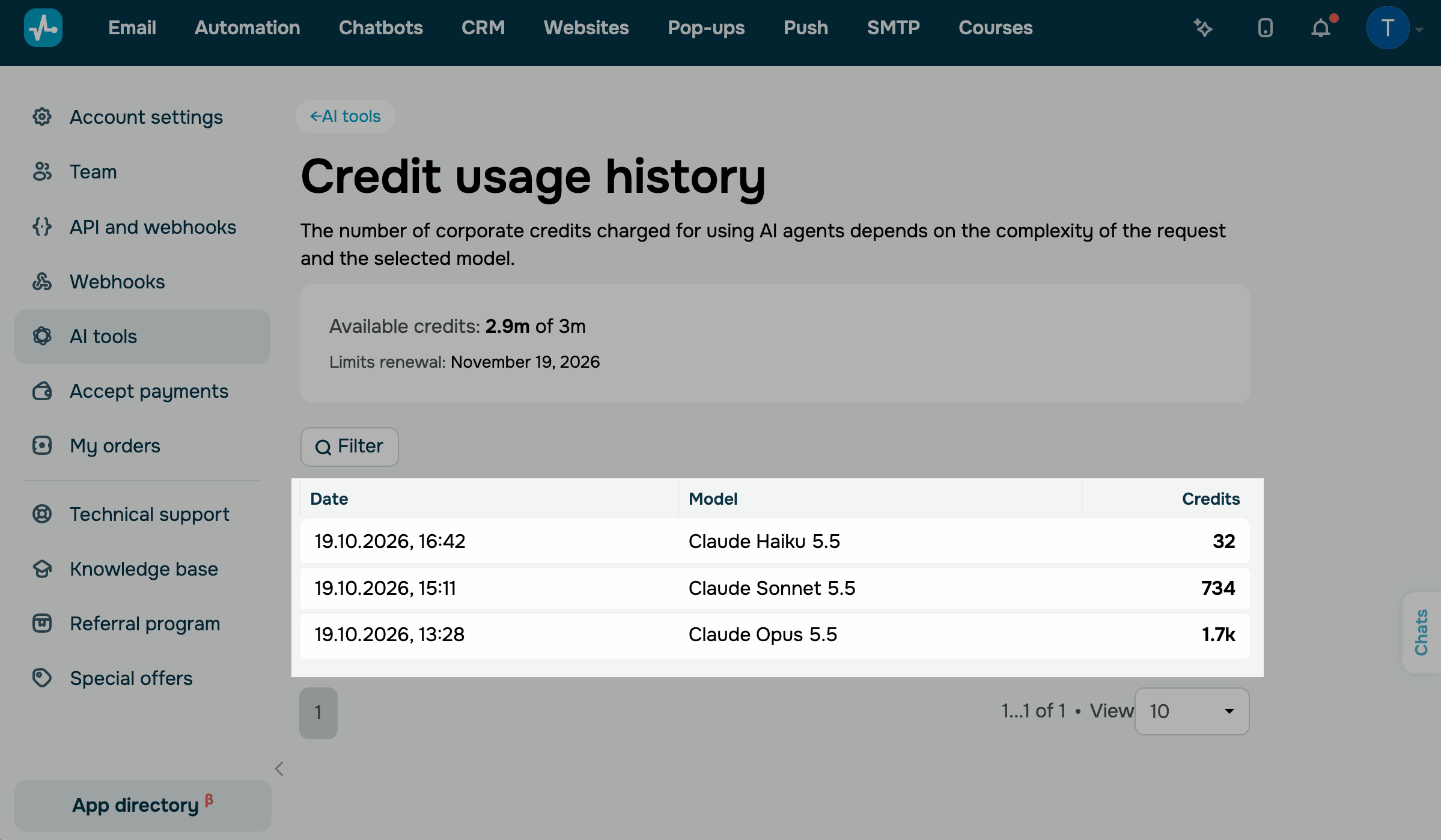
To view requests for specific dates, click Filter, set the From and To dates, and click Apply.
The history lists only requests that spend SendPulse credits. Requests that run on your own API key don't appear in it.
Manage your subscription
You can keep your package renewing, buy more credits, change the package, or cancel the subscription.
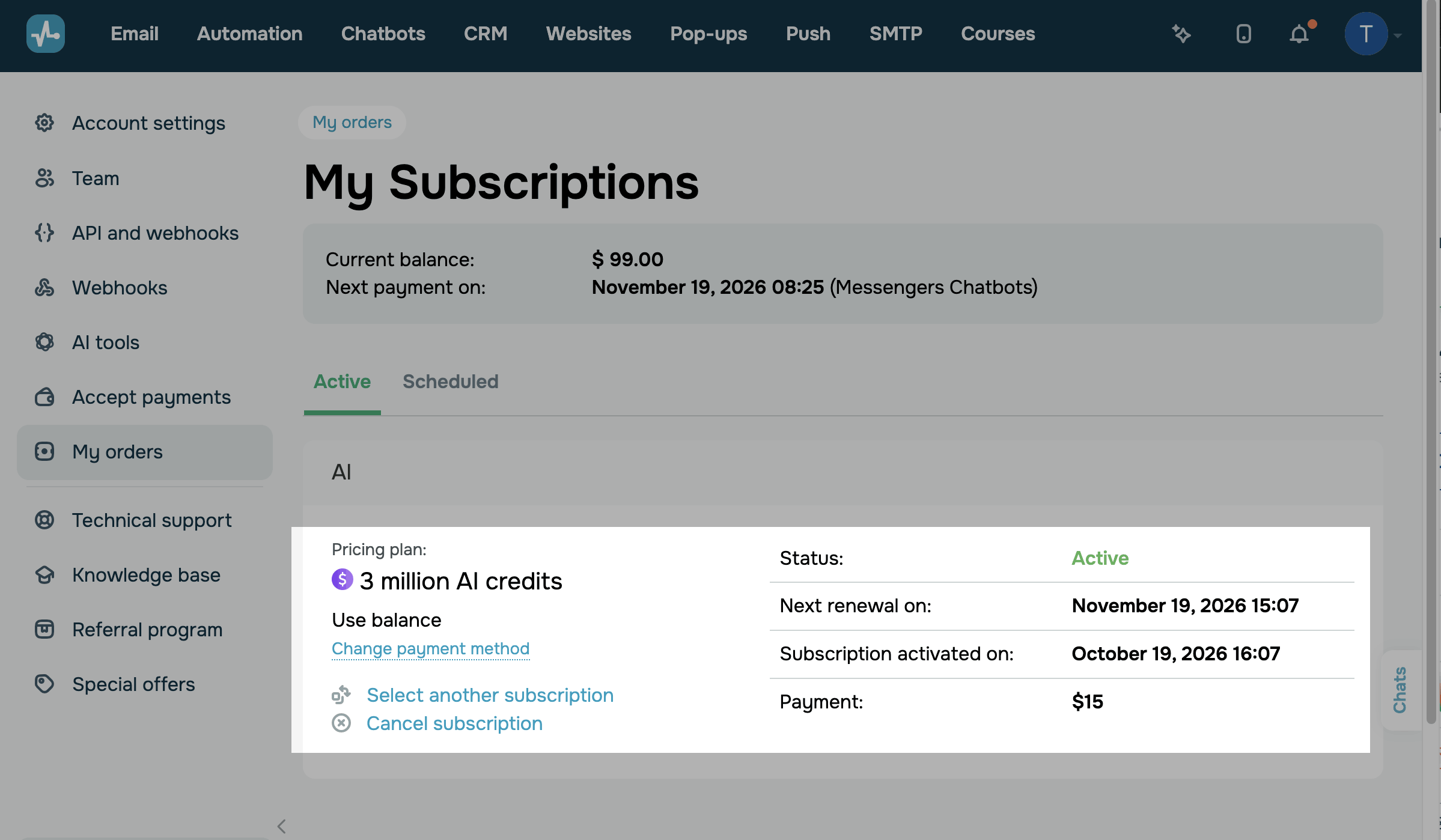
To view your AI credits subscription, go to My orders > My Subscriptions. The AI section shows your package, how you pay for it, its status, the next renewal date, and the payment amount.
Renew your package
Your package renews automatically every month. SendPulse charges the renewal the same way you paid for the package: to your account balance or to the card you used in the shopping cart.
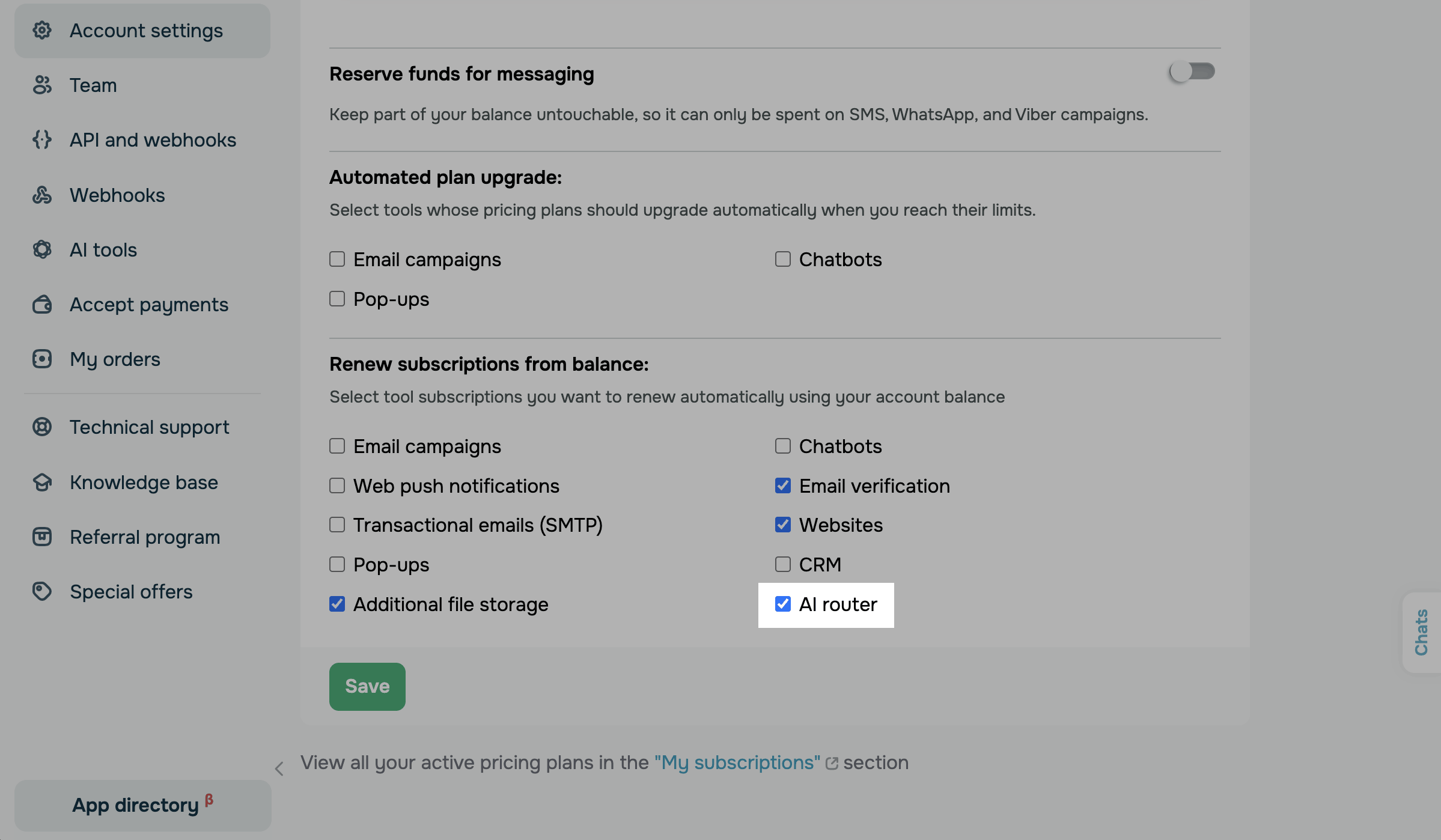
To turn on automated renewal from your balance, go to Account settings > Payments. In the Renew subscriptions from balance section, select the AI router checkbox. Then, click Save.
If a renewal fails, for example, because your balance is too low, you switch to the free plan, and your remaining credits expire. To buy a package again, click Activate subscription.
If automated renewal is off, for example, because you canceled the subscription, your package expires at the end of the paid month. After that, you can't use the remaining credits. To buy a package again, click Renew plan.
Read more: Renew subscriptions automatically using your account balance, Change your payment method.
Buy more credits or change your package
If you run out of credits before your package renews, buy another package, the same one or a different one.
In the Corporate limits section, click Upgrade plan and follow the steps in Buy AI credits.
You can also change your package in My orders > My Subscriptions. In the AI section, click Select another subscription and confirm the action.
SendPulse adds the new credits to your balance right away, and the next renewal date moves to one month after this purchase. Your subscription also switches to the new package.
For example, if you buy 12m credits on top of 3m, SendPulse then charges $60 for 12m credits every month.
Cancel your subscription
To stop paying for AI credits, cancel the subscription.
Go to My orders > My Subscriptions, find your AI credits subscription, and click Cancel subscription. Select a reason and confirm the cancellation.
Canceling turns off automated renewal. Your credits stay available until the end of the paid month. Until then, the subscription keeps showing the Active status and the next renewal date.
Read more: View your SendPulse subscriptions.
Use your own API key instead
If you have an account with an AI provider, integrate it with SendPulse to use your own limits for that provider's models.
Go to Account settings > AI tools. In the Own API keys section, click Add token next to the provider. In the pop-up window that appears, paste your key into the Token (API Secret key) field and click Save.
To learn where to get a key, see the following articles for your provider: Integrate ChatGPT with SendPulse tools, Integrate Claude with SendPulse tools, Integrate DeepSeek with SendPulse tools, Integrate Google Gemini with SendPulse tools.
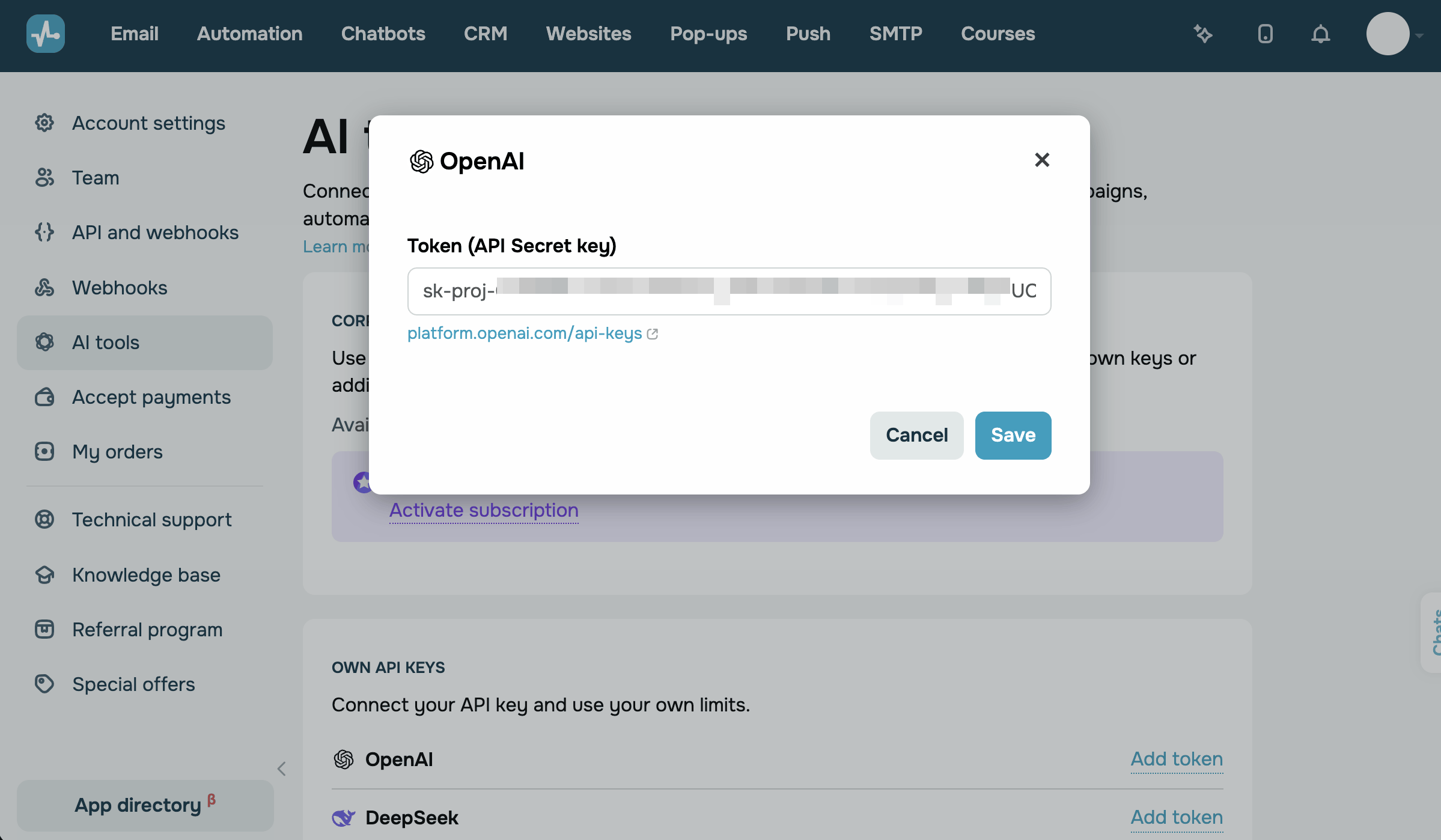
Once you save the key, the model list marks the provider as Own API key. Models of other providers keep running on SendPulse credits.
While a provider's key is connected, you can't use that provider's models with SendPulse credits. To switch back to credits, delete the key. Click the trash can icon next to the key and confirm.
If your own key stops working, SendPulse doesn't switch to credits on its own. When the key's quota is used up, the AI window asks you to check the limits and billing in your provider account. When the provider rejects the key, the window shows the provider's error. To use credits instead, select a model from another provider.
Integrate your AI client with SendPulse
An AI client is the app where you chat with AI, such as ChatGPT, Claude, or Cursor. To manage your SendPulse account in this chat, integrate the client with SendPulse through the MCP server.
The MCP server sends your requests to SendPulse through the API and returns the results to the chat. For example, you can request statistics, run a message campaign, or update contact information.
Go to Account settings > AI tools. In the MCP server section, copy the link and paste it into your client.
For setup steps in ChatGPT, Claude, Cursor, and other clients, read MCP server basics.
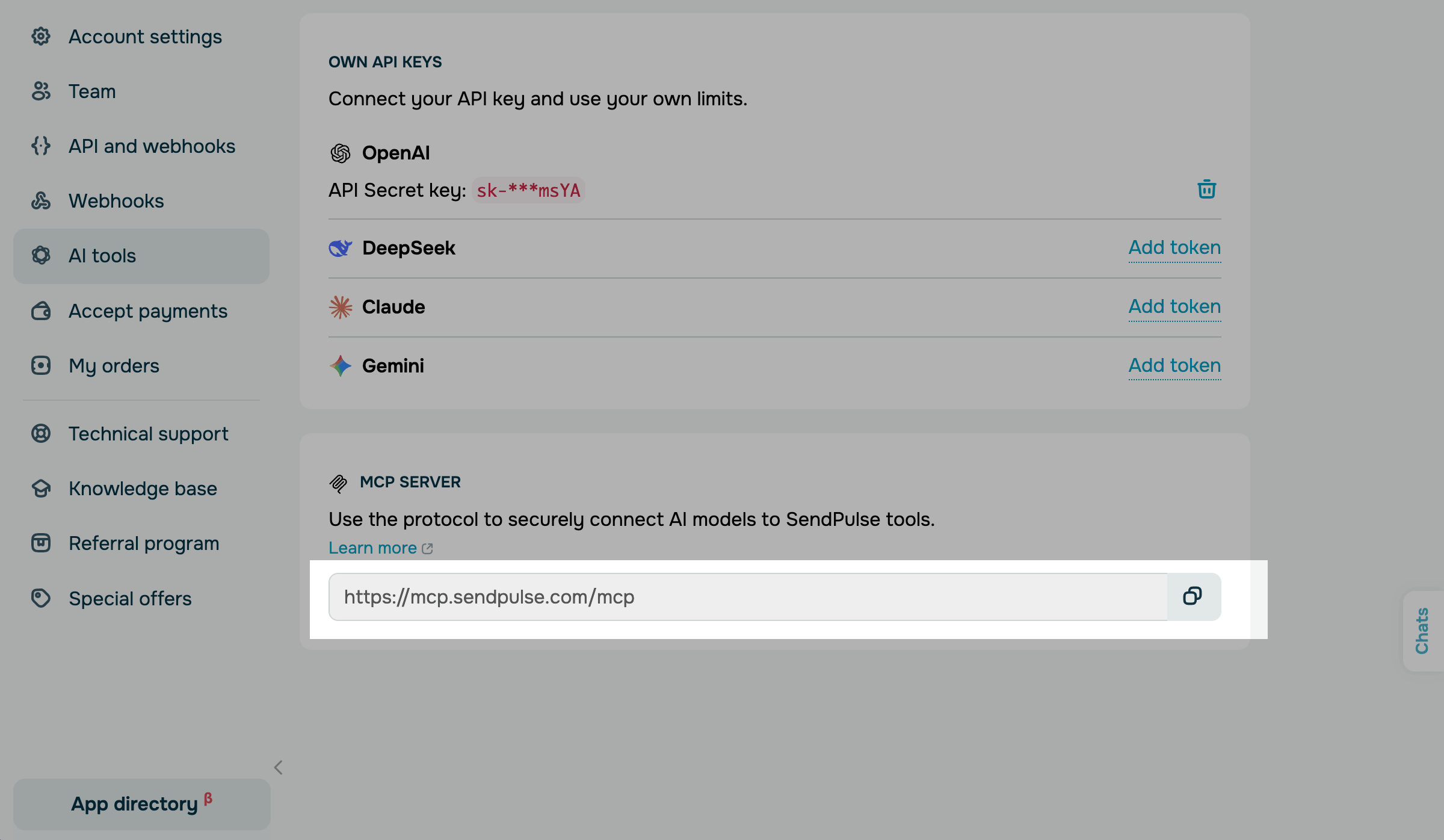
The MCP server doesn't spend AI credits. SendPulse charges credits only for requests to AI models that run on SendPulse credits.
If your client uses your own AI provider account or API key, its requests don't spend credits.
To see which actions you can run in the chat, read List of MCP tools.
Troubleshoot AI credits
If AI credits don't work as expected, find your case in the following table:
| Not enough AI credits for this request appears in the AI window | Buy a package, or wait until your package renews. Your balance doesn't cover the request. |
| The action buttons in the AI window are unavailable | Click Activate AI credits in the window, or buy a package on the AI tools page. Your balance is zero. |
| SendPulse redirects you to the shopping cart when you buy credits | Pay in the shopping cart, or top up your balance. Your main balance doesn't cover the package. The bonus balance and funds you've reserved for messaging don't count. |
| Your balance shows a negative number in red | Buy a package to continue using AI. A request cost more than your remaining credits, so SendPulse charged it in full. |
| A model doesn't show Credits remaining | To use credits for this provider, delete its key in the Own API keys section. The model's provider runs on your own API key. |
Now you can use AI in SendPulse tools without your own API key and keep track of your credits.
To make the most of AI credits, learn how to improve or generate email copy with AI and generate website copy with AI.
You can also create an automated flow using AI.
 Last Updated: 21.10.2026


or