Manage segments
Use segments to filter contacts in your mailing list based on selected conditions and manage them for targeted campaigns. You can edit a segment to update its criteria, create an email campaign for contacts who match specific parameters, or delete a segment if it is no longer needed.
In this article, we will talk about how to edit, use, and delete segments.
Edit a segment
Click Edit Segment to change the condition or type of segment.
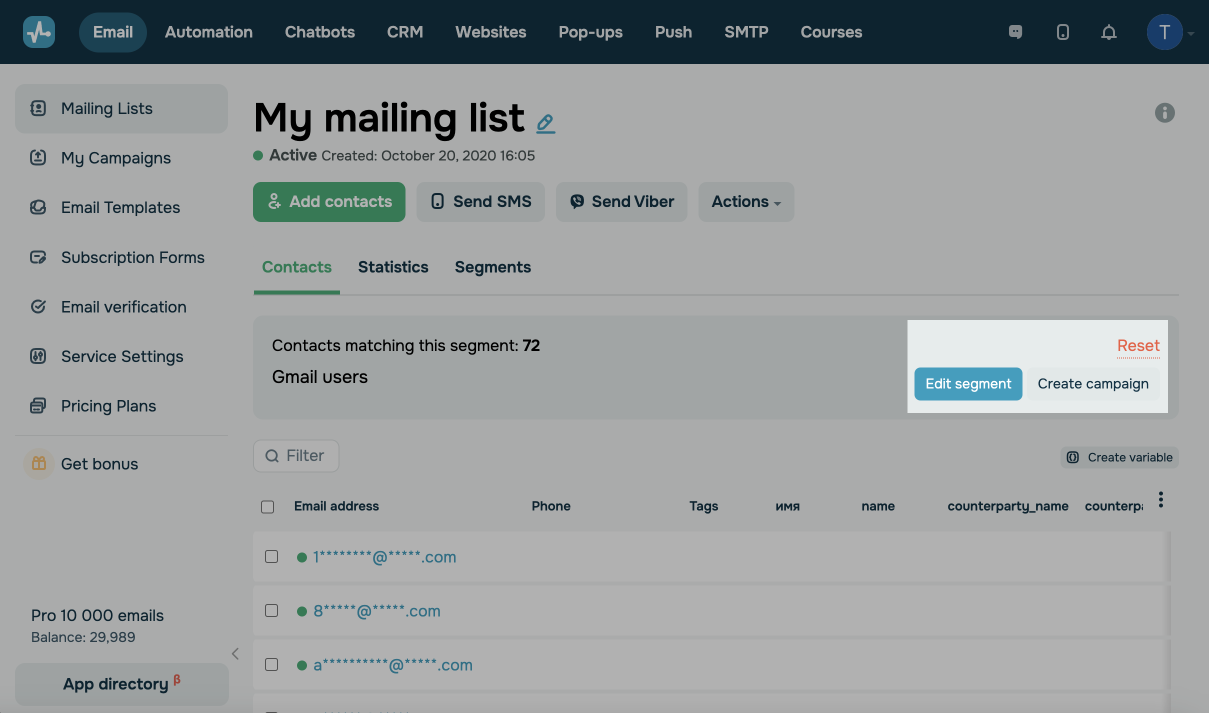
Create a campaign
Click Create a campaign and you will be redirected to the email campaign builder. The recipients will be contacts from the selected segment of this mailing list.
Saved segments are also available when creating campaigns. Segments can be applied to each mailing list individually.
Delete a segment
Go to the Segments tab and click on the trash can icon opposite the segment you want to delete. This action will only delete the segment criteria, the contacts corresponding to the segment will remain in the mailing list.
Last Updated: 03.03.2026
or