You know the saying — “the grass is always greener on the other side.” Most of the time, it’s just a reminder not to chase shiny objects. But in the world of marketing tools, sometimes that greener grass really is worth taking a closer look.
GetResponse is every marketer’s darling, praised for its all-in-one approach to email automation, funnels, and even webinars. Yet, as versatile as it is, some users eventually realize it’s not a perfect fit for their specific needs, whether that’s pricing, complexity, or a lack of certain AI-powered capabilities. If GetResponse feels a bit too rigid, costly, or simply out of sync with your workflow, it’s worth exploring what else is out there.
In this post, we’ll review over ten popular GetResponse alternatives — ranging from affordable solutions for small teams to AI-driven platforms built for serious growth. Whether you’re chasing a better price-quality ratio, more flexible automation, or just a smoother user experience, you’ll find a mix of tried-and-tested options ready to meet you where you are.
Disclaimer: The information in this post is accurate as of November 2025.
What makes GetResponse such a popular email marketing solution?
There’s no point in researching GetResponse competitors without developing a clear understanding of what we’re looking for in the first place. The platform’s most prominent features set a high bar — but also make it easier to filter out alternatives that cannot replicate and refine what GetResponse does best.
- All-in-one stack. GetResponse covers content creation tools, funnel builders, landing pages, and email automation in one place, which reduces the need to juggle multiple tools.
- Webinars and paid newsletters built into the platform. Being able to build and launch one’s own educational products is a unique growth feature — as long as it’s relevant to the user.
- Pop-ups and push notifications. The platform makes it easy to engage, bring back, and convert website visitors with hard-to-miss messages and forms.
- Strong automation features. GetResponse reviews repeatedly praise the automated sales funnel creator with pre-designed scenarios, paired with a visual builder.
- AI toolkit. The platform offers AI features on many levels, from email content generation and website building to smart product recommendations and online course creation.
- Personalized, human-led onboarding. GetResponse sets its users up for success by offering one-on-one, beginner-friendly welcome calls.
- Sliding pricing scale. Instead of rigid packages, the platform suggests flexible, volume-based pricing plans better suited to varying customer needs.
Overall, GetResponse fully deserves its place at the top — it covers most marketing communication needs and offers 170+ integrations for everything from eCommerce and CRM systems to analytics, social media, and payment solutions.

Free email marketing that scales
Use an AI assistant, pre-made templates, robust automation, and more to run impactful email campaigns without coding. Send up to 15,000 monthly emails at no cost.
Get started for free
Why look for GetResponse alternatives?
It’s easy to get blinded by all the flashy features, sleek dashboards, and automation promises — but beneath the surface, there are subtle yet crucial details that can make or break your experience with GetResponse.
Let’s see what else users usually mention when discussing GetResponse’s pros and cons:
- No forever-free starter plan. The free 14-day trial may not always be enough for some users to fully grasp the capabilities of the platform and get into the workflow, as it imposes some limitations regarding gated content.
- Pricing can get expensive as you scale. Several reviewers say costs climb quickly if you rapidly grow your contact list or require more features, like automations or the online course builder. There’s no option to pay for each communication channel separately.
- No live chat and chatbot support. Text- and voice-based messaging becomes an increasingly more important channel for marketers. The lack of a unified inbox and having to use a third-party solution may feel like a hindrance to some.
- Downgrades can only be performed by the support team. There’s no instant way to switch to a cheaper plan if your circumstances suddenly change — you will need to contact the GetResponse team first.
- No built-in CRM capabilities. GetResponse users must integrate the platform with their own system if they want better visibility into their customer profiles.
- Complex automations have a learning curve. While automation is powerful, a number of users report it’s not always intuitive for very complex, multi-condition campaigns.
- Too much legacy. GetResponse has been around for over 20 years, which has its own perks — but also means that some templates or solutions may subjectively feel slightly dated, both in terms of looks and usability.
Ultimately, GetResponse aims to hit that sweet spot between being a comprehensive, all-in-one marketing hub and staying accessible to users of all experience levels. But at the end of the day, it’s up to each user to decide whether the platform truly fits their workflow — whether it supports the right channels and delivers the kind of personalization their marketing strategy demands.

Power up your business with smart tools
Emails, chatbots, websites, automation, CRM, and more — everything you need to connect with your audience.
Get started for free
Best GetResponses alternatives for diverse needs and budgets
We’ve reviewed 13 tools like GetResponse and highlighted their key features and unique selling points to help you find your dream email service provider. Whatever your email marketing goals are, this list got you covered.
SendPulse
SendPulse is an omnichannel marketing automation platform designed to help businesses and individuals communicate with their audiences across email, SMS, chatbots, and web push notifications — all from a single dashboard. It’s built for marketers who are tired of disjointed tools and prefer having a unified inbox and a bird’s-eye view of their processes.
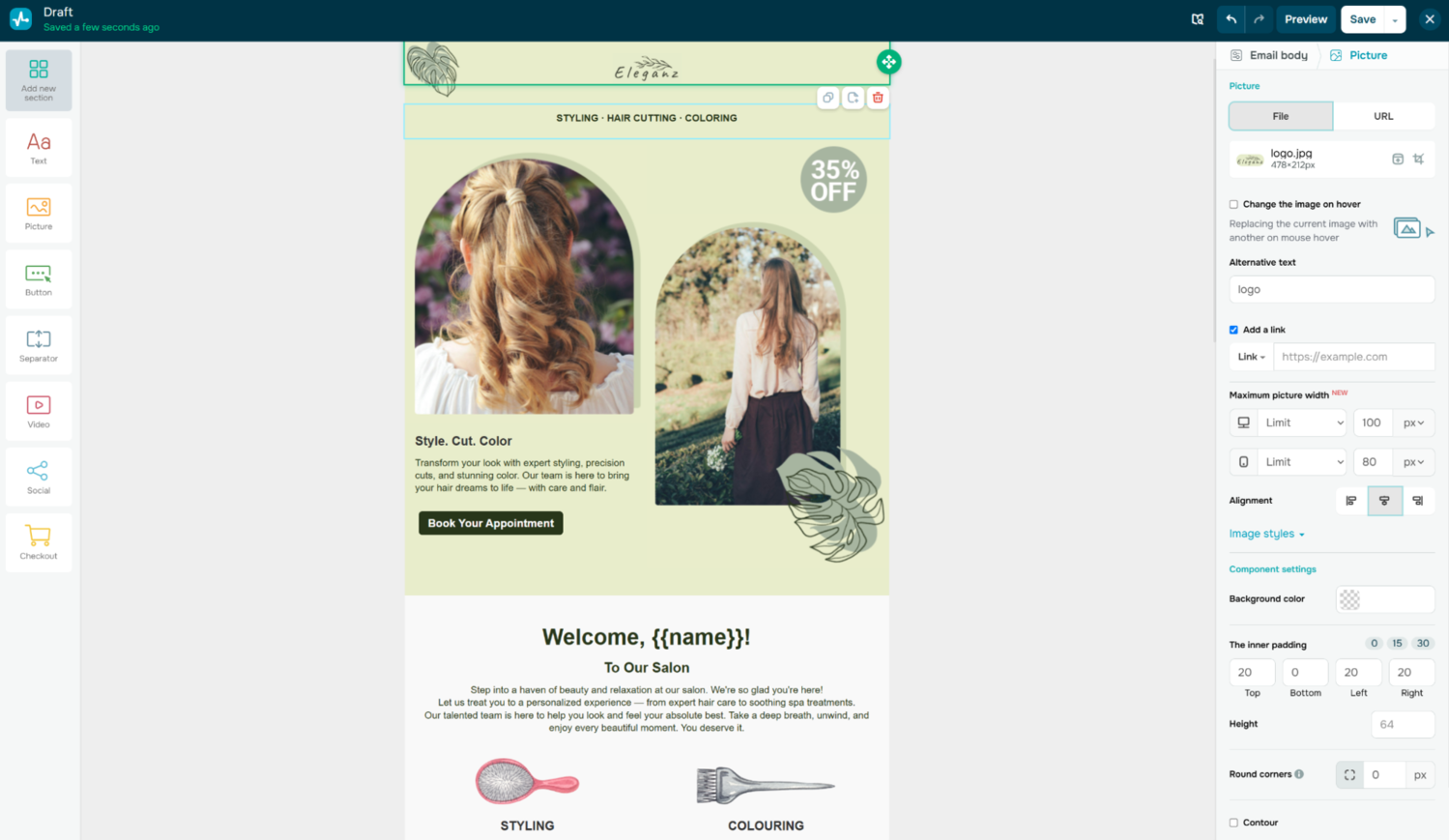 Editing an email template in SendPulse
What sets SendPulse apart is its omnichannel versatility. The chatbot builder is particularly advanced, allowing you to design complex conversational flows while syncing all user data back into a central CRM system. Its integration with AI enables you to nurture and interact with your audience in a more efficient yet personalized way, and is a valuable addition to email.
SendPulse’s key features include:
- drag-and-drop email builder with 100+ templates and interactive features;
- transactional email service (SMTP and API);
- live chat widget for websites;
- code-free, AI-powered chatbot builder for Telegram, WhatsApp, TikTok, Instagram, and Facebook;
- SMS marketing;
- visual automation builder with pre-made templates;
- built-in CRM system for managing contacts and deal pipelines;
- AI content creation assistant;
- smart conditional pop-ups and surveys;
- web push notifications;
- website and bio link page builder;
- online course builder with community management tools;
- built-in spam check, A/B testing, and analytics;
- dynamic segmentation and email verifier;
- app and integration marketplace;
- 24/7 support with real agents.
Pricing. SendPulse offers a free-forever basic plan with up to 15,000 monthly emails and 500 subscribers. Payments for more advanced plans can be either subscription-based or volume-based, starting at $11 a month, billed monthly. Annual billing gives you 20% off. Other tools are billed separately.
⚖️ Verdict. When compared to GetResponse, SendPulse is the more flexible and budget-friendly solution — it doesn’t pressure its users into paying for channels they don’t use. It covers live chats and chatbots, turning messaging apps like WhatsApp and Telegram into potent marketing and customer service channels.

Power up your business with smart tools
From solo creators to global brands, thousands of customers trust SendPulse to run email campaigns, chatbots, automations, and more — all in one place.
Get started for free
Mailchimp
Mailchimp is a broader marketing hub, offering tools for email automation, customer relationship management, content creation, and more. It supports 300+ eCommerce integrations and is regularly ranked among the best email marketing platforms.
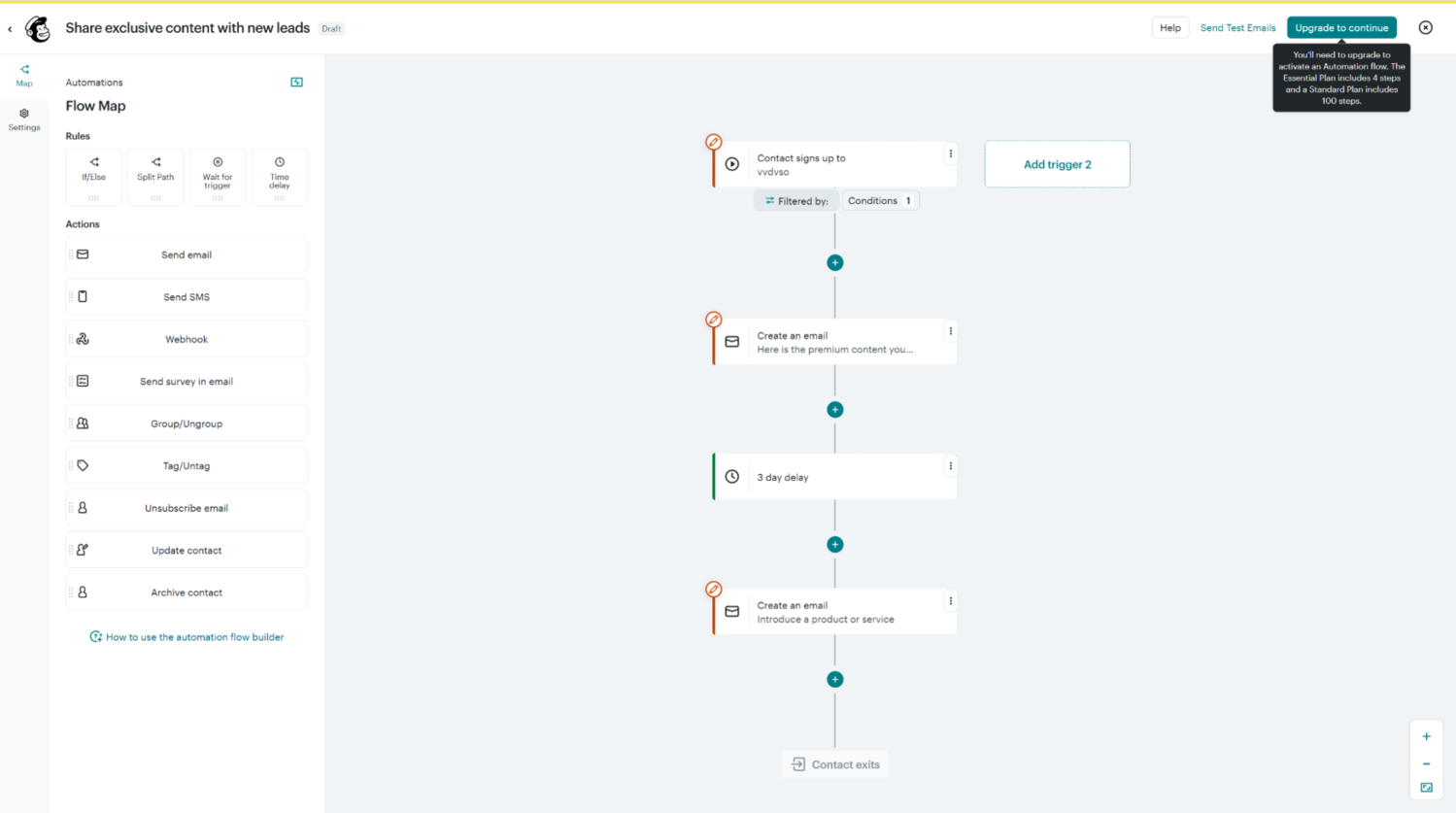 Editing an email automation template in Mailchimp
Mailchimp’s standout strength lies in its AI-driven toolkit. As its user, you will be able to outsource content creation, editing, and campaign optimization to AI while ensuring absolute brand consistency. The platform has recently launched AI-generated automations and fully built emails, which can take your efficiency one step further.
Here are the main Mailchimp features at a glance:
- intuitive email builder and 250+ templates;
- transactional emails;
- dynamic content and send time optimization;
- AI demographic predictions and advanced segmentation;
- unified content studio for brand asset management;
- generative AI for better email and website copy;
- Creative Assistant for instant visual content creation;
- marketing automation flow builder with pre-made templates;
- website and landing page builder;
- SMS campaigns;
- built-in CRM and audience insights dashboard;
- tags and custom fields for contacts;
- lead capture forms and surveys;
- A/B testing and advanced analytics;
- 24/7 support.
Pricing. Mailchimp offers scalable pricing, a free 14-day trial, and a free-forever plan with up to 1,000 monthly sends and 500 subscribers. More advanced plans with AI start at $20 a month, billed monthly. SMS credits, websites, and transactional emails are paid for separately.
⚖️ Verdict. When looking at GetResponse vs. Mailchimp, the latter feels more accessible and design-focused, whereas GetResponse leans into funnel and educational product creation. Mailchimp offers more in-depth customer profile management, which is key to building long-lasting customer relations.
ActiveCampaign
ActiveCampaign has recently transformed into an autonomous marketing platform that helps teams and businesses focus on strategic thinking and building advanced customer journeys. It pioneers an AI-first approach, which allows the end user to generate content, automation flows, and entire campaigns via text prompts.
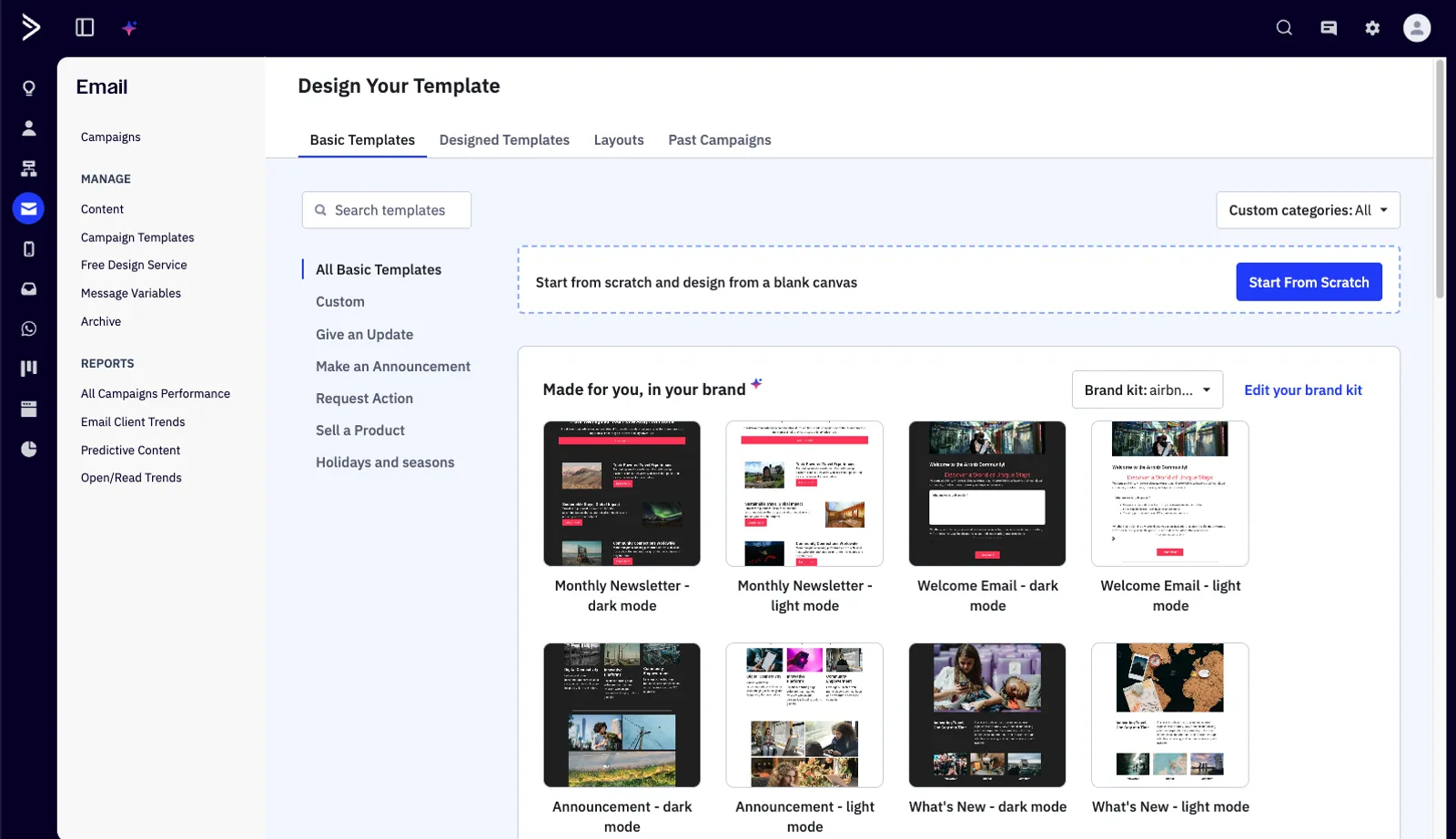 Using the AI brand kit for creating new emails in ActiveCampaign; source: ActiveCampaign
ActiveCampaign’s Active Intelligence is an AI-driven automation ecosystem acting as a creative copilot. It empowers you to rapidly flesh out, visualize, and implement ideas and receive predictions and suggestions along the way. Paired with other AI integrations, it helps you adopt a fully hands-off approach to marketing and customer relationship management.
Here are the most prominent features of this GetResponse alternative:
- advanced visual automation builder with conditional logic and branching workflows;
- email templates, a visual builder, and AI real-time suggestions;
- dedicated IP management for better deliverability;
- AI email personalization;
- AI brand kit for visual consistency across channels;
- built-in CRM system with sales pipeline tracking and lead scoring;
- predictive sending and AI content generation;
- SMS campaigns and WhatsApp messaging;
- landing page builder;
- extensive integration library with over 950 apps;
- ability to connect Claude, ChatGPT, and other AI tools via Model Context Protocol;
- segmentation and tagging tools for behavior-based targeting;
- conversational, AI-powered analytics dashboard and custom reporting.
Pricing. There’s a free 14-day trial. You can purchase email and WhatsApp capabilities separately or as a bundle. The cheapest email plan with automation features starts at $59 a month, billed monthly. Annual billing saves you 20%. The CRM suite and SMS campaigns cost extra.
⚖️ Verdict. This is one of the strongest competitors to GetResponse, a true AI powerhouse at a corresponding price point. The difference between GetResponse vs. ActiveCampaign comes down to the fact that ActiveCampaign leans more toward deep, highly intelligent automation and CRM sophistication rather than being an all-in-one marketing suite.
AWeber
AWeber is one of the veteran players in the email marketing space, built to help businesses of all sizes create, automate, and deliver engaging email campaigns with ease. This GetResponse alternative is known for its simplicity and reliability — its target audience is marketers who want powerful tools without the steep learning curve.
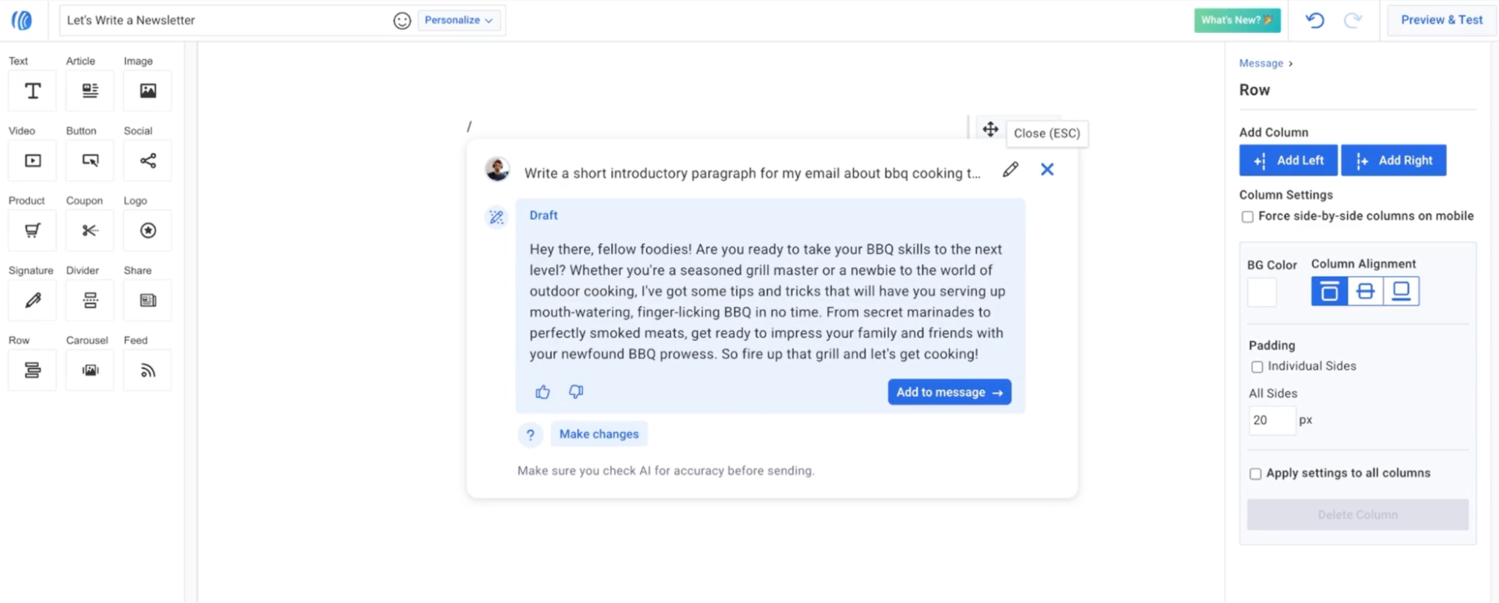 Using an AI email writing assistant in AWeber; source: AWeber
What makes AWeber stand out is its AI-powered Newsletter Assistant, which can generate weekly long-form emails in your authentic voice. Another stellar feature is AMP support, which allows you to build dynamic, interactive email experiences without needing any code.
Let’s take a look at AWeber’s feature list:
- drag-and-drop email builder integrated with Canva;
- automated on-brand template generation;
- RSS-triggered emails;
- workflow designer;
- AI writing assistant;
- behavioral campaign automation;
- tagging and segmentation;
- landing page builder and signup forms;
- push notifications;
- hundreds of eCommerce integrations (Shopify, WooCommerce, etc.);
- A/B testing, analytics, and reporting;
- guaranteed deliverability and 24/7 customer support.
Pricing. There’s a free 14-day trial. Paid plans start at $15 a month, billed monthly. You can save up to four months by paying annually.
⚖️ Verdict. When looking at GetResponse vs. AWeber, it becomes obvious that AWeber is simpler and more beginner-friendly, though less feature-dense. It lacks advanced funnel builders, native webinars, and the deeper automation logic that GetResponse offers. However, it compensates with excellent email capabilities, generous pricing plans, and creator-oriented AI tools and integrations.
EmailOctopus
EmailOctopus is a streamlined email marketing platform designed for small- to mid-sized businesses, creators, and nonprofits. One of its unique selling points is its integration with Amazon SES (Simple Email Service) for high-volume sending at lower cost and solid deliverability.
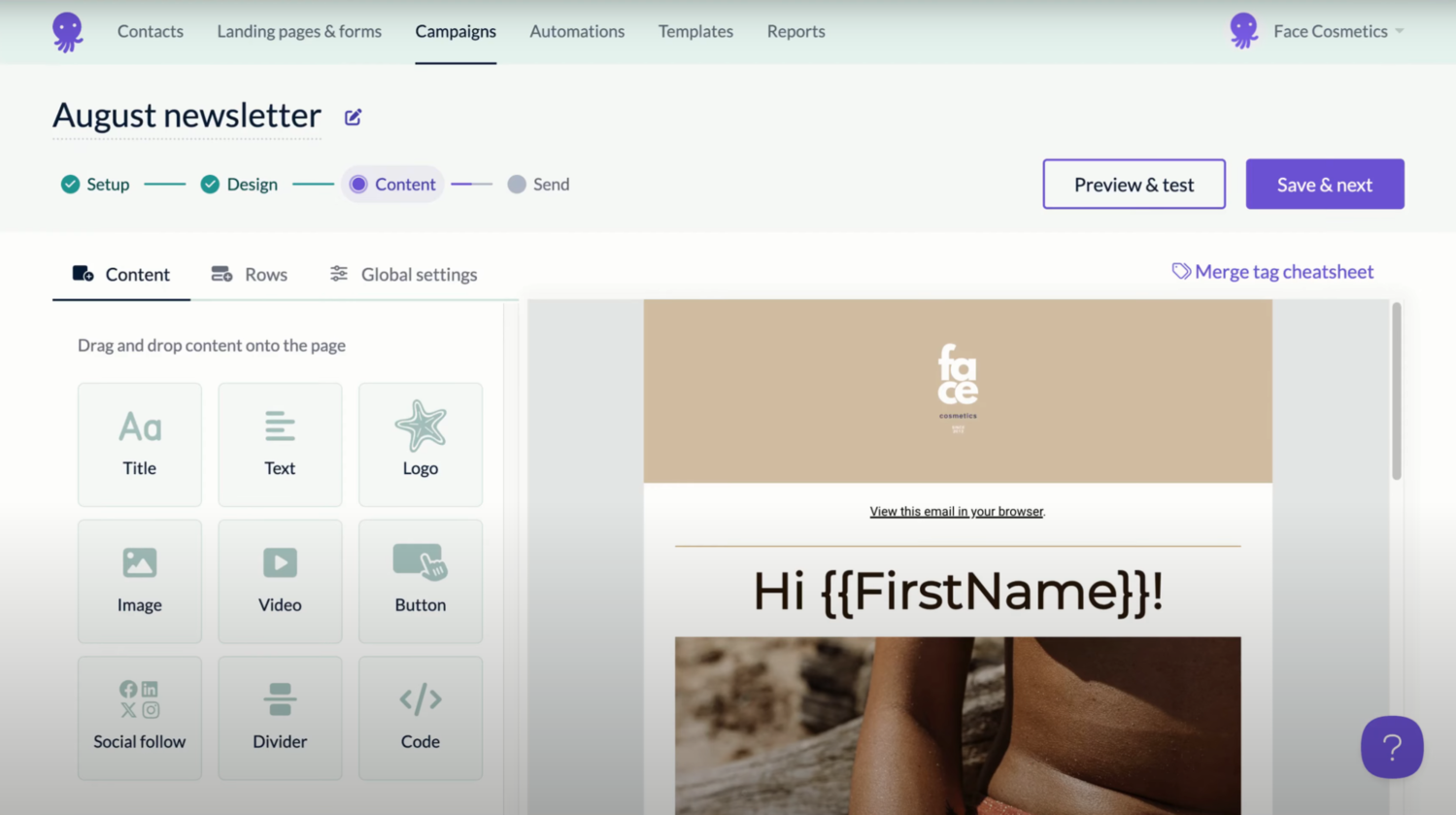 Editing an email template in EmailOctopus; source: EmailOctopus
EmailOctopus appeals to beginner users due to the simplicity of its interface. The Zapier integration allows you to plug into hundreds of other apps and platforms as you grow.
Let’s look at the core features of this GetResponse alternative:
- drag-and-drop email editor;
- mobile-friendly email template collection;
- automated brand asset pull for speedy content generation;
- custom HTML template import;
- list management and segmentation with custom fields;
- signup form builder for WordPress websites;
- automation workflows (welcome series, drip campaigns, tag/field updates);
- landing page builder;
- AI support chatbot for easy setup and troubleshooting;
- built-in analytics and reporting.
Pricing. There’s a forever-free plan with 2,500 subscribers and 10,000 emails per month. The Pro plan starts at $10 a month, billed monthly, and has volume-based pricing. Paying yearly saves you 10%.
⚖️ Verdict. If your priority is quick setup, strong deliverability, and keeping things straightforward, EmailOctopus shines. When it comes to the price, EmailOctopus beats many of its competitors, including GetResponse, because it’s purely focused on email and doesn’t include any unnecessary gimmicks.
Kit
Kit, formerly known as ConvertKit, is an email marketing platform designed specifically for creators — bloggers, podcasters, YouTubers, and online educators who want to grow and nurture a lively audience. It’s intended for building automated email sequences, promoting digital products, and managing subscribers without the clutter of enterprise-level tools.
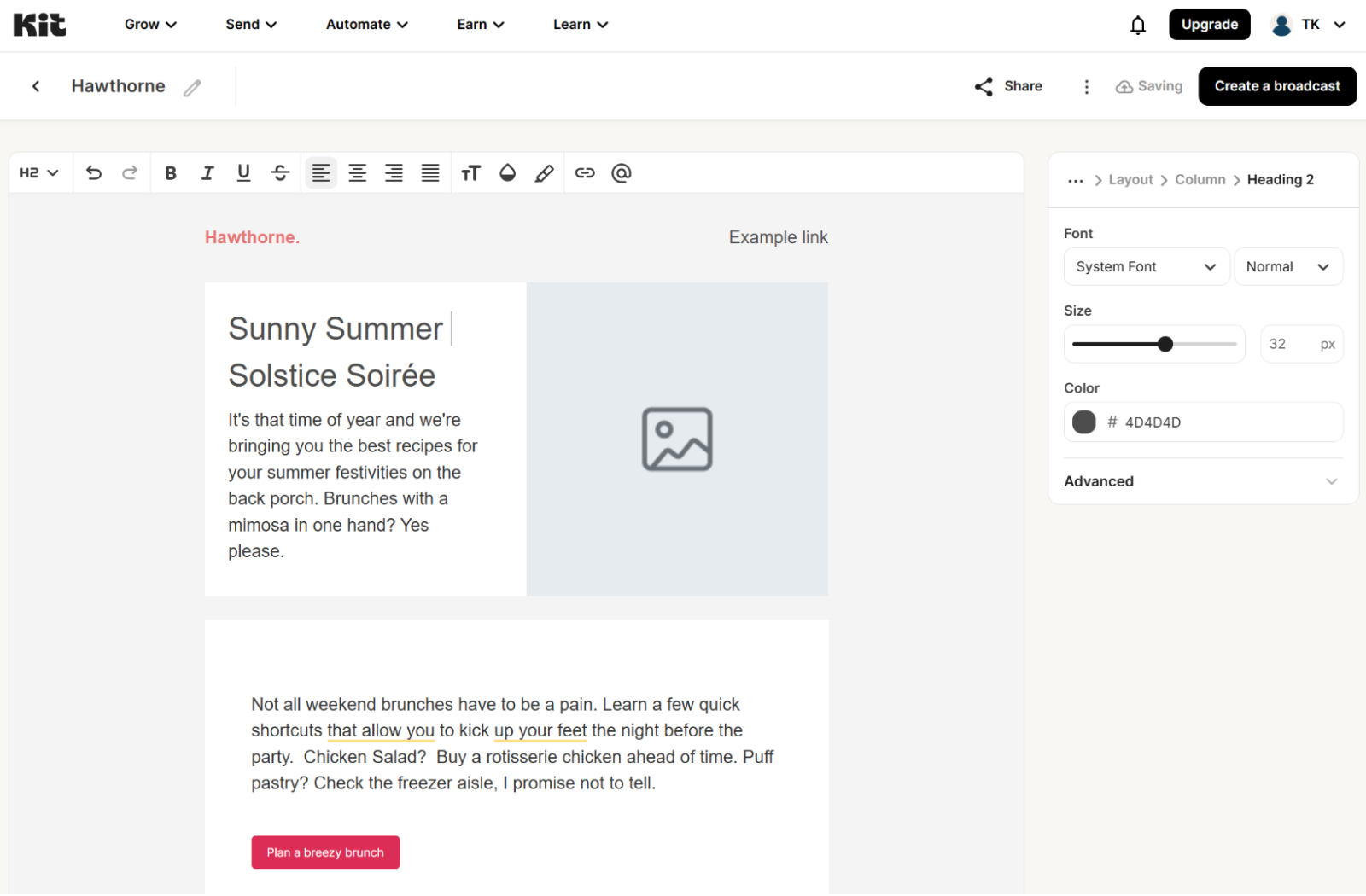 Creating a newsletter in Kit
Mainly, Kit stands out for its focus on creator monetization and community building. Its Creator Network allows users to recommend and be discovered by other creators. The Paid Recommendations feature unlocks expanded reach and high-quality audience growth. Finally, the eCommerce kit makes it easy to sell eBooks, courses, and paid newsletters directly from Kit, cutting out the need for external apps entirely.
Here’s what this GetResponse alternative has to offer:
- drag-and-drop campaign builder;
- 99.8% email delivery rate;
- built-in landing pages with Unsplash integration;
- creator-oriented templates for lead generation;
- intuitive visual automation builder;
- customizable subscription forms;
- tagging system for organizing subscribers by interest or behavior;
- native tools for selling digital products, memberships, and subscriptions;
- integrations with major creator tools (Canva, Circle, Teachable, etc.);
- free migrations;
- analytics and audience insights.
Pricing. There’s a free 14-day trial, a free single-newsletter plan with up to 10,000 recipients, and a 30-day money-back guarantee. More advanced plans start at $39 a month, billed monthly. Paying annually is 20% cheaper.
⚖️ Verdict. When it comes to GetResponse vs. Kit, the contrast lies in their focus. The reimagined platform caters to creative entrepreneurs, offering dedicated tools for building authentic audience relationships, while GetResponse, despite its webinar capabilities, leans more heavily into pure eCommerce.
Constant Contact is one of the longest-standing email marketing platforms, designed to help small and mid-sized businesses create, send, and track professional campaigns without needing deep technical skills. Over the years, it has expanded from simple newsletters to a full suite that includes automation, social media marketing, and eCommerce solutions.
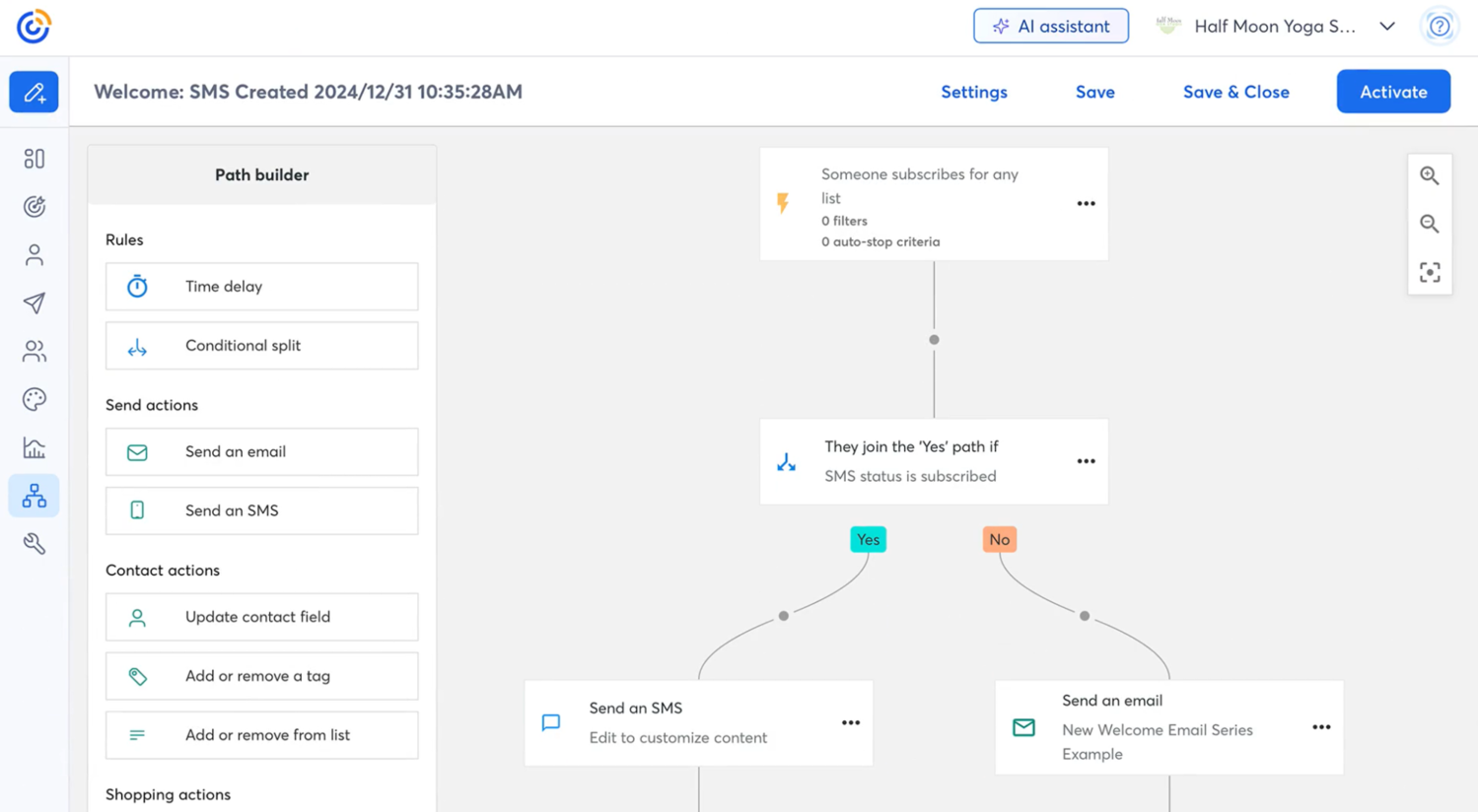 Building a multi-channel automation in Constant Contact; source: Constant Contact
Constant Contact’s unique edge lies in its event marketing tools. These allow users to manage registrations, send follow-up reminders, and even sell tickets directly through email campaigns — something very few email platforms handle natively.
Here’s the platform’s comprehensive feature list:
- drag-and-drop email builder with 100+ customizable templates;
- marketing automation templates and autoresponders;
- 97% deliverability rate;
- locked templates and permissions for brand consistency;
- AI-powered subject line and content generator;
- integrated social media scheduling and ads management;
- contact segmentation and subscription forms;
- event invite templates, ticketing, and event pages;
- SMS marketing;
- CRM available as an add-on product;
- multi-account solutions for consistency across regions and teams;
- analytics dashboard with open, click, and conversion tracking;
- integrations with Shopify, WooCommerce, and other platforms;
- live phone and chat support.
Pricing. There’s a 14-day free trial and a 30-day money-back guarantee. Paid plans start at $12 a month, billed monthly, and are volume-dependent. Prepaying for 12 months saves you up to 15%.
⚖️ Verdict. When comparing Constant Contact vs. GetResponse, it’s easy to see how their strengths diverge. With its event and social media tools, Constant Contact unlocks previously untapped channels for online and offline audience engagement — with this approach, email becomes part of a bigger marketing puzzle.
LTV.ai
LTV.ai is an autonomous, AI-first email marketing platform with a chat-based interface. Instead of complicated editors, its users can rely on plain-language prompts to ideate, build, personalize, and execute entire marketing campaigns.
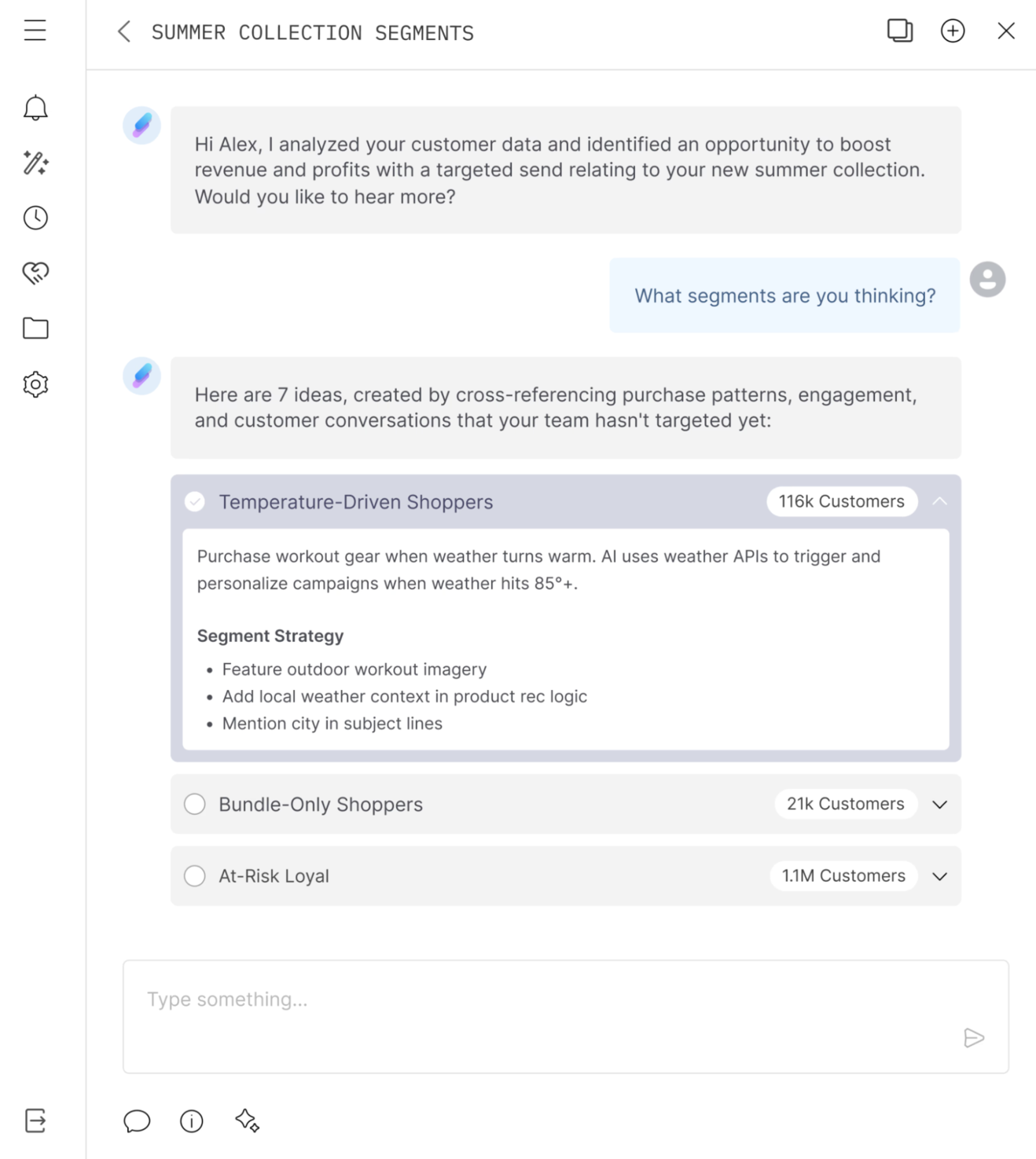 The AI-chat-based interface of LTV.ai
What truly sets LTV.ai apart is its focus on hyperpersonalization and autonomous behavior rather than just “send this campaign to this segment.” The platform builds a kind of persistent “customer memory,” using every purchase, browse event, feedback snippet, and location cue to refine its customer profile. It then leverages that memory to decide when, what, how much discount, and through which channel to reach out — with minimal human intervention.
Let’s look at the capabilities of this alternative to GetResponse:
- autonomous AI campaign creation and optimization;
- one-to-one contextualized campaign personalization;
- AI-curated product highlights;
- AI-driven segmentation and dynamic audiences;
- integrated email and SMS messaging for cohesive outreach;
- AI auto-replies and follow-ups;
- smart coupon and offer management based on predictions;
- real-time data and feedback loops.
Pricing. There’s an option to book a demo. The platform offers custom pricing.
⚖️ Verdict. Compared to GetResponse, LTV.ai occupies a different niche — it focuses almost exclusively on advanced personalization, autonomous logic, and extremely targeted messaging. It’s developed for eCommerce brands aiming to maximize lifetime value via email and SMS.
Moosend
Moosend is an email marketing and automation platform built to help businesses of all sizes effortlessly create, send, and optimize campaigns. Instead of chasing an omnichannel approach, Moosend keeps its focus on doing email really well, combining intuitive design with powerful automation features.
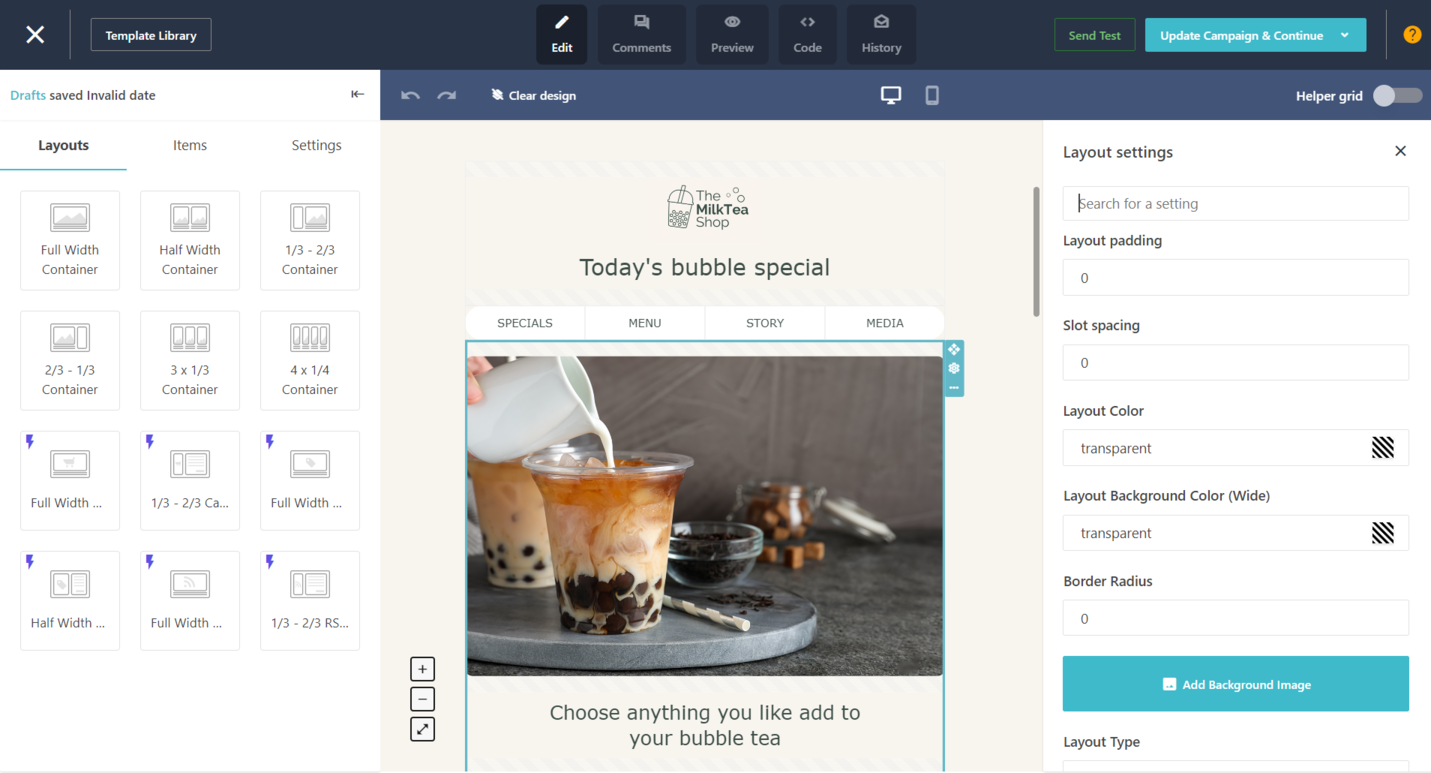 Creating an email newsletter; source: Moosend
Moosend sets its users up for success by supplying them with customizable automation recipes, landing page templates, newsletter templates, and pre-designed subscription forms, which shortens the learning curve and allows users to experience the power of the platform right after onboarding.
Here’s what this GetResponse alternative has to offer:
- drag-and-drop email editor with 110+ professional templates;
- transactional emails;
- 98% deliverability score;
- RSS emails;
- A/B testing with nuanced settings;
- conditionally visible email content;
- AI-powered subject line and content suggestions;
- advanced behavioral segmentation and custom fields;
- AI-powered audience insights and personalized recommendations;
- advanced automation workflows, templates, and triggers;
- landing page builder;
- subscription form builder;
- real-time analytics and reports;
- 80+ integrations with popular eCommerce and CRM platforms.
Pricing. There’s a free 30-day trial period. The basic paid plans are volume-based and start at $9 a month for 500 contacts. You can request a custom plan if you need transactional emails, hosted files, and other advanced features.
⚖️ Verdict. While it may not match GetResponse’s broad all-in-one ecosystem, Moosend wins points for its ease of use, affordability, and focused efficiency — this is a lean yet capable platform for users who want results without unnecessary complexity.
MailerLite
MailerLite is a streamlined email marketing platform built for creators, small businesses, and startups that look for a perfect blend of automation and control. The name speaks for itself, and yet the solution comes with surprising extras.
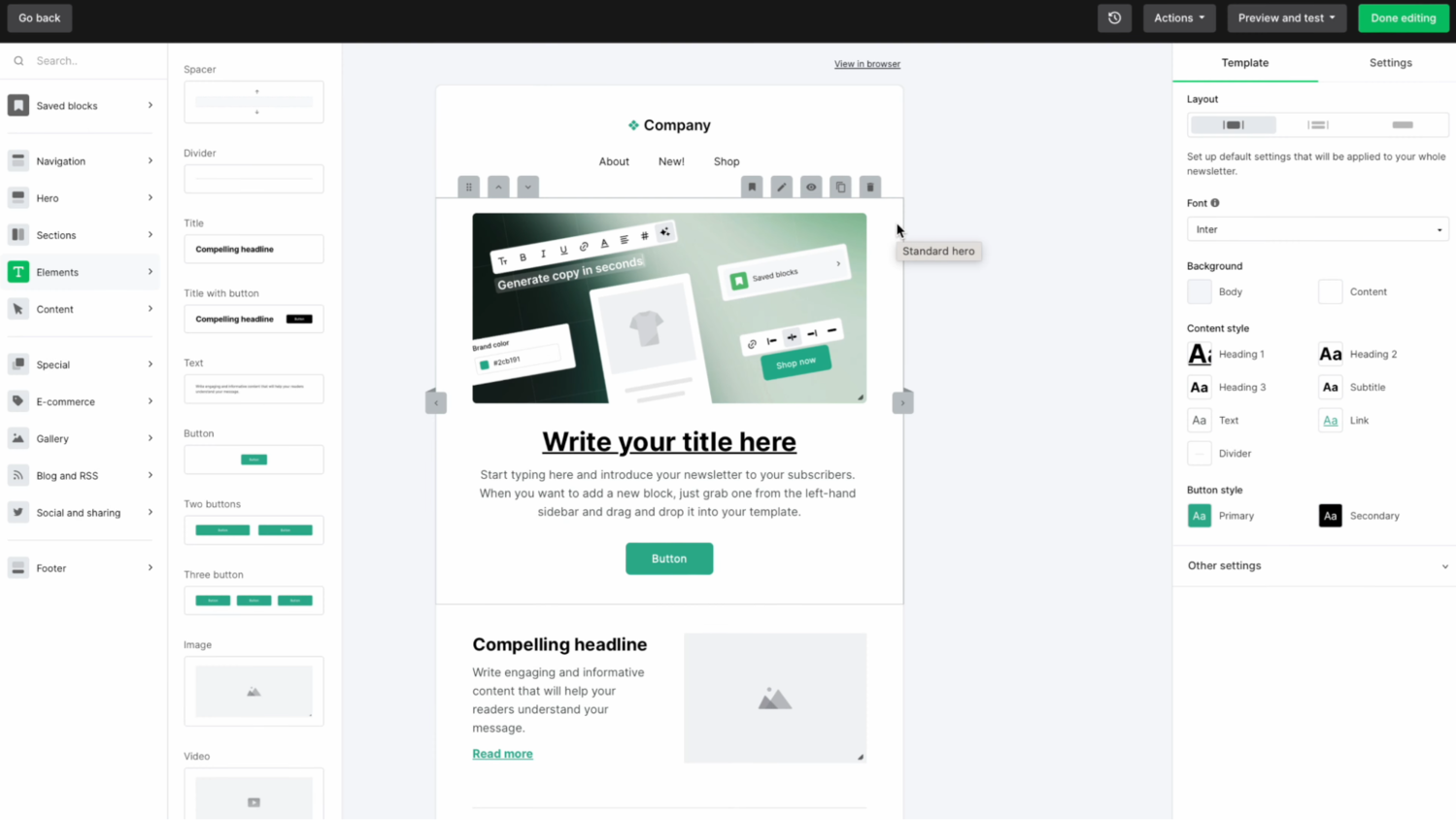 Designing a newsletter in MailerLite; source: MailerLite
For beginner as well as up-and-coming creators, MailerLite is the ultimate solution as it allows them to both build their following and monetize their expertise at a reasonable price point. From a marketing perspective, this GetResponse alternative ticks all the boxes, providing robust email capabilities and automation without the burden of enterprise features.
The wide variety of integrations makes it easy to pivot MailerLite in whichever direction your business grows. For instance, you can make the platform more coaching-oriented by linking it with course platforms or membership tools, more sales-oriented by integrating with Shopify or WooCommerce, or even tailor it for service-based businesses through scheduling and CRM plugins.
Here’s what this GetResponse alternative has under the hood:
- drag-and-drop campaign and newsletter editor;
- automation workflows and behavior-based triggers;
- transactional emails and SMS campaigns;
- website and landing page builder;
- commercial blogging tools;
- over 70 pre-designed blocks for speedy campaign creation;
- contact list management and segmentation tools;
- AI writing assistant for subject lines and email copy;
- toolkit for building and selling eBooks, memberships, paid newsletters, etc.;
- gamified conditional pop-ups;
- iPad subscription forms for offline events and physical stores;
- multivariate A/B testing for campaigns and automations;
- advanced analytics;
- 100+ integrations with automation, CRM, education, and community management apps;
- 24/7 support with an average waiting time of five minutes.
Pricing. There’s a free 14-day trial and a forever-free plan with up to 500 subscribers and 12,000 monthly emails. The pricing is flexible and volume-based, starting at $10 a month, billed monthly. You can save 10% by paying yearly.
⚖️ Verdict. When considering GetResponse vs. MailerLite, you may notice that GetResponse targets a more advanced, automation-driven audience. MailerLite, however, stands out as a budget-conscious, user-friendly alternative that covers most essentials and then some.
EngageBay
EngageBay is an all-in-one marketing, sales, and service platform designed primarily for small to midsize businesses. Rather than only focusing on email, EngageBay combines tools for automation, contact management, landing pages, and help desk functions for a unified view of customer relationships and interactions.
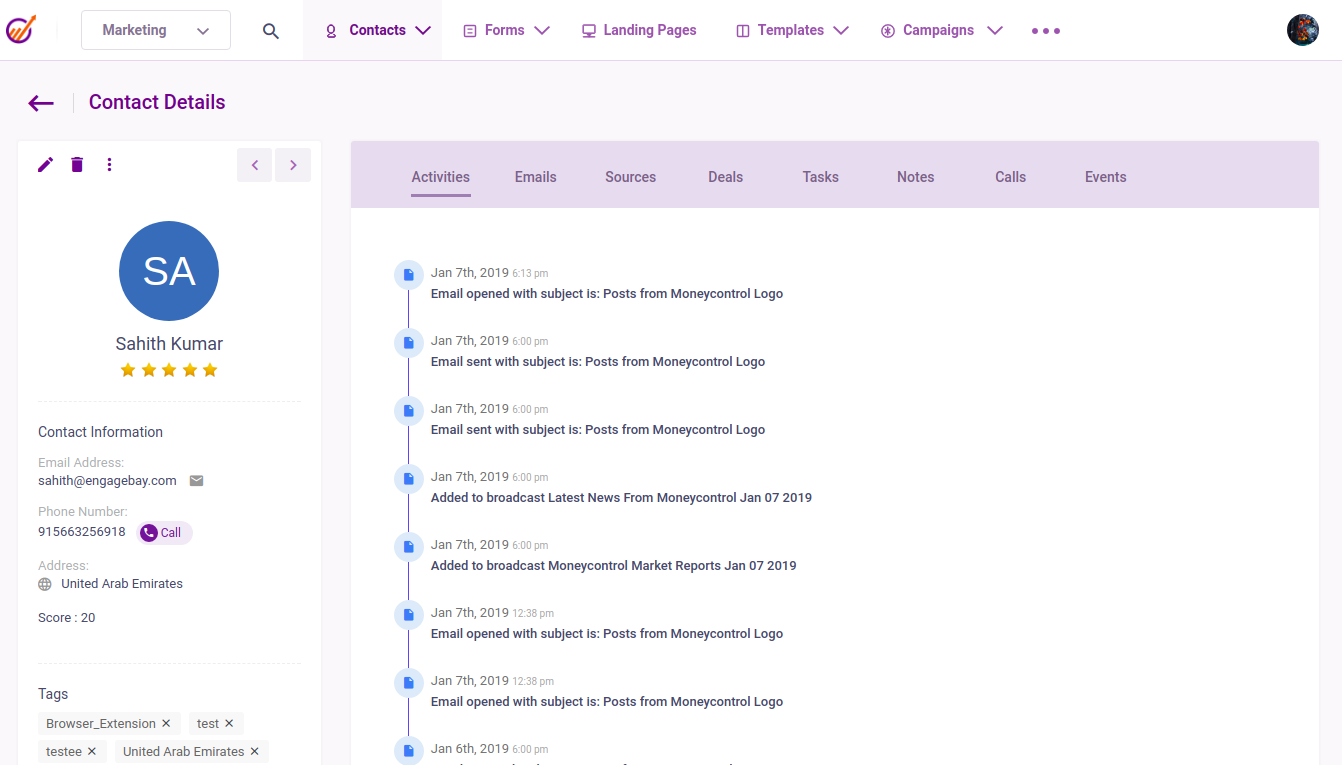 Viewing a detailed contact profile in EngageBay; source: EngageBay
EngageBay’s standout unique feature is its seamless integration with OpenAI, enabled through a powerful low-code automation component called the OpenAI Node. This node allows users to queue dynamic prompts — incorporating real CRM variables like {{Company.name}} or {{Deal.amount}} — and instantly retrieve personalized, structured outputs from models such as GPT-4.
This goes beyond AI writing assistance, although the integration can also be employed for content creation. With this capability, this alternative to GetResponse enables teams to automate more demanding tasks like lead-enrichment (automatically filling in company size, industry, or location), intelligent email generation with subject lines tailored to each contact’s interest, and follow-up sequences triggered by deal stage or customer behavior.
Its feature list includes the following:
- visual email builder with pre-designed templates;
- drag-and-drop marketing automation workflows;
- AI-driven email campaign insights and suggestions;
- built-in free CRM system with contact management and deal tracking;
- sales automation tools (pipelines, tasks, appointment scheduling);
- detailed customer profiles and 360 tracking;
- ticket system and live chat features for customer support;
- trainable AI chatbots for customer support;
- landing page and lead capture form builder;
- lead scoring and tagging for better segmentation;
- email sequences, A/B testing, and personalization;
- predictive lead nurturing and behavior tracking;
- social media integration and tracking tools;
- real-time analytics and reporting;
- free migration services;
- 100+ integrations with major apps like Zapier, Shopify, and WordPress.
Pricing. EngageBay offers individual modules (Marketing Bay, CRM & Sales Bay, Service Bay) that you can buy separately or together. There’s a free basic all-in-one plan with up to 250 contacts and 1,000 monthly emails. The second cheapest all-in-one plan starts at $14.99 a month, billed monthly. To save up to 15%, choose annual or biannual billing.
⚖️ Verdict. When comparing GetResponse vs. EngageBay, it’s clear that GetResponse is primarily built for targeting businesses focused on funnels, conversions, and scalable campaigns. EngageBay, on the other hand, is as much a CRM as it is an email solution, combining marketing, sales, AI automation, and support tools in one place.
Mailsoftly
Mailsoftly is an AI-powered email and SMS marketing platform built with small and mid-sized businesses in mind. It’s known and loved for its vast collections of free templates, diverse use cases, and powerful enterprise features.
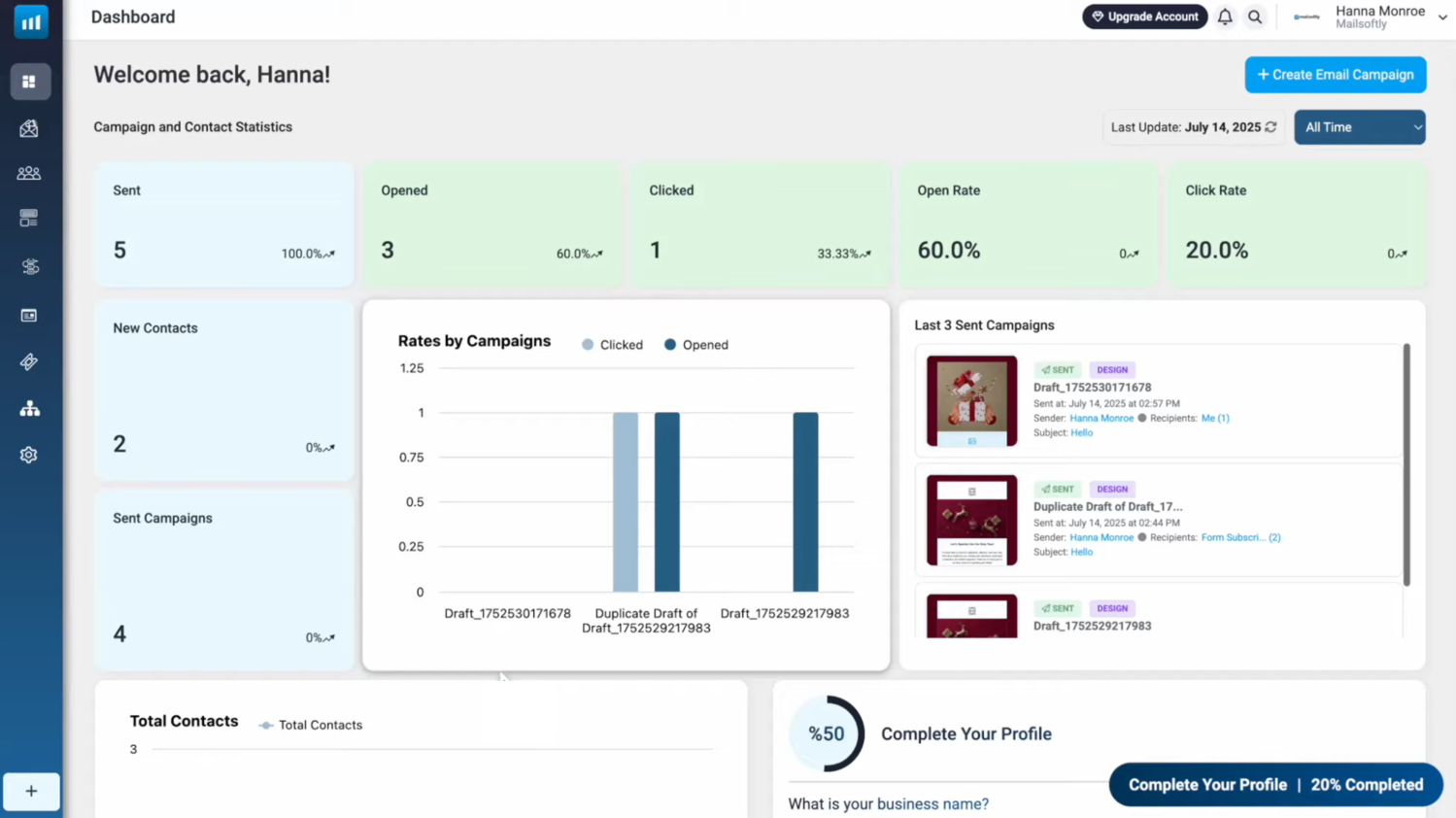 The main dashboard in Mailsoftly; source: YouTube
For its enterprise clients, Mailsoftly offers a shared workspace with role-based access, an admin dashboard, white labeling, a unified SSO login experience, a 256-bit SSL connection, form encryption, local data residency, and PCI certification.
Among the platform’s features are:
- drag-and-drop email builder with 1,000+ responsive templates;
- AI-powered on-brand email creation;
- campaign scheduling and predictive sending algorithms;
- smart segmentation and personalization tools;
- goal-based automation flows;
- built-in contact management and CRM-like capabilities;
- A/B testing for email content and send times;
- customizable sign-up forms;
- personalized SMS campaigns;
- landing page builder;
- audience analytics with engagement heatmaps and campaign tracking;
- SMTP and API support for transactional emails;
- integration with CRMs and eCommerce platforms;
- detailed real-time reporting and conversion tracking.
Pricing. There’s an option to book a demo. The free plan comes with up to 500 contacts and up to 2,000 monthly email sends. Paid plans start at $49 a month, billed monthly. Paying yearly saves you up to 20%.
⚖️ Verdict. Compared to GetResponse, Mailsoftly offers a leaner, more approachable experience at a lower price point. It may lack GetResponse’s built-in webinars and advanced funnel builder, but it compensates with AI-guided tools and an intuitive workflow that help users move faster with less hassle.
Instantly
Instantly is an AI-powered cold email automation platform intended to help businesses scale personalized outreach and lead generation efficiently. Unlike traditional email marketing tools, Instantly focuses on sending high-volume, deliverability-optimized cold campaigns that feel personal and human. It’s especially popular among agencies, B2B marketers, and startups looking to automate prospecting without compromising response rates.
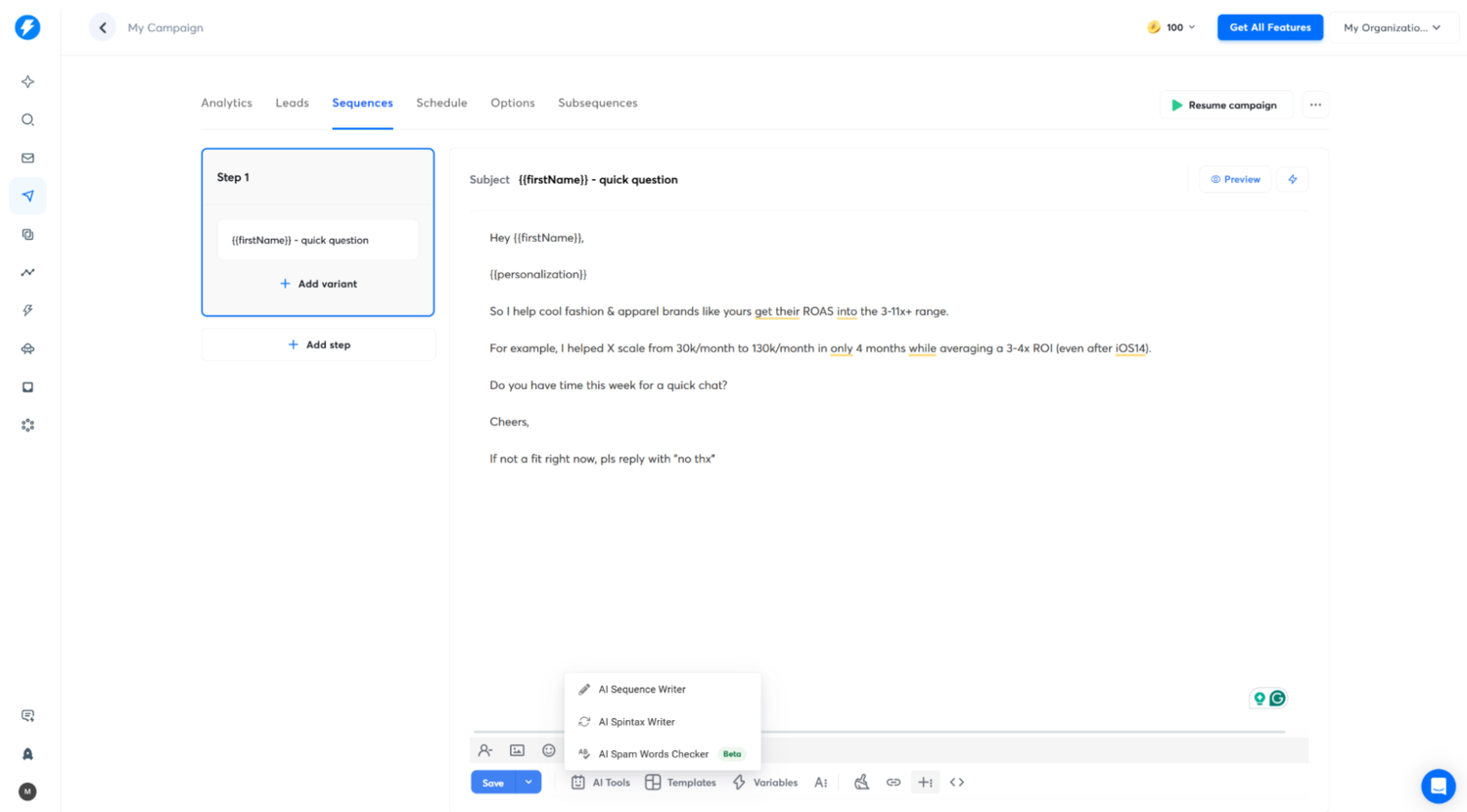 Preparing a template-based cold outreach campaign with Instantly
This alternative to GetResponse empowers its users by automating the most time-consuming parts of outreach — writing, sending, and tracking emails, while protecting deliverability through advanced AI and reputation management systems. Its clean interface and ready-to-use campaign templates let even new users start generating leads within hours, not days.
Another unique feature of the platform is Instantly Pixel, whose main purpose is to identify B2B website visitors, filter out ideal clients, and push them into an outreach campaign. This takes care of another daunting task — turning anonymous traffic into qualified leads.
Here are the key features of the platform:
- AI-driven cold email personalization, enrichment, and sequence creation;
- smart sending and AI deliverability optimization (auto warm-up, inbox rotation);
- sales flow designer;
- AI custom reply labels for automatically categorizing responses;
- AI copilot for outsourcing outreach and sales tasks;
- Instantly CRM with call and SMS support;
- unlimited email accounts and campaign scaling;
- built-in lead database and contact enrichment;
- A/B testing and performance analytics;
- email verification and spam-score monitoring;
- sales hub with 50+ docs, 600+ outreach templates, set-up guides, and instructions;
- private Facebook community;
- integration with the B2B Lead Finder, CRMs, and outreach tools via API and Zapier;
- team collaboration and account management tools.
Pricing. Instantly offers a 14-day free trial. Paid plans start at around $37 per month for basic cold outreach and are based on sending volume, team size, and advanced deliverability tools. The SuperSearch and CRM packages are billed separately.
⚖️ Verdict. While GetResponse excels at inbound marketing automation, Instantly is built for outbound outreach, focusing on cold leads and B2B prospecting. In short, GetResponse nurtures relationships you’ve already built, while Instantly.ai helps you initiate new ones at scale.
Join 3M+ businesses growing with SendPulse
From solo creators to global brands, millions trust SendPulse to run chatbots, email campaigns, automations, and more — all in one place. Get started for free now!
Get started for free
Comparing GetResponse competitors side by side
Wondering which GetResponse alternative is the best? This table will help you pinpoint the perfect option for your needs, estimated sending volume, and budget.
| Tool |
Free plan |
Pricing |
Unique features |
Best for |
| SendPulse |
✅
15k emails
500 contacts |
$ |
Built-in CRM, AI email-writing assistant, AI chatbots, 360 automation |
Small and medium-sized businesses, creators, HR managers |
| Mailchimp |
✅
1k emails
500 contacts |
$$ |
AI growth assistant, seamless integrations |
Businesses with design-focused communication |
| ActiveCampaign |
❌
Only free trial |
$$$ |
Autonomous AI ecosystem with prompt-based navigation and deep intelligence |
Medium-sized businesses and enterprises |
| AWeber |
❌
Only free trial |
$ |
Landing pages, an AI newsletter assistant, unlimited automations and seats on paid plans |
Small businesses and individual creators |
| EmailOctopus |
✅
10k emails
2,5k contacts |
$ |
WordPress plugins and integrations |
Small businesses and non-profits |
| Kit (ex ConvertKit) |
✅
10k contacts |
$$ |
Creator-centered eCommerce, design, and discovery tools |
Bloggers, educators, podcasters, coaches |
| Constant Contact |
❌
Only free trial |
$ |
Event marketing and social media tools |
Franchises and agencies |
| LTV.ai |
❌
Only demo |
$$$ |
Chat-based, AI-powered campaign creation, personalization, and execution |
eCommerce brands prioritizing high CLV |
| Moosend |
❌
Only free trial |
$ |
AI assistant for content and campaign creation |
eCommerce businesses of all sizes |
| MailerLite |
✅
12k emails
500 contacts |
$ |
Creator toolkit for monetizing digital products |
Creators, small and medium-sized businesses |
| EngageBay |
✅
1k emails
250 contacts |
$ |
Helpdesk and CRM capabilities |
Marketing, sales, and support teams |
| Mailsoftly |
✅
2k emails
500 contacts |
$$$ |
Scalable enterprise-grade capabilities, including data security |
Agencies, eCommerce, retail, NGOs, enterprises |
| Instantly |
❌
Only free trial |
$$$ |
Lead discovery and AI-powered cold outreach |
Agencies, B2B marketers, startups |
Our comprehensive list offers something for everyone, from agencies and influencers to brick-and-mortar small businesses and even SaaS enterprises. The best part is, some of these GetResponse alternatives are free to use from the get-go — any user can explore their functionality first without risking unexpected charges.
With SendPulse, you don’t need to compromise on necessary features or channels due to budget concerns or lack of experience. Our platform offers scalable, small-business-friendly pricing and an intuitive set of tools for establishing, nurturing, and automating relationships with your audience, be it customers, students, employees, or community members.
There’s a feature and support channel for everyone, whether you rely on email, chatbots, SMS, or push notifications. Our comprehensive help center, video guides, and support agents are there to ensure your success from day one. Create your free account today and give it a go!